
Murf AI
AI voice generator with 200+ ultra-realistic voices across 35+ languages. Create professional voiceovers, dub videos in 44 languages, and build voice apps with the fastest TTS API on the market—all from your browser.
Try Murf AI →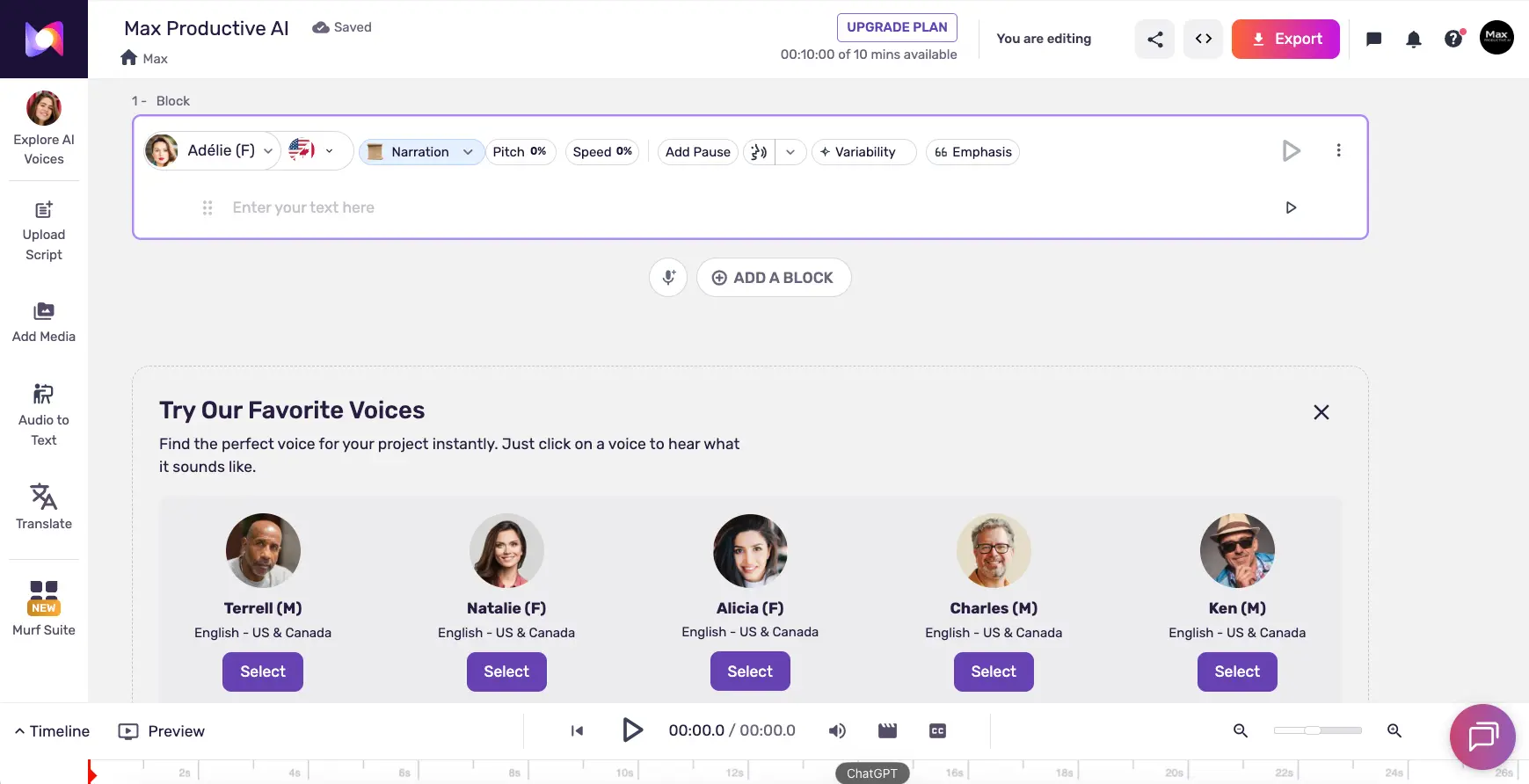
The All-in-One Voice Studio
for Teams & Enterprises
Murf AI goes well beyond basic text-to-speech. With its built-in video editor, AI dubbing in 44 languages, and the Falcon API clocking 55ms latency, it's a genuinely comprehensive voice creation platform. The 200+ voices deliver professional, consistent quality—and the Canva, PowerPoint, and Google Slides integrations make it uniquely suited for marketing teams, e-learning professionals, and enterprises that need compliant voice solutions without leaving their existing workflows.
✓ What We Love
- 200+ natural voices with 99.38% pronunciation accuracy
- Built-in video editor—no external software needed
- Falcon API: 55ms latency at $0.01/min
- Best-in-class enterprise security certifications
! Could Be Better
- Voice cloning only on Enterprise plan
- Free plan: 10 min lifetime, no downloads
- Non-English voices can be inconsistent
What Is Murf AI?
A comprehensive overview of the platform, its products, and who it's built for.
Murf AI is a cloud-based artificial intelligence platform that converts written text into ultra-realistic, human-sounding speech. Founded in 2020 by Ankur Edkie, Sneha Roy, and Divyanshu Pandey—three IIT Kharagpur graduates—and headquartered in Salt Lake City, Utah, Murf has grown to serve over 10 million creators and developers worldwide. The company has raised $11.5M in total funding, including a $10M Series A led by Matrix Partners India.
What makes Murf AI different from a simple text-to-speech tool is its breadth. The platform operates as a complete audio content creation suite spanning three core products: Murf Studio (a browser-based voiceover editor with a drag-and-drop timeline), Murf Dub (AI-powered video dubbing in 44 languages), and the Murf API (powered by the Falcon engine for real-time voice applications). Whether you're a marketer recording a product demo, an L&D team building multilingual training courses, or a developer building conversational AI agents, Murf has a product designed for your workflow.
The AI is trained on professionally recorded voice actor data—and Murf emphasizes ethical voice sourcing, meaning every voice in its library was created with explicit consent, and actors earn royalties each time their voices are used. This is a meaningful differentiator in a market where the ethics of AI voice generation have come under increasing scrutiny. The latest Gen 2 speech model claims 99.38% pronunciation accuracy, and independent reviewers consistently praise the natural, professional quality of Murf's premium voices.
As of February 2026, Murf holds an impressive array of enterprise certifications—SOC 2 Type II, ISO 27001, ISO 42001 (AI management), HIPAA, and GDPR—making it one of the most compliance-ready voice platforms available. For organizations in regulated industries like healthcare, finance, or government, this security portfolio can be a decisive factor.
Who Is Murf AI Best For?
Murf AI is ideal for marketing teams and agencies creating consistent brand voice content at scale, e-learning professionals building multilingual training materials, YouTube creators and podcasters needing reliable voiceovers, enterprise teams requiring compliance certifications and collaboration features, and developers building voice agents through the Falcon API. Solo creators on tight budgets may find better entry-level value with alternatives like ElevenLabs ($5/mo).
A notable 2025 market development strengthened Murf's position: Play.ht was acquired by Meta and shut down by December 2025, leaving thousands of users seeking alternatives. Murf responded by offering displaced Play.ht users a free 6-month subscription with dedicated migration support—a smart move that likely expanded its user base significantly heading into 2026.
See Murf AI in Action
Real screenshots from the platform showing the voice studio, dubbing interface, and voice library.
Studio Editor Workspace
The main text-to-speech editor with voice controls and timeline
The Murf Studio editor presents a clean workspace where you type or paste text into blocks, select a voice, and fine-tune parameters. The top bar shows voice controls including Pitch (0%), Speed (0%), Add Pause, Variability, and Emphasis options. The bottom section recommends popular voices—Terrell, Natalie, Alicia, Charles, Ken—each available for instant preview. The left sidebar provides quick access to Explore AI Voices, Upload Script, Add Media, Audio to Text, and Translate features.
Voice Library (Gen 2 Voices)
Browse and filter 200+ voices by use case, gender, age, and style
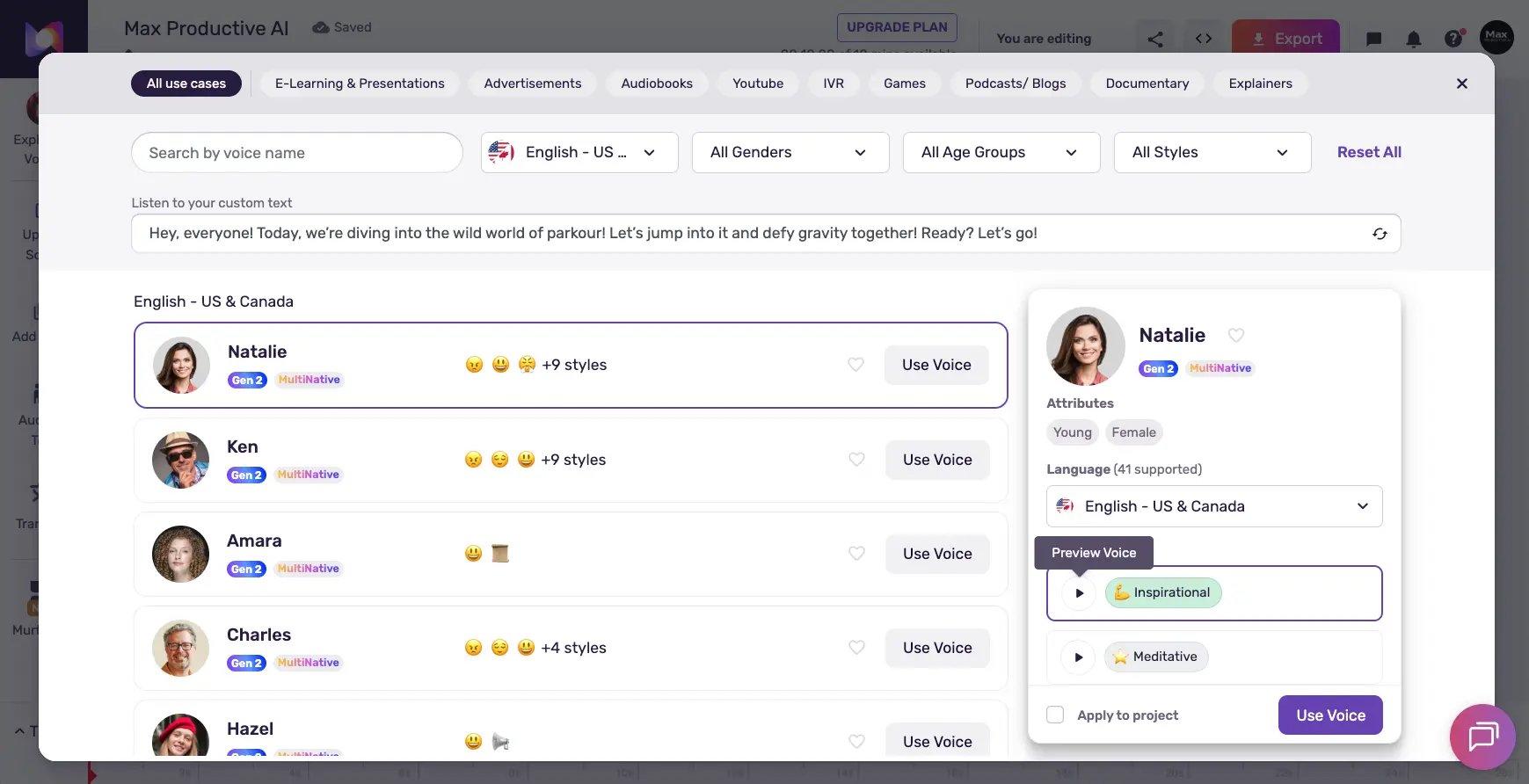
The voice library is where Murf AI's depth becomes apparent. Voices are organized with powerful filters—by language, gender, age group, and style. Each voice shows a Gen 2 badge indicating the latest speech model, and "MultiNative" labeling for voices that can seamlessly switch between languages. Clicking a voice opens a detail panel showing attributes (Young, Female), supported languages (41 for Natalie), and available styles (Inspirational, Meditative, etc.) with instant audio preview. Use case tabs across the top let you jump directly to voices optimized for E-Learning, Advertisements, Audiobooks, YouTube, IVR, Games, Podcasts, Documentary, and Explainers.
AI Dubbing Interface (Murf Dub)
Side-by-side original and translated audio with speaker controls
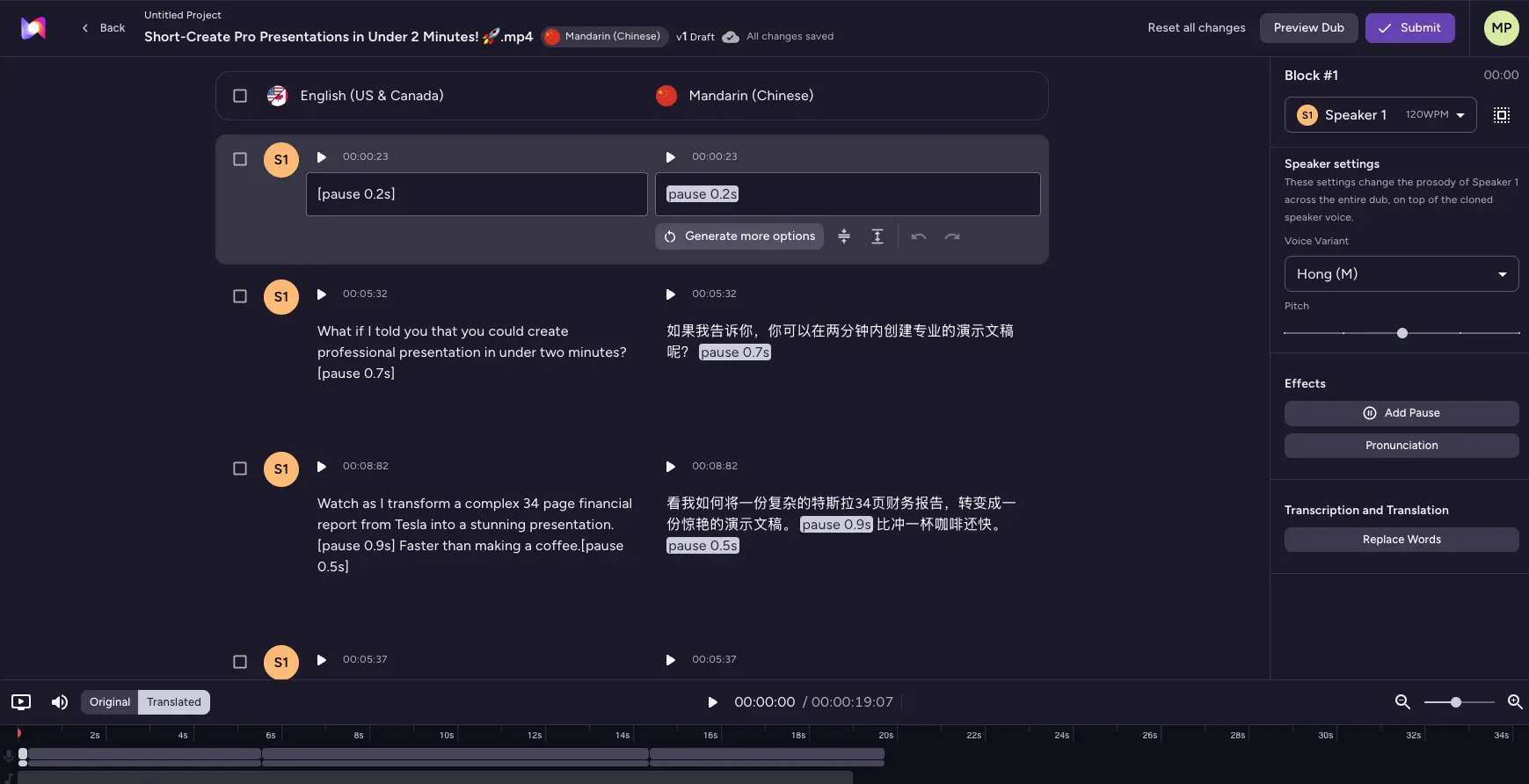
The Murf Dub interface is designed for video localization workflows. This screenshot shows an English-to-Mandarin Chinese dubbing project with the original transcript on the left and the translated version on the right—each with its own playback controls. The right panel shows Speaker Settings where you can choose voice variants (Hong M), adjust pitch, and add effects like pauses and pronunciation corrections. The timeline at the bottom provides precise audio synchronization. This is particularly powerful for teams localizing training videos, product demos, or marketing content across markets.
Templates Dashboard
Pre-built project templates organized by content type
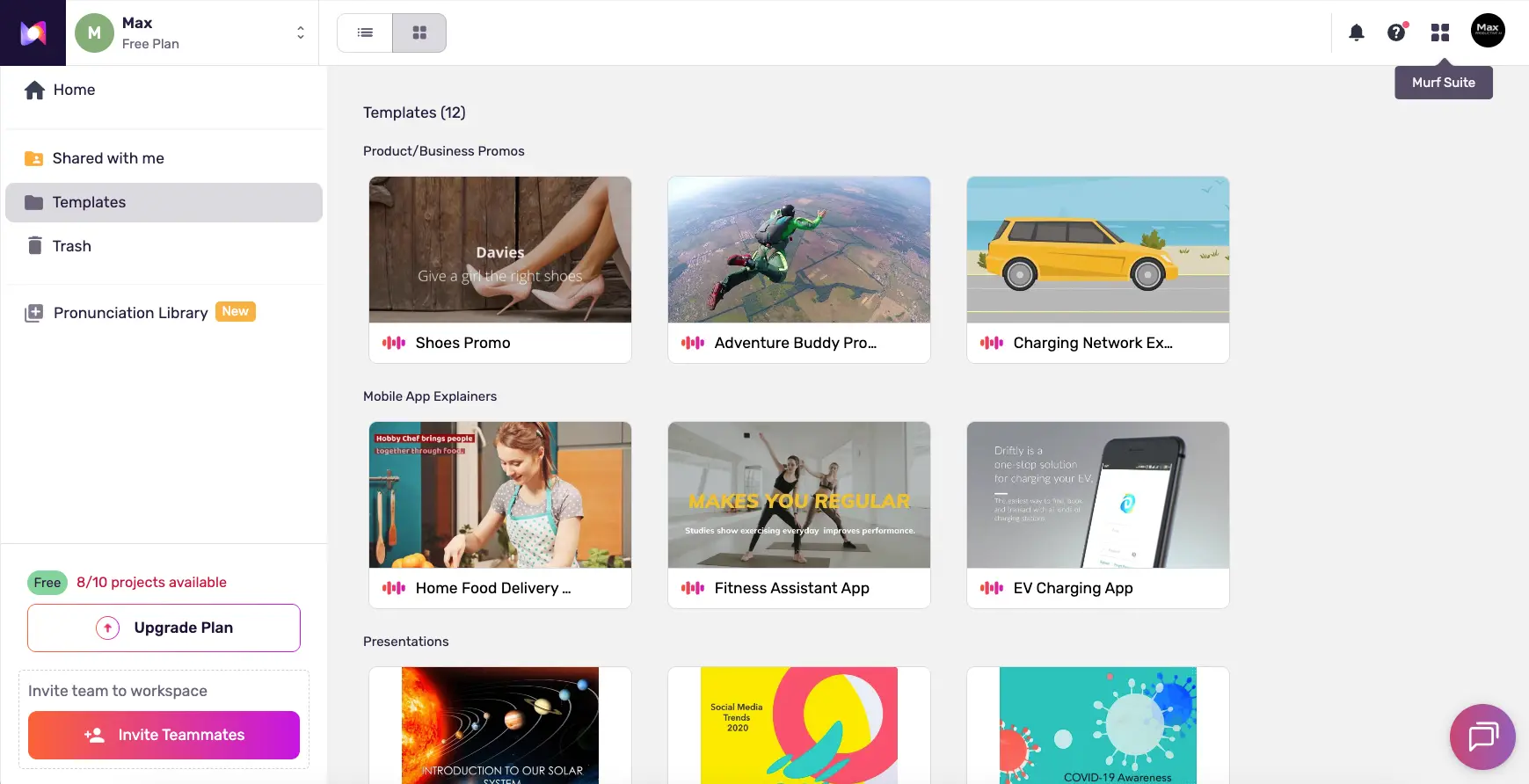
Rather than starting from a blank slate, the Templates dashboard provides ready-made projects across categories: Product/Business Promos, Mobile App Explainers, and Presentations. Each template comes with pre-structured scripts, voice selections, and timing—giving new users a fast on-ramp to producing polished voiceovers. The left sidebar also shows the Pronunciation Library (marked as New), which lets teams define custom pronunciation rules for brand names, technical terms, or industry jargon that the AI should handle consistently across all projects.
Ready to create professional voiceovers in minutes?
Try Murf AI Text-to-Speech →Free plan available • 200+ AI voices • No credit card requiredHow Murf AI Works
From text to broadcast-ready audio in four straightforward steps.
Choose Your Voice
Browse Murf's library of 200+ AI voices using filters for language, gender, age group, accent, and use case (narration, conversational, promo, documentary, and more). Each voice includes multiple speaking styles—such as inspirational, calm, cheerful, or sad—so you can match the exact tone your project needs. The Gen 2 MultiNative voices can even switch between languages mid-sentence for natural code-mixing. Preview any voice instantly before committing.
Enter Your Script
Type or paste your text into the Murf Studio editor. You can also upload an existing script file or use the Audio-to-Text feature to transcribe existing recordings. The editor organizes content into text blocks on a drag-and-drop timeline, making it easy to structure longer projects like training modules, audiobooks, or multi-scene videos. Add background music from the built-in library or upload your own tracks.
Customize and Fine-Tune
This is where Murf AI shines beyond basic TTS tools. Adjust pitch, speed, emphasis, and variability for each text block independently. The unique "Say It My Way" feature lets you record your own rendition of any line—directing the AI to match your exact tone and inflections. Add pauses, customize pronunciation for brand names or technical terms using the Pronunciation Library, and use emphasis markers to stress specific words. For video projects, sync audio with your visuals directly in the built-in timeline editor.
Export or Publish
Download your finished audio in MP3, WAV, or FLAC format at quality levels up to 48 kHz/16-bit. Export as a single merged file or as individual segments in a ZIP folder. For presentation workflows, use the native Canva, PowerPoint, or Google Slides integrations to embed voiceovers directly. For video dubbing, Murf Dub handles the full localization pipeline—translating, generating voice, and syncing lips—all in one place. Developers can access everything programmatically through the Falcon API.
Ethical Voice AI
Every voice in Murf's library was created with explicit permission from professional voice actors who earn royalties each time their voice is used. This ethical sourcing model is a meaningful differentiator—especially for enterprises and brands concerned about the legal and reputational risks of AI-generated content. Submitting unauthorized voice recordings for cloning is prohibited under Murf's Terms of Service.
Murf Falcon API — Built for Speed
Launched in November 2025, the Falcon API delivers 55ms model latency and sub-130ms time-to-first-audio—making it the fastest production TTS API available. At $0.01/minute with 11-region data residency (including US, EU, India, UAE, Japan, and Australia), it's designed for real-time voice agents, IVR systems, and conversational AI applications that demand low-latency, compliant speech synthesis at scale.
Key Murf AI Features
A comprehensive voice platform spanning studio, dubbing, API, and integrations.
200+ AI Voices (Gen 2)
Ultra-realistic voices across 35+ languages with 99.38% pronunciation accuracy. Filter by gender, age, accent, and use case. Multiple speaking styles per voice including narration, conversational, promo, inspirational, calm, and cheerful.
Built-in Video Editor
Drag-and-drop timeline editor to sync voiceovers with video, images, and background music. Add media, adjust timing, and produce complete video content without leaving the browser—no need for separate editing software.
AI Dubbing (Murf Dub)
Localize videos into 44 languages with instant voice cloning, lip synchronization, and native-speaker linguistic review. 30x faster than traditional dubbing methods. Supports MP4, MOV, AVI, MKV, and audio formats.
Falcon API (55ms Latency)
The fastest production TTS API on the market. 55ms model latency, sub-130ms time-to-first-audio, WebSocket streaming, 10,000+ concurrent sessions, and 11-region data residency. Priced at $0.01/minute—approximately 30% cheaper than competitors.
Voice Cloning
Create a digital replica of any voice from just 2 minutes of clean audio. Cloned voices generate speech in 20+ languages while preserving the original speaker's identity and tone. Requires written consent from the voice owner. Enterprise plan only.
Canva, PowerPoint & Google Slides
Add AI voiceovers directly inside Canva designs (all paid plans), generate voiceovers within Google Slides (Business+), and use the PowerPoint plugin for presentations up to 100+ slides. No audio export/import needed—voices are embedded directly.
Voice Changer
Upload an existing audio recording and transform it into a professional voiceover using any voice in the library—while preserving the original emotion and pacing. Useful for replacing low-quality recordings or changing voice talent without re-recording.
Team Collaboration
Role-based permissions, approval workflows, version tracking, and shared voice libraries. Manage multiple editors on the Business plan with advanced collaboration features on Enterprise. Designed for marketing teams and agencies managing voice content at scale.
Beyond these core capabilities, Murf offers a Pronunciation Library for defining custom rules for brand names and technical terms, "Say It My Way" voice direction where you record your own reading to guide the AI, MultiNative code-mixing for seamless language switching mid-sentence, and WordPress HTML embed integration for adding audio playback to blog posts. The platform ships weekly product updates—in September 2025 alone, 13 new languages were added in a single release.
Experience all of Murf AI's features:
Try Murf AI Free →Free plan available • No credit card requiredMurf AI Pricing Plans
Tiered pricing based on Voice Generation Time (VGT)—the actual duration of audio output.
Free
Creator
Business
Enterprise
Special discounts: 20% off for students, educators, and non-profit organizations—stackable with annual billing for up to ~46% total savings.
Important: When your VGT allocation runs out, generation stops—there are no automatic overage charges.
Is Murf AI Worth the Investment?
A professional voice actor typically charges $200-500+ for a 5-minute voiceover. Murf's Creator plan at $19/month gives you 24 hours of generation per year—enough for hundreds of voiceovers. For teams producing regular content, the cost savings are substantial. The Falcon API at $0.01/minute is especially compelling for developers building voice applications at scale.
Compared to alternatives: ElevenLabs starts at just $5/month (better entry-level value), WellSaid Labs begins at $50/month per user, and LOVO AI starts at $24/month. Murf's pricing is competitive for its feature set—particularly the built-in video editor and integrations that competitors lack—but the jump from Creator ($19) to Business ($66) can feel steep for mid-volume users who need collaboration features but don't have team budgets.
Detailed Pros & Cons
An honest, balanced assessment based on hands-on testing and verified user feedback.
✓ Pros
Murf's Gen 2 voices deliver 99.38% pronunciation accuracy. Premium voices sound natural and professional—well-suited for explainer videos, training content, and marketing materials. The variety of speaking styles (narration, conversational, promo, inspirational) gives real creative flexibility.
Unlike competitors that focus on TTS alone, Murf combines voice generation, video editing, dubbing, translation, voice changing, and collaboration in one platform. This eliminates the need to juggle multiple tools for audio content production.
Native plugins for Canva, PowerPoint, Google Slides, Adobe Captivate, and WordPress. No other TTS platform matches this integration breadth. For teams already using these tools, Murf fits directly into existing workflows without disruption.
55ms model latency and $0.01/minute pricing make Falcon the fastest and most cost-effective TTS API available. With 11-region data residency and 10,000+ concurrent session support, it's purpose-built for production-scale voice applications.
SOC 2 Type II, ISO 27001, ISO 42001 (AI management), HIPAA, and GDPR certifications. This is the most comprehensive compliance package among dedicated TTS platforms—critical for organizations in healthcare, finance, or government.
All voices are created with consent from professional voice actors who earn royalties. In a market facing increasing ethical scrutiny, this transparent approach reduces legal and reputational risk for businesses using AI-generated voice content.
✗ Cons
Voice cloning—a key feature for brand voice consistency—is only available on the Enterprise tier at custom pricing. Competitors like ElevenLabs offer voice cloning from $5/month. This is the most significant competitive gap for individual creators and smaller teams.
The free tier provides just 10 minutes of generation (lifetime, not monthly) with no download capability. While useful for a quick preview, it's not sufficient for a thorough evaluation. Competing platforms like ElevenLabs offer more generous free tiers with monthly refresh.
Voice quality is strongest for English and major European languages. Some users report that tonal languages like Mandarin and rhythmically complex languages like Arabic don't perform as naturally. Quality has been improving with Gen 2, but there's still a gap compared to English output.
Not all 200+ voices are created equal. Premium Gen 2 voices sound excellent, but some older voices in the library can sound more synthetic on longer scripts. It's worth previewing several voices before committing to a project.
The jump from Creator ($19/mo) to Business ($66/mo) is significant. Users who need collaboration features or the PowerPoint plugin but have moderate volume needs may find themselves pushed to a more expensive tier than their usage warrants.
Payments are generally non-refundable. The only exception is cancellation within 24 hours of purchase with less than 10 minutes of usage. Combined with the limited free plan, this means you have a narrow window to evaluate before committing financially.
Murf AI vs Alternatives
How Murf AI compares to the leading AI voice generators in 2026.
| Feature | Murf AI | ElevenLabs | WellSaid Labs | Hume AI |
|---|---|---|---|---|
| Starting Price | $19/mo | $5/mo | $50/mo/user | Free tier |
| Free Plan | 10 min (no downloads) | 10K credits/mo | 7-day trial | ✓ Free tier |
| AI Voices | 200+ | 1,000+ | ~50 | Empathic voices |
| Languages | 35+ | 74 | ~15 | Multi-language |
| Voice Cloning | Enterprise only | From $5/mo | Enterprise only | N/A |
| Built-in Video Editor | ✓ Full timeline | ✗ | ✗ | ✗ |
| API Latency | 55ms (Falcon) | ~80ms | N/A | Low latency |
| Integrations | Canva, PPT, Slides, WP | API-focused | Adobe Express/Premiere | API-focused |
| Security Certs | SOC 2 II, ISO, HIPAA | SOC 2 II, GDPR | SOC 2 | SOC 2 |
| Best For | Teams, enterprise, L&D | Creators, audiobooks | English corporate | Empathic voice AI |
Which Voice Generator Is Right For You?
Murf AI
Best for TeamsBest for: Marketing teams, e-learning professionals, and enterprises needing an all-in-one voice studio with built-in video editing, team collaboration, and compliance certifications. The Canva/PowerPoint/Google Slides integrations make it uniquely suited for non-technical content teams. Also the top choice for developers needing the lowest-latency TTS API (Falcon at 55ms/$0.01 per minute). Less ideal for solo creators on tight budgets or users who need voice cloning without enterprise pricing.

ElevenLabs
Best Voice QualityBest for: Content creators, podcasters, and audiobook narrators who prioritize maximum voice realism and emotional expressiveness. ElevenLabs leads the market in naturalness—with inline audio tags for whispers, sighs, and emotional inflections that no competitor matches. Voice cloning from $5/month and 74 languages make it the best overall value for individual creators. Choose ElevenLabs if voice quality is your top priority.
WellSaid Labs
Enterprise EnglishBest for: Enterprise teams focused on English-language corporate training and L&D content that demands the highest audio fidelity. WellSaid produces up to 96 kHz ultra-high-fidelity audio with Oxford Dictionary pronunciation integration. Adobe Express and Premiere Pro integrations serve video production teams. At $50/month per user, it's primarily justified for larger organizations with dedicated content budgets and English-first requirements.

Hume AI
Empathic VoiceBest for: Developers and researchers building emotionally intelligent voice applications. Hume AI's Empathic Voice Interface (EVI) detects and responds to emotional cues in real-time—a fundamentally different approach from traditional TTS. Best suited for therapeutic applications, customer service AI, and conversational agents that need emotional awareness. Not designed for traditional voiceover production.
Speaktor
Budget-FriendlyBest for: Users looking for a straightforward, affordable text-to-speech solution without the complexity of a full production studio. Speaktor focuses on simplicity and accessibility—ideal for students, researchers, and accessibility use cases. A good option if you need basic TTS without advanced features like video editing, dubbing, or API access.
Frequently Asked Questions
Should You Try Murf AI?
Murf AI has evolved from a straightforward text-to-speech tool into a genuinely comprehensive voice creation platform. The combination of a polished studio editor, AI dubbing in 44 languages, the market-leading Falcon API, and native integrations with Canva, PowerPoint, and Google Slides creates an ecosystem that no other TTS platform fully replicates. For teams that need voice content as part of a broader content production workflow—especially in enterprise environments with compliance requirements—Murf AI delivers real, differentiated value in 2026.
The limitations are worth acknowledging: voice cloning being locked to the Enterprise tier is a competitive disadvantage, the free plan is too restrictive for proper evaluation, and non-English voice quality still trails English output. For solo creators who prioritize raw voice quality and affordable voice cloning, ElevenLabs remains the stronger starting point. But for marketing teams, L&D professionals, agencies, and developers building voice applications, Murf's breadth of features and industry-leading security make it a compelling choice.
Our Recommendation
Start with the free plan to preview voices and test the editor interface. If the voice quality matches your needs, upgrade to Creator ($19/month annual) for full commercial rights and downloads. Teams should evaluate the Business plan ($66/month) for collaboration features, PowerPoint integration, and the Voice Changer. Developers should explore the Falcon API—at 55ms latency and $0.01/minute, it's the performance-to-price leader for real-time voice applications.
Ready to Create Professional AI Voiceovers?
Join 10M+ creators using Murf AI to generate ultra-realistic voices, dub videos in 44 languages, and build voice applications