
Superwhisper
AI voice-to-text for Mac, Windows, and iOS that transcribes your speech—locally or in the cloud—then reshapes it with an LLM. The custom modes system turns one spoken sentence into a polished email, a quick Slack message, or a clean code comment, depending on where your cursor is.
Try Superwhisper →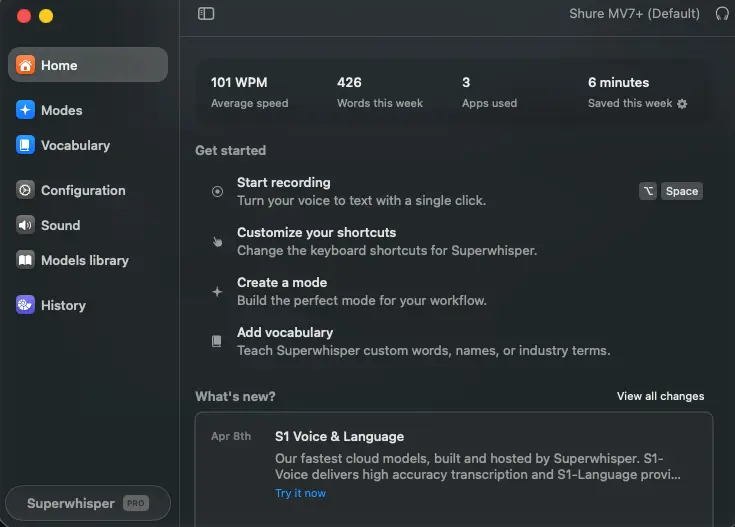
The Power User's Dictation Tool
Built for Privacy & Control
Most dictation apps just turn speech into text. Superwhisper goes a step further—it transcribes, then runs the result through an AI layer that formats it for whatever you're doing. The thing that sets it apart is its custom modes system, which lets you build per-app presets with their own models and prompts. Add full offline processing and real HIPAA compliance, and you get a tool that earns its keep for Mac-first professionals. It asks for patience up front. In return, it gives you a level of control nothing else in this category comes close to.
✓ What We Love
- Runs 100% offline—audio never leaves your device
- Custom modes with full prompt engineering, unmatched in the category
- SOC 2 Type II and HIPAA compliant—rare for a dictation app
- One license covers Mac, Windows, iPhone, and iPad
! Could Be Better
- Steep learning curve—this isn't an install-and-go tool
- Windows and iOS feel a step behind the Mac app
- No Android version, and only a 15-minute Pro trial
What Is Superwhisper?
Who builds it, what problem it solves, and whether the depth is worth your time.
Superwhisper is an AI voice-to-text app that lives in your Mac or Windows menu bar and activates with a global keyboard shortcut (Option+Space by default). You hold the key, speak, and release—the app records your audio, runs it through a Whisper-based speech model, and then optionally passes the transcript through a large language model that cleans up filler words, fixes punctuation, and adapts the output to whatever app you're in. The finished text drops straight into your cursor, with no copy-paste step. It's built by SuperUltra, Inc. and, as of this writing, sits at version 2.15.0. That makes it one of the more actively developed tools in the space.
What separates it from basic dictation is that two-stage pipeline. A plain transcriber gives you raw words; Superwhisper can hand you a finished email draft, a casual chat message, structured meeting notes, or clean code comments from the same mumbled voice input—depending on which "mode" is active. That's the whole pitch, and it mostly delivers.
Here's the thing—this design philosophy cuts both ways. The flexibility that power users love is the same flexibility that overwhelms newcomers. There are multiple transcription models to choose from, an LLM layer to configure, custom prompts to write, and API keys to manage if you go that route. If you just want to talk into a text box and get words out, this is a lot of machinery. If you want to dictate differently in Gmail than in Slack than in your code editor, automatically, without touching a setting—this is the only tool that really does it.
Who Is Superwhisper Best For?
Mac-first users (especially on Apple Silicon) who care about privacy and want offline-first workflows. It rewards people willing to invest an hour configuring custom modes: writers drafting first passes, developers dictating to AI coding assistants, and professionals in regulated fields (legal, medical, financial) who need HIPAA or SOC 2 compliance with the option to keep audio entirely on-device. If you bounce between emails, meetings, notes, and code all day and want contextual AI formatting for each, this is your tool.
A note on how we approached this: we didn't run a controlled lab test. This review draws on Superwhisper's official documentation and changelog, its published compliance and privacy materials, and a wide read across independent reviews and user community feedback (Product Hunt, Reddit, the App Store, and third-party testers). Where opinions are mixed, and on a tool this deep they often are, we've said so rather than smoothing it over.
On reach: Superwhisper supports 100+ languages with automatic detection and can translate foreign-language speech into English during transcription. The NVIDIA Parakeet local model covers 25 languages offline. For international or multilingual work, that breadth is a real asset: Whisper's multilingual depth is one of the architecture's strongest cards.
See Superwhisper in Action
Real screenshots from the macOS app showing the interface and how the modes system fits together.
Home Dashboard
Your starting point, with usage stats and quick setup paths
The home view keeps things calm: a row of stats up top (average speed in WPM, words this week, time saved), then a short "Get started" checklist for recording, shortcuts, modes, and vocabulary. The left sidebar is your map for the whole app: Home, Modes, Vocabulary, Configuration, Sound, Models library, and History. It's a clean entry point, even if everything interesting lives one click deeper.
Modes List
Built-in and custom modes, each pinned to its own models
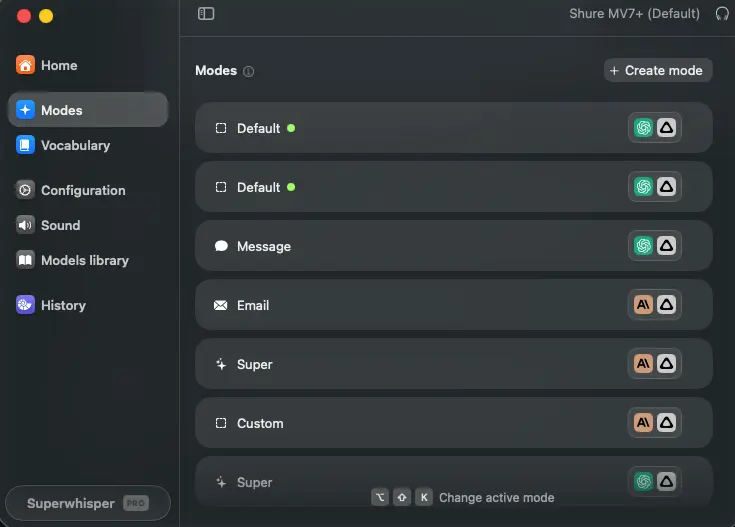
This is the heart of the app. Each mode shows the models it uses via small badges on the right, so you can tell at a glance which modes lean on an AI layer and which are raw transcription. Message, Email, and Super each shape output differently for their context. The "Create mode" button up top is where power users spend their time—and where the tool starts to separate itself from everything else.
Custom Mode Configuration
Where you write the instructions, pick models, and set context
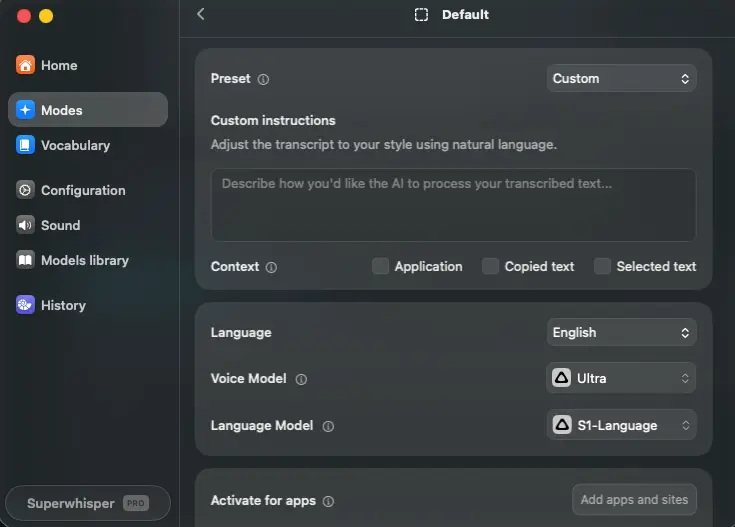
Here's where the real configuration happens. You describe how you want the AI to process your transcript in plain language, toggle which context the mode can read (the active app, copied text, selected text), and choose both your voice model and your language model independently. The separation of voice model (transcription) and language model (formatting) is the mechanic that makes per-mode tuning possible—pick a fast offline voice model paired with a capable LLM, or any combination that fits the job.
Want to build your own modes and see how it fits your workflow?
Try Superwhisper →Free tier with no expiry • Setup takes about an hour to dial inModels Library
Cloud and offline models side by side, with speed/accuracy trade-offs
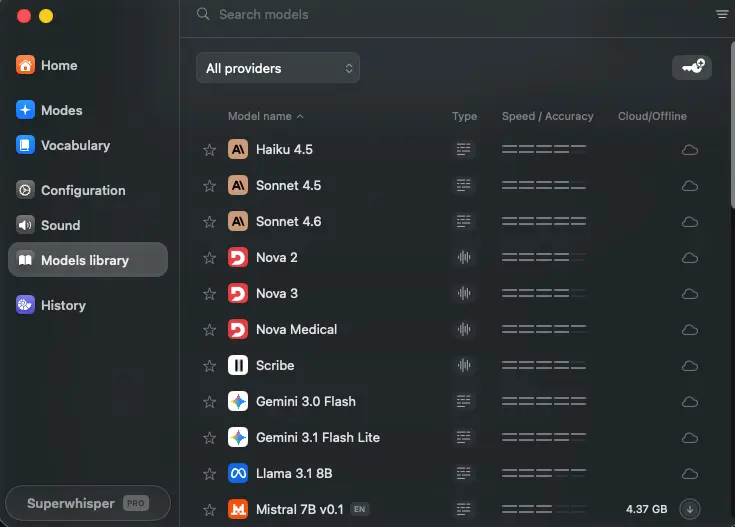
The models library is where the breadth becomes obvious. You'll see LLM options like Claude Haiku and Sonnet, Nova, Gemini, Llama, and Mistral, alongside transcription models—each tagged with a cloud or offline (download) icon and a rough speed-versus-accuracy bar. Offline models you download once and run forever with no internet. It's a lot of choice, which is exactly the point for this audience and exactly the overwhelm for a casual one.
Vocabulary & Replacements
Teach it your jargon and set automatic text swaps
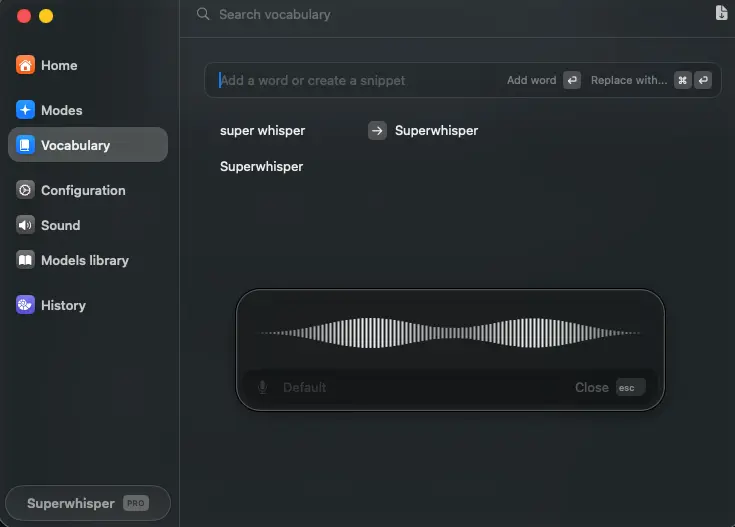
Vocabulary is the unglamorous feature that quietly fixes accuracy. Add proper nouns, product names, or domain terms and Superwhisper stops mangling them. The replacement rules go further—map "super whisper" to "Superwhisper," or any shorthand to its full form, and it expands automatically. As of May 2026 you can bulk-import a vocabulary list via CSV, which matters if you work in a field with a lot of specialized terminology.
How Superwhisper Works
From keyboard shortcut to formatted text in four steps—with one AI layer doing the heavy lifting in the middle.
Press the Shortcut and Speak
Hold the global shortcut (Option+Space by default) anywhere on your system—in any app, in any text field—and start talking. There's no window to open, no app to switch to. A small floating recorder shows a live waveform so you know it's listening. Release the key when you're done. This single-button flow is one of the things even critics consistently praise; it gets out of your way.
Transcription (Local or Cloud)
Your audio goes to the voice model assigned to your active mode. Pick a local Whisper or Parakeet model and the whole thing happens on your device—nothing touches the internet. Pick a cloud model like Deepgram Nova 3 or ElevenLabs Scribe v2 and you trade a little privacy for higher accuracy and speed. This is the choice that defines your privacy posture, and Superwhisper lets you make it per mode rather than globally.
AI Post-Processing (Optional)
If your mode has a language model attached, the raw transcript passes through it. This is where filler words disappear, punctuation gets fixed, and the text takes on the shape you asked for—an email with a greeting and sign-off, a terse Slack message, a structured note. Custom modes let you write the exact prompt that governs this step. Want raw transcription with zero AI meddling? Use Voice to Text mode and skip this stage entirely.
Paste, with Context Awareness
The finished text lands at your cursor. With Super Mode active, the app reads your active application, any selected text, and recent clipboard content to adapt the output—matching the tone of an email thread, continuing a highlighted passage, or pulling in a name it found on screen. Auto-activation rules can switch modes for you, so Gmail triggers Email mode and Slack triggers Message mode without a single manual change.
Privacy You Can Verify
With local models, audio, transcript, and metadata never leave your machine. No server round-trip, no API charges, full function in airplane mode. Even on cloud models, Superwhisper's policy is explicit: no training on your data, no server-side audio retention, no tracking. One honest caveat worth knowing: recordings are saved to your local History by default, even in offline mode, so if you want zero local footprint you'll need to turn that off in settings. It's a documented user complaint, not a hidden one.
It Keeps Getting Better—Literally
Because the AI layer routes through frontier models like GPT-5, Claude Sonnet 4.5, and Gemini 3.0 Flash, your output quality improves automatically as those models improve. Tools locked to a single proprietary model don't get that lift for free. Pair that with a changelog showing 15+ significant updates in the past year, and this is clearly a tool that's being pushed forward, not coasting.
Key Features
What you actually get—and where the depth pays off versus where it adds friction.
Custom Modes System
The feature that defines the product. Build unlimited per-app presets, each with its own transcription model, LLM, custom prompt, and auto-activation rules. Nothing else in the category comes close—competitors offer tone adjustments; Superwhisper offers full prompt engineering. This is the reason power users put up with the setup time.
Full Offline Processing
Local Whisper and NVIDIA Parakeet models run entirely on-device. No internet, no API fees, no data leaving your Mac. It's the cleanest privacy story in the category, and it's the foundation for the HIPAA use case. Best on Apple Silicon; Windows supports local models too, just less smoothly.
Super Mode
Reads your active app, selected text, and recent clipboard to produce context-aware output, matching an email thread's formality, addressing a sender by name, or picking up where a highlighted passage left off. When it works, it feels like magic. It needs the LLM layer and works with any connected cloud model.
File Transcription
Drop in MP3, MP4, WAV, M4A, OGG, or OPUS files and get timestamped transcripts with speaker diarization. Click any timestamp to jump to that moment; re-process a recording with a different mode. It's solid—though if files are your only need, a dedicated tool like MacWhisper is purpose-built for that workflow.
Enterprise Compliance
SOC 2 Type II (confirmed March 2026), HIPAA, GDPR, and PIPEDA, with a published pen-test report. That combination is rare among dictation apps and, paired with the offline option, is what makes Superwhisper viable in healthcare, legal, and finance where cloud dictation is off the table.
Coding Integrations
Official support for Claude Code, OpenCode, and Amp, plus Codex hooks (added May 2026). Developers like Andrej Karpathy and Pieter Levels have publicly mentioned using it for dictating to AI coding assistants. Build a "developer instructions" mode that strips filler and formats as precise commands.
100+ Languages & Translation
Automatic language detection across 100+ languages, with the ability to translate foreign speech into English as you dictate. Parakeet covers 25 languages offline. For multilingual professionals, this breadth (and the auto-translate option) is one of the strongest cards in the deck.
Vocabulary & History
A custom vocabulary (with CSV import) teaches it your jargon, and replacement rules expand shorthand automatically. A searchable History keeps every recording with full-text search, segmented playback, and re-processing. The one gap: no cloud sync, so modes and vocabulary don't carry across your devices yet.
Beyond the headline features, Superwhisper supports realtime streaming transcription (Parakeet Realtime brought this offline in January 2026), meeting recording, and a BYOK option so you can route LLM processing through your own OpenAI or Anthropic key under your own data contract. The Enterprise tier adds SSO, org-level recording retention policies, and centralized configuration. Worth noting: long-time users occasionally grumble that features move or change between updates, and that the app sometimes simplifies in ways that frustrate advanced workflows—the flip side of being actively developed.
All Pro features included at every paid tier—monthly, annual, or lifetime:
Try Superwhisper →Free tier with no expiry • 30-day refund on paid plansPricing Plans
A genuinely useful free tier, simple Pro pricing, and a lifetime option that pays off for daily users.
Free
- ✓ Unlimited dictation, small local models
- ✓ 100+ languages
- ✓ Up to 3 custom modes
- ✓ 15-minute Pro trial included
- ✓ Email support
- ✓ No credit card, no expiry
Pro Annual
- ✓ All cloud & local models
- ✓ Unlimited custom modes
- ✓ File transcription & meeting recording
- ✓ Translation & Super Mode
- ✓ Covers Mac, Windows, iPhone, iPad
- ✓ Saves ~17% vs. monthly
Pro Lifetime
- ✓ Everything in Pro, forever
- ✓ No recurring fees
- ✓ All future updates included
- ✓ Breaks even in ~2.5 years
- ✓ 30-day refund policy
Good to know: One Pro license covers all platforms, and buying from the official site is typically cheaper than the App Store, which adds a platform fee.
Pricing last verified June 2026. Visit Superwhisper for current rates.
Is the Lifetime Deal Worth It?
If you'll use Superwhisper daily for two-plus years, the $249.99 lifetime is the rational choice—it recovers its cost against the monthly plan in roughly 29 months and undercuts three years of a subscription competitor by a wide margin. If you're not sure yet, start free (it doesn't expire), then move to annual once it's earned a place in your day.
For context on where this sits: Wispr Flow runs $15/month or $144/year with no lifetime option, making Superwhisper's annual plan meaningfully cheaper for comparable daily use—and the lifetime deal cheaper still over any multi-year horizon. The flip side is that Wispr Flow's cloud-first polish requires zero configuration, while Superwhisper expects you to invest setup time to unlock its value. Different bets for different users.
Detailed Pros & Cons
An honest breakdown drawn from documentation, compliance materials, and a wide read of user feedback.
✓ Pros
Full on-device transcription on Apple Silicon, no internet required, zero data exposure. For anyone whose work can't touch a cloud server (or who just doesn't want it to), this is the headline reason to choose Superwhisper. The local models are properly capable, not a token offline mode.
Custom modes with full prompt engineering, per-mode model selection, and auto-activation rules let you build tailored AI workflows for any context. Power users have documented 20+ custom modes. If you've ever wished a dictation tool behaved differently in different apps, this is the only one that truly delivers that.
SOC 2 Type II, HIPAA, GDPR, and PIPEDA, plus a published penetration test. Combined with the offline option, Superwhisper is effectively the only tool offering both on-device privacy and enterprise compliance—the exact combination regulated industries need for procurement sign-off.
A single Pro purchase covers Mac, Windows, iPhone, and iPad with no extra charge. For people who move between a desktop and a phone, not paying per device is a small but real win—though the lack of cross-device mode sync slightly undercuts it.
Routing through GPT-5, Claude Sonnet 4.5, Gemini 3.0 Flash, Grok, and Llama 4 means output quality rises as frontier models improve—you benefit without doing anything. A tool tied to one proprietary model can't make that promise.
Set the depth aside and the basics are excellent: a single shortcut, a clean recording overlay, automatic filler-word removal, and a native macOS feel. Independent testers rate the underlying transcription accuracy highly, and the everyday "press, talk, done" loop is fast.
✗ Cons
Multiple models, custom modes, prompt writing, and optional API key management add up to meaningful setup overhead. This is the most common criticism by far, and it's fair. Budget an hour to configure things properly—and know that the 15-minute Pro trial isn't nearly enough to evaluate any of it.
The Mac version is the polished one. Windows (launched February 2025) works and supports offline models but feels a step behind, and Intel Macs handle cloud models better than local ones. The iOS app is functional but rougher around the edges, with occasional keyboard bugs and no way to import from the native Voice Memos app.
Parakeet in particular has been flagged by users for missing medical terms, software names, and heavy non-native accents. A custom vocabulary list helps a lot, but it's manual setup. If technical-vocabulary accuracy is your top priority, that's a known weak spot.
Android users are simply out of luck. And even across supported platforms, custom modes and vocabulary live locally on each device—setting up the same configuration on Mac and iPhone means duplicating it by hand. Cloud sync is planned but hasn't shipped.
Independent testing has scored Superwhisper's developer support as the lowest among comparable tools, and there's no live chat. If you hit a problem, expect to email and wait. For a tool at this price and depth, that's a legitimate gripe.
If you only need to speak short messages and quick notes without AI formatting, this is more tool than you need. Simpler, cheaper options exist for that—and the $249.99 lifetime is hard to justify for casual use when basic local dictation can be had elsewhere for a fraction of the price.
Superwhisper vs Alternatives
How it stacks up against the main contenders in AI dictation—and who each one is really for.
| Feature | Reviewed Superwhisper | Wispr Flow | Voicetype | Dragon Professional |
|---|---|---|---|---|
| Platforms | Mac, Windows, iOS | Mac, Win, iOS, Android | Mac, Windows | Windows (Mac discontinued) |
| Offline / On-device | ✓ Full | ✗ Cloud-only | ✓ Local option | ✓ Local |
| Custom Modes / Prompts | ✓ Best-in-class | Limited (tone) | Basic | Voice commands |
| Starting Price | Free / $8.49/mo | $15/mo | Subscription | $699 one-time |
| Lifetime Option | ✓ $249.99 | ✗ None | ✗ None | ✓ (perpetual) |
| SOC 2 / HIPAA | ✓ Both | ✓ HIPAA all plans | Not specified | Enterprise focus |
| Best For | Privacy + power users | Polish + cross-platform | Simple fast dictation | Legacy enterprise dictation |
Which Tool Is Right For You?
Superwhisper
ReviewedBest for: Mac-first power users who want maximum control and privacy. The sweet spot is if you value an offline option, need custom AI workflows per app, require HIPAA or SOC 2 compliance, or want a lifetime license instead of a subscription. The deeper your dictation needs (and the more sensitive your data), the more this tool justifies its learning curve.
Wispr Flow
Most PolishedBest for: Users who want a plug-and-play premium experience across every platform, including Android. Choose it if you prioritize ease of use over customization, need a HIPAA BAA on an individual plan (not just enterprise), or want the smoothest cross-device experience. The trade-offs: it's cloud-only with no offline mode, has lighter customization, and is the most expensive mainstream option at $144/year with no lifetime deal.
Voicetype
Fast & SimpleBest for: People who want quick, accurate dictation without the configuration overhead Superwhisper asks for. It's a lighter-weight option focused on speed and getting words on the page fast across Mac and Windows. Choose it if Superwhisper's modes, models, and prompts feel like more than you need and you'd rather just talk and type.

Dragon Professional
Enterprise LegacyBest for: Windows-based professionals in legal, medical, or enterprise settings who rely on deep voice-command control and established workflow integrations. Dragon is the long-standing incumbent in professional dictation, with mature accuracy and command features. The trade-offs are steep: a high one-time price (around $699), a Windows-centric focus since the Mac version was discontinued, and none of the modern LLM-formatting or offline-AI flexibility Superwhisper brings to the table.
Frequently Asked Questions
Should You Use Superwhisper?
Superwhisper is the most capable and customizable local-first AI dictation tool available in mid-2026, and it's not especially close. The custom modes system has no real equivalent, the offline processing is the real thing rather than a checkbox, and the SOC 2 plus HIPAA compliance opens doors that most dictation apps can't. For Mac-first professionals who handle sensitive data or dictate across many different contexts all day, it earns its 4.6.
The caveats are equally real, and worth taking seriously. The learning curve will frustrate anyone expecting to install and go. Windows and iOS feel like second-class citizens next to the Mac app, there's no Android version at all, and the 15-minute trial does the tool a disservice by not giving you enough room to see what it can do. This is a power tool that asks for an investment before it rewards you.
Our Recommendation
Start with the free tier—it doesn't expire, so there's no clock pressuring you. Spend real time building two or three custom modes for the apps you live in (email, chat, and notes is a good starting trio), and lean on a local model if privacy matters. If the workflow clicks within a week or two, move to the annual plan, or go straight to lifetime if you already know you're in for the long haul. If you'd rather not configure anything, that's a legitimate signal that a more plug-and-play tool suits you better.