
n8n Launches AI Workflow Builder: Create Automations with Natural Language
Updated: October 14, 2025

Published October 14, 2025. This article may contain affiliate links. When you purchase through these links, we may earn a commission at no extra cost to you. This comprehensive guide covers n8n's official AI Workflow Builder beta launch, including natural language automation capabilities, pricing, availability, competitive analysis, and complete feature breakdown.
n8n has entered the conversational automation arena. On October 13, 2025, the popular workflow automation platform launched its AI Workflow Builder (Beta), introducing natural language workflow creation to its robust automation infrastructure. This feature allows users to describe automations in plain English rather than manually connecting nodes—a capability that platforms like Lindy AI have already been offering throughout 2025.
The launch represents n8n's evolution toward more accessible automation creation while maintaining the technical depth that has made it a favorite among developers and technical teams. Unlike starting with a blank canvas and manually configuring complex node connections, users can now simply describe their automation requirements conversationally, and the AI generates complete workflows with configured nodes, logic connections, and data flow patterns.
However, this isn't pioneering territory. The conversational workflow building space already includes established players, and n8n's implementation serves to maintain competitive parity in a market where natural language automation has become an expected feature rather than a novel innovation. With a gradual rollout exclusively to Cloud users and a credit-based pricing model, n8n is carefully testing this new capability before broader deployment.
Bottom Line: n8n's AI Workflow Builder beta launches October 13, 2025, bringing natural language automation to Cloud users with 20-150 monthly credits depending on plan tier. The feature transforms text prompts into production-ready workflows, offering multi-turn conversation refinement and seamless switching between AI generation and manual editing—positioning n8n to compete with platforms like Lindy AI that already offer similar conversational agent building.
What is n8n's AI Workflow Builder?
The AI Workflow Builder represents n8n's answer to the "blank canvas problem" that often intimidates users new to workflow automation. Instead of requiring deep knowledge of n8n's node architecture and manually connecting components, users can now describe their automation needs in natural language, and the system generates functional workflows automatically.
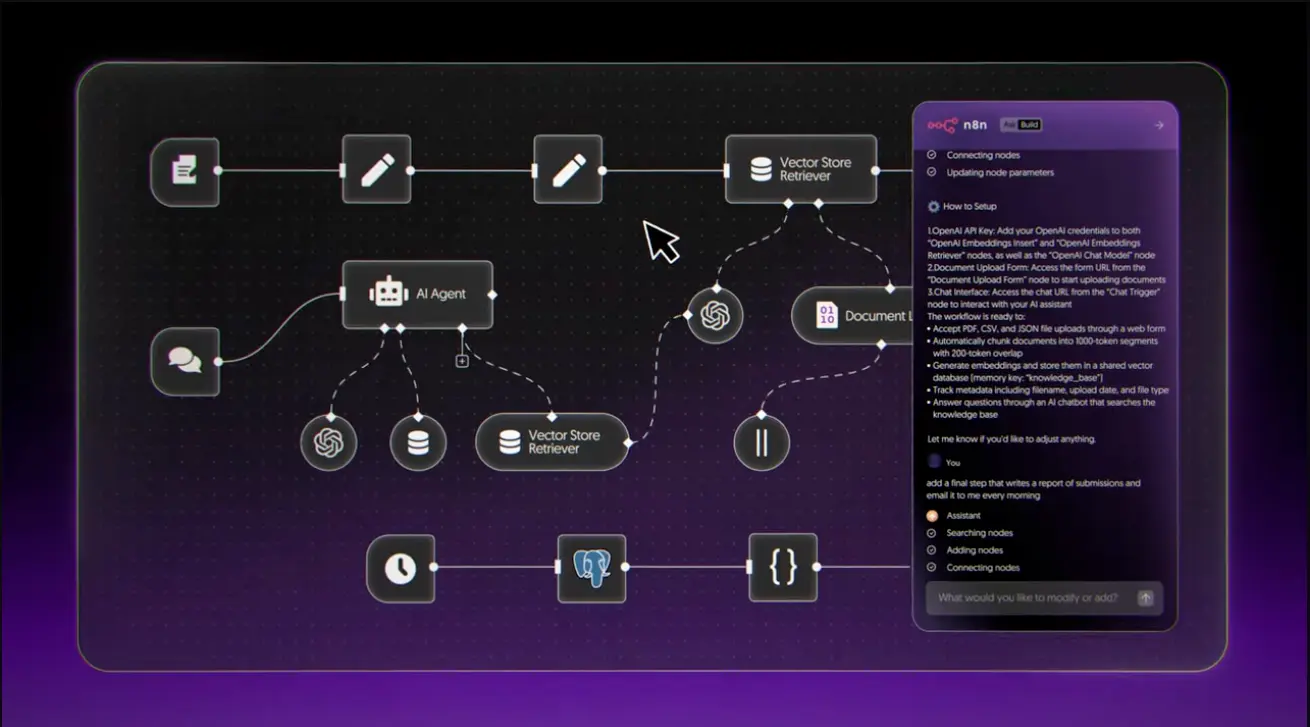
The platform processes natural language prompts and generates complete workflows with properly configured nodes, logic connections, and data flow patterns. Users maintain full technical control—after the AI generates a workflow, you can refine, expand, or adjust it directly in n8n's traditional visual editor. This hybrid approach ensures that technical users retain the flexibility they expect while newcomers can get started quickly.
Core Capabilities
- Conversational Workflow Generation: Transform text descriptions into functional automated processes without manually selecting or configuring nodes.
- Multi-Turn Refinement: Iterate on workflows through back-and-forth dialogue with the AI assistant, clarifying requirements and enhancing functionality step by step.
- Intelligent Node Selection: The AI automatically chooses appropriate components based on workflow requirements, drawing from n8n's extensive node ecosystem.
- Production-Ready Output: Generate workflows that can be immediately deployed or further customized using n8n's visual editor.
- Seamless Editor Integration: Switch between AI-generated workflows and manual editing without losing technical control or customization options.
- Execute and Refine: Test generated workflows and provide feedback to the AI for immediate adjustments and improvements.
The feature operates on a credit-based system where each interaction with the AI consumes one credit. This includes sending messages to create workflows, requesting modifications, and using the "Execute and refine" function. Failed messages or manually stopped requests don't consume credits, ensuring users only pay for successful interactions.
Try n8n AI Workflow BuilderHow Natural Language Automation Works
The AI Workflow Builder fundamentally changes the workflow creation process by eliminating the need to understand n8n's technical architecture before building automations. Users can focus on describing their business processes in natural language while the AI handles the technical implementation.
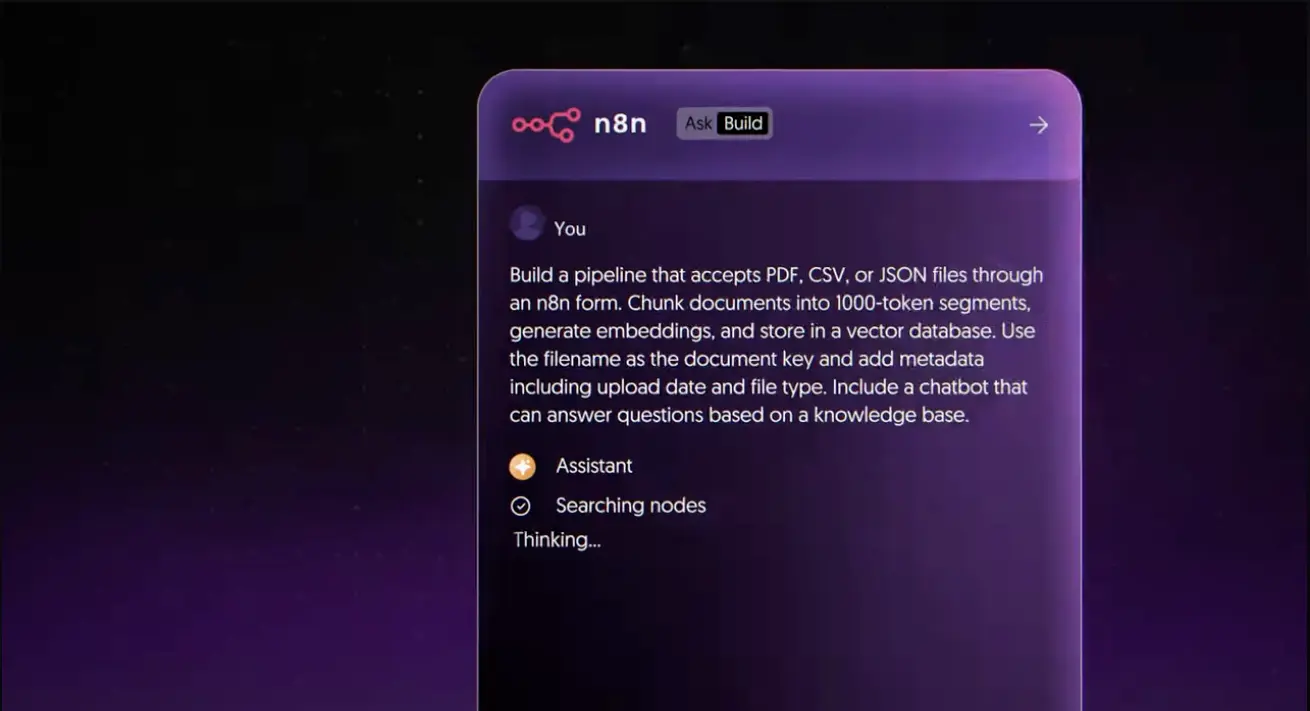
The Creation Process
Step 1: Describe Your Automation
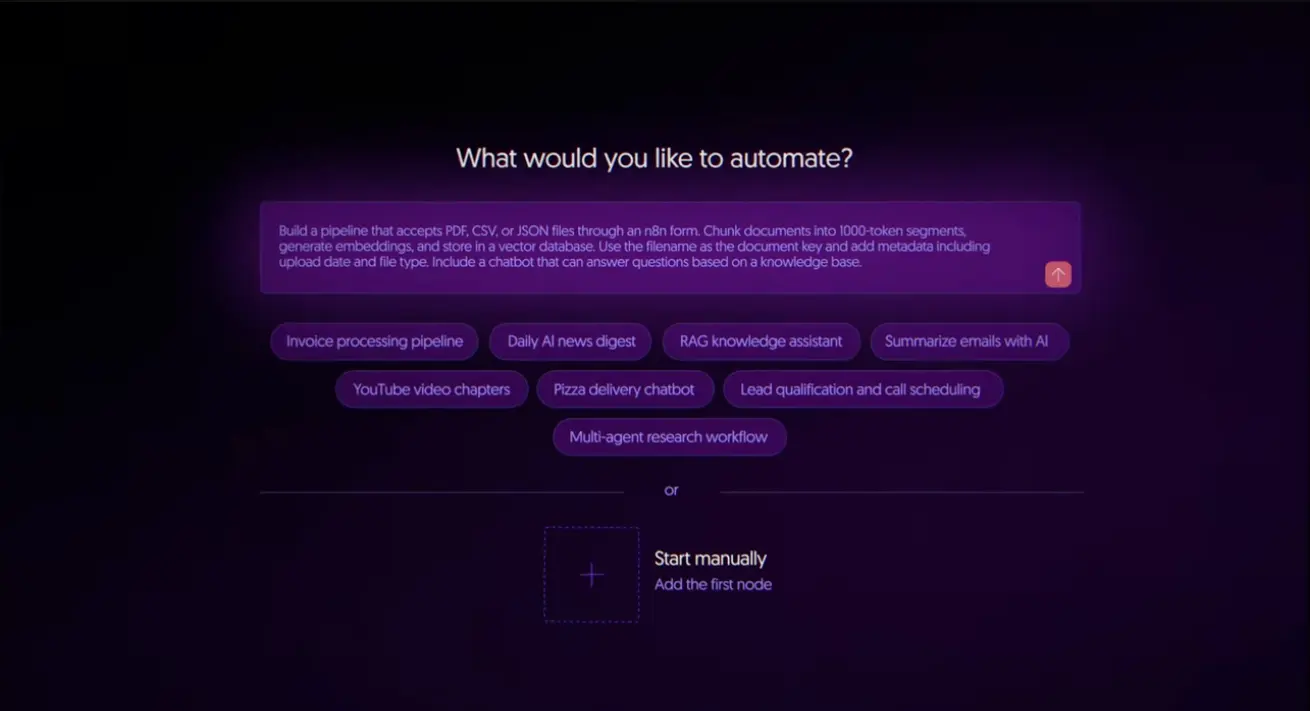
Rather than starting with a blank canvas, users open the AI Workflow Builder and describe what they want to automate in plain English. For example: "When a new customer signs up through our form, add them to our CRM, send a welcome email, and notify the sales team in Slack."
Step 2: AI Generates the Workflow
The AI processes your description and automatically creates a complete workflow with all necessary nodes, connections, and configurations. It selects appropriate triggers, actions, and logic flows based on your requirements.
Step 3: Refine Through Conversation
You can engage in multi-turn conversations to clarify requirements, add conditions, or modify behavior. Ask the AI to add data transformations, implement conditional logic, or adjust specific node configurations.
Step 4: Test and Deploy
Use the "Execute and refine" function to test your workflow with real or mock data. The AI can help debug issues and optimize performance based on test results.
Step 5: Manual Fine-Tuning
Switch to n8n's traditional visual editor at any time to make precise adjustments, add advanced features, or customize the workflow beyond what the AI generated.
Data Privacy and Security
The AI receives your text prompts, node definitions, parameters, connections, current workflow definitions, and mock execution data when using the builder. Importantly, the AI does not receive credential details or past workflow execution data, maintaining security for sensitive information.
Users can reset the AI's context at any time using the /clear command, starting fresh with a new workflow conversation.
Availability and Pricing Structure
The AI Workflow Builder launches exclusively for n8n Cloud users, with a careful, measured rollout strategy that reflects the computational demands of AI-powered workflow generation. Self-hosted users will need to wait for future updates, as n8n evaluates the best approach for bringing this feature to on-premises deployments.
n8n Cloud Plans with AI Access
14-Day Trial
Price: Free trial period
AI Credits: 20 credits per month
Target: Users evaluating n8n and testing the AI Workflow Builder capabilities
Starter Plan
AI Credits: 50 credits per month
Target: Small businesses and individual users building personal automations
Pro Plan
AI Credits: 150 credits per month
Target: Professional users and teams requiring regular AI-assisted workflow creation
Enterprise Cloud
Availability: Coming in a future update
Details: Enterprise users will receive access to the AI Workflow Builder in a subsequent release
Important Note: Self-hosted users currently cannot access the AI Workflow Builder. n8n is actively exploring the best approach to bring this feature to self-hosted deployments, but no timeline has been announced. At present, there's no option to purchase additional credits within your existing plan, though n8n is evaluating this possibility.
Credit Consumption Model
Each interaction with the AI Workflow Builder consumes one credit, including sending messages to create workflows, requesting modifications, and using "Execute and refine" functionality. Failed messages or manually stopped requests do not consume credits.
This credit-based pricing is designed to cover the substantial computational costs of the underlying AI models rather than serving as a profit center. The model ensures accessibility while managing infrastructure expenses associated with natural language processing and workflow generation.
Gradual Rollout Timeline
To ensure optimal performance and user experience, n8n is implementing a gradual rollout over one week for users on version 1.115.0. This means you may not have immediate access to the feature when you first upgrade to the latest version. The phased deployment allows n8n to monitor system stability and address any issues before wider availability.
Start Your n8n TrialCompetitive Landscape: Following Established Players
The conversational workflow building space already features several established platforms that have been offering natural language automation capabilities throughout 2025. n8n's entry into this market represents adaptation to industry trends rather than pioneering new territory.
Lindy AI: Established Natural Language Agent Builder
Lindy AI has been offering conversational agent building capabilities earlier in 2025, providing users with drag-and-drop visual workflow builders combined with natural language prompts. Their Agent Builder platform supports over 2,500 integrations and multi-agent orchestration, demonstrating that natural language workflow creation has become a mature capability in the automation space.
Lindy's approach allows users to build AI agents through conversational interfaces, with features including task automation, data transformation, and complex multi-agent workflows—capabilities that closely mirror what n8n now offers with its AI Workflow Builder.
Other Conversational Automation Platforms
The market includes additional players offering similar capabilities. Platforms like Voiceflow, Botpress, FlowiseAI, and Relevance AI have implemented visual-conversational hybrid approaches for building AI agents and automations. These tools demonstrate that natural language workflow creation has become an expected feature rather than a novel innovation.
Zapier and Make have also added AI capabilities to their automation platforms, though their approaches focus on different aspects of AI integration compared to comprehensive conversational workflow generation.
n8n's Positioning
n8n's AI Workflow Builder serves to maintain competitive parity while leveraging their existing technical infrastructure and developer-friendly approach. The key differentiator isn't the presence of natural language capabilities—which competitors already offer—but rather the integration of these features with n8n's robust node ecosystem and technical flexibility.
Users can choose between conversational creation for quick prototyping and traditional visual building for complex, precise workflows. This hybrid approach appeals to technical users who want both accessibility and deep customization options.
Comparison: AI Workflow Builders
Understanding how n8n's AI Workflow Builder compares to other automation platforms helps organizations make informed decisions about their workflow automation strategy.
| Feature | n8n AI Workflow Builder | Lindy AI | Zapier AI | Make |
|---|---|---|---|---|
| Natural Language Creation | ✓ Conversational prompts | ✓ Conversational interface | ✓ AI suggestions | ✓ AI nodes |
| Multi-Turn Refinement | ✓ Yes | ✓ Yes | Limited | Limited |
| Visual Editor Integration | ✓ Seamless switching | ✓ Drag-and-drop | ✓ Traditional builder | ✓ Scenario editor |
| Self-Hosted Option | Planned (not yet available) | Cloud only | Cloud only | Cloud only |
| Pricing Model | Credit-based (20-150/month) | Usage-based plans | Task-based plans | Operation-based plans |
| Integration Count | 400+ nodes | 2,500+ integrations | 6,000+ apps | 1,500+ apps |
| Open Source | ✓ Yes (core platform) | No | No | No |
| Multi-Agent Orchestration | Via workflows | ✓ Native support | Limited | Via scenarios |
| Technical Customization | Extensive (code nodes) | Moderate | Limited | Moderate |
| Developer Focus | High | Moderate | Low | Moderate |
Key Differentiators for n8n
Open Source Foundation: Unlike competitors, n8n maintains an open-source core platform, providing transparency and community-driven development that proprietary platforms cannot match.
Technical Depth: n8n offers extensive customization through code nodes and advanced workflow logic, appealing to technical teams that need precise control alongside AI-assisted creation.
Self-Hosted Potential: While not yet available for the AI Workflow Builder, n8n's commitment to self-hosted deployments represents a future advantage for organizations with strict data sovereignty requirements.
Developer-Friendly: The platform maintains its technical focus while adding accessibility features, ensuring power users aren't sacrificing capabilities for convenience.
For teams evaluating workflow automation platforms, exploring the full landscape of available tools can provide valuable context. Check out our comprehensive guide to the best AI tools for workflow automation and agent building to compare additional options.
Use Cases and Practical Applications
The AI Workflow Builder excels at transforming business process descriptions into functional automations across various scenarios, making workflow creation accessible to users who may not have technical automation expertise.
Customer Onboarding Automation
Describe your customer onboarding process in natural language—"When a new customer signs up, create a record in our CRM, send a welcome email sequence, assign them to a customer success manager, and notify the team in Slack"—and the AI generates the complete workflow with all necessary integrations and logic.
Data Processing and Transformation
Automate complex data workflows by describing requirements like "Pull data from our sales database every morning, clean and transform the records, generate summary reports, and distribute them to department managers via email." The AI handles node selection, data mapping, and scheduling automatically.
Content Management Workflows
Create publishing workflows through simple descriptions: "When a new blog post is published in WordPress, extract the content, generate social media posts for Twitter and LinkedIn, schedule them, and update our content calendar in Notion." The AI assembles all necessary components and connections.
Support Ticket Automation
Build customer support workflows by explaining: "When a high-priority support ticket is created, notify the on-call engineer immediately, create a corresponding task in our project management system, and if not resolved within 2 hours, escalate to the support manager." The AI implements all conditional logic and integrations.
Financial Reporting and Analysis
Generate financial automation workflows: "Every week, collect revenue data from Stripe and expense data from QuickBooks, calculate key metrics, create visualization dashboards, and email executive summaries to leadership." The AI orchestrates data collection, analysis, and distribution.
Starting Point for Complex Automations
Even for advanced users, the AI Workflow Builder serves as an effective starting point. Generate a basic workflow structure through natural language, then switch to the visual editor to add sophisticated logic, error handling, and custom transformations that require technical precision.
Build Your First AI WorkflowImplementation Considerations
Successfully adopting the AI Workflow Builder requires understanding both its capabilities and limitations, particularly during the beta phase when features are still evolving based on user feedback.
Credit Management Strategy
The credit-based pricing model introduces usage considerations that weren't present in n8n's traditional approach. Users must strategically decide when to use natural language generation versus manual workflow building, especially when working with limited monthly credit allocations.
For Trial users with 20 monthly credits, each workflow creation and refinement interaction must be considered carefully. Starter plan users (50 credits) and Pro users (150 credits) have more flexibility but still need to balance AI-assisted creation against credit consumption.
Cloud-Only Limitation
Organizations requiring on-premises deployment face a temporary limitation, as the AI Workflow Builder is currently unavailable for self-hosted installations. n8n is evaluating approaches for self-hosted implementation, but no timeline has been announced.
This restriction may impact teams with strict data sovereignty requirements, regulatory compliance needs, or existing self-hosted n8n deployments that cannot easily migrate to the cloud platform.
Gradual Rollout Timing
The phased deployment over one week means immediate availability isn't guaranteed upon upgrading to version 1.115.0. Organizations planning to adopt the AI Workflow Builder should account for potential delays before full access becomes available.
Enterprise Adoption Timeline
Enterprise Cloud customers don't have access at launch, with availability scheduled for "a future update." Large organizations interested in the AI Workflow Builder will need to wait for the Enterprise rollout before deploying this capability across their teams.
Prompt Engineering Skills
Effective use of the AI Workflow Builder benefits from clear, specific prompt engineering. Users should provide detailed descriptions including data sources, specific actions, conditional logic requirements, and expected outputs to generate optimal workflows.
Multi-turn conversation capabilities allow for iterative refinement, but starting with well-structured initial prompts reduces the number of interactions needed—conserving credits and accelerating workflow creation.
Frequently Asked Questions
The AI Workflow Builder is a beta feature launched October 13, 2025, that allows users to create automated workflows using natural language prompts instead of manually connecting nodes. You describe what you want to automate in plain English, and the AI generates a complete workflow with configured nodes, logic connections, and data flow patterns.
The feature is currently available exclusively to n8n Cloud users on 14-day Trial plans (20 credits per month), Starter plans (50 credits per month), and Pro plans (150 credits per month). Enterprise Cloud users will receive access in a future update, and self-hosted users are awaiting n8n's evaluation of the best implementation approach.
Each interaction with the AI Workflow Builder consumes one credit. This includes sending messages to create workflows, asking for modifications, and using "Execute and refine" functionality. Failed messages or manually stopped requests do not consume credits. Currently, there's no option to purchase additional credits beyond your plan allocation, though n8n is exploring this possibility.
Yes, you maintain complete technical control. After the AI generates a workflow, you can seamlessly switch to n8n's traditional visual editor to refine, expand, or adjust the workflow directly. This hybrid approach ensures technical users retain the flexibility they expect while newcomers can get started quickly with AI assistance.
Not currently. The AI Workflow Builder launches exclusively for n8n Cloud users. n8n is actively exploring the best approach to bring this feature to self-hosted deployments, but no timeline has been announced. Organizations requiring on-premises deployment will need to wait for future updates.
Both platforms offer natural language workflow creation with conversational interfaces. Lindy AI has been providing similar capabilities earlier in 2025 with over 2,500 integrations and multi-agent orchestration. n8n differentiates through its open-source foundation, deeper technical customization via code nodes, and seamless integration with its existing robust automation infrastructure. Lindy focuses more heavily on agent-based approaches, while n8n maintains its workflow-centric architecture.
The AI receives your text prompts, node definitions, parameters and connections, current workflow definitions, and mock execution data when using the builder. Importantly, the AI does not receive credential details or past workflow execution data, maintaining security for sensitive information. You can reset the AI's context anytime using the /clear command.
n8n is implementing a gradual rollout over one week for users on version 1.115.0 to ensure system stability and optimal performance as the feature becomes widely available. This phased deployment allows n8n to monitor infrastructure scaling and address any issues before broader access, reflecting the substantial computational requirements for AI-powered workflow generation.
Yes, the AI supports multi-turn conversations, allowing you to iteratively build and refine complex workflows including conditional logic, data transformations, error handling, and multi-step business processes. You can start with basic requirements and enhance them through back-and-forth dialogue with the AI assistant, then fine-tune technical details in the visual editor.
You can upgrade to a higher plan to receive more credits. Trial users (20 credits) can upgrade to Starter (50 credits) or Pro (150 credits) plans. Currently, there's no option to purchase additional credits within your existing plan, though n8n is exploring this possibility based on user feedback during the beta phase.
The conversational workflow building space already includes established platforms like Lindy AI, Voiceflow, and Botpress that have been offering natural language automation capabilities throughout 2025. n8n's implementation represents adaptation to industry trends rather than pioneering new territory. The key value is bringing this capability to n8n's existing user base with seamless integration into their familiar workflow environment.
Enterprise Cloud users will receive access to the AI Workflow Builder "in a future update," but n8n hasn't provided a specific timeline for this rollout. Large organizations interested in the feature should monitor n8n's announcements for Enterprise availability updates.
Related Articles
- Lindy AI 3.0 Tutorial: Build Your First Agent - Learn how to use Lindy's natural language agent builder, which has been offering conversational workflow creation capabilities before n8n's AI Workflow Builder launch.
- Best AI Tools for Task Automation and Workflow Building - Comprehensive directory of AI automation platforms including n8n, Lindy AI, Zapier, Make, and other workflow builders to help you evaluate different approaches to automation.
Final Takeaway: n8n's AI Workflow Builder, launched October 13, 2025, brings natural language automation to the platform's Cloud users with 20-150 monthly credits depending on plan tier. While platforms like Lindy AI have been offering similar conversational agent building capabilities earlier in 2025, n8n's implementation provides value through seamless integration with its existing technical infrastructure, developer-friendly approach, and hybrid model allowing users to switch between AI generation and manual editing. The beta launch reflects careful market adaptation rather than innovation, positioning n8n to maintain competitive parity in a space where natural language workflow creation has become an expected feature across automation platforms.