

Blackbox AI
AI-powered coding platform with a multi-agent Chairman LLM that runs Claude, GPT, Gemini and more in parallel—then picks the best output. Write, debug, and ship code faster across VS Code, JetBrains, CLI, mobile, and web.
Try Blackbox AI →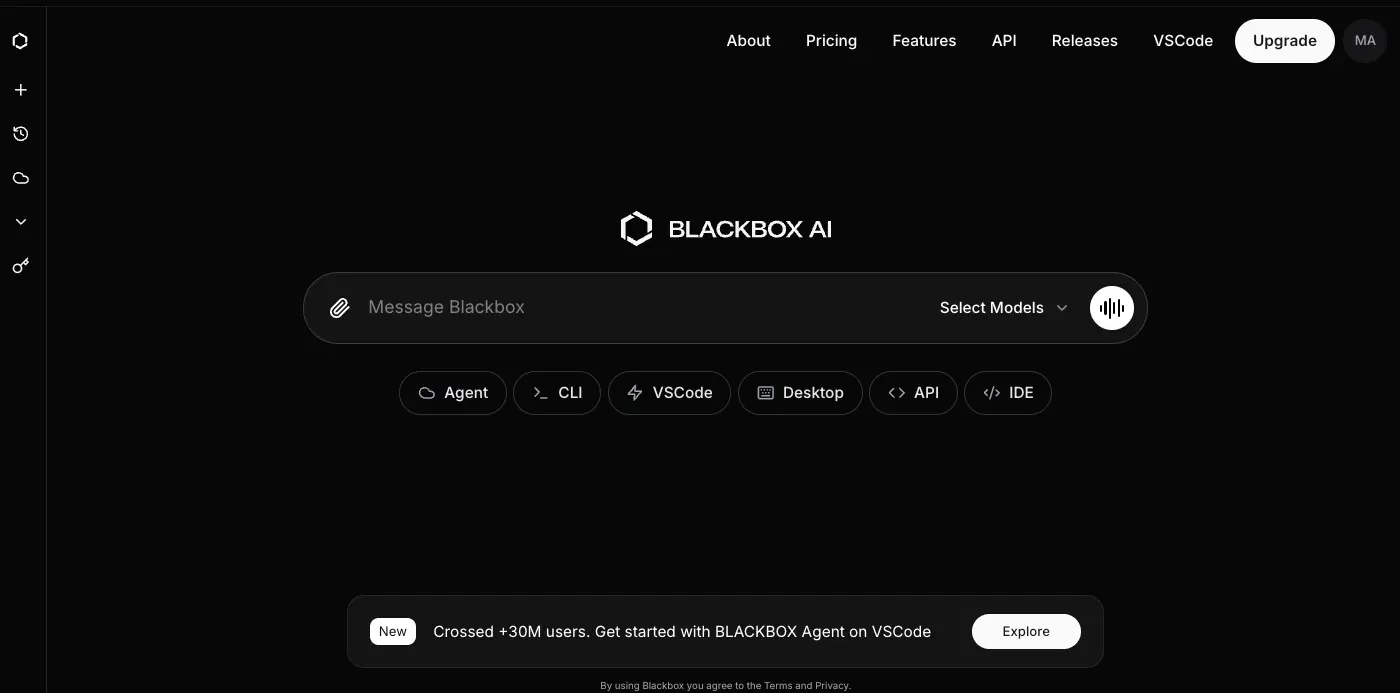
Multi-Model Coding Power
at an Unbeatable Price
Blackbox AI stands out with a genuinely unique proposition: its Chairman LLM dispatches tasks to multiple frontier models in parallel and automatically selects the best result. With 300+ AI models, image-to-code, voice coding, and the widest platform coverage in the AI coding assistant market—all starting at $10/month for Pro—it delivers remarkable value for experienced developers working on personal projects and prototyping.
✓ What We Love
- Chairman multi-agent workflow—truly unique
- 300+ AI models under one subscription
- $10/mo Pro undercuts Cursor & Copilot
- Widest platform: VS Code, JetBrains, CLI, mobile
! Could Be Better
- Premium credits burn fast on multi-agent tasks
- Steep learning curve for advanced features
- Free tier model quality is basic
What Is Blackbox AI?
A comprehensive overview of the platform and who it's built for.
Blackbox AI is an AI-powered coding platform and "Universal Agent Platform" designed to help software developers write, debug, test, and ship code faster. Founded in 2019 by Richard, Robert, and Roger Rizk, the company has grown from a code search tool into a full-scale AI coding assistant serving an estimated 30 million users as of early 2026, with approximately $31.7 million in revenue generated in 2025.
What makes Blackbox AI fundamentally different from single-model competitors like Cursor or GitHub Copilot is its multi-agent "Chairman" architecture. Rather than relying on a single AI model for every task, Blackbox dispatches the same coding task simultaneously to multiple leading AI models—including Claude, OpenAI Codex, Gemini, and Blackbox's own models—then uses a supervising "Chairman" LLM to evaluate and select the best output automatically. This means you get the collective strengths of multiple frontier models working on your problem at once.
The platform operates across an impressively wide range of surfaces: VS Code (with 4.8 million+ extension installs), JetBrains IDEs, a proprietary Blackbox IDE, a full CLI with agentic capabilities, a browser extension, mobile apps for iOS and Android, a web interface, and an encrypted desktop application. No other AI coding assistant matches this platform breadth as of March 2026.
Beyond the multi-agent workflow, Blackbox AI has built several differentiated capabilities: image-to-code conversion (turning Figma designs, wireframes, and screenshots into functional components), voice coding via ElevenLabs integration in the CLI, a structured project management system called Conductor, and access to over 300 AI models under a single subscription. The Pro plan at $10/month makes it one of the most aggressively priced serious AI coding tools on the market.
Who Is Blackbox AI Best For?
Blackbox AI is ideal for experienced developers building personal projects and prototypes who want multi-model access at low cost, front-end developers who regularly convert designs to code, teams modernizing legacy codebases, JetBrains users wanting agentic AI capabilities at this price point, and developers who want to experiment with multiple AI models without paying for separate subscriptions. It also fits well within app building workflows thanks to its App Builder and image-to-code features.
The platform supports 20+ programming languages including Python, JavaScript, TypeScript, Java, C#, C++, Go, Ruby, Rust, PHP, SQL, and Bash—along with popular frameworks like React, Next.js, Node.js, Flask, and Express. It accepts natural language instructions to generate code in any supported language, making it accessible for developers across the full stack.
See Blackbox AI in Action
Real screenshots from the platform showing the interface, model configuration, and platform options.
Main Chat Interface & Agent Dashboard
Your central hub for interacting with Blackbox AI across multiple modes
The Blackbox AI main interface features a clean, dark-themed design. The central chat bar lets you message any AI model directly, while quick-access buttons below provide entry points to the Agent mode, CLI, VS Code extension, Desktop app, API, and IDE. The "Select Models" dropdown in the chat bar gives instant access to the full model catalog. A banner at the bottom highlights the platform crossing 30 million users.
Model Providers Configuration
Connect and configure from 300+ AI model providers under one roof
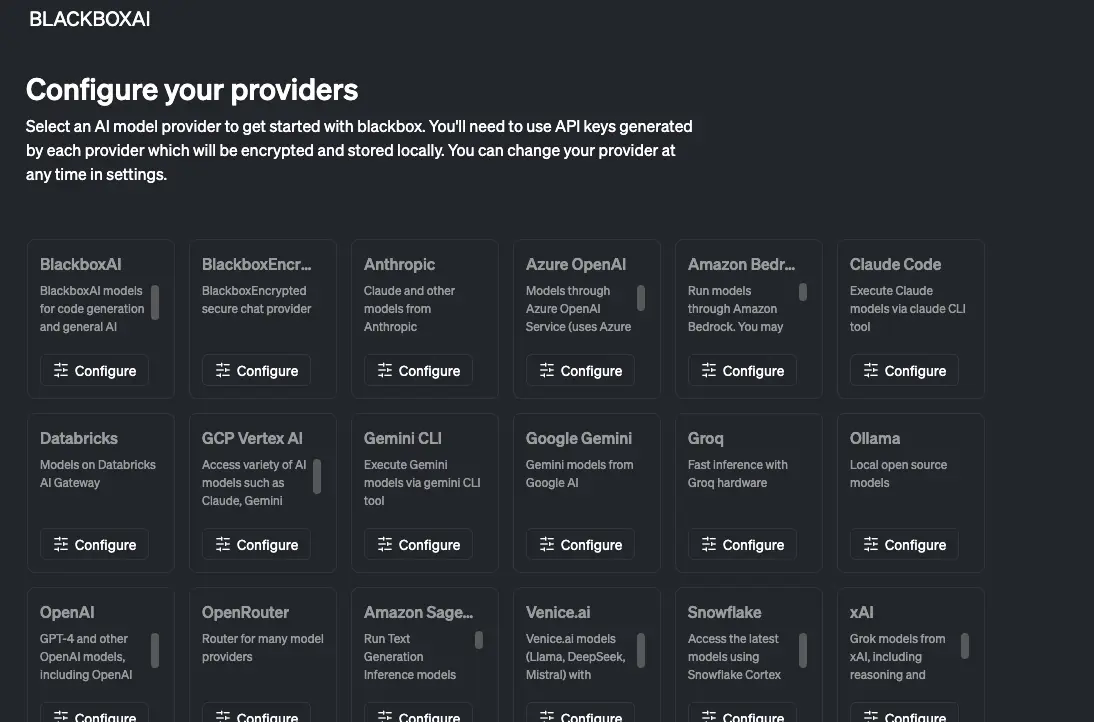
The provider configuration screen shows the breadth of Blackbox AI's model ecosystem. Visible providers include BlackboxAI's own models, BlackboxEncrypted (secure chat), Anthropic (Claude), Azure OpenAI, Amazon Bedrock, Claude Code, Databricks, GCP Vertex AI, Gemini CLI, Google Gemini, Groq, Ollama (local models), OpenAI, OpenRouter, Amazon SageMaker, Venice.ai, Snowflake, and xAI (Grok). Each provider requires your own API key, which is encrypted and stored locally on your device.
Platform Options: Terminal, IDE & Web
Code with Blackbox anywhere—in your terminal, IDE, or browser
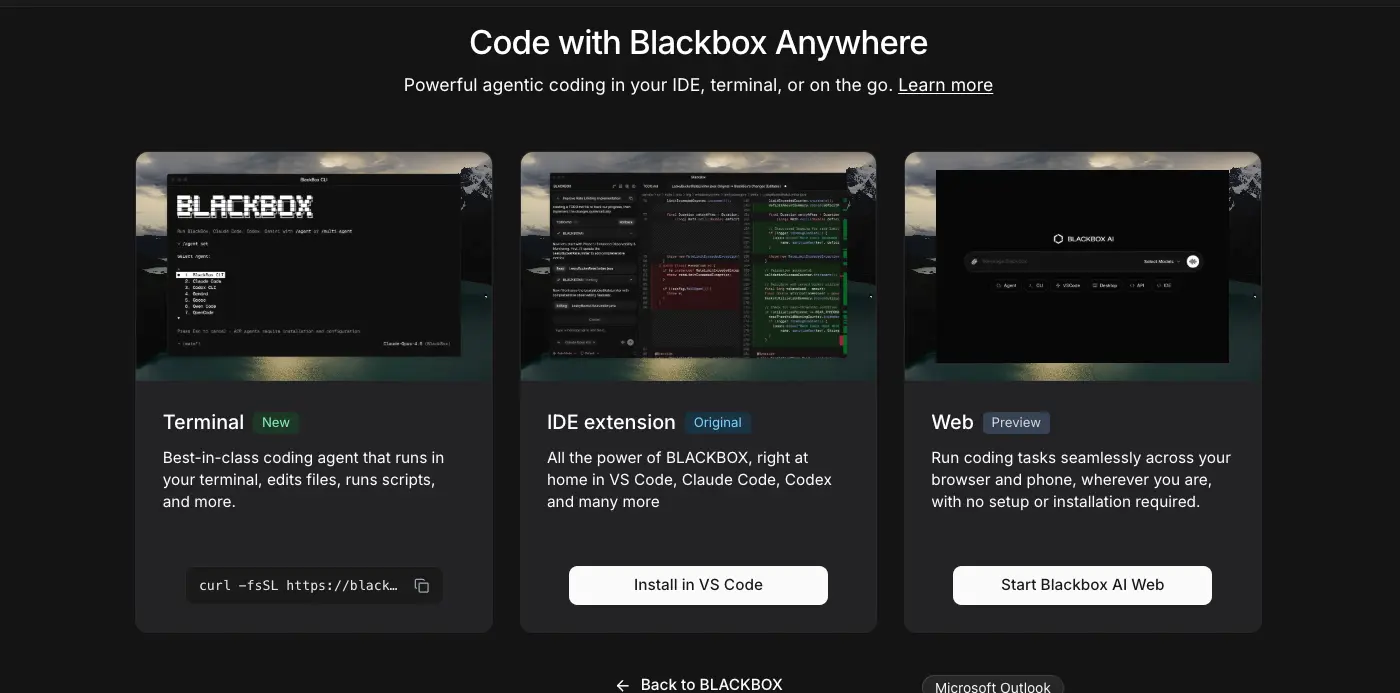
Blackbox AI offers three primary entry points. The Terminal option (marked "New") is their latest focus—a best-in-class agentic CLI that runs in your terminal, edits files, and runs scripts. The IDE extension (marked "Original") brings all features into VS Code, Claude Code, and Codex environments. The Web option (marked "Preview") lets you run coding tasks directly in your browser or phone, with no installation required. This tri-platform approach means you can start in the browser, move to the terminal for serious work, and use the IDE for daily coding—all under the same subscription.
Ready to code with 300+ AI models under one platform?
Try Blackbox AI →Free tier available • No credit card requiredHow Blackbox AI Works
From selecting a model to shipping production-ready code in four steps.
Choose Your Surface
Start by selecting how you want to interact with Blackbox AI. Open the VS Code or JetBrains extension for inline code completions, launch the CLI for agentic terminal workflows, use the web interface for quick prototyping, or open the mobile app for on-the-go PR reviews. Each surface connects to the same underlying AI infrastructure, so your model preferences and project context carry across platforms.
Select Models or Enable Chairman Mode
For standard tasks, pick any model from the 300+ available—Claude 4.5, GPT-5.2, Gemini, DeepSeek, Qwen, or Blackbox's own models. For complex tasks where you want the best possible output, enable the Chairman multi-agent workflow (available on Team plans and above). Chairman automatically creates separate Git branches, dispatches the task to multiple models in parallel, and evaluates all outputs to select the winner.
Describe Your Task in Natural Language
Write what you need in plain English—"Build a React dashboard with authentication," "Debug this memory leak in my Python server," or "Convert this Figma screenshot to Tailwind components." Blackbox AI understands full repository context: it indexes your entire codebase including folders, commit history, and external URLs to provide contextually accurate responses. For structured projects, use Conductor to enforce a Context → Spec → Plan → Implement workflow before any code is written.
Review, Iterate & Ship
Review the generated code, compare Chairman outputs side by side if using multi-agent mode, and request refinements through the chat interface. Once satisfied, merge directly into your codebase. For front-end work, use image-to-code to convert design mockups into components instantly. Use the CLI's non-interactive mode for CI/CD pipeline automation, or publish directly from the App Builder for rapid prototyping.
E2E Encrypted Desktop Agent
Blackbox AI's desktop agent uses end-to-end encryption where all data is encrypted locally before transmission. Encryption keys never leave your device, meaning the company cannot access sensitive information processed through the desktop agent—a meaningful privacy feature for developers working with proprietary code.
Voice Coding in the CLI
Blackbox AI's CLI supports a /voice command powered by the ElevenLabs API, enabling speech-to-text and text-to-speech interactions directly from your terminal. Dictate project specs, describe bugs hands-free, or review code output audibly—a unique capability no other mainstream AI coding assistant offers.
Key Features
Everything that makes Blackbox AI stand out in the AI coding assistant market.
Chairman LLM Multi-Agent
Dispatches tasks to Claude, GPT, Gemini, and more in parallel on separate Git branches. A supervising Chairman model evaluates correctness, performance, and quality—then selects the best implementation automatically. Compare outputs side by side before merging.
300+ AI Models
Access Anthropic Claude, OpenAI GPT-5/Codex, Google Gemini, DeepSeek, Qwen, Groq, Ollama (local models), and many more—all under one subscription. Switch between providers instantly without managing multiple accounts or billing.
Image-to-Code (Vision OCR)
Upload Figma exports, wireframes, UI screenshots, or even hand-drawn sketches—and get functional HTML, CSS, React, or Tailwind components. Can also extract code visible in YouTube videos or web pages. Available on paid plans.
Conductor Project Manager
A structured CLI system enforcing Context → Spec & Plan → Implement. Establishes project context first (tech stack, conventions, goals), writes specs and plans for review, then implements within agreed constraints. Git-aware, works on new and existing codebases.
Repository-Wide Context
Indexes your entire codebase—folders, files, commit histories, and external URLs—to answer questions and trace bugs across multi-file projects. This deep retrieval makes it effective for large, complex codebases where file-level context falls short.
Voice Coding (CLI)
Use the /voice command in the CLI powered by ElevenLabs API for speech-to-text and text-to-speech interactions. Dictate project specs, describe bugs, or review code output hands-free. A unique capability among mainstream AI coding assistants.
Cross-Platform Coverage
Available on VS Code, JetBrains, a proprietary IDE, CLI, browser extension, iOS and Android mobile apps, web interface, and an E2E encrypted desktop app. No other AI coding assistant matches this platform breadth. Supports GitHub Codespaces and Jupyter Notebooks.
App Builder
Build and deploy web applications directly from the Blackbox AI interface. Describe your app in natural language, iterate with the AI, and publish—ideal for rapid prototyping and MVPs. Available on Team plans and above.
Beyond these headline features, Blackbox AI supports inline code completion across 20+ languages, real-time code generation from natural language comments, legacy code migration (claiming 78% conversion accuracy for tasks like VB6 to C# migration), and non-interactive CI/CD pipeline mode for automated workflows. The platform is also expanding into Slack integration for Team plans, enabling coding agents to operate directly within team communication channels.
Experience the full multi-agent platform with 300+ AI models:
Try Blackbox AI →Free tier available • Pro from $10/monthPricing Plans
Five tiers from free to enterprise—with a competitive Pro plan at $10/month.
Free
Pro
Team
Note: Annual billing typically offers ~20% off all paid plans. Premium model credits are consumed per task and may be used faster on multi-agent workflows.
How Does Blackbox AI's Pricing Compare?
Blackbox AI Pro at $10/month is half the cost of Cursor Pro ($20/mo) and matches GitHub Copilot Pro ($10/mo)—but offers access to 300+ models, image-to-code, and voice coding that neither competitor includes at this price. The Team plan at $20/mo adds Chairman multi-agent workflow, still matching Cursor's Pro price while including collaborative features.
It's worth noting that premium model credits are a key consideration. The $30 credit pool on Pro covers standard development tasks well, but heavy multi-agent Chairman usage can consume credits faster than expected. If you primarily use the multi-agent workflow, the Team or Business plans provide a larger credit pool that better matches intensive usage patterns.
Detailed Pros & Cons
An honest, balanced assessment of Blackbox AI's strengths and limitations.
✓ Pros
No other tool at this price point runs Claude, GPT, Gemini, and additional models in parallel on separate Git branches, then auto-selects the best output. This genuinely differentiated architecture leverages the collective strengths of frontier models rather than betting on a single one.
Access Anthropic Claude, OpenAI, Google Gemini, DeepSeek, Qwen, Groq, Ollama (local), and many more without managing separate accounts. This is a genuine advantage over competitors that offer 3-5 models. Developers can pick the best model for each task type.
Pro at $10/month undercuts Cursor ($20/mo) and matches Copilot Pro ($10/mo) while including image-to-code, voice coding, and mobile access that neither offers. For developers watching their budget, this value proposition is hard to beat.
VS Code, JetBrains, proprietary IDE, CLI, browser extension, iOS/Android mobile apps, web interface, desktop app, GitHub Codespaces, and Jupyter Notebooks. No competitor comes close to this platform reach—particularly valuable for developers who work across multiple environments.
Converts Figma exports, wireframes, screenshots, and even hand-drawn sketches into functional HTML, CSS, React, or Tailwind components. This feature bridges the design-to-development gap and is particularly valuable for front-end developers and rapid prototypers.
The Context → Spec → Plan → Implement workflow enforces disciplined AI-assisted development. Instead of jumping straight to code, Conductor ensures the agent understands your project context, writes a spec, and gets approval before implementation—reducing errors on complex tasks.
✗ Cons
Multi-agent Chairman tasks consume credits faster than single-model interactions. Power users on the Pro plan ($30 credits) may find themselves running low before month's end, particularly if using the Chairman workflow frequently. Budget-conscious users should monitor credit consumption closely.
The multi-agent system, Conductor CLI, and model configuration require significant setup knowledge. While basic chat and code completion are straightforward, unlocking the platform's full potential demands investment in learning the CLI, understanding model strengths, and configuring Conductor workflows.
The default free-tier model provides basic functionality but is noticeably less capable than premium models. Developers may find the quality gap between free and paid tiers wider than expected. The free tier works for learning and simple tasks but may not reflect the platform's true capabilities.
Not all models are available on every surface—some are accessible via CLI but not the IDE extension, or vice versa. This inconsistency can be frustrating when switching between platforms and finding that your preferred model isn't available on your current surface.
Data retention controls and the ability to opt out of AI model training are reserved for Enterprise plans. Developers on Free, Pro, Team, or Business plans should be aware that code submitted may be used for model improvement. The E2E encrypted Desktop Agent offers a workaround for sensitive work.
User feedback indicates that customer support response times can be inconsistent. While the platform includes documentation and community resources, developers who rely on responsive vendor support may want to factor this into their decision.
Blackbox AI vs Alternatives
How Blackbox AI compares to the leading AI coding assistants in 2026.
| Feature | Blackbox AI | Cursor | GitHub Copilot | Windsurf |
|---|---|---|---|---|
| Pro Price | $10/mo | $20/mo | $10/mo | $20/mo |
| Free Tier | ✓ Unlimited chat | ✓ 50 premium reqs | ✓ 2,000 completions | ✓ 25 Cascade uses |
| AI Models | 300+ | Multi-model | Multi-model | SWE-1.5 + 3rd party |
| Multi-Agent | ✓ Chairman workflow | ✓ Background Agents | ⚠️ Agent Mode | ✓ Cascade |
| Image-to-Code | ✓ | ✗ | ✗ | ✗ |
| IDE Support | VS Code, JetBrains, native IDE | Cursor IDE only | VS Code, JetBrains, Xcode, Eclipse | Windsurf IDE only |
| Mobile App | ✓ iOS + Android | ✗ | ✗ | ✗ |
| Voice Coding | ✓ CLI | ✗ | ✗ | ✗ |
| Best For | Multi-model, value devs | Best daily coding | Teams, beginners | Guided agentic workflow |
Which Tool Is Right For You?
Blackbox AI
Best ValueBest for: Experienced developers who want multi-model access at a competitive price. Ideal if you value flexibility across platforms (VS Code, JetBrains, CLI, mobile), want to experiment with 300+ AI models under one subscription, or need image-to-code for front-end workflows. The Chairman multi-agent workflow is a genuine differentiator. Choose Blackbox AI if you prioritize feature breadth and value over a single polished experience.

Cursor
Best OverallBest for: Professional developers who want the best daily coding experience. Cursor's Supermaven autocomplete is widely regarded as the most accurate in the market, and its Background Agents can run multiple tasks in parallel. At $20/month it's more expensive than Blackbox AI's Pro, but the polish, context consistency, and SOC2 compliance make it the top choice for serious production work. Limitation: VS Code fork only—no JetBrains support.

GitHub Copilot
Safest ChoiceBest for: Teams, enterprise environments, and developers who value reliability and ecosystem integration above all else. With 20M+ users, the broadest IDE support (VS Code, JetBrains, Neovim, Xcode, Eclipse), IP indemnity on Business plans, training opt-out by default, and deep GitHub integration, it's the most defensible choice for professional and team use. Pro matches Blackbox AI at $10/month but with fewer models.

Windsurf
Guided AgenticBest for: Developers learning agentic AI workflows who want a tool that explains its reasoning before executing changes. Windsurf's Cascade agent walks through its plan before acting, and its Memories system learns your coding conventions over time. Acquired by Cognition AI (makers of Devin) in December 2025, signaling a roadmap toward deeper autonomy. At $20/month, it competes with Cursor but offers a more guided experience.

Tabnine
Privacy-FirstBest for: Regulated industries and teams with strict data privacy requirements. Tabnine is the only reviewed AI coding assistant offering fully air-gapped, on-premise deployment where code never leaves your infrastructure. At $9/user/month (Dev Plan), it's the lowest-priced paid option. Limitation: no meaningful agentic capabilities compared to Blackbox AI, Cursor, or Windsurf—focused on completions and chat, not autonomous coding.
Frequently Asked Questions
Should You Try Blackbox AI?
Blackbox AI occupies a unique position in the AI coding assistant market: it's the most feature-rich tool at the most competitive price. The Chairman multi-agent workflow—running Claude, GPT, Gemini, and more in parallel to select the best output—is genuinely differentiated and unavailable in any competitor at $10/month. Add 300+ model access, image-to-code, voice coding, Conductor project management, and the widest platform coverage of any tool reviewed, and the value proposition is compelling.
The limitations are real: premium credits can be consumed faster than expected on multi-agent tasks, the learning curve for advanced features is steep, the free tier model is noticeably basic, and customer support response times are inconsistent. For developers who need the most polished daily experience, Cursor remains the strongest option. For teams needing enterprise compliance, GitHub Copilot is the safest bet.
Our Recommendation
Start with the free tier to evaluate the platform and basic model quality. If the workflow fits, upgrade to Pro ($10/month) to unlock premium models and image-to-code—it's low-risk at this price point. Developers who rely on the Chairman multi-agent workflow should consider the Team plan ($20/month) for the larger credit pool. Blackbox AI is best positioned as a powerful multi-model experimentation platform and prototyping tool for developers who value flexibility and value above all else.
Ready to Code with 300+ AI Models?
Join 30M+ developers using Blackbox AI's multi-agent Chairman workflow to write, debug, and ship code faster