
CodeRabbit
AI-powered code review platform that delivers line-by-line feedback on every pull request across GitHub, GitLab, Azure DevOps, and Bitbucket. 40+ integrated linters, agentic chat, and a learning system that gets smarter with every review.
Try CodeRabbit Free →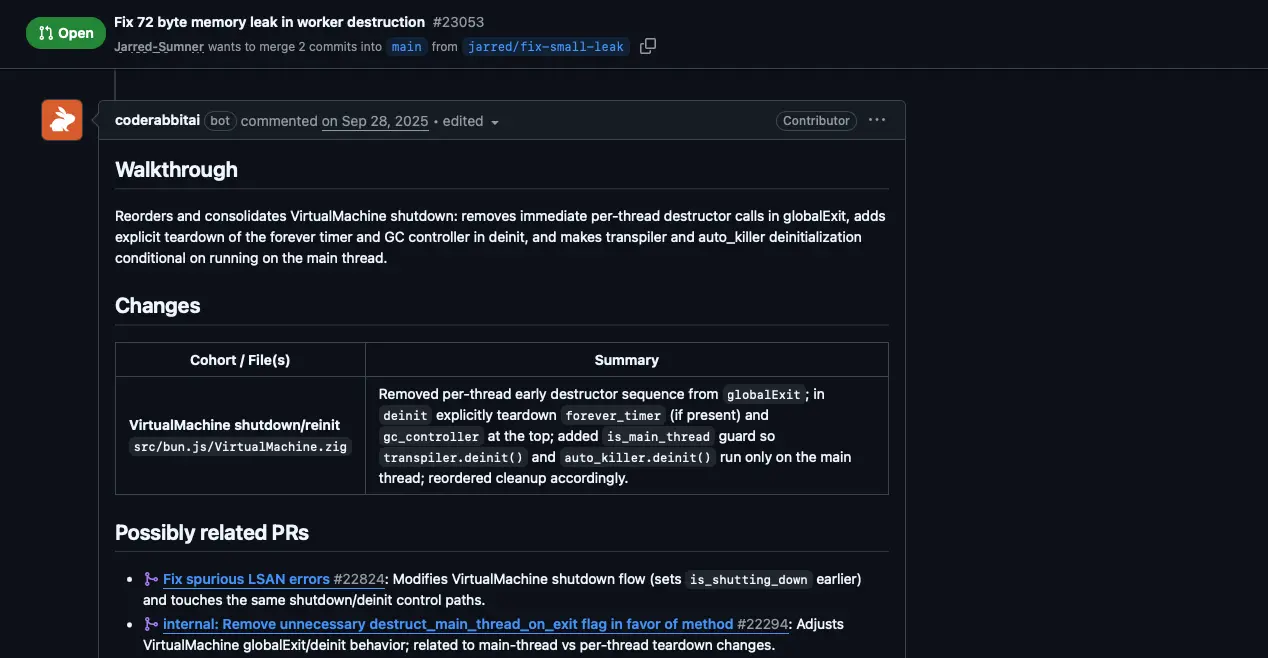
The Most-Installed AI Code Review
Tool—For Good Reason
After thorough testing, CodeRabbit earns its position as the most widely adopted AI code review platform. It delivers fast, low-noise automated reviews across all four major Git platforms, integrates 40+ linters and SAST tools, and offers a genuinely free tier for open-source projects. The learning system progressively reduces noise, and the new Issue Planner extends its value beyond review into planning.
✓ What We Love
- Free tier with no credit card required
- All 4 Git platforms supported
- 40+ linters and SAST tools integrated
- Low false positives—high-signal reviews
! Could Be Better
- 2–4 week tuning period for best results
- No cross-repository context
- SSO only on Enterprise plan
What Is CodeRabbit?
A comprehensive overview of the platform, its technology, and who it's built for.
CodeRabbit is an AI-powered code review platform that automatically analyzes pull requests and merge requests the moment they are opened, delivering line-by-line feedback directly inside GitHub, GitLab, Azure DevOps, or Bitbucket. Rather than simply flagging style issues, CodeRabbit generates a plain-English walkthrough of every change, builds sequence diagrams showing code flow, identifies bugs, security vulnerabilities, and performance issues, and posts inline comments with one-click fix suggestions.
Founded by Harjot Gill (formerly FluxNinja) and headquartered in San Francisco, CodeRabbit has grown rapidly since launch. As of early 2026, it has connected over 2 million repositories, processed more than 13 million pull requests, and serves over 8,000 paying customers including companies like Chegg, Groupon, Life360, and Mercury. In September 2025, the company raised a $60M Series B at a $550M valuation, bringing total funding to $88M—a strong signal of market confidence in the AI code review category.
What sets CodeRabbit apart from general-purpose AI coding assistants is its specialized focus on the review phase. The platform combines LLM reasoning with over 40 integrated static analysis and security tools (linters, SAST scanners, secrets detectors), all running inside isolated sandbox environments. This means CodeRabbit doesn't just use AI to comment on code—it runs real linting and security analysis alongside its AI-generated feedback, combining the best of deterministic tooling and intelligent reasoning.
The core problem CodeRabbit addresses is becoming increasingly urgent. As AI coding tools like Cursor and GitHub Copilot cause developers to merge significantly more pull requests, human review becomes the bottleneck. CodeRabbit inserts a tireless AI reviewer into that gap, providing automated analysis in approximately 3 minutes rather than hours of waiting for teammate availability.
Who Is CodeRabbit Best For?
CodeRabbit is ideal for small-to-mid engineering teams (3–50 developers) where PR bottlenecks slow delivery, teams shipping large volumes of AI-generated code that needs a quality gate, open-source maintainers handling high external PR volumes, and organizations using GitLab, Azure DevOps, or Bitbucket where few AI review alternatives exist. It's particularly well-suited for agile teams and startups prioritizing velocity without sacrificing quality.
CodeRabbit is also notably generous with its free tier. Public repositories get unlimited reviews forever at no cost, and open-source projects receive the full Pro plan—including all linters, SAST tools, agentic chat, and analytics—completely free with no seat limits. This makes it one of the most accessible developer tools in the category for the open-source community.
See CodeRabbit in Action
Real screenshots from the platform showing key features and the review workflow.
PR Review Walkthrough
Automated line-by-line review with walkthrough summary and change analysis
When a pull request is opened, CodeRabbit posts a structured review comment directly in the PR thread. The walkthrough section provides a concise, plain-English explanation of what changed and why. Below it, a changes table breaks down each modified file with a summary of what was done. The platform also identifies potentially related PRs—helping developers understand the broader context of any change.
Analytics Dashboard
Track review metrics, time saved, and team productivity across repositories
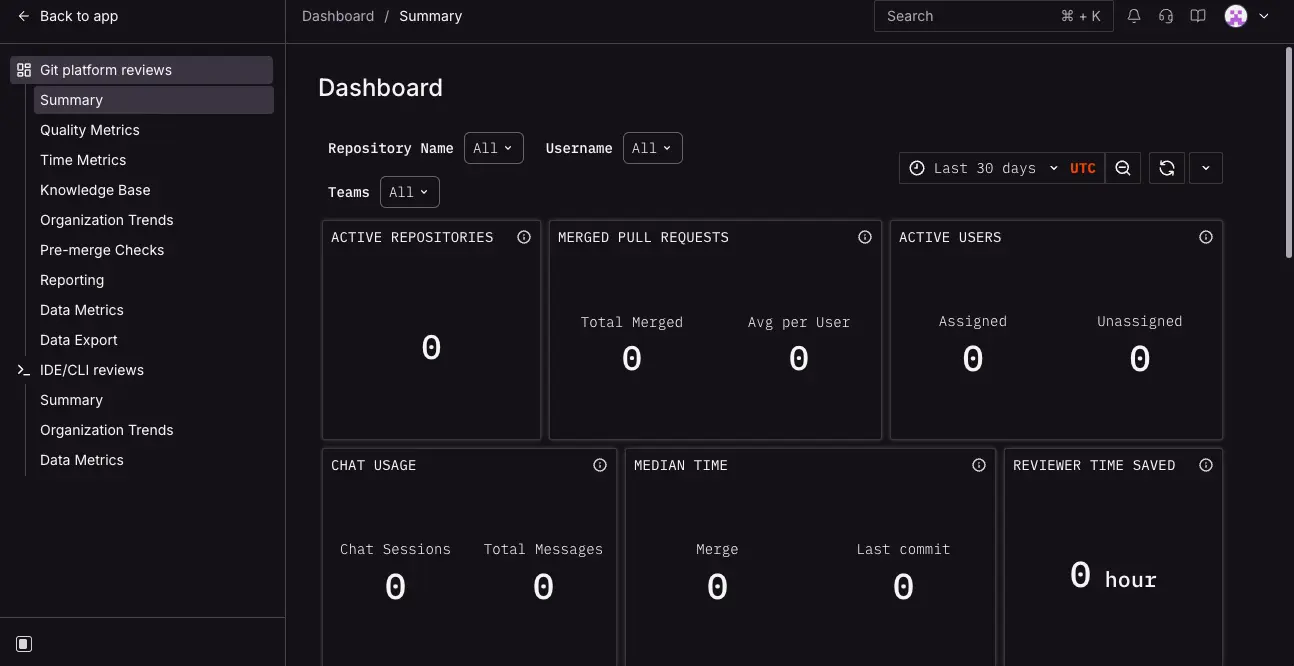
The analytics dashboard provides a comprehensive view of your team's code review activity. Key metrics include active repositories, merged pull requests (total and average per user), active users, chat usage, median merge and commit times, and—importantly—reviewer time saved. This data helps engineering managers quantify the ROI of automated code review and identify workflow bottlenecks.
Repository Management
Connect and manage repositories with a clean, organized interface
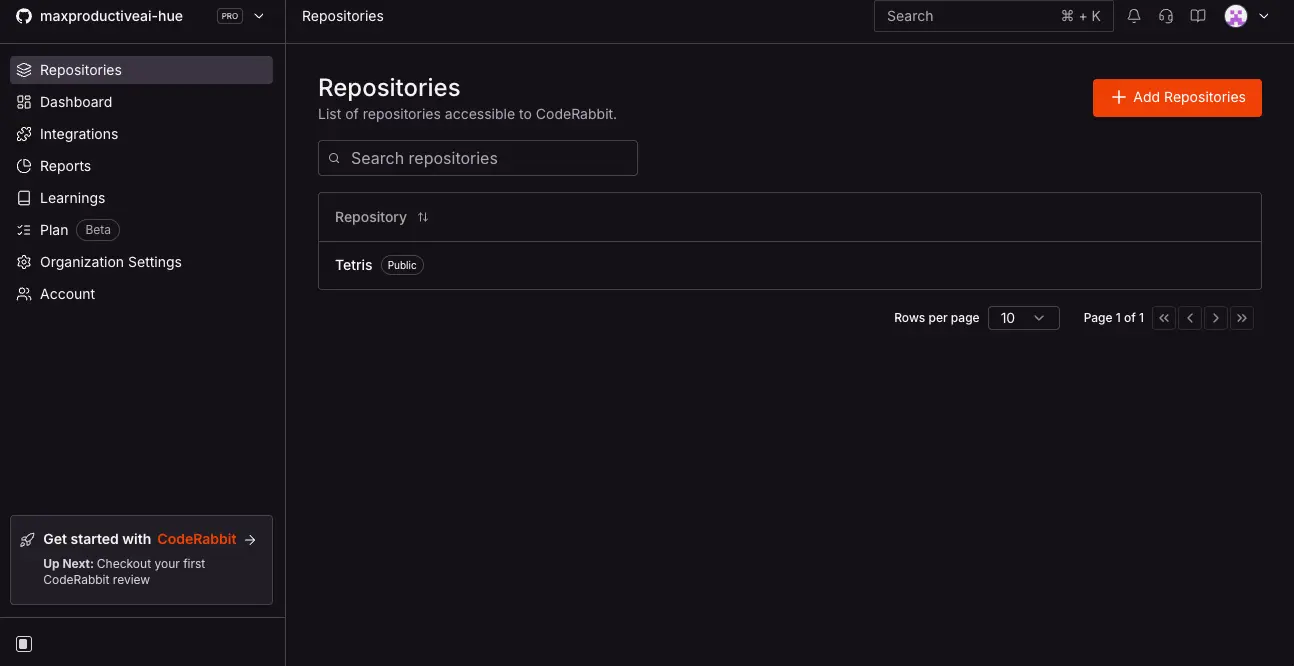
The repository management interface provides a centralized hub for all connected repositories. The sidebar offers quick access to the Dashboard, Integrations, Reports, Learnings, Organization Settings, and Account management. Adding new repositories takes a single click. The interface clearly labels each repo's visibility (public/private) and provides pagination for teams managing many projects.
MCP Server Integrations
Connect external context sources to enrich code reviews with business logic
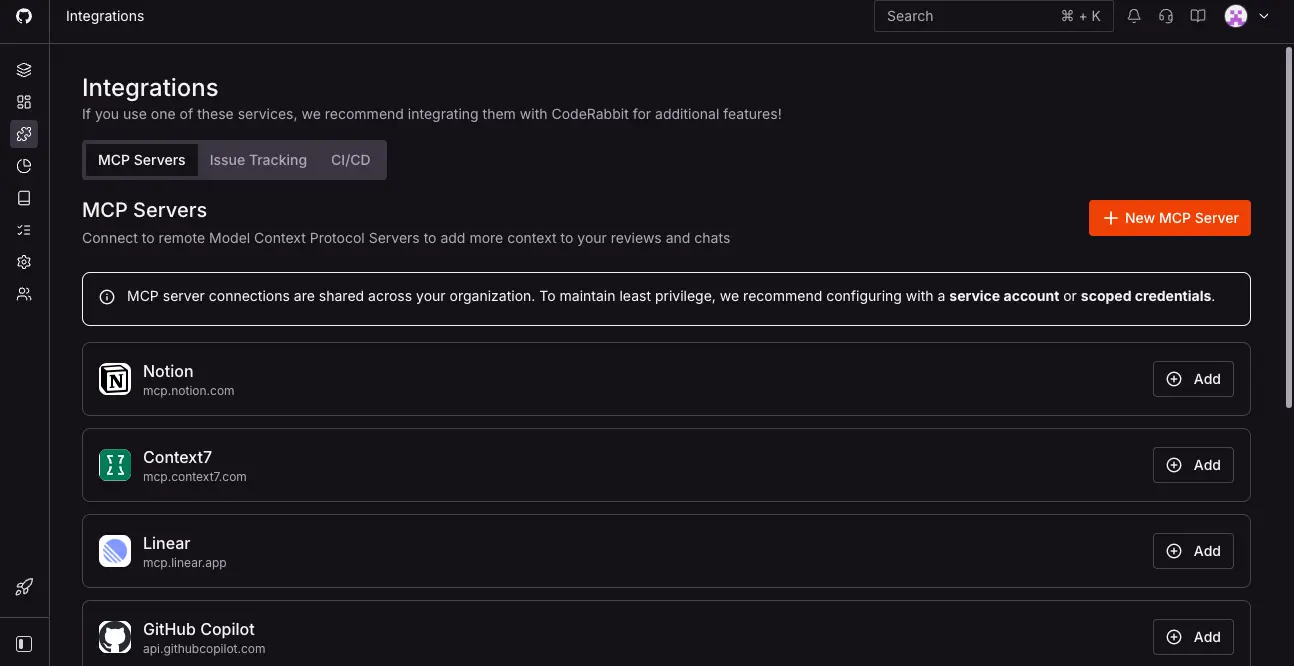
CodeRabbit's integrations page shows the Model Context Protocol (MCP) server connections that enrich reviews with external context. Available integrations include Notion, Context7, Linear, GitHub Copilot, and more. The platform also supports issue tracking and CI/CD integrations. MCP enables CodeRabbit to pull in Slack discussions, Confluence documentation, and deployment context—making reviews aware of business logic, not just code syntax.
Settings & PR Summary Configuration
Fine-tune review behavior, language, and PR summary format per repository
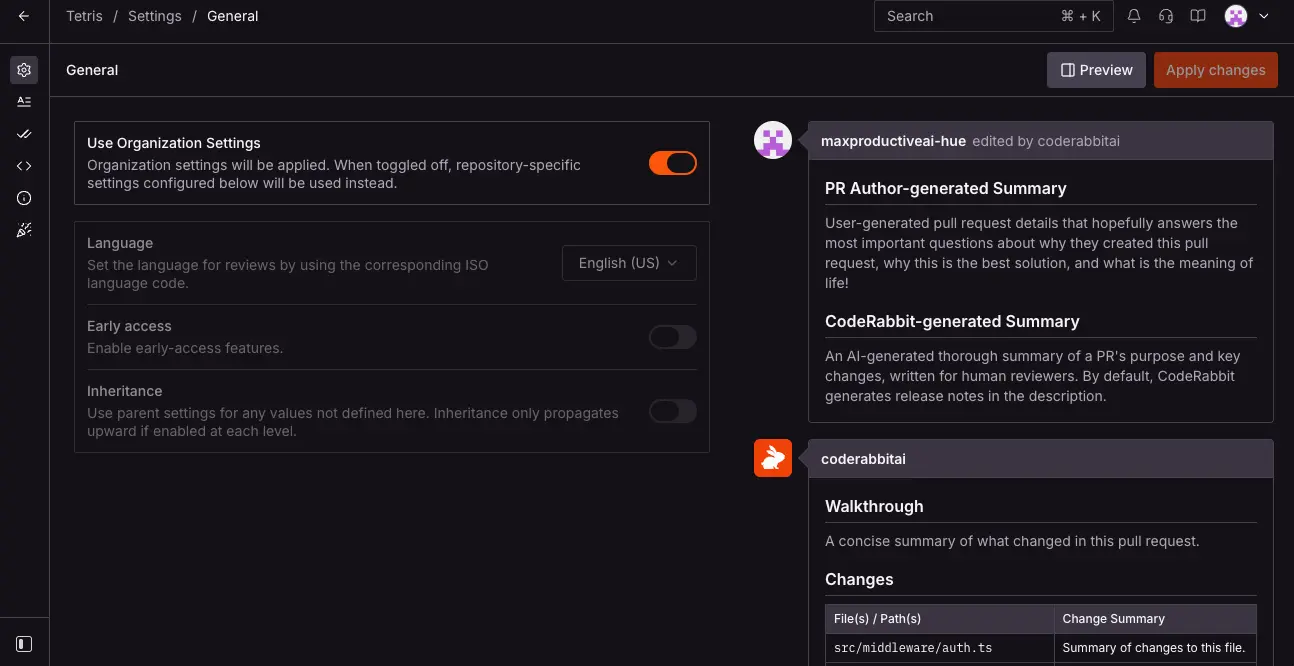
The settings interface allows granular control over CodeRabbit's behavior. Organization-wide settings can be applied across all repositories, with per-repo overrides available. Options include review language, early access features toggle, and settings inheritance. The right panel shows a live preview of how PR summaries will appear—including the author-generated summary and CodeRabbit's AI-generated walkthrough with change tables, so you know exactly what your team will see.
Ready to see automated code reviews on your own repositories?
Try CodeRabbit Free →Free tier available • No credit card requiredHow CodeRabbit Works
From connecting your repo to receiving your first AI-powered review in under 5 minutes.
Connect Your Repository
Go to coderabbit.ai and sign in with your GitHub, GitLab, Azure DevOps, or Bitbucket account. Authorize CodeRabbit and select which repositories to connect. No code changes, no CI/CD pipeline modifications required. CodeRabbit auto-detects your primary branch name (main, master, dev, etc.) and begins monitoring for new pull requests immediately.
Open a Pull Request
When a PR is opened, CodeRabbit receives a webhook event and spins up a fresh, isolated sandbox environment specifically for that review. Inside the sandbox, it clones your repository and builds a Code Graph—an AST (Abstract Syntax Tree) representation of the entire codebase to understand inter-file dependencies, not just the changed lines. This contextual understanding is what separates CodeRabbit from simple diff-based analysis tools.
Automated Analysis Runs
Within the sandbox, CodeRabbit runs 40+ linters and SAST tools relevant to the detected programming languages. Simultaneously, it queries multiple LLMs (OpenAI, Anthropic, Google Gemini) with the diff, code graph context, and any external signals from connected integrations like Jira, Linear, or MCP-connected tools. It can even perform web searches to look up the latest documentation for newer libraries. The entire process typically completes in approximately 3 minutes.
Review Posted, Sandbox Destroyed
CodeRabbit posts a structured review comment directly in your PR with a high-level walkthrough summary, per-file line-by-line comments with severity labels, and one-click fix suggestions. The sandbox is then completely destroyed—nothing persists. If you push additional commits to the same PR, CodeRabbit triggers an incremental review, providing feedback only on what changed since the last review.
Zero Data Retention Architecture
Your code is processed in memory only inside an ephemeral sandbox and deleted the moment the review completes. Code is never stored on disk, never used to train AI models, and never shared with third parties. Even CodeRabbit's LLM providers operate under agreements preventing storage or training on your code. CodeRabbit is SOC 2 Type II certified and GDPR compliant.
Continuous Learning
CodeRabbit adapts to your team over time. Every time you dismiss or correct a suggestion, the system stores that feedback as a team-specific learning, progressively reducing noise. You can also define conventions in a .coderabbit.yaml config file or use a central configuration repository to manage settings across your entire organization. Most teams report review quality improving significantly after 2–4 weeks of active use.
Key Features
Everything CodeRabbit offers to accelerate your code review workflow.
Automated PR Reviews
Instant line-by-line code analysis with walkthrough summaries, sequence diagrams, severity-ranked comments, and one-click AI fix suggestions—posted directly in your PR like a human reviewer.
Agentic Chat
Converse with CodeRabbit directly inside PR comments using natural language. Ask it to explain reasoning, generate unit tests, create docstrings, clarify flags, or open new PRs with generated fixes.
40+ Linters & SAST Tools
Integrated static analysis including Biome, ESLint, Ruff, Pylint, golangci-lint, Clippy, RuboCop, Brakeman, TruffleHog for secrets detection, Trivy for IaC security, and many more—all running in sandboxed environments.
Multi-Platform Support
Works with GitHub, GitLab, Azure DevOps, and Bitbucket—the only AI code review tool supporting all four major Git platforms. Setup is identical across all platforms.
MCP Server Integration
Pull context from Slack, Confluence, Notion, Datadog, Sentry, and internal wikis via the Model Context Protocol. Reviews become aware of business context, deployment status, and team discussions—not just code.
Issue Planner (Beta)
Launched February 2026, the Issue Planner integrates with Linear, Jira, GitHub Issues, and GitLab to auto-generate Coding Plans from issues—helping AI coding agents receive precise specifications before writing code.
Learning System
Adapts to your team's conventions over time. Dismiss a suggestion and it remembers. Define rules in .coderabbit.yaml or let the system learn from your editing patterns. Noise drops significantly after 2–4 weeks.
IDE & CLI Support
VS Code, Cursor, and Windsurf extensions deliver inline reviews on staged and unstaged commits before a PR is even opened. A CLI (beta) brings analysis to the terminal, useful for AI agent pipelines.
Beyond these core features, CodeRabbit also supports docstring generation for 18+ languages, auto-generated PR summaries and release notes, Code Graph analysis for understanding file dependencies, multi-LLM support (OpenAI, Anthropic, Google Gemini), and customizable automation recipes. The platform's growing feature set reflects its expansion from a pure review tool into a broader development workflow platform.
Experience all these features—free for open source:
Try CodeRabbit Free →Free tier available • All features on Pro for OSSCodeRabbit Pricing Plans
Transparent, per-developer pricing with a genuinely free tier—charged only for developers who open PRs.
Free
Lite
Pro
Enterprise
Open source: Full Pro features free forever with no seat limits—one of the most generous OSS offerings in developer tools.
Is CodeRabbit Worth the Investment?
Teams report 35–40% reduction in PR cycle time. At $24/dev/month on the Pro plan, CodeRabbit pays for itself if it saves each developer just one hour of waiting for code review per month—and most teams save significantly more than that.
Comparing to alternatives: Greptile starts at $30/dev/month with no free tier; Cursor BugBot is $40/user/month; Graphite Agent's Team plan is $40/user/month; GitHub Copilot code review is bundled at $19–39/user/month but only works with GitHub. CodeRabbit's combination of a free tier, competitive Pro pricing, and open-source generosity positions it as strong value across the spectrum.
Detailed Pros & Cons
An honest, balanced assessment based on thorough testing and community feedback.
✓ Pros
CodeRabbit is one of the few AI code review tools supporting all four major Git platforms: GitHub, GitLab, Azure DevOps, and Bitbucket. Most competitors—including Graphite, GitHub Copilot Code Review, and Cursor BugBot—are GitHub-only. If your organization uses GitLab or Azure DevOps, your options narrow dramatically, and CodeRabbit stands out.
Independent benchmarks found CodeRabbit produces approximately 2 false positives per review run—significantly lower than some competitors. This means less noise for developers to triage and higher trust in the suggestions that are surfaced. CodeRabbit prioritizes actionable, high-confidence comments over exhaustive flagging.
Open-source projects receive the full Pro plan—including all 40+ linters, agentic chat, analytics, and docstring generation—completely free with no seat limits. This is one of the most generous offerings in the developer tools space and a meaningful contribution to the open-source ecosystem.
With 40+ integrated static analysis and security tools running alongside AI reasoning, CodeRabbit catches issues that pure LLM-based tools miss. Secrets detection via TruffleHog, IaC security via Trivy, and language-specific linters provide defense-in-depth that goes far beyond what a general-purpose AI assistant can offer.
Reviews complete in approximately 3 minutes on average, meaning developers get feedback before context-switching away from their PR. This speed keeps the development flow moving and eliminates the frustration of waiting hours for a teammate to become available for review.
SOC 2 Type II certified, GDPR compliant, zero data retention policy, and ephemeral sandboxed review environments. Enterprise customers can opt for self-hosted deployment via AWS or GCP Marketplace for complete on-premises data control.
✗ Cons
Before the learning system adapts to your team's conventions, CodeRabbit can generate a high volume of comments. Most teams report that review quality improves significantly after 2–4 weeks of actively dismissing irrelevant suggestions and optionally defining guidelines in .coderabbit.yaml. The free tier makes this low-risk to evaluate.
CodeRabbit's code graph analysis operates within a single repository. Teams with microservices spread across multiple repos don't get system-level reasoning—it cannot trace a dependency or bug across service boundaries. This is a meaningful limitation for complex distributed architectures.
Single Sign-On is only available on the custom-priced Enterprise plan. For mid-size companies with SSO mandates, this can create friction and push the effective cost higher than the published Pro pricing suggests.
CodeRabbit excels at catching syntactic issues, security patterns, missing tests, and style inconsistencies. However, it does not assess architectural decisions or business logic—it cannot tell you whether a PR is conceptually misguided or conflicts with broader system design goals.
The VS Code/Cursor/Windsurf extensions and CLI tool launched relatively recently and lack the polish of the core PR review experience. These channels are improving rapidly, but teams looking for deep IDE-integrated review may find them less refined than the in-PR experience.
While the Free, Lite, and Pro plans have clear pricing, the Enterprise tier requires contacting sales. Self-hosted deployment costs can be significantly higher than the standard per-seat pricing, which may be a consideration for organizations requiring on-premises options.
CodeRabbit vs Alternatives
A detailed comparison to help you choose the right AI code review tool for your team.
| Feature | CodeRabbit | Greptile | Graphite | GitHub Copilot |
|---|---|---|---|---|
| Starting Price | Free / $12/dev/mo | $30/dev/mo | Free / $20/user/mo | Bundled ($19/user/mo) |
| Free Tier | ✓ Public + OSS unlimited | 14-day trial only | ✓ Hobby (limited) | ✓ Limited |
| Git Platforms | GitHub, GitLab, ADO, Bitbucket | GitHub, GitLab | GitHub only | GitHub only |
| Linters & SAST | 40+ tools | None | None | CodeQL + ESLint |
| Codebase Context | Code Graph (per-repo) | Full codebase indexing | Full + PR history | Diff-based only |
| Agentic Chat | ✓ Full | ✗ | ✓ Full | Limited |
| MCP Integration | ✓ (Slack, Confluence, Sentry…) | ✗ | ✗ | ✗ |
| False Positives | Low (~2 per run) | Higher (~11 per run) | Very low (<5% negative) | Mixed |
| Best For | Multi-platform teams, OSS | Maximum accuracy | High-velocity GitHub teams | GitHub-only, zero setup |
Which Tool Is Right For You?
CodeRabbit
Best All-AroundBest for: Engineering teams that need fast, low-noise reviews across any Git platform. Ideal if you use GitLab, Azure DevOps, or Bitbucket (where few competitors exist), maintain open-source projects, want integrated linting and security analysis alongside AI reasoning, or need a tool that learns your team's conventions over time. The free tier makes evaluation risk-free.

Greptile
Highest AccuracyBest for: Teams where catching every real bug matters more than review noise. Greptile indexes the entire codebase for full-context understanding and scored the highest bug catch rate in independent benchmarks. However, it also produces more false positives, offers no free tier, supports only GitHub and GitLab, and starts at $30/dev/month. Best for complex, interconnected codebases.

Graphite
Workflow-FirstBest for: High-velocity GitHub teams willing to adopt stacked PRs as a practice. Graphite's insight is that most review problems stem from PRs being too large—its platform encourages smaller, reviewable stacked changes with extremely high signal-to-noise AI review. Trusted by Shopify, Ramp, and Asana. GitHub-only, starting at $20/user/month.

GitHub Copilot
BundledBest for: Teams already paying for GitHub Copilot who want zero-effort first-pass PR reviews. Code review is bundled into Copilot Business ($19/user/month) with no additional setup—just assign Copilot as a reviewer. However, it's GitHub-only, diff-based (less context), and suggestions tend to be more stylistic than substantive. Often best as a complement to a deeper tool like CodeRabbit. Read our review

Cursor (BugBot)
Agentic AutofixBest for: Teams living in the Cursor IDE who want automated bug fixing, not just flagging. BugBot spins up cloud VMs that fix problems and push commits to your PR branch. At $40/user/month it's the most expensive option, GitHub-only, and charges per unique PR author—including external OSS contributors. Read our review

Sentry
Error MonitoringBest for: Teams needing production error monitoring and crash reporting alongside code review. While Sentry doesn't compete directly with CodeRabbit on PR reviews, it complements it perfectly—CodeRabbit catches issues before merge, while Sentry catches what escapes to production. CodeRabbit's MCP integration even pulls Sentry context into reviews. Read our review
Frequently Asked Questions
.coderabbit.yaml configuration file. You can choose review profiles (chill vs assertive), set path-specific instructions, toggle individual linters, define language-level rules, and create pre-merge checks in plain English. A central configuration repository can manage settings across your entire organization. The learning system also adapts automatically when you dismiss or correct suggestions.Should You Try CodeRabbit?
After thorough testing, CodeRabbit earns its position as the most broadly adopted AI code review platform for good reason. It delivers fast, low-noise reviews across all four major Git platforms—a critical differentiator in a market where most competitors only support GitHub. The combination of AI reasoning with 40+ integrated linters and SAST tools provides a depth of analysis that neither pure LLM-based tools nor traditional static analyzers can match alone.
The limitations are real but manageable: expect a 2–4 week tuning period before reviews reach peak relevance, and understand that CodeRabbit is a first-pass reviewer—not a replacement for human architectural judgment. For teams on GitLab, Azure DevOps, or Bitbucket, CodeRabbit is one of the only strong AI review options available. For open-source maintainers, the free Pro tier with no seat limits is genuinely exceptional.
Our Recommendation
Start with the free tier—no credit card required—and connect a few repositories. Run it alongside your existing review process for 2–3 weeks to let the learning system calibrate. Focus on its strongest areas first: style consistency, security patterns, and obvious bugs. If the signal-to-noise ratio works for your team after the tuning period, upgrade to Pro for the full linter and SAST integration. The risk is zero; the potential upside is significant.
Ready to Automate Your Code Reviews?
Join 2M+ repositories using CodeRabbit for fast, low-noise AI code review across GitHub, GitLab, Azure DevOps, and Bitbucket