

HubSpot
All-in-one CRM platform with marketing automation, sales tools, customer service, and AI-powered Breeze agents. The complete solution for growing businesses.
Get Started Free →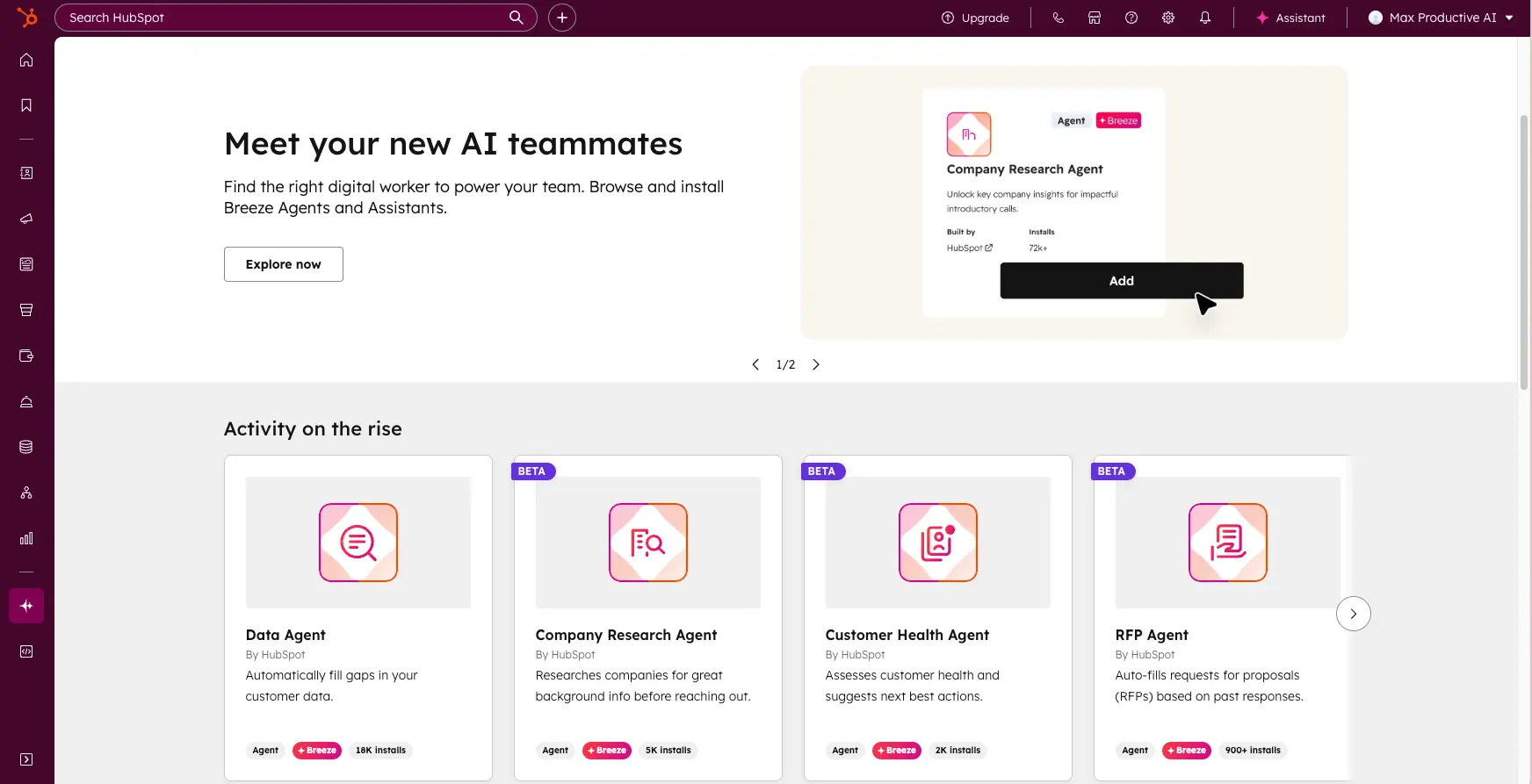
The Best All-in-One CRM
for Growing Businesses
HubSpot delivers the most comprehensive all-in-one CRM platform available. The 2026 Breeze AI suite—including Customer Agent that resolves 50% of support tickets automatically—represents genuine innovation. While pricing can escalate at scale, the generous free tier and exceptional ease of use make it ideal for SMB-to-mid-market businesses.
✓ What We Love
- Unified marketing, sales, service platform
- Revolutionary Breeze AI agents (2026)
- Generous free tier—unlimited contacts
- Exceptionally intuitive interface
! Could Be Better
- Pricing jumps significantly at Professional tier
- Starter plan lacks A/B testing
- Less customizable than Salesforce
See HubSpot in Action
Real screenshots showcasing HubSpot's key features and AI capabilities.
Breeze AI Agents
Meet your new AI teammates—agents that research, respond, and automate
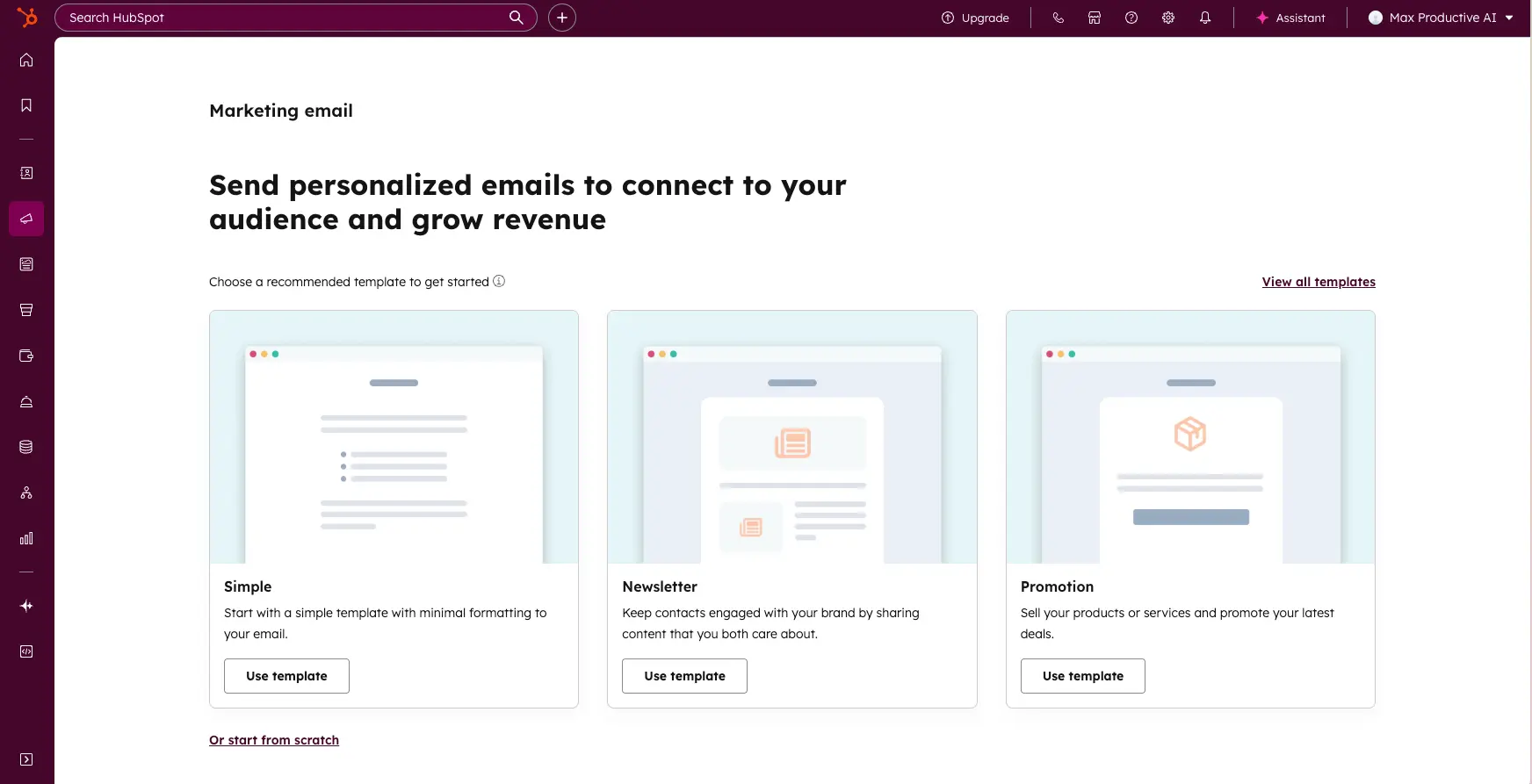
Email Marketing Templates
Create personalized campaigns with drag-and-drop simplicity
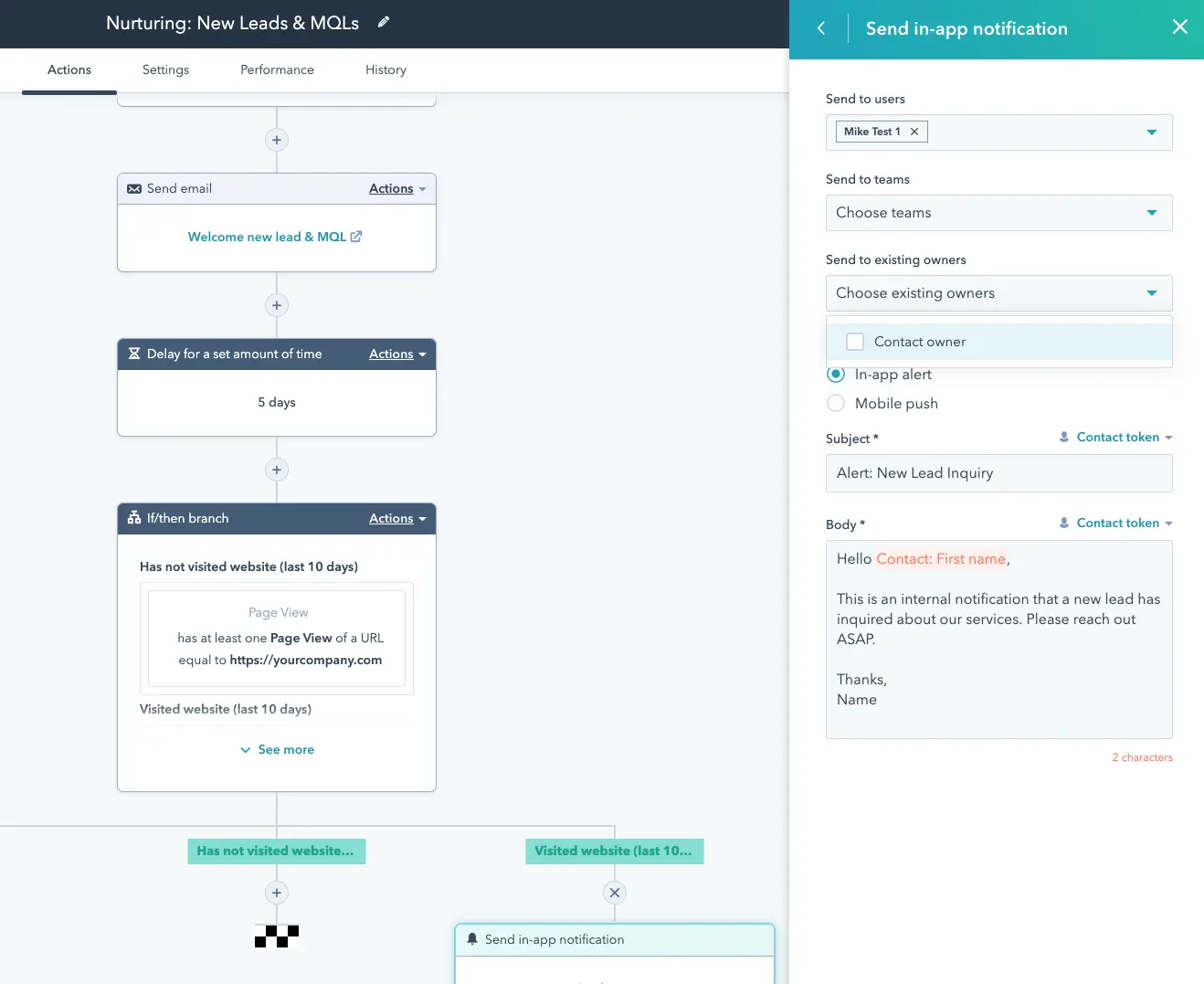
Workflow Automation
Visual workflow builder for lead nurturing and engagement
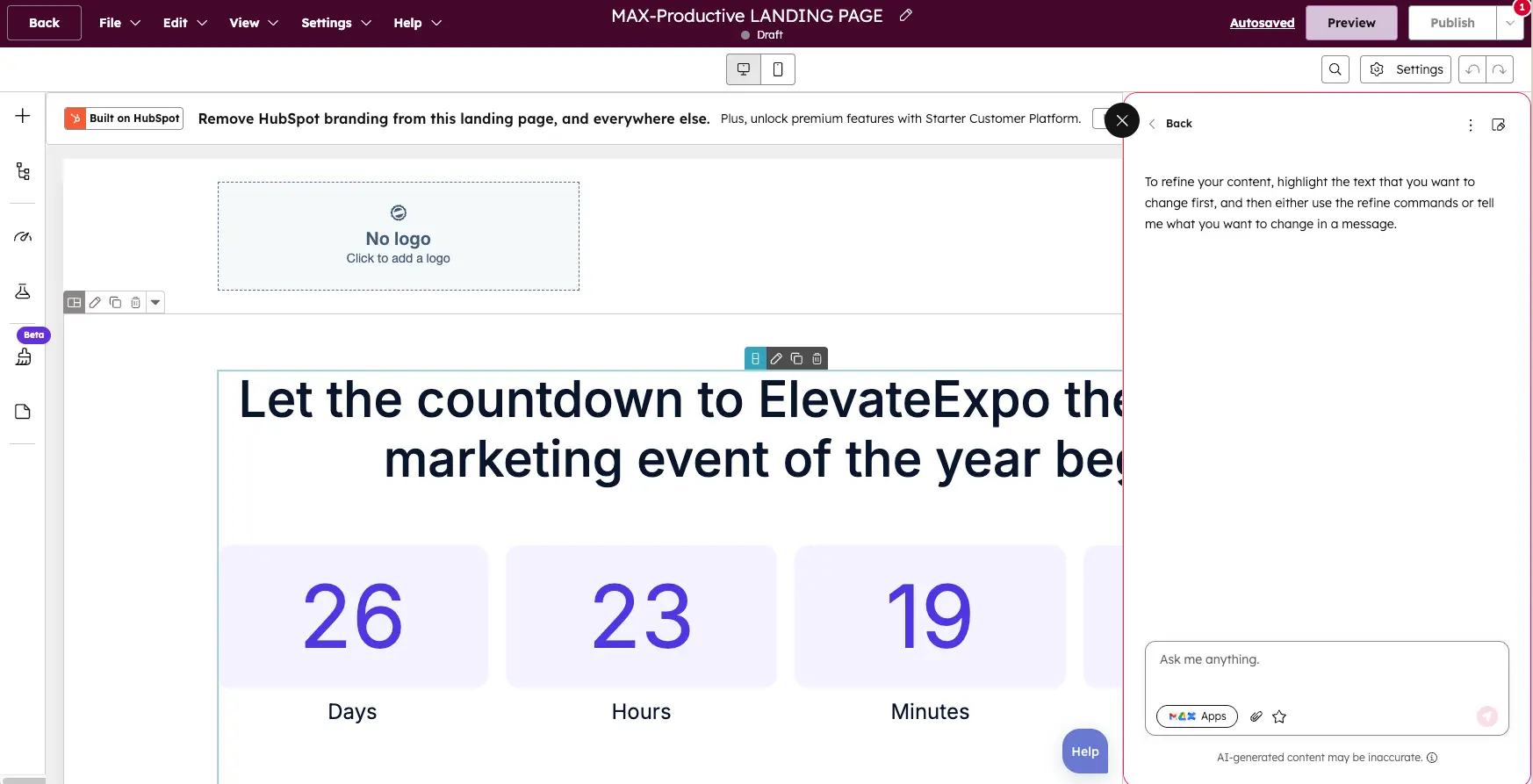
Landing Page Builder
Create high-converting pages with countdown timers and AI assistance
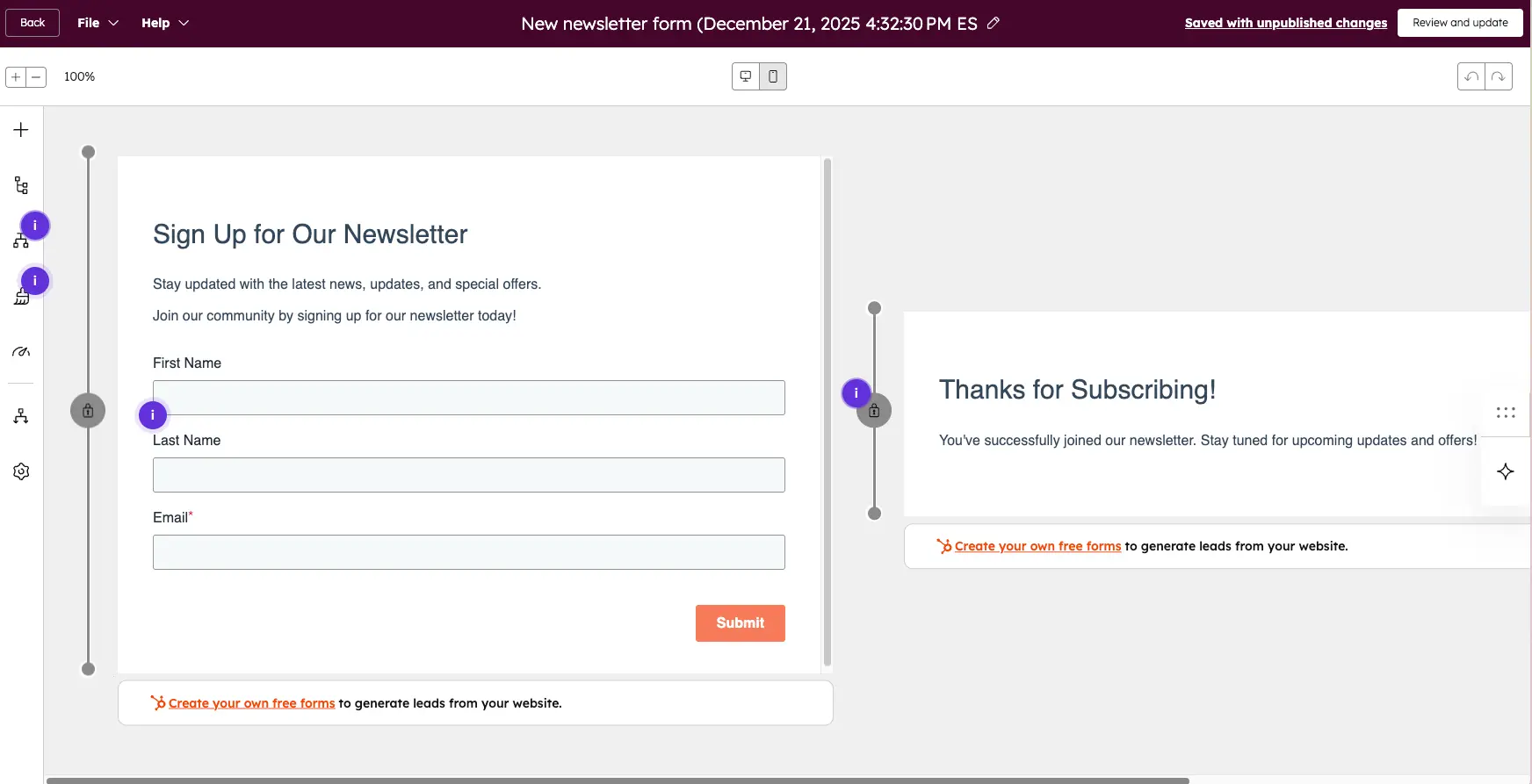
Form Builder
Capture leads with customizable forms and thank-you pages
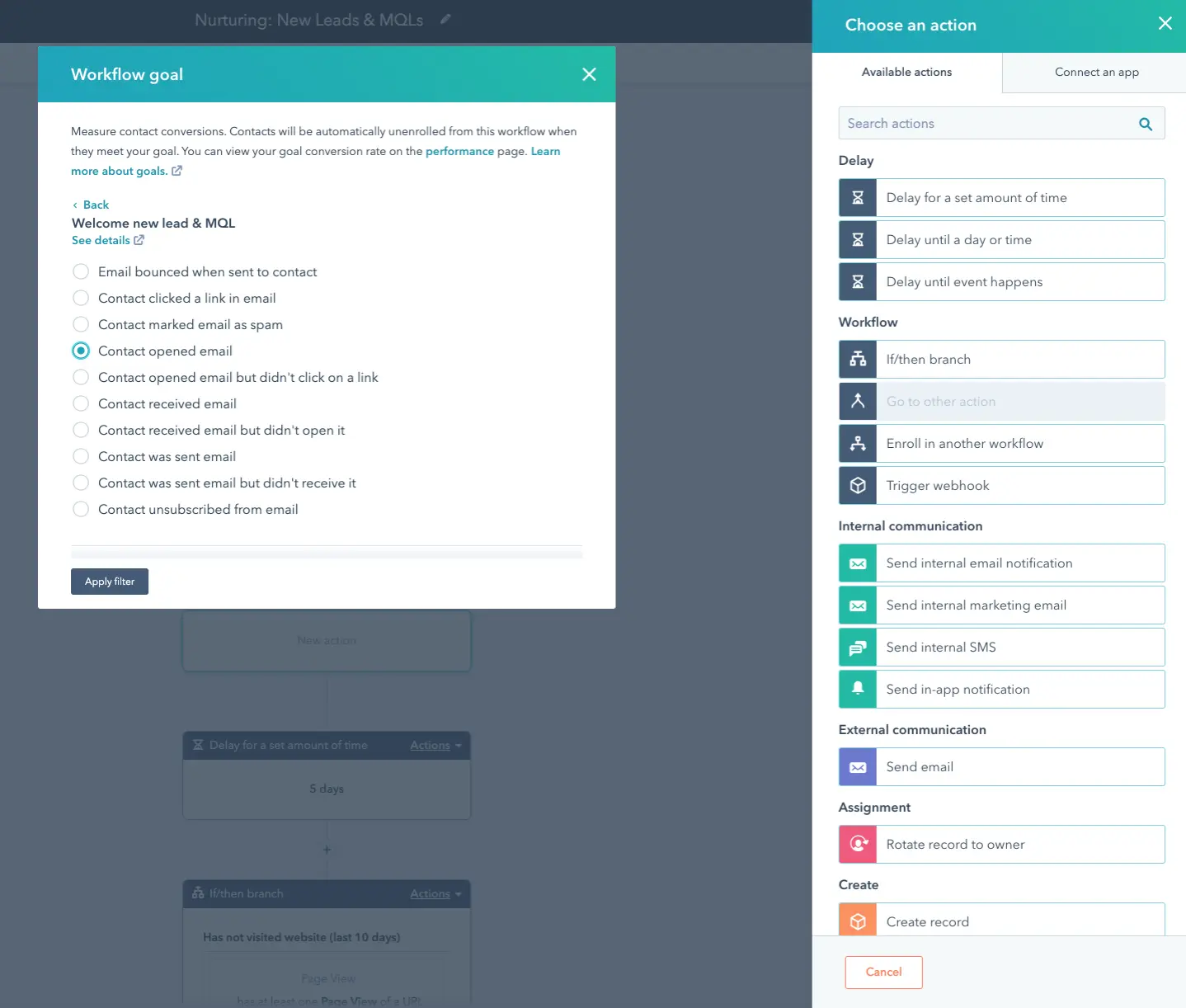
Workflow Goal Settings
Measure conversions with engagement-based goals and triggers
Ready to experience these features yourself?
Get Started Free →Free forever • No credit card requiredHow HubSpot Works
Create Your Free Account
Sign up in minutes with just your email. No credit card required. Get instant access to the free CRM with unlimited contacts and users.
Connect Your Tools
Integrate with Gmail, Outlook, Slack, and 1,500+ other apps. HubSpot syncs your contacts, emails, and calendar automatically.
Import Your Data
Upload existing contacts via CSV or connect your current CRM. HubSpot analyzes your data and helps deduplicate records automatically.
Automate & Scale
Build workflows to nurture leads, score prospects with AI, and let Breeze agents handle repetitive tasks while you focus on closing deals.
All-in-One Platform
Unlike using separate tools for email, CRM, and support, HubSpot unifies everything. Marketing, sales, and service teams work from the same customer data—no more data silos.
Key Features
Free CRM
Unlimited contacts and users. Track deals, manage tasks, and log every interaction automatically.
Email Marketing
Drag-and-drop email builder with personalization tokens, A/B testing, and send-time optimization.
Marketing Automation
Visual workflow builder with if/then logic, delays, and multi-channel sequences for lead nurturing.
Breeze AI Agents
Customer Agent resolves 50% of tickets. Prospecting Agent researches accounts. Content Agent generates posts.
Sales Pipeline
Visual deal tracking with customizable stages, forecasting, and automatic activity logging.
Help Desk & Tickets
Ticketing system with routing, prioritization, and knowledge base for customer self-service.
Landing Pages & Forms
Drag-and-drop builders for high-converting pages. Embed forms anywhere to capture leads.
Analytics & Reporting
Custom dashboards, journey analytics, campaign ROI tracking, and revenue attribution.
HubSpot Pricing Plans
Start free, then scale with your business. All plans require annual commitment.
Free
Starter
Professional
Enterprise
Note: Prices are for Marketing Hub. Bundles available for Sales + Service hubs. Additional seats and marketing contacts incur extra costs.
Is HubSpot Worth It?
*Per support agent with Breeze Customer Agent. ROI increases significantly for high-volume teams.
Detailed Pros & Cons
✓ Pros
Marketing, sales, service, and CRM unified. No more juggling separate tools or dealing with data silos.
Breeze AI agents (2026) are genuinely useful—Customer Agent resolves 50% of tickets automatically.
Truly unlimited contacts and users on free plan. No artificial limits or time restrictions.
Intuitive interface suitable for non-technical users. Drag-and-drop builders require no coding.
1,500+ pre-built integrations including Salesforce, Slack, Zapier, Shopify, and more.
✗ Cons
Jump from Free/Starter to Professional is significant ($890/mo). Costs grow with team size and contacts.
No A/B testing, limited automation (10 actions), no advanced reporting on lower tiers.
Customization options more limited for enterprises with unique workflows or legacy processes.
Paid plans require annual billing. No month-to-month flexibility on most tiers.
While basics are easy, complex automation and workflows require training time.
HubSpot vs Alternatives
How does HubSpot compare to other CRM and marketing platforms?
| Feature | HubSpot | Salesforce | Zoho CRM | Pipedrive |
|---|---|---|---|---|
| Starting Price | Free | $25/user | $20/user | $14/user |
| Free Plan | ✓ Unlimited | ✗ None | ✓ 3 users | ✗ Trial only |
| Ease of Use | ★★★★★ | ★★☆☆☆ | ★★★☆☆ | ★★★★★ |
| Marketing Automation | ★★★★★ | ★★★☆☆ | ★★★★☆ | ★☆☆☆☆ |
| AI Features | ✓ Breeze Agents | ✓ Einstein | ✓ Zia | ✓ Basic AI |
| Best For | SMB All-in-One | Enterprise | Budget Teams | Sales-Only |
Which Platform Is Right For You?
HubSpot
Our Pick for SMBBest for: Growing businesses (10-500 employees) who need integrated marketing, sales, and service tools with exceptional ease of use. The generous free tier makes it easy to start, and Breeze AI provides cutting-edge automation.
Salesforce
EnterpriseBest for: Large enterprises (500+ employees) needing unlimited customization and complex workflow automation. Requires dedicated admin team and longer implementation.

Zoho CRM
Budget-FriendlyBest for: Cost-conscious teams who want extensive features at 70% lower cost than HubSpot. Steeper learning curve but excellent value.

Pipedrive
Best for: Sales-focused teams who want the best visual pipeline management without marketing or service features. 65% cheaper than HubSpot Professional.

Monday CRM
Best for: Project-centric teams and agencies who need visual flexibility (Kanban, Gantt, timeline views) combined with basic CRM functionality.

ActiveCampaign
Best for: Email-heavy businesses prioritizing deliverability (93.4% vs HubSpot's 79.8%) and advanced email automation at lower cost.

Brevo
Best for: Businesses needing affordable email marketing with SMS capabilities and basic CRM features. Great for e-commerce.

Unbounce
Best for: Teams focused specifically on landing page optimization and conversion rate testing. More specialized than HubSpot's page builder.
Frequently Asked Questions
Should You Use HubSpot?
HubSpot delivers the most comprehensive all-in-one CRM platform for growing businesses. The 2026 Breeze AI suite provides genuine competitive advantage—Customer Agent alone can save support teams hours daily. Combined with exceptional ease of use, integrated marketing automation, and a truly generous free tier, it's hard to beat for SMB-to-mid-market companies.
The main consideration is pricing: costs can increase significantly as you scale beyond the free tier. For budget-conscious teams, alternatives like Zoho offer 70% savings. For sales-only teams, Pipedrive is more focused and affordable. But for businesses wanting everything unified—marketing, sales, service—HubSpot remains the gold standard.
Our Recommendation
Start with the free CRM today. Use it for 3-6 months to validate fit before committing to paid tiers. When you're ready for automation, Professional tier provides the best value for growing teams.
Ready to Grow Better with HubSpot?
Join 200,000+ businesses using HubSpot's all-in-one CRM platform