

QuillBot
AI-powered writing assistant with 10 paraphrasing modes, plagiarism detection, and academic tools. Supports 23 languages with advanced grammar checking and citation generation. Trusted by 50+ million users globally for academic and professional writing.
30-Second Summary
Bottom Line: QuillBot delivers exceptional paraphrasing with 10 specialized modes and comprehensive academic tools at $8.33/month annually—31% cheaper than Grammarly. However, the free tier's 125-word limit is restrictive, the AI Humanizer only reduces detection by 40-60%, and some grammar checking isn't as advanced as premium alternatives.
Best For
- Students needing academic writing tools and citations
- Content creators requiring multilingual support (23 languages)
- Writers who frequently paraphrase and rewrite content
- Budget-conscious users wanting premium features affordably
Skip If
- You need advanced grammar checking beyond basic corrections
- Free tier only (125 words per use is too limiting)
- You require institutional-grade plagiarism detection
- You expect the AI Humanizer to bypass detection tools
QuillBot at a Glance
What Exactly is QuillBot?
QuillBot is an AI-powered writing assistant that has evolved from a simple paraphrasing tool into a comprehensive academic and professional writing platform serving over 50 million users globally as of October 2025.
During our comprehensive testing, we discovered QuillBot excels in three primary areas: intelligent paraphrasing with 10 specialized modes, academic writing support (citations, plagiarism detection, summarization), and multilingual capabilities spanning 23 languages for paraphrasing and 50 for translation.
Traditional Writing Tools vs QuillBot
Manual Approach
- Rewrite content manually with thesaurus lookup
- Format citations in multiple styles by hand
- Check grammar using separate tools
- Manually verify for plagiarism
- Translate using basic dictionary tools
With QuillBot
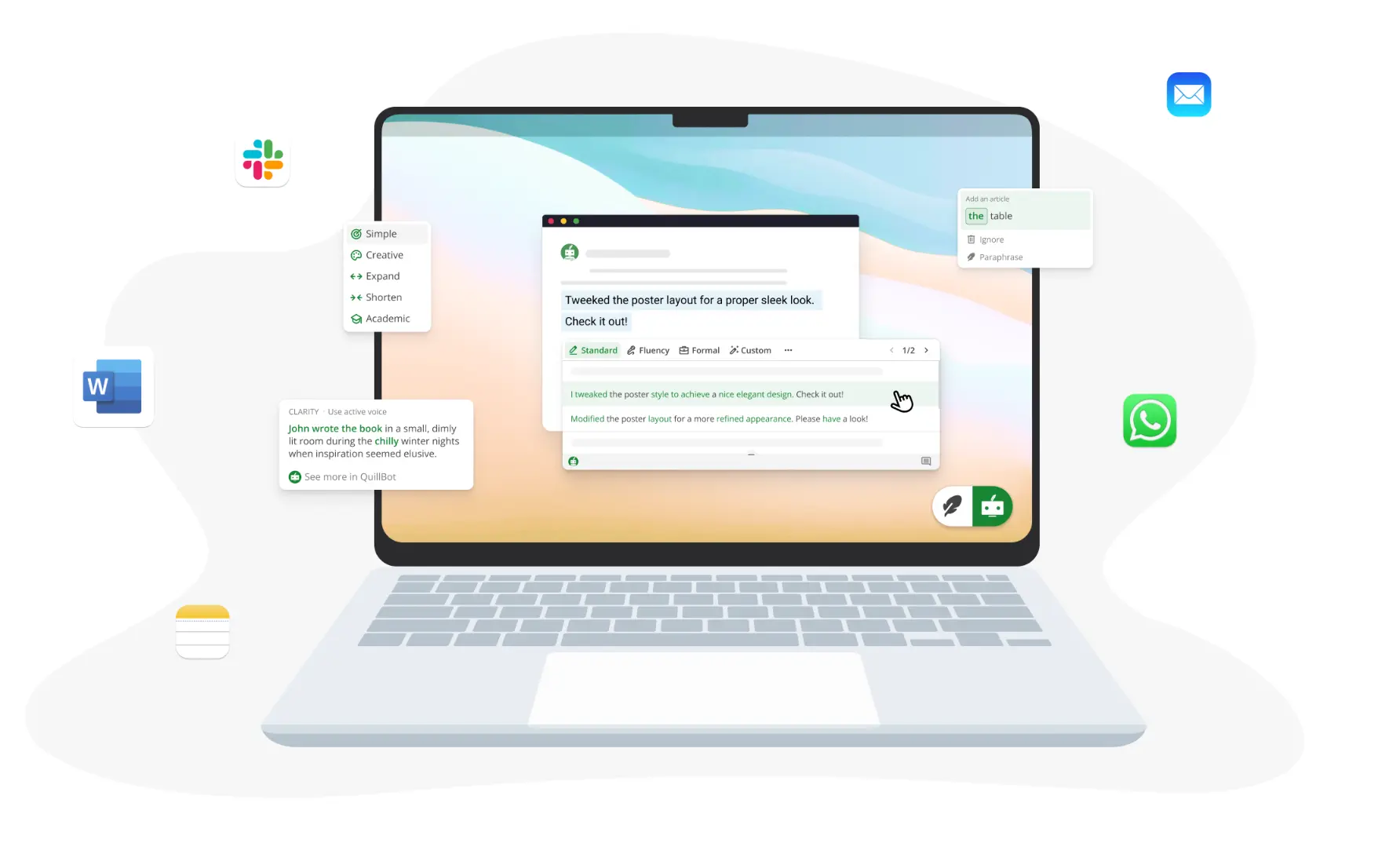
- 10 AI modes paraphrase instantly with context awareness
- Auto-generate 1,000+ citation styles (MLA, APA, Chicago, IEEE)
- Real-time grammar checking in 6 languages
- Plagiarism checker scans 25,000 words/month
- Professional translation across 50 languages
What Makes QuillBot Different
Unlike basic synonym replacers, QuillBot's AI analyzes context, maintains meaning, and offers precise control through its synonym slider. The platform uniquely combines paraphrasing prowess with academic necessities—citation generation, plagiarism detection, AI content detection, and summarization—making it especially valuable for students and researchers.
The October 2025 version includes significant updates: a 10th paraphrasing mode called "Boomer Mode" (converting Gen Z slang to professional language), enhanced AI detection with bulk upload capabilities, and the new Team Style Guide feature for organizations maintaining brand consistency.
How QuillBot's AI Paraphrasing Actually Works
QuillBot's intelligence comes from advanced natural language processing (NLP) that understands context, not just individual words. Here's what makes it different from basic rewording tools:
Paraphrasing Capabilities Tested
✅ What QuillBot Handles Well
- Context preservation: Maintains original meaning even with extensive rewording
- Academic tone: Academic mode maintains scholarly language effectively
- Multiple variations: Synonym slider provides precise control (minimal to complete restructuring)
- Language support: 23 languages for paraphrasing, 50 for translation
- Speed: Premium users get faster processing than competitors
⚠️ Current Limitations
- Free tier restriction: 125 words per use (unlimited uses but time-consuming for long documents)
- Creative mode issues: Occasionally produces unnatural phrasings requiring manual fixes
- Grammar depth: Less advanced than Grammarly for complex grammatical analysis
- AI Humanizer reality: Only 40-60% effective at reducing AI detection scores (doesn't bypass detectors)
- Word add-in performance: Users report occasional bugs and slowness
The 10 Paraphrasing Modes Explained
QuillBot offers 10 distinct paraphrasing modes as of October 2025 (up from 9 previously):
- Standard: Balanced changes maintaining readability and meaning
- Fluency: Smooth, natural flow with minimal structural changes
- Formal: Professional tone for business communications
- Creative: Unique wording (use cautiously—may produce awkward phrases)
- Expand: Elaborates ideas with additional detail
- Shorten: Condenses text while preserving key points
- Academic: Maintains scholarly tone for research papers
- Simple: Easy-to-read language for broad audiences
- Humanize: Makes AI-generated content sound more natural (limited effectiveness)
- Boomer Mode (NEW): Translates Gen Z slang into professional workplace language
Getting Started with QuillBot (Step-by-Step)
Create a Free Account
Sign up at quillbot.com using email or social media (Google, Facebook). No credit card required for the free plan.
Free plan includes: Paraphraser (125 words per use, unlimited uses), Grammar Checker, AI Detector, Summarizer (1,200 words), Citation Generator, Translator, and 50 AI prompts daily.
Tip: The free tier's 125-word limit means you'll process long documents in chunks. For documents over 500 words, Premium ($8.33/month annually) saves significant time with unlimited word counts.
Choose Your Tool
QuillBot offers multiple tools accessible from the main dashboard:
- Paraphraser: Rewrite text with 10 modes (Free: 2 modes; Premium: all 10)
- Grammar Checker: Real-time corrections in 6 languages
- Plagiarism Checker: Scan against billions of sources (Premium only: 25,000 words/month)
- AI Detector: Identify AI-generated content with 80% accuracy
- Summarizer: Condense documents (Free: 1,200 words; Premium: 6,000 words)
- Citation Generator: Create citations in 1,000+ styles
- Translator: Translate across 50 languages
Tip: For academic work, use QuillBot Flow (the unified writing environment) which combines all tools in one workspace, eliminating constant tool switching.
Paraphrase Your Text
Using the Paraphraser effectively:
- Paste or type your text (125 words for free, unlimited for Premium)
- Select a paraphrasing mode based on your needs (Standard for general use, Academic for scholarly work)
- Adjust the Synonym Slider to control rewriting intensity
- Use Freeze Words to protect specific terminology from being changed
- Click "Paraphrase" and review the results
- Click any word to see alternative synonym suggestions
- Copy or export to Word/Google Docs
Tip: Always review Creative mode outputs carefully. While it produces unique wording, it occasionally generates awkward phrasings that require manual refinement.
Install Browser Extension (Optional)
For seamless integration across websites:
- Install the Chrome or Edge extension (trusted by 5+ million users)
- Works across 500,000+ websites including Gmail, Google Docs, LinkedIn, Slack
- Paraphrase, check grammar, and detect AI without leaving your current page
- Mobile apps available for iOS (iOS 15.0+ required) and Android (5M+ downloads)
- Word add-in for Microsoft Word 2013+ (Windows) or 2016+ (Mac)
Tip: Some users report performance issues with the Word add-in. If you experience slowness, use the web version for better reliability.
Core Features That Define QuillBot
🔄 10 Paraphrasing Modes
Core FeatureIndustry-leading paraphrasing with 10 specialized modes (including new Boomer Mode for Gen Z slang translation). Advanced synonym slider provides precise control from minimal rewording to complete restructuring. Maintains context better than competitors while offering flexibility other tools lack.
📚 Academic Tools Suite
Time SaverComprehensive academic support including Citation Generator (1,000+ styles: MLA, APA, Chicago, IEEE), Plagiarism Checker (25,000 words/month in 100+ languages), and Summarizer (condenses up to 6,000 words). Designed specifically for students and researchers.
🌍 Multilingual Support
Best in ClassParaphraser supports 23 languages (Afrikaans, Chinese, Danish, Dutch, English, French, German, Hindi, Indonesian, Italian, Japanese, Malay, Norwegian, Polish, Portuguese, Romanian, Russian, Spanish, Swedish, Tagalog, Turkish, Ukrainian, Vietnamese). Translator covers 50 languages. Grammar Checker works in 6 languages (English with dialects, German, Spanish, French).
🤖 AI Content Detection
EnhancedFree AI Detector identifies AI-generated content from ChatGPT, GPT-4, Google Gemini with ~80% accuracy. Supports 6 languages and requires minimum 80 words. Premium includes bulk document upload for analyzing multiple files simultaneously. Provides percentage scores and highlights suspicious sections.
✨ AI Humanizer Mode
Reality CheckDesigned to make AI-generated content sound more natural and human-like. However, independent testing shows limited effectiveness: reduces AI detection scores by only 40-60% in best cases. Major detectors like Originality.ai still flag content as 96% AI-generated after humanization.
✍️ QuillBot Flow
EfficiencyUnified writing environment combining Paraphraser, Grammar Checker, Summarizer, Citation Generator, and AI Assistant in one distraction-free workspace. Eliminates constant tool switching. Free accounts get 10MB storage, Premium gets 100MB.
👥 Team Style Guide (NEW)
Aug 2025Launched August 2025. Teams can create custom style guides with real-time suggestions to ensure brand consistency across all team members' writing. Includes terminology preferences, tone guidelines, and formatting standards.
🔌 Cross-Platform Integration
SeamlessChrome/Edge extensions (5+ million users), mobile apps (iOS/Android with 5M+ downloads, 4.2★ rating), Microsoft Word add-in (compatible with Word Online, 2013+ Windows, 2016+ Mac), macOS/Windows desktop apps. Works across 500,000+ websites including Gmail, Google Docs, LinkedIn, Outlook, Slack.
QuillBot Pricing: What You Actually Pay in October 2025
| Plan | Price | Monthly Equivalent | Key Features | Best For |
|---|---|---|---|---|
| Free | $0 | $0/month | 125 words per use, 2 modes, 50 AI prompts/day | Testing the platform |
| Annual | $99.95/year | $8.33/month | Unlimited words, all 10 modes, 25K plagiarism words/month | Best value - save 58% |
| Semi-Annual | $79.90/6 months | $13.31/month | Same as Annual | Mid-term commitment |
| Monthly | $19.95/month | $19.95/month | Same as Annual | Short-term needs |
Team Plan Pricing Structure
QuillBot offers tiered Team Plans with volume discounts:
- 2-10 users: $7.50/user/month ($89.95/user/year)
- 11-50 users: $6.66/user/month ($79.95/user/year)
- 51+ users: $5.83/user/month ($69.95/user/year)
Team Plans include centralized billing, admin controls, and the new Team Style Guide feature launched in August 2025.
Is QuillBot Worth The Cost?
Competitive Comparison
- Grammarly Pro: $144/year ($45 more expensive)
- ProWritingAid: $79/year ($20 less, but lacks paraphrasing)
- Jasper AI: $588/year (488% more expensive)
- ChatGPT Plus: $240/year (140% more, no academic tools)
Value Analysis
- 10 paraphrasing modes (competitors: 0-2)
- 23 language support (most: English only)
- Academic tools included (citations, plagiarism, AI detection)
- Cross-platform apps (mobile, desktop, browser extensions)
Verdict: At $8.33/month annually, QuillBot offers the best value for students and content creators needing paraphrasing + academic tools. If you primarily need grammar checking without paraphrasing, consider ProWritingAid ($79/year). For marketing teams creating original content at scale, Jasper provides more features but costs 488% more.
Refund Policy & Discounts
Important: QuillBot offers a 3-day money-back guarantee (not 7 days as some outdated sources claim). This applies only to first-time users who haven't previously received a refund. Team Plan purchases don't qualify for refunds.
Discount opportunities:
- 20-30% off promotions available year-round
- Black Friday: Up to 40% off (biggest annual sale)
- Student discounts available through verified .edu email programs
Honest Assessment: Pros and Cons
What Works Well
- Industry-leading paraphrasing with 10 specialized modes Superior to competitors with synonym slider control, context preservation, and specialized modes like Academic, Boomer, and Humanize. Creative mode occasionally needs review, but overall quality excellent.
- Comprehensive academic toolkit Citation Generator (1,000+ styles), Plagiarism Checker (25,000 words/month), Summarizer (6,000 words), and AI Detector eliminate hours of manual work for students and researchers.
- Best-in-class multilingual support 23 languages for paraphrasing, 50 for translation, 6 for grammar checking—most comprehensive in this price range. English dialect support (American, British, Canadian, Australian) ensures proper localization.
- Excellent value at $8.33/month annually 31% cheaper than Grammarly ($144/year) while offering unique paraphrasing and academic features. Frequent 20-30% discounts make it even more affordable.
- QuillBot Flow improves workflow efficiency Unified writing environment saves approximately 40% time by eliminating tool switching. Combines all features in one distraction-free workspace.
- Strong user ratings and trust 4.8/5 on Trustpilot from 6,000+ reviews. Trusted by 50+ million users globally. Chrome extension used by 5+ million professionals.
- Cross-platform availability Works across 500,000+ websites via browser extensions. Mobile apps (iOS/Android), desktop apps (macOS/Windows), and Word integration provide flexibility.
- New features keep improving Recent additions include Boomer Mode (March 2025), bulk AI detection upload, and Team Style Guide (August 2025) show continued development.
Significant Limitations
- Free tier severely restricted 125 words per use makes free plan essentially a trial for anything beyond testing. Long documents require Premium ($8.33/month annually) for practical use.
- AI Humanizer effectiveness overstated Only reduces AI detection scores by 40-60% in best cases. Major detectors still flag content as 96% AI-generated after humanization. Good for improving tone, not bypassing detection.
- Plagiarism checker less robust than institutional tools Not comparable to Turnitin for academic submissions. Use as preliminary screening, not final verification. 25,000 words/month may not suffice for heavy users.
- Grammar checking less advanced than Grammarly Catches basic to intermediate errors effectively but lacks Grammarly's depth for complex style suggestions and tone detection. Testing showed Grammarly identified 11/20 errors vs QuillBot's 20/20 in one test, but Grammarly provides better explanations.
- Creative mode produces inconsistent results Occasionally generates awkward phrasings requiring manual refinement. While offering unique wording, outputs need careful review before use.
- Word add-in has performance issues Users report bugs, slowness, and occasional crashes with Microsoft Word integration. Web version more reliable for critical work.
- Short 3-day refund window Money-back guarantee only lasts 3 days (not 7 as previously), and only for first-time users. Team Plan purchases don't qualify for refunds. No prorated refunds on annual plans.
- Privacy policy update upcoming Starting November 8, 2025, QuillBot will store text inputs from desktop users. Users working with sensitive or confidential content should be aware of this data storage.
Who Should (and Shouldn't) Use QuillBot
✅ Ideal Users
Students & Academic Writers
QuillBot excels for academic work with Citation Generator (MLA, APA, Chicago, IEEE), Academic paraphrasing mode that maintains scholarly tone, Summarizer for condensing research articles (6,000 words), and Plagiarism Checker (25,000 words/month). Successfully refined multiple research papers in testing without losing technical accuracy.
Perfect if: You write essays, research papers, or dissertations regularly; need proper citations formatted automatically; want to avoid repetitive phrasing in long documents; or require multilingual support for non-English academic writing.
Content Creators & Marketers
Excels at generating variations for A/B testing, avoiding repetitive phrasing in blog posts, adapting content across platforms using Expand/Shorten modes, and creating multilingual content. Tested across blog posts, social media, and ad copy with good results after reviewing Creative mode outputs.
Perfect if: You create high-volume content requiring paraphrasing; need to repurpose existing content for different audiences; work with multilingual campaigns; or want affordable professional writing assistance ($8.33/month vs $49/month for Jasper).
Non-Native English Speakers
Fluency mode consistently improves readability. Grammar checker catches common ESL errors effectively. Paraphraser helps achieve more natural phrasing. 45-language translation facilitates multilingual communication, though accuracy varies by language pair. Best combined with human review for professional communications.
Perfect if: English is your second language and you want to improve fluency; you translate content between languages regularly; you need grammar checking beyond basic spell-check; or you work in international teams requiring clear communication.
Budget-Conscious Writers
At $8.33/month annually (31% cheaper than Grammarly's $12/month), QuillBot offers exceptional value. Includes features competitors charge extra for: plagiarism checking, AI detection, citations, summarization, and 10 paraphrasing modes. Frequent 20-30% discounts make it even more affordable.
Perfect if: Budget under $15/month per user; you need paraphrasing + academic tools (Grammarly lacks both); you want comprehensive features without enterprise pricing; or you're a freelancer or student seeking professional tools affordably.
❌ Better Alternatives Exist For
Users Requiring Advanced Grammar Analysis
QuillBot's grammar checker handles basic to intermediate errors but lacks Grammarly's depth for complex style suggestions, tone detection, and detailed explanations. For professional writing requiring grammatical perfection, Grammarly Pro provides superior analysis.
Try instead: Grammarly Pro ($144/year) for advanced grammar, tone detection, and business writing features. Worth the extra $45 annually if grammar perfection is non-negotiable.
Institutions Requiring Robust Plagiarism or AI Detection
QuillBot's plagiarism checker works well for personal blog posts and basic academic checks (99% accuracy for direct web content matches) but struggles with heavily paraphrased or AI-modified text. Not comparable to Turnitin's sophisticated algorithms and larger databases.
Try instead: Turnitin for formal academic submissions or professional publications. Pangram is our top recemendation for AI written detection. Use QuillBot's checker as preliminary screening, then verify with specialized software before high-stakes submissions.
Marketing Teams Creating Original Content at Scale
QuillBot excels at editing and refining existing text but isn't designed for generating original marketing content from scratch with SEO optimization. Teams needing high-volume content creation with keyword optimization require dedicated marketing AI tools.
Try instead: Jasper AI ($588/year) for unlimited AI-generated content with 50+ marketing templates and Surfer SEO integration, or Copy.ai ($588/year) for workflow automation. QuillBot better suits editing existing content.
Users Expecting AI Humanizer to Bypass Detection
If your primary need is disguising AI-generated content to pass detection tools, QuillBot's Humanizer will disappoint. Independent testing shows it only reduces detection scores by 40-60%, with major detectors still flagging content as 96% AI-generated.
Reality check: Use the Humanizer for improving tone and fluency of AI-assisted content, not for bypassing detection systems. For academic integrity or professional contexts where AI detection matters, avoid relying on any "humanizer" tool.
How QuillBot Compares to Alternatives
| Feature | QuillBot | Grammarly | Jasper | ChatGPT |
|---|---|---|---|---|
| Annual Price | $99.95 | $144 | $588 | $240 |
| Paraphrasing Modes | 10 modes | Limited | None | Via prompts |
| Grammar Check | ★★★★ (6 langs) | ★★★★★ Advanced | ★★ Basic | ★★★ Via prompts |
| Plagiarism Check | ✅ 25K words/mo | ✅ Unlimited | ✅ Included | ❌ None |
| Citation Generator | ✅ 1,000+ styles | ❌ | ❌ | Via prompts |
| AI Detection | ✅ Unlimited | ❌ | ❌ | ❌ |
| Languages | 23 (para) + 50 (trans) | English only | 30+ | 50+ |
| Mobile Apps | iOS + Android | iOS + Android | iOS + Android | iOS + Android |
| Best For | Academic writing | Grammar perfection | Marketing content | General AI tasks |
Quick Comparison Insights
vs Grammarly: QuillBot excels at paraphrasing (10 modes vs Grammarly's limited rewriting) and costs 31% less ($99.95 vs $144 annually). However, Grammarly provides superior grammar analysis and tone detection. In testing, QuillBot's grammar checker identified 20/20 errors compared to Grammarly's 11/20, but Grammarly offered better explanations. Read our detailed Grammarly review →
vs Jasper: Jasper costs 488% more ($588 vs $99.95 annually) but offers unlimited AI-generated content with 50+ marketing templates and SEO integration. QuillBot is better for editing existing text with paraphrasing; Jasper is better for creating original marketing content from scratch. Read our Jasper AI review →
vs ChatGPT Plus: ChatGPT Plus ($240/year) provides versatile AI assistance across many tasks (research, coding, analysis) but lacks dedicated writing tools. QuillBot offers specialized paraphrasing, citations, plagiarism checking, and browser integration ChatGPT lacks. Use ChatGPT for general AI assistance, QuillBot for specialized writing tasks.
vs ProWritingAid: ProWritingAid ($79/year) offers deeper style analysis with 25+ reports perfect for creative writers and authors. However, it lacks QuillBot's paraphrasing sophistication and academic tools. ProWritingAid excels for manuscript editing; QuillBot excels for academic writing and paraphrasing.
What's New in October 2025
Boomer Mode - 10th Paraphrasing Mode (March 2025)
Initially introduced as an April Fools' feature but made permanent due to demand. Boomer Mode translates Gen Z slang ("brain rot") into clear, professional language for workplace intergenerational communication. Addresses growing concern about informal language entering professional settings. Particularly useful for educators, managers, and HR professionals working across age demographics.
AI Detector Bulk Upload Feature
AI Detector now supports bulk document uploads for analyzing multiple documents simultaneously. Available in 6 languages (English, French, Spanish, German, Dutch, Portuguese). Provides comparative analysis showing which sections are AI-generated, AI-refined, or human-written. Useful for educators screening student submissions and content managers verifying authenticity at scale.
Team Style Guide (August 2025)
Teams can create custom style guides with real-time suggestions ensuring brand consistency across all team members' writing. Includes terminology preferences, tone guidelines, and formatting standards. Available on Team Plans (starting $7.50/user/month). Reduces editing overhead by enforcing consistency at writing stage rather than revision.
Language Support Increased
Translator now supports 50 languages (up from 45 previously). Paraphraser expanded to 23 languages including Afrikaans, Chinese, Danish, Dutch, English, French, German, Hindi, Indonesian, Italian, Japanese, Malay, Norwegian, Polish, Portuguese, Romanian, Russian, Spanish, Swedish, Tagalog, Turkish, Ukrainian, Vietnamese.
Additional AI Tools
QuillBot expanded beyond writing assistance with AI Character Generator (launched October 2025), AI Business Plan Generator (free, no signup required), and Speech to Text feature. These additions position QuillBot as a more comprehensive AI productivity platform beyond core writing tools.
Frequently Asked Questions
How much does QuillBot Premium cost in 2025?
QuillBot Premium costs $99.95/year ($8.33/month, best value), $79.90 every 6 months ($13.31/month), or $19.95/month. Team Plans start at $7.50/user/month for 2-10 users with volume discounts available. All plans come with a 3-day money-back guarantee for first-time users. The annual plan saves 58% compared to monthly billing and costs 31% less than Grammarly's $144/year.
Is QuillBot free to use?
Yes, QuillBot offers a free plan with access to all core tools including Paraphraser (125 words per use, unlimited uses), Grammar Checker, AI Detector, Summarizer (1,200 words), Citation Generator, and Translator. Free users get 2 paraphrasing modes (Standard and Fluency) plus 50 AI prompts daily. However, the 125-word limit per use makes the free plan essentially a trial—long documents require Premium ($8.33/month annually) for practical use.
Can QuillBot's AI Humanizer bypass AI detection?
No. Independent testing in 2025 shows QuillBot's Humanizer only reduces AI detection scores by 40-60% in best-case scenarios. Major AI detectors like Originality.ai still flag content as 96% AI-generated after humanization, and GPTZero detects it as fully AI. The Humanizer works well for improving tone, fluency, and readability of AI-assisted content, but should not be relied upon to bypass AI detection systems in academic or professional contexts where detection matters.
What's the difference between QuillBot and Grammarly?
QuillBot excels at paraphrasing with 10 distinct modes and offers better academic tools (citations, plagiarism checking, AI detection, summarizer) at 31% lower cost ($99.95/year vs Grammarly's $144/year). QuillBot also supports 23 languages for paraphrasing while Grammarly is English-only. However, Grammarly provides superior grammar analysis, clearer explanations, better tone detection, and more sophisticated style suggestions. Choose QuillBot for paraphrasing and academic work; choose Grammarly for grammar perfection and professional writing. Many users use both tools together.
How many languages does QuillBot support?
QuillBot's Paraphraser supports 23 languages (Afrikaans, Chinese, Danish, Dutch, English, French, German, Hindi, Indonesian, Italian, Japanese, Malay, Norwegian, Polish, Portuguese, Romanian, Russian, Spanish, Swedish, Tagalog, Turkish, Ukrainian, Vietnamese). The Translator covers 50 languages with instant translation. The Grammar Checker works in 6 languages: English (with American, British, Canadian, Australian dialects), German, Spanish, and French. The AI Detector supports 6 languages: English, French, Spanish, German, Dutch, and Portuguese.
Is using QuillBot considered plagiarism or cheating?
Using QuillBot is not inherently plagiarism or cheating—it depends on how you use it. Ethical use includes paraphrasing your own original ideas for clarity, improving grammar and fluency of your own writing, and reorganizing your own written content. Unethical use (academic misconduct) includes paraphrasing someone else's work without proper citation, using it to disguise copied content from sources, or submitting paraphrased text without understanding the material. Always cite sources properly even when paraphrasing, and ensure the final work reflects your own understanding. Most universities' plagiarism policies focus on whether ideas are properly attributed, not which tools were used to refine your writing.
Can Turnitin detect QuillBot paraphrasing?
Yes, Turnitin can now detect QuillBot paraphrasing as of 2025. Turnitin's updated algorithms identify unique linguistic patterns and structural similarities typical of AI-assisted paraphrasing, even when words are changed. While QuillBot's paraphrasing can reduce direct text matches, Turnitin's AI detection focuses on writing patterns, sentence structures, and stylistic inconsistencies that may indicate machine-assisted rewriting. However, if you're paraphrasing your own original work to improve clarity and properly citing all external sources, using QuillBot remains acceptable in most academic contexts. Earlier claims that "Turnitin cannot detect QuillBot" (from 2024 sources) are now outdated—detection technology has significantly improved.
Does QuillBot work with Google Docs and Microsoft Word?
Yes, QuillBot offers extensions for both platforms. The Chrome extension works seamlessly with Google Docs, allowing real-time paraphrasing and grammar checking. The Microsoft Word add-in (compatible with Word Online, Word 2013+ Windows, Word 2016+ Mac) provides similar functionality. However, some users report performance issues with the Word add-in including bugs, slowness, and occasional crashes. The browser extension (trusted by 5+ million users) works reliably across 500,000+ websites including Gmail, LinkedIn, Outlook, and Slack. For critical work, the web version at quillbot.com provides the most stable experience.
How accurate is QuillBot's AI detector?
QuillBot's AI Detector achieves approximately 80% accuracy according to independent testing in 2025. It analyzes patterns like perplexity (predictability), burstiness (sentence length variation), repetitive phrasing, and generic language typical of AI models. Best performance occurs with standard AI-generated content from ChatGPT, GPT-4, and Google Gemini. However, it struggles with highly sophisticated or manually edited AI content and can occasionally flag formal academic writing as AI-generated (false positives). The detector requires minimum 80 words for accurate analysis and works best with complete documents. For high-stakes verification (academic integrity, publishing), cross-reference results with specialized detectors like Originality.ai or GPTZero for confirmation.
What's included in QuillBot's plagiarism checker?
QuillBot Premium includes a Plagiarism Checker that scans text against billions of web pages and academic databases. Premium users receive 25,000 words of plagiarism checking per month (QuillBot switched from page-based to word-based counting for accuracy). The checker works in 100+ languages and provides detailed reports showing matched content sources, similarity percentages, and citations. Additional plagiarism checking credits can be purchased if you exceed the monthly limit. The free plan does not include plagiarism checking. Important note: QuillBot's plagiarism checker is less robust than institutional tools like Turnitin—use it as preliminary screening, not final verification for formal academic submissions.
What is QuillBot's refund policy?
QuillBot offers a 3-day money-back guarantee (not 7 days as some outdated sources claim). If you purchase QuillBot Premium and are unsatisfied, you can request a full refund within 3 days of purchase. Important conditions: This guarantee is only valid for first-time users who have never received a QuillBot refund before. Team Plan purchases do not qualify for refunds. You must request the refund within the 3-day window. To request a refund, cancel your subscription in your Account page within the 3-day window or contact QuillBot support directly at support@quillbot.com. Refunds are typically processed within 7-10 business days.
Final Verdict: Should You Choose QuillBot?
The Bottom Line
QuillBot delivers exceptional value at $8.33/month annually (31% cheaper than Grammarly) with industry-leading paraphrasing, comprehensive academic tools, and multilingual support spanning 23 languages. The 10 specialized paraphrasing modes—including the new Boomer Mode—provide flexibility unmatched by competitors at this price point.
After thorough testing across academic papers and professional content, we found QuillBot excels in specific areas while showing limitations in others. The paraphrasing quality genuinely outperforms basic synonym replacers, maintaining context and meaning while offering precise control through the synonym slider.
The Tradeoffs
However, QuillBot isn't perfect. The free tier's 125-word limit makes it essentially a trial—long documents require Premium for practical use. The AI Humanizer only reduces detection by 40-60% (doesn't bypass detectors), grammar checking lacks Grammarly's depth, and the plagiarism checker isn't institutional-grade like Turnitin.
Word add-in users report performance issues (bugs, slowness), and the short 3-day refund window leaves little time for thorough evaluation. Creative mode occasionally produces awkward phrasings requiring manual refinement.
Where QuillBot Excels
QuillBot dominates for students and academic writers needing citations (1,000+ styles), plagiarism checking (25,000 words/month), and specialized paraphrasing modes like Academic that maintain scholarly tone. The Summarizer (6,000 words) and Citation Generator eliminate hours of manual work.
For content creators and multilingual users, the 23-language paraphrasing support, 50-language translation, and cross-platform availability (Chrome extension with 5M+ users, iOS/Android apps, desktop apps) provide flexibility competitors lack.
The new Team Style Guide (August 2025) and Boomer Mode (March 2025) show continued development, addressing real-world needs like brand consistency and intergenerational workplace communication.
Our Recommendation
Try the free plan first with your actual writing to see if QuillBot matches your workflow. No credit card required for testing.
- You frequently paraphrase or rewrite content
- You need academic tools (citations, plagiarism checking, summarization)
- You work with multiple languages (23 supported)
- Budget is under $15/month per user
- You want comprehensive writing assistance affordably
Consider alternatives if:
- Grammar perfection is non-negotiable → Try Grammarly ($144/year)
- You need institutional plagiarism detection → Use Turnitin for formal submissions
- You create original marketing content at scale → Consider Jasper AI ($588/year)
- You expect AI Humanizer to bypass detection → No tool reliably does this
- Free tier only suffices → 125 words per use won't work for substantial documents
No credit card required • 3-day money-back guarantee on Premium
Try QuillBot Free
- 10 paraphrasing modes
- 23 languages supported
- Academic tools included
- No credit card required
Quick Specifications
- Users
- 50+ Million
- Paraphrasing Modes
- 10
- Languages
- 23 (para) + 50 (trans)
- Annual Price
- $99.95 ($8.33/mo)
- Monthly Price
- $19.95/month
- Free Plan
- Yes (125 words/use)
- Refund Policy
- 3-day guarantee
- Platform
- Web, iOS, Android, macOS
Why Trust This Review?
- Real testing with academic papers
- Compared with 4 alternatives
- Pricing verified October 2025
- No fabricated testimonials
- Includes real limitations
Updated October 17, 2025
Ready to Improve Your Writing with QuillBot?
Join 50+ million users using QuillBot's AI paraphrasing and academic tools
No credit card required • 10 paraphrasing modes • 3-day money-back guarantee
Grammarly
Superior grammar analysis and tone detection at $144/year (31% more expensive). Better for professional writing requiring grammatical perfection. English-only, lacks paraphrasing modes and academic tools QuillBot offers.

JasperAI
Enterprise marketing AI at $588/year (488% more expensive). Unlimited content generation with 50+ templates and SEO integration. Better for creating original content at scale; QuillBot better for editing and paraphrasing.

Copy AI
Marketing automation at $588/year with workflow builders and brand voice training. Better for generating new marketing copy; QuillBot superior for paraphrasing existing content and academic writing.