VEED vs CapCut: Complete 2026 Comparison for Content Creators
Two powerful AI video editors, two different philosophies. Here's how to choose the right one for your content creation needs.
Choose CapCut
If you're a solo creator focused on TikTok, Reels, or Shorts who wants a generous free plan, mobile-first editing, and trending templates without paying a premium.
Choose VEED
If you work in teams, need real-time collaboration, brand consistency tools, and professional AI features for business or long-form content.
| Feature | CapCut | VEED |
|---|---|---|
| Best For | Solo creators, TikTok/Reels | Teams, businesses, brand content |
| Starting Price | Free (1080p, no watermark) | Free (720p with watermark) |
| Key Strength | Mobile editing + TikTok integration | Team collaboration + Brand Kit |
Choosing the right video editor can make or break your content creation workflow. CapCut and VEED have emerged as two of the most popular AI video generators in 2026, but they serve distinctly different audiences and use cases. This comprehensive CapCut vs VEED comparison examines both tools based on their January 2026 features, pricing, and real-world performance to help you make an informed decision.
Both platforms offer powerful AI-driven editing capabilities, but the similarities largely end there. CapCut dominates the social media creator space with its mobile-first approach and generous free tier, while VEED targets businesses and teams with browser-based collaboration tools and professional workflows . Understanding which tool aligns with your specific needs—whether you're creating TikToks from your phone or managing brand video campaigns with a distributed team—is essential before committing time and budget.
For a broader perspective on available options, explore our complete guide to AI video editing tools for 2026.
Quick Comparison: VEED vs CapCut at a Glance
| Feature | CapCut | VEED |
|---|---|---|
| Best For | Solo creators, TikTok/Reels, mobile editing | Teams, businesses, brand consistency |
| Starting Price | Free (robust) | Free (limited) |
| Paid Plans | $9.99-$24.99/month | $19-$49+/month |
| Platform | Mobile, Desktop, Web | Web-based, iOS (Pro only) |
| Free Plan Export | 1080p watermark-free | 720p with watermark |
| Collaboration | Single user only | Real-time team editing |
| Best Feature | TikTok integration, trending templates | Brand Kit, team collaboration |
| Learning Curve | Easy (2-3 hours) | Moderate (4-5 hours) |
| Export Quality | Up to 4K (Pro) | Up to 4K (Pro) |
| Offline Editing | Yes (mobile/desktop apps) | No (browser-only) |
Quick Recommendation: Choose CapCut if you're a solo creator focused on social media short-form content. Choose VEED if you work in teams or need professional brand consistency tools .
Pricing Breakdown: CapCut vs VEED in 2026
CapCut Pricing Structure
Free Plan - $0
CapCut offers one of the most generous free tiers in the video editing market. Users get access to basic editing tools with 1080p export capabilities, though some premium templates include watermarks. The free plan includes limited AI credits but provides access to fundamental effects and transitions without requiring payment .
Standard Plan - $9.99/month or $89.99/year
Introduced in late 2024 as a mid-tier option, the Standard plan is mobile-only but removes watermarks from all exports. This tier includes premium filters and templates, 100GB of cloud storage, and increased AI credits. For creators who primarily edit on smartphones and tablets, this represents excellent value .
Pro Plan - $19.99/month or $179.99/year
The Pro tier expanded significantly in price from its previous $9.99/month point in late 2024. This increase came with substantial feature additions. Pro users gain cross-platform access (mobile, desktop, and web), 1TB cloud storage (ten times the Standard allocation), 1,200 AI credits monthly, 4K export capability, the complete premium asset library, advanced AI tools including camera tracking, and a commercial license for monetized content .
Teams Plan - $24.99/month or $214.99/year
The Teams plan builds on Pro with multi-user access, shared workspaces for project collaboration, team asset libraries, and administrative controls for managing permissions and workflows .
| CapCut Plan | Monthly | Annual | Key Features |
|---|---|---|---|
| Free | $0 | $0 | 1080p export, basic AI, limited templates |
| Standard | $9.99 | $89.99 | Mobile-only, no watermarks, 100GB storage |
| Pro | $19.99 | $179.99 | All platforms, 4K, 1TB storage, 1,200 AI credits |
| Teams | $24.99 | $214.99 | Multi-user, shared workspaces, admin controls |
VEED Pricing Structure
Free Plan - $0
VEED's free tier is substantially more limited than CapCut's, with watermarked exports capped at 720p resolution and a 10-minute video length limit. Users receive 2GB of storage and access to basic editing tools, making this tier best suited for testing the platform rather than production work .
Lite Plan - $19/month or $9/month billed annually
The Lite plan removes watermarks and enables 1080p HD exports. Subscribers receive 12 hours of auto-subtitle generation annually (approximately 60 minutes monthly), five generative AI videos daily, 5GB storage, a 25-minute video limit, basic Brand Kit functionality, and stock library access. The annual pricing makes this competitive with CapCut Standard for budget-conscious users .
Pro Plan - $49/month or $24/month billed annually
VEED Pro targets serious creators and small businesses with unlimited generative AI videos, 4K exports, 20GB storage, 120-minute video limits, advanced AI tools (avatars, translation, eye contact correction, clean audio), full Brand Kit access, voice cloning, and iOS app access. The annual pricing offers substantial savings but requires upfront commitment .
Enterprise Plan - Custom Pricing
Enterprise customers receive everything in Pro plus team management tools, multiple brand kits for managing different clients or divisions, custom templates, advanced security including single sign-on (SSO), priority support, and video analytics. Pricing varies based on team size and feature requirements .
| VEED Plan | Monthly | Annual (per mo) | Key Features |
|---|---|---|---|
| Free | $0 | $0 | 720p with watermark, 10-min limit, 2GB |
| Lite | $19 | $9 | 1080p, no watermark, basic Brand Kit, 25-min |
| Pro | $49 | $24 | 4K, advanced AI, 120-min, iOS app, full Brand Kit |
| Enterprise | Custom | Custom | Team management, SSO, priority support |
Cost Analysis: Which Offers Better Value?
For solo social media creators, CapCut provides superior value. The free plan's 1080p exports and the Standard plan's $9.99 price point undercut VEED significantly .
For professional teams, VEED's collaboration features justify the higher Pro price ($49/month). When compared to the combined cost of basic editing tools plus separate collaboration platforms, VEED consolidates workflows cost-effectively .
For businesses requiring brand consistency, VEED's Brand Kit in the Lite tier ($19/month annual) delivers value that CapCut cannot match at any price point, as CapCut lacks dedicated brand management tools entirely .
AI Features Comparison: Innovation Across Both Platforms
CapCut AI Capabilities (2026 Update)
CapCut has aggressively expanded its AI feature set, particularly in the January 2026 update. The platform now includes 15+ distinct AI-powered tools :
AI Video Maker generates complete videos from text scripts, selecting appropriate stock footage, transitions, and music to match the content narrative. This tool dramatically accelerates the video creation process for creators starting from written concepts .
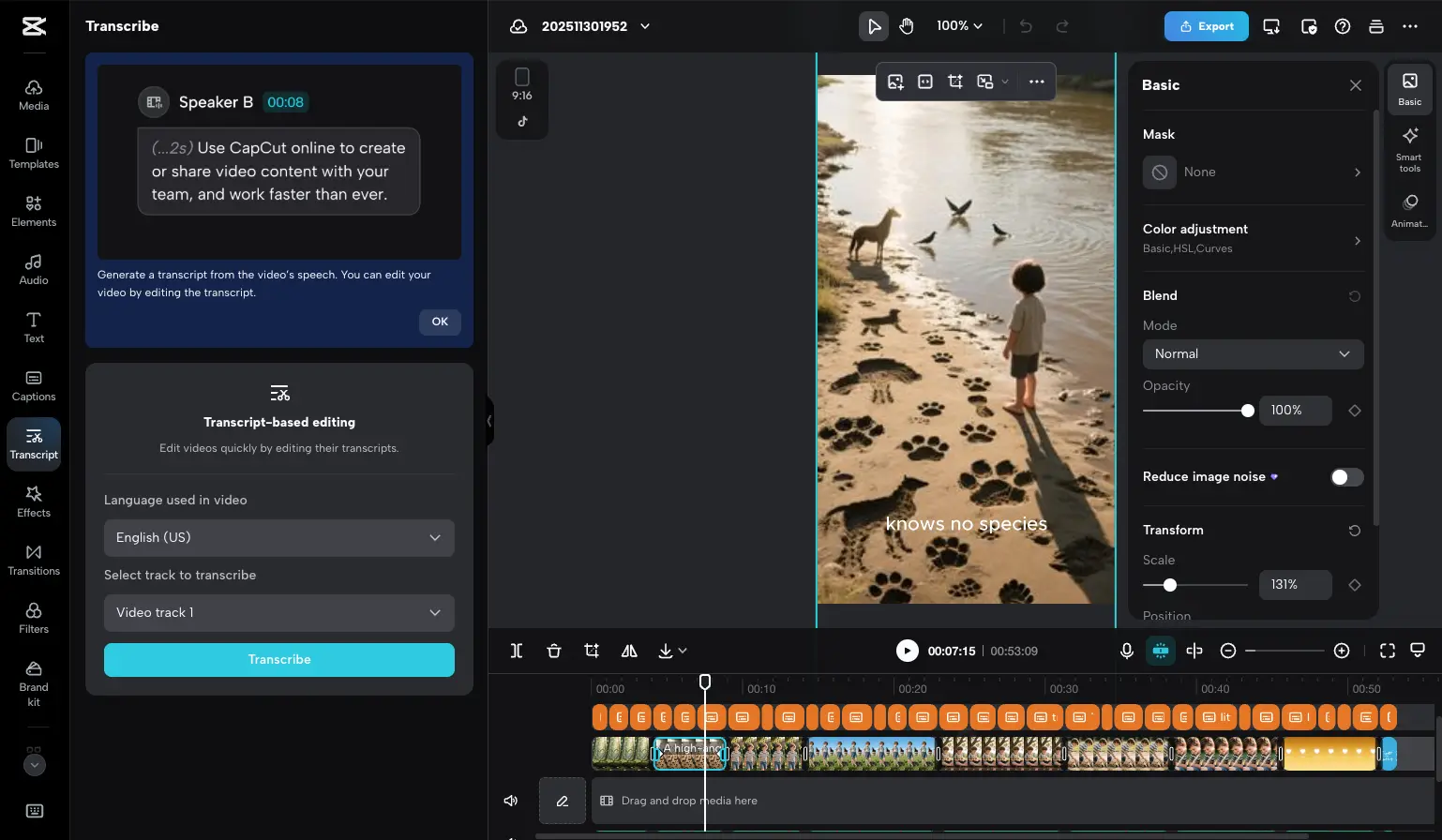
AI Avatars enable faceless content creation through AI-generated personas that can deliver scripted content. This feature addresses creator burnout and privacy concerns while maintaining consistent content output .

AI Video Translator provides full dialogue conversion with lip-sync technology across multiple languages. The AI adjusts mouth movements to match translated audio, creating seamless multilingual content without re-recording .
Bilingual Captions simultaneously display subtitles in two languages, expanding content accessibility for multilingual audiences without requiring separate video versions .

Additional AI Features include AI Voice Clone for consistent voiceovers, Auto Beat Sync for music-driven content, Scene Detector for highlight extraction, Camera Tracking for advanced stabilization, Normalize Loudness for audio balancing, and Relight for post-production lighting adjustments .
VEED AI Capabilities (2026)
VEED focuses its AI development on professional workflow enhancement and collaboration efficiency. The platform offers 12 major AI features :
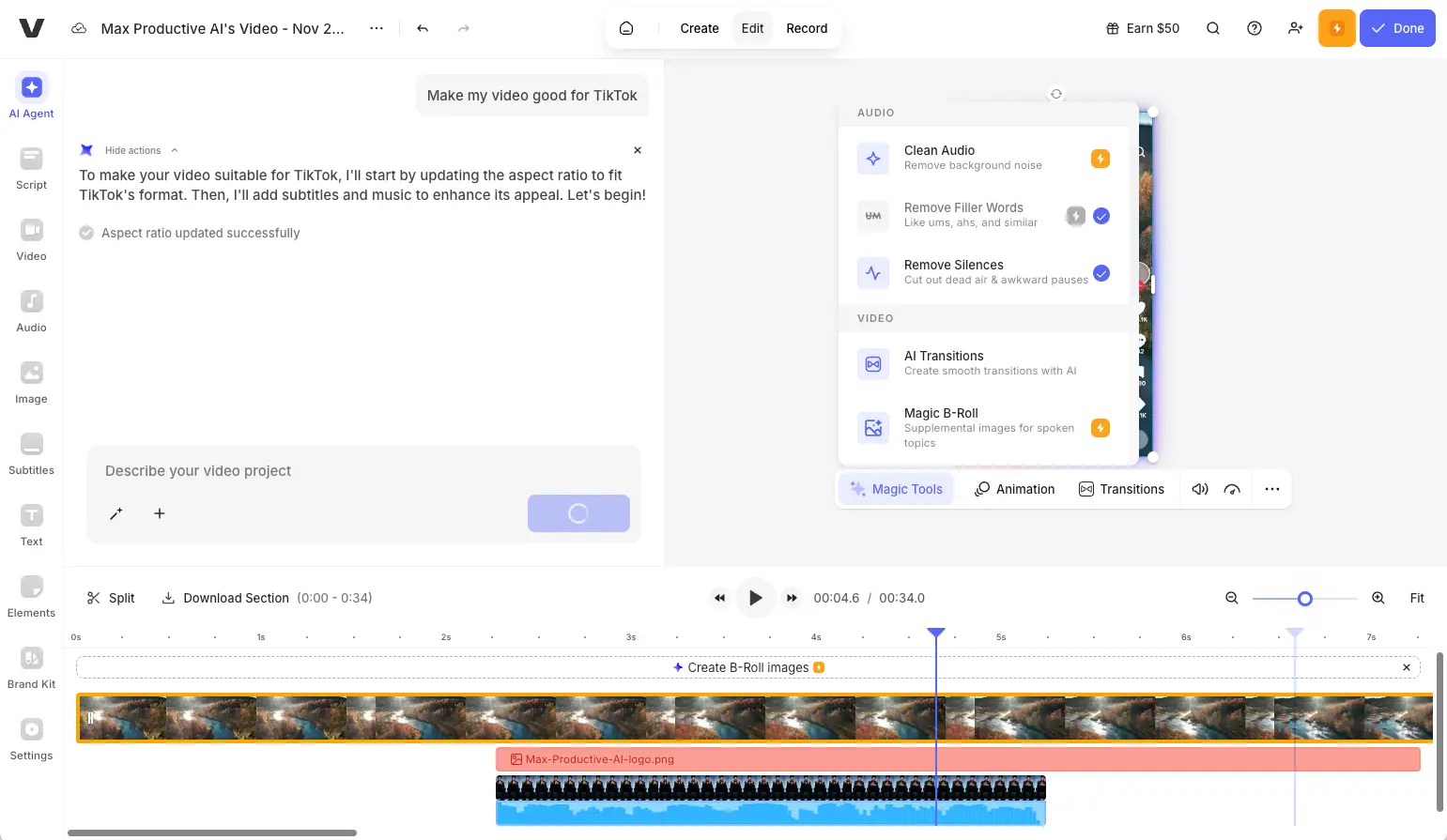
Magic Cut automatically selects the best takes from longer recordings and removes pauses, filler words, and dead air. This feature dramatically reduces editing time for interview content, podcasts, and talking-head videos where creators record long takes with mistakes .

Eye Contact Correction adjusts gaze direction so speakers appear to look directly at the camera even when reading from scripts or monitors. This subtle correction significantly improves viewer engagement and perceived authenticity .
AI Translate converts voice audio to 100+ languages while maintaining the original speaker's voice characteristics. Unlike simple voiceover replacement, this technology preserves vocal tone and emotion across language barriers .
Auto Subtitles generates accurate captions in 50+ languages with extensive styling options, enabling creators to maintain brand consistency in subtitle appearance across all content .
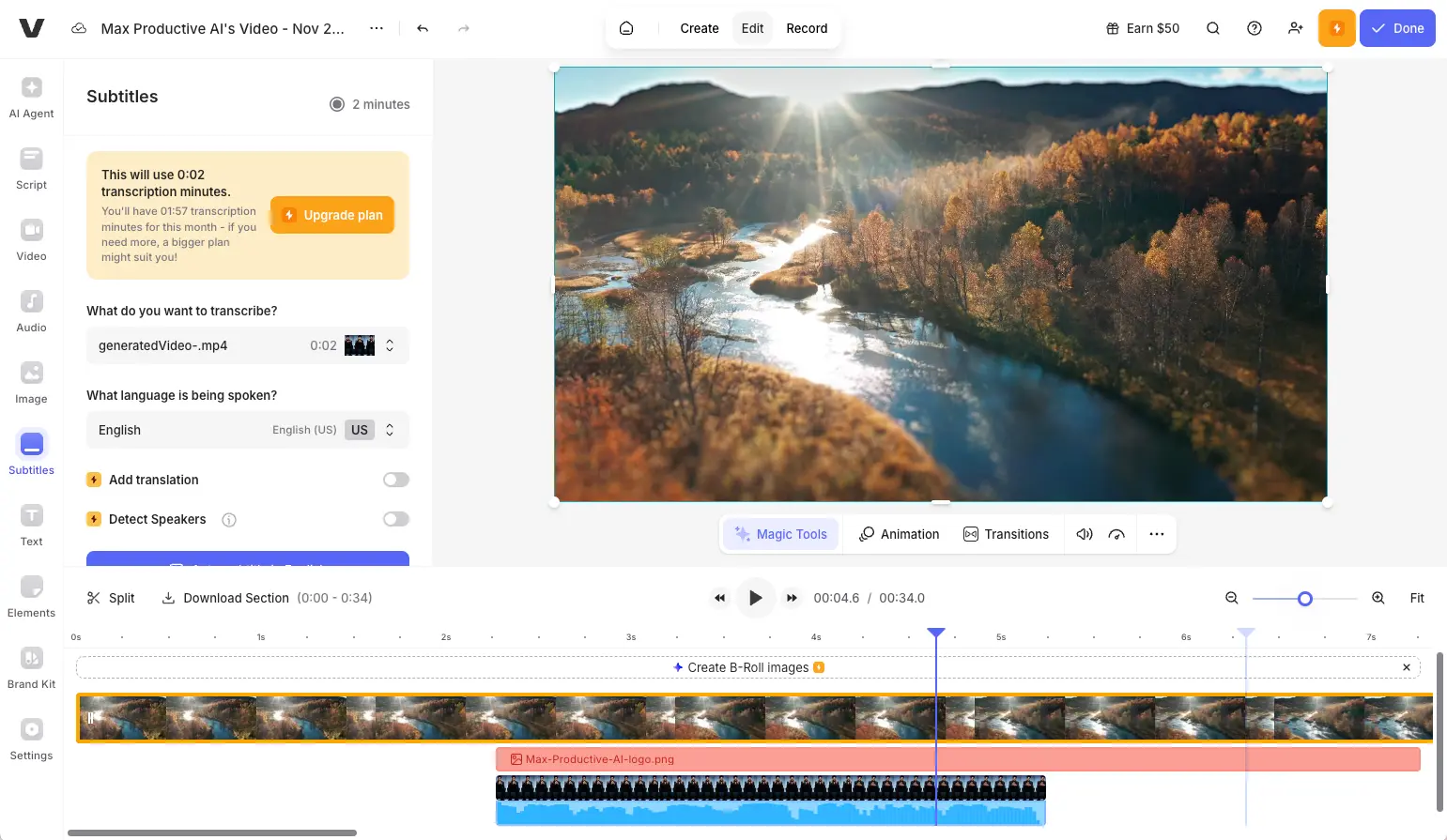
Additional AI Features include AI Avatars for faceless video creation, Clean Audio for noise removal, Filler Word Removal, AI Video Models integration (Google Veo 3.1, Seedance 1.0, Mochi 1), Text-to-Video generation, and Video GPT for editing assistance .
AI Features Head-to-Head
| AI Feature | CapCut | VEED | Winner |
|---|---|---|---|
| Auto Captions | Bilingual support | 50+ languages, more styling | Tie |
| AI Avatars | Included | Included | Tie |
| Video Translation | Lip-sync technology | 100+ languages, voice preservation | Use-case dependent |
| Auto Editing | Scene Detector | Magic Cut (removes pauses) | VEED |
| Eye Contact Correction | Not available | Included | VEED |
| Audio Enhancement | Normalize Loudness | Clean Audio + Filler Removal | VEED |
| Beat Sync | Auto Beat Sync | Not available | CapCut |
| Text-to-Video | AI Video Maker | Multiple AI models | Tie |
Editing Features: Core Capabilities Beyond AI
CapCut Editing Tools
CapCut provides a comprehensive editing suite optimized for mobile-first workflows. The multi-layer timeline supports simultaneous video, audio, text, and effects tracks with intuitive touch controls on mobile devices and traditional mouse-based editing on desktop .
Key features include Chroma Key (green screen) for background replacement, Speed Ramping for dramatic slow-motion effects, Keyframe Animation for motion graphics, Vertical Viewer optimized for 9:16 content, and Social Media Preview Modes showing how content appears in platform feeds .
The Template Library contains thousands of pre-built project templates organized by content type, trend, and style. Stock Library access provides extensive royalty-free music, sound effects, and video clips. Direct TikTok Integration enables one-tap publishing with automatic format optimization .
VEED Editing Tools
VEED structures its editing environment around browser-based accessibility and team collaboration. The platform prioritizes features supporting professional workflows and brand consistency .
Screen Recording with simultaneous webcam capture is built directly into the editor, eliminating separate recording software. The Multi-Track Timeline supports unlimited layers with precise frame-by-frame control. Video Compression tools optimize file sizes without separate conversion software .
Brand Kit serves as the central repository for shared logos, fonts, colors, and templates. Video Hosting with embeddable player allows creators to host finished videos directly on VEED's servers. Aspect Ratio Presets enable quick reformatting with intelligent reframing .
Collaboration Features: Team Workflows
CapCut Collaboration (Limited)
CapCut operates primarily as a single-user application. While the cloud sync functionality allows creators to access projects across their own devices (phone, tablet, desktop), the platform lacks true multi-user collaboration features .
The Teams plan ($24.99/month) adds shared workspaces and team asset libraries, but it does not support simultaneous editing by multiple users. Team members can access shared project files and assets, but collaboration remains asynchronous—users must take turns editing rather than working simultaneously .
For solo creators and small operations where one person handles all video editing, CapCut's cloud sync across personal devices provides sufficient multi-device access .
VEED Collaboration (Comprehensive)
VEED built its platform architecture specifically to support team-based video production workflows. The collaboration features represent a core competitive advantage over CapCut .
Shared Workspaces enable multiple team members to access project folders simultaneously. Time-Stamped Comments allow reviewers to leave feedback on specific frames or timecodes. Role-Based Permissions distinguish between Editors, Reviewers, and Administrators .
Team Folders organize projects by client, campaign, or content type with customizable access permissions. Brand Kit ensures all team members access current approved brand elements. Video Review Tool creates shareable links for external stakeholders without requiring VEED accounts .
Platform Availability and Performance
CapCut Platform Support
CapCut provides native applications for iOS, Android, Windows, and macOS, with a supplementary web-based editor offering limited functionality .
The mobile applications represent CapCut's primary focus and most fully-featured implementations. Desktop applications offer full feature parity optimized for mouse and keyboard workflows. Offline editing enables productive work without internet connectivity .
CapCut generally delivers faster rendering and export times, particularly on mobile devices where native application optimization provides performance advantages over browser-based solutions .
VEED Platform Support
VEED operates primarily as a browser-based application accessible through any modern web browser on any operating system. This eliminates installation requirements and storage concerns .
The iOS application is available only for Pro plan subscribers. No desktop application exists—users access VEED exclusively through web browsers. Internet dependency means VEED cannot function offline .
Some users have reported performance considerations including occasional buffering with large video files and the need for stable internet connectivity throughout editing sessions. Browser-based architecture limits access to device hardware acceleration compared to native applications .
Export Quality Comparison
Both platforms support 4K exports on their respective Pro plans:
| Plan | CapCut Export | VEED Export |
|---|---|---|
| Free | 1080p, no watermark | 720p with watermark |
| Entry Tier | 1080p (Standard) | 1080p (Lite) |
| Pro Tier | 4K | 4K |
Use Case Recommendations: Choosing Your Tool
Choose CapCut If You Are:
TikTok and Instagram Reels Creators — CapCut's native TikTok integration, trending template library, and vertical-first editing interface optimize specifically for short-form vertical video. Direct publishing with automatic format optimization eliminates export and re-upload steps .
Solo Content Creators Without Team Needs — Individual creators gain no benefit from collaboration features and may find team-oriented interfaces unnecessarily complex. CapCut's streamlined single-user experience reduces interface clutter .
Mobile-First Editors — Creators who shoot and edit entirely on smartphones benefit from CapCut's mobile-native design with touch-optimized controls and gesture-based navigation .
Budget-Conscious Creators — CapCut's free plan with 1080p watermark-free exports provides exceptional value for creators starting out. Even the paid Standard plan at $9.99/month costs significantly less than VEED's entry-level Lite plan .
Short-Form Content Specialists (Under 5 Minutes) — CapCut's interface, template system, and effect library optimize for content under 5 minutes. The trending template library and rapid export process create efficient workflows for high-volume short-form production .
Users Requiring Offline Editing — Native mobile and desktop applications enable productive editing without internet connectivity .
Choose VEED If You Are:
Marketing Teams and Agencies — Teams collaborating on video content require VEED's real-time editing, commenting, approval workflows, and role-based permissions. The platform eliminates productivity losses from emailing files and tracking feedback separately .
Businesses Requiring Brand Consistency — VEED's Brand Kit centralizes approved logos, fonts, colors, and templates, ensuring all team-produced videos maintain brand standards .
Professional Content Producers — VEED's advanced AI features (Eye Contact Correction, Magic Cut, Clean Audio) and professional workflow tools elevate content polish beyond social media creator needs .
Long-Form Content Creators — VEED's timeline management handles videos up to 120 minutes on Pro plans more effectively than CapCut's interface. Podcast editors, webinar producers, and educational content creators benefit from superior organization .
Teams Requiring Built-In Screen Recording — VEED's integrated screen capture with simultaneous webcam recording eliminates separate recording software for tutorials, demonstrations, and presentations .
Organizations Needing Video Hosting — VEED's included video hosting with embeddable players allows businesses to host video content directly without separate hosting services .
Neither Tool Is Ideal When:
You Require Professional Color Grading — Both offer basic color adjustment but lack advanced grading capabilities. Consider DaVinci Resolve for cinema-quality color work .
You Edit Feature-Length Content — Projects exceeding 2 hours challenge both platforms. Professional NLEs (Adobe Premiere Pro, Final Cut Pro) handle feature-length projects more effectively .
You Require Transcript-Based Editing — Neither platform offers true transcript-based editing where cuts are made by editing text. Consider Descript for this workflow .
Pros and Cons: Balanced Analysis
CapCut
Pros
- Most generous free plan (1080p watermark-free exports)
- Superior mobile experience with touch-optimized interface
- Native TikTok integration with one-tap publishing
- Lower price point ($9.99-$19.99/month)
- Extensive template library with trending effects
- Optimized for short-form content production
- Faster rendering and export times
- Offline editing capability
- Constantly updated trending effects library
Cons
- Designed primarily for individual workflows rather than team collaboration
- Browser editor offers limited functionality compared to apps
- ByteDance ownership may raise data handling considerations for some business users
- Interface can become complex with longer video projects
- Some users have noted billing-related questions worth reviewing before subscribing
- Customer support response times could be improved according to some reviews
- Some previously free features moved to paid tiers in late 2024 updates
VEED
Pros
- Comprehensive real-time collaboration tools
- Browser-based accessibility from any device
- Superior for business and professional content
- Extended video length support (120 minutes Pro)
- Advanced professional AI features (Eye Contact, Magic Cut, Clean Audio)
- Built-in screen recording with webcam
- Video hosting with embeddable players
- Brand Kit for team consistency
- Multiple aspect ratio presets with smart reframing
Cons
- Positioned at a premium price point ($19-$49/month)
- Free tier includes watermarks and 720p limitation
- Some users report occasional performance considerations with larger files
- iOS app available only for Pro subscribers
- Requires stable internet connectivity throughout editing
- Customer support response times could be improved based on some user feedback
- Credit system for AI features may require adjustment period to understand
User Reviews and Real-World Experiences (January 2026)
CapCut User Feedback
Overall Sentiment: Generally positive with strong product satisfaction
What users appreciate:
- Intuitive interface with gentle learning curve—first-time editors report creating polished content within hours
- Powerful features available at no cost compared to paid alternatives
- TikTok creators praise native integration and trending template access
- Fast export speeds particularly valued by high-volume short-form creators
- Extensive template library keeps creators current with trending styles
Areas for improvement noted:
- Some users recommend reviewing subscription terms carefully before upgrading
- Support response times could be faster according to some reviews
- Desktop application development sometimes trails mobile updates
VEED User Feedback
Overall Sentiment: Mixed, with strong praise for collaboration features
What users appreciate:
- Browser-based interface requiring no software installation
- Teams specifically praise collaboration features and shared workspaces
- Time-saving potential of AI tools like Magic Cut and auto-subtitles
- Team workflow improvements generating enthusiastic feedback from agency users
Areas for improvement noted:
- Some users suggest the pricing could be more accessible for individual creators
- Performance optimization opportunities exist for larger projects
- Customer support processes continue to evolve
Alternatives Worth Considering
If CapCut Doesn't Fit Your Needs
Wondershare Filmora (Rating: 4.2/5) delivers accessible professional features at affordable pricing without browser performance limitations. Try Filmora for desktop editing with creative effects .
PowerDirector (Rating: 4.4/5) targets advanced mobile editing needs with professional features beyond CapCut's capabilities .
DaVinci Resolve (free desktop version) provides professional-grade editing, color grading, and audio tools for creators willing to invest time learning more complex software .
If VEED Doesn't Fit Your Needs
Descript (Rating: 4.8/5) revolutionizes editing through transcript-based workflows where video cuts are made by editing text—ideal for interviews, podcasts, and dialogue-heavy video. Try Descript for unique text-based editing .
Gling (Rating: 4.1/5) provides automatic video editing from raw footage, perfect for creators wanting AI-powered first cuts. Try Gling for auto-editing .
Podcastle (Rating: 4.5/5) combines recording and editing capabilities specifically designed for podcasts and remote interviews. Try Podcastle for podcast production .
Pictory (Rating: 4.4/5) offers template-driven, AI-powered editing focused on rapid marketing video creation .
Explore our complete AI video editing tools directory to find the solution that matches your specific needs.
Can You Use Both Together?
Yes—and some sophisticated content operations do exactly that:
- CapCut: Quick social media content (TikToks, Reels, Shorts), mobile editing on-the-go, trending effect application
- VEED: Professional brand videos, team collaboration projects, long-form content, client work requiring approval workflows
Combined approach: Use CapCut's free plan for personal social content and VEED Pro for business projects. This hybrid workflow leverages each tool's strengths while avoiding their limitations.
Final Verdict: VEED vs CapCut
| Best overall value for solo creators | CapCut |
| Best for team collaboration | VEED |
| Best free plan | CapCut |
| Best for TikTok/Reels | CapCut |
| Best for brand consistency | VEED |
| Best mobile experience | CapCut |
| Best for business content | VEED |
| Best for long-form video | VEED |
| Best AI audio tools | VEED |
| Best trending effects | CapCut |
| Best offline editing | CapCut |
| Most affordable | CapCut |
Bottom line: The fundamental difference between VEED and CapCut is individual vs team and mobile vs browser:
- CapCut = Solo Creator Focus: Mobile-first editing, generous free tier, TikTok integration, trending effects, budget-friendly pricing
- VEED = Team & Business Focus: Real-time collaboration, Brand Kit, professional AI polish, browser accessibility, enterprise workflows
Neither tool is perfect for everyone. Both dramatically improve video production efficiency compared to manual editing. The right choice depends on your workflow (solo vs team), platform (mobile vs browser), content type (short-form vs long-form), and budget constraints.
Frequently Asked Questions
Learn more about other AI video editing tools in our comprehensive directory. For deeper analysis, read our full CapCut review or VEED review.
Last Updated: April 08, 2026. Pricing, features, and platform capabilities reflect current information as of this date and may change. Always verify current pricing and features on official websites before purchasing.