
VEED.IO
Browser-based video editing with powerful AI automation for creators and teams. Auto-subtitles in 125+ languages, Magic Cut for filler word removal, and real-time collaboration—no downloads required.
Try VEED.IO Free →
Accessible Video Editing
for Creators & Teams
After extensive testing, VEED.IO delivers on its promise of accessible video editing for everyone. Its browser-based approach eliminates installation barriers, while AI features like auto-subtitles in 125+ languages and Magic Cut for filler word removal genuinely save hours of manual editing. The platform shines for social media creators, marketing teams, and educators who need to produce polished content quickly.
✓ What We Love
- Exceptionally easy to use—no experience required
- No installation—edit from any device
- Powerful AI (Magic Cut, auto-subtitles)
- Real-time team collaboration
! Could Be Better
- Performance slows with larger projects
- Requires internet—no offline editing
- Free tier includes watermark
What Is VEED.IO?
A comprehensive overview of the platform and who it's built for.
VEED.IO is a browser-based video editing platform that has earned its place as one of the most accessible video creation tools available in 2026. With over 10 million monthly active users and backing from Sequoia Capital ($35M in funding), VEED combines intuitive drag-and-drop editing with AI-powered automation—including auto-subtitles in 125+ languages, filler word removal, and AI avatars.
What sets VEED apart from traditional video editing software is its zero-installation approach. Everything runs in your web browser, meaning you can edit videos from Windows, Mac, Chromebooks, tablets, and even locked work computers. Projects automatically save to the cloud and are accessible from any device with an internet connection.
The platform was founded in 2017 in London, UK, and has grown rapidly by focusing on simplicity over complexity. While professional tools like Adobe Premiere Pro and DaVinci Resolve offer more advanced features, they require significant learning investment. VEED targets creators who need professional-quality output without mastering complex software—and delivers on that promise with a learning curve measured in hours rather than weeks.
As of January 2026, VEED.IO maintains a 4.6/5 rating on Trustpilot with over 3,000 reviews and counts major companies including P&G, Pinterest, and Visa among its users. The platform processes millions of videos monthly and has become particularly popular for social media content creation, marketing videos, and educational materials.
Who Is VEED.IO Best For?
VEED.IO is ideal for social media creators, marketing teams, educators, and small businesses who need to produce professional-quality videos quickly without mastering complex software. It's particularly well-suited for teams requiring real-time collaboration, brands maintaining consistent visual identity across content, and anyone prioritizing ease-of-use over advanced manual control.
The platform generates a comprehensive range of content types: trimmed and edited videos, videos with auto-generated subtitles, screen and webcam recordings, videos with background removal, content optimized for multiple platforms (YouTube, TikTok, Instagram, LinkedIn), and even AI avatar videos. The 2 million+ royalty-free stock library means you can enhance productions without additional stock subscriptions.
See VEED.IO in Action
Real screenshots from the platform showing key features and the editing workflow.
Main Editing Interface
VEED's clean timeline-based editor with intuitive controls
The VEED.IO interface presents a clean, modern layout. The left panel provides quick access to media uploads, text overlays, elements, and AI tools. The center preview shows your video in real-time, while the timeline below allows intuitive drag-and-drop editing for animations, speed adjustments, and fade effects.
AI Copilot Agent
Natural language commands for automated editing
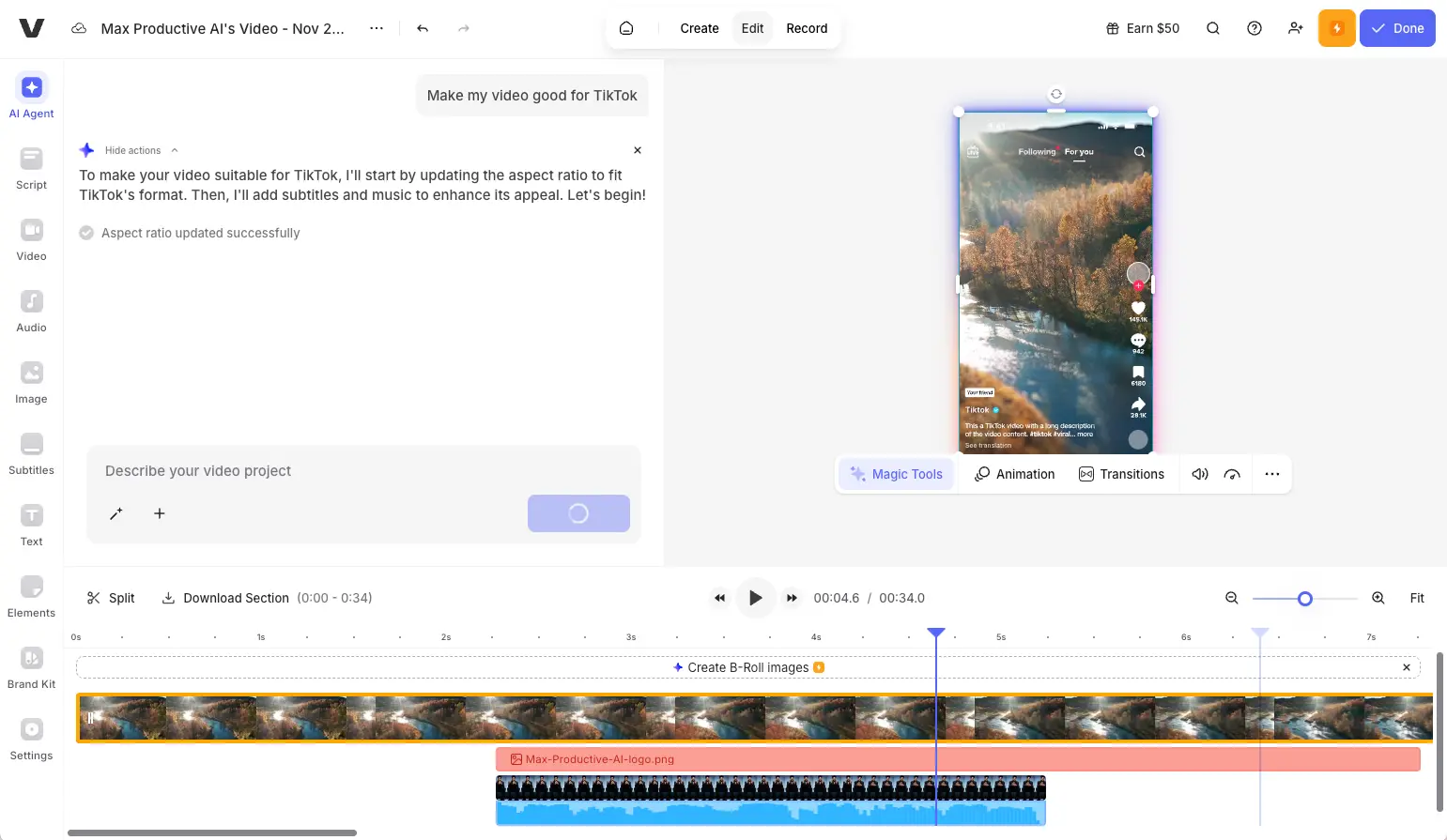
Simply tell VEED what you want in natural language—like "Make my video good for TikTok"—and the AI automatically adjusts aspect ratio, adds captions, and optimizes the format. This dramatically speeds up repetitive tasks and platform-specific adaptations.
Magic Tools Panel
One-click AI enhancements for professional results
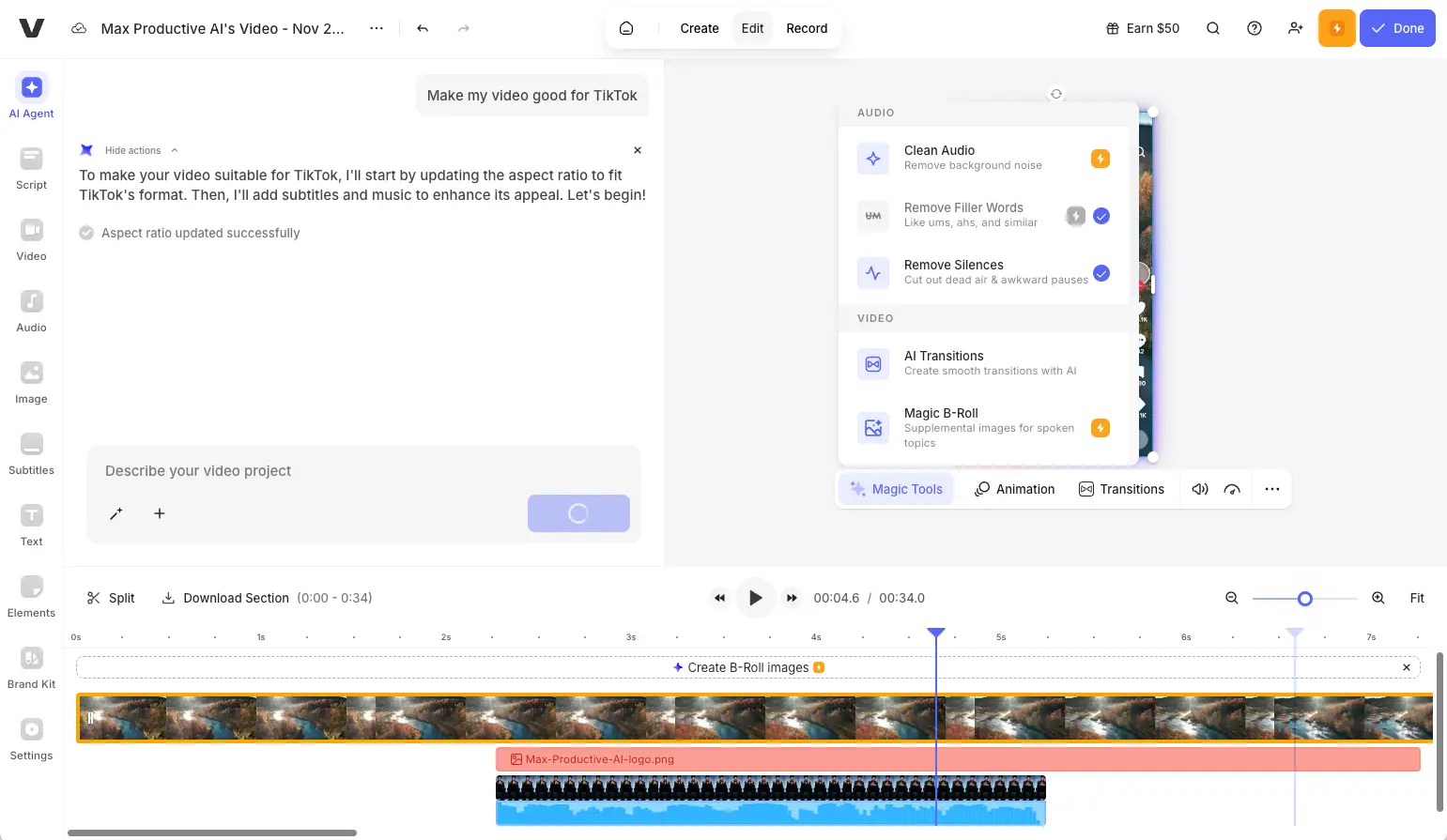
The Magic Tools panel offers one-click AI enhancements including Clean Audio (noise removal), Remove Filler Words ("um," "uh"), Remove Silences, AI Transitions, and Magic B-Roll for automated footage suggestions. In testing, Magic Cut reduced an 8-minute video to under 6 minutes in just 30 seconds.
Auto-Subtitle Generator
Automatic transcription in 125+ languages
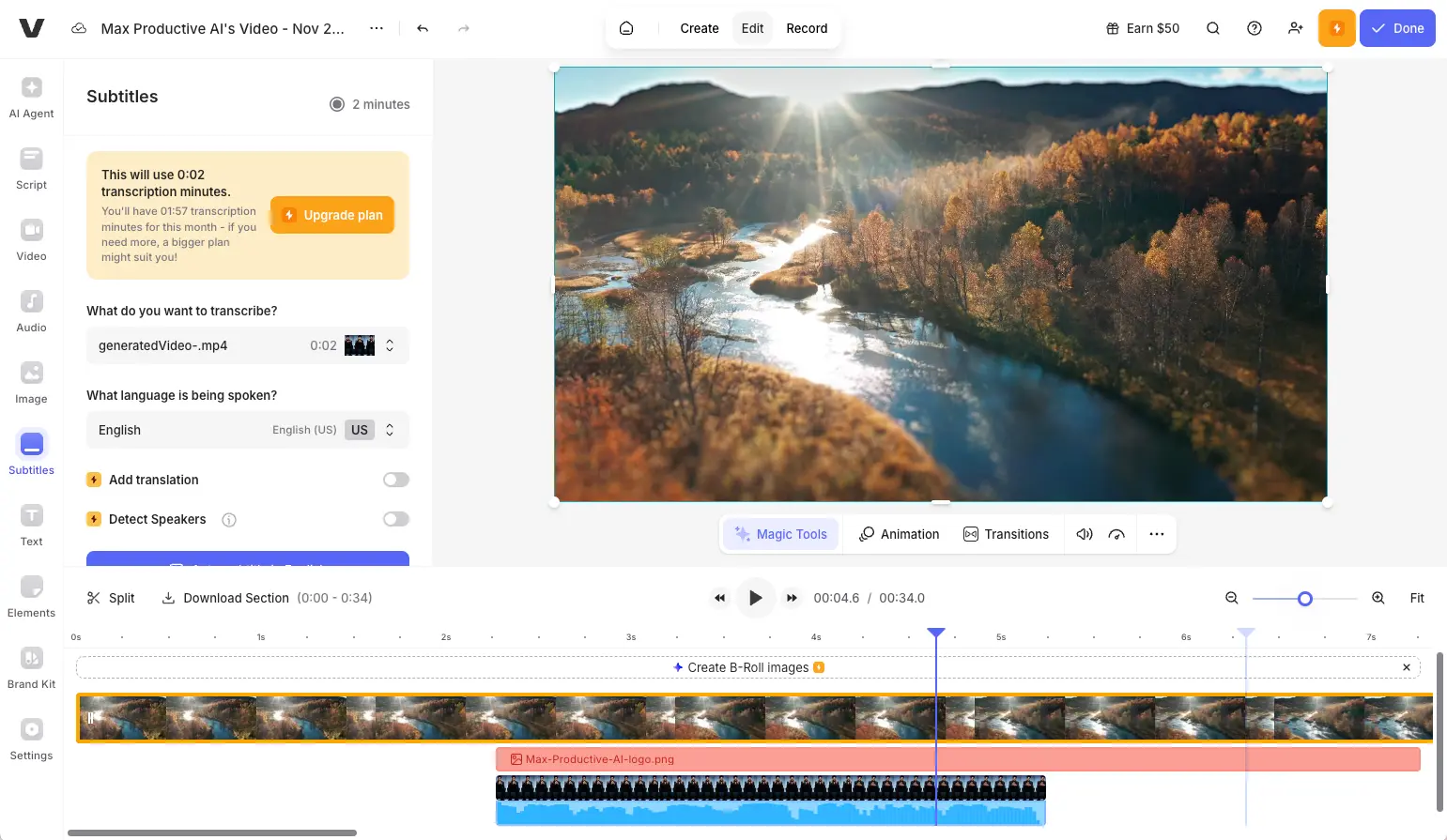
VEED's auto-subtitle generator provides automatic transcription in 125+ languages with translation options. Features include speaker detection toggle, extensive style customization, and SRT/VTT export for accessibility compliance on platforms like YouTube.
Text-Based Video Editing
Edit video by editing the transcript

Edit your video by editing the transcript—delete words from the text and the corresponding video segments are automatically removed. This revolutionary approach is perfect for quickly cleaning up interviews, podcasts, and presentations without frame-by-frame editing.
Ready to experience browser-based video editing with powerful AI tools?
Try VEED.IO Free →No credit card required • Free plan availableHow VEED.IO Works
From upload to export in five simple steps—no software installation required.
Upload Your Media
Start by uploading video files, recording your screen/webcam directly in-browser, or selecting from VEED's library of 2 million+ royalty-free stock clips. Supported formats include MP4, MOV, AVI, MKV, and more. The free plan allows uploads up to 1GB per file, with paid plans offering unlimited upload sizes.
Edit with Timeline or AI
Use the familiar timeline editor to trim, cut, and arrange clips—or let AI handle the heavy lifting. Magic Cut automatically removes filler words and awkward pauses. The AI Copilot accepts natural language commands like "resize for Instagram" or "add subtitles in Spanish" and executes multi-step edits automatically.
Enhance with Effects & Text
Add animated text overlays, transitions, filters, and music from the stock library. Use Clean Audio to remove background noise, or apply background removal to create green-screen effects without physical equipment. Brand Kit users can apply saved logos, fonts, and colors with one click for consistent visual identity.
Collaborate & Review
Share projects with team members for real-time editing or time-stamped feedback. Reviewers can click specific moments in the video to leave precise comments—eliminating confusing email threads about "that part around 2:30." Role-based permissions control who can edit versus view-only access.
Export & Share
Export videos in MP4 format at resolutions from 720p (free) to 4K (Enterprise). Download files directly or host them on VEED's embeddable player. Subtitle files can be exported as SRT or VTT for accessibility compliance on platforms like YouTube. One-click presets optimize for specific platforms.
Cloud-Based Architecture
All processing happens on VEED's servers, meaning your computer's specifications don't limit what you can create. A Chromebook can edit the same projects as a high-end workstation. The trade-off is requiring stable internet—plan for 25+ Mbps for smooth 1080p editing.
Automatic Project Saving
Projects save automatically to the cloud as you work. Access your projects from any device—start editing on your laptop, continue on a tablet. No manual save required, and no risk of losing work to crashes or power outages.
Key Features
Everything you need to create professional videos without complex software.
Browser-Based Editor
Edit videos entirely in your web browser—no downloads or installations required. Works on Windows, Mac, Chromebooks, and tablets. Projects automatically save to the cloud and are accessible from any device.
Auto-Subtitles (125+ Languages)
AI-powered speech recognition generates synchronized captions automatically. Supports 125+ languages and accents with customizable styles. Export as SRT/VTT files or burn subtitles directly into the video.
Magic Cut (Filler Word Removal)
Automatically detects and removes "um," "uh," "like," and awkward pauses. In testing, Magic Cut reduced an 8-minute video to under 6 minutes—eliminating over 2 minutes of dead air in just 30 seconds.
AI Copilot
Give natural language instructions like "Make my video vertical for TikTok" or "Add captions in Spanish." The AI understands context and executes multi-step edits automatically, dramatically speeding up repetitive tasks.
AI Avatars
Generate talking-head videos from text scripts using 50+ diverse AI avatars. Choose from 35+ voice options in multiple languages. Pro users can create custom voice clones for consistent brand narration.
Clean Audio
Remove background noise, normalize volume levels, and improve overall audio quality with one click. Ideal for recordings made in less-than-perfect acoustic environments like home offices or outdoor locations.
Background Removal
AI-powered green screen effect without physical equipment. Isolate subjects and replace backgrounds with solid colors, images, or video. Works best with well-lit, stationary subjects.
Stock Library (2M+ Assets)
Access over 2 million royalty-free video clips, images, and audio tracks. Paid plans unlock unlimited access, potentially eliminating the need for separate stock subscriptions like Envato or Artlist.
Team Collaboration
Real-time editing with multiple simultaneous users. Time-stamped commenting lets reviewers click exact moments instead of describing timestamps. Brand Kits ensure all team members maintain consistent visual identity.
Screen & Webcam Recording
Record your screen, webcam, or both in customizable layouts (picture-in-picture, side-by-side). Includes a built-in teleprompter for reading scripts while maintaining eye contact. Recordings open directly in the editor.
Text-Based Editing
Edit video by editing the transcript—delete words from the text and the corresponding video segments disappear. Revolutionary for cleaning up interviews, podcasts, and presentations quickly without frame-by-frame editing.
Multi-Platform Presets
One-click aspect ratio presets for YouTube (16:9), Instagram Stories/Reels (9:16), TikTok (9:16), and Instagram Feed (1:1). Create one master video and quickly resize for multiple platforms without re-editing.
Beyond these core features, VEED integrates directly with major platforms and offers rapid adoption of new AI models—they shipped Google Veo 3 support the same day it released. The platform continuously adds new capabilities while maintaining its focus on accessibility and ease-of-use.
Experience all these features with the free plan:
Try VEED.IO Free →No credit card required • Upgrade anytimePricing Plans
Freemium model with four tiers. Annual billing saves 30-40%.
Free
Lite
Pro
Enterprise
Important: Monthly billing available at higher rates ($19 Lite, $49 Pro). AI features operate on annual credit allocations.
Is VEED.IO Worth the Investment?
Users report saving 10-15 hours per month on video editing tasks. The included stock library alone is worth $15-30/month if purchased separately. At $12-24/month, VEED pays for itself quickly.
Comparing to alternatives: CapCut is free but lacks team collaboration; Descript starts at $16/month; Filmora is $50/year for desktop; Kapwing is $16/month. VEED's combination of browser accessibility, AI features, and collaboration tools represents strong value for teams and creators.
Detailed Pros & Cons
An honest, balanced assessment after extensive testing.
✓ Pros
Intuitive drag-and-drop interface that beginners can master in hours, not weeks. No video editing experience required. The learning curve is among the gentlest in the industry.
Works entirely in your browser—edit on any device including Chromebooks, tablets, and locked work computers. No software downloads, no compatibility issues, no storage concerns.
Magic Cut, auto-subtitles, and AI Copilot genuinely save hours of manual editing work. These aren't gimmicks—they deliver real time savings on routine tasks.
Time-stamped comments and simultaneous editing eliminate email back-and-forth for revision cycles. Reviewers click exact moments to leave feedback—no more "around the 2:30 mark."
2 million+ royalty-free assets included with paid plans, potentially replacing separate stock subscriptions worth $15-30/month. One less tool to manage and pay for.
VEED integrates cutting-edge AI models quickly—they shipped Google Veo 3 support the same day it released. You get access to the latest capabilities without waiting.
✗ Cons
Browser-based architecture can cause slowdowns when editing longer videos or projects with many layers. Complex projects may require patience—this is the trade-off for accessibility.
No offline editing capability. All processing happens on cloud servers, so a stable connection is essential. Not ideal for travel or unreliable internet situations.
Even the Pro plan caps exports at 120 minutes. Long-form content creators (2+ hour podcasts, webinars) will need Enterprise or alternatives like DaVinci Resolve.
While VEED claims 98.5% accuracy, real-world results depend on audio quality and accents. Manual review recommended for professional or published content.
Basic color adjustments only—no professional color grading features like LUTs, color wheels, or scopes found in Premiere or Resolve. Not for cinema-grade work.
All free tier exports include a visible VEED watermark. Removal requires upgrading to at least the Lite plan ($12/month annual). No way around this on free tier.
VEED.IO vs Alternatives
A comprehensive comparison to help you choose the right video editing tool.
| Feature | VEED.IO | CapCut | Descript | Wondershare Filmora |
|---|---|---|---|---|
| Starting Price | Free / $12/mo | Free | $16/mo | $50/year |
| Platform | Browser (any device) | Desktop + Mobile | Desktop + Web | Desktop only |
| Watermark (Free) | Yes | No | Yes | Yes |
| Auto-Subtitles | ✓ 125+ languages | ✓ Basic | ✓ Advanced | ✓ Basic |
| Team Collaboration | ✓ Real-time | Limited | ✓ Good | ✗ No |
| Offline Editing | ✗ No | ✓ Yes | ✓ Yes | ✓ Yes |
| Best For | Teams, social media | TikTok creators | Podcasters | Desktop users |
Which Tool Is Right For You?
VEED.IO
Best for TeamsBest for: Social media creators, marketing teams, and educators who need browser-based accessibility, real-time collaboration, and powerful AI tools. Ideal if you prioritize ease-of-use, work across multiple devices, and need consistent branded content without mastering complex software.

CapCut
FreeBest for: Solo TikTok and Instagram creators on a budget. Completely free with no watermarks and offers direct TikTok integration. Choose if budget is your primary concern and you don't need team collaboration features. Limited browser functionality compared to mobile/desktop apps.

Descript
Best for AudioBest for: Podcasters, interview-based content, and dialogue-heavy videos. Superior transcript-based editing lets you edit video by editing text—delete a word from the transcript and the video segment disappears. Better audio tools including Studio Sound and Overdub voice cloning.

Wondershare Filmora
DesktopBest for: Desktop users wanting offline editing capability or a one-time purchase option. At $50/year or $80 one-time, offers good value for solo creators who prefer traditional software. More advanced editing features than VEED but requires installation and learning investment.

Gling
YouTubersBest for: YouTubers creating talking-head videos who need specialized AI for removing silences and filler words. Exports to Premiere/Final Cut for finishing. More focused than VEED—does one thing (cleanup) extremely well rather than full editing.

Pictory
Blog-to-VideoBest for: Content marketers converting blog posts and written content into videos. Excels at text-to-video with larger Getty/Storyblocks library. Choose if you have existing written content to repurpose rather than raw video footage to edit.
Frequently Asked Questions
Should You Try VEED.IO?
After extensive testing, VEED.IO delivers on its core promise: accessible video editing for everyone. Its browser-based approach eliminates installation barriers, making professional-quality video creation possible from any device. The AI-powered features—particularly Magic Cut and auto-subtitles in 125+ languages—deliver genuine time savings that justify the subscription cost for regular content creators.
The platform particularly shines for social media creators, marketing teams, and educators who need polished content quickly. Real-time collaboration with time-stamped commenting transforms team workflows, while Brand Kits ensure consistent output. The 2M+ stock library included with paid plans adds significant value.
The limitations are real: performance can slow with larger projects, offline editing isn't possible, and the free tier's watermark pushes serious users to paid plans. But for the target audience, VEED represents excellent value in 2026.
Our Recommendation
Start with the free tier to test if VEED's interface and AI tools fit your workflow. If you're producing regular social media content or working with a team, the Pro plan at $24/month (annual) offers the best feature-to-value balance. Solo creators with simpler needs may find Lite at $12/month sufficient. The free tier works well for testing—no credit card required.
Ready to Create Professional Videos?
Join 10M+ creators editing videos in their browser with VEED.IO's powerful AI tools