

Chronicle AI
AI-powered presentation tool that uses a story-first approach to generate client-ready, interactive slides from prompts, URLs, or PDFs. Build boardroom-quality narratives in minutes—with Peek, Deep Hover, and 30+ integrations.
Try Chronicle AI →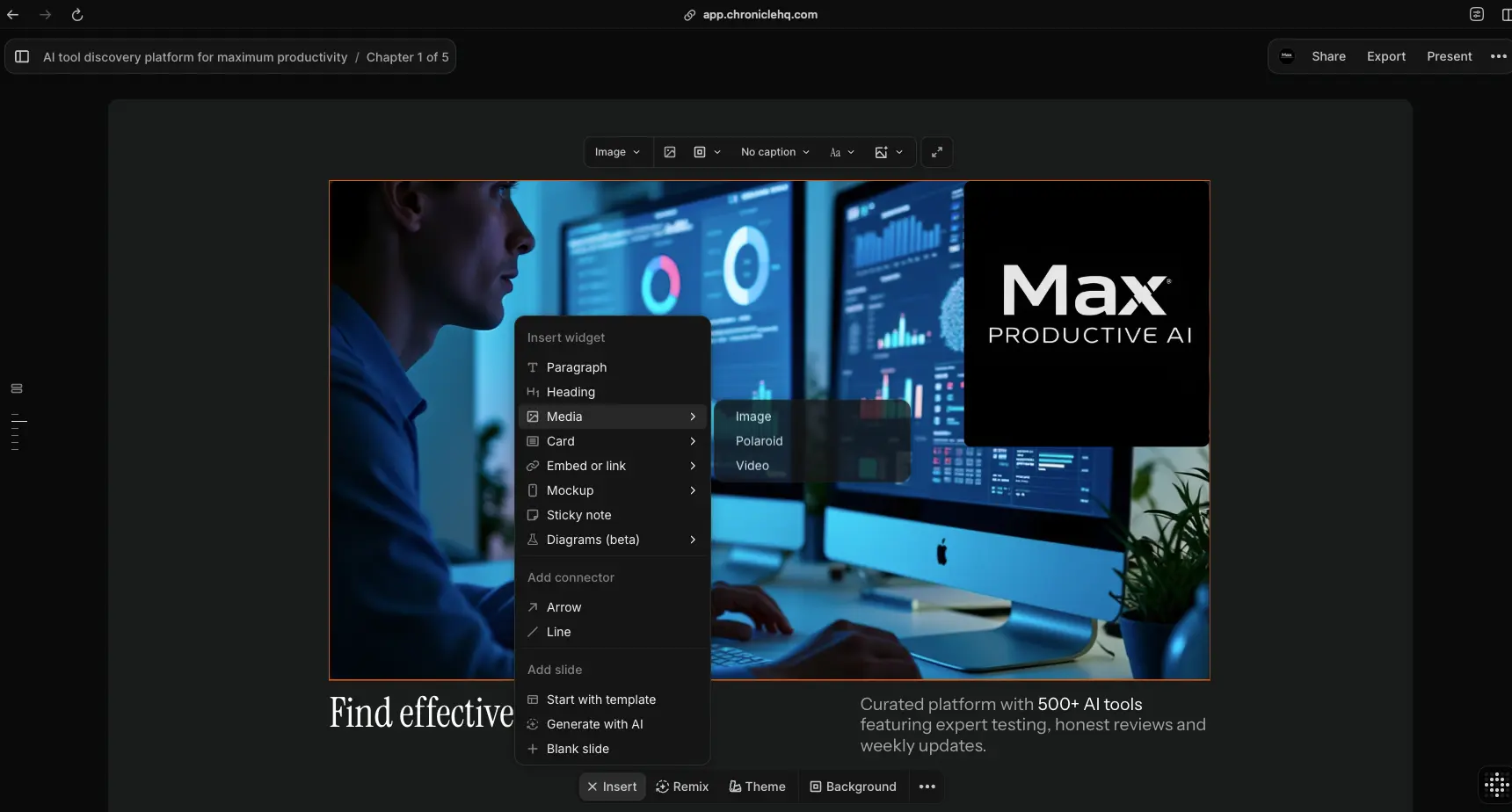
Story-First AI Presentations
for High-Stakes Narratives
After extensive testing, Chronicle AI stands out in the crowded AI presentation space with a genuinely different approach: narrative-first generation that produces 85-90% client-ready outputs. While competitors focus on speed, Chronicle focuses on storytelling quality—structuring content into hook-problem-solution-proof sequences that feel intentional, not auto-generated. The interactive Peek and Deep Hover features are unique in the category and genuinely useful for live presenting. If you create high-stakes presentations where polish matters, Chronicle is worth the steeper learning curve.
✓ What We Love
- Story-first AI with 85-90% client-ready output
- Interactive Peek & Deep Hover for live presenting
- Widget-based editor with 64+ remix styles
- Generous free plan (100 tokens/month)
! Could Be Better
- No PowerPoint export yet (rolling out 2026)
- Steeper learning curve (4-6 hours)
- Young platform—launched June 2025
What Is Chronicle AI?
A comprehensive overview of the platform and who it's built for.
Chronicle AI (also known as Chronicle HQ) is an AI-powered presentation creation platform that takes a fundamentally different approach from its competitors. Rather than simply auto-generating slides from a prompt, Chronicle uses a story-first methodology—structuring your content into narrative sequences with intentional visual hierarchy that feels crafted, not templated. The result is presentations that consistently reach 85-90% client-ready quality straight from the AI, significantly reducing the manual cleanup most other tools require.
Founded in 2021 by Mayuresh Patole and Tejas Gawande (with roots tracing back to IIT Bombay in 2012), Chronicle launched publicly in June 2025 after building a 100,000-person waitlist. The company has raised $7.5 million from investors including Accel and Square Peg, alongside angel investors from Google, Meta, Stripe, and Adobe. As of early 2026, Chronicle is used by over 5,000 teams across startups, consulting firms, agencies, and corporate strategy departments.
What makes Chronicle AI genuinely different from tools like Gamma or Beautiful.ai is its narrative engine. Where Gamma prioritizes speed (generating decks in 5-10 minutes) and Beautiful.ai focuses on brand consistency through smart templates, Chronicle's AI analyzes your content and organizes it into storytelling frameworks—hook, problem, solution, proof sequences that align with how audiences actually process information. This approach is particularly effective for investor pitches, board updates, sales proposals, and any presentation where persuasion matters as much as information delivery.
The platform also introduces interactive capabilities not found in traditional slide tools. Features like Peek (revealing hidden content during live presenting) and Deep Hover (isolating specific data points by dimming everything else) give presenters real-time control over audience attention—something PowerPoint animations and Prezi's zoom effects approach differently but don't fully achieve.
Who Is Chronicle AI Best For?
Chronicle AI is ideal for startup founders building fundraising pitch decks, consultants and agencies creating client-facing proposals, strategy teams producing board-level narratives, and product managers presenting roadmaps. It's best suited for professionals who create 2-5 high-stakes presentations per month where visual quality and narrative coherence directly impact outcomes. If you need maximum speed on volume work, Gamma may be a better fit; if you need strict brand enforcement across a large team, consider Beautiful.ai.
Chronicle AI generates presentations from multiple input types: text prompts, website URLs, PDF documents, or existing PowerPoint files. The AI analyzes the content, proposes a narrative structure, and produces a draft composed of modular widgets that you can rearrange, restyle, and refine. With 30+ integrations (including ChatGPT, Claude, Notion, Loom, and Google Sheets), the platform fits into existing workflows rather than requiring you to rebuild around it. Web publishing with engagement analytics lets you track exactly who viewed your deck and which slides held their attention—a valuable feature for sales teams and fundraising founders.
See Chronicle AI in Action
Real screenshots from the platform showing key features and the presentation creation workflow.
Creation Methods
Four flexible ways to start building your Chronicle AI presentation
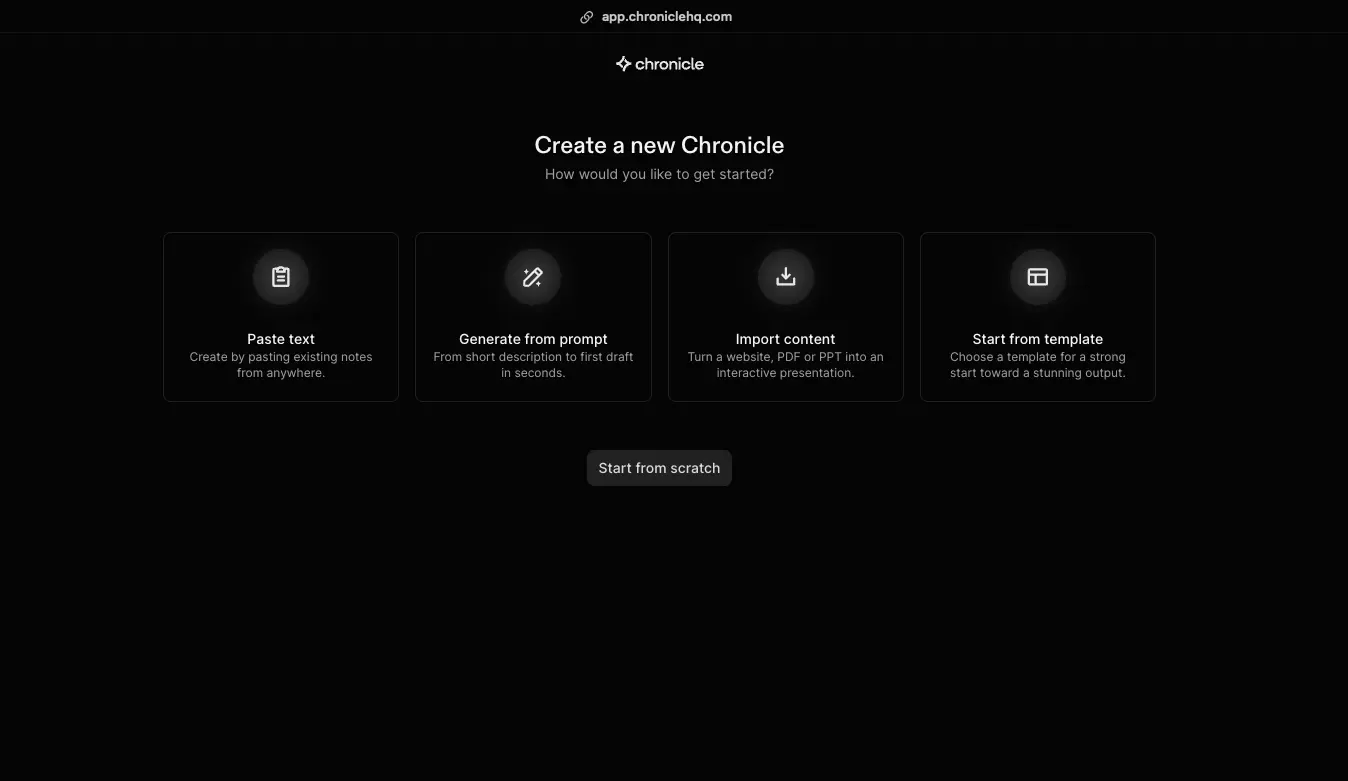
Chronicle offers four distinct starting points: Paste Text lets you transform existing notes or documents into structured presentations. Generate from Prompt creates a full draft from a short description in seconds. Import Content converts websites, PDFs, or PowerPoint files into interactive Chronicle presentations. Start from Template provides curated layouts for common use cases. There's also a "Start from scratch" option for maximum creative control.
Template Gallery
Business-focused templates for pitch decks, board meetings, and strategy sessions
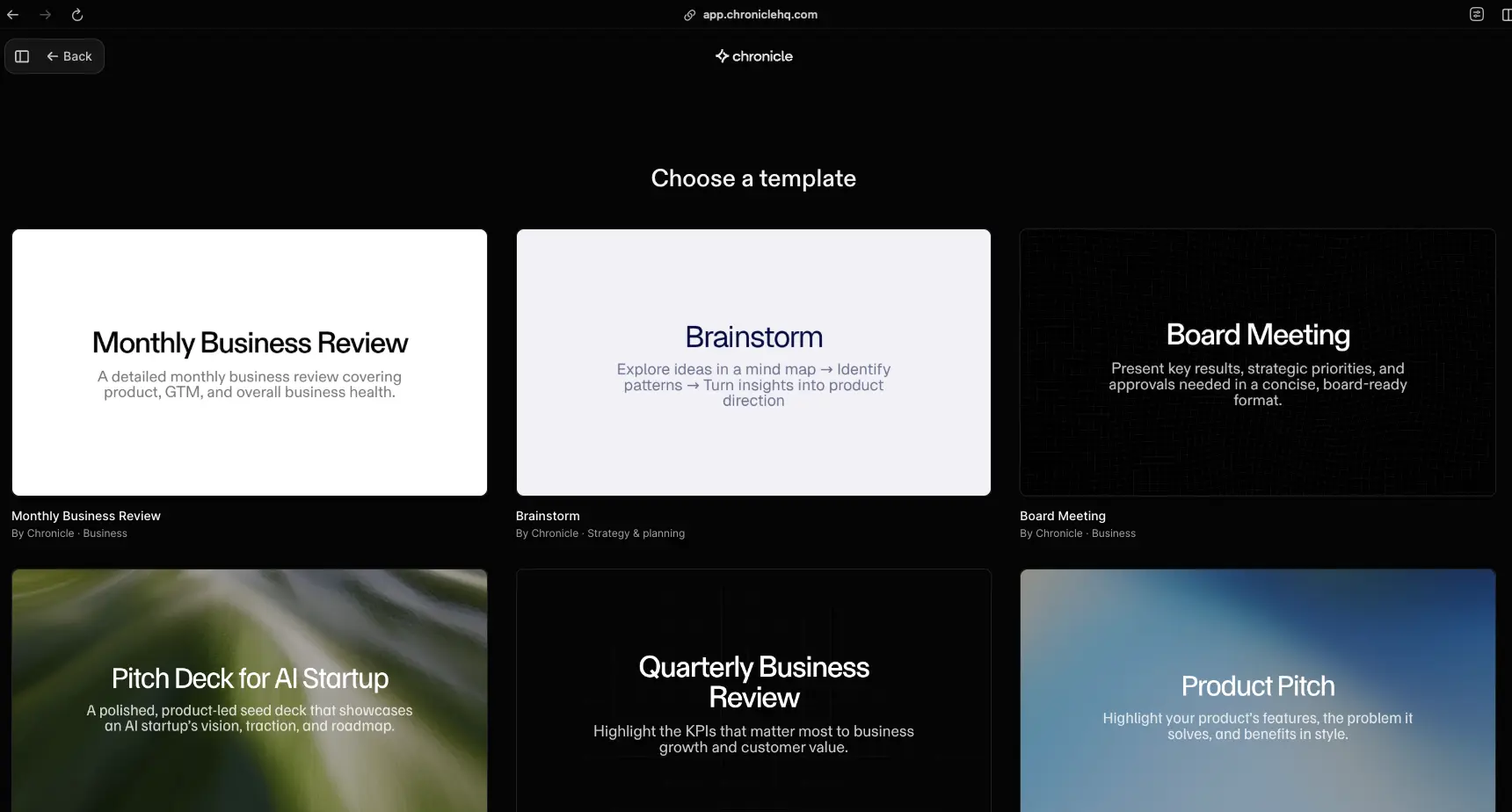
The template gallery includes purpose-built layouts for professional scenarios: Monthly Business Review covering product, GTM, and business health; Brainstorm templates for mind mapping and turning insights into product direction; Board Meeting formats for concise, approval-ready presentations; Pitch Deck for AI Startup showcasing vision, traction, and roadmap; Quarterly Business Review highlighting KPIs and growth; and Product Pitch for features, problems, and benefits. Each template is designed by Chronicle for business-ready output.
Narrative Storyline & Themes
Story-first AI generation with customizable visual themes
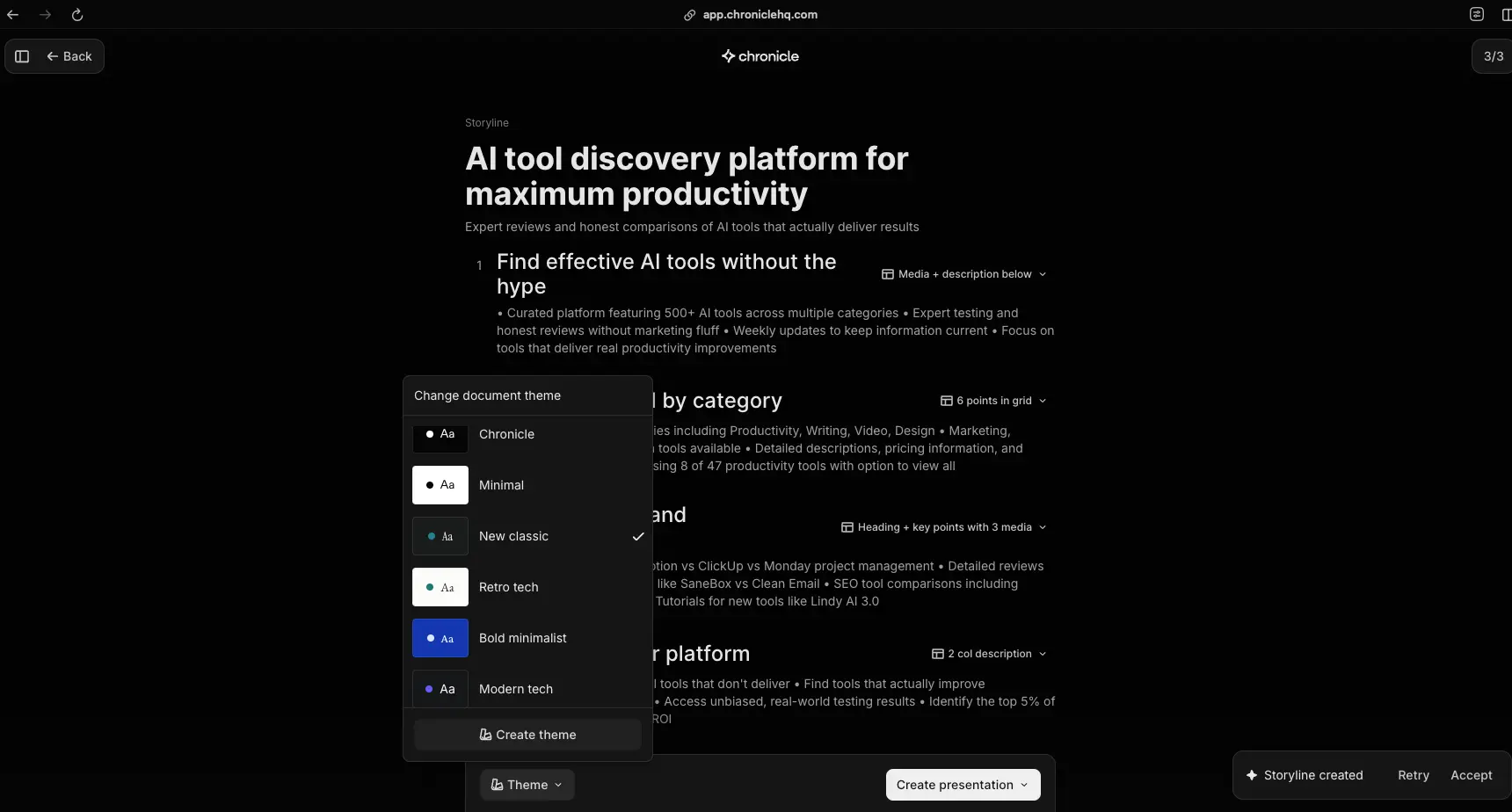
This screenshot reveals Chronicle's core differentiator: the Storyline editor. The AI generates a narrative structure—visible here with numbered sections and key points organized logically. The theme panel offers six built-in styles (Chronicle, Minimal, New Classic, Retro Tech, Bold Minimalist, Modern Tech) plus a "Create theme" option for custom branding. Notice the "Storyline created" confirmation at bottom with Retry and Accept options, giving you control before committing to a full design pass.
Presentation Editor & Widget System
Full editing canvas with modular widgets for maximum creative control
The editor is where Chronicle's flexibility becomes apparent. The Insert Widget menu shows the modular approach: Paragraph, Heading, Media (Image, Polaroid, Video), Card, Embed or Link, Mockup, Sticky Note, and Diagrams (beta). Connectors (Arrow, Line) link elements visually. The bottom toolbar provides Insert, Remix, Theme, and Background controls. You can also add slides from templates, generate with AI, or start blank. The chapter navigation on the left keeps large presentations organized.
Export Options
Multiple export formats for different distribution needs
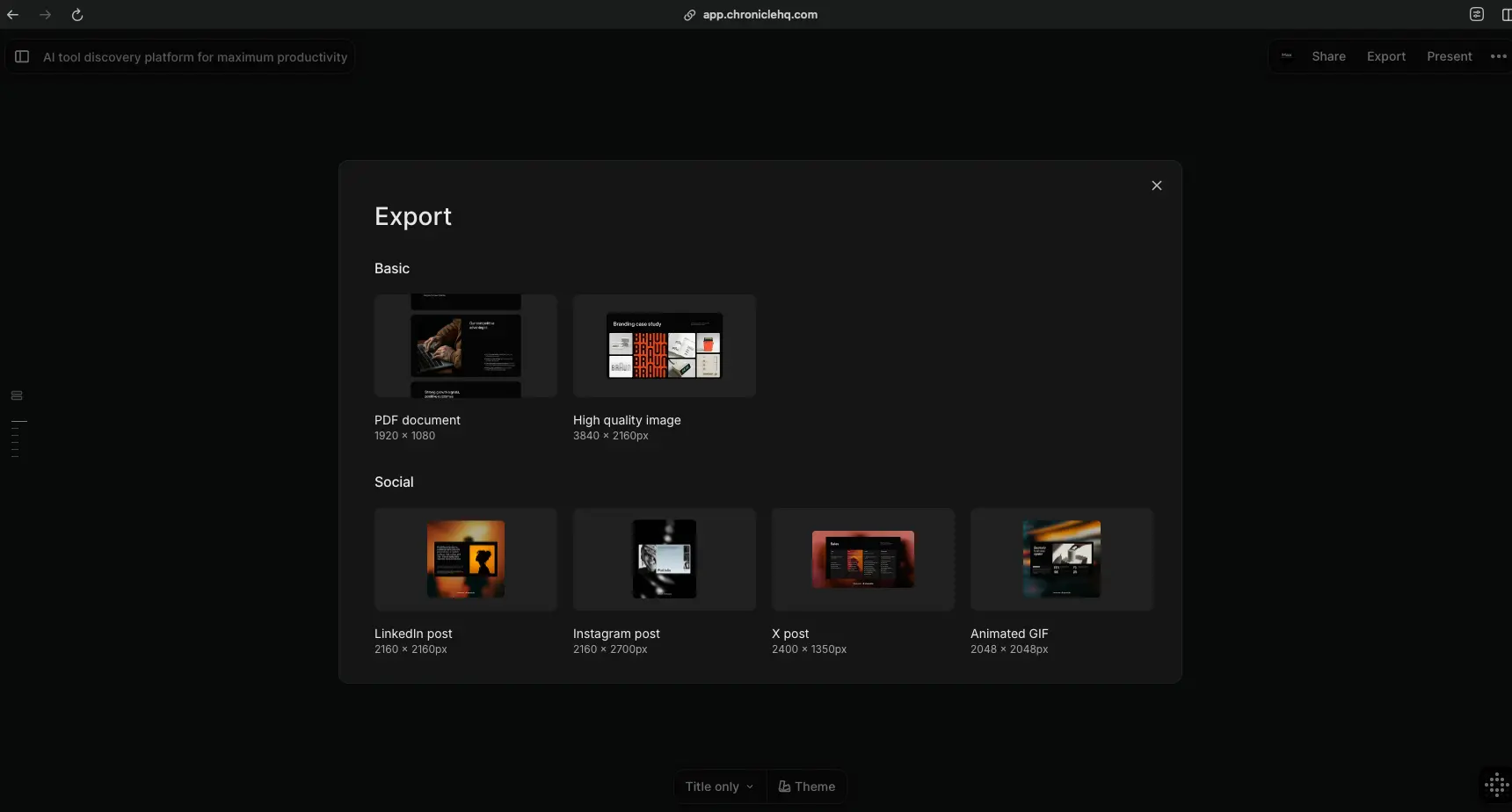
Chronicle's export panel offers two categories: Basic includes PDF documents (1920×1080) and high-quality images (3840×2160px). Social exports include LinkedIn posts (2160×2160), Instagram posts (2160×2700), X/Twitter posts (2400×1350), and Animated GIFs (2048×2048). The Share and Present buttons in the top-right corner handle web publishing with engagement tracking. PowerPoint (.pptx) export is confirmed as rolling out in 2026—a critical update that will address one of the platform's biggest current limitations.
Ready to build story-driven presentations that stand out?
Try Chronicle AI Free →Free plan with 100 AI tokens/month • No credit card requiredHow Chronicle AI Works
From raw idea to client-ready presentation in four narrative-driven steps.
Choose Your Starting Point
Chronicle offers multiple entry points depending on what you have available. Paste existing text or notes from any source, type a short prompt describing what you need, import a URL (Chronicle scrapes and structures the content), upload a PDF document, or import an existing PowerPoint file. You can also start from one of the purpose-built templates (Pitch Deck, Business Review, Board Meeting, etc.) or begin with a blank canvas. This flexibility means Chronicle adapts to your workflow—not the other way around.
AI Generates a Narrative Storyline
This is where Chronicle's story-first approach becomes tangible. Rather than jumping straight to slide design, the AI first creates a Storyline—a narrative structure that organizes your content into logical, persuasive sequences. You'll see numbered sections with key points arranged for maximum impact. At this stage, you choose a visual theme (Chronicle, Minimal, New Classic, Retro Tech, Bold Minimalist, or Modern Tech) and can review, retry, or accept the proposed structure before the full design pass begins. This intermediate step is what produces Chronicle's noticeably more coherent output compared to competitors that skip narrative planning.
Customize with Widgets and Remix
Once the AI generates your presentation, the widget-based editor gives you granular control. Insert Paragraphs, Headings, Media (images, videos, polaroids), Cards, Embeds, Mockups, Sticky Notes, or Diagrams. The Remix feature—with 64+ layout styles—lets you instantly try different arrangements for any slide without rebuilding from scratch. Connectors (arrows and lines) help create visual relationships between elements. The editor balances AI-powered automation with manual design control, producing results that feel custom rather than auto-generated.
Present, Share, or Export
Chronicle presentations are designed for multiple delivery formats. Present directly in the browser using interactive features like Peek (reveal hidden content on demand) and Deep Hover (isolate specific elements for emphasis). Share via web link with built-in analytics that track who viewed your deck and which slides they spent time on—particularly valuable for investor decks and sales proposals. Export to PDF, high-quality images, or social media formats (LinkedIn, Instagram, X, animated GIF). PowerPoint export is rolling out in 2026 to address the corporate distribution requirement.
Coming in 2026: Muse Conversational Agent
Chronicle's biggest AI update introduces Muse—a conversational agent that lets you iterate on presentations through natural language. Instead of regenerating entire decks, tell Muse to "make this slide more punchy," "less corporate, more human," or "convert slide 5 into a simple visual." Muse understands narrative context and adjusts specific elements while maintaining story flow. Early access began January 2026, with broader rollout expected Q1-Q2 2026.
Real-Time Collaboration
Chronicle supports real-time shared editing with visible cursors, making it easy for teams to work on presentations simultaneously. Shared workspaces are available on Pro and above, with guest editor slots scaling from 1 (Free) to 3 (Pro) to unlimited (Plus). Admin controls and consolidated billing are available on the Enterprise plan for larger organizations.
Key Features
Everything Chronicle AI offers for professional presentation creation.
Story-First AI Generation
Chronicle's narrative engine structures content into hook-problem-solution-proof sequences before designing slides. This produces coherent, persuasive presentations—not just pretty slides arranged randomly. Output quality reaches 85-90% client-ready.
Widget-Based Editor
Build presentations like composing a webpage with modular widgets: text blocks, media, cards, embeds, mockups, sticky notes, and diagrams. Drag-and-drop with automatic snap ensures clean layouts while maintaining creative freedom.
Peek & Deep Hover
Unique interactive features for live presenting. Peek reveals hidden content on demand; Deep Hover isolates specific elements by dimming everything else. Control audience attention in real-time—not available in any other AI presentation tool.
64+ Remix Styles
Instantly try different layout arrangements for any slide without rebuilding. The Remix feature offers 64+ design variations, letting you find the optimal visual composition in seconds. Each remix costs approximately 1 AI token.
Multi-Source Import
Generate presentations from text prompts, website URLs, PDF documents, or existing PowerPoint files. Chronicle's AI extracts content, identifies key themes, and builds narrative-structured presentations from any source material.
Real-Time Collaboration
Simultaneous editing with visible cursors, shared workspaces (Pro+), and scalable guest access: 1 guest (Free), 3 guests (Pro), unlimited guests (Plus). Consolidated billing and admin controls available on Enterprise.
30+ Integrations
Connect with ChatGPT, Claude, Perplexity, Notion, Loom, Google Sheets, Airtable, YouTube, Instagram, TikTok, Calendly, and more. Image generation via Nano Banana, Runway Gen-4, and Ideogram 3.0 is built-in.
Muse Conversational Agent
Iterate on presentations through natural language commands. Ask Muse to refine tone, restructure sections, or simplify visuals without regenerating the entire deck. Use-case specific generation for pitches, board updates, and strategies. Rolling out Q1-Q2 2026.
Beyond these headline features, Chronicle supports web publishing with engagement analytics (track views and slide-level attention), custom theme creation on Pro plans and above, PDF and social media exports (LinkedIn, Instagram, X, animated GIF), and an API (early access) for automated presentation generation from CRM data or sales notes. The platform's 6 built-in themes (Chronicle, Minimal, New Classic, Retro Tech, Bold Minimalist, Modern Tech) provide a solid foundation that custom themes can extend.
Experience Chronicle's story-first AI with the free plan:
Try Chronicle AI Free →100 tokens/month • No credit card requiredPricing Plans
Token-based pricing with a generous free tier—annual billing saves 20%.
Free
Pro
Plus
Token usage: Full presentation ≈ 15 tokens (10 base + 1/chapter) • Remix ≈ 1 token • Rewrite ≈ 1 token • Tokens expire monthly
Enterprise: Custom pricing with brand governance, role-based permissions, and compliance workflows
How Many Presentations Per Plan?
Based on a typical 5-chapter presentation using ~15 tokens. Free plan is generous enough for occasional users. Pro handles most professional workflows (2-4 client decks/month plus iterations). Plus is designed for agencies and high-volume teams. Token add-on purchases are coming but not yet available as of February 2026.
Compared to alternatives: Gamma offers unlimited AI at $8/month (cheapest in category); Beautiful.ai starts at $12/month with unlimited slides; Plus AI begins at $10/month with unlimited AI generations; Prezi AI Standard starts at just $5/month. Chronicle's token system is more restrictive on pure volume, but the output quality difference (85-90% client-ready vs. 60% for competitors) means less time spent on manual cleanup—a trade-off that favors professionals billing for their time.
Detailed Pros & Cons
An honest, balanced assessment based on research and user feedback.
✓ Pros
Chronicle consistently produces 85-90% client-ready presentations—significantly higher than the 60% typical of competitors. Balanced layouts, consistent spacing, and intentional visual hierarchy reduce the manual cleanup that eats into productivity with other tools. Multiple independent reviewers and Product Hunt users highlight the design quality as Chronicle's standout attribute.
The story-first methodology genuinely differentiates Chronicle. Content is organized into persuasive sequences (hook-problem-solution-proof) rather than just filling slide templates. This produces presentations that flow logically and feel intentional—particularly effective for pitch decks, board updates, and sales proposals where storytelling drives outcomes.
Peek and Deep Hover are unique in the AI presentation category. No other tool offers this level of real-time audience attention control during live presenting. Peek reveals hidden content on demand; Deep Hover isolates specific data points by dimming everything else. Genuinely useful for investor pitches and executive briefings.
The modular widget system (text, media, cards, embeds, mockups, diagrams) with 64+ remix styles offers remarkable design flexibility. Unlike rigid template-based tools, Chronicle lets you compose slides like a designer would—without requiring design skills. The Remix feature instantly generates layout alternatives at the cost of just 1 token.
100 tokens per month with unlimited documents and widgets is genuinely useful—enough for approximately 6-7 full presentations monthly. Unlike Beautiful.ai's 14-day trial requiring a credit card, Chronicle's free plan lets you evaluate the platform at your own pace with no payment commitment.
30+ integrations spanning AI tools (ChatGPT, Claude, Perplexity), productivity (Notion, Google Sheets, Airtable), media (YouTube, Instagram, TikTok, Loom), scheduling (Calendly, Cal.com), and image generation (Runway Gen-4, Ideogram 3.0). The API (early access) enables automated presentation generation for sales and reporting workflows.
✗ Cons
This is Chronicle's biggest limitation in February 2026. PowerPoint export was announced in November 2025 and is rolling out during 2026, but it's not fully available yet. For organizations dependent on .pptx format for client delivery or internal circulation, this is a dealbreaker until the export launches. The PDF export works as a workaround but loses interactivity.
At 4-6 hours to proficiency, Chronicle has the highest learning curve in the AI presentation category. The widget-based system and 64 remix options can feel overwhelming initially. Compare this to Gamma (<30 minutes), Plus AI (<15 minutes), or Beautiful.ai (<1 hour). Multiple users and reviewers explicitly flag this as a barrier—worth the investment for power users, but not for everyone.
Launched publicly in June 2025, Chronicle is less than a year old. Independent reviewers note the platform is "still a bit rough around the edges" with occasional text overlap on content-heavy slides, glitches, and weak mobile performance. These are normal growing pains but represent real risk for critical work compared to established tools like Prezi (15 years) or Beautiful.ai (7 years).
Chronicle requires continuous internet connection. No desktop app, no mobile app, no offline presenting. If you present at conferences with unreliable wifi, in secure facilities, or while traveling, this is a significant limitation. The only AI presentation tool with true offline access is Prezi AI (desktop app). Export to PDF before presenting as a fallback.
Unlike Gamma's unlimited AI at $8/month or Prezi's unlimited AI at $12/month, Chronicle's token-based system creates usage ceilings: 100 (Free), 250 (Pro), or 1,000 (Plus) tokens per month. Tokens expire monthly and don't roll over. High-volume users creating 20+ presentations monthly may find even the Plus plan restrictive compared to competitors offering unlimited generation.
Tome—a similar narrative-first AI presentation tool—shut down in April 2025 despite 20 million users and $81.6 million in funding. While Chronicle differs (B2B focus, paying customers from day one, PowerPoint export planned), the precedent raises legitimate questions about young presentation startups. Mitigate by exporting regularly and maintaining backup tools.
Chronicle AI vs Alternatives
How Chronicle compares to the leading AI presentation tools in 2026.
| Feature | Chronicle AI | Gamma | Beautiful.ai | Plus AI |
|---|---|---|---|---|
| Starting Price | Free ($0) | Free (400 credits) | $12/mo (trial) | $10/mo |
| AI Approach | Story-first narrative | Speed-first cards | Template-first brand | Native integration |
| Output Quality | 85-90% ready | ~60% ready | ~75% ready | ~70% ready |
| Learning Curve | 4-6 hours | <30 min | <1 hour | <15 min |
| PowerPoint Export | ⚠️ Coming 2026 | ✓ Yes | ✓ Yes | ✓ Native |
| Interactive Presenting | ✓ Peek/Deep Hover | ✗ Static | ✗ Static | ✗ Static |
| Offline Access | ✗ No | ✗ No | ✗ No | ✓ Native apps |
| Best For | High-stakes narratives | Speed & volume | Brand consistency | PowerPoint teams |
Which Tool Is Right For You?
Chronicle AI
Best Narrative QualityBest for: Startup founders, consultants, agencies, and strategy teams creating 2-5 high-stakes presentations per month where narrative coherence and visual polish directly impact outcomes. Ideal for pitch decks, board updates, client proposals, and sales narratives. Choose Chronicle if each presentation matters more than speed of production, and you're willing to invest 4-6 hours learning for consistently premium output.

Gamma
Best ValueBest for: Budget-conscious creators needing fast, unlimited AI generation at $8/month. Gamma produces decks in 5-10 minutes with minimal learning curve (<30 min). Ideal for internal presentations, weekly updates, and volume work. Output is less polished than Chronicle (~60% ready vs 85-90%) but speed and affordability are unmatched. Proved business model sustainability after Tome shutdown.

Beautiful.ai
Best Brand ConsistencyBest for: Corporate teams needing strict brand enforcement across every deck. Beautiful.ai's Smart Slides auto-format content to brand rules—the strictest brand consistency tool in the category. Enterprise-mature with SSO, SCIM, and 7+ years operating. 300+ professional templates designed for Fortune 500 recurring reports. Choose if brand compliance matters more than narrative innovation.

Plus AI
Zero Learning CurveBest for: Teams already using PowerPoint or Google Slides who want AI capabilities without switching tools. Plus AI works inside your existing apps—zero learning curve (<15 min). Native .pptx format means no export headaches. SOC 2 Type II certified for enterprise compliance. Live Snapshots auto-refresh data in presentations. Choose if workflow disruption is your biggest concern.

Prezi AI
Best for Live PresentingBest for: Presenters and speakers who present live frequently. Prezi Video's unique face overlay feature works in Zoom and Teams—no other AI tool offers this. Only AI presentation tool with true offline access via desktop app. 15 years operating (zero shutdown risk), trained on 450M presentations. Motion-first design creates cinematic storytelling. Best for educators and live pitch scenarios.

Presentations AI
AI-Powered SlidesBest for: Users seeking a streamlined AI presentation experience with professional design output. Presentations AI focuses on turning ideas into polished slides quickly, with an intuitive interface and strong visual templates. A solid all-around option for teams that want quality output without Chronicle's learning curve.

Decktopus
Budget OptionBest for: Budget-conscious users needing simple AI presentations for low-stakes projects. At $14.99/month with credit-based generation, Decktopus offers a straightforward experience for internal updates and basic decks. Less powerful than Chronicle or Gamma for professional use, but suitable for quick presentations where polish isn't critical.

Wondershare Presentory
Desktop + RecordingBest for: Educators and content creators who need built-in video recording and screen capture alongside AI presentation creation. Wondershare Presentory combines slide creation with presentation recording tools in a desktop application. Choose if you need to create video courses or recorded presentations with integrated webcam overlay.
Frequently Asked Questions
Should You Try Chronicle AI?
Chronicle AI represents a genuinely different approach in the AI presentation space. Rather than competing on speed or template volume, it bets on narrative quality—and that bet pays off. The story-first AI consistently produces presentations that feel intentional, coherent, and professional at a level most competitors simply don't reach. The interactive Peek and Deep Hover features are unique in the category and genuinely valuable for live presenting. For startup founders, consultants, agencies, and strategy teams creating high-stakes presentations, Chronicle delivers.
The limitations are real and worth acknowledging: no PowerPoint export yet (rolling out 2026), the steepest learning curve in the category (4-6 hours), a web-only platform with no offline access, and the inherent risk of a young company (<1 year). The Tome shutdown precedent is a legitimate concern, though Chronicle's paid-first business model and B2B focus suggest a more sustainable path. The token system is more restrictive than competitors offering unlimited generation, making Chronicle less ideal for pure volume work.
Our Recommendation
Start with the free plan (100 tokens/month, no credit card required) and build 2-3 practice presentations to evaluate whether Chronicle's output quality justifies the learning investment for your workflow. If the narrative AI matches your presentation style and the polish level impresses you, upgrade to Pro ($12/month annual). Keep Gamma ($8/month) as a companion for internal and volume work. Wait for PowerPoint export before fully committing if .pptx is essential for your clients. Low risk, high potential upside for professionals who care about presentation excellence.
Ready to Build Presentations That Tell a Story?
Join 5,000+ teams creating narrative-driven, client-ready presentations with Chronicle AI