

Beautiful.ai
AI-powered presentation platform with patented Smart Slides auto-layout and DesignerBot AI generation. Create polished, on-brand decks in minutes—no design skills needed.
Try Beautiful.ai →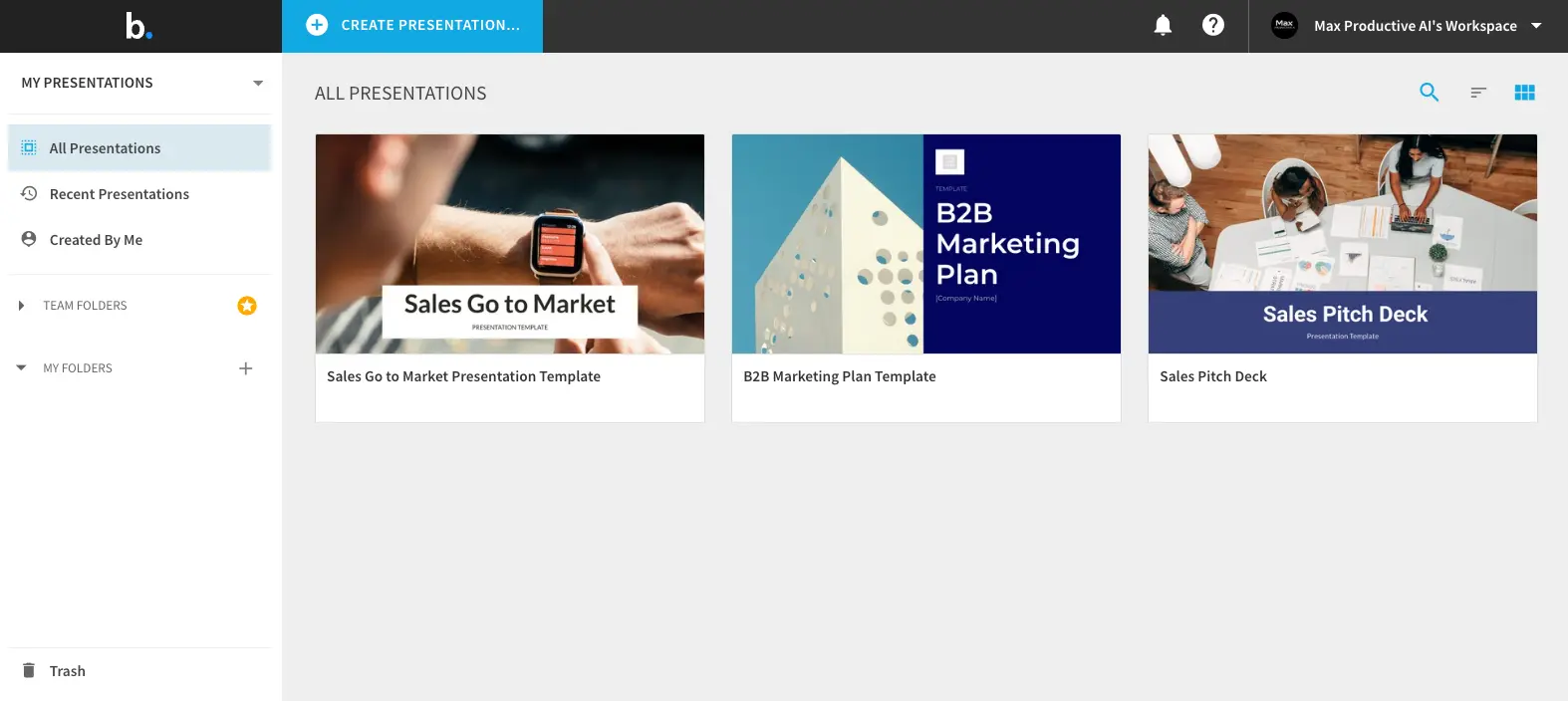
Polished AI Presentations
for Brand-Conscious Teams
Beautiful.ai solves a specific problem really well: it makes every slide look professionally designed, regardless of who built it. The patented Smart Slides engine handles layout, spacing, and typography automatically—so your team's worst PowerPoint offender can produce polished decks without touching alignment guides. The 2026 Context-Aware AI Workflow adds real narrative control, and the Salesforce integration is a genuine differentiator for sales teams. But there's a catch: no free plan, rigid templates, and a steep price jump from Pro to Team mean it's not for everyone.
✓ What We Love
- Smart Slides auto-layout—slides look polished automatically
- Brand governance with content locking for team consistency
- Salesforce integration with per-slide engagement analytics
- New Context-Aware AI gives outline-first narrative control
! Could Be Better
- No free plan—14-day trial requires a credit card
- Template rigidity limits custom layout control
- Pro to Team jump: $12 → $40/user/month is steep
What Is Beautiful.ai?
The AI presentation maker that handles design so you don't have to—but with some trade-offs worth knowing about.
Beautiful.ai is a cloud-based presentation platform founded in 2015 by Mitch Grasso, the entrepreneur behind SlideRocket (acquired by VMware). Currently led by CEO Jason Lapp with Grasso as CTO, the company is headquartered in San Francisco and raised $45 million from General Catalyst in March 2026—bringing total funding to over $61 million. As of early 2026, more than 100,000 businesses across 193 countries have created over 100 million slides on the platform.
Here's the thing that actually matters: Beautiful.ai isn't trying to be another "AI writes your slides" tool. Its core bet is on automated design intelligence. The patented Smart Slides engine reformats your slide in real time as you add content—adjusting spacing, alignment, font sizes, and visual hierarchy without you touching a single formatting option. Where tools like Gamma or Presentations AI focus on generating content quickly, Beautiful.ai focuses on making sure whatever you create looks right.
That's a genuinely different approach. Independent testers report cutting deck creation time by 70% or more—tasks that took 3-4 hours in PowerPoint now wrap up in under an hour. And unlike general-purpose AI tools where the first draft needs heavy cleanup, Beautiful.ai's output already looks finished. The trade-off? You're working within the platform's opinionated design system. If you want to place an element exactly 47 pixels from the left edge, Beautiful.ai will fight you on that. For most business presentations, that constraint is a feature. For consultants building custom frameworks, it's a limitation.
Who Is Beautiful.ai Best For?
Sales and marketing teams creating repeatable pitch decks, proposals, and reports—especially those using Salesforce (native integration with per-slide analytics). Non-designers in business roles who need professional output without learning design. Enterprises requiring brand governance at scale across multiple presenters. Teams willing to commit to annual billing, where the $12/month Pro plan is strong value.
Worth noting: the March 2026 product update—a Context-Aware AI Workflow that generates a text outline before designing slides—was the most significant feature launch in the company's history. Combined with the $45M investment earmarked for global expansion, it signals a company investing seriously in its future, not coasting on existing features.
See Beautiful.ai in Action
Real screenshots from the platform showing DesignerBot, Smart Slides, and the template library.
Dashboard & Presentations Library
Your workspace for managing all presentations and team folders
The dashboard is clean and straightforward. Left sidebar gives you quick filters—All Presentations, Recent, Created By Me—plus Team Folders and personal folders. Presentations appear as visual cards showing the title slide thumbnail. Nothing fancy here, which is fine. You'll spend most of your time in the editor, not the dashboard.
DesignerBot: AI Prompt to Presentation
Describe what you need and DesignerBot builds the deck
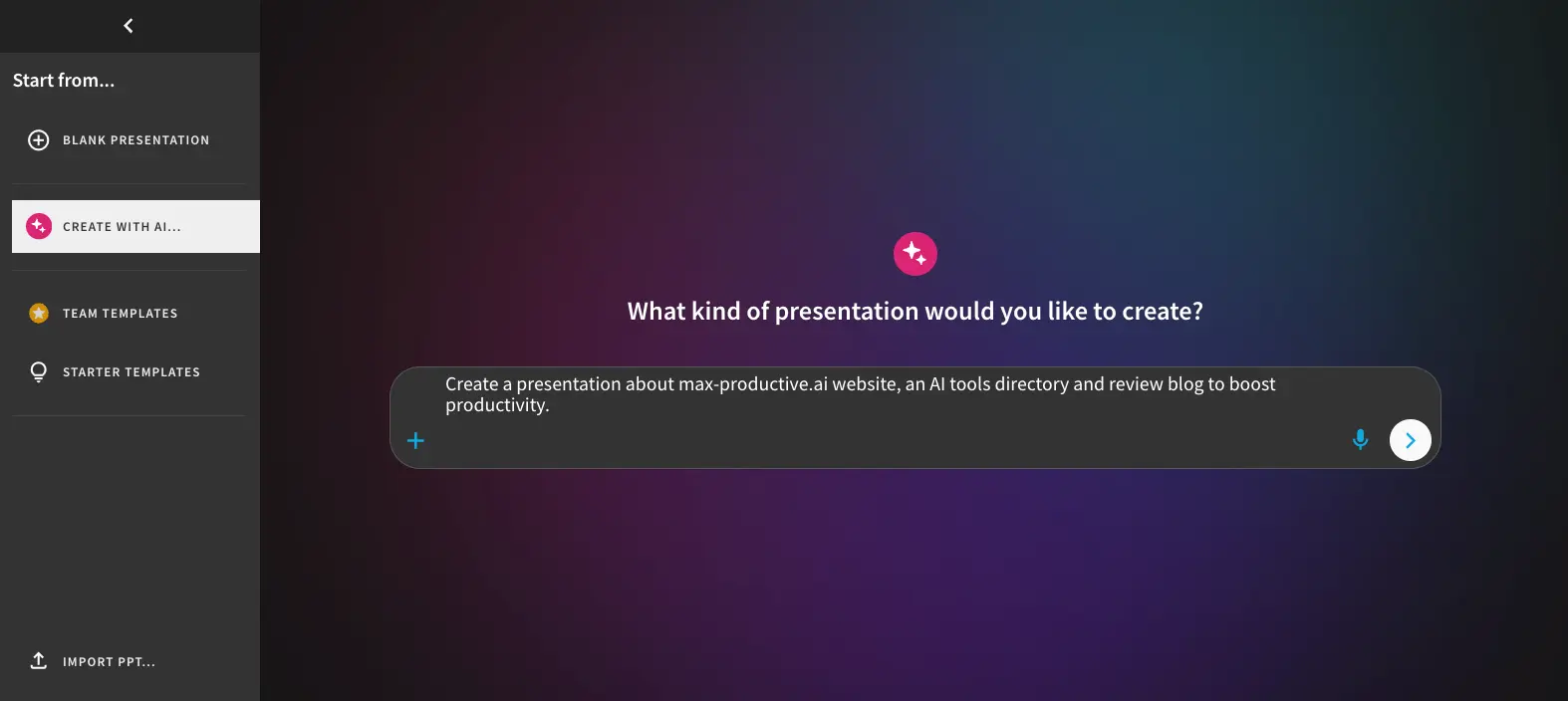
This is where DesignerBot starts. Type a prompt—"Create a 10-slide sales pitch for a SaaS project management tool"—or upload a document, and the AI takes it from there. The interface also supports voice input, which is a nice touch for brainstorming. You can start from blank, use the AI, pick team templates, or choose from starter templates via the left sidebar.
Context-Aware AI Outline Editor
Review and reshape the narrative before committing to slide design
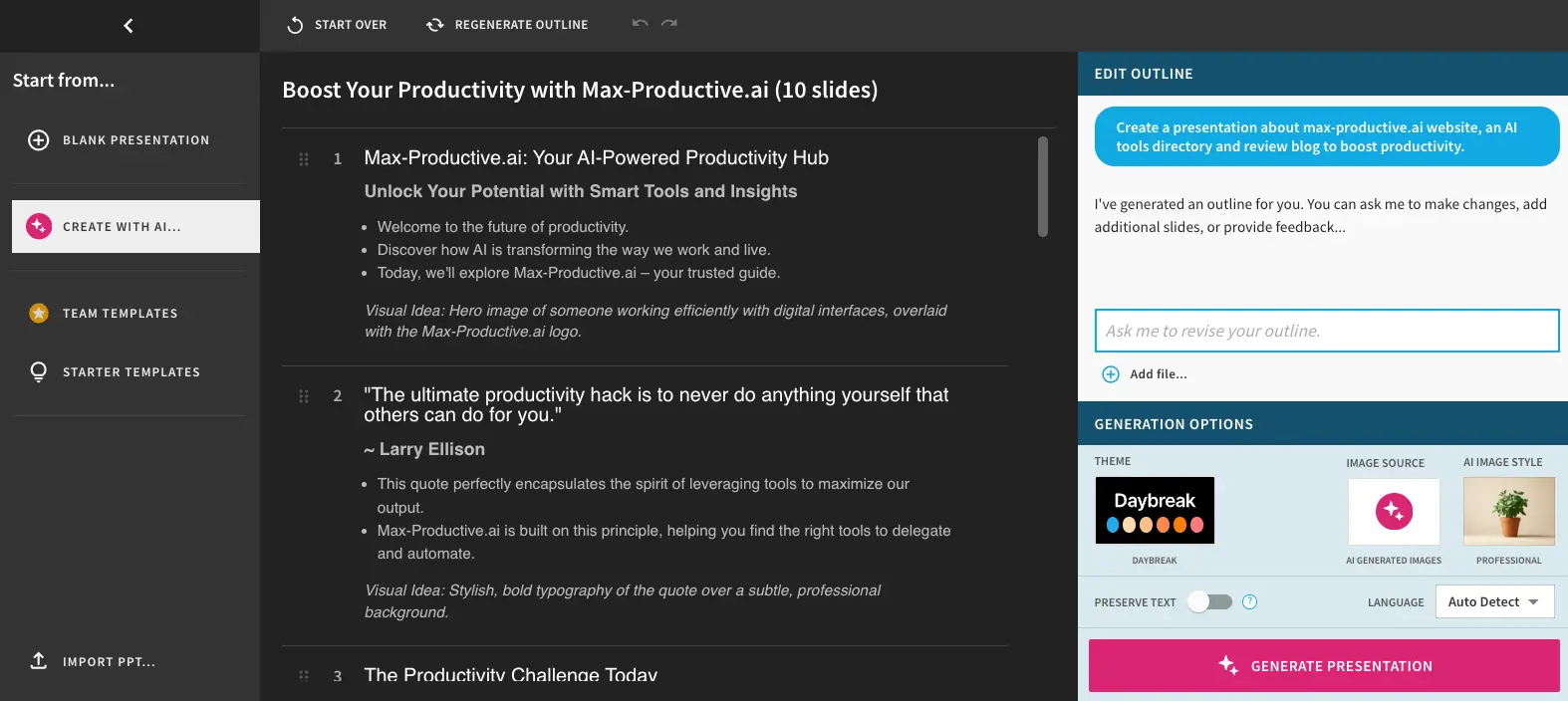
This is the 2026 addition that changes the workflow significantly. Instead of jumping straight to designed slides, Beautiful.ai now generates a text outline first—slide by slide with bullet points and visual suggestions. You can reorder slides, rewrite content, add or remove sections, all before hitting "Generate Presentation." The right panel lets you pick a theme, image source (AI-generated or stock), and language. I'd have liked to see more theme options, but the outline-first approach solves a real problem: losing narrative control when AI goes straight to design.
Want to see how Smart Slides handles your content?
Try Beautiful.ai →14-day free trial • No commitment requiredSmart Slides Editor & Presentation View
The main editing workspace where Smart Slides handles layout automatically
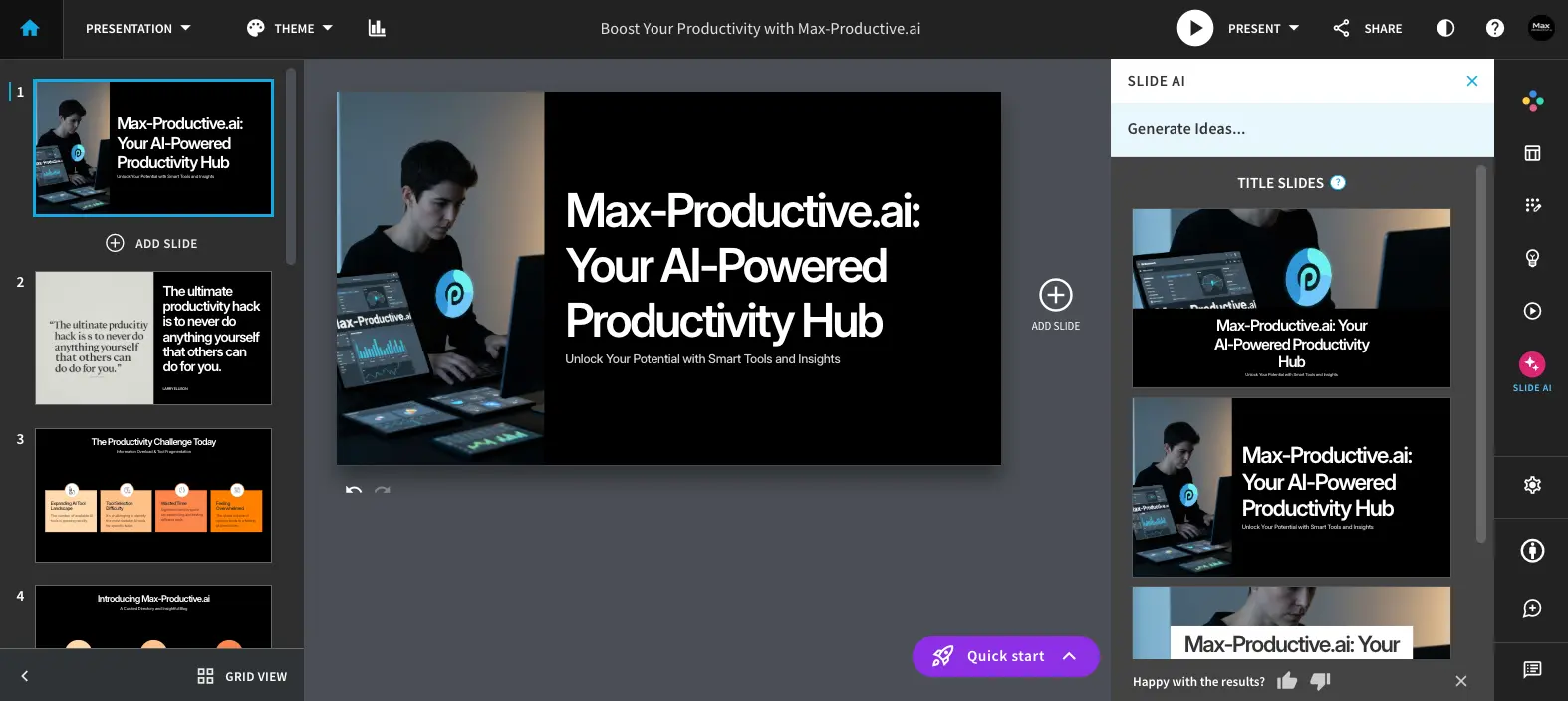
Here's where the magic happens. The main canvas shows your slide with automatic formatting applied. The left panel displays thumbnail previews of all slides. On the right, "Slide AI" offers alternative title slide designs—click one to swap instantly. The "Generate Ideas" option lets you request new AI-generated layouts for any slide. Notice how the design looks polished without any manual formatting work. That's Smart Slides doing its thing.
Smart Slides Layout Customization
Editing content within Beautiful.ai's structured layout system
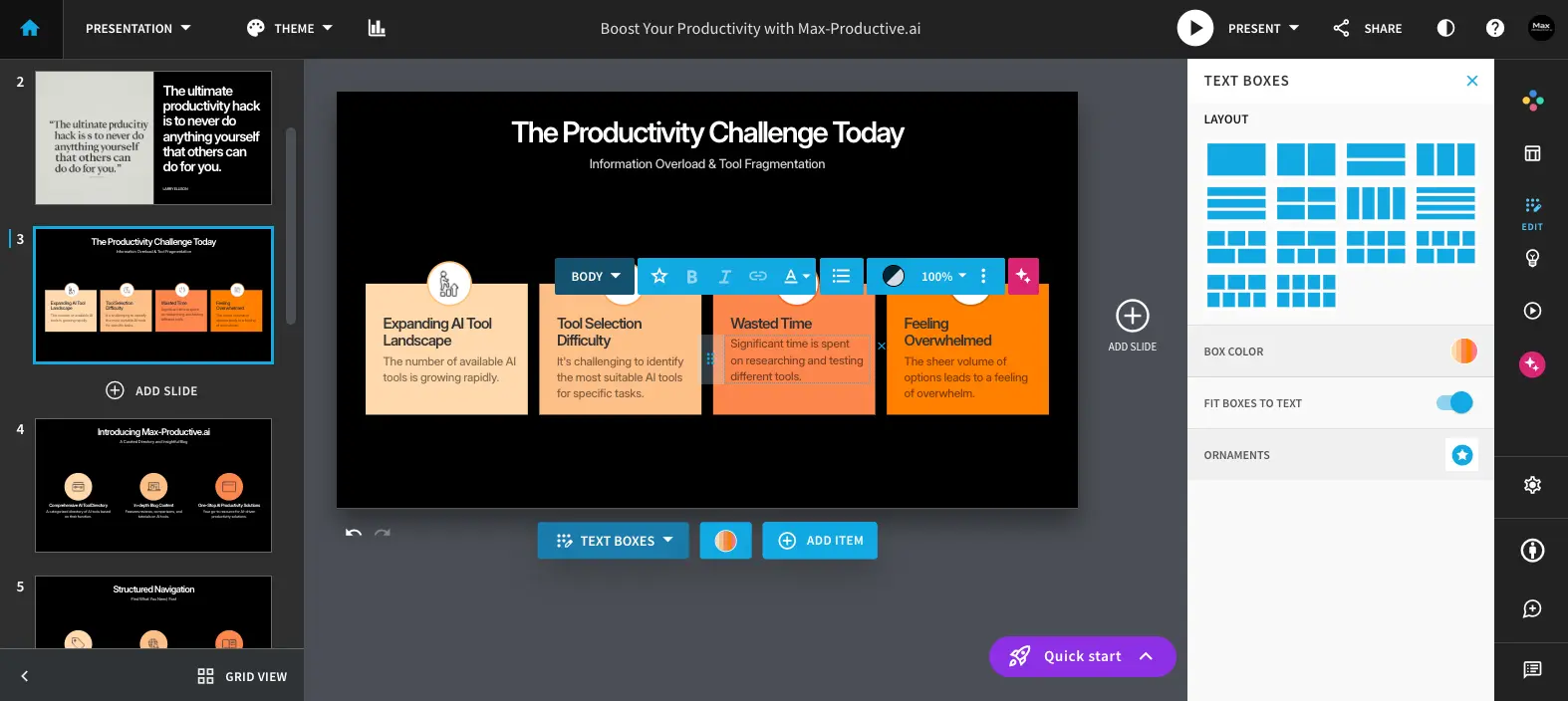
This screenshot shows the double-edged sword of Smart Slides. The right panel offers layout presets—different grid arrangements for your content blocks. You can change box colors, toggle "Fit Boxes to Text," and adjust ornaments. It's fast and produces consistent results. But see those fixed grid layouts? That's the rigidity users mention. You pick from presets, you don't freely drag elements anywhere you want. For standard business decks, this works perfectly. For custom consulting frameworks? Frustrating.
Generate Slide Ideas with AI
Add new AI-generated slides to an existing presentation
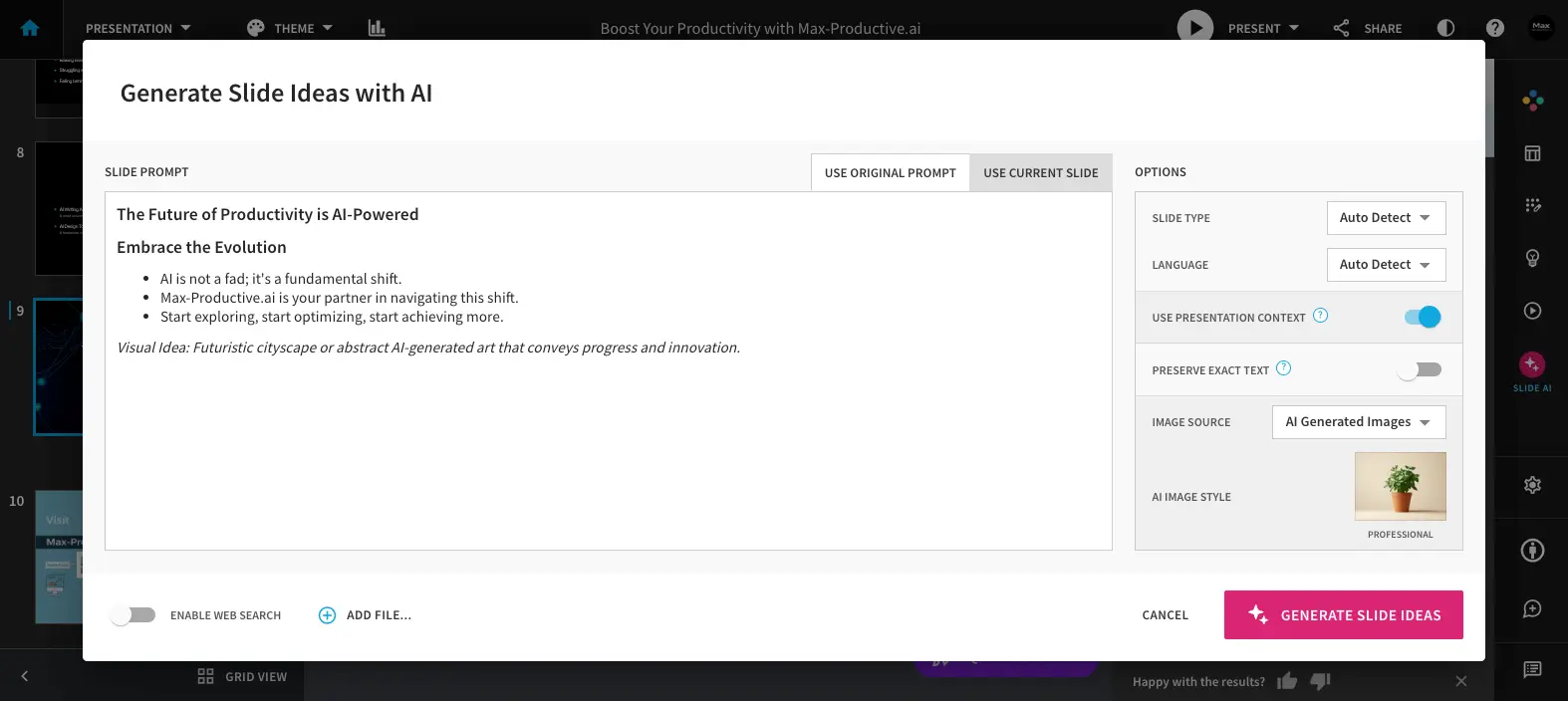
Need to add a slide mid-deck? This dialog lets you describe what the new slide should cover, and Beautiful.ai generates options that fit the existing presentation's context. The "Use Presentation Context" toggle is key—it tells the AI to consider your full deck's narrative when creating the new slide, not just the prompt in isolation. A small but thoughtful feature that reduces the "random new slide that doesn't fit" problem.
Presentation Templates Library
Pre-built templates across business categories
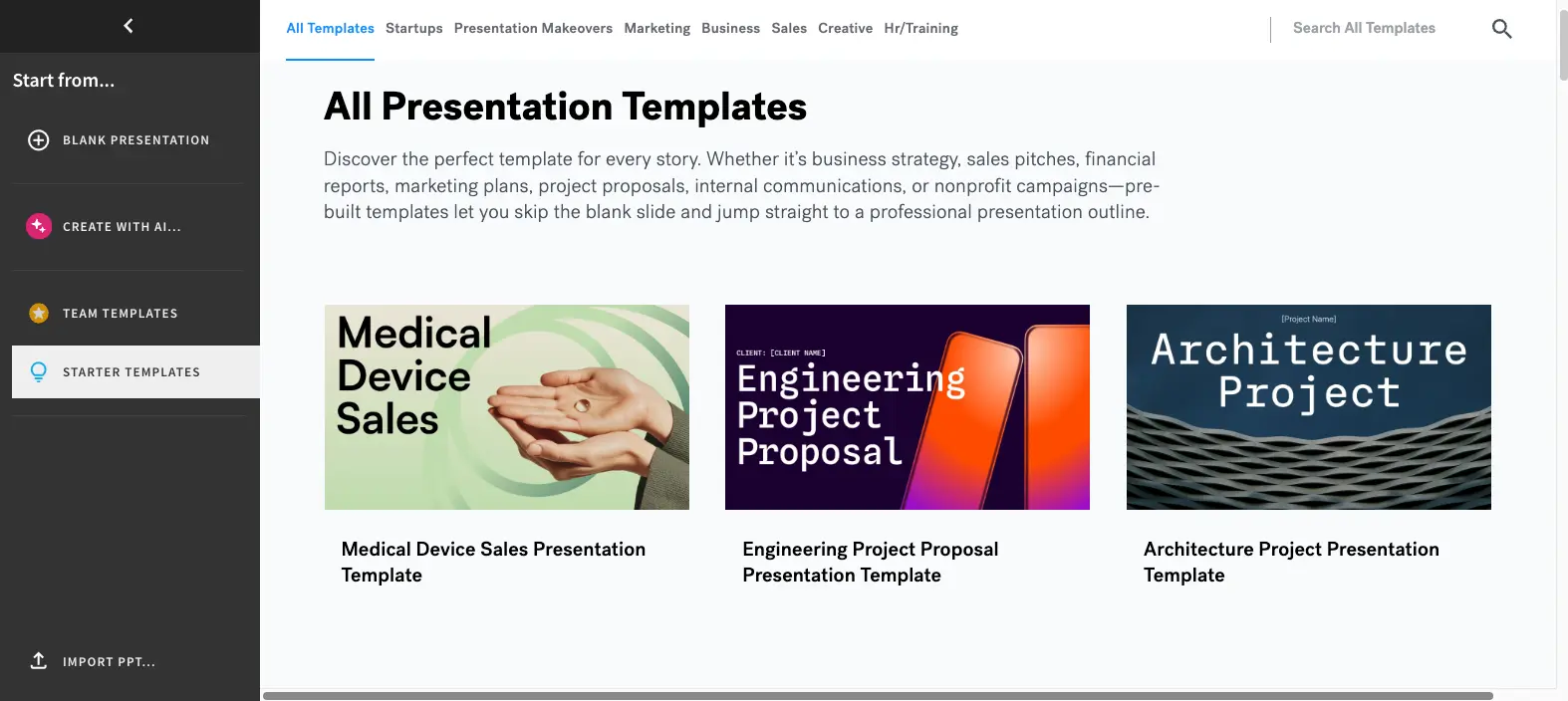
The template library covers standard business categories: Startups, Marketing, Business, Sales, Creative, HR/Training. Template quality is professional and consistent, though the selection is smaller than what you'd find in Prezi or Canva. The "Presentation Makeovers" tab is a nice touch—showing before/after examples of dull slides transformed with Beautiful.ai's design system. For most business use cases, what's here is more than enough.
How Beautiful.ai Works
From a text prompt to a finished presentation in four steps. The design happens automatically.
Start with a Prompt, File, or Template
You have three entry points: type a description of what you need ("Q3 sales review for the board"), upload a document (PDF, Word, or text file), or pick from the template library. You can also paste a URL and let DesignerBot extract the content. Most users start with the AI prompt—it's the fastest path from zero to a structured deck.
Review the AI-Generated Outline
This is the new 2026 workflow, and it's a significant improvement. Instead of jumping straight into designed slides, Beautiful.ai generates a text outline first—showing you the narrative structure, slide-by-slide bullet points, and suggested visuals. You can rewrite, reorder, add, or remove slides at the outline level before any design work happens. This fixes the biggest complaint about AI presentation tools: losing control of the story when the AI runs ahead.
Smart Slides Handles the Design
Hit "Generate Presentation" and Smart Slides takes over. The engine selects appropriate layouts for each slide type, applies your chosen theme, positions all elements with proper spacing and hierarchy, and sources images. The whole process takes about two minutes. Here's what's genuinely different: you don't need to fix alignment, adjust font sizes, or reposition elements afterward. The output already looks presentation-ready.
Refine, Customize, and Share
Edit any slide by clicking into it—change text, swap images, pick different layout presets, adjust colors. Smart Slides reformats in real time as you make changes, so nothing breaks visually. When you're done, share via link, present directly from the browser, export to PowerPoint or PDF, or push to Google Slides. The Salesforce integration lets sales teams track which slides prospects viewed and for how long.
Enterprise-Grade Security
Beautiful.ai holds SOC 2 Type II certification, supports GDPR compliance, encrypts data in transit and at rest, and conducts annual third-party penetration testing. Enterprise plans include SSO and SCIM provisioning. For organizations with strict compliance requirements, this puts Beautiful.ai ahead of most standalone AI presentation tools.
Brand Control That Scales
Teams can upload logos, define color palettes, set typography, and apply brand themes across every presentation. Content locking prevents teammates from altering key slides—so your brand guidelines survive contact with the entire sales team. Shared template libraries and centralized asset management give brand managers real governance over all output.
Key Features
What you're actually getting—and where the gaps are.
Smart Slides Auto-Layout
The feature that justifies the product. Automatically adjusts spacing, alignment, typography, and visual hierarchy as you add content. This is Beautiful.ai's patented technology and remains the strongest auto-layout engine in the AI presentation category—nothing else comes close for consistent output quality.
DesignerBot AI Generation
Generate full decks from a text prompt, uploaded document, or URL. Honest take: the design output is excellent, but the written content often needs rewriting. DesignerBot structures slides well but doesn't produce strategically sharp copy—you'll want to bring your own messaging.
Context-Aware AI Workflow
The biggest 2026 update. Start with a prompt and get a text outline first—review the narrative before committing to slide design. A chat-style interface lets you iterate without losing context. Solves the "AI ran ahead and ruined my story" problem that plagues most AI presentation tools.
Brand Kit & Content Locking
Upload logos, define colors and fonts, then apply them everywhere. Content locking prevents team members from altering protected slides. Among AI presentation tools, this is best-in-class for brand governance. Gamma and Decktopus offer basic brand kits, but neither has content locking.
Analytics & Salesforce Integration
Track total views, unique viewers, time per slide, and completion rates. The Salesforce integration extends this directly into your CRM—sales reps see which slides a prospect viewed and for how long. Uncommon among presentation tools and a genuine differentiator for revenue teams.
Export Options
Export to editable PowerPoint, static PowerPoint (images), Google Slides, or PDF. Caveat: editable PPTX exports can have font and layout issues. If your workflow depends on clean PPTX files, test before committing. Plus AI generates natively inside PowerPoint and avoids this problem entirely.
Real-Time Collaboration
Multiple users can edit simultaneously with comments, progress tracking, and version history. Important: collaboration is gated behind the Team plan at $40/user/month. The Pro plan is individual-only. A 10-person team on annual billing pays $4,800/year.
15-Language Localization & Developer API
The platform now supports 15 languages for global teams, and a new Developer API enables custom workflow integrations. A ChatGPT custom GPT lets you ideate content and push directly to Beautiful.ai. Fresh 2026 additions—early days, but promising for international or automation-focused teams.
What's missing? Beautiful.ai can't AI-generate diagrams—Venn diagrams, flowcharts, quadrant charts—which is a gap. There's no offline editing, and the template library is smaller than what Canva or Prezi offer. For most structured business presentations, the feature set covers what you need. For creative or highly visual work, you may feel constrained.
See how Smart Slides handles your next presentation:
Try Beautiful.ai →14-day free trial • All features includedPricing Plans
Three tiers with a steep monthly-vs-annual gap you should know about.
Pro
- ✓ Smart Slides auto-layout
- ✓ DesignerBot AI generation
- ✓ Brand Kit (logos, colors, fonts)
- ✓ Export to PPTX, PDF, Google Slides
- ✓ AI image generation
- ✗ No collaboration features
Team
- ✓ Everything in Pro
- ✓ Real-time collaboration
- ✓ Shared template libraries
- ✓ Content locking
- ✓ Presentation analytics
- ✓ Salesforce integration
Enterprise
- ✓ Everything in Team
- ✓ SSO & SCIM provisioning
- ✓ Advanced admin controls
- ✓ Dedicated account manager
- ✓ Custom onboarding
- ✓ Priority support
No free plan. The 14-day trial requires a credit card and auto-charges if not cancelled.
Pricing last verified April 2026. Visit Beautiful.ai for current rates.
Is It Worth the Money?
Independent testers report cutting deck creation from 3-4 hours to under 1 hour. At the $12/month annual Pro price, it pays for itself if you create just one presentation per month. The real value question is the Team plan: $40/user/month is reasonable for sales teams closing deals with those decks, but expensive for teams who present occasionally.
For context: Gamma starts at $8/month with a free tier; Plus AI starts at $12/month with a free trial; Chronicle offers unlimited free documents with Pro at $12/month; Prezi has a free tier and starts at $7/month. Beautiful.ai's annual Pro pricing is competitive, but the monthly rate and Team tier put it at the premium end. You're paying for the auto-layout engine and brand governance—whether that premium is justified depends on how many decks your team produces.
Detailed Pros & Cons
An honest breakdown based on research, user feedback, and platform analysis.
✓ Pros
Smart Slides is genuinely different from anything else in the category. The output already looks presentation-ready—no fixing alignment, no adjusting spacing, no fighting with font sizes. For teams where non-designers create decks, this alone justifies the subscription.
Multiple independent reviewers report 70%+ time reduction on deck creation. A 3-4 hour PowerPoint session becomes 45-60 minutes. Even accounting for content editing, the net savings are substantial for anyone creating presentations regularly.
Brand Kit plus content locking is a combination no other AI presentation tool matches. Upload your brand assets, lock critical slides, and let your entire sales team create decks without worrying about off-brand output. For organizations managing consistency across dozens of presenters, this is the strongest option available.
Per-slide engagement tracking pushed directly into your CRM. Sales reps see which slides a prospect spent time on, when they last opened the deck, and completion rates. This isn't available in Gamma, Plus AI, or most competitors. For revenue teams, it's a genuine differentiator.
The outline-first workflow addresses the biggest frustration with AI presentation tools: losing narrative control. Being able to reshape the story before design kicks in is a fundamentally better approach. This update alone makes Beautiful.ai a noticeably better product than it was six months ago.
SOC 2 Type II, GDPR compliance, encryption everywhere, SSO, and annual pen testing. If your organization has procurement requirements that smaller tools can't meet, Beautiful.ai checks the boxes.
✗ Cons
Every major competitor offers some form of free access in 2026. Gamma gives 400 free AI credits. Chronicle offers unlimited free documents. Prezi has a free tier. Beautiful.ai's 14-day trial requires a credit card upfront and auto-bills if you forget to cancel. That's a real barrier for individuals and small teams who want to evaluate before committing.
The same automation that makes slides look polished prevents you from positioning elements freely. Consultants who need Harvey balls, custom process flows, or unusual comparison matrices will find themselves fighting the system. If your decks follow standard business formats, this is fine. If they don't, it's a dealbreaker.
The $12/month annual Pro plan is competitive. But the $45/month monthly rate is nearly 4x that—the largest annual-to-monthly gap in the category. And the jump from Pro to Team ($40/user) to access collaboration, analytics, and content locking is aggressive. A 10-person team on annual Team billing pays $4,800/year.
Editable PPTX exports can have font rendering inconsistencies and layout problems. If your clients expect clean, editable .pptx files, test this carefully. Plus AI avoids this issue by generating natively inside Google Slides and PowerPoint.
DesignerBot handles layouts beautifully but doesn't write strategically informed content. It doesn't summarize complex ideas or generate sharp business copy—it needs well-formed input. Don't expect to type a vague prompt and receive a boardroom-ready narrative.
Editing is browser-only—the desktop app only supports presenting. And there's no AI-generated diagram support: Venn diagrams, flowcharts, and quadrant charts can't be auto-generated, which is a noticeable gap versus tools that support these common slide types.
Beautiful.ai vs Alternatives
How Beautiful.ai compares to the top AI presentation makers in 2026.
| Feature | Reviewed Beautiful.ai | Gamma | Plus AI | Chronicle |
|---|---|---|---|---|
| Starting Price (Annual) | $12/user/mo | $8/mo | $12/mo | $12/user/mo |
| Free Plan/Trial | 14-day trial (CC req.) | ✓ Free tier | ✓ 7-day trial | ✓ Free tier |
| Auto-Layout Quality | ★★★★★ | ★★★ | ★★ | ★★★★ |
| AI Content Writing | ★★★ | ★★★★★ | ★★★ | ★★★★ |
| Brand Governance | ★★★★★ (locking) | ★★ | ★★ | ★★★ |
| PPTX Export | ✓ (issues noted) | ✓ (issues noted) | Native PowerPoint | ✗ No PPTX |
| Presentation Analytics | ★★★★★ | ★★ | ★★ | ★★ |
| Best For | Brand-conscious teams | Fast content creation | Google/PPT workflows | Design-quality storytelling |
Which Tool Is Right For You?
Beautiful.ai
ReviewedBest for: Sales and marketing teams who create repeatable pitch decks and need every presentation to look polished without design skills. The sweet spot is if your organization values brand consistency, uses Salesforce, and is willing to commit to annual billing where the $12/month Pro plan is genuinely competitive.

Gamma
Free Tier AvailableBest for: Users who want AI to write the content, not just design it. Gamma generates full decks in ~45 seconds, offers a free tier, and starts at $8/month. AI content generation is stronger than Beautiful.ai's. The trade-off: weaker brand governance and less polished auto-layout.

Plus AI
Native PPT/SlidesBest for: Teams whose workflow lives inside Google Slides or PowerPoint. Plus AI generates natively within those platforms—no export, no conversion, no layout issues. If your deliverables must be clean, editable files, this solves a problem Beautiful.ai can't.

Chronicle
Free Tier AvailableBest for: Founders and product teams who prioritize design quality and storytelling. Chronicle's Muse AI Design Agent produces some of the highest-quality AI-generated presentations available. No PPTX export though—web publishing and PDF only.

Prezi
Zooming CanvasBest for: Educators, keynote speakers, and anyone who wants to stand out visually—especially in video calls via Prezi Video. The zooming canvas creates genuinely memorable non-linear presentations. Not suited for standard corporate slide production.

Decktopus
Lead GenerationBest for: Solopreneurs and sales reps who need embedded lead generation forms, booking links, and Q&A sessions directly inside their presentations. Decktopus turns decks into functioning microsites—a unique capability no other tool offers.
Frequently Asked Questions
Should You Try Beautiful.ai?
Beautiful.ai is a genuinely excellent presentation tool for the right use case. The Smart Slides auto-layout engine remains the best in the category—nothing else produces consistently polished output with so little manual effort. The 2026 Context-Aware AI Workflow and $45M General Catalyst investment signal a company investing in its future. For sales teams, marketing departments, and organizations that need brand consistency across multiple presenters, it's one of the strongest options available.
But the gaps are real. No free plan in a market where every major competitor offers one. Template rigidity that frustrates anyone needing custom layouts. A pricing structure where the monthly rate is nearly 4x the annual, and collaboration features sit behind a $40/user/month tier. PowerPoint export issues remain a practical concern for teams whose deliverables leave the platform. These aren't minor quibbles—they shape who should and shouldn't use the tool.
Our Recommendation
Start with the 14-day free trial and test with a real presentation you need to create—not a throwaway. Focus on whether Smart Slides handles your typical slide types well and whether the PPTX export meets your quality bar. If your team creates 4+ presentations per month and values consistent branding, the annual Pro plan at $12/month is strong value. If you're unsure, try Gamma's free tier first to see if AI presentations work for your workflow before committing budget.