
GetResponse review
GetResponse puts email, landing pages and automation in one account, with webinars and courses on higher plans and AI that drafts whole campaigns. It suits small businesses that want one tool from signup to sale. Plan to edit the AI copy.
Free plan up to 500 contacts. 14-day premium trial, no card.
This review contains affiliate links. We may earn a commission at no extra cost to you.
Verdict: a clear automation builder, with AI that drafts more than it finishes
As of October 2026, GetResponse is a capable all-in-one platform for small businesses that want email, landing pages and automation in one account, with webinars and courses on the Creator plan. In our trial, the visual automation builder was the highlight: the welcome template we opened matched our brief almost step for step. The AI tools are quick first-draft helpers. One run built a landing page, a welcome email and a newsletter, but the copy was generic and the footer carried an address we never entered. Starter costs $15.58 a month billed yearly for 1,000 contacts, and unlimited workflows start on Marketer at $48.38.
What we like
- An automation builder you can read at a glance
- Email, pages, webinars and courses in one account
- A real free plan and a no-card trial
Best for. Small businesses, coaches and course creators who want email, landing pages and automation under one login, plus webinars and courses on Creator, and don't mind editing AI drafts.
Try GetResponse freeWhat we don't
- AI copy needs a real edit
- Check AI emails for details that aren't yours
- Costs rise with your list
Not for you if. You mainly need the deepest automation, the lowest price for simple newsletters, or a newsletter to monetize. ActiveCampaign goes further on automation, MailerLite and Brevo cost less for simple sends, and Beehiiv is built for growing and earning from a newsletter.
Compare alternativesHow we tested GetResponse
- Method
- Hands-on test, October 21, 2026
- Access
- A free account with GetResponse's 14-day premium trial, on desktop
- Scope
- One AI campaign, an AI newsletter, the Writing Assistant and a welcome automation
- Not tested
- Sending, deliverability and results, live automations, segmentation, A/B tests, webinars, courses, ecommerce
We tested GetResponse on October 21, 2026, on a free account with the 14-day premium trial, at no cost. The test business was our own: Max Productive AI and a planned weekly newsletter about AI tools. We gave the AI Campaign Generator a full brief, our real logo and a color palette, then inspected the landing page, welcome email and newsletter it made. Next we asked the automation template search for a welcome sequence and opened the workflow it suggested. Then we gave the AI Email Generator a specific three-tool newsletter and ran the AI Writing Assistant on its copy. We also browsed the email template gallery. The screenshots below come from that account. Prices and limits come from GetResponse's pricing page and help center, and user opinion from Trustpilot and independent reviews such as TechRadar, EmailToolTester and Style Factory.
We didn't send or publish anything, so this review has no deliverability, open or click results and no live automation runs. We also skipped segmentation, A/B testing, webinars, courses, paid newsletters, ecommerce, the website builder and send-time optimization, so those parts rely on GetResponse's documentation. The signup form stayed unsubmitted, and we didn't check where the generated buttons and social icons linked. It's one day on the trial, so read it as a first-hand impression of the AI and automation tools rather than a verdict on campaign performance.
What changed since our last review
- October 2026
- GetResponse MCP launched on October 5, free on every plan. GetResponse says it lets Claude, ChatGPT or another MCP tool check stats, find contacts and draft newsletters or whole campaigns in your account.
- August 2026
- The AI Template Assistant (August 31) suggests automation templates from a plain-English goal. We tested it.
- April 2026
- Revenue attribution shows what each message and workflow earned, with a channel breakdown in ecommerce reports.
- Since August 2025
- Plans are now Starter, Marketer, Creator and Enterprise, and the free trial runs 14 days. Our previous version used the older plan names and a 30-day trial. See current pricing
GetResponse
Our rating: 4.3 / 5
Free plan for up to 500 contacts. Paid plans from $15.58 a month, billed yearly.
Try GetResponse freeOr compare ActiveCampaign, Brevo and Mailchimp.
What is GetResponse?
GetResponse is an email marketing platform that also builds landing pages, signup forms, marketing automation, webinars, online courses and websites. It's aimed at small businesses, creators and online stores that want to collect subscribers, nurture them and sell to them from one account. The company started in Poland in 1998, and its paid plans are now called Starter, Marketer, Creator and Enterprise.
GetResponse has also added a layer of AI. The AI Campaign Generator drafts a landing page, a welcome email and a newsletter from one brief. Next to it sit an AI Email Generator, a Writing Assistant inside the email editor, AI subject lines and an AI landing page creator. Since August 2026, an assistant suggests automation templates from a plain-English goal. Since October 5, 2026, an MCP server lets Claude or ChatGPT work with your account on every plan.
What separates GetResponse from ActiveCampaign, Brevo or Mailchimp is how much sits in one account at a small-business price. On the Creator plan, webinars, courses, paid newsletters and a website builder sit in the same account as your emails, so you aren't paying for and connecting three more tools. ActiveCampaign goes deeper on automation, and Brevo can cost less for a large list you email rarely. Our read: GetResponse makes the most sense when you'll use at least two of those extra pieces.
GetResponse hands-on: one AI campaign and a welcome automation
These screenshots come from our trial account on October 21, 2026, in the order we worked: the AI campaign first, then automation, then the AI email tools. Tap or click any image to open it full size.
One AI run, three campaign assets
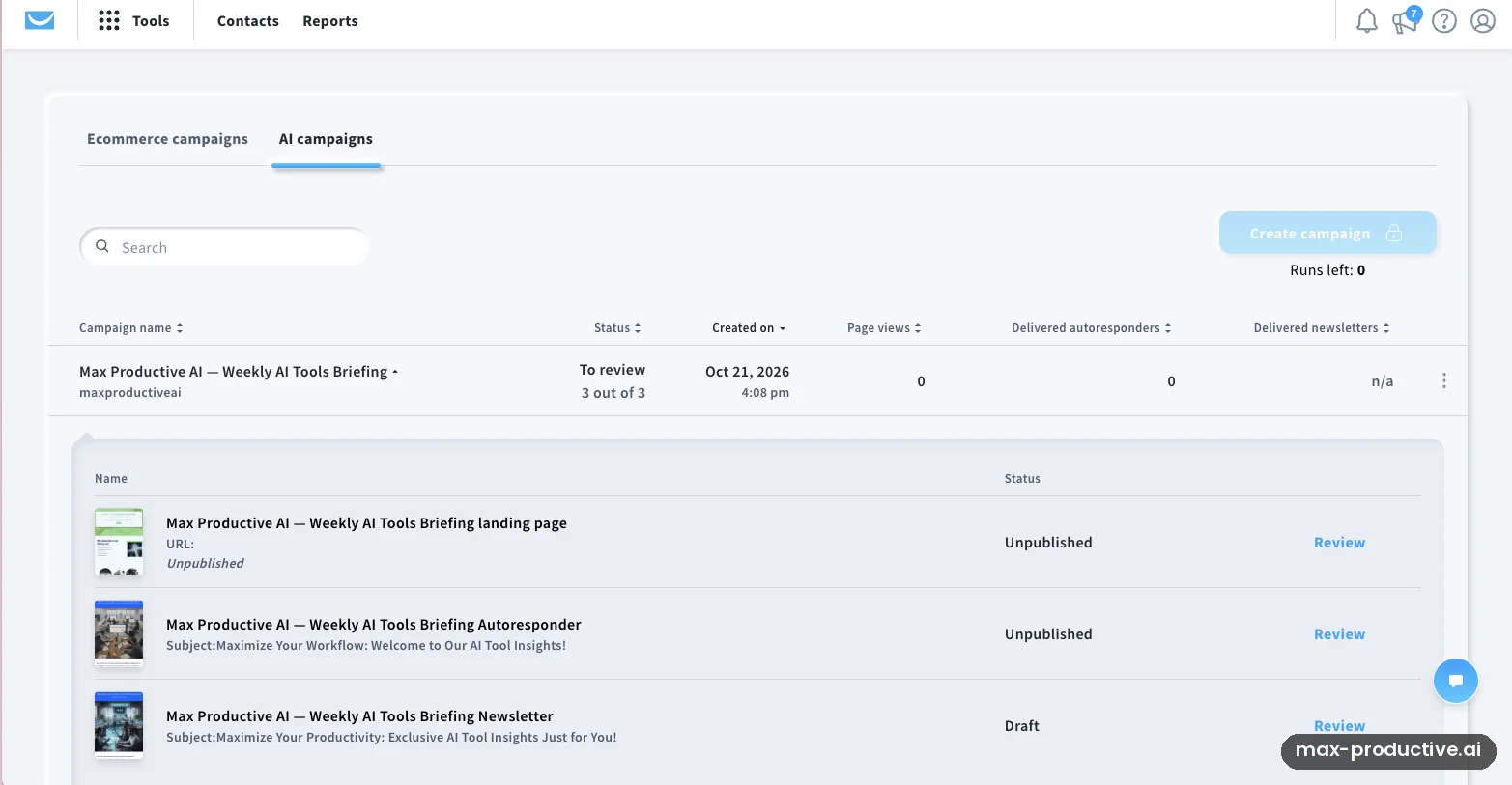
We started with the AI Campaign Generator, which works from a short questionnaire. We described Max Productive AI, its audience and its independent editorial angle, uploaded our real logo and picked a color palette. GetResponse then built a campaign for a weekly AI tools briefing with three linked parts: a landing page, a welcome autoresponder and a newsletter. Nothing went live on its own. The landing page and autoresponder sat unpublished and the newsletter stayed a draft, and we didn't publish or send any of them.
Note the counter under the locked Create campaign button: Runs left: 0. The trial includes one AI campaign run, and our test used it. Our advice: write your answers in a document first, with your offer, your audience and a few phrases in your own voice, then paste them in.
AI landing page: the hero section
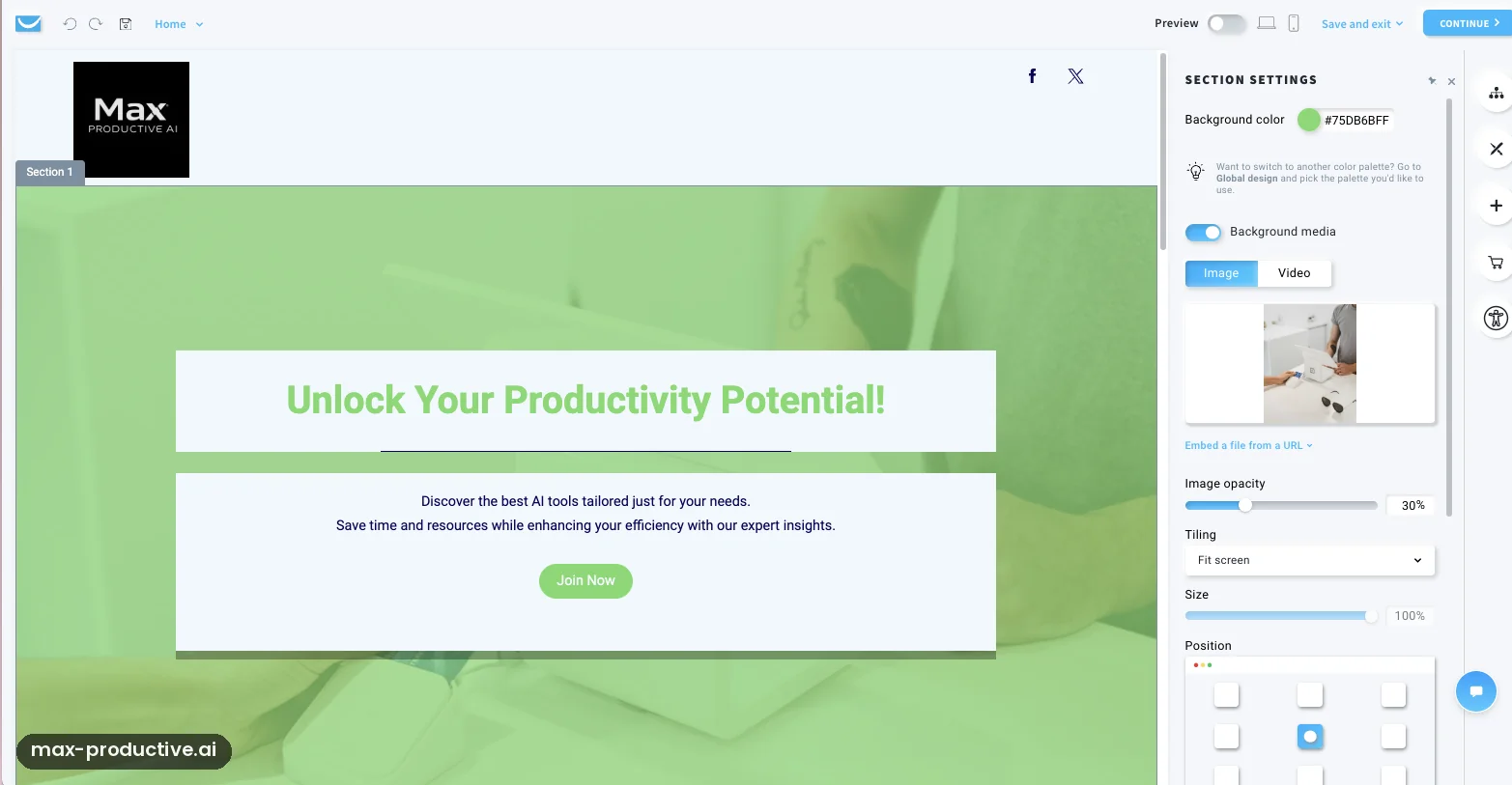
The landing page placed our logo at the top and laid a green overlay on a stock photo. The headline read "Unlock Your Productivity Potential!", with two lines about discovering AI tools and a Join Now button. The structure works: one headline, one promise, one button. The words, though, could belong to any productivity brand. Nothing says "independent reviews of AI software", which is the real reason to subscribe.
In fairness, the green came from the palette we picked, so part of the look is our doing. The section settings on the right make it easy to change: background color, image opacity, tiling and position are all plain controls. We'd keep the layout and rewrite the headline and the line under it by hand.
The signup section
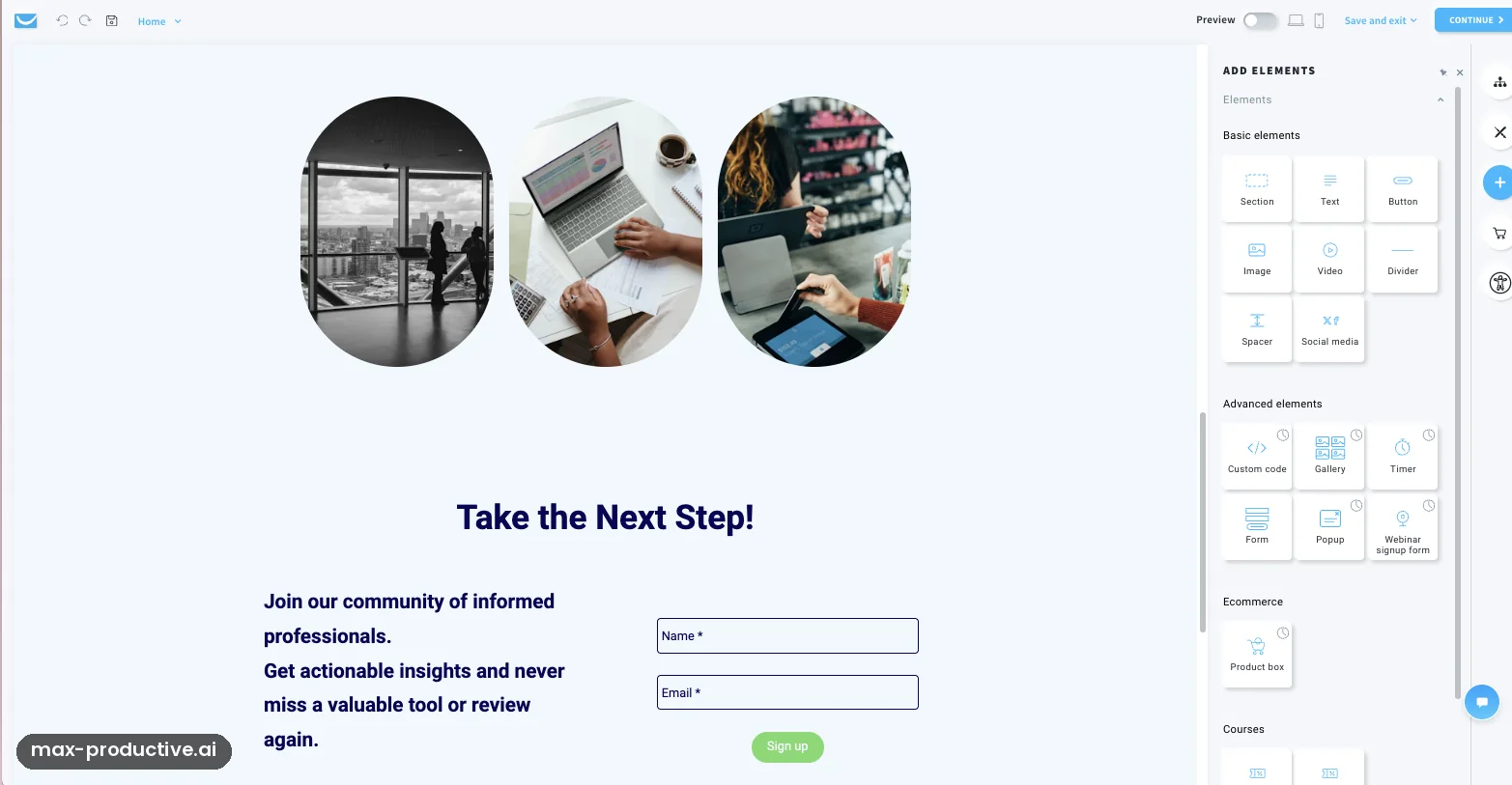
Further down, the AI added three oval stock photos, a "Take the Next Step!" headline and a short pitch about joining a community of informed professionals, next to a name and email form. The form itself is right for a newsletter: two fields and a Sign up button. Since we never submitted it, what happens after signup is outside this review.
The part we'd change is the offer. We'd want a signup box to say what arrives and how often, for example "one email a week with the AI tools we tested". Our brief described exactly that newsletter, and the page didn't use it. The element panel on the right shows how much else the builder can add: timers, popups, galleries, webinar signup forms and product boxes.
AI welcome email: the opening
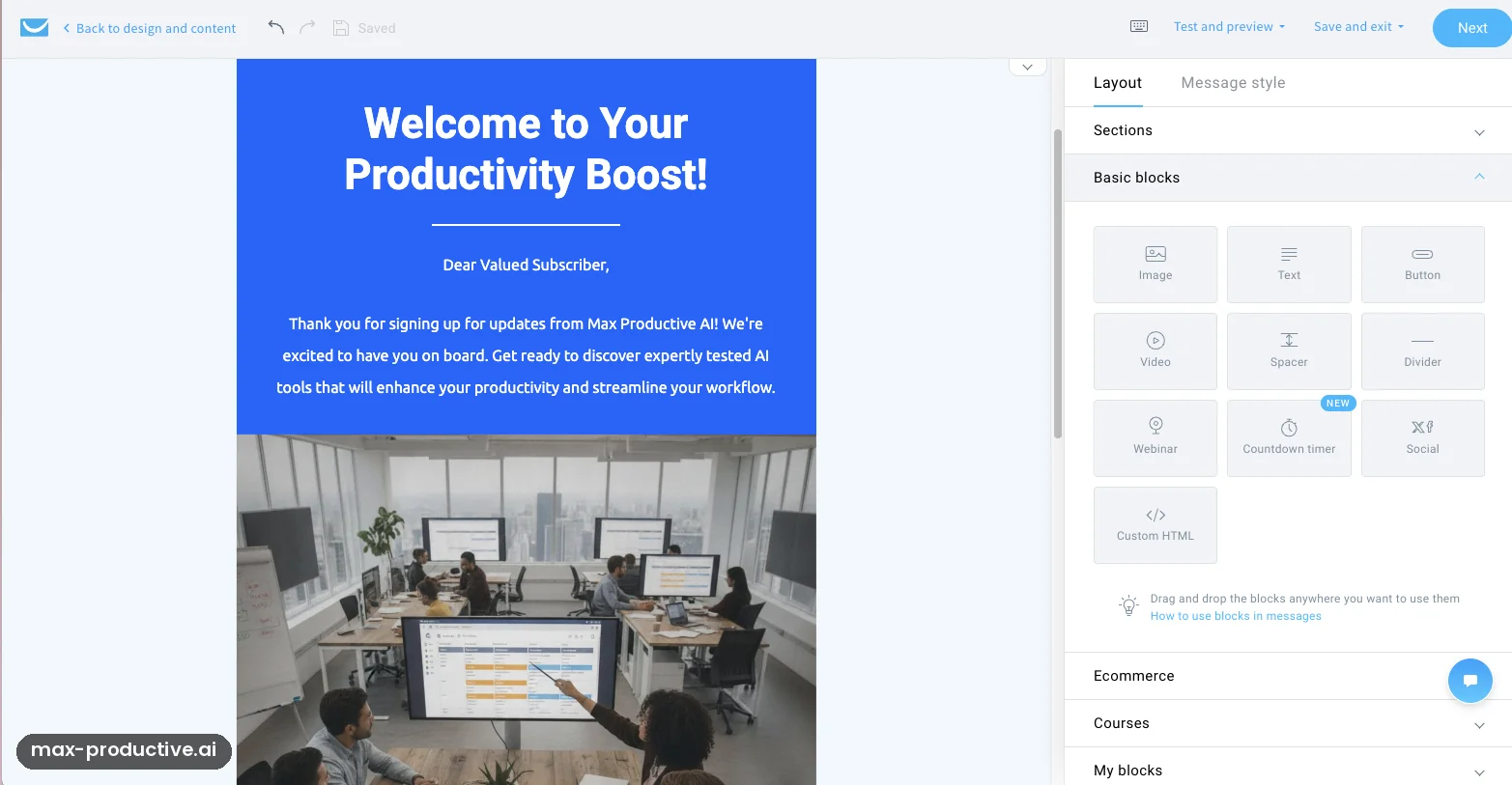
The welcome autoresponder opened with "Welcome to Your Productivity Boost!" on a blue header, then "Dear Valued Subscriber". The body named Max Productive AI and promised expertly tested AI tools, so the AI had clearly read our brief. Most of the rest was broad talk about productivity and better workflows, above a large office stock photo.
As a first draft for a business that needs to send something this week, it does the job. For a publication with a point of view, we'd rewrite most of it. Our advice: greet people by first name, and use the opening line to say what they'll get next and when.
Check the footer before you send
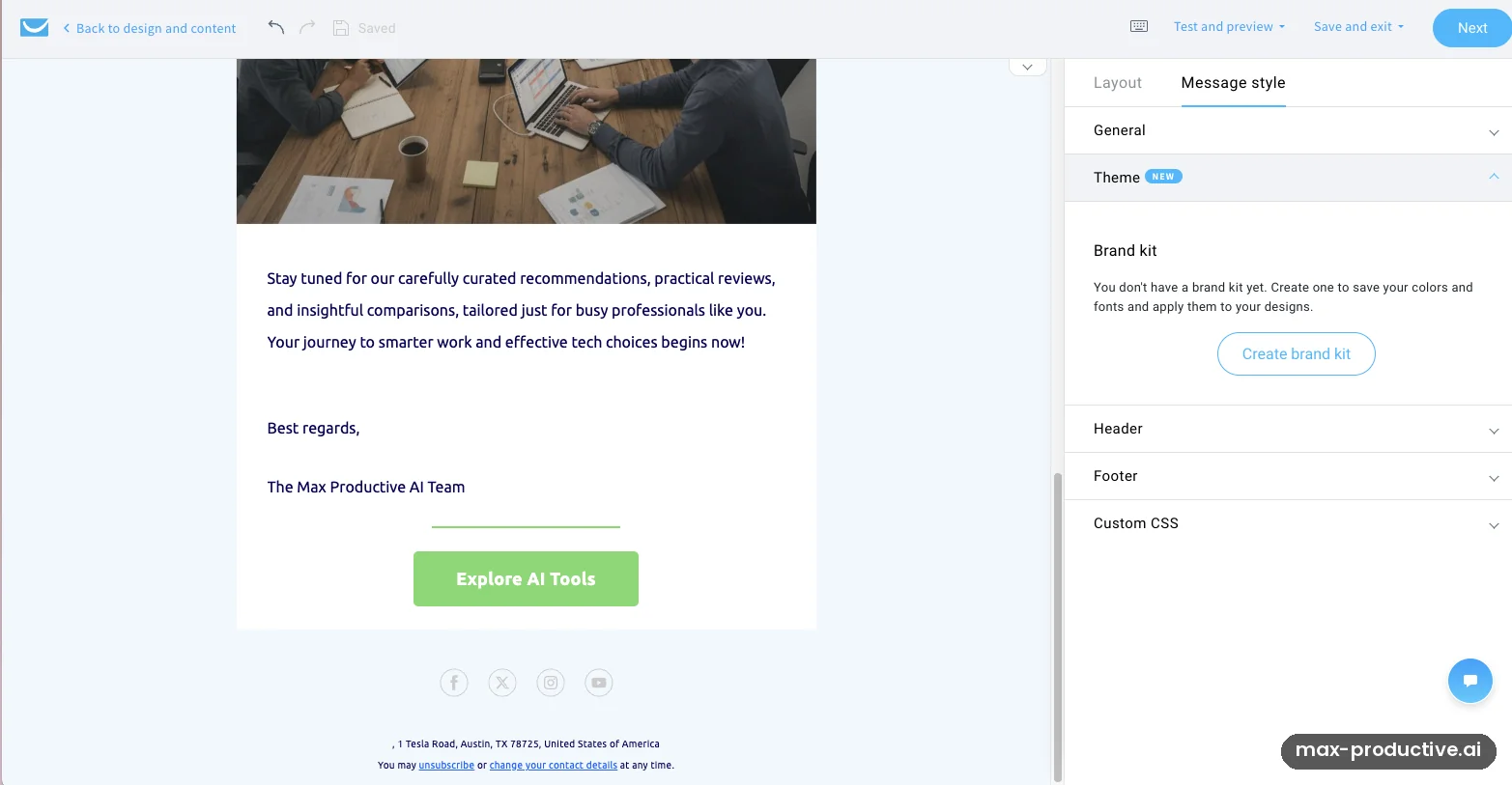
The bottom of the email had what you'd expect: a green Explore AI Tools button, a sign-off from the Max Productive AI Team, social icons and an unsubscribe link. It also had a postal address, 1 Tesla Road in Austin, Texas, which we never entered. It may be a default account value or a template placeholder rather than something the AI invented. Unless you change it, it could go out with the email.
This was the most useful lesson of our test. An AI-made email can look finished and still carry business details that aren't yours. Before sending, check the footer address, where the button and social icons point, and the sender details in your account settings. Anti-spam rules such as the US CAN-SPAM Act expect a valid postal address in marketing email, so this one matters.
Automation: asking for a workflow in plain English
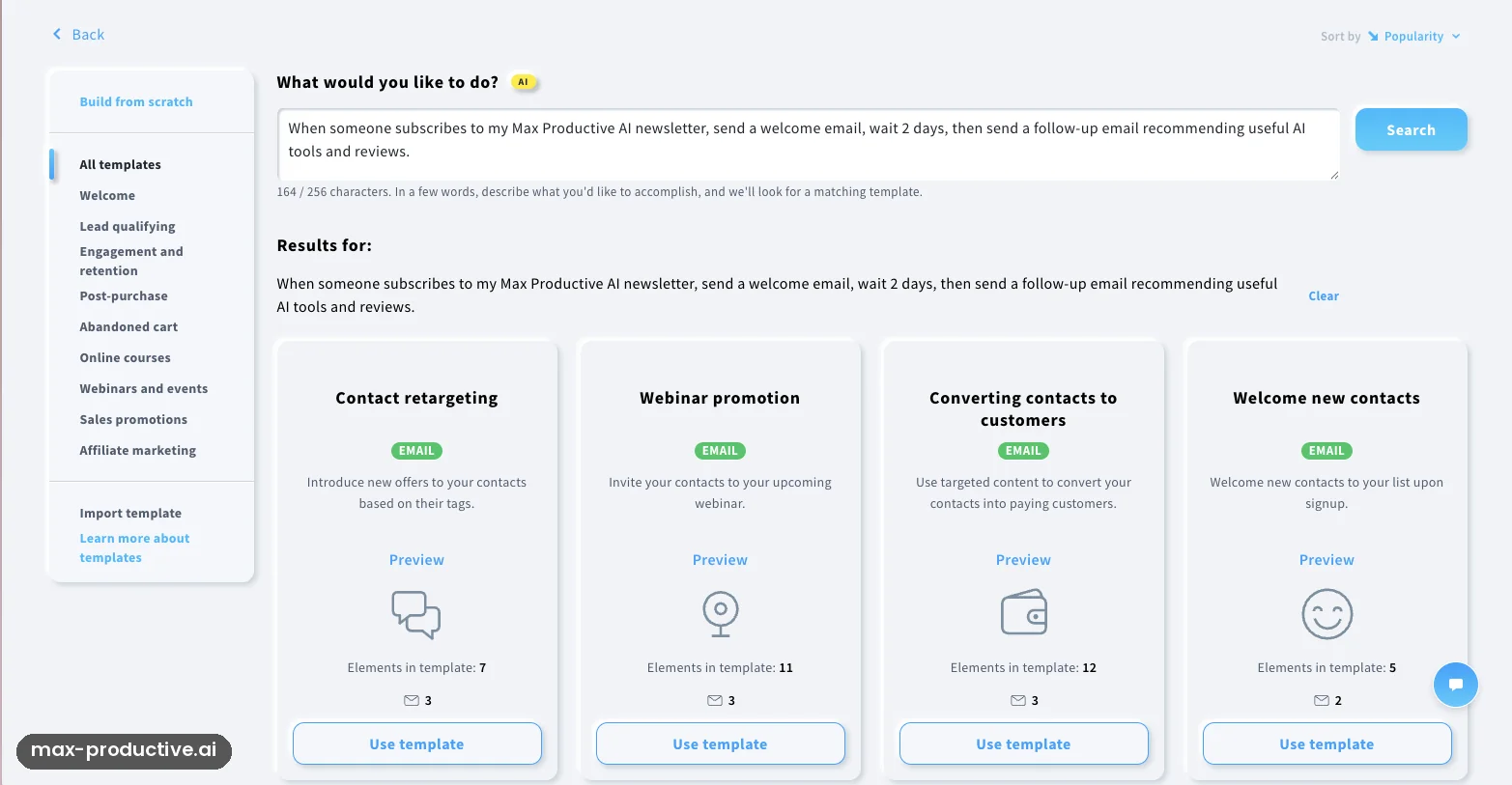
Next we moved to automation. The template search accepts a plain-English request. We wrote: "When someone subscribes to my Max Productive AI newsletter, send a welcome email, wait 2 days, then send a follow-up email recommending useful AI tools and reviews." It returned four templates: Contact retargeting, Webinar promotion, Converting contacts to customers, and Welcome new contacts.
The right answer was there, in fourth place. The first three were about retargeting, webinars and sales, which our request never mentioned. Think of this feature as a smart search over GetResponse's template library: it finds a template, it doesn't build a custom workflow from your words. Our advice: read every result before you pick, and open the preview of the two most likely matches.
The workflow builder
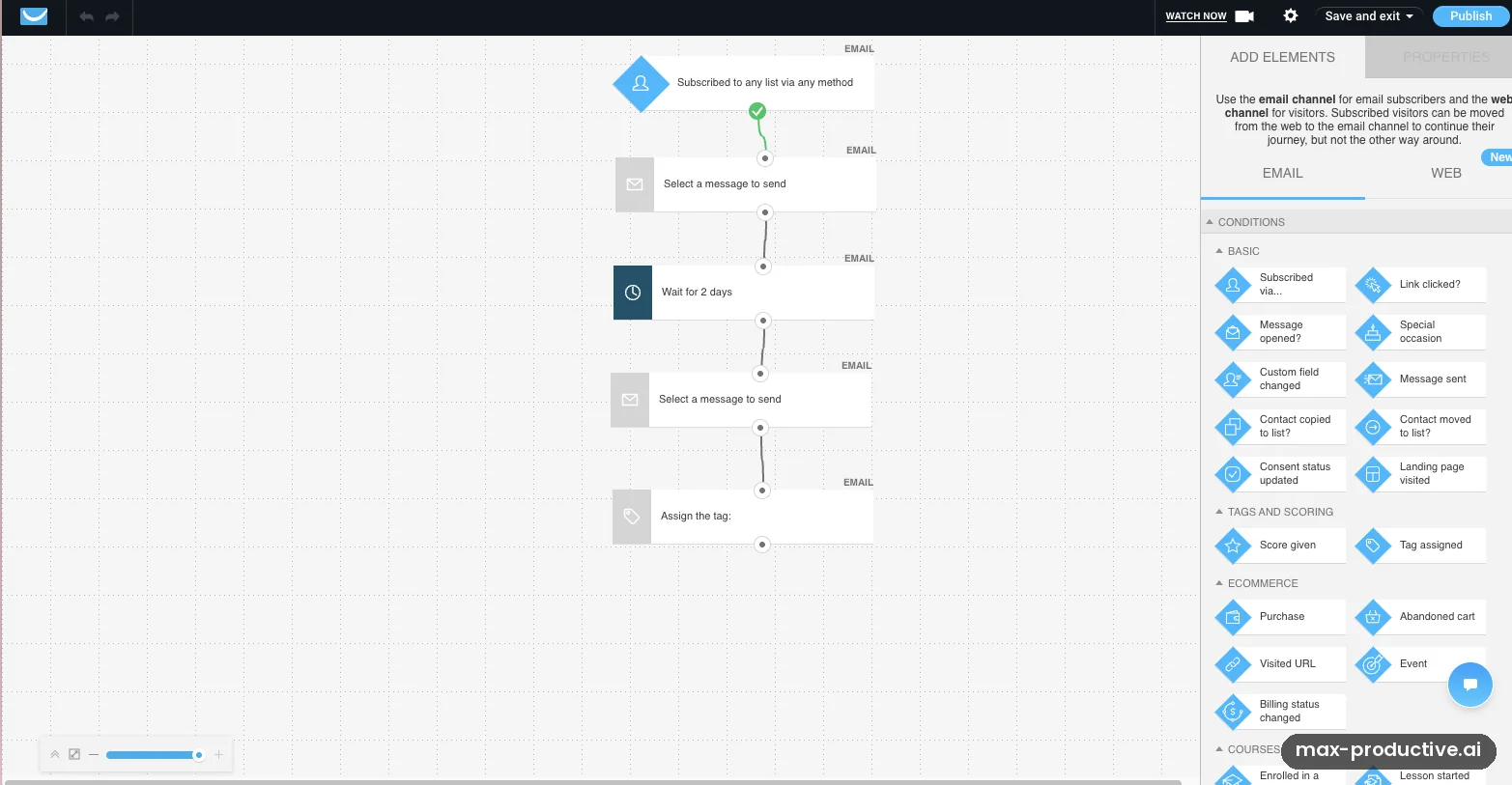
This was the best part of our test. The Welcome new contacts template opened as a five-step flow: a subscribe trigger, a welcome email, a two-day wait, a follow-up email and a tag. That's almost exactly the sequence we asked for, laid out so anyone can follow it. The panel on the right lists what you can add next, from message opened, link clicked and tag assigned to purchase, abandoned cart and course events. A Web tab adds steps for site visitors, such as push notifications and popups.
The two-day wait was already in the template, so we can't credit the AI with setting it. The two email steps still needed messages, and the trigger was set to any list, so there's real setup left. Because the workflow was never published or run, we can't tell you how it behaves with live subscribers.
AI Email Generator, with a tighter brief
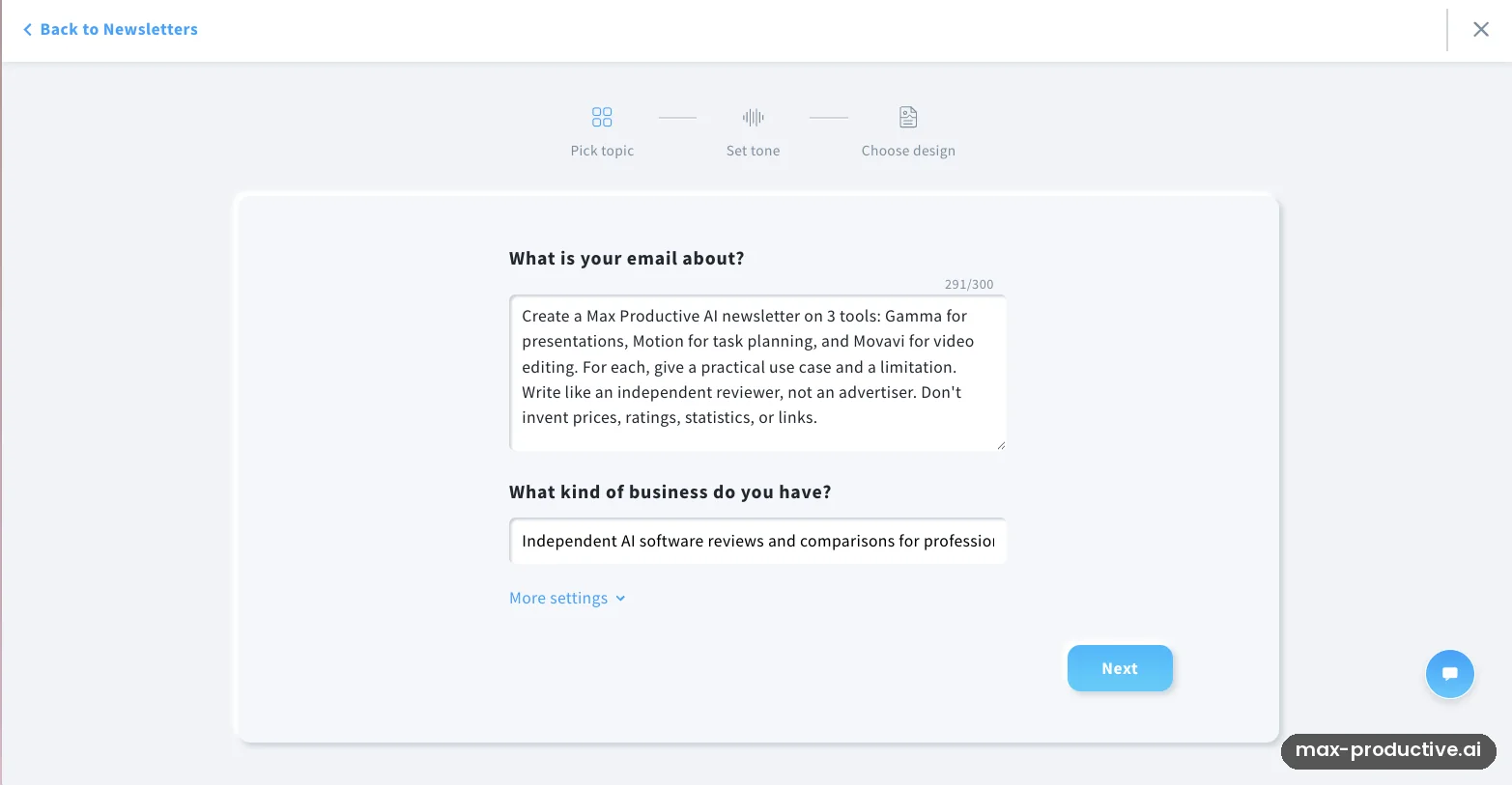
Then we gave the standalone AI Email Generator a more specific job. It works in three steps (pick topic, set tone, choose design), and the topic box takes up to 300 characters. We asked for a newsletter on three tools we know well: Gamma for presentations, Motion for task planning and Movavi for video editing. For each one we wanted a practical use case and a limitation, written like an independent reviewer, with no invented prices, ratings, statistics or links.
The newsletter covered all three tools, a step up in focus from the welcome campaign's generic copy. The design came out close to the earlier email, and the wording stayed fairly general. A full fact check of that newsletter was outside our test. Our read: a specific prompt steers the generator well, and you still need to check each claim it makes about a product.
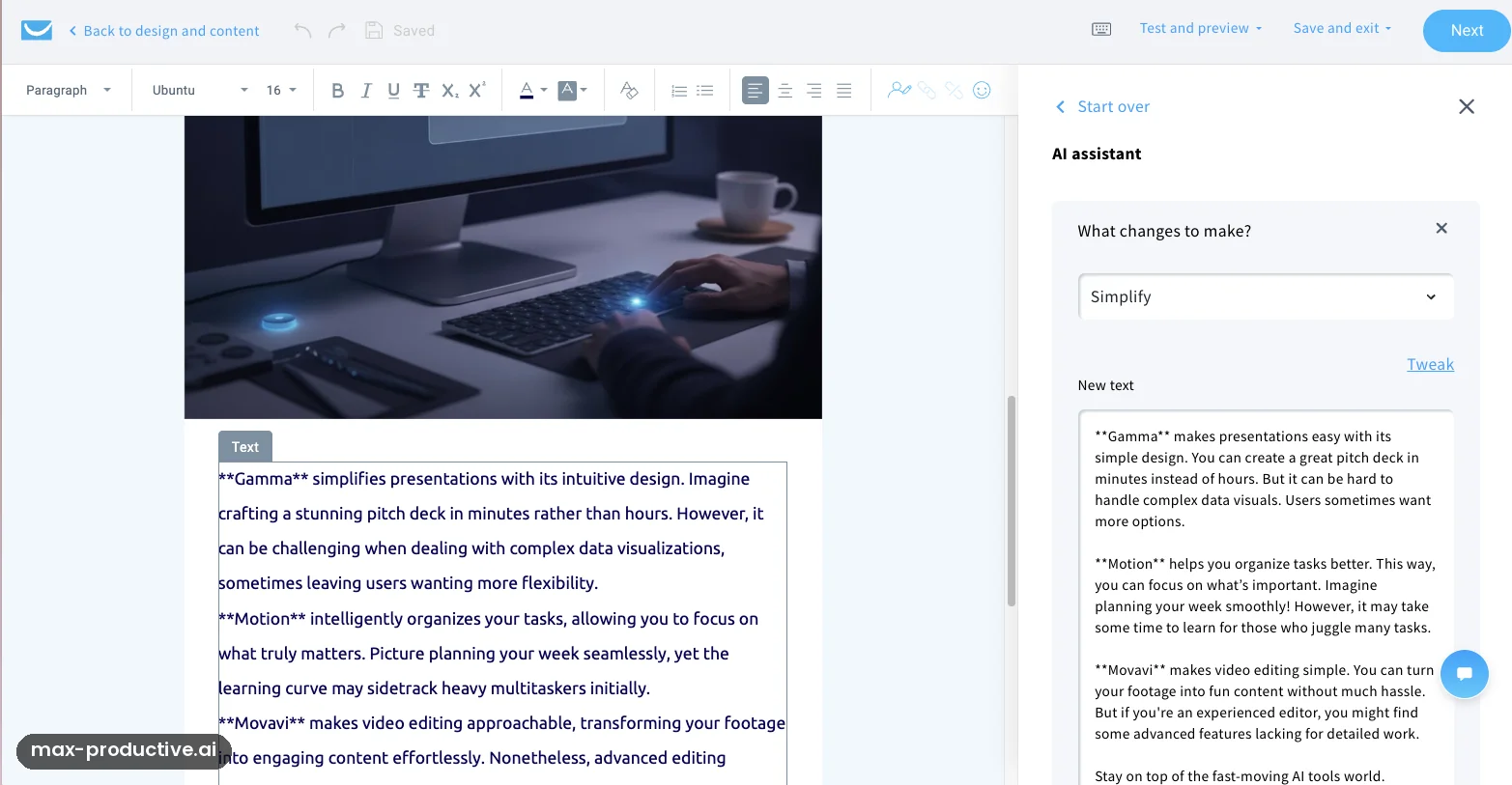
AI Writing Assistant: Simplify
Last, we opened that newsletter in the email editor and ran the AI Writing Assistant's Simplify option on the product blurbs. It works in a side panel, so the original and the new text sit side by side, and a Tweak link lets you adjust the result. "Gamma simplifies presentations with its intuitive design" became "Gamma makes presentations easy with its simple design", and long sentences were split into short ones.
The rewrite was easier to read and a little less specific. Simplify changes how a claim is worded, not whether it's right. The text also carried Markdown-style asterisks around each product name (**Gamma**), so look for stray formatting before you send. Since we sent nothing, we can't say whether they would reach the inbox.
GetResponse key features
Here's what GetResponse includes and which plan each part needs. Where a feature goes beyond what our test touched, we rely on GetResponse's pricing page and help center.
-
AI Campaign Generator
Unlimited from MarketerBuilds a landing page, a welcome autoresponder and a newsletter from a short brief, all linked and left as drafts. You get one run on the free trial and three on Starter, and Marketer and Creator have no cap. It gets you a starting structure quickly, and the copy needs your edit.
-
AI Email Generator
Unlimited from MarketerWrites a full email from a topic, your business type, the email type, one of six tones, and a layout and color palette. Starter and the trial get three uses. A detailed brief kept the email on topic in our test.
-
AI Writing Assistant
Trial and paid plansWorks inside the drag-and-drop email editor. It can generate, shorten, lengthen, change the tone, simplify, fix grammar or translate selected text, with prompts up to 300 characters. It isn't part of the free plan once the trial ends.
-
Marketing automation
Unlimited from MarketerA visual workflow builder with 17 conditions, 11 actions and 7 filters, and templates in nine categories, from welcome series to abandoned carts and webinars. Its AI Template Assistant suggests templates from a plain-English goal. Starter allows one custom workflow of up to six elements.
-
Landing pages, forms and popups
Every paid plan includes unlimited landing pages, visitors and popups, plus signup forms. GetResponse's AI landing page creator offers three designs to choose from, with three uses on Starter and no cap from Marketer. On the free plan, you get one published landing page and one active form.
-
Webinars, courses and paid newsletters
Creator planCreator adds webinars (100 attendees, according to the pricing page), unlimited courses with no transaction fees, paid newsletter subscriptions and a website builder for up to five sites. Course students are capped by tier, starting at 500. None of these were part of our test.
-
Ecommerce tools
Marketer and upAbandoned cart recovery, purchase automation, promo codes, product blocks and revenue reports, with Shopify, WooCommerce, Magento and other store connections. Revenue attribution, added in April 2026, shows what each message and workflow earned.
-
Perfect Timing and AI Insights
Marketer and upPerfect Timing delays each send by up to 23 hours to reach a contact at their usual best hour. AI Insights reviews a sent message and suggests changes to the subject line, body, send time and segment.
-
GetResponse MCP
All plansConnects your account to Claude, ChatGPT or another MCP-compatible tool. GetResponse says an assistant can then check newsletter stats, find contacts by engagement and draft newsletters or a full campaign, all saved as drafts. It wasn't part of our test.
One note on maturity. The automation builder felt solid in our test, while AI generation is the newest layer. We'd lean on the builder and treat the AI like a quick junior copywriter: useful for a first pass, and worth checking line by line.
GetResponse pricing
As of October 2026, GetResponse has a free plan, three paid plans at $15.58, $48.38 and $56.58 a month for 1,000 contacts on annual billing, and Enterprise on a custom quote. Prices rise with your contact count.
| Plan detail | Free | Starter | Marketer | Creator | Enterprise |
|---|---|---|---|---|---|
| Billed yearly, 1,000 contacts | $0 | $15.58/mo | $48.38/mo | $56.58/mo | Custom |
| Billed monthly, 1,000 contacts | $0 | $19/mo | $59/mo | $69/mo | Custom |
| Billed monthly, 5,000 contacts | Not available | $54/mo | $95/mo | $109/mo | Custom |
| Contacts and emails | 500 contacts, 2,500 emails a month | Unlimited sends | Unlimited sends | Unlimited sends | Custom |
| Automation | None after the trial | 1 custom workflow, up to 6 elements | Unlimited workflows, ecommerce steps | Full automation, with webinar and course steps | Full automation |
| AI tools | None after the trial | 3 uses of each AI generator, Writing Assistant | Unlimited AI generators, AI Insights | As Marketer, plus the AI website builder | As Creator, plus AI product recommendations (add-on) |
| Webinars and courses | No | Webinar add-on, where offered | Webinar add-on, where offered | 100 attendees, courses, paid newsletters | 1,000 attendees |
| Also worth knowing | GetResponse badge on emails, Help Center support only | 3 users, email and chat support | 5 users, A/B tests, Perfect Timing, sales funnels | 5 users, website builder for 5 sites | SMS, transactional email, dedicated IP, phone support |
Swipe sideways to see every plan.
Prices come from GetResponse's pricing page and help center, last verified on October 21, 2026. They exclude VAT or sales tax.
See the price for your list size.
See GetResponse plansWhich GetResponse plan should you choose?
Free is a place to hold a small list and send occasional newsletters. Once the trial ends it can't send autoresponders or run workflows, so it won't run a funnel. Starter suits a newsletter with one welcome sequence: one custom workflow, unlimited sends and three users. Starter workflows can't use tags or scoring, so a template that ends with a tag step, like the one we tested, needs a small change. Marketer is the plan to budget for if automation is why you're choosing GetResponse, with unlimited workflows, abandoned-cart and purchase automation, A/B tests and unlimited AI generators. Creator adds webinars, courses, paid newsletters and the website builder for $10 more a month at the entry tier on monthly billing. Enterprise is for SMS, transactional email, a dedicated IP and phone support.
Is GetResponse worth the money?
For a small business that would otherwise pay for an email tool, a webinar tool and a course platform, Creator is good value. At its entry price of $56.58 a month on annual billing, it replaces several subscriptions with one login. Marketer is fairly priced for its automation. The math turns against GetResponse in two cases. For a simple newsletter, MailerLite or Brevo cost less. For a fast-growing list, watch the curve: Marketer goes from $59 a month at the entry tier to $114 at 10,000 contacts, billed monthly.
One buyer note matters more than the sticker price. GetResponse's help center says it doesn't issue refunds, and plans renew automatically. Our advice: use the full 14-day trial, start on monthly billing, and switch to annual for the 18% saving once you're sure.
How GetResponse counts contacts
Paid plans bill on the month's peak number of active contacts and on the contacts added that month. The same email address on two lists counts as two contacts. If forms, integrations, the API or manual adds push you over your tier, GetResponse adds a monthly list extension fee, even on annual plans. Above 100,000 contacts, each extra block of a thousand costs $4 a month. The terms of service use a broader definition of a contact, so check them if your list changes a lot. Keeping one main list and cleaning out inactive contacts keeps the bill predictable.
The trial, and what the free plan loses after it
During the 14-day trial you get most premium features, with limits such as 500 contacts, 10-person webinars and one AI campaign run. Afterwards, the free account can't schedule newsletters, send autoresponders or automations, use the AI generators or predesigned email templates, or see message reports. Support moves to the Help Center only, and contacts above 500 wait in a queue for 32 days before they're deleted. One more tip: new accounts can be held for a short verification before they can send. It usually takes under 24 hours and sometimes up to 72, so sign up a few days before your first send.
Discounts, add-ons and cancelling
Annual billing saves 18% on Starter, Marketer and Creator. Nonprofits can get 50% off for 24 months, with conditions on GetResponse's nonprofit page. Webinar and extra-user add-ons are sold on Starter and Marketer, though some North American accounts can't buy them. You can cancel at any time in a browser with no further charges, and GetResponse makes a one-time retention offer, such as a free month or a pause, when you do.
GetResponse pros and cons
Pros
An automation builder you can read at a glance
The welcome workflow we opened was five clear blocks on a canvas: trigger, email, wait, email, tag. Conditions such as opens, clicks, tags, scores, purchases and abandoned carts sit in a side panel. It was the most convincing part of our test, and it needs no AI copy to be useful.
Email, pages, webinars and courses in one account
Landing pages, forms and popups come with every paid plan, and Creator adds webinars, courses, paid newsletters and a website builder. If you'd otherwise pay for two or three of those separately, one login can save money and setup.
A real free plan and a no-card trial
The free plan covers up to 500 contacts, and new accounts get 14 days of premium features without a card. That was enough for us to try the AI tools and the automation builder at no cost.
One AI run drafts a whole campaign
From one questionnaire, the AI Campaign Generator built a landing page, a welcome email and a newsletter, all linked and all left unpublished for review. As a starting structure for a new list, that saves real setup time.
Unlimited sends on every paid plan
Paid plans are priced by contacts, with unlimited monthly emails, landing pages and popups. If you email your list often, that's easier to budget than per-send pricing.
Writing help inside the editor
GetResponse's AI Writing Assistant sits in a side panel of the email editor, with the original and the rewrite side by side. Simplify turned long promotional sentences into short, plain ones, and it can also shorten, change the tone or translate.
Cons
AI copy needs a real edit
Generic headlines and a "Dear Valued Subscriber" greeting could belong to any brand. A specific brief helped, but plan to rewrite the hero, the offer and the first lines of each email in your own voice.
Check AI emails for details that aren't yours
Our welcome email carried a postal address in Austin, Texas that we never entered, probably a default or placeholder. Review the footer, the sender details and every link before the first send.
Costs rise with your list
Every plan is priced by contacts, and the same email on two lists counts twice. TechRadar points to a steep price jump at the mid-tier plan, and Style Factory notes that costs climb as lists grow. Keep one main list, clean out inactive contacts, and price the plan at the size you expect in a year.
No refunds, so start monthly
GetResponse's help center says it doesn't issue refunds, and plans renew automatically. Some Trustpilot reviewers mention billing and cancellation frustrations. Use the full trial and start on monthly billing before you commit to a year.
Starter's automation is limited
Starter includes one custom workflow of up to six elements and three uses of each AI generator. More workflows, tags, scoring, ecommerce triggers and unlimited AI start on Marketer, at about three times the Starter price.
Template search can bury the best match
Our plain-English request for a welcome sequence returned the right template fourth, after retargeting, webinar and sales templates. Read all the suggestions before you pick one.
GetResponse alternatives
The table compares GetResponse with four close rivals, and the cards below cover eight options from our AI email marketing directory.
| Compared on | GetResponse Reviewed | ActiveCampaign | Brevo | Mailchimp | MailerLite |
|---|---|---|---|---|---|
| Entry paid plan | $15.58 a month, billed yearly, for 1,000 contacts | $15 a month, billed annually, for 1,000 contacts | $9 a month for 5,000 emails | $13 a month for 500 contacts | $10.80 a month, billed yearly, for 500 subscribers |
| Free plan | 500 contacts, 2,500 emails a month | No, 14-day trial | Up to 300 emails a day | 250 contacts, 500 sends a month | 250 subscribers, 2,500 emails a month |
| Priced by | Contacts | Contacts | Emails sent | Contacts | Subscribers |
| Built-in extras | Webinars, courses and website builder on Creator | Sales CRM as a paid add-on | SMS, WhatsApp, push and a CRM | Analytics AI on paid plans | AI landing pages, MCP server |
| Best for | All-in-one small business marketing | Advanced automation | Multichannel email on a budget | Mainstream email with ecommerce | Simple, low-cost newsletters |
Swipe sideways to see every tool.
GetResponse vs ActiveCampaign
ActiveCampaign is the automation specialist. Its Starter plan costs about the same as GetResponse's, $15 a month billed annually for 1,000 contacts, but it allows five actions per automation and has no free plan. It also offers 900+ automation templates and AI agents that can run recurring tasks. GetResponse is the better value when you also want webinars, courses or a website in the same account. Our ActiveCampaign vs GetResponse comparison goes through the differences in detail.
GetResponse vs Brevo
The two price in different ways. Brevo charges mainly by emails sent, while GetResponse charges by contacts and includes unlimited sends. With a large list you email once or twice a month, Brevo can work out cheaper, and it adds SMS, WhatsApp and a CRM. If you email often, or want automation, webinars and courses in one place, GetResponse's model is easier to plan around. See our Brevo vs GetResponse comparison.
GetResponse vs Mailchimp
Since February 17, 2026, Mailchimp's free plan covers 250 contacts and 500 sends a month, with no automated journeys. GetResponse's free plan is larger, at 500 contacts and 2,500 emails. Mailchimp's paid plans start lower, at $13 a month for 500 contacts, and PCMag rates it highly for marketing with ecommerce. GetResponse is the one to pick if webinars or courses are part of your plan.
Which alternative fits you?
-
KlaviyoOur rating: 4.8 / 5
Best for: Online stores, above all on Shopify, that want email and SMS driven by purchase data.
Klaviyo's free plan covers 250 active profiles and 500 email sends a month, and the Email plan starts at $20 a month for 500 profiles. Everything is built around store data, so it's the stronger pick for ecommerce. For webinars, courses or a B2B list, GetResponse has more in the box.
-

ActiveCampaignOur rating: 4.7 / 5
Best for: Businesses that want the deepest automation and are ready to spend time building it.
Starter costs about the same as GetResponse's, and the platform offers 900+ automation templates plus AI agents in its Active Intelligence layer. There's no free plan, only a 14-day trial, and the sales CRM is a paid add-on.
-
BrevoOur rating: 4.6 / 5
Best for: Teams that want email, SMS, WhatsApp and a CRM in one place, priced by emails sent rather than contacts.
Starter costs $9 a month for 5,000 emails, and the free plan sends up to 300 emails a day. Because the price follows volume, a large list that you email rarely can cost less on Brevo. Logo removal costs extra on Starter.
-

OmnisendOur rating: 4.5 / 5
Best for: Ecommerce stores that want email, SMS and web push with straightforward pricing.
The free plan covers 250 contacts and 500 emails a month, and Standard starts at $16 a month for 500 contacts. Support is 24/7 by live chat and email on every plan. Pro plans started on or after May 4, 2026 need a separate subscription for SMS.
-
MailerLiteOur rating: 4.3 / 5
Best for: Creators and small businesses that want a clean, easy newsletter tool at a low price.
Comfort costs $10.80 a month billed yearly for 500 subscribers, and the free plan covers 250 subscribers and 2,500 emails a month since a June 2026 change. Independent reviewers praise how easy it is to learn. It has no built-in CRM.
-

BeehiivOur rating: 4.1 / 5
Best for: Writers who want to grow and earn from a newsletter.
The free plan covers up to 2,500 subscribers, and beehiiv takes no cut of paid subscription revenue. EmailToolTester notes that automations need a paid plan and that it doesn't send store emails such as abandoned-cart reminders. Plans were renamed on October 1, 2026, so older guides may use the old names.
-

MoosendOur rating: 4.1 / 5
Best for: Budget-minded teams that want unlimited sends and everyday automation.
Pro starts at $7 a month billed annually for 500 contacts, with unlimited sends and a 30-day free trial but no free plan. Moosend is now part of Constant Contact.
-

Campaign MonitorOur rating: 4.0 / 5
Best for: Teams that send designed newsletters and want unlimited users on every plan.
Lite costs $13 a month billed monthly for 500 contacts, after a 30-day free trial. PCMag picks it for basic campaigns and newsletters, and its AI Writer comes with every plan.
GetResponse FAQ
Is GetResponse free?
Yes, GetResponse has a free plan for up to 500 contacts and 2,500 emails a month, with a GetResponse badge on your messages. Inactive contacts count toward the 500. New accounts also get a 14-day premium trial with no card, with the AI tools and automation included. After the trial, the free plan can't send autoresponders or run workflows, and support moves to the Help Center.
How much does GetResponse cost?
As of October 2026, GetResponse costs $15.58 (Starter), $48.38 (Marketer) and $56.58 (Creator) a month for 1,000 contacts on annual billing, or $19, $59 and $69 billed monthly. Enterprise is priced on request. Prices rise with your list: 5,000 contacts on Marketer cost $95 a month billed monthly. All prices exclude VAT or sales tax.
How good is the GetResponse AI Campaign Generator?
GetResponse's AI Campaign Generator is a fast way to get a starting structure, not a finished campaign. In our October 2026 test, one run produced a landing page, a welcome email and a newsletter from a short questionnaire. The layouts were usable, but the copy was generic and the email footer showed a postal address we never entered. Treat the output as a first draft and edit it before you publish.
How many AI campaigns can you create on the GetResponse trial?
The GetResponse free trial includes one AI campaign generation and up to three uses of the AI Email Generator. The Starter plan allows three uses of each, and Marketer and Creator have no cap. Because the trial gives you a single campaign run, write out your offer, audience and tone before you start, then paste them into the questionnaire.
Does every GetResponse plan include marketing automation?
No, GetResponse's free plan can't run autoresponders or workflows once the 14-day trial ends. Starter includes a welcome series and one custom workflow of up to six elements, without tags or scoring. Unlimited workflows, tags, scoring and ecommerce triggers such as abandoned carts start on Marketer, and webinar and course steps on Creator.
Does GetResponse include webinars and courses?
Yes, GetResponse includes webinars, online courses and paid newsletters on the Creator plan, which starts at $56.58 a month on annual billing. Creator webinars hold up to 100 attendees, and courses carry no transaction fees, with up to 500 students at that tier. Starter and Marketer can add webinars as a paid add-on where add-ons are offered. We didn't test webinars or courses.
Does GetResponse offer refunds?
No, GetResponse's help center says it doesn't issue refunds, because it runs as a pay-as-you-go service. Plans renew automatically every month or year, and you can cancel at any time in a browser with no further charges. That makes the 14-day trial and monthly billing the safest way to start. Switch to annual, which saves 18%, once you're sure.
Is GetResponse better than Mailchimp?
GetResponse is a better fit than Mailchimp if you want a larger free plan or webinars and courses in the same account. GetResponse's free plan covers twice as many contacts as Mailchimp's and five times the monthly emails, after Mailchimp changed its free plan on February 17, 2026. Mailchimp's paid plans start lower, at $13 a month for 500 contacts, and PCMag rates it highly for ecommerce marketing.
Can GetResponse work with ChatGPT or Claude?
Yes, GetResponse launched an MCP server on October 5, 2026 that connects your account to Claude, ChatGPT or another MCP-compatible tool, free on every plan. GetResponse says a connected assistant can check newsletter stats, find contacts by engagement, and draft newsletters or a full campaign, saved as drafts for you to review. Our test didn't cover the MCP connection.
Is GetResponse good for beginners?
Yes, GetResponse is approachable for beginners, because templates and AI generators give you a starting point for every email, page and workflow. In our test, the automation builder was clear enough to follow at a glance. Style Factory finds the editor a little clunky, so give yourself time to learn it. Start with one list, one form and the welcome template, then add more once those work.
Should you try GetResponse?
GetResponse earns its place by putting a lot in one account and offering a clear automation builder. Its AI tools save real time on a first draft and are less convincing as a finished product: expect to rewrite headlines, greetings and offers, and to check every footer and link. If you mainly want the deepest automation, ActiveCampaign is the stronger pick, and for a simple newsletter MailerLite or Brevo cost less. For a small business that wants email, landing pages and automation, with webinars and courses within reach, GetResponse earns its 4.3.
What we'd do. Open a free account and plan the 14-day trial before you click anything AI. Write a one-page brief with your offer, audience and voice, then spend your single AI campaign run on it. Rewrite the headline and greeting, and check the footer address, sender details and links. Open the Welcome new contacts automation template and connect your emails to it. Count your contacts across all lists, price Starter and Marketer at the size you expect in a year, and start on monthly billing.
Our rating: 4.3 / 5
Very good
About this review
Based on a one-day hands-on test on a GetResponse free account with the 14-day premium trial, GetResponse's published pricing, help center and release notes, and public user feedback. First published 6 August 2025. Last updated 21 October 2026.
Sources checked
- Pricing and plan limits. GetResponse pricing page and help center, checked October 21, 2026.
- Product changes. GetResponse What's New release notes.
- User feedback. Trustpilot and independent reviews by TechRadar, EmailToolTester and Style Factory.
Ratings are our overall editorial judgment on a 5-point scale: 4.5 and up is Excellent, 4.0 to 4.4 Very good, 3.5 to 3.9 Good, 3.0 to 3.4 Fair. We do not use sub-scores.
This review contains affiliate links, so we may earn a commission at no extra cost to you. Our ratings and editorial opinions remain independent.