
Klaviyo review
Klaviyo is the email and SMS platform many online stores grow into, and its new AI agent, Composer, now plans campaigns from your own data. If your store has real order history and a growing list, it's the platform we'd try first.
Free plan for up to 250 active profiles and 500 emails a month.
This review contains affiliate links. We may earn a commission at no extra cost to you.
Verdict: the ecommerce platform to grow into, with a careful AI agent
As of October 2026, Klaviyo is one of the most complete email and SMS platforms we've reviewed for online stores that have customer data to work with. Its flows, segments and store integrations run deep, and Composer, its new AI agent, now plans and drafts campaigns from a prompt and audits what you've built. In our free account it also declined to invent numbers it didn't have. The trade-off is cost. Plans follow your active profiles and are billed monthly only. The Email plan rises to $150 a month at 10,000 profiles, and text messages and the service tools cost extra beyond small free allowances.
What we like
- Built around your store data
- An AI agent that respects your data
- Starter flows ready on day one
Best for. Growing online stores, above all on Shopify, with enough order data to make segments and flows pay off. It also suits teams that want email, text messages and customer service on one profile.
Try Klaviyo freeWhat we don't
- Costs climb with your list
- Monthly billing, with add-ons on top
- Active profiles include non-subscribers
Not for you if. You run a small or mid-sized store on a tight budget, or you mainly send a newsletter. Omnisend gives smaller stores better value, and Mailchimp or Brevo suit a general newsletter.
Compare alternativesHow we tested Klaviyo
- Method
- Hands-on test, October 29, 2026
- Access
- A new Klaviyo free plan account, on the web
- Scope
- Composer analysis and campaign draft, flows, templates, list growth tools, the Claude connector listing
- Not tested
- Sending, text messages, Customer Agent, a store connection, paid plans
We tested a new Klaviyo free account on October 29, 2026, set up under our Max Productive AI brand, with no store connected. We asked Composer two things: where our biggest revenue opportunities were, and to plan and draft our next email campaign. Then we went through the template library, the recommended flows, the Welcome Series setup, the list growth tools and the automations screen, and looked up Klaviyo's connector in Claude's settings. The screenshots below come from that session. Prices and limits come from Klaviyo's pricing page and help center. User opinion comes from the Shopify App Store, Reddit and independent email marketing reviews. Our testing method explains how we rate tools.
We didn't send a campaign, launch a flow, send text messages, set up Customer Agent or connect a store or the Claude connector. An empty account also limits what we could judge: segmentation, predictive analytics and revenue reporting need customer data, so those parts rely on Klaviyo's documentation. Take this as a first-hand look at the setup and the AI, not a test of results.
What changed since our last review
- October 2026
- The pricing page now leads with three plans: Free, Email, and a new Marketing plan from $90 a month that adds Customer Hub and social marketing. See the plans
- October 2026
- Composer, Klaviyo's AI marketing agent, came out of preview on October 13. Every account gets a free monthly Composer allowance.
- September 2026
- Klaviyo Headless lets Claude, ChatGPT and other AI assistants work in your account through more than 260 MCP tools.
- July 2026
- Text messages moved from SMS credits to per-message prices in dollars. The Email and SMS plan our January version listed is no longer on the pricing page.
Klaviyo
Our rating: 4.8 / 5
Free plan for up to 250 active profiles. Paid plans from $20 a month, billed monthly.
Try Klaviyo freeOr compare Omnisend, Mailchimp and ActiveCampaign.
What is Klaviyo?
Klaviyo is an email and SMS marketing platform built for online stores. It brings store data such as orders and products into each customer's profile, then uses it for targeted campaigns and automated flows: welcome series, abandoned checkout reminders, post-purchase messages and the like. Many Shopify brands know it as their default email tool, and it also works with WooCommerce and Wix, among more than 350 integrations.
In 2026 it grew well beyond email. Klaviyo now calls itself an autonomous B2C CRM: email, text messages, WhatsApp, RCS, mobile push, a help desk and an AI support agent all share one customer profile. The headline addition is Composer, an AI marketing agent that answers questions from your data, audits your flows and drafts campaigns from a prompt. It came out of preview on October 13, 2026.
What separates Klaviyo from Omnisend or Mailchimp is how much it does with store data. Segments draw on purchase history and site behavior, flows react to what shoppers do, and reports attribute revenue to each campaign. Omnisend covers the ecommerce essentials for less, and Mailchimp is the broader all-rounder. Klaviyo is the one to pick when you have the customer data, and the budget, to use all of it.
Klaviyo hands-on: what Composer did with a brand-new account
These screenshots come from our new free account, in the order we went through it. Tap or click any image to open it full size.
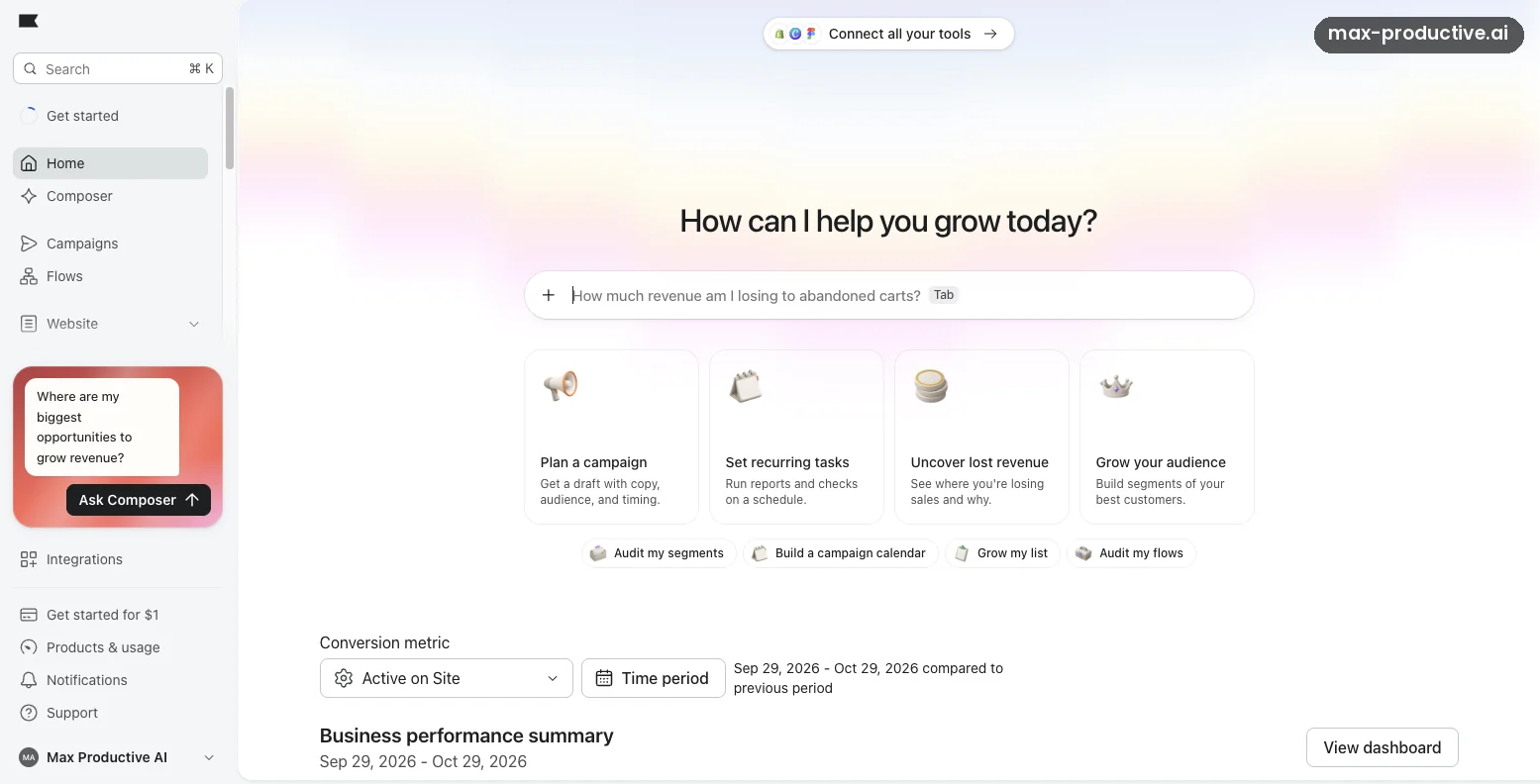
The home screen and Composer
A new Klaviyo account opens on one question, "How can I help you grow today?", with Composer's prompt box in the middle. Under it sit four starter tasks: plan a campaign, set recurring tasks, uncover lost revenue and grow your audience. Lower down, a business performance summary waits for data. The left menu is longer than in an email-only tool, with Website, Social, Service and Audience sections, which shows how far Klaviyo has spread beyond email.
The sidebar also carries a "Get started for $1" link. That's the October 2026 offer on the Email plan: $19 off a $20 first month at 500 profiles.
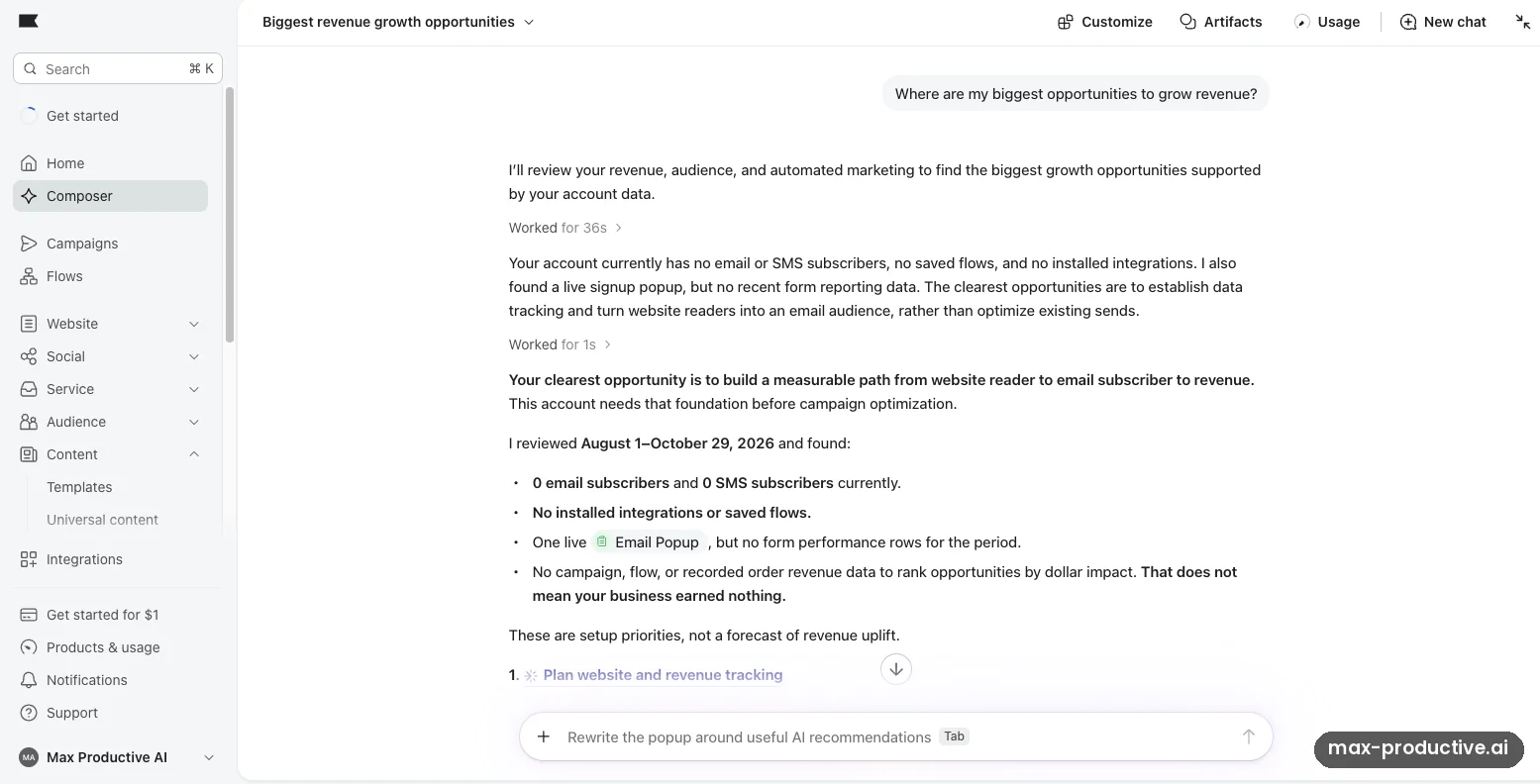
Composer on an empty account
We asked Composer the question its sidebar card suggests: "Where are my biggest opportunities to grow revenue?" Composer worked for 36 seconds and came back with a straight answer: no email or SMS subscribers, no integrations, no saved flows, and one live sign-up popup with no reporting data yet. It added that this did not mean the business earned nothing, and labelled its list "setup priorities, not a forecast of revenue uplift." Its first priority was to set up website and revenue tracking.
Our read: this is how you want an AI agent with access to your numbers to behave. It didn't invent an opportunity to look useful. On a store with real order data, this same prompt is where Composer's analysis should start paying for itself.
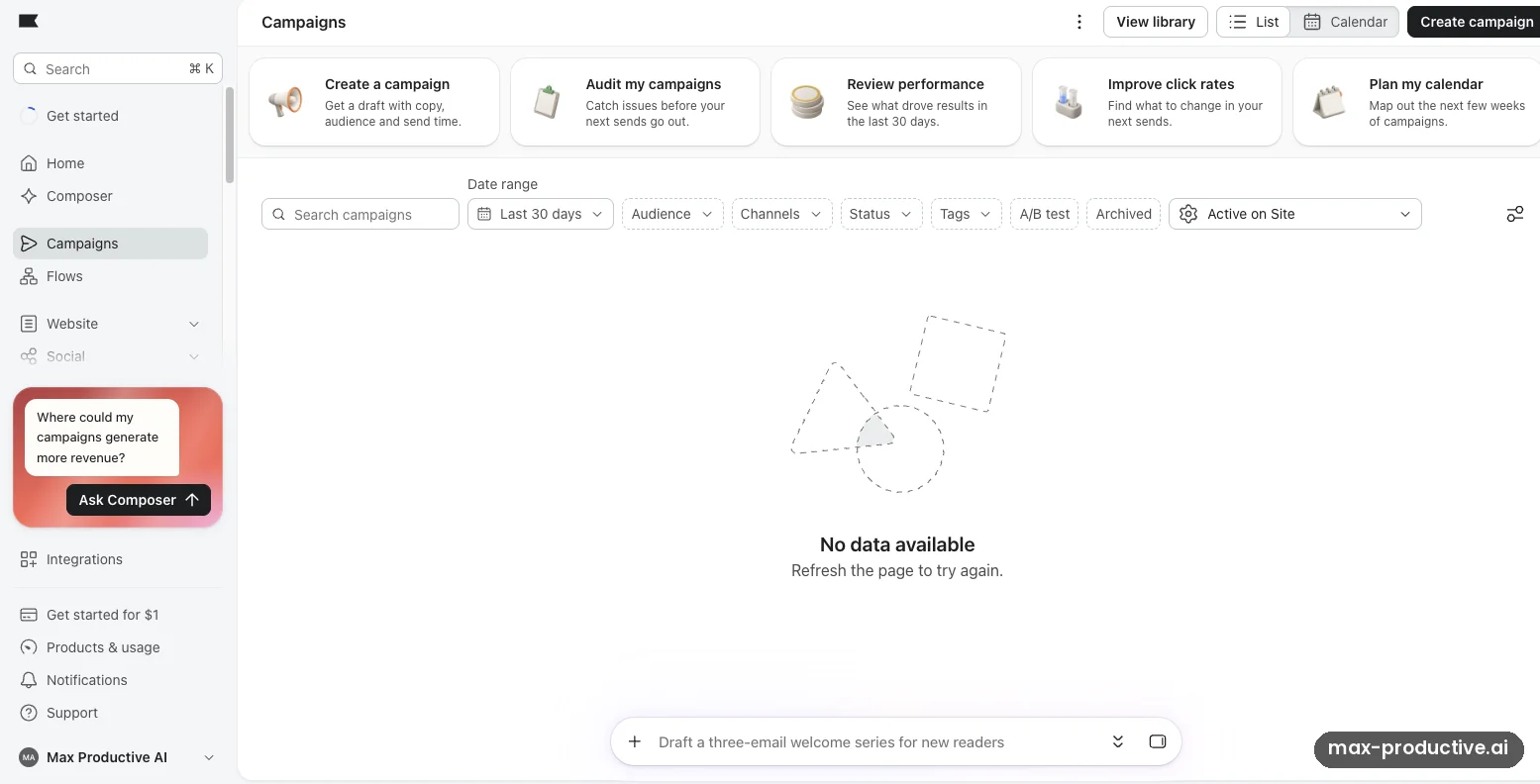
Campaigns, with Composer built in
The Campaigns page shows how far Composer reaches into the product. Above the empty campaign list sit five shortcuts: create a campaign, audit campaigns before they go out, review the last 30 days, improve click rates and plan a calendar. Each card describes a Composer task: the first, for example, promises a draft with copy, audience and send time. You can still build everything by hand, with list and calendar views and filters for audience, channel, tags and A/B tests.
A campaign drafted by Composer
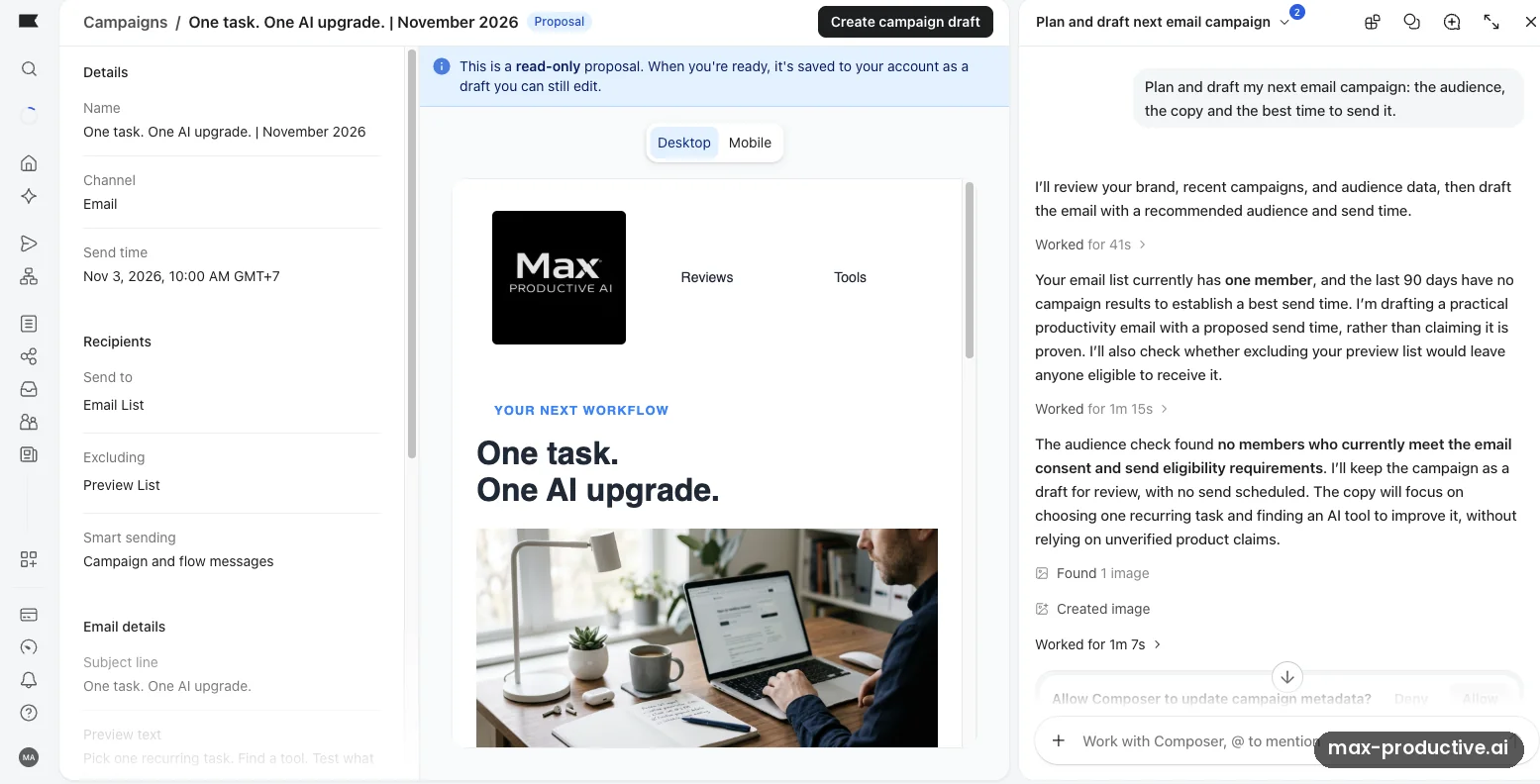
Next we asked Composer to plan and draft our next email campaign, with the audience, the copy and the best send time. It worked through the request in about three minutes and produced a read-only proposal called "One task. One AI upgrade." It targets our email list minus the preview list, with Smart Sending on and a proposed send time of November 3 at 10 AM. The email picked up our logo and our site's Reviews and Tools links, and Composer created a header image to go with it.
Two details stood out. Composer noted that our list had no campaign history, so it presented the send time as a proposal, not a proven best time. It then checked consent, found no one on the list who could receive the email, and kept the campaign as a draft with nothing scheduled. It also asked permission before updating the campaign metadata. The proposal only becomes an editable draft when you click "Create campaign draft", and sending stays your call.
The template library
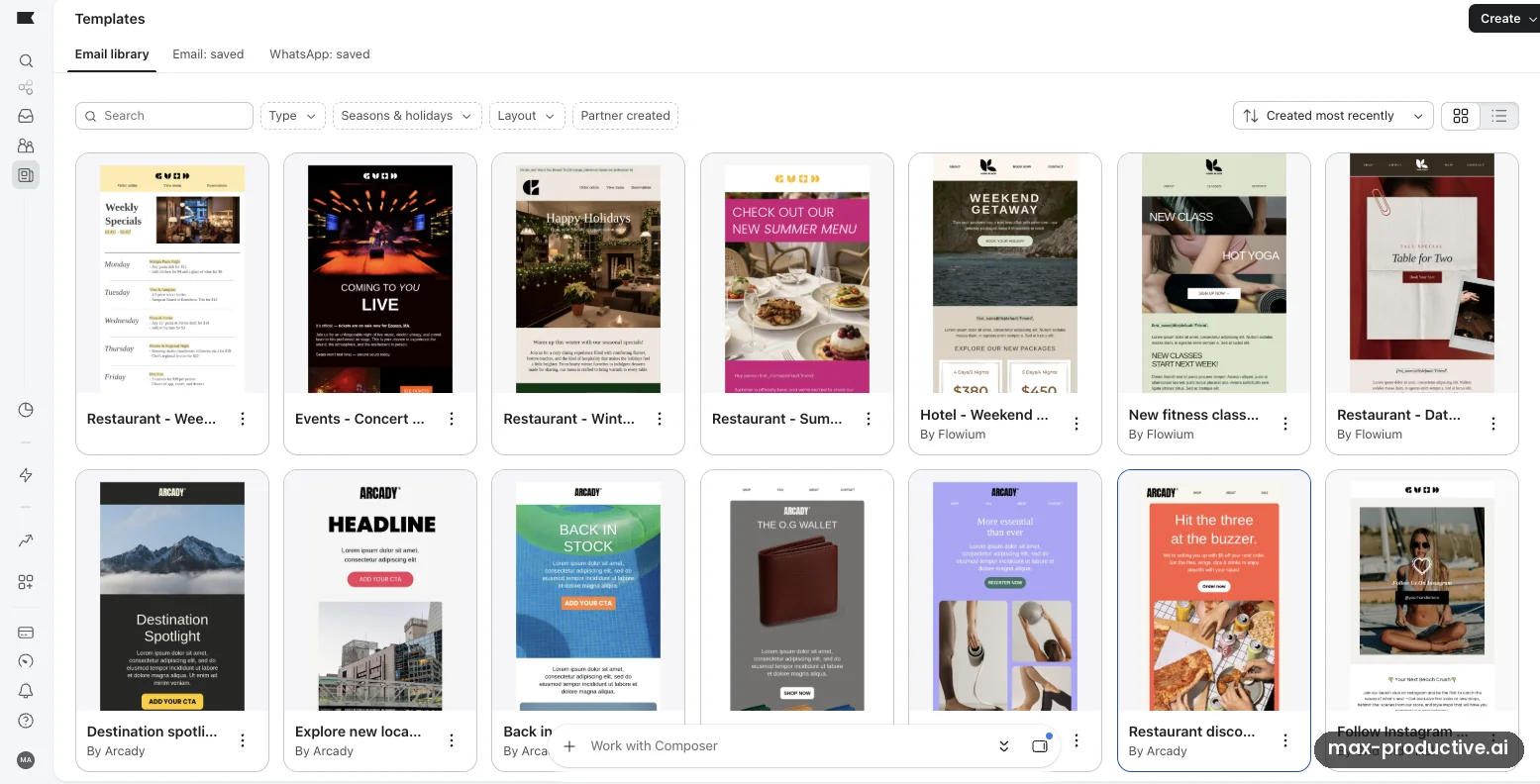
Klaviyo's email library can be filtered by type, season and layout, and by templates made by partner agencies such as Arcady, Flowium and Grid and Pixel. The designs are polished and lean towards retail, restaurants, hotels and events. Saved WhatsApp templates have their own tab next to the email ones.
Our advice: pick a layout you like and let your brand settings restyle it. Either way, plan to replace the stock photos and sample copy.
Flows suggested for our account
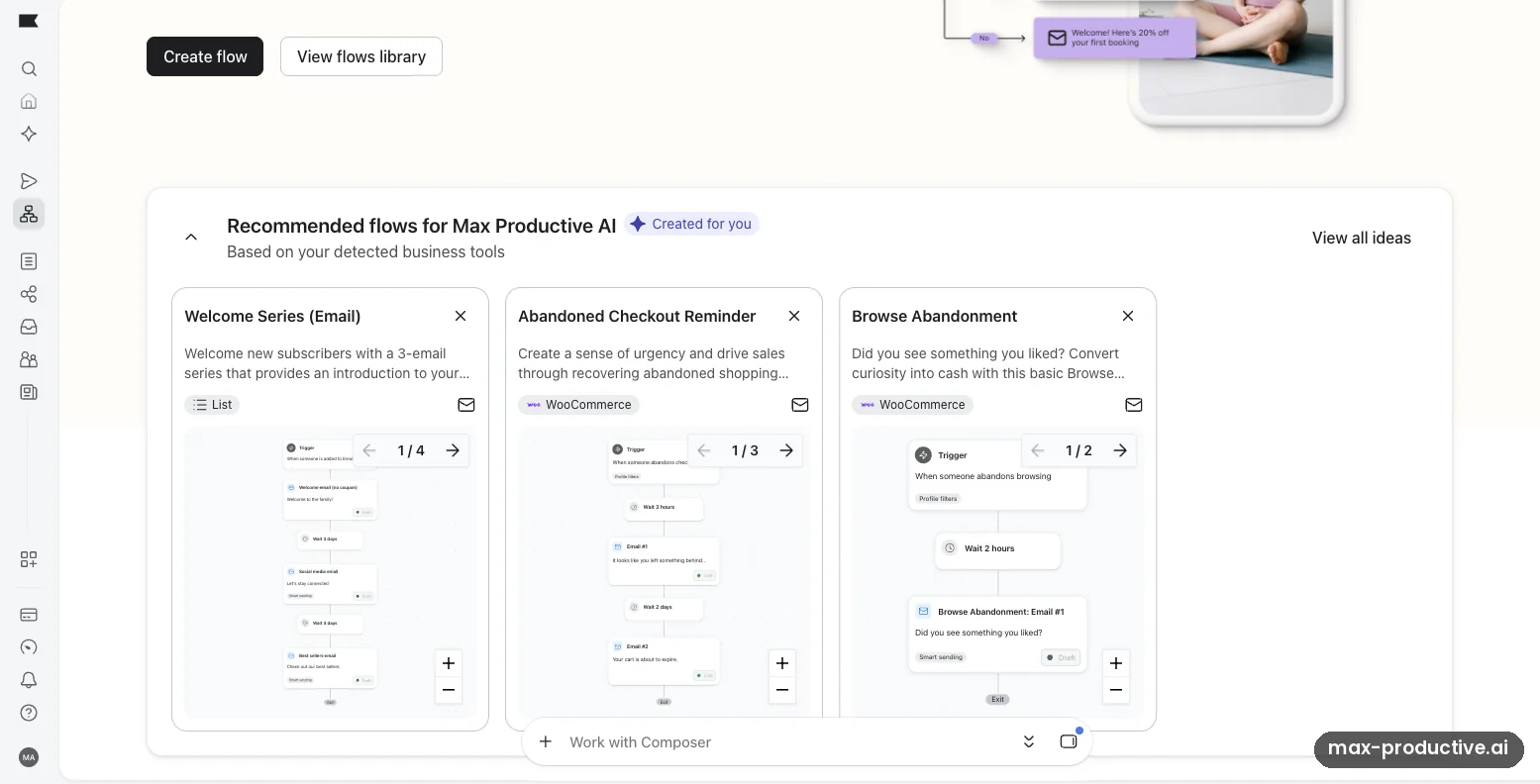
The Flows page opens with three recommended flows, "Created for you" from what Klaviyo calls your detected business tools: a three-email welcome series, an abandoned checkout reminder and a browse abandonment flow. The last two are tagged WooCommerce, although we hadn't connected a store. Each card previews the flow step by step before you open it.
These are common starter automations for an online store. Klaviyo's free plan lets you build automations, so a new store can have them running before it pays anything.
Setting up the welcome series
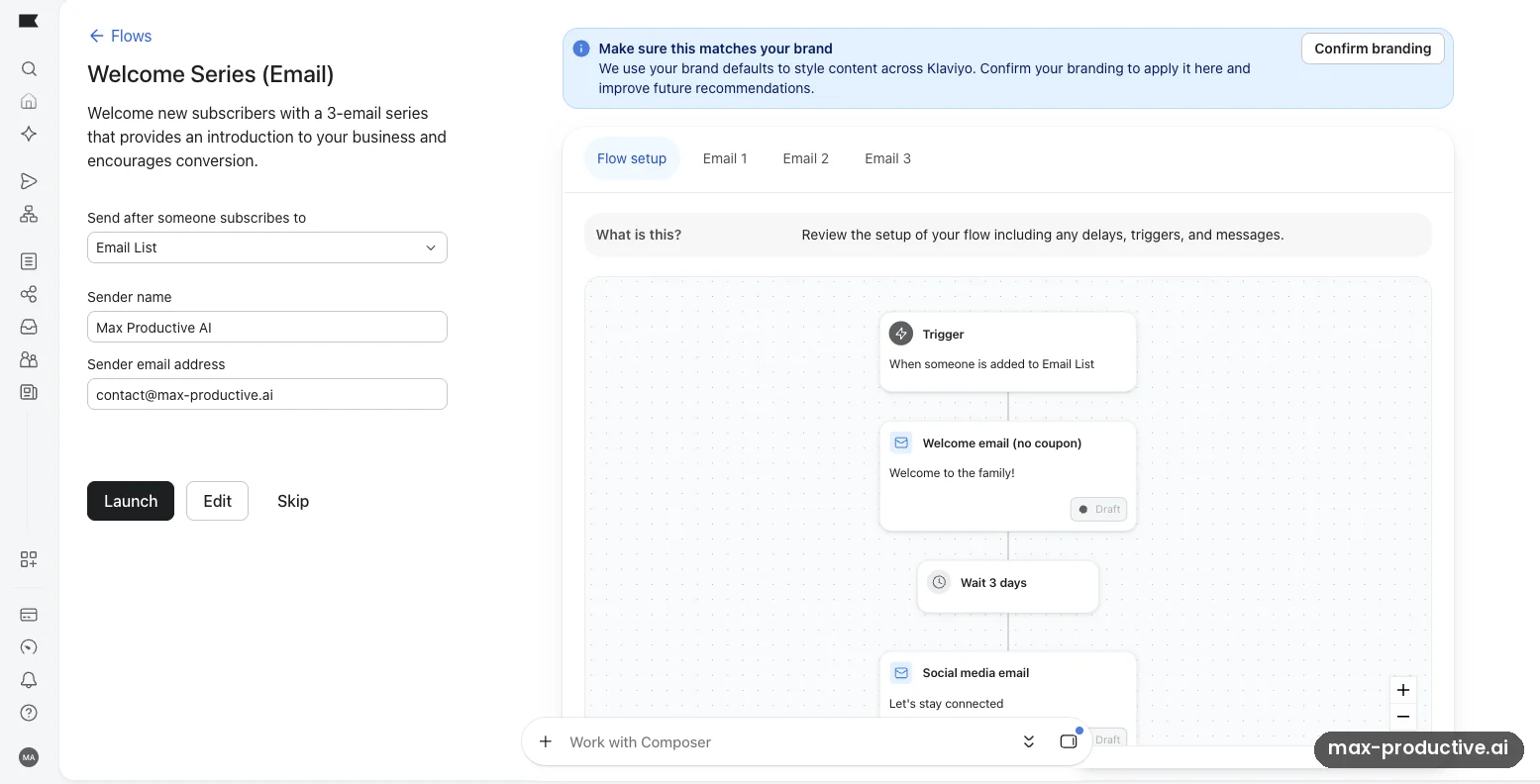
Opening the welcome series shows how little setup a starter flow needs. You choose the list that triggers it, check the sender name and address, which Klaviyo had already filled in for us, and click Launch. The flow sends a welcome email, waits three days, sends an email inviting subscribers to follow you on social media, then a best sellers email four days later. The emails are drafts with default copy (the first opens with "Welcome to the family"), and a banner asks you to confirm your branding first.
We'd do exactly that before launching: confirm the branding, then rewrite each email in your own voice. The structure is sound, and the words are there to be replaced.
List growth tools
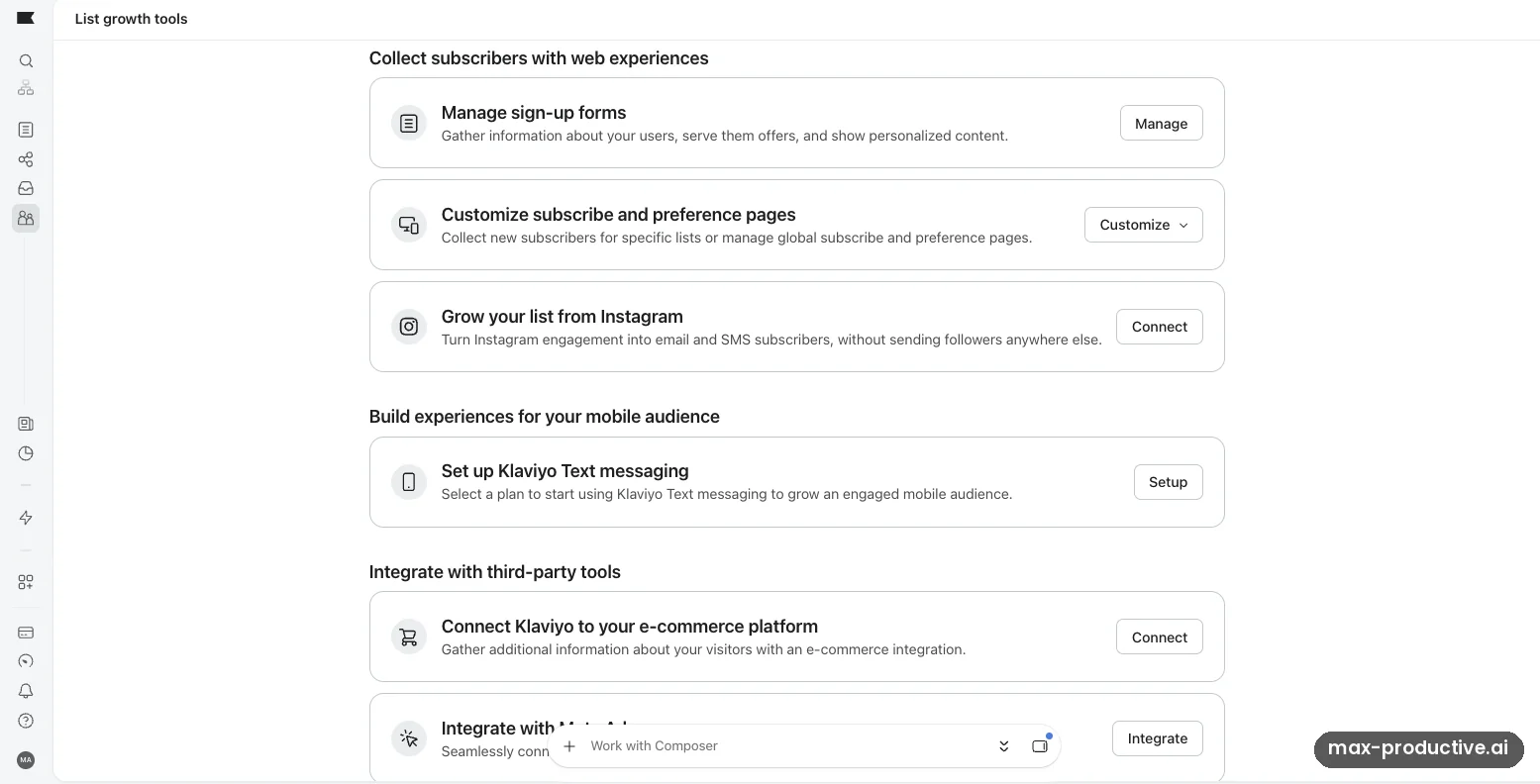
The list growth page gathers the main ways to collect subscribers: sign-up forms, subscribe and preference pages, Instagram, text messaging, an ecommerce platform connection and Meta Ads. For a brand with an active Instagram account, the option we'd look at first is growing the list straight from Instagram, without sending followers anywhere else. Text messaging has its own setup, starting with choosing a messaging plan.
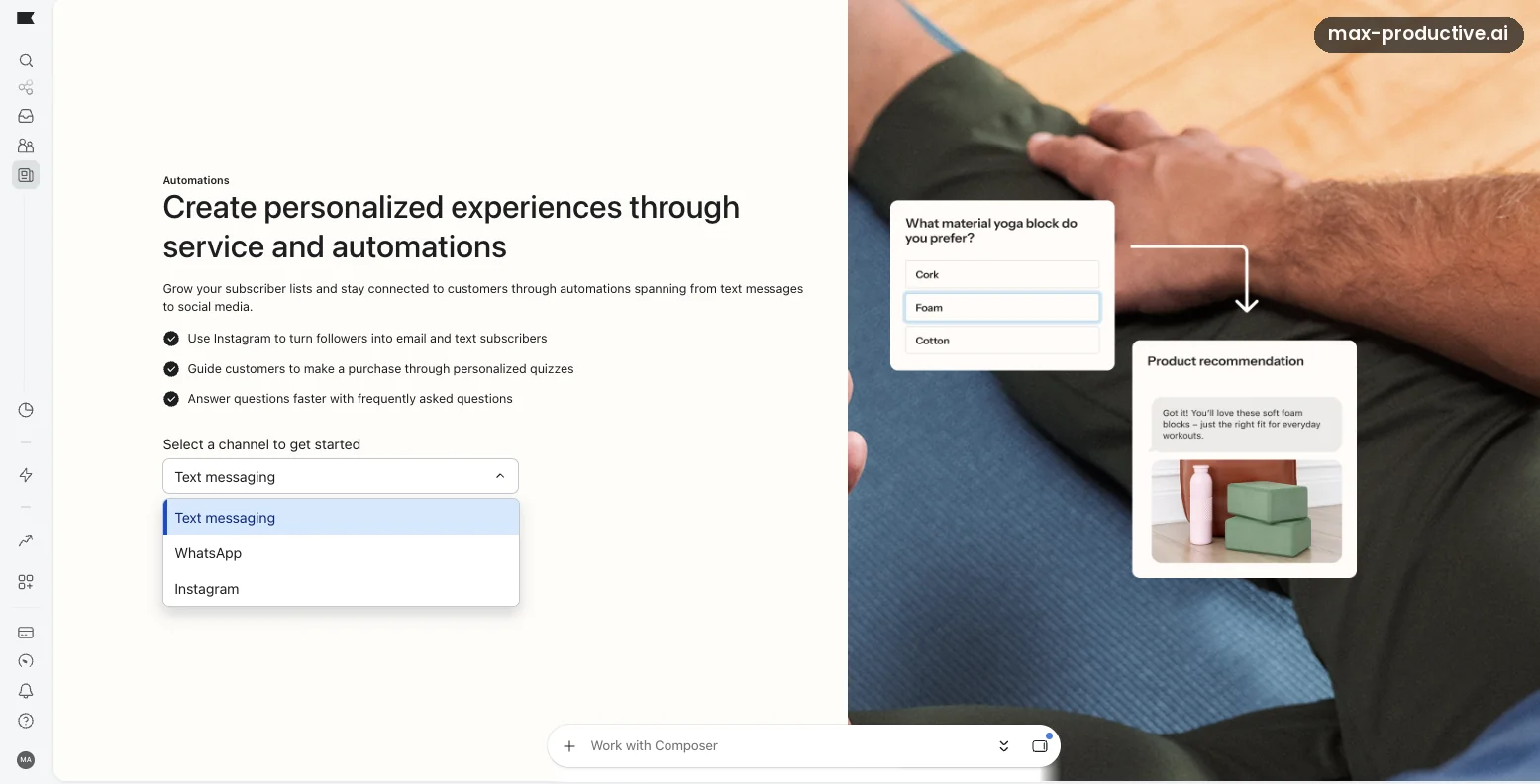
Automations for text, WhatsApp and Instagram
The Automations screen covers what Klaviyo calls personalized experiences: turning Instagram followers into email and text subscribers, product quizzes that guide a purchase, and answers to frequently asked questions. You start by picking a channel: text messaging, WhatsApp or Instagram. We stopped at the channel picker and didn't build one.
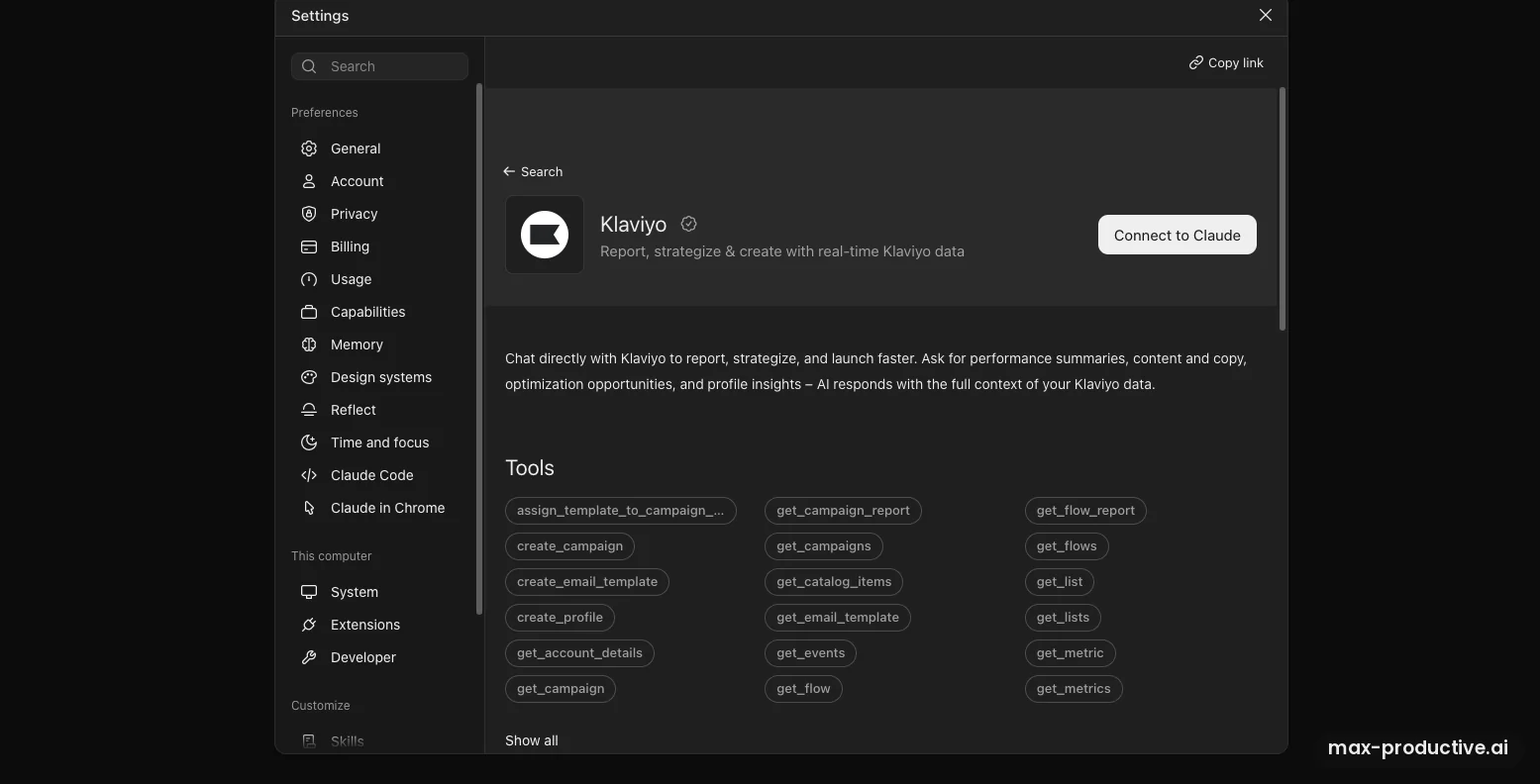
Klaviyo's connector in Claude
Klaviyo's AI reach goes beyond its own app. In Claude's settings, Klaviyo appears as a connector to "report, strategize & create with real-time Klaviyo data." The tool list shows what an assistant could do once connected: create campaigns, email templates and profiles, and read campaign and flow reports, lists, metrics, events and catalog items. Klaviyo calls its MCP offering Klaviyo Headless and says it exposes more than 260 tools to Claude, ChatGPT and other AI systems.
We looked at the listing but didn't connect our account. If you already work in Claude every day, it's a second way into your Klaviyo data worth trying, with the same care you'd give any tool that can create campaigns. Our guide to Claude connectors explains how they work.
Set up flows and try Composer on the free plan.
Try Klaviyo freeKlaviyo key features
Here's what Klaviyo offers in October 2026 and which parts cost extra. Where a feature goes beyond what our free account could show, we rely on Klaviyo's documentation.
-
Composer, the AI marketing agent
$5 a month includedComposer sits on the home screen and inside Campaigns and Flows. Ask about performance and it answers from your data, with sources. Ask for a campaign and it plans the audience, copy and send time. It can audit campaigns, flows, forms and segments, run those audits on a schedule, and save workflows as reusable skills. Customer-facing work waits for your approval. Usage is metered: every account gets a free monthly allowance, and bigger analyses use more.
-
Flows
Automations triggered by what customers do: joining a list, leaving a checkout, browsing a product, placing an order. Klaviyo suggests starter flows for your account and lets you build them on the free plan. The engine was rebuilt as Flows 2.0 in August 2026, and since September a sign-up form can be a step inside a flow.
-
Segmentation and personalization
Predictive analytics on MarketingSegments can use profile data, purchase history and on-site behavior, and Composer can now build a segment from a plain-language description. Predictive analytics comes with the Marketing plan. Personalization, an add-on from $100 a month, adds up to four RFM models and, in Klaviyo's words, models that decide who to reach, what to show and when to send.
-
Email editor and templates
A drag-and-drop editor with a template library, saved templates and brand settings that restyle designs. Recent additions include version history for templates and a converter that turns saved HTML templates into editable drag-and-drop ones. AI writes subject lines on every plan, and paid plans add AI for content, images and segments.
-
Text messages, WhatsApp, RCS and push
Billed per messageSMS, MMS, WhatsApp and RCS run from the same profiles and flows as email. Since July 2026 you buy a messaging plan upfront in dollars and pay per message, with lower rates at higher volumes. Mobile push and in-app messages for brands with their own app come with the Marketing plan, and a channel dashboard compares email, SMS, WhatsApp and push in one view.
-
Customer Hub and social marketing
Marketing planCustomer Hub is a personalized area on your store where shoppers track orders, see loyalty rewards and find recommended products. Social marketing turns Instagram comments and messages into subscribers with auto-replies, and now reports the revenue tied to social posts. Both come with the Marketing plan, and basic Instagram auto-replies are free.
-
Customer Agent and Helpdesk
Free allowance, then paidKlaviyo's service tools share the marketing profile. Customer Agent is a 24/7 AI assistant that answers shoppers' questions, handles tasks such as order tracking and returns, and recommends products, in more than 100 languages. Helpdesk is the ticket workspace for your human team. Since October 2026 you can build and test Customer Agent inside Composer. If you'd rather run a standalone support chatbot, dedicated tools such as Tidio and Freshdesk are worth comparing.
-
Klaviyo Headless (MCP)
Klaviyo's MCP server exposes more than 260 tools, so Claude, ChatGPT and other assistants can read your data, build segments, draft campaigns and write flows. Klaviyo's own examples include weekly performance reviews posted to Slack and custom dashboards built on live data. Claude lists Klaviyo as a ready-made connector.
-
Integrations and reporting
More than 350 integrations, with Shopify, WooCommerce and Wix among the store platforms. Reports attribute revenue to campaigns on every plan, and paid plans add audience and conversion dashboards. Since October 2026 you can also export campaign analytics as a CSV filtered by date, tag, channel and A/B variation.
Our read on the AI: Composer is the newest layer on a platform whose flows and segments have run store email for years. In our test it was careful in the right places. We'd still treat each draft as a first version. In our account the welcome emails carried default copy and the campaign image was AI-generated, so check the copy and the audience before anything goes out.
Klaviyo pricing
As of October 2026, Klaviyo has a free plan and two paid plans, Email and Marketing, priced by active profiles and billed monthly. Text messages, extra Composer usage and the service tools are add-ons.
| Plan detail | Free | Marketing | |
|---|---|---|---|
| 500 active profiles | $0 (up to 250) | $20/mo | $90/mo |
| 2,500 active profiles | Not available | $60/mo | $130/mo |
| 5,000 active profiles | Not available | $100/mo | $170/mo |
| 10,000 active profiles | Not available | $150/mo | $220/mo |
| 50,000 active profiles | Not available | $720/mo | $1,006/mo |
| Email sends a month | 500 | 10 times your profile tier | 10 times your profile tier |
| Text and mobile messages | $5 a month included | Add-on, priced per message | Add-on, plus push and in-app messages |
| Composer AI agent | $5 of usage a month | $5 a month, or a paid Composer plan | $5 a month, or a paid Composer plan |
| Support | Email support for 60 days | Standard support | Standard support |
| Also worth knowing | Flows, sign-up forms, basic segmentation. Klaviyo logo on emails. | A/B testing, advanced templates, AI for content, images and segments. Logo removed. | Customer Hub, social marketing, predictive analytics, loyalty rewards and order tracking. |
Swipe sideways to see every plan.
Prices come from Klaviyo's pricing page calculator and help center, last verified on October 29, 2026. All prices are in US dollars, per month, billed monthly. Above 150,000 profiles, pricing is custom.
See the price for your list size.
See Klaviyo plansWhich Klaviyo plan should you choose?
Free is for setting up and testing. It covers 250 active profiles and 500 emails a month, enough to build flows and sign-up forms before you pay. Email covers what many stores need, and it's the right choice until you want push notifications, predictive analytics or Customer Hub. Marketing adds those, plus loyalty rewards and order tracking pages, for $70 a month more than Email on small and mid-sized lists. Add text messages, more Composer usage, Customer Agent or Helpdesk only when you have a use for them, since each is billed on top.
Is Klaviyo worth the money?
For a store with steady orders, usually yes, and Klaviyo helps you check: its reports attribute revenue to each campaign, so you can see whether the bill pays for itself. The math is less kind to a large list you rarely sell to. Pricing counts every contact you can email, subscribed or not, and a paid account moves up a tier automatically as the count grows.
If you won't use Klaviyo's deeper data tools, a simpler store platform can cost noticeably less. The alternatives below compare entry prices side by side.
Add-ons: text messages, AI and service tools
Text messages, MMS, WhatsApp and RCS are bought as a plan, paid upfront in dollars, at per-message rates that fall with volume. The free plan includes a small monthly allowance. Composer comes with $5 of usage a month on every account, the paid Composer plan gives four times that for $20 monthly, and paid accounts can add $10 top-ups. Customer Agent includes 50 free AI resolutions, then costs $140 a month for 200. Helpdesk costs $185 a month for 1,000 tickets, after a 30-day trial. Personalization starts at $100 a month, and Reviews at $25 a month for 250 orders.
What changed in 2026
In July 2026 Klaviyo replaced SMS credits with per-message prices in dollars. The change applied from July 13 for new and free accounts, and from the first billing cycle after August 13 for existing paid customers. The Email and SMS plan our January 2026 review listed, $35 a month with 1,250 credits, no longer appears on the pricing page. In October the page was reorganized around three plans, with the new Marketing plan bundling Customer Hub and social marketing. Every plan is still billed monthly, with no annual discount.
What counts as an active profile?
Klaviyo's billing guide defines an active profile as any profile, regardless of consent status, that can be emailed through Klaviyo. A contact you imported but never emailed still counts unless it's suppressed. On a paid plan, going over your tier doesn't stop sending: Klaviyo moves you to the next tier from the next billing cycle. On the free plan, you can't send emails until you're back under 250 or you upgrade.
Our advice: suppress contacts you don't plan to email, and look at the count before each billing date.
Klaviyo pros and cons
Pros
Built around your store data
Klaviyo builds each customer profile from store data and site activity, then lets segments, flows and reports use it. Merchants on the Shopify App Store often praise the flows, segmentation, analytics and Shopify integration, and the app holds 4.7 out of 5 from more than 3,400 reviews there.
An AI agent that respects your data
Composer answered our revenue question with setup priorities rather than an invented forecast, checked consent before planning a send, and asked before updating the campaign. Every account gets a free monthly allowance to try it.
Starter flows ready on day one
A welcome series, an abandoned checkout reminder and a browse abandonment flow come pre-built and suggested for your account. The free plan lets you build automations, so they can be running before you pay.
Email, text and service on one profile
Text messages, WhatsApp, RCS, push, a help desk and an AI support agent all use the same customer profile as your email. A support conversation and a marketing message draw on the same history.
Open to the AI tools you already use
Klaviyo Headless exposes more than 260 MCP tools, and Claude lists Klaviyo as a ready-made connector. If your team already works in Claude or ChatGPT, they can pull reports and draft campaigns from there.
Cons
Costs climb with your list
The Email plan costs $150 a month at 10,000 active profiles and $720 at 50,000. Smaller stores that won't use the deeper data tools can pay less elsewhere, so run the numbers for your own list before you commit.
Monthly billing, with add-ons on top
There's no annual discount, and text messages, extra Composer usage, Customer Agent, Helpdesk and Personalization are each billed separately. Budget for the setup you'll actually use, not the entry price.
Active profiles include non-subscribers
Every contact you can email counts, whether or not they subscribed, and paid plans move up a tier automatically. One recent Shopify App Store review describes a much larger bill after the profile count jumped. Suppressing contacts you won't email keeps this in check.
A learning curve beyond the basics
Starter flows are quick, but segmentation, personalization and several channels take time to learn. EmailToolTester names the learning curve for segments as a drawback, and some Shopify reviewers credit Klaviyo's free training webinars with helping them learn it.
Free-plan support is short
Email support on the free plan lasts 60 days. After that you have the help center, Klaviyo Academy and the community forum. That's fine while you test, less so if you plan to stay on Free.
Built for stores more than newsletters
Much of Klaviyo's value depends on store data, and it has no native landing pages. A publisher or B2B sender is usually better served by Mailchimp, Brevo or ActiveCampaign.
Klaviyo alternatives
The table compares Klaviyo with four close rivals, and the cards below cover eight options from our AI email marketing directory.
| Compared on | Klaviyo Reviewed | Omnisend | Mailchimp | ActiveCampaign | Brevo |
|---|---|---|---|---|---|
| Entry paid plan | $20 a month for 500 profiles | $16 a month for 500 contacts | $13 a month for 500 contacts | $15 a month, billed annually, for 1,000 contacts | $9 a month for 5,000 emails |
| Free plan | 250 profiles, 500 emails a month | 250 contacts, 500 emails a month | 250 contacts, 500 emails a month | No, 14-day trial | Up to 300 emails a day |
| Priced by | Active profiles | Contacts | Contacts | Contacts | Emails sent |
| Best for | Stores with lots of customer data | Small and mid-sized online stores | All-round email with wide integrations | Advanced automation and CRM | Multichannel email on a budget |
Swipe sideways to see every tool.
Klaviyo vs Omnisend
This is the comparison many store owners make, and it comes down to size and data. Omnisend covers the ecommerce essentials, including automations on its free plan, for less. Its Standard plan starts at $16 a month for 500 contacts and cost less than Klaviyo's Email plan at every list size we checked. For small and mid-sized stores, we think it's the better value. Klaviyo pulls ahead when you have the order history to use detailed segments, predictive analytics and more channels. Our Klaviyo vs Omnisend comparison goes through the differences one by one.
Klaviyo vs Mailchimp
Mailchimp is the broader all-rounder, with a large integration list and features for businesses that sell a little but aren't only a store. Its Essentials plan starts at $13 a month for 500 contacts. Klaviyo goes deeper on store data and automation, and costs a little more to start. If most of your revenue comes from an online store, Klaviyo is the stronger fit. If email supports a wider business, our Mailchimp review is the place to start.
Which alternative fits you?
-

ActiveCampaignOur rating: 4.7 / 5
Best for: Businesses that want advanced automation and a built-in CRM, including B2B and service companies.
Starter costs $15 a month billed annually for 1,000 contacts. There's no free plan, only a 14-day trial. It suits teams that sell more than products, where Klaviyo's store focus matters less.
-
BrevoOur rating: 4.6 / 5
Best for: Teams that want email, SMS, WhatsApp and a CRM in one place, priced by emails sent rather than contacts.
Starter costs $9 a month for 5,000 emails, and the free plan sends up to 300 emails a day. Because the price follows sending volume, a large list you email rarely can cost less than on Klaviyo.
-

OmnisendOur rating: 4.5 / 5
Best for: Small and mid-sized online stores that want ecommerce automation from day one at a fair price.
Its free plan covers 250 contacts and 500 emails a month and includes automations. Standard starts at $16 a month for 500 contacts and cost less than Klaviyo's Email plan at every list size we checked, up to 50,000 contacts.
-

GetResponseOur rating: 4.3 / 5
Best for: Small businesses and course creators who want email, landing pages and automation under one login.
Its free plan covers 500 contacts and 2,500 emails a month. Starter costs $15.58 a month billed yearly for 1,000 contacts, and it includes the landing pages Klaviyo doesn't offer.
-
MailerLiteOur rating: 4.3 / 5
Best for: Creators and small businesses that want a clean, easy newsletter tool at a low price.
Comfort costs $10.80 a month billed yearly for 500 subscribers, and the free plan allows 2,500 emails a month. EmailToolTester rates it easy to use and good value.
-

BeehiivOur rating: 4.1 / 5
Best for: Writers who want to grow and earn from a newsletter rather than a store.
Beehiiv's free plan covers up to 2,500 subscribers, ten times Klaviyo's free profile limit. It's built for newsletters and publishing, so it's the better home for a media brand.
-

MoosendOur rating: 4.1 / 5
Best for: Budget-minded teams that want unlimited sends and everyday automation.
Pro starts at $7 a month billed annually for 500 contacts, with unlimited sends and a 30-day free trial but no free plan. It suits a list you email often on a small budget.
-

MailchimpOur rating: 4.1 / 5
Best for: Businesses that want an all-round email tool with wide integrations, beyond pure ecommerce.
Its free plan matches Klaviyo's on paper, with 250 contacts and 500 emails a month, and Essentials starts at $13 a month for 500 contacts. It's the easier fit when email supports a wider business than a store.
Klaviyo FAQ
Is Klaviyo free?
Yes, Klaviyo has a free plan with no time limit for up to 250 active profiles and 500 email sends a month. It includes $5 of mobile messages and $5 of Composer usage a month, sign-up forms, flows and basic segmentation. Email support lasts for the first 60 days, and the Klaviyo logo stays on your emails until you upgrade. Go over either limit and sending pauses until you upgrade or are back within it.
How much does Klaviyo cost?
As of October 2026, Klaviyo's Email plan costs $20 a month for 500 active profiles, $100 at 5,000 and $150 at 10,000. The Marketing plan, which adds Customer Hub, social marketing, push notifications and predictive analytics, costs $90 a month at 500 profiles. All plans are billed monthly with no annual discount, and text messages, extra Composer usage and the service tools cost extra.
What is Klaviyo Composer?
Klaviyo Composer is an AI marketing agent built into Klaviyo. It answers questions from your account data, audits campaigns, flows, forms and segments, and drafts campaigns, flows and segments from a prompt for you to review before anything goes out. It came out of preview on October 13, 2026. Every account gets a free monthly allowance of Composer usage, and a paid Composer plan gives four times that.
What is an active profile in Klaviyo?
An active profile in Klaviyo is any contact the platform can email, whether or not they subscribed to marketing. Suppressed contacts don't count. Klaviyo prices its plans on this number, and on a paid plan it moves you to the next tier from the following billing cycle if your count grows. Suppressing contacts you no longer email keeps the bill in check.
Does Klaviyo include SMS?
Yes, Klaviyo sends SMS, MMS, WhatsApp and RCS messages, but they're billed separately from email. Since July 13, 2026, new accounts buy a messaging plan upfront in dollars and pay per message, with lower rates at higher volumes. The free plan includes a small monthly allowance of mobile messages to test text marketing. The old Email and SMS plan with credits no longer appears on the pricing page.
Is Klaviyo good for small businesses?
Klaviyo works for small online stores, and its free plan is enough to set up flows and sign-up forms before you pay. Costs rise with your list, though, and much of its depth needs order data. For small and mid-sized stores on a budget, we think Omnisend offers better value, while Klaviyo suits stores with lots of customer data. For a newsletter without a store, Mailchimp or Brevo fit better.
Does Klaviyo work with Shopify and WooCommerce?
Yes, Klaviyo integrates with Shopify, WooCommerce, Wix and other store platforms, among more than 350 integrations. Connecting your store brings its orders and products into Klaviyo's customer profiles, which store flows such as abandoned checkout reminders rely on. Shopify is its best-known pairing: the Klaviyo app holds a 4.7 rating from more than 3,400 reviews on the Shopify App Store.
Can I use Klaviyo with Claude or ChatGPT?
Yes, Klaviyo offers an MCP server, which it calls Klaviyo Headless, with more than 260 tools that Claude, ChatGPT and other AI assistants can use. Claude lists Klaviyo as a connector for reports, strategy and content, with tools such as create_campaign and get_flow_report. We found the connector in Claude's settings but didn't connect our account, so we can't speak to how it performs.
Does Klaviyo offer annual billing?
No, Klaviyo bills every plan monthly, starting on the day you begin a paid plan, according to its billing guide. There's no annual plan or annual discount as of October 2026. Because the price follows your active profile count, your monthly bill changes with the size of your list.
Should you try Klaviyo?
If you run an online store with real order history, yes. Klaviyo has the most to offer once your customer data starts to build up. You get flows that react to what shoppers do, detailed segments, revenue reporting and now an AI agent that analyzes carefully instead of guessing. The limits are about cost and fit. Prices follow every contact you can email, billing is monthly only, and text messages and service tools sit on top. Smaller stores get better value from Omnisend, and newsletter senders from Mailchimp or Brevo. For a store ready to grow into it, Klaviyo earns its 4.8.
What we'd do. Open a free account and connect your store first, so Composer and the flow suggestions work from real data. Rewrite the welcome series and abandoned checkout emails in your own voice, then turn them on. Ask Composer where your biggest revenue opportunities are and check the sources it gives. Before upgrading, count your active profiles, suppress contacts you won't email, and compare prices at your list size before you choose.
Our rating: 4.8 / 5
Excellent
About this review
Based on a hands-on test of a new Klaviyo free account in October 2026, Klaviyo's published pricing, help center and release notes, and public user feedback. First published 5 September 2025. Last updated 29 October 2026.
Sources checked
- Pricing and plan limits. Klaviyo pricing page, billing guide and mobile messaging pricing FAQ, checked October 29, 2026.
- AI features and updates. Composer page, Composer plan guide, What's New and the September 2026 platform update.
- User feedback. The Shopify App Store listing, Reddit, and independent reviews by EmailToolTester and Email Vendor Selection.
Ratings are our overall editorial judgment on a 5-point scale: 4.5 and up is Excellent, 4.0 to 4.4 Very good, 3.5 to 3.9 Good, 3.0 to 3.4 Fair. We do not use sub-scores.
This review contains affiliate links, so we may earn a commission at no extra cost to you. Our ratings and editorial opinions remain independent.