
Buffer
Social media management platform for scheduling, publishing, and analyzing content across 12+ networks. The simplest way to build your audience and grow your brand—designed for creators and small teams who value clarity over complexity.
Try Buffer Free →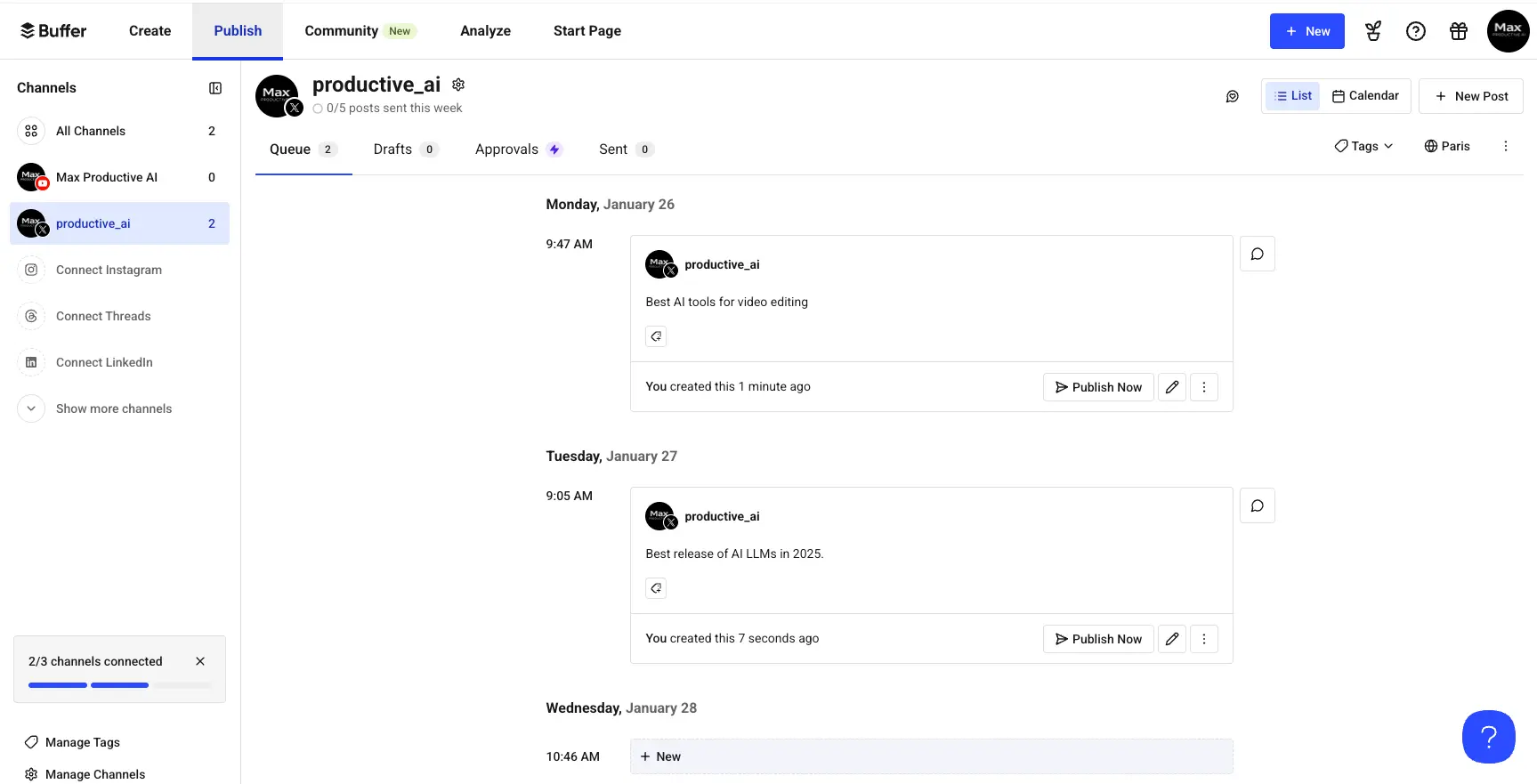
The Simplest Social Media Tool
for Creators & Small Teams
After extensive testing, Buffer delivers exceptional value for its core audience: solopreneurs and small teams who prioritize simplicity over enterprise-level features. With 195,000+ monthly active users and support for 12 platforms including emerging networks like Bluesky and Threads, Buffer has evolved from a basic scheduling tool into a comprehensive suite with unlimited AI content generation, analytics, and team collaboration—all while maintaining the cleanest interface in the market.
✓ What We Love
- Industry-leading simplicity—5-minute setup
- Unlimited AI generation on all plans
- First to support Bluesky, Threads, Mastodon
- Genuine free plan with real utility
! Could Be Better
- No content recycling automation
- Analytics lack competitor tracking
- Inbox missing TikTok, YouTube, Pinterest
What Is Buffer?
A comprehensive overview of the platform and who it's built for.
Buffer is a social media management platform designed for solopreneurs, content creators, and small-to-medium businesses seeking simplicity without sacrificing functionality. Founded in 2010, the platform has evolved from a basic scheduling tool into a comprehensive suite that includes publishing, analytics, engagement, AI-powered content creation, and link-in-bio pages. With over 195,000 monthly active users and $23.2M in annual recurring revenue, Buffer has established itself as a user-friendly alternative to enterprise-grade competitors like Hootsuite and Sprout Social.
What sets Buffer apart from complex enterprise tools is its deliberate focus on accessibility. The platform excels in three critical areas: an intuitive interface design that requires minimal onboarding (most users schedule their first post within 5 minutes), reliable cross-platform scheduling across 12 social networks, and transparent per-channel pricing that scales affordably for small teams. Buffer consciously trades advanced features—social listening, deep analytics, and enterprise workflows—for ease of use.
Buffer operates as a fully remote company with 73-75 employees distributed across 15-30 countries, reflecting modern remote-first principles that align with its target audience of digital entrepreneurs. Under CEO Joel Gascoigne's leadership, the company achieved profitability in 2024 and maintains a unique profit-sharing model. This values-driven culture extends to transparent pricing, open documentation of performance challenges, and genuine free plan offerings—an approach that builds trust with budget-conscious creators.
The platform currently supports 12 major social networks: Facebook, Instagram, X/Twitter, LinkedIn, TikTok, Pinterest, YouTube, Google Business Profile, Mastodon, Bluesky, and Threads. Buffer has been notably fast at adopting emerging platforms—adding Bluesky support in December 2024 and Threads in July 2023, months before most competitors.
Who Is Buffer Best For?
Buffer is ideal for solo creators and small teams (1-10 people) managing 3-8 social channels who prioritize simplicity and consistency over advanced analytics. It's particularly well-suited for Instagram and TikTok creators, personal brand builders, freelance social media managers with 2-5 clients, and small businesses with limited marketing resources. If you value getting started quickly over having every possible feature, Buffer is likely your best choice.
Buffer ranks 4.3/5 on G2 (1,022+ reviews) and 4.5/5 on Capterra (1,490+ reviews), positioning it consistently above average in user satisfaction while maintaining lower complexity scores than enterprise alternatives. Users consistently praise the clean interface, responsive customer support (84% of inquiries answered within 24 hours), and the genuinely useful free plan that doesn't feel artificially limited.
See Buffer in Action
Real screenshots from the platform showing key features and the content management workflow.
Content Queue & Calendar View
Your central hub for managing scheduled posts across all channels
The Publish dashboard presents a clean, organized view of your content queue. Each post shows the scheduled date, time, and a preview of the content. The left sidebar lets you switch between channels (2/3 connected in this example), while the List/Calendar toggle in the top right allows you to visualize your schedule differently. Posts can be published immediately, edited, or rescheduled with simple one-click actions.
Ideas Board (Kanban Content Planner)
Brainstorm and organize content ideas before they become posts
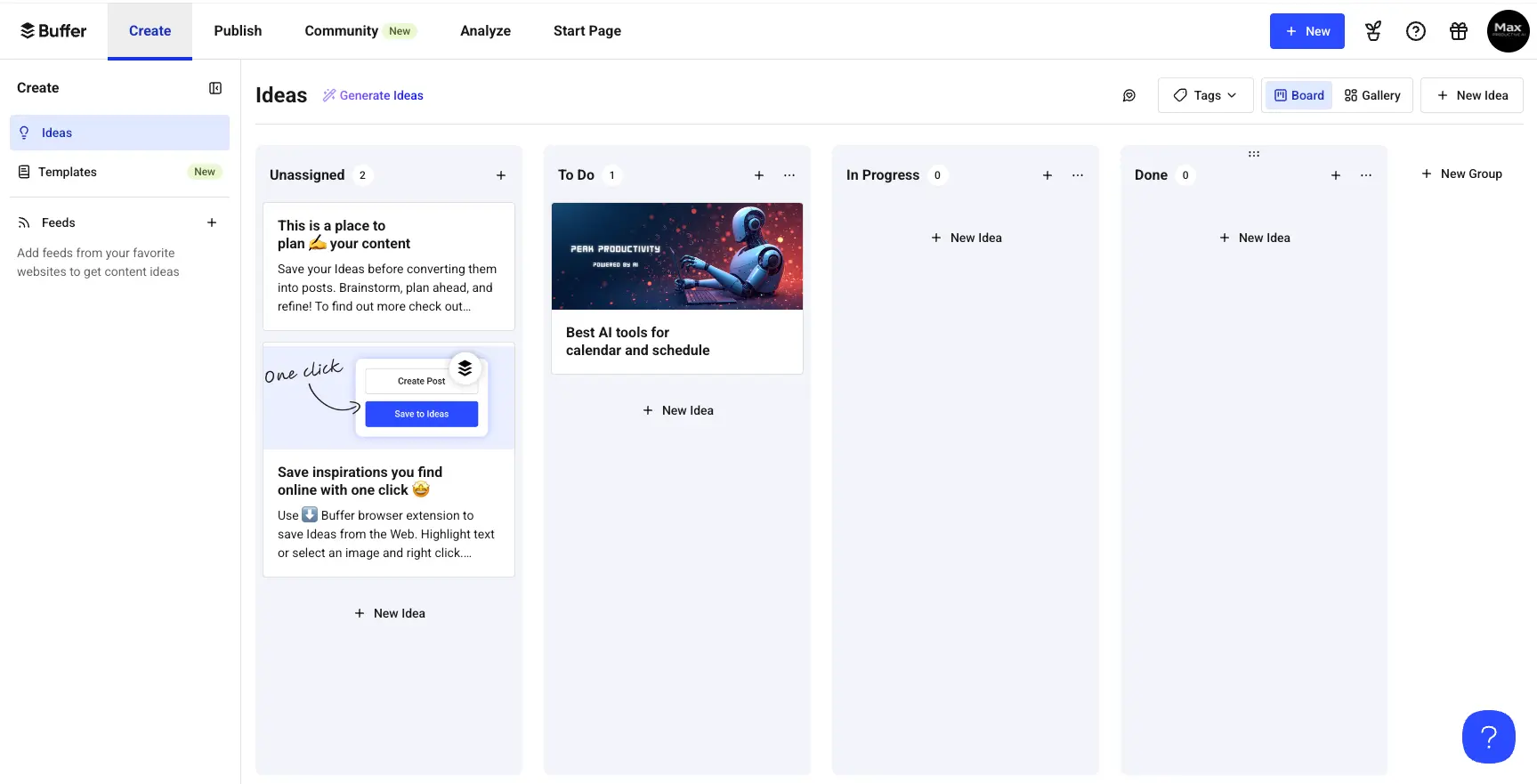
Buffer's Ideas feature provides a Kanban-style board for content planning. Drag cards between columns (Unassigned, To Do, In Progress, Done) to track your content pipeline. Each idea can include images, notes, and tags. The "Generate Ideas" button uses AI to suggest content topics. When ready, convert any idea into a scheduled post with one click—no copy-pasting required.
Community Engagement Inbox
Respond to comments and messages across platforms in one place
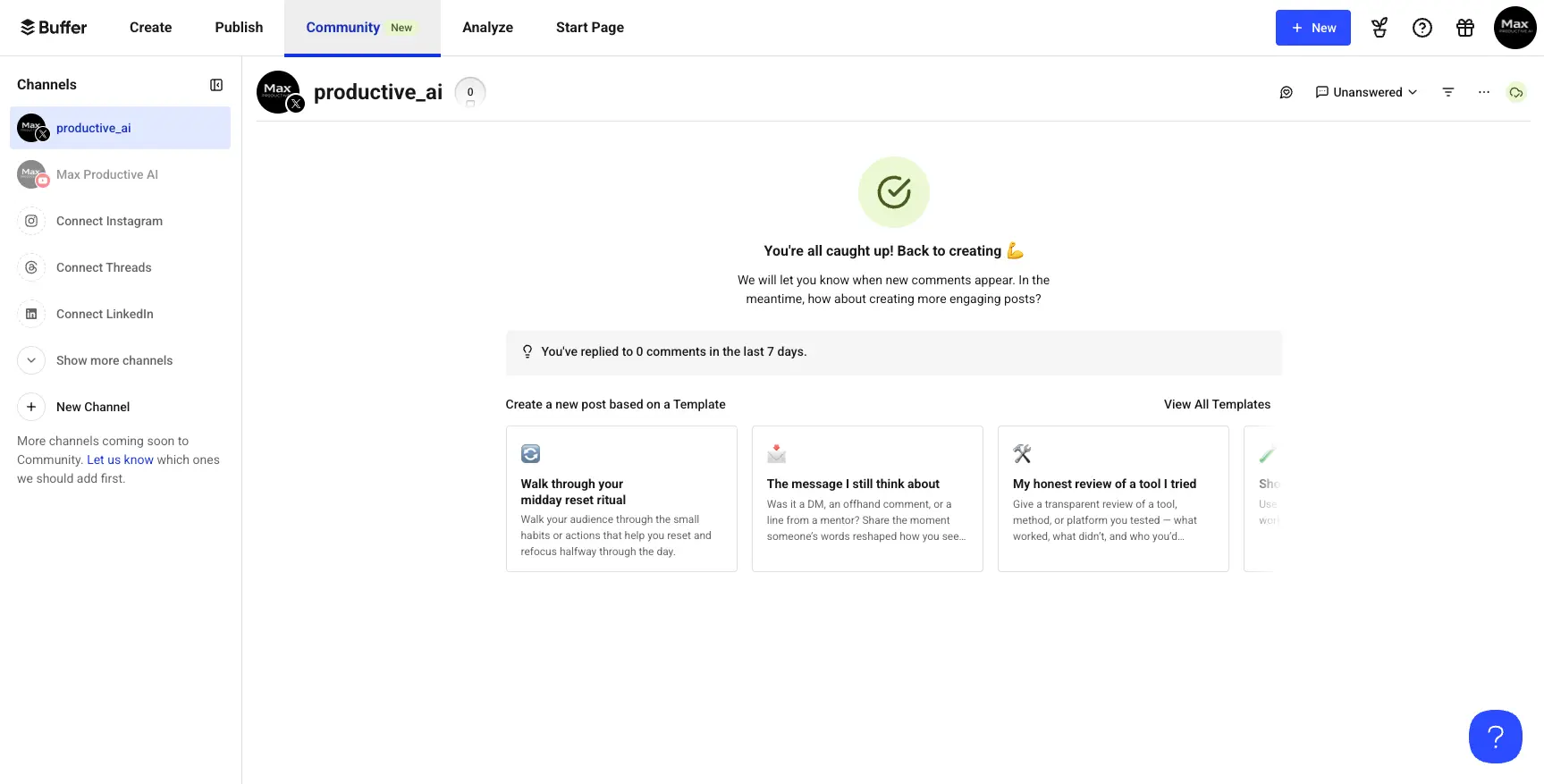
The Community feature consolidates comments from Instagram, Facebook, Threads, LinkedIn, Bluesky, and X into a unified inbox. The "Unanswered" filter helps prioritize responses, while the activity tracker shows you've replied to 0 comments in the last 7 days. Post templates at the bottom suggest engagement-focused content like "My honest review of a tool I tried" to encourage audience interaction.
YouTube Shorts Post Composer
Schedule YouTube content with full metadata control
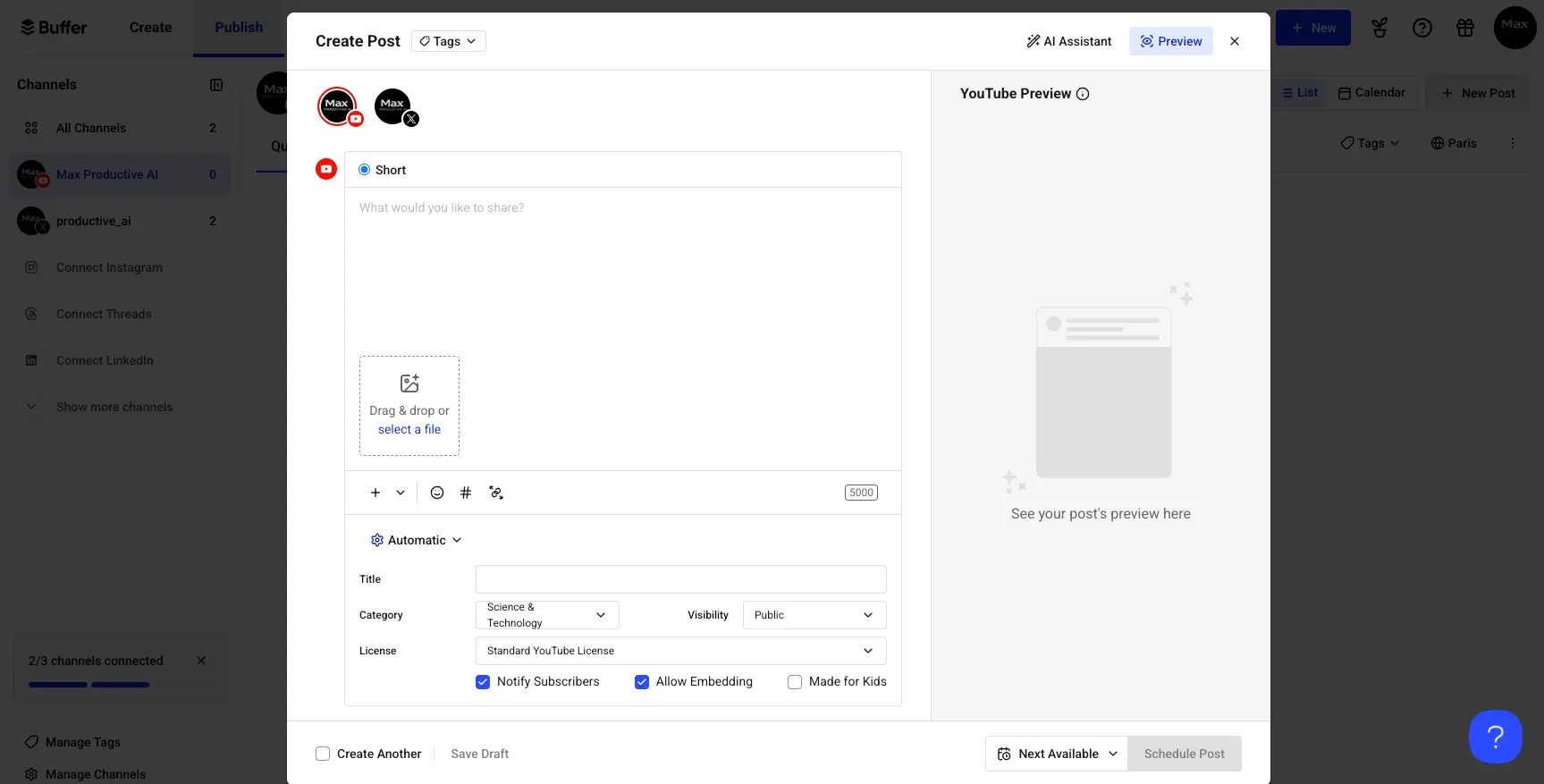
Buffer's YouTube composer supports both standard videos and Shorts with comprehensive metadata options. Set the title, category (Science & Technology shown), visibility (Public/Private/Unlisted), and license type. Checkboxes for "Notify Subscribers," "Allow Embedding," and "Made for Kids" give you full control. The AI Assistant button in the top right can help generate descriptions and titles.
Start Page Templates
Create a professional link-in-bio page in minutes
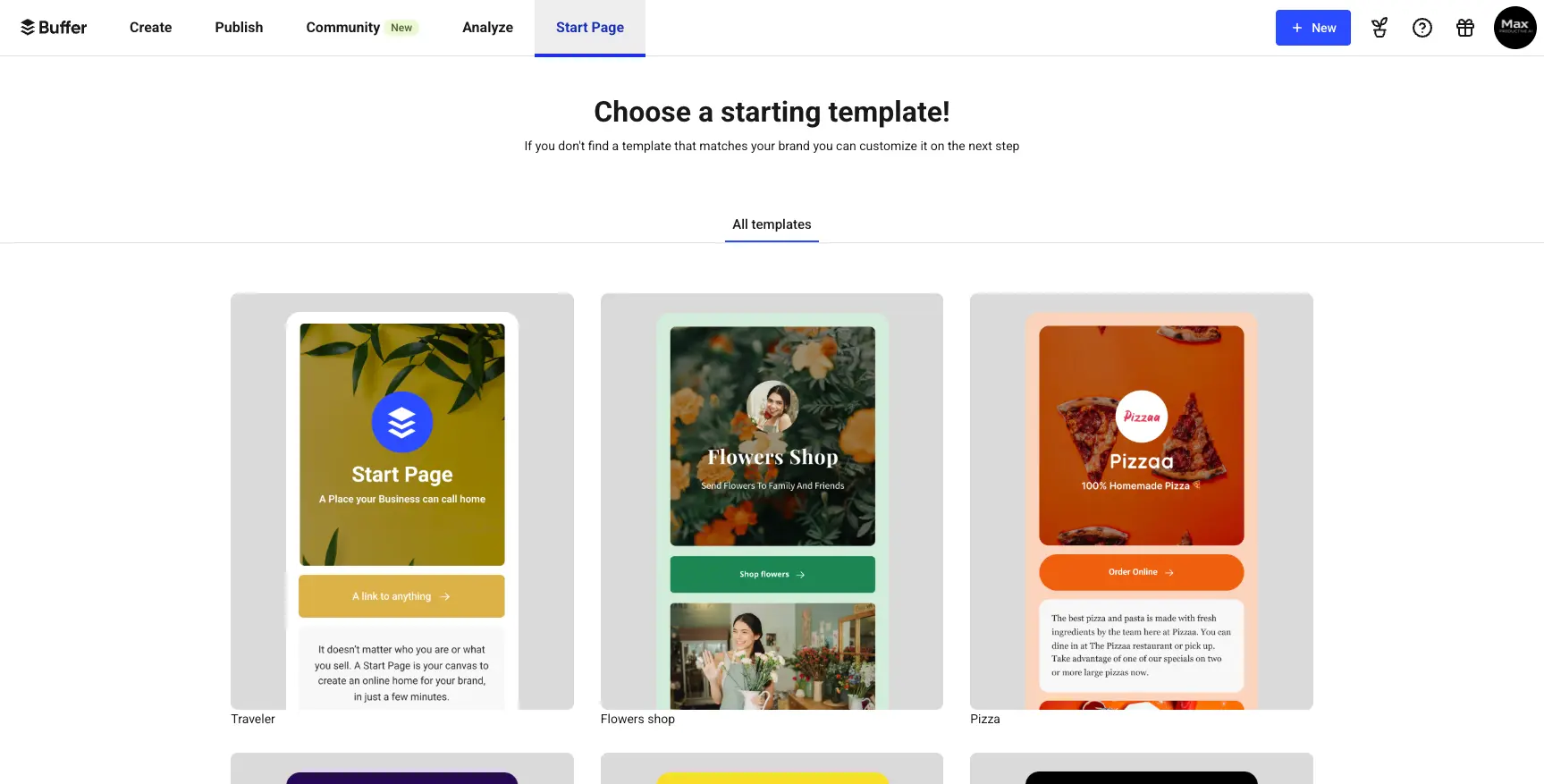
Buffer's Start Page offers a free link-in-bio builder that competes with Linktree and Beacons. Choose from templates designed for different use cases—Traveler for personal brands, Flowers Shop for retail, Pizzaa for restaurants. Each template is fully customizable with drag-and-drop blocks for links, images, videos, email forms, and call-to-action buttons. Analytics track total traffic and individual link clicks.
Ready to simplify your social media management?
Try Buffer Free →Free plan available • No credit card requiredHow Buffer Works
From account creation to consistent posting in four simple steps.
Connect Your Social Accounts
Link your social media profiles through secure OAuth authentication. Buffer supports 12 platforms: Facebook Pages, Instagram (Business, Creator, or Personal), X/Twitter, LinkedIn (personal and company pages), TikTok, Pinterest, YouTube, Google Business Profile, Threads, Bluesky, and Mastodon. Each connection takes about 30 seconds—just authorize Buffer to post on your behalf. The free plan allows 3 channels; paid plans support unlimited channels.
Set Your Posting Schedule
Define when Buffer should publish your content. You can set specific time slots for each day of the week (e.g., 9 AM, 12 PM, 6 PM on weekdays) or use Buffer's "Best Time to Post" recommendations based on analysis of over 2 million posts. For Instagram, Buffer suggests 3-6 PM on weekdays; for LinkedIn, 7 AM-4 PM on weekdays; for TikTok, 4-7 PM on weekdays. The schedule personalizes further as you build posting history.
Create and Queue Content
Compose posts using Buffer's clean editor with the AI Assistant available for brainstorming, repurposing, and tone adjustments. Add media directly or design in Canva without leaving Buffer (Canva integration built-in). Choose your scheduling option: "Add to Queue" places content in the next available slot, "Share Now" publishes immediately, or select a specific date and time. Bulk upload via CSV lets you import up to 100 posts at once.
Analyze and Engage
Monitor performance through Buffer's analytics dashboard—track engagement, reach, follower growth, and identify your best-performing content. Use the Community inbox to respond to comments across Instagram, Facebook, Threads, LinkedIn, Bluesky, and X without switching apps. The Comment Score feature highlights comments requiring urgent attention. Export PDF reports for stakeholders on Team and Agency plans.
Instagram Auto-Publishing Requirements
For automatic Instagram posting, you need a Business or Creator account connected to a Facebook Page. Videos must be 5 seconds to 15 minutes. Posts with music, stickers, or polls require notification publishing—Buffer sends a mobile reminder when it's time to post, with caption pre-loaded in the Instagram app.
Browser Extension & Mobile Apps
Buffer's browser extension lets you share content from anywhere on the web—highlight text, right-click, and add to your queue. Mobile apps (iOS and Android, both 4.7+ ratings) enable on-the-go scheduling, queue management, and emergency pause if you need to halt posting during breaking news or crises.
Key Features
Everything you need to manage your social media presence effectively.
Multi-Platform Scheduling
Queue-based scheduling across 12 social networks with drag-and-drop calendar management. Set posting times per platform, use "Best Time to Post" recommendations, or publish immediately. Bulk upload via CSV imports up to 100 posts at once.
AI Content Assistant
Unlimited AI generation on all plans including Free. Create posts from prompts, repurpose content for different platforms, adjust tone (casual/formal/professional), expand or shorten text, translate to multiple languages, and generate content ideas.
Instagram & Reels Publishing
Auto-publish for Business/Creator accounts: images, carousels, Stories, and Reels (5 sec–15 min). First comment scheduling for hashtags. Notification publishing for Personal accounts and posts with music/stickers.
Community Inbox
Unified engagement dashboard for Instagram, Facebook, Threads, LinkedIn, Bluesky, and X. AI-powered Comment Score highlights urgent responses. Reply directly without leaving Buffer. Filter by platform, date, or engagement type.
Analytics & Reporting
Track engagement (likes, comments, shares), reach, impressions, and follower growth. Post-level performance comparison. Best time analysis based on your data. Custom PDF reports on Team plan with date range and chart customization.
Start Page (Link-in-Bio)
Free customizable landing page for Instagram, TikTok, and other single-bio-link platforms. Drag-and-drop builder with links, images, videos, email forms, and CTAs. Template library and custom branding. Built-in click analytics.
Emerging Platform Support
First-mover advantage on Bluesky (added December 2024), Threads (July 2023), and Mastodon. Reach early adopters building audiences on decentralized networks 6-12 months before competitors add support.
Team Collaboration
Unlimited team members on Team and Agency plans. Three-tier permissions: Account Owner, Full Posting Access, Approval Required. Draft review workflows, shared content calendar, and in-platform feedback notes.
Beyond these core features, Buffer integrates with popular tools to streamline workflows: design in Canva within the Buffer composer, access files from Google Drive, Dropbox, and OneDrive, and automate complex workflows via Zapier (1,000+ app connections). The Hashtag Manager (Team plan) lets you save and reuse hashtag groups for Instagram with one-click insertion.
Experience all these features with Buffer's free plan:
Try Buffer Free →3 channels included • Unlimited AI generationBuffer Pricing Plans
Transparent per-channel pricing that scales with your needs.
Free
Essentials
Team
All paid plans include: 14-day free trial (no credit card required) • Annual billing saves 20% • 50% nonprofit discount
Buffer Pricing Examples
Buffer's per-channel model works well for 1-8 channels. For larger operations (10+ channels), the Agency plan provides better value. Compare: Loomly offers 10 accounts for $32/month, and SocialPilot provides 15 accounts for $50/month—worth considering if you're scaling beyond Buffer's sweet spot.
Buffer's Free plan stands out in the market—unlike competitors that severely limit free tiers, Buffer provides genuine utility with 3 channels, 10 posts each, and full AI access. This low barrier to entry lets you evaluate the platform thoroughly before committing to paid plans.
Detailed Pros & Cons
An honest, balanced assessment based on extensive testing and user feedback.
✓ Pros
Buffer's interface requires minimal onboarding—users can schedule their first post within 5 minutes of account creation. The clean, uncluttered design prioritizes essential functions without overwhelming users. This represents a strategic choice to serve the majority who need core scheduling functionality.
Unlike competitors like Later (5-100 credits/month), Buffer offers unlimited AI generation on all plans including Free. Generate posts, repurpose content, adjust tone, and translate without worrying about usage limits. This encourages experimentation and creative exploration.
Buffer quickly integrates emerging social networks, enabling early adopters to reach audiences on Bluesky, Threads, and Mastodon before competitors add support. This 6-12 month head start matters for creators building communities on next-generation platforms.
The per-channel model eliminates hidden costs and allows incremental scaling. Small creators start free, add channels at $6 each, and only pay for what they actively use. No surprise charges or complex tier requirements.
Buffer's Free plan provides real utility—3 channels with 10 posts each, unlimited AI, basic analytics, and Start Page. Unlike artificially limited trials, this enables consistent posting for hobbyists and emerging creators indefinitely.
Support responds to 84% of inquiries within 24 hours with a hospitality-inspired approach emphasizing personalized, context-aware responses. Users consistently praise responsiveness and patience in reviews.
✗ Cons
Buffer cannot automatically repeat evergreen posts—users must manually duplicate content or use CSV bulk upload. For brands with 40+ repeating posts (tips, quotes, blog promotions), this creates significant administrative overhead. Competitors like SocialBee handle this automatically.
Buffer provides sufficient data for basic performance tracking but lacks competitive intelligence, sentiment analysis, and detailed historical data. Marketing teams requiring benchmarking or advanced reporting may find the analytics insufficient for strategic decisions.
Buffer cannot monitor untagged brand mentions, track trending topics, or alert users to relevant conversations across the web. Users must manually search each platform or subscribe to separate listening tools.
The Community inbox excludes TikTok, Pinterest, and YouTube—three visually-focused platforms where engagement drives algorithmic visibility. This forces toggling between Buffer and native apps for comprehensive community management.
While affordable for 1-8 channels, Buffer becomes expensive beyond 10 channels. A 20-channel setup costs $180-240/month, while competitors like SocialPilot offer 30 accounts for $100/month. Agencies should compare alternatives.
While unlimited, the AI Assistant's output tends toward formal, generic content that works best as a first draft rather than publication-ready posts. Budget 5-10 minutes per post for human refinement to match your brand voice.
Buffer vs Alternatives
A comprehensive comparison to help you choose the right social media management tool.
| Feature | Buffer | Hootsuite | Later | Metricool |
|---|---|---|---|---|
| Starting Price | $0 (Free) | $99/mo | $25/mo | $0 (Free) |
| Platforms Supported | 12 | 20+ | 9 | 11 |
| AI Generation | Unlimited | Unlimited ($99+) | 5-100 credits | Limited |
| Content Recycling | ❌ None | Basic | ❌ None | ❌ None |
| Social Listening | ❌ None | ✓ 130M+ sources | ❌ None | Limited |
| Competitor Analysis | ❌ None | ✓ With add-on | ❌ None | ✓ 100 profiles |
| Ease of Use | 9/10 | 5/10 | 8/10 | 7/10 |
| Best For | Creators, small teams | Enterprise teams | Visual-first brands | Data-driven marketers |
Which Tool Is Right For You?
Buffer
Best for SimplicityBest for: Solopreneurs, content creators, and small businesses (1-10 people) managing 3-8 social channels who prioritize simplicity and consistency over advanced features. Ideal if you value a clean interface, transparent pricing, and getting started in 5 minutes. The generous free plan makes it risk-free to try.

Hootsuite
Enterprise FeaturesBest for: Medium-to-large teams needing comprehensive social listening (monitors 130M+ sources), advanced analytics, and 20+ platform integrations including Reddit. Choose Hootsuite if brand monitoring and competitive intelligence are essential—but expect a steeper learning curve and $99+/month minimum.

Sprout Social
Enterprise CRMBest for: Enterprise customer service teams requiring CRM-style contact records, AI-powered sentiment analysis, and unlimited historical analytics. The Smart Inbox handles 600M+ messages daily with advanced routing. At $249/user/month, it's overkill for creators but transforms customer service operations.

Flick
Hashtag ResearchBest for: Instagram-focused creators who need advanced hashtag research and analytics. Flick's hashtag tools help identify optimal tags for reach and engagement. If Instagram is your primary platform and hashtag strategy is crucial to your growth, Flick offers deeper Instagram-specific insights than Buffer.

SocialBee
Content RecyclingBest for: Brands with 40+ evergreen posts needing automatic content recycling. SocialBee's category-based system lets you organize content (Tips, Quotes, Promotions) and recycle indefinitely without manual duplication. At $29/month, it saves 10-15 hours monthly compared to Buffer's manual approach.

Later
Visual PlanningBest for: Visual-first brands focused primarily on Instagram and TikTok. Later's grid preview shows exactly how your Instagram feed will look before posting—essential for aesthetic-focused accounts. Choose Later if 70%+ of your strategy is Instagram and visual planning outweighs AI generation needs (Later limits AI to 5-100 credits).

Metricool
Analytics FocusBest for: Data-driven marketers who need competitor analysis (track up to 100 profiles) and deeper analytics than Buffer provides. Metricool's free plan is more generous (1 brand, 50 posts/month) and includes paid ads analytics for Facebook, Instagram, and Google. Steeper learning curve but superior reporting.

MagicPost
AI-FirstBest for: Creators who want AI to handle more of the content creation process. MagicPost takes an AI-first approach to social media content, generating posts based on your brand voice and content preferences. Good alternative if you want even more AI automation than Buffer provides.

Oz (HeyOz)
Viral ContentBest for: Ecommerce brands and creators focused on creating viral TikTok and Instagram content. Oz offers 11+ trendy format templates and cutting-edge AI models for video generation. If viral short-form video is your primary goal, Oz provides more specialized tools than Buffer's general-purpose approach.
Frequently Asked Questions
Should You Use Buffer?
After extensive testing, Buffer succeeds precisely because it resists the temptation to become all things to all users. By targeting solopreneurs, content creators, and small businesses with a deliberately simplified product, Buffer delivers exceptional value for audiences underserved by enterprise-focused competitors.
The platform's 4.4/5 rating reflects this strategic clarity: users seeking simplicity, affordability, and reliability in social media scheduling will find Buffer exceeds expectations. Those requiring advanced analytics, social listening, or enterprise workflows should look elsewhere—and Buffer makes no apologies for that positioning.
Our Recommendation
Start with Buffer's free plan—it provides genuine utility without artificial limitations. If you find yourself needing more than 10 posts per channel or wanting advanced analytics, upgrade to Essentials ($6/channel). For teams requiring approval workflows and collaboration, Team ($12/channel) delivers excellent value. The 14-day free trial on paid plans means zero risk to explore.
Ready to Simplify Your Social Media?
Join 195,000+ creators and businesses managing social media with Buffer's clean, intuitive platform