

Cal.com
Open-source scheduling infrastructure for meetings, bookings, and team coordination. Connect calendars, automate workflows, and let clients book time—free forever for individuals, no credit card required.
Try Cal.com Free →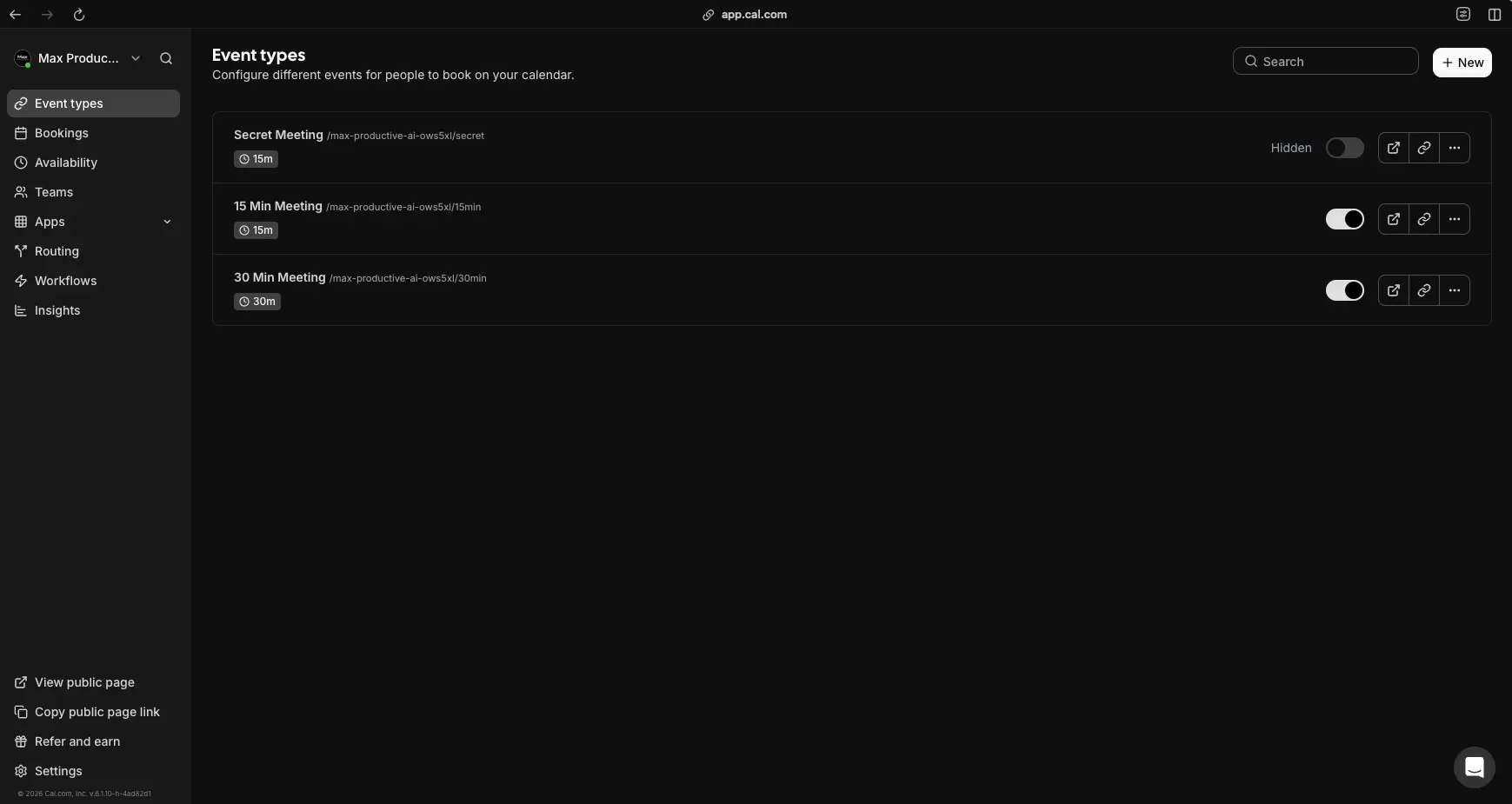
Open-Source Scheduling Infrastructure
for Teams & Developers
After extensive testing, Cal.com stands out as the most versatile open-source scheduling platform available in 2026. Its free plan covers unlimited bookings and event types—far more generous than Calendly's single event type on free. The Teams and Organization tiers unlock powerful round-robin scheduling, routing forms, and enterprise-grade compliance (SOC 2, ISO 27001, HIPAA). Whether you need a simple booking link or complex multi-team scheduling infrastructure, Cal.com delivers with 70+ integrations, robust APIs, and the option to self-host.
✓ What We Love
- Open-source with self-hosting option
- Free plan: unlimited bookings & event types
- 70+ integrations & full REST API
- SOC 2, ISO 27001, HIPAA compliant
! Could Be Better
- Advanced features have a learning curve
- Self-hosting requires DevOps expertise
- No Android mobile app yet
What Is Cal.com?
A comprehensive overview of the open-source scheduling platform and who it's built for.
Cal.com is an open-source scheduling infrastructure platform designed as a powerful alternative to tools like Calendly. It covers everything from simple "book a meeting" links to complex, multi-team scheduling workflows—and can be used either as a hosted SaaS at cal.com or self-hosted on your own infrastructure under the AGPLv3 license. The platform also positions itself as "scheduling infrastructure" via robust APIs, webhooks, and white-label options for embedding directly into other products.
What makes this Cal.com booking tool different from proprietary schedulers is its open-source foundation. The entire codebase is available on GitHub, which means complete transparency about how your data is handled. For privacy-sensitive organizations, regulated industries, and developer teams, this is a genuine differentiator—not just marketing language. You can inspect the code, contribute improvements, or fork it entirely for custom needs.
The platform has evolved significantly from a simple Calendly alternative into comprehensive scheduling infrastructure. As of early 2026, Cal.com supports one-to-one meetings, round-robin and collective team events, group bookings, recurring events, routing forms for lead qualification, automated workflows for reminders and follow-ups, and payment collection via Stripe and PayPal. Over 70 native integrations connect Cal.com to your existing stack—including Google Calendar, Outlook, Zoom, Google Meet, Microsoft Teams, HubSpot, Salesforce, and many more.
The free plan is remarkably generous: unlimited event types, unlimited bookings, multiple calendar connections, workflows, routing forms, webhooks, and integrations—all at zero cost for a single user. Compare this to Calendly's free plan, which limits you to a single event type, and the value proposition becomes clear. Paid tiers (Teams at ~$15/user/month, Organizations at ~$37/user/month) add team scheduling, round-robin distribution, branding removal, and enterprise-grade compliance features including SOC 2, ISO 27001, and HIPAA certifications.
Who Is Cal.com Best For?
Cal.com is ideal for developers and SaaS teams wanting to embed scheduling and deeply customize flows, mid-size organizations needing SSO, SCIM, and org-level routing, privacy-sensitive and regulated industries (healthcare, finance, education) requiring HIPAA/SOC 2 compliance and potentially self-hosting, and startups and solopreneurs who want a free, capable scheduler with room to grow. It's less ideal for very non-technical users who want the absolute simplest scheduling tool with minimal configuration.
The platform's API-first design means almost anything possible in the UI can be done programmatically. REST API v1 and v2 offer comprehensive coverage of core objects (event types, bookings, availability, teams, users), with OAuth and API key authentication, signed webhook payloads, and standard rate limiting. This makes Cal.com a natural fit for building scheduling directly into SaaS products or complex internal systems—a capability competitors simply don't offer at this level.
See Cal.com in Action
Real screenshots from the Cal.com platform showing key features and configuration.
Event Types & Booking Setup
Your central hub for creating and managing all meeting types
The Event Types dashboard serves as your command center. Here you can see three configured event types: a Secret Meeting (hidden from public page), a 15-minute quick call, and a 30-minute standard meeting. Each event type has its own unique booking URL, duration setting, and visibility toggle. The clean interface makes it easy to manage multiple meeting types, copy share links, and preview your public booking page. Click "+ New" to create additional event types for different use cases—consultations, demos, interviews, or anything else.
Availability & Working Hours
Set your schedule and let Cal.com handle timezone conversions automatically
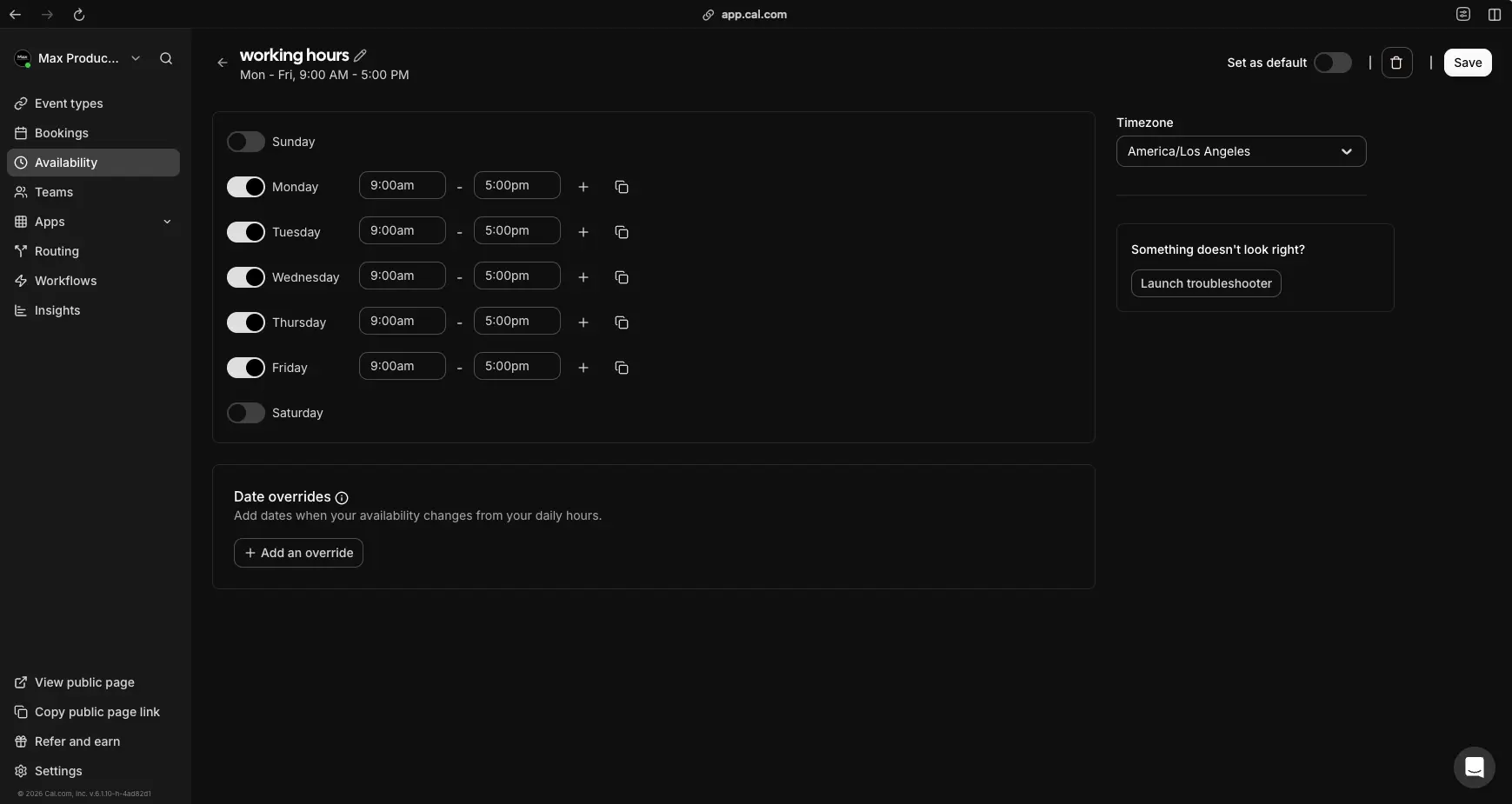
The Availability page gives you granular control over when people can book time with you. Toggle individual days on or off, set custom hours per day (9:00am–5:00pm shown here), and add multiple time blocks using the "+" button. The timezone selector ensures invitees always see your availability converted to their local time. Date overrides let you block specific dates (holidays, vacations) or add special availability windows without changing your recurring schedule. You can create multiple availability schedules and assign them to different event types—one for client calls, another for internal meetings.
Calendar Integrations & Sync
Connect your calendars to prevent double bookings and sync availability
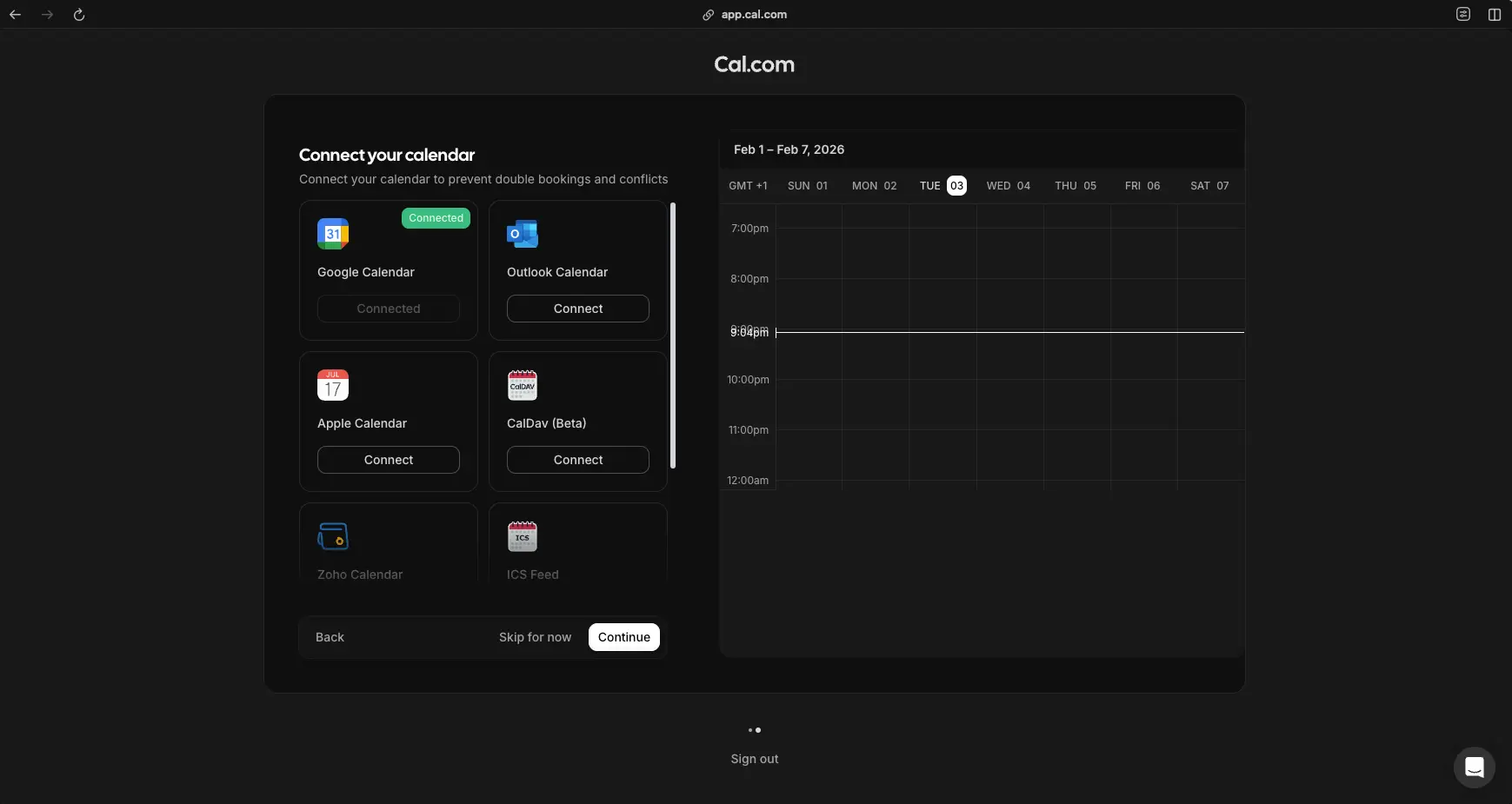
Cal.com connects to all major calendar platforms—not just Google and Microsoft. The integration setup shows Google Calendar already connected, with options for Outlook, Apple Calendar, CalDav (Beta), Zoho Calendar, and ICS Feed imports. This broad compatibility is a key advantage over competitors that primarily support only Google and Microsoft calendars. The live calendar preview on the right shows your current week at a glance. Cal.com reads busy/free status from all connected calendars simultaneously, preventing double bookings across personal and work calendars.
Workflows & Automation
Automate reminders, follow-ups, and notifications around your events
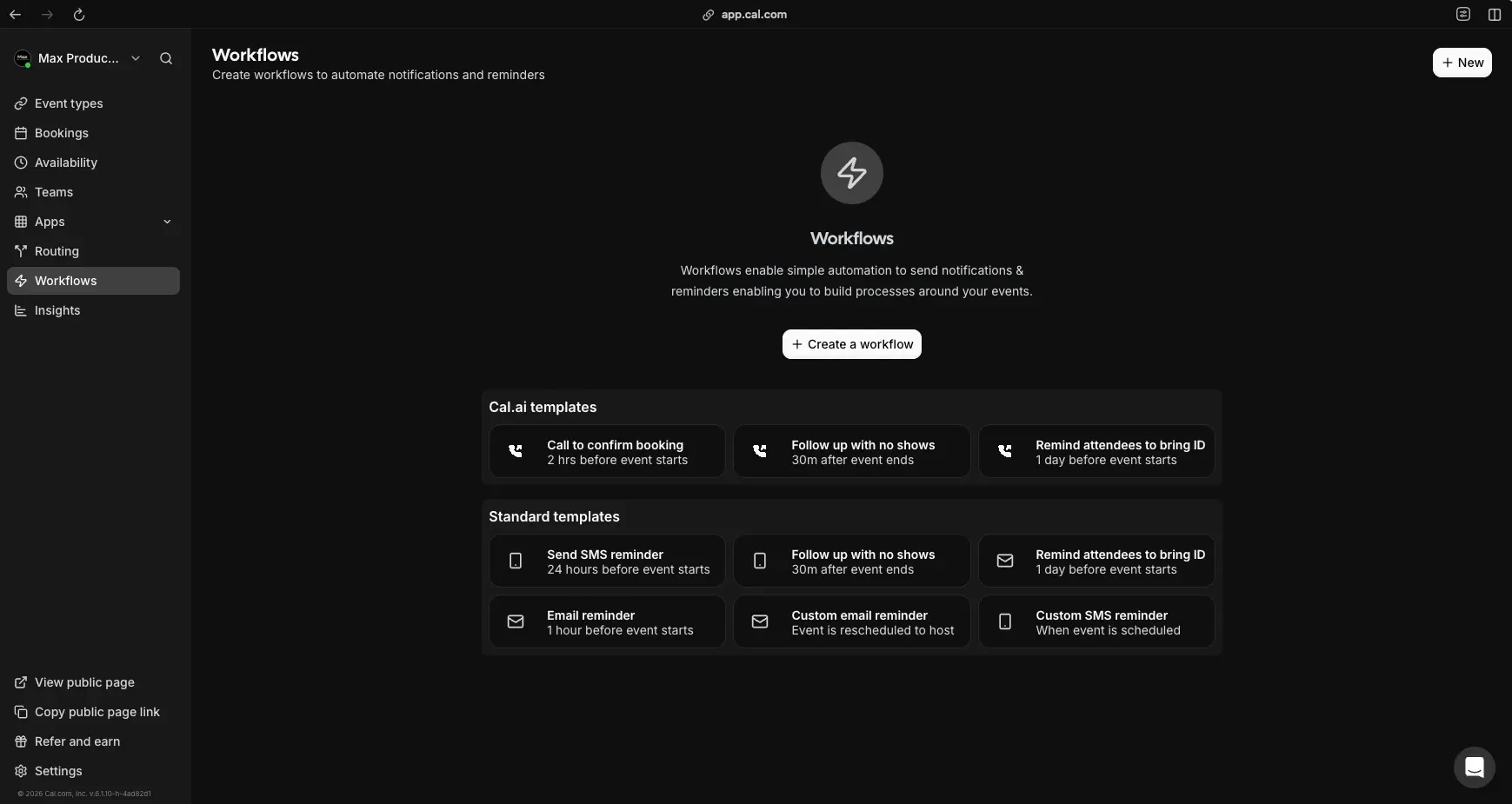
The Workflows page is where Cal.com goes beyond basic scheduling into genuine automation. Cal.ai templates offer AI-powered automation: calling to confirm bookings 2 hours before, following up with no-shows 30 minutes after, and reminding attendees to bring ID 1 day before. Standard templates cover SMS reminders, email reminders, and custom notifications triggered by scheduling, rescheduling, or cancellation events. Click "+ Create a workflow" to build custom automation sequences—for example, sending a pre-meeting questionnaire 24 hours before, a Zoom link 1 hour before, and a feedback form 30 minutes after.
Ready to set up your own scheduling infrastructure?
Try Cal.com Free →Free forever for individuals • No credit card requiredHow Cal.com Works
From calendar connection to automated booking in four simple steps.
Connect Your Calendars
Start by linking your existing calendars—Google Calendar, Outlook, Apple Calendar, CalDav, or Zoho. Cal.com reads busy/free status from all connected calendars simultaneously, so meetings on your personal calendar automatically block slots on your booking page. You can connect multiple calendars and choose which one new bookings are added to. The integration takes less than a minute per calendar, and Cal.com handles all the OAuth authorization securely.
Create Event Types
Set up the types of meetings people can book with you. A 15-minute discovery call, a 30-minute consultation, a 60-minute workshop—each gets its own booking page with a unique URL. Configure duration, buffer time between meetings, minimum advance notice, and maximum bookings per day. Add custom booking questions to gather information before the meeting (project details, agenda items, phone numbers). You can create unlimited event types on every plan, including the free tier.
Set Your Availability
Define when you're available for bookings. Set your working hours per day of the week (Monday–Friday 9–5, or any custom schedule), choose your timezone, and add date overrides for holidays or special availability windows. Create multiple availability schedules—"Client Hours" from 9am–1pm and "Internal Meetings" from 2–5pm—then assign each to different event types. Cal.com automatically converts your availability to each invitee's local timezone, eliminating the confusion of cross-timezone scheduling.
Share, Automate & Scale
Share your booking link via email, embed it on your website, or add it to your email signature. When someone books, Cal.com automatically adds the event to your calendar, sends confirmation emails to both parties, creates the video conferencing link (Zoom, Google Meet, or Cal Video), and triggers any workflows you've configured—reminders, follow-ups, Slack notifications, CRM updates. For teams, round-robin scheduling distributes bookings evenly, and routing forms qualify leads before they reach your calendar.
Open-Source Transparency
Unlike proprietary scheduling tools, Cal.com's entire codebase is publicly available on GitHub under the AGPLv3 license. This means you can inspect exactly how your data is handled, contribute improvements, report issues directly in the repository, and even self-host the platform on your own infrastructure for complete data sovereignty. For healthcare, finance, and government organizations, this transparency is often a compliance requirement.
Continuous Development
Cal.com ships frequent updates with new features, integrations, and improvements. Recent releases include Cal.ai for AI-powered scheduling from email, Insights 2.0 with advanced analytics, an iOS mobile app (January 2026), and expanded routing and workflow capabilities. The active open-source community and corporate backing ensure long-term stability and innovation.
Key Features
Everything you need to automate scheduling for individuals, teams, and organizations.
Unlimited Event Types
Create unlimited meeting templates on every plan, including the free tier. Configure one-to-one, group, round-robin, collective, and recurring events—each with custom durations, buffers, and booking questions.
Calendar Integrations
Sync with Google Calendar, Outlook, Apple Calendar, CalDav, Zoho, and ICS feeds. Read busy/free status from multiple calendars simultaneously to prevent double bookings across all your schedules.
Round-Robin & Team Scheduling
Distribute bookings evenly across team members with round-robin logic. Collective events require all selected members to be available. Team pages provide a shared booking interface with configurable weighting.
Workflows & Automation
Build automated sequences triggered by bookings: email reminders, SMS notifications, follow-up messages, Slack alerts, and custom webhook actions. Pre-built templates for common scenarios plus fully custom workflow creation.
Routing Forms
Qualify leads before they book. Create multi-step forms that route invitees to the right person, event type, or external URL based on their answers. Essential for sales qualification, support triage, and intake flows.
Payment Collection
Charge for appointments via Stripe or PayPal—available even on the free plan. Set fixed prices, hourly rates, or deposits per event type. Invitees pay before the booking is confirmed, reducing no-shows.
Video Conferencing
Auto-generate meeting links with Zoom, Google Meet, Microsoft Teams, Cal Video (built-in), Whereby, Daily.co, and more. Cal Video requires no separate account—it's included free with every Cal.com plan.
API & Self-Hosting
Full REST API (v1 and v2) with OAuth and API key authentication. HMAC-signed webhooks for robust integrations. Official Docker setup for self-hosting. Platform offering to embed scheduling as infrastructure inside your SaaS.
Beyond these core capabilities, Cal.com offers organization-level features for larger companies: sub-teams with dedicated routing, org-level workflows, custom subdomains (yourcompany.cal.com), SAML SSO, SCIM user provisioning, HRIS sync, domain-wide delegation, and advanced analytics with Insights 2.0. The platform supports 70+ app integrations including CRM tools (HubSpot, Salesforce), automation platforms (Zapier, Make), and analytics services (Google Analytics).
Experience all these features starting with the free plan:
Try Cal.com Free →No credit card required • Unlimited bookings on free planPricing Plans
From free individuals to enterprise organizations—with self-hosting available at every tier.
Individual
Teams
Organization
Enterprise: Custom pricing with Cal.ai Enterprise, 99.99% uptime SLA, priority 24/7 support, and advanced security features
Self-hosting: Free under AGPLv3, or commercial licenses for Org/Enterprise/Platform tiers
Is Cal.com Worth the Upgrade?
Typical back-and-forth email scheduling takes 5-10 minutes per meeting. If you schedule 20+ meetings monthly, Cal.com saves 8-15 hours—worth $400-750 at $50/hour. The free plan handles most of this. The Teams upgrade ($15/user/month) pays for itself if round-robin distribution saves each team member just 30 minutes monthly.
Compared to alternatives: Calendly's Standard plan starts at $10/user/month but limits event types on free; SavvyCal starts at $12/user/month with no equivalent free tier; Chili Piper starts at $150+/month for sales routing. Cal.com's free plan is the most generous in the market, and the Teams tier offers comparable features to competitors' mid-range plans at competitive pricing.
Detailed Pros & Cons
An honest, balanced assessment of Cal.com as a scheduling tool in 2026.
✓ Pros
The entire codebase is available under AGPLv3 with strong community traction on GitHub. Self-hosting gives complete data control and flexibility—particularly attractive for privacy-sensitive organizations, EU-based customers, regulated industries (healthcare, finance), and developer-heavy teams that need full customization.
Unlimited bookings and unlimited event types on the free tier—significantly more generous than Calendly (1 event type on free) and most competitors. The free plan also includes workflows, routing forms, webhooks, integrations, and payment collection. Makes it viable as a long-term scheduler without ever upgrading.
API-first design with comprehensive REST API (v1 and v2), OAuth authentication, HMAC-signed webhooks, and extensive documentation. Ideal for building scheduling directly into SaaS products, internal tools, or custom workflows. The "Platform" offering is purpose-built for embedding scheduling as infrastructure.
SOC 2 Type 2, ISO 27001, and HIPAA certifications with signed BAAs available through the app store. SAML SSO, SCIM provisioning, HRIS sync, domain-wide delegation, audit logs, and data residency options (including EU hosting at cal.eu). Suitable for regulated industries when configured appropriately.
Flexible team scheduling with round-robin, collective events, and team pages. Organization tier adds sub-teams, org-level routing and workflows, attribute-based routing, custom subdomains, and advanced white-labeling. Powerful for larger companies with complex hierarchies and multi-department scheduling needs.
Connects with Google Calendar, Outlook, Apple Calendar, CalDav, and Zoho—broader calendar support than most competitors. Over 70 integrations across video conferencing (Zoom, Meet, Teams), CRM (HubSpot, Salesforce), payments (Stripe, PayPal), analytics, and automation platforms (Zapier, Make).
✗ Cons
While basic scheduling is straightforward, routing forms, complex workflows, team routing logic, and deep API customization are perceived as more complex and take time to master. This is especially true for non-technical users who may find the configuration options overwhelming compared to simpler tools like Calendly.
Although self-hosting is a major selling point, it requires DevOps knowledge (Docker, databases, scaling, security hardening) and understanding of AGPL licensing implications for commercial use. Setup takes 15-30 minutes for experienced developers but ongoing maintenance adds overhead. Not ideal for small non-technical teams.
Teams at $15/user/month and Organization at $37/user/month can feel expensive for larger teams with simple needs. A 20-person team on the Organization tier costs $740/month. For very small teams that only need basic scheduling, leaner alternatives may offer better per-user value.
As a fast-moving, feature-rich product, some user feedback mentions occasional glitches with video integrations or payment processing, and certain settings areas can feel less polished. This is consistent with rapid development—issues tend to get fixed quickly, but expect minor friction points.
Cal.com launched an iOS companion app in January 2026, but Android users are still waiting. The initial iOS release also doesn't support self-hosted instances. The responsive web interface works on mobile browsers, but a native app experience is limited to iOS for now.
While the free plan is generous for core scheduling, team features (round-robin, collective events, branding removal) require the Teams plan, and compliance features (SOC 2, HIPAA, SSO/SCIM) require Organization or Enterprise. For serious B2B use with multiple team members, an upgrade is usually necessary.
Cal.com vs Alternatives
A comprehensive comparison to help you choose the right scheduling tool for your needs.
| Feature | Cal.com | Calendly | SavvyCal | Reclaim AI |
|---|---|---|---|---|
| Starting Price | Free | Free | $12/user/mo | Free |
| Free Plan | ✓ Unlimited events & bookings | ✓ 1 event type | Polls only | ✓ Limited |
| Open Source | ✓ AGPLv3 | ✗ | ✗ | ✗ |
| Self-Hosting | ✓ Full control | ✗ | ✗ | ✗ |
| Team Scheduling | Round-robin + Collective | Round-robin | Basic teams | Smart links |
| API & Webhooks | ✓ Full REST API v1 & v2 | Limited | Limited | Limited |
| Unique Strength | Open-source infra + API | Brand recognition + UX | Calendar overlay UX | AI time blocking |
| Best For | Dev teams, complex orgs | Corporate mainstream | Solo consultants | Personal productivity |
Which Scheduling Tool Is Right For You?
Cal.com
Best OverallBest for: Developers and SaaS teams wanting to embed scheduling deeply, mid-size organizations needing SSO, compliance, and org-level routing, privacy-sensitive and regulated industries requiring HIPAA/SOC 2 and potentially self-hosting, and startups wanting a free, capable scheduler that scales. The open-source foundation, generous free plan, and API-first design make it the most versatile option in the market.

Calendly
Most PopularBest for: Teams that want the lowest-friction "everyone already knows it" solution. Calendly's polished UX, strong brand recognition, and mature enterprise playbook make it the politically safe choice for mainstream corporate adoption. Choose if you don't need self-hosting, advanced APIs, or deep customization—and prefer a tool that requires minimal onboarding. Note: Free plan is limited to 1 event type vs Cal.com's unlimited.

SavvyCal
Best Invitee UXBest for: Solo consultants, agencies, and creators who prioritize a beautiful, frictionless booking experience. SavvyCal's standout calendar overlay lets invitees see their own calendar against your availability—a genuinely useful UX innovation. Simpler mental model than Cal.com if you never need complex team routing or self-hosting. Starting at $12/user/month with no equivalent free tier.

Reclaim AI
Free Plan AvailableBest for: Individuals and teams wanting AI-powered calendar optimization beyond just meeting scheduling. Reclaim AI automatically protects focus time, schedules tasks around meetings, and optimizes your calendar. It includes scheduling links but its core value is in intelligent time management—a different approach than Cal.com's infrastructure-focused platform. Choose if personal productivity and calendar optimization matter more than complex booking workflows.

Motion AI
AI CalendarBest for: Professionals who want AI-driven project management combined with intelligent calendar scheduling. Motion auto-schedules tasks, protects focus time, and includes meeting booking links—but its primary strength is task and project management with AI optimization. Choose Motion if you need a unified productivity system, not just scheduling infrastructure. Starting at $19/user/month with no free plan.

Sunsama
Daily PlannerBest for: Professionals who want a mindful daily planning ritual that pulls tasks from multiple sources (Asana, Trello, Jira, Gmail) onto a unified calendar. Sunsama focuses on sustainable productivity and work-life balance rather than meeting scheduling. It complements Cal.com rather than replaces it—use Sunsama to plan your day and Cal.com to handle bookings. Starting at $16/month.
Frequently Asked Questions
Should You Try Cal.com?
After thorough testing, Cal.com earns its position as the most versatile scheduling platform in 2026. The open-source foundation is genuine—not just marketing—and the free plan's generosity (unlimited event types and bookings) makes it the easiest recommendation for anyone starting out. The 70+ integrations, robust API, and self-hosting option put it in a category above simpler schedulers. For teams and organizations, the round-robin distribution, routing forms, and compliance certifications deliver real enterprise value.
The tradeoffs are real: non-technical users may find advanced features like routing forms and complex workflows harder to configure than simpler tools. Self-hosting requires genuine DevOps capability. Per-user pricing adds up for larger teams. And Android users are still waiting for a native mobile app. But these are limitations of ambition, not quality—Cal.com is building scheduling infrastructure, not just a booking link tool.
Our Recommendation
Start with the free plan—there's nothing to lose and no credit card required. Set up your availability, create 2-3 event types, and share booking links with clients or colleagues. If you're a developer, explore the API and webhooks to see how deep the customization goes. If you need team scheduling, the Teams plan at $15/user/month pays for itself if it saves each team member just one hour of scheduling back-and-forth monthly. For regulated industries, the Organization tier's compliance certifications and self-hosting option are worth every dollar.
Ready to Automate Your Scheduling?
Join thousands of teams using Cal.com for meetings, bookings, and scheduling infrastructure—starting free