
Copper CRM
The only CRM officially recommended by Google—built natively inside Gmail. Automatically logs emails, meetings, and contacts with zero manual data entry. Manage sales pipelines and projects without ever leaving Google Workspace.
Try Copper CRM →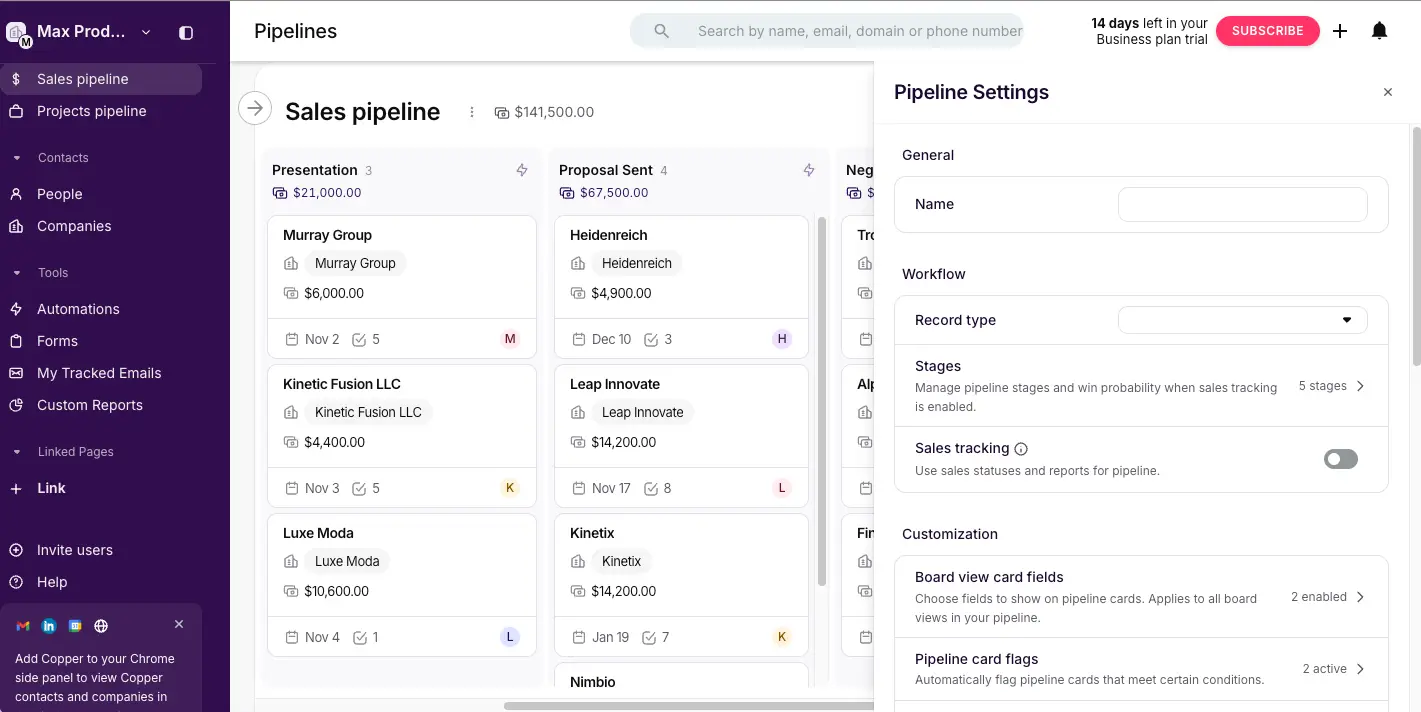
The Best CRM for Teams
That Live in Google Workspace
After extensive testing, Copper CRM delivers the deepest Google Workspace integration of any CRM on the market. It lives natively inside Gmail, automatically captures emails, meetings, and contacts, and genuinely eliminates manual data entry. The 2025 addition of built-in project management makes it uniquely capable for agencies and service firms. However, the effective sales entry price of $59/seat/month and Google-only requirement narrow its ideal audience.
✓ What We Love
- Lives inside Gmail—no tab switching
- Zero manual data entry for emails & meetings
- Built-in project management (unique in CRMs)
- 14-day free trial, no credit card required
! Could Be Better
- Google Workspace mandatory—no Outlook
- Real sales features start at $59/seat/month
- Custom reports & email sequences at $99/seat
What Is Copper CRM?
A comprehensive overview of the platform and who it's built for.
Copper CRM is a customer relationship management platform built exclusively for teams that use Google Workspace—Gmail, Google Calendar, Google Drive, Google Docs, and Google Sheets. Unlike conventional CRMs that require constant switching between your inbox and a separate application, Copper lives natively inside Gmail via a Chrome Extension sidebar. Contacts, deal records, pipeline stages, tasks, and full conversation history are all visible without ever leaving the inbox.
What makes Copper fundamentally different from every other CRM is the depth of that Google integration. Every email sent or received is automatically logged to the relevant contact record. Calendar meetings appear in contact timelines. New contacts are pre-populated from email signatures. You can add someone to your CRM with a single click from the Gmail sidebar—no copying names, no typing email addresses, no manual entry whatsoever. This zero-data-entry philosophy is Copper's defining characteristic, and no competitor matches it within the Google ecosystem.
Originally founded in 2013 as ProsperWorks and headquartered in San Francisco, Copper is the only CRM officially recommended by Google for Workspace users—a distinction no competitor holds. As of March 2026, it serves over 30,000 companies worldwide and maintains strong ratings across independent review platforms. The platform shipped 60 new features in 2025 alone, including AI email tools, a conversational CRM query system (Copper GPT), a fully rebuilt Chrome Extension, and a built-in project management layer.
That 2025 project management addition is particularly significant. Copper evolved from a pure sales CRM into a unified client lifecycle platform—covering sales pipeline management, project delivery, and client communication in a single Google-native tool. For agencies, consultancies, and professional services firms that previously needed both a CRM and a separate project management tool, this consolidation can meaningfully reduce tool sprawl and monthly costs.
Who Is Copper CRM Best For?
Copper is ideal for Google Workspace teams of 5–100 people with relationship-driven sales processes. It works particularly well for agencies and creative firms, professional services (consultants, lawyers, accountants), real estate teams, SaaS startups, and any team migrating from spreadsheet-based contact management. If your entire company lives in Gmail and Google Calendar, Copper will feel like a natural extension of tools you already use—not a separate system to learn.
The platform covers the full range of CRM functionality: sales pipeline management with customizable Kanban boards, contact and company management with automatic enrichment, email outreach with tracked templates and bulk sending, team collaboration with shared histories and task assignment, project management with visual boards and subtasks, and reporting and analytics for pipeline velocity, win rates, and rep performance. All of this is available across web, Chrome Extension, and mobile apps for iOS and Android.
See Copper CRM in Action
Real screenshots from the platform showing key features and the interface.
Sales Pipeline — Kanban Board View
Visual deal tracking with drag-and-drop pipeline management
The sales pipeline view shows deals organized in a clean Kanban board with stages like Presentation, Proposal Sent, and Negotiation. Each deal card displays the company name, deal value, close date, and task count at a glance. The right-side settings panel lets you customize pipeline stages, enable sales tracking, configure board view card fields, and set up automatic pipeline card flags. The total pipeline value ($141,500 in this example) is always visible at the top for instant forecasting.
Activity Feed Dashboard
Your central hub for tracking all relationship activity
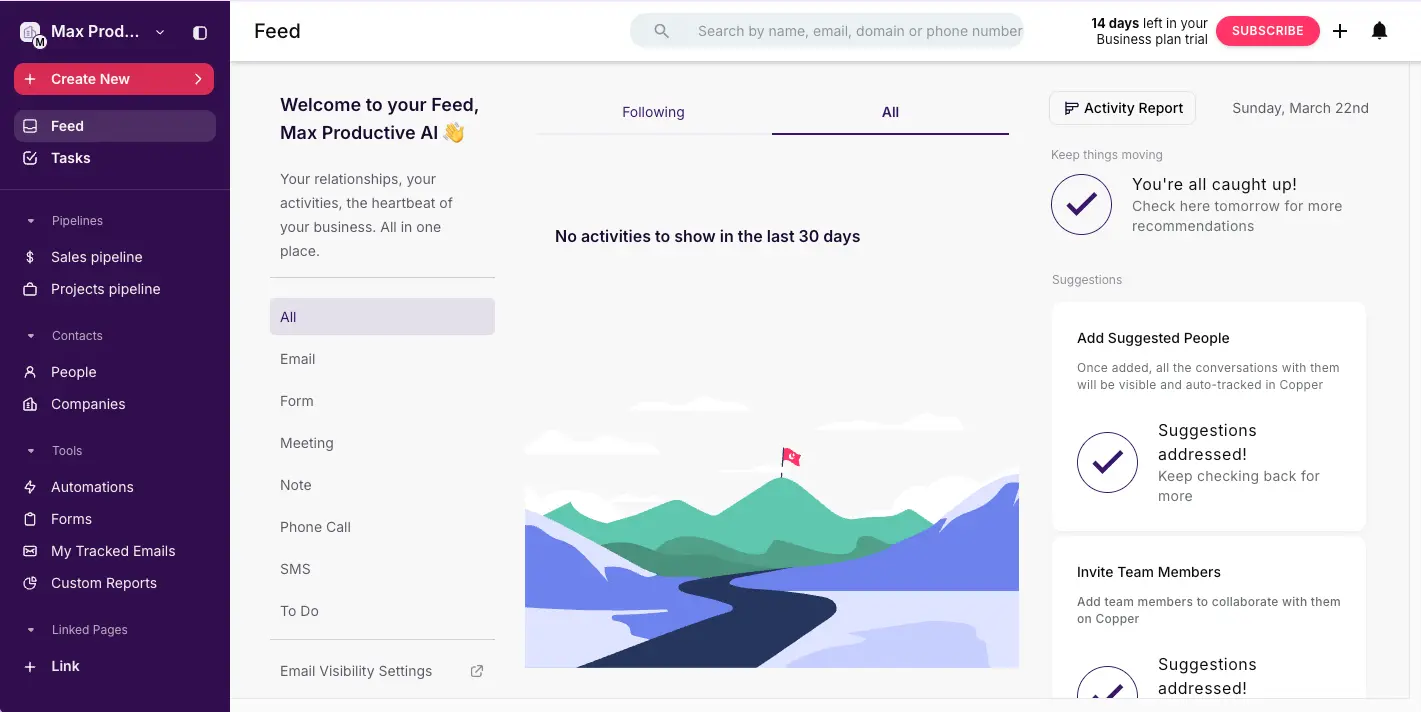
The Feed dashboard serves as your central command center, showing all relationship activity across your team. Filter by activity type—Email, Form, Meeting, Note, Phone Call, SMS, or To Do—to focus on what matters. The right sidebar provides intelligent suggestions: add contacts Copper has identified from your email conversations, invite team members, and track progress. The Activity Report button gives instant access to performance metrics.
Automation Builder
Automate email outreach, workflows, and task creation
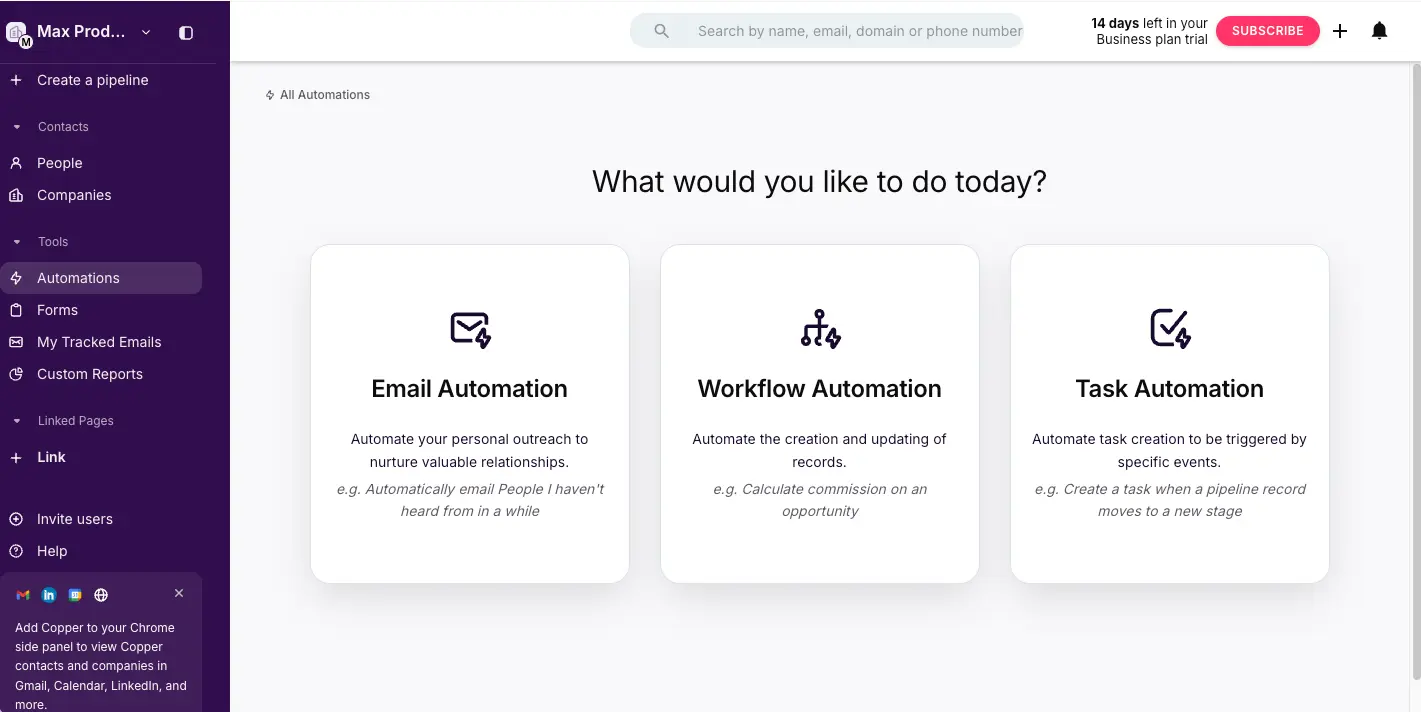
Copper's automation interface presents three clear paths. Email Automation lets you set up outreach sequences that nurture leads without manual follow-up. Workflow Automation handles record creation and field updates triggered by events—like automatically calculating commission on an opportunity. Task Automation creates tasks when pipeline records move to new stages, ensuring nothing falls through the cracks during handoffs between sales and delivery teams.
Pipeline Templates
Pre-built templates for sales, projects, and industry-specific workflows
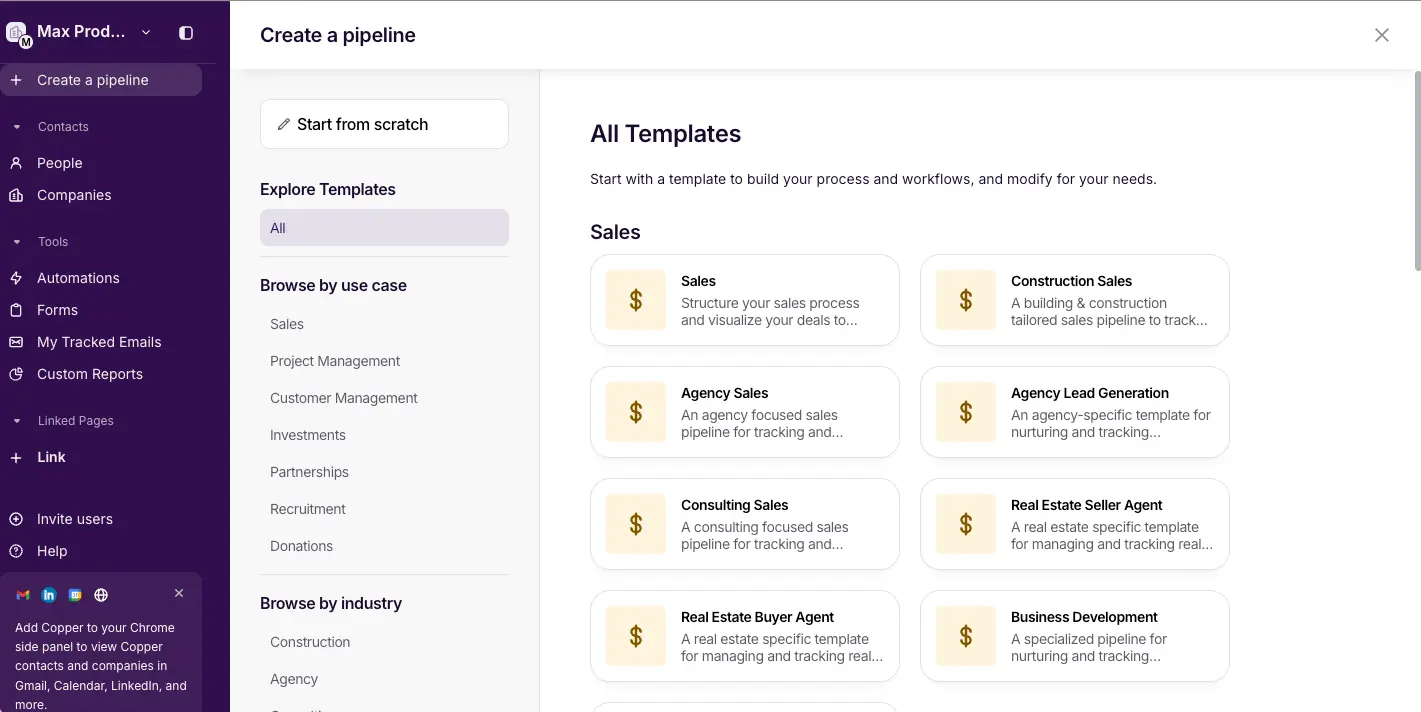
When creating a new pipeline, Copper offers a library of templates organized by use case (Sales, Project Management, Customer Management, Investments, Partnerships, Recruitment, Donations) and by industry (Construction, Agency, Real Estate, and more). Templates include pre-configured stages and fields tailored to each workflow—Agency Sales, Agency Lead Generation, Consulting Sales, Real Estate Buyer Agent, and Business Development are just a few options. You can also start from scratch for fully custom pipelines.
Form Builder
Capture leads directly into your CRM with embeddable web forms
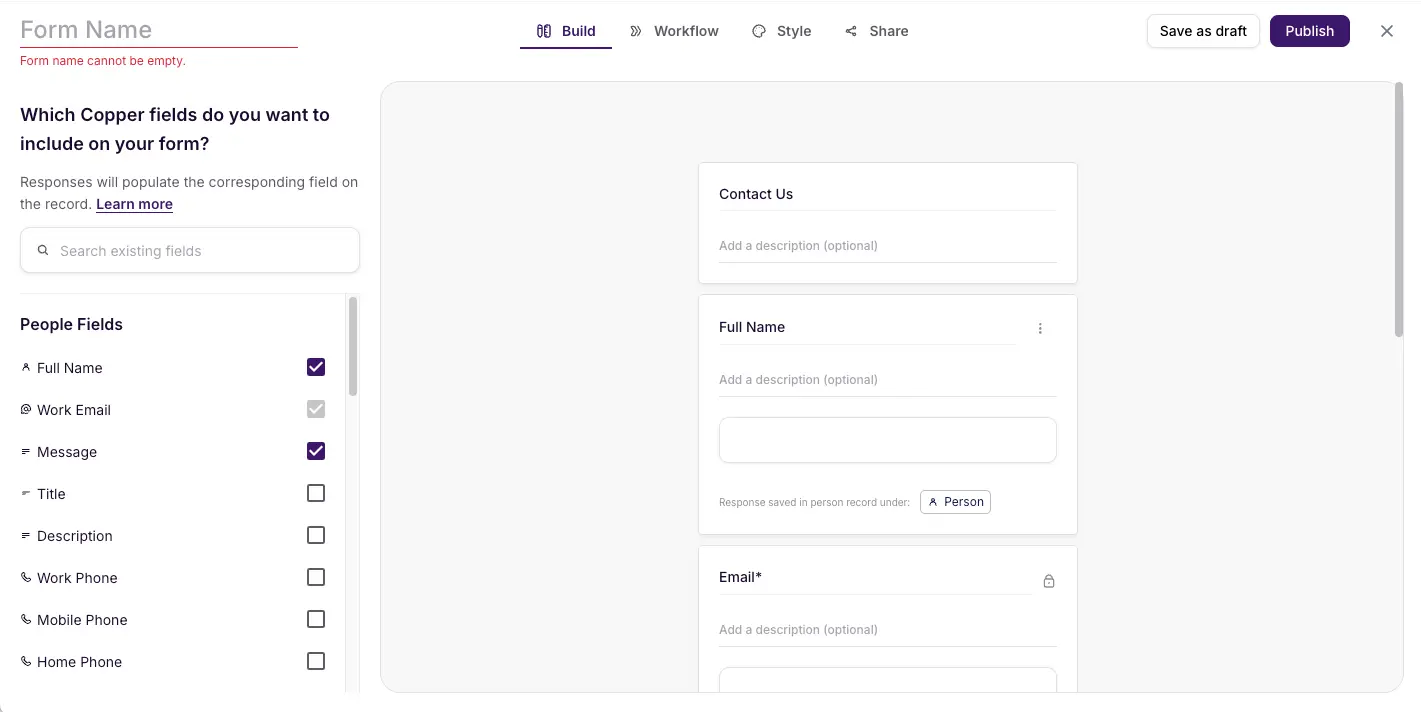
The form builder lets you create web forms that feed directly into Copper CRM records. The left panel shows available People Fields—Full Name, Work Email, Message, Title, Description, Phone numbers—each mapping to the corresponding CRM contact field. The top navigation includes Build, Workflow, Style, and Share tabs for complete form customization. Responses automatically create or update Person records in Copper, eliminating the need for manual lead entry from website inquiries.
Ready to see Copper CRM in your Gmail inbox?
Start Free Trial →14-day free trial • No credit card requiredHow Copper CRM Works
From Google Workspace login to a fully populated CRM in under an hour.
Sign Up with Google Workspace
Create your Copper account using your existing Google Workspace login—no separate credentials needed. Copper immediately requests authorization to connect with Gmail, Google Calendar, Google Drive, and Google Contacts. This one-time authorization establishes the live, bidirectional sync that powers everything. The entire process takes about 2–3 minutes, and your email history begins populating the CRM automatically.
Install the Chrome Extension
The Chrome Extension is where Copper's magic lives. Once installed, a CRM sidebar appears directly inside Gmail. Open any email and you'll see the sender's full contact record—company, deal history, tasks, notes, and related opportunities—without switching tabs. As of the April 2025 update, the extension also works on any website, allowing one-click contact capture from LinkedIn profiles, company pages, and other sources. Install for your entire team in about 5 minutes.
Configure Your Sales Pipeline
Set up your pipeline stages in Settings. Choose from Copper's pre-built templates (Sales, Agency Sales, Consulting, Real Estate, and more) or build custom stages from scratch. Add custom fields relevant to your business—deal source, product category, contract type—whatever your team tracks. Most teams complete pipeline configuration in 10–15 minutes. Copper also supports multiple pipelines, so you can track sales, partnerships, and projects separately.
Start Working — Copper Fills Itself
This is where Copper truly differentiates itself. From the moment you connect, every email sent or received is automatically logged to the relevant contact. Calendar meetings appear in activity timelines. New contacts are suggested from email interactions and can be added with one click. Rather than requiring your team to remember to log every touchpoint, Copper captures relationship data passively. Most teams find their CRM partially populated within hours—without entering a single contact manually.
Zero-Entry Data Philosophy
Copper's core design principle is that a CRM should fill itself. Emails auto-log. Calendar events auto-sync. Contacts auto-populate from email signatures. The result is higher data quality and dramatically better team adoption—users report that team members barely notice they're using a CRM because it lives where they already work.
Security & Compliance
Copper holds SOC 2 Type II certification (verified annually through independent audit), maintains GDPR compliance with a Data Processing Agreement, and is TRUSTe certified. Infrastructure runs on AWS with encryption for data at rest and in transit. For teams handling sensitive client data, Copper's security posture is solid for an SMB-focused CRM.
Key Features
Everything Copper brings to your Google Workspace workflow.
Native Gmail Integration
A full CRM sidebar embedded directly inside Gmail via Chrome Extension. View contact records, deal history, tasks, and notes while reading any email. Every message is automatically logged—no manual entry, no copy-paste, no switching tabs.
Visual Sales Pipelines
Kanban-style drag-and-drop pipelines with customizable stages, deal values, close dates, and win probability tracking. Support for multiple pipelines to separate sales, partnerships, and projects. Pre-built templates for 10+ industry workflows.
Automatic Data Capture
Emails, calendar events, and contacts are logged automatically without manual input. New contacts are pre-populated from email signatures and enriched with phone numbers, social profiles, job titles, and company data using AI-powered enrichment.
Project Management
Built-in project boards with Kanban views, task management with subtasks and drag-and-drop, project-to-deal linking, and Google Drive file attachments. Added in 2025—unique among CRMs in this category. Available from the Basic plan upward.
AI Email & Copper GPT
AI Email Rewriter improves draft clarity and tone with one click. AI Template Generator creates personalized email templates. Copper GPT lets you query your CRM data in natural language—ask "Which deals stalled last month?" and get instant answers.
Email Outreach & Templates
Send tracked emails with open and click notifications, use merge-field templates for personalized outreach, send bulk emails to segments, and build automated email sequences (Business tier). All sent directly from your Gmail account.
Google Workspace Suite Sync
Full bidirectional sync with Gmail, Calendar, Drive, Contacts, Sheets, and Looker Studio. Calendar events auto-link to contacts. Drive files attach to records. Sheets integration enables custom reporting. Not a periodic plugin—a live, real-time embed.
Workflow Automation
Automate email outreach sequences, record creation, field updates, and task triggers based on pipeline events. Create rules like "When a deal moves to Closed Won, auto-create a project record." Available on Professional and Business plans.
Beyond these core features, Copper integrates natively with Slack for deal notifications, QuickBooks for invoice sync, DocuSign and PandaDoc for contract management, and Calendly for meeting bookings. For tools without native integration, Copper connects to over 8,000 apps through Zapier. API access is available on Professional and Business plans for custom integrations.
Experience all these features with a free 14-day trial:
Try Copper CRM →No credit card required • Full Business-tier access during trialPricing Plans
Four tiers with annual billing—understand what each plan actually includes before choosing.
Starter
Basic
Professional
Business
Important: Prices shown are for annual billing. Monthly billing adds approximately 26% to the rates above. Starter and Basic plans do not include Sales Opportunities or Leads.
Understanding Copper's Real Cost
While Copper advertises plans from $9/seat, the Starter and Basic tiers exclude core sales features (Opportunities and Leads). Most sales teams will need the Professional plan at $59/seat/month as a realistic starting point. A 10-person team on Professional pays $590/month ($7,080/year). On Business, that rises to $990/month ($11,880/year). Factor this into your evaluation alongside the time savings from automatic data capture.
For context: HubSpot offers a genuinely functional free CRM tier. Pipedrive's real sales features start at $14.90/seat. Zoho CRM begins at $14/seat with more included functionality. Copper's higher entry price is the trade-off for the deepest Google Workspace integration available—teams that value that integration often find the premium worthwhile given the time savings and adoption benefits.
Detailed Pros & Cons
An honest, balanced assessment based on extensive research and testing.
✓ Pros
No CRM embeds more deeply into Gmail, Calendar, and Drive. The Chrome Extension sidebar shows full contact records while reading any email, and every interaction is auto-logged. This isn't a periodic sync—it's a live, real-time embed. For Google-native teams, this is a genuine competitive advantage no alternative matches.
Emails auto-log. Calendar meetings auto-appear in contact timelines. New contacts auto-populate from email signatures with AI-enriched phone numbers, titles, and social profiles. This zero-entry approach dramatically improves CRM data quality and is the single most praised feature across user reviews.
Copper is the only CRM in its competitive set that offers native project management. Visual Kanban boards, task management with subtasks, project-to-deal linking, and Google Drive file attachments let teams manage the full client lifecycle—from initial lead to project delivery—without switching tools. A valuable consolidation for agencies and service firms.
Because Copper follows Google's design language and lives inside tools teams already use, most Google Workspace teams are operational within hours—not weeks. The interface feels immediately familiar. Users consistently note that team members barely notice they're using a CRM, which translates to higher adoption rates.
60 new features shipped in 2025 including AI email tools, Copper GPT, Chrome Extension overhaul, project management upgrades, and form rebuilds. This level of active development signals a healthy product roadmap and commitment to evolution.
SOC 2 Type II certified (independently audited annually), GDPR compliant with DPA, TRUSTe certified, and hosted on AWS with encryption at rest and in transit. Appropriate for business use and suitable for teams handling sensitive client data.
✗ Cons
Copper offers zero support for Microsoft Outlook, Microsoft 365, or any non-Google email platform. If even one team member uses Outlook, Copper becomes unsuitable for the whole organization. This is a hard requirement, not a preference—there is no workaround for native functionality.
While Copper advertises plans from $9/seat, the Starter and Basic tiers do not include Sales Opportunities or Leads—the core features of any sales CRM. Most sales teams realistically start at the Professional plan ($59/seat/month), making Copper's effective entry one of the higher options in its segment.
Custom reporting, email sequences, and unlimited contacts require the Business plan at $99/seat/month. Competitors like Pipedrive ($24.90), Freshsales ($39), and Salesflare ($49) offer email sequences at significantly lower price points. This can be a consideration for teams on tighter budgets.
The Professional plan caps contacts at 15,000. Growing teams that exceed this threshold must upgrade to Business ($99/seat)—a $40/seat/month increase. It's worth auditing your contact volume before choosing a tier to avoid unexpected upgrades.
Beyond Google Workspace, Copper offers native integrations with Slack, QuickBooks, Mailchimp, DocuSign, and a handful of calling tools. Most other connections require Zapier or Make, which adds $20–50/month in additional costs depending on automation volume.
Unlike Freshsales or Close, Copper does not include native phone or SMS capabilities. Teams needing calling features must integrate third-party tools like JustCall or RingCentral, adding complexity and cost to the total CRM setup.
Copper CRM vs Alternatives
How Copper compares to leading CRM and business platforms.
| Feature | Copper CRM | HubSpot | Pipedrive | Monday.com |
|---|---|---|---|---|
| Starting Price | $9/seat/mo | Free tier available | $14.90/seat/mo | $12/seat/mo |
| Free Plan | 14-day trial | ✓ Functional free tier | 14-day trial | 14-day trial |
| Gmail Integration | ★★★★★ Native embed | ★★★ Plugin | ★★ Extension | ★★ Extension |
| Outlook Support | ✗ No | ✓ Yes | ✓ Yes | ✓ Yes |
| Auto Data Capture | ✓ Full (emails, calendar, contacts) | Partial | ✗ No | ✗ No |
| Project Management | ✓ Built-in | ✗ No | ✗ No | ✓ Core feature |
| Email Sequences | $99/seat (Business) | Free tier+ | $24.90/seat | Add-on |
| Best For | Google Workspace teams | All-in-one marketing + sales | Visual pipeline CRM | Work management + CRM |
Which Tool Is Right For You?
Copper CRM
Best for Google WorkspaceBest for: Teams of 5–100 people who live entirely in Google Workspace and want a CRM that eliminates manual data entry. Ideal for agencies, consultancies, professional services, and relationship-driven sales teams. Copper's unique combination of native Gmail integration and built-in project management makes it the strongest option for Google-native teams that need to manage both sales pipelines and client delivery in one tool.

HubSpot CRM
Free Tier AvailableBest for: Teams needing an all-in-one platform combining marketing automation, sales CRM, and customer service. HubSpot's free tier is genuinely functional with unlimited users and contacts. Choose HubSpot if you need marketing tools alongside your CRM, use Outlook, or want a free starting point. Note: Gmail integration is a plugin—not as deeply embedded as Copper's native approach.

Pipedrive
Best Visual PipelineBest for: Sales-focused SMBs wanting the best visual pipeline experience at a lower entry cost. Pipedrive offers unlimited contacts from day one, real email sequences at $24.90/seat, and supports both Gmail and Outlook. Choose Pipedrive if visual deal tracking is your priority, you need Outlook compatibility, or budget is a primary concern. Lacks Copper's automatic data capture and project management.

Monday.com CRM
Work Management + CRMBest for: Teams that need project management as their primary tool with CRM capabilities layered on top. Monday.com excels at work management, team collaboration, and process automation across departments. Choose Monday.com if your CRM needs are secondary to project and work management. For teams wanting a CRM-first approach with projects added, Copper is the better fit.

Brevo (formerly Sendinblue)
Free Plan AvailableBest for: Small businesses needing email marketing and basic CRM in one affordable platform. Brevo combines email campaigns, marketing automation, transactional emails, SMS marketing, and a lightweight CRM. Choose Brevo if email marketing is your primary need with CRM as a secondary function, or if you need a free starting point for both marketing and sales management.
Frequently Asked Questions
Should You Try Copper CRM?
After extensive research and testing, Copper CRM earns its position as the best CRM for Google Workspace teams. The Gmail integration isn't just a feature—it's a fundamentally different approach to CRM that eliminates the manual data entry problem most sales teams struggle with. Add the 2025 project management layer, and you have a genuinely unique tool that can manage the entire client lifecycle from lead capture to project delivery without leaving Google's ecosystem.
The limitations are real but well-defined: Google Workspace is a hard requirement, the effective sales entry price of $59/seat is higher than most alternatives, and advanced features like email sequences and custom reporting require the $99/seat Business tier. These are trade-offs, not dealbreakers—if you're a Google-native team, the time savings from automatic data capture and the adoption benefits from a familiar interface often justify the premium.
Our Recommendation
Take advantage of the 14-day free trial (no credit card required) and use it seriously with your actual team. Test the Gmail sidebar with real emails, check whether automatic contact logging captures your key relationships accurately, and evaluate whether the pipeline view matches your sales process. If after a week your team barely notices they're using a CRM—that's Copper working exactly as intended. If your team also uses Outlook or needs a free long-term plan, explore HubSpot or Pipedrive instead.
Ready to Try the Best CRM for Google Workspace?
Join 30,000+ companies managing sales pipelines and projects natively inside Gmail with Copper CRM