

Gamma
AI-powered presentation, document, and website builder. Turn a simple text prompt into polished, professional visual content in under 60 seconds — no design skills required.
Try Gamma Free →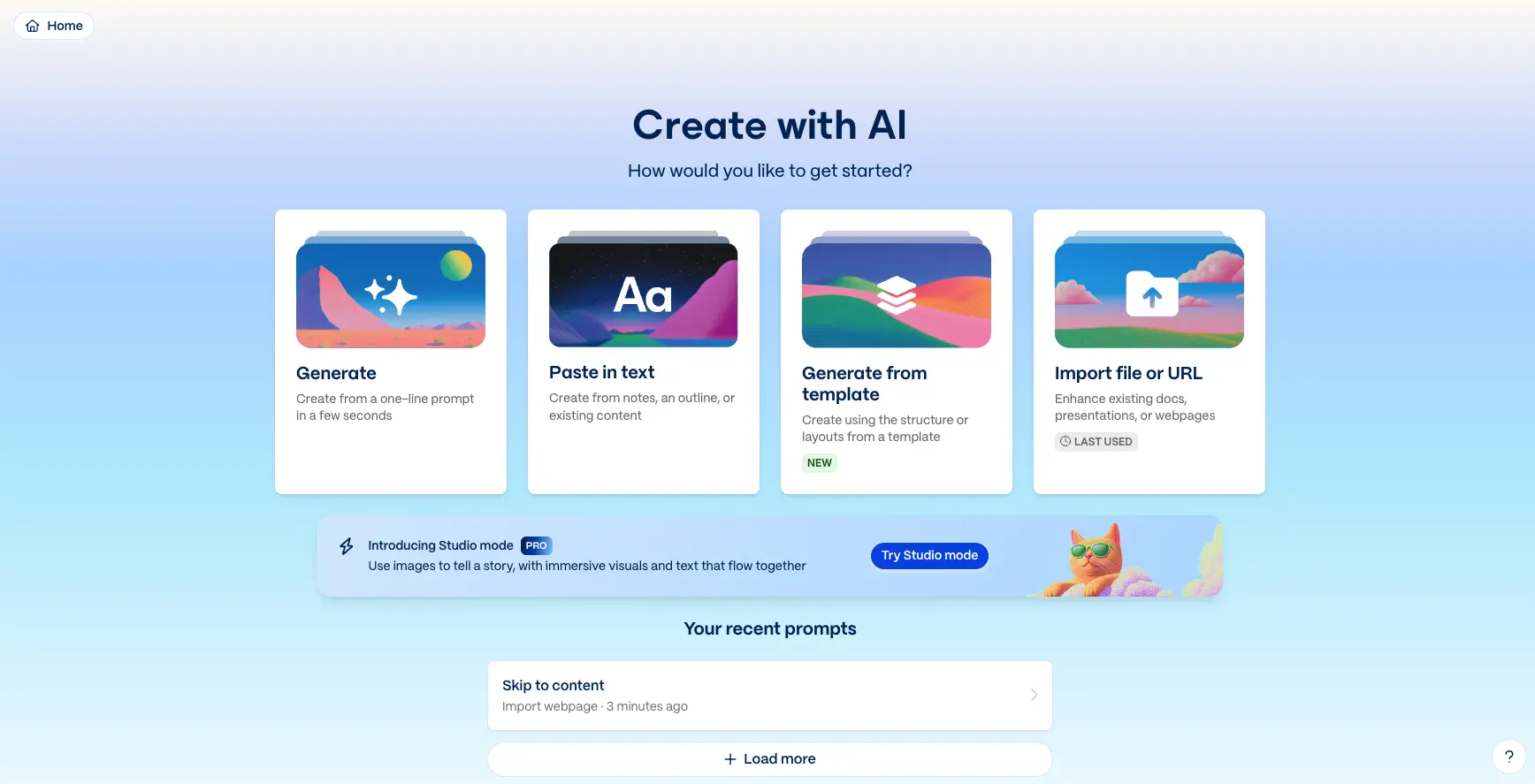
The Leading AI Presentation Maker
for Speed and Versatility
After extensive hands-on testing, Gamma delivers on its core promise: transforming a simple text prompt into a polished presentation in under 60 seconds. With over 70 million users, $100M in annual recurring revenue, and a $2.1B valuation, this is a proven platform — not a beta experiment. The Gamma Agent AI assistant, multi-format output (decks, docs, websites, social), and generous free plan make it our top-rated AI presentation tool in 2026.
✓ What We Love
- Prompt-to-presentation in under 60 seconds
- Versatile: decks, docs, websites, social posts
- Gamma Agent for conversational AI editing
- Generous free plan — 400 AI credits
! Could Be Better
- PowerPoint exports may need adjustments
- Design customization is template-driven
- AI text benefits from human refinement
What Is Gamma?
A comprehensive overview of the AI presentation maker that 70 million people use.
Gamma is an AI-powered presentation, document, and website builder that lets you create polished, professional visual content from a simple text prompt in under 60 seconds. Unlike traditional tools like PowerPoint or Google Slides that require manual slide-by-slide construction, Gamma uses a modern card-based, scrollable format and leverages over 20 AI models to generate text, images, layouts, and design elements automatically.
Founded in late 2020 by Grant Lee, James Fox, and Jon Noronha — all former Optimizely colleagues — Gamma has grown into one of the most popular AI content creation platforms in the world. As of late 2025, Gamma serves over 70 million users who have collectively created more than 400 million presentations, websites, and documents, with over 1 million pieces of content created on the platform every single day.
The growth trajectory speaks for itself: in November 2025, Gamma raised a $68 million Series B led by Andreessen Horowitz, reaching a $2.1 billion valuation and crossing $100 million in annual recurring revenue — all while remaining profitable with a lean team of just 52 employees. This makes Gamma one of the most capital-efficient AI startups in the world, and a strong indicator that the product genuinely solves a real problem.
What sets Gamma apart from general-purpose AI tools is its specialized focus on visual content. The platform doesn't just generate text — it produces complete, structured presentations with professional layouts, relevant images, and cohesive design themes. The September 2025 launch of Gamma 3.0 introduced Gamma Agent, an AI design partner that can research topics on the web, refine content, restyle entire presentations, and provide feedback through natural language conversation.
Who Is Gamma Best For?
Gamma is ideal for startup founders creating pitch decks, marketers building campaign presentations and landing pages, educators designing lesson materials, freelancers and consultants producing client proposals, sales professionals who need quick shareable decks, and students creating school projects. It's particularly well-suited for anyone who values speed and modern design over pixel-perfect control, and for teams that share content via web links rather than downloadable files.
Beyond presentations, Gamma supports four main content types: presentation decks, rich documents (reports, proposals, briefs), full websites (landing pages, portfolios, event sites) published with one click, and social media posts formatted for Instagram, LinkedIn, and Twitter/X. Each format supports interactive elements including embedded videos, GIFs, charts, forms, and live web apps from platforms like Figma, Miro, Airtable, and Power BI.
Watch Gamma in Action
See how Gamma transforms a simple prompt into a professional presentation.
See Gamma in Action
Real screenshots from the platform showing key features and the content creation workflow.
Create with AI — Dashboard Home
Your starting point for creating any type of content with AI
The Gamma dashboard presents four clear paths to content creation: Generate from a prompt, Paste in text from notes or outlines, Generate from template (with workspace templates support), and Import from file or URL. The new Studio Mode banner highlights Gamma's latest immersive visual storytelling capabilities. Recent prompts appear below for quick access to previous work.
Generate Prompt Interface
Choose your content type, style, and describe what you'd like to create
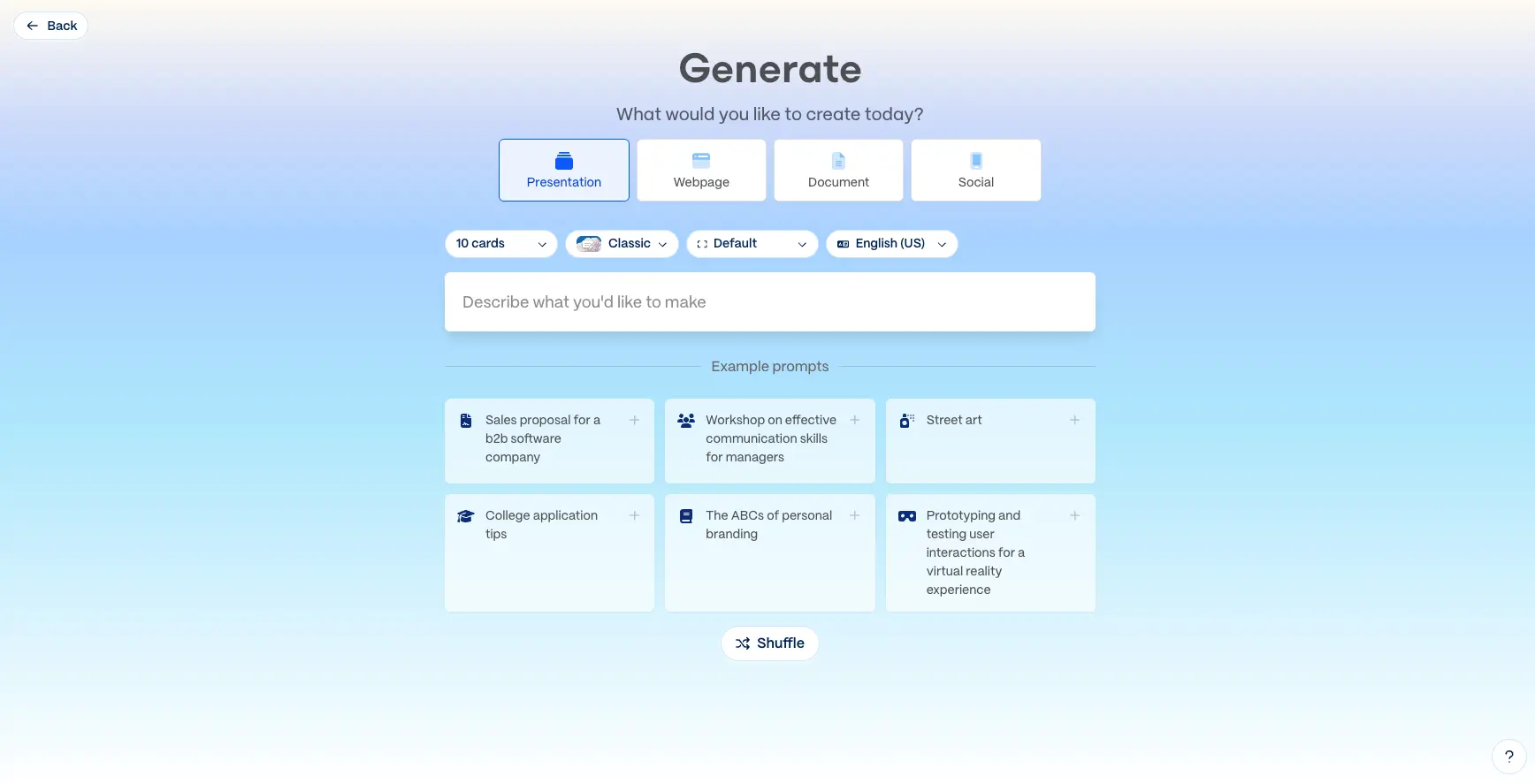
The generate interface lets you select your content type (Presentation, Webpage, Document, or Social), configure settings like the number of cards (up to 10 on free, 20 on Plus), choose a theme style (Classic, Creme, Snowball, and more), and set your output language. Example prompts like "Sales proposal for a B2B software company" or "Workshop on effective communication skills" help you get started quickly.
Prompt Editor with Content Settings
Fine-tune your content structure, text density, and visual theme before generating
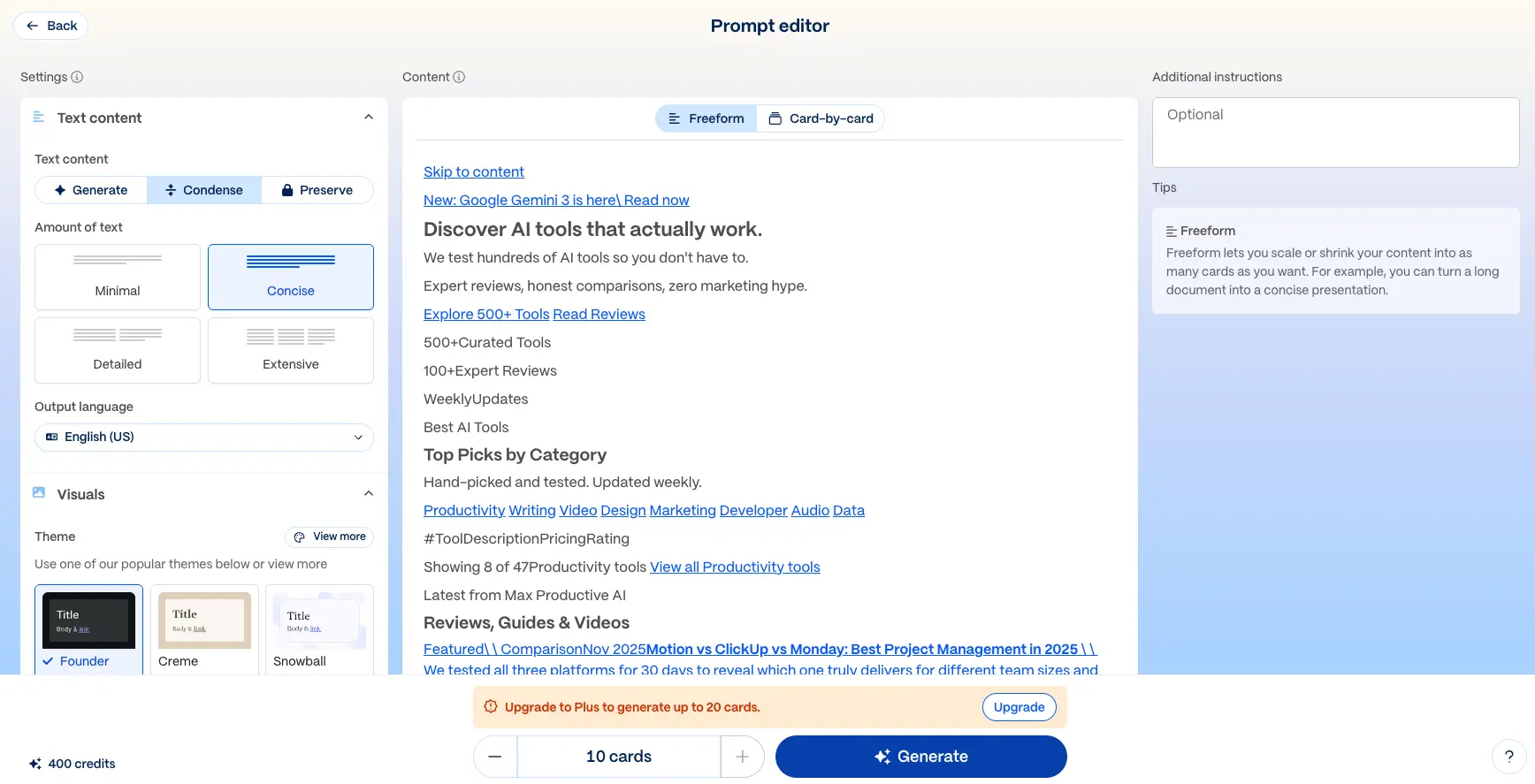
Before generating, the Prompt Editor gives you granular control over the output. Choose between Generate (AI creates content), Condense (shorten existing content), or Preserve (keep original text). Set text density from Minimal to Extensive. The Freeform view lets you review and edit the content outline before generating, while Card-by-card mode provides per-slide control. Additional instructions and theme selection round out the customization options.
Presentation Example Output
A real AI-generated presentation showing Gamma's professional output quality
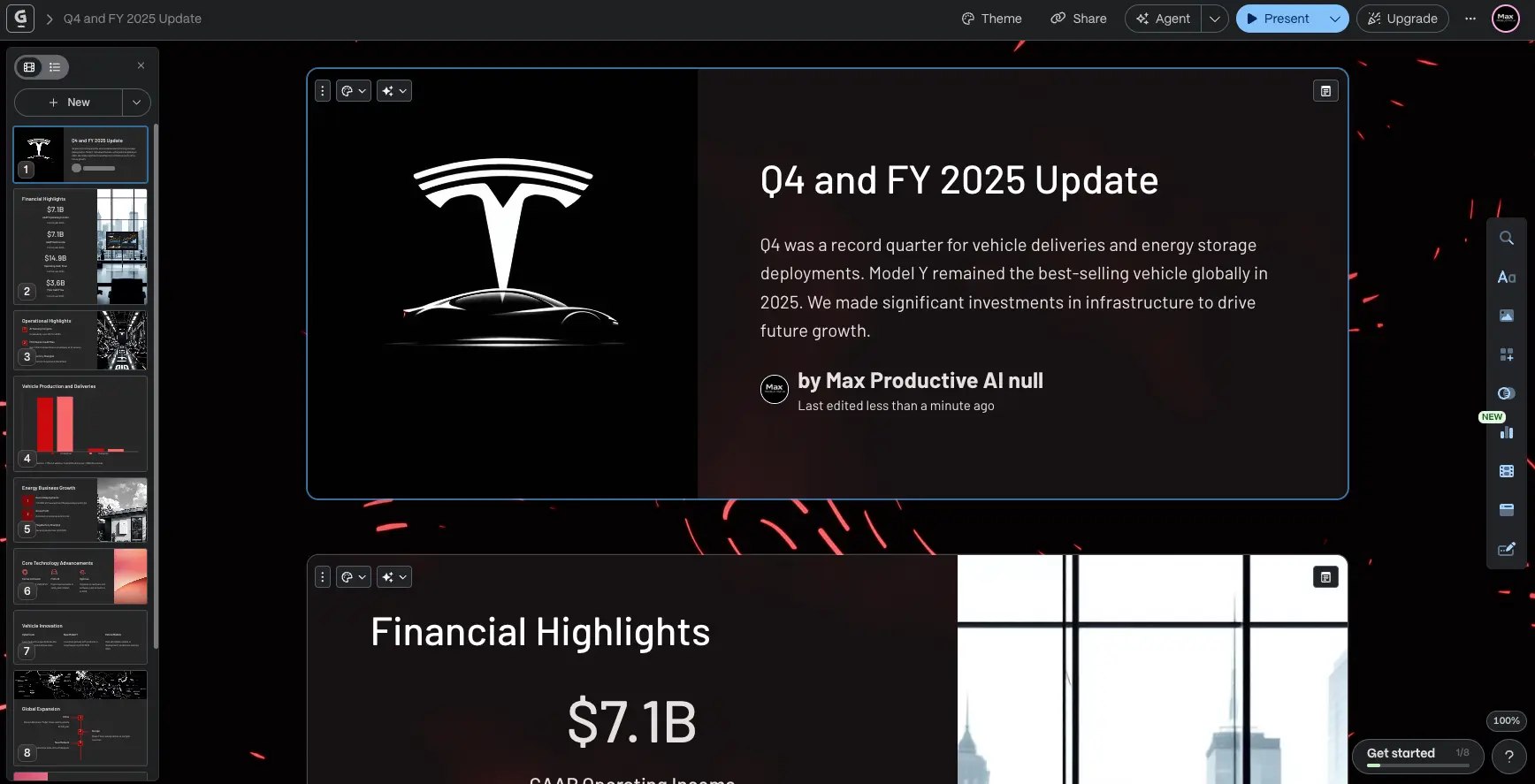
This example shows a complete financial report presentation generated by Gamma. The left sidebar provides card navigation with visual thumbnails across multiple sections (Financial Highlights, Operational Highlights, Vehicle Production, Energy Business, Core Technology, and more). The card-based format combines text, data figures, and contextual imagery in a modern, professional layout. The top toolbar provides quick access to Theme, Share, Agent, and Present modes.
AI Agent Editor Panel
Gamma's AI design partner for conversational editing and refinement
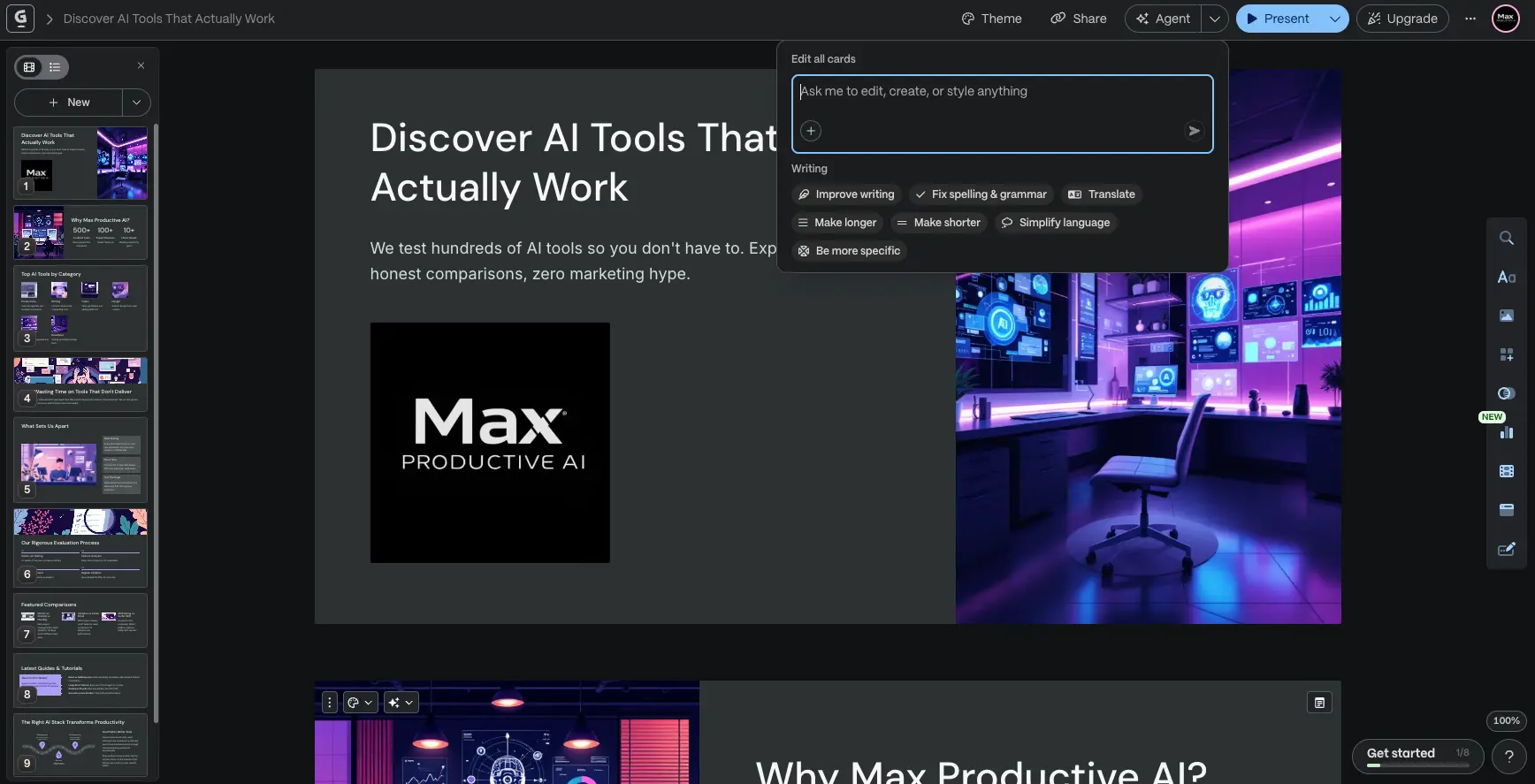
The Gamma Agent panel (accessible via the "Agent" button in the toolbar) lets you edit all cards at once using natural language. Type commands like "make the tone more professional" or "add a competitor analysis section." Quick action buttons provide one-click access to common tasks: Improve writing, Fix spelling & grammar, Translate, Make longer, Make shorter, Simplify language, and Be more specific. This conversational approach to editing is one of Gamma's most powerful features.
Workspace Templates
Create reusable templates for consistent, on-brand content at scale
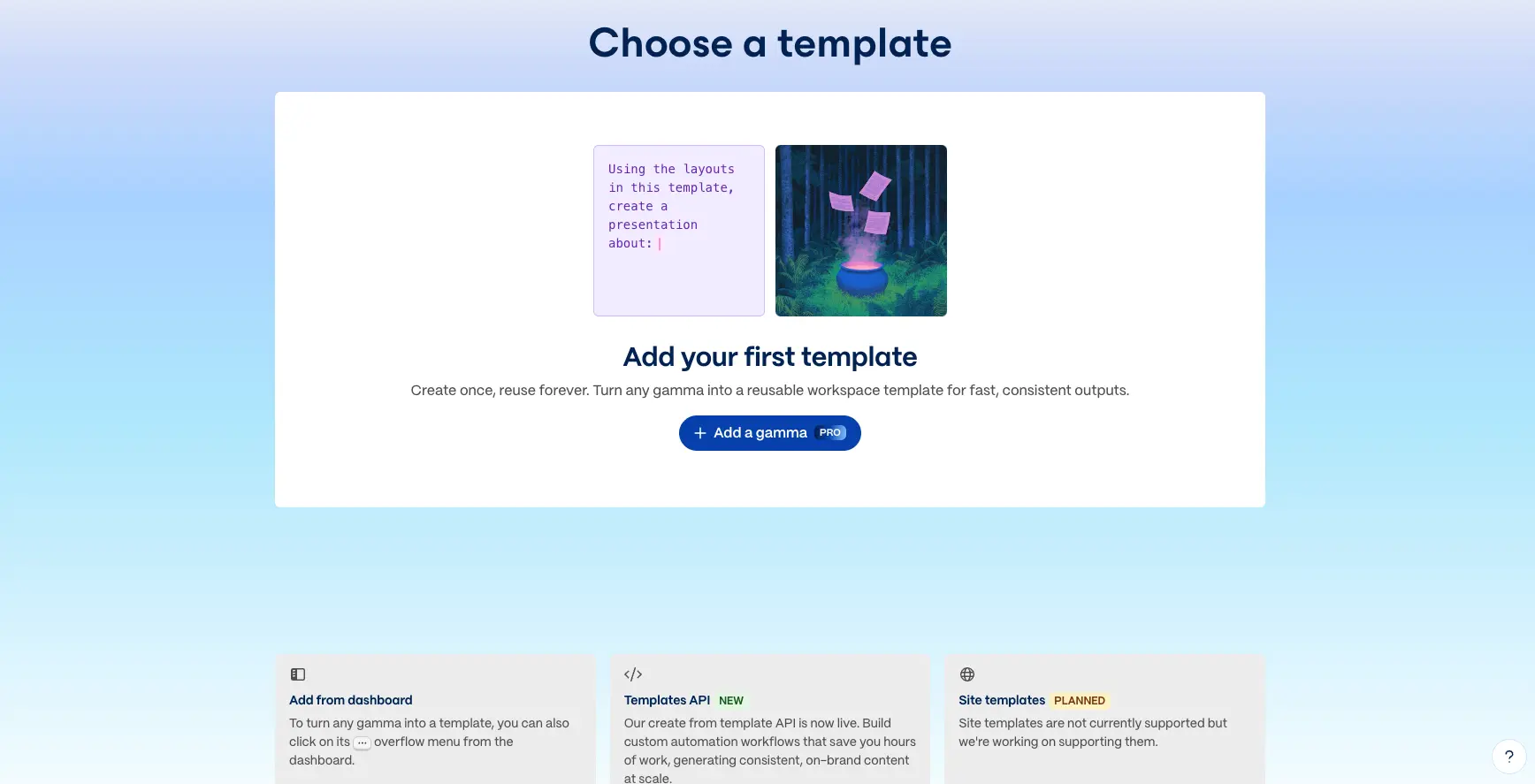
The Workspace Templates feature (available on Pro plans) lets you create once and reuse forever. Turn any Gamma presentation into a reusable workspace template for fast, consistent outputs across your team. The Templates API enables custom automation workflows that save hours of work by generating on-brand content at scale. Site templates for website creation are currently in development.
Ready to create your first AI-powered presentation?
Try Gamma Free →Free plan available • No credit card requiredHow Gamma Works
From text prompt to polished presentation in four simple steps.
Choose Your Starting Point
Gamma offers four ways to begin: Generate from a one-line text prompt (e.g., "Create a pitch deck for a sustainable fashion startup"), paste in existing notes or an outline, upload a document (PDF, PPTX, Word), or import a URL to transform any webpage into a presentation. You also choose your output format — Presentation, Document, Webpage, or Social media post — and select a visual theme from 100+ options.
AI Generates Your Content (~30-60 Seconds)
Gamma's AI processes your input using multiple models — including GPT-4 for text generation, Retrieval-Augmented Generation (RAG) for context-aware content, and models like Flux Fast for AI image generation. In approximately 30 to 60 seconds, you receive a complete, structured presentation with professional layouts, formatted text, relevant images, and cohesive design elements. You can configure text density (Minimal to Extensive), number of cards, and output language before generating.
Refine with Gamma Agent
Once generated, use Gamma Agent — the AI design partner introduced with Gamma 3.0 — to refine your content through natural language conversation. Say "make the tone more formal," "add a competitor analysis section," or "restyle this with a dark theme," and the Agent carries out changes across your entire presentation. Quick-action buttons also let you improve writing, fix grammar, translate, make content longer or shorter, and simplify language with one click.
Share, Export, or Publish
When you're satisfied with the result, Gamma offers multiple distribution options. Share via web link with engagement analytics (who viewed, how long, scroll depth). Export to PowerPoint, PDF, PNG, or Google Slides. Publish as a live website with optional custom domain. Or format for social media (Instagram, LinkedIn, Twitter/X). For teams, real-time collaboration with commenting lets multiple editors work simultaneously before finalizing.
Security & Privacy
Gamma achieved SOC 2 Type II certification in October 2025. All data is encrypted in transit, the platform is GDPR and CCPA compliant, and your content is never used for AI training on Team and Business plans (individual users can opt out in settings). SSO authentication is available on Business plans.
Latest Updates (January 2026)
Recent features include Remix (quickly adapt any Gamma for a new audience), Workspace Templates (reusable team templates), Nano-Banana Pro & HD for cinematic visual storytelling (Studio Mode), the Generate API now in general availability for programmatic content creation at scale, and Make integration for workflow automation.
Key Features
Everything that makes Gamma the most versatile AI presentation maker in 2026.
AI Generation from Prompts
Type a topic or paste an outline, and Gamma produces a complete, structured presentation with text, images, and professional layouts in under 60 seconds. Supports 20+ AI models for text and image generation.
Gamma Agent (AI Design Partner)
Introduced with Gamma 3.0, the Agent researches the web, refines content, restyles entire decks, and provides design feedback — all through natural language conversation. Edit your entire presentation by simply describing what you want.
Multi-Format Output
Create presentations, rich documents, full websites, and social media posts — all from one platform. Publish websites with one click (no coding), export to PowerPoint/PDF/PNG/Google Slides, or share via web link with analytics.
AI Image Generation & Editing
Generate and edit images directly within presentations using multiple AI models including Flux Fast and Nano Banana Pro (cinematic HD imagery). Images are saved to your Media Library for easy reuse across projects.
Smart Layouts & Diagrams
Auto-generated layouts including timelines, pyramids, circular layouts, and 12+ adaptive smart diagrams. 100+ themes plus the ability to import your own brand themes. Custom branding and fonts available on Pro plans.
Real-Time Collaboration
Multiple team members can edit simultaneously with commenting workflows. Link-based sharing includes engagement analytics — track who viewed, time spent, and scroll depth. Centralized workspace management on team plans.
12+ Interface Languages
Interface available in English, Chinese (Simplified/Traditional), French, German, Japanese, Korean, Spanish, Portuguese, and more. RTL language support (Arabic, Farsi, Hebrew, Urdu) in beta. AI generates content in dozens of additional languages.
Generate API & Integrations
The Generate API (GA since January 2026) enables programmatic content creation at scale. Zapier and Make integrations connect Gamma to 8,000+ apps. Embed Figma, Miro, Airtable, Power BI, YouTube, Typeform, and more directly into presentations.
Beyond these core features, Gamma supports interactive elements like embedded videos (YouTube, Vimeo, Loom), GIFs, live charts, forms (Typeform, Google Forms, Jotform, Calendly), and web apps. The Import & Transform feature lets you upload PDFs, PPTX files, Word documents, or paste URLs — Gamma restructures existing content into polished visual presentations automatically.
Experience all these features — start with the free plan:
Try Gamma Free →400 AI credits included • No credit card requiredGamma Pricing Plans
From a generous free plan to enterprise-ready features — Gamma pricing explained.
Free
Plus
Pro
Ultra
Note: Premium features like Agent, advanced models, and API consume credits from a monthly allowance
Is Gamma Worth the Investment?
Gamma's free plan with 400 credits lets you create approximately 10 full presentations — enough to thoroughly test the platform before committing. At $8/month for the Plus plan, if Gamma saves you just 1-2 hours of manual presentation work monthly, it pays for itself many times over. Most users report creating presentations in minutes rather than hours.
Compared to alternatives: Beautiful.ai requires $12/month minimum with no free plan; Plus AI starts at $15/month with only a 7-day trial; Canva Pro costs $12/month; and Microsoft Copilot requires $20/month plus an existing Microsoft 365 subscription. Gamma's $8/month entry point with a generous free tier represents one of the most competitive pricing structures in the AI presentation space.
Detailed Pros & Cons
An honest, balanced assessment after extensive hands-on testing.
✓ Pros
Gamma's core strength is speed. Enter a text prompt and receive a complete, structured presentation with layouts, text, and images in approximately 30 to 60 seconds. Multiple independent tests confirm this as a genuine, significant time-saver — especially for first drafts, brainstorming, and rapid iteration.
The interface is intuitive enough for complete beginners with no design background. Reviewers consistently highlight this as a key differentiator — there's virtually no learning curve. If you can type a sentence, you can create a professional-looking presentation with Gamma.
Unlike most competitors that only create presentations, Gamma produces decks, rich documents, full websites, and social media content — all from one tool. The ability to publish a website with one click (no coding required) or format content for social platforms adds unique value.
Gamma Agent (launched with Gamma 3.0) lets you refine content through natural language. Ask it to research topics on the web, restyle entire presentations, rewrite sections, or simplify language — all without touching individual elements manually. This is a genuine differentiator.
400 AI credits on the free tier (approximately 10 full presentations) is enough to meaningfully evaluate the platform before committing to a paid plan. No credit card required to sign up — you can test Gamma's capabilities risk-free.
With 70 million users, $100M in annual recurring revenue, a $2.1B valuation, SOC 2 Type II certification, and profitability — Gamma is a proven, reliable platform. This isn't an experimental beta tool; it's a mature product with significant resources for continued development.
✗ Cons
Because Gamma uses a card-based vertical format rather than traditional 16:9 slides, layouts, text spacing, and image positioning can shift when exporting to PowerPoint. It's worth reviewing the exported file before presenting. For teams that require pixel-perfect PowerPoint output, this is worth considering.
Gamma's layouts are template-based, which means you can't freely reposition every element or adjust spacing with pixel precision. This is by design — it keeps content looking professional — but users who need granular design control may find it limiting compared to tools like Canva or PowerPoint.
While structurally sound and a strong starting point, AI-generated text can sometimes feel formulaic, especially in introductions and conclusions. For best results, plan to personalize the text with your specific brand voice, data points, and examples. This is common across all AI content tools.
Heavy users may notice that Gamma reuses similar design structures across different presentations with different color schemes. Using the 100+ available themes, custom branding options, and the Remix feature helps add variety, but it's something to be aware of if you create presentations frequently.
Gamma is entirely web-based and requires an internet connection. There's no desktop app for offline editing. If you frequently work in environments without reliable internet access, this is a practical limitation to consider.
While paid plans offer unlimited AI creations under fair use, premium features like the Agent, advanced AI models, and API access consume credits from a monthly allowance. Heavy power users may occasionally need to be mindful of credit usage for the most advanced capabilities.
Gamma vs Alternatives
How Gamma compares to other AI presentation tools — find the best fit for your needs.
| Feature | Gamma | Beautiful AI | Plus AI | Prezi |
|---|---|---|---|---|
| Starting Price | Free ($8/mo paid) | $12/mo | $15/mo | $7/mo |
| Free Plan | ✓ 400 credits | ✗ 14-day trial | ✗ 7-day trial | ✓ Basic |
| AI Generation Speed | ~30-60 seconds | Slower | ~2 minutes | Basic AI |
| AI Agent / Copilot | ✓ Gamma Agent | Basic | Basic | Basic |
| Output Formats | Decks + Docs + Sites + Social | Presentations only | Google Slides / PPTX | Presentations only |
| PowerPoint Export | ✓ (may need adjustments) | ✓ Reliable | ✓ Native | Limited |
| Users | 70M+ | Not disclosed | Not disclosed | Established |
| Best For | Speed, versatility, modern format | Brand governance | Google/MS native | Non-linear storytelling |
Which Tool Is Right For You?
Gamma
Editor's ChoiceBest for: Anyone who needs to create polished presentations, documents, or websites from a text prompt as fast as possible. Ideal for founders, marketers, educators, consultants, and students who value speed and modern design over pixel-perfect control. The generous free plan, Gamma Agent AI assistant, and multi-format versatility make it our top-rated AI presentation tool overall.

Beautiful AI
Brand GovernanceBest for: Teams requiring strong brand enforcement and automated design consistency. Beautiful.ai's "smart slides" enforce professional layouts automatically with 300+ auto-formatting slide types. Choose if brand governance is your top priority and you're willing to pay more ($12-40/user/month) for stricter design controls. No free plan available.

Plus AI
Native Slides/PPTXBest for: Teams embedded in Google Workspace or Microsoft 365 who need zero export headaches. Plus AI works directly inside Google Slides and PowerPoint as an add-on — so you never leave your native environment. Choose if PowerPoint/Google Slides compatibility is non-negotiable and you want reliable formatting. See our detailed Gamma vs Plus AI comparison →

Prezi
Non-Linear FormatBest for: Educational content, creative storytelling, and conference talks where you want a distinctive, memorable presentation format. Prezi's zoomable canvas paradigm is completely different from linear slides — audiences remember it. Choose if you want to stand out with a unique visual approach. Starting at just $7/month.

Chronicle
Storytelling-FirstBest for: Creative professionals and educators who want widget-based, storytelling-first presentations with unique visual effects. Chronicle offers smart canvas design with zoom effects and interactive widgets. A solid alternative for narrative-driven content where engagement matters more than speed.

Presentations AI
Specialized AIBest for: Users who want a dedicated AI presentation tool with strong generation capabilities and a focus specifically on slide creation. A good alternative to Gamma if you prefer a more presentation-focused tool without the additional document and website features.

Decktopus
Easy to UseBest for: Users who want a simple, straightforward AI presentation maker with an emphasis on ease of use. Decktopus offers quick creation with AI-powered design suggestions. A budget-friendly option for users who need basic AI presentation capabilities.
Frequently Asked Questions
Should You Try Gamma?
After extensive hands-on testing, Gamma earns its position as our highest-rated AI presentation maker in 2026. The speed is genuine — going from a text prompt to a polished, professional presentation in under 60 seconds is transformative for anyone who regularly creates decks, documents, or visual content. With 70 million users, $100M ARR, and a $2.1B valuation, this is a proven platform backed by substantial resources for continued innovation.
The Gamma Agent introduced with version 3.0 is a standout feature — the ability to refine entire presentations through conversational AI commands feels like having a design assistant at your fingertips. Add multi-format versatility (decks, docs, websites, social), the Generate API for automation at scale, and a generous free plan with 400 credits, and Gamma delivers exceptional value in 2026.
Our Recommendation
Start with the free plan (400 AI credits, no credit card required) and create 2-3 presentations to evaluate the output quality for your specific needs. If the speed and modern format work for your workflow, the Plus plan at $8/month offers excellent value with unlimited AI creations and no branding. For teams needing custom branding, analytics, and API access, the Pro plan at $15/month unlocks the full Gamma experience. With a generous free tier, there's zero risk in trying it.
Ready to Create Presentations with AI?
Join 70 million+ users creating polished presentations, documents, and websites with Gamma