
QuillBot
An AI paraphraser with a grammar checker, summarizer, citation tool, and plagiarism checker built around it. Most people come for the Paraphraser, and on annual billing it costs well under Grammarly Pro.
Try QuillBot Free →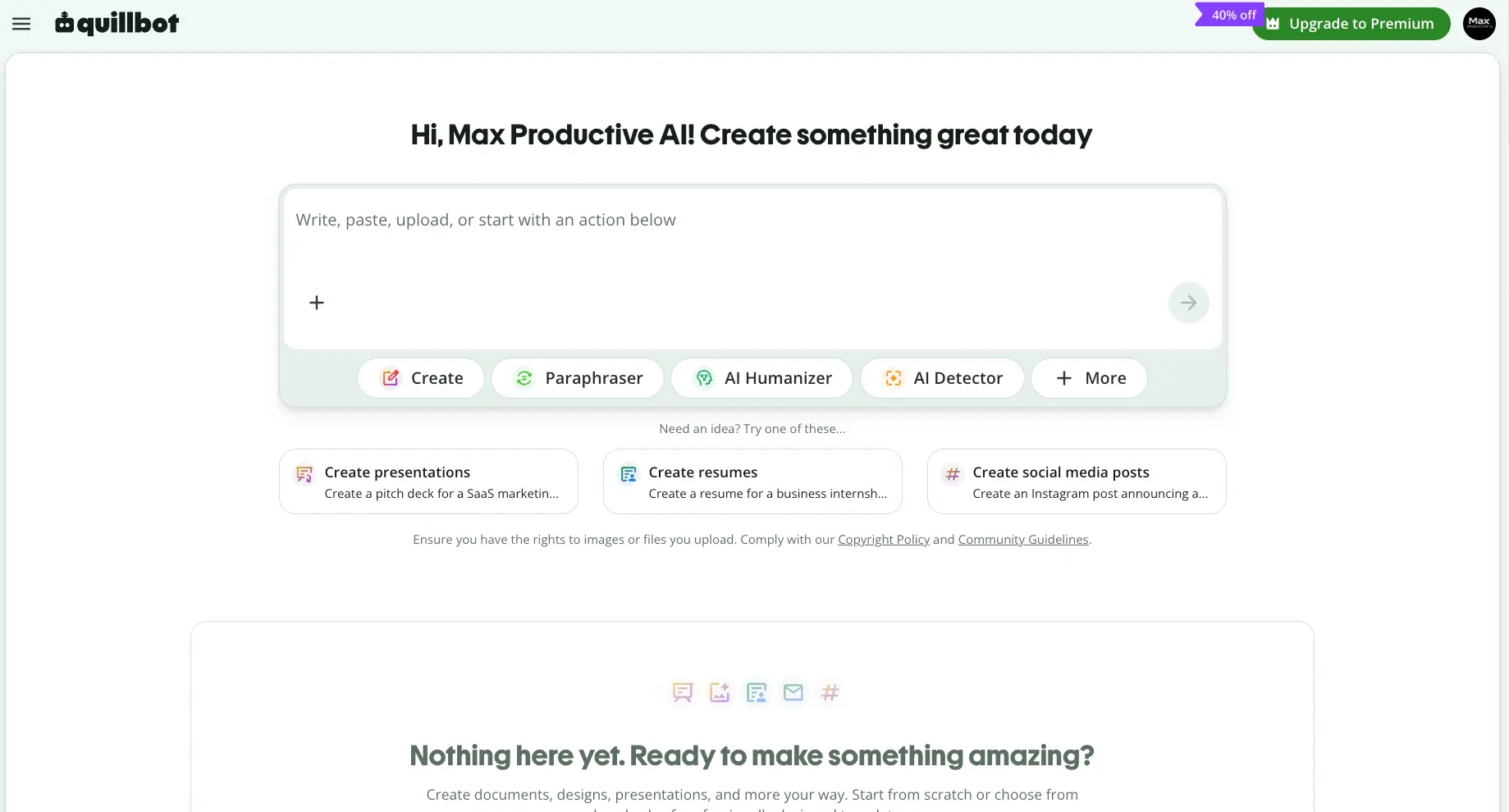
Strong Paraphraser, Fair Price.
Don't Buy It to Beat Detectors.
As of October 2026, QuillBot is still the paraphrasing tool we'd point most students and non-native writers to first. Premium at $8.33/month on the annual plan buys nine rewrite modes, unlimited paraphrasing, and a Copyleaks-powered plagiarism checker for less than Grammarly Pro. The catches: the free plan's word cap makes it a demo more than a tool, refunds are off the table in most countries, and its Humanizer won't reliably get AI text past Turnitin.
✓ What We Like
- Paraphraser with nine modes, a synonym slider, and custom modes on Premium
- Annual Premium undercuts Grammarly Pro and bundles more tools
- Free Citation Generator and unlimited basic grammar checks
- Works in Chrome, Word, Google Docs, and native desktop and mobile apps
! Could Be Better
- Free plan's paraphrase cap is too tight for real work
- Humanizer and AI Detector are the weakest links, and independent tests say so
- No refund window unless the law requires one, and plans auto-renew
What Is QuillBot?
Who makes it, what you get, and whether it's still just a paraphraser.
QuillBot started as a paraphrasing tool, and for most of its users that's still what it is. It belongs to Learneo, the company behind Course Hero, and it has grown into a writing suite with nine core tools behind one login: Paraphraser, Grammar Checker, Summarizer, Citation Generator, Plagiarism Checker, AI Detector, AI Humanizer, Translate, and AI Chat. The Paraphraser is what people sign up for. Of the other eight, the Citation Generator and the Plagiarism Checker earn their place; the rest range from handy to weak. QuillBot has also added creation tools such as image generation, a presentation maker, and a website builder. We left those out of this review, because QuillBot is still a writing tool first.
The easiest way to understand it is next to Grammarly. Grammarly sits in every text field on your machine and corrects as you type. QuillBot works on a draft you've already written and reshapes it when you ask: tighten a paragraph, make an email more formal, simplify a dense passage, cut a 2,000-word report down to its key points. You bring the words and QuillBot edits them. If you want something to write from a blank page, that's Jasper AI for marketing copy or a general model like Claude or ChatGPT.
It's available almost everywhere you write: web app, Chrome, Edge, and Safari extensions, a Microsoft Word add-in, a Google Docs integration, and native apps for iOS, Android, Windows, and macOS. The Chrome extension alone has passed 6 million users. The mobile app has grown its own set of Create with AI features, which we covered in a separate review.
Who Is QuillBot Best For?
Students, ESL and non-native English writers, researchers, and editors who already have a draft and need to rewrite, shorten, or polish it. It also suits anyone who wants paraphrasing, grammar, citations, and a plagiarism check under one cheap subscription instead of three separate ones.
Our Testing
We ran QuillBot on a free Max Productive AI account in September 2026: the Paraphraser in Standard mode, the Grammar Checker, the AI Detector, and the AI Humanizer, using short excerpts from our own site copy. The screenshots below are from that account. We did not buy Premium, so locked features (Tone, Compare Modes, the percent-human score, the Plagiarism Checker) are described from QuillBot's documentation and independent reviews rather than hands-on use. On October 1, 2026 we re-checked pricing, plan limits, refund terms, and privacy settings against QuillBot's pricing pages and Help Center, and read the independent detection studies cited below.
One caveat belongs up front. A lot of people come to QuillBot hoping to get AI-written text past detectors, and the product leans into that with a dedicated AI Humanizer and a Humanize mode in the Paraphraser. Independent tests through 2026 show it working some of the time and failing much of the rest, and Turnitin says its detector is built to catch AI text that has been paraphrased. We cover the evidence in the features section. So we judged QuillBot as a writing tool, which is where it's good.
See QuillBot in Action
Screenshots from our own free account, September 2026. The same two short passages, run through four of the tools.
Dashboard
One input box, a row of tool chips, and idea prompts for people who don't know where to start
The current dashboard is a single "write, paste, upload" box with the main tools as chips underneath. Paste text and pick what to do with it, or start from one of the Create ideas. Those suggestions (a SaaS pitch deck, a business-internship resume, an Instagram announcement) show how far QuillBot has moved beyond paraphrasing. Once you know which tool you want, the left sidebar visible in the next screenshots is the faster route. Worth noting: a 40%-off Premium banner was live during our September testing, though we found no sitewide promotion when we re-checked prices on October 1. Offers come and go, so look before paying full price.
Paraphrasing Tool
Standard mode on a 39-word passage about our own site
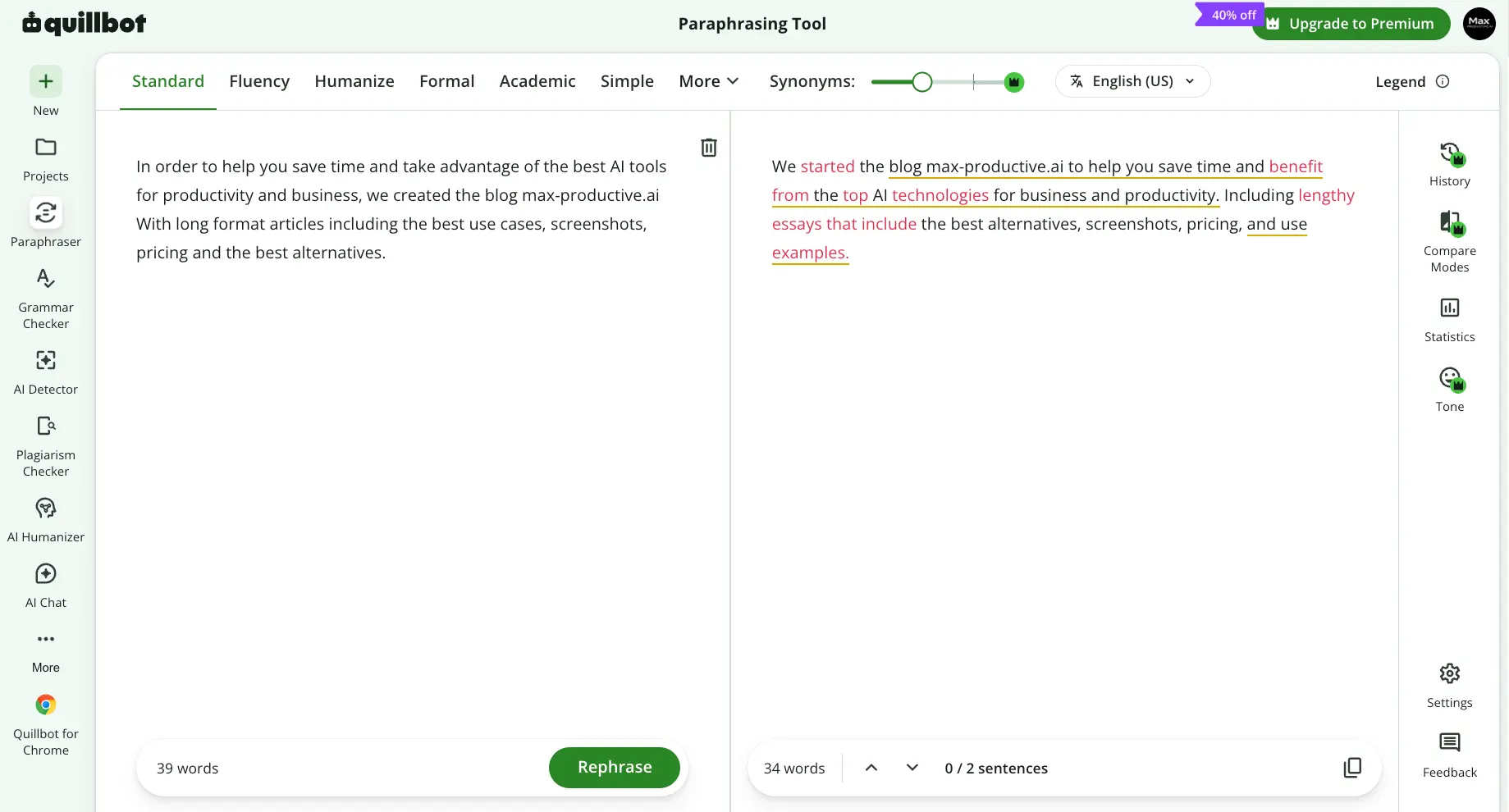
We pasted a 39-word blurb about max-productive.ai and hit Rephrase in Standard mode. QuillBot returned 34 words, kept the two-sentence structure, and color-coded every change so you can see exactly what moved. Click any changed word and you get alternative synonyms. The result read cleanly, but it swapped "long format articles" for "lengthy essays," which changes the meaning. Freeze Words exists for exactly this, though a free account lets you freeze only one word; Premium removes the limit. Either way the habit to build is the same: QuillBot is quick and easy to steer, but you still have to read what it hands back. Compare Modes, Statistics, and Tone in the right rail all carry crown icons on a free account.
Grammar Checker
Same 39 words: two corrections and four writing scores
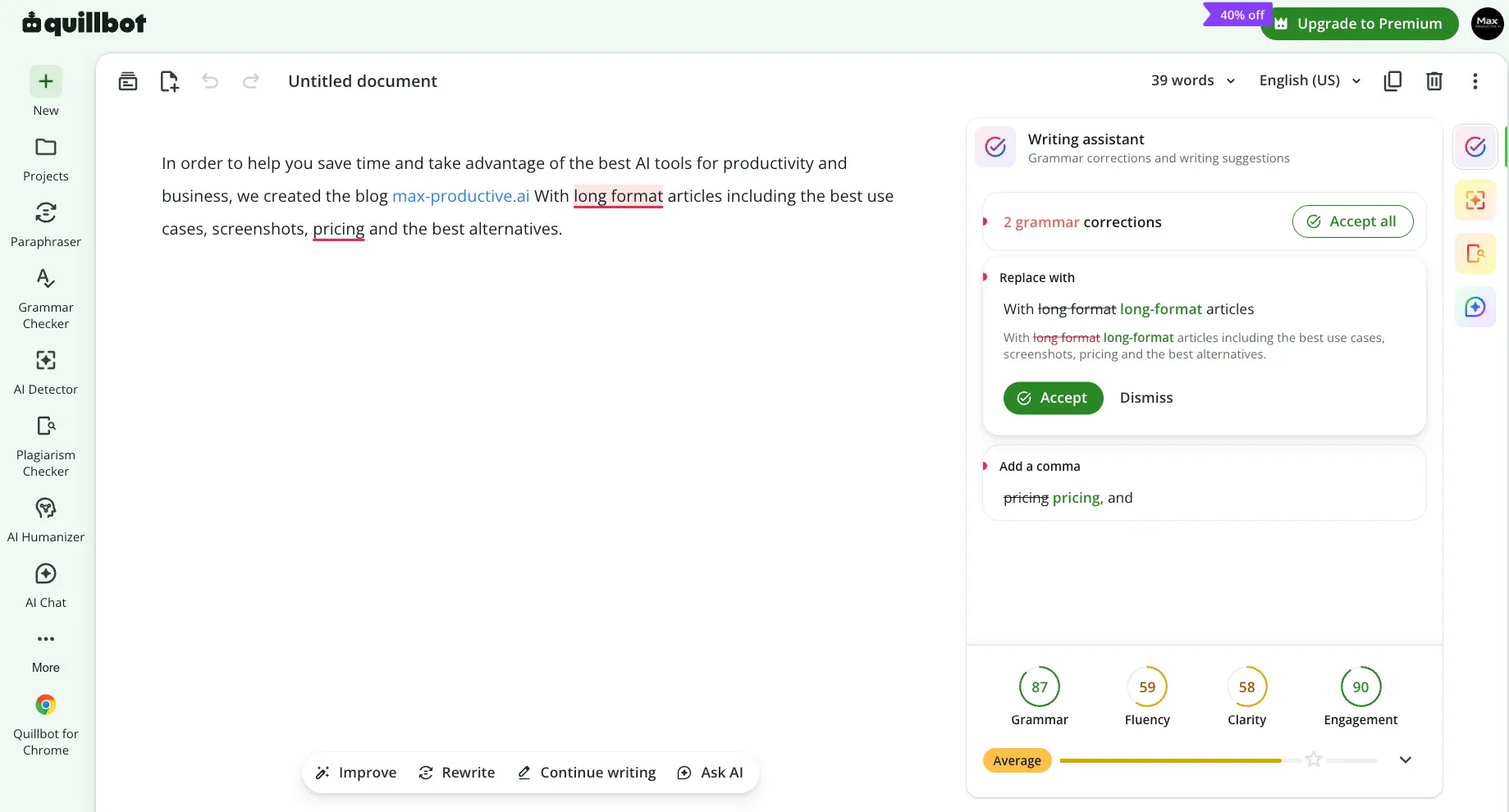
It caught the missing hyphen and the missing Oxford comma, with an Accept all button and a short explanation for each. Fine, but any checker does that. The four dial scores are more useful: a 58 on Clarity and a 59 on Fluency for a sentence that opens with "In order to help you save time" is a fair verdict, and the Average label underneath doesn't sugarcoat it. What you don't get is Grammarly's tone and formality coaching. The Improve, Rewrite, Continue writing, and Ask AI bar under the editor hints at where this is heading, with the Grammar Checker slowly turning into a general document editor.
Want to run your own draft through the Paraphraser?
Try QuillBot's Paraphraser →Standard and Fluency modes are free • No card needed for a free accountAI Detector
88 words, model version 7.1.0, and a verdict with no hedging
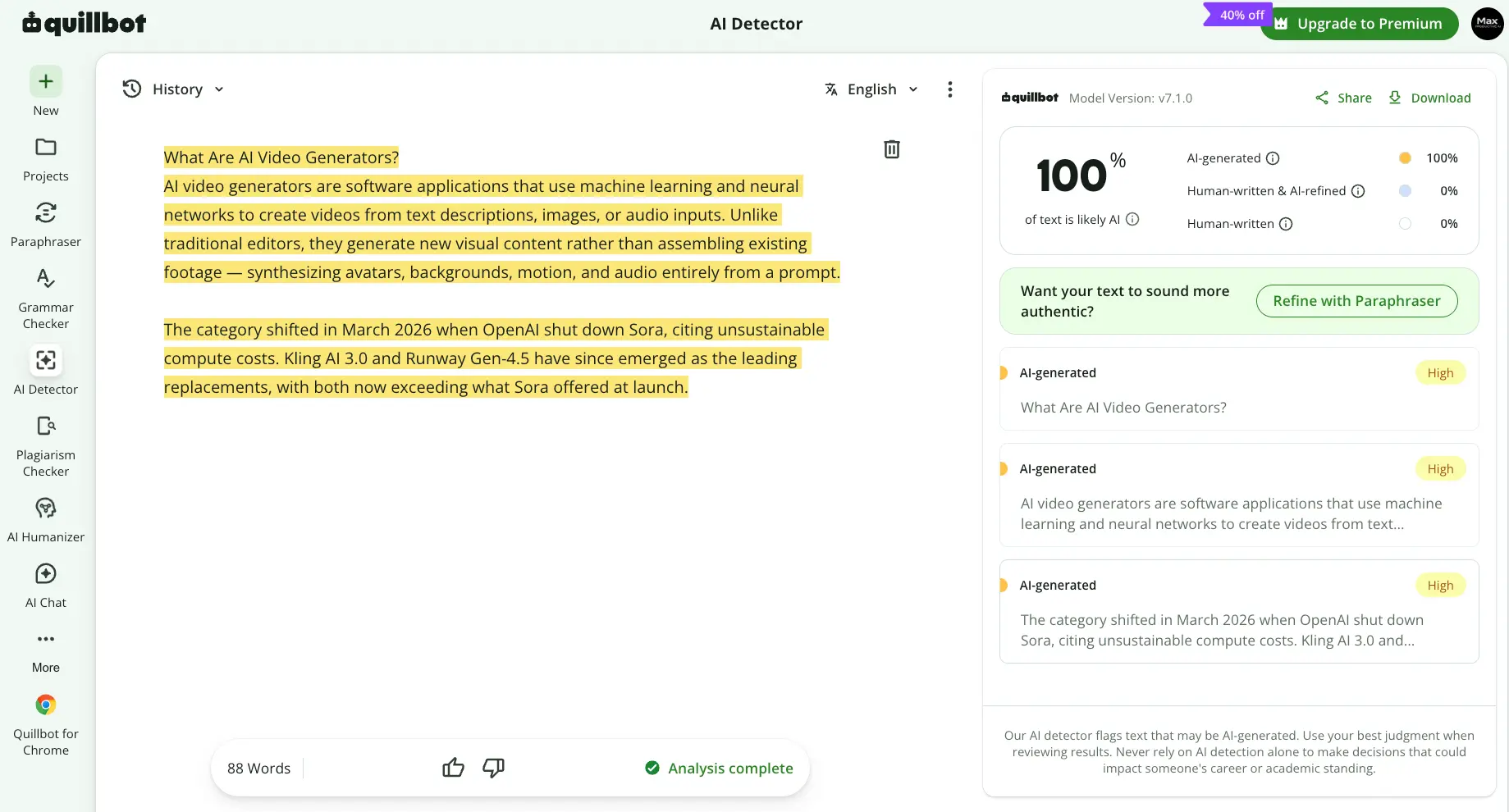
We pasted an 88-word excerpt from one of our own articles. The detector came back 100% AI-generated, flagged all three segments High, and immediately offered to fix that with the Paraphraser. A detector that volunteers to rewrite whatever it flags is a strange incentive, and it says a lot about who QuillBot thinks is using it. How far to trust the verdict depends on the text. QuillBot markets the detector as 99% accurate, citing a lab benchmark. A 2025 independent study found it near-perfect on raw and lightly paraphrased AI text, then right only 58% of the time once that text had been "humanized." How often it flags genuine human writing hasn't been well measured, and QuillBot's own disclaimer says not to rely on detection alone for decisions about someone's career or academic standing. We'd take that at face value.
AI Humanizer
The same 88 words, two rewrite styles, and one locked score
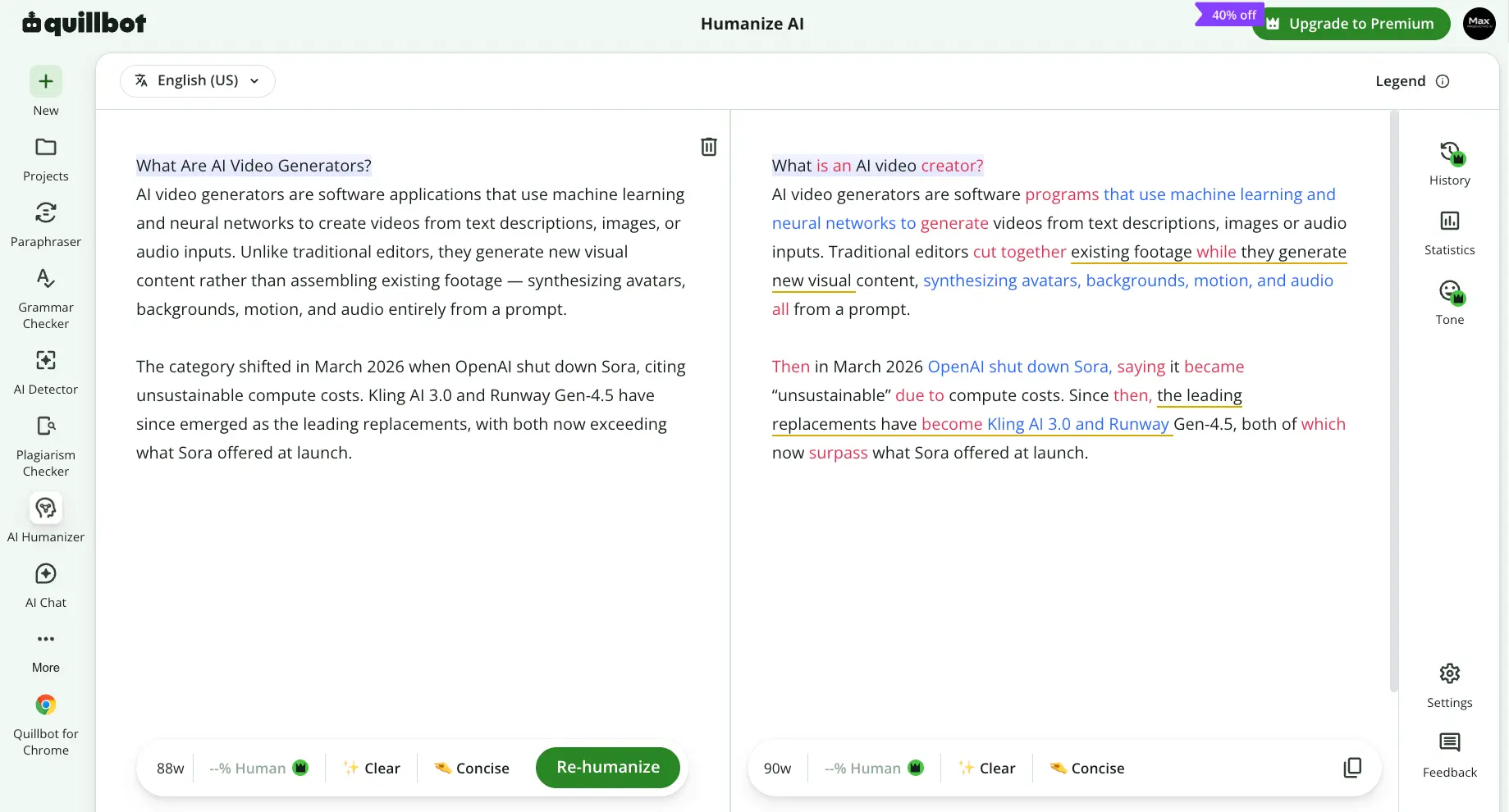
Same passage, this time through the Humanizer, which free accounts can use within a small daily allowance. The output grew from 88 to 90 words. It swapped "generators" for "creator," turned "citing" into "saying," and reordered a few clauses, all color-coded by type of change. The "--% Human" score sits behind a crown; free users never see the number. We didn't run the output back through the detector, and given what independent testing shows (see the features section), we wouldn't expect a clean pass. It works as a plain-language rewriter. We wouldn't count on it for more than that.
How QuillBot Works
From a rough draft to a cleaner one in four steps. The workflow is the same in the web app, the extension, and the Word and Docs add-ins.
Create an Account and Pick Where You'll Work
A free account gets you the full dashboard. From there you choose your surface: the web app for longer sessions, the Chrome, Edge, or Safari extension for quick rewrites in any text field, the Word add-in or Google Docs integration for working inside a document, or the native apps on phone and desktop. The tools are identical across all of them; only the layout changes.
Paste Your Text and Choose a Mode
In the Paraphraser, pick a mode and drag the synonyms slider to decide how aggressively QuillBot swaps words. Standard and Fluency are free; Formal, Academic, Simple, Creative, Expand, Shorten, and Humanize need Premium, as do custom modes where you describe the style you want in your own words. Hit Rephrase and the rewrite appears on the right, one sentence at a time if you prefer. The free plan caps each run, so long documents go in as chunks. Split them at paragraph breaks rather than mid-paragraph, or the rewrite loses the thread between sentences.
Review Every Change Before You Accept It
This is the step people skip, and it's where QuillBot either earns its keep or quietly rewrites your meaning. Two habits help. Before you rephrase, use Freeze Words on anything that must survive untouched: a product name, a technical term, a quoted phrase. Free accounts get one frozen word, Premium gets unlimited, and the feature doesn't work in every mode. After, step through the output with the sentence navigator and click any color-coded word to see alternatives. Premium adds Compare Modes, which lays several rewrites side by side, and Statistics, which reports word count and readability. Our own test produced one meaning shift in 39 words. Read the output.
Run the Rest of the Suite
With the rewrite done, the same left sidebar takes you to the Grammar Checker for mechanics and writing scores, the Summarizer to condense reading material, the Citation Generator to reference it, the Plagiarism Checker (Premium, powered by Copyleaks, 25,000 words a month) to catch accidental matches, and the AI Detector for a first-pass read on whether text looks machine-written. None of them is the best in its category. Between them, though, they cover most of what a student or editor needs in a normal week.
Which Paraphraser Mode to Use
The mode names don't tell you much on their own. This is how we'd match them to real jobs, and what to keep an eye on with each.
| Mode | Plan | Use it for | Watch for |
|---|---|---|---|
| Standard | Free | Everyday rewording that stays close to the original | Still swaps key terms, so freeze the ones that matter |
| Fluency | Free | Fixing awkward or non-native phrasing with minimal changes | Light touch; it won't restructure a messy sentence |
| Formal | Premium | Emails, cover letters, client documents | Can sound stiff on casual copy |
| Academic | Premium | Essays and reports that need a scholarly register | Check your course's AI policy before using it on graded work |
| Simple | Premium | Turning dense text into plain language | Can flatten nuance and qualifiers |
| Creative | Premium | Seeing a sentence said a completely different way | Changes the most words, so meaning drifts the most |
| Expand | Premium | Adding length to a thin paragraph | Pads with filler when the source has little to say |
| Shorten | Premium | Getting under a word or character limit | May cut a qualifier you needed |
| Humanize | Premium | Making stiff, machine-sounding text read naturally | A readability fix only, with patchy results against detectors |
| Custom | Premium | Your own brief, such as "plain English for a 12-year-old" | Results vary, so test on a short passage first |
What Premium Actually Changes
You can try every tool on the free plan. What you can't do is use them at length: paraphrasing stops after a short passage, the summarizer has a modest limit, and most modes are locked. In practice, Premium mostly means you stop pasting an essay in six pieces.
Best Used as a Second Pass
Draft in your own words, or in a model like Claude, then bring the text here to tighten, formalize, or simplify it. People who expect QuillBot to write the first draft tend to come away disappointed.
Key QuillBot Features
What each tool does, what's free, and which ones justify paying for Premium.
Paraphraser
The reason QuillBot exists. Nine modes (Standard, Fluency, Formal, Academic, Simple, Creative, Expand, Shorten, Humanize), a synonyms slider, sentence-level navigation, and custom modes on Premium where you describe the voice you want. Free accounts get Standard and Fluency with a per-run word cap; try the free Paraphraser to see if the output suits you before paying.
Grammar Checker
Spelling, punctuation, and grammar with a one-line explanation per fix, plus Grammar, Fluency, Clarity, and Engagement scores. Basic checks are unlimited on a free account; the fuller recommendations are Premium. Where it falls short is tone and style: Grammarly will tell you a sentence sounds hesitant or wordy; QuillBot mostly tells you it's correct.
Summarizer
Paste an article or report and get either the key sentences or a paragraph summary, with a length slider. The free limit is 1,200 words, which covers a news article but not a journal paper; Premium raises it to 6,000. Useful for reading, less so for writing.
Citation Generator
Free for everyone, and it covers APA, MLA, Chicago, Harvard, and other major styles. Search by URL, DOI, ISBN, or title and it builds the reference. For a student this alone is worth the free account.
Plagiarism Checker
Premium only. It scans against web sources in 100+ languages using Copyleaks technology, which QuillBot says doesn't store what you submit. Premium includes 25,000 words of scanning per month, and you can buy extra word packs. Good for catching accidental overlap before you submit. It does not see unpublished student papers the way Turnitin does, so a clean score here is not a guarantee of a clean score there.
AI Detector
Free up to 1,200 words per scan with a limited number of scans per day, and it breaks results down by sentence into AI-generated, human-written and AI-refined, and human-written. It does well on raw AI text and much worse once text has been reworked or humanized, where independent testing puts it only a little better than a coin flip. Treat it as a first read, and use Pangram when the result matters. You can test the QuillBot AI Detector for free.
AI Humanizer
Rewrites AI-sounding text in a Clear or Concise style. Free accounts get a small daily allowance; Premium removes the limit and shows a percent-human score. As a readability pass it's decent. As a way past detectors it's unreliable: Turnitin's results on QuillBot-humanized text swung widely in a June 2026 peer-reviewed study, and Turnitin says its detector is built to catch paraphrased and bypassed AI text. Try the AI Humanizer when a draft reads stiff, and leave it there.
Translate, AI Chat, and Integrations
The Paraphraser itself works in 23+ languages, and the Translate tool pairs well with it for non-native writers. AI Chat is a light assistant for quick questions, not a ChatGPT replacement. The integrations are the quiet strength: Chrome, Edge, Safari, Word, Google Docs, and native apps mean you rarely have to copy text out of wherever you're writing.
Outside the Paraphraser, nothing in the suite is the best in its class, and at this price that's a fair trade. Our real complaint is about placement. The Humanizer and the Detector are the two weakest tools QuillBot offers, and they get top billing on the dashboard.
What Happens to the Text You Paste
QuillBot's Help Center says submitted text can be used to improve its models, and the browser extension stores your input unless you turn that off. There are opt-outs for input storage and, if you have an account, for model training. Team plan text isn't used for training at all. If you edit client work or unpublished research, change those settings before you paste anything.
See what Premium adds and pick a billing period:
See QuillBot Pricing →Free plan available • Annual, quarterly, and monthly optionsQuillBot Pricing
Simple on the surface: free, or Premium. The billing period is what moves the price.
Free
- ✓ Paraphraser: Standard + Fluency, 125-word cap per run
- ✓ Unlimited basic grammar checks
- ✓ Summarizer up to 1,200 words
- ✓ AI Detector: 1,200 words per scan, limited daily scans
- ✓ AI Humanizer: small daily allowance
- ✓ Citation Generator
Premium Annual
- ✓ Billed $99.95 per year
- ✓ All paraphrase modes + custom modes
- ✓ Unlimited paraphrasing and Freeze Words
- ✓ Plagiarism Checker, 25,000 words/month
- ✓ Summarizer up to 6,000 words
- ✓ Full Humanizer with percent-human score
Premium Monthly
- ✓ Same features as Annual
- ✓ No long commitment
- ✓ Quarterly option: $39.95 every 3 months ($13.31/mo)
- ✓ Good for a single project or semester
- ✓ Switch to Annual later to save
Pricing last verified October 1, 2026. Visit QuillBot for current rates.
Read This Before You Pay
QuillBot has no money-back window. Its refund policy, updated August 28, 2026, says refunds are issued only where the law requires them; buyers in the EEA and UK get a 14-day right of withdrawal. Every plan renews automatically. You can switch renewal off at any time in your account and keep Premium until the paid period ends. If you subscribed through the iOS or Android app, refund requests go to Apple or Google.
How the Annual Price Compares
On monthly billing the gap widens: $19.95 against $30 for Grammarly Pro on its own (Grammarly is folding Pro into its new Superhuman suite, and some of its pages now list different monthly prices). Wordtune is cheaper still at $6.99/month for Advanced or $9.99 for Unlimited, both billed annually, but it's a sentence rewriter with basic grammar, not a suite. Whether QuillBot's bundle beats Grammarly for you comes down to what you write: paraphrase-heavy work favors QuillBot, everything-else-heavy work favors Grammarly.
Is Premium worth it? For most people who land on this page, yes, with one condition. The free plan is a demo. If you paraphrase more than a couple of paragraphs a week, the annual plan pays for itself in saved copy-pasting alone, and the Plagiarism Checker is a bonus you'd otherwise pay for separately. If you only need it for one term paper or thesis, a single month or quarter is cheaper than a year you won't use. If grammar correction is your main need and rewriting is occasional, compare Grammarly's free tier first. And skip Premium entirely if your reason for buying is detector evasion; you'd be paying for the one thing the product doesn't reliably do.
Detailed Pros & Cons
What held up in our own testing, what independent research shows, and where the product oversells itself.
✓ Pros
Every mode from Formal to Shorten, a synonyms slider, sentence-by-sentence navigation, and custom modes give you more control over a rewrite than the other paraphrasers we've reviewed. Most of the 2026 hands-on reviews we read reach the same conclusion: this is the strongest dedicated paraphraser available, and the rest of the suite is built around it.
Premium on the annual plan costs less than Grammarly Pro, and less again with the student rate, while bundling a summarizer, citation generator, and plagiarism checker. Few writing subscriptions cover that much ground at this price.
The Citation Generator is free, and basic grammar checks are unlimited without paying. For a student building a reference list, the citation tool alone justifies signing up, even if the free Paraphraser is too tight for daily use.
Browser extensions for Chrome, Edge, and Safari, a Word add-in, a Google Docs integration, and native apps on four platforms. Store ratings are strong across all of them (see what users say below), which suggests the day-to-day experience holds up.
Every rewrite is color-coded, every changed word is clickable, and the Humanizer has its own legend. In our test that transparency is what let us catch a meaning shift in seconds. Plenty of AI writing tools hand you a rewritten block and leave the diffing to you.
Paste, pick a mode, click Rephrase. The dashboard's idea prompts help newcomers, and the left sidebar keeps every tool one click away. We were productive in the first minute of the free account, which is more than we can say for most suites.
✗ Cons
A per-run cap of just over a hundred words and two modes means the free Paraphraser can't handle an essay without you feeding it in pieces. That's fine for evaluating the output, frustrating for actual work, and a frequent complaint in user reviews.
It catches mechanics and gives you four scores, then stops. There's no tone coaching, no wordiness nudges, no audience-aware suggestions. If grammar is the main job, Grammarly is the better checker, and its free plan is more useful than QuillBot's.
The evidence points both ways, and that's the problem. A June 2026 study got wildly different Turnitin results from QuillBot-humanized text depending on which chatbot wrote the original. Turnitin says its detector targets paraphrased AI text, and in a separate 2026 study Pangram caught 37 of 40 AI-rewritten papers. A tool that works some of the time is a gamble with your academic record.
It does well on raw AI text, but independent testing shows accuracy dropping sharply once text has been humanized, and there's little independent data on how often it wrongly flags human writing. That's an awkward combination for a tool QuillBot puts on its front page. When the result matters, use a purpose-built detector like Pangram.
Our 39-word test turned "long format articles" into "lengthy essays." Small, but wrong, and Standard is supposed to be the conservative mode. Accept a rewrite unread and this kind of drift ends up in your document.
Outside the EEA and UK, QuillBot refunds only where the law requires it. Combined with automatic renewal, that explains why billing is the biggest source of complaints on Trustpilot. If you only need Premium for one term, turn renewal off right after you subscribe; you keep access until the period ends.
What Real Users Say
Store ratings as of October 1, 2026, and the themes that keep coming up in reviews and Reddit threads.
| Where | Rating | Based on |
|---|---|---|
| Trustpilot | 4.8 / 5 | 14,300+ reviews |
| Chrome Web Store | 4.7 / 5 | About 5,900 ratings |
| Apple App Store (US) | 4.7 / 5 | About 3,000 ratings |
| Google Play | About 4.5 / 5 | About 22,000 reviews (varies slightly by device) |
The ratings are high almost everywhere. Read the reviews themselves and the same three kinds of praise keep coming back: the interface is easy, paraphrases usually keep the intended meaning, and having grammar, summaries, and citations in one place saves time.
The complaints are just as consistent. The biggest group on Trustpilot is about billing: renewals people say they didn't expect, and trouble cancelling an old account. A second group covers awkward or wrong paraphrases. A third, more recent one is about QuillBot's own tools disagreeing, with text that came out of the Humanizer still getting flagged by the AI Detector.
On Reddit the tone is more mixed. Writers in craft communities tend to say QuillBot helps fix an awkward sentence but can strip out words that mattered and flatten your voice if you lean on it. Students talk mostly about detection: threads describe their own writing being flagged as AI, including by QuillBot's detector, and instructors asking for a 0% score. None of that is measured data, but it lines up with our own test. The rewriting is useful, and the detection side is where trust breaks down.
QuillBot vs Alternatives
Its real rivals are the tools competing for the same rewrite-my-draft budget. The detector, fiction, and marketing tools further down do different jobs and often sit alongside it.
| Feature | Reviewed QuillBot | Grammarly | Wordtune |
|---|---|---|---|
| Free plan | Yes, word-capped paraphrasing | Yes, 100 AI prompts/month | Yes, 10 rewrites/day |
| Cheapest paid plan | $8.33/mo (annual) | $12/mo (annual) | $6.99/mo (Advanced, annual) |
| Paraphrasing | 9 modes + custom | Rewrite suggestions | Tone-based rewrites |
| Grammar & style depth | Good, light on tone | Best-in-class | Basic |
| Plagiarism checker | Premium (Copyleaks) | Pro plan | No |
| Works inside other apps | Extensions, Word, Docs, native apps | Everywhere you type | Extension + web |
| Best for | Students, ESL writers, editors reworking drafts | Daily professional writing across apps | Sentence-level polish on a budget |
QuillBot vs Grammarly: The Comparison Most Readers Are Actually Making
The two get lumped together, but they do different jobs. Grammarly watches you type, everywhere, and nudges you on grammar, clarity, and tone as you go. QuillBot waits for a finished draft and rewrites it on request. In our test the QuillBot Grammar Checker caught two mechanical errors and gave four scores, then stopped. That's the gap: Grammarly's suggestions go deeper into tone and wordiness, and it works in more places.
On price, QuillBot wins: about a third less than Grammarly Pro on annual billing, and the gap is wider month to month. QuillBot also bundles a summarizer, citation generator, and plagiarism checker into the same plan, where Grammarly keeps its plagiarism checker on Pro. If you write all day in email, Slack, and documents, Grammarly earns its higher price. If your work is reworking drafts, translating, and citing sources, QuillBot is the better buy. Both have free tiers, so run the same paragraph through each before you pay for either.
Which Tool Is Right For You?
QuillBot
ReviewedBest for: students, non-native English writers, researchers, and editors who need to rewrite, shorten, or formalize existing drafts and want citations and a plagiarism check in the same subscription. The sweet spot is paraphrase-heavy work on a budget. It's the wrong choice if you need a drafting engine or a way past AI detectors.
Grammarly
Grammar & StyleBest for: people who write all day across email, chat, and documents and want real-time correction with tone and clarity coaching. It's the deeper grammar checker and the more useful free plan; QuillBot beats it on paraphrasing control and on price. Many writers keep both, using Grammarly free for typing and QuillBot Premium for rewriting.

Paraphraser.io
Paraphrasing OnlyBest for: people who want a browser-based paraphraser and nothing else. It's a lighter tool than QuillBot, without the surrounding suite, and we rated it 3.9 in our own review. Worth a look if QuillBot's bundle is more than you need and you'd rather not pay for tools you won't open.

Pangram
AI DetectionBest for: anyone who needs to know whether text is AI-written and can't afford a false accusation. Pangram is a detector, not a writing tool, so it complements QuillBot rather than replacing it. In a June 2026 peer-reviewed study from Vrije Universiteit Brussel, it cleared all 40 human-written papers and caught 37 of 40 humanized ones, while Turnitin, GPTZero, and Copyleaks all underestimated how much AI text the papers contained. If you check yourself with QuillBot's detector, check again here.

Sudowrite
Fiction WritingBest for: novelists and screenwriters who want an AI that drafts with them and remembers the story. Story Engine takes an outline to chapters, the Story Bible keeps characters and plot consistent across long manuscripts, and none of that exists in QuillBot. Pricing starts around $10 to $19 a month and climbs well past QuillBot Premium. A novelist would draft in Sudowrite and polish in QuillBot or Grammarly afterward; nobody should be choosing between them.

Jasper AI
Marketing ContentBest for: marketing teams that need brand-controlled long-form content generated from a brief: blog posts, campaign copy, landing pages. Jasper generates and QuillBot edits, and Jasper costs a lot more. The natural pairing is Jasper for the draft and QuillBot to tighten and check it.
Two more from our AI writers roster, for completeness: Copy.ai generates marketing copy and MagicPost writes and schedules LinkedIn posts. Neither competes with QuillBot. Both produce drafts you might well run through it afterward.
Frequently Asked Questions
Should You Use QuillBot?
QuillBot is the best tool in its category at rewriting text you already have, and the tools around the Paraphraser are good enough to make the subscription an easy yes for the people it's built for. Students, non-native writers, researchers, and editors will get their money's worth from the annual plan, and the student rate makes the decision even easier.
Two things keep it at 4.3. The free plan is too limited to be a real working tool, so you're paying before you've done much, and outside the EEA and UK you won't get that money back. And the two features QuillBot promotes hardest, the AI Detector and the Humanizer, are the two it does least well, with independent research to back that up. Buy QuillBot for the Paraphraser, the citations, and the plagiarism check. Don't buy it to hide anything.
Our Recommendation
Start on the free plan and run a real paragraph of your own through Standard and Fluency, then through the Grammar Checker. If you find yourself hitting the word cap daily within a week, you've confirmed the use case: take the annual plan, or the student rate if you qualify. If you only need it for one term, pay monthly or quarterly and switch off auto-renew the same day. If what you mostly wanted was grammar correction, compare Grammarly's free tier first and decide from there.