
SaneBox
AI-powered email filtering that works with any inbox. Save 3-4 hours weekly by automatically sorting what matters from what can wait.
Start Free Trial →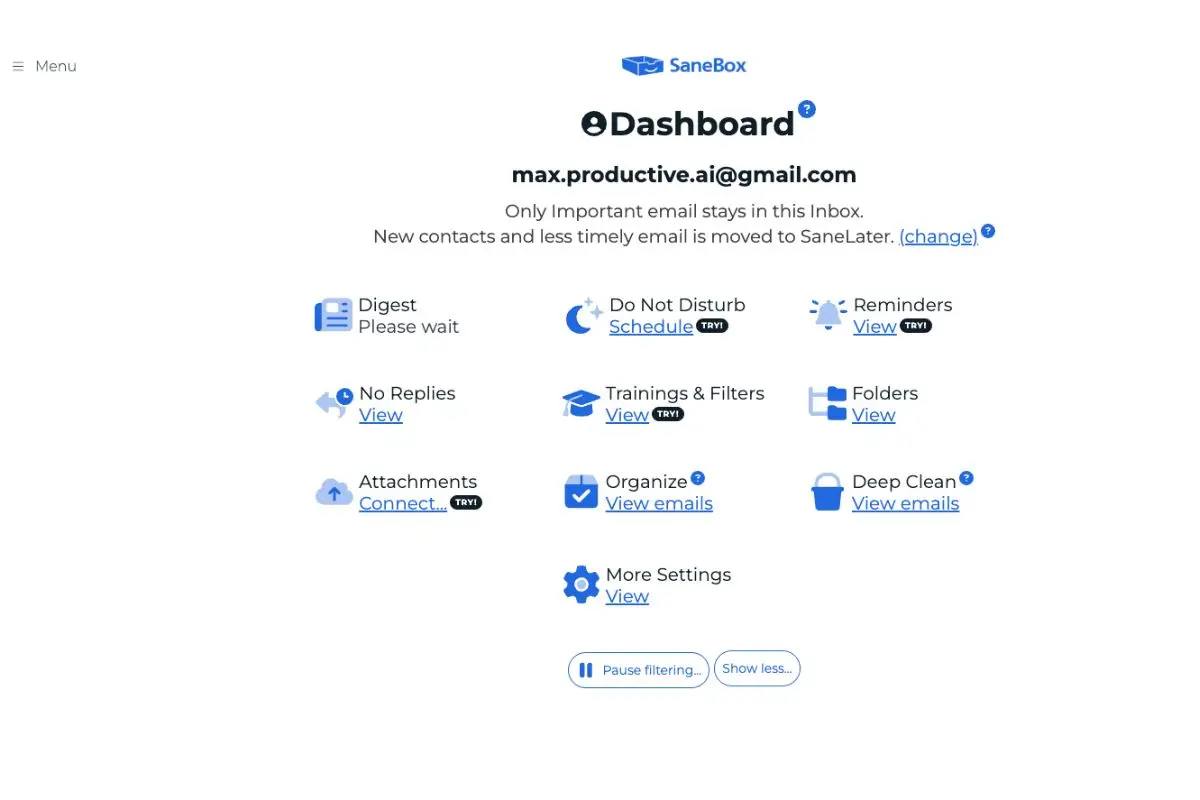
The Best AI Email Filter
for Busy Professionals
After 6 weeks of testing, SaneBox saved us 3-4 hours weekly with 98.5% accuracy. It's the only email tool that works silently in the background without requiring a new app.
✓ What We Love
- Works with any email provider
- No app needed—uses existing client
- AI learns from your behavior
- SaneBlackHole blocks senders permanently
! Could Be Better
- No free plan (14-day trial only)
- Takes 1-2 weeks to learn preferences
- iOS app only—no Android
See SaneBox in Action
Real screenshots from our hands-on testing.
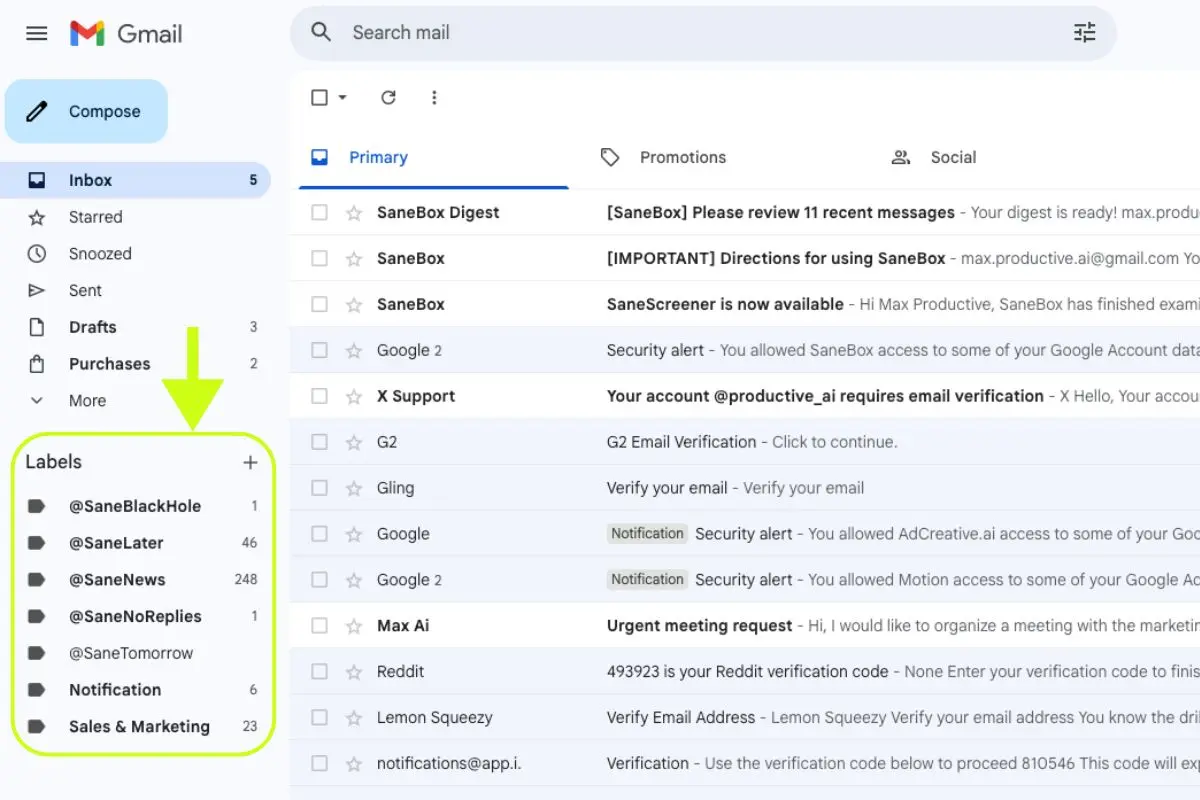
Gmail Integration
Smart folders appear directly in your Gmail sidebar
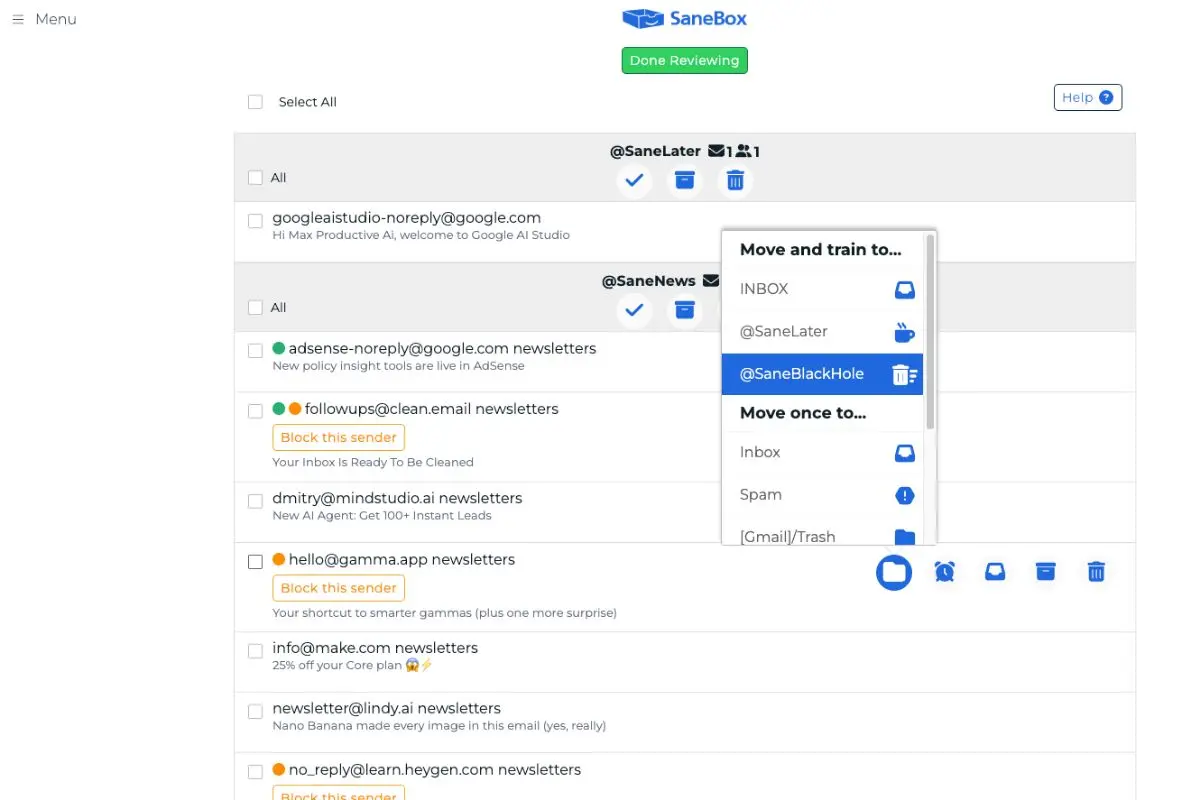
Train the AI with One Click
Move emails to train SaneBox—it learns from every action
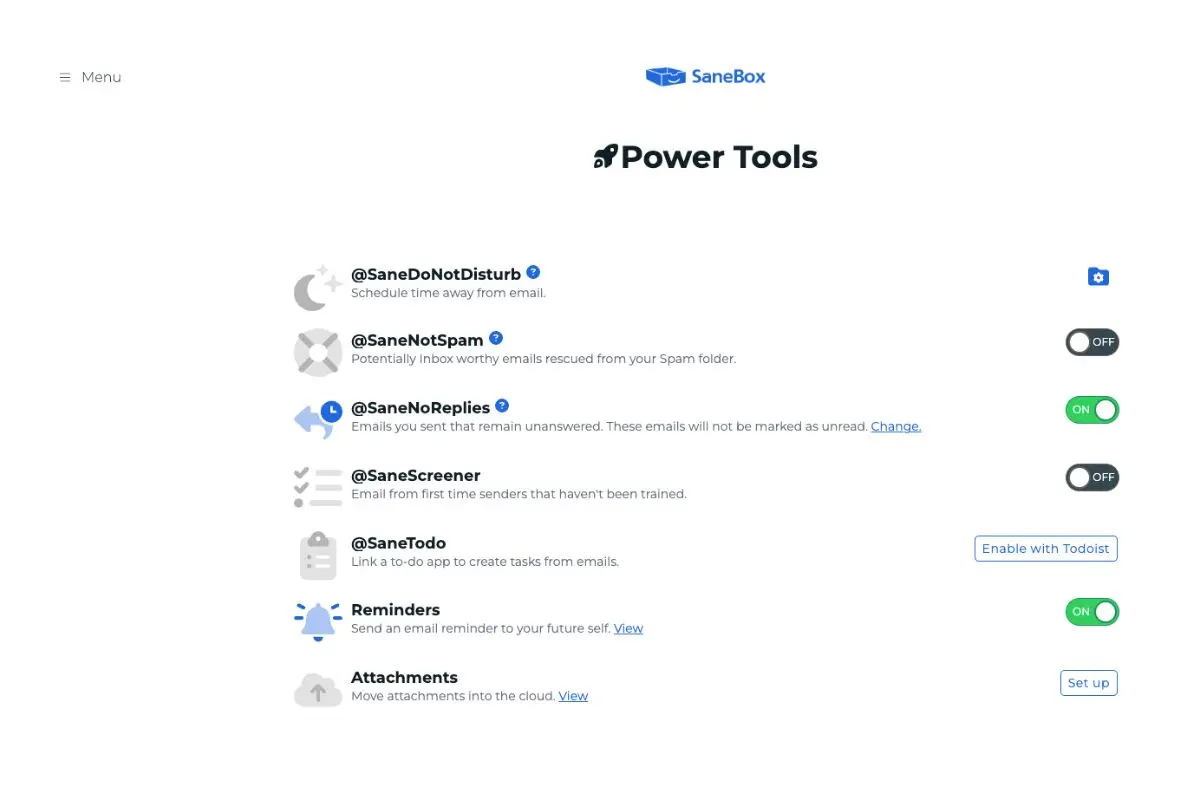
Power Tools
Do Not Disturb, response tracking, and more
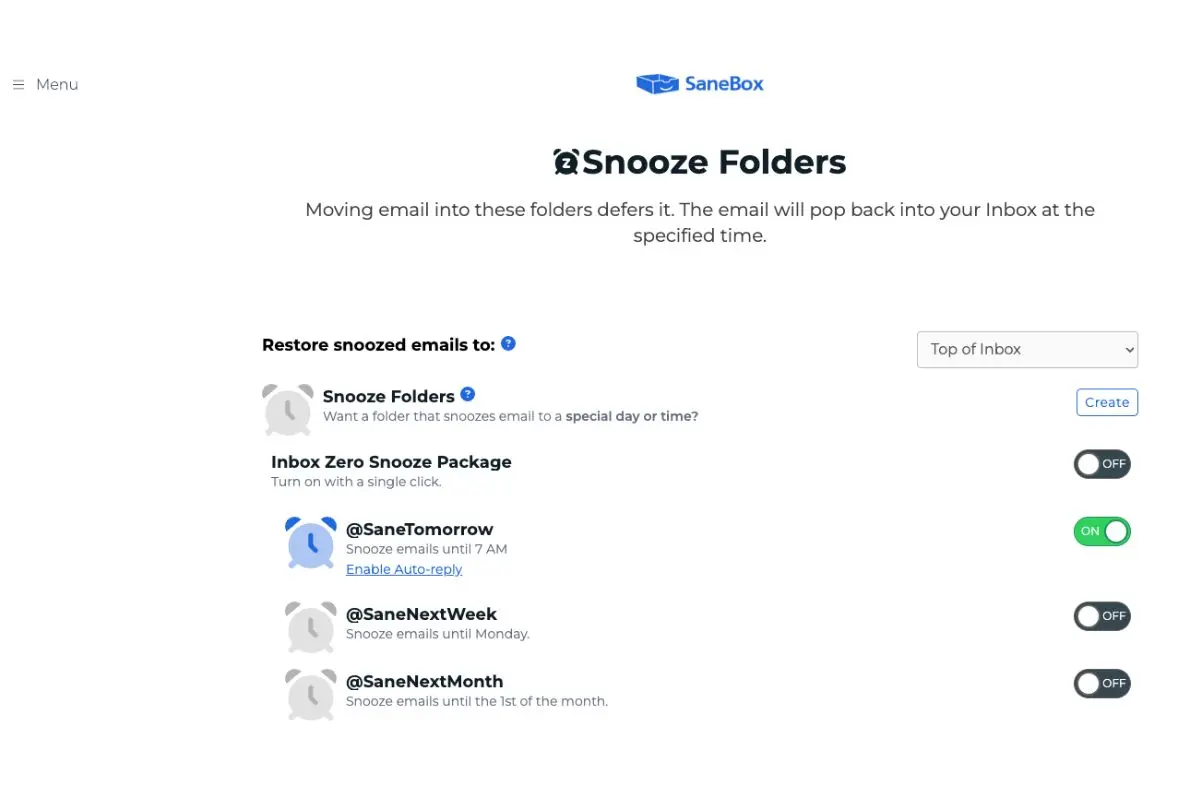
Snooze Emails
Defer to tomorrow, next week, or any date
Ready to see these features in your own inbox?
Start Your Free Trial →14-day free trial • No credit card requiredHow SaneBox Works
Connect Your Email
Works with Gmail, Outlook, iCloud, or any IMAP provider. OAuth for major providers, no passwords needed.
AI Analyzes Your History
SaneBox scans 4-6 weeks of email headers (not content) to learn your patterns and priorities.
Smart Folders Appear
@SaneLater, @SaneNews, and other folders show up in your email sidebar. No app needed.
Train & Improve
Move emails between folders to train the AI. It reaches 98%+ accuracy in 1-2 weeks.
Privacy-First Design
SaneBox only analyzes email headers (sender, subject, timestamp)—never the actual content of your messages.
Key Features
SaneLater
Non-urgent emails filtered to a separate folder. Check when you have time.
SaneBlackHole
Drag emails here to permanently block that sender. No more unwanted messages.
SaneReminders
Snooze emails to resurface later. Get reminded if no one replies.
SaneNoReplies
Track emails you sent that didn't get a response. Never let things slip.
SaneNews
Newsletters and bulk emails go here. Read them in batch.
SaneNotSpam
Rescue important emails from spam. Train it with one click.
Custom Folders
Create your own smart folders with custom rules and filtering.
Daily Digest
Summary email with one-click actions for everything filtered.
Pricing Plans
Save up to 30% with annual or biannual billing.
Save more: Annual saves ~20% • Biannual saves ~30%
Is It Worth It?
*Based on $50K salary. The Lunch plan pays for itself in the first month.
Detailed Pros & Cons
✓ Pros
Works with any email provider that supports IMAP. No lock-in.
Uses your existing email client. Nothing new to learn.
98.5% accuracy after training. Very few false positives.
Users report 3-4 hours saved weekly. That's 150+ hours/year.
Only reads email headers, never the content of your messages.
✗ Cons
Only a 14-day trial. Clean Email offers a free tier if budget is tight.
Takes 1-2 weeks to reach peak accuracy. Requires patience.
No Android app. You can still use SaneBox via your email app.
$7-36/month. Worth it for heavy email users, less so for light users.
Rare after training, but important emails can get filtered initially.
SaneBox vs Alternatives
How does SaneBox stack up against the competition?
| Feature | SaneBox | Clean Email | Superhuman | Spark Mail |
|---|---|---|---|---|
| Starting Price | $7/mo | $10/mo | $30/mo | Free |
| Free Plan | 14-day trial | Limited free | None | ✓ Free tier |
| Email Providers | Any IMAP | Any IMAP | Gmail only | Any IMAP |
| AI Filtering | ✓ Advanced | ✓ Basic | ✓ Advanced | ✓ Basic |
| Mobile App | iOS only | iOS + Android | iOS + Android | iOS + Android |
| Best For | Professionals | Budget users | Power users | Teams |
Which Tool Is Right For You?
SaneBox
Our Top PickBest for: Busy professionals who receive 50+ emails daily and want AI filtering without changing their email workflow. SaneBox works silently in the background with any email provider.

Clean Email
Free TierBest for: One-time inbox cleanup. Great for bulk cleaning but less sophisticated ongoing AI than SaneBox.

Spark Mail
Free PlanBest for: Teams who need shared inboxes and a free option. Requires using their app instead of your existing client.

Superhuman
PremiumBest for: Power users who want the fastest, most polished email experience. $30/month but Gmail/Outlook only.
Frequently Asked Questions
Should You Try SaneBox?
After extensive testing, SaneBox delivers on its promise: less time managing email, more time for actual work. If you receive 50+ emails daily and want AI filtering without switching apps, SaneBox is the best solution available.
The lack of a free plan is the main drawback, but the 14-day trial gives you enough time to see real results. For anyone receiving 50+ emails daily, SaneBox pays for itself within the first month.
Our Recommendation
Start the free trial with your busiest email account. Don't test with light usage—connect your primary inbox to see the full impact.
Ready to Take Control of Your Inbox?
Join 1 million+ professionals who save 3-4 hours every week with SaneBox