
Wondershare PDFelement review
Wondershare PDFelement is a full PDF editor for Windows and Mac. Version 13 adds AI that researches across PDFs and YouTube videos and flags risky contract clauses. It suits anyone who edits, signs and reviews documents and wants that AI inside the same app.
Free trial: 7 days on Mac, 14 on Windows, no card. Plans from $79.99 a year on Wondershare's store.
This review contains affiliate links. We may earn a commission at no extra cost to you.
Verdict: a full PDF editor whose AI goes well beyond chat
As of October 2026, Wondershare PDFelement is a full PDF editor for Windows and Mac with AI that does more than answer questions about a file. In our test, the layout appeared unchanged after our text edits and Lumi answered four of four factual questions correctly. Agreement Copilot flagged all eight risky clauses we planted in a test contract, and AI Spaces turned a PDF and a YouTube video into one research workspace. The trade-off is the AI allowance. Every plan includes only 50 AI uses in total, so regular AI users should budget for the add-on.
What we like
- Contract review that found every planted risk
- AI Spaces goes beyond chatting with one file
- Lumi was accurate and didn't invent answers
Best for. Freelancers, small businesses and teams who edit, sign and review PDFs every week, above all anyone who reads contracts or researches across several documents and wants that AI inside their editor.
Try PDFelement freeWhat we don't
- Only 50 AI uses come with a plan
- Reports lean toward summaries
- No web page import in our Mac test
Not for you if. You only need the odd edit or a quick AI chat with a PDF. LightPDF costs far less, PDF.ai has a free plan for quick questions, and Foxit PDF Editor includes a monthly AI allowance with every account.
Compare alternativesHow we tested Wondershare PDFelement
- Method
- Hands-on test of the AI features, October 20, 2026
- Access
- 7-day premium trial on Mac, PDFelement 13.0.5
- Scope
- Text editing, Lumi, AI Spaces, AI Risk Review, grammar check
- Not tested
- OCR, conversion, redaction, forms, translation, e-signing, Windows
We tested PDFelement 13 (version 13.0.5) on a Mac on October 20, 2026, during a 7-day premium trial that gave us the paid AI features, including AI Spaces and AI Risk Review. We focused on the AI and prepared three test sources. The first was a two-page PDF that mixes real facts about Max Productive AI with clearly labelled fictional data and four planted grammar mistakes. The second was one of our own YouTube videos. The third was a fictional sponsorship agreement with eight deliberately one-sided clauses. We edited text and questioned and summarized the PDF with Lumi. Then we built an AI Space from the PDF and the video, generated a report, ran AI Risk Review on the contract and grammar-checked a paragraph. Prices, AI allowances and trial terms come from Wondershare's store pages and AI help center. User opinion comes from Trustpilot and published reviews. Our testing method explains how we rate tools.
We did not test OCR, file conversion, compression, Smart Redact, Compare, forms, PDF translation, AI rewriting, AI-content detection, e-signatures, or the AI Spaces flashcards, quizzes, podcasts and mind maps. We ran no speed benchmarks and no side-by-side runs against other editors. Our files were small and built to have known answers, so read the results as a controlled first-hand check, not a promise of accuracy on every document.
What changed since our last review
- September 2026
- PDFelement 13 arrived on September 3 with AI Spaces, a research workspace for files and YouTube videos, and Agreement Copilot, which reviews, compares and translates contracts.
- September 2026
- The perpetual license now covers PDFelement 13. Wondershare says major upgrades may need a new purchase.
Wondershare PDFelement
Our rating: 4.5 / 5
Plans start at $79.99 a year, or $129.99 once for a perpetual license.
Try PDFelement freeOr compare Foxit PDF Editor, LightPDF and PDF.ai.
What is Wondershare PDFelement?
Wondershare PDFelement is a PDF editor for Windows and Mac, with companion apps for iOS, Android and the web. It covers the whole PDF job: editing text and images, OCR for scans, conversion to and from Office formats, forms, redaction, comparison and e-signatures. PDFelement 13 arrived on September 3, 2026, and it puts AI at the center of the app.
That AI comes in three parts. Lumi is the assistant you'll use most: it answers questions about a document, summarizes it, translates and checks grammar. The second, AI Spaces, is a research workspace that reads PDFs, Office files and YouTube transcripts together, then turns them into reports, quizzes, flashcards, mind maps or podcasts. Agreement Copilot reviews contracts for risky clauses and links straight to comparison, translation, redaction and signing.
Foxit, UPDF and Adobe Acrobat all include an AI assistant now, so chatting with a PDF no longer sets an editor apart. PDFelement 13 makes its case with two features that go further. Its research space can sit YouTube transcripts next to your files, and Agreement Copilot marks risky clauses inside the document. Its yearly plan also costs less than Foxit's or Adobe's. Our read: if your work involves research material or agreements, those two features are the reason to pick it.
PDFelement hands-on: Lumi, AI Spaces and a contract review
These screenshots come from our test on a Mac, in the order we worked: editing, Lumi, AI Spaces, Agreement Copilot, then a grammar check. Tap or click any image to open it full size.
Editing existing text
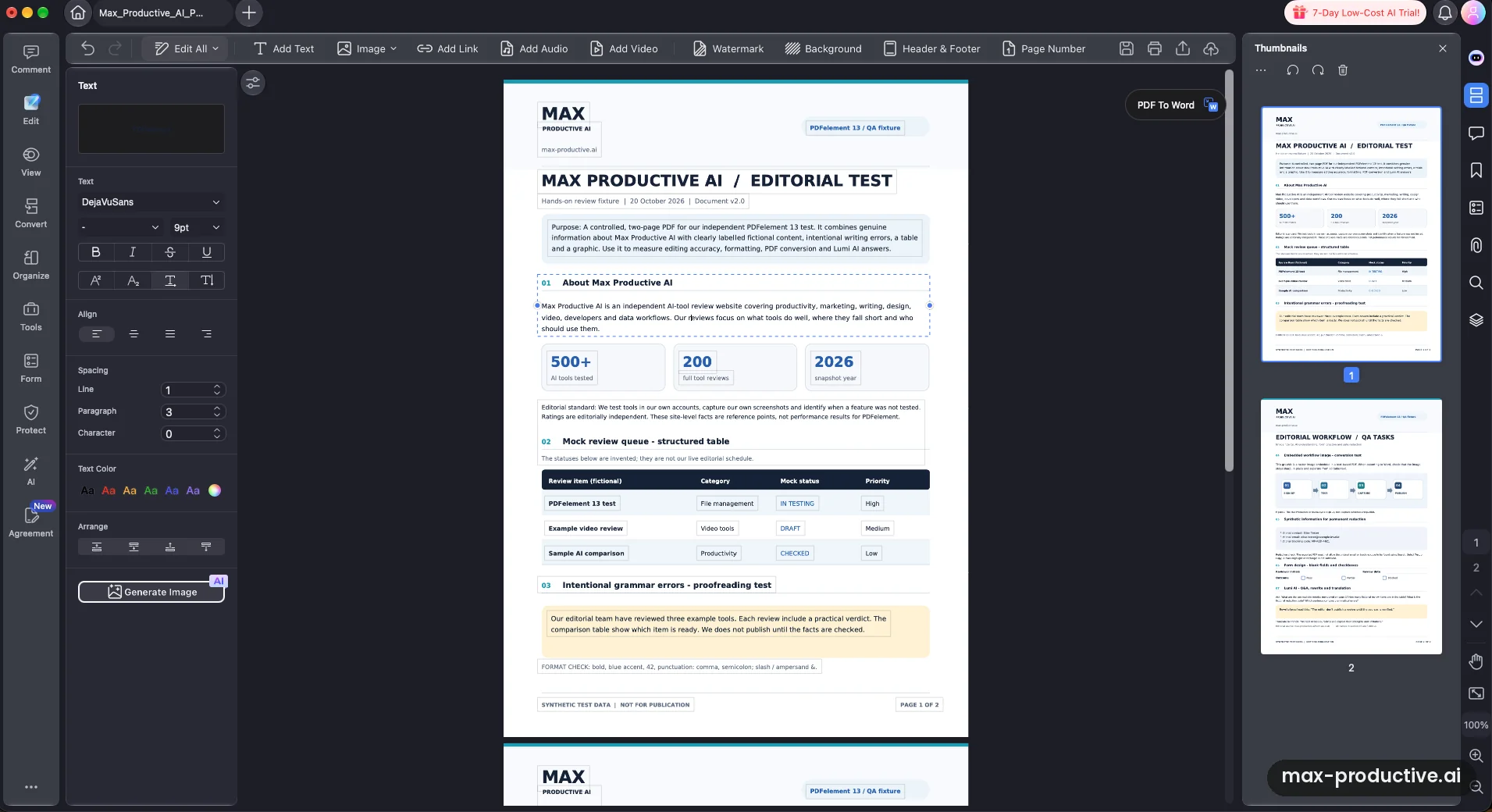
We started with the job most people buy a PDF editor for. In Edit mode, PDFelement turned each paragraph of our two-page test PDF into a text box and picked up the embedded font, DejaVu Sans at 9 pt. We changed a sentence in place, and the typography and the layout around it appeared unchanged.
The toolbar shows how far the editor goes: images, links, watermarks, backgrounds, headers and footers, page numbers, and even audio and video. The text panel also has an AI Generate Image button. We only tested text editing, so treat the rest as what's on offer rather than what we checked.
Lumi Chat With PDF: four questions, four right answers
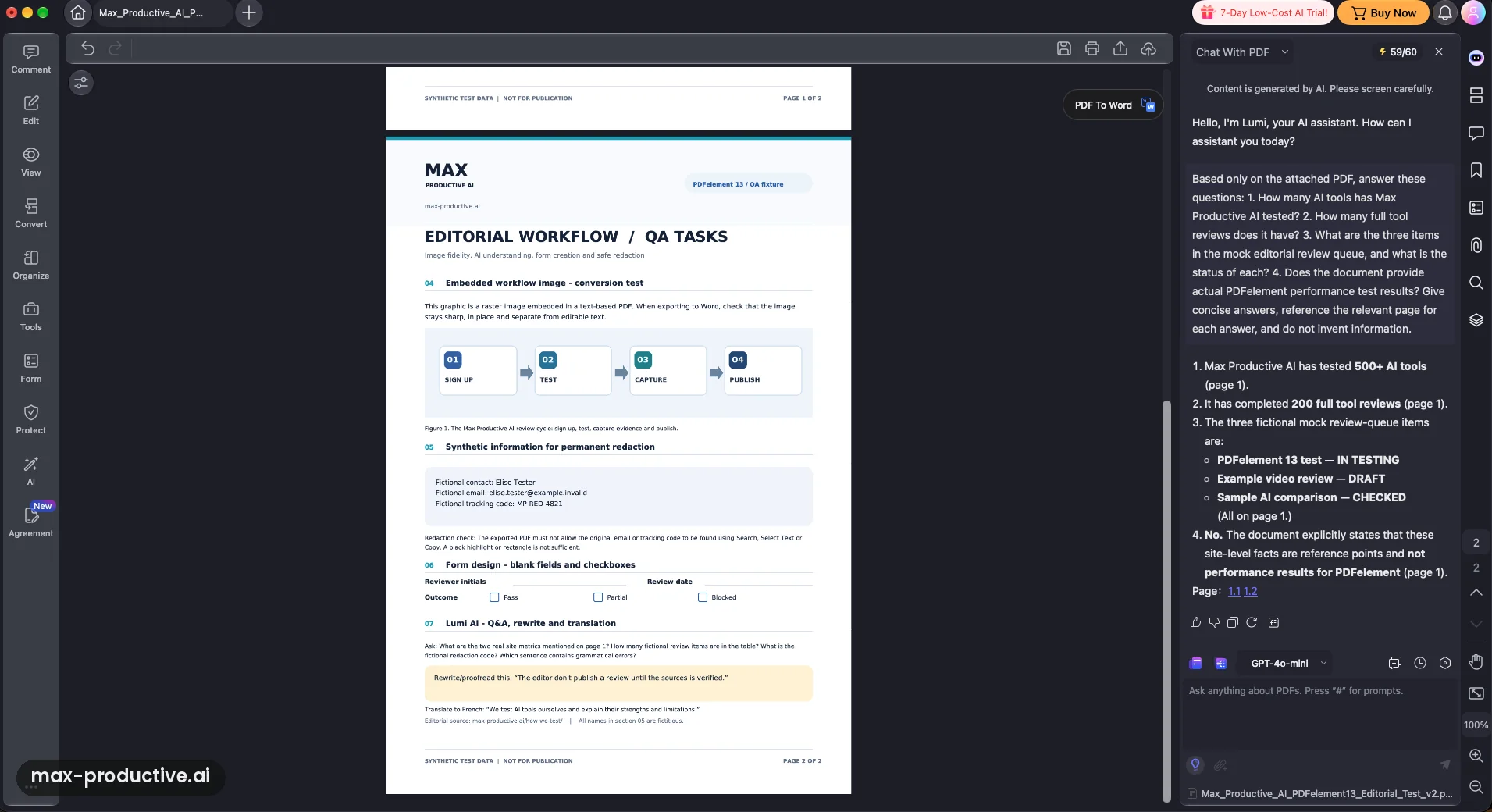
Lumi is PDFelement's AI assistant, and it sits in a side panel next to your document. We asked it four factual questions about our test file. Two were figures from a row of stats, one was about the items and statuses in a table, and one asked whether the PDF held any real PDFelement test results. It got all four right. It read the table correctly, and it said plainly that the document contains no performance results instead of inventing some.
Each answer names its page, with clickable references underneath that we didn't click through. Our read: accurate on a short, clean document. Chat with PDF is standard in this category now, so it's a reason to like PDFelement rather than the reason to choose it.
A summary that kept fact and fiction apart
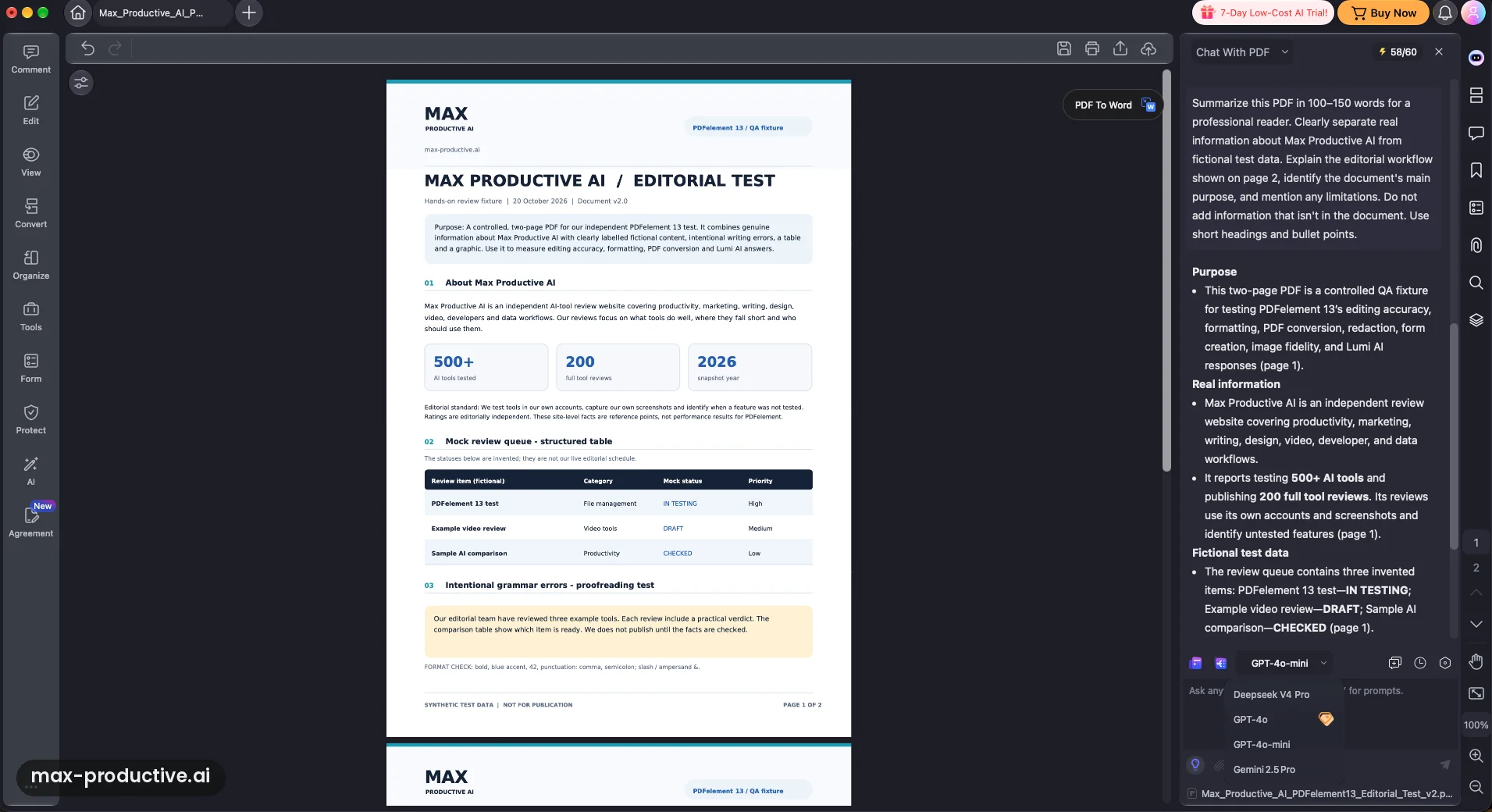
Next we asked for a 100 to 150 word summary that separated real information about Max Productive AI from the fictional test data. Lumi answered under short headings, Purpose, Real information and Fictional test data, and put each point under the right one with its page number. The part we checked was clear and on target. We didn't measure the full answer against our word limit.
The model menu is open in this shot. Our trial offered GPT-4o mini, GPT-4o, DeepSeek V4 Pro and Gemini 2.5 Pro, with a gem icon next to GPT-4o. We ran these tests on GPT-4o mini. We only saw what a trial account shows, so check which models your plan includes.
AI Spaces: one workspace for several sources
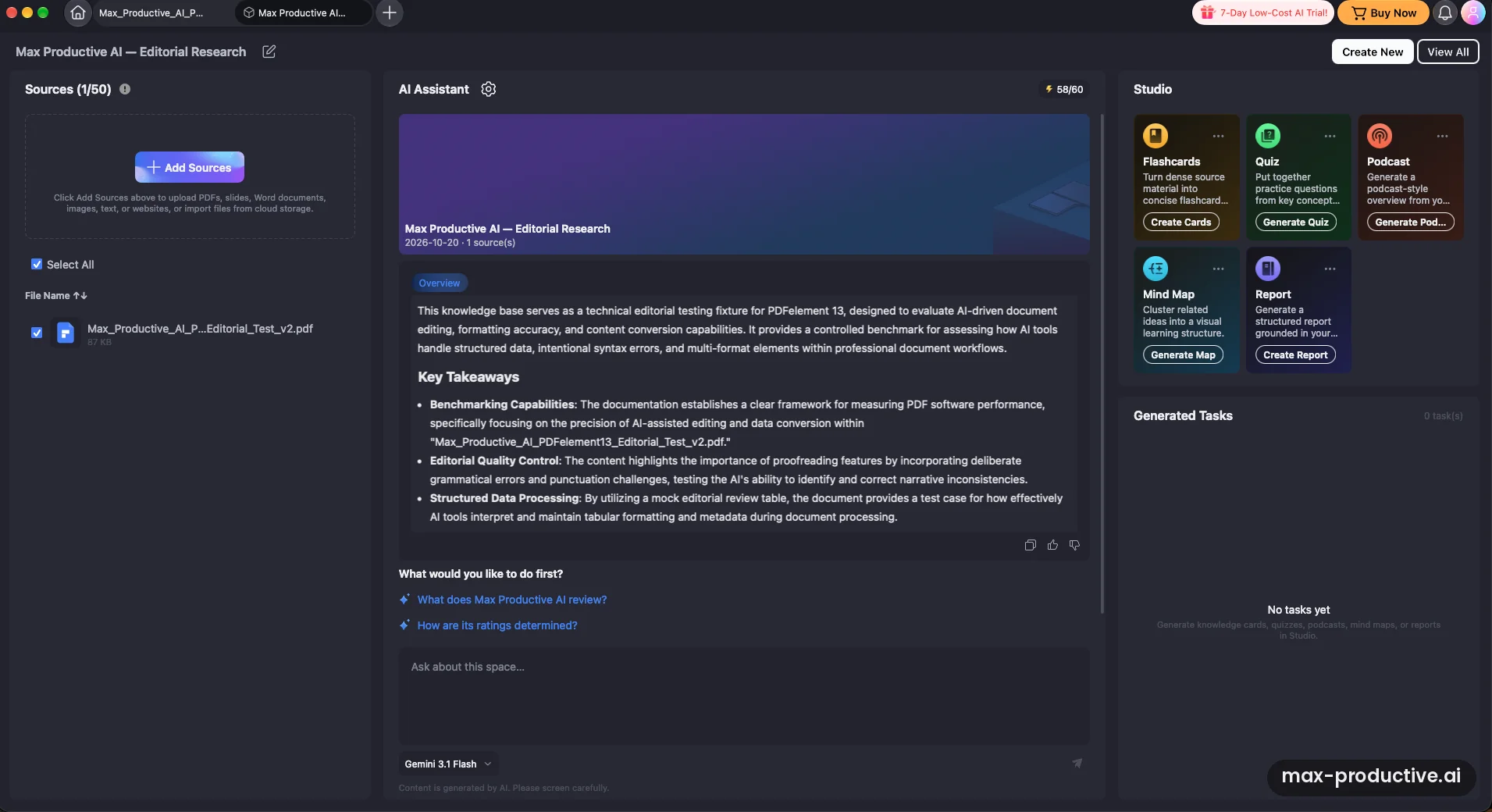
This is where PDFelement 13 feels different from a classic PDF editor. You create a space, add sources, and an assistant works across all of them. We set up an editorial research space and uploaded our test PDF. PDFelement wrote an overview and three key takeaways on its own, then suggested two questions to ask next.
The Studio panel turns your sources into flashcards, a quiz, a podcast, a mind map or a report. We tried the report. The other four were on screen, but we didn't test them. The space ran on Gemini 3.1 Flash, and the source counter showed a limit of 50.
Run the same checks on your own files during the free trial.
Try PDFelement free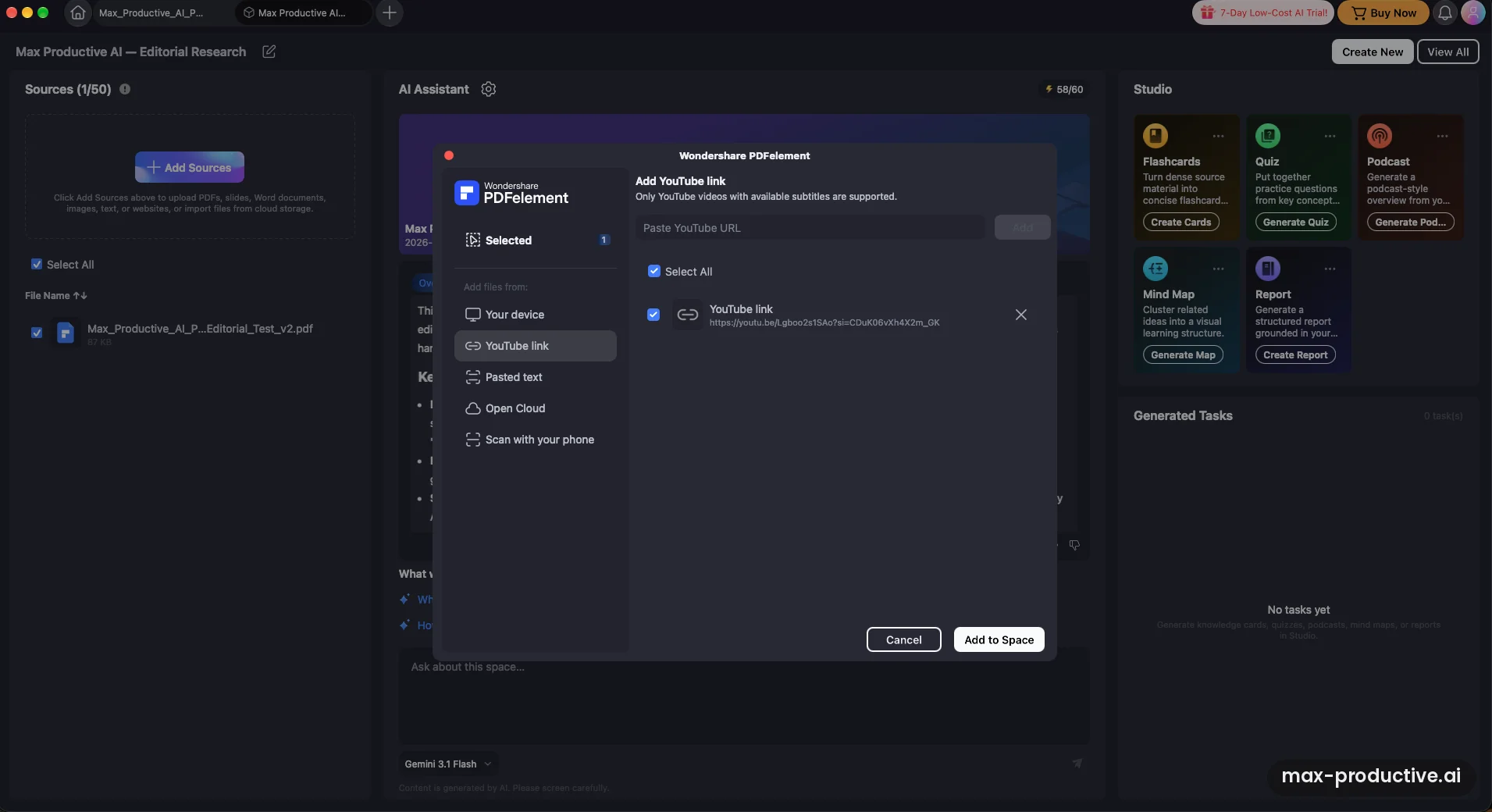
Adding a YouTube video as a source
Sources can come from your Mac, a YouTube link, pasted text, cloud storage or a phone scan. We pasted the link to one of our own videos, a walkthrough of building an agent in Lindy 3.0, and PDFelement added it as a source called "YouTube link.pdf". The dialog says only videos with available subtitles are supported, so the assistant works from the transcript.
One gap on the Mac version we tested: the dialog had no option to import a web page by URL. If your research lives on websites, save the pages as PDFs or paste the text in first.
One question across two sources
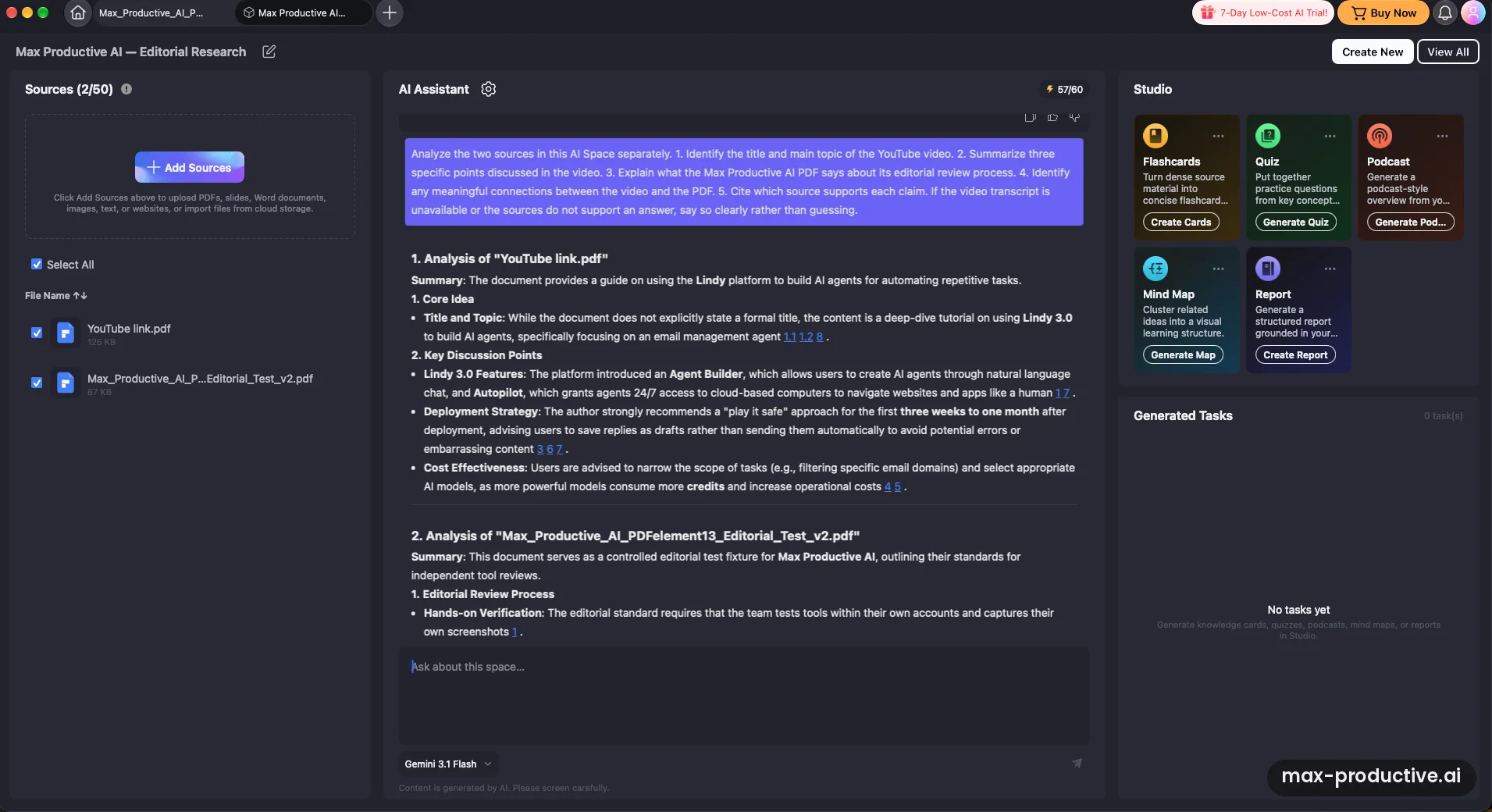
With the video and the PDF in the same space, we asked a five-part question. We wanted the video's title and topic, three points it makes, and what our PDF says about our editorial process. We also asked for the links between the two and which source backs each claim. Finally, we told it to say so if the sources didn't support an answer.
The answer handled each source separately, with numbered references after the claims. It pulled specific advice from the video, such as keeping a new agent on drafts for the first three weeks to a month, and how model choice affects credit use. When the transcript gave no formal title, it said so rather than making one up. We didn't check every reference number, but this is the behavior you want from a research assistant.
A report built from both sources
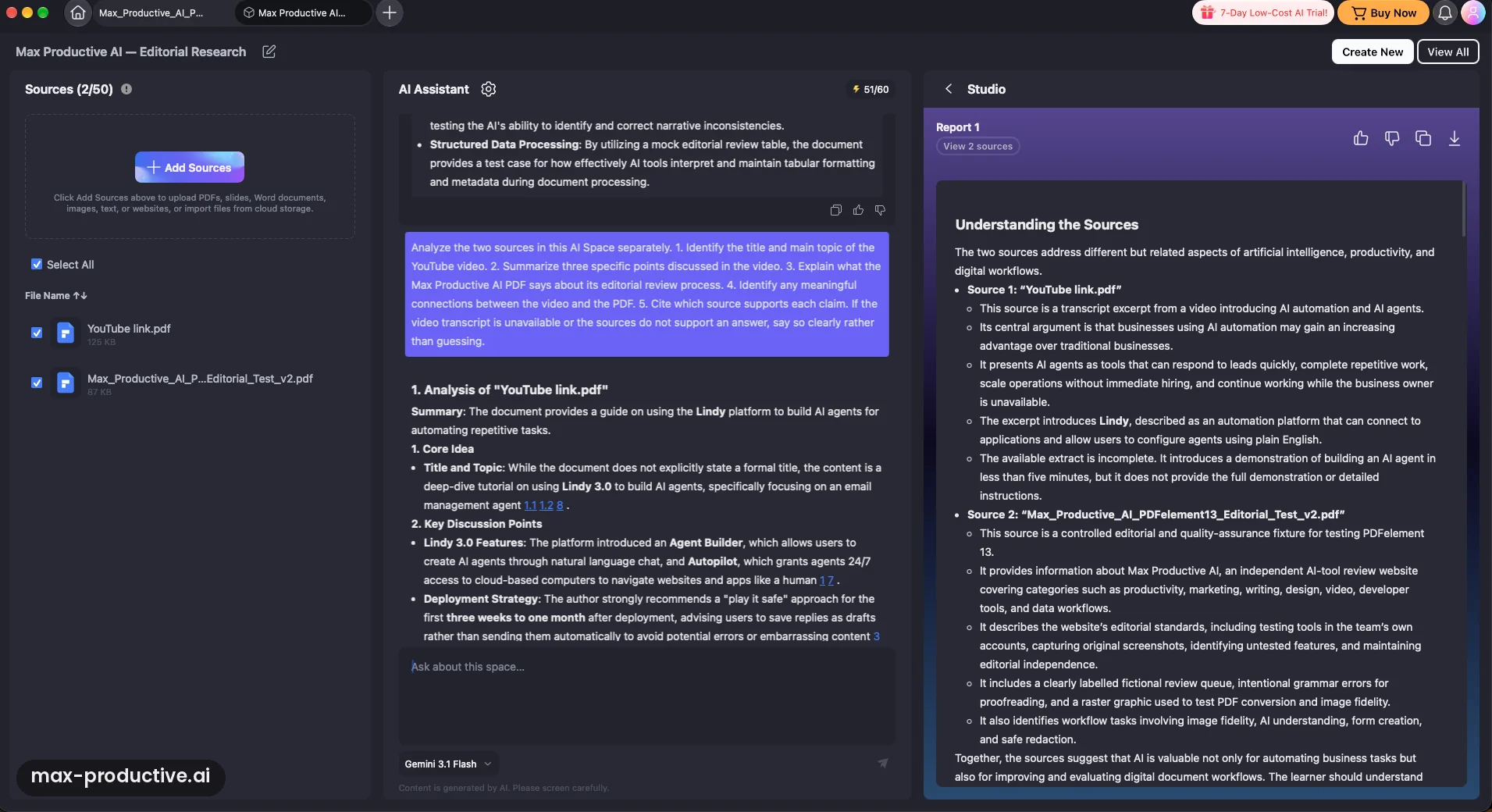
Studio's Report button produced "Understanding the Sources", a structured, readable write-up that describes each source and then what they share. It's a tidy starting point. In the part we read, though, it isn't the targeted, actionable briefing on Lindy we asked for. It summarizes the sources, and its closing lines address "the learner", which reads more like study notes.
One detail to watch: the report called the video source an incomplete extract, while the chat answer just before it had listed specific advice from the same video. Our advice: use a report for the overview, then ask follow-up questions in chat for the details you need. Wondershare's guide also lists a Custom report type next to Brief, Standard and In-depth, which is the one to try when you need a specific deliverable.
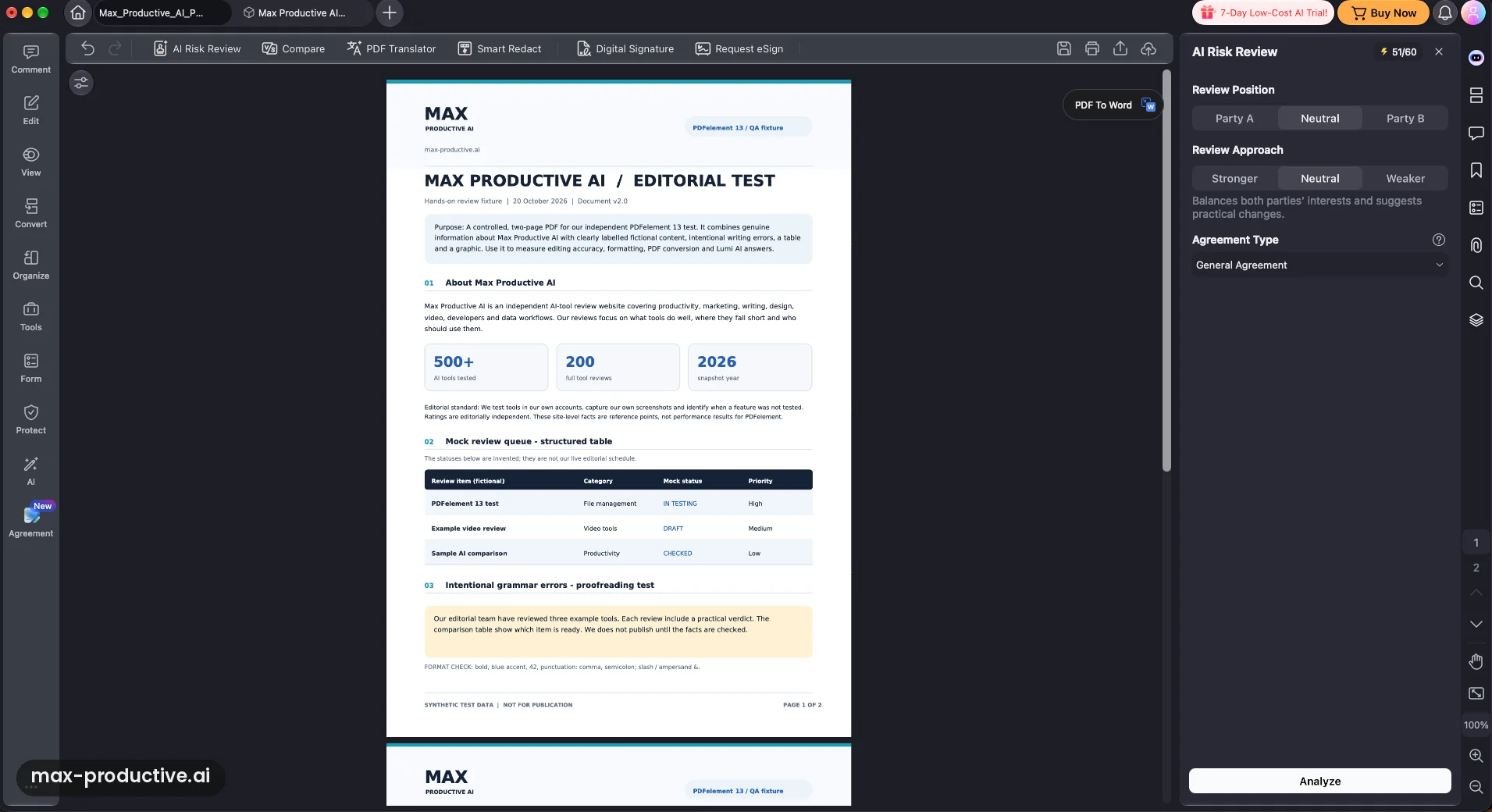
Agreement Copilot and the review settings
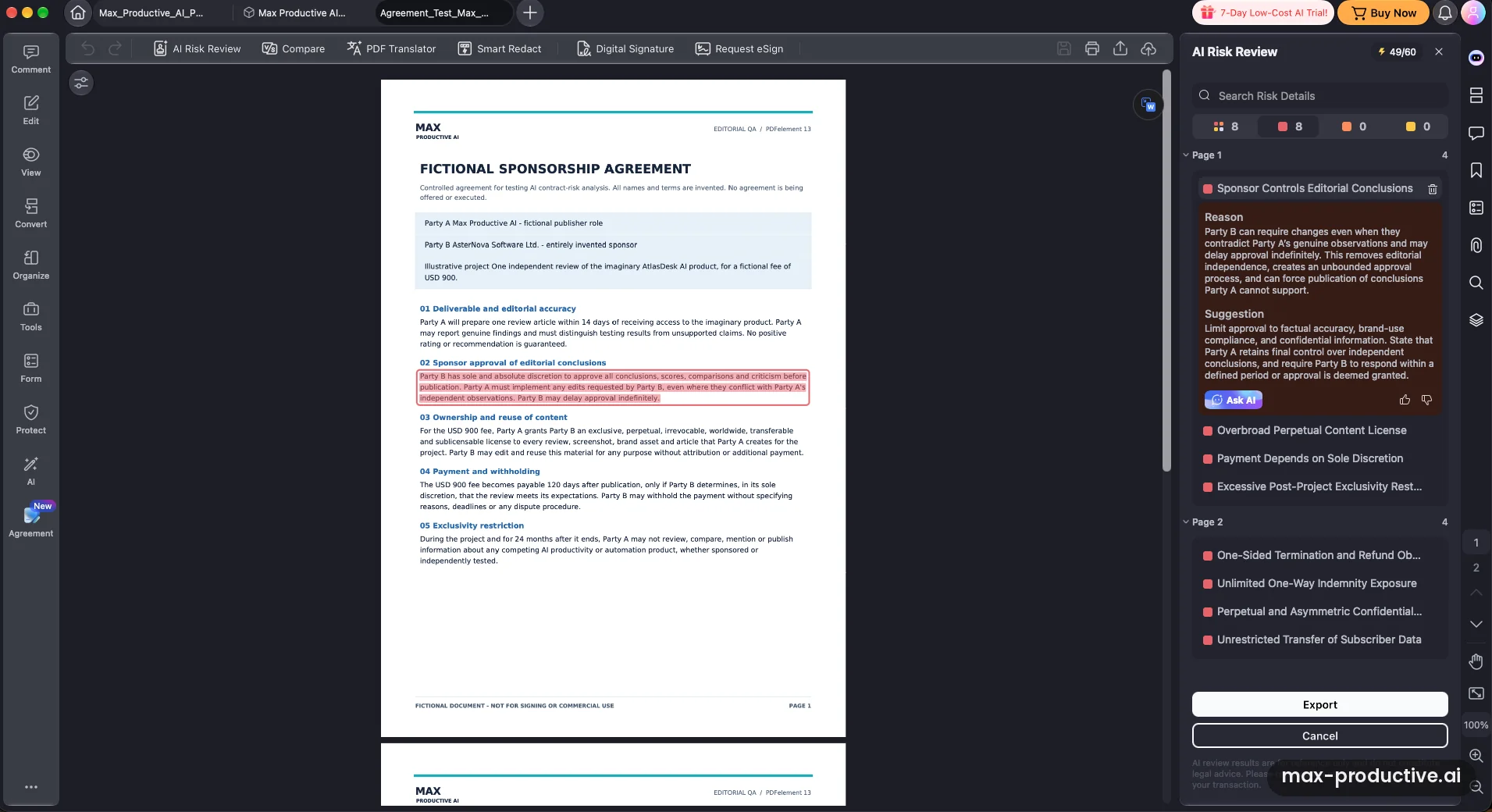
Agreement Copilot lives in its own Agreement tab in the left sidebar, marked New, with a toolbar for AI Risk Review, Compare, PDF Translator, Smart Redact, Digital Signature and Request eSign. Before a review, you pick whose side you're on (Party A, Neutral or Party B), how firmly it should push (Stronger, Neutral or Weaker) and the agreement type.
We like that the side is a setting. A clause that's fine for a sponsor can be a problem for a publisher, and the review can reflect which one you are.
Eight planted risks, eight flags
For this test we wrote a two-page fictional sponsorship agreement with eight clauses that work against the publisher. They gave the sponsor approval over editorial conclusions, a perpetual content license, payment at its discretion and 24 months of exclusivity. The rest covered one-sided termination, unlimited indemnity, one-sided confidentiality and free transfer of subscriber data. AI Risk Review flagged all eight as high risk, grouped them by page, and highlighted each clause in the document.
Every flag comes with a plain-English reason, suggested wording and an Ask AI button to dig further. This was the strongest measurable result of our test. Keep two things in mind. We didn't judge the legal quality of the suggestions, and, as PDFelement's own footer says, the review is not legal advice. Use it to prepare the points you'll raise with your lawyer or the other side.
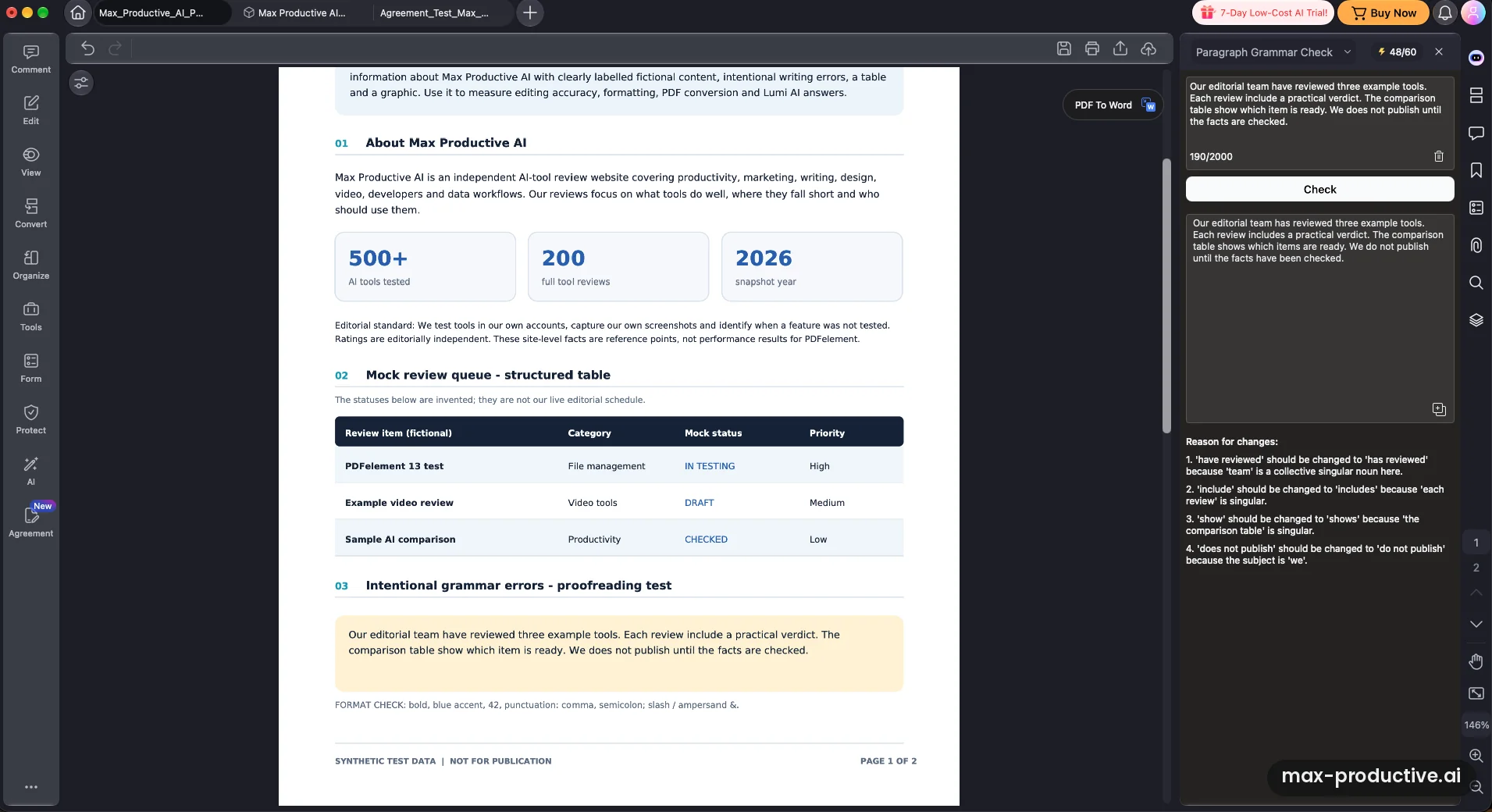
Paragraph Grammar Check
Last, we pasted a paragraph with four planted mistakes into Lumi's Paragraph Grammar Check. It fixed all four ("team have" to "team has", "review include" to "review includes", "table show" to "table shows", "We does" to "We do") and explained each one in a numbered list. Each check takes up to 2,000 characters.
It also made two small edits it didn't list, such as "which item is ready" becoming "which items are ready". That's harmless here, but it shifts the meaning slightly, so read the corrected text before you paste it back.
PDFelement key features
Here's what PDFelement 13 includes and where the AI allowance comes into play. Where a feature goes beyond our test, we rely on Wondershare's guides and store pages.
-
Lumi AI assistant
Uses AI creditsChat with a PDF, summarize, explain, rewrite, translate and check grammar from a side panel. Wondershare lists GPT-4o, GPT-4o mini, Gemini 2.5 Pro and DeepSeek V4 Pro as its models. A completed chat session or paragraph check counts as one AI use. In our test, Lumi was accurate on factual questions and honest about what the document didn't contain.
-
AI Spaces
New in version 13A workspace for PDFs, Word, Excel and PowerPoint files, text files, images, pasted text, PDFelement Cloud files and YouTube videos with subtitles. The in-app counter showed a limit of 50 sources. It writes an overview, answers questions with citations, and builds reports (Brief, Standard, In-depth or Custom), quizzes, flashcards, mind maps and podcasts you can export as MP3. Creating a space is free, and the AI actions draw on your uses.
-
Agreement Copilot
New in version 13AI Risk Review reads a contract from the side you choose and sorts risks into high, medium and low, each with a reason and suggested wording. Wondershare says it's tuned for common US and Canadian business agreements, from NDAs and SaaS contracts to leases. It costs one AI use per page, and the same tab links to Compare, side-by-side translation, Smart Redact and e-signatures.
-
PDF editing
Edit text and images in place, add links, watermarks, headers and footers, page numbers and backgrounds, and even embed audio or video. In our test, edited text kept its font and the layout around it appeared unchanged.
-
OCR and conversion
OCR turns scans into searchable, editable text in more than 20 languages (Wondershare's own pages give slightly different counts). Conversion covers Word, Excel, PowerPoint, images and more, with a longer list of formats on Windows than on Mac. We didn't test either.
-
Forms, signatures and cloud
Fill and build forms, sign documents yourself, and send them for signature through PDFelement Cloud. The plan table lists three Request eSign sends on each paid plan, so heavy senders will want a dedicated e-signature service. Plans include 20GB of cloud storage, or 100GB with cross-platform plans.
-
Smart Redact and protection
Uses AI creditsSmart Redact finds and masks sensitive details such as names, ID numbers and bank card numbers, based on the country and privacy standard you pick. It costs one AI use per page. Password protection sits alongside it. We didn't test redaction.
Our advice: check the AI counter before big jobs. A 30-page contract review takes 30 AI uses, so the allowance that comes with a plan goes quickly once you rely on Risk Review or Smart Redact. Also note that Wondershare's AI terms say chat, summaries, grammar checks and translation upload the PDF to your PDFelement Cloud first. If your company restricts cloud tools for confidential files, check that before you run contracts through it.
PDFelement pricing
As of October 2026, PDFelement costs $79.99 a year for one platform, $109.99 for two years or $129.99 once for a perpetual license. AI beyond the included 50 uses is a separate add-on, and today's prices are part of a version 13 launch promotion.
| Plan detail | Yearly | 2-Year | Perpetual |
|---|---|---|---|
| Single platform (Windows or Mac) | $79.99 a year | $109.99 for 2 years | $129.99 once |
| Cross-platform (desktop, mobile, web) | $89.99 a year | $119.99 for 2 years | $139.99 once |
| Price shown crossed out (single platform) | $129 | $149 | $159 |
| Renewal | Renews automatically until you cancel | Renew manually | None. Major upgrades may cost extra |
| AI included | 50 AI uses in total | 50 AI uses in total | 50 AI uses in total |
| Cloud storage | 20GB, or 100GB cross-platform | 20GB, or 100GB cross-platform | 20GB, or 100GB cross-platform |
| Request eSign sends | 3 | 3 | 3 |
Swipe sideways to see every plan.
Prices come from Wondershare's US store pages and AI help center, last verified on October 20, 2026. Prices in the Mac App Store version are different.
Check today's price and the launch promotion.
See PDFelement plansWhich PDFelement plan should you choose?
Pick the single-platform yearly plan if you work on one computer and want every update. Choose cross-platform if you move between a Mac or PC and your phone, because mobile and web access come with it. The perpetual license suits buyers who'd rather pay once and stay on version 13 for a few years. Wondershare says it includes minor updates, while major upgrades may cost extra. The 2-year plan doesn't renew automatically, which some buyers prefer.
Is PDFelement worth the money?
For the editor alone, yes. The yearly plan costs less than Foxit PDF Editor ($129.99 a year) or Adobe Acrobat Standard ($14.99 a month on an annual plan), and it covers editing, OCR, conversion, forms and signing. The AI changes the math a little. Our single test session used 12 AI uses, so the 50 included won't last long if you lean on AI Spaces or Risk Review.
In that case, add the annual AI pack at $39.99. That brings the total to about $120 a year. Foxit's plan includes 300 AI credits a month, so estimate how much AI you'll really use before you choose. If you'll mostly edit and sign, the base plan is enough.
AI add-on prices and how uses are counted
The AI add-on comes in four auto-renewing packs: $3.99 a month for 1,000 uses, $9.99 a quarter for 3,000, $19.99 for six months for 6,000, or $39.99 a year for 12,000. A chat session, summary or paragraph grammar check counts as one use. AI Risk Review and Smart Redact count one use per page, and PDF translation one per 10 pages. Space reports and quizzes vary with the number of files. Failed or cancelled tasks don't count.
You'll also see AI trial offers. On Mac, each plan card offers a free 7-day AI trial that then renews at the annual AI price. Wondershare's AI help center also lists a "7 Days Low-Cost AI Trial" at $1.99 that renews the same way, and the banner in our app used the same name. If you only want to test, set a reminder to cancel before day seven.
Free trial, refunds and renewals
The free trial lasts 7 days on Mac and 14 days on Windows, with no card. It lets you test nearly all features, but saved files carry a watermark, conversion and compression are restricted, and Wondershare lists 10 AI uses. Our premium trial showed a larger counter of 60, so allowances vary by offer. Wondershare offers a 30-day money-back guarantee under the conditions of its refund policy, and AI credits you've used aren't refundable. Yearly plans renew automatically until you cancel.
Team and Mac App Store pricing
Team licenses for 1 to 10 users cost $139 per user as a one-time price, and larger teams get a custom quote. If you buy through the Mac App Store, the plans and prices are different, with Standard and Pro tiers, so compare them with the direct store before you subscribe.
PDFelement pros and cons
Pros
Contract review that found every planted risk
AI Risk Review flagged all eight one-sided clauses in our test agreement, grouped them by page and highlighted each one in the PDF. Each flag offers a reason and suggested wording. It's a clear first pass before you talk to a lawyer.
AI Spaces goes beyond chatting with one file
Mixing PDFs, Office files and YouTube transcripts in one space, then asking questions across them, is a real research workflow. Our two-source answer kept the sources apart and added numbered references. Reports, quizzes, mind maps and podcasts come from the same panel.
Lumi was accurate and didn't invent answers
Four of four factual answers were right, including one that meant reading a table. Asked about results that weren't in the document, Lumi said so instead of making some up. The grammar check fixed every planted error and explained each fix.
Text editing keeps your layout
Edit mode picked up our embedded font, and the layout around our edited sentence appeared unchanged. For many buyers that's still the main job, and it went smoothly.
Lower price than Foxit or Acrobat
At today's launch prices, the single-platform yearly plan costs less than Foxit's yearly plan or Acrobat Standard, and a perpetual license is still on offer if you'd rather pay once.
Desktop, mobile and web covered
Windows, Mac, iOS, Android and web, with cross-platform plans from $10 more. Files sync through PDFelement Cloud, with 20GB or 100GB included.
Cons
Only 50 AI uses come with a plan
That's 50 in total, not per month. Our single test session used 12, and Risk Review costs one use per page. If you'll use the AI every week, budget for the AI add-on as well.
Reports lean toward summaries
Our AI Spaces report was tidy and readable, but the part we read summarized both sources rather than giving the targeted briefing we asked for. Treat it as a first draft and ask follow-up questions in chat for the specifics.
No web page import in our Mac test
The Mac source dialog offered files, YouTube, pasted text, cloud and phone scans, but no website import, and Wondershare's guides don't list one. Save pages as PDFs or paste the text in instead.
Pricing takes some reading
Single or cross-platform, yearly, two-year or perpetual, a launch promotion, separate AI packs and different Mac App Store prices. It's all on the store pages, but read the plan card and the AI terms, and check whether an AI trial is added at checkout.
AI output still needs a human check
The grammar check made two edits it didn't list, and one shifted the meaning slightly. Risk Review's suggestions are a starting point, and Wondershare itself says they aren't legal advice. Read AI changes before you accept them.
Some users report frequent upgrade prompts
Frequent upgrade offers are a common theme in Trustpilot reviews, and our trial window carried Buy Now and AI trial banners too. They're easy to close. Perpetual owners also mention that major new versions cost extra, which Wondershare states on its store page.
PDFelement alternatives
The four PDF tools below sit in our file management directory. The table compares them with PDFelement.
| Compared on | PDFelement Reviewed | Foxit PDF Editor | UPDF | LightPDF | PDF.ai |
|---|---|---|---|---|---|
| Entry paid plan | $79.99 a year | $129.99 per user a year | $49.99 a year (promotion) | $15.99 a year | $10 a month, billed yearly |
| One-time option | $129.99 perpetual | $209.99 perpetual, without AI | $79.99 lifetime | $39.99 lifetime | None listed |
| AI included | 50 uses in total, add-on from $3.99 a month | 300 credits a month on every account | AI Assistant sold separately | 1,000 credits a month on the yearly plan | The core of the product |
| Platforms | Windows, Mac, iOS, Android, web | Windows, Mac, web | Windows, Mac, iOS, Android, web | Web, desktop and mobile | Web and Chrome extension |
| Standout strength | AI Spaces and contract risk review | AI credits included every month | One license for four devices | Low price for AI PDF tools | Simple chat with PDFs |
| Best for | Research and contract-heavy work | Businesses that want AI built into the plan | Budget buyers on several devices | Light editing in the browser | Asking questions about PDFs |
Swipe sideways to see every tool.
PDFelement vs Foxit PDF Editor
Foxit is the closest match: a full desktop editor for Windows and Mac, with web access and an AI assistant. It costs $129.99 a year, and every account gets 300 AI credits a month, which suits steady AI use without an add-on. PDFelement costs less up front, and its version 13 brings AI Spaces with YouTube sources and Agreement Copilot's contract review. If research or contracts are a big part of your work, compare those two with Foxit's AI tools during both free trials. If you want AI credits bundled every month, Foxit is the easier fit. Our Foxit vs PDFelement comparison goes deeper.
PDFelement vs Adobe Acrobat
Acrobat is Adobe's own PDF editor and the one many companies standardize on. Acrobat Standard costs $14.99 a month on an annual plan, and the AI Assistant comes with Acrobat Studio at $24.99 a month. PDFelement covers the everyday editing, OCR, conversion and signing jobs for considerably less. Choose Acrobat if your clients or your company require it. Otherwise PDFelement is well worth a trial first.
Which alternative fits you?
-

Foxit PDF EditorOur rating: 4.6 / 5
Best for: Businesses that want a full desktop editor with AI credits included every month.
Foxit PDF Editor costs $129.99 per user a year, or $159.99 for Editor+, which adds mobile apps, eSign and Smart Redact. Every account gets 300 AI credits a month, and a perpetual license is available without AI. It's a strong choice for teams on Windows and Mac.
-

UPDFOur rating: 4.4 / 5
Best for: Budget-minded buyers who work across several devices and want one license for all of them.
UPDF Pro costs $49.99 a year on its current promotion, or $79.99 for a lifetime license, and one license covers four devices across Windows, Mac, iOS, Android and web. Its AI Assistant is sold separately. We haven't published a full UPDF review yet.
-

LightPDFOur rating: 4.1 / 5
Best for: Occasional users who want AI PDF tools in the browser for a small yearly fee.
LightPDF costs $15.99 a year with 1,000 AI credits a month, or $39.99 for a lifetime plan, and it has a free web plan. It's lighter than a desktop editor like PDFelement, which suits quick jobs more than heavy editing.
-

PDF.aiOur rating: 4.0 / 5
Best for: People who mainly want to ask questions about PDFs, not edit them.
PDF.ai has a free plan and a Pro plan at $10 a month billed yearly, plus a Chrome extension. It focuses on chat and data extraction, so pair it with an editor if you also need to change documents.
PDFelement FAQ
Is Wondershare PDFelement free?
No, Wondershare PDFelement has no free plan, but it has a free trial: 7 days on Mac and 14 days on Windows, with no credit card. The trial lets you test nearly all features, but files you save carry a watermark, conversion and compression are restricted, and AI is limited to a few uses. After that you need a yearly, two-year or perpetual plan.
How much does PDFelement cost?
As of October 2026, Wondershare PDFelement costs $79.99 a year for one platform, $89.99 a year cross-platform, $109.99 for two years, or $129.99 once for a perpetual license. These are launch promotion prices for version 13. AI beyond the 50 included uses is a separate add-on. Team licenses cost $139 per user as a one-time price.
What's new in PDFelement 13?
Wondershare PDFelement 13, released on September 3, 2026, adds AI Spaces and Agreement Copilot. The research space reads PDFs, Office files, images and YouTube transcripts together and creates reports, quizzes, flashcards, mind maps and podcasts. Agreement Copilot reviews contracts for risky clauses, compares versions and translates side by side. Wondershare also points to faster performance.
Does PDFelement include AI, and is it limited?
Yes, Wondershare PDFelement includes AI, but it's metered. Every paid plan comes with 50 AI uses in total, not per month. A chat session counts as one use, while AI Risk Review and Smart Redact count one per page. For regular use, the AI add-on costs $3.99 a month for 1,000 uses or $39.99 a year for 12,000.
Can PDFelement review contracts?
Yes, Wondershare PDFelement's Agreement Copilot includes AI Risk Review, which flags risky clauses from the side you choose and suggests new wording. In our test it caught all eight problem clauses we planted in a fictional agreement. Wondershare says it doesn't provide legal advice, so use it to prepare questions for a lawyer, not to replace one.
Can PDFelement analyze YouTube videos?
Yes, Wondershare PDFelement's AI Spaces accepts YouTube links as sources, as long as the video has subtitles, because it works from the transcript. We added one of our own videos next to a PDF and asked questions across both, and the answers cited each source. Web pages weren't an option in the Mac version we tested.
Is PDFelement better than Adobe Acrobat?
Wondershare PDFelement costs much less than Adobe Acrobat and covers the everyday jobs: editing, OCR, conversion, forms and signing. Its AI Spaces and contract review are strong reasons to choose it, though heavy AI use needs the add-on. Acrobat remains the safer pick if your clients or company standardize on Adobe. For everyone else, PDFelement is well worth trying first.
Does PDFelement work on Mac?
Yes, Wondershare PDFelement has a native Mac app for macOS 11 or later, on Apple silicon and Intel Macs. We tested version 13 on a Mac, including AI Spaces and Agreement Copilot. The Mac trial lasts 7 days rather than 14, and Wondershare's specs list fewer conversion formats on Mac than on Windows.
Is the PDFelement perpetual license worth it?
Wondershare PDFelement's perpetual license costs $129.99 once for one platform and gives lasting access to version 13 with its minor updates. Major upgrades may cost extra, and AI is still limited to the 50 included uses. It pays off if you'd keep version 13 for more than two years. Otherwise the yearly plan keeps you on the latest version.
Should you try Wondershare PDFelement?
PDFelement 13 is easy to recommend if PDFs are part of your weekly work. The editor covers the everyday jobs, and the new AI goes well past chat: a research space that mixes files and videos, and a contract review that found every risk we planted. The main limits are the AI budget and the need to check AI output. Only 50 AI uses come with a plan, the pricing has several moving parts, and AI output still needs a careful read. For most people who edit, sign and review documents, PDFelement earns its 4.5.
What we'd do. Download the free trial and plan your 7 days (14 on Windows) around real files. Edit one document you'd normally send to a colleague. Build an AI Space from the PDFs and videos behind a current project and ask it the question you'd ask an assistant. Run AI Risk Review on a contract you already know well, so you can judge its flags. Watch the AI counter as you go, then choose between the yearly plan, the perpetual license and the AI add-on.
Our rating: 4.5 / 5
Excellent
About this review
Based on a hands-on test of PDFelement 13 on a Mac during a 7-day premium trial, Wondershare's store pages, AI help center and user guides, and public user feedback. First published 12 November 2025. Last updated 20 October 2026.
Sources checked
- Pricing and AI allowances. PDFelement store and AI help center, checked October 20, 2026.
- Features and release. PDFelement release notes, AI Spaces guide and AI contract review page.
- Independent opinion. User reviews on Trustpilot, plus TechRadar and Macworld reviews.
Ratings are our overall editorial judgment on a 5-point scale: 4.5 and up is Excellent, 4.0 to 4.4 Very good, 3.5 to 3.9 Good, 3.0 to 3.4 Fair. We do not use sub-scores.
This review contains affiliate links, so we may earn a commission at no extra cost to you. Our ratings and editorial opinions remain independent.