

Descript
AI-powered all-in-one video & podcast editor that lets you edit media by editing text. Record, transcribe, edit, collaborate, and publish — with 30+ AI tools including Underlord AI co-editor, Studio Sound, voice cloning, and AI video generation.
Try Descript Free →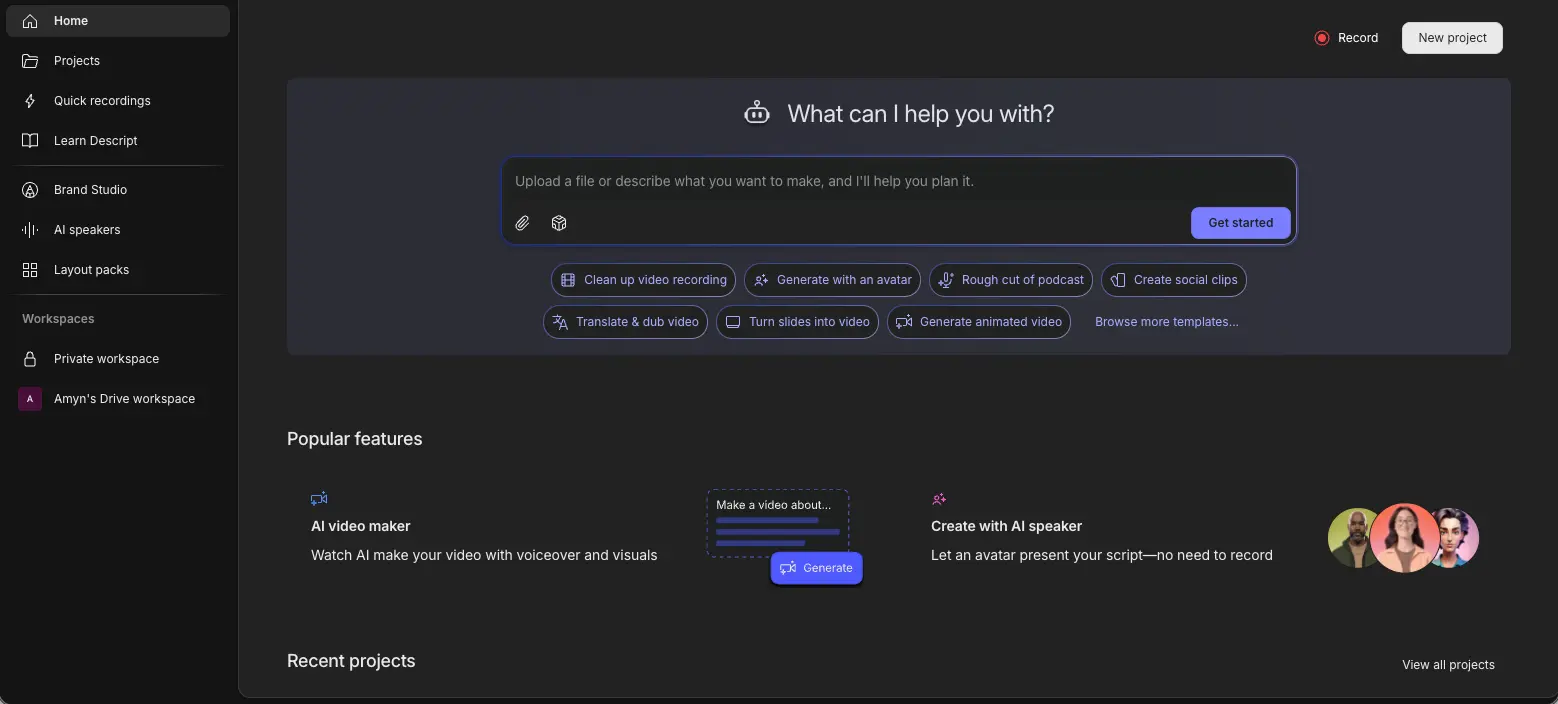
The AI Video & Podcast Editor
That Thinks Like a Document
Descript has genuinely reimagined video and podcast editing. Its text-based editing paradigm — where you edit media by editing a transcript — reduces editing time by an estimated 60–70% for spoken-word content. Combined with 30+ AI tools including the Underlord AI co-editor, Studio Sound audio enhancement, voice cloning, and AI video generation, it's one of the most innovative content creation platforms available. The free plan lets you evaluate the workflow before committing, and paid plans start at just $16/month.
✓ What We Love
- Text-based editing is a genuine game-changer
- 30+ AI tools with Underlord AI co-editor
- Studio Sound transforms any audio quality
- Free plan for evaluation, strong security
! Could Be Better
- AI credits can run out quickly for heavy users
- Occasional stability issues on complex projects
- No offline editing mode available
What Is Descript?
A comprehensive overview of the platform, its origins, and who it's built for.
Descript is an AI-powered all-in-one video and audio editing platform that pioneered the concept of text-based media editing — the ability to edit video and audio by simply editing a transcript, much like working in a Google Doc. When you import a video or audio file, Descript automatically transcribes it, and you can then cut, rearrange, or delete content by editing the text. Delete a sentence from the transcript, and it's removed from the video instantly.
Founded in 2017 by Andrew Mason — the former CEO and founder of Groupon — Descript was born from a frustration with traditional waveform-based editing while Mason worked on his audio tour startup, Detour. Today, the platform serves over 6 million creators and teams, including organizations like The New York Times, HubSpot, NPR, and Al Jazeera. It holds a strong 4.7/5 rating on G2 from 846+ reviews.
What makes Descript unique in the video editing landscape is its breadth. It's not just an editor — it's a complete content creation ecosystem. Beyond text-based editing, Descript includes AI-powered audio enhancement (Studio Sound), voice cloning (AI Speakers / Regenerate), automatic filler word removal, AI video and image generation using models like Veo 3.1 and Sora 2, remote recording for up to 10 guests (Descript Rooms), real-time Google Docs-style collaboration, translation and dubbing in 30+ languages, and an agentic AI co-editor called Underlord that can execute multi-step editing tasks from natural language instructions.
The platform also exports timelines to Adobe Premiere Pro, DaVinci Resolve, and Final Cut Pro — making it an excellent rough-cut and assembly tool within professional workflows. For creators who need speed and accessibility, Descript can replace traditional editors entirely. For professionals who need finishing power, it complements their existing NLE of choice.
Who Is Descript Best For?
Descript is ideal for podcasters, YouTubers, course creators, marketing teams, and journalists who primarily produce talking-head, interview, tutorial, or voiceover-driven content. It's particularly well-suited for creators who value editing speed over pixel-perfect control, teams that need real-time collaboration, and anyone who finds traditional timeline-based editing intimidating or time-consuming. If you work with spoken-word content, Descript can genuinely transform your workflow.
Descript serves content creators across multiple categories — podcasters editing interview shows, YouTubers producing tutorials, educators building online courses, marketers creating social clips, and distributed teams collaborating on branded video content. The platform is available as a desktop app for macOS and Windows, as a web app for Chromium-based browsers, and offers view-only access on mobile devices.
See Descript in Action
Real screenshots from the platform showing key features and the content creation workflow.
Dashboard & AI Assistant
Your central hub for creating and managing all video and audio projects
The Descript dashboard greets you with a conversational AI prompt: "What can I help you with?" The left sidebar provides quick access to Projects, Quick Recordings, Brand Studio, AI Speakers, and Layout Packs. Quick-start templates let you jump into specific workflows — clean up video recordings, generate with an avatar, rough cut a podcast, create social clips, translate and dub video, turn slides into video, or generate animated video. The "Popular features" section highlights the AI Video Maker and AI Speaker creation tools.
New Project Creation Workflow
Three paths to start creating — upload, generate from prompt, or paste a script
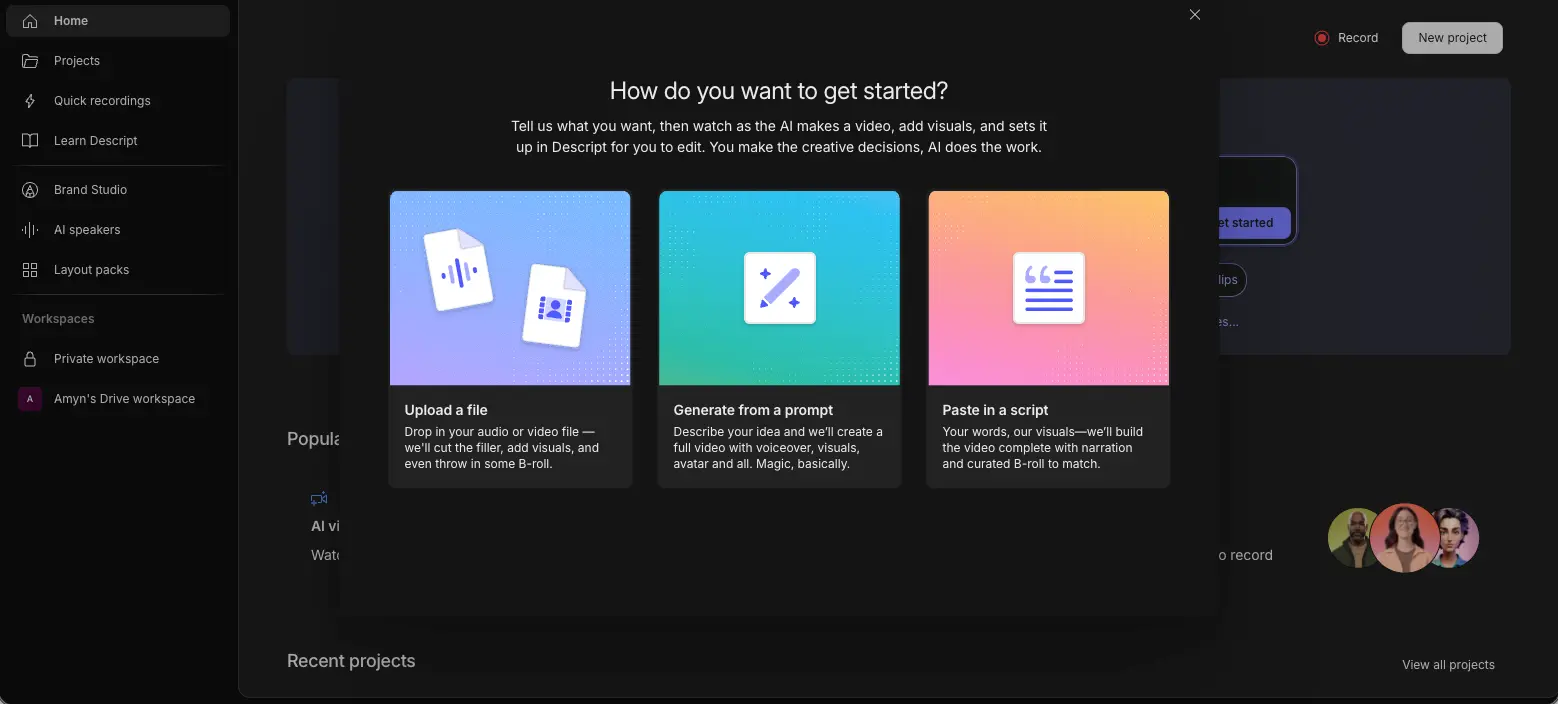
When starting a new project, Descript offers three distinct creation paths. "Upload a file" lets you drop audio or video for AI-powered cleanup and editing. "Generate from a prompt" uses AI to create a full video with voiceover, visuals, and avatar from a text description. "Paste in a script" builds a complete video with narration and curated B-roll from your own written content. This flexibility means Descript works whether you have existing footage to edit or are starting from scratch with just an idea.
AI Tools Panel — Sound & Visual Enhancement
The full suite of AI tools accessible from the editor sidebar
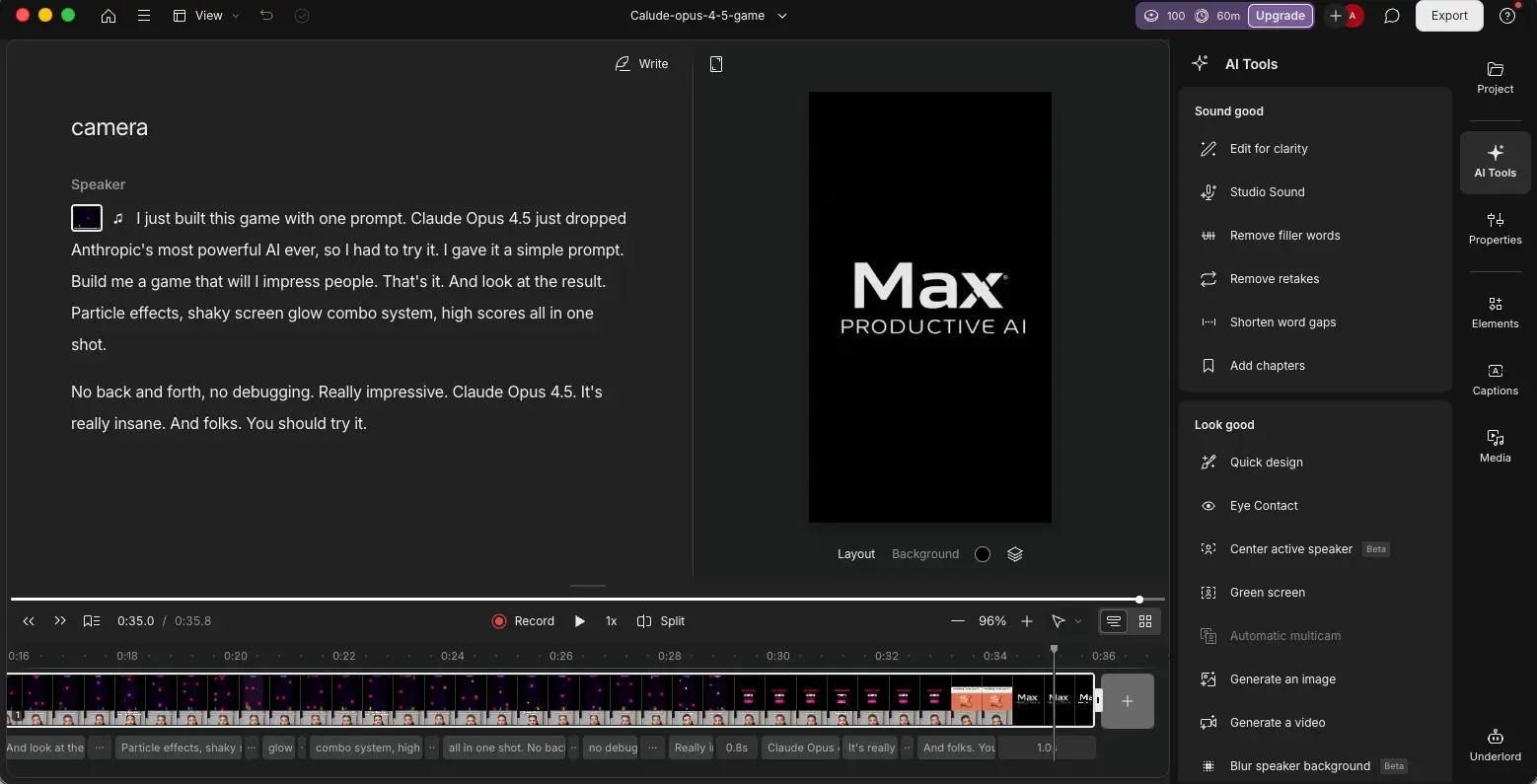
The AI Tools panel is organized into two clear categories. "Sound good" includes Edit for Clarity, Studio Sound (one-click audio enhancement), Remove Filler Words, Remove Retakes, Shorten Word Gaps, and Add Chapters. "Look good" includes Quick Design, Eye Contact correction (makes it appear you're looking at the camera), Center Active Speaker, Green Screen background removal, Automatic Multicam, and AI image and video generation. The text-based transcript editor sits alongside the video preview, letting you edit media and apply AI tools simultaneously.
Captions & Styling Panel
Professional caption styles with one-click application across scenes
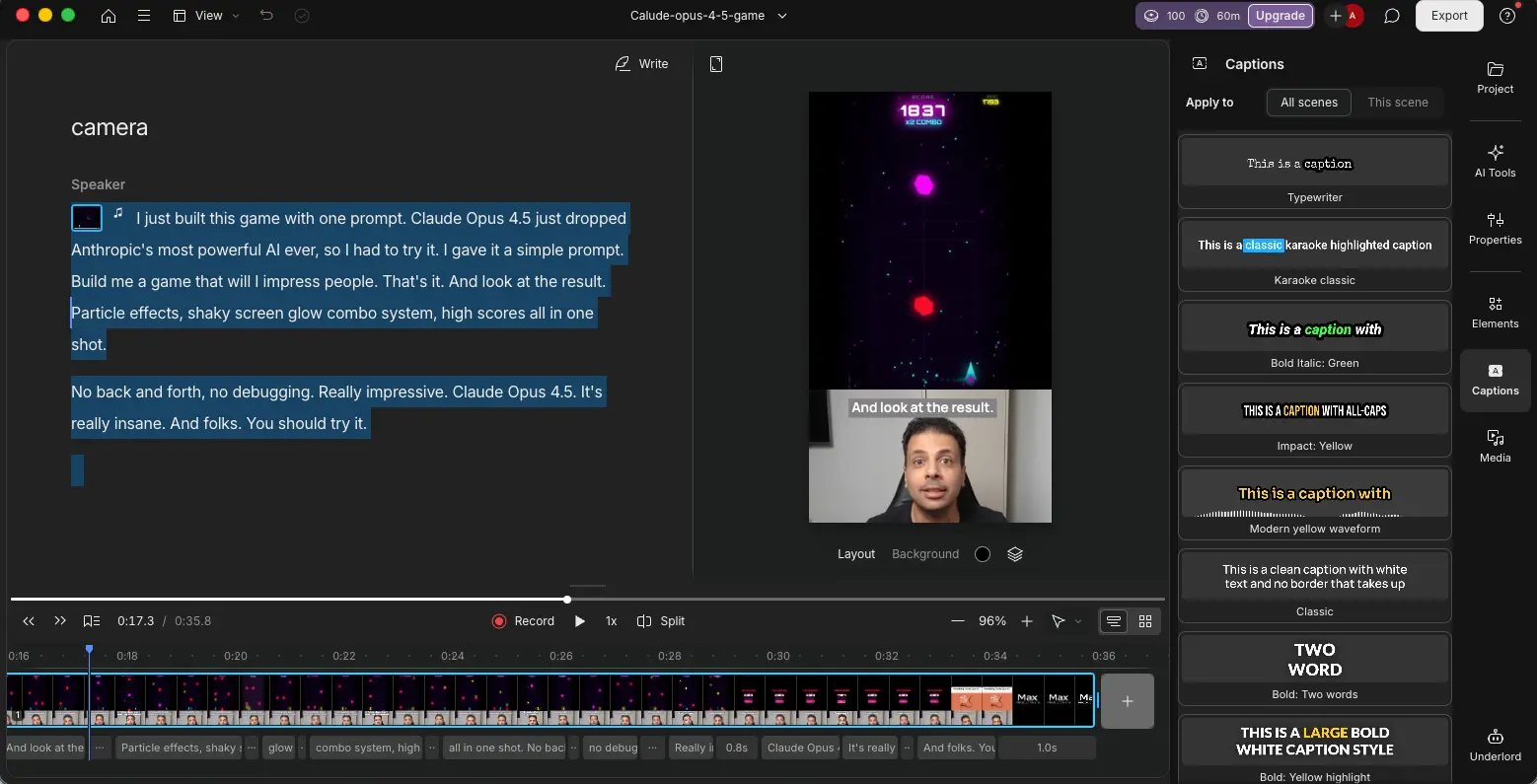
The Captions panel showcases Descript's approach to professional video styling. Multiple pre-built caption styles — including Typewriter, Karaoke Classic, Bold Italic Green, Impact Yellow, Modern Yellow Waveform, Classic White, Bold Two Words, and Large Bold White — can be applied to all scenes or individual scenes with one click. The left panel shows the transcript that directly controls the video timeline, with the highlighted text synced to the current playback position. This is text-based editing in action: every word on the left corresponds to a moment in the video on the right.
Ready to experience text-based video editing with 30+ AI tools?
Try Descript Free →Free plan available • No credit card requiredHow Descript Works
From raw footage to polished content in four simple steps.
Import or Record Your Content
Start by uploading a video or audio file, recording directly in the app (including screen + webcam capture), or using Descript Rooms for remote recording with up to 10 guests. You can also generate entirely new content from a text prompt or script using AI. Descript supports all common media formats, and uploaded files are automatically stored in the cloud for access across devices.
Automatic Transcription (~95% Accuracy)
Once imported, Descript automatically transcribes your content with approximately 95% accuracy across 25 supported languages. The AI identifies individual speakers (Speaker Detective), and you can add a custom glossary for brand-specific terms and names to improve accuracy. The transcript appears alongside your media in a document-style editor — this is where the magic happens.
Edit by Editing Text + AI Tools
This is Descript's core innovation. Delete a sentence from the transcript, and it's removed from the video. Rearrange paragraphs, and the video follows. Highlight filler words and press delete. Beyond text editing, apply AI tools like Studio Sound (audio cleanup), Eye Contact correction, Green Screen, and filler word removal — or use Underlord, the AI co-editor, to execute complex multi-step edits from natural language instructions like "Remove all ums, add captions, and create 3 social clips."
Export, Publish, or Repurpose
Export your finished content in up to 4K resolution (on Creator plan and above), or export timelines directly to Adobe Premiere Pro, Final Cut Pro, DaVinci Resolve, or other professional NLEs for further polish. Descript can also generate social clips, translate and dub content into 30+ languages with lip sync, create show notes, write video descriptions, and publish shareable web pages with embedded players — all from the same project.
Enterprise-Grade Security
Descript is SOC 2 Type II compliant and aligns with GDPR and CCPA standards. All data at rest uses AES-256 encryption, and data in transit is protected via HTTPS with TLS 1.2. Media is stored on encrypted AWS and Google infrastructure. Voice cloning requires explicit user consent, and your data is never sold or shared with third parties.
Real-Time Collaboration
Descript supports Google Docs-style co-editing with timestamped comments, sharing, and team feedback. Multiple team members can work on the same project simultaneously — making it ideal for distributed teams, agencies, and content operations that need to review and iterate quickly.
Key Features
Everything that makes Descript a comprehensive content creation platform.
Text-Based Editing
Edit video and audio by editing the transcript — delete words, rearrange sections, and make cuts just like editing a text document. Descript's flagship innovation that reduces editing time by an estimated 60-70% for spoken-word content.
Underlord AI Co-Editor
An agentic AI assistant that executes multi-step editing tasks from natural language. Say "remove filler words, tighten pacing, and create 3 social clips" and Underlord handles it. Supports Claude, GPT, and Gemini models.
Studio Sound
One-click AI audio enhancement that removes background noise, echo, and hiss while boosting speech clarity. Consistently praised by users as a standout feature that makes even poor-quality recordings sound professional.
AI Video & Image Generation
Create video clips from text prompts using Veo 3.1, Sora 2, and Kling. Generate images with Flux 2 Pro. Access 35+ stock AI avatars or create custom avatars from photo uploads. Ideal for B-roll and supplementary visuals.
Voice Cloning (AI Speakers)
Clone your voice to type corrections instead of re-recording. The Regenerate feature repairs audio and matches surrounding tone. Best suited for short corrections and gap-filling rather than full narrations. English only.
Descript Rooms
Remote recording studio for up to 10 participants with backup cloud recordings, lossless WAV capture, audio-only mode, and producer controls. Rooms recordings don't count against your transcription balance.
Translation & Dubbing
Caption translation in 61 languages, audio dubbing in 30+ languages with native-sounding AI speakers in 14 languages. Lip sync matches the speaker's mouth movements to translated audio for natural-looking results.
Timeline Exports to NLEs
Export timelines to Adobe Premiere Pro (XML), Final Cut Pro (FCPXML), DaVinci Resolve (XML/AAF), Reaper, Adobe Audition, and Pro Tools. Makes Descript an excellent rough-cut tool within professional workflows.
Beyond these core capabilities, Descript offers automatic filler word removal, AI Eye Contact correction, Green Screen background removal, automatic multicam editing, screen recording, AI clip creation for social media, and content generation tools for show notes, video descriptions, and blog post drafts. All AI features are metered through an AI credit system that varies by plan.
Experience all 30+ AI features with the free plan:
Try Descript Free →Free plan available • No credit card requiredDescript Pricing Plans
Five tiers from free evaluation to enterprise deployment — with annual billing savings.
Free
Hobbyist
Creator
Business
Annual billing saves ~33% compared to monthly. Enterprise plans with SSO/SCIM, custom AI controls, and flexible licensing available on request. Education and non-profit discounts offered.
Is Descript Worth the Investment?
Text-based editing reduces editing time by an estimated 60–70% for spoken-word content. At $50/hour, saving even 10 hours monthly represents $500 in value — for a $16-50 investment. Descript also replaces 3-5 separate tools (transcription, editing, recording, captions, AI generation), potentially saving $200-400/year in additional subscriptions.
Comparing to alternatives: CapCut Pro costs $19.99/month with a 15-minute video limit; Adobe Premiere Pro starts at $22.99/month without AI transcription or voice cloning; VEED.io Pro starts at $24/month but is browser-only; Riverside.fm Pro is $24/month but has a much simpler editor. Descript's Creator plan at $24/month offers the broadest combination of AI tools and editing capabilities at that price point. However, if you need unlimited AI without per-use metering, the credit system is worth evaluating during the free trial.
Detailed Pros & Cons
An honest, balanced assessment based on extensive evaluation.
✓ Pros
Descript's core innovation genuinely changes the content creation workflow. Editing video by editing text is intuitive and dramatically faster — users report 60-70% time savings compared to traditional timeline editing. If you produce spoken-word content, this paradigm feels like a leap forward.
Underlord AI co-editor, Studio Sound, voice cloning, AI video/image generation, filler word removal, Eye Contact, Green Screen, translation/dubbing, and more — all in one platform. This breadth would cost $200+ per month if purchased as separate services.
One-click AI audio enhancement consistently receives praise across reviews. It transforms recordings made in untreated rooms with background noise into professional-sounding audio. For podcasters and creators without dedicated recording spaces, this feature alone can justify the subscription.
Timeline exports to Adobe Premiere Pro, Final Cut Pro, DaVinci Resolve, and more make Descript an excellent rough-cut tool within professional workflows. You get the speed of AI-assisted editing and the finishing power of your preferred NLE.
Google Docs-style real-time co-editing, timestamped comments, and Brand Studio (Business plan) make Descript well-suited for teams. Multiple team members can work on the same project simultaneously.
Unlike many competitors requiring payment upfront, Descript's free plan lets you experience the text-based editing workflow and basic AI tools before committing. It's limited (60 minutes, 100 credits), but sufficient to validate whether the approach works for you.
✗ Cons
Nearly every AI feature consumes credits — Studio Sound (10), filler word removal (10), Eye Contact (10), video generation (8), and even Underlord conversations. Heavy users may find credit allocations insufficient, particularly on the Hobbyist and Creator plans. Top-ups are available but add to costs.
Some users report crashes, lag, and freezing on longer or more complex projects. Descript ships frequent bug fixes and the overall experience has improved, but stability remains an area where the platform is still maturing.
All media is cloud-stored and AI processing happens on remote servers. You need an active internet connection (recommended 50 Mbps down / 10 Mbps up) for all operations. This can be a drawback for creators working in low-connectivity environments or during travel.
Descript is not designed for advanced color grading, complex visual effects, multi-cam automation, or broadcast-standard finishing. Professional video editors will still need Premiere Pro or DaVinci Resolve for final polish on high-end productions.
AI Speakers (voice cloning) sound natural for brief corrections and gap-filling, but longer passages can lose the natural rhythm and intonation of real speech. It's English-only and best used as a correction tool rather than for full narration.
Descript's rapid development pace means the interface and feature locations change regularly. While this brings improvements, it can temporarily disrupt established workflows for power users who have built muscle memory around specific layouts.
Descript vs Alternatives
How Descript compares to other video editing tools — and which tool fits your workflow best.
| Feature | Descript | CapCut | VEED.io | Podcastle |
|---|---|---|---|---|
| Starting Price | Free / $16/mo | Free / $9.99/mo | Free / $9/mo | Free / $14.99/mo |
| Text-Based Editing | ✓ Core feature | ✗ | ✗ | ✗ |
| AI Co-Editor | ✓ Underlord (multi-model) | ✗ | ✗ | ✗ |
| Voice Cloning | ✓ AI Speakers | ✗ | ✗ | ✓ |
| AI Audio Cleanup | ✓ Studio Sound | ✓ Basic | ✓ Clean Audio | ✓ Magic Dust |
| Remote Recording | ✓ Rooms (10 guests) | ✗ | ✗ | ✓ (10 guests) |
| Translation/Dubbing | ✓ 30+ languages + lip sync | ✗ | ✓ 50+ languages | ✗ |
| NLE Export | ✓ Premiere, FCP, DaVinci | ✗ | ✗ | ✗ |
| Max Resolution | 4K (Creator+) | 4K (Pro) | 4K (Pro+) | 4K (Pro+) |
| Platforms | Mac, Win, Web | All platforms | Web only | Web, Mac, Win |
| Best For | Podcasters, creators, teams | Short-form social content | Quick browser editing | Podcast-focused creators |
Which Tool Is Right For You?
Descript
Best All-in-OneBest for: Podcasters, YouTubers, course creators, and marketing teams who produce talking-head, interview, or voiceover-driven content. Ideal if you value editing speed, need AI-powered tools across the entire production pipeline (record → edit → enhance → publish), want real-time team collaboration, and prefer a platform that grows with your content needs. The text-based editing approach and Underlord AI co-editor are unique advantages no competitor matches.

CapCut
Powerful Free TierBest for: Social media creators focused on TikTok, Reels, and Shorts who need trending templates, auto-captions, and quick mobile editing. Exceptionally powerful free tier with great template library. Limitations: 15-minute video cap on free, no text-based editing, no voice cloning, no remote recording. Choose CapCut if short-form social content is your primary output.

VEED.io
Browser-FirstBest for: Marketers and social media managers who need quick, browser-based video editing with great subtitles and simple branding — no software installation required. Excellent caption generation in 50+ languages and a more intuitive interface for beginners. Choose VEED if you need fast browser-based editing and don't require text-based editing, voice cloning, or remote recording.

Podcastle
Podcast FocusBest for: Podcast-first creators on a budget who need built-in podcast hosting, remote recording for 10 guests, Magic Dust audio enhancement, and voice cloning at a lower price point ($14.99/mo vs $24/mo). Simpler interface with fewer video features. Choose Podcastle if podcasting is your sole focus and you want a streamlined, affordable all-in-one solution.

Wondershare Filmora
Traditional EditorBest for: Creators who want a more traditional video editing experience with motion tracking, keyframing, color grading with LUTs, and AI features at a lower price point ($69.99/year or $79.99 one-time perpetual license). Recently added AI subtitles and text-based editing. Choose Filmora if you prefer timeline-based editing with more visual effects depth and want to avoid ongoing subscription costs.

Gling
YouTube FocusBest for: YouTubers who specifically need AI-powered rough-cut editing to automatically remove silences, bad takes, and filler words from long-form videos. Gling is more specialized than Descript — it focuses on one workflow (YouTube editing) and does it well. Choose Gling if YouTube content is your primary focus and you want a simpler, more targeted editing tool.

Pictory
Script-to-VideoBest for: Marketers and content creators who need to turn long-form text content (blog posts, articles, scripts) into engaging videos automatically. Pictory excels at text-to-video conversion with stock footage matching. Choose Pictory if your workflow starts from written content rather than recorded video or audio.
Frequently Asked Questions
Should You Try Descript?
After thorough evaluation, Descript stands out as one of the most innovative content creation platforms available in 2026. The text-based editing paradigm genuinely changes how you work with video and audio — it's faster, more intuitive, and more accessible than traditional timeline editing for spoken-word content. Combined with 30+ AI tools, the Underlord AI co-editor, Studio Sound, voice cloning, AI video generation, and professional NLE exports, Descript delivers a remarkably comprehensive platform that can replace multiple separate tools.
The limitations are worth noting: the AI credit system introduces usage awareness that some creators find restrictive, stability on complex projects is still improving, and there's no offline editing. But for its target audience — podcasters, YouTubers, course creators, and marketing teams producing spoken-word content — the time savings and feature breadth make Descript an excellent investment.
Our Recommendation
Start with the free plan to validate whether text-based editing suits your workflow. During the free trial, pay attention to your AI credit consumption — this will determine whether the Hobbyist (400 credits) or Creator (800 credits) plan is sufficient. If the editing approach clicks for you, the Creator plan at $24/month (annual) offers the best balance of features, export quality (4K), and credit allocation for most individual creators. Teams should evaluate the Business plan for Brand Studio, priority support, and higher credit allocations.
Ready to Edit Video by Editing Text?
Join 6 million+ creators using Descript's AI-powered video and podcast editor with 30+ tools