
Descript vs Gling 2026: I Tested Both AI Editors — Here's the Honest Winner
Descript vs Gling compared — AI editing speed, pricing, and features tested side by side. Find the best YouTube editor for 2026.
Choose Descript If...
You need an all-in-one editing studio — text-based editing, AI voice cloning, Studio Sound audio enhancement, screen recording, AI avatars, captions, and direct YouTube publishing. Descript is the better pick for podcasters, course creators, and marketing teams who want to go from raw footage to polished, published content without leaving one app.
Choose Gling If...
You're a YouTube-first creator who wants the fastest possible rough cut. Gling strips silences, bad takes, and filler words in minutes, then exports a clean XML timeline to Premiere Pro, Final Cut, or DaVinci Resolve. It's a pre-editor — purpose-built for one job, and it does that job faster than Descript.
| Dimension | Descript | Gling |
|---|---|---|
| Primary role | Full-stack AI video/audio editor | AI pre-editor (rough cut automation) |
| Entry price (annual) | $0 free / $16/mo Hobbyist | $0 free / $10/mo Plus |
| Free plan | Yes — 1 hr media, 720p watermarked | Yes — 1 hr media, watermarked |
| AI voice cloning | Overdub (English-focused) | Not available |
| Direct YouTube publish | Yes (up to 4K on Creator+) | No |
| NLE export | Premiere, FCP, Pro Tools, Logic, Audition | Premiere, FCP, DaVinci Resolve |
| Best for | Podcasters, marketers, course creators | YouTube talking-head creators |
Last verified: April 2026
Who should NOT choose either: If your content is primarily cinematic, narrative, or relies on motion graphics and color grading, neither Descript nor Gling will replace a traditional NLE like Wondershare Filmora or Adobe Premiere Pro. Both tools are built for spoken-word, talking-head content — not visual storytelling.
Descript and Gling both use AI to speed up video editing, but they solve fundamentally different problems. Descript is a full editing suite — text-based editing, voice cloning, screen recording, AI avatars, captions, and publishing — all in one app. Gling is a focused pre-editor that strips raw footage down to a clean rough cut and hands it off to your NLE of choice.
We tested both tools on our own YouTube content and compared every dimension that matters: editing speed, filler word removal accuracy, transcription quality, export options, and real-world pricing at different usage levels. This guide gives you the specific data and honest tradeoffs to pick the right editor for your workflow. For individual deep-dives, read our full Descript review and the complete Gling review.
What Is Descript? (AI Video & Audio Editor)
Descript is a transcript-first editing platform that treats video and audio like a text document. You edit words on a page, and the media follows — delete a sentence from the transcript, and the corresponding footage is cut automatically. It's a paradigm shift from timeline-based editing, and for spoken-word content like podcasts, interviews, and tutorials, creators report it can reduce editing time by 60–70% compared to traditional NLE workflows.
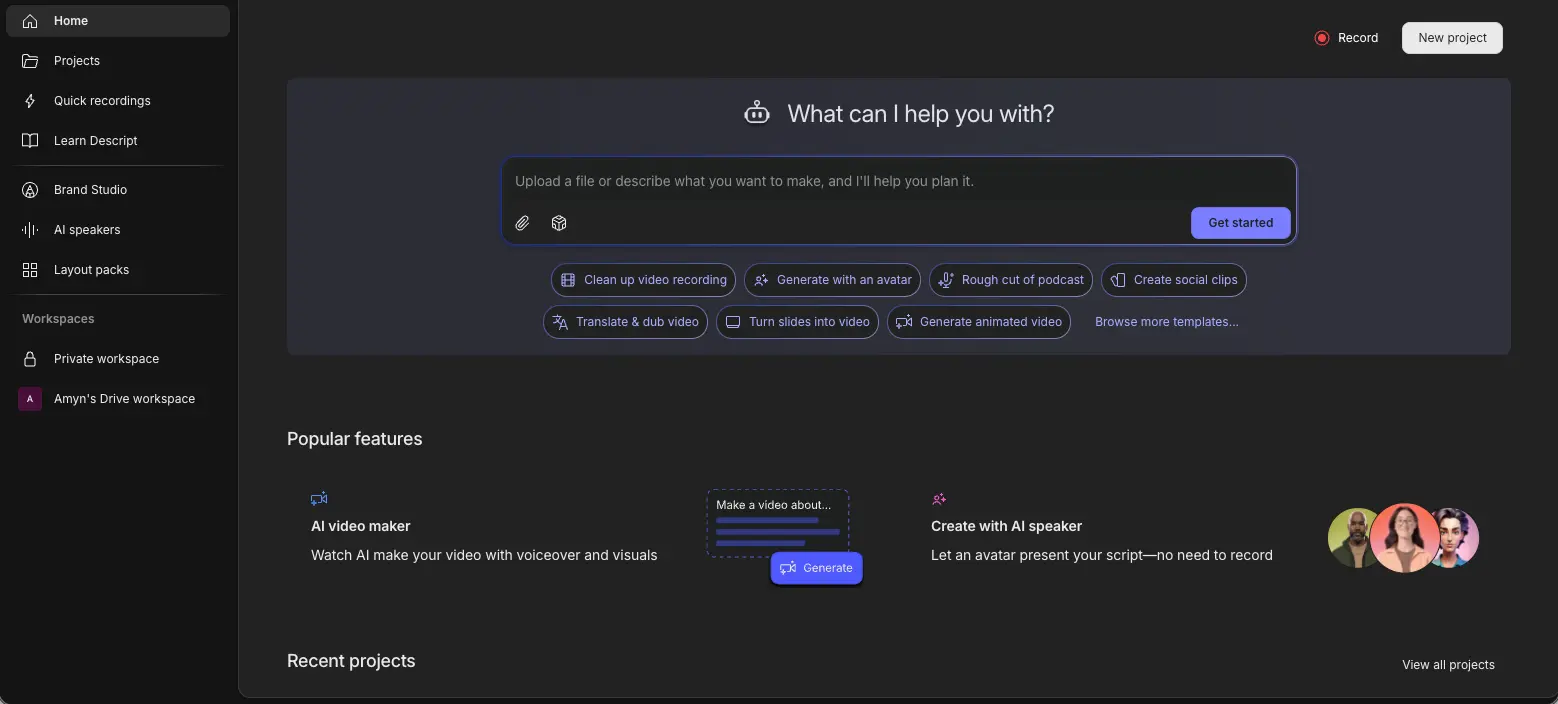
But here's the thing — Descript wants to be your entire production stack. Recording, editing, captioning, translating, generating AI avatars, publishing to YouTube — it does all of it. That ambition is both its greatest strength and a source of friction. The dashboard has a lot going on, and there's a genuine 2–3 week learning curve for creators coming from Premiere or Final Cut. If all you need is a fast rough cut, that breadth can feel like overhead.
Key Features for Video Creators
Descript's AI toolkit expanded significantly in early 2026. The February update integrated Claude Opus 4.6 into the Underlord engine, improving filler word removal accuracy by 43% and B-roll placement accuracy from 60% to 92%. That's a meaningful jump — the B-roll suggestions actually land now, where before they felt like random stock footage.
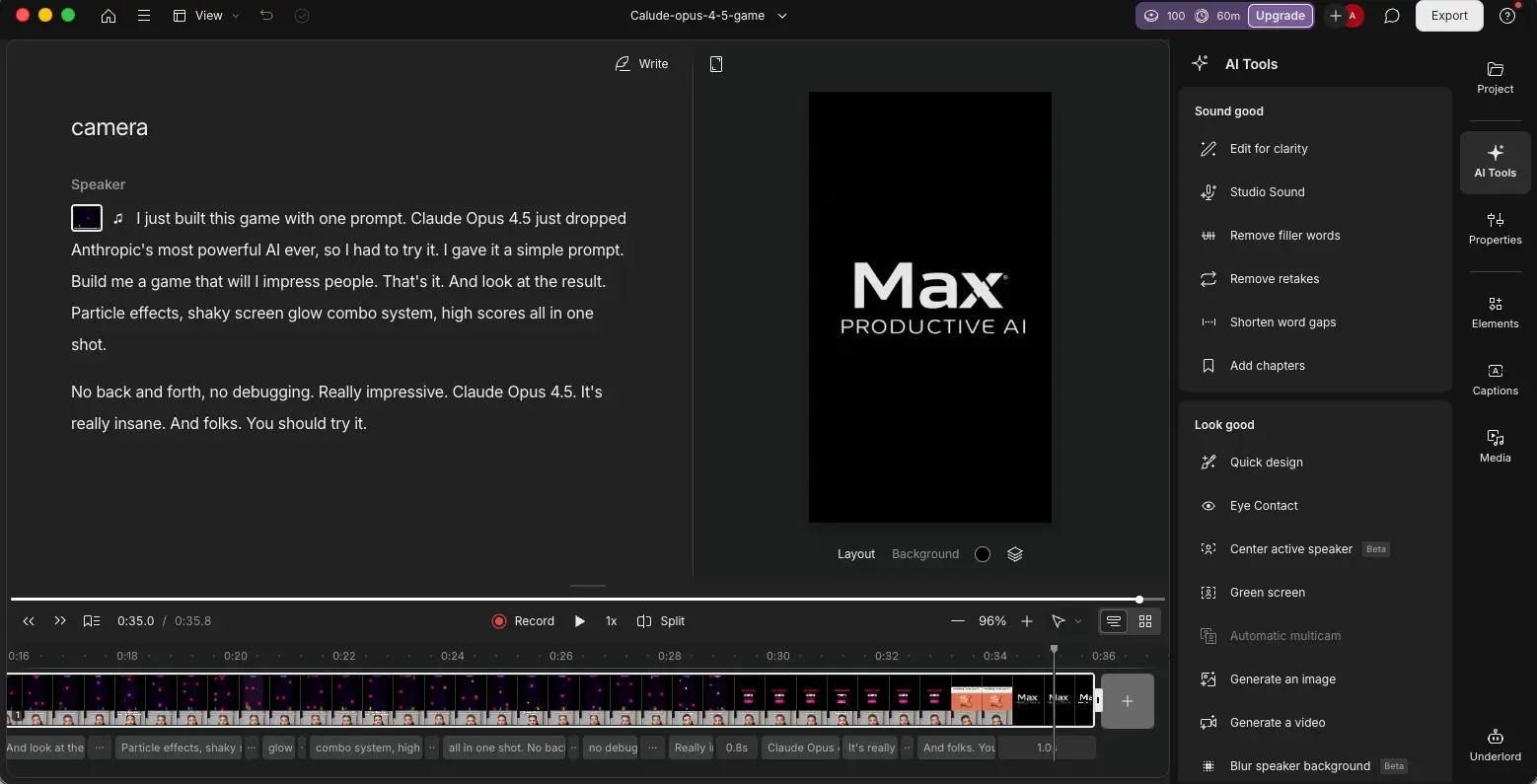
Studio Sound is arguably Descript's most universally loved feature. One click applies noise reduction, echo removal, voice enhancement, volume leveling, and smart EQ. If you're recording outside a treated studio — which is most creators — this alone justifies exploring Descript. Overdub lets you fix spoken mistakes by typing replacement words, synthesized in a clone of your voice. It works well in English but is effectively limited to English only, which is a notable gap compared to tools like HeyGen that support dozens of languages.
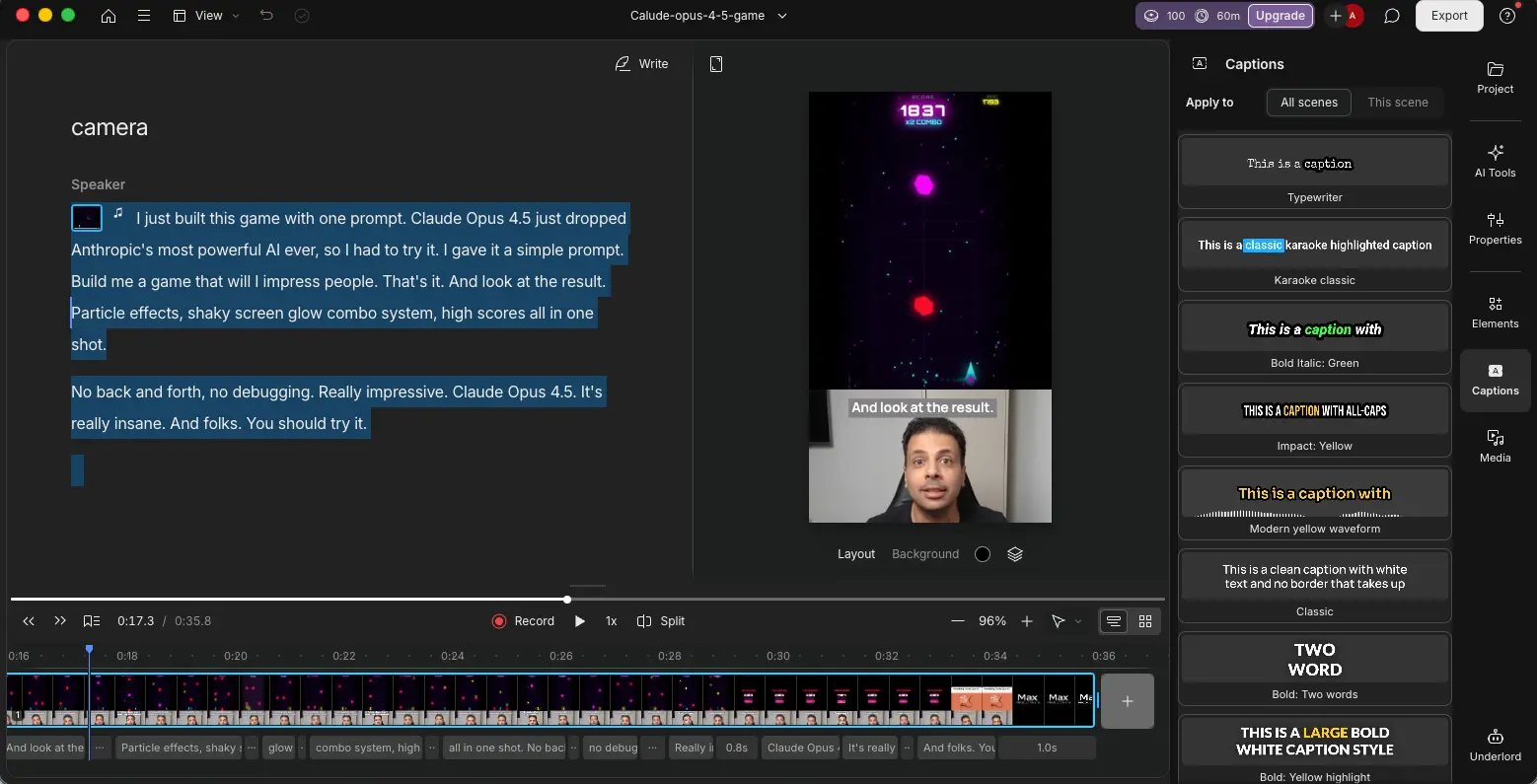
The AI feature set also includes eye contact correction (useful for teleprompter reads), green screen without a physical setup, automatic multicam switching, AI avatars powered by Hedra and Kling models, and translation and dubbing in 30+ languages on the Business plan. The captions panel offers multiple animated caption styles for social content.
One frustration worth flagging: every AI action in Descript consumes credits from a monthly allowance. Studio Sound, eye contact correction, green screen, avatar generation, filler removal — they all draw from the same pool. Multiple users report depleting their monthly credits within a single day of heavy editing. If you process a lot of content, factor in potential top-up costs beyond the base subscription price.
Pricing Plans in 2026
| Plan | Monthly | Annual | Media Hours | AI Credits | Export |
|---|---|---|---|---|---|
| Free | $0 | $0 | 1 hr | 100 (one-time) | 720p, watermarked |
| Hobbyist | $24/mo | $16/mo | 10 hrs | 400/mo | 1080p |
| Creator | $35/mo | $24/mo | 30 hrs | 800/mo | 4K |
| Business | $65/mo | $50/mo | 40 hrs | 1,500/mo | 4K |
The free plan gives you 1 hour of media processing per month with 100 AI credits that are not refreshed — once they're gone, they're gone. No NLE timeline export, no stock media access, no custom fonts. It's enough to test the interface but not enough to evaluate the tool properly on real projects. Descript's Hobbyist plan at $16/month (annual) is where the platform becomes genuinely usable.
What Is Gling? (AI-Powered YouTube Editing)
Gling takes the opposite approach to Descript. Instead of trying to be your entire production platform, it does one thing: automate the rough cut. Upload raw footage, and Gling's AI strips out silences, bad takes, and filler words — then hands you a clean timeline you can export to your NLE for polishing. Think of it as an AI assistant that handles the most tedious 80% of editing so you can focus on the creative 20%.
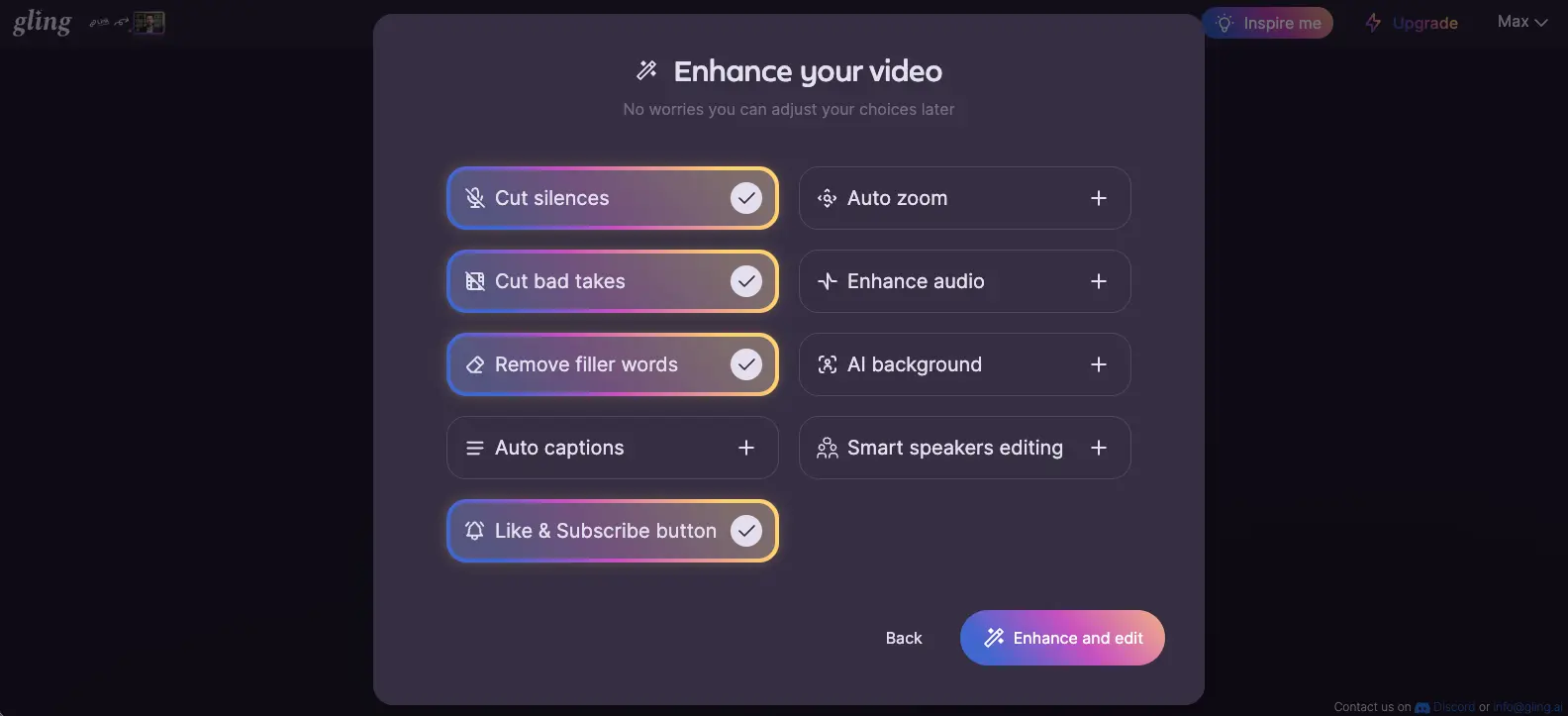
The design philosophy is refreshingly honest. Gling doesn't pretend to replace Premiere Pro or DaVinci Resolve — it feeds into them. For YouTube creators who shoot talking-head content and already have an NLE workflow, Gling slots in at the front of the pipeline and saves hours of manual scrubbing through raw footage. Creators report going from 2 hours of raw footage to a cleaned rough cut in minutes.
Is it limited? Absolutely. No color grading, no motion graphics, no multi-track audio mixing, no effects of any kind. But that's the point — Gling doesn't try to do what your NLE already does well. It just does what NLEs do poorly: the boring, repetitive rough cut work.
Key Features for YouTubers
Gling's 2026 updates focused on making its core AI smarter rather than adding new feature categories. Smart Thresholding now distinguishes deliberate dramatic pauses from dead air — a real improvement for creators whose delivery style includes intentional silence. Sentiment Analysis recognizes comedic or dramatic filler usage and avoids cutting it, which is the kind of nuance that separates a helpful tool from an overly aggressive one.
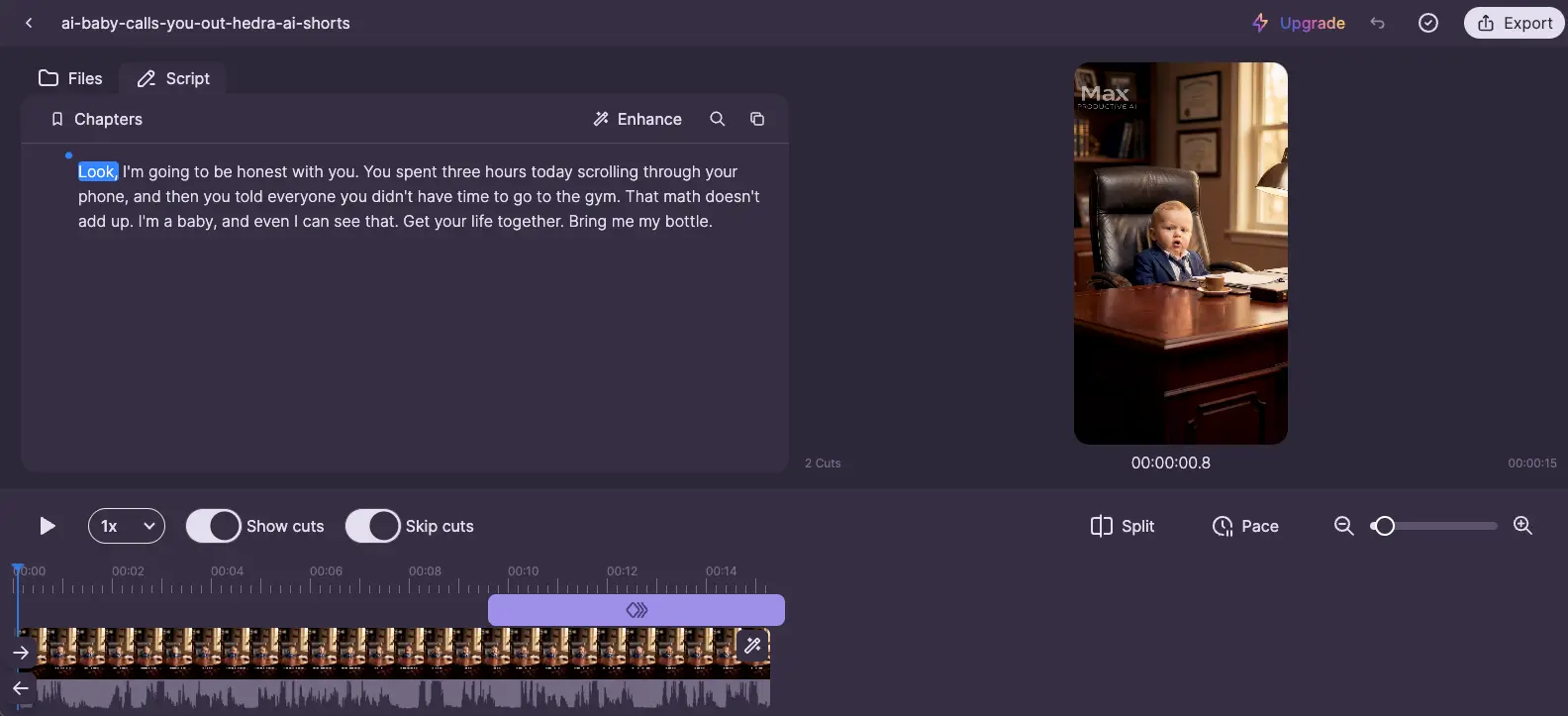
The Custom Stoplist lets you define regional and accent-specific filler words beyond the standard English "um" and "uh" — a thoughtful addition for non-native English speakers. The Sensitivity Slider offers Aggressive vs. Natural modes, giving you direct control over how much the AI cuts. And Bad Take Detection identifies repeated sentences where you restarted a take and retains the best version automatically.
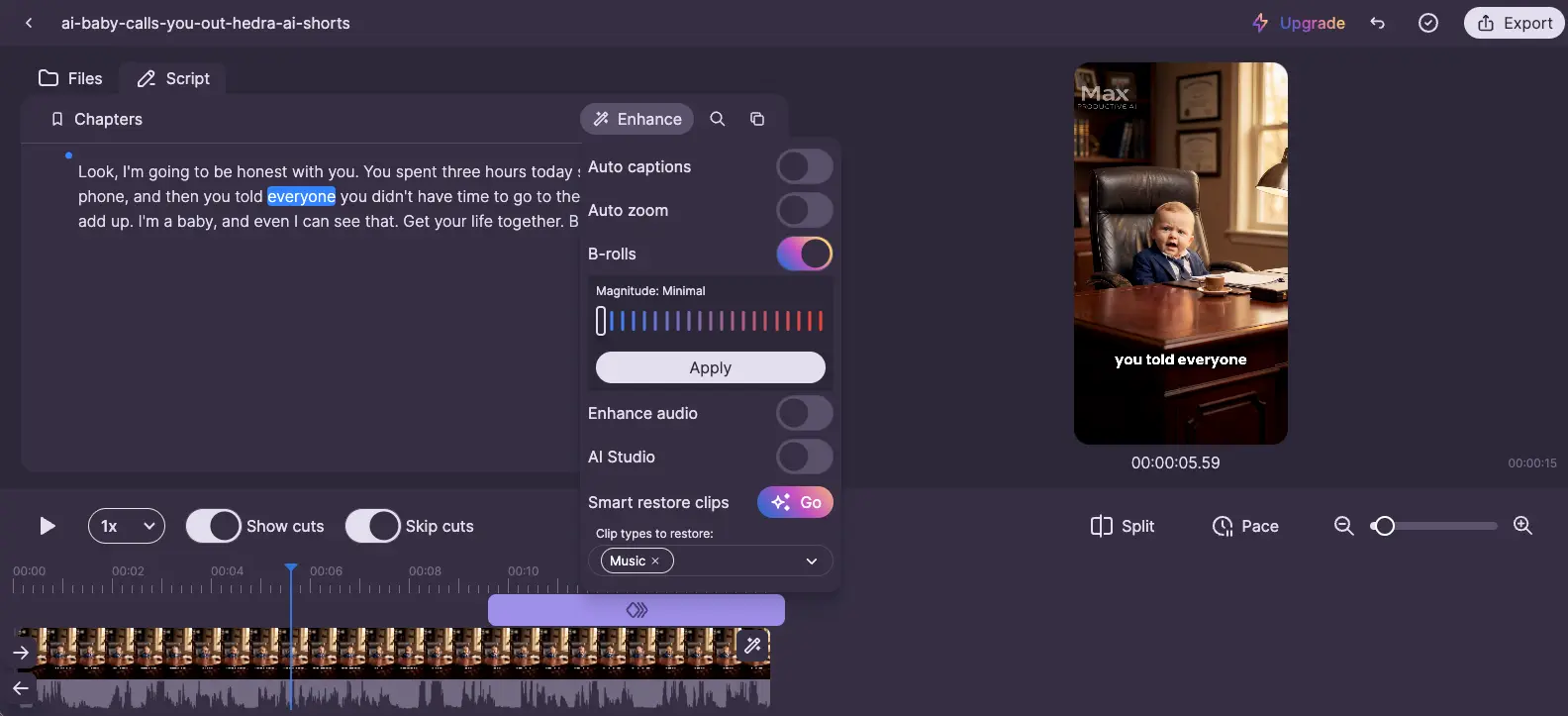
Beyond the core rough-cut engine, Gling includes YouTube-specific tools: an AI title generator for SEO-optimized titles, a chapters generator that creates YouTube chapter markers from the transcript, next video suggestions based on channel performance, and an AI B-roll generator that matches contextual footage to your video's theme. Worth noting: Gling does not publish directly to YouTube — it's a pre-editing layer only.
Pricing Plans in 2026
| Plan | Monthly | Annual | AI Edited Media | Export |
|---|---|---|---|---|
| Free | $0 | $0 | 1 hr/mo | Watermarked |
| Plus | $20/mo | $10/mo | 10 hrs/mo | Watermark-free |
| Pro | $40/mo | $20/mo | 30 hrs/mo | Watermark-free |
| Elite | $100/mo | $50/mo | 100 hrs/mo | Watermark-free |
Gling's pricing is simpler than Descript's — all plans include all features. The only differentiator is monthly media processing volume. Annual billing cuts every price by 50%, making the Plus plan at $10/month one of the best values in AI video editing. No credit system, no feature gating, no surprise overage charges. That straightforward approach is a real contrast to Descript's AI credits model.
Feature-by-Feature Comparison: Descript vs Gling
These tools overlap on the basics — filler removal, silence cutting, transcript-based editing — but diverge sharply on everything else. Here's how they compare across the dimensions that actually affect your workflow.
| Feature | Descript | Gling |
|---|---|---|
| Text-based editing | Full transcript editor | Transcript-based trimmer |
| Filler word removal | Advanced (Claude Opus 4.6, +43% accuracy) | Custom stoplist + sensitivity slider |
| Silence removal | Shorten Word Gaps | Core feature (Smart Thresholding) |
| Bad take removal | Remove Retakes | Core feature (auto-select best take) |
| AI voice cloning | Overdub (English-focused) | Not available |
| Studio audio enhancement | Studio Sound (one-click) | Basic speech enhancement |
| AI avatars | Hedra, Kling v2/v2 Pro | Not available |
| Screen recording | Screen + webcam, 2 screens | Not available |
| Eye contact correction | Yes | Not available |
| AI B-roll | Creator+ plans | All plans |
| YouTube chapters | AI chapters | Core feature (all plans) |
| YouTube title generator | Not available | SEO-optimized |
| Direct YouTube publishing | Yes (up to 4K) | Not available |
| Translation & dubbing | 30+ languages (Business+) | Not available |
| Team collaboration | Comments, live collab, Media Library | Not available |
| NLE export | Premiere, FCP, Pro Tools, Logic, Audition | Premiere, FCP, DaVinci Resolve |
| Offline mode | No (cloud-only) | Desktop app (low-bandwidth friendly) |
AI Editing Speed and Accuracy
For pure rough-cut speed on talking-head content, Gling wins. Upload footage, click process, and you get a cleaned timeline in minutes — before any manual review. Descript's approach is more interactive: you work with the transcript, make selective edits, apply AI features one by one. It's more powerful but slower for the specific task of getting a rough cut done.
On transcription accuracy, Descript claims 95%+ with automatic speaker identification for multi-participant recordings. The February 2026 Claude Opus 4.6 integration improved its overall AI agent performance by about 30%. Gling's silence detection is accurate but has historically been flagged as overly aggressive — cutting intentional pauses along with dead air. The 2026 Sentiment Analysis and Smart Thresholding updates were specifically designed to fix that, and the results are noticeably better.
Filler Word and Silence Removal
Both tools handle filler words and silences, but they take different approaches. Descript's Underlord AI detects and removes "um," "uh," "like," repeated words, and more with a single click. The February 2026 accuracy improvement of 43% is significant — earlier versions would sometimes cut mid-word or leave partial fillers. An "Avoid Harsh Cuts" option helps preserve natural pacing.
Gling's approach gives you more manual control. The Custom Stoplist lets you define exactly which words to target — useful if your accent includes fillers that standard English detection misses. The Sensitivity Slider lets you choose between aggressive cutting (for maximum cleanup) and natural mode (preserving more of your original delivery). For creators who want a set-it-and-forget-it experience, Descript is smoother. For creators who want granular control over what gets cut, Gling offers more flexibility.
Transcription and Text-Based Editing
Both platforms support editing video through a text transcript, but Descript's implementation is more sophisticated. In Descript, the transcript is the editor — you write, delete, rearrange, and the video follows. You can add new words using Overdub, insert media at any point in the transcript, and use the text as the primary editing surface for everything.
Gling's text-based editing is more focused: edit the transcript to define what stays and what gets cut, then export the cleaned timeline. It's a trimmer, not a full editor. You won't compose new content inside Gling — you'll cut the rough material and move to your NLE for creative work. For most YouTube creators, that distinction matters less than you'd think. The rough cut is where 80% of the time goes.
Export Quality and Platform Support
Descript offers broader export options: direct YouTube publishing (up to 4K on Creator+), multiple NLE format exports including Pro Tools, Logic, and Audition for audio-focused workflows, local MP4 download, and shareable embeddable web links. That's a genuine advantage for creators who publish across platforms.
Gling focuses on MP4/MP3 export and XML/EDL files for the three major video NLEs — Premiere Pro, Final Cut Pro, and DaVinci Resolve. No direct publishing, no audio-specific NLE support. It's narrow but sufficient if your workflow ends in one of those three editors. The XML export is clean and preserves all editing decisions, which is what matters for the hand-off.
Pricing Comparison — Descript vs Gling 2026
These tools price differently, which makes direct comparison tricky. Descript uses a tiered system with media hours, AI credits, and feature gating. Gling uses a flat structure where all features are included and you're only paying for media processing volume. Here's how they line up at comparable usage levels:
| Usage Level | Descript (Annual) | Gling (Annual) |
|---|---|---|
| Free tier | 1 hr, 100 credits (one-time), 720p watermarked | 1 hr, all features, watermarked |
| ~10 hrs/month | $16/mo Hobbyist (400 credits, 1080p) | $10/mo Plus (all features, watermark-free) |
| ~30 hrs/month | $24/mo Creator (800 credits, 4K) | $20/mo Pro (all features, premium support) |
| High-volume | $50/mo Business (1,500 credits, 4K) | $50/mo Elite (100 hrs, premium support) |
At the 10-hour tier, Gling is 38% cheaper ($10 vs $16/month annual) and includes all features — no credit system to worry about. At 30 hours, the gap narrows to $20 vs $24. At the top tier, both land at $50/month but Gling gives you 100 hours of media versus Descript's 40. The math clearly favors Gling on pure price-per-hour, but that ignores the massive feature gap — Descript gives you voice cloning, avatars, Studio Sound, screen recording, direct publishing, and team collaboration that Gling simply doesn't have.
The real question isn't which is cheaper — it's whether you need what Descript's extra cost buys you. If you just need rough cuts and your NLE handles the rest, Gling at $10/month is hard to beat. If you need an all-in-one platform, Descript's pricing reflects the broader toolset.
For context: CapCut offers free editing with AI features, while VEED.io starts at around $18/month for its AI editing suite. Descript and Gling both sit competitively in this price range, each with a different value proposition.
Pricing last verified April 2026. Visit Descript or Gling for current rates.
Pros and Cons of Descript
Pros
- Text-based editing is genuinely transformative for spoken content. Editing video by editing words cuts out the tedious timeline scrubbing that eats hours. For podcasts, interviews, and tutorials, nothing else works quite like this. Users consistently describe it as the single feature that made them switch from traditional NLEs.
- Studio Sound is the best one-click audio fix at this price point. Noise reduction, echo removal, voice enhancement, and leveling applied in one step. If you record outside a professional studio, this feature alone can make your audio sound dramatically better.
- Full publishing pipeline from recording to YouTube. Screen recording, editing, captioning, translation, and direct YouTube publishing — all without leaving the app. For creators who want fewer tools in their stack, Descript consolidates the entire workflow.
- February 2026 AI upgrade significantly improved accuracy. The Claude Opus 4.6 integration boosted filler removal by 43% and B-roll placement from 60% to 92%. These aren't incremental improvements — they made previously unreliable features genuinely usable.
- Team collaboration and shared Media Library. Comments, live collaboration, and a centralized asset library make Descript viable for agencies and teams — something Gling doesn't support at all.
Cons
- AI credits deplete fast under heavy use. Every AI action draws from a shared monthly pool. Multiple users report burning through their entire monthly allocation in a single day of intensive editing. This isn't a theoretical concern — it's a recurring frustration in user reviews, and top-up credits add real cost.
- No offline mode — confirmed unfeasible near-term. Descript has officially stated full offline support is not coming soon due to its cloud-dependent architecture. If you edit on flights, in rural areas, or anywhere with unreliable internet, this is a dealbreaker.
- Overdub is English-only in practice. The AI voice cloning feature works well in English but doesn't support other languages meaningfully. Competitors like ElevenLabs support 32+ languages. If multilingual content is part of your workflow, Overdub won't help.
- Frequent bugs and post-update instability. User reviews consistently flag crashes, broken workflows after updates, and UI glitches. Descript ships features fast, but stability sometimes suffers as a result.
- 2–3 week learning curve from traditional NLEs. The text-first paradigm is powerful but unfamiliar. Creators coming from Premiere or Final Cut need genuine ramp-up time before they're editing efficiently.
Pros and Cons of Gling
Pros
- Fastest rough cut in the category. Upload footage, let the AI process it, and you have a clean timeline in minutes. For high-volume YouTube creators who shoot frequently, this time savings compounds dramatically — turning hours of manual scrubbing into a few minutes of review.
- All features included on every plan. No feature gating, no credit system, no upsells. The only difference between plans is media processing volume. This transparency is refreshing compared to tiered feature models where critical capabilities are locked behind higher plans.
- $10/month annual Plus plan is outstanding value. For 10 hours of AI-edited media per month with full features and no watermarks, this is one of the best deals in AI video editing. Most competitors charge significantly more for comparable processing volume.
- Extremely beginner-friendly. There's almost no learning curve. If you can upload a file and click a button, you can use Gling. For creators who don't want to learn a complex editing interface, this accessibility matters.
- Clean XML export preserves decisions for NLE polish. The hand-off to Premiere, Final Cut, or DaVinci Resolve works reliably. Your edit decisions transfer cleanly, so you're not re-doing work in your NLE.
- YouTube-specific AI tools add immediate value. The title generator, chapters generator, and next video suggestions are practical SEO tools that most editing platforms don't include.
Cons
- Narrow feature scope by design. No color grading, no motion graphics, no multi-track audio mixing, no visual effects. If you need any of these, you need another tool. Gling is a pre-editor, period — and that limited scope means it can't be your only editing tool.
- No direct YouTube publishing. You export files and upload manually. For creators posting daily or managing multiple channels, the extra steps add friction that Descript's direct publishing eliminates.
- AI can be overly aggressive with cuts. Despite the 2026 Smart Thresholding and Sentiment Analysis improvements, some users still report the AI cutting intentional dramatic pauses. You need to review the rough cut before exporting — trusting it blindly will occasionally remove content you wanted to keep.
- Not viable for non-talking-head content. Narrative film, music videos, event coverage, animation — none of these benefit from Gling's approach. It's purpose-built for dialogue-driven content, and that scope limitation is real.
- Free plan is too limited to evaluate properly. One hour per month with watermarks gives you barely enough time to test the AI on a single short video. Unlike Descript's free plan which at least includes basic features, Gling's free tier feels like a teaser rather than a trial.
Who Should Choose Descript?
Descript is the right pick if you need more than a rough cut tool. Specifically, choose Descript if you're a podcaster or interview creator who wants to edit by words instead of waveforms, if you're a course creator producing tutorials with screen recordings, if you're a marketing team repurposing long-form video into clips, captions, and social posts, if you need team collaboration with shared assets and comments, if you publish in multiple languages and need dubbing and translation, or if you want to go from raw footage to published YouTube video without leaving one platform.
The typical Descript user is someone whose content is primarily speech-based and who values workflow consolidation over maximum depth in any single capability. If that sounds like you, Descript's breadth is worth the slightly higher price and learning curve.
Who Should Choose Gling?
Gling makes more sense if your workflow already includes a capable NLE and you want an AI assistant to handle the rough cut. Choose Gling if you're a YouTube-first talking-head creator who wants the fastest possible turnaround from raw footage to cleaned timeline, if you already know Premiere, Final Cut, or DaVinci Resolve and want an AI pre-editor that feeds into your existing workflow, if you post frequently and need to process high volumes of footage efficiently, if you're budget-conscious and want full features at $10/month, or if you're a beginner who wants the simplest possible entry point to AI-assisted editing.
The typical Gling user is a solo YouTube creator who shoots talking-head content regularly and has a polishing workflow in a traditional NLE. Gling handles the boring part — the rough cut — so you can focus on the creative part.
Final Verdict: Descript vs Gling in April 2026
| Best all-in-one AI video editor | Descript |
| Fastest rough cut automation | Gling |
| Best audio enhancement | Descript (Studio Sound) |
| Best for YouTube-first creators | Gling |
| Best AI voice features | Descript (Overdub + avatars) |
| Cheapest entry price | Gling ($10/mo annual) |
| Best filler word accuracy | Descript (Claude Opus 4.6) |
| Best NLE workflow integration | Gling (XML → Premiere/FCP/DaVinci) |
| Best for teams and collaboration | Descript |
| Easiest learning curve | Gling |
Bottom line: These tools aren't really competitors — they're different tools for different stages of the editing pipeline. Descript is a full production suite that replaces your NLE for spoken-word content. Gling is a specialized pre-editor that feeds into your existing NLE. Pick Descript if you want one platform for everything. Pick Gling if you already have a polishing workflow and just need the rough cut done fast. Some creators use both — Gling for the initial cut, Descript for audio cleanup and publishing — and that combo workflow is worth considering if you process high volumes.
Exploring More AI Video Editing Tools?
If neither Descript nor Gling is quite the right fit, browse our complete video editing tools directory and video generators directory for more options. For related comparisons, see how VEED compares to CapCut and how Submagic compares to SendShort for AI captions. And for deeper individual reviews, read our full Descript review and the complete Gling review.
FAQ — Descript vs Gling
Explore more AI video tools: browse our video editing tools directory and subtitles and captions tools. For individual deep-dives, read our full Descript review and Gling review. Related comparisons: VEED vs CapCut and Submagic vs SendShort.