
Foxit vs PDFelement — Which PDF Editor Actually Wins in 2026?
Two powerhouse PDF editors, two different strengths. Here's the honest breakdown to help you pick the right one.

If you're comparing Foxit vs PDFelement, you already know both tools are among the best Adobe Acrobat alternatives on the market. The challenge? They're remarkably close in quality—both earn a 4.5/5 rating—yet they're built for different kinds of users. Choosing between them without a clear comparison can feel like flipping a coin.
In this detailed Foxit PDF Editor vs Wondershare PDFelement comparison, we break down every category that matters: editing power, AI features, OCR, security, e-signatures, pricing, and real-world use cases. By the end, you'll know exactly which one fits your workflow, your budget, and your team. No guesswork required.
Choose Foxit PDF Editor
If you need enterprise-grade security (HIPAA, AIP, SOC 2), advanced compliance tools, built-in e-signatures with envelope management, and cutting-edge AI innovations like MCP Host and Smart Podcast.
Choose Wondershare PDFelement
If you want the best value for money with a perpetual license option, multi-model AI (ChatGPT, DeepSeek, Gemini), generous AI credits, and a clean interface that's easy to learn from day one.
| Feature | Foxit PDF Editor | PDFelement |
|---|---|---|
| Best For | Enterprise, legal, compliance | Individuals, students, SMBs |
| Starting Price | $129.99/year | $79.99/year or $129.99 one-time |
| Key Strength | Security, compliance, eSign | Affordability, multi-AI, value |
Side-by-Side Comparison Table
| Category |  Foxit PDF Editor Foxit PDF Editor |
 PDFelement PDFelement |
|---|---|---|
| Company | Foxit Software (Fremont, CA, USA). Founded 2001 | Wondershare Technology (Shenzhen, China). Founded 2003 |
| Users | 700M+ users, 640K+ customers | 150M+ users in 200+ countries |
| Current Version | v2025.3 (Dec 2025) | V12 (Sept 2025) |
| Platforms | Windows, Mac, iOS, Android, Web | Windows, Mac, iOS, Android, Web |
| AI Model | GPT-4o mini (single) | ChatGPT, DeepSeek, Gemini (selectable) |
| Free AI Credits | 20/month | 1,000 initial uses included |
| OCR Languages | Wide multi-language support | 25 (Win) / 29 (Mac) |
| eSign | Built-in Foxit eSign (150 envelopes/yr on Editor+) | Self-sign + digital signatures, batch sign (V12) |
| Compliance | HIPAA, SOC 2, FERPA, GDPR, eIDAS, 21 CFR Part 11 | ISO 27001 certified |
| Perpetual License | ~$210 (desktop only, no AI, no updates) | $129.99 (desktop, V12 minor updates) |
| Annual Price | $129.99/year (Editor), $172.79/year (Editor+) | $79.99/year (Win), $89.99/year (Mac) |
| Free Version | Foxit PDF Reader (free, includes 20 AI credits) | 7-day trial (watermark on saves, 3-file batch limit) |
| Our Rating | ★ 4.5/5 | ★ 4.5/5 |
Detailed Feature-by-Feature Comparison
User Interface & Ease of Use
Both Foxit and PDFelement use a ribbon-style interface that will feel familiar to anyone who has used Microsoft Office. Here's the thing, though: the experience of using them day-to-day is noticeably different.
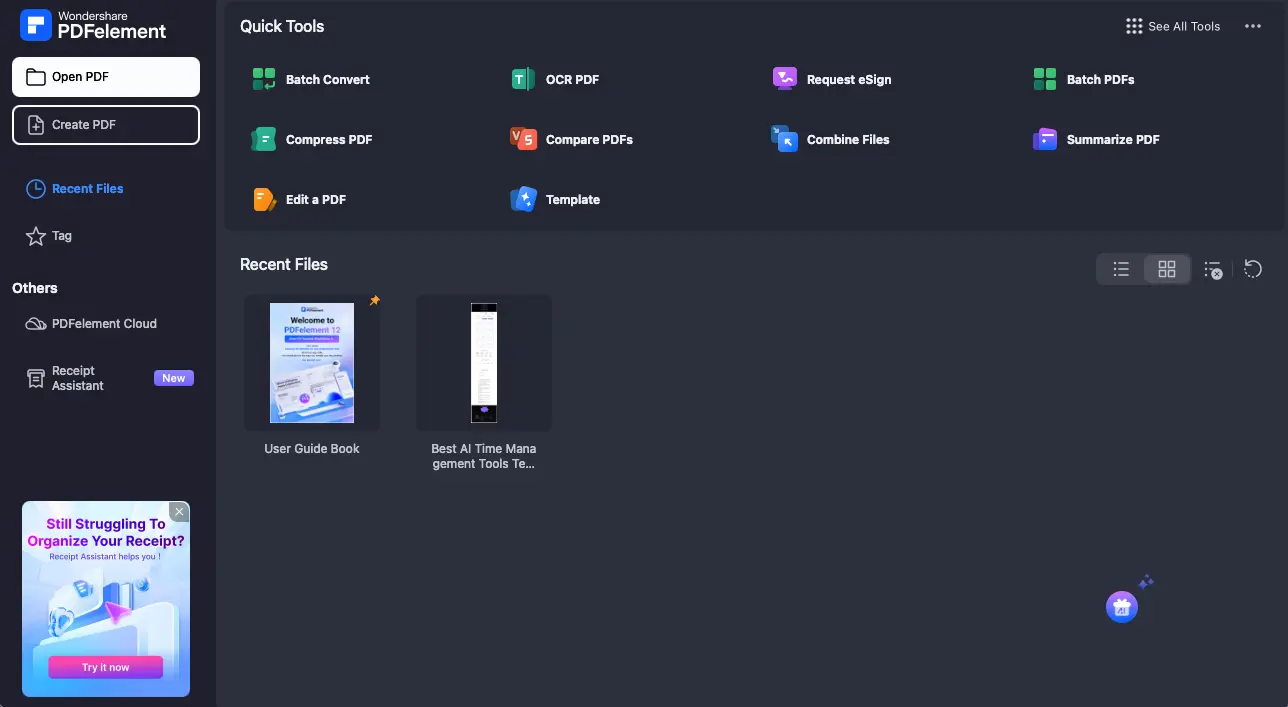
PDFelement's V12 refresh delivers a clean, modern workspace with pinnable quick-access tools right from the home dashboard. Users consistently describe it as approachable and intuitive. Foxit, meanwhile, packs more features into its ribbon, supporting 17 interface languages compared to PDFelement's 9, and offers dark mode since version 11.1. The trade-off? Some users note that certain Foxit features feel "buried too deep" within the menus.
PDFelement also supports dark mode and lets you customize which tools appear in the top menu. Both editors handle multi-tab document editing smoothly. For a first-time user who simply wants to open, edit, and save a PDF without reading a manual, PDFelement has a slight edge in out-of-the-box simplicity.
PDF Editing Capabilities
When it comes to core editing, both tools are genuinely capable. Text editing, image manipulation, page management (merge, split, rotate, reorder), annotations, and form filling are all present on both sides. Neither leaves you wanting for the fundamentals.
What really stands out are the exclusive extras. Foxit brings PDF Binders for organizing multiple documents into a single package with a table of contents—a feature that legal teams and project managers love. It also supports 3D content viewing in U3D, PRC, and glTF formats, along with tickmarks for accounting and manufacturing workflows. PDFelement counters with measurement tools for lengths, areas, and curves (ideal for architects and engineers), batch crop in V12, and support for ePub, Markdown, and HWP export formats that Foxit doesn't offer.
Foxit's v2025.3 added an arc drawing tool, Bluebeam comment compatibility, and CSV comment export. PDFelement V12 introduced a refreshed workspace with customizable pin-to-top tools. Both are evolving fast.
AI Features
This is where it gets interesting. Both editors have invested heavily in AI, but they've taken very different approaches.

Foxit's AI Assistant, powered by GPT-4o mini, focuses on innovative workflow automation. Its standout feature is the Smart Command system—you type a natural-language instruction like "add a CONFIDENTIAL watermark to all pages," and the AI identifies and executes the correct tool for you. Foxit also introduced the industry-first MCP Host for agentic AI integration with Gmail, Salesforce, Jira, HubSpot, and more, plus Smart Podcast (which converts PDFs to podcast-style audio) and AI Image Generation. These are genuinely innovative features you won't find elsewhere.

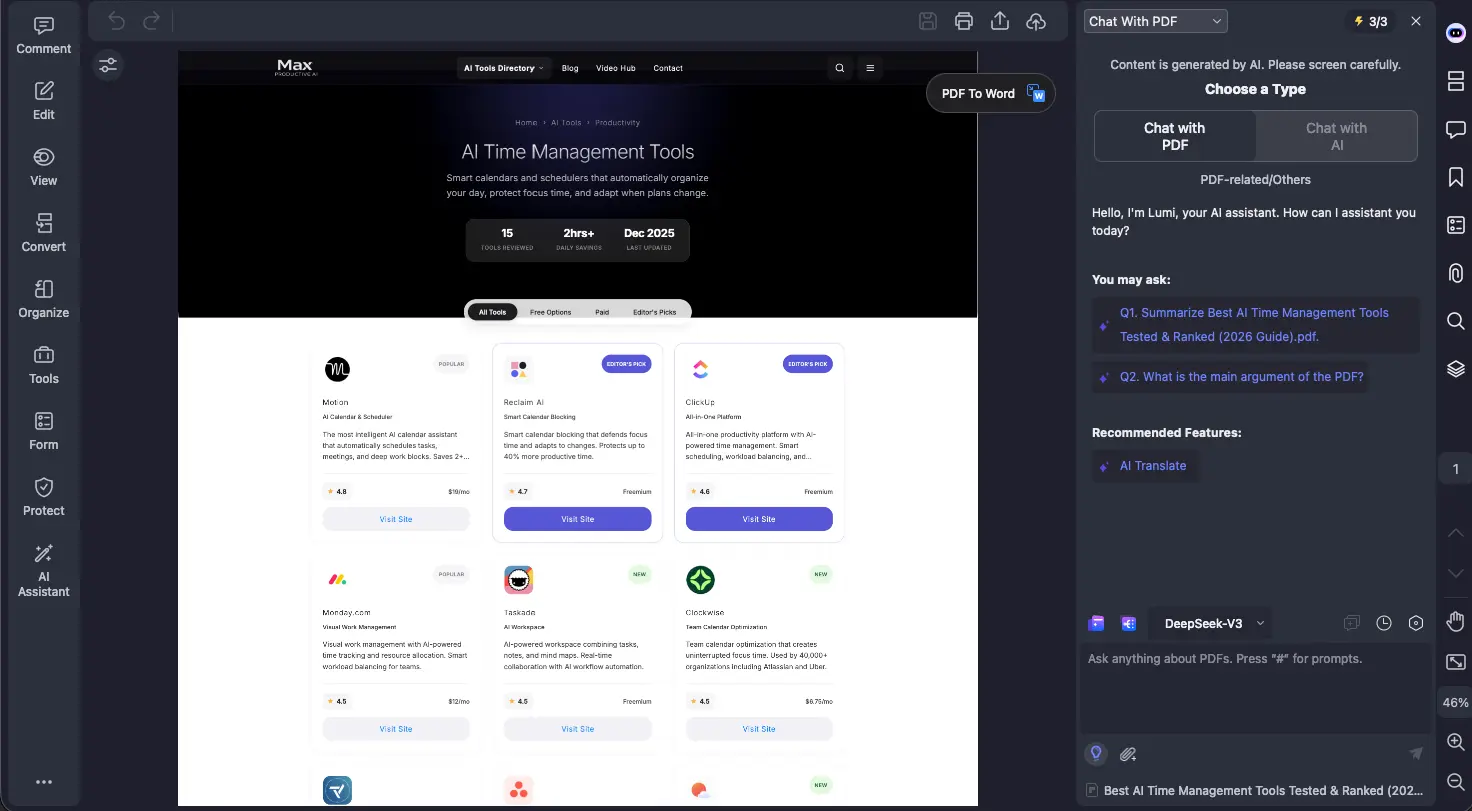
PDFelement V12 takes a different approach, emphasizing model flexibility and generosity. Users can switch between ChatGPT, DeepSeek, and Gemini depending on their preference. PDFelement includes 1,000 free AI uses (compared to Foxit's 20/month), offers AI-written content detection, grammar checking, and supports AI translation in 75 languages versus Foxit's 26. The paid AI add-on is also cheaper at $39.99/year versus Foxit's $49.99/year.
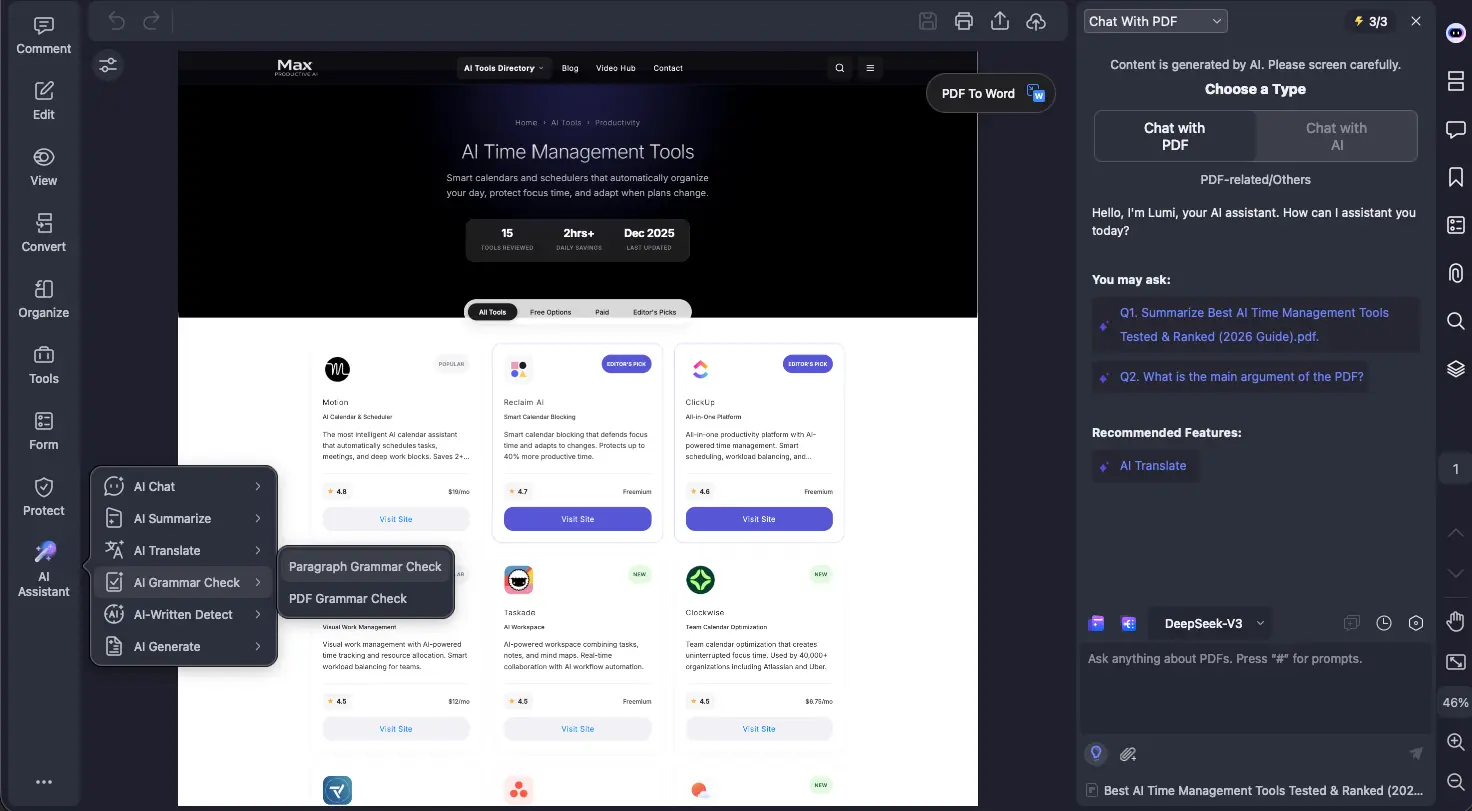
| AI Feature | Foxit | PDFelement | Winner |
|---|---|---|---|
| AI models | GPT-4o mini (single) | ChatGPT, DeepSeek, Gemini | PDFelement |
| Free AI credits | 20/month | 1,000 initial uses | PDFelement |
| Smart Commands (NLP) | Advanced (task execution) | Available | Foxit |
| MCP Host (agentic AI) | Industry first | Not available | Foxit |
| AI Image Generation | Yes (v2025.3) | Not available | Foxit |
| Smart Podcast | Yes (PDF to audio) | Not available | Foxit |
| AI Content Detection | Not available | Yes (V12) | PDFelement |
| Translation languages | 26 languages | 75 languages | PDFelement |
| AI add-on price | $49.99/year | $39.99/year | PDFelement |

OCR (Optical Character Recognition)
Both editors offer solid OCR with searchable and editable output modes, batch OCR processing, and regional/selective OCR for partial pages. Foxit supports a wide range of languages and recently added Vietnamese and Indonesian in v14.0. PDFelement supports 25 languages on Windows and 29 on Mac, with established coverage for major languages including Arabic, Chinese, Japanese, Korean, and most European languages.
User feedback paints a similar picture for both: OCR works well on clean, high-quality scans, with occasional inconsistencies on complex layouts or low-resolution documents. One PDFelement user reported roughly 95% accuracy on standard scanned documents, while Foxit users praise its OCR but note results can vary with difficult sources. No independent head-to-head OCR benchmark between these two tools has been published.
Form Creation & Handling
Both tools support interactive form fields, auto-field recognition, JavaScript form logic, and data extraction to CSV. Foxit adds barcode, date picker, and image form fields, plus form templates in its feature set. PDFelement handles form creation, filling, and extraction smoothly, with V12 offering a streamlined interface for managing form fields.
For most users, the form capabilities are functionally equivalent. Foxit's JavaScript support and specialized field types give it a slight edge for developers building complex interactive forms.
Security & Document Protection
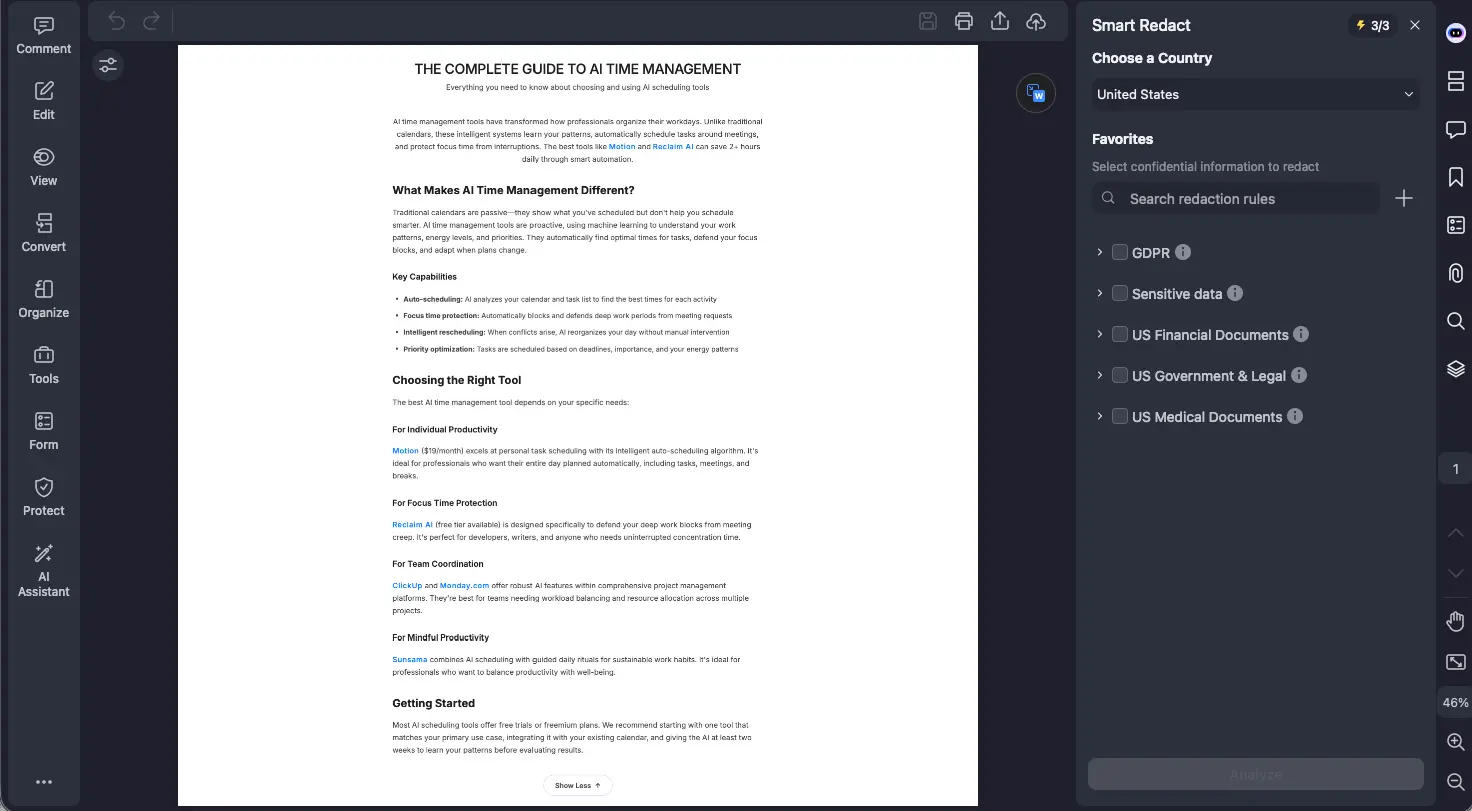
This is one area where the PDFelement vs Foxit comparison shows a clear gap. Both offer password protection, certificate encryption, and redaction tools. Both also provide AI-powered Smart Redact for batch redaction of sensitive information. But Foxit goes significantly further for organizations with strict compliance requirements.
Foxit offers documented compliance with HIPAA (with Business Associate Agreements), SOC 2 Type II, FERPA, GDPR, CCPA, eIDAS, and 21 CFR Part 11. It integrates with Microsoft Azure Information Protection (AIP) with sensitivity labels, supports Microsoft Double Key Encryption (DKE), includes document sanitization to auto-remove hidden information, and features Safe Reading Mode. Version 2025.3 added AES GCM encryption per ISO/TS 32003 and consent collection for shared reviews.
PDFelement holds ISO 27001 certification and provides solid encryption and redaction, but it does not advertise comparable compliance certifications or enterprise rights management integrations on its public documentation. For everyday document protection, PDFelement handles the job well. For regulated industries, Foxit is the clear choice.
E-Signatures
Foxit integrates its standalone Foxit eSign platform directly into Editor+, providing 150 pooled envelopes per year, signature tracking, templates, workflow routing, and real-time status monitoring. For higher volumes, standalone Foxit eSign plans offer 250 envelopes/year (Essentials) or unlimited envelopes (Business). The system is certified for eIDAS and ESIGN Act compliance.
PDFelement includes self-signed electronic signatures and certificate-based digital signatures in the core product. V12 introduced batch signing—applying a signature to multiple PDFs at once—which is a handy addition. However, there's no envelope-based workflow management, no signature routing templates, and no standalone high-volume eSign product.
If you occasionally sign your own documents, PDFelement covers you well. If you regularly send contracts and need to track who has signed, Foxit or PDFelement which is better becomes an easy call—Foxit's eSign ecosystem is far more robust.
File Conversion & Format Support
Both editors handle the core conversions well: Word, Excel, PowerPoint, images (JPEG, PNG, BMP, TIFF, GIF), HTML, RTF, plain text, and PDF/A archiving. Both support creating PDFs from scanners, Visio files, and various source formats.
Where they diverge is interesting. PDFelement supports ePub, Markdown, and HWP (Korean word processor) export—formats Foxit doesn't offer. PDFelement can also import CAD/DWG files directly. Foxit, on the other hand, supports 3D content formats (U3D, PRC, glTF) and XML export, along with Outlook and Project file import in its Pro edition.
Batch Processing
Both tools support batch convert, OCR, print, compress, watermark, combine, Bates numbering, and data extraction. Here's where each adds something unique: Foxit's Editor+ plan includes an Action Wizard that lets you create custom multi-step batch workflows—a powerful automation tool for repetitive tasks. PDFelement V12 counters with batch sign, batch crop, and batch translate—three operations Foxit doesn't offer in batch mode.
For organizations that need repeatable, custom automation sequences, Foxit's Action Wizard is a significant advantage. For users who frequently need to sign, crop, or translate stacks of documents, PDFelement's V12 batch additions are immediately practical.
Platform Support & Cloud
Both tools run on Windows, Mac, iOS, Android, and web. Foxit differentiates with deeper cloud integrations: SharePoint, OneDrive, Google Drive, Microsoft Teams app, browser extensions for Chrome and Edge, and Dropbox Team Folders (added in v2025.3). The Editor plan includes 20 GB of cloud storage, while Editor+ bumps that to 150 GB. Foxit also provides an Admin Console for centralized license management—a must-have for IT departments.
PDFelement offers PDFelement Cloud with 20 GB for individual yearly plans and 100 GB for cross-platform bundles. Cloud access controls and cross-device syncing are included. Team licensing uses Wondershare ID-based management, which is simpler but not as full-featured as Foxit's Admin Console with GPO/SCCM deployment and SSO support.

Pricing Comparison (2026)
Foxit PDF Editor Pricing
| Plan | Price | Cloud Storage | Key Inclusions |
|---|---|---|---|
| PDF Editor (annual) | $129.99/year | 20 GB | Full editing, OCR, 20 AI credits/mo |
| PDF Editor+ (annual) | $172.79/year | 150 GB | eSign (150 envelopes), Smart Redact, mobile, templates |
| PDF Editor (monthly) | $10.99/month | 20 GB | Same as annual Editor, billed monthly |
| Perpetual License | ~$210 one-time | None | Desktop only, no AI, no updates, no mobile |
| AI Assistant add-on | $49.99/year | — | 2,000 credits/month across all Foxit products |
| PDF Reader | Free | — | View, annotate, fill & sign, 20 AI credits/mo |
Discounts: Education pricing available with school email. TechSoup nonprofit discount: $49.99/year for Editor+. Volume discounts up to 30% for 30+ licenses.
Wondershare PDFelement Pricing
| Plan | Price | Cloud Storage | Key Inclusions |
|---|---|---|---|
| Yearly (Windows) | $79.99/year | 20 GB | Full editing, OCR, 1,000 AI uses, batch tools |
| Yearly (Mac) | $89.99/year | 20 GB | Same features, Mac optimized |
| 2-Year (Windows) | $109.99 total | 20 GB | ~$55/year equivalent |
| Perpetual License | $129.99 one-time | Limited | V12 with minor updates, no major version upgrades |
| Team License | ~$109/year or $139 perpetual per user | Varies | Wondershare ID management |
| AI Add-on | $39.99/year | — | 12,000 AI uses over 12 months (1,000/mo) |
| Free Trial | 7 days free | — | Watermark on saves, 3-file batch limit, 20MB max |
Discounts: Up to 63% student discount through Student Beans. Upgrade pricing from older versions: $29–$59 depending on license type.
True Cost Over Time
| Scenario | Foxit (1 Year) | PDFelement (1 Year) | Savings |
|---|---|---|---|
| Base annual plan | $129.99 | $79.99 (Win) | PDFelement saves $50 |
| Premium plan | $172.79 (Editor+) | ~$109.99 (cross-platform varies) | PDFelement saves ~$63 |
| Base + AI add-on | $179.98 | $119.98 | PDFelement saves ~$60 |
| Scenario | Foxit (3 Years) | PDFelement (3 Years) | Savings |
|---|---|---|---|
| Base annual × 3 | $389.97 | $239.97 (yearly) or $129.99 (perpetual) | Up to $260 with perpetual |
| Premium × 3 | $518.37 | ~$329.97 | PDFelement saves ~$188 |
For context: Adobe Acrobat Pro costs $19.99/month ($239.88/year) on an annual plan, with the AI Assistant add-on at $4.99/month extra. Both Foxit and PDFelement are significantly more affordable than Adobe, and PDFelement's perpetual license is especially attractive for users who prefer a one-time purchase over recurring costs.
Who Should Choose Which?
Students
Best pick: PDFelement. The $129.99 perpetual license means no recurring costs—ideal for students on a budget. The Student Beans partnership offers up to 63% off, and user reviews from students consistently praise its ease of use. Foxit also offers education discounts (including $49.99/year via TechSoup for nonprofits), but PDFelement's one-time pricing model is more student-friendly.
Freelancers & Solo Professionals
Best pick: PDFelement for budget-conscious freelancers, Foxit Editor+ if you need integrated e-signatures. PDFelement's lower annual cost ($79.99 vs $129.99) and perpetual option make it ideal for keeping overhead low. But if you regularly send contracts for signature, Foxit Editor+'s built-in eSign with 150 envelopes per year is worth the premium.
Small Business Teams
Best pick: Foxit for collaboration-heavy teams, PDFelement for cost-conscious teams. Foxit's Admin Console, SharePoint/Teams integration, shared reviews, and volume discounts (30%+ for 30+ licenses) make it better suited for managing PDF workflows across a team. PDFelement's team license (~$109/year or $139 perpetual per user) is more affordable if you don't need deep IT management tools.
Lawyers & Legal Professionals
Best pick: Foxit. Bates numbering, certified redaction, PDF Binders for case file management, Action Wizard for automated legal workflows, AIP/DKE integration, and HIPAA compliance make Foxit the natural choice for law firms. PDFelement offers redaction and Smart Redact, but it doesn't match Foxit's legal-specific toolset.
Enterprise & Compliance Teams
Best pick: Foxit. SOC 2 Type II, HIPAA with BAA, FERPA, 21 CFR Part 11, Microsoft AIP/DKE, GPO/SCCM deployment, Admin Console, SSO—Foxit's enterprise infrastructure is in a different category. PDFelement holds ISO 27001 certification, which is solid, but organizations with strict regulatory requirements will find Foxit's compliance documentation more comprehensive.
AI Power Users
Best pick: It depends on what you value. PDFelement V12 offers more AI models (ChatGPT, DeepSeek, Gemini), more generous free credits (1,000 vs 20), a cheaper AI add-on, AI content detection, and 75-language AI translation. Foxit offers more innovative AI applications: MCP Host for agentic workflow integration, Smart Podcast, AI Image Generation, and Smart Commands. If you want flexibility and value, go PDFelement. If you want cutting-edge AI innovation, go Foxit.
Former Adobe Acrobat Users
Best pick: Foxit for the closest Adobe experience, PDFelement for the simplest transition at the lowest cost. Foxit's advanced feature set (3D content, portfolios, Action Wizard, Bates numbering) most closely mirrors Acrobat Pro's capabilities, and its ribbon interface will feel familiar. PDFelement is also widely praised as an Adobe alternative—one user called it "a real replacement for Adobe Acrobat for a fraction of the cost"—with a gentler learning curve.
Frequently Asked Questions
Final Verdict: Foxit vs PDFelement
| Best user interface | PDFelement |
| Best editing power | Tie |
| Best AI innovation | Foxit |
| Best AI value & model choice | PDFelement |
| Best OCR | Tie |
| Best form creation | Foxit (narrowly) |
| Best security & compliance | Foxit |
| Best e-signatures | Foxit |
| Best file conversion | PDFelement |
| Best batch processing | Tie |
| Best platform & cloud | Foxit |
| Most affordable | PDFelement |
Bottom line: The fundamental difference in this Foxit vs PDFelement comparison is scope vs. value:
- Foxit PDF Editor = Enterprise scope: Stronger security and compliance infrastructure, integrated eSign with envelope management, Admin Console for team deployment, and innovative AI features like MCP Host and Smart Podcast.
- PDFelement = Value champion: More affordable at every tier, perpetual license option, multi-AI model flexibility, more generous AI credits, and a cleaner interface that's easier to pick up.
Both tools earn a 4.5/5 rating for good reason—they're each excellent at what they do. If you need regulatory compliance and team-scale collaboration, Foxit is worth the premium. If you want maximum PDF power for the least money, PDFelement is hard to beat. Read our full Foxit PDF Editor review or PDFelement review for deeper dives into each tool.
Looking for something different entirely? LightPDF is an excellent cloud-first option for users who prefer working in a browser, and PDF.ai specializes in AI-powered document chat and analysis. Both are worth exploring if neither Foxit nor PDFelement feels like the right fit.
Learn more about other AI-powered PDF tools in our comprehensive directory. For deeper analysis, read our full Foxit PDF Editor review or Wondershare PDFelement review.