
Motion AI Employees Review 2025: Complete Testing & Analysis of AI Workforce Features
Updated: October 14, 2025
📢 Disclosure: This article contains affiliate links. If you purchase through them, we may earn a commission at no extra cost to you. This helps us maintain our independence and write genuine, unbiased reviews based on actual testing.
⚡ Quick Take: Motion AI Employees has evolved into a sophisticated AI workforce platform with 8+ specialized digital workers, dramatically expanded credit allocations (25,000+ credits on Light plan), and enhanced integrations. After extensive testing in October 2025, I found it delivers genuine time savings for busy professionals—but comes with a learning curve and premium pricing ($29-$599/month).
Are you spending countless hours on repetitive tasks that drain your energy and steal time from strategic work? After extensively testing Motion AI Employees throughout October 2025—including the latest feature updates and pricing changes—I've discovered a productivity solution that goes far beyond typical AI assistants, but it's not for everyone.
Motion has transformed dramatically from its origins as a smart scheduling tool. The platform now offers a complete AI workforce ecosystem with 8+ specialized digital workers, massively expanded credit allocations (the Light plan now includes 25,000 credits instead of the previous 50), and enhanced integrations with Salesforce, HubSpot, and advanced Slack functionality.
After putting each AI employee through rigorous real-world testing, I've uncovered both impressive capabilities and critical limitations you need to know before investing. In this comprehensive 2025 review, I'll walk you through exactly what Motion can accomplish, how the updated credit system works, and whether the premium price justifies the investment.
What Are Motion AI Employees?
Motion AI Employees represent a fundamental evolution in productivity software—moving beyond simple task management tools that organize your to-do list, and surpassing basic AI chatbots that respond to prompts. These are sophisticated digital workers designed to autonomously execute complete workflows.
The system integrates seamlessly with Motion's existing scheduling and task management infrastructure, creating a unified productivity ecosystem. What fundamentally distinguishes Motion from competitors is the deep contextual integration with your existing workflow.
The 8+ AI Employees
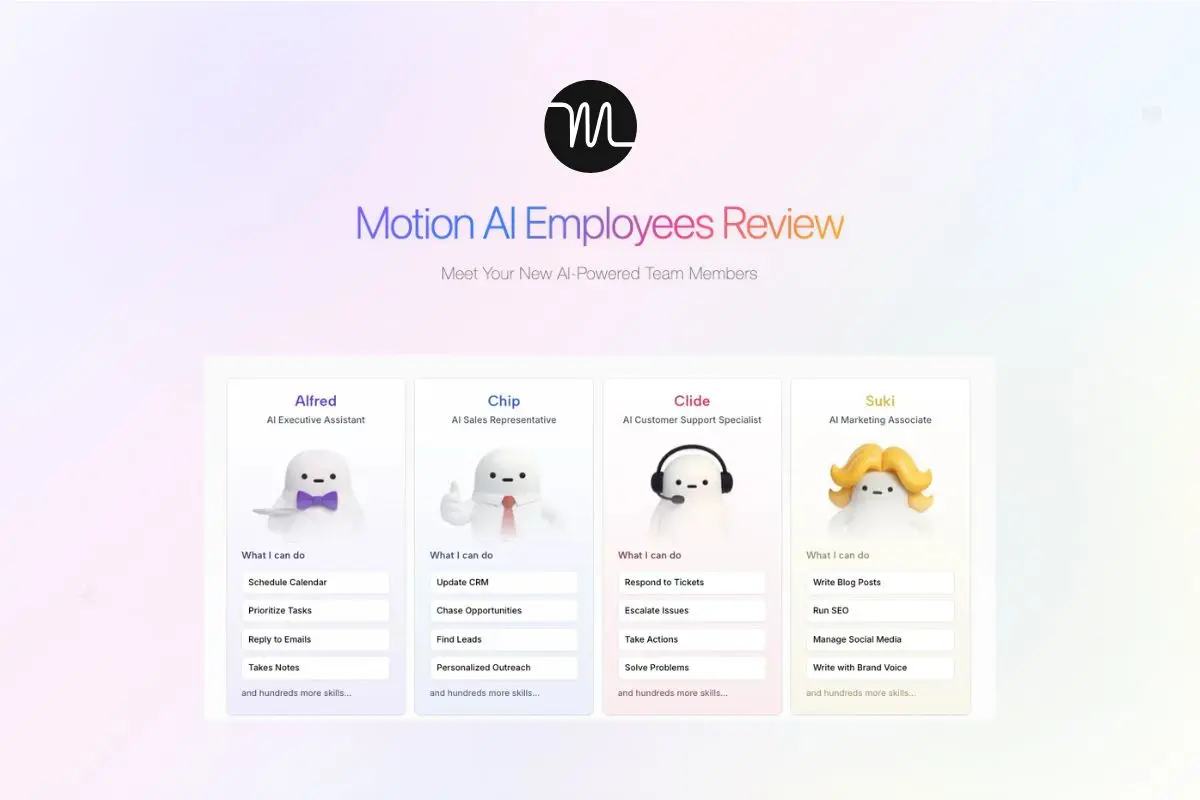
- Alfred - AI Executive Assistant for meeting preparation, schedule optimization, and email management
- Suki - Marketing Associate handling blog writing, social media management, and SEO optimization
- Chip - Sales Representative for outreach, lead management, and CRM updates
- Clide - Customer Support Specialist managing inquiries, tickets, and response automation
- Dot - Recruiter streamlining hiring processes and candidate communication
- Millie - Project Manager overseeing team coordination and deadline tracking
- Spec - Researcher conducting thorough analysis and comprehensive reports
- AI HR & Legal Assistant - NEW: Handles HR processes and legal documentation
- Custom AI Employees - Available on Enterprise plans, built by Motion's engineers for specific workflows
Rather than operating as standalone tools requiring constant platform switching, these AI workers connect directly with your calendar, email, task management systems, and CRM. They learn from your Motion workspace data—including projects, tasks, meetings, and notes—to deliver increasingly personalized assistance over time.
The real innovation extends beyond task automation to workflow intelligence. Motion AI Employees analyze your patterns, preferences, and priorities to handle multi-step processes that typically require hours of manual work—from competitor content analysis to comprehensive meeting brief preparation.
2025 Pricing & Plans Analysis
Motion operates on a tiered pricing structure that has been significantly updated in 2025, with dramatic increases in credit allocations across all plans. Understanding the current pricing model is crucial for determining whether the investment aligns with your business needs and budget constraints.
AI Workplace
$29/month
1 seat | 1,000 credits
Perfect for individual professionals testing the platform
Light ⭐ Most Popular
$99/month
3 seats | 25,000 credits
10 integrations
Ideal for solopreneurs and small teams
Standard
$299/month
10 seats | 100,000 credits
20 integrations
Built for growing teams and agencies
Plus
$599/month
25 seats | 250,000 credits
50 integrations
Enterprise-level automation
🎯 Major Update: The credit system has been massively expanded in 2025. The Light plan now includes 25,000 credits (up from 50 credits previously), making it significantly more valuable for regular users. This represents a 500x increase in credit allocation without a price change.
Real ROI Calculations
When compared to traditional virtual assistant costs, Motion's value proposition becomes clear. Traditional virtual assistants typically cost $15-25 per hour, which for 20 hours weekly translates to $1,200-$2,000 monthly.
Motion AI Light Plan costs $99 monthly (approximately $23 weekly), representing potential monthly savings of $1,101-$1,901 for equivalent work output. The annual ROI calculation shows $13,212-$22,812 saved versus human VA costs.
Cost Comparison Analysis
- Traditional Virtual Assistant: $15-25/hour × 20 hours/week = $1,200-$2,000/month
- Motion AI Light Plan: $99/month (approximately $23/week)
- Potential Monthly Savings: $1,101-$1,901 for equivalent work output
- Annual ROI: $13,212-$22,812 saved versus human VA costs
Most small business owners find the Light plan sufficient for daily operations, while marketing agencies and larger teams requiring high-volume content creation typically need Standard or Plus tiers. Motion has been gradually increasing prices over the past year, with current pricing locked in for annual subscribers but potentially subject to increases for new monthly users.
Ready to 10x Your Productivity?
Join over 1 million professionals already using Motion's AI workforce
Start 7-Day Trial⭐ Credit card required • Cancel anytime
⚡ Pricing Note: Motion's pricing has increased over the past year as demand grows. Current pricing is locked for annual subscribers but may increase for new monthly users. Lock in current rates with annual commitment.
In-Depth Feature Testing
Alfred - AI Executive Assistant

Alfred stands out as Motion's flagship AI employee, designed to handle the complex responsibilities of executive assistance. During my October 2025 testing, Alfred demonstrated impressive capabilities in automated meeting preparation—generating comprehensive briefs that included attendee backgrounds, relevant project history, and suggested talking points.
The daily meeting briefings feature proved particularly valuable in real-world testing. Each morning, Alfred automatically analyzes your calendar to provide context and priorities for the day ahead. This includes meeting objectives based on calendar descriptions, attendee relationship history from previous meetings, and relevant project updates from your Motion workspace.
The email management capabilities extend far beyond simple sorting. Alfred intelligently prioritizes messages based on sender importance (analyzing your historical response patterns), content urgency (identifying deadline-related keywords), and project relevance (connecting emails to active Motion projects).
Task prioritization represents Alfred's most sophisticated feature. Rather than organizing tasks by deadline alone, Alfred considers project dependencies, stakeholder expectations, your personal productivity patterns, and meeting schedule conflicts. The system learns from your decisions over time, gradually improving its prioritization accuracy.
Suki - AI Marketing Associate

Suki represents Motion's most feature-rich AI employee, offering comprehensive marketing automation capabilities. The blog writing workflow employs a systematic 7-step process that goes far beyond simple content generation.
Rather than just generating content, Suki begins with competitor analysis, identifying content gaps and opportunities. The SEO research phase goes beyond keyword stuffing, actually understanding search intent and content structure requirements.
Suki's 7-Step Blog Creation Process
- Competitor Analysis: Identifies content gaps and opportunities in your niche
- SEO Research: Understands search intent and content structure requirements
- Outline Development: Creates comprehensive article structure with H2/H3 hierarchy
- Content Drafting: Generates detailed, engaging content in your brand voice
- SEO Optimization: Implements proper header structure, meta descriptions, and internal linking
- Brand Voice Alignment: Ensures tone and terminology consistency
- Final Review: Provides editing suggestions and improvement recommendations

The modular skill selection in Motion allows precise customization for different marketing needs. You can enable specific capabilities like email campaign creation, landing page copy development, PR content and press release drafting, social media content generation (platform-specific), and SEO-optimized blog posts.
This modularity prevents credit waste on unnecessary features while ensuring comprehensive coverage of your marketing stack. Brand voice consistency emerged as a standout feature during testing—after analyzing existing content, Suki maintains remarkable tone, terminology, and messaging alignment across all generated materials.
Email Assistant & Meeting Notetaker

The Email Assistant module showcases Motion's practical approach to productivity enhancement. The inbox sorting system analyzes email context and relationships to create intelligent categories beyond simple filtering.
Professional reply drafting maintains appropriate tone while ensuring clarity and completeness. The priority flagging system proved particularly valuable during high-volume periods, considering message content, project relevance, and deadline implications rather than relying on sender importance alone.

The Meeting Notetaker delivers comprehensive meeting automation. Real-time transcription works reliably across Google Meet, Microsoft Teams, and Zoom, maintaining accuracy even with multiple speakers and technical discussions.
Action item extraction in Motion proves remarkably accurate—identifying not just explicit assignments but also implied commitments and follow-up requirements. Meeting summary generation creates concise, actionable documents that capture key decisions and next steps without overwhelming detail.
New AI HR & Legal Assistant
The newly added AI HR & Legal Assistant (launched in Q3 2025) handles employee onboarding documentation, contract review and summarization, compliance checklist management, policy document creation, and basic legal correspondence.
While not replacing specialized legal counsel, it significantly reduces time spent on routine HR and legal administrative tasks. This addition makes Motion particularly valuable for small businesses without dedicated HR departments.
Understanding Credit Consumption
The expanded credit system in 2025 represents a major improvement in Motion's value proposition. Understanding credit consumption patterns is essential for selecting the right plan and avoiding unexpected overages.
Actual Credit Consumption by Task Type
- Simple Email Replies: 1-2 credits per email
- Email Sorting & Flagging: 2-3 credits per inbox scan
- Blog Post Outlines: 3-5 credits per outline
- Comprehensive Blog Posts: 8-15 credits (1,500-2,500 words)
- Meeting Preparation Briefs: 2-4 credits per meeting
- Social Media Content Batches: 5-10 credits (5-10 posts)
- Full Meeting Transcription: 3-6 credits per hour
- Competitor Analysis Reports: 10-15 credits per comprehensive report
- CRM Data Updates: 1-2 credits per record
If you exceed your monthly credit allocation, Motion automatically charges for additional credits at approximately $0.02 per credit (varies slightly by plan). The system provides warnings when you approach 75% and 90% of your limit, and you can monitor real-time usage through the dashboard.
Unlike some competitors, there's no hard cutoff that stops your AI Employees from working mid-month—preventing workflow disruptions. However, monitoring consumption is essential to avoid unexpected overages on your bill.
Real-World Usage Example: A typical small business owner using Alfred for email management (daily), Suki for 2 blog posts monthly, and Meeting Notetaker for 10 meetings weekly consumes approximately 15,000-18,000 credits monthly—well within the Light plan's 25,000 credit allocation.
Real User Experiences & ROI
The real-world impact of Motion AI Employees becomes clear through case studies and user testimonials. Construction companies have reported significant efficiency gains by transforming operations with automated scheduling, client communication, and project tracking.
Marketing agencies highlight the content creation speed, enabling them to maintain consistent publishing schedules without burnout. Multiple users have described Motion as particularly helpful for managing ADHD and executive function challenges, with structured workflows and automated reminders helping maintain focus and consistency.
Success Stories (2025)
- MP Cloud Technologies: Eliminated daily scrums entirely by automating status update compilation and distribution
- Ally Advantage Consulting: Streamlined resource allocation across multiple projects using AI project management
- Regional Construction Company: Transformed operations with automated scheduling, client communication, and project tracking
- Marketing Agencies: Maintain consistent publishing schedules across client accounts without content team burnout
- ADHD Entrepreneurs: Structured workflows and automated reminders help maintain focus and consistency
However, Motion requires realistic expectations. The platform demands initial time investment for optimal configuration. Users consistently mention the learning curve for proper setup, with significant productivity gains typically appearing after several weeks of consistent use.
The system delivers best results for Gmail users, as the email integration features are optimized primarily for Google's ecosystem. Outlook users experience reduced functionality in email management features.
Motion AI Employees vs. Competitors (2025 Comparison)
Motion AI Employees occupies a unique position in the productivity software landscape. While many tools offer either task management or AI assistance, Motion's integrated approach delivers workflow automation that standalone competitors struggle to match.
Top Competitors in 2025
- Reclaim.ai: Free alternative with excellent Google Calendar integration, but lacks AI employees for content creation and email management. Best for calendar optimization only. While Reclaim excels at defending time for focus work and habits, it doesn't offer the comprehensive workflow automation that Motion provides. See our detailed Motion vs Reclaim AI comparison for a deeper analysis.
- Sunsama: Manual planning approach ($20/month) gaining popularity among users wanting more control. No AI automation, requires daily planning rituals. Sunsama emphasizes intentional daily planning with a mindful approach to task management. It's ideal for users who prefer deliberate human control over their schedule rather than AI-driven automation. The tool focuses on work-life balance and preventing burnout through conscious planning.
- Akiflow: Keyboard-first workflow ($34/month) for power users. Limited AI capabilities, focused on manual task aggregation from multiple sources. Akiflow consolidates tasks from various platforms into a single interface but requires manual intervention for task management. Best suited for keyboard enthusiasts who want centralized task visibility without AI assistance.
- Notion AI: Customizable workspace with growing AI features ($10/month). Requires significant manual setup, lacks automated workflow execution. Notion AI provides writing assistance and content generation within your workspace but doesn't handle autonomous workflow management like meeting preparation or email prioritization. It's more of an AI writing assistant embedded in a flexible workspace rather than a complete AI workforce.
- Trevor AI: Simple time-blocking tool ($3.99/month). Basic functionality without intelligent scheduling or AI employees. Trevor focuses on straightforward time-blocking with minimal features—a budget-friendly option for those who need simple daily planning without advanced automation.
Feature Comparison Matrix
| Feature | Motion AI Employees | Reclaim.ai | Sunsama | Notion AI |
|---|---|---|---|---|
| AI Workflow Automation | ✅ 8+ AI Employees | ❌ | ❌ | ⚠️ Basic |
| Email Management | ✅ Advanced | ❌ | ❌ | ❌ |
| Content Creation | ✅ Full Suite | ❌ | ❌ | ✅ Basic |
| Calendar Optimization | ✅ AI-Powered | ✅ AI-Powered | ⚠️ Manual | ❌ |
| Learning & Adaptation | ✅ Continuous | ✅ Limited | ❌ | ⚠️ Basic |
| Meeting Automation | ✅ Full Suite | ⚠️ Basic | ❌ | ❌ |
| Task Prioritization | ✅ AI-Driven | ⚠️ Time-Based | ✅ Manual | ⚠️ Manual |
| Starting Price | $29/month | Free | $20/month | $10/month |
| Best For | Teams & Busy Professionals | Individual Calendar Users | Intentional Planners | Custom Workflows |
When to Choose Each Tool
Choose Motion AI Employees if you need comprehensive workflow automation with AI employees handling email management, content creation, meeting preparation, and multi-step processes. Best for busy professionals, executives, marketing teams, and small business owners who can justify the premium pricing with significant time savings.
Choose Reclaim.ai if you primarily need intelligent calendar management and time blocking without the cost. Reclaim excels at defending time for focus work, habits, and meetings but won't handle content creation or email management. Perfect for individual users on a budget who only need calendar optimization.
Choose Sunsama if you prefer intentional, mindful daily planning over automation. Sunsama's ritual-based approach helps prevent burnout through conscious task selection and work-life balance. Ideal for users who want human control over their schedule and find value in daily planning ceremonies.
Choose Notion AI if you need a flexible workspace with basic AI writing assistance. Notion works well for teams wanting customizable databases, wikis, and project management with some AI support for content generation. However, it lacks the autonomous workflow execution that Motion provides.
Choose Akiflow if you're a keyboard-first power user who wants centralized task aggregation without AI interference. Akiflow consolidates tasks from multiple sources into one interface but requires manual management—best for users who prefer human control and keyboard shortcuts.
The sophisticated multi-step processes set Motion apart from these alternatives. Where competitors might handle single tasks like email drafting or scheduling, Motion AI Employees manage complete workflows from inception to completion. This comprehensive approach means fewer tools in your stack and less context switching throughout your day.
For budget-conscious users who only need calendar optimization, Reclaim.ai provides excellent value at no cost. For those wanting more human control and intentional planning, Sunsama offers a mindful alternative. But for professionals needing genuine AI workforce automation with multiple specialized employees, Motion remains the most comprehensive solution despite the higher price point.
Mobile App Experience
Motion has made significant mobile improvements throughout 2025, addressing a major limitation from previous years. Native iOS and Android apps are now available on all plans, providing comprehensive mobile functionality.
Mobile Capabilities
- Full Task Management: Create, edit, and complete tasks with full Motion features
- Calendar Integration: View and manage schedule with AI-powered optimization
- Quick Capture: Rapid task entry with voice-to-text support
- Notifications: Smart alerts for upcoming meetings and priority tasks
- Offline Mode: Limited functionality available without connection
However, AI Employees functionality remains limited on mobile devices. While you can trigger certain automated workflows and view AI-generated content, the full AI Employee configuration and advanced features require desktop access.
Most users report using mobile primarily for task capture and schedule viewing, with AI Employee management happening on desktop. This makes sense given the complexity of workflow configuration and the need for larger screens to properly review AI-generated content.
Comprehensive Pros & Cons
✅ Pros
- Massively Expanded Credits: 25,000+ credits on Light plan (500x increase from previous 50)
- Comprehensive Workflow Automation: 8+ AI Employees handling complete processes
- Excellent Gmail Integration: Seamless Google Workspace connectivity
- Continuous Learning: System improves accuracy over time with use
- Enhanced Integrations: Up to 50 connections on Plus plan (Salesforce, HubSpot, Slack)
- Real Time Savings: Significant hours reclaimed for high-value work
- Strong ROI Potential: Savings versus traditional VA costs
- Mobile Apps: Native iOS and Android support on all plans
- No Hard Cutoffs: Credit overages don't stop workflows mid-month
- Custom AI Employees: Enterprise plans can build specialized workers
⚠️ Cons
- Learning Curve: Requires time for optimal configuration
- Premium Pricing: Starting at $29/month, not suitable for tight budgets
- Gmail Dependency: Outlook users experience reduced functionality
- Setup Time Investment: Initial configuration requires thoughtful planning
- Credit Monitoring Needed: Must track consumption to avoid overages
- Complex Feature Set: Can overwhelm casual users seeking simple solutions
- Timezone Issues: Some users report delayed triggers
- Limited Mobile AI: AI Employee configuration requires desktop access
- Gradual Price Increases: Pricing has increased over the past year
Who Should Use Motion AI Employees
If you manage complex schedules with multiple stakeholder relationships, Motion's AI-powered meeting preparation, email management, and calendar optimization will reclaim valuable hours weekly. The automated briefings alone can justify the investment for executive-level professionals.
Agencies and marketing teams requiring consistent content output at scale benefit dramatically from Suki's 7-step blog creation process and social media automation. Motion enables faster content production while maintaining brand consistency across all channels.
When you're wearing multiple hats daily, having AI employees shift seamlessly between different business functions becomes invaluable. Like having a competent team without overhead costs—particularly valuable for businesses in growth phases.
Structured workflows, automated reminders, and intelligent task prioritization help maintain focus and consistency. Motion provides external structure for managing executive function challenges without relying solely on personal discipline.
Budget-Conscious Users: Free alternatives like Reclaim.ai provide basic calendar optimization. Outlook-Primary Users: Gmail integration is significantly more robust. Simplicity Seekers: The complexity may frustrate those wanting straightforward task lists. Quick-Start Expectations: The learning curve requires commitment. Manual Control Preference: Tools like Sunsama suit those wanting deliberate daily planning.
Getting Started Guide (Step-by-Step)
Successfully implementing Motion AI Employees requires thoughtful planning and systematic setup. Rushing through configuration typically results in suboptimal performance and user frustration. Here's my recommended approach based on extensive testing.
Recommended Implementation Process
- Week 1: Foundation Setup
- Create account and configure workspace settings
- Complete Gmail integration and authentication (ensure Google Workspace admin approves if applicable)
- Import existing tasks and projects
- Set up calendar preferences and working hours
- Configure AI Knowledge with 5-10 pieces of existing content
- Week 2: Initial AI Employee Activation
- Activate ONLY Alfred (Executive Assistant) first
- Configure email management preferences and VIP contacts
- Test meeting preparation briefs with upcoming meetings
- Monitor credit consumption patterns
- Adjust settings based on initial performance
- Week 3: Expand to Second AI Employee
- Add Suki (Marketing) OR your most pressing need
- Configure brand voice with existing content examples
- Run test tasks to understand output quality
- Refine prompts and preferences based on results
- Week 4+: Optimization & Expansion
- Gradually activate additional AI Employees as needed
- Monitor productivity gains and credit consumption
- Create custom workflows for recurring processes
- Evaluate whether plan tier suits actual usage
Resist the temptation to activate all AI Employees simultaneously. Users who gradually implement 1-2 AI Employees at a time report higher satisfaction and faster productivity gains than those who enable everything at once and become overwhelmed.
Critical Success Factor: The key to success with Motion is patience during the initial setup phase. The system needs time to learn your patterns, and you need time to understand how to best leverage each AI Employee's capabilities.
🛡️ 7-Day Trial: Motion offers a 7-day trial to test the system. Credit card required to start. Cancel anytime during the trial period if the platform doesn't meet your needs.
Common Issues & Solutions
Based on analysis of user discussions and forums, here are the most frequently reported issues with Motion and their solutions:
Frequently Encountered Problems
- AI Employees Not Appearing in Sidebar
- Cause: Plan doesn't include AI Employees access (AI Workplace plan has limited features)
- Solution: Verify your plan tier includes full AI Employees. Upgrade to Light plan ($99/month) minimum for complete access.
- Timezone Issues Causing Delayed Triggers
- Cause: Particularly affects UK users where AI Employees trigger late in the day
- Solution: Double-check workspace timezone settings. Contact Motion support for account-specific timezone adjustments.
- Email Integration Not Working Properly
- Cause: Incomplete Gmail authentication or insufficient permissions
- Solution: Disconnect and reconnect Gmail integration. Ensure all requested permissions are granted. If using Google Workspace, verify admin has approved third-party access.
- Tasks Disappearing or Hard to Locate
- Cause: Tasks that can't be scheduled before deadlines may become difficult to find
- Solution: Use the search function and "All Tasks" view. Adjust deadlines or reduce task load to ensure schedulability. Review workspace settings for auto-archive rules.
- Credit Consumption Higher Than Expected
- Cause: Complex tasks consume more credits than anticipated
- Solution: Monitor real-time credit usage dashboard. Start with simpler tasks to understand consumption patterns. Upgrade to higher tier if consistently hitting limits.
If you experience persistent issues not resolved by these solutions, contact Motion's support team directly with your account email and specific problem description for personalized assistance.
Conclusion & Final Recommendation
After extensive testing throughout October 2025—including the latest feature updates, pricing changes, and workflow integrations—Motion AI Employees emerges as a powerful productivity solution for specific user profiles. The platform genuinely delivers on its promise of intelligent workflow automation, transcending simple task management and basic AI assistance.
The productivity improvements aren't marketing exaggeration—they reflect the real impact of having 8+ AI employees handle routine work. The time savings from automated meeting preparation, email management, and content creation can fundamentally transform how you allocate working hours.
Bottom Line: Motion AI Employees represents a premium productivity solution delivering substantial value for busy professionals, growing teams, and productivity-focused organizations operating within the Google ecosystem. While the learning curve and pricing may not suit everyone, users matching the ideal profile consistently find it becomes indispensable over time.
Who Will Get Maximum Value
Motion delivers exceptional ROI for executives and managers managing complex schedules with multiple stakeholders, marketing agencies and content teams requiring consistent high-volume output, small business owners who need to maximize limited time, ADHD professionals seeking structured systems, and Gmail/Google Workspace users who can leverage full integration capabilities.
Who Should Consider Alternatives
Consider alternatives if you operate on tight budgets (under $100/month for productivity tools), primarily use Outlook/Microsoft 365 (functionality significantly reduced), prefer manual control over automated systems (Sunsama offers better intentional planning), need immediate results without setup investment (learning curve required), or seek simple task list management without workflow complexity (Todoist or TickTick may suffice).
The platform's continuous evolution—with frequent feature updates and consistent improvements—suggests a strong future trajectory. Motion has demonstrated commitment to addressing user concerns while expanding capabilities with new additions like the HR/Legal Assistant and custom AI Employees.
My Final Recommendation
For busy professionals, growing teams, and productivity-focused organizations operating within the Google ecosystem and willing to invest time in proper setup, Motion AI Employees represents a compelling solution likely to deliver significant ROI. The 7-day trial provides sufficient time to evaluate fit.
Rating: 4.2/5 stars - Excellent for target users, but not suitable for everyone due to learning curve and Gmail dependency.
Credit card required • Cancel anytime during trial
Frequently Asked Questions
Motion AI Employees pricing has been updated as of October 2025: AI Workplace starts at $29/month (1 seat, 1,000 credits), Light plan is $99/month (3 seats, 25,000 credits), Standard is $299/month (10 seats, 100,000 credits), and Plus is $599/month (25 seats, 250,000 credits). The credit system has been significantly expanded, with the Light plan now offering 25,000 credits instead of the previous 50 credits—representing a 500x increase in value.
Motion AI Employees go beyond basic AI chatbots by executing complete workflows autonomously. They handle meeting preparation with attendee backgrounds, manage email prioritization based on your historical patterns, create multi-step content from competitor analysis to SEO optimization, update CRM records automatically after calls, and coordinate team tasks through integrated project management. Unlike standalone AI tools, Motion learns from your workspace data including projects, tasks, meetings, and notes—providing contextual intelligence that improves over time.
Motion AI Employees are optimized primarily for Gmail and Google Workspace users. While basic functionality works with other email providers like Outlook, Gmail users experience the most comprehensive features including advanced email sorting, intelligent reply drafting, and seamless calendar integration. Non-Gmail users report reduced email management capabilities and diminished workflow automation effectiveness. If you primarily use Outlook or Microsoft 365, consider whether limited functionality justifies the investment.
Based on October 2025 usage patterns, credit consumption varies significantly by task complexity: simple email replies use 1-2 credits, email sorting and flagging consumes 2-3 credits per scan, blog post outlines require 3-5 credits, comprehensive blog posts (1,500-2,500 words) consume 8-15 credits, meeting preparation briefs use 2-4 credits per meeting, and social media content batches consume 5-10 credits for 5-10 posts. Most small business owners find the 25,000 credits in the Light plan sufficient for regular operations—handling approximately 150-200 tasks monthly.
No, Motion AI Employees are designed to augment human capabilities, not replace them entirely. They excel at repetitive, time-consuming tasks like email management, meeting preparation, data entry, and content creation—allowing human employees to focus on strategic decision-making, creative problem-solving, complex relationship building, and nuanced judgment calls that require human empathy and context. Think of Motion as highly capable digital assistants that handle the "busy work" so humans can focus on high-value activities.
If you exceed your monthly credit allocation, Motion automatically charges for additional credits at approximately $0.02 per credit (varies slightly by plan tier). The system provides proactive warnings when you approach 75% and 90% of your limit, allowing you to adjust usage before overages occur. You can monitor consumption in real-time through the dashboard. Unlike some competitors, Motion doesn't impose hard cutoffs that stop your AI Employees from working mid-month—preventing workflow disruptions. However, unexpected overages can increase costs, so monitoring is essential.
Common troubleshooting issues include: AI Employees not appearing in the sidebar (verify your plan includes full AI Employees access—AI Workplace has limited features), timezone problems causing delayed triggers (especially affecting UK users—check workspace timezone settings), insufficient workspace permissions (ensure admin access), or incomplete Gmail integration (disconnect and reconnect with all permissions granted). If problems persist after these checks, contact Motion support with your account email for specific assistance.
Most users report seeing initial productivity gains within 2-3 weeks of proper setup, with significant improvements manifesting after 4-6 weeks as Motion learns your patterns, preferences, and priorities. The key success factor is investing time in initial configuration—including setting up AI Knowledge with your business context (5-10 content examples), training the AI on your communication preferences, and gradually activating AI Employees (1-2 at a time) rather than enabling all simultaneously. Users who rush setup typically experience frustration and suboptimal results.
Motion offers native integrations with Slack for task creation and notifications, Google Workspace for comprehensive email/calendar functionality, Zoom/Microsoft Teams for meeting notes and transcription, and various other business tools. Integration limits vary by plan tier: Light plan (10 connections), Standard plan (20 connections), Plus plan (50 connections). Advanced CRM integrations like Salesforce and HubSpot are available but typically require higher-tier plans or custom Enterprise setup. Check the current integration directory to verify your specific tools are supported.
Current user complaints include: learning curve requiring time to optimize performance (most common complaint), credit consumption monitoring needed to avoid unexpected overages, Gmail dependency significantly limiting functionality for Outlook users (reduced features), occasional timezone issues causing delayed task triggers (particularly affecting UK users), higher pricing compared to basic task management tools ($99/month vs $10-20 alternatives), and advanced features overwhelming casual users seeking simple productivity solutions. However, users who persist beyond the initial learning period consistently report high satisfaction with Motion.
Yes, Motion offers a 7-day trial with access to all 8+ AI Employees and premium features. A credit card is required to start the trial, and you can cancel anytime during the 7-day period. The trial includes access to all AI Employees (Alfred, Suki, Chip, Clide, Dot, Millie, Spec, plus HR/Legal Assistant), credit allocation for testing, complete integration setup capabilities, and all premium features. This provides sufficient time to test real workflows, evaluate credit consumption patterns, and assess whether Motion suits your specific needs before continuing your subscription.
Traditional virtual assistants cost $15-25 per hour for 20 hours weekly ($1,200-$2,000 monthly), while Motion's Light plan costs $99 monthly (approximately $23 weekly). Motion AI Employees work 24/7 without breaks or time off, don't require training on company processes (though initial setup is needed), maintain perfect consistency without human error variability, and scale instantly with your needs without hiring friction. However, human VAs excel at complex relationship management, creative strategic thinking, nuanced decision-making in ambiguous situations, and tasks requiring genuine human empathy and context—areas where AI still has limitations.
Custom AI Employees are available on Enterprise plans (pricing varies based on requirements), built by Motion's engineering team to match your specific workflows and industry needs. You provide detailed instructions in natural language (similar to training a human employee), and Motion creates specialized AI Employees for your unique processes. This includes industry-specific workflows (healthcare, legal, real estate), complex multi-step automations requiring specialized logic, and integration with proprietary business systems or databases. Contact Motion's sales team for custom AI Employee capabilities and pricing.
Before canceling your subscription, ensure you've completed these critical steps: finished the full Gmail integration setup with all permissions granted, spent several weeks allowing the system to learn your patterns (it improves significantly after this period), configured AI Knowledge with 5-10 pieces of existing content representing your brand voice, activated only 1-2 AI Employees initially rather than enabling all simultaneously (common mistake causing overwhelm), and contacted Motion support for troubleshooting specific issues. Many users find success after addressing these common setup problems rather than immediately canceling—Motion requires proper configuration to demonstrate value.