
LightPDF
AI-powered PDF editor with GPT-4 ChatPDF that lets you chat with documents, extract insights, and process PDFs with 25+ free tools—no installation required.
Try LightPDF Free →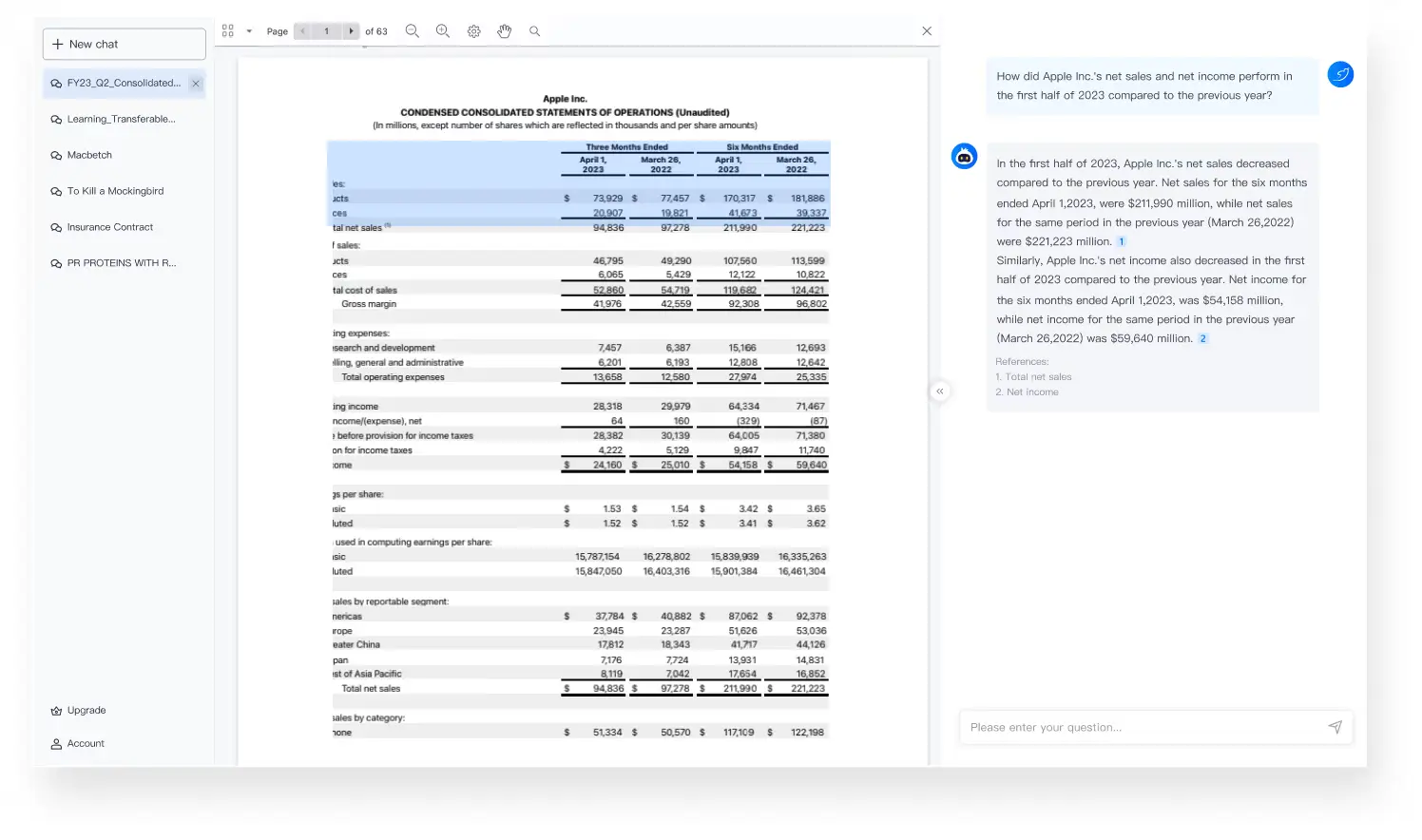
A Modern AI-First PDF Editor
for Document Intelligence
LightPDF delivers where it matters most: GPT-4 powered ChatPDF that actually understands your documents with page citations. The 25+ free tools without watermarks make it a compelling choice for anyone tired of paying Adobe prices.
✓ What We Love
- GPT-4 ChatPDF with page citations
- 25+ free tools, no watermarks
- OCR supports 20+ languages
- Works on any device, no install
! Could Be Better
- Free tier limited to 8 AI questions/day
- Premium pricing on the higher side
- AI features require internet
See LightPDF in Action
Real screenshots showcasing key features and interface.
AI Agent PDF Assistant
Chat-based interface for intelligent PDF processing

ChatPDF Document Analysis
Ask questions about any document and get cited answers
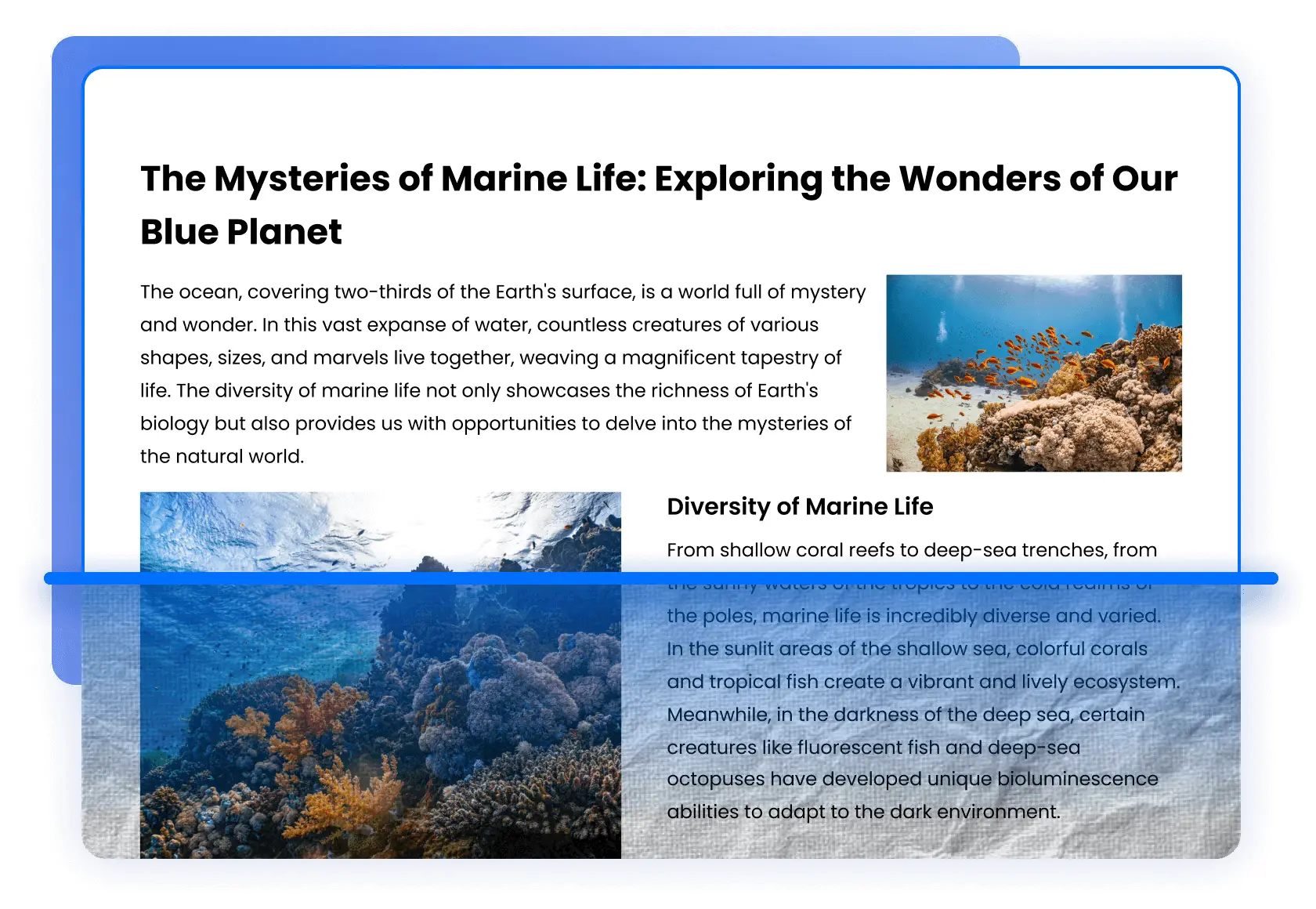
OCR Text Recognition
Extract text from scanned documents and images
PDF Annotation & Editing
Full editing suite with highlights, drawings, and text tools

Form Creation & Editing
Build interactive PDF forms with fields, checkboxes, and signatures

How LightPDF Works
Upload Your Document
Drag and drop any PDF, Word, Excel, PowerPoint, or image file. Supports files up to 100MB on free tier, unlimited on premium.
Choose Your Tool
Select from 25+ tools: edit, convert, compress, merge, split, OCR, or chat with AI. Everything works directly in your browser.
AI Processes Your Request
For ChatPDF, GPT-4 analyzes your document and lets you ask questions in natural language with page-cited answers.
Download or Share
Get your processed file instantly. No watermarks added. Save to cloud storage or download directly.
Privacy & Security
LightPDF uses 256-bit SSL encryption and is GDPR compliant. Files are automatically deleted after processing—your documents are never stored or analyzed beyond your request.
Key Features
ChatPDF (GPT-4)
Ask questions about any document in natural language. Get answers with automatic page citations.
OCR Recognition
Extract text from scanned documents and images. Supports 20+ languages including handwriting.
PDF Editor
Edit text, images, and links directly in PDFs. Add annotations, highlights, and shapes.
File Conversion
Convert between PDF and 15+ formats: Word, Excel, PowerPoint, images, HTML, EPUB.
AI Summarizer
Generate concise summaries of long documents. Extract key information automatically.
AI Translation
Translate documents to 20+ languages while preserving original formatting.
AI Mind Maps
Convert PDF content into visual mind maps. Perfect for studying and presentations.
Compress & Merge
Reduce file sizes by up to 90%. Combine multiple PDFs into one document.
Pricing Plans
Save up to 60% with annual plans. Free tier includes 25+ tools.
Yearly
Additional options: 3-Year Plan at $99.99 • Perpetual License at $109.99
LightPDF vs Adobe Acrobat
Save $191.89/year with LightPDF—plus get superior AI features included.
Detailed Pros & Cons
✓ Pros
GPT-4 powered document chat with automatic page citations. Superior to most competitors.
25+ tools with no watermarks—rare among PDF editors. Basic needs covered without paying.
20+ languages with handwriting support. Users consistently praise accuracy.
Web, Windows, Mac, iOS, Android—all synced. Work from anywhere seamlessly.
GDPR compliant, 256-bit encryption, auto-delete. Suitable for sensitive documents.
✗ Cons
Only 8 ChatPDF questions daily on free tier. Power users will need premium.
ChatPDF, OCR, and translation need connectivity. Desktop apps work offline for basic tasks.
Different features consume different credits. Takes time to understand consumption rates.
Monthly costs higher than budget alternatives like UPDF. Annual plan offers better value.
Lacks archival format support. Enterprise users may need Adobe or Foxit.
LightPDF vs Alternatives
How does LightPDF compare to other AI PDF editors?
| Feature | LightPDF | Foxit PDF Editor | PDFelement | PDF.ai | Adobe Acrobat |
|---|---|---|---|---|---|
| Starting Price | Free / $47.99/yr | $131.88/yr | $79.99/yr | Free / $10/mo | $239.88/yr |
| AI Chat (GPT-4) | ✓ Included | $49.99/yr add-on | $3.99/mo add-on | ✓ Included | $59.88/yr add-on |
| Free Tools | 25+ tools | Reader only | Trial only | Limited free | Limited |
| OCR Languages | 20+ | 20+ | 20+ | Limited | Best |
| Perpetual License | $109.99 | $159 | $129.99 | None | None |
| Best For | AI document chat | Enterprise security | All-rounder value | Quick AI chat | Publishing pros |
Which Tool Is Right For You?
LightPDF
Best for AIBest for: Students, researchers, and professionals who need to chat with documents, extract insights, and process PDFs without expensive software. Superior GPT-4 ChatPDF with page citations.

Foxit PDF Editor
EnterpriseBest for: Enterprise users needing security compliance, smart redaction, and Microsoft integrations. More expensive but robust for business.
Wondershare PDFelement
Perpetual LicenseBest for: Users wanting a one-time purchase with multi-model AI. Great all-rounder with extensive template library.

Adobe Acrobat
Industry StandardBest for: Publishing professionals and enterprises needing PDF/A compliance, Adobe Sign, and Creative Suite integration.

Sparkle
Budget OptionBest for: Budget-conscious users seeking simple PDF creation and editing without advanced AI features.

PDF.ai
AI FocusBest for: Users who primarily need AI chat with PDFs without heavy editing features. Simple interface, affordable pricing.
Frequently Asked Questions
Should You Try LightPDF?
LightPDF stands out as a modern, AI-first PDF solution that prioritizes intelligent document processing over traditional complexity. The GPT-4 powered ChatPDF with page citations is genuinely useful for researchers, students, and professionals who need to extract insights from documents quickly.
The generous free tier with 25+ tools and no watermarks makes it easy to try before committing. At $47.99/year, it's significantly cheaper than Adobe while offering superior AI features. The main trade-off: premium pricing if you pay monthly, and AI features require internet.
Our Recommendation
Start with the free tier to test ChatPDF and OCR on your actual documents. If you process PDFs regularly and value AI assistance, the yearly plan offers excellent value versus alternatives.
Ready to Chat With Your Documents?
Join millions of users who save time with AI-powered PDF editing