
Later
Visual-first social media management platform with the best Instagram grid planner on the market. Drag-and-drop scheduling, Link in Bio, and Best Time to Post—built for creators and brands who care about feed aesthetics.
Try Later Free →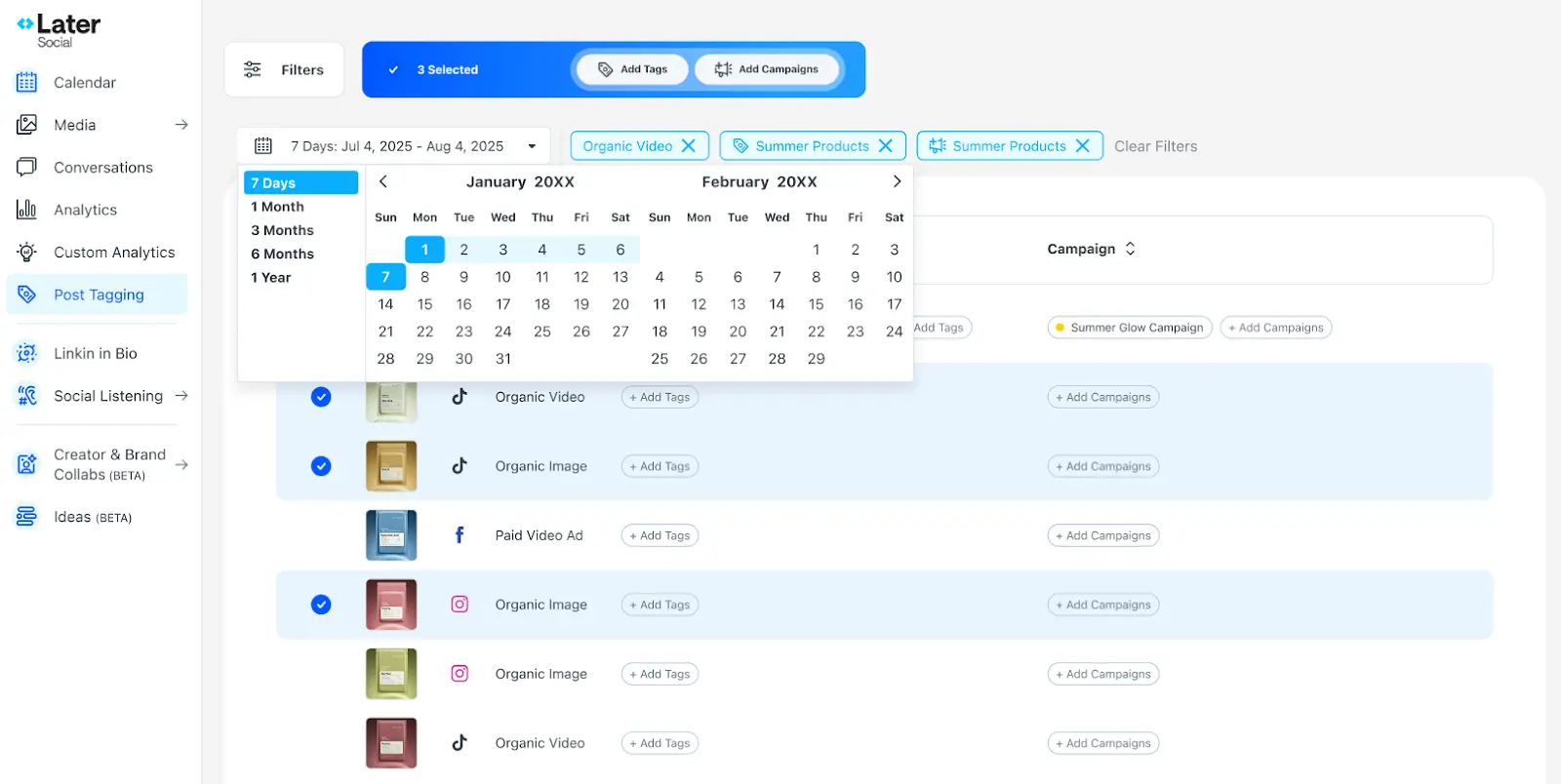
The Visual Planner Instagram
Creators Actually Want to Use
After thorough testing, Later remains the go-to visual planner for Instagram and TikTok creators who prioritize feed aesthetics. Its drag-and-drop grid preview is genuinely best-in-class, and the Link in Bio tool turns a single profile link into a traffic-driving hub. While the elimination of the free plan and limited AI credits may disappoint some users, the platform delivers where it matters most: helping visual-first brands maintain cohesive, beautiful social feeds with minimal effort.
✓ What We Love
- Best-in-class Instagram grid visual planner
- Link in Bio with click tracking on all plans
- Auto-publish for Stories, Reels & TikTok
- Intuitive drag-and-drop calendar
! Could Be Better
- No free plan (14-day trial only)
- AI credits are limited (10-50/month)
- 30 posts/month cap on Starter plan
What Is Later?
A comprehensive overview of the platform and who it's built for.
Later is a visual-first social media management platform that has specialized in Instagram and TikTok scheduling since its founding in 2014 (originally as "Latergramme"). The platform's standout feature is its drag-and-drop Instagram visual planner—a grid preview that shows exactly how your feed will look before you hit publish. For creators and brands where aesthetic consistency drives engagement and sales, this capability alone sets Later apart from general-purpose scheduling tools.
Following a merger with influencer marketing platform Mavrck in January 2024, Later now operates as a dual-purpose platform offering three core products: Later Social™ for social media scheduling and analytics, Later Influence™ for enterprise influencer marketing campaigns with access to 14+ million creator profiles, and Later Link in Bio™ for creating clickable landing pages from Instagram and TikTok profiles.
Later supports nine social media platforms as of February 2026: Instagram (Posts, Stories, Reels, Carousels), TikTok, Facebook, Pinterest, X (Twitter), LinkedIn, YouTube Shorts, Threads (in testing), and Snapchat (announced late 2025). Its strength lies squarely in visual-first platforms—Instagram, TikTok, and Pinterest—where the grid preview and aesthetic planning features genuinely transform how creators plan content.
The platform is used by over 7 million users worldwide and maintains a 4.4/5 rating on G2 (309 reviews) and Capterra (396 reviews). Later holds official Instagram Marketing Partner status, meaning it uses Instagram's official API for posting—an important detail for creators concerned about account safety and shadow bans.
Who Is Later Best For?
Later is ideal for Instagram-focused creators and brands where visual feed aesthetics directly impact engagement—think fashion, beauty, design, food, and lifestyle niches. It works best for solo creators or small teams (1-6 people) posting 1-5 times daily who want to plan their grid in advance and drive traffic through Link in Bio. If Instagram and TikTok represent 70%+ of your social media efforts, Later's specialization becomes a genuine advantage over generalist tools.
What makes Later different from using a general tool like Hootsuite or Buffer is its visual-first philosophy. While competitors treat scheduling as a calendar exercise, Later treats it as a design exercise. You can see exactly how each post fits into your overall grid, drag posts around to find the perfect visual flow, and preview your feed days or weeks in advance. For brands and creators whose audiences follow them partly for the aesthetic experience, this workflow difference is substantial.
See Later in Action
Real screenshots from the platform showing key features and the content planning workflow.
Visual Calendar & Instagram Grid Planner
Plan your feed with a drag-and-drop calendar and live grid preview
Later's visual calendar is the heart of the platform. The left sidebar provides quick access to Calendar, Media, Conversations, Analytics, and the AI-powered Ideas feature. The main calendar view shows all scheduled content across platforms with filter controls for date range (7 days, 1/3/6 months, or 1 year), content type (Organic Video, Organic Image, Paid Video Ad), and campaign tags. You can bulk-select posts to add tags or assign to campaigns—useful for organizing seasonal content or tracking performance by theme.
AI Content Ideas Generator
Describe your brand and get AI-generated content pillars and post ideas
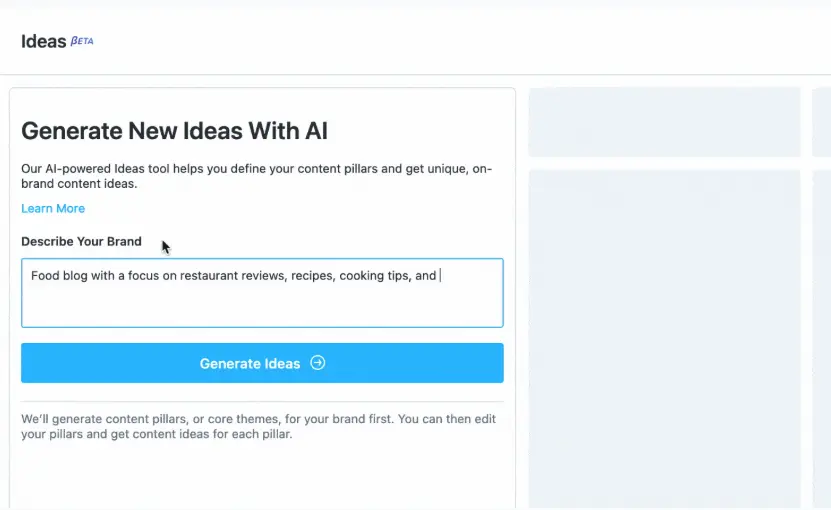
The AI Ideas tool (currently in beta) lets you describe your brand—in this example, "Food blog with a focus on restaurant reviews, recipes, cooking tips"—and generates content pillars automatically. These pillars become the foundation for organized content planning. Each pillar gets its own column where you can generate specific post ideas, add your own, or mix and match. The feature uses AI credits (1 credit per generation), so it's best used strategically for brainstorming sessions rather than daily content creation.
AI Content Ideas: Generated Results
Content pillars with actionable post ideas you can copy and schedule
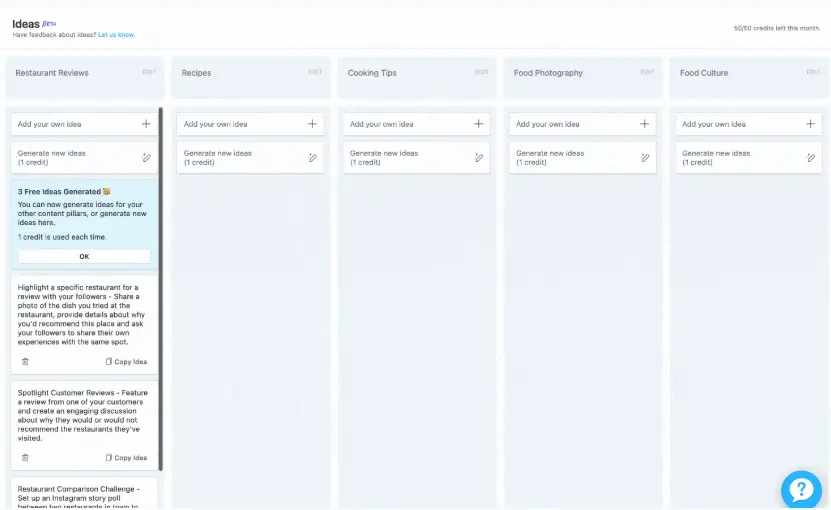
Here's what the AI generates: five distinct content pillars—Restaurant Reviews, Recipes, Cooking Tips, Food Photography, and Food Culture—each with specific, actionable post ideas. For instance, under Restaurant Reviews, the AI suggests highlighting a specific restaurant with a photo and asking followers to share their experiences. Under Spotlight Customer Reviews, it suggests featuring a review and creating discussion around recommendations. Each idea can be copied directly to your content plan. Notice the credit counter (50/50 remaining)—the Starter plan provides only 10 credits, so higher-tier plans are needed for regular AI use.
Social Inbox: Instagram Messages
Manage Instagram DMs and comments without leaving Later
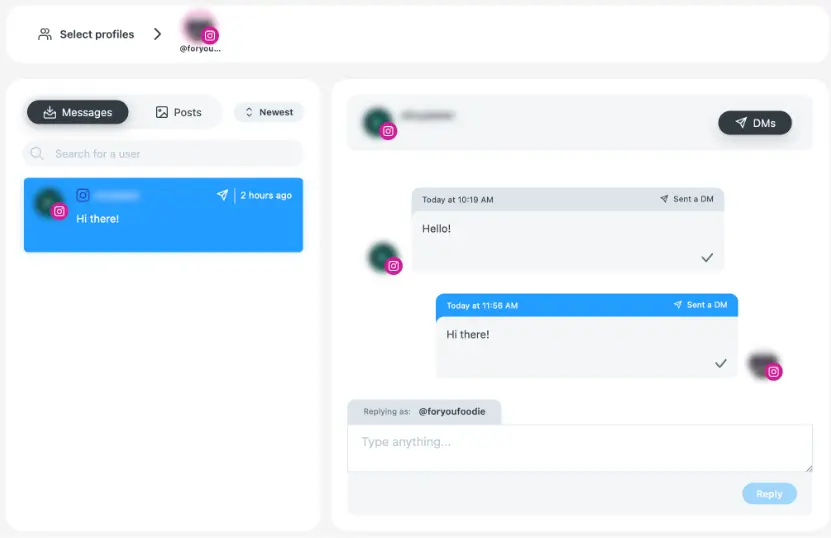
Later's social inbox lets you manage Instagram direct messages and comments from within the platform. You can filter between Messages and Posts, sort by newest, and reply directly without switching to the Instagram app. The interface shows conversation threads with timestamps and delivery status indicators. While functional for Instagram engagement, it's worth noting that the inbox currently supports Instagram and TikTok only—if you need unified inbox management across all platforms, enterprise tools like Agorapulse offer broader coverage.
How Later Works
From connecting your accounts to a perfectly planned Instagram feed in four steps.
Connect Your Social Profiles
Start by connecting your Instagram, TikTok, Facebook, Pinterest, LinkedIn, X, or YouTube accounts. Later groups these into "social sets"—one profile per platform per set. For Instagram and TikTok, you'll need to authorize Later for auto-publishing (requires an Instagram Business or Creator account). Facebook, X, Pinterest, LinkedIn, and YouTube Shorts auto-publish by default without extra setup. The entire connection process takes about 5 minutes.
Upload & Organize Your Media
Drag and drop photos and videos into Later's Media Library—you can bulk-upload up to 50 files at once. The library serves as your centralized content hub, accessible across desktop and mobile. Use labels and filters to organize content by campaign, theme, or season. Later stores unlimited media on all plans, so you can build a robust content library without worrying about storage limits. The platform accepts photos up to 30MB and videos up to 500MB on Growth+ plans.
Plan Your Feed with the Visual Planner
This is where Later truly differentiates itself. Drag media from your library onto the visual calendar, and watch your Instagram grid preview update in real-time. Rearrange posts to find the perfect visual flow—ensure colors complement each other, alternate between close-ups and wide shots, and maintain the aesthetic consistency your followers expect. Later's Best Time to Post feature analyzes when your specific audience is most active and highlights optimal scheduling windows. Write captions, add hashtags, set your first comment, and configure your Link in Bio URL for each post.
Auto-Publish & Track Performance
Once scheduled, Later auto-publishes your content at the designated times—no manual intervention needed for Instagram posts, Stories, Reels, TikTok videos, and all other supported platforms. After publishing, track performance through Later's analytics: monitor impressions, reach, engagement, follower growth, and Link in Bio clicks. The "Best Posts" analysis identifies your top-performing content to inform future strategy. Analytics data is available for 3 months on Starter, up to 1 year on higher plans.
Official Instagram Marketing Partner
Later uses Instagram's official API for all publishing—this is important for account safety. Unlike unauthorized tools that may trigger shadow bans or account flags, Later operates within Instagram's approved framework. You can schedule and auto-publish with confidence that your account remains in good standing.
Mobile App for On-the-Go Planning
Later's mobile app (iOS 15+ and Android 6.0+) lets you capture, upload, and schedule content directly from your phone. Get push notifications when it's time to post manually, manage your content calendar, and respond to Instagram messages—all from the same app. The mobile experience is particularly strong for creators who capture content throughout their day and schedule during dedicated planning sessions.
Key Features
Everything Later offers for visual social media management.
Instagram Visual Grid Planner
Later's signature feature: a drag-and-drop grid preview showing exactly how your Instagram feed will look before publishing. Rearrange posts to create visual flow, ensure color harmony, and maintain the cohesive aesthetic your followers expect. Rated best-in-class across independent reviews.
Link in Bio (Linkin.bio)
Transform your Instagram or TikTok bio link into a clickable landing page. Each post links to a specific URL—product pages, blog posts, videos. Includes unlimited custom buttons, Mailchimp email capture, performance click tracking, and customizable design. Included on all plans.
Best Time to Post
AI analyzes your specific audience's engagement patterns to recommend optimal posting times for Instagram and TikTok. Schedule posts during these windows to maximize reach and engagement without guesswork—the recommendations update as your audience behavior evolves.
Auto-Publish Everywhere
Schedule once, publish automatically across Instagram (Posts, Stories, Reels, Carousels), TikTok, Facebook, Pinterest, X, LinkedIn, YouTube Shorts, Threads, and Snapchat. No manual posting notifications needed—Later handles everything at the scheduled time.
AI Caption & Ideas Generator
Generate captions from short prompts, get hashtag suggestions tailored to your content, and adjust tone (professional, casual, playful). The Ideas tool creates content pillars and post suggestions based on your brand description. Uses a credit system (10-50 credits/month by plan).
Social Inbox
Manage Instagram DMs and TikTok comments directly from Later's interface. Filter messages, reply quickly, and keep up with engagement without switching between apps. Currently limited to Instagram and TikTok—other platforms require native app management.
Analytics & Insights
Track impressions, reach, follower growth, engagement rates, and Link in Bio clicks across Instagram, TikTok, Pinterest, and X. "Best Posts" analysis identifies top-performing content to guide future strategy. Data available for 3 months (Starter) to 1 year (Growth+) with CSV export.
Later Influence (Influencer Marketing)
Access 14+ million creator profiles with AI-powered influencer discovery, campaign management workflows, draft review and approval systems, and performance analytics. The Mavely integration provides access to 200,000+ vetted creators who drove $1.5B+ in tracked sales in 2024. Enterprise plans only.
Beyond these core features, Later offers unlimited media storage on all plans, a mobile app for on-the-go content creation (iOS and Android), saved captions and hashtag groups for quick reuse, and content tagging for organized campaign management. The platform also supports Instagram Carousel scheduling with up to 10 images/videos per post and first-comment scheduling for hashtag strategies.
Experience all these features during your free trial:
Try Later Free →14-day free trial • All features includedLater Pricing 2026
Plans based on "social sets"—one profile per platform bundled together.
Starter
Growth
Advanced
Add-ons: Extra social sets $11.25/mo • Extra users $3.75/mo • 100 AI credits $3.75/mo
Agency Plan: $200+/month with 15+ social sets, 10+ users, and custom features
Understanding Social Sets
A "social set" bundles one profile per platform: 1 Instagram + 1 Facebook + 1 TikTok + 1 X + 1 Pinterest + 1 LinkedIn + 1 YouTube + 1 Threads + 1 Snapchat. If you manage 3 Instagram accounts, you'll need 3 social sets (Growth plan minimum). You cannot have multiple accounts from the same platform in one set.
Compared to alternatives at the 3-profile level (annual billing): Buffer Essentials costs $216/year, Planoly runs $192/year, while Later Growth sits at $400/year. Later commands a premium, but includes more platforms per social set, advanced analytics, and the best-in-class Link in Bio tool. For users who actively leverage these features, the premium is justified; for basic scheduling needs, more affordable options exist.
Detailed Pros & Cons
An honest, balanced assessment after extensive testing.
✓ Pros
Later's drag-and-drop grid preview is consistently rated excellent across independent reviews. See exactly how your feed will look before publishing, rearrange posts for visual flow, and maintain the aesthetic consistency that drives engagement for visual-first brands. No other tool matches this implementation quality.
Later's Linkin.bio transforms a single bio link into a clickable, trackable landing page. Each post links to a specific destination, with unlimited custom buttons, Mailchimp integration, and click analytics. It's more advanced than competitors' alternatives—Buffer's Start Page and Planoly's Linkit are notably more basic.
As an official Instagram Marketing Partner, Later's auto-publishing works reliably for Instagram Posts, Stories, Reels, Carousels, TikTok, and all other supported platforms. No need for manual posting notifications—set it, schedule it, and it publishes on time.
Multiple reviews highlight how quickly new users get productive. The drag-and-drop interface feels natural, and most users schedule their first posts within minutes. The mobile app extends this simplicity for on-the-go content planning.
Later analyzes your specific audience's engagement patterns—not generic industry data—to recommend optimal posting times. This personalized approach helps maximize reach without requiring you to manually analyze engagement data.
All plans include unlimited media storage in the content library. Build a robust visual library over time without worrying about storage caps—a notable advantage over competitors like ContentStudio that impose 10-25 GB limits.
✗ Cons
Later eliminated its free plan in 2025, now offering only a 14-day free trial. Competitors like Buffer maintain free tiers (3 channels, 10 posts each), making them more accessible for hobbyists and users wanting extended testing before committing to a paid subscription.
The Starter plan caps you at 30 posts per profile per month—essentially one post per day. For creators posting more frequently or managing Stories plus feed posts, the Growth plan ($45/month, 150 posts) becomes necessary. Buffer and some competitors offer unlimited posts at lower price points.
AI features use a credit system: 10 credits/month on Starter, 50 on Advanced. Each caption generation or hashtag suggestion consumes credits. For comparison, Hootsuite provides 300 AI tokens/month. If you rely on AI for daily content creation, Later's allocation may feel restrictive.
Later doesn't support uploading hundreds of posts via CSV file. While you can bulk-upload media (up to 50 files), each post must be individually scheduled. Competitors like SocialPilot and Hootsuite support CSV uploads of 350-500+ posts at once—a time-saver for agencies planning months ahead.
The social inbox only supports Instagram DMs and TikTok comments. You can't manage Facebook, LinkedIn, or X messages from within Later. For businesses needing cross-platform engagement management, tools like Agorapulse offer a more comprehensive unified inbox.
While Later's platform works well, some users have reported slower-than-expected support response times and friction around billing changes. Setting calendar reminders before renewal dates and documenting any subscription changes is advisable. Later is actively working on improving the support experience.
Later vs Alternatives
A comprehensive comparison to help you choose the right social media management tool.
| Feature | Later | Buffer | Planoly | Hootsuite |
|---|---|---|---|---|
| Starting Price | $25/mo | $6/channel | $16/mo | $249/seat |
| Free Plan | 14-day trial | ✓ Free tier | ✗ No | ✗ No |
| Post Limits | 30-Unlimited/plan | Unlimited | 30-Unlimited | Unlimited |
| Visual Grid Preview | ✓ Best-in-class | Basic | ✓ Excellent | Basic |
| Link in Bio | ✓ Advanced | Basic (Start Page) | Basic (Linkit) | ✗ No |
| AI Capabilities | 10-50 credits/mo | Included | Limited | 300 tokens/mo |
| Bulk CSV Upload | ✗ No | ✗ No | ✗ No | ✓ 350+ posts |
| Best For | Instagram visual creators | Simplicity & budget | Grid aesthetics | Enterprise teams |
Which Tool Is Right For You?
Later
Best Visual PlannerBest for: Instagram-focused creators and brands where visual feed aesthetics directly impact engagement. Ideal if you value grid planning, need an advanced Link in Bio to drive traffic, and primarily manage Instagram/TikTok content. The Growth plan ($45/month) hits the sweet spot with 3 social sets and 150 posts per profile. If Instagram represents 70%+ of your social strategy and visual consistency matters to your audience, Later is purpose-built for your workflow.

Buffer
Free Plan AvailableBest for: Beginners wanting the simplest interface, users needing a free plan to test, and anyone who values unlimited posts at an affordable price. Buffer costs $216/year for 3 channels vs Later's $400/year—46% cheaper. Choose Buffer if visual grid planning isn't essential and simplicity plus affordability are your priorities. See our full Buffer review →

Flick
Hashtag ExpertBest for: Instagram creators who rely heavily on hashtag strategy for discovery. Flick offers advanced hashtag research, performance tracking, and AI-powered caption generation. If hashtag optimization is central to your Instagram growth strategy, Flick's specialized tools go deeper than Later's basic hashtag suggestions.

Hootsuite
Enterprise PowerBest for: Enterprise teams with $250+/user/month budgets needing 35+ platform support, social listening, unlimited posts, bulk CSV scheduling (350+ posts), and advanced team workflows. At 10x Later's price, Hootsuite serves a fundamentally different market—it's a full social media management suite, not just a scheduling tool.
Sprout Social
Enterprise CRMBest for: Large organizations needing a social CRM that processes millions of customer messages with AI automation. Combines customer care, sentiment analysis, competitor benchmarking, and team productivity reports. At $249-499/seat/month, it targets enterprises—not comparable to Later's creator-focused approach.

SocialBee
Content RecyclingBest for: Content creators who want to recycle evergreen posts automatically. SocialBee's category-based scheduling and content recycling queues let you keep your best posts circulating without manual rescheduling. A strong choice if you have a library of evergreen content that deserves repeat exposure.

Metricool
Analytics FocusBest for: Data-driven marketers who want deep analytics across social media and Google Ads in one dashboard. Metricool combines scheduling with competitor analysis, hashtag tracking, and detailed performance reports. A solid choice if analytics depth matters more than visual grid planning.

MagicPost
AI-FirstBest for: Creators looking for AI-powered post generation with minimal effort. MagicPost focuses on using AI to create engaging social media content quickly. If AI content creation is your top priority over visual grid planning, MagicPost's approach may better suit your workflow.
Frequently Asked Questions
Should You Try Later?
After thorough testing, Later delivers exactly what it promises: a beautiful, intuitive way to plan and schedule visual-first social media content. The Instagram grid planner is genuinely the best on the market—no competitor matches the experience of dragging posts around to craft the perfect feed aesthetic. Combined with the advanced Link in Bio tool and reliable auto-publishing across nine platforms, Later provides a focused, polished toolset that serves its target audience well.
The platform isn't for everyone. The elimination of the free plan, limited AI credits, and post caps on lower tiers mean Later works best for a specific audience: Instagram and TikTok creators who post 1-5 times daily and care deeply about visual consistency. If that describes you, Later is worth the investment. If you're looking for the cheapest option, the most AI-powered tool, or an agency-scale platform, explore the alternatives above.
Our Recommendation
Start with the 14-day free trial and focus on two things: (1) Does the visual grid planner genuinely change how you plan your Instagram feed? and (2) Does Link in Bio drive measurable traffic to your website or products? If both answers are yes after 10-12 days, Later earns its place in your workflow. The Growth plan ($45/month) offers the best balance of features for most creators, with 3 social sets and 150 posts per profile.
Ready to Plan Your Perfect Instagram Feed?
Join 7M+ creators using Later to visually plan, schedule, and grow on Instagram, TikTok, and beyond