
Pipedrive
Sales-focused CRM with the best visual pipeline in its class. Drag-and-drop deal management, AI Sales Assistant, Pulse prospecting toolkit, and workflow automations—built for teams that sell, not teams that configure.
Try Pipedrive Free →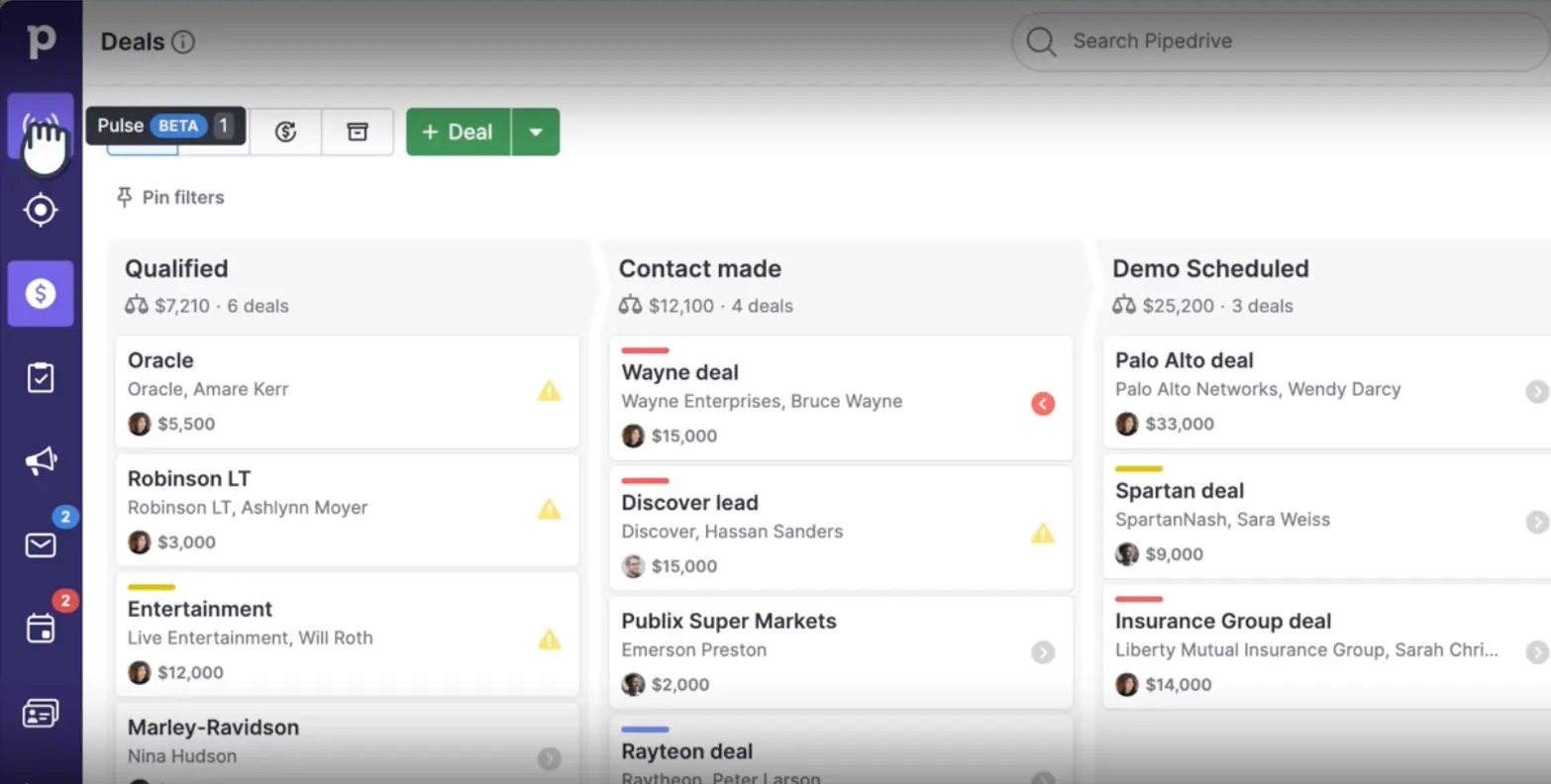
The Gold Standard for Visual
Sales Pipeline Management
After extensive testing, Pipedrive delivers one of the best visual sales pipeline experiences available in 2026. Its drag-and-drop Kanban board is genuinely intuitive—any salesperson understands the interface within minutes. The growing AI toolkit, including Pulse, Agentic AI, and Insights AI, meaningfully reduces admin overhead. Most teams deploy in 1-2 days without consultants, making it an excellent choice for sales-focused SMBs that prioritize speed-to-value over platform breadth.
✓ What We Love
- Best-in-class visual Kanban pipeline
- Deploy in 1-2 days—no consultants needed
- Strong AI suite at reasonable pricing
- Excellent mobile app with offline mode
! Could Be Better
- No free plan (14-day trial only)
- Add-ons inflate the real monthly cost
- Limited native marketing automation
What Is Pipedrive?
A comprehensive overview of the platform and who it's built for.
Pipedrive is a cloud-based, sales-focused CRM (Customer Relationship Management) platform founded in 2010 by five Estonian salespeople who were frustrated with overly complex enterprise tools. Their founding insight was simple: build a CRM around how salespeople actually work—managing deals through stages—rather than how managers want to monitor them. The result is a visual, pipeline-driven tool that has become one of the most popular CRMs for small and mid-sized sales teams worldwide.
What distinguishes Pipedrive from general-purpose CRMs is its activity-based selling philosophy. Rather than simply tracking contacts, the platform pushes sales reps to always have a defined next action scheduled for every deal. This design principle means deals don't quietly go stale—the system actively surfaces what needs attention and when. It's a subtle but powerful difference that directly impacts close rates.
As of March 2026, Pipedrive serves over 100,000 companies across 179 countries, generates approximately $207 million in annual revenue (growing roughly 9.5% year-over-year), and employs around 900+ people globally. It is backed by Vista Equity Partners, Bessemer Venture Partners, Insight Partners, and Atomico, with a valuation of approximately $1.5 billion. The company is headquartered in Tallinn, Estonia, and New York.
Pipedrive has invested heavily in AI since 2024, launching its AI Sales Assistant, the Pulse prospecting toolkit, Agentic AI for automatic call and meeting summaries, and Insights AI for natural-language report generation. In February 2026, the company restructured its pricing from five plans down to four, simplifying the lineup while maintaining competitive per-user pricing starting at $14/user/month on annual billing.
Who Is Pipedrive Best For?
Pipedrive is ideal for sales-driven SMBs with 2-50 salespeople managing B2B or B2C pipelines. It's particularly well-suited for teams moving from spreadsheets to their first CRM, SaaS companies, digital agencies, consultancies, real estate firms, and professional services businesses. If you need instant pipeline visibility, fast deployment, and a tool your reps will actually open every day, Pipedrive is a top contender.
Common use cases include SaaS sales teams tracking multi-stage deals, digital agencies managing client acquisition pipelines, consultancies organizing proposals and engagements, real estate professionals tracking property deals, and construction companies managing project bids. The platform's flexibility means any team with a defined sales process—prospect, qualify, demo, propose, close—can map their workflow onto Pipedrive's visual board within hours.
See Pipedrive in Action
Real screenshots from the platform showing key features and the daily sales workflow.
Sales Pipeline Kanban Board
Your visual command center for tracking every deal through custom stages
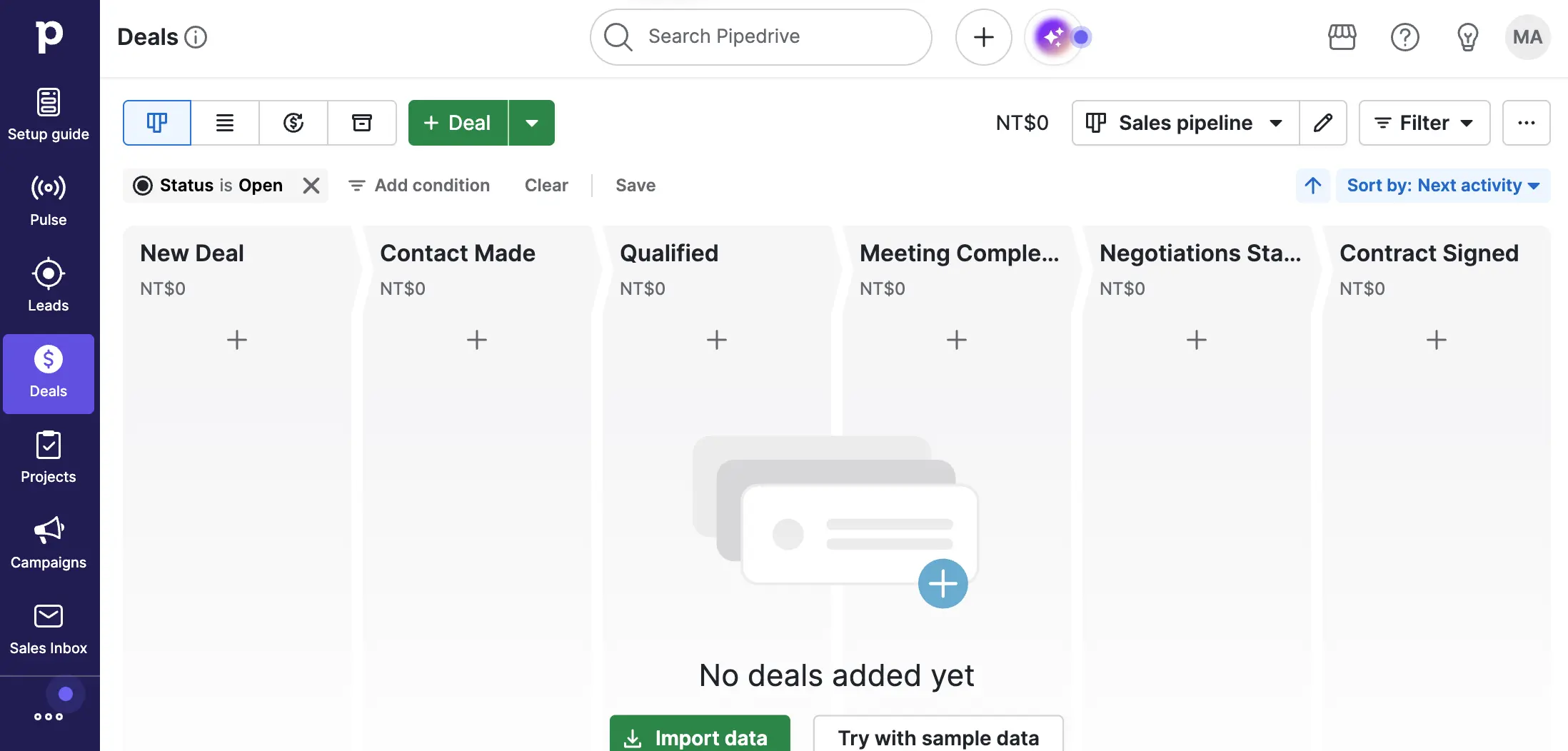
The Pipedrive pipeline board is its signature feature. Each column represents a sales stage—fully customizable to match your process. Deals appear as cards you drag between stages as they progress. The top bar shows four view options (Kanban, list, forecast summary, timeline), plus filters for status, conditions, and sorting by next activity. This is the screen your sales reps will live in every day.
Deals Pipeline with Pulse Overview
See deal values, contact details, and AI-powered alerts at a glance
This populated pipeline view shows the Pulse integration in action. Each deal card displays the company name, contact person, and deal value. The yellow warning triangles flag deals that need attention—whether they've gone stale or have overdue activities. The Pulse badge in the top bar provides a notification count for AI-generated insights. Stage totals at the top give managers instant revenue visibility per pipeline phase.
AI Sales Assistant & Pulse Feed
Your AI-powered assistant that answers questions about deals, data, and settings
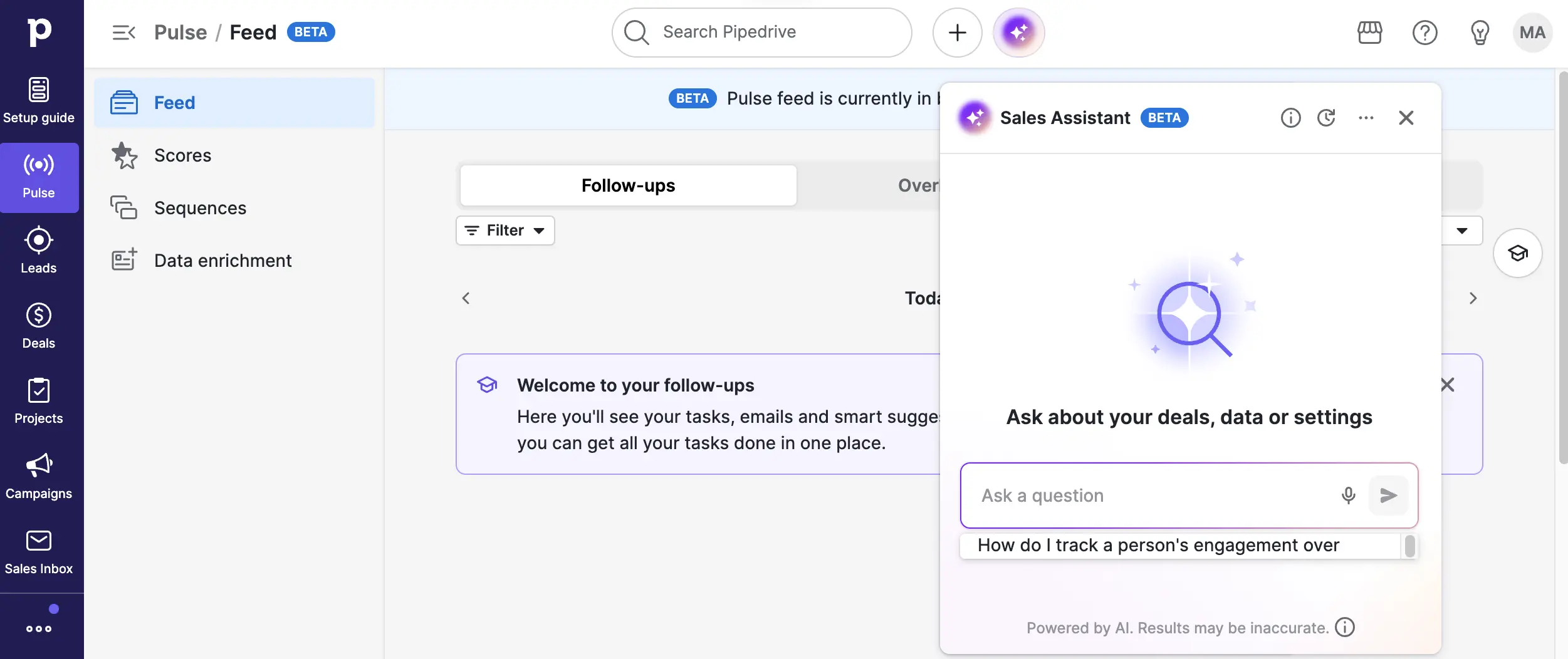
The Pulse section combines a follow-up feed with the AI Sales Assistant panel. The left sidebar provides access to the Feed (activity stream), Scores (lead scoring), Sequences (automated email follow-ups), and Data Enrichment. The AI Sales Assistant chat panel on the right lets you ask natural-language questions like "How do I track a person's engagement over time?"—powered by OpenAI. This is where Pipedrive's AI investment becomes tangible for daily sales work.
Pulse Sequence Templates
Pre-built automated email sequences for nurturing leads and following up
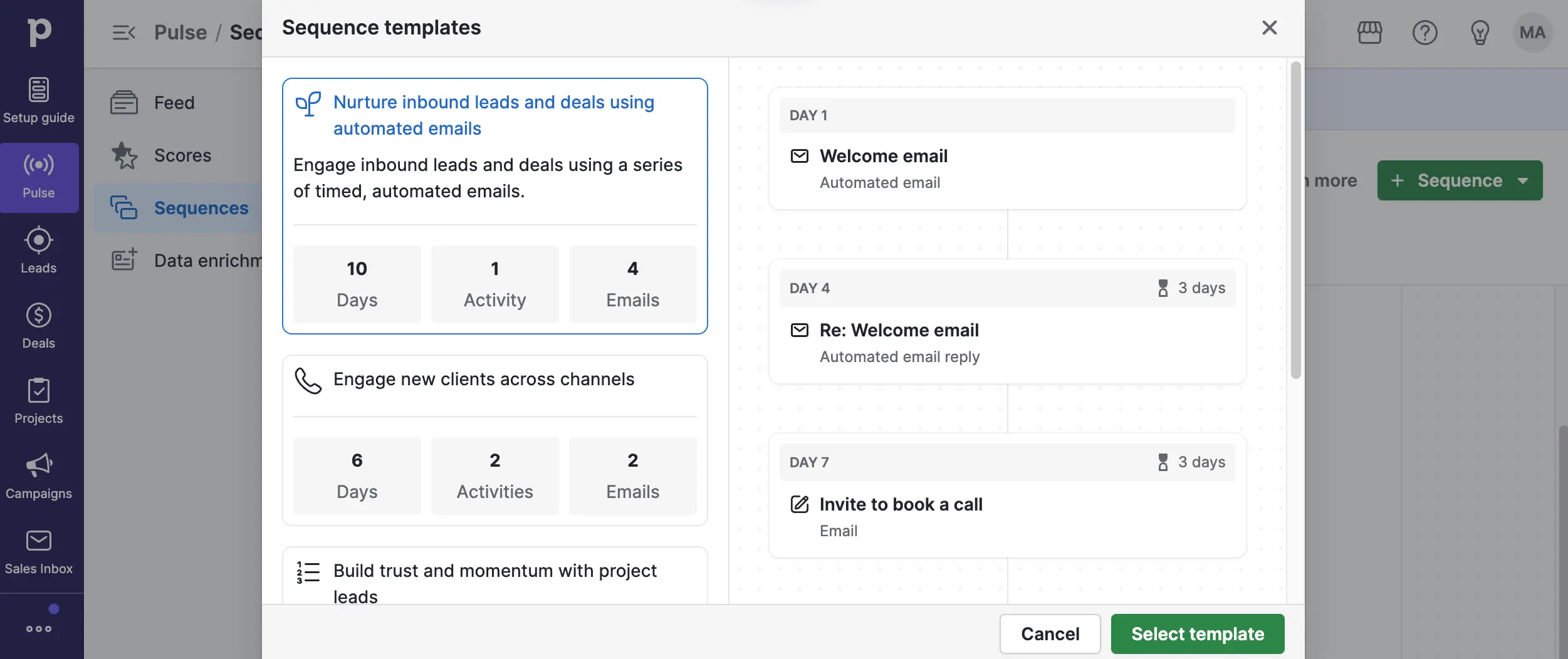
Pulse Sequences provide pre-built templates for common sales scenarios. The example shown—"Nurture inbound leads and deals using automated emails"—runs a 10-day sequence with 4 emails and 1 activity. The right panel shows the day-by-day timeline: a welcome email on Day 1, a follow-up reply on Day 4, and a call booking invitation on Day 7. Templates can be customized or built from scratch. This is where Pipedrive bridges the gap between manual follow-ups and automated outreach.
LeadBooster & Leads Inbox
Capture and manage inbound leads with chatbot, live chat, web forms, and prospector
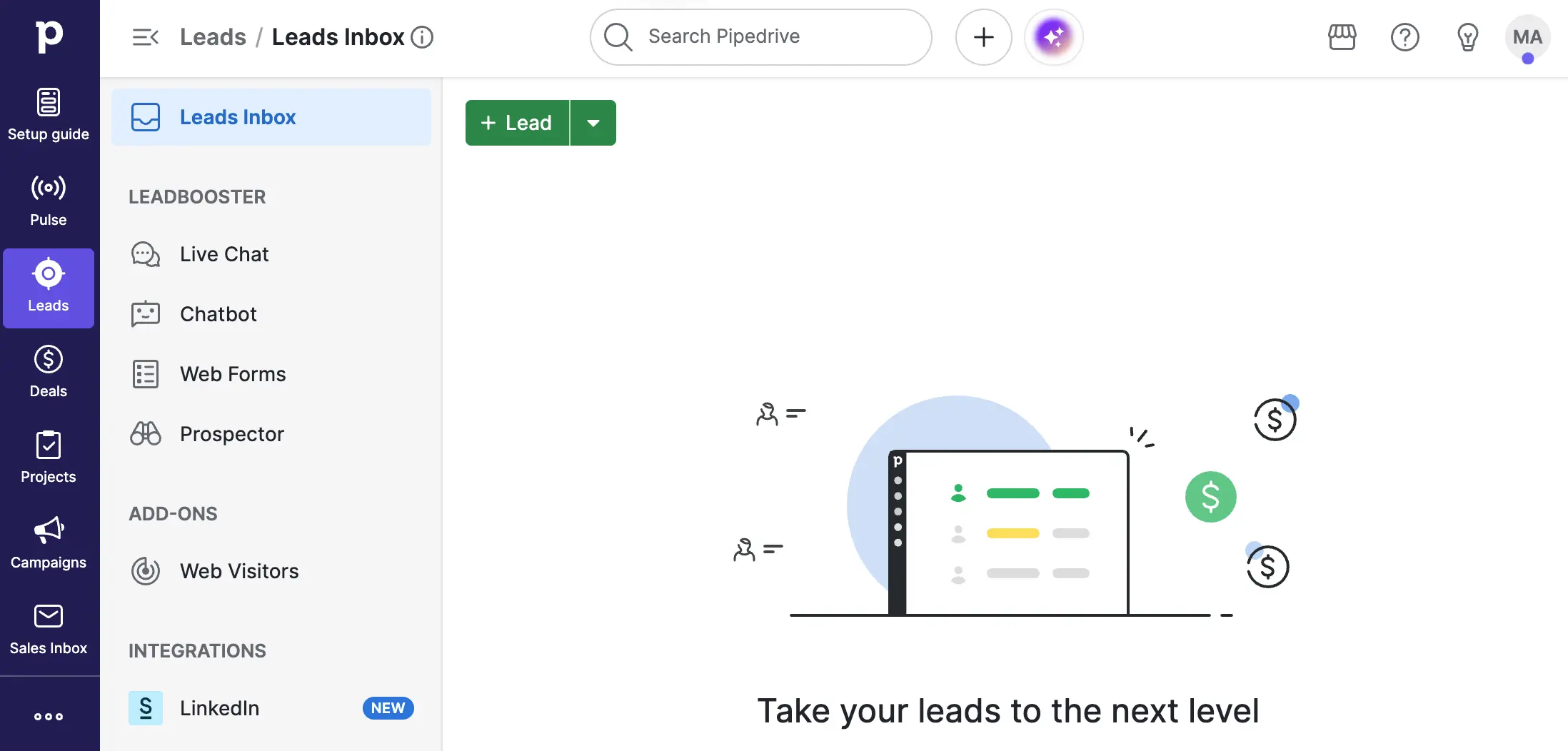
The Leads section shows Pipedrive's lead generation capabilities. The LeadBooster sidebar provides access to Live Chat, Chatbot, Web Forms, and Prospector (a database of 400M+ contacts). The Add-ons section includes Web Visitors tracking, and a new LinkedIn integration is highlighted. Leads flow into the central inbox before being qualified and converted to deals in your pipeline. This is the top of the funnel that feeds your sales pipeline.
Ready to experience Pipedrive's visual pipeline for yourself?
Start Free 14-Day Trial →No credit card required • Full feature accessHow Pipedrive Works
From sign-up to closing deals in four practical steps.
Set Up Your Pipeline in Minutes
Create your account, choose your plan (or start a 14-day free trial), and configure your company settings—time zone, currency, and fiscal year. Then build your sales pipeline by defining stages that match your actual sales process. Most teams use 5-7 stages like New Lead, Contact Made, Qualified, Demo Scheduled, Proposal Sent, Negotiations, and Won/Lost. Invite your team members, connect Gmail or Outlook for automatic email sync, and you're ready to go. No consultants, no technical setup—most teams complete this in a single morning.
Import Contacts & Deals
Bring in your existing data through three methods: Import2 for direct CRM-to-CRM migration (supports 30+ platforms including Salesforce and HubSpot, free for up to 1 million records), spreadsheet import for CSV or Excel files, or the REST API for programmatic transfers. Set up custom fields to track business-specific data points—industry, deal source, product interest, or anything your team needs. The key tip: set up all users and pipelines before importing so records are properly assigned from the start.
Work Deals Through Your Pipeline
This is where Pipedrive's activity-based philosophy shines. Every deal on your Kanban board should always have a next scheduled action—a call, email, meeting, or task. Drag deals between stages as they progress. The AI Sales Assistant flags at-risk deals, recommends next actions, and drafts follow-up emails. Pulse surfaces real-time signals: email opens, link clicks, overdue activities, and stale deals. Deal rotting alerts automatically notify you when opportunities haven't moved in a set number of days. Your reps spend their time selling, not updating spreadsheets.
Automate, Analyze & Scale
Set up workflow automations that fire when deals move stages, contacts are updated, or specific conditions are met—automatically creating tasks, sending emails, assigning owners, or notifying teammates. The 2025 branching automation update enables conditional logic (if deal value exceeds $10K, route to senior rep; otherwise assign to SDR). Use Insights dashboards to track conversion rates, average deal size, revenue forecasts, and team performance. Insights AI lets you generate reports by typing what you want in plain English—no manual configuration needed.
Activity-Based Selling Philosophy
Pipedrive's core design principle is that you can't control outcomes—you can only control your activities. The system is built to ensure every deal always has a next step scheduled. This seemingly simple idea is what makes teams more disciplined about follow-ups and, ultimately, helps close more deals. Deals without scheduled activities are visually flagged, creating gentle but persistent accountability.
Enterprise-Grade Security
Pipedrive holds ISO 27001, ISO 27701, SOC 2 (Type II), and SOC 3 certifications. EU customer data is stored in AWS data centers across Frankfurt, Dublin, and Stockholm. Two-factor authentication is enforced for admin accounts, with role-based access controls and full GDPR compliance tools including Data Processing Addendums and data subject request handling.
Key Features
Everything Pipedrive offers to help your sales team close more deals.
Visual Kanban Pipeline
Best-in-class drag-and-drop deal board with unlimited custom pipelines, configurable stages, deal rotting alerts, win probability tracking, and customizable deal cards. Any salesperson understands the interface in minutes with zero training.
AI Sales Assistant
Powered by OpenAI, recommends next best actions for each deal, flags at-risk opportunities, summarizes deal histories, and generates email drafts. Ask questions in natural language and get instant insights about your pipeline data.
Pulse AI Toolkit
Four-part prospecting suite: Data Enrichment (auto-fill company info), Custom Scoring (define your own lead rules), Sequences (automated follow-up email flows), and Feed (real-time activity stream with email opens, clicks, and stale deal alerts).
Workflow Automations
Trigger-based automations fire when deals move stages, contacts are updated, or conditions are met. Branching logic (added 2025) enables conditional workflows. Auto-create tasks, send emails, assign owners, and notify teammates without manual effort.
LeadBooster Suite
Complete lead generation toolkit: Chatbot for automated website engagement, Live Chat for real-time conversations, Web Forms for inbound capture, and Prospector with a database of 400M+ contacts for outbound sourcing. New LinkedIn integration included.
Email Sync & Tracking
Two-way sync with Gmail and Outlook automatically logs all email communication to deal timelines. Email tracking shows opens and clicks in real-time. Group emailing and templates support scaled outreach. Smart email scheduling optimizes send times.
Agentic AI & Insights AI
Agentic AI automatically generates call summaries, meeting notes, and follow-up recommendations after calls. Insights AI lets you create reports by typing plain-language descriptions instead of manually building dashboards—no configuration needed.
Mobile App & Integrations
Best-in-class iOS and Android apps with full offline mode, automatic call logging, map view for nearby prospects, and voice memos. Connect to 400+ native integrations plus 6,000+ apps via Zapier—including Slack, Zoom, QuickBooks, Mailchimp, and PandaDoc.
Beyond these headline features, Pipedrive includes revenue forecasting based on historical win rates, custom sales goals and quota tracking, role-based permissions with three access levels, web-to-mobile notifications, and a developer-friendly REST API for custom integrations. The platform also supports multiple currencies—useful for international sales teams—and includes document management through the Smart Docs add-on with e-signature capabilities.
Experience all these features with a free 14-day trial:
Try Pipedrive Free →No credit card required • Full access to all featuresPricing Plans
Four plans billed per user—annual billing saves 17-30% vs. monthly.
Lite
Growth
Premium
Ultimate
Important: Prices shown are annual billing. Monthly billing runs 17-30% higher (~$24-$79/user/month). Add-ons like LeadBooster, Smart Docs, and Campaigns are separate on lower plans.
Watch Out for Add-On Costs
The base per-user price is competitive, but essential features like LeadBooster, email marketing campaigns, Smart Docs, and the complete Pulse AI suite require Premium or paid add-ons. A small team of 5 on Premium costs $295/month—still significantly less than HubSpot Professional ($1,781+/month) or Salesforce Pro Suite ($500/month for 5 users), but notably higher than the Lite tier suggests at first glance. Always calculate your total cost at the feature level you actually need.
Compared to alternatives: HubSpot starts free but jumps to $1,781+/month at Professional; Salesforce starts at $25/user but most teams need Pro Suite at $100/user; Zoho CRM offers the best feature-per-dollar ratio from $14/user with more included; Monday CRM starts at $12/seat but requires minimum 3 seats. Pipedrive's sweet spot is the Growth or Premium tier for teams that want excellent pipeline UX without enterprise complexity.
Detailed Pros & Cons
An honest, balanced assessment after extensive testing and research.
✓ Pros
Pipedrive's drag-and-drop Kanban board is widely regarded as the most intuitive pipeline interface among SMB CRMs. Any salesperson can understand the layout within minutes, and the customizable deal cards (updated in 2025) let teams show exactly the data points that matter. This is the feature that consistently earns Pipedrive its top ratings for ease of use.
Most teams are fully operational in 1-2 days without external consultants. Compare this to HubSpot (days to weeks for full-stack deployment) and Salesforce (weeks to months with significant consulting costs). This rapid deployment dramatically lowers the real cost of CRM adoption and means reps start closing deals sooner.
Pulse, Agentic AI, and Insights AI genuinely reduce sales admin overhead. The AI Sales Assistant recommends actions and drafts emails; Pulse surfaces real-time engagement signals; Agentic AI auto-generates call summaries. Crucially, these features are included at reasonable tier prices—unlike Salesforce's Agentforce at $125-$550/user/month extra.
The iOS and Android apps are consistently rated among the best CRM mobile experiences. Full offline mode, automatic call logging for known contacts, nearby prospect map view, and voice memos make it particularly valuable for field sales reps who spend their days on the road.
The system ensures every deal always has a next step scheduled. Deals without upcoming activities are visually flagged, creating gentle but persistent accountability. This design philosophy directly improves follow-up discipline and prevents deals from quietly going cold.
400+ native integrations via the Pipedrive Marketplace plus 6,000+ apps through Zapier. Notable native connections include Google Workspace, Microsoft 365, Zoom, Slack, Mailchimp, QuickBooks, PandaDoc, and DocuSign. The REST API supports custom integrations for unique workflows.
✗ Cons
While Pipedrive offers a solid 14-day free trial (no credit card required), there's no permanent free tier. Competitors like HubSpot, Zoho CRM (up to 3 users), and Freshsales (up to 3 users) all offer free plans that let teams start without financial commitment. For budget-conscious startups, this creates an adoption barrier.
Essential features like LeadBooster, Smart Docs, email marketing campaigns, and the full Pulse AI suite require the Premium plan or paid add-ons. The $14/user Lite tier is appealing on paper but may leave teams wanting for core capabilities. Always calculate total cost at the feature level you actually need before committing.
Pipedrive is a sales CRM, not a marketing platform. There are no native landing pages, ad management, SEO tools, or complex lead nurturing workflows. Teams that need both sales and marketing in one platform should consider HubSpot or pair Pipedrive with dedicated marketing tools like Mailchimp, ActiveCampaign, or Brevo.
Unlike Close CRM, Freshsales, and Zoho CRM—all of which include native calling—Pipedrive requires third-party integrations like Aircall, JustCall, or Talkdesk for phone capabilities. This adds both complexity and cost for teams whose reps spend significant time on calls.
Basic dashboards and reports are functional for most SMB needs, but advanced analytics, multi-source reports, and predictive modeling require Premium or above. Teams with complex reporting requirements may need external BI tools for deeper analysis.
Complex territory management, custom objects, multi-department governance, and advanced approval workflows are not Pipedrive's strength. Organizations approaching 100+ users with sophisticated operational needs would benefit from evaluating Salesforce or HubSpot Enterprise for that level of complexity.
Pipedrive vs Alternatives
How Pipedrive compares to the most common CRM alternatives for growing teams.
| Feature | Pipedrive | HubSpot | Monday CRM | Salesforce |
|---|---|---|---|---|
| Starting Price (annual) | $14/user/mo | Free (paid from $15) | $12/seat/mo | $25/user/mo |
| Free Plan | 14-day trial | ✓ Limited | ✓ 2 seats | ❌ |
| Pipeline UX | ⭐⭐⭐⭐⭐ Best | ⭐⭐⭐⭐ Good | ⭐⭐⭐⭐ Flexible | ⭐⭐⭐ Complex |
| AI Features | ✓ Pulse, Agentic AI, Insights AI | ✓ Breeze AI | Basic AI | ✓ Einstein + Agentforce |
| Marketing Automation | ⭐⭐ Limited | ⭐⭐⭐⭐⭐ Excellent | ❌ | ⭐⭐⭐⭐ Good (add-on) |
| Setup Time | 1-2 days | Days-Weeks | 1-3 days | Weeks-Months |
| Mobile App | ⭐⭐⭐⭐⭐ Best | ⭐⭐⭐⭐ Good | ⭐⭐⭐ Functional | ⭐⭐⭐⭐ Good |
| Best For | Sales-focused SMBs | Marketing + Sales | Sales + Projects | Enterprise |
Which CRM Is Right For You?
Pipedrive
Best Pipeline UXBest for: Sales-focused SMBs with 2-50 reps who want the clearest visual pipeline, fastest deployment, and a CRM their team will actually use daily. Ideal for B2B companies with structured sales cycles who value speed-to-value over platform breadth. The AI toolkit adds genuine value without Salesforce-level pricing. Choose Pipedrive when selling is your primary challenge, not marketing.

HubSpot
All-in-One PlatformBest for: Teams that need marketing, sales, and customer service in a single platform. HubSpot's free CRM is a strong starting point, and its marketing automation capabilities far exceed Pipedrive's. The trade-off: pricing escalates steeply at the Professional tier ($1,781+/month for the full suite). Choose HubSpot when you need landing pages, ad management, email campaigns, and CRM in one place.

Monday CRM
Sales + ProjectsBest for: Teams that need to manage the handoff from "deal closed" to "project delivered" within the same platform. Monday CRM's unique strength is combining sales pipeline management with post-sale project management. Highly customizable board views and strong visual dashboards. Note: the Basic plan ($12/seat) lacks email sync and automations—most teams need Standard ($17) or Pro ($28) for real CRM functionality. Requires minimum 3 seats.

Copper
Google Workspace NativeBest for: Teams deeply embedded in Google Workspace who want a CRM that lives entirely within Gmail and Google Calendar. Copper auto-captures contacts and interactions from your Google apps, minimizing data entry. Its relationship-focused approach works well for consultancies, agencies, and professional services. Choose Copper when Google Workspace integration matters more than pipeline power features.

Brevo
Free Tier AvailableBest for: Small businesses that need email marketing, transactional emails, SMS, and basic CRM in an affordable all-in-one platform. Brevo offers a generous free tier and excels at multi-channel marketing communications. Its CRM is simpler than Pipedrive's pipeline management, but the combination of sales tools and marketing automation makes it a strong option for teams on tight budgets. Also integrates natively with Pipedrive for teams that want both.
Frequently Asked Questions
Should You Try Pipedrive?
After extensive testing, Pipedrive earns its reputation as the gold standard for visual sales pipeline management in the SMB CRM space. The drag-and-drop Kanban board is genuinely best-in-class—intuitive enough that reps start using it productively on day one. The 2025-2026 AI investments (Pulse, Agentic AI, Insights AI) have added real substance, not just marketing buzzwords. Most importantly, teams deploy in days, not months—a massive advantage when every week without a CRM is a week of lost pipeline visibility.
The trade-offs are real but manageable: no free plan creates an adoption barrier, add-on costs can inflate your bill beyond the attractive base price, and the lack of native marketing automation means you'll need separate tools if marketing is part of your workflow. For purely sales-focused teams, these limitations rarely matter. For teams needing a unified sales-and-marketing platform, HubSpot is worth evaluating alongside Pipedrive.
Our Recommendation
Start with the 14-day free trial—no credit card required. Set up your pipeline stages on day one, import a sample of your deals, and test the AI Sales Assistant and Pulse feed. Focus on whether your reps find the interface natural and whether the pipeline view gives you the visibility you've been missing. If it clicks within the first week (and for most sales teams, it does), you've found a CRM that your team will actually use. The Growth plan ($39/user) is the sweet spot for most teams; Premium ($59/user) is worth it if you need LeadBooster and the full Pulse AI suite.
Ready to Close More Deals?
Join 100,000+ companies managing their sales pipeline with Pipedrive