

Submagic
AI-powered short-form video editor that turns raw footage into publish-ready TikTok, Reels & Shorts in minutes. Auto-captions in 100+ languages, one-click editing, B-roll insertion, and direct social publishing — no timeline, no design skills needed.
Try Submagic →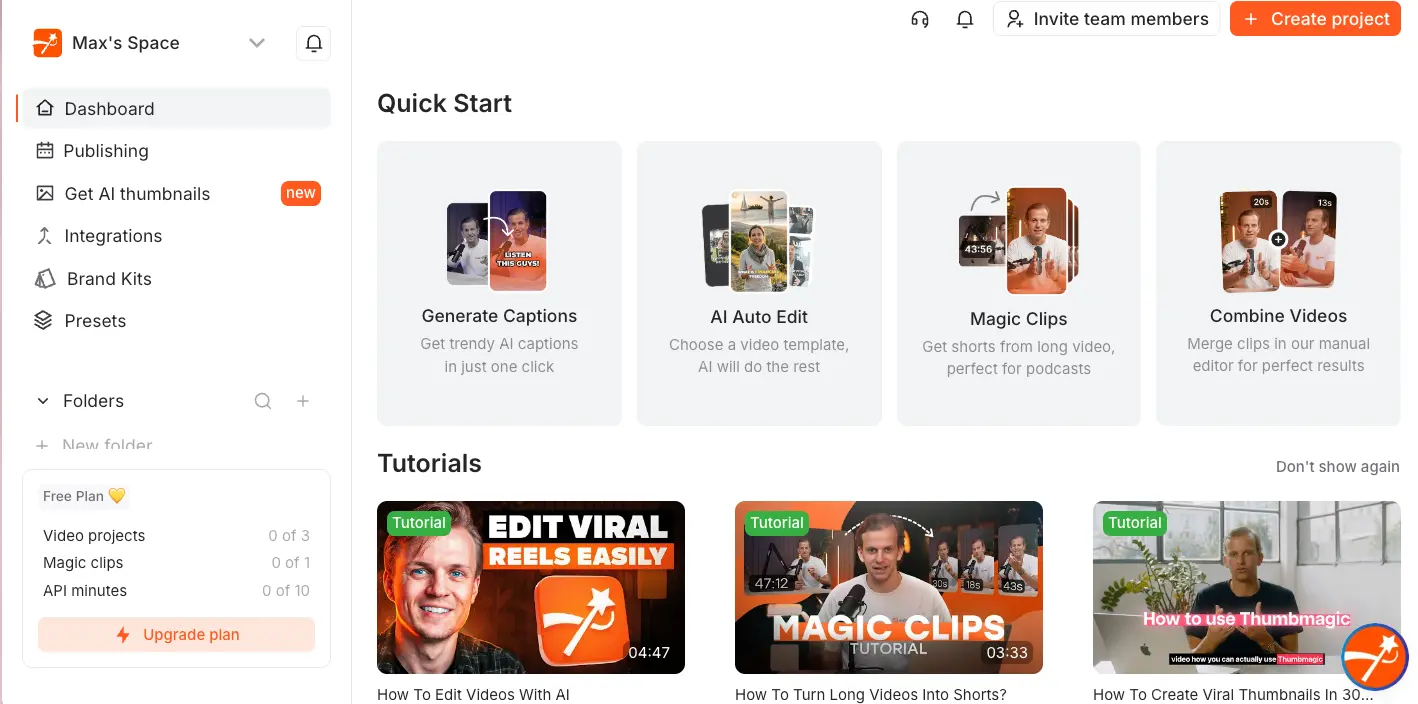
The Fastest Path from Raw Footage
to a Polished Short
Submagic does one thing and does it exceptionally well: it turns raw video into TikTok-ready, Reels-ready, Shorts-ready content faster than anything else I've used. The caption accuracy across 100+ languages is genuinely best-in-class, and the one-click AI Auto-Edit produces a fully styled, B-roll-enhanced short in under five minutes. It won't replace a professional editor — there's no timeline, no color grading — but that's not what it's for. For creators and agencies publishing short-form content regularly, the Pro plan at $23/month is where the value sits.
✓ What We Love
- Caption accuracy (99%+) across 100+ languages
- One-click AI Auto-Edit for complete shorts
- AI Eye Contact Correction — rare at this price
- Built-in social publishing to 5 platforms
! Could Be Better
- Export delays and server freezes are a real issue
- Magic Clips costs an extra $12/month add-on
- Free plan is barely usable (3 watermarked videos)
What Is Submagic?
A look at who built it, what problem it solves, and whether it fits your workflow.
Submagic is an AI video editor built for one specific job: turning raw footage into polished short-form content for TikTok, Instagram Reels, and YouTube Shorts. It's not a general-purpose editor — there's no timeline, no color grading panel, no multi-track audio mixing. What it does instead is automate the tedious parts of short-form production: captioning, silence removal, B-roll insertion, zoom effects, and publishing. The whole point is speed over control.
The company was launched in May 2023 by French entrepreneurs David Zitoun and Tsi-fei Chan. Here's the growth story that matters: they hit $1M in annual recurring revenue within 90 days of launch, reached $8M ARR by mid-2025, and did it entirely bootstrapped with a team of roughly 13 people in Paris. As of early 2026, Submagic claims over 4 million registered users — and receives 5,000 to 10,000 new signups daily.
What sets it apart from tools like CapCut or VEED? Depth of automation. Where most editors still require you to manually place captions, cut dead air, and search for B-roll footage, Submagic's AI Auto-Edit handles all of that in a single click. Upload a video, press one button, and you get back a fully captioned, trimmed, B-roll-enhanced short — typically in under five minutes. You can fine-tune from there, but the starting point is already remarkably close to finished.
The caption engine is the flagship feature and genuinely the strongest in this category. It supports 100+ languages with a claimed accuracy rate above 99%, which independent reviewers and the tool's 4.7/5 rating on G2 (83 verified reviews) consistently back up. Dozens of animated caption templates — inspired by creators like Alex Hormozi and MrBeast — let you match trending visual styles without any design work.
Who Is Submagic Best For?
Social media managers, coaches, agencies, and creators who publish short-form video regularly — at least 4-8 times per month. Particularly strong for agencies managing multiple clients (Brand Kit + team seats), and for anyone who values caption quality and speed over fine-grained editing control. If you spend more than 2 hours per week manually editing Reels or Shorts, Submagic will likely pay for itself in the first month.
Here's the honest caveat: Submagic is a workflow accelerator, not a professional editing suite. If you need color correction, multi-track audio, or frame-level precision, this isn't your tool — Descript or VEED cover that ground. But for the specific job of going from raw talking-head footage to a polished, captioned, platform-optimized short? It's one of the fastest options available in 2026.
See Submagic in Action
Real screenshots from the platform showing the dashboard, caption editor, AI tools, and upload flow.
Dashboard & Quick Start
Your home base with four core workflows front and center
Clean, functional interface. The left sidebar gives quick access to Dashboard, Publishing, AI Thumbnails, Integrations, Brand Kits, and Presets. The Quick Start area presents the four main workflows — Generate Captions, AI Auto Edit, Magic Clips, and Combine Videos — each with a clear visual and description. Below that, a Tutorials section with walkthrough videos helps new users get started. Worth noting: the Free Plan indicator at the bottom-left shows your usage limits (3 videos, 1 Magic Clip, 10 API minutes).
Upload & Caption Generation
Drop a video and Submagic handles the rest
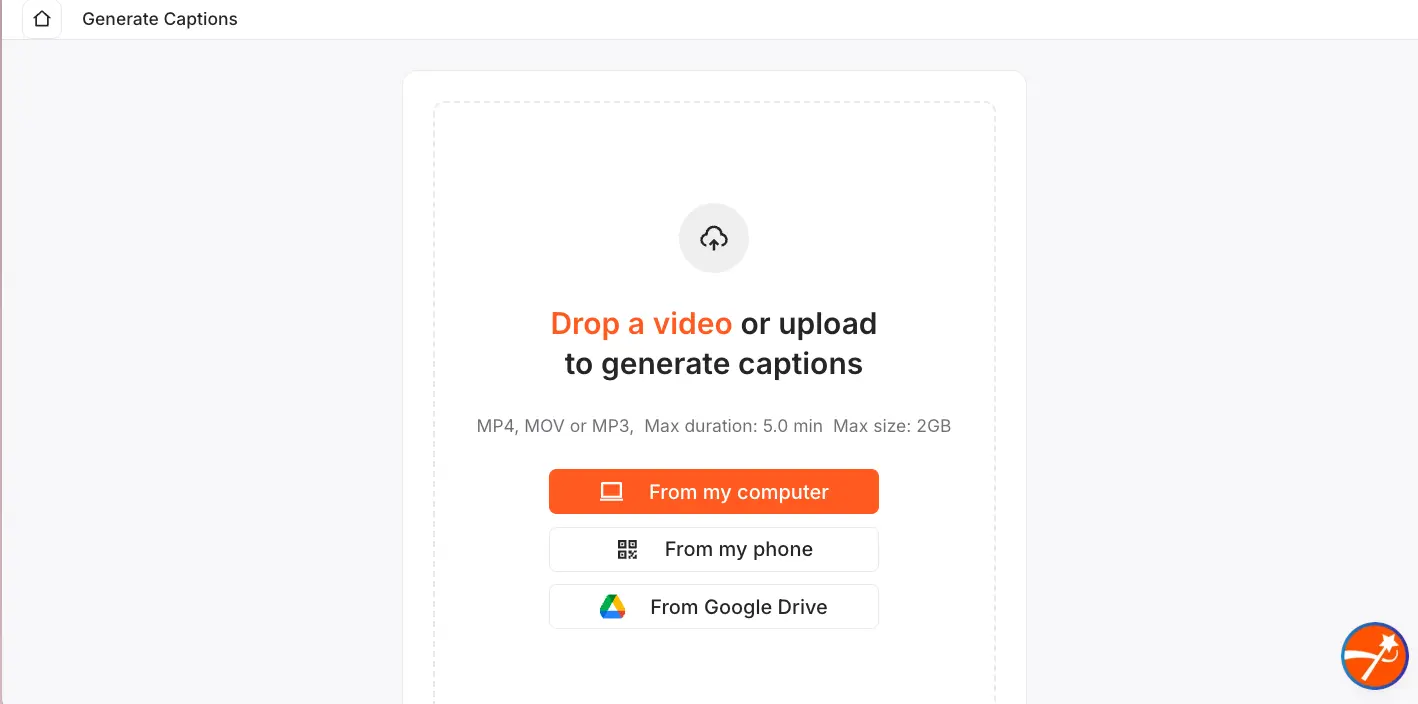
The upload screen is straightforward — drag a file from your computer, scan a QR code to upload from your phone, or pull directly from Google Drive. Max file size is 3GB, with duration limits depending on your plan (90 seconds on Free, up to 30 minutes on Business). The QR code mobile upload is a nice touch for creators who film on their phone but edit on desktop — which is exactly the workflow Submagic is designed for.
Want to see how fast AI Auto-Edit handles your video?
Try Submagic Free →Free plan available • No credit card requiredCaption Style Library
Dozens of animated styles — from Hormozi to MrBeast and beyond
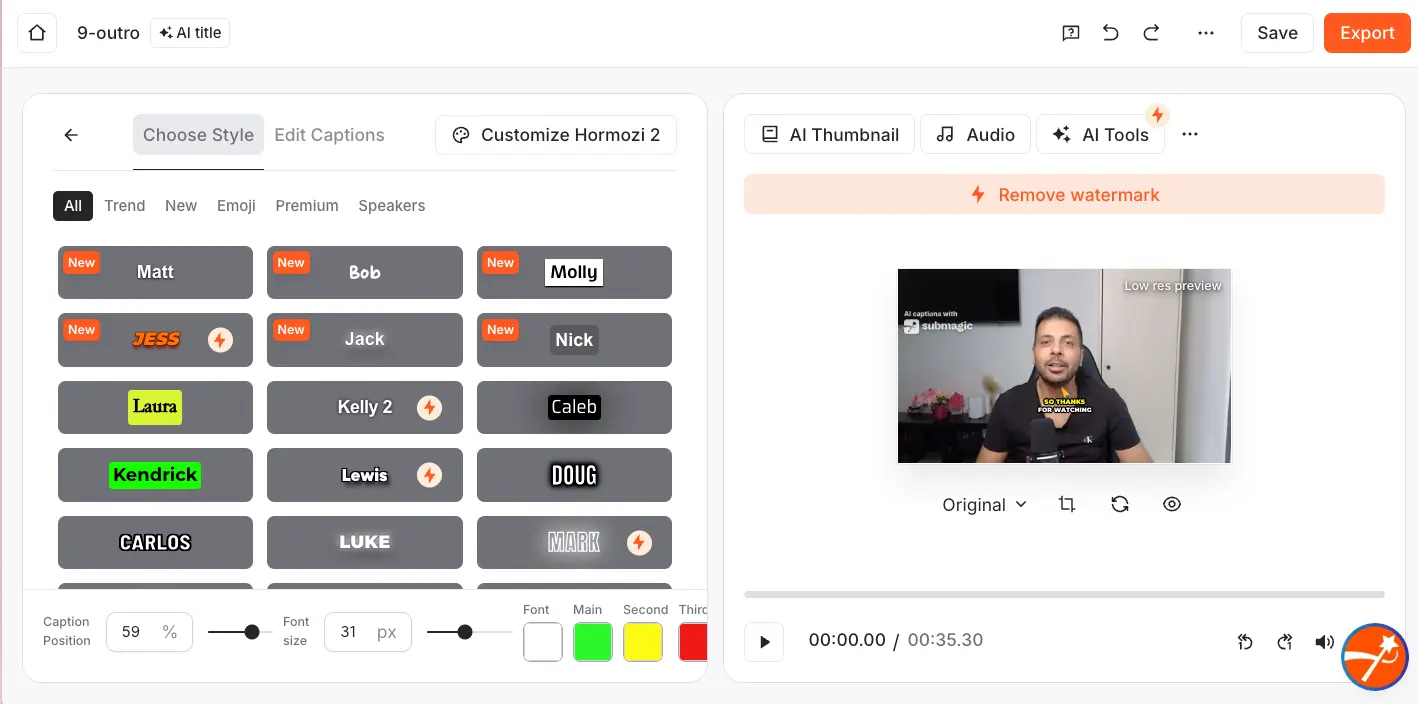
This is where Submagic's caption focus really shows. The style library offers dozens of pre-built animated caption templates organized by category — Trending, New, Emoji, Premium, and Speakers. Each template has a distinct look (bold uppercase, handwritten, highlighted, etc.) and you can customize font size, caption position, and color scheme from the bottom toolbar. The "Customize Hormozi 2" tab at the top indicates you can tweak any style to make it your own. For creators who want that animated, word-by-word caption look that dominates TikTok right now, this is the fastest way to get it.
AI Boost & Tools Panel
Every AI enhancement toggle in one place
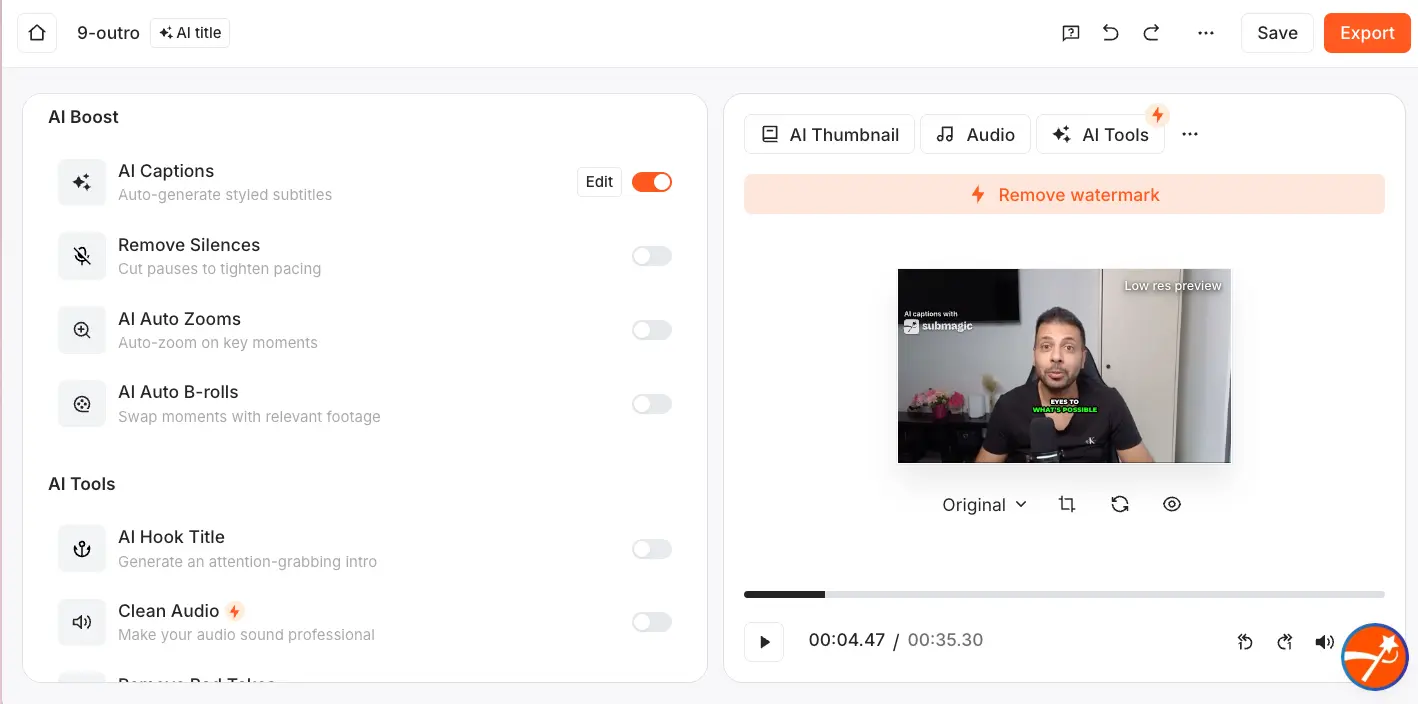
This panel is the control center for Submagic's automation. The AI Boost section lets you toggle individual features on or off: AI Captions (with an Edit button for manual adjustments), Remove Silences, AI Auto Zooms, and AI Auto B-rolls. Below that, AI Tools offers Hook Title generation, Clean Audio, and Remove Bad Takes. Each feature works independently, so you can use just captions on one video and the full Auto-Edit suite on another. The AI Thumbnail, Audio, and AI Tools tabs at the top-right give access to additional features. It's a simple layout — toggle on what you want, leave off what you don't.
How Submagic Works
From raw footage to a published short in four steps. The whole process takes minutes, not hours.
Upload Your Video
Drag and drop an MP4 or MOV file, scan the QR code to upload from your phone, or import directly from Google Drive. Submagic accepts files up to 3GB. If you're using the Magic Clips feature, you can also paste a YouTube URL directly — no download needed. The upload itself is fast; Submagic 2.0 (launched March 2025) brought a 60% speed improvement to uploads.
AI Transcription & Auto-Edit
Here's where the magic happens. Submagic's speech-to-text engine processes your audio across 100+ languages with 99%+ accuracy. If you selected AI Auto-Edit, the system simultaneously applies animated captions in your chosen style, removes silences and filler words, inserts contextually relevant B-roll from the Storyblocks library, adds cinematic zoom effects at key moments, and generates a hook title. All of this happens in roughly 2–5 minutes for a typical 3-minute video. You don't touch anything — one click triggers the entire pipeline.
Fine-Tune Through the Transcript
Instead of scrubbing a timeline, you edit through text. Delete a sentence from the transcript and the corresponding footage disappears. Fix a caption word and it updates on screen. This transcript-based approach is what makes Submagic fast — you're reading and editing text, not hunting for moments in a video. Toggle AI features on or off from the Boost panel, swap B-roll clips that don't fit, adjust caption positioning, and tweak the hook title if needed.
Export or Publish Directly
Export in 1080p (Starter/Pro) or 4K at 60fps (Business), or skip the download entirely and publish straight to TikTok, Instagram, YouTube Shorts, LinkedIn, or X from within Submagic. The built-in scheduler lets you set future publication dates, and the AI auto-generates platform-specific titles, descriptions, and hashtags — so a single video can be adapted and posted across all five platforms with tailored metadata in one go.
About Export Speed
Let's be upfront: export delays are the most common complaint about Submagic on G2. Videos occasionally get stuck in processing, particularly during peak usage periods. Submagic 2.0 improved export speed by about 30%, but this remains a real friction point. If you're on a tight deadline, plan for a buffer.
Key Features
What you're actually getting — and where the limits are.
AI Captions (100+ Languages)
The feature that built this company. 99%+ accuracy, dozens of animated styles, word-by-word highlighting, emoji integration, and full customization of fonts, colors, and positioning. This is the best auto-captioning engine in the short-form video category — and it's not particularly close.
AI Auto-Edit (One-Click)
Press one button. Get back a fully captioned, silence-trimmed, B-roll-enhanced, zoom-effected, sound-designed short. Available from the Pro plan. This single feature is the main reason Submagic exists — and it works well enough that many users never need to touch the individual tools.
Magic B-Roll
AI reads your transcript, identifies topic shifts, and inserts relevant stock footage from the Storyblocks premium library — complete with transition sound effects. The relevance isn't always perfect (you'll swap clips occasionally), but it's a massive time saver versus hunting for B-roll manually.
Magic Clips
Converts long-form video into multiple short clips — paste a YouTube URL and Submagic finds the best moments. Here's the catch: it costs an extra $12/month on top of any plan. SendShort includes long-to-short clipping in its base plans, which makes this upsell harder to justify.
AI Eye Contact Correction
Were you reading a script and your eyes drifted from the camera? One click fixes it. This feature is nearly unique in the sub-$50/month tier — neither CapCut nor OpusClip offer it. It's subtle, but for teleprompter-recorded content, it makes a visible difference.
Brand Kit & Team Collaboration
Upload client logos, fonts, and colors once — Submagic applies them automatically to every video. The Pro plan supports 3 team members, Business allows 5, and Enterprise scales to unlimited. One agency documented saving 24 hours per week after switching. The one frustration: only one social account per platform for publishing.
Social Publishing & Scheduling
Launched March 2026. Schedule and publish directly to TikTok, Instagram, YouTube Shorts, LinkedIn, and X — with AI-generated platform-specific titles, descriptions, and hashtags. Eliminates the need for a separate social scheduling tool for most creators. Facebook support is not confirmed as of April 2026.
API & Automation
Launched July 2025. Integrates with Zapier, Make, n8n, and Google Drive for programmatic captioning and exports. Requires the Business plan ($41/month) and costs $0.69 per minute of processed video — which is expensive compared to some alternatives. Best suited for agencies automating batch workflows, not developers needing high-volume captioning at scale.
Beyond these core features, Submagic also offers AI Avatar Studio (generate talking-head videos from scripts without filming), Auto-Zoom with smart transitions, Clean Audio for one-click background noise removal, AI Hook Title generation, caption translation across 100+ languages, auto-reframing from landscape to 9:16, and ThumbMagic — a sister product for AI thumbnail generation launched in late 2025. The Custom Brand Dictionary on the Business plan lets you teach the AI client-specific terminology for improved accuracy.
All core features included from the Pro plan:
Try Submagic →Free plan available • Pro plan from $23/monthPricing Plans
Four tiers plus Enterprise. The Pro plan is where 82% of paying users land.
Free
- ✓ 3 videos per month
- ✓ Max 1 min 30 sec
- ✓ 1080p with watermark
- ✓ AI Captions included
- ✗ Watermark on exports
Professional
- ✓ 40 videos per month
- ✓ Max 5 min duration
- ✓ 1080p / 30 FPS
- ✓ AI Auto-Edit, B-Roll, Zoom
- ✓ Up to 3 team members
- ✓ No watermark
Business
- ✓ 100 videos per month
- ✓ Max 30 min duration
- ✓ 4K / 60 FPS export
- ✓ API access ($0.69/min)
- ✓ Up to 5 team members
- ✓ Custom Brand Dictionary
Important: Magic Clips costs an extra $12/month add-on on any plan. Monthly billing is available at higher rates ($19/$39/$69).
Pricing last verified April 2026. Visit Submagic for current rates.
Is It Worth the Money?
That's $0.58 per fully edited short — compared to 1-2 hours of manual editing time per video. Even at a conservative $25/hour freelancer rate, Submagic pays for itself if it saves you just one hour per month. Agencies report saving 24+ hours weekly. The math works for anyone publishing more than a handful of shorts per month.
For context: SendShort's Advanced plan matches at $23/month but includes long-to-short clipping without the add-on fee. VEED's Lite plan starts at $12/month but with lower caption accuracy (~92%). CapCut is free for basic editing but requires significantly more manual work. Descript's Hobbyist plan starts at $16/month but is optimized for podcasts, not social shorts. For pure short-form captioning and automation, Submagic's Pro plan at $23/month sits in the sweet spot.
Detailed Pros & Cons
An honest breakdown based on user reviews across G2, Trustpilot, and independent testing.
✓ Pros
This isn't marketing fluff — the 99%+ accuracy claim holds up in practice. On a 300-word video, that translates to roughly 3 corrections versus 15 with a 95% engine. Across 100+ languages, with animated styles that match current TikTok trends, this is the strongest captioning engine in the short-form category. G2 and Trustpilot reviewers consistently cite it as the primary reason they stay subscribed.
AI Auto-Edit isn't just a marketing feature — it genuinely transforms how fast you can produce shorts. Upload, click once, and get back a captioned, trimmed, B-roll-enhanced, zoom-effected video in under five minutes. You'll still fine-tune things, but the starting point is 80-90% of the way there. For creators publishing 4-8 times per week, this alone justifies the subscription.
A genuinely distinctive feature. If you record with a teleprompter or notes and your gaze drifts, one click corrects it. Neither CapCut nor OpusClip offer this at any price point. It's subtle but makes a real difference for talking-head content — viewers engage more with direct eye contact.
Since March 2026, you can schedule and publish directly to TikTok, Instagram, YouTube Shorts, LinkedIn, and X without leaving Submagic. The AI generates platform-specific metadata automatically. This eliminates the need for a separate scheduling tool for most solo creators — one less subscription, one fewer workflow step.
Brand Kit, multi-seat plans, project folders, team annotations, and the API for automation pipelines. One documented agency saves 24 hours per week; another reported a 300% revenue increase from taking on more clients without hiring editors. If you manage video for multiple brands, the Business plan covers ground that most competitors in this price range can't match.
In the past 12 months alone: Submagic 2.0 (60% faster uploads), social publishing, AI Eye Contact, API launch, AI Avatar Studio, and ThumbMagic. This tool is evolving fast, which is a good sign for long-term subscribers. The development cadence is noticeably ahead of competitors like OpusClip and SendShort.
✗ Cons
The #1 technical complaint on G2, and it's consistent. Videos get stuck in processing, particularly during peak usage. Submagic 2.0 improved export speed by ~30%, but this hasn't eliminated the issue. If you're on a deadline and your video hangs at "processing," that's a genuinely frustrating experience. Server-side reliability needs improvement.
One of Submagic's most-marketed features — converting long-form video into short clips — costs an extra $12/month on top of any plan. SendShort and OpusClip include long-to-short clipping in their base pricing. For a tool positioned as an all-in-one short-form editor, this upsell feels like a gap in the value proposition.
Three watermarked videos at 90 seconds maximum? That's not enough to properly evaluate the tool before paying. The watermark disqualifies the output for any real use. Compare this to CapCut, which is genuinely free with no watermark, or VEED's free tier at 720p without a timeline cap. Submagic's free plan is more of a teaser than a trial.
Multiple G2 reviewers report billing errors or accidental subscriptions receiving no refund, citing a policy buried in the Terms of Service. At least one Reddit user documented four days of site downtime with no compensation offered. Combined with the weak free plan, this creates a situation where you're asked to commit financially before you can meaningfully evaluate the product.
No iOS app. No Android app. No desktop application. Everything runs in the browser. In 2026, when competitors like Captions.ai have native mobile apps and CapCut works on every device, the browser-only limitation is a real inconvenience for creators who want to review or approve content on the go.
No timeline. No color grading. No multi-track audio. Professional editors will find this limiting immediately. Submagic is deliberately not a general-purpose editor — but if your content occasionally needs more than what the AI provides, you'll need a second tool. That's the tradeoff for speed.
Submagic vs Alternatives
How Submagic compares to the main competitors in the AI short-form video space.
| Feature | Reviewed Submagic | SendShort | CapCut | Descript |
|---|---|---|---|---|
| Starting Price | $12/mo | $15/mo | Free | $16/mo |
| Free Plan | 3 vids + watermark | 3 vids + watermark | ✓ Full free tier | 60 min + watermark |
| Caption Accuracy | 99%+ (100+ lang) | 97-98.5% (50+ lang) | Good (auto-gen) | 95%+ (EN-strong) |
| One-Click Full Edit | ✓ AI Auto-Edit | Partial | ✗ | Partial (Underlord) |
| AI Eye Contact | ✓ | ✗ | ✗ | ✓ (Creator+) |
| Long-to-Short Clipping | +$12/mo add-on | ✓ Included | ✗ | Partial |
| Social Publishing | ✓ 5 platforms | ✓ Limited | ✗ | ✗ |
| Best For | Short-form creators & agencies | Faceless / automated content | Budget / manual editing | Podcasts & interviews |
Which Tool Is Right For You?
Submagic
ReviewedBest for: Creators and agencies who publish short-form content regularly and want the fastest path from raw footage to a polished, captioned short. The sweet spot is if caption quality matters to your content, you publish to multiple platforms, and you'd rather spend 5 minutes with AI Auto-Edit than 2 hours in a traditional editor. Particularly strong for multi-client agencies using Brand Kit.

SendShort
Faceless VideoBest for: Creators producing faceless AI-generated video content without filming. SendShort includes long-to-short clipping and AI voiceovers in its base plans — both areas where Submagic charges extra or doesn't offer. The tradeoff: zero verified G2 reviews and lower caption accuracy (97-98.5%). If faceless automation is your primary workflow, SendShort offers better value. See our detailed comparison →

CapCut
Free TierBest for: Budget-conscious creators who need a genuinely free editor with mobile support. CapCut offers no watermark on exports, works on iOS and Android, and has a solid feature set for manual editing. The tradeoff: significantly more manual work for captions and effects — there's no equivalent to Submagic's one-click Auto-Edit. If budget is your primary concern, CapCut is hard to beat at $0. See VEED vs CapCut comparison →

Descript
Podcasts & Long-FormBest for: Podcasters, educators, and interview-based creators who need text-based editing for long-form content. Descript's Studio Sound audio enhancement is broadly considered the best in class. The overlap with Submagic is minimal — these tools serve different primary use cases. Many serious creators use both: Descript for long-form production, Submagic for repurposing clips into shorts.
VEED
Full EditorBest for: Teams needing a single tool for both long-form editing AND short-form optimization. VEED has a full multi-track timeline, color tools, and team permissions that Submagic doesn't offer. Caption accuracy (~92%) is lower, but if you edit YouTube videos, corporate content, and Reels in one subscription, VEED covers more ground. If more than 70% of your output is short-form, Submagic is the faster daily driver.

Podcastle
Audio-FirstBest for: Audio-first creators who need podcast recording, AI voice enhancement, and video production in one tool. Podcastle's strength is in audio quality — noise removal, voice cloning, and multi-track audio editing that Submagic simply doesn't cover. Different category, but worth considering if audio is your primary channel.
Frequently Asked Questions
Should You Try Submagic?
If you produce short-form video for TikTok, Reels, or Shorts with any regularity, Submagic is one of the best tools available in 2026. The caption engine is genuinely best-in-class — 99%+ accuracy across 100+ languages, with animated styles that match what's trending right now. The one-click AI Auto-Edit is the fastest route from raw footage to a polished short I've seen, and the addition of social publishing means you can go from upload to posted without switching tools.
The drawbacks are real and worth considering. Export delays remain a recurring issue. Magic Clips being a paid add-on feels stingy for a tool that positions itself as all-in-one. The free plan is too limited to meaningfully evaluate the product. And the strict no-refund policy means you're making a commitment before you fully know what you're getting. These aren't deal-breakers, but they're worth weighing — especially the export reliability if you work on tight deadlines.
Our Recommendation
Start with the free plan to test caption accuracy on a couple of short clips. If the output quality matches what you need, upgrade to the Pro plan at $23/month — that's where 82% of users land and where the full feature set (AI Auto-Edit, B-roll, team seats) unlocks. Test the auto subtitle generator first to see how it handles your accent and speaking style. For agencies managing multiple clients, the Business plan at $41/month with Brand Kit and API access is the strongest short-form video tool in its price range.