
SendShort
AI-powered short video platform that turns long videos into viral clips with auto-captions in 50+ languages. Includes a faceless video generator to create content without filming anything.
Try SendShort Free →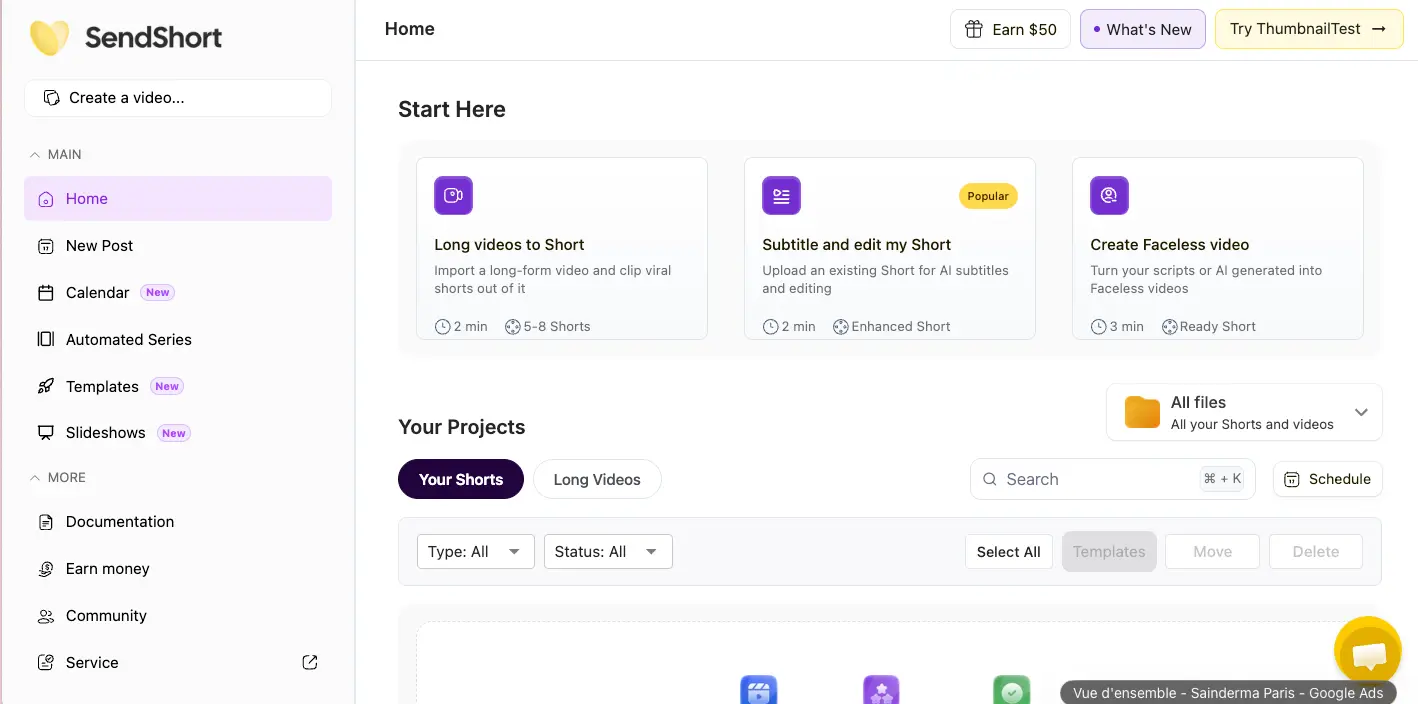
Affordable AI Shorts Tool
With a Unique Faceless Twist
SendShort packs a lot into a $15/month starting price — AI captions in 50+ languages, B-roll insertion, and a faceless video generator that no direct competitor matches at this tier. It's genuinely useful for solo creators who need volume without complexity. But here's the catch: the headline long-to-short clip extraction feature is locked behind the $47/month Business plan, documented credit bugs effectively halve your quota, and support can take weeks to reply. A tool with real potential that's still ironing out real problems.
✓ What We Love
- Free plan with no credit card required
- Faceless video generator — unique at this price
- 98.5% caption accuracy, 350+ styling options
- 50+ language translation for captions
! Could Be Better
- Long-to-short AI only on $47/mo Business plan
- Credit bugs that eat quota without output
- Support response times of 1–2 weeks
What Is SendShort?
Who built it, what it actually does, and where its limitations sit.
SendShort is an AI short-form video platform founded in 2023 in Miami. The core pitch is straightforward: upload a long video (or paste a YouTube link), and the AI automatically identifies the most engaging moments, adds captions, inserts B-roll footage, and packages everything into vertical-format clips ready for TikTok, Instagram Reels, and YouTube Shorts. It's grown to over 100,000 creators and positions itself as one of the cheapest all-in-one options in the AI short video tool category.
What makes it interesting — and genuinely different from tools like VEED.io or CapCut — is the faceless video generator. Type a topic, and SendShort produces a complete video: script, AI voiceover, background visuals, and synced captions. No camera, no footage, no editing. For creators in niches like finance, motivation, or education who want to stay off-camera, this is a genuine differentiator that no competitor matches at the $15/month price point.
Here's the thing, though — the marketing doesn't tell the full story. The most-advertised feature, AI long-video-to-short clip extraction, is locked behind the $47/month Business plan. If you sign up for the $15 Starter plan expecting to paste a 30-minute YouTube video and get 10 clips back, you'll be disappointed. The cheaper tiers only let you import short clips for captioning and editing — not extract highlights from long content. That's a meaningful gap between the promise and the product at entry-level pricing.
Who Is SendShort Best For?
Solo creators on TikTok, Reels, or YouTube Shorts who need affordable captioning and basic video editing. Particularly strong for faceless content creators in education, finance, and motivation niches who want a text-to-video pipeline without filming. Also useful for multilingual creators who need caption translation in 50+ languages on a budget.
The caption engine is genuinely strong — 98.5% transcription accuracy with over 350 styling options covering fonts, colors, and animations. You can mimic viral caption styles (Hormozi, Iman Gadzhi, etc.) or build your own. Translation covers 50+ languages, which beats Opus Clip's 21 languages by a wide margin. For creators targeting international audiences, that capability matters.
Worth noting: SendShort's Trustpilot rating sits at 3.0–3.3 out of 5 from a relatively small review pool. That's noticeably lower than competitors like Submagic (G2: 4.7/5) or Opus Clip (G2: 4.5/5). The complaints tend to cluster around credit system issues and slow support — problems we'll cover in detail in the Pros & Cons section. It's a tool with genuine strengths at a great price, but with rough edges that are hard to ignore.
See SendShort in Action
Real screenshots from the platform showing the dashboard, editor, and key features.
Dashboard Home Screen
Your starting point with three clear content creation paths
Clean layout with three distinct workflows front and center. The left sidebar gives access to Calendar, Automated Series, Templates, and Slideshows — newer additions marked with "New" badges. The "Earn $50" referral button in the top right is a nice touch for monetization-minded creators. Notice the "Popular" badge on "Subtitle and edit my Short" — that's the feature most users actually use day-to-day, not the long-to-short AI extraction.
Caption Styles Editor
350+ caption customization options with preset styles
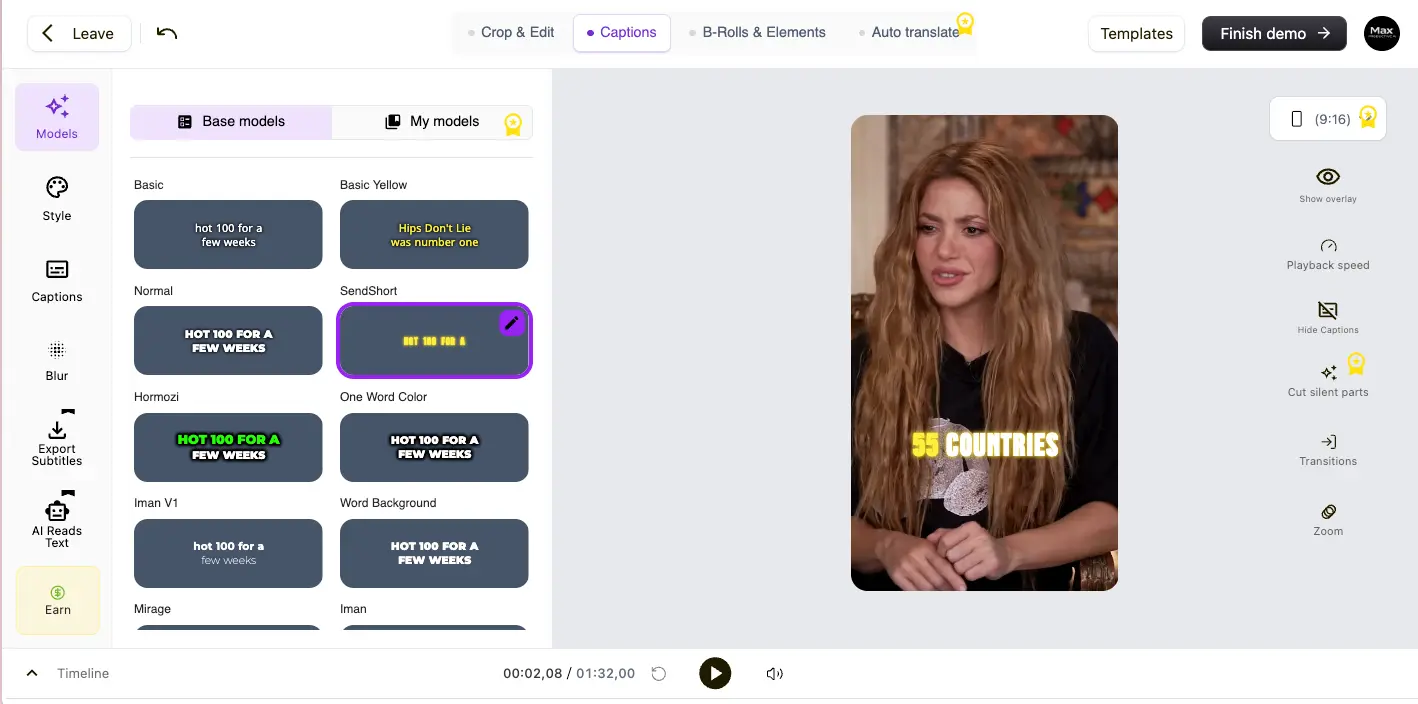
This is where SendShort shines. The caption editor offers named presets — "Hormozi," "Iman V1," "One Word Color," "Mirage" — that let you replicate viral creator caption aesthetics in one click. The left sidebar also gives access to blur options, subtitle export, and an "AI Reads Text" feature. You can see the selected "SendShort" style applied to the preview video on the right. The variety here is genuinely impressive for the price point.
AI Video Editor Dashboard
Full editing interface with crop, captions, B-rolls, and auto-translate
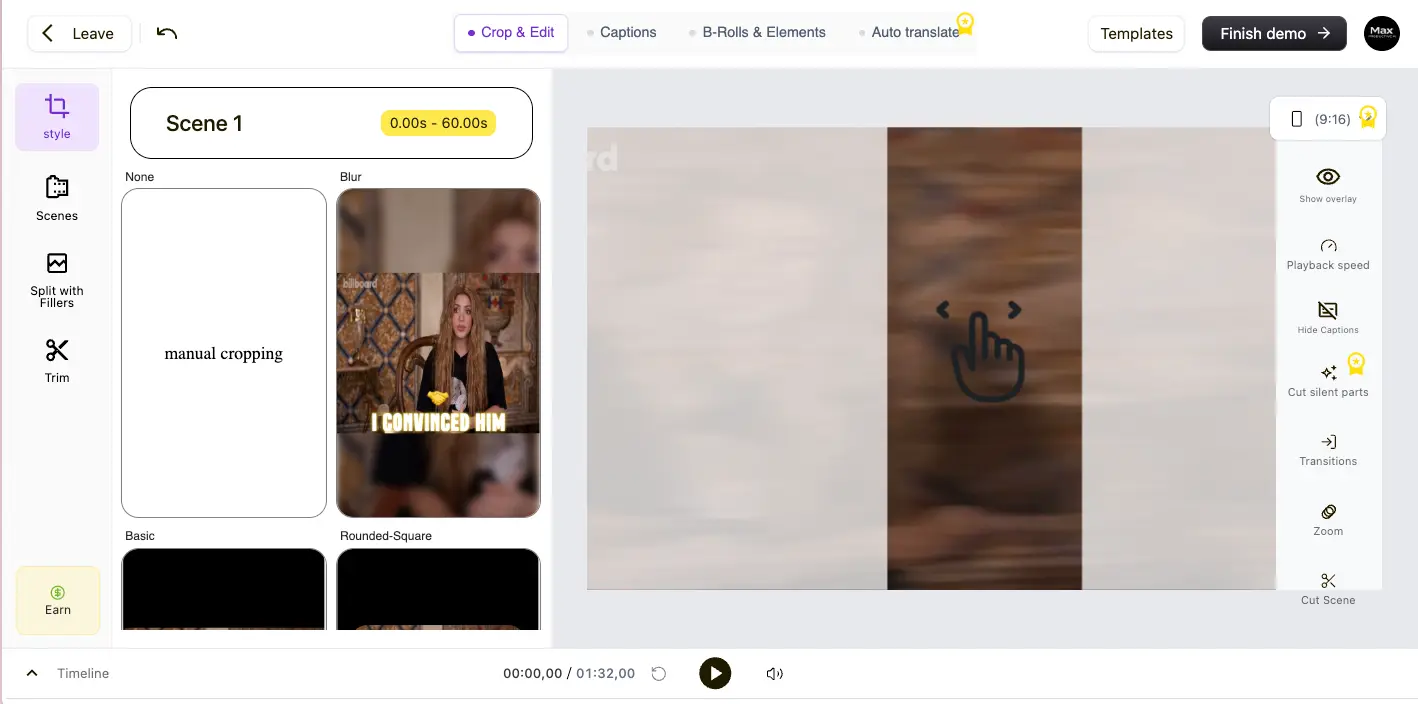
The editor groups everything into four tabs: Crop & Edit, Captions, B-Rolls & Elements, and Auto Translate. The left panel shows scene-level controls with style options (None, Blur, manual cropping, Basic, Rounded-Square frames). Right-side tools include overlay controls, playback speed, silence cutting, transitions, zoom, and scene cutting. It's not as polished as Descript's editor, but it covers the essentials for short-form work.
Want to test the caption styles on your own video?
Try SendShort Free →Free plan — no credit card • 3 free video exportsFaceless Video Generator
Create complete videos from text — no camera required
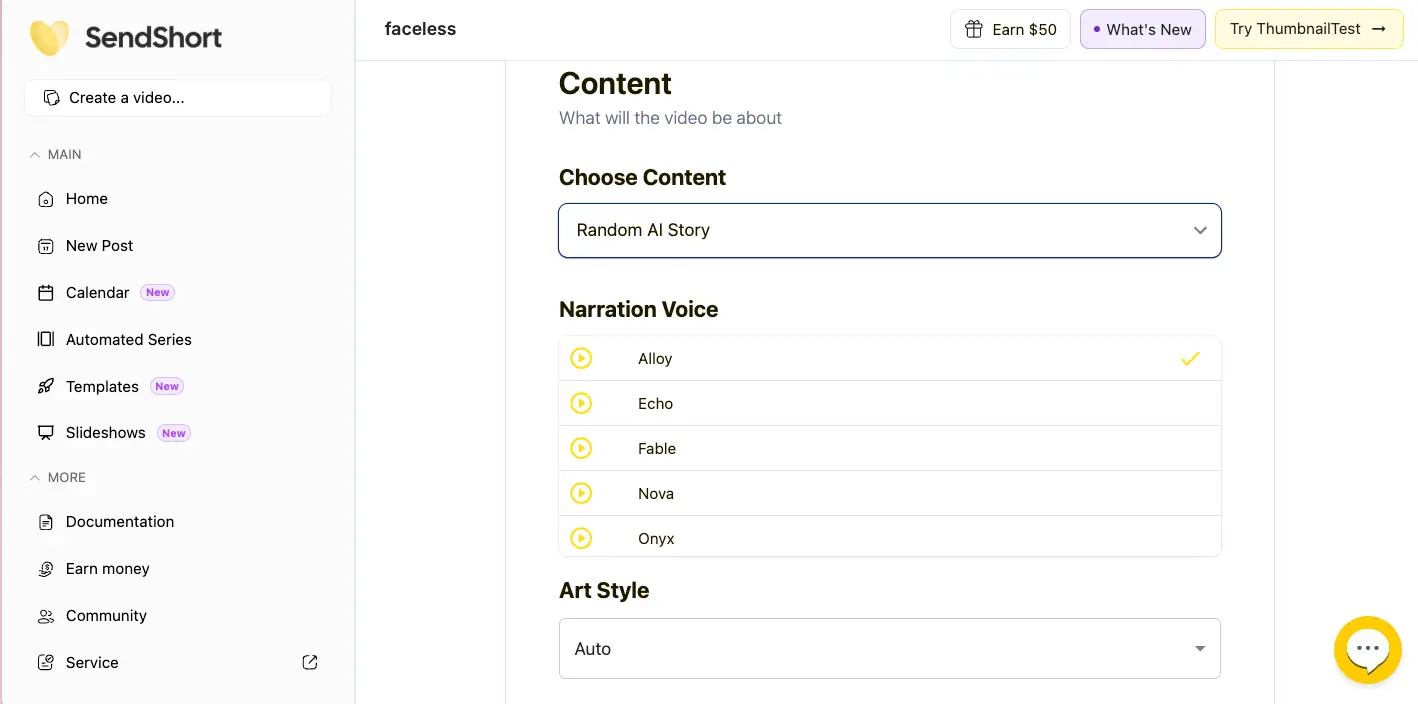
SendShort's standout feature. Choose your content type (Random AI Story, specific topic, or paste your own script), pick a narration voice (Alloy, Echo, Fable, Nova, Onyx, and more), select an art style, and the AI generates a complete video. The interface is minimal — almost too minimal, honestly. There's no preview of what the voices sound like before generating, which means some trial and error on your first few videos. Still, the fact that this exists at $15/month is notable.
Long Video Clipping with Chapters
AI identifies chapters and key moments from long-form content
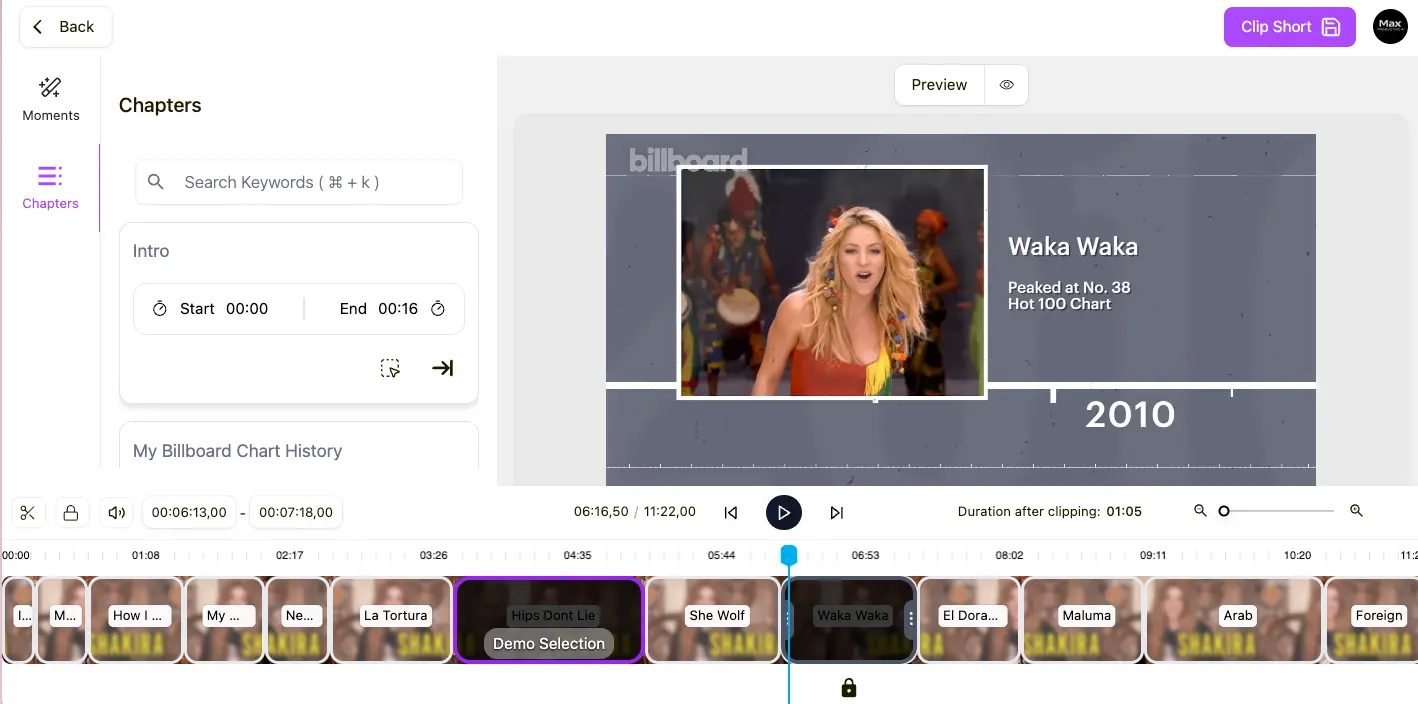
This is the Business-plan-only feature ($47/month) — and it's the one most heavily marketed. The AI breaks a long video into chapters and key moments, shown in a scrollable timeline at the bottom. You can search by keyword, adjust clip start/end times, and preview before exporting. The "Duration after clipping" indicator helps you stay within platform limits. It works well when it works, but remember: you need the top-tier plan to access any of this.
How SendShort Works
Three workflows depending on what you're trying to create.
SendShort isn't a single-feature tool — it's three tools in one, each with a different starting point. Which one you use depends on what you're making and which plan you're on.
Subtitle & Edit a Short (All Plans)
The most popular workflow. Upload an existing short clip, and SendShort adds AI captions, auto-crops to 9:16 vertical, inserts B-roll, and lets you choose from 350+ caption styles. You can also adjust zoom, transitions, and trim the clip. This is available on every plan including the free tier — and for most creators, it's the feature they'll use daily. The whole process takes about 2 minutes from upload to finished clip.
Create a Faceless Video (Starter+)
Type a topic or paste your own script. The AI generates a voiceover, matches visuals to the content, adds synced captions, and produces a ready-to-publish vertical video. You pick the voice, art style, and content type. Honest take: the AI-generated visuals can feel generic — think stock-footage-with-a-filter quality. For faceless channels where visuals are secondary to the narration, that's fine. For anything requiring visual precision, you'll want to swap in your own assets.
Long Video to Shorts (Business Plan Only — $47/mo)
Paste a YouTube URL or upload a long video (up to 10 minutes), and the AI analyzes the content to find the most engaging segments. It breaks the video into chapters and key moments, then generates individual clips with captions, B-roll, and vertical formatting. This is the feature you see in most SendShort marketing — but it's only available on the Business plan. If this is your primary use case, know that Opus Clip offers the same capability starting at $15/month on their Starter plan.
Review, Export, or Schedule
Once your clips are generated, review them in the editor, make adjustments to captions or cropping, and either download or schedule for auto-posting. Export quality ranges from 1080p on Starter to 4K/60fps on Business. Auto-posting is limited to TikTok and YouTube — and only one account per platform. For Instagram Reels, you'll need to download and upload manually.
Watch the Credit System
Independent users report that generating a video costs 1 credit and exporting it costs an additional credit — meaning each finished, downloadable video costs 2 credits, not 1. On the Starter plan's 20-credit quota, that could mean 10 actual videos, not 20. We'd recommend confirming current credit mechanics with SendShort's help docs before committing to a paid plan.
Key Features
What you're actually getting — and on which plan.
AI Auto-Captions
The bread and butter. 98.5% accuracy, 350+ customization options, 50+ languages. You can replicate viral creator styles in one click or build custom presets. Available on all plans including free. This alone justifies the tool for many creators — it's faster and cheaper than manual captioning, and the quality is strong for clear audio in English.
Faceless Video Generator
No competitor offers this at $15/month. Type a topic → get a full video with AI script, voiceover, visuals, and synced captions. The visuals lean generic, but for faceless channels in education or finance niches, it does the job. 3 videos/week on Starter, 10 on Professional, unlimited on Business.
Long-to-Short AI Extraction
The most-marketed feature — and the most frustrating to access. AI scans a long video, finds the best moments, and generates clips automatically. Genuinely useful when it works. But it requires the $47/month Business plan, which undercuts the "affordable" positioning. Opus Clip offers this on their $15/month Starter plan.
Auto Translation (50+ Languages)
One-click caption translation — not word-for-word machine translation but contextual rendering. Covers more than double the languages of Opus Clip (21). Unlocked on the Professional plan ($23/month) and above. A strong selling point for creators targeting international audiences.
AI B-Roll & Elements
Auto-inserts relevant stock footage to increase production value. A nice add-on that saves time, though the stock footage selection can feel limited. Importing your own B-roll requires Professional or higher.
AI Hook Titles
Generates attention-grabbing titles designed to maximize viewer retention in the first second. Available on Professional and above. Absent from Opus Clip, which is one of SendShort's small wins in the head-to-head.
Auto-Publishing & Scheduling
Schedule and auto-post to TikTok and YouTube Shorts with custom frequency (1–3 videos/day). But only those two platforms — no Instagram, LinkedIn, X, or Facebook. And one account per platform only. Agencies, this probably isn't enough.
Automated Series
Set up a recurring schedule and SendShort generates and posts faceless videos automatically — without any manual intervention. Useful for consistency-focused channels, but the quality of fully automated content is hit-or-miss. Worth experimenting with, not relying on exclusively.
Beyond these headline features, SendShort includes auto-zoom, noise reduction (Professional+), silence cutting, AI voiceover with 10+ voices, SRT caption export (Business only), and 4K/60fps export (Business only). It's a surprisingly deep feature set for the price — the issue isn't what's included, it's where each feature sits on the plan ladder.
Test the captions and faceless generator on the free plan:
Try SendShort Free →No credit card required • 3 free video exportsPricing Plans
Four tiers — but the feature gating changes the value equation significantly.
Free
- ✓ 3 video exports (one-time)
- ✓ AI captions
- ✓ Basic editing
- ✓ No credit card required
- ✗ No long-to-short AI
Starter
- ✓ 20 shorts/month
- ✓ 1 min 30 sec max length
- ✓ Captions + B-roll
- ✓ 3 faceless videos/week
- ✓ 1080p export
- ✗ No long-to-short AI
Professional
- ✓ 50 shorts/month
- ✓ 3 min max length
- ✓ Translation (50+ languages)
- ✓ AI hooks + noise reduction
- ✓ 10 faceless videos/week
- ✓ 2K export
- ✗ No long-to-short AI
Business
- ✓ Unlimited shorts
- ✓ 10 min max length
- ✓ Long-to-short AI extraction
- ✓ Auto-publish (TikTok + YouTube)
- ✓ 4K / 60fps export
- ✓ SRT export
Credit warning: Independent users report each video costs 2 credits (1 to generate + 1 to export), effectively halving the advertised quota.
Pricing last verified April 2026. Visit SendShort for current rates.
How Does the Pricing Stack Up?
At $15/month, both SendShort and Opus Clip match on entry pricing — but Opus Clip includes long-to-short AI at that tier while SendShort doesn't. Submagic starts at ~$12/month (annual) with stronger caption aesthetics. CapCut is free with solid captioning but lacks AI clip extraction. SendShort's best value is the Professional plan at $23/month — the faceless generator plus 50+ language translation make it a unique offering at that price.
Detailed Pros & Cons
An honest breakdown based on independent user reports and our own research.
✓ Pros
Three free video exports with no credit card required. That's enough to test caption quality, the editing interface, and even one faceless video before deciding if it's worth paying. In a market where "free trial" often means "free after you hand over your card," this matters.
Type a topic, get a complete video. Script, voiceover, visuals, captions — all generated without filming. Neither Opus Clip, Submagic, Klap, nor 2short.ai offer anything like this. For off-camera creators, this single feature could be the deciding factor.
98.5% accuracy is competitive with the best in class. The 350+ styling options with named presets (Hormozi, Iman, etc.) save time that would otherwise go into manual formatting. For clear English audio, the transcription quality is solid.
50+ languages for caption translation. That's more than double Opus Clip's 21 languages and competitive with Submagic's 48-100+. If you're creating content for international audiences on a budget, this is a meaningful advantage.
Clips, captions, B-roll, hooks, scheduling — it's all in one tool. You don't need to stitch together three different services to go from raw video to published short. For solo creators who value simplicity, the integrated pipeline saves real time.
$15/month for the Starter plan. The only tool cheaper is 2short.ai at $9.90/month, but that offers a narrower feature set. At $23/month for Professional, SendShort's combination of faceless video + translation + AI hooks is hard to find elsewhere.
✗ Cons
Long-video-to-short AI extraction — the feature most prominently marketed — requires the $47/month Business plan. If you signed up at $15/month expecting this, you'll need to upgrade to a tier that's 3× more expensive. Opus Clip includes this on their $15 Starter plan. That's a tough comparison.
Multiple independent users report that generating a video costs 1 credit and exporting it costs another — effectively halving the advertised quota. A "20 shorts/month" plan may deliver only 10 downloadable videos in practice. This isn't just annoying; it feels deceptive if the math doesn't match the marketing.
Several independent reports describe the system crashing mid-generation with a network error — and still deducting a credit without producing a video. When you're on a limited quota and credits are effectively double-counted, losing them to bugs stings.
1–2 week response times documented across multiple independent sources. Some users report receiving no reply at all. There's no live chat. When combined with credit bugs, this is the most frustrating part of the experience — you lose credits to errors and then wait weeks for resolution.
Only TikTok and YouTube. No Instagram Reels, X/Twitter, LinkedIn, or Facebook. And you can only connect one account per platform. Submagic and Opus Clip both offer broader multi-platform publishing. For anyone managing more than one brand or account, this is a real constraint.
The maximum video input length is 10 minutes on the top-tier plan. Podcasters and webinar creators working with 30–60 minute recordings will need to pre-clip their content before uploading — which partially defeats the purpose of an AI clipping tool. Opus Clip and Klap both accept much longer inputs.
SendShort vs Alternatives
How SendShort compares to the main competitors in the AI short video space.
| Feature | Reviewed SendShort | Submagic | CapCut | VEED.io |
|---|---|---|---|---|
| Starting Price | $15/mo | ~$12/mo (annual) | Free | $18/mo |
| Free Plan | ✓ 3 videos, no CC | ✓ 3 videos | ✓ Full free tier | ✓ Limited |
| Long-to-Short AI | $47/mo only | Add-on +$12/mo | ✗ No | ✗ No |
| Faceless Video | ✓ Yes | ✗ No | ✗ No | ✗ No |
| Caption Languages | 50+ | 48–100+ | 20+ | 125+ |
| Caption Styling | 350+ options | Best-in-class | Good | Good |
| Auto-Posting | TikTok + YouTube | Multi-platform | TikTok | Multi-platform |
| Best For | Faceless creators, budget | Caption aesthetics | Free editing | All-in-one editor |
Which Tool Is Right For You?
SendShort
ReviewedBest for: Solo creators building faceless content channels in education, finance, or motivation niches who need an affordable all-in-one tool. The faceless video generator is the unique selling point — if that feature solves a real problem for you and you can tolerate occasional bugs, the Professional plan ($23/month) is the sweet spot. Less ideal if you need the long-to-short AI without paying $47/month.

Submagic
Caption Quality LeaderBest for: Creators who prioritize caption aesthetics and team collaboration. The highest G2 score in the category (4.7/5), creator-specific caption presets, Storyblocks video library, and built-in team workspaces. Long-to-short extraction is a separate add-on (+$12/month). No faceless video generator. See our detailed SendShort vs Submagic comparison →

CapCut
Free TierBest for: Creators who want powerful free video editing with solid auto-captions and don't need AI clip extraction or faceless generation. CapCut's free tier is genuinely useful — more editing depth than SendShort's paid plans, though it lacks AI-powered long-to-short clipping. If your workflow is "edit a clip + add captions," CapCut might be all you need for $0. See our VEED vs CapCut comparison →

VEED.io
All-in-One EditorBest for: Creators who need a full-featured video editor beyond just short-form clips. VEED offers captioning, screen recording, teleprompter, collaboration tools, and more in a polished package. It's broader but more expensive than SendShort, and doesn't include faceless video generation or AI clip extraction. Different tool for a broader use case.

Descript
Pro EditorBest for: Podcasters and video creators who want text-based editing — edit your video by editing the transcript. Far more polished than SendShort for editing depth, but it's a different product: Descript is a full production tool, not an AI clip generator. No faceless video feature. If editing quality matters more than automation, Descript wins.

Gling
YouTube FocusedBest for: YouTubers who need AI-powered rough cut editing — silence removal, filler word detection, and quick assembly. Gling is laser-focused on the YouTube editing workflow rather than short-form generation. Different niche than SendShort, but worth considering if YouTube long-form is your primary output.
Frequently Asked Questions
Should You Try SendShort?
SendShort delivers an unusually deep feature set for its price — the faceless video generator, multilingual captions, AI B-roll, and hook titles create a genuinely useful all-in-one pipeline for solo short-form creators. At $15–23/month, the combination of capabilities is hard to find elsewhere. And the free plan (3 videos, no credit card) means you can test before committing anything.
But it's a tool with visible cracks. The credit bugs are documented, the support is slow, and the headline long-to-short feature being locked behind the $47 Business plan creates a real gap between marketing and reality. The Trustpilot rating of 3.0–3.3/5 reflects these issues. SendShort isn't a polished, enterprise-ready product — it's an affordable, feature-rich tool that sometimes frustrates.
Our Recommendation
Start with the free plan and test the faceless video generator plus the caption engine. If those two features work for your content, upgrade to Professional ($23/month) — that's the sweet spot for faceless creators who need translation and AI hooks. Only move to Business ($47/month) if long-to-short AI extraction is essential for your workflow. And before committing to any paid plan, confirm the current credit system mechanics with SendShort's documentation.