Bubble
Full-stack no-code development platform enabling anyone to build sophisticated web and mobile applications without writing code. With visual programming, integrated PostgreSQL database, workflow automation, and 1,000+ plugins, Bubble has powered 7 million applications that transacted $1+ billion in 2024. Build SaaS platforms, marketplaces, CRMs, and internal tools 20-40% faster than traditional coding at a fraction of the cost.
30-Second Summary
Bottom Line: Bubble stands as the most comprehensive no-code full-stack platform for building production-ready web and mobile applications, offering unparalleled power through visual programming, integrated PostgreSQL database, and workflow automation. With 7 million apps built, $1 billion transacted, and recent AI Agent features plus native mobile development (August 2025), Bubble accelerates development 20-40% faster than traditional coding while saving $300K-$1M annually. However, the steeper learning curve (3-12 months to proficiency), complete vendor lock-in with no code export, and workload-based pricing that can scale unpredictably demand careful consideration before committing.
Best For
- Non-technical founders building SaaS platforms and marketplaces
- Startups needing rapid MVP development in weeks instead of months
- Businesses creating internal tools, CRMs, and custom dashboards
- Teams willing to invest in learning for long-term no-code power
Skip If
- You need code ownership or ability to migrate away from platform
- Ultra-high-performance apps requiring millisecond latency are your goal
- Marketing websites are primary need (use Webflow instead)
- Learning curve and time investment don't fit your timeline
No credit card required • 50,000 Workload Units monthly
Bubble at a Glance
What Exactly is Bubble?
Bubble is a comprehensive full-stack no-code development platform launched in 2012 that enables users to build sophisticated web and mobile applications without writing code, combining visual programming for frontend design, backend workflow automation, integrated PostgreSQL database management, and AWS-hosted infrastructure in a single unified platform.
Unlike basic website builders or simple app creators, Bubble provides complete application development capabilities rivaling traditional coding. The platform serves over 2 million users who have collectively built nearly 7 million applications ranging from simple prototypes to production SaaS platforms serving 100,000+ daily users. Companies built on Bubble have raised hundreds of millions in venture capital funding—Dividend Finance secured $365 million while running their entire platform on Bubble, while Axial facilitated over 2,000 closed deals connecting 10,000+ financial professionals.
Traditional Development vs Bubble No-Code
Traditional Coding
- Requires 3-6 months for MVP development with skilled developers
- Hire developers at $80K-$150K annually or agencies $50K-$200K per project
- Manage separate frontend, backend, database, and hosting infrastructure
- Manually handle security patches, server scaling, and deployments
- Full code ownership and unlimited customization potential
With Bubble
- Build functional MVPs in weeks through visual drag-and-drop interface
- Start at $0-$32/month; companies save $300K-$1M annually on development
- Integrated full-stack platform handles everything in one place
- Automatic security, scaling, and deployment managed by platform
- Complete vendor lock-in—no code export or migration capability
The Evolution of Bubble's Platform
Since launching in 2012, Bubble has continuously evolved from a simple prototyping tool into a mature full-stack platform. Key milestones include the 2022 responsive design overhaul enabling mobile-adaptive layouts, September 2025 database performance improvements (50% faster searches, 90% faster reference deletions), and August 2025 launch of native mobile app development using React Native foundation. The October 2025 introduction of Bubble AI Agent marked a transformative shift—the AI now generates pages, troubleshoots workflows, and provides contextual guidance while understanding your specific app architecture.
The platform operates entirely cloud-based through Amazon Web Services infrastructure with enterprise-grade security including SOC 2 Type II certification, ISO 27001 certification, and compliance with GDPR standards. Users access Bubble through web browsers for development, with deployed applications running on Bubble's managed AWS hosting featuring AES-256 encryption, automatic SSL certificates, and DDoS protection through Cloudflare partnership.
How Bubble's No-Code Technology Works
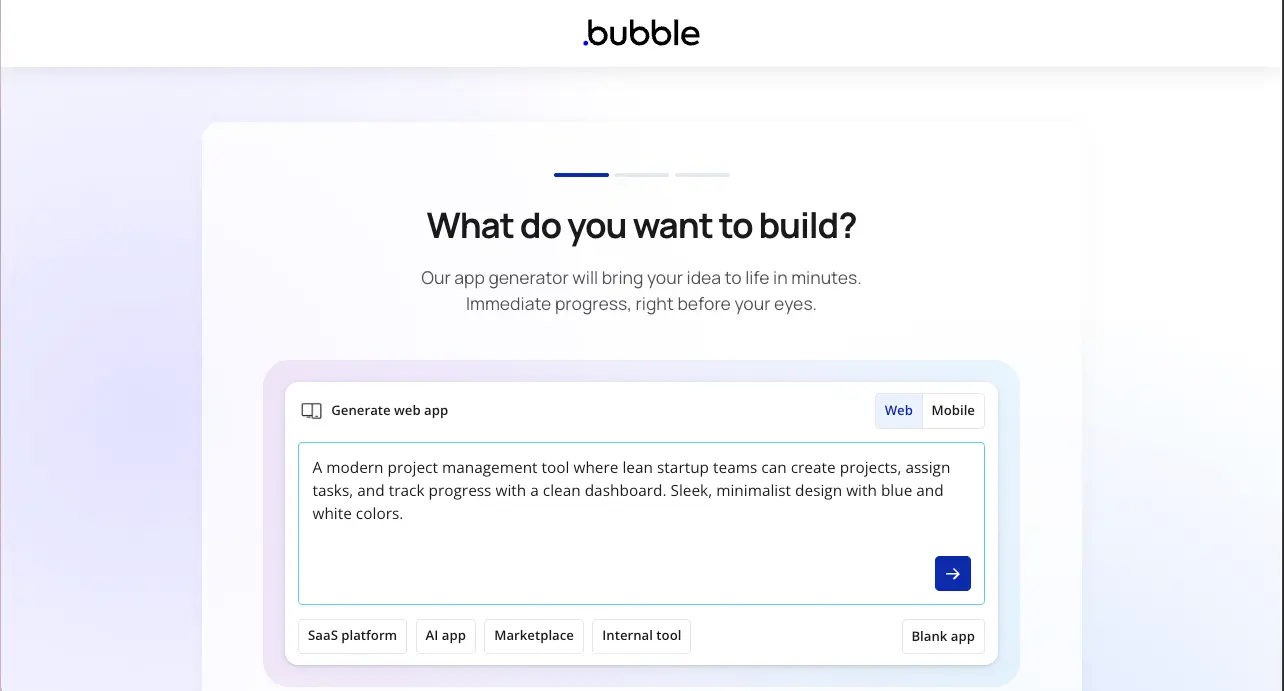
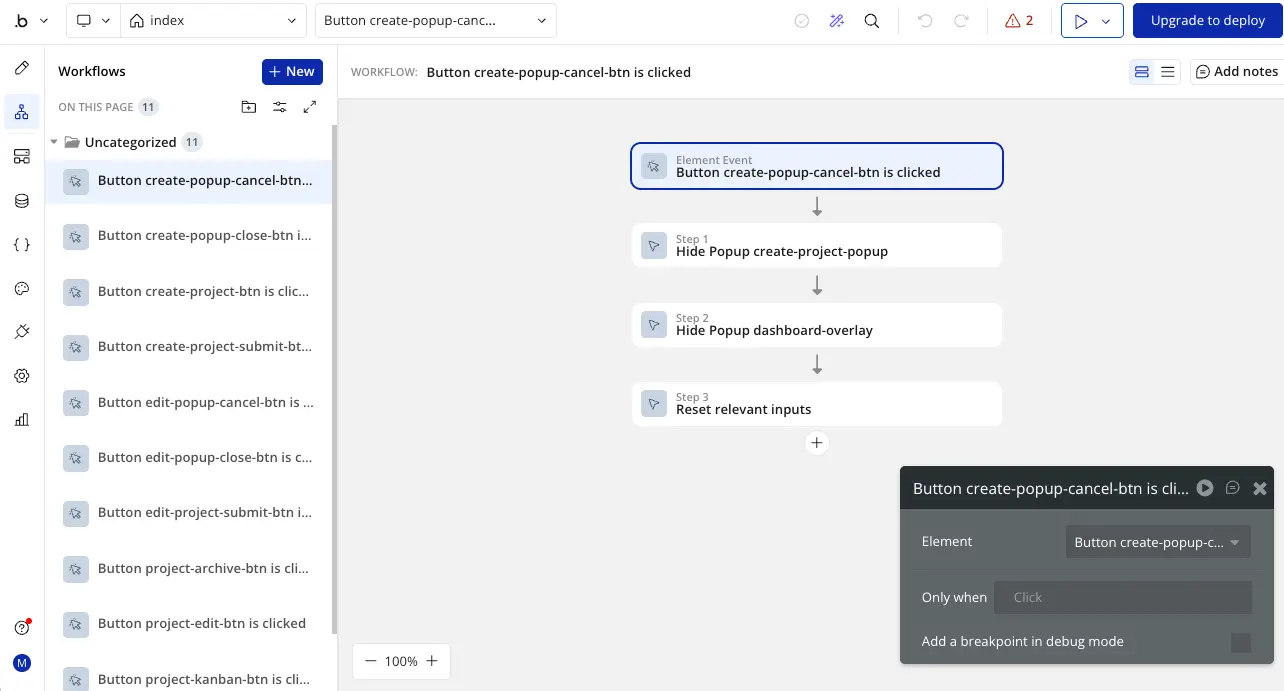
Bubble uses visual programming—a methodology replacing written code with graphical elements users manipulate through drag-and-drop interfaces. Behind the scenes, Bubble translates visual configurations into executable code, but developers never see or touch that code. The platform operates through four integrated systems:
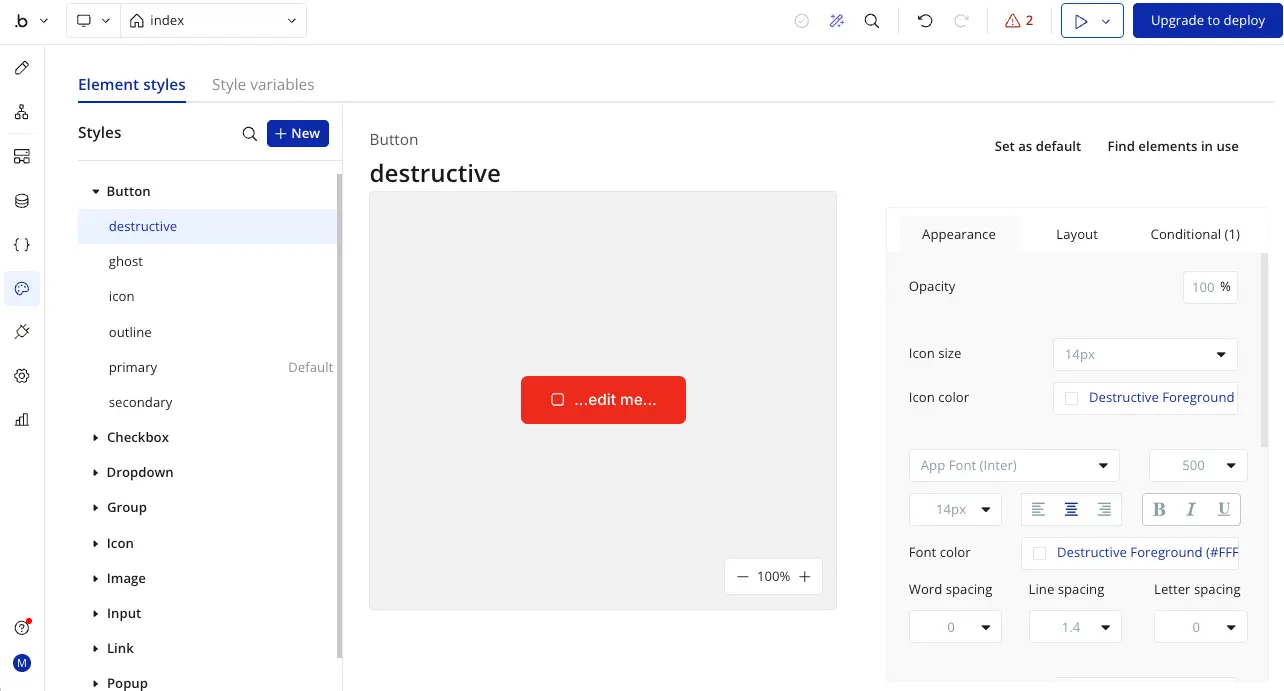
- Design Editor: WYSIWYG interface for creating UI components, layouts, and responsive designs that adapt across devices
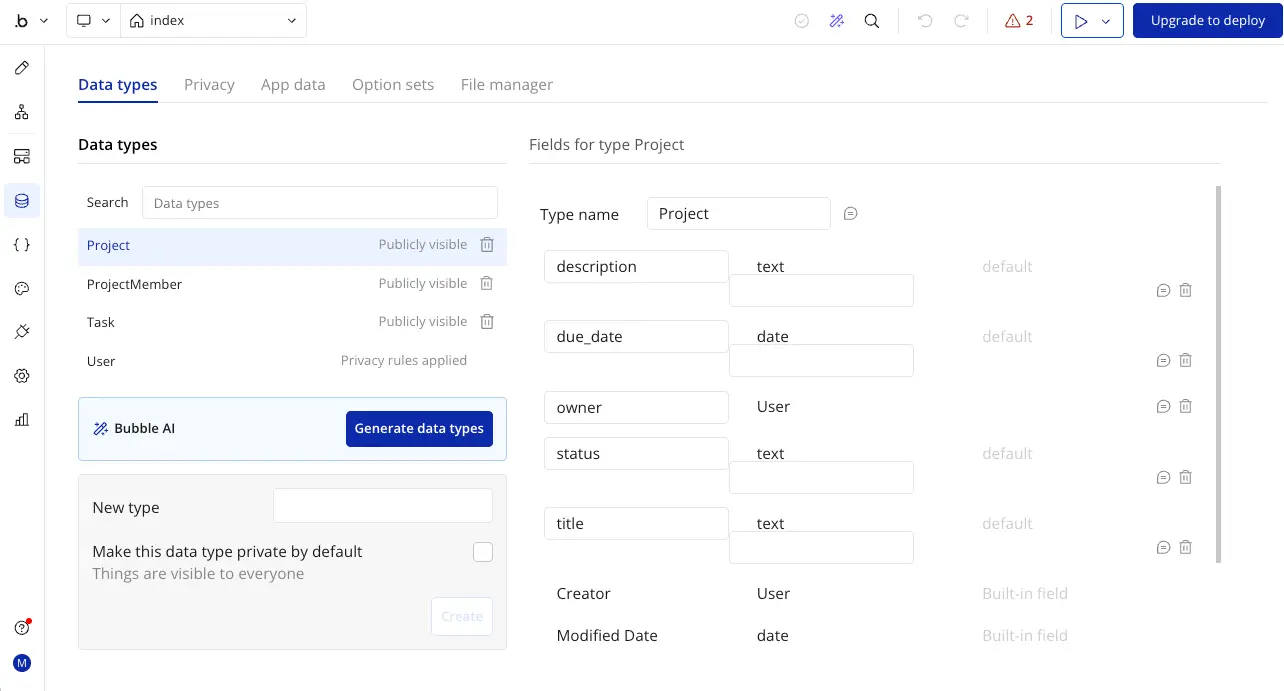
- Database Manager: PostgreSQL-backed visual database where you define custom data types, relationships, and privacy rules without SQL
- Workflow Engine: Event-driven logic builder creating actions triggered by user interactions, data changes, or scheduled events
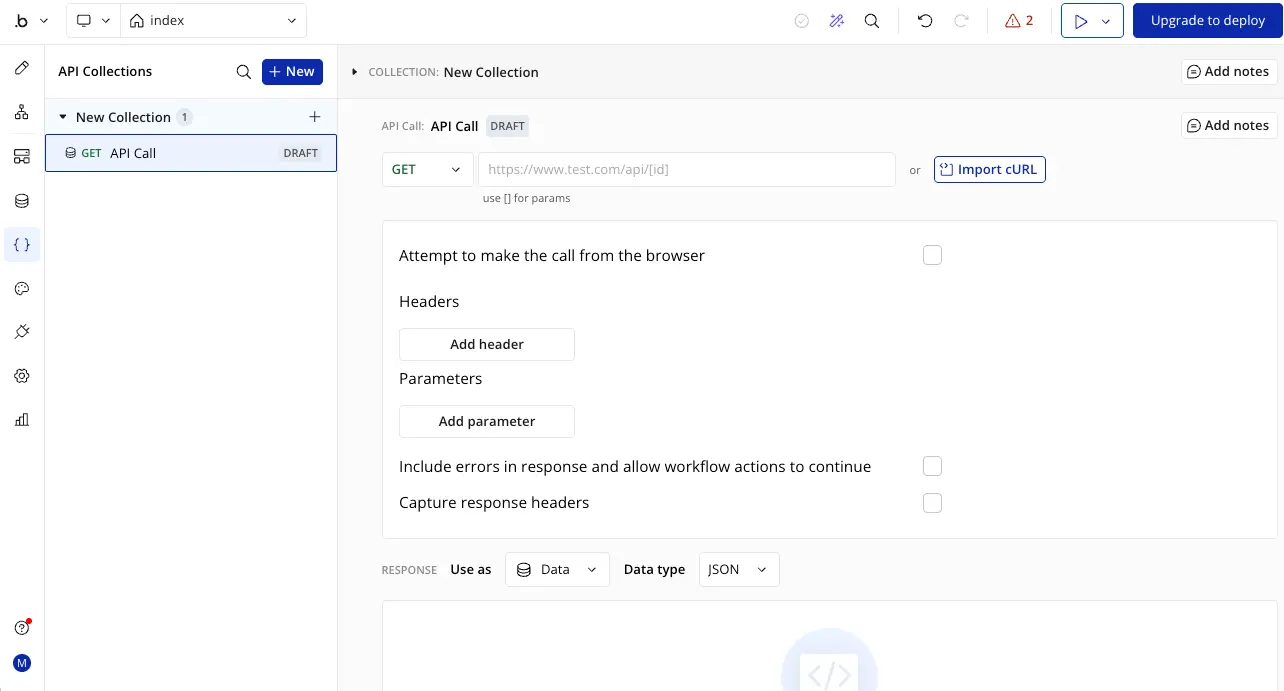
- API Connector: Integration layer connecting to external services through RESTful APIs with support for OAuth2, API keys, and custom authentication
Development happens in real-time—changes appear instantly in preview mode, enabling rapid iteration. When ready to launch, one-click deployment publishes applications to production URLs with automatic HTTPS, requiring no DevOps knowledge or server configuration.
How Does Bubble's Visual Development Actually Work?
Bubble's visual development system operates through a sophisticated multi-layered interface combining drag-and-drop design, database architecture, workflow automation, and API integrations—all accessible through a web browser without installing development environments or managing local code repositories.
Bubble's Development Capabilities
✅ Where Bubble Excels
- Full-stack in one platform: Frontend design, backend logic, database, hosting, and deployment unified in single interface—no assembly of multiple tools required
- Rapid development velocity: Build MVPs 20-40% faster than traditional coding; companies launch products in weeks instead of 3-6 months
- Visual workflow automation: Create complex business logic through visual event-driven workflows without writing JavaScript or Python
- Production-ready scalability: Apps serve 100,000+ daily users with proper optimization; platforms transacted $1+ billion in 2024
- Extensive integration ecosystem: Nearly 1,000 plugins plus API Connector enabling unlimited third-party connections including Stripe, Twilio, SendGrid, OpenAI
- Native mobile development: Build iOS and Android apps directly in Bubble (launched August 2025) using React Native foundation with access to device cameras, GPS, push notifications
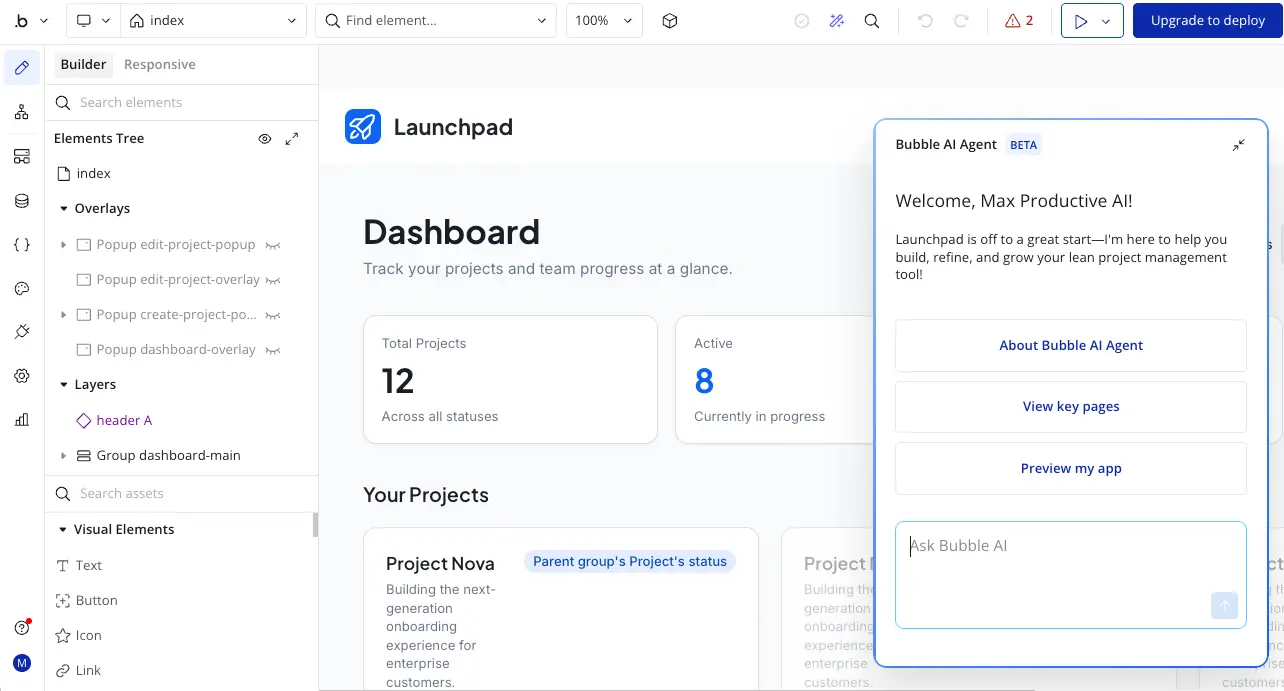
- AI-powered development: AI Agent generates pages, troubleshoots workflows, and provides contextual guidance understanding your specific app architecture
⚠️ Current Limitations
- Steeper learning curve than alternatives: Requires 1-3 months for basics, 6-12 months for proficiency—more complex than Glide, Softr, or Adalo despite being "no-code"
- Complete vendor lock-in: No code export capability means you cannot migrate away from Bubble without completely rebuilding your application from scratch
- Performance constraints exist: Not suitable for ultra-low-latency apps (high-frequency trading), complex 3D graphics, or real-time multiplayer games
- Workload cost unpredictability: Usage-based pricing can scale unexpectedly with traffic spikes or inefficient workflows; requires continuous optimization
- Database processing limits: Complex operations process approximately 100 rows per second; large datasets or complex queries need careful optimization
Step-by-Step: Getting Started with Bubble
Starting with Bubble takes approximately 2-4 hours to create your first simple application, though mastering the platform requires sustained practice:
- Create your free account: Sign up at Bubble.io using email or Google authentication—no credit card required for free plan
- Complete Bubble Academy lessons: Interactive tutorials teach core concepts including pages, elements, data types, workflows, and privacy rules
- Define your database structure: Create custom data types representing your app's entities (Users, Products, Orders, Messages) with fields and relationships
- Build your first page: Drag elements from the visual editor (text, buttons, inputs, images) onto canvas and style them using property editor
- Create workflows: Add event-driven logic like "When Button is clicked → Create a new Thing in database → Navigate to another page"
- Test in preview mode: Click preview to interact with your app in real-time, testing workflows and database operations
- Deploy when ready: Upgrade to Starter plan ($32/month) to deploy live with custom domain and remove Bubble branding
For optimal learning efficiency, follow the 70-20-10 rule: spend 70% of time building actual projects (not just tutorials), 20% reading documentation when stuck, and 10% watching videos for new concepts. Most successful Bubble developers report building 3-5 throwaway practice apps before creating their first production application.
Core Features That Define Bubble
🎨 Visual Development Editor
Drag & DropWYSIWYG interface enabling pixel-perfect UI design through drag-and-drop components including buttons, inputs, images, repeating groups (for displaying lists), custom elements, and reusable components. The editor supports responsive design with breakpoints for desktop, tablet, and mobile, plus container layouts that automatically adapt to screen sizes. Property editor provides granular control over margins, padding, colors, fonts, borders, and conditional visibility.
🗄️ Integrated PostgreSQL Database
Built-InEvery Bubble application includes a robust PostgreSQL database accessible through visual interface. Create custom data types with fields supporting text, numbers, dates, booleans, files, images, and relationships to other data types. Define one-to-many and many-to-many relationships, set field-level privacy rules controlling who can view or modify data, and leverage automatic indexing (introduced September 2025) that optimizes query performance without manual configuration.
⚡ Workflow Automation Engine
Event-DrivenVisual workflow system creates business logic responding to events like button clicks, page loads, data changes, or scheduled triggers. Workflows execute sequential actions including database operations (create, modify, delete), API calls, navigation, custom states updates, and conditional branching. Backend workflows process resource-intensive tasks asynchronously without blocking frontend, perfect for email sending, report generation, or bulk data processing. Redesigned workflow tab (2025) improves organization for complex app logic.
🔗 API Connector & Integrations
UnlimitedBubble-developed API Connector plugin enables connections to any RESTful API returning JSON data. Supports authentication methods including OAuth2, API keys, HTTP Basic, and custom headers. Pre-built integrations available for popular services including payment processing (Stripe, PayPal), communication (Twilio SMS, SendGrid email), AI services (OpenAI, ChatGPT), maps (Google Maps), and data sources (Google Sheets, Airtable). Plugin marketplace offers 1,000+ additional connections covering analytics, marketing, CRM, and specialized services.
📱 Native Mobile App Development
Beta (2025)Build iOS and Android applications directly in Bubble using dedicated mobile canvas launched August 2025. Native Mobile Builder uses React Native foundation while maintaining Bubble's visual development approach. Access device capabilities including camera, location services, push notifications, and biometric authentication. Pre-built components adhere to Apple's Human Interface Guidelines and Google's Material Design standards. BubbleGo platform enables testing on real devices before app store submission. Mobile apps share backend infrastructure with web applications, enabling unified data and workflows.
🤖 AI Agent Development Assistant
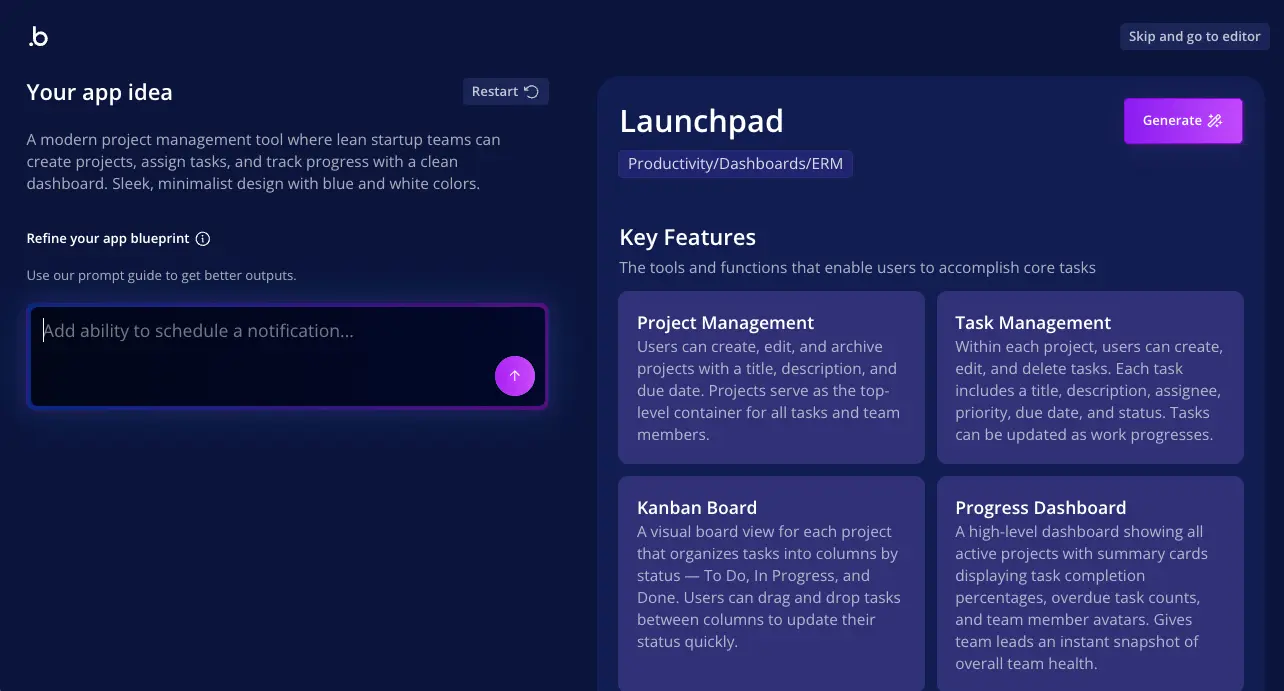
Launched 2025Bubble AI Agent (launched October 2025) generates and edits UI elements, troubleshoots workflows, and provides contextual step-by-step guidance. The AI understands your specific app context including existing design system, data types, and architecture. Generate complete pages by describing requirements—"create user dashboard with activity feed, recent orders, and profile editing"—and AI produces functional layout using proper element hierarchy and style variables. Mobile app generation creates native UI with data types, dynamic expressions, and sample data automatically.
🔒 Enterprise-Grade Security
SOC 2 CertifiedComprehensive security infrastructure includes SOC 2 Type II compliance, ISO 27001 certification, and GDPR-ready measures meeting EU and UK data privacy requirements. All applications receive automatic SSL certificates, AES-256 encryption for data at rest, and TLS encryption for data in transit. Multi-factor authentication (2FA) and single sign-on (SSO) support available. Field-level privacy rules provide granular control over data access. Security Dashboard with secrets scanner detects leaked API keys and suggests mitigation. DDoS protection through Cloudflare partnership and point-in-time data recovery for accidental deletion.
👥 User Authentication & Permissions
Built-InNative user authentication system handles signup, login, password resets, and email verification without external services. Create custom user roles and permissions controlling feature access and data visibility. Privacy rules define who can view, modify, or delete specific data types at field level. Support for social login through Google, Facebook, LinkedIn using OAuth integration. Session management, password requirements, and account lockout policies configurable through settings.
📊 Database Performance Optimization
2025 UpgradeSeptember 2025 database improvements delivered 50% faster searches (P99 latency reduced from 105ms to 58ms) and 90% faster reference deletion lookups. Automatic index creation runs during off-peak hours using HypoPG to test indexes before implementation, with no limitation on tables exceeding 5 million records. Weekly cleanup removes unused indexes (over 860,000 indexes and 1TB of data removed). Enterprise customers benefit from separated data layer architecture isolating their infrastructure.
🎯 Version Control & Collaboration
Team-ReadyBranch-based version control enables multiple developers working on separate features simultaneously without conflicts. Create development, staging, and production versions with one-click deployment between environments. Rollback to previous versions if issues arise. Growth plan and above support multiple app versions (10-20 depending on tier). Comment system allows team members to leave feedback on specific elements. Change logs track modifications with timestamps and author attribution.
🌐 Custom Domains & Hosting
IncludedConnect custom domains (yourcompany.com) to Bubble applications with automatic SSL certificate provisioning. AWS-hosted infrastructure provides global CDN distribution for fast content delivery. Automatic scaling handles traffic spikes without manual intervention. Starter plan and above support custom domains, removing yourapp.bubbleapps.io subdomain. Enterprise plans offer choice of AWS hosting region including EU options, static IP addresses for enterprise integrations, and dedicated server instances for isolated infrastructure.
Bubble Pricing: What You Actually Pay
| Plan | Monthly Price | Annual Price | Workload Units | Best For |
|---|---|---|---|---|
| Free | $0 | $0 | 50,000 WU/month | Learning & prototyping |
| Starter | $32/month | $29/month | 175,000 WU/month | MVPs & solo founders |
| Growth | $134/month | $119/month | 250,000 WU/month | Expanding startups |
| Team | $399/month | $349/month | 500,000 WU/month | Scaling teams |
| Enterprise | Custom | Custom | Custom allocation | Large organizations |
Understanding Workload Units (WU)
What Are Workload Units?
Workload Units measure server resources your app consumes including:
- Database operations (searches, writes): 0.2-0.5 WU per operation
- Page loads: 0.15 WU per load
- Backend workflows: 0.01-0.6 WU depending on complexity
- Data transmission: 0.000003 WU per character
How WU Pricing Works
Benefits and considerations:
- Pay only for actual resource consumption, not arbitrary user limits
- Plans include monthly WU allocations with discounted overage rates
- Optimization reduces costs—efficient workflows consume fewer WU
- Costs can spike unexpectedly with traffic or inefficient queries
- Monitor usage through app metrics dashboard to control expenses
Free Plan: Learning and Prototyping
The permanently free plan provides unlimited time to learn Bubble with significant limitations:
- 50,000 WU monthly: Sufficient for development and testing but limited for real usage
- No live deployment: Apps remain in development mode only—cannot publish publicly
- 200 database record limit: Quickly reached making free tier impractical for production
- Bubble branding and subdomain: Apps display "Built with Bubble" at yourapp.bubbleapps.io
- Single editor only: One person can work on the app—no collaboration
- 6 hours server log retention: Very limited debugging capability
Best use: Build your complete application on free plan, then upgrade to Starter when ready to launch. This validates your concept thoroughly before financial commitment.
Starter Plan: Launch-Ready Foundation
At $29-32/month, Starter plan removes critical free plan limitations enabling production launches:
- 175,000 WU monthly: Supports small to medium traffic—approximately 1,000-5,000 monthly visitors depending on app complexity
- Live app deployment: Publish publicly with custom domain support
- No Bubble branding: Professional appearance without platform attribution
- 2-7 days server logs: Better debugging and error tracking
- Unlimited database records: No artificial record limitations
Starter plan suits solo founders, freelancers, and small businesses launching MVPs or internal tools serving limited users. Many successful Bubble apps operate profitably on Starter plan for months before scaling demands upgrades.
Growth & Team Plans: Scaling Operations
Growth Plan ($119-134/month) adds collaboration and advanced features:
- 250,000 WU monthly supporting growing traffic
- 2 app editors for team collaboration
- 10 app versions for staging and testing environments
- Premium version control with branching
- Sub-apps feature for modular architecture
Team Plan ($349-399/month) supports larger teams and heavier workloads:
- 500,000 WU monthly handling substantial traffic
- 5 app editors for larger development teams
- 20 app versions for complex deployment pipelines
- 20 days server logs for comprehensive debugging
Enterprise Plan: Custom Infrastructure
Custom pricing for organizations requiring advanced capabilities:
- Dedicated server instances: Isolated infrastructure separate from shared hosting
- Choice of AWS region: EU hosting options for GDPR compliance
- Static IP addresses: Enterprise system integration requiring whitelisting
- No workload-based pricing: Flat monthly fee regardless of usage
- 24/7 support: Priority assistance and dedicated account management
- SSO and advanced security: SAML single sign-on, audit logs, centralized app management
Enterprise plans typically start at $3,500+/month, targeting organizations with 50+ users or specialized infrastructure requirements.
Mobile App Pricing (October 2025)
Native mobile development requires separate pricing with three options:
- Web-only plans: Standard pricing for web applications only
- Mobile-only plans: Higher cost covering mobile infrastructure and app store support
- Web + mobile plans: Combined pricing for unified web and mobile development
Mobile apps built during beta period (before October 1, 2025) must upgrade to mobile-enabled plans to remain live. Specific mobile pricing requires contacting Bubble's sales team.
Honest Assessment: Pros and Cons
What Works Exceptionally Well
- Comprehensive full-stack capabilities in unified platform Frontend design, backend workflows, database management, user authentication, API integrations, and hosting combined in single interface—eliminating need to assemble multiple tools or services
- Exceptional development velocity accelerating time-to-market Build functional MVPs 20-40% faster than traditional coding—weeks instead of 3-6 months—enabling rapid validation and iteration based on real user feedback
- Production-ready scalability proven at enterprise level Apps transacted $1+ billion in 2024, serve 100,000+ daily users with optimization, and support venture-backed companies like Dividend Finance ($365M raised) running entirely on Bubble
- Massive cost savings versus traditional development Companies save $300K-$1M annually by eliminating need for full engineering teams during initial development—Starter plan costs $384/year vs $80K-$150K developer salaries or $50K-$200K agency contracts
- Extensive ecosystem enabling unlimited functionality Nearly 1,000 plugins, hundreds of templates, active community forum, comprehensive documentation, and professional agencies provide solutions for virtually any integration or use case
- AI-powered development revolutionizing productivity Bubble AI Agent (launched October 2025) generates complete pages, troubleshoots workflows, and provides contextual guidance understanding your specific app architecture—mobile app generation creates native UI automatically
- Native mobile development eliminating wrapper limitations Build iOS and Android apps directly in Bubble (launched August 2025) using React Native foundation with access to device cameras, GPS, push notifications, and native performance
- Enterprise-grade security meeting compliance standards SOC 2 Type II, ISO 27001, GDPR-ready infrastructure with AES-256 encryption, automatic SSL, field-level privacy rules, and DDoS protection through Cloudflare partnership
- Significant database performance improvements in 2025 September 2025 updates delivered 50% faster searches (P99: 105ms → 58ms), 90% faster reference deletion, and automatic indexing removing over 860,000 unused indexes freeing 1TB of storage
Significant Limitations
- Steeper learning curve than simpler no-code alternatives Requires 1-3 months for basic proficiency, 6-12 months for advanced mastery despite being "no-code"—significantly more complex than Glide, Softr, or Adalo where users build functional apps in hours or days
- Complete vendor lock-in with no code export capability Absolutely no way to migrate applications away from Bubble without completely rebuilding from scratch—full dependency on Bubble's infrastructure, pricing, and platform evolution creates strategic risk
- Performance constraints for specific use cases Not suitable for ultra-low-latency applications (millisecond-level responses), complex 3D graphics, real-time multiplayer games, or high-frequency trading—database processes approximately 100 rows/second for complex operations
- Workload Unit pricing can scale unpredictably Usage-based costs difficult to forecast for complex apps—inefficient workflows or traffic spikes cause unexpected expense increases; some users report unsustainable $16K/month costs without optimization
- Design flexibility requires more effort than specialized tools Creating pixel-perfect, highly customized UIs takes significant work compared to design-focused platforms like Webflow—responsive design functions but requires manual configuration across breakpoints
- SEO requires manual setup unlike dedicated platforms Bubble lacks automatic SEO optimization found in Webflow—requires manual configuration of meta tags, URL slugs, Open Graph data, and structured markup; pages can be slow without optimization
Who Should (and Shouldn't) Use Bubble
✅ Ideal Users
Non-Technical Startup Founders
Entrepreneurs without coding backgrounds building SaaS platforms, marketplaces, or custom web applications benefit enormously from Bubble's full-stack capabilities. The platform enables founders to transform ideas into functional MVPs in weeks, validate product-market fit with real users, and iterate based on feedback—all without hiring expensive development teams or learning to code.
Perfect if: You're bootstrapping your startup with limited capital, need to launch quickly to secure funding or customers, want complete control over product direction without developer bottlenecks, or require sophisticated backend logic that simpler no-code tools cannot provide.
SaaS Platform Developers
Teams building software-as-a-service businesses leverage Bubble's workflow automation, subscription management integrations (Stripe), user roles and permissions, and multi-tenant data isolation. The platform's database privacy rules enable clear data separation between customers, while workflow engine handles complex business logic like feature flags, usage tracking, and automated billing.
Perfect if: You're launching a B2B SaaS product requiring sophisticated user management, building freemium models with feature tiers based on subscriptions, need to scale from 10 to 10,000 customers without platform limitations, or want integrated payment processing without building custom billing infrastructure.
Marketplace and Platform Builders
Two-sided marketplaces connecting buyers and sellers excel on Bubble through complex user roles, listing management, search and filtering, review systems, and transaction workflows. The platform handles seller onboarding, buyer discovery, messaging between parties, and payment processing with fee splits—all configured through visual workflows without custom backend development.
Perfect if: You're creating service marketplaces (freelance, consulting, local services), product marketplaces (handmade goods, vintage items, digital products), rental platforms (equipment, spaces, vehicles), or community platforms connecting members with specific needs to service providers.
Internal Business Tool Developers
Companies building custom CRMs, project management systems, inventory management, or internal dashboards benefit from Bubble's rapid development and flexible customization. Internal tools don't require polished design—they need functionality, integration with existing systems, and the ability to evolve quickly as business needs change. Bubble excels at these requirements.
Perfect if: Your business has unique workflows that off-the-shelf software doesn't address, you need to integrate multiple data sources into unified dashboards, employees require mobile access to company databases and processes, or custom tools provide competitive advantages worth the development investment.
Agencies and Freelance Developers
Development agencies and freelancers specializing in no-code deliver client projects 20-40% faster than traditional coding, enabling higher profit margins or competitive pricing. Bubble's visual nature allows clients to see progress in real-time, provide feedback during development, and request changes without massive technical debt accumulation that plagues traditional projects.
Perfect if: You run a development agency serving SMBs and startups, freelance building MVPs and custom applications, want to expand service offerings without hiring additional developers, or maintain ongoing client relationships through Bubble's monthly hosting requirements creating recurring revenue opportunities.
Product Managers and Business Analysts
Technical professionals who understand software architecture but don't code daily use Bubble to prototype features, validate requirements, and communicate effectively with engineering teams or stakeholders. The platform enables creating functional prototypes that demonstrate workflows, data relationships, and user experiences far more effectively than static mockups or written specifications.
Perfect if: You need to validate product concepts before committing engineering resources, want to demonstrate features to stakeholders for buy-in, bridge communication gaps between business and technical teams, or rapidly test multiple approaches to solving user problems without developer time investment.
❌ Better Alternatives Exist For
Marketing Websites and Content-Focused Sites
Bubble's strengths lie in application functionality, not content presentation or SEO optimization. Marketing websites, portfolios, blogs, and content-heavy sites benefit far more from platforms purpose-built for design aesthetics and search engine visibility.
Try instead: Wix provides beautiful templates and extremely simple editing for small business websites. Webflow delivers superior design control with pixel-perfect layouts, automatic SEO optimization, clean code export, and fast static page loads—ideal for marketing sites, landing pages, and content platforms where design and organic traffic matter most.
Mobile-First Native App Development
While Bubble launched native mobile capabilities in August 2025, the platform remains web-first with mobile as secondary consideration. Apps requiring polished mobile-native experiences, offline functionality, or performance-critical mobile features may find better alternatives in mobile-focused platforms.
Try instead: FlutterFlow provides native iOS and Android development with smooth animations, device integration, offline capabilities, and full Flutter code export enabling unlimited customization. If mobile-first experiences with native performance are your priority, FlutterFlow's specialization delivers better results than Bubble's newer mobile functionality.
Projects Requiring Code Ownership or Migration Flexibility
Organizations needing the ability to migrate applications away from platforms, maintain code repositories, or eventually transition to custom development should avoid Bubble entirely. The complete vendor lock-in with no code export creates strategic dependencies that can affect company valuation during acquisitions or limit technical evolution.
Try instead: FlutterFlow exports full Flutter/Dart source code you can host anywhere and customize infinitely. Webflow exports clean HTML/CSS for marketing sites. For ultimate control, traditional development with modern frameworks provides complete ownership from day one—though at significantly higher cost and slower development velocity.
Simple Internal Tools From Spreadsheet Data
Organizations with data in Google Sheets or Airtable needing quick internal tools, client portals, or directories benefit from platforms that connect directly to existing data sources rather than requiring data migration and complex database modeling.
Try instead: Softr transforms Airtable databases into functional web apps in hours using pre-built blocks—no database modeling required. Glide creates mobile apps from Google Sheets within minutes, perfect for field teams and simple data visualization. Both offer faster deployment for straightforward use cases where Bubble's power would be overkill.
Ultra-High-Performance or Specialized Applications
Applications requiring millisecond-level latency, processing millions of concurrent transactions, handling real-time multiplayer interactions, or performing complex computational tasks exceed Bubble's performance capabilities and architectural design.
Try instead: Traditional development using specialized frameworks—React + Node.js for web apps, Unity or Unreal for games, specialized languages for high-frequency trading or scientific computing. When performance is non-negotiable and budgets support custom development, traditional coding remains necessary despite higher costs and longer timelines.
Healthcare Applications Requiring HIPAA Compliance
While Bubble provides enterprise-grade security with SOC 2, ISO 27001, and GDPR compliance, the platform lacks HIPAA certification required for handling protected health information (PHI) in United States healthcare applications.
Try instead: OutSystems or Mendix provide enterprise low-code platforms with HIPAA compliance, or engage specialized healthcare software development firms familiar with regulatory requirements. Traditional development with HIPAA-certified hosting partners ensures full compliance for sensitive medical data and patient information management.
How Bubble Compares to Alternatives
| Feature | Bubble | Webflow | FlutterFlow | Softr |
|---|---|---|---|---|
| Primary Use Case | ★★★★★ Web apps & SaaS |
★★★★★ Marketing sites |
★★★★★ Mobile apps |
★★★★ Simple portals |
| Learning Curve | ★★★ Moderate-High |
★★★★ Low-Moderate |
★★★ Moderate |
★★★★★ Very Low |
| Built-In Database | ★★★★★ PostgreSQL |
★★ Limited CMS |
★★★★ External |
★★★★ Airtable sync |
| Workflow Automation | ★★★★★ Advanced |
★★ Basic |
★★★★ Good |
★★ Limited |
| Code Export | ❌ No | ✅ Yes | ✅ Yes | ❌ No |
| Starting Price | $29/mo | $14/mo | $30/mo | $49/mo |
| Mobile Apps | ★★★★ Native (2025) |
❌ No | ★★★★★ Native |
★★ Responsive |
| Best For | Complex web apps | Design-focused sites | Mobile-first apps | Quick portals |
Quick Comparison Insights
vs Webflow: Bubble dominates for application development with integrated database, workflow automation, and backend logic. Webflow wins decisively for marketing websites, portfolios, and content-heavy sites with superior design control, automatic SEO, and fast static page loads. Optimal strategy: use Webflow for marketing site attracting visitors, Bubble for actual application delivering functionality. Many successful startups leverage both platforms this way.
vs FlutterFlow: FlutterFlow excels for mobile-first native apps with smooth animations, offline capabilities, and full code export providing migration flexibility. Bubble provides more comprehensive web application development with mature ecosystem, extensive plugins, and integrated backend. Choose FlutterFlow when mobile-native experience is priority; choose Bubble when web-first platform with complex backend logic matters most. FlutterFlow's code ownership (full Flutter export) contrasts sharply with Bubble's complete vendor lock-in.
vs Softr: Softr delivers faster deployment for simple use cases—client portals, directories, membership sites—built on existing Airtable or Google Sheets data. Bubble requires more setup but provides unlimited customization, complex workflows, and scalability for sophisticated applications. Choose Softr when data already exists in Airtable and you need beautiful visualization quickly; choose Bubble when building custom application logic requiring full database control and workflow automation.
vs Wix: Wix excels for simple business websites, portfolios, blogs, and basic e-commerce stores requiring minimal technical knowledge and fast deployment. Bubble serves entirely different purpose—building sophisticated web applications with databases, user authentication, and complex business logic. Choose Wix for marketing presence; choose Bubble for functional product development. The platforms address fundamentally different needs.
vs Traditional Coding: Bubble enables 20-40% faster development at fraction of cost ($29-399/month vs $80K-$150K annual developer salaries). Traditional coding provides ultimate flexibility, optimal performance, and complete code ownership without vendor lock-in. Choose Bubble for speed-to-market, cost efficiency, and rapid iteration when requirements fit platform capabilities. Choose traditional coding when performance is non-negotiable, code ownership mandatory, or unique technical requirements exceed no-code possibilities.
What's New in November 2025
AI Agent Expanded Capabilities
November 2025 brought significant AI Agent enhancements including ability to create entirely new pages (not just edit existing ones) using your app's established styles and design system. The AI maintains proper element hierarchy, applies style variables consistently, and generates functional workflows. Mobile app password reset testing via BubbleGo platform now available for iOS with Android coming soon. By end of 2025, AI Agent will edit workflows and data structures directly, further revolutionizing development velocity.
Database Performance Breakthrough
September 2025 database layer improvements delivered transformative performance gains: searches up to 50% faster (P99 latency: 105ms → 58ms), reference deletion lookups up to 90% faster, and automatic index creation removing limitations on tables exceeding 5 million records. The platform now uses HypoPG to test indexes before implementation, runs indexing during off-peak hours, and performs weekly cleanup removing unused indexes (over 860,000 indexes and 1TB of data removed in initial cleanup).
Security Dashboard Integration
Security Dashboard (formerly Flusk) now integrated directly into Bubble platform at official domain. Features include secrets scanner detecting leaked API keys in code and suggesting immediate mitigation steps, comprehensive security monitoring, and centralized security management. This integration provides enterprise-grade security oversight without third-party dependencies, strengthening Bubble's SOC 2 Type II and ISO 27001 compliance posture.
Workload Usage Filtering for Mobile
New filtering capabilities enable developers to separate and analyze Workload Unit consumption between web and mobile projects. This transparency helps optimize costs by identifying which platform consumes more resources, enabling targeted optimization efforts. Critical for teams managing combined web+mobile pricing introduced October 2025, ensuring efficient resource allocation across platforms.
Platform Monitoring and Incident Response
Continued improvements to platform monitoring systems and incident resolution processes reduce downtime and improve reliability. Enhanced infrastructure observability enables Bubble team to identify and resolve issues proactively before affecting users. These behind-the-scenes improvements support the 99.9% uptime SLA enterprise customers depend on for mission-critical applications.
Expert Portal and Review System
Ongoing improvements to Bubble's marketplace including enhanced expert portal for agencies and freelancers, improved review system for plugins and templates, and better discovery mechanisms helping users find quality resources. These ecosystem enhancements support the growing community of 2+ million developers building on Bubble, ensuring high-quality plugins, templates, and professional services remain accessible.
Common Questions Answered
What is Bubble.io and what can you build with it?
Bubble is a full-stack no-code development platform launched in 2012 that enables users to build sophisticated web and mobile applications without writing code. The platform combines frontend design through drag-and-drop visual interface, backend logic via workflow automation, integrated PostgreSQL database management, and AWS-hosted infrastructure in a single unified system. Over 2 million users have built nearly 7 million applications on Bubble including SaaS platforms, two-sided marketplaces, CRM systems, internal business tools, social networks, booking platforms, community forums, fintech solutions, membership sites, e-commerce platforms, and custom dashboards. The platform powered apps that transacted over $1 billion in the past year, with successful companies like Dividend Finance raising $365 million in VC funding while running entirely on Bubble. Under the hood, Bubble uses PostgreSQL as its database technology hosted on Amazon Web Services with AES-256 encryption, automatically handling all server management, security patches, scaling, and deployment without requiring DevOps knowledge.
How long does it take to learn Bubble.io?
Learning Bubble varies from a few days for basic proficiency to 6-12 months for advanced mastery depending on your prior experience, learning intensity, and project complexity. Basic proficiency (understanding the interface, creating simple pages, performing basic workflows) takes a few days to 1 week through introductory tutorials and experimentation. Intermediate proficiency (building complex applications with user authentication, data handling, and custom workflows) requires a few weeks to 2-3 months—most beginners working 30+ hours weekly can build significant MVPs within 3 months. Advanced proficiency (developing sophisticated, scalable applications with API integrations, custom plugins, and performance optimization) demands 6-12 months of consistent practice—working several hours daily or 1-2 days weekly, you'll reach proficiency within 6 months and expert-level capability after 12 months of full-time use. Learning speed depends on prior coding experience (those with development backgrounds learn faster due to familiarity with logic concepts), learning intensity (full-time dedication at 30-40 hours/week accelerates learning versus part-time study), project complexity (simple CRUD apps can be built quickly once you understand repeating groups and database searches), and learning resources utilized (Bubble Academy, paid courses, one-on-one mentoring, and bootcamps all impact velocity). The steeper learning curve compared to simpler tools like Glide or Softr represents the tradeoff for Bubble's significantly greater power and flexibility.
Can you build mobile apps with Bubble?
Yes, Bubble can now build native iOS and Android mobile apps directly through its Native Mobile Builder, launched in beta in August 2025. This represents a major evolution from Bubble's previous mobile approach which relied on third-party wrappers. The Native Mobile Builder uses React Native behind the scenes while keeping development inside Bubble's visual editor, featuring fully native iOS and Android apps built directly in Bubble's mobile canvas, single-page architecture using custom states for navigation, pre-built components adhering to Apple's Human Interface Guidelines and Google's Material Design, access to native device capabilities including camera, location services, and push notifications, BubbleGo platform for testing on real devices, AI-powered mobile app generation (beta) that creates native UI with data types and sample data automatically, and shared backend between web and mobile apps. Mobile-specific pricing was introduced on October 1, 2025, with options for web-only, mobile-only, or combined web+mobile plans. Mobile capabilities were free during the beta testing phase but now require paid plans to keep apps live. Before the Native Mobile Builder, Bubble users relied on mobile wrappers like BDK, Natively, or GoNative to convert responsive web apps into mobile apps using WebView technology, which had limitations around native performance and app store approval. As of November 2025, the Native Mobile Builder is still evolving with some features like in-app purchases in broader testing phase, and the ecosystem of mobile-specific plugins is developing, but it's ready for dashboard apps, CRMs, and many common mobile use cases.
What are the limitations of Bubble's free plan?
Bubble's free plan is designed for learning, prototyping, and early development—not for live, production applications. Core restrictions include no live deployment (cannot publish your app publicly; free apps remain in development mode only), 200 database records maximum (quickly reached in real-world apps making the free tier unsuitable for production), Bubble branding (apps display "Built with Bubble" and cannot be white-labeled), Bubble subdomain only (apps hosted at yourapp.bubbleapps.io with no custom domain support), single editor (only one person can work on the app with no team collaboration), and 6 hours server log retention (very limited debugging capability). Workload and features include 50,000 Workload Units per month (sufficient for testing but limited for real usage), no recurring workflows (cannot schedule backend tasks or automated processes), no version control (cannot create multiple development branches), no two-factor authentication (limited security features), and limited API and plugin capacity (can use API connector and plugins but with monthly limitations). The free plan IS good for learning Bubble's interface and features, building prototypes and wireframes, testing whether Bubble fits your needs, developing MVPs before launch (then upgrade to deploy), and personal projects with fewer than 200 database entries and no public access. The Starter plan at $32/month ($29 annually) removes most limitations enabling live deployment, custom domains, no Bubble branding, and 175,000 WU/month—making it the minimum viable tier for launching real applications. Use the free plan to validate your concept and build as much as possible, then upgrade when you need to go live or exceed database limits.
Is Bubble.io worth it in 2025?
Yes, Bubble remains highly worth it for the right use cases—particularly for startups, non-technical founders, and businesses building custom web applications, SaaS platforms, or marketplaces. Bubble is absolutely worth it when building startups and MVPs (enabling founders to launch functional products in weeks instead of months at a fraction of traditional development costs—companies have saved $300K-$1M per year), for non-technical founders (empowering entrepreneurs to build their vision without hiring expensive development teams or learning to code, with solo founders creating revenue-generating applications earning $200K+ ARR), and for specific application types (excelling at SaaS platforms, marketplaces, internal tools, CRMs, booking systems, and community platforms). Evidence of success includes apps transacting $1+ billion in the past year, Dividend Finance raising $365 million in VC funding while running on Bubble, Axial facilitating over 2,000 closed deals connecting 10,000+ financial professionals, and creators earning $3,000-$10,000/month building Bubble apps for clients. However, trade-offs exist including platform lock-in (no code export capability means you cannot migrate your app off Bubble without rebuilding from scratch—this vendor dependency is the price for managed hosting, automatic updates, and simplified infrastructure), learning curve (requires significant investment to master—3 months for basics, 6-12 months for proficiency, steeper than simpler tools like Glide or Softr), performance limitations (not ideal for ultra-high-performance applications requiring millisecond-level latency, complex 3D graphics, or processing millions of concurrent transactions), and Workload Unit costs (the usage-based pricing model can become expensive as applications scale, requiring continuous optimization to control costs). After years of evolution, Bubble is "a resounding yes—for the right projects." The platform's 2025 improvements including native mobile apps, AI agent features, and significant database performance enhancements make it more capable than ever. However, it's not suitable for every scenario—marketing websites are better on Webflow, mobile-first apps may prefer FlutterFlow, and enterprise applications needing HIPAA compliance should consider OutSystems or specialized healthcare platforms.
Can you make money building with Bubble?
Yes, many creators generate significant revenue with Bubble through multiple monetization strategies. Building and selling your own SaaS or marketplace represents the most profitable approach, with apps generating $200K ARR before switching platforms entirely to Bubble, creators earning $4,500 in first month with 100+ paid subscribers at $5/month, SaaS platforms achieving $50K+ MRR, and marketplace apps taking 10% transaction fees earning sustainable revenue. Agency work and freelancing enables Bubble developers to earn $75-$125/hour building applications for clients with monthly project income ranging from $3,000-$10,000 depending on project complexity and client base. Template and plugin sales allow selling pre-built templates and plugins on Bubble's marketplace with templates typically selling for $100-$150 each (Bubble takes approximately 20% commission while driving significant marketplace traffic). Coaching and training provides opportunities to offer paid training, courses, bootcamps, or one-on-one mentoring to aspiring Bubble developers, and consultancy services enable providing guidance, app optimization, or technical support to other Bubble users on a project or hourly basis. Common monetization models include subscription model (charging users monthly or annual fees for access to your platform, working well for content-based apps, productivity tools, and exclusive membership sites), transaction fees (taking percentage of transactions between users typical for marketplaces, with platform owners charging 5-15% per transaction while Stripe takes additional payment processing fees), and tiered pricing (offering free basic plans with premium features unlocked through upgrades removing ads, adding features, or increasing usage limits). Revenue generation depends far more on marketing, sales, and service delivery than the platform itself—Bubble accelerates time-to-market and reduces costs, but business success still requires solving real market needs, effective customer acquisition, and strong execution.
How does Bubble.io compare to traditional coding?
Bubble enables 20-40% faster development than traditional coding at a fraction of the cost, but trades ultimate flexibility and code ownership for speed, accessibility, and managed infrastructure. Development speed differs dramatically: Bubble builds functional MVPs in days to weeks with rapid iteration through visual editor, while traditional coding typically requires months for comparable functionality due to coding, debugging, and testing processes. Cost comparison shows Bubble starting at $0-$32/month with no developer salaries during initial development (companies save $300K-$1M annually), versus traditional coding requiring hiring developers ($80K-$150K+ annually per developer) or agencies ($50K-$200K+ per project). Technical expertise required: Bubble needs no coding knowledge with visual drag-and-drop interface and plain language workflow logic, while traditional coding requires expertise in multiple programming languages, frameworks, databases, and DevOps. Flexibility and customization: Bubble offers high flexibility for most apps but constrained by platform capabilities (JavaScript only for custom code), whereas traditional coding provides unlimited customization with any language, framework, or architecture possible. Maintenance and updates: Bubble requires minimal maintenance as platform handles server updates, security patches, and deployments automatically, while traditional coding demands high maintenance burden with developers manually managing updates, security, bug fixes, and infrastructure. Scalability: Bubble provides scalable cloud infrastructure automatically managed handling 100,000+ daily users with optimization, while traditional coding requires careful architectural planning and manual scaling but can handle billions of requests with significant engineering effort. Code ownership: Bubble offers no code export with complete vendor lock-in (cannot host elsewhere or migrate without rebuilding), whereas traditional coding provides full code ownership where you can host anywhere, modify anything, and maintain complete control. Choose Bubble when speed to market is critical (MVP, startup validation), budget is limited (<$100K for development), building proven business models (SaaS, marketplaces, CRMs), or non-technical team needs full product capability. Choose traditional coding when ultimate performance is non-negotiable, code ownership and migration capability are required, building highly specialized or cutting-edge technology, or budget and timeline support custom development.
Can you export code from Bubble or migrate your app to another platform?
No, Bubble does not offer code export functionality, creating complete vendor lock-in. What Bubble does NOT provide includes source code (HTML, CSS, JavaScript) that runs your app, backend logic or API endpoints as exportable code, executable application you can run independently, or ability to host your Bubble app outside Bubble's platform. What you CAN export from Bubble includes database export (raw data in CSV format through automated exports or API-based scripts, though this lacks preserved structure, relationships, or business logic), configuration files (JSON files describing workflows, but these are not executable code you can run independently), and design export (limited—Bubble offers some assistance exporting design elements if you decide to leave, but application logic must be rebuilt entirely). Who owns what: You own all data and content in your app, the ideas, branding, and intellectual property of your product concept, and your user base and business relationships. Bubble owns the proprietary platform and underlying technology powering your app, the generated code that makes your application function, and the hosting infrastructure and deployment systems. Migration reality: If you want to leave Bubble, you must completely rebuild your application from scratch using traditional coding or another platform. This can be prohibitively expensive, especially for complex applications—potentially costing $100K-$500K+ depending on app complexity. Bubble promises to open-source their platform code if they ever go bankrupt. However, since Bubble was developed starting in 2008, the technology is likely outdated, making it difficult and expensive to find developers to support legacy code. Alternatives with code export include FlutterFlow (full Flutter/Dart source code export) and Webflow (clean HTML/CSS code export). Vendor lock-in is the price you pay for Bubble's benefits: fully managed hosting, automatic updates, security patches, and simplified infrastructure. For most startups, speed and cost savings during crucial early stages far outweigh future migration risks. However, this dependency can affect perceived valuation if seeking acquisition or major investment. View Bubble as a platform for validation and early growth, not necessarily your permanent technical foundation. Many successful companies prototype on Bubble, prove product-market fit, raise capital, then rebuild with custom code when scale demands it.
Is Bubble suitable for large-scale applications and enterprise use?
Yes, Bubble can handle large-scale applications and enterprise use cases, but requires careful architecture, optimization, and often Enterprise-tier plans. Evidence of enterprise scalability includes apps transacting $1+ billion in the past year, Dividend Finance raising $365 million in VC funding while running on Bubble, Axial facilitating 2,000+ closed deals connecting 10,000+ financial professionals, Seagate using Bubble for internal tools, and platforms successfully serving 100,000+ daily users. Enterprise features in 2025 include dedicated infrastructure (isolated server instances separate from shared infrastructure, choice of AWS hosting regions including EU options, static IP addresses for enterprise integration, no workload-based pricing on dedicated plans) and security and compliance (SOC 2 Type II compliant, ISO 27001 certified, GDPR-ready with EU/UK data privacy measures, single sign-on support, multi-factor authentication, field-level privacy rules, and point-in-time data recovery). Performance improvements in 2025 delivered database searches up to 50% faster (P99 latency: 105ms → 58ms), reference deletion lookups up to 90% faster, automatic database indexing with no table size limitations, and separated data layer architecture for Enterprise customers. Bubble scales well for SaaS platforms with clear data separation and optimized workflows, internal enterprise tools and dashboards, marketplaces with proper database indexing and backend workflows, and applications up to 1 million mobile app users with optimization. Scaling becomes challenging for ultra-high-performance applications requiring millisecond latency, applications processing millions of concurrent transactions, real-time data-heavy operations beyond ~100 rows/second, and apps exceeding 100,000 daily active users without dedicated infrastructure. Enterprise limitations include not being HIPAA compliant (Bubble lacks HIPAA certification making it unsuitable for healthcare applications handling protected health information), no on-premise deployment (cannot self-host or deploy on private servers except dedicated AWS instances managed by Bubble), and vendor lock-in (no code export means enterprise applications remain dependent on Bubble's platform long-term). For organizations requiring absolute enterprise compliance, on-premise hosting, or code ownership, platforms like OutSystems or Mendix offer low-code solutions purpose-built for enterprise at significantly higher costs. Best practice for enterprise: start with Growth or Team plans to validate use cases, then move to Enterprise plans with dedicated infrastructure when scaling beyond 50,000-100,000 daily users. Bubble can absolutely support enterprise applications with proper planning, optimization, and investment in Enterprise-tier infrastructure, but it's best suited for mid-market enterprises and specific enterprise use cases rather than replacing mission-critical core systems requiring maximum performance, HIPAA compliance, or on-premise deployment.
How much does Bubble.io cost in 2025 and how does pricing scale?
Bubble offers five pricing tiers ranging from $0/month (Free) to custom Enterprise pricing, using a usage-based Workload Unit (WU) system that scales with actual consumption. Free Plan ($0/month) includes 50,000 WU/month, Bubble subdomain and branding, no live deployment, 200 database record limit, 1 app editor, 6 hours server log retention, best for learning and prototyping. Starter Plan ($32/month or $29 annually) provides 175,000 WU/month, custom domain, no Bubble branding, live app deployment, 1 app editor, 2-7 days server logs, best for MVPs and solo developers. Growth Plan ($134/month or $119 annually) includes 250,000 WU/month, 2 app editors, 10 app versions, 14 days server logs, premium version control, sub-apps feature, best for expanding SaaS and growing teams. Team Plan ($399/month or $349 annually) offers 500,000 WU/month, 5 app editors, 20 app versions, 20 days server logs, premium collaboration features, best for scaling teams with heavier workloads. Enterprise Plan (custom pricing) provides custom WU allocations, unlimited app editors, dedicated server instances, choice of hosting region, static IP addresses, 24/7 support, SSO and advanced security, best for large organizations and high-traffic apps. Understanding Workload Units: WU measure server resources needed to run your app, aggregating activities including database operations (0.2-0.5 WU per operation), page loads (0.15 WU), backend workflows (0.01-0.6 WU depending on complexity), and data transmission (0.000003 WU per character). You pay for actual resource consumption rather than arbitrary limits, with different plan tiers including different monthly WU allocations—if exceeded, additional WU can be purchased at discounted rates. Mobile app pricing (effective October 1, 2025) introduced separate pricing for mobile capabilities with three options: web-only plans (standard pricing), mobile-only plans (higher cost due to infrastructure and app store support), and web + mobile plans (combined pricing for both platforms). Cost scaling challenges include unpredictability (WU-based pricing can be difficult to forecast for complex applications with costs potentially spiking unexpectedly with traffic increases or inefficient workflows), requiring continuous monitoring and optimization to control expenses as apps scale. Despite potential scaling costs, Bubble remains significantly cheaper than traditional development ($300K-$1M savings annually) or enterprise platforms like OutSystems/Mendix ($20K-$50K/year).
Final Verdict: Should You Choose Bubble?
The Bottom Line
Bubble earns our strong 4.3/5 rating as the most comprehensive no-code full-stack development platform available in November 2025. The platform's combination of visual programming, integrated PostgreSQL database, sophisticated workflow automation, and AWS-hosted infrastructure enables non-technical founders and small teams to build production-ready web and mobile applications that would traditionally require months of development and teams of engineers.
With 7 million applications built, $1 billion transacted in 2024, and recent revolutionary improvements including AI Agent development assistant, native mobile app capabilities (August 2025), and 50% faster database performance (September 2025), Bubble demonstrates both market validation and continued innovation. Companies like Dividend Finance raising $365 million in venture capital while running on Bubble prove the platform's enterprise-grade capabilities when properly architected.
Where Bubble Dominates
Bubble excels decisively for SaaS platforms, two-sided marketplaces, internal business tools, and custom web applications requiring complex backend logic, user authentication, and database management—use cases where simpler no-code tools reach their limitations. The development velocity advantage (20-40% faster than traditional coding) combined with dramatic cost savings ($300K-$1M annually versus hiring engineering teams) creates compelling ROI for startups, small businesses, and agencies.
The October 2025 launch of Bubble AI Agent fundamentally transforms the development experience. Non-technical founders now describe desired features in plain English—"create user dashboard with activity feed and profile editing"—and receive functional implementations within minutes. This AI understands your specific app context, maintains design systems, and troubleshoots workflows, further widening Bubble's advantage over platforms lacking AI assistance.
The extensive ecosystem provides real competitive moats: nearly 1,000 plugins covering payments (Stripe), communication (Twilio, SendGrid), AI services (OpenAI), maps (Google Maps), and countless specialized integrations. Hundreds of templates accelerate development. An active community forum with thousands of developers provides rapid problem-solving. Professional agencies offer turnkey development services when needed.
The Unavoidable Trade-Offs
Bubble's most significant weakness—complete vendor lock-in with zero code export capability—demands serious consideration. Once you build on Bubble, migrating away requires completely rebuilding your application from scratch at potentially $100K-$500K+ cost depending on complexity. This platform dependency affects company valuation during acquisitions, limits technical evolution options, and creates strategic risk if Bubble's pricing or policies change unfavorably. Alternatives like FlutterFlow (full Flutter code export) and Webflow (clean HTML/CSS export) provide migration paths Bubble fundamentally cannot match.
The learning curve exceeds simpler no-code platforms significantly. While marketed as "no-code," Bubble requires 1-3 months for basic proficiency and 6-12 months for advanced mastery—substantially more investment than Glide, Softr, or Adalo where users build functional apps within hours. This complexity reflects Bubble's power but creates adoption friction for teams seeking immediate productivity.
Workload Unit pricing introduces cost unpredictability as applications scale. Inefficient database queries or workflows can cause usage to spike unexpectedly, with some users reporting unsustainable $16K/month costs without proper optimization. While companies still save dramatically versus traditional development, the usage-based model requires continuous monitoring and optimization that adds operational overhead.
Performance limitations exist for specific use cases. Applications requiring ultra-low latency (millisecond-level responses), processing millions of concurrent transactions, handling real-time multiplayer interactions, or performing complex computational tasks exceed Bubble's architectural capabilities. For these specialized requirements, traditional development remains necessary despite higher costs.
November 2025 Market Position
Bubble maintains technological leadership through consistent innovation. The September 2025 database improvements (50% faster searches, 90% faster reference deletions, automatic indexing) address historical performance concerns. Native mobile development launched August 2025 eliminates previous wrapper-based limitations. AI Agent capabilities launched October 2025 position Bubble at the forefront of AI-assisted development—competitors lack comparable intelligent assistance understanding specific app contexts.
Security and compliance meet enterprise standards: SOC 2 Type II certification, ISO 27001 certification, GDPR compliance, AES-256 encryption, automatic SSL, and field-level privacy rules. However, lack of HIPAA certification prevents use for protected health information, and no on-premise deployment option limits appeal for organizations requiring self-hosted solutions.
Competitive positioning remains strong. Bubble costs dramatically less than enterprise low-code platforms (OutSystems, Mendix at $20K-$50K/year+) while providing similar capabilities for small-to-mid-market use cases. Compared to simpler no-code tools (Glide, Softr), Bubble offers far greater power and scalability justifying the steeper learning curve. Against traditional coding, the 20-40% development speed advantage and 90%+ cost savings during initial phases create decisive advantages for resource-constrained startups.
Our Recommendation
Start with Bubble's free plan to build your complete application without time pressure or financial commitment. The permanent free tier with 50,000 monthly Workload Units enables thorough platform validation before upgrading to launch.
- You're building SaaS platforms, marketplaces, internal tools, or custom web applications requiring backend logic and databases
- Development velocity matters—you need to launch in weeks instead of 3-6 months to validate ideas or secure funding
- Budget constraints demand alternatives to $80K-$150K developer salaries or $50K-$200K agency contracts
- Non-technical founder or team needs to build sophisticated applications without learning to code
- Willing to invest 1-3 months learning platform fundamentals for long-term productivity gains
- Platform lock-in acceptable in exchange for rapid development, managed infrastructure, and dramatic cost savings
- Applications serve 100,000+ users with optimization—scalability requirements fit Bubble's capabilities
Consider alternatives if:
- Marketing websites or content-focused sites are primary need → Use Webflow for superior SEO, design control, and performance
- Mobile-first native apps with polished UI are priority → FlutterFlow provides better mobile-native experiences and code export
- Code ownership is mandatory or migration flexibility required → FlutterFlow (Flutter export), Webflow (HTML/CSS), or traditional development provide exit paths
- Ultra-high-performance applications requiring millisecond latency → Traditional coding with specialized frameworks necessary
- Simple internal tools from spreadsheet data → Glide or Softr offer faster deployment connecting directly to Google Sheets/Airtable
- Healthcare applications requiring HIPAA certification → OutSystems or specialized healthcare platforms provide necessary compliance
- Learning curve doesn't fit timeline → Simpler tools like Glide, Softr, or Adalo enable immediate productivity
No credit card required • Unlimited learning time • 50,000 WU monthly
About This Review: We evaluated Bubble through comprehensive analysis of current platform capabilities, independent user reviews across multiple platforms, competitive testing comparisons, and extensive documentation review. This assessment reflects independent analysis as of November 2025 based on verified features, actual user experiences, and real-world performance data. Pricing and features verified through official sources dated November 14, 2025.
Ready to Start?
- Free forever plan
- Full-stack no-code
- AI-powered development
Quick Specifications
- Users
- 2+ Million
- Apps Built
- 7 Million+
- Database
- PostgreSQL
- Starting Price
- $29/month
- Free Plan
- Yes (50K WU/mo)
- Mobile Apps
- Native (2025)
- Code Export
- No
- AI Features
- Yes (AI Agent)
Why Trust This Review?
- ✓ Independent research & analysis
- ✓ Compared with 8+ alternatives
- ✓ Verified pricing November 2025
- ✓ Research-based content only
- ✓ Balanced pros & cons assessment
Updated November 14, 2025
Ready to Build Your Application Without Code?
Join over 2 million users building production-ready web and mobile apps 20-40% faster than traditional coding
No credit card required • Unlimited learning time • Full-stack capabilities
Alternative No-Code & App Building Platforms
Compare Bubble with other leading no-code development platforms and app builders
Softr
No-code platform transforming Airtable and Google Sheets into functional web apps using pre-built blocks. Perfect for client portals, directories, and membership sites requiring fast deployment without complex database modeling.
Lovable
AI-first development platform generating full-stack applications from natural language descriptions. Combines conversational AI with visual editing for rapid prototyping and deployment of modern web applications.
BLACKBOX AI
AI coding assistant providing real-time code completion, generation, and optimization across multiple programming languages. Enhances developer productivity with intelligent suggestions and automated code improvements.
Wix
User-friendly website builder for creating marketing sites, portfolios, blogs, and e-commerce stores with beautiful templates and simple editing. Focus on design aesthetics and fast deployment for small business online presence.
Cursor
AI-powered code editor built on VS Code providing intelligent code suggestions, refactoring, and natural language code generation. Perfect for developers seeking AI assistance while maintaining full control over traditional development.
Shipixen
Next.js boilerplate generator creating production-ready codebases with pre-configured authentication, payments, database, and deployment. Accelerates development for developers wanting code ownership with rapid setup.