
Lovable AI
Chat your way to a real web app. Lovable turns plain-English prompts into working full-stack applications: frontend, database, login, and payments. Then it hands you the entire codebase whenever you want it.
Try Lovable Free →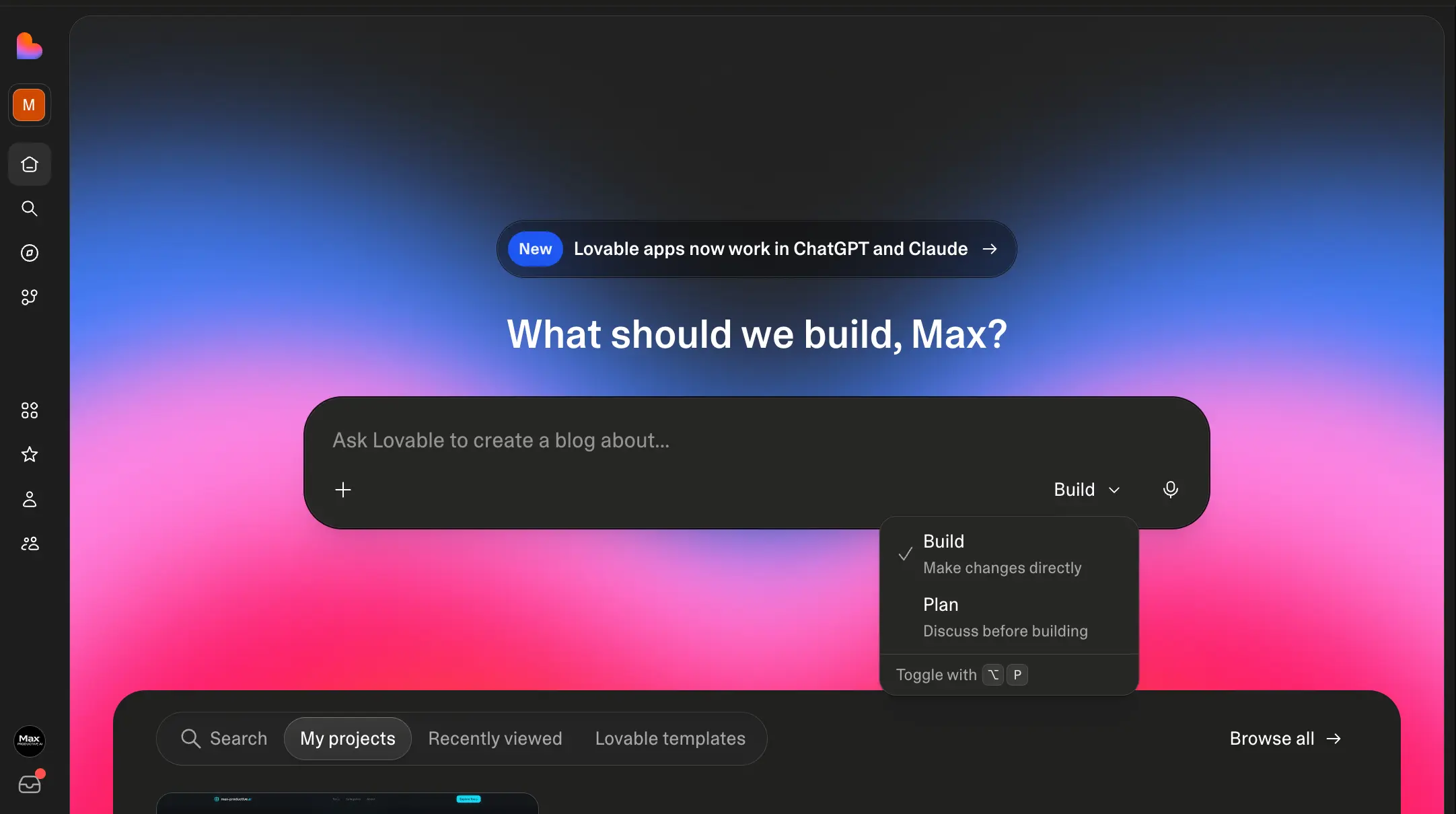
The Fastest Route From Idea
to Working Full-Stack App
Lovable is the closest thing yet to describing an app and watching it exist. One prompt gets you a working frontend, a real database, and user accounts. And unlike most no-code tools, you can export the entire codebase to GitHub and continue anywhere you like. It isn't flawless: credits go quickly on complex builds, and its security history deserves a clear-eyed read. But as a way to take an idea to a working full-stack MVP in an afternoon, nothing else we've tried comes close.
✓ What We Love
- One prompt builds frontend, database, and auth together
- The best-looking generated UI of any AI app builder
- Full GitHub export, so you're never locked in
- Free plan lets you test before paying a cent
! Could Be Better
- Credits disappear fast on complex builds (failed runs still count)
- Complex custom logic can hit a capability ceiling
- Past security incidents mean extra review before launching with real user data
What Is Lovable AI?
The Stockholm startup that turned "describe it and it exists" into the fastest-growing software product in history.
Lovable is an AI app builder that works like a conversation with a software engineer. You describe what you want in plain English ("build me a directory of the best AI tools for productivity", say) and it generates a complete web application in front of you: pages, styling, a database, user accounts, even Stripe payments if you ask for them. Everything runs in the browser, updates in a live preview as it builds, and produces real React and TypeScript code underneath rather than some proprietary black box.
The company behind it started in Stockholm as GPT Engineer, an open-source project by founder Anton Osika, before relaunching as Lovable in late 2024. What happened next is one of the steepest growth curves software has ever produced: $100M in annual recurring revenue within eight months of launch, a $500M annualized run rate by mid-2026, and a valuation past $6.6 billion after a December 2025 round backed by the venture arms of Nvidia and Alphabet. Enterprise teams at Klarna, Uber, Zendesk, and Deutsche Telekom now use it to cut prototype timelines from weeks to days.
If you're weighing Lovable vs Bolt, v0, or Base44, the short version is that Lovable leads the "vibe coding" category, and the gap comes down to two things. First, it's genuinely full-stack: where v0 concentrates on frontend generation, Lovable wires up a Supabase database, authentication, and file storage as part of the same conversation. Second, you own everything it makes. The complete codebase syncs to GitHub, so you can graduate to Cursor or VS Code the day you outgrow it. That exit door doesn't exist at all on a closed platform like Bubble, and Base44 only opens it halfway.
Who Is Lovable Best For?
Non-technical founders validating an idea, product managers and designers who want working prototypes instead of static mockups, and indie builders shipping MVPs on nights and weekends. It also earns a place in technical workflows as a first-draft machine: generate the app in Lovable, export to GitHub, refine in a code editor. If your end goal is a client portal or internal ops tool with strict permissions, Softr is usually the better starting point.
Two things keep this Lovable AI review from being a straight love letter. Lovable is brilliant for most of a build and noticeably less brilliant at the finish: complex business logic and unusual integrations can send it in circles, spending credits along the way. And its security track record includes two genuine incidents that anyone planning to handle real user data should read about before launching. We cover both honestly below, because they shape who this tool is right for. To Lovable's credit, its response to the second incident changed the platform for the better.
See Lovable in Action
Real screenshots from our own Lovable workspace, so you can see exactly what building with it looks like.
The Dashboard: One Prompt Box, Two Modes
Where every project starts: describe an app, or plan it out first
The whole product fits in one text box: "What should we build?" The dropdown next to it is more useful than it looks. Build mode makes changes directly, while Plan mode discusses the approach with you before spending any credits, which matters once you understand how billing works. Note the banner up top: Lovable apps now work inside ChatGPT and Claude, a 2026 addition we'll come back to.
Prompt to App: Our Directory Test
A one-line prompt became a designed, working directory page
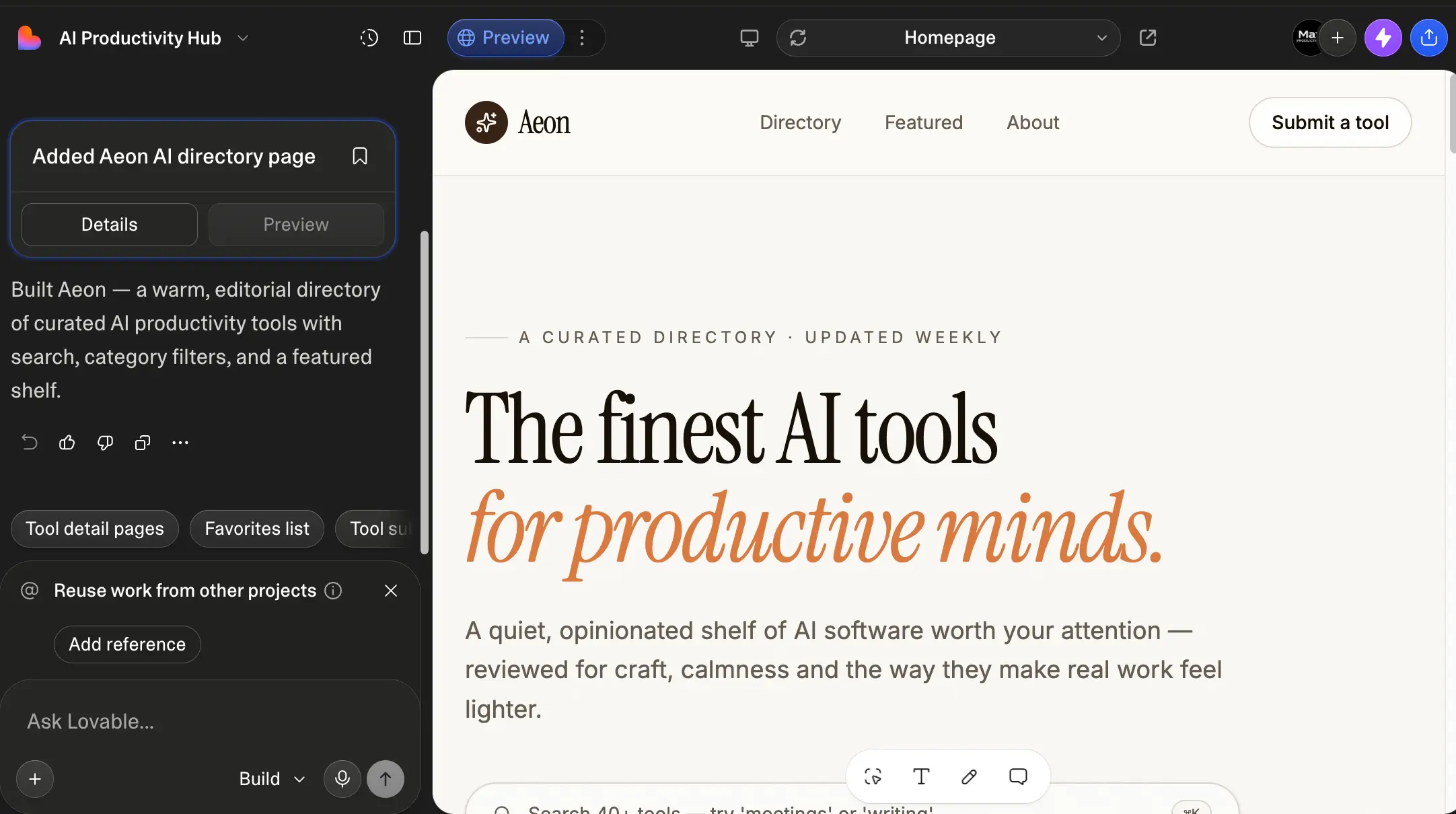
We asked for "an elegant webpage of a directory of the best AI tools for productivity" and got this: serif typography, a curated editorial layout, working search, category filters, and a featured shelf, with zero design direction from us. This is the thing reviewers keep repeating about Lovable, and we'll repeat it too: the generated UI is tasteful out of the box, not template-shaped filler. The suggestion chips underneath ("Tool detail pages", "Favorites list") queue up logical next steps so you're never staring at a blank prompt.
Watching It Think: Build Mode in Progress
Status updates show what the AI is working on, and you can stack requests
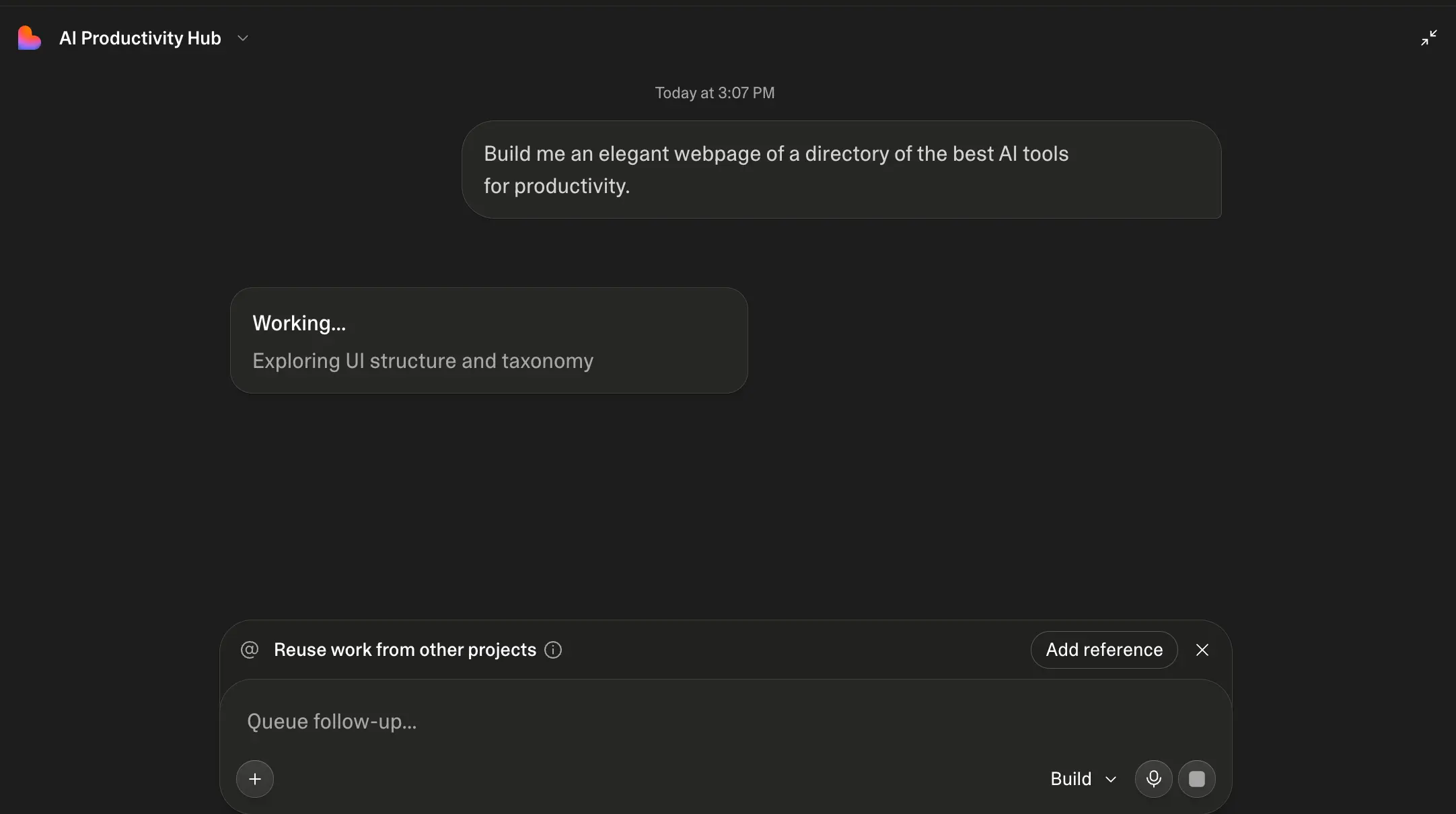
Generation isn't a spinner and a wait. Lovable narrates what it's doing ("Exploring UI structure and taxonomy" here) so you can tell whether it understood you before the result lands. The queue box at the bottom is a small touch that adds up: type your next change while the current one builds instead of watching the progress bar. Most simple pages arrived for us in a couple of minutes.
Curious what it would build from your idea?
Try Lovable Free →Free plan • 5 credits a day • No card needed to browseThe Code Is Real — and It's Yours
A proper React + TypeScript project sits under every app
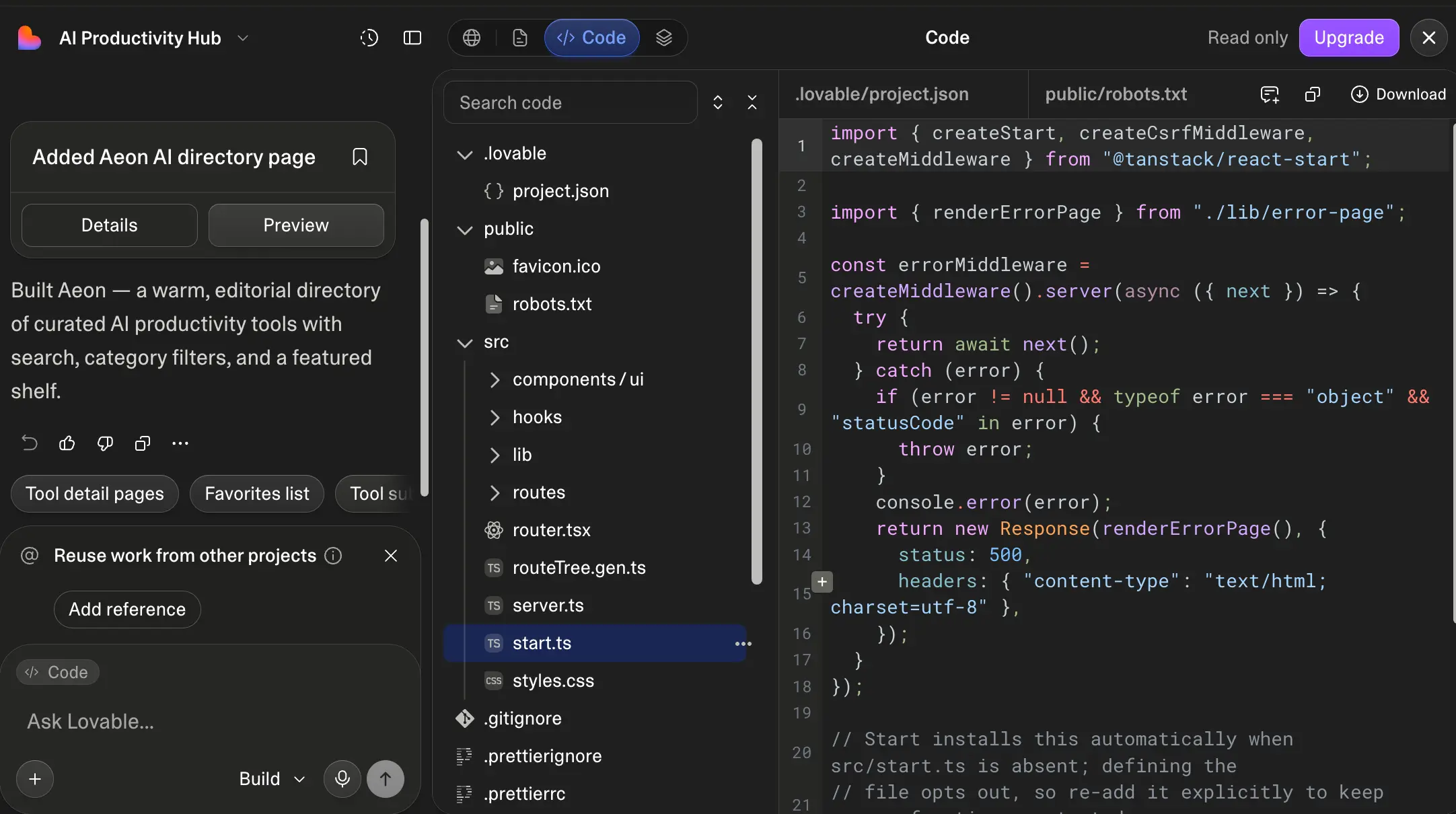
Flip to the Code view and the illusion of "no-code" dissolves in the best way: there's a structured React and TypeScript project in there, with components, hooks, routes, and clean styling: the kind of codebase a developer could pick up without wincing. On the free plan the editor is read-only (in-editor code editing sits behind a paid plan), but the download and GitHub sync options mean the code is never held hostage. That's the core of Lovable's no-lock-in promise, and it checks out.
Agent Integrations: Your App Works in ChatGPT and Claude
Publish once, and AI assistants can use your app directly
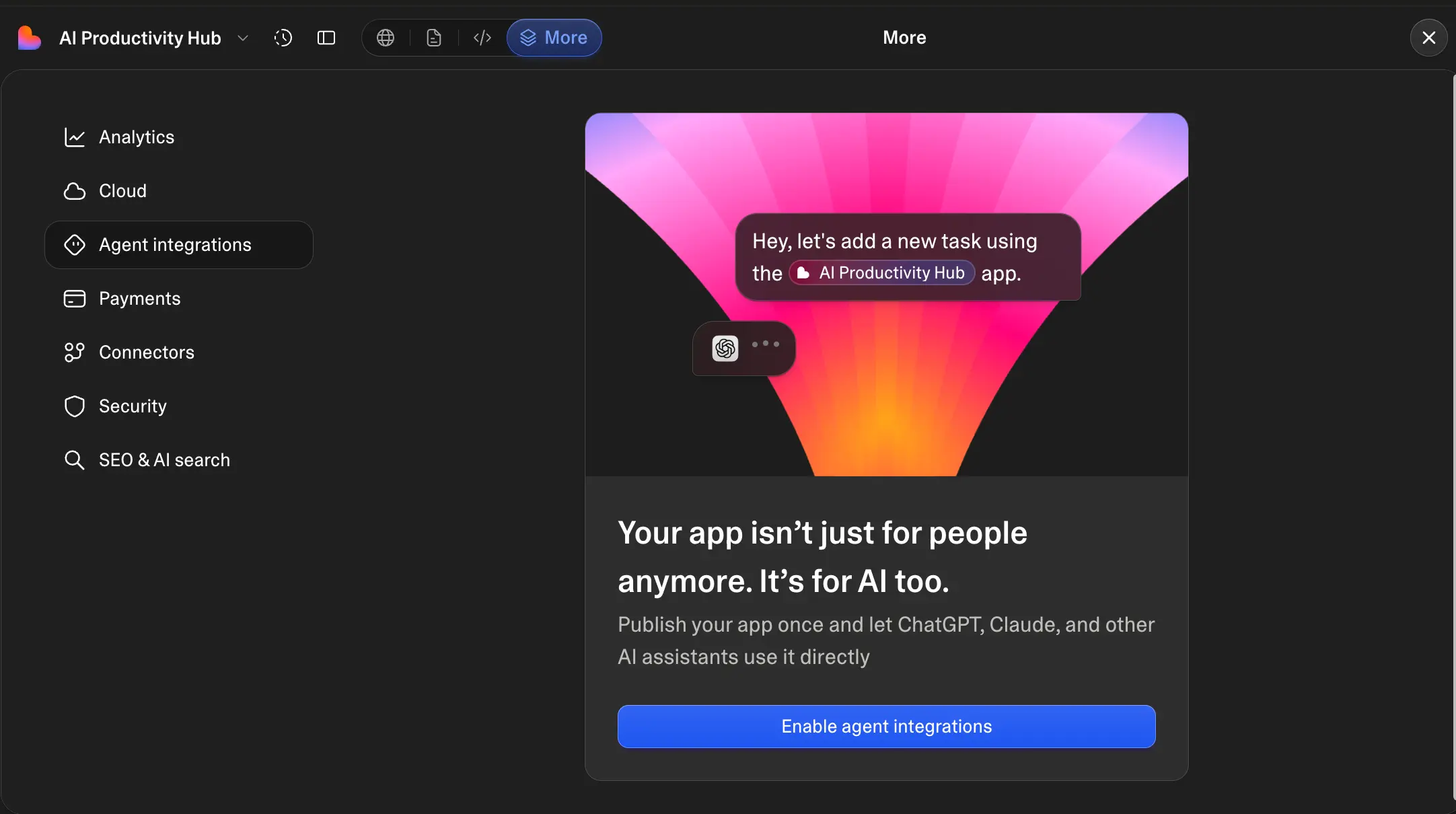
This is the newest idea in the product, and it's a forward-looking one: enable agent integrations and your published app becomes usable by AI assistants. Someone can ask ChatGPT or Claude to add a task in your app, and it happens. The surrounding settings panel also shows how much Lovable now bundles per project: analytics, cloud hosting, payments, connectors, security, and an SEO & AI search section, all without leaving the platform.
Templates: Start From Something That Already Works
Remixable starters for SaaS pages, stores, canvases, and presentations
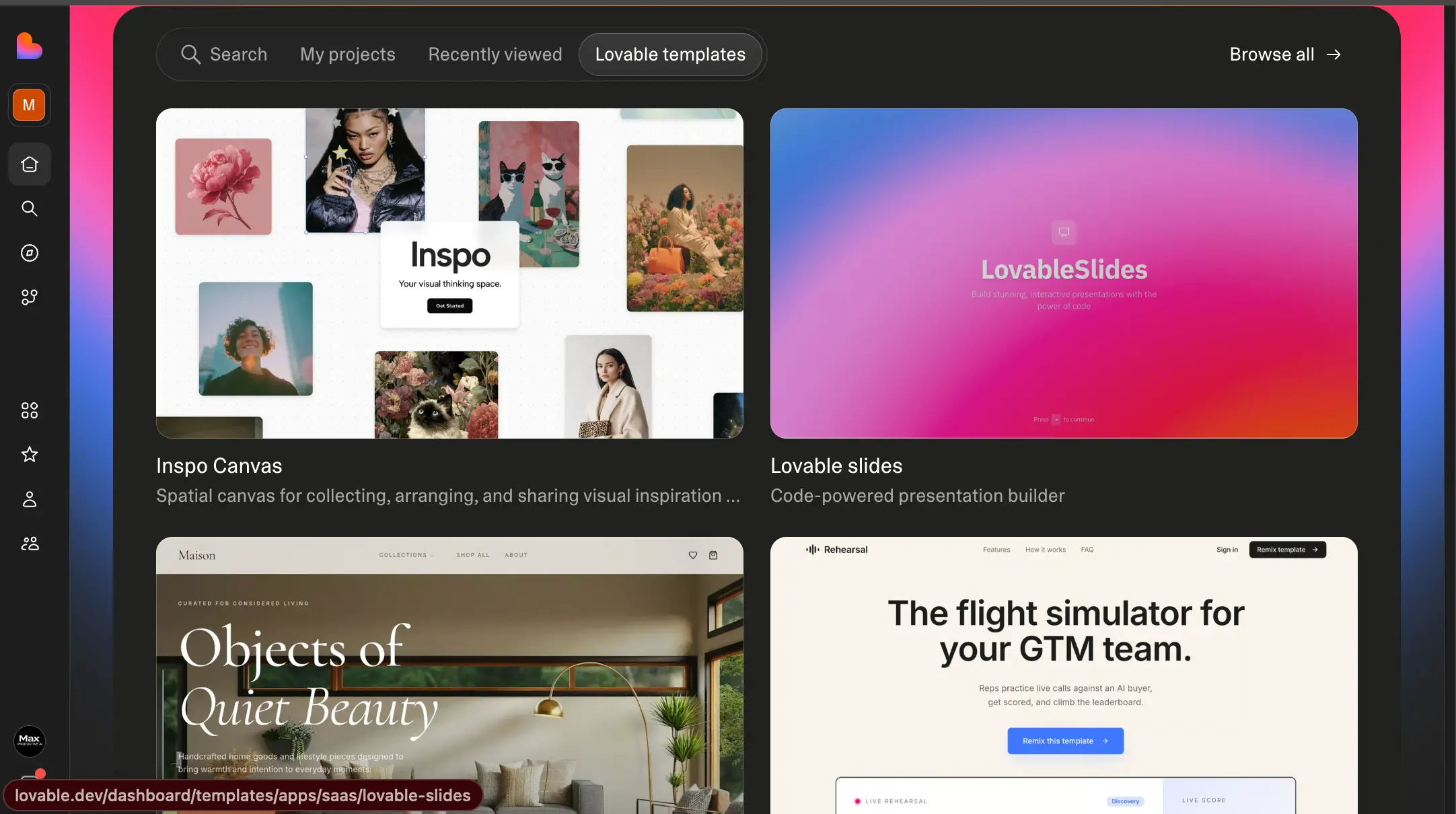
The template gallery has grown into a shortcut worth taking. Rather than describing an ecommerce site from scratch, remix one. The examples here range from a visual inspiration canvas to a code-powered presentation builder to a polished home-goods storefront. Each remix gives you the full project to reshape with prompts, which is often faster (and cheaper in credits) than building the foundation yourself.
How Lovable Works
From a sentence to a deployed app in four steps, with a paper trail of real code the whole way.
Describe Your App — or Sketch It
Type what you want in the prompt box, in normal language and at whatever level of detail you have. Not sure yet? Switch to Plan mode and Lovable will discuss the approach with you before building anything, which is a smart habit for bigger ideas since planning conversations don't burn build credits the way wrong turns do. Visual thinkers can use Draw-to-Build instead: sketch UI elements on a canvas and the AI converts them into production code.
Watch It Build the Full Stack
Lovable generates a real project: React and TypeScript on the frontend, Tailwind for styling, and Supabase behind it for the database, authentication, and file storage. A live preview renders the actual app as it comes together, and status updates tell you what the AI is working on at each moment. This full-stack scope is the line between Lovable and frontend-only generators: what you get isn't a pretty mockup, it's an application with a working backend.
Iterate in Plain English
Every refinement is a message: "make the header sticky," "add a favorites list," "connect Stripe for subscriptions." You can click elements in the preview to edit them visually, pull in reference work from your other projects, and queue follow-up requests while a build is running. One practical note: each build spends credits based on its complexity, and a failed attempt still counts, so precise prompts pay for themselves quite literally.
Publish, Export, or Both
When it's ready, publish through Lovable Cloud with hosting and a custom domain handled for you, no DevOps required. Sync the codebase to GitHub at any point, whether as a backup, a handoff to a developer, or your own migration path to Cursor or VS Code. And if you enable agent integrations, your published app becomes directly usable from ChatGPT and Claude, not just from a browser tab.
Security Is Now Opt-Out, Not Opt-In
After its 2025–2026 incidents, Lovable rebuilt its defaults: new projects are private by default, and a pre-publish security scanner checks your app before it goes live. Both changes meaningfully lower the risk for non-technical builders, though for apps handling sensitive user data, we'd still treat the scanner as a first pass and get an independent review before launch.
It Plugs Into Your AI Workflow
Lovable ships a Claude MCP integration, so you can build, deploy, and manage projects straight from Claude or the Claude Code terminal. Add the Google Cloud partnership (Gemini models plus enterprise-scale infrastructure) and agent integrations for published apps, and Lovable is quietly positioning itself as the app layer of the AI ecosystem rather than a standalone builder.
Key Features
What the Lovable app builder actually gives you, from the free plan up.
Prompt-to-Full-Stack Generation
The headline act. One prompt produces a landing page, database schema, authentication, and dashboard in a single flow: real React, TypeScript, and Tailwind code with a live preview. It's the difference between generating a picture of an app and generating an app.
Built-In Supabase Backend
Database, user authentication, file storage, and real-time updates come wired in through Supabase: no separate backend setup, no glue code. This is what lets a non-technical founder ship something with login screens and saved data rather than a static brochure.
GitHub Sync & Full Code Export
Push the entire codebase to your own GitHub repository and keep building anywhere: Cursor, VS Code, a hired developer's laptop. You retain full ownership of the code and IP you create. Among AI app builders, this exit door is rarer than it should be.
Live Preview & Visual Editing
The real app renders beside the chat as it builds, and you can click into the preview to adjust elements directly: nudge text, restyle a section, swap an image. It shortens the feedback loop from "describe, wait, hope" to something closer to design software.
Stripe Payments Integration
Subscriptions and one-off payments connect through Stripe with minimal fuss, which turns a prototype into something that can actually charge customers. Paired with the Supabase auth layer, the "SaaS in a weekend" pitch stops being marketing and starts being a plausible plan.
Draw-to-Build
Sketch interface elements on a canvas and Lovable converts the drawing into production code. For visual thinkers who can picture a layout but can't describe it precisely in words, this closes the gap, and it's a feature most rivals don't have.
Agent Integrations & Claude MCP
Published apps can be used directly by AI assistants like ChatGPT and Claude, and the Claude MCP integration lets you manage Lovable projects from Claude Code. Early days, but it points at a future where the apps you build have AI users as well as human ones.
Templates & Remixing
A growing gallery of working starters (SaaS landing pages, storefronts, presentation builders, canvases) that you fork and reshape with prompts. Starting from a template is often the most credit-efficient route to a finished product, since the foundation is already solid.
Around the core builder sits a fast-maturing platform: Lovable Cloud handles hosting and custom domains, Workspace Insights gives enterprise teams governance and audit trails, and a Google Cloud partnership brings Gemini models plus the infrastructure behind those hundred-thousand-plus daily new projects. The pre-publish security scanner, added after the incidents we discuss below, now checks every app before it ships.
Everything above starts on the free plan:
Try Lovable Free →Free daily credits • Full GitHub export on paid plansLovable Pricing Plans (July 2026)
A free tier that's genuinely usable, and paid plans priced by credits rather than seats.
Free
- ✓ 5 build credits per day (30/mo cap)
- ✓ Monthly Cloud & AI credit grants
- ✓ Live preview & templates
- ✓ Publish on a lovable.app subdomain
- ✓ Public projects
Pro
- ✓ 100 monthly credits + daily top-ups
- ✓ Private projects
- ✓ Custom domains
- ✓ Full GitHub sync & code export
- ✓ Buy top-up credits (valid 12 months)
- ✓ ~$21/mo billed annually
Business
- ✓ Everything in Pro
- ✓ Larger credit pool
- ✓ Team workspaces & collaboration
- ✓ Single sign-on (SSO)
- ✓ Opt out of AI training on your data
- ✓ ~$42/mo billed annually
Worth knowing: Pro moved from $20 to $25 earlier in 2026 • Unused plan credits expire after roughly two months • Enterprise (custom pricing) adds audit logs, SLAs, and dedicated support
Pricing last verified July 2026. Visit Lovable for current rates.
Is It Worth the Money?
Hands-on reviewers report shipping full apps in anywhere from 30 minutes to 6 hours, work that would otherwise mean weeks of development or a four-figure freelance invoice. If Lovable gets even one idea in front of real users that would otherwise have stayed in your notes app, a $25 Pro month has paid for itself.
For context against the rest of the category: Bubble starts at $29/month per app with usage-based overages that can climb sharply; Base44 runs $16–20/month at entry on a dual-credit system; Hostinger Horizons undercuts everyone at $6.99/month but with tight prompt caps and no permanent free tier; and Softr's flat tiers begin at $49/month. Lovable's free-plan-plus-$25-Pro combination sits in a comfortable middle: cheap enough to try seriously, priced honestly for what it produces.
Detailed Pros & Cons
The honest picture after building real projects with it, including the parts the hype skips.
✓ Pros
Frontend, database, authentication, storage, and payments arrive as one connected application, not a mockup that needs a backend bolted on later. That single fact separates Lovable from most of the "AI website builder" crowd and is why it gets used for real products, not just demos.
Generated interfaces are consistently attractive and mobile-responsive without any design direction. Our directory test produced editorial typography and a considered layout from a one-line prompt. Reviewers across the board flag UI quality as Lovable's clearest lead over competing builders, and our experience matches.
GitHub sync exports the complete, readable React/TypeScript codebase, and Lovable's terms leave code and IP ownership with you. Practically, that means no rebuild if you outgrow the platform: hand the repo to a developer or open it in Cursor and keep going. Closed rivals can't say the same.
A working app in a single sitting rewires how you treat ideas: things you'd never have commissioned get built and tested, because the cost of trying collapsed. Enterprise teams report the same effect at their scale, with prototype cycles measured in days instead of weeks.
Five daily build credits won't ship your startup, but they're plenty to build something real and judge whether Lovable understands your idea before you pay. Add the template gallery and Plan mode, and the on-ramp is about as friendly as this category gets.
A valuation north of $6 billion, backing from Nvidia and Alphabet's venture arms, enterprise customers, a Google Cloud partnership, and shipping velocity that added agent integrations and Claude MCP within months. Tool choice is partly a bet on the vendor, and this one looks safe to bet on.
✗ Cons
Complexity-weighted billing is fair in principle, but failed or wrong generations still consume credits, and iterating on a tricky feature can chew through a Pro allowance faster than expected. Heavy builders routinely end up on Business-tier spend. Plan mode and precise prompts help a lot; budget-conscious users should lean on both.
Multi-step workflows, unusual integrations, and intricate business logic can send the AI in circles. The pattern reviewers describe (a brilliant first few weeks, then a wall) matches what we've seen on complex builds. The saving grace is the GitHub exit: graduating to Cursor is a doorway, not a rebuild.
Two real incidents: CVE-2025-48757 in 2025, where misconfigured database permissions exposed data across 170+ Lovable-built apps, and an April 2026 platform bug that briefly let signed-in users see other users' source code and chat histories. Lovable patched both, shipped a pre-publish security scanner, and made projects private by default, which is a credible response. Still, if your app stores sensitive user data, commission an independent security review before launch.
Everything Lovable builds is a responsive web app. There's no native iOS or Android output, so an App Store presence means a separate wrapping tool or a different platform; Bubble now publishes true native apps if that's a hard requirement.
Simple projects come out clean almost every time; sprawling ones occasionally arrive with bugs that take extra iterations (and credits) to squash. Community threads about fixing broken large projects are worth reading for the honest failure modes. Keeping each prompt scoped to one change reduces the churn noticeably.
The default Supabase-and-Stripe stack is excellent, but stray from it and friction rises: integrations outside that path are where the AI most often stumbles. If your product depends on a specific backend or an exotic third-party service, expect to do that wiring yourself after export.
Lovable vs Alternatives
How the Lovable app builder stacks up against the other names in the space, and when each one wins.
| Feature | Reviewed Lovable | Bubble | Base44 | Hostinger Horizons |
|---|---|---|---|---|
| Starting Price | Free / $25/mo Pro | $29/mo per app | Free / $16–20/mo | $6.99/mo |
| Free Plan | ✓ 5 daily credits | Build-only (no publishing) | ✓ Limited credits | 7-day trial only |
| Code Export | ✓ Full (GitHub) | ✗ None | Frontend only | ✗ None |
| Native Mobile | Web only | ✓ True native iOS/Android | ✗ | ✗ |
| Backend | Supabase, built in | Proprietary, built in | Built in (locked) | Supabase-backed |
| Learning Curve | Minutes | Months | Minutes | Minutes |
| Unique Strength | Full-stack speed + code ownership | Highest capability ceiling | Fast iteration, Wix backing | Hosting & domain bundled |
| Best For | MVPs & prototypes you may scale | Complex SaaS & marketplaces | Consumer-style apps | Beginners on a budget |
Which Tool Is Right For You?
Lovable
ReviewedBest for: Founders, product people, and small teams who want the fastest path from idea to a working full-stack app while keeping the code. The sweet spot is MVPs, SaaS prototypes, and internal experiments where speed matters and the GitHub export keeps every option open. Start free, and treat the Pro tier as the price of taking an idea seriously.

Bubble
Highest CeilingBest for: Complex, funded products (marketplaces, multi-sided platforms, intricate data relationships), plus anyone who needs true native iOS/Android publishing, which Bubble now offers. The trade-offs: a learning curve measured in months, no code export at all, and usage-based billing that needs careful modeling before you scale. See our full Lovable vs Bubble comparison →

Base44
Wix-OwnedBest for: Solo builders who want a very fast iteration loop and cheap entry pricing, and don't mind backend lock-in. Base44 was acquired by Wix in 2025 and only exports frontend code; the database and backend stay on its infrastructure, so a future migration means a rebuild on that side. Great for consumer-style apps you'll keep on the platform.

Hostinger Horizons
All-In-One BundleBest for: Total beginners who want one bill covering the app, hosting, domain, SSL, and email. Horizons bundles all of it on Hostinger's mature infrastructure from $6.99/month. The catch is thin credit allowances on entry tiers and no code export, so keep it for simpler projects: portfolios, small business sites, basic booking tools.

Softr
Business AppsBest for: Client portals, internal tools, and operational software for a defined set of users. Softr ships with roles, permissions, and data structure solved by default, syncs two-way with Airtable and Google Sheets, and uses flat, predictable pricing with a free-forever tier. Its Ask AI co-builder handles generation, though there's no code export and design flexibility trails Lovable's.
Keep Reading
Two deeper dives that pair well with this review.
Lovable vs Bubble: Which AI App Builder Wins in 2026?
Softr Ask AI Review: The Co-Builder for Business Apps
Frequently Asked Questions
Should You Try Lovable?
Lovable earns its 4.7 by delivering the thing every AI app builder promises and almost none achieve: a working, good-looking full-stack application from a plain-English description, with the entire codebase yours to export. The speed changes what you're willing to attempt, the generated design quality removes the "it looks AI-made" tax, and the GitHub exit means choosing Lovable today doesn't foreclose any option tomorrow. That combination is why it went from launch to category leader faster than any software company before it.
Go in with clear eyes about the trade-offs. Credits reward planning and punish flailing, complex custom logic will eventually want a code editor, and the security history, while met with a much improved private-by-default platform, still argues for an independent review before any launch involving sensitive user data. None of that changes the bottom line: for taking an idea to a working MVP, Lovable is the best tool available in 2026.
Our Recommendation
Start on the free plan and build something real: the actual idea you've been sitting on, not a to-do list demo. Five daily credits are enough to see whether Lovable understands your product; use Plan mode for anything ambitious so discussion doesn't cost you builds. If the first drafts land, a month of Pro is a low-stakes upgrade. Before launching anything that stores user data, run the built-in security scan and get an independent review. And if you ever hit the ceiling, export to GitHub — the work goes with you.