
Softr review
Softr turns a plain-English prompt into a working business app, with the database, logins and permissions already in place. For a client portal or an internal tool you don't want to maintain as code, it's the first builder to try.
Free plan available. 7-day trial of Business features, no card.
This review contains affiliate links. We may earn a commission at no extra cost to you.
Verdict: business apps without the codebase, and without the code export
As of October 2026, Softr is the app builder we'd send a non-technical team to first for client portals and internal tools. You describe the app, the AI Co-Builder sets up the database, pages and logins, and from then on you edit visually instead of re-prompting and hoping. Who sees which record is a setting you can read, not code an AI has to get right. The price of that safety is that your app lives on Softr. There's no source-code export and no native App Store build, and the Pro plan most client portals need costs $99 a month.
What we like
- Permissions are a setting, not a prompt
- You can stop prompting whenever you like
- It works with the data you already have
Best for. Operations teams, agencies and small businesses that need a client portal or an internal tool and have no developer to call, above all when different people must see different data.
Try Softr freeWhat we don't
- No source-code export
- No native mobile app
- A steep step from Basic to Pro
Not for you if. The code is the product, or you need a native app. Lovable and Bolt.new hand you a codebase you own, and Bubble goes deeper on custom logic and native mobile.
Compare alternativesHow we tested Softr
- Method
- Hands-on build, October 2026
- Access
- The 7-day Business trial every new account gets
- Scope
- One knowledge base app from a one-sentence prompt
- Not tested
- External data sources, outside users, workflows in production
We opened a Softr workspace on the trial every new account gets and gave the AI Co-Builder a one-sentence prompt: an internal knowledge base about AI tools. We went through the setup wizard, then inspected what it made: the app, the editor, the database and the Workflows tab. The screenshots below are from that build. Plan prices and limits come from Softr's pricing page and help docs. Where we mention what users think, that comes from public reviews and Softr's own community forum.
We did not connect an external data source, invite outside users or run a workflow in production, so those parts lean on Softr's documentation. It's a single build, so take it as a first-hand impression and nothing bigger.
What changed since our last review
- September 2026
- An MCP server lets Claude, ChatGPT or Cursor build inside your workspace, on every plan.
- August 2026
- New pricing. The entry price dropped (Basic used to cost about $49 a month) and plans now count the people who log in. See the plans
- March 2026
- Softr relaunched as what it calls an AI-native platform for business apps.
What is Softr?
Softr is an AI app builder for business software: client portals, internal tools, lightweight CRMs, inventory trackers, team intranets and knowledge bases. These are apps where people log in, see the data they're allowed to see, and get work done. It launched in 2020 as a friendly way to put an interface on an Airtable base, and for years that's how most people knew it.
That description is out of date. On March 31, 2026, Softr relaunched as what it calls an AI-native platform for business apps. It's a different animal from the product we first covered in 2025. It now has its own relational database, a native workflow engine, an AI Co-Builder that generates a whole app from a prompt, a Vibe Coding block for custom components, and, since September, an MCP server that lets Claude, ChatGPT or Cursor build inside your workspace.
What separates Softr from Lovable, Bolt.new or Base44 is what the AI is allowed to touch. Those tools write an application's code, which gives you enormous freedom and also a codebase to look after. Softr's AI assembles your app from parts Softr already runs in production: authentication, user groups, data restrictions, list and form blocks. You get less freedom and far fewer ways for things to break. For a consumer product, that's the wrong trade. For an invoice portal your clients log into, we think it's the right one.
Softr hands-on: what one prompt built
These screenshots come from our test workspace, in order, from the first prompt to the finished app. Tap or click any image to open it full size.
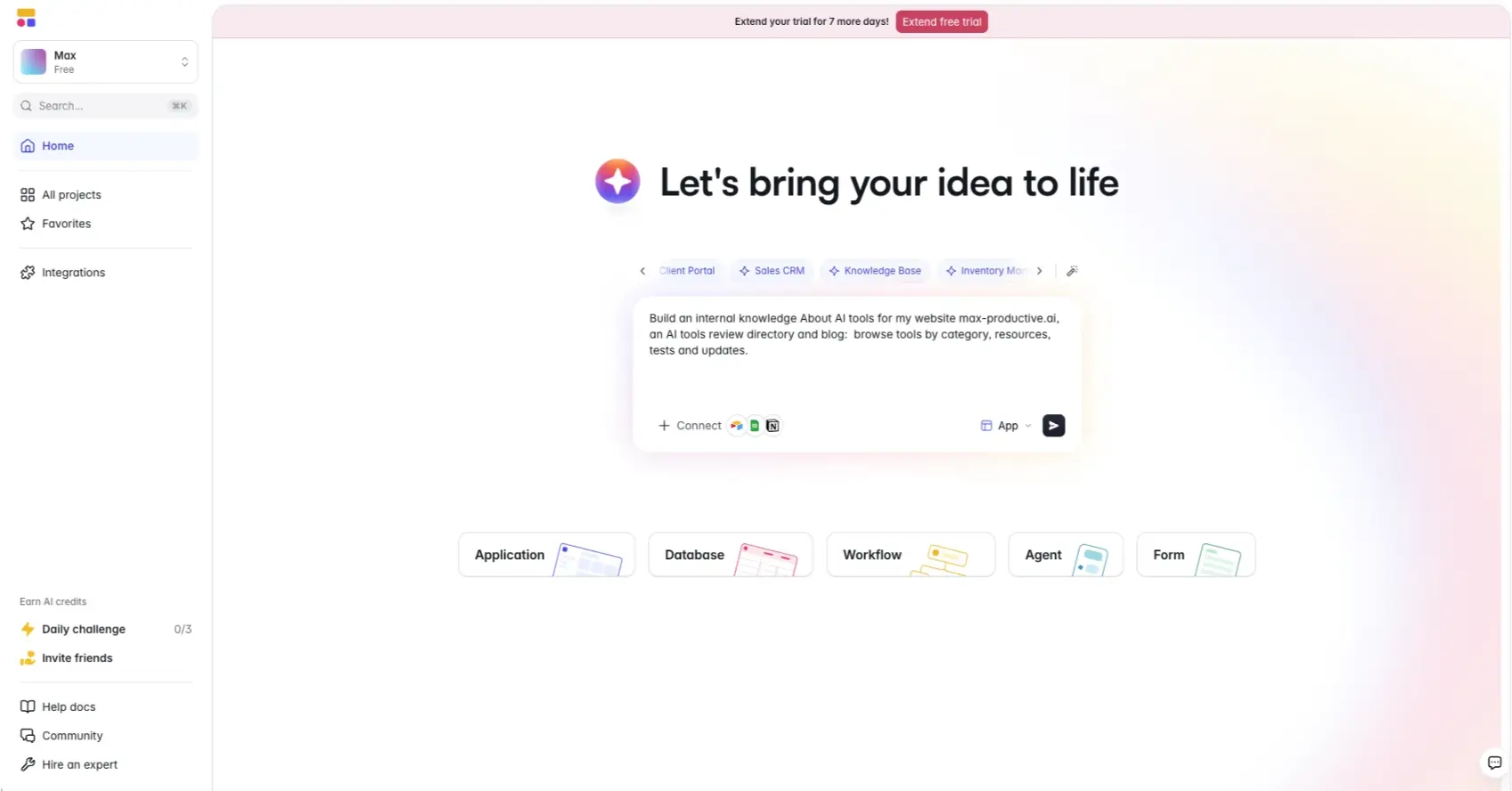
The AI Co-Builder prompt
Softr opens on a single prompt box. We typed one sentence asking for an internal knowledge base about AI tools for max-productive.ai, with tools by category, resources, tests and updates. It's vague on purpose, because a first-time user won't write a spec. The Connect button starts the build from data you already have in Airtable, Google Sheets or Notion, so you don't begin with an empty database. The sidebar also has an "Earn AI credits" area with a daily challenge, which tells you early that AI credits are the thing Softr rations.
Our advice: be specific about who will log in. "Clients see their own projects, account managers see all of them" gets you a much better first build than "make a client portal."
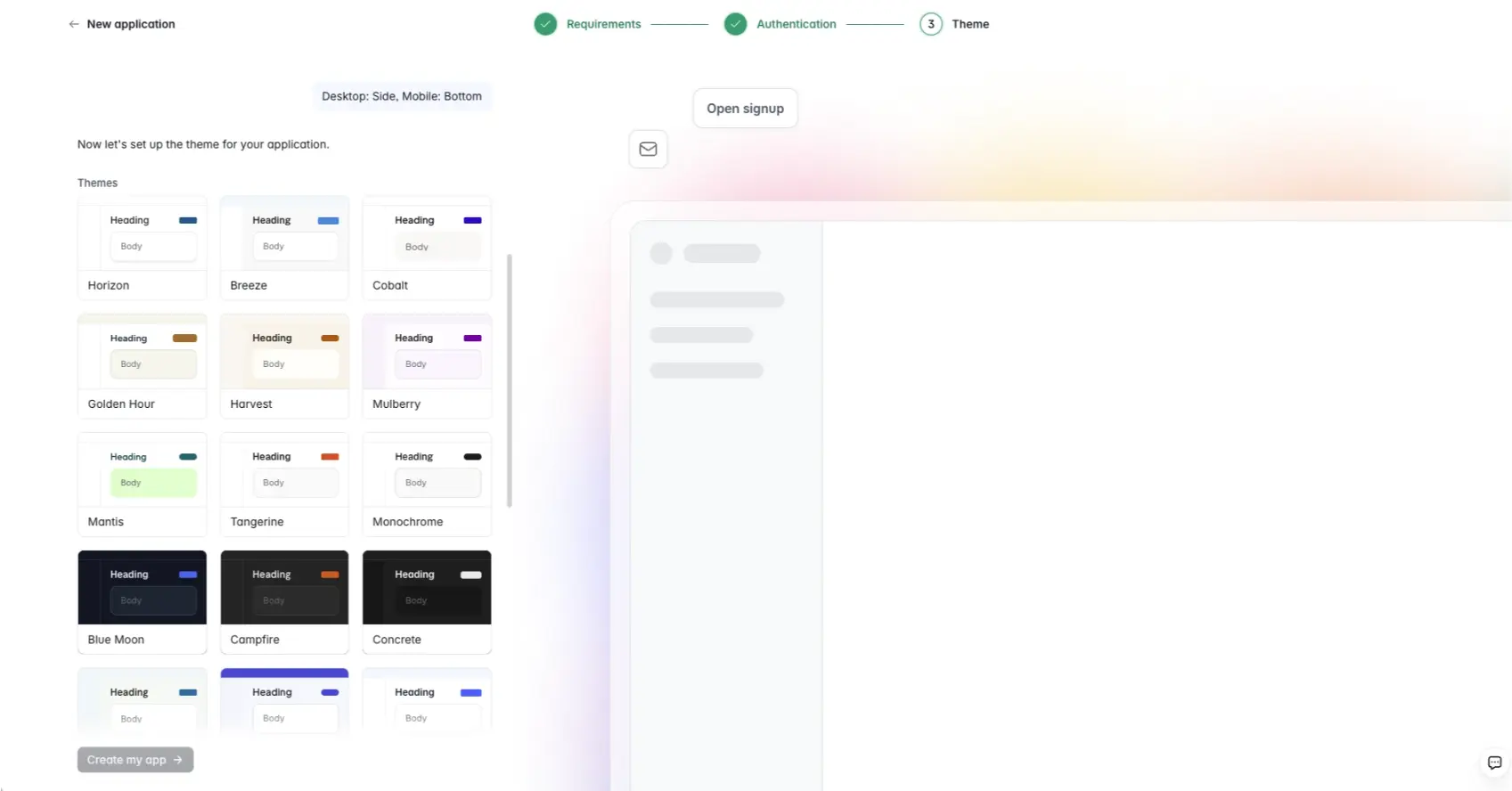
Setup wizard: requirements, authentication, theme
Before it builds, the Co-Builder asks three things: what the app needs to do, how people will sign in, and how it should look. The middle question is the telling one. Most AI builders give you a screen first and bolt logins on when you ask. Softr settles access before a single page exists, and our build came out with open signup and a side menu on desktop that moves to the bottom on mobile.
The theme picker is a grid of presets with names like Breeze, Mulberry and Blue Moon. They're tidy, and they all look like business software. You pick a palette and move on, which is a fair preview of how much visual freedom you get.
The app editor
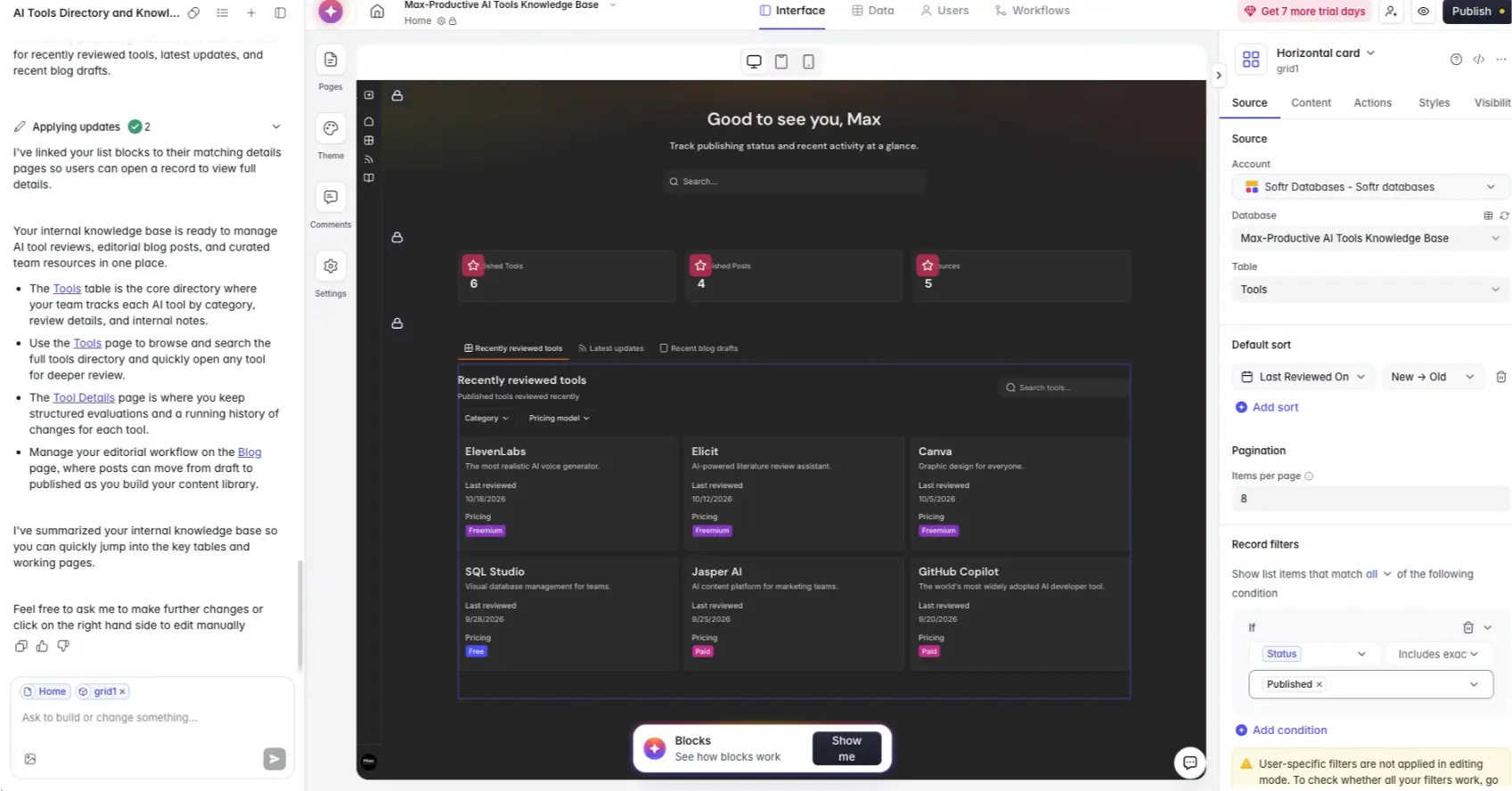
This is where you'll spend your time, and it explains Softr better than any feature list. The chat on the left built the app and summarized what it made: a Tools table, a tool details page, a blog page for drafts. The panel on the right shows the same decisions as plain settings. Our "Recently reviewed tools" list reads from the Tools table, sorts by last reviewed date, shows eight per page and only includes records marked Published. We never asked for that filter. The AI added it, and we can change it from a dropdown without writing another prompt.
One rough edge: the three stat tiles at the top came out with their labels clipped behind the icons. It's a small layout slip, the kind we'd tidy by hand in the Styles tab before spending an AI credit on it.
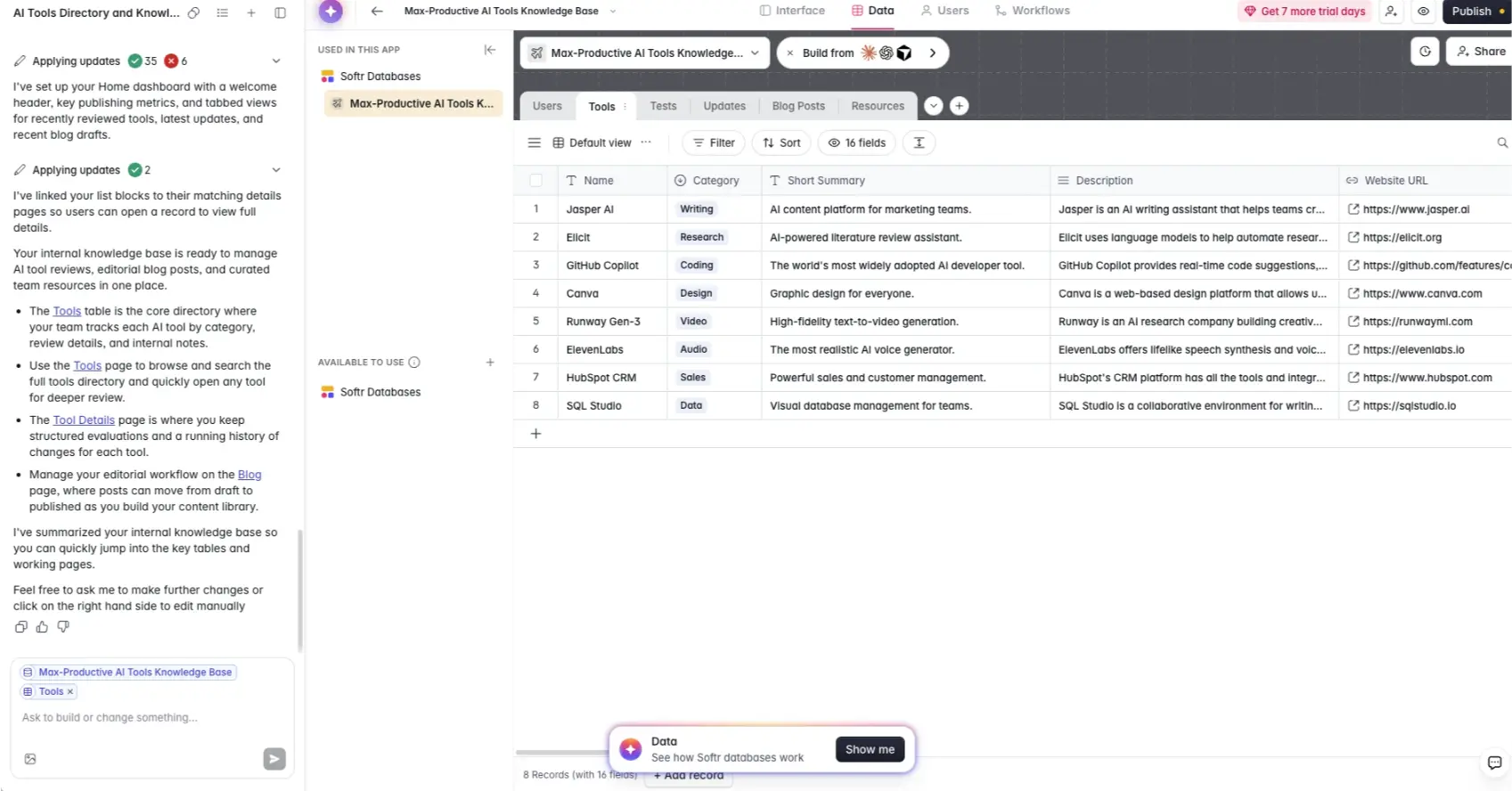
Softr Databases
Switch to the Data tab and you're looking at a spreadsheet-style database the AI designed from our one sentence: six tables with typed fields such as category tags and URLs. It feels like Airtable, and it's included, so there's no second subscription.
A couple of caveats. The records are placeholders the AI wrote (Jasper AI, Elicit, GitHub Copilot and friends), and a few "last reviewed" dates sit in the future, so clear them out before you invite anyone. The build log shows 35 completed steps and 6 failed ones. The app still came out working, with lists linked to their detail pages, but it's a reminder that an AI build is a first draft. With Softr you can at least open the draft and see every part of it.
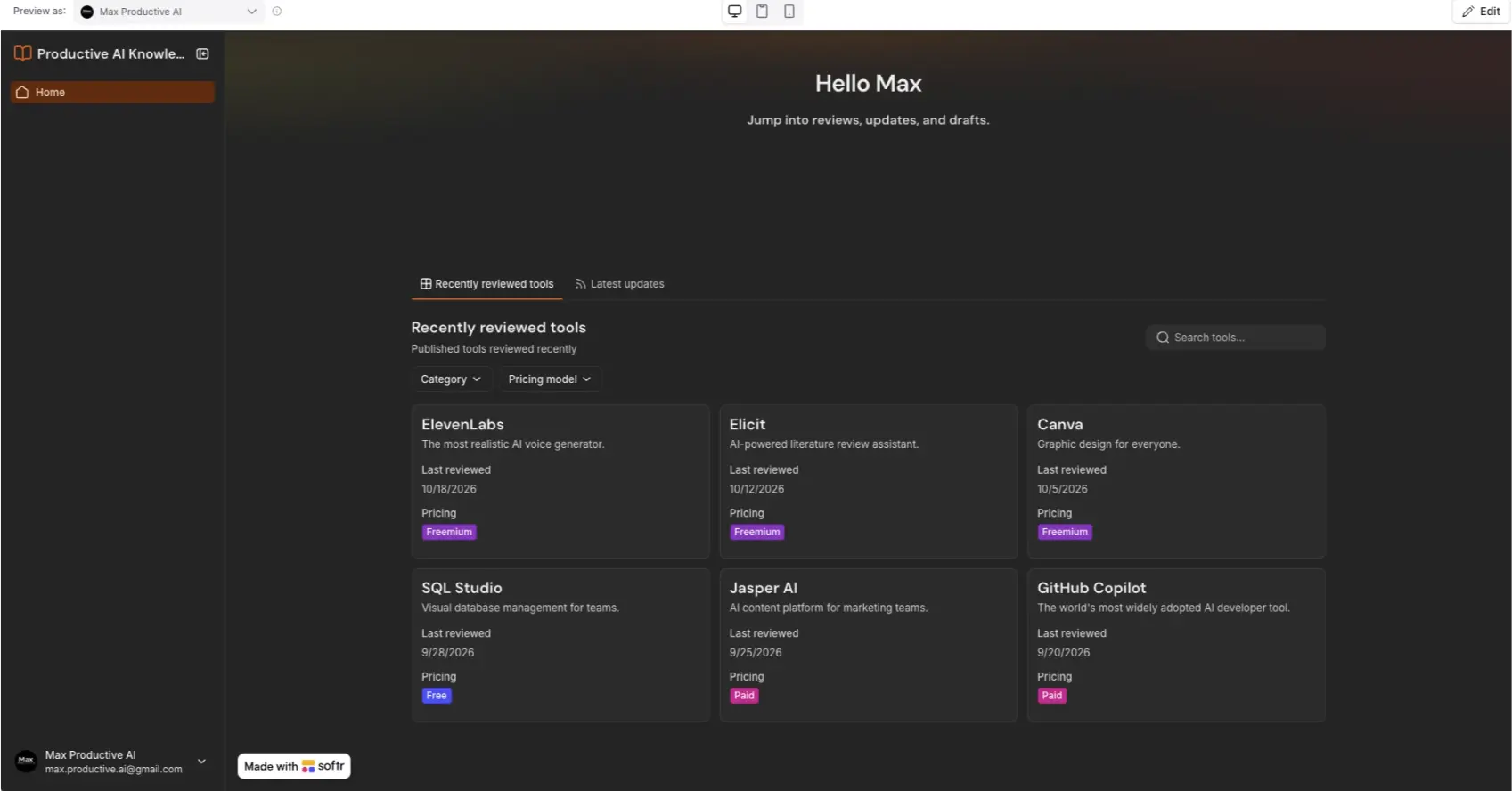
The generated app, in preview
Here's the result in preview: a greeting by name, two tabs, filters for category and pricing model, a search box, and cards with colored pricing tags. For one sentence of input, that's a usable internal tool. The feature we'd point to is the "Preview as" menu at the top. Pick a user and you see exactly what they would see, which is how you check permissions before a client finds the gap for you.
Note the "Made with Softr" badge in the corner. It stays until you're on the Pro plan. The layout is recognizably a Softr app: clean, card-based, a little safe. If you wanted something that looks like nothing else, this isn't where you'll get it.
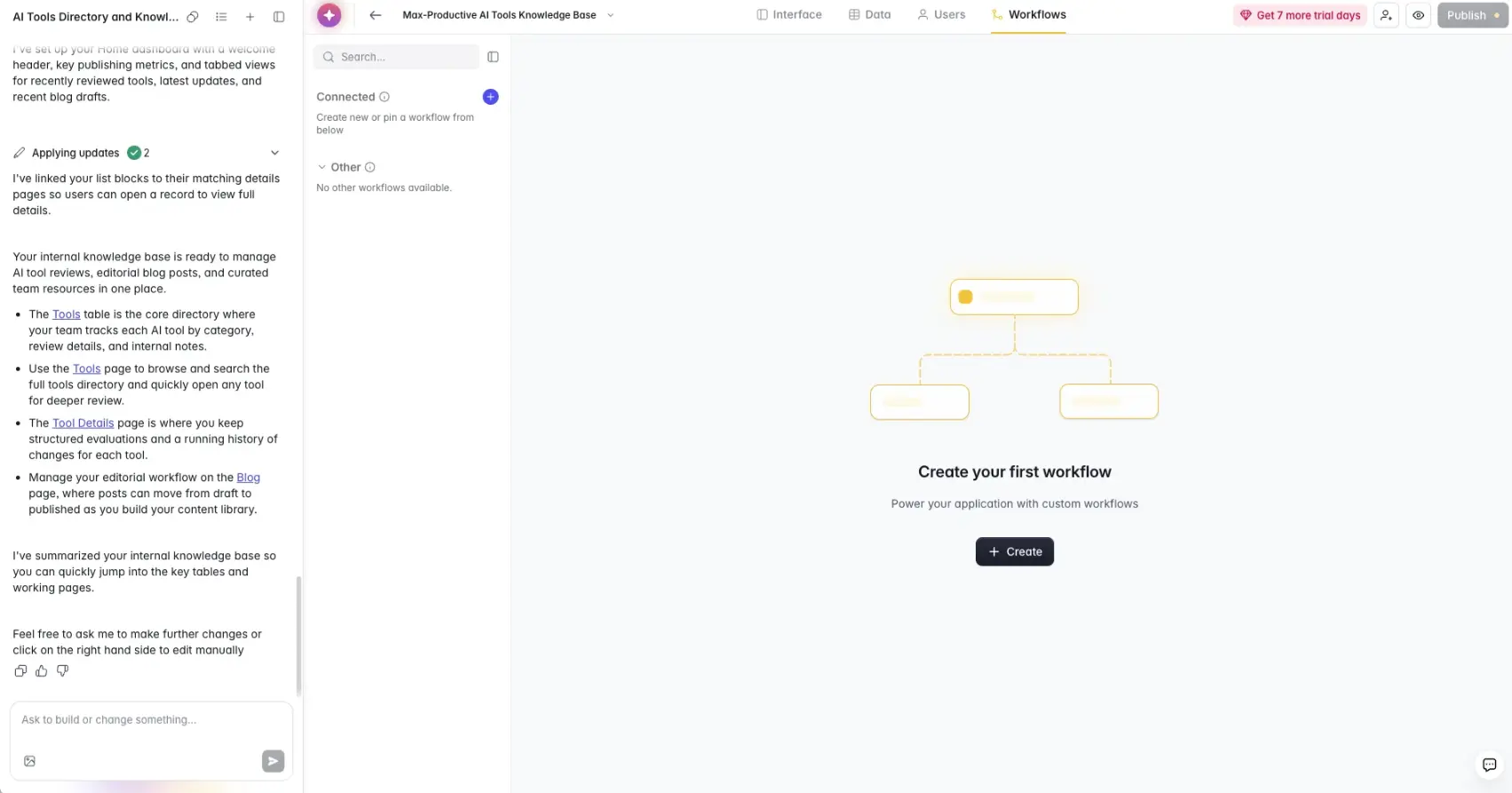
The workflow builder
The Workflows tab was empty after our build. We hadn't asked for anything to be automated, so the Co-Builder didn't invent one, and we'd take that over an AI that pads an app with automations nobody requested.
When you do need one, the builder goes well past simple notifications. A workflow can start from a database change, a button, a form, a schedule or a webhook, then branch, loop, wait, call an API, run JavaScript or Python, or hand a step to an AI model. The free plan includes 500 workflow actions a month, and the logic steps themselves don't count against that. We didn't run a production workflow for this review, so this part describes the builder. We can't tell you how it behaves under load.
Softr key features
Here's what's in the box and which parts sit on the higher plans. Where a feature goes beyond what our build touched, we rely on Softr's documentation.
-
AI Co-Builder
Describe the app and get a working first version: tables, pages, logins and sample data, connected and ready to preview. It's strongest on predictable business shapes such as CRMs, trackers, portals and knowledge bases. Everything it makes stays editable by hand afterwards. It runs on AI credits.
-
Vibe Coding block
Softr's answer to its oldest complaint, that blocks are rigid. Prompt for a custom component, such as a calculator, a scheduler or a specialized chart, and it's generated inside a single block that still uses your data, theme and permissions. Softr reads the generated code and lists its data actions in a visual panel, so you can set user-group permissions on each one.
-
Softr Databases
A built-in relational database with linked records, formulas and typed fields, so you no longer need Airtable or Sheets underneath. Record limits run from 5,000 on Free to 1 million on Business. If you've used Airtable, you'll feel at home quickly.
-
External data sources
Airtable, Google Sheets, Notion, HubSpot, Salesforce, monday.com, ClickUp, Coda, SmartSuite, Xano, Supabase, PostgreSQL, MySQL, SQL Server and REST APIs, among others. On paper this is Softr's biggest advantage, because it can sit on top of systems your company already runs. We didn't connect one in our test. Availability varies by plan, and Snowflake and BigQuery are Enterprise only.
-
Users, groups and permissions
Custom groups from ProThe feature we'd put first. Control visibility by page, block, action, user group and individual record, all enforced server-side. Free and Basic give you the default visitor and logged-in groups. Custom groups start on Pro (three) and grow on Business (ten), which also adds global data restrictions.
-
Workflows
A native automation builder with database, form, button, schedule and webhook triggers, plus branches, loops, waits, API calls, JavaScript, Python and AI steps. You can use Softr's models or your own OpenAI or Anthropic key. Monthly actions range from 500 on Free to 25,000 on Business, and workflows pause if you reach the cap.
-
Softr MCP
All plansConnect Claude, ChatGPT, Cursor or Codex and let your assistant create databases, pages, user groups and workflows in your workspace. It doesn't draw on Softr AI credits. A second, app-level server lets your own users talk to an app through their AI assistant while keeping their permissions.
-
Ask AI
Softr's AI layer for the data inside your apps. It started in 2025 as a chat box that lets app users ask questions about the app's data in plain language, and Softr has since added AI agents that work on database records. We covered the original feature in our Softr Ask AI review.
One note on maturity. The AI is the newest part of a platform that has been around for years. The blocks, logins and data connections have been running companies' apps since 2020. The Co-Builder and Vibe Coding arrived in 2026. We'd lean on the first group without much worry and treat the second like a capable junior colleague: good, fast, and worth checking.
Security and compliance
Softr's security page says the platform is SOC 2 Type II and GDPR compliant, encrypts data in transit and at rest, and enforces permissions on the server, so database credentials and API keys never reach the browser. Two-factor authentication comes with Business, and SSO, SCIM and audit logs with Enterprise.
Hosting runs on AWS. Where exactly is less clear. The security page offers EU (Germany) or US data residency, while Softr's own FAQ says all user data is hosted in Germany. If data location is a contractual matter, get the answer for your plan in writing before you sign.
Softr pricing
As of October 2026, Softr has a free plan, three paid plans at $19, $99 and $329 a month on annual billing, and Enterprise on a custom quote. The plans count users, so read the limits before the prices.
| Plan detail | Free | Basic | Pro | Business | Enterprise |
|---|---|---|---|---|---|
| Billed annually | $0 | $19/mo | $99/mo | $329/mo | Custom |
| Billed monthly | $0 | $25/mo | $119/mo | $395/mo | Custom |
| Users | 5 app users, up to 3 builders | 1 builder, 5 team and 5 client users | 2 builders, 10 team and 50 client users | 3 builders, 30 team and 100 client users | Custom |
| Database records | 5,000 | 50,000 | 500,000 | 1 million | Custom |
| AI credits a month | 5 | 10 | 50 | 100 | Custom |
| Workflow actions a month | 500 | 2,500 | 10,000 | 25,000 | Custom |
| Custom user groups | Default groups only | Default groups only | 3 | 10 | Custom |
| Also worth knowing | Unlimited apps, databases, workflows and forms. No custom domain, and the Softr badge stays. | One custom domain. | Granular permissions, custom code, Softr badge removed. | Two-factor authentication, installable PWA, priority support. | SSO, SCIM and audit logs. |
Swipe sideways to see every plan.
Prices and limits come from Softr's pricing page and help docs, last verified in October 2026.
See which features come with each plan.
See Softr plansWhich Softr plan should you choose?
Free is for trying Softr and for personal tools with a handful of users. Basic suits a solo builder or a small internal tool where everyone sees the same thing, since it has no custom user groups. Pro is the starting point for any client portal, because that's where custom roles, granular permissions and badge removal begin. Business is for larger teams, or for anyone who needs two-factor authentication, the installable mobile app or more than three custom groups. Enterprise is the tier for SSO, SCIM and audit logs. If you're unsure between two plans, the trial gives you Business features for a week, which is long enough to see which ones you'd miss.
Is Softr worth the money?
Pro on annual billing covers 60 logged-in people, which works out to about $1.65 a head each month. Add 100 more clients at $1 each and you're at $199 for 160 people. For a portal that replaces email threads and shared spreadsheets, that's easy to justify. The math only turns against you at the extremes: a five-person tool where Basic would do, or a community with thousands of members, where the user caps send you to Enterprise.
Against the other builders on this page, the sticker prices are close, but they aren't measuring the same thing. The code generators meter AI credits or tokens, so your bill follows how much you build. Softr meters users and records, so your bill follows how many people use what you built. For an app you set up once and run for years, we'd take the second model.
Add-ons, discounts and refunds
Extra users on Pro cost $3 (team) and $1 (client) a month each; on Business, $5 and $2. Extra builders start at $5 a month, and extra custom domains are $13 a month on annual billing. Annual billing saves about two months of fees on Pro and Business, and nearer three on Basic. Nonprofits and education get 50% off, and Softr refunds a first payment within 14 days on monthly billing and 30 days on annual.
What changed in August 2026
Softr pricing changed on August 5, 2026. The entry price dropped: Basic used to cost about $49 a month. In exchange, plans are now built around how many people log in, split into team users (same email domain as your workspace) and client users (everyone else). Go over your allowance on Pro or Business and the extra users are billed automatically after a seven-day grace period. Existing customers kept their old plans.
Our read: the new structure is good news for small internal tools and a mixed bag for large audiences. A client portal with 40 customers fits Pro without add-ons. But Pro stops at 250 client users and Business at 500, so membership apps and big customer bases end up talking to sales. That drew criticism from long-time builders on Softr's own community forum. Softr's position is that it builds for internal tools and client portals first, and the pricing follows that focus.
What happens when the AI credits run out?
Nothing breaks. Softr is a hybrid builder, so the visual editor works with or without credits. With prompt-only builders, an empty balance stops the build. Plan credits reset every month and don't roll over. If you'd prefer not to think about credits at all, connect Claude, ChatGPT or Cursor through Softr's MCP server and build with the assistant you already pay for.
Softr pros and cons
Pros
Permissions are a setting, not a prompt
This is the reason to choose Softr. Access is set by page, block, action, user group and individual record, and enforced on the server. In a code generator you trust the AI to write those rules correctly. In Softr you read the rule in a panel and test it with "Preview as."
You can stop prompting whenever you like
The Co-Builder gets you a working app from a sentence. After that, every block is editable by hand, hand edits cost no credits, and nothing stops working when the monthly allowance is gone.
It works with the data you already have
More than 20 sources connect directly, including Airtable, Google Sheets, HubSpot, Salesforce, Supabase and the main SQL databases. Softr becomes the interface on top and nobody has to migrate anything.
Database and workflow engine in the box
Softr Databases removes the old need for a separate Airtable plan, and native workflows cover triggers, branches, loops, API calls and code steps. Softr is far less dependent on Zapier or Make than it used to be.
MCP on every plan, Free included
Letting Claude, ChatGPT or Cursor build in your workspace without spending Softr credits is a generous call, and we didn't expect to find it on the free plan.
Cons
No source-code export
Your data is yours and can live in an external database, but the app can't leave. There's no download and no GitHub sync. For a startup whose product is the app, that's a serious limit.
No native mobile app
Softr apps are responsive and can be installed as a PWA, but they can't be published to the App Store or Google Play. The installable PWA is a Business-plan feature.
A steep step from Basic to Pro
Pro costs roughly five times what Basic does, and custom user groups, granular permissions, custom code and badge removal all sit on Pro. The plan that makes Softr worth choosing for a portal is the more expensive one.
User limits need planning
Since the August 2026 change, each plan has a hard ceiling on logged-in users, even with add-ons. A membership site with a thousand members now needs an Enterprise quote. Run your own numbers for the next twelve months before you commit.
Design freedom has a ceiling
Apps are made of blocks and themes, and they look like it. The Vibe Coding block narrows the gap for individual components, but it won't give you the one-of-a-kind interface a code generator can.
AI builds still need a human pass
Our build finished with 6 failed steps out of 41, a few clipped labels and placeholder records. None of it looked hard to fix, and all of it was visible. Just don't expect to publish the first draft untouched.
Softr alternatives
All six tools below sit in our AI app building directory. The table covers the four closest to Softr.
| Compared on | Softr Reviewed | Lovable | Bolt.new | Base44 | Bubble |
|---|---|---|---|---|---|
| Entry paid plan | $19 a month, billed annually | $25 a month | $25 a month | $16 a month, billed annually | $29 a month for web, billed annually |
| How you build | AI, visual editor and Vibe Coding blocks | An AI agent writes the code | AI writes code in the browser | Prompt-first AI | Visual editor and AI |
| Backend | Built-in database and 20+ external sources | Lovable Cloud | Bolt Cloud or Supabase | Built-in | Built-in |
| Code export | No | Yes, to GitHub | Yes | Yes, to GitHub from the Builder plan | No |
| Native mobile | No, PWA only | No, PWA only | Yes, through Expo | Store packages from the Builder plan | Yes, iOS and Android |
| Standout strength | Roles and record-level permissions | Design quality and code handoff | Full control of the code | All-in-one speed | Depth of custom logic |
| Best for | Portals, internal tools, operations apps | Custom web products, MVPs | Developers, technical founders | Non-technical founders | Complex no-code products |
Swipe sideways to see every tool.
Softr vs Lovable, Bolt.new and Base44
In 2026 this is the comparison that matters most, and it comes down to one question: do you want an app or a codebase? Lovable, Bolt.new and Base44 generate actual code. You get more design freedom, GitHub export, and with Bolt.new a path to native mobile through Expo. You also get the job of keeping generated software working as it grows. Softr gives you less freedom and takes that job away, because logins, roles and data rules come with the platform. If the app is your product, pick one of the three. If the app supports your business, Softr is the calmer choice. Our Lovable alternatives guide and Base44 vs Lovable comparison go deeper on the code-generating side.
Softr vs Bubble
Bubble is the traditional no-code rival. It goes much deeper on custom logic and interface design, and it now builds native iOS and Android apps. The cost is a steeper learning curve and usage-based pricing that takes some study. Softr is the one an operations manager can pick up quickly and still maintain a year later. Both keep your app on their own runtime with no code export, so portability doesn't separate them. Depth versus ease does.
Which alternative fits you?
-

LovableOur rating: 4.7 / 5
Best for: Founders building a custom web product or MVP where the look matters and an engineer may take over later.
Lovable writes readable code and syncs it to GitHub, and its output looks less templated than anything block-based. Pro starts at $25 a month. You'll manage credits, and roles and permissions are something you prompt for and then verify yourself.
-

Bolt.newOur rating: 4.6 / 5
Best for: Developers and technically confident founders who want a JavaScript project they can open, edit and deploy anywhere.
Bolt.new works with Supabase or its own cloud database, and with Expo for mobile apps. Pro is $25 a month with a monthly token allowance. It's far more flexible than Softr, and you carry the debugging that comes with that.
-

Base44Our rating: 4.0 / 5
Best for: Non-technical founders who want AI to produce a complete app with database, auth and hosting in one place, at a lower entry price.
Base44 costs $16 a month on annual billing, with GitHub sync from the Builder plan. It gets you to something custom faster than Softr, and it's lighter on the visual, inspectable permission controls that make Softr a safer home for client data.
-
BubbleOur rating: 4.3 / 5
Best for: Teams building a complex product without traditional code, including native iOS and Android apps.
Bubble's editor can express almost any workflow or layout. Starter is $29 a month for web on annual billing, or $59 for web plus mobile, and usage is metered in workload units. Expect a longer learning curve than Softr and, like Softr, no code export.
-

Hostinger HorizonsOur rating: 4.2 / 5
Best for: Solo builders who want a website and a simple web app at the lowest cost, with hosting and a domain in the same account.
In August 2026 Hostinger merged Horizons with its Website Builder into Hostinger AI Builder, so that's the name you'll see at checkout. It's a good deal for simple projects and isn't built for the multi-role portals Softr handles well.
-

Emergent
Best for: Builders who want an AI agent to produce a full-stack web app and a native mobile app from the same chat, with GitHub export on paid plans.
Standard is $20 a month, or $17 on annual billing. As with Bolt.new, the flexibility comes with a conventional codebase to maintain.
Softr FAQ
Is Softr free to use?
Yes, Softr has a free plan that never expires, with unlimited apps, databases, workflows and forms. It is limited to 5 app users, 5,000 database records, 5 AI credits and 500 workflow actions a month, and it has no custom domain. New accounts also start with a 7-day trial of the Business plan's features with no credit card required, which extends to 14 days if you add a card.
How much does Softr cost?
As of October 2026, Softr's paid plans cost $19 (Basic), $99 (Pro) and $329 (Business) a month on annual billing, or $25, $119 and $395 billed monthly. Enterprise has custom pricing. Most client portals need Pro, because custom user groups and granular permissions start there. Extra users on Pro cost $3 a month for team members and $1 for clients.
Is Softr good for client portals?
Yes, client portals are Softr's strongest use case, because logins, user groups and record-level data restrictions are built into the platform. Each client signs in and sees only their own projects, documents or invoices, while your team sees everything. Custom user groups and granular permissions start on the Pro plan, which includes 50 client users and lets you add more for $1 each per month.
What is the difference between Softr and Airtable?
Softr is an app builder and Airtable is a database, and many teams use the two together. Airtable stores and organizes records. Softr puts an app with logins and permissions on top, so clients or staff can work with the data without getting access to the base itself. Softr now has its own built-in database as well, so you can build without Airtable.
Can Softr connect to Airtable, Supabase or SQL databases?
Yes, Softr connects to more than 20 data sources, including Airtable, Google Sheets, Notion, HubSpot, Salesforce, monday.com, ClickUp, Supabase, Xano, PostgreSQL, MySQL and SQL Server, plus any REST API. You can also skip external tools and use Softr Databases, its built-in relational database. Which sources you can use depends on your plan, and Snowflake and BigQuery are reserved for Enterprise.
Does Softr work with Claude, ChatGPT and Cursor?
Yes, Softr has an MCP server that lets Claude, ChatGPT, Cursor and Codex build and manage apps in your Softr workspace. A connected assistant can create databases and records, generate pages and Vibe Coding blocks, set up user groups and build workflows. Softr says MCP is included on every plan, including Free, and it doesn't use Softr AI credits because the AI work is done by the assistant you already pay for.
Can I export my Softr app's source code?
No, Softr does not offer source-code export, so an app built on Softr runs only on Softr. You keep ownership of your data and can connect or export it, but the application itself can't be downloaded and hosted elsewhere. If owning the codebase matters, Lovable, Bolt.new and Base44 all give you code you can take to GitHub.
Can Softr build native iOS or Android apps?
No, Softr builds responsive web apps and installable Progressive Web Apps, not native iOS or Android apps. A Softr PWA can be added to a phone's home screen, with push notifications on the higher plans, but it can't be published in the App Store or Google Play. For native mobile, look at Bubble, Bolt.new or Emergent.
Should you try Softr?
Softr isn't trying to win the "build anything from a prompt" contest, and that's why we like it. It does a narrower job: business software that non-technical people can build, read and keep running. The limits are real: the app can't be exported as code, there's no native mobile build, and designs stay within what blocks and themes allow. If your app is the product, look at Lovable, Bolt.new or Bubble. If your app runs the business behind the product, Softr earns its 4.4.
What we'd do. Sign up for the free plan and spend the 7-day trial of Business features on a project you actually need. Describe one app, with the user types spelled out. Create two test users in different groups and check what each one sees with "Preview as." Count how many team and client users will log in over the next year, then compare that with the Pro and Business allowances before you choose a plan.
Our rating: 4.4 / 5
Very good
About this review
Based on a hands-on build in a Softr trial workspace, Softr's published pricing, help documentation and security pages, and public user feedback. First published 6 August 2025. Last updated 8 October 2026.
Sources checked
- Pricing and plan limits. Softr pricing page and help docs, checked October 2026.
- Security and data residency. Softr security page and its FAQ.
- User feedback. Public reviews and the Softr community forum.
Ratings are our overall editorial judgment on a 5-point scale: 4.5 and up is Excellent, 4.0 to 4.4 Very good, 3.5 to 3.9 Good, 3.0 to 3.4 Fair. We do not use sub-scores.
This review contains affiliate links, so we may earn a commission at no extra cost to you. Our ratings and editorial opinions remain independent.