
Zapier
The most connected no-code automation platform — 8,000+ app integrations, AI Agents, Copilot natural language builder, and MCP connectivity. Automate workflows across your entire tech stack without writing a single line of code.
Visit Zapier →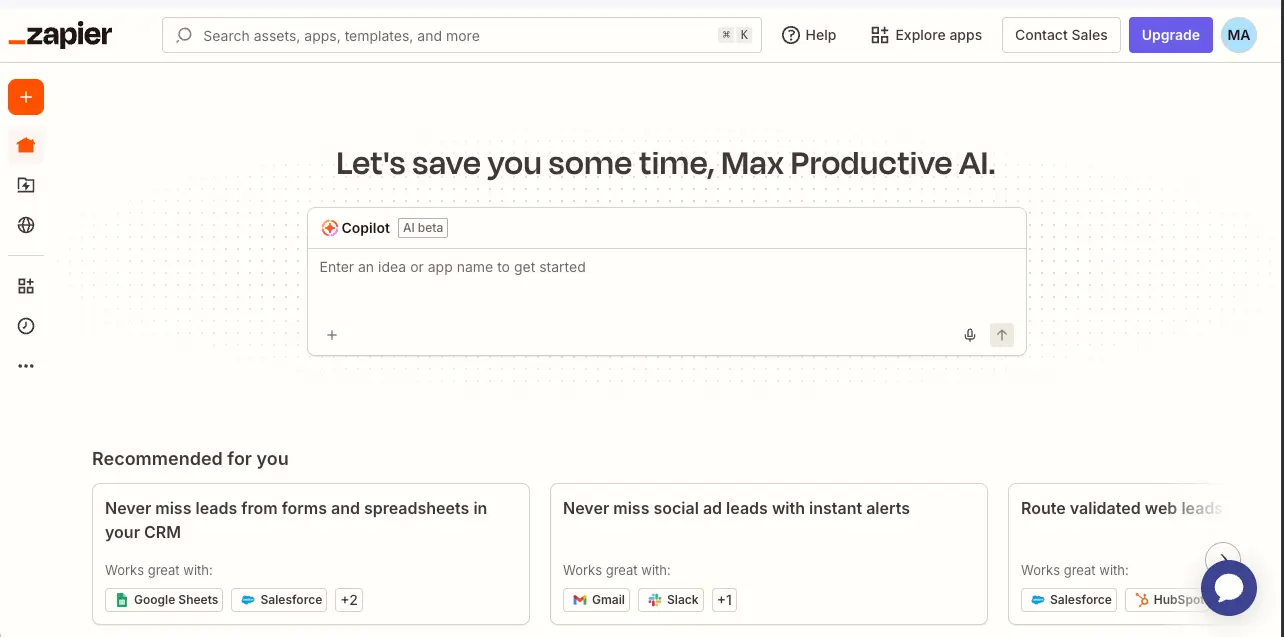
The Most Accessible Automation
Platform — Now With AI Agents
After extensive testing, Zapier remains the most broadly-integrated automation platform on the market. Its 2025–2026 evolution into a full AI orchestration platform — with Copilot, AI Agents, and MCP connectivity — represents the most significant product transformation in its 13-year history. With 8,000+ app integrations and the ability to build workflows from plain English, Zapier is still the fastest path from idea to working automation. The aggressive task-based pricing at scale is what keeps it from a higher score.
✓ What We Love
- 8,000+ integrations — unmatched ecosystem
- Copilot builds workflows from plain English
- AI Agents with multi-agent orchestration
- Enterprise security: SOC 2, ISO 27001, PCI DSS
! Could Be Better
- Task-based pricing gets costly at scale
- Free plan limited to 100 tasks/month
- No native loop/iteration support
What Is Zapier?
A comprehensive overview of the automation platform that connects your entire tech stack.
Zapier is a cloud-based, no-code automation platform that connects over 8,000 web applications through automated workflows called Zaps. Founded in 2011 and headquartered in San Francisco, it has grown from a simple app connector into what now bills itself as the most connected AI orchestration platform — serving over 3 million users and 100,000+ paying customers worldwide. Users have created more than 25 million Zaps to date, and the platform processes over 3.1 billion tasks per month across 800+ employees in 40 countries.
Every Zap is built around a straightforward paradigm: a trigger (an event in one app, such as receiving a new email in Gmail) and one or more actions (tasks performed in other apps, such as creating a row in Google Sheets and sending a Slack notification). No coding is required at any step. This simplicity has been the foundation of Zapier's appeal for over a decade, and it remains the fastest way for non-technical users to automate repetitive tasks across their SaaS stack.
What makes the 2025–2026 version of Zapier significantly different from earlier iterations is its expansion into a full AI orchestration platform. The launch of AI Agents (general availability May 2025), Copilot natural language builder (September 2025), and MCP connectivity (Model Context Protocol) has transformed the platform from a workflow automation tool into an AI infrastructure layer. Users can now describe what they want in plain English and have Copilot build the corresponding workflow automatically, deploy autonomous AI agents that make decisions across connected apps, and connect external AI tools like Claude and ChatGPT directly to Zapier's 30,000+ actions.
Zapier has been profitable since 2014 — a remarkable achievement built on just $1.4 million in venture capital, reaching an estimated $310 million in revenue for 2024 with a $5 billion valuation. This capital efficiency speaks to the genuine value the platform delivers to its user base.
Who Is Zapier Best For?
Zapier is ideal for non-technical solo users, freelancers, and SMBs who need fast, reliable automation across a mixed SaaS stack. It's particularly well-suited for teams wanting one all-in-one platform (automation + database + forms + AI agents), organizations requiring enterprise-grade security certifications, and businesses needing to connect niche or enterprise apps that only Zapier supports. If you value speed and breadth over cost efficiency at high volumes, Zapier is the default choice.
Beyond core Zaps, the platform now bundles seven integrated products into standard paid plans: Zaps (workflows), Agents (AI bots), Copilot (natural language builder), Tables (automation-first database), Interfaces (no-code app builder), Forms (data collection), Canvas (workflow diagramming), and Chatbots (customer-facing AI). For most small and medium businesses, this eliminates the need for separate database tools, form builders, no-code app builders, or chatbot platforms — consolidating multiple subscriptions into a single ecosystem.
See Zapier in Action
Real screenshots from the platform showing the dashboard, AI Agents, Copilot builder, and workflow editor.
Dashboard Homepage
Your central hub with Copilot AI and personalized workflow recommendations
The Zapier homepage greets you with a clean, focused interface centered around the Copilot AI assistant. Rather than navigating through menus, you can simply type what you want to automate — such as "Never miss leads from forms and spreadsheets in your CRM" — and Copilot builds the workflow for you. The "Recommended for you" section surfaces relevant automation templates based on your connected apps and usage patterns.
Zap Editor with Copilot
Build workflows visually with AI assistance at every step
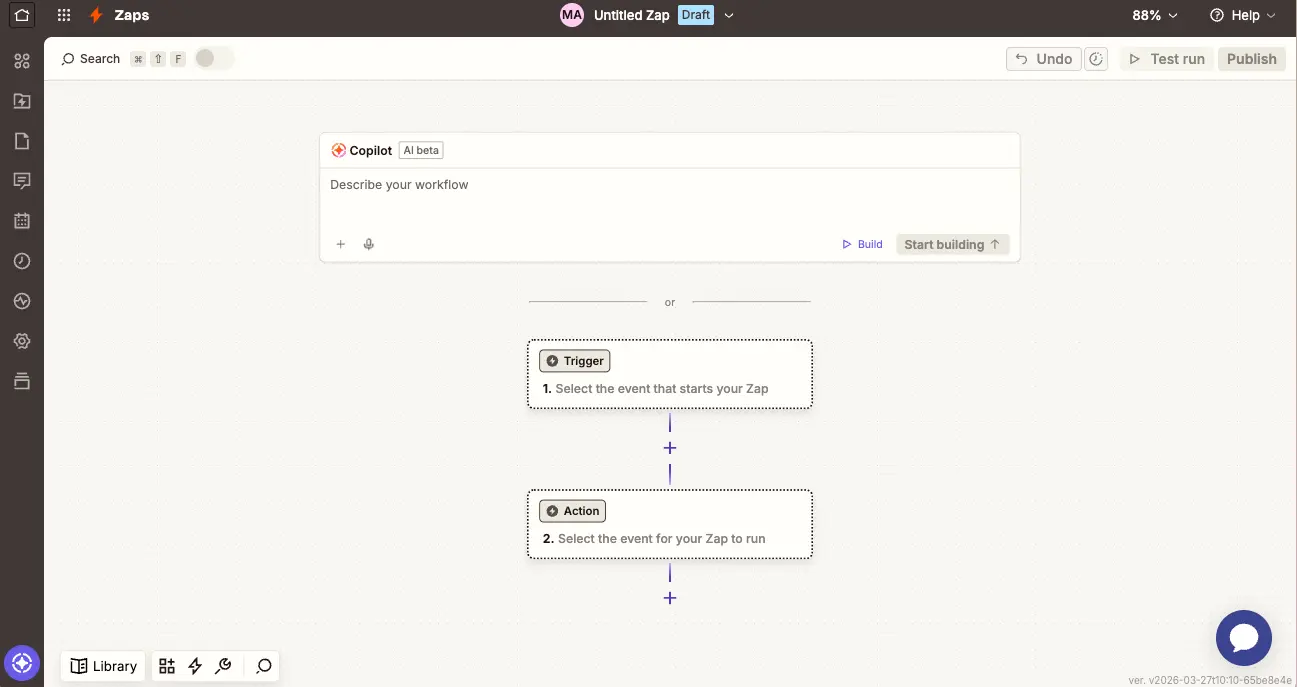
The Zap editor presents the classic trigger-to-action flow in a clean visual layout. The Copilot bar sits at the top, allowing you to describe your workflow in natural language and have the AI generate the full structure. You can also build manually by selecting trigger and action apps from the 8,000+ integration library. The "Test run" and "Publish" buttons in the top-right let you validate before deploying.
Copilot Zap Builder
Build complex Zaps from templates using conversational AI
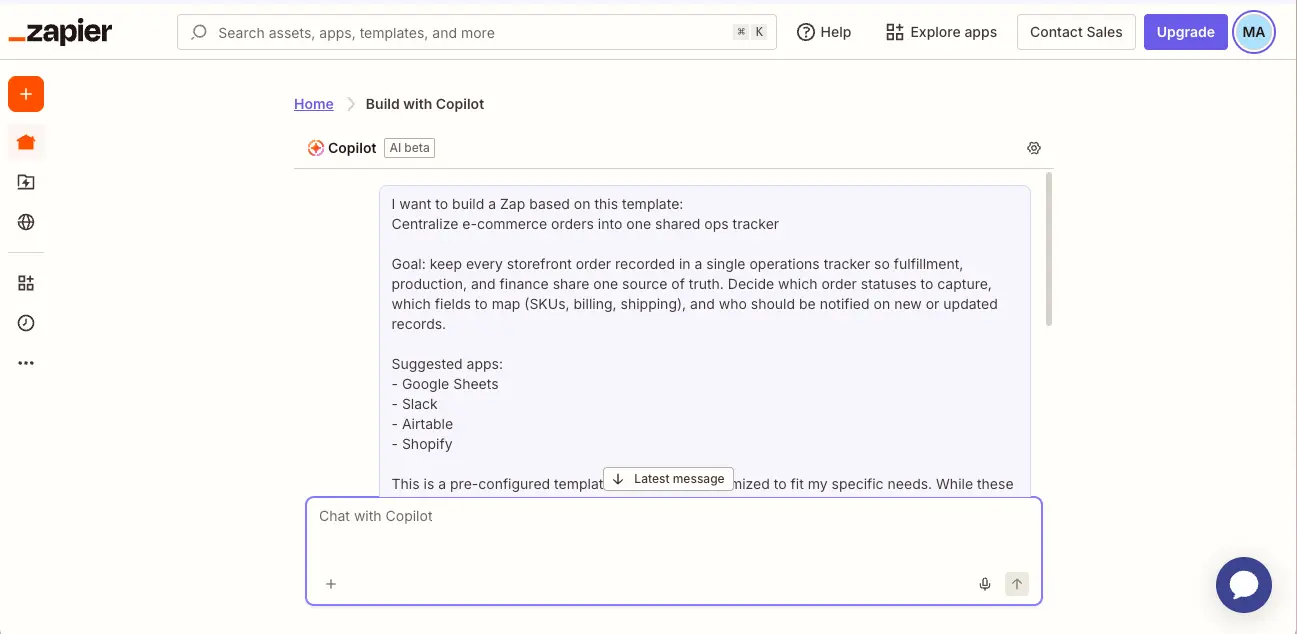
This view shows Copilot building a Zap from a template — in this case, centralizing e-commerce orders into a shared operations tracker. Copilot suggests the relevant apps (Google Sheets, Slack, Airtable, Shopify), explains the workflow goal, and lets you customize through conversational instructions. Independent practitioners report approximately 92% success rate for simple Zaps and around 80% for complex agent flows on the first generation.
AI Agents Dashboard
Configure autonomous AI agents with natural language instructions
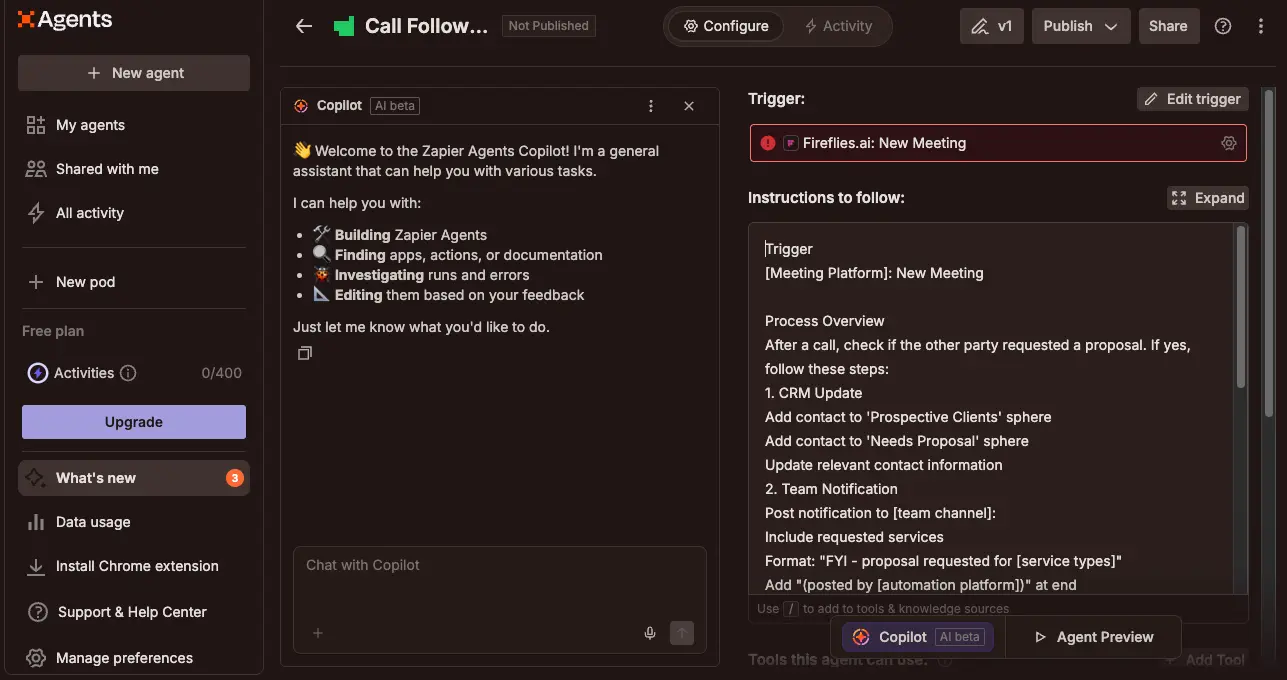
The Agents interface allows you to build autonomous AI bots that go beyond fixed trigger-to-action logic. In this example, a "Call Follow-Up" agent is configured with a Fireflies.ai trigger and detailed multi-step instructions — including CRM updates, team notifications, and proposal tracking. The Copilot sidebar helps you build, find, investigate, and edit agents through natural conversation. Agents can access 8,000+ apps, browse the web, and delegate to other agents.
Agent Templates
Pre-built agent templates for common sales, marketing, and operations tasks
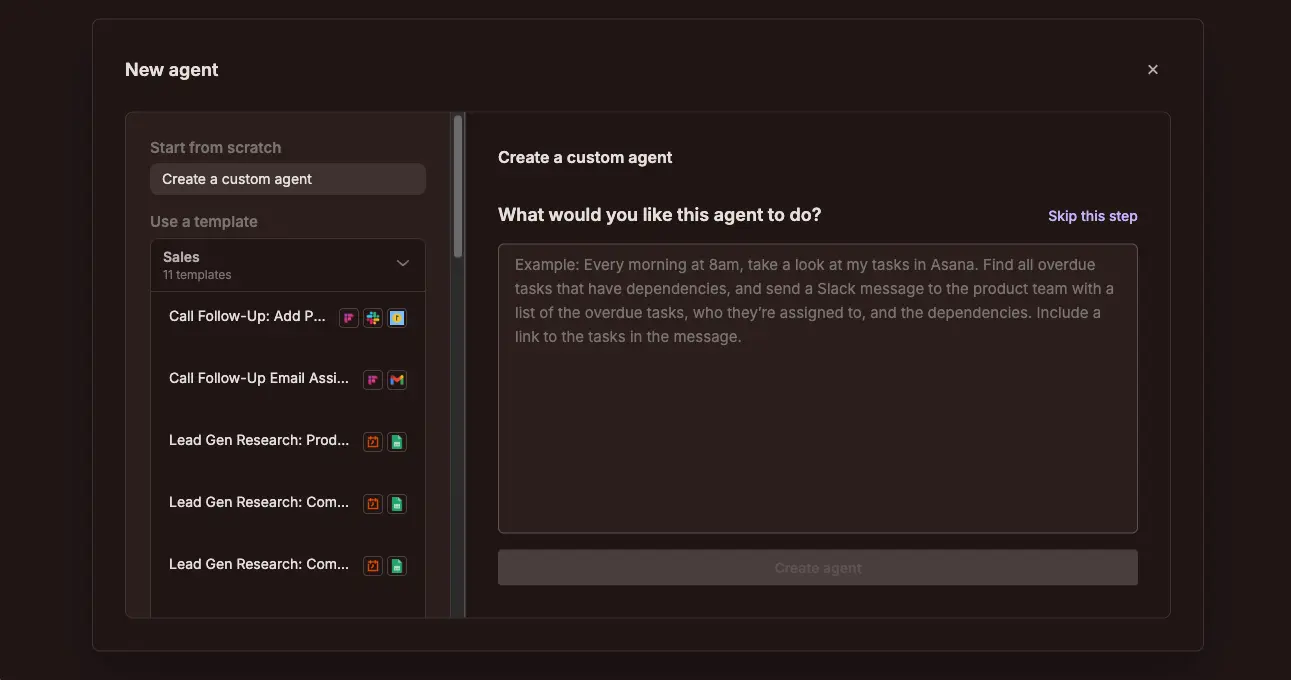
Creating a new agent is straightforward. You can start from scratch with a custom description or choose from categorized templates. The Sales category alone includes 11 templates covering call follow-ups, email assistance, lead generation research, and competitive analysis. Each template shows which apps it connects to, and can be customized after creation. This template library significantly reduces the time needed to deploy agents for common business workflows.
Ready to automate your workflows with 8,000+ app integrations?
Visit Zapier →Free plan available • No credit card requiredHow Zapier Works
From idea to working automation in minutes — no coding required.
Describe or Pick Your Workflow
You can start in two ways: describe what you want in plain English using Copilot ("When I get a new lead from my website form, add them to HubSpot and notify my sales team on Slack"), or browse thousands of pre-built templates organized by use case and app. Copilot builds the complete Zap structure automatically with approximately 92% accuracy for simple workflows, while templates provide proven configurations you can customize. Either approach gets you to a working automation far faster than manual setup.
Connect Your Apps
Zapier handles authentication seamlessly through OAuth — no API keys to manage, no developer required. Simply click "Connect" next to each app, sign in with your existing credentials, and Zapier establishes the connection. With 8,000+ supported apps, virtually every SaaS tool you use is available. Independent testing found authentication seamless across 20+ integrations spanning CRM, payments, marketing automation, and project management. Once connected, apps remain linked for all future Zaps.
Configure Triggers, Actions & Logic
Each Zap starts with a trigger — the event that kicks off your workflow (e.g., "New row in Google Sheets" or "New customer in Stripe"). Then you chain one or more actions that execute in other apps. Paid plans unlock multi-step Zaps, conditional Paths (if/else branching), Filters (run only when criteria are met), Formatters (data transformation), Delays, Schedules, and Sub-Zaps (reusable modular components). An important cost-saving detail: filters, formatters, and routing steps do not count against your task usage.
Test, Deploy & Monitor
Before going live, Zapier lets you test each step with real data to verify everything works correctly. Once satisfied, hit "Publish" and your Zap runs automatically. Polling intervals determine how frequently Zapier checks for new triggers: every 15 minutes on Free, 5 minutes on Professional, and 1 minute on Team and Enterprise. Webhook-based triggers provide near-instant execution on paid plans. The activity dashboard provides logs for every run, and you can set up error notifications to catch failures early.
Enterprise-Grade Security
Zapier holds SOC 2 Type II, SOC 3, ISO 27001, and PCI DSS certifications. All data is encrypted in transit (TLS 1.2+) and at rest (AES-256). Enterprise plans include SAML SSO, role-based access control, audit logs, and GDPR compliance with EU-US Data Privacy Framework participation. Zapier explicitly states it does not sell or market user data to third parties. Note: Zapier is not HIPAA compliant and cannot handle Protected Health Information.
Understanding Task Consumption
Every successful action step in a Zap counts as one task. The trigger is always free. So a 5-step Zap (trigger → filter → lookup → update → notify) consumes 3 tasks per run (filter doesn't count). A single multi-step Zap running 50 times per day could consume 4,500+ tasks per month. MCP tool calls count as 2 tasks each. Understanding this math is essential before choosing a plan — track your actual usage for 30 days on the free plan before committing.
Key Features
Seven integrated products bundled into one AI orchestration platform.
Zaps (Automated Workflows)
The foundation of Zapier: trigger-to-action workflows connecting 8,000+ apps. Multi-step chains, conditional Paths, Filters, Formatters, Delays, Schedules, Sub-Zaps, and webhooks. Filters and routing steps are free — only external actions consume tasks.
AI Agents
Autonomous AI bots that make decisions across connected apps. Describe a goal in natural language, and the Agent determines how to achieve it — browsing the web, reading data sources, updating CRMs, drafting communications, and delegating to other specialist agents. Agent-to-agent orchestration enables multi-agent pipelines.
Copilot (AI Builder)
Natural language assistant integrated into every Zapier product. Describe what you want in plain English and Copilot builds the Zap, Agent, Table, Interface, Canvas, or Chatbot automatically. Retains chat history across sessions. Available on all plans including free. ~92% success rate for simple Zaps.
MCP Connectivity
Model Context Protocol lets external AI tools — Claude, ChatGPT, Cursor — connect to Zapier's 30,000+ actions across 8,000+ apps without custom code. Turns any AI assistant into an app-controlling agent. Code-free setup, available on all plans. Each MCP call consumes 2 tasks.
Tables (Database)
Automation-first database that stores, enriches, and automates data natively inside Zapier. AI Enrich auto-fills fields using AI prompts. 2,500 records on free, more on paid. Direct Zap and Agent triggers from table events. Now included in all plans — previously a $20/month add-on.
Interfaces & Forms
Interfaces is a drag-and-drop no-code app builder for client portals, dashboards, lead capture pages, and approval workflows — all connected natively to Zaps and Agents. Forms collects data and triggers workflows on submission. Copilot can generate form fields from a text description. Both included in all plans.
Canvas (Workflow Diagramming)
AI-powered collaborative tool for visualizing entire business processes. Map end-to-end workflows, assign steps to team members, leave comments, and receive AI-generated improvement suggestions. Particularly useful for planning before building, especially for larger teams documenting cross-departmental automations.
Chatbots
AI chatbot builder for customer-facing and internal use cases: lead capture, FAQ answering, appointment booking, ticket routing. Train chatbots on uploaded documents and connect them to Zap actions. Admin roles, viewer access, and activity logs included. Basic version free, advanced features on paid plans.
The integration depth deserves special emphasis. Zapier's 8,000+ app integrations include not only mainstream SaaS tools but also enterprise connectors for SAP, Workday, NetSuite, Oracle, Dynamics 365, and ServiceNow — applications that competitors like Make and n8n frequently lack. Recent additions reflect the AI ecosystem push, including Pinecone (vector database) and ElevenLabs (AI voice). Webhook support handles custom and proprietary APIs when no native integration exists.
Explore the full platform with a free plan:
Visit Zapier →Free plan • No credit card required • 8,000+ integrationsPricing Plans
Task-based pricing across four tiers — understand the math before you commit.
Free
Professional
Team
Enterprise: Custom pricing • Unlimited users • SAML SSO • Audit logs • Dedicated account manager • 30-min SLA
Annual billing saves ~33%: Professional drops to ~$19.99/mo, Team to ~$69/mo
Understanding Task-Based Pricing
A 5-step Zap running 50 times per day consumes approximately 7,500 tasks per month — well above the Professional plan's 750-task base. At 5,000 tasks/month, expect to pay around $123–148/month on Professional. Filters, formatters, and routing steps do not count against usage, which partially offsets the impact of complex workflows. Track your actual consumption on the free plan for 30 days before committing to a paid tier.
It's worth being transparent about how Zapier's pricing compares: at 5,000 tasks/month, Zapier costs approximately $123–148/month, while Make offers equivalent workload capacity for around $25/month. At higher volumes the difference grows further. Zapier's premium is justified by its vastly larger integration library, Copilot AI, and superior ease of use — but if cost efficiency is your primary concern and you're comfortable with a steeper learning curve, alternatives like Make or n8n deserve serious consideration.
Detailed Pros & Cons
An honest, balanced assessment based on extensive research and testing.
✓ Pros
With 8,000+ integrations (independently verified at over 8,500), Zapier eliminates the "missing connector" problem. If your SaaS tool exists, Zapier almost certainly supports it — including enterprise apps like SAP, Workday, NetSuite, and Oracle that competitors frequently lack. This breadth alone is often the deciding factor.
Creating a first Zap takes approximately 3 minutes — pick a trigger app, select an event, connect an action app. OAuth authentication is completely abstracted: no API keys to manage, no developer required. Marketing teams with zero coding background can build multi-step workflows within an hour of onboarding.
The September 2025 Copilot launch represents a genuine step-change in accessibility. Describe a workflow in plain English and have it built automatically — available on all plans including free. Real-world success rates of approximately 92% for simple Zaps dramatically reduce setup friction.
Zapier Agents, MCP connectivity, AI Guardrails, Chatbots, and AI-enriched Tables represent an authentic AI layer — not a superficial addition. The agent-to-agent orchestration capability enables sophisticated multi-agent pipelines previously impossible in no-code tools. Zapier's positioning as infrastructure for AI agents (via MCP) is strategically sound.
Tables, Interfaces, Forms, Canvas, Chatbots, and Agents are all included in standard plans as of late 2025. For most SMBs, this eliminates the need for separate database tools (Airtable), form builders (Typeform), no-code app builders (Glide), or chatbot platforms — consolidating multiple subscriptions.
SOC 2 Type II, ISO 27001, and PCI DSS certifications with data encrypted in transit and at rest. Enterprise plans include SAML SSO, RBAC, audit logs, and GDPR compliance. Independent testing found 99.9%+ uptime in production environments.
✗ Cons
Zapier's most discussed limitation. At 5,000 tasks/month, costs reach approximately $123–148/month compared to around $25/month on Make for equivalent workload. The gap widens at higher volumes. Premium apps (Salesforce, NetSuite) require the Team plan regardless of task volume, adding further cost pressure. Overage fees can also increase bills unexpectedly.
The free tier was reduced from 750 to 100 tasks/month in 2024. With single-step Zaps only and 15-minute polling, it's best treated as a testing environment. A single multi-step Zap checking email every 15 minutes would exhaust the 100-task limit in a few days. Make offers 1,000 operations/month free with multi-step capabilities.
Zapier lacks a native foreach/loop node. Iterating over arrays (processing each line item in an order, each row in a spreadsheet) requires workarounds like "Looping by Zapier" or Sub-Zaps, which add setup complexity and additional task costs. Make and n8n handle this more elegantly with built-in iterators.
Conditional routing (Paths) is a paid-only feature. The logic system handles simple if/then/else branching well but is less capable than Make or n8n for nested conditions, complex data transformations, error handling with retry logic, and extensive array manipulation.
Free and Professional users receive email-only support with 24–48 hour response times. Priority support and faster response require the Team plan, while dedicated account management and phone support are reserved for Enterprise. For context, Make offers live chat at significantly lower price points.
All data passes through Zapier's cloud infrastructure — no self-hosted or on-premise deployment exists. For organizations in regulated industries with strict data residency requirements or teams wanting full data sovereignty, n8n (which supports self-hosting with unlimited tasks) is a more suitable alternative.
Zapier vs Alternatives
How Zapier compares to the leading task automation platforms in 2026.
| Feature | Zapier | Make | n8n |
|---|---|---|---|
| App Integrations | 8,000+ | ~2,000–3,000 | ~400 native |
| Ease of Use | ★★★★★ | ★★★★ | ★★★ |
| 5,000 Tasks/Month | ~$123–148/mo | ~$25/mo | ~$55/mo cloud |
| AI Agents | Full platform, GA | Beta | Via LangChain |
| Native Loops | No (workarounds) | Yes | Yes |
| Self-Hosting | No | No | Yes (unlimited) |
| Free Tier | 100 tasks, 1-step | 1,000 ops, multi-step | Unlimited (self-hosted) |
| Enterprise Apps | SAP, Workday, Oracle | Limited | Limited |
| Best For | Non-tech teams, breadth | Cost efficiency, logic | Tech teams, sovereignty |
Which Tool Is Right For You?
Zapier
Best Ease of UseBest for: Non-technical solo users, freelancers, and SMBs who need fast, reliable automation across a broad SaaS stack. Ideal if you value speed and simplicity, need AI-native features (Agents, Copilot, MCP), require enterprise app connectors (SAP, Workday, NetSuite), or want an all-in-one platform with database, forms, and chatbots included. The 8,000+ integration library is unmatched.

Make
Best Value at ScaleBest for: Power users and teams wanting complex visual workflows with strong data manipulation at a fraction of Zapier's cost. Make's visual scenario builder handles nested conditions, iterators, and multi-route processing more elegantly. At 5,000–20,000 operations/month, Make can cost 80%+ less than Zapier. Choose Make if cost efficiency and complex logic matter more than integration breadth.

n8n
Open SourceBest for: Technical teams and developers who want full control, self-hosting capability, and unlimited tasks. n8n leads on pure AI flexibility with LangChain integration and self-hosted LLM support. True programming-style control with loops, error branches, switches, and custom code nodes. Perfect for data sovereignty requirements and AI-heavy custom architectures. Requires engineering comfort.

Lindy
AI Agents FocusBest for: Teams wanting a dedicated AI agent platform for knowledge work automation — email management, meeting scheduling, customer support, and sales outreach. Lindy offers a more opinionated agent-first approach compared to Zapier's broader automation-plus-agents model. Strong for users who prioritize autonomous AI capabilities over traditional workflow automation.

MindStudio
AI App BuilderBest for: Users who want to build custom AI-powered applications and agents without code. MindStudio focuses on creating AI apps with multi-model support, custom knowledge bases, and deployment options. Choose if you need to build standalone AI tools rather than connect existing SaaS apps in automated workflows.

Voiceflow
Conversational AIBest for: Teams building advanced conversational AI agents and chatbots with visual dialogue flow design. Voiceflow offers deeper conversational design capabilities than Zapier's built-in Chatbots feature — including multi-turn dialogue management, NLU training, and enterprise deployment. Choose Voiceflow if conversational AI is your primary use case rather than workflow automation.

Rube
Visual AutomationBest for: Users looking for a fresh, visual approach to automation with an emphasis on simplicity and modern design. Rube offers an intuitive visual builder for creating automated workflows. A newer entrant in the task automation space, it provides a clean alternative for users who find Zapier's interface too linear or Make's canvas too complex.

Flowith
AI WorkflowsBest for: Users seeking an AI-first automation approach with a focus on intelligent workflow execution. Flowith combines AI capabilities with task automation for knowledge workers who want their workflows to be powered by AI reasoning rather than simple trigger-action logic.
Frequently Asked Questions
Should You Use Zapier in 2026?
After extensive testing, Zapier remains the most accessible and broadly-integrated automation platform available. The 2025–2026 transformation into an AI orchestration platform — with Copilot, AI Agents, MCP connectivity, and a bundled ecosystem of Tables, Interfaces, Forms, Canvas, and Chatbots — is genuinely impressive. The 8,000+ app ecosystem is unmatched, and the Copilot natural language builder makes creating workflows faster than any competitor. For non-technical teams who value speed and breadth, Zapier is still the default choice.
The limitations are real and worth acknowledging: task-based pricing becomes significantly more expensive than alternatives at scale, the free plan is effectively a demo at 100 tasks/month, and the lack of native loops creates friction for complex data processing. If cost efficiency is your primary concern at volumes above 5,000 tasks/month, Make or n8n offer compelling alternatives. But for the vast majority of small businesses, freelancers, and non-technical teams, Zapier's combination of ease, breadth, AI capabilities, and ecosystem consolidation makes it worth the premium.
Our Recommendation
Start with the free plan and track your actual task consumption for 30 days. Focus on automating your highest-value, most repetitive workflows first — lead capture, CRM updates, notification routing. If your usage stays under 750 tasks/month, the Professional plan at $19.99/month (annual) is excellent value. If you're exceeding 5,000 tasks/month, run a parallel evaluation of Make before scaling further on Zapier. The best approach is to use Zapier for breadth and ease, and consider supplementing with a cost-efficient alternative for high-volume, complex workflows.
Ready to Automate Your Workflow?
Join 3M+ users connecting 8,000+ apps with AI-powered automation — start free, no credit card required