
n8n
n8n is a visual workflow builder for people who've hit the ceiling of simpler automation tools. It connects apps, APIs, code and AI agents on one canvas, bills per workflow run instead of per step, and can run on your own server for free.
Try n8n →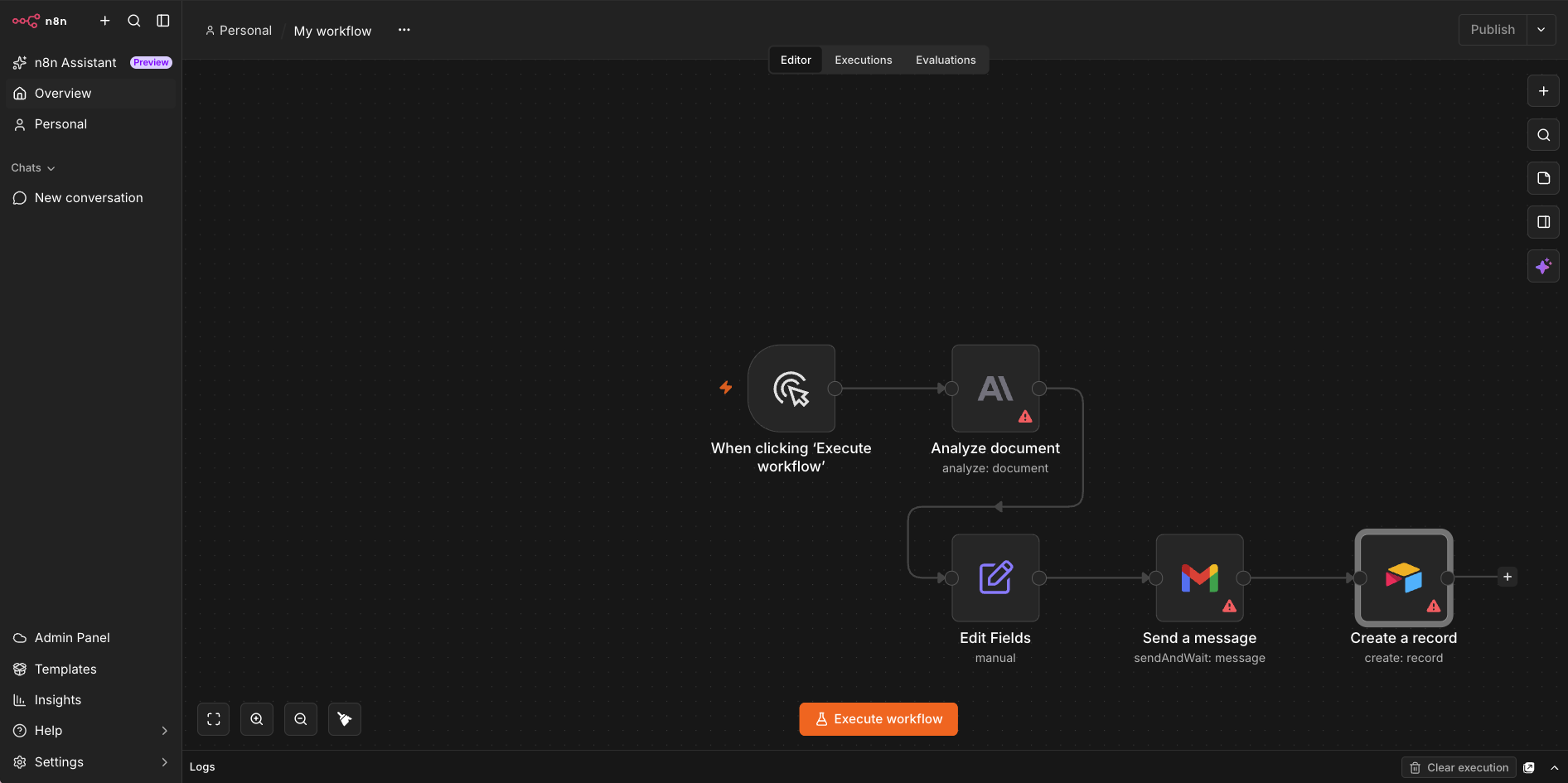
The Automation Platform You Won't Outgrow,
If You're Willing to Learn It
As of October 2026, n8n is the automation platform I'd pick for anyone comfortable with APIs and a bit of JSON. You get a visual editor, a code step when you need one, AI agents that wait for your approval before they act, and a free edition you can host yourself. Paid plans count one execution per workflow run, however many steps it has, so a long, complicated automation doesn't get more expensive with every node you add. The price of all that is effort. n8n asks more of you in the first week than Make or Zapier do, and self-hosting it properly is a job, not a checkbox.
✓ What We Love
- One execution per run, with unlimited steps
- Free self-hosted Community Edition
- JavaScript and Python inside the visual builder
- AI agents with human approval, MCP and evaluations
! Could Be Better
- Steeper learning curve than Make or Zapier
- Self-hosting means you own backups, updates and security
- Fair-code license, and a big price jump to the Business plan
What Is n8n?
A workflow builder that sits between no-code tools and writing the integration yourself.
n8n (pronounced "n-eight-n") is a workflow automation platform built around a visual node editor. Each workflow starts with a trigger: a webhook, a schedule, a new email, an event in another app. From there you chain nodes that transform data, query a database, call an API, run code, ask an AI model a question, or pause until a human approves the next step. That's a longer list than "when this happens in app A, do that in app B", and it's the reason people move to n8n after outgrowing simpler tools.
What sets n8n workflow automation apart is how far it stretches before you have to leave. A workflow can start as five drag-and-drop nodes, then pick up a JavaScript or Python step, an HTTP request to a service with no native integration, a vector database, an AI agent. You stay on the same canvas the whole time. With Make or Zapier, the day you need custom logic is usually the day you start looking at other tools. With n8n, that day mostly doesn't come.
The AI side has grown up fast. Agents are a standard node now, with model, memory and tool connections, MCP support in both directions, and evaluation tools for checking that an agent still behaves after you change a prompt. The part I like most is that AI stays optional inside a workflow. You can keep validation, routing and database writes fully deterministic and bring in a model only for the step that needs judgment, like classifying a support ticket. Then you make it wait for a human before it sends anything.
You can run n8n two ways. n8n Cloud is the hosted version, with data stored in Frankfurt, Germany. The Community Edition is free to run on your own server, which goes a long way to explaining the project's 200,000-plus stars on GitHub. One caveat that many reviews skip: n8n is fair-code, not open source in the usual sense. The source is public, but the license restricts some commercial uses. More on that below.
How We Evaluated n8n
For this n8n review, I opened an n8n Cloud account, went through the first-run screen, and built a five-node workflow in the editor: a manual trigger, an Anthropic document-analysis node, Edit Fields, a Gmail send-and-wait step and an Airtable record. I also opened the n8n Assistant and the agent builder. The screenshots below show that workflow as built, before it was wired to live accounts, so nothing on this page is a performance or reliability benchmark from my own use. Pricing and plan limits were checked against n8n's own pricing page on October 5, 2026. Licensing, security and feature details come from n8n's documentation and Trust Center, and the user-sentiment picture comes from public community discussions.
So who is it for? Developers, automation specialists, agencies building workflows for clients, and technical operations people who are tired of paying per step. Teams with strict data requirements too, because self-hosting lets you decide where everything lives. Who is it not for? Anyone who wants an automation running in ten minutes with no setup, and anyone hoping an AI will click through websites on their behalf. Lindy and MuleRun are built for that second job. n8n isn't.
See n8n in Action
Screenshots from our n8n Cloud account, from the first screen to the agent builder.
First-Run Dashboard
Three ways in: a live demo, an agent, or a blank workflow
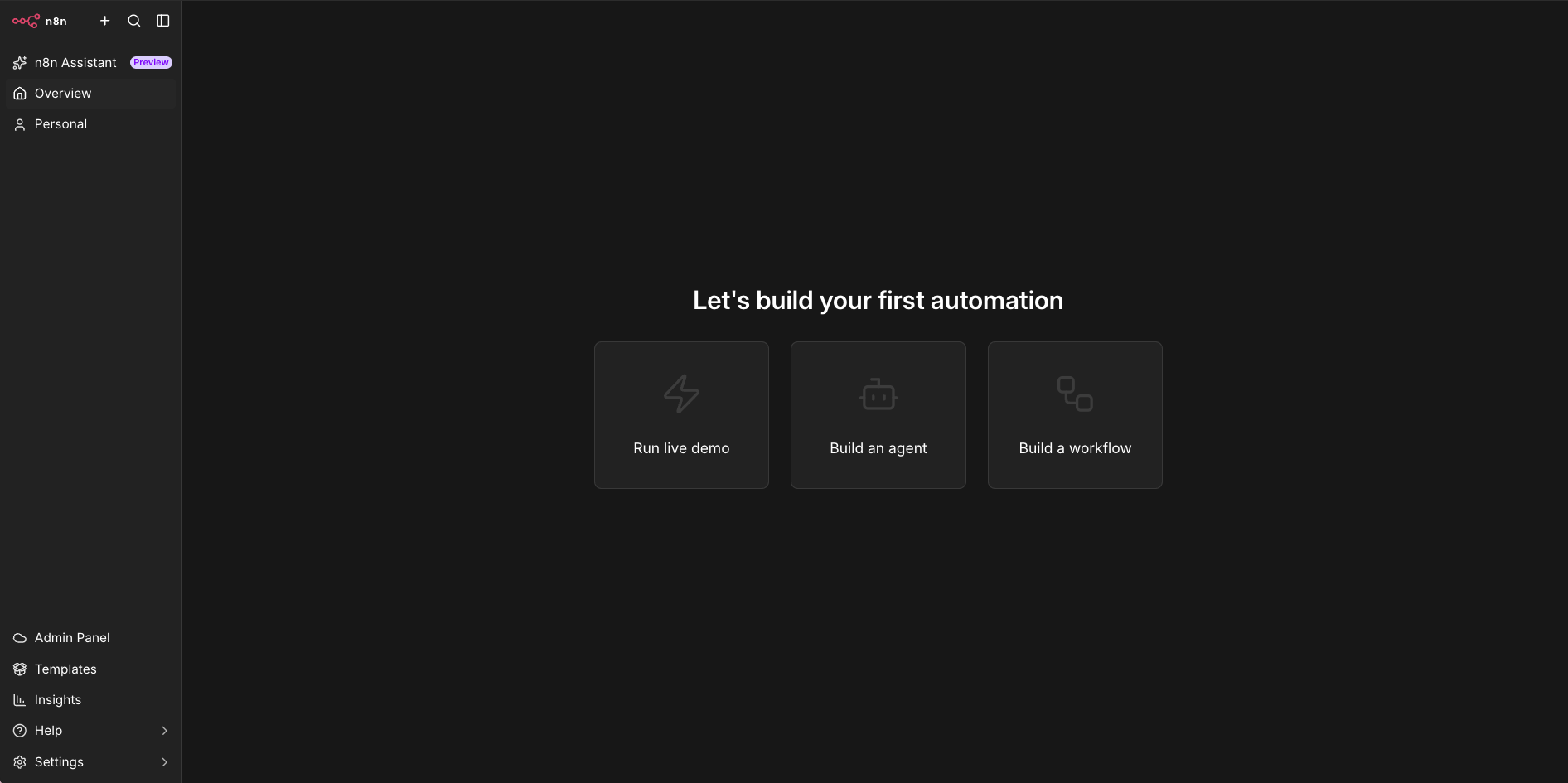
A new account opens on an almost empty screen with three cards: Run live demo, Build an agent, Build a workflow. I like the restraint. There's no ten-step product tour to click through. The sidebar is short too: n8n Assistant with a Preview badge, Overview, your Personal space, then Admin Panel, Templates, Insights, Help and Settings at the bottom. Notice that "Build an agent" sits on equal footing with "Build a workflow". Agents used to be a side feature in n8n. Now they're one of the two front doors.
Workflow Editor
Nodes on a canvas, wired left to right, with warnings on anything unfinished
This is the workflow I built to get a feel for the editor: a manual trigger, an Anthropic node that analyzes a document, an Edit Fields step to shape the output, a Gmail node using the send-and-wait operation, and an Airtable node that creates a record. Dragging and wiring nodes is quick. The red triangles are n8n telling me three nodes still need configuration before the workflow can run, which is a fair warning and easy to miss on a busy canvas. The tabs along the top matter more than they look. Executions keeps a log of every run, and Evaluations is where you test AI steps against known inputs. On a paid plan, this whole chain would count as one execution each time it fires.
Node Settings Panel
Input on the left, parameters in the middle, output on the right
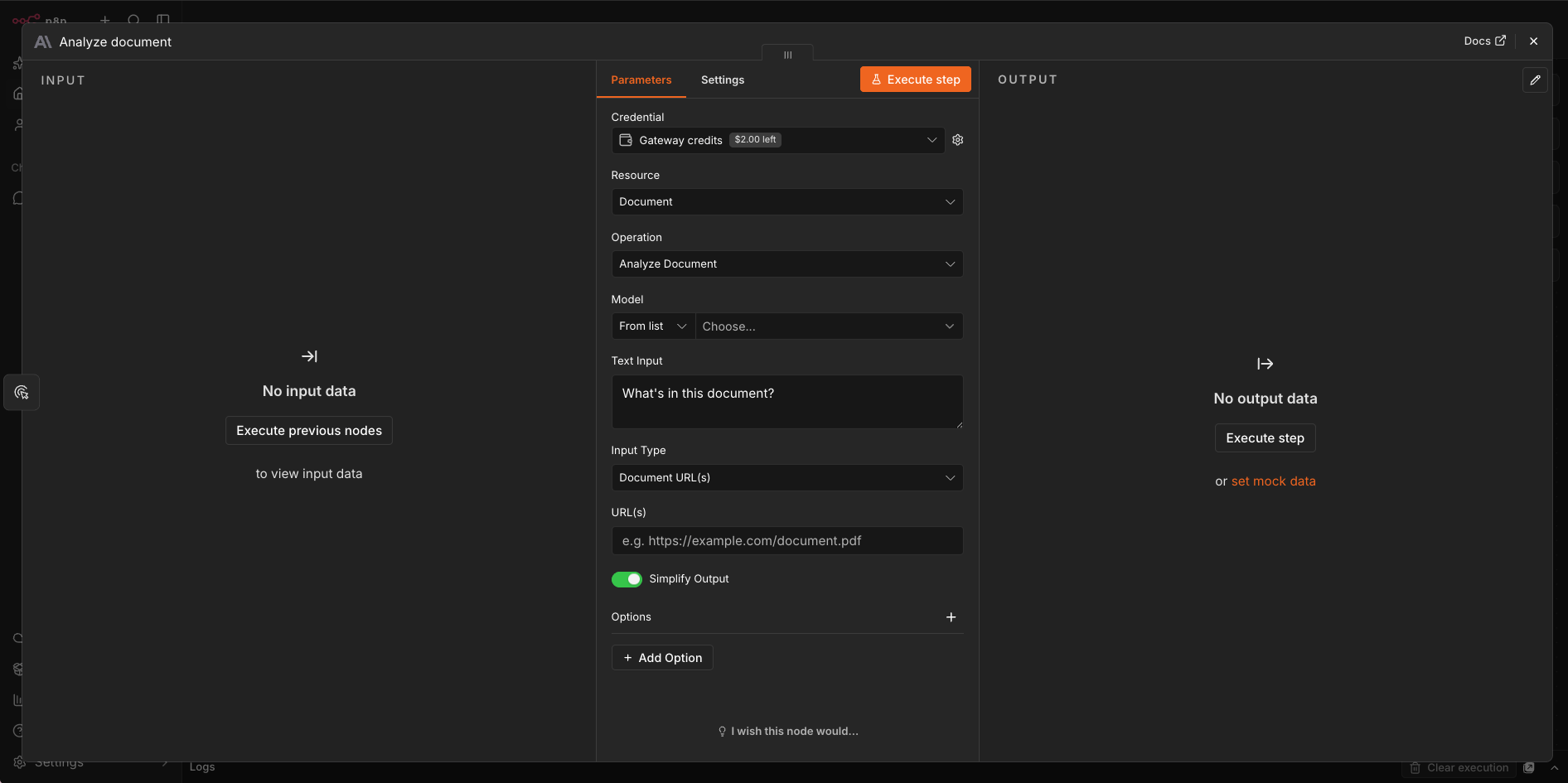
Open any node and you get this three-pane view. Input data on the left, the node's settings in the middle, output on the right. It's my favorite thing about building in n8n, because you can run one step, look at exactly what it returned, and write the next step against what actually came back. Here the Anthropic node is set to analyze a document from a URL with the prompt "What's in this document?". Two details are worth pointing out. The credential is set to Gateway credits, n8n's built-in allowance for hosted AI models, so I could configure an AI step without pasting in my own API key. My account showed $2.00 left. And the "set mock data" link on the right lets you fake a node's output so you can keep building while the earlier steps are unfinished.
Want to try the editor on one of your own workflows?
Try n8n →Free Cloud trial • No credit card requiredn8n Assistant
Describe the automation in plain language and let n8n draft it
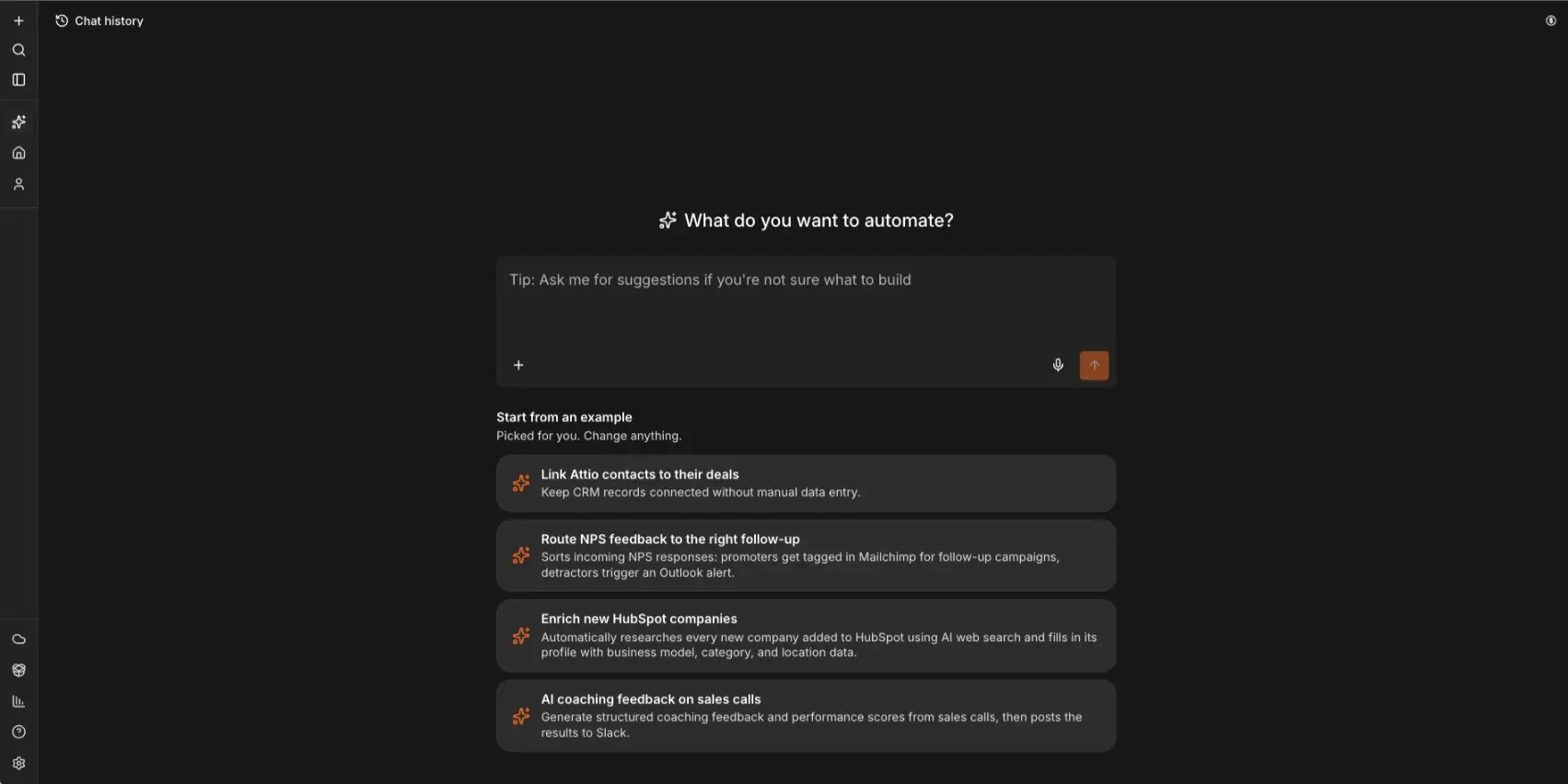
The Assistant is n8n's answer to the "just tell it what you want" tools. One prompt box, a microphone button, and four suggested starting points. Mine were: link Attio contacts to their deals, route NPS feedback to the right follow-up, enrich new HubSpot companies using AI web search, and generate coaching feedback on sales calls, then post it to Slack. Those examples say a lot about who n8n thinks its users are. Operations and revenue teams, not hobbyists. Keep your expectations in check, though. The feature carries a Preview label, and Cloud plans meter it. Starter includes 1,600 Assistant credits a month. I'd treat it as a way to get a first draft onto the canvas, then finish the workflow by hand.
AI Agent Builder
Model, instructions, skills and triggers on one page
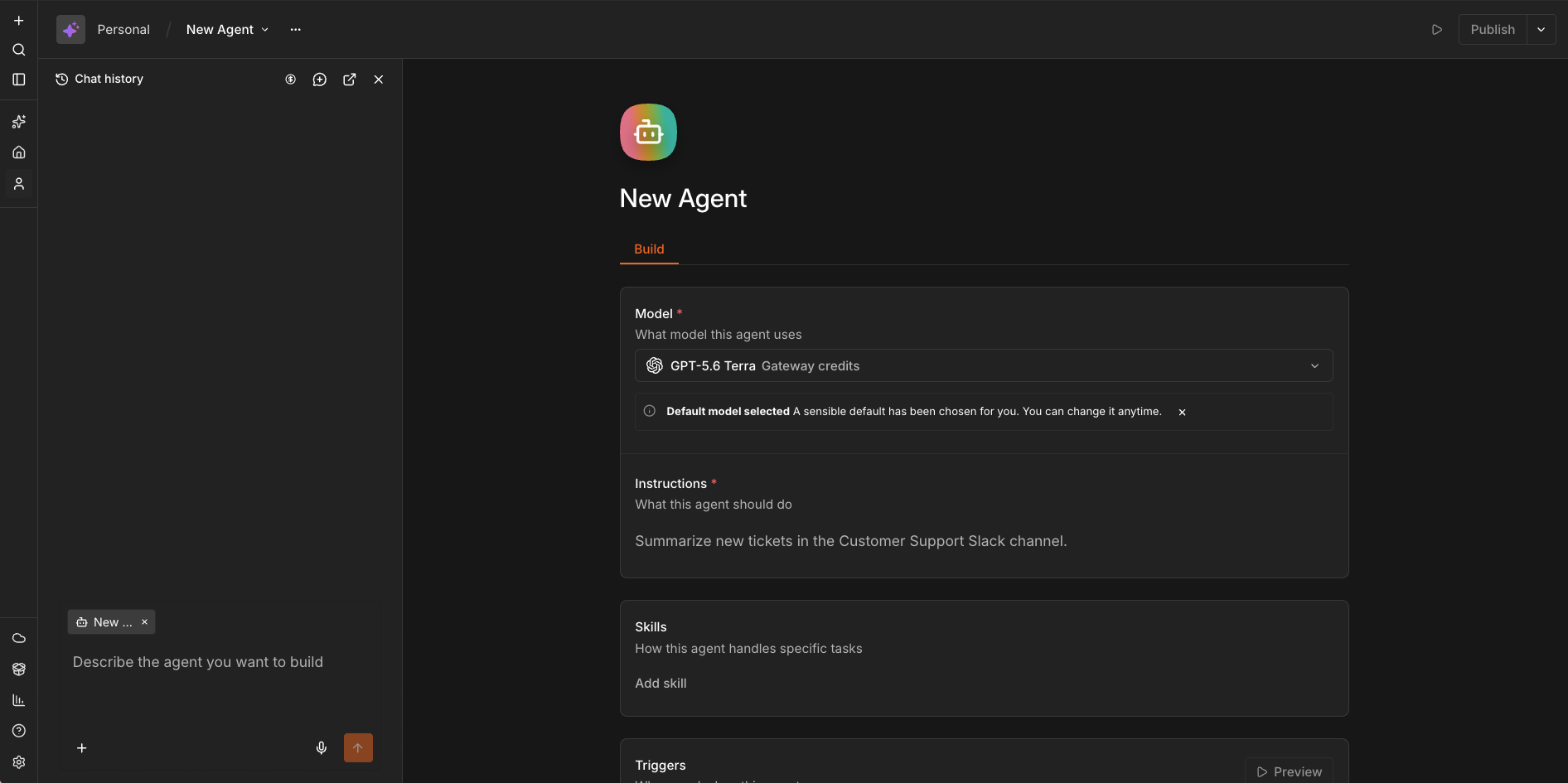
Choosing "Build an agent" opens a form instead of a canvas. Pick a model (mine defaulted to GPT-5.6 Terra on Gateway credits, with a note saying I could change it), write instructions, add skills, set triggers. The placeholder instruction reads "Summarize new tickets in the Customer Support Slack channel", which is about the right size of job for a first agent. On the left, a chat panel offers to build the agent from a description. It's a much gentler way into n8n AI agents than wiring an Agent node by hand, although n8n's pricing page still marks this agent builder as a preview. What this screen doesn't show is the control you get in the full editor: approvals, branching, error handling. For anything that touches customers or money, I'd build it as a workflow.
How n8n Works
Four steps from a trigger to a workflow that runs on its own.
Start With a Trigger
Every workflow begins with something that sets it off. A webhook call from another system, a schedule, a new email, a form submission, an event in one of the supported apps, or a manual click while you're testing. If the app you need has no trigger node, a webhook usually covers it.
Chain Nodes and Add Logic
Add a node for each action and wire them together. Branch on conditions, loop over items, merge data from two paths, call a sub-workflow, wait for a set time, catch errors. When the built-in nodes can't do what you need, drop in a Code node and write JavaScript or Python, or use the HTTP Request node to call any REST or GraphQL API directly. This is the step where n8n pulls away from simpler tools.
Bring In AI Where It Helps
Connect an AI Agent node to a model, give it memory and a set of tools, and it can decide which tool to use for a request. Add a vector store if it needs to look things up in your own documents. Then decide how much freedom it gets. You can require a human to approve a tool call before it runs, so the agent drafts the email and you press send. Switch that on for anything that can't be undone.
Test, Publish and Watch It Run
Run a single node or the whole workflow from the editor and inspect the data at each step. Use mock data so you aren't calling live APIs on every test. When it works, publish it. The Executions tab then logs every run, failures included, and you can open any of them to see where it broke. For AI steps, Evaluations lets you score outputs against test cases, so a prompt tweak doesn't quietly make things worse.
Cloud or Self-Hosted?
n8n Cloud gets you running in minutes, handles updates for you and keeps your data in the EU. Self-hosting the Community Edition costs nothing in license fees and puts you in charge of where data lives, but you also own TLS, the database, backups, monitoring and upgrades. A security advisory in January 2026 made the point well. Cloud customers were patched automatically, while self-hosters on older 1.x versions had to update on their own. If nobody on your team wants that job, pay for Cloud.
Is n8n Open Source?
Not in the strict sense. n8n is fair-code under its Sustainable Use License. The source is public, you can modify it, and using it inside your own business is fine. So is charging clients to build workflows on their own n8n installs. Hosting clients' workflows and credentials on your instance, reselling n8n, or embedding it in a product is a different matter and can require an Enterprise or Embed license. Agencies should read the license page before they build a business on it.
Key Features
What you get, and which parts depend on your plan.
Visual Workflow Builder
A node canvas with branching, loops, merges, waits, sub-workflows and error handling. Every node shows its input and output side by side, so debugging means looking at real data instead of guessing. Make's builder is prettier. n8n's is the one I'd rather debug in.
2,274 Integrations Plus Any API
That's the count in n8n's integration directory when I checked, across CRM, marketing, data, developer and AI tools. Make and Zapier list more. It matters less than you'd think, because the HTTP Request node, GraphQL support and cURL import let you call almost any service that has an API.
JavaScript & Python Code Node
Write JavaScript or Python in a Code node when a transformation is too awkward for no-code blocks. Python works in Code nodes but not in inline expressions. Self-hosted users can go further with custom nodes. For mixed teams this is ideal: the flow stays readable and the hard part lives in twenty lines of code.
AI Agents & RAG
An AI Agent node with connections for models (OpenAI, Anthropic, OpenRouter, xAI, local models through Ollama), memory and tools, plus vector stores like Pinecone, Qdrant, PGVector and Supabase for retrieval. Plenty of tools have an agent builder. What n8n adds is everything around it: the agent sits inside a workflow that can already talk to your CRM, database and inbox.
MCP Client & Server
n8n speaks the Model Context Protocol in both directions. An MCP Server Trigger exposes your workflows as tools for outside AI systems, and the MCP Client lets n8n agents use tools from external servers. Useful, and a little risky. MCP tools can change things in live systems, so set up authentication and scoping before you expose anything.
Human Approval Steps
Make an agent stop and ask before it runs a sensitive tool call. It drafts the email, you approve the send. The same pattern covers CRM updates, deletions, publishing and payments. Of all n8n's AI features, this is the one I'd insist on for production work.
Evaluations & Tracing
Test AI steps against known inputs so you can tell whether a change made things better or worse. Light evaluations come with every Cloud plan. Metric-based ones are limited to a single workflow on Starter and unlimited on Pro. LangSmith and OpenTelemetry tracing are available on self-hosted setups. Most agent builders stop at the demo. This is the part that helps you trust one.
Self-Hosting & Production Tooling
Run the Community Edition on your own server at no license cost, private-network setups included. The grown-up tooling costs money. SSO, multiple environments, queue mode and Git-based version control arrive with the Business plan, and Enterprise adds external secrets and log streaming.
n8n AI Agents: How Much Can You Trust Them?
n8n AI agents are workflows in which an AI Agent node decides which tools to call to finish a task. You give the agent a model, memory and a list of tools (an API call, a database query, another workflow), and it works out the order. For anyone weighing n8n against agent-only products, the thing to look at is the control around the agent. n8n supports human approval for tool calls, so an agent can be made to stop before it sends, deletes or pays for anything. Evaluations let you re-test it after each change. And since the agent lives inside an ordinary workflow, the steps before and after it can be plain, predictable logic. That makes n8n a sensible home for agents that touch business systems, and a slower route than Lindy or MindStudio if all you want is a quick assistant.
Two things to keep in mind. First, n8n gives you most of its capability on every plan, the free one included. What the paid tiers add is mainly volume, collaboration and governance, which is the opposite of how most SaaS pricing works. Second, the feature list assumes someone on your team can read an API doc. The nodes are visual, but the data moving between them is JSON, and sooner or later you'll have to look at it.
See what each plan includes:
Check n8n's plans →Starter and Pro on n8n Cloud • Free self-hosted editionn8n Pricing
A free self-hosted edition, two Cloud plans, and a big step up for Business. n8n prices in euros.
As of October 2026, n8n pricing comes in five tiers: a free self-hosted Community Edition, Starter at €20 a month and Pro at €50 a month on n8n Cloud, a self-hosted Business plan at €667 a month, and custom Enterprise pricing. Those are annual-billing prices. Every plan includes unlimited users and workflows and all the integrations. What you pay for is the number of workflow executions per month.
Community
- ✓ No n8n subscription fee
- ✓ No execution cap from n8n
- ✓ Integrations, Code node and AI nodes
- ✓ Your server, your data location
- ✗ No SSO or Git-based environments
- ✗ You handle hosting, backups and updates
Starter
- ✓ 2,500 workflow executions/month
- ✓ Unlimited steps per execution
- ✓ 5 concurrent executions, 1 shared project
- ✓ Unlimited users and workflows
- ✓ AI agents, MCP and AI nodes
- ✓ 1,600 Assistant credits/month
Pro
- ✓ 10,000 workflow executions/month
- ✓ Up to 50 concurrent executions
- ✓ 3 shared projects
- ✓ Workflow history, 7 days of insights
- ✓ Admin roles
- ✓ Metric-based AI evaluations
Business: €667/mo billed annually (€800 on monthly billing) for 40,000 executions. Self-hosted only, with SSO/SAML/LDAP, multiple environments, queue mode and Git version control. Forum support only
Start-up Plan: 50% off Business for qualifying companies with fewer than 20 employees
Free trial: Pro-level features and 1,000 executions on n8n Cloud, no credit card required
Enterprise: Custom pricing, Cloud or self-hosted, with external secrets, log streaming and SLA-backed support
Currency: n8n lists prices in euros, so the dollar amount on your card will vary with the exchange rate
Pricing last verified October 2026. Visit n8n for current rates.
What Does One Run Cost?
On Starter, a run costs less than a cent whether it has three steps or thirty. Pro brings that down to half a cent. On a step-metered tool, a 30-step workflow uses around thirty units of your allowance every time it fires. The math stops favoring n8n if you run a huge number of tiny two-step automations, where a per-step tool's free tier might cover you.
The pricing model is the reason many people switch. Make charges a credit each time a module does something, and Zapier charges a task for each action step. A workflow with a trigger, ten API calls, a handful of transformations and a few AI steps can burn through dozens of credits in a single run on Make. On n8n Cloud it's one execution. That doesn't make n8n cheaper for everyone. How often your workflows fire and what you pay your AI provider still matter. But n8n never punishes you for adding a step.
The free route deserves a clear explanation, because "n8n is free" gets repeated everywhere. The Community Edition has no subscription fee and no execution cap. You pay for the server it runs on, and you pay in time: installs, updates, backups. n8n Cloud has no permanent free plan, only a two-week trial. It's a decent trial, though: Pro-level features, 1,000 executions and no credit card. If you're evaluating, start there, build one workflow you'd use for real, and decide afterwards whether you'd rather pay n8n or run it yourself.
Two limits are easy to miss when you compare Starter and Pro. A single run can last up to 5 minutes on Starter and 40 minutes on Pro, which matters for long AI or data jobs. And Starter keeps one day of workflow history, against five on Pro. If your workflows are short and you rarely need to roll back a change, Starter is fine. If an agent might work on a task for ten minutes, you need Pro.
The weak spot is the gap in the middle. Pro is €50 a month. The next step, Business, is €667, and it only runs on your own infrastructure. That's the plan you need for SSO and Git-based environments, so a growing team can hit it sooner than expected. This has drawn pointed criticism in the n8n community, especially the idea of paying per execution on servers the customer already pays for. n8n's answer is that the price reflects the value of the features, not the cost of hosting. I think the critics have the better argument. If you need governance features but nowhere near 40,000 runs a month, the price list doesn't have a rung for you, unless you qualify for the Start-up Plan, which takes 50% off Business for companies with fewer than 20 employees.
Detailed Pros & Cons
The full picture, including the parts that don't make it onto n8n's homepage.
✓ Pros
Paid plans count one execution per workflow run with no limit on steps. You can add validation, error handling, logging and a few extra API calls without watching a meter. On step-metered platforms, careful engineering makes the bill go up. Here it doesn't, and that changes how you build.
The self-hosted Community Edition comes with the integrations, the Code node and the AI nodes, and n8n doesn't charge for it. For a developer with a small server, that's a full automation platform for the cost of hosting. Few mainstream competitors offer anything like it.
JavaScript and Python in a Code node, HTTP and GraphQL requests, webhooks, and custom nodes on self-hosted installs. You rarely reach the point where the tool says no. A cloud engineer who reviewed n8n on Reddit in May 2026 praised exactly this mix, including the way developers can build components that non-developers then edit visually.
Agents can use tools, memory and your own documents, and you decide where they need sign-off. Deterministic steps handle the parts that must be right every time. Evaluations tell you whether the agent holds up after a change. It's a more careful approach than the autonomy-first tools take, and for business processes I think it's the right one.
The directory has roughly 2,300 entries. That's fewer than Make or Zapier, and for technical users it matters less than the number suggests, because anything with an API can be reached through the HTTP Request node. You can even paste in a cURL command and let n8n build the request.
n8n's Trust Center lists SOC 2 Type II and SOC 3 documentation. Cloud data is encrypted in transit and at rest, and it stays in the EU, which European teams will count as a plus. A built-in security audit flags risky nodes, unprotected webhooks and outdated installs.
✗ Cons
You can build a simple workflow in an afternoon. Building a good one means understanding JSON, authentication, how items flow between nodes and how to read an error message. Make hides more of that from you, and Zapier hides nearly all of it. Expect it to take a while before n8n feels natural.
Free software, real work. TLS, the database, backups, monitoring, upgrades and security patches are yours. Even reviewers who like n8n have criticized parts of the self-hosting documentation. If your plan is "install it once and forget it", that plan ends the first time a security advisory lands.
n8n is fair-code. For internal use you'll never notice. For agencies and SaaS builders, the Sustainable Use License draws lines around hosting for clients, reselling and embedding, and crossing them means a commercial license. Plenty of articles call n8n open source without mentioning this. Read the license if n8n is part of what you sell.
Pro to Business is more than a thirteenfold price increase, with nothing in between, and Business is self-hosted only. SSO and Git-based environments sit behind that wall. Small teams that need governance but not volume end up paying for capacity they won't use. And at that price, support is still the community forum.
Make and Zapier both have a free plan you can stay on indefinitely. n8n Cloud gives you 14 days. If you want to keep tinkering at no cost after the trial, self-hosting is the only route, which is a lot to ask of a beginner.
n8n works through APIs, webhooks and events. I found no first-party equivalent of the computer-use features in Lindy or MuleRun, where an agent operates a browser. You can connect outside browser-automation services, but if "go to this site and do the thing" is your main need, n8n is the wrong shape of tool.
n8n vs Alternatives
How n8n compares with the tools people shortlist next to it. They don't all do the same job.
| Feature | Reviewed n8n | Make | Zapier | Lindy | MindStudio |
|---|---|---|---|---|---|
| Entry Paid Plan | €20/mo (annual) | About $9-12/mo (annual) | $19.99/mo (annual) | $29.99/user/mo | $20/mo + usage |
| Free Option | Self-hosted edition, 14-day Cloud trial | 1,000 credits/mo | 100 tasks/mo, two-step Zaps | No permanent free plan | 1 agent, 1,000 runs/mo |
| What You Pay For | Workflow runs, unlimited steps | Credits per module action | Tasks per action step | Seats with pooled credits | Subscription plus AI usage |
| Integrations | 2,274 + any API | 3,000+ apps | Around 8,000 apps | 1,500+ integrations | 500+ connector actions |
| Self-Hosting | ✓ Free | ✗ | ✗ | ✗ | Business option |
| Code | JavaScript + Python | Code modules (metered) | Code steps | Limited | JavaScript + Python |
| Standout Strength | Per-run pricing and self-hosting | Friendly visual builder | Largest app catalog | Works in Slack, email and browser | Fast AI agent building |
| Best For | Technical teams, complex workflows | No-code SaaS automation | Beginners, short automations | Delegating office work | AI agents as the product |
n8n vs Make: The Short Version
n8n is the better pick for long, technical workflows, and Make is the better pick for non-technical teams. Make is the closest rival here, and the choice mostly comes down to who's building. Make has the friendlier builder, a bigger app library and a free plan that never expires. n8n has self-hosting, proper code support, custom nodes and pricing that ignores step count. If your workflows are short and your team isn't technical, Make will feel better from day one. If your workflows are long, touch custom APIs, or need to run on your own infrastructure, n8n wins, and the gap widens as things get more complicated.
n8n vs Zapier: The Short Version
n8n beats Zapier on flexibility and on the cost of long workflows, and Zapier beats n8n on ease of use. Zapier is the easiest of the three and connects the most apps. It's also where long workflows get expensive, because every action step in a Zap uses a task. For a two-step automation between popular apps, Zapier is hard to beat. For branching logic, loops, custom API calls, or anything you'd describe as a system, I'd take n8n every time.
Which Tool Is Right For You?
n8n
ReviewedBest for: Technical teams, automation specialists and agencies that build long, multi-step workflows with custom APIs, code and AI agents, and anyone who needs to self-host. The per-run pricing and the free Community Edition are the reasons to choose it. The depth of the editor is the reason you'll stay. Start with the Cloud trial and build one workflow you really need.

Make
Closest RivalBest for: Non-technical teams and solo operators who want visual automation across a wide range of SaaS apps without learning JSON first. A big app library, a free plan, and a builder that's easier on the eye than n8n's. Credits are charged per module action, so costs rise with workflow length, and there's no self-hosted version.

Zapier
Easiest StartBest for: Beginners and small teams connecting popular apps with short, simple automations. It has the largest app catalog here and the gentlest setup. The free plan is limited to two-step Zaps, and paid plans are metered by task, so long workflows get expensive. You can't self-host it either.

Lindy
AI TeammateBest for: People who'd rather delegate a job than design a workflow. Lindy works through Slack, email, calendar and meetings, takes instructions in plain language, can operate a browser, and asks for approval before consequential actions. Plans start at $29.99 per user a month with 3,000 credits. You give up n8n's precise control and self-hosting.

MindStudio
Agent BuilderBest for: Teams where the AI agent itself is the product. Access to more than 200 AI models, quick model comparisons, and tools for testing and publishing agents. There's a free plan with one agent, and the Individual plan is $20 a month plus usage. n8n is stronger for wiring business systems together. MindStudio is easier for building and shipping the agent.

Symphony
For Small BusinessBest for: Non-technical small-business owners who want a team of AI agents coordinated through conversation, covering outreach, marketing and scheduling. Launched by Wix in August 2026, with a free plan and paid tiers from $16 a month on annual billing. It's young, so its track record is short next to n8n's, and it gives you far less engineering control.

MuleRun
Computer UseBest for: Tasks that need an agent working inside websites and graphical interfaces. MuleRun gives its agent a cloud computer, scheduled tasks and connectors, with usage billed in credits. Team plans are $20 per seat a month with a three-seat minimum. Choose it when the work can't be done through an API. Choose n8n when it can and you want it repeatable.

Voiceflow
Chat & VoiceBest for: Customer-facing chat and voice agents. Voiceflow combines agentic playbooks with scripted workflows, knowledge bases, evaluations and staging environments, all built around conversation design. Pricing has moved to usage-based billing for agencies and quotes for businesses. It solves a different problem from n8n.

Flowith
Creative CanvasBest for: Research, ideation and multimodal content on a visual AI canvas, with Agent Neo breaking a goal into subtasks. Pro is listed at $19.90 a month. It doesn't replace n8n and isn't trying to. Flowith helps you think and create, and n8n runs your operations.
Want the wider field? Our task automation tools page lists every tool we've reviewed in this category.
Frequently Asked Questions
Should You Try n8n?
n8n has the highest ceiling of any automation platform I've reviewed in this category. The visual editor handles everyday automations, the Code node and HTTP requests handle the awkward parts, and the AI agent tooling comes with approvals and evaluations instead of blind autonomy. Because a run counts once however long the workflow is, you're free to build things properly. And if you'd rather not pay n8n at all, the Community Edition runs on your own server.
The caveats are the ones you'd expect from a tool this flexible. It takes longer to learn than Make or Zapier. Self-hosting means ongoing maintenance. The license isn't open source in the strict sense, and the price jump to Business is hard to defend. None of that changes my view for the right user. If you're technical, or have someone technical nearby, n8n is the best place to build automations in 2026. If you're not, start with something simpler and come back when you hit its limits.
Our Recommendation
Start the Cloud trial instead of self-hosting on day one. Rebuild one automation you already run somewhere else, ideally a long one, and work out how many executions it would use in a month. Try the Assistant for a first draft, and add an approval step to anything an AI agent touches. If the trial sticks, Starter is enough for most individuals, and Pro makes sense once you need longer runs, more history or more concurrency. Move to self-hosting later, when you know you want it.