
Flowith AI
An AI creation workspace built on an infinite branching canvas instead of a chat window. Fork ideas into parallel paths, switch between dozens of AI models per task, and hand multi-step work to the autonomous Agent Neo—all under one subscription.
Try Flowith →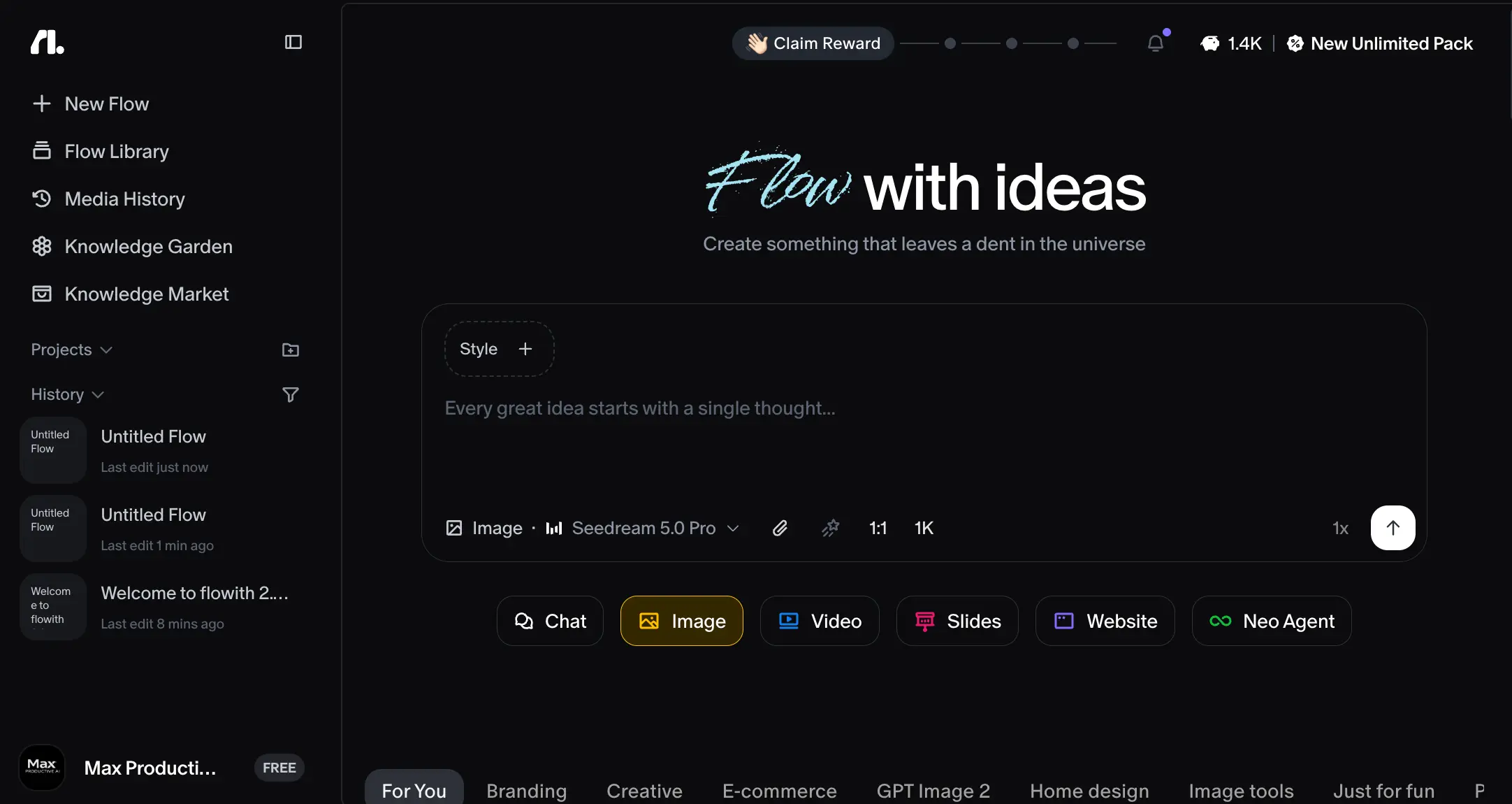
A Branching Canvas That
Earns Its Learning Curve
Flowith AI is the rare tool where the interface is the product. The infinite canvas—where every prompt and output becomes a node you can fork and compare side by side—solves a problem every heavy AI user knows: linear chat buries your work. Add 40+ models under one subscription, document-grounded memory, and an agent that keeps working while you sleep, and you get a serious workspace for complex projects. The catch is the credit system: it drains fast, doesn't roll over, and demands attention you shouldn't have to spend.
✓ What We Love
- The branching canvas—fork, compare, and merge outputs visually
- GPT-5, Claude Opus, DeepSeek, and image/video models in one place
- Agent Neo's long-form research output is genuinely strong
- Knowledge Garden grounds answers in your own documents
! Could Be Better
- Credits vanish fast—no rollover, and video burns them fastest
- Expect a few days before the canvas paradigm clicks
- No terminal or file access—not built for developer work
What Is Flowith AI?
The company behind it, the problem it solves, and who it's actually built for.
Flowith AI is an AI creation workspace that replaces the familiar chat window with an infinite 2D canvas. Every prompt, every response, every generated image becomes a node on that canvas—something you can move, branch, merge, or return to later. Instead of scrolling back through a linear thread hunting for the version you liked, you fork the conversation and keep both paths visible side by side. It sounds like a small interface decision. In practice, it changes how you approach any project with more than one possible direction.
The company behind it, Flowith Technologies Pte. Ltd., was co-founded in 2023 by Yichen Wu and Derek Nee and is registered in Singapore. After a #1 Product of the Day finish on Product Hunt in August 2024 and a public launch in 2025, the platform has grown past one million users, with backing from Stripe, NVIDIA Inception, Google for Startups, Microsoft, and AWS. That's serious support for a young product—though, as we'll get to, the base of verified independent reviews hasn't caught up with those user numbers yet.
| Flowith AI at a Glance | Details |
|---|---|
| What it is | AI creation workspace on an infinite branching canvas |
| Developer | Flowith Technologies Pte. Ltd., Singapore |
| Launched | Founded 2023; public launch 2025 |
| Pricing model | Credit-based — free plan plus three paid tiers |
| Platforms | Web, FlowithOS (Mac/Windows), iOS |
| Best for | Researchers, creators, and content teams |
| Biggest caveat | Credits don't roll over month to month |
What you're actually buying is three things under one credit-based subscription. First, the canvas itself with access to more than forty AI models—GPT-5, Claude Opus, DeepSeek, Llama, plus image and video specialists like Seedream and Flux—so you can route each step to the best-fit model without switching tools or losing context. Second, Knowledge Garden, a memory system that grounds AI answers in documents you upload. Third, Agent Neo, an autonomous agent that plans and executes multi-step work on its own, even while you're offline.
How does that compare to the tools you already know? General assistants like ChatGPT and Gemini keep everything in one linear thread and one model family. Agent builders like Lindy or MindStudio automate recurring business workflows rather than open-ended creative work. Flowith sits in the newer "super-agent" category alongside Manus and Genspark—platforms designed to plan and produce multi-step work with minimal supervision—but it's the only one of the three organized around a visual, branching workspace.
How We Reviewed Flowith
We created a free Flowith account and spent hands-on time with the onboarding flow, the canvas, and the Knowledge Garden and Knowledge Market features—the screenshots below come from that account. For everything a 300-credit trial can't reach (Agent Neo at full depth, video generation, long-term credit behavior), this review draws on independent long-term tests including a 90-day trial, controlled head-to-head comparisons, and verified user feedback. No fabricated benchmarks, no invented results.
One thing to be upfront about: this isn't a tool you'll master in an afternoon. Reviewers who used it over extended stretches describe a few days of adjustment before the canvas paradigm feels natural, especially coming from linear chatbots. That's not a dealbreaker—but it does shape who should buy it.
Who Is Flowith AI Best For?
Power users, researchers, marketers, and content teams handling complex, multi-threaded projects—the people who routinely compare several drafts, run parallel research threads, or iterate on visuals across many rounds. If your work is exploratory by nature, the canvas earns its learning curve. If you mostly want quick answers, it's overkill.
See Flowith AI in Action
Real screenshots from our Flowith account showing the interface and key features.
Dashboard & Creation Hub
The "Flow with ideas" home screen where every project starts
The home screen is cleaner than you'd expect from a tool with this much under the hood. The prompt bar sits front and center with a style selector, aspect-ratio and resolution controls, and a model dropdown—Seedream 5.0 Pro in this shot, one of dozens on the roster. Below it, mode pills switch between Chat, Image, Video, Slides, Website, and Neo Agent. The left sidebar tracks your flow history and gives one-click access to Knowledge Garden and Knowledge Market. Your remaining credit balance sits in the top bar, and you'll find yourself glancing at it more often than you'd like.
Guided Onboarding
"Spark your first creation"—guided examples that teach the canvas basics
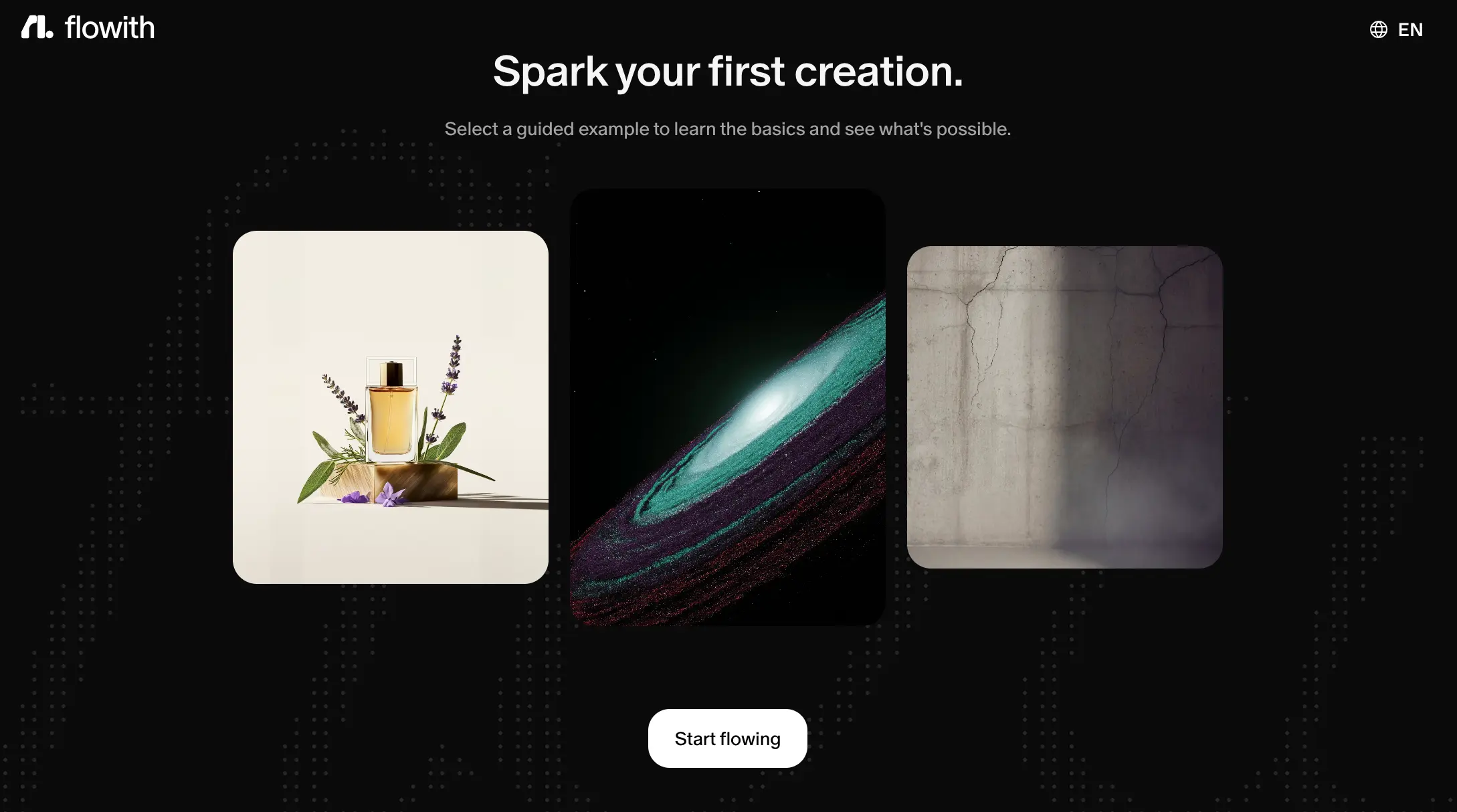
Onboarding starts with a set of guided example creations rather than a documentation dump, which is the right call for an interface this unfamiliar. Pick an example, watch how nodes connect, then hit "Start flowing." It softens the learning curve without removing it—expect the first real session to feel disorienting if you're used to linear chat. Give it a few sessions before you decide.
Curious how the canvas feels compared to a chat window?
Try Flowith →The Starter plan is enough for a first look at the canvasKnowledge Garden
Document-grounded knowledge bases—yours or the community's
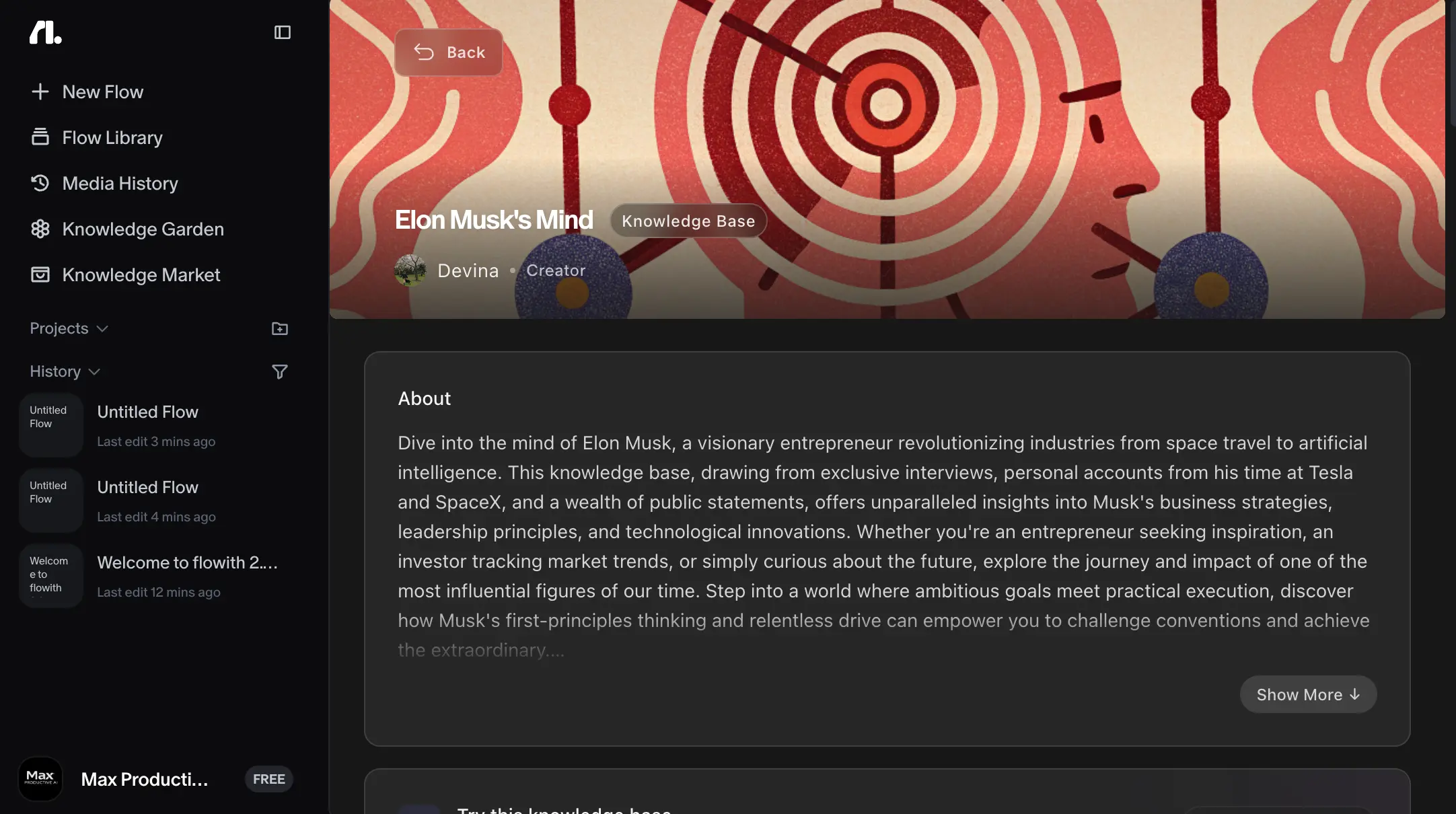
This is a community-published knowledge base—"Elon Musk's Mind," compiled by a creator from interviews and public statements—viewed from inside our account. Your own Knowledge Gardens work the same way: upload documents (up to 400,000 tokens per file), Flowith atomizes them into Seeds, and the AI answers from your material instead of guessing from training data. Independent testers report this measurably cuts hallucinations in research and writing work, and it's one of the features that separates Flowith from a generic multi-model wrapper.
Knowledge Market & Community
A marketplace of shared knowledge bases—with real creator earnings
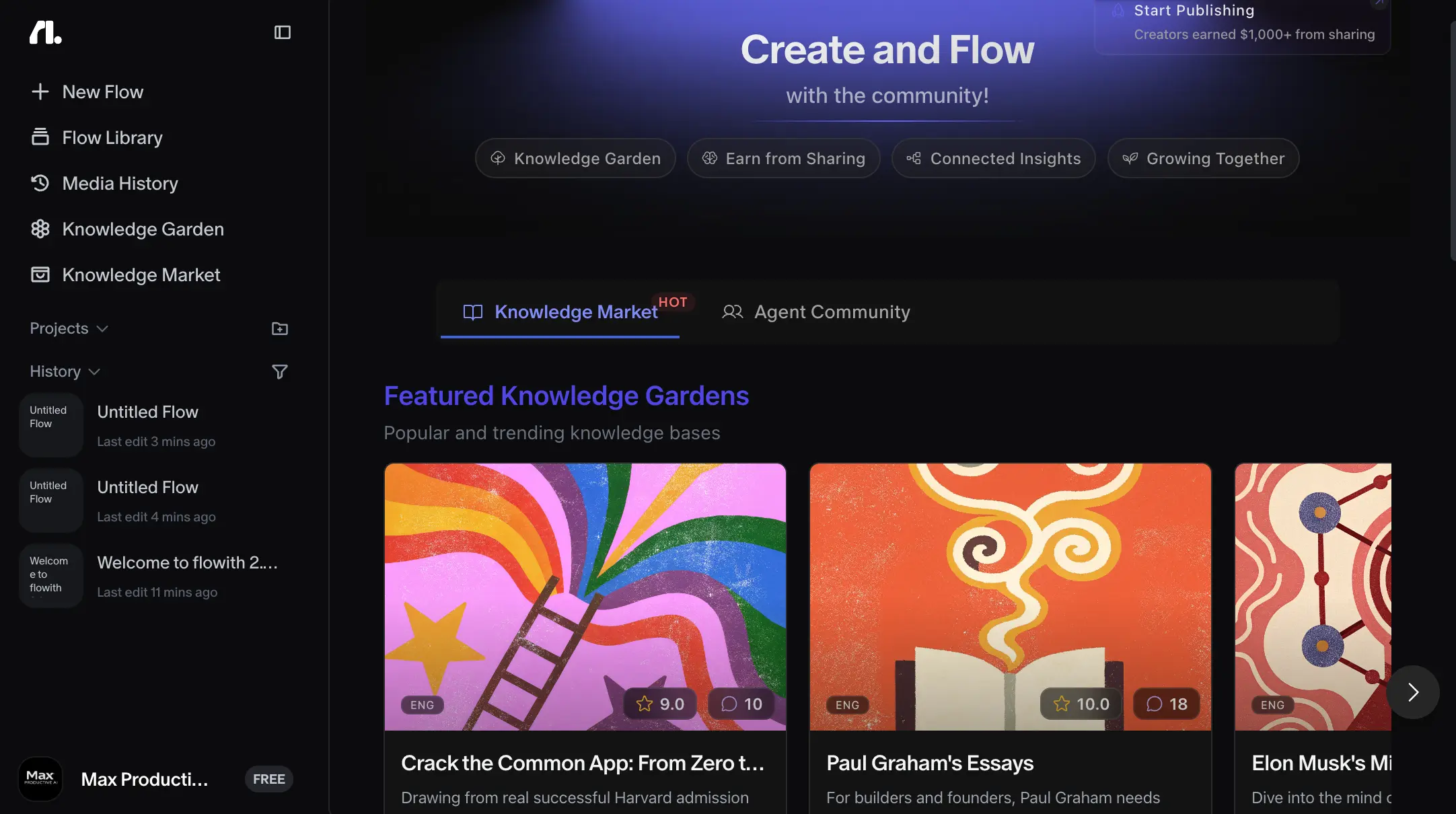
The Knowledge Market turns those knowledge bases into a two-sided community: browse featured gardens (Paul Graham's essays, college-application guides), check ratings and comments, or publish your own and earn from it—the banner touts four-figure payouts for top publishers. There's also an Agent Community tab for shared agent configurations. It's early days as marketplaces go, and curation is still light, but it's a genuinely different direction from anything ChatGPT or Manus offers.
How Flowith AI Works
From a single prompt to a branching project—and, when you're ready, a hands-off agent run.
Start a Flow on the Canvas
Type a prompt, pick a mode (Chat, Image, Video, Slides, or Website), and choose your model. The response appears as a node on the canvas rather than a message in a thread. From that node you can continue, regenerate, or—this is the point—branch.
Branch, Compare, and Merge
Fork the same prompt into multiple variations and view them side by side: three headline directions, four image edits, two research angles. Nothing gets buried above the fold. This is where the canvas pays off, especially for iterative image editing—users specifically praise seeing the whole tree of edits and stepping back to any earlier version. One caveat from user feedback: the canvas doesn't save your cursor position, which gets mildly annoying on large branch trees.
Ground It with Knowledge Garden
Upload your research, brand docs, or source material—even book-length files—and Flowith splits everything into Seeds. From then on, answers in that flow draw on your documents first. For research-heavy and long-form writing work, this is the difference between an assistant that guesses and one that cites your actual material.
Hand Off to Agent Neo
For multi-step jobs—a competitor analysis, a full report, a one-page site deployed live via flo.host—describe the goal and let Neo take it. Its Oracle planner decomposes the goal into subtasks, calls tools like web search and image generation, and keeps running after you close the laptop. You come back to a finished artifact rather than a half-completed thread.
Watch the Credit Meter
Everything—text, images, video, agent runs—draws from one shared credit pool, and unused credits vanish at the end of each billing cycle. Video is the heaviest sink by far: a single clip runs roughly 475 to 6,000 credits depending on length and resolution. Budget accordingly, and treat any video-heavy month as a test of your plan's ceiling.
About Those Headline Numbers
Flowith advertises 1,000+ inference steps per workflow, a 10-million-token context window, and 90% accuracy on the GAIA Level 3 agent benchmark. Those figures come from Flowith itself, not third-party verification. The real-world output is genuinely strong—but treat the spec sheet as marketing until independent benchmarks catch up.
Flowith AI Key Features
What Flowith AI actually bundles into one subscription—and where each piece stands today.
Branching Canvas
The reason Flowith exists. Every interaction is a node you can fork, compare, and merge on an infinite 2D map. Reviewers consistently call it the platform's most defensible advantage over standard chatbots—not a gimmick, but a real fix for the way linear threads swallow earlier work.
Agent Neo
Flowith's autonomous agent, driven by the Oracle planning framework: state a goal and it decomposes the job, runs the tools, and keeps working while you're offline. Testers found its long-form research reports polished and well-structured, often finished in under an hour. Just remember the headline specs are vendor-reported.
Multi-Model Marketplace
GPT-5, Claude Opus, DeepSeek, Llama, plus image and video specialists like Seedream, Flux, and Nano Banana—all switchable per node without losing context. No bring-your-own-API-key option, though; that's true of every tool in this category.
Knowledge Garden
Uploaded documents become Seeds that anchor AI responses in your material rather than general training data. Handles very large files and noticeably reduces hallucination risk in research tasks. Quietly one of the best features here.
AI Slides & Website
Generate slide decks or deploy a live one-page site from a single prompt via flo.host. Decent for speed—but if presentation-grade decks are your main job, Gamma still beats Flowith's Slides mode on polish and reliability, at a lower price.
AI Image & Video
Image generation across multiple models is a genuine strength, especially combined with branch-based iteration. Video works but is the platform's biggest credit sink—one clip can cost anywhere from a few hundred to several thousand credits, so heavy video users hit plan ceilings fast.
Knowledge Market
Browse, rate, and use community-published knowledge bases—or publish your own and earn from sharing. It adds a discovery-and-monetization layer no direct competitor currently matches, though quality varies by creator, as with any young marketplace.
Cross-Platform & Collaboration
Web app, a Mac/Windows desktop client called FlowithOS, and a native iOS app, with real-time multi-user collaboration on shared canvases at higher tiers. No Android client listed yet—worth knowing if that's your daily driver.
A few things you won't find: there's no terminal or file-system access, so Neo produces artifacts—reports, pages, images—rather than working software. If you need an agent that writes and executes real code in a sandbox, that's Manus territory. File-type support for uploads is also narrower than you'd expect, a recurring gripe across user feedback.
Want to route your next project through forty-plus models on one canvas?
See Flowith's Pricing →Plans from free to $49.90/month for most usersFlowith AI Pricing
Credit-based tiers, from a thin free plan to a heavyweight Infinite option.
Starter
- ✓ 300 one-time credits (no renewal)
- ✓ Standard models only
- ✓ 5 concurrent tasks
- ✓ 2 devices
- ✓ Full canvas access
Pro
- ✓ ~22,000 credits/month
- ✓ Full model marketplace
- ✓ 50 concurrent tasks
- ✓ Commercial license
- ✓ FlowithOS early access
Ultimate
- ✓ 50,000+ credits/month
- ✓ Video models included
- ✓ Agent Neo full access
- ✓ Team collaboration
- ✓ Priority queue
Important: refunds are only available within 48 hours of payment and with fewer than 200 credits consumed • An Infinite tier ($499.90/month, 500,000+ credits, dedicated support) exists for extreme usage
Pricing last verified July 2026. Flowith's own pages show slightly different credit figures in places, so confirm your tier's allowance at checkout — visit Flowith for current rates.
Is It Worth the Money?
That ≈50% figure comes from one independent three-month test, not a lab benchmark—treat it as directional. Still, the math is forgiving: if Flowith saves you even two or three hours a month on research or iteration, the Pro tier covers itself. The real financial risk isn't the subscription price—it's misjudging credit burn on video-heavy months.
For context on pricing: Manus starts at $20/month with a daily credit refresh that cushions light use; Genspark runs $24.99/month (less billed annually) but hides full pricing behind a login; Lindy starts at $49.99/month for business-admin agents; MindStudio lands around $60/month for its no-code builder; MuleRun matches Flowith's entry price with a marketplace of pre-built agents; and Gamma undercuts everyone at $9/seat/month if slides are all you need. Flowith's Pro tier is competitively priced for what it bundles—the question is never the sticker price, it's how far the credits stretch for your workload.
Flowith AI Pros & Cons
An honest breakdown from hands-on time plus independent long-term testing and user feedback.
✓ Pros
Forking a prompt into three directions and comparing them side by side sounds minor until you've done it on a real project. For research, drafting, and especially iterative image editing, keeping every attempt visible—and stepping back to any earlier version—beats scrolling through a linear thread every time. Users managing parallel tasks call it the feature that keeps them on the platform.
GPT-5, Claude Opus, DeepSeek, Llama, and a bench of image and video specialists—swap models mid-project without losing your place. You stop asking "which tool should I open?" and start asking "which model fits this step?"—a quiet but real workflow upgrade.
Independent testers came away impressed: polished, well-structured reports with strong visuals, multi-step research finished in well under an hour, and the better final deck in a controlled head-to-head against Manus (7.5/10 vs. 6.5/10 overall, despite taking longer). For artifact-style deliverables, Neo is the real thing.
Grounding answers in your uploaded documents isn't a novelty feature—testers report it measurably reduces made-up claims in research and writing work. For anyone producing client-facing or published material, that alone can justify the subscription.
Web, a dedicated Mac/Windows client (FlowithOS), and a native iOS app, with real-time collaboration on shared canvases at higher tiers. Plenty of rivals in this category are still browser-only.
The Knowledge Market lets you use knowledge bases other people have built—or publish your own and earn from it. It's young and uneven, but it points somewhere none of the direct competitors are going.
✗ Cons
One shared pool covers everything, nothing rolls over, and video can eat a month's allowance in a handful of clips. Worse, Flowith's own pages show inconsistent credit figures, and at least one user reported per-image costs jumping sharply after renewal. The refund window is measured in hours, not weeks, which leaves little room to change your mind.
The canvas is unfamiliar, and long-term testers consistently describe an adjustment period before it feels natural. Coming from linear chatbots, the first sessions feel like more work, not less. Push through a few real projects before judging—or don't buy it if you won't.
Neo produces reports, pages, and images—not running software. There's no sandbox, no command execution, no direct file manipulation, which is why developer-leaning testers consistently point to Manus instead. Flowith isn't trying to be that tool, but you should know it isn't.
A recurring complaint across user feedback: the input formats the various agents accept are narrower than expected. If your source material lives in unusual formats, test before committing.
A one-time credit grant that never renews is enough for an afternoon of poking around, not an evaluation. You can't meaningfully test Neo or video generation without paying, which makes the tight refund window sting more.
For a product claiming a million-plus users, the number of verifiable third-party reviews remains small, and the headline benchmark figures are self-reported. The independent signal that does exist is positive—but it's a smaller sample than we'd like.
Flowith AI vs Alternatives
How Flowith AI stacks up against the super-agents and agent builders competing for the same subscription.
| Feature | Reviewed Flowith AI | Manus | Genspark | Lindy |
|---|---|---|---|---|
| Starting Price | $19.90/mo | $20/mo | $24.99/mo | $49.99/mo |
| Free Plan | 300 credits, one-time | ✓ + daily refresh | ✓ Free plan | 400 credits/mo |
| Interface | Branching canvas | Task dashboard + cloud VM | Chat + output view | Natural-language builder |
| Terminal/File Access | ✗ None | ✓ Sandboxed VM | Limited (plugins) | ✗ None |
| Monthly Credits | 22,000–550,000 | 4,000–40,000 (+daily) | 10,000–125,000 | Unpublished per-action |
| SOC 2 / ISO | No | Yes | Yes | Yes |
| Unique Strength | Parallel visual iteration | Ships working software | Office formats + phone calls | Inbox/CRM automation |
| Best For | Researchers, creators | Developers, builders | Decks, sheets, BI | Business admin |
Which Tool Is Right For You?
Flowith AI
ReviewedBest for: Exploratory, parallel work—brainstorming, iterative image and design editing, and long-running research or writing projects where comparing branches side by side genuinely speeds up decisions. Independent testing found it strongest on complex, long-chain tasks (code generation, interactive pages), with little differentiation from standard chatbots on simple one-step jobs. If your work naturally forks in multiple directions, this is the tool built for it.
Manus
Developer-Grade AgentBest for: Autonomous execution that ships working artifacts—apps, scripts, automated pipelines—rather than documents and images. Manus (now operating under Meta) has what Flowith lacks entirely: a real terminal, file-system access, and a persistent sandboxed cloud VM, plus a daily credit refresh that keeps light recurring use from stalling. In a controlled slide-deck head-to-head it was faster than Flowith but rougher on final quality.
Genspark
Office & BI FocusBest for: Office and business-intelligence work—decks, sheets, docs, and dashboards assembled from raw data, plus a "Call For Me" feature that places real phone calls. It's the speed-and-format pick among the super-agents. The catch: full pricing sits behind a login wall, a transparency gap next to Flowith and Manus.

Lindy
Business AutomationBest for: Automating recurring business admin—inbox triage, meeting prep, CRM updates—through natural-language agent setup and 100+ templates. It's Flowith's counterpart for operations rather than creative work. Be aware of its own credit-anxiety problem and reported reliability hiccups under production load; treat it as a fit for light, non-critical automation.

MindStudio
No-Code BuilderBest for: Teams standardizing repeatable, custom agent workflows across 50+ models without code. It trades Flowith's exploratory canvas for structure and price transparency—better for "build it once, run it weekly" automation than for open-ended creative sessions.

MuleRun
Agent MarketplaceBest for: Users who'd rather pick from 180+ pre-built agents than build from a blank canvas, backed by an always-on cloud VM for 24/7 execution. Its entry tier matches Flowith's price exactly, making it the lowest-friction alternative on this list—though agent quality varies by creator.

Gamma
Free Tier AvailableBest for: Polished slide decks, docs, and one-page sites—nothing more, and that's the point. Gamma beats Flowith's built-in Slides and Website modes on quality and reliability, starts at $9/seat/month, lets credits roll over up to 2x, and has a genuinely usable free tier. Deliberately narrow, extremely good in its lane.
Frequently Asked Questions
Should You Try Flowith AI?
Flowith AI earns its 4.1/5 rating by doing something most AI tools only claim: offering a workflow you can't replicate elsewhere. The branching canvas is a real answer to a real problem—linear chat buries your best work—and pairing it with dozens of models, document-grounded memory, and a capable autonomous agent makes it one of the most interesting workspaces in the category. For researchers, content teams, and marketing operators juggling parallel projects, the productivity gains are genuine.
The deductions are just as real. The credit system is opaque and unforgiving—no rollover, a punishing video burn rate, and a refund window measured in hours. The learning curve will filter out casual users. And developers should look elsewhere: without terminal or file access, Neo makes artifacts, not software. Know which side of that line your work falls on before subscribing.
Our Recommendation
Use the free plan for a first look at the canvas, then pilot the Pro tier for one real project cycle—the Starter credits alone won't tell you enough. Spend that month on what Flowith does best: parallel research, image iteration, or a long-form writing project grounded in Knowledge Garden. Hold off on video-heavy work until you understand your credit burn, and note the tight refund terms—a two-day window and a 200-credit cap—before committing to anything annual.