

CapCut Review
Free AI-powered video editor for TikTok, Reels, and YouTube Shorts. Auto captions, AI avatars, trending effects—all without paying a cent.
Try CapCut Free →
Best Free Video Editor
for Short-Form Content
CapCut's free tier is genuinely impressive—auto captions, AI avatars, and trending effects without paying anything. The 15-minute limit keeps it focused on short-form content, which is exactly what it does best. A solid choice for social media creators.
✓ What We Love
- Best free tier in video editing
- Powerful AI (auto captions, avatars, TTS)
- Perfect TikTok/Reels integration
- Intuitive for complete beginners
! Worth Knowing
- 15-minute video length limit
- Optimized for short-form, not long videos
- Some premium features require Pro
- ByteDance ownership (like TikTok)
CapCut in Action
Real screenshots showing CapCut's AI tools and editing interface.
AI-Powered Dashboard
Start with templates, AI video maker, or blank canvas
Auto Captions Generator
One-click captions in 130+ languages

AI Text-to-Speech
269+ voices across multiple languages
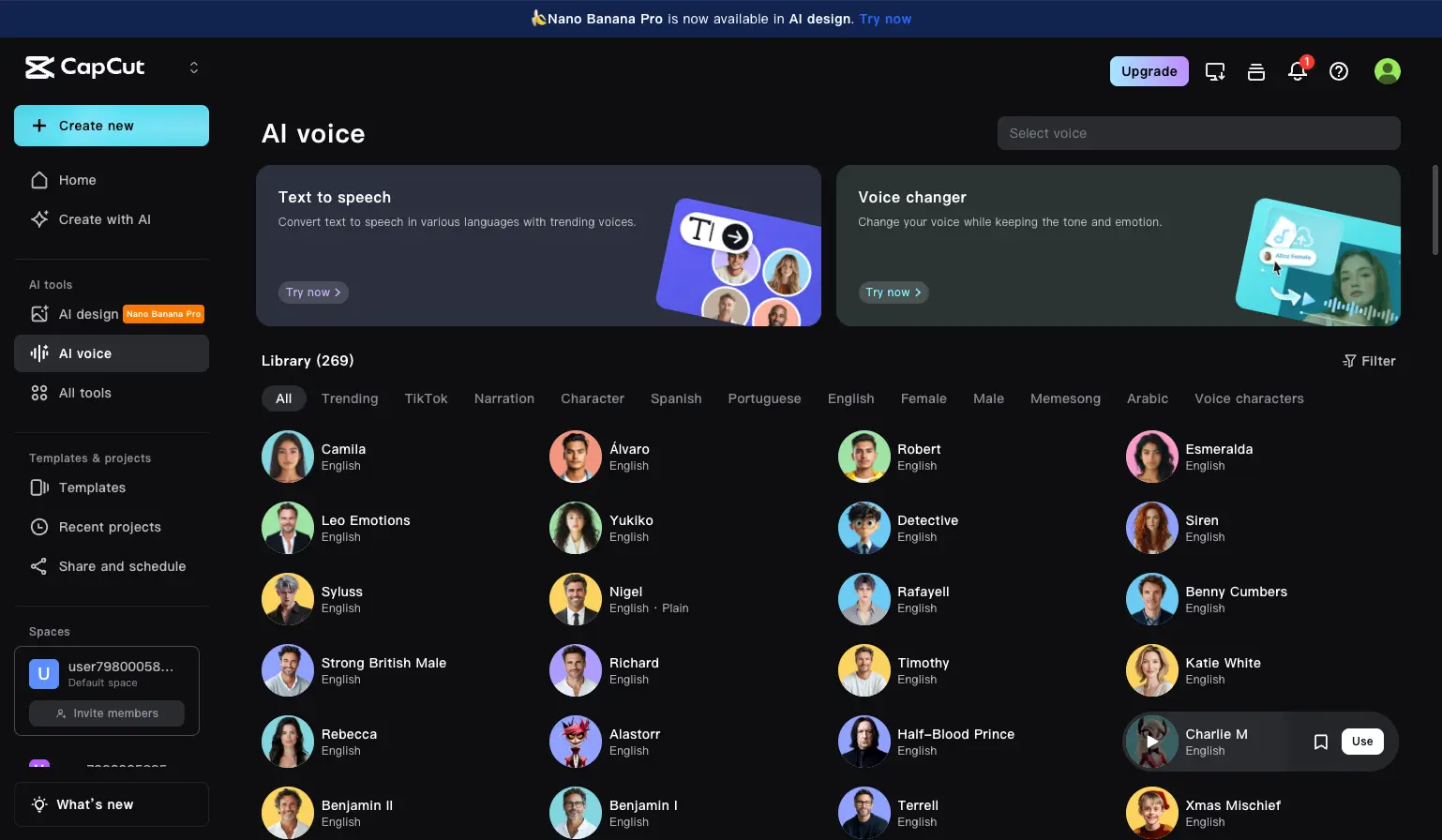
AI Avatars
Digital presenters for faceless content

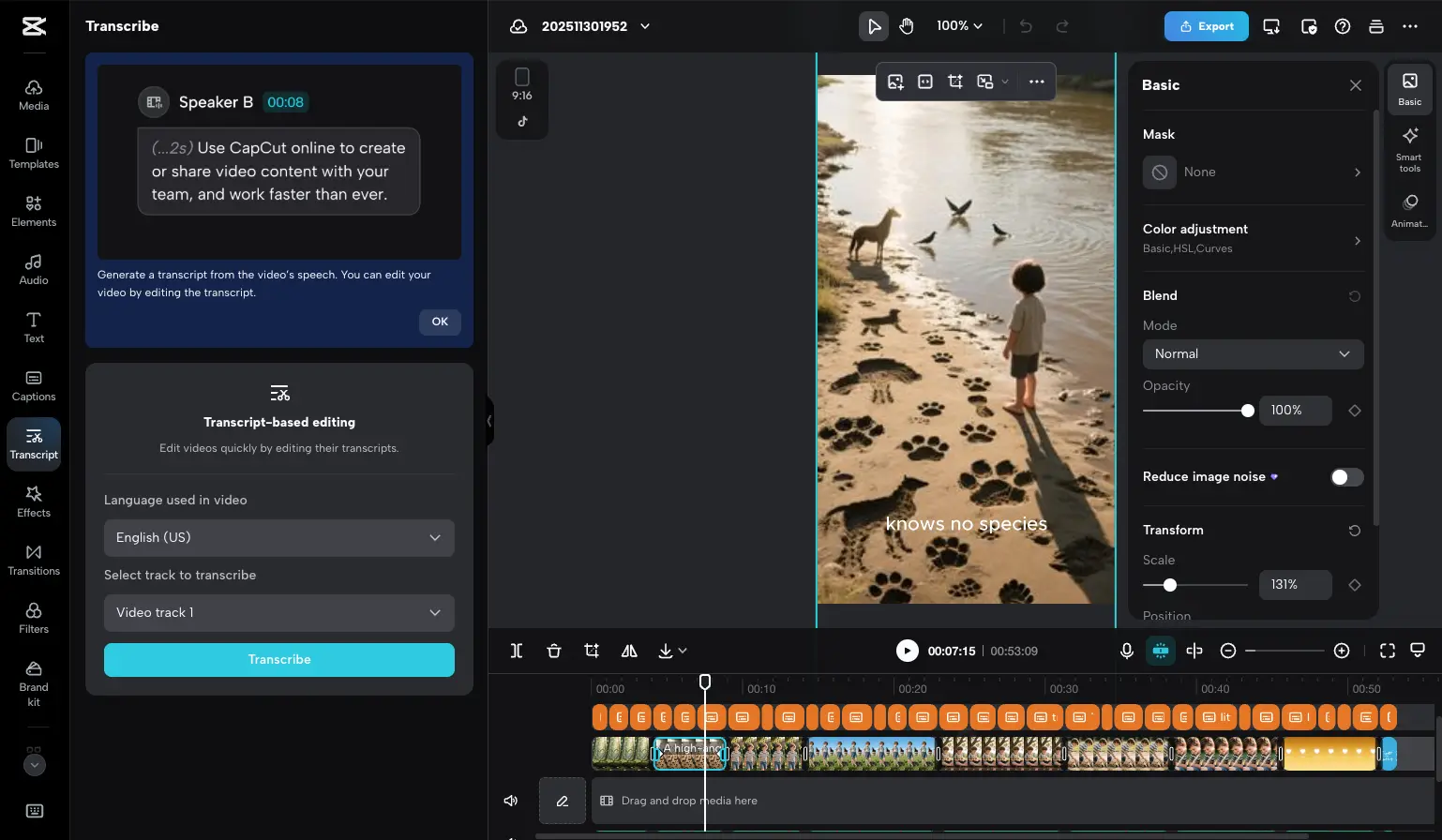
Transcript-Based Editing
Edit video by editing text
AI Design Tools
Generate thumbnails, posters, and social graphics

AI Features Deep Dive
What makes CapCut stand out for content creators.
Auto Captions
One-click speech-to-text in 130+ languages. Accurate transcription with customizable caption styles.
AI Avatars
Digital presenters that lip-sync to your script. Create faceless videos without appearing on camera.
Text-to-Speech
269+ natural-sounding voices across languages. Perfect for narration, tutorials, and voiceovers.
Background Removal
AI-powered chroma key without green screen. Remove or replace backgrounds in one click.
Script to Video
Paste text and get an auto-generated video with scenes, music, and voiceover. Great for ideation.
Long-to-Shorts
Auto-extract highlights from longer videos. Repurpose content for TikTok, Reels, and Shorts.
Auto Reframe
Automatically crop and reframe for different aspect ratios. 9:16, 16:9, 1:1—all from one export.
Video Upscaler
Enhance low-quality footage with AI. Old videos, screenshots, and compressed files look sharper.
Most AI Features Are Free
Unlike competitors, CapCut includes auto captions, text-to-speech, AI avatars, and script-to-video in the free tier. Pro mainly adds 4K export, removes watermarks on premium templates, and unlocks the full asset library.
CapCut Limitations to Know
Before you commit, understand these constraints.
15-Minute Video Limit
CapCut is built for short-form content
While technically you can edit longer videos on desktop, CapCut becomes unstable and unreliable beyond ~15 minutes. This isn't a bug—it's by design. CapCut is optimized for TikTok, Reels, and Shorts, not documentaries or YouTube long-form. If you need to edit longer content, consider Filmora or DaVinci Resolve.
Subscription Management
Tips for a smooth Pro experience
CapCut has excellent app store ratings (4.6/5) for its editing features, though some Pro subscribers have reported challenges with subscription management and customer support response times. If you upgrade to Pro, we recommend: keeping track of your billing cycle, managing subscriptions through your app store settings, and testing within the trial period to ensure it meets your needs. The free tier is robust enough for most creators to evaluate before committing.
Data & Privacy Considerations
What to know about ByteDance ownership
CapCut is developed by ByteDance, the same company behind TikTok. Like most modern apps, it collects usage data, device information, and processes uploaded media to deliver its AI features. This is standard practice for cloud-based video editors. For personal content creators making social videos, this works well. Organizations with specific compliance requirements may want to review the privacy policy to ensure it aligns with their needs.
Free vs Pro Features
Understanding the tier differences
CapCut has evolved its pricing model over time, with some advanced effects and AI features now exclusive to Standard or Pro tiers. The core editing experience remains excellent and free, including auto captions, basic AI tools, and 1080p export. Pro unlocks 4K export, the full asset library, and advanced AI features. Most casual creators find the free tier sufficient, while power users benefit from Pro's expanded capabilities.
CapCut Pricing (December 2025)
Prices vary by region and platform. These are typical US rates.
Free
Standard
Pro
Annual billing: Typically saves 30-50% vs monthly.
Our Recommendation
Start with the free tier to explore CapCut's capabilities—it's genuinely generous. Upgrade to Pro if you need 4K export, watermark-free premium templates, or the full asset library. For creators who prefer one-time purchases, Filmora's $79 lifetime license is also worth considering.
Detailed Pros & Cons
✓ Pros
Auto captions, AI avatars, text-to-speech, and script-to-video—all free. No other editor matches this.
New users can edit and export their first video within minutes. The interface is intuitive and forgiving.
Trending effects, music, and templates updated weekly. Aspect ratios and exports optimized for social platforms.
Start editing on your phone, continue on desktop, finish in browser. Cloud sync works well (especially on Pro).
Auto captions generate in seconds. Background removal is nearly instant. ByteDance's AI is genuinely impressive.
✗ Cons
Designed for short-form content. Longer videos may experience performance issues. Consider alternatives for YouTube long-form.
Customer support primarily uses automated systems. Manage subscriptions through your app store for easier control.
Like most modern editors, CapCut processes content in the cloud. Review privacy terms if working with sensitive material.
Some advanced effects and AI tools require Pro. Free tier is generous but not unlimited.
Limited color grading, no multi-cam, basic audio mixing. Designed for speed over deep control.
CapCut vs Alternatives
Which video editor is right for your needs?
| Feature | CapCut | Filmora | Descript | VEED.io |
|---|---|---|---|---|
| Starting Price | Free | $4.17/mo (or $79 lifetime) | $16/mo | $12/mo |
| Video Length Limit | ~15 minutes | ✓ Unlimited | ✓ Unlimited | ✓ Unlimited (paid) |
| Best For | Short-form social | YouTube/general | Podcasts/interviews | Teams/collaboration |
| AI Captions | ✓ 130+ languages | ✓ Available | ✓ Excellent | ✓ Available |
| Desktop App | ✓ Win/Mac | ✓ Win/Mac | ✓ Win/Mac | Browser only |
| Mobile App | ✓ iOS/Android | ✓ iOS/Android | ✓ iOS | ✓ iOS |
| Customer Support | Automated + community | ✓ Human support | ✓ Human support | ✓ Human support |
Which Tool Is Right For You?
CapCut
Best for Short-FormBest for: TikTok creators, Instagram Reels, YouTube Shorts. Beginners who want powerful AI tools without paying. Anyone who values ease-of-use over advanced features.

Wondershare Filmora
$79 LifetimeBest for: YouTubers who need unlimited video length. Anyone who prefers a one-time purchase over subscriptions. Better customer support than CapCut.

Descript
PremiumBest for: Podcasters and interview-style content. Edit video by editing text—revolutionary for talk-heavy content. Voice cloning with Overdub.
VEED.io
Browser-BasedBest for: Teams and marketers who need collaboration features. Browser-based means no downloads. Better for brand consistency.

InVideo AI
Best for: Text-to-video generation. Describe what you want and get a complete video. Great for marketing and ads.

Runway ML
AI Video GenBest for: Cutting-edge AI video generation. Gen-4 models create footage from text. For experimental creators and AI enthusiasts.
Frequently Asked Questions
Is CapCut Worth It?
For short-form social content, CapCut's free tier is exceptional. Auto captions, AI avatars, text-to-speech, and trending effects—all without paying anything. No other editor offers this combination for TikTok, Reels, and Shorts creators.
The 15-minute limit means CapCut isn't designed for long-form content—but that's by design, not a flaw. For its intended use case (social video), CapCut delivers outstanding value. Pro adds 4K export and premium assets for creators who need more.
Our Recommendation
Start with CapCut Free for short-form social content—it's genuinely excellent. Upgrade to Pro if you need 4K or premium assets. For long-form YouTube content, pair CapCut with Filmora or Descript.
Ready to Create Short-Form Content?
Join 500 million+ creators using CapCut's free AI video editor