
ClickUp review
ClickUp puts tasks, docs, chat and an AI assistant that can act on your work in one workspace. For a team ready to spend some time on setup, it can replace several tools. If you want something simple, a lighter app will suit you better.
Free Forever plan with no time limit. Paid plans come with a 30-day money-back guarantee.
This review contains affiliate links. We may earn a commission at no extra cost to you.
Verdict: the all-in-one workspace whose AI now does real work
As of October 2026, ClickUp is the all-in-one workspace we'd suggest to teams that want tasks, docs, chat and AI under one roof. The free plan has no cap on tasks or members. In our test, Brain² read our review List and guidelines Doc, wrote an accurate progress report, created three subtasks and built a working dashboard. The trade-offs are effort and cost as you grow. Expect a real learning curve, and budget for AI. Full Brain² starts on the Business plan at $17 per user a month on yearly billing, and ClickUp bills every member of the workspace.
What we like
- One workspace for tasks, docs and chat
- Brain² can act, not just answer
- A free plan with no member cap
Best for. Growing teams that want projects, docs, chat and AI in one place and are willing to invest in setup. Also solo users and small teams who want a free plan with no member cap.
Try ClickUp freeWhat we don't
- A real learning curve
- Full AI starts on Business
- Free plan limits are counted in uses
Not for you if. You want a to-do list or a board you can learn in an afternoon. Todoist and Trello are lighter, and Monday.com is quicker to set up for team projects.
Compare alternativesHow we tested ClickUp
- Method
- Hands-on use, October 2026
- Access
- Our own Free Forever workspace, with the built-in Brain² trial
- Scope
- Board, tasks, a Doc wiki, and Brain² reports, subtasks and an Artifact dashboard
- Not tested
- Super Agents, automations, Gantt and Dashboards, integrations and importers, mobile apps, paid plans
We built this test around real work: the six reviews in our editorial pipeline in October 2026. In our Free Forever workspace we set up a Space for content and put the six reviews on a Board. We wrote a brief and a six-step checklist into one task, and kept our editorial guidelines in a Doc marked as a wiki. Then we gave Brain² two jobs: read the List and the Doc, report on progress and create three subtasks, then build an editorial dashboard as an Artifact. The screenshots below come from that workspace, including its upgrade screen. Prices and limits come from that screen, ClickUp's pricing page and its Help Center. User opinion comes from Reddit, ClickUp's feedback board, Trustpilot, app store reviews and tech press.
We did not build Super Agents or automations, use Gantt or Dashboards, or connect integrations. We also skipped the importers, the mobile apps and the paid plans, so those parts rely on ClickUp's documentation. We didn't check whether the Artifact dashboard updates when tasks change, so we describe it as a snapshot.
What changed since our last review
- October 2026
- ClickUp's new plans, with AI built in, now appear as early access in new and Free Forever workspaces: Core, Business, Business Plus and Enterprise. See pricing
- June 2026
- Brain² replaced ClickUp Brain. It can act on your workspace, route work to Claude, GPT or Gemini, build Artifacts such as decks and dashboards, and connect other apps through MCP.
- March 2026
- ClickUp 3.0 was retired on March 27, 2026, so every workspace now runs ClickUp 4.0, which launched in December 2025.
ClickUp
Our rating: 4.6 / 5
Free plan. Paid plans from $9 a user a month, billed yearly.
Try ClickUp freeOr compare Monday.com, Asana and Trello.
What is ClickUp?
ClickUp is an all-in-one work management platform. Tasks and projects, docs and wikis, team chat, whiteboards, goals, time tracking and an AI assistant called Brain² all live in one workspace. You organize work in Spaces, Folders and Lists, then look at the same tasks as a list, a Kanban board, a calendar, a table or a Gantt chart. It runs in the browser, with apps for Windows, Mac, Linux, iOS and Android.
Two changes make it a different product from the one we first reviewed in June 2025. ClickUp 4.0 arrived in December 2025 with a redesigned interface, and it became the only version on March 27, 2026. Then in June 2026, ClickUp relaunched its AI as Brain². Brain² draws on your tasks, docs and chat, sends each request to Claude, GPT or Gemini, and keeps a memory of your preferences. It can also act: create and update tasks, build Artifacts such as slide decks and dashboards, and reach other apps through MCP.
What separates ClickUp from Monday.com, Asana or Trello is breadth. Those tools put project management first. ClickUp builds docs, chat and AI into the same workspace, so context stays next to the work. You get fewer tabs to juggle and more settings to learn. Its free plan follows the same logic: generous with people, with no member cap, and stricter with advanced features, which come with a fixed number of uses.
ClickUp hands-on: our editorial board and Brain²
These screenshots come from our Free Forever workspace in October 2026, in the order we worked. Tap or click any image to open it full size.
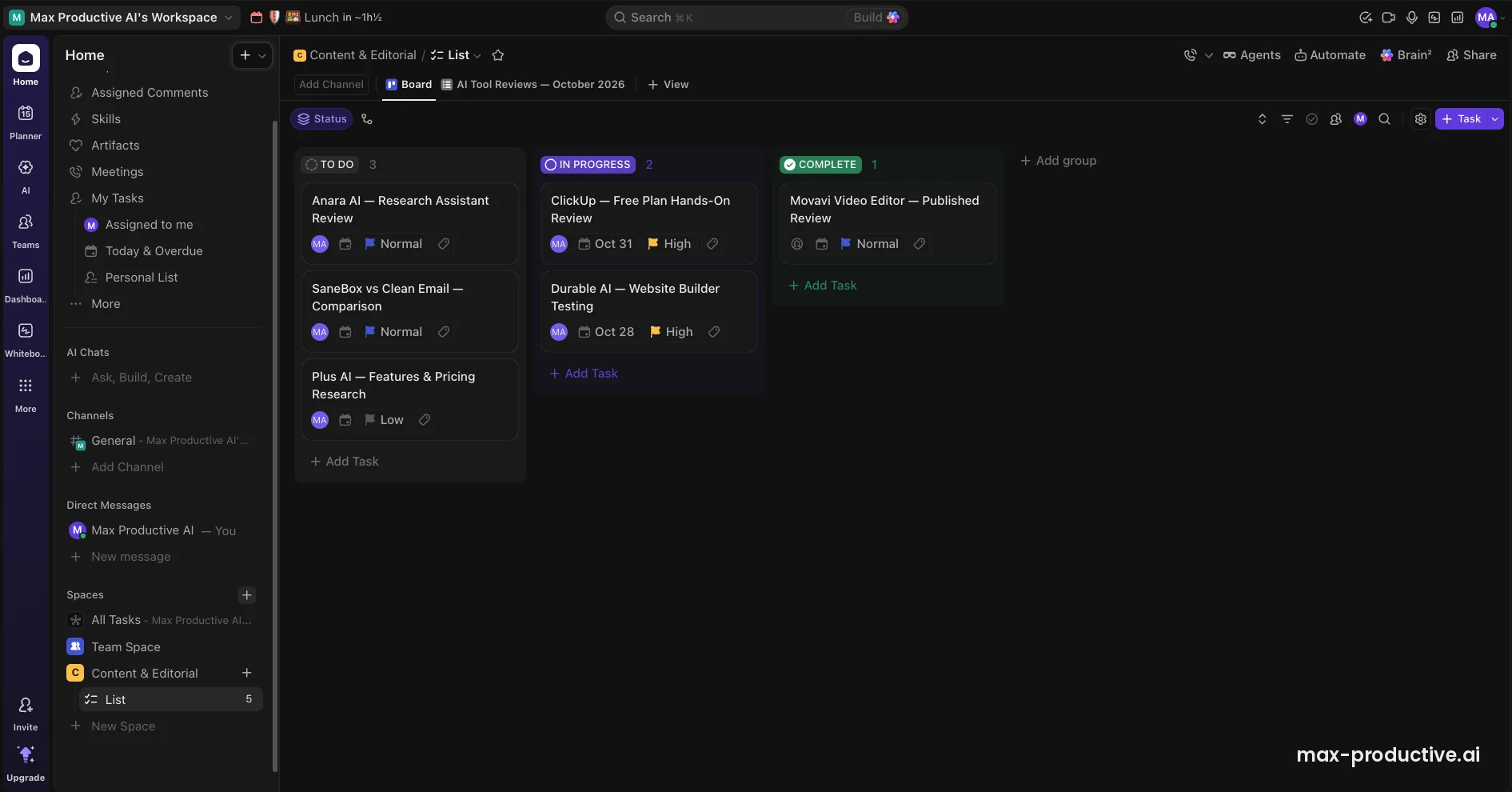
The Board view
We created a Space called Content & Editorial and a List of six reviews from our pipeline. In Board view, each status is a column: To do, In progress and Complete. Cards show the assignee, the due date and a priority flag, and you drag a card to change its status. List, Board, Calendar and Table views have no usage counter on the free plan, so this is a view you can work in every day at no cost.
Our advice: agree on your statuses before you add tasks. ClickUp lets you customize them, and a team with four or five clear statuses tends to get more from the Board than one that improvises.
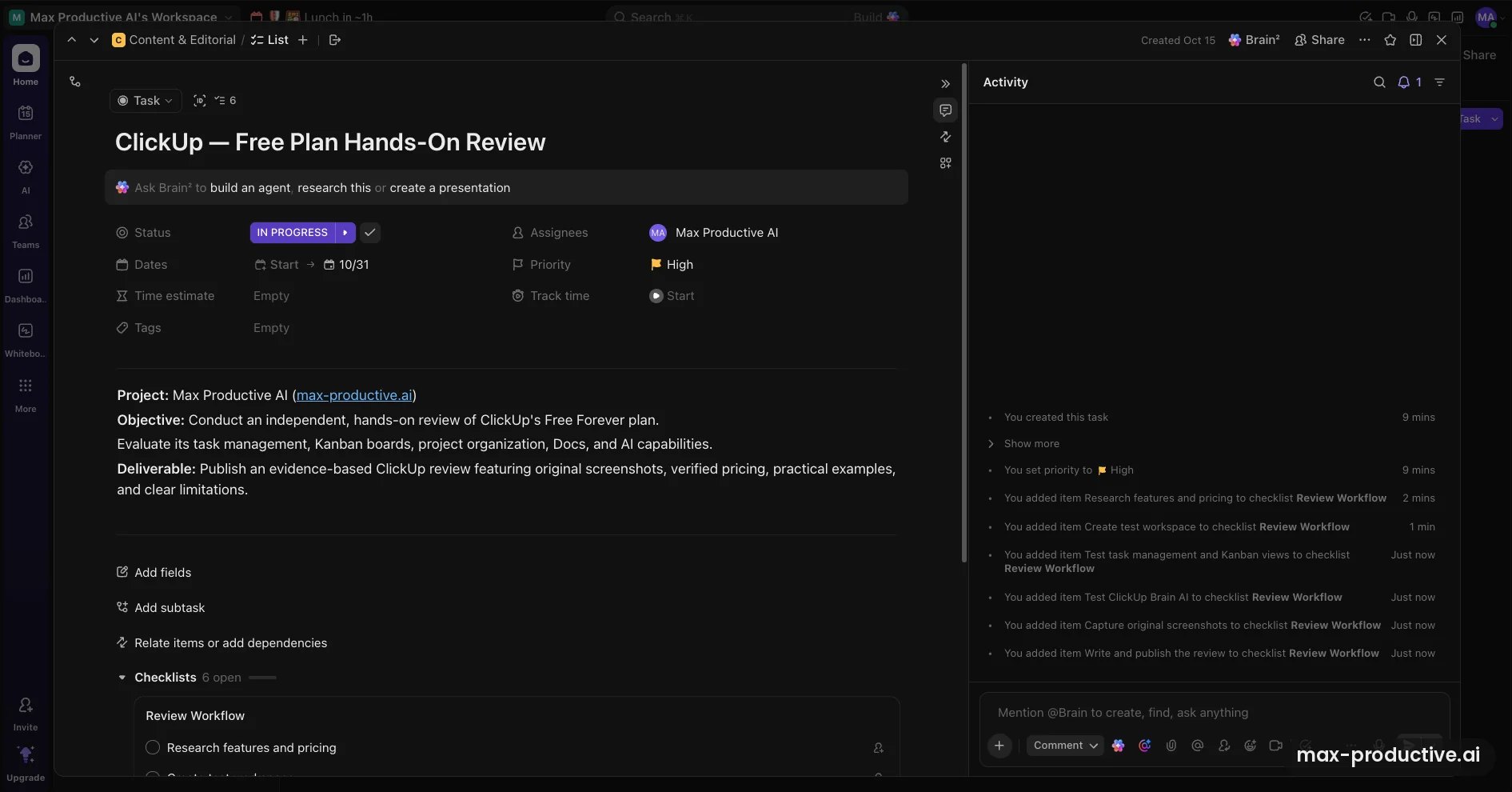
A task with a brief and a checklist
Open a card and you get the whole task: status, dates, priority, assignee and time tracking at the top, a description below, then subtasks and checklists. We wrote the brief for this review into the description and added a six-step checklist, from researching pricing to publishing. The Activity panel on the right logs each change with a time, which helps when several people touch the same task.
The page is busy. There are fields for time estimates, tags and dependencies, and a prompt to ask Brain² to build an agent or a presentation. New users can ignore most of it at first. One free plan detail to watch: Custom Fields come with 60 uses for the whole workspace, so add them sparingly.
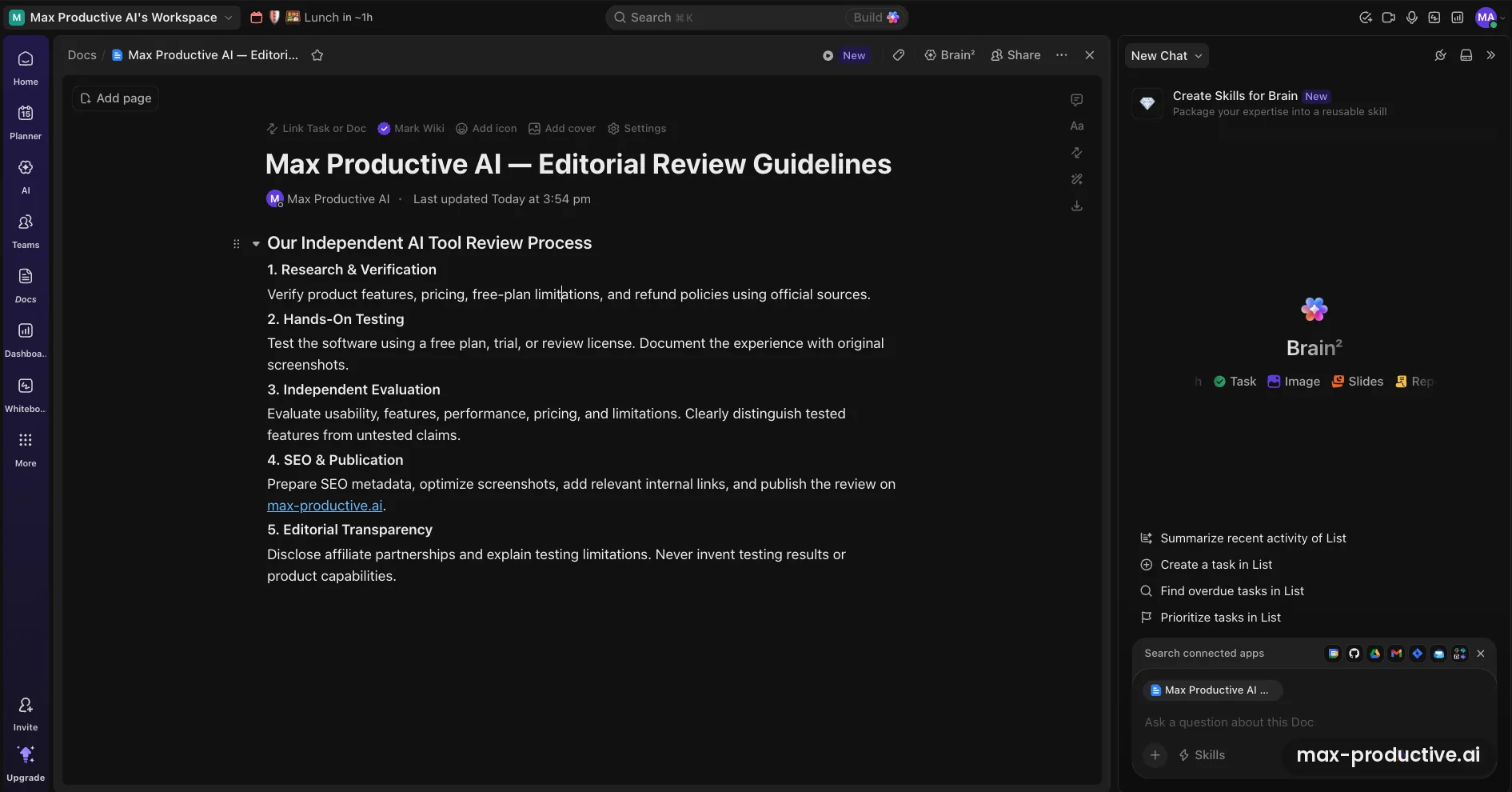
A Doc marked as a wiki
ClickUp Docs sit right next to your tasks. We wrote our editorial review guidelines as a Doc and marked it as a Wiki, which flags it as a reference page for the team. The free plan allows one wiki. Docs can link to tasks, and with the Brain² panel open you can ask questions about the page in front of you.
We kept the guidelines in ClickUp for a reason: Brain² can read them. That pays off in the next two screenshots.
Asking Brain² to do real work
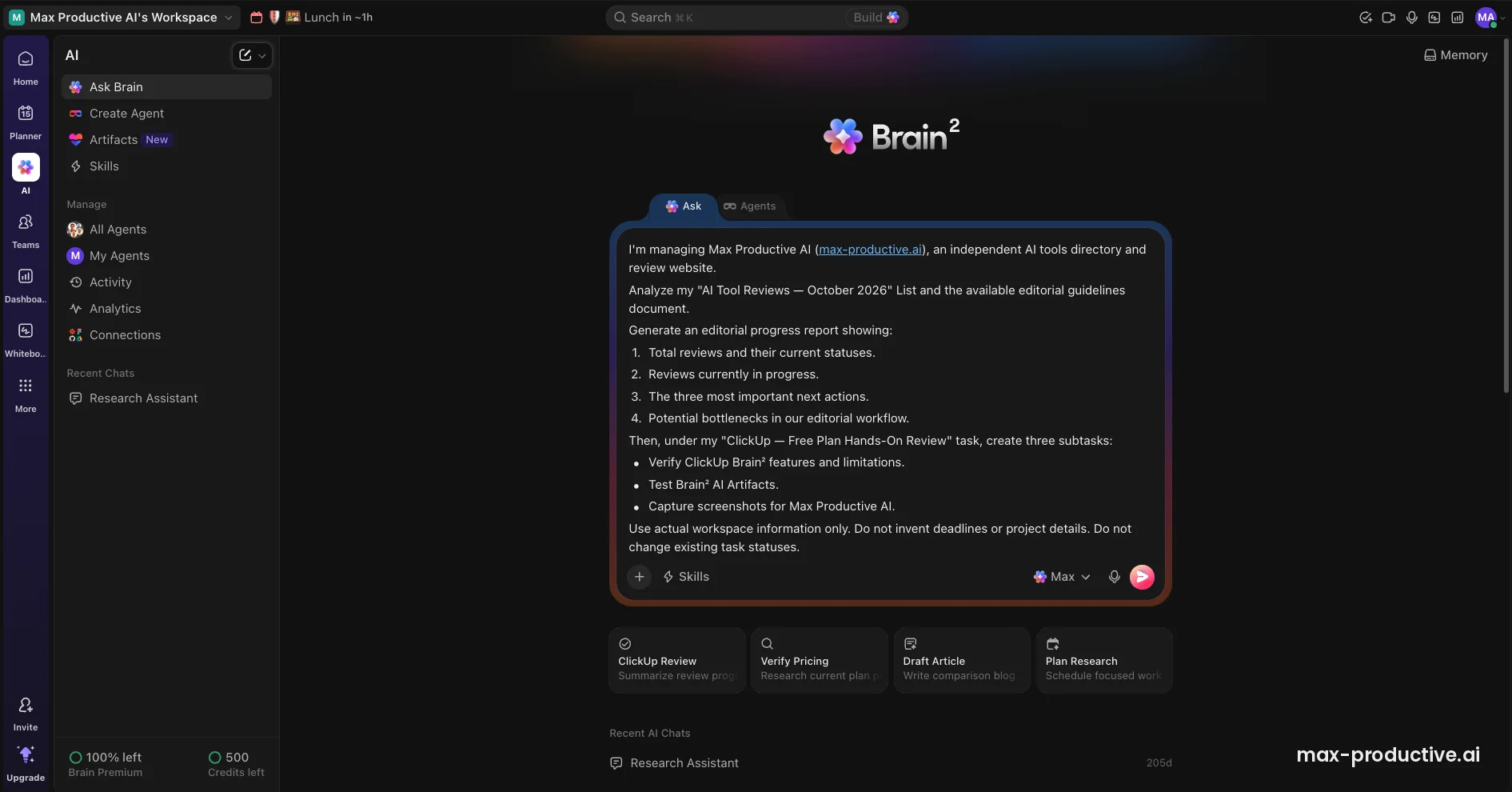
The AI hub gathers Brain²'s tools in one sidebar: Ask, Agents, Artifacts and Skills, plus Manage pages for agents, activity, analytics and connections. We gave Ask a demanding prompt. Read our review List and the guidelines Doc, report totals by status, name the three most important next actions and any bottlenecks, then create three subtasks under the ClickUp review task. We also told it to use real workspace data only, invent no deadlines and change no statuses.
The footer shows the free plan's AI allowance, including 500 AI credits for the whole workspace. ClickUp's Help Center says the free plan's AI uses and credits don't reset, so spend them on questions about your own work.
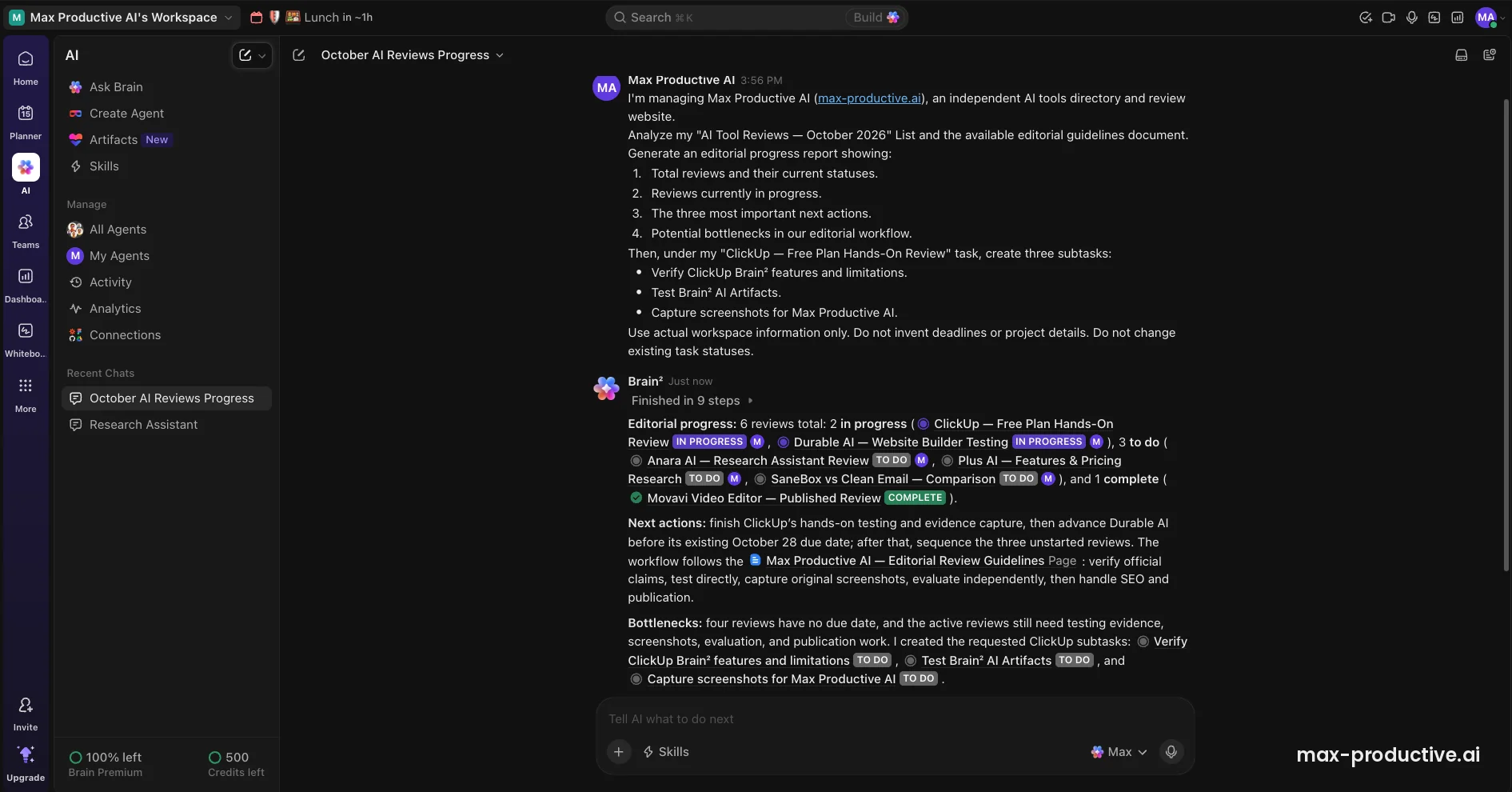
The Brain² report and the new subtasks
Brain² finished in nine steps, and its counts matched our board exactly: six reviews, two in progress, three to do and one complete. Its next actions made sense, it kept Durable AI's existing October 28 due date instead of inventing dates, and it linked our guidelines Doc as the process to follow. It also flagged that four reviews had no due date, three of them still open, which is a fair point for planning. Then it created the three subtasks we asked for, each set to To do.
This is the shift Brain² is built around, from answering questions to acting on the workspace. Parts of the report read a little generic, and we'd still check its suggestions. For a weekly status round-up across a List and a Doc, though, one prompt did what would otherwise take a careful read of both.
The dashboard Brain² built as an Artifact
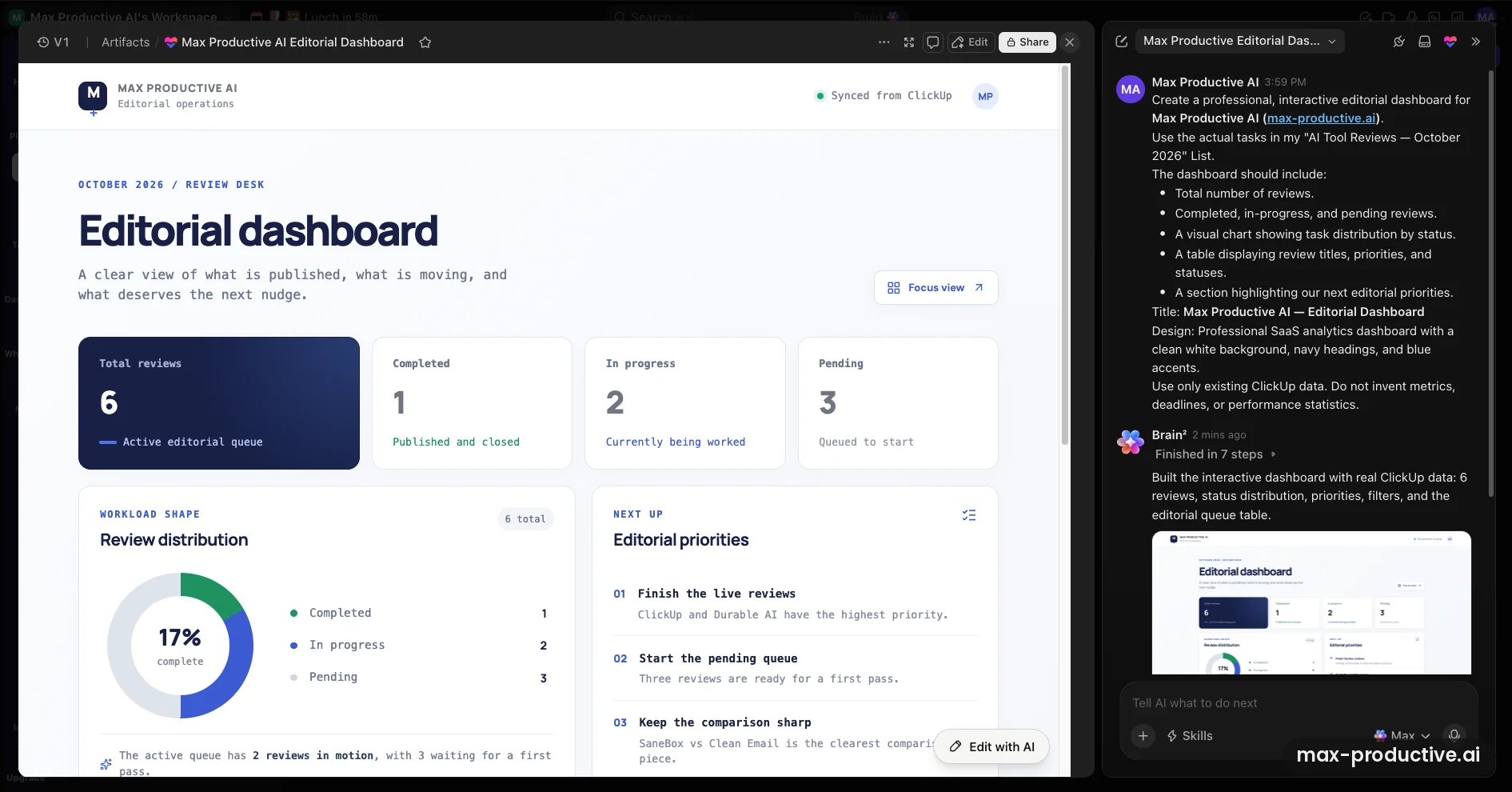
Our second job for Brain² was an editorial dashboard built from the review List. We asked for totals, a status chart, a table of titles and priorities, and our next priorities, in a white, navy and blue design. It finished in seven steps. The numbers are right: 6 reviews, 1 completed, 2 in progress and 3 pending, with a donut chart at 17% complete. The priorities panel makes sensible calls, starting with the ClickUp and Durable AI reviews, the two marked high priority. Brain²'s summary says the table and filters sit further down the page.
Artifacts are part of Brain². They can be slide decks, dashboards, reports or small interactive prototypes, and they're saved in your workspace. This one is versioned (V1), with an Edit button and an Edit with AI button, so you can refine it by hand or by prompt. It ran on the free plan's AI trial. Two caveats: creating or editing an Artifact uses AI credits, and although the header reads "Synced from ClickUp", we didn't test whether it updates when tasks change. Check that before you treat it as a live view.
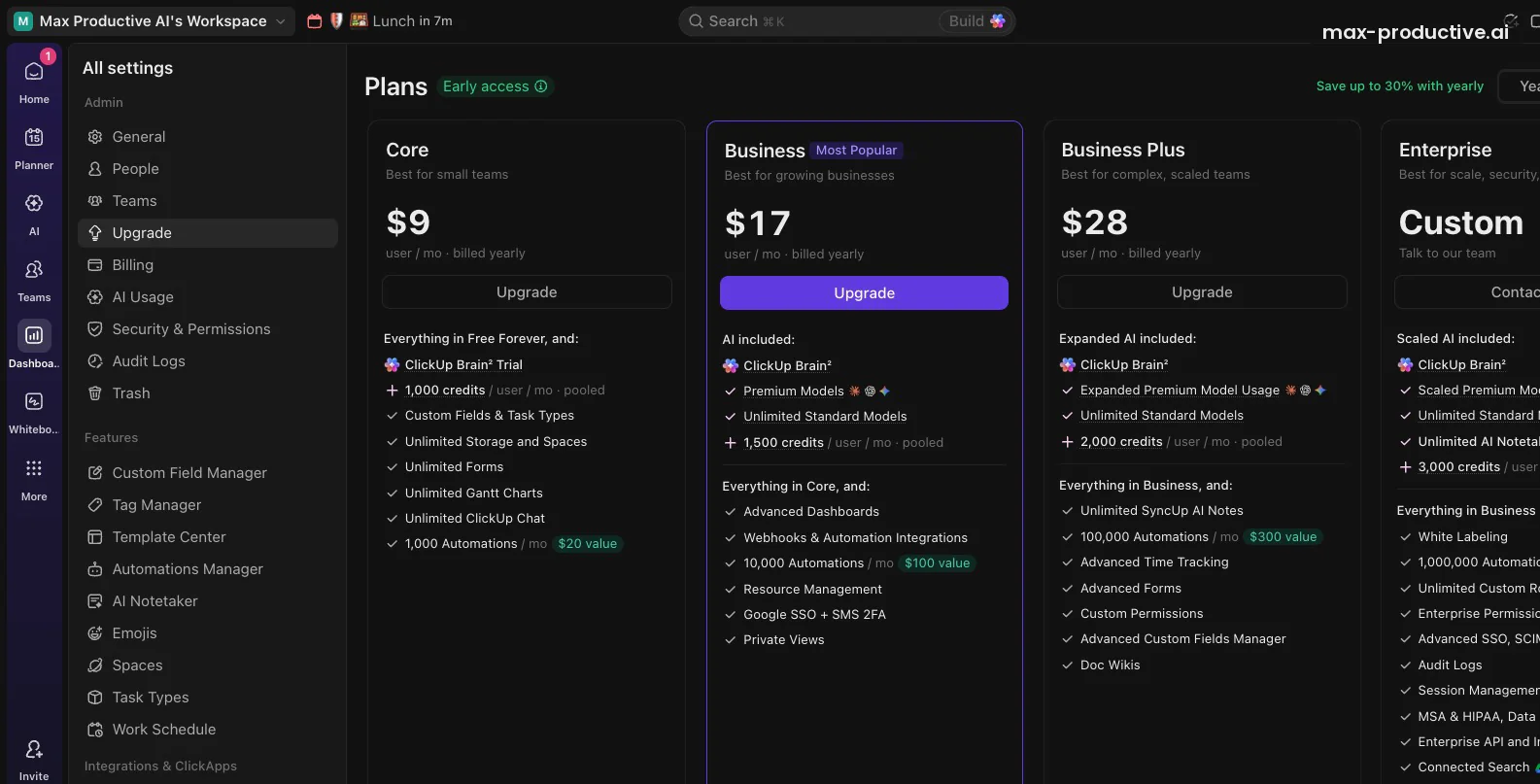
What our free workspace is offered on upgrade
When we clicked Upgrade, ClickUp didn't show the plans on its public pricing page. It offered its new lineup, marked Early access, starting with Core at $9 per user a month on yearly billing. Each plan builds AI in: Core keeps Brain² as a trial but adds monthly AI credits, and Business is the first plan with Brain² and premium models included.
Our advice: if you start on the free plan, budget from this screen rather than from the public pricing page. The full lineup is in the pricing section below.
ClickUp key features
Here's what matters most and where each feature's limits sit. Where a feature goes beyond what we tested, we rely on ClickUp's documentation.
-
Views for every way of working
The same tasks appear as a list, a board, a calendar, a table, a Gantt chart, a timeline or a workload view. List, Board, Calendar and Table are unlimited on every plan. Gantt becomes unlimited on the Unlimited plan, and Timeline on Business. Workload view stays capped on Unlimited.
-
Brain²
Included from BusinessClickUp's AI answers questions about your tasks, docs and chat, writes and summarizes, and takes action: it creates and updates tasks, builds Artifacts and works through multi-step requests. It sends each request to Claude, GPT or Gemini, remembers your preferences, and connects to apps such as Google Drive, GitHub and Salesforce through MCP.
-
Super Agents
Uses AI creditsAI agents you set up to work in the background on recurring jobs, using your workspace data and tools. ClickUp estimates 100 to 300 credits per run, and every run uses credits, even one that only returns an answer. We didn't build one for this review, so start with a small, well-defined job.
-
Artifacts and Skills
Artifacts are decks, dashboards, reports and prototypes that Brain² generates and saves in your workspace. We built an editorial dashboard on the free plan's trial. Skills are saved instructions that Brain² and Super Agents reuse, so you explain a format or a process once. Creating or editing an Artifact uses AI credits, and custom Skills are listed as a Max-plan feature in ClickUp's new lineup.
-
Docs and wikis
Collaborative Docs with nested pages and links to tasks, included on every plan. Mark a Doc as a wiki to flag it as a team reference. Brain² can read Docs, which makes them a natural home for processes you want the AI to follow.
-
Chat
Limited on FreeTeam chat built into the workspace, with messages that can turn into tasks. The free plan allows 1,000 messages in total, and Core makes Chat unlimited, which matters if your team wants to move off Slack.
-
Automations
Rules that react to changes, such as reassigning a task when its status moves. Free Forever allows 5 active automations and 100 actions a month, and each paid plan raises the allowance. Automations pause when the monthly allowance runs out and restart the next month.
-
Integrations and importers
ClickUp counts more than 1,000 integrations, many of them reached through Zapier and Make, plus native connections for Slack, Google Drive, GitHub, HubSpot, Zoom, Figma and Microsoft Teams. Importers for Trello, Asana, Monday.com, Notion, Todoist and Jira work on every plan, including the free one.
-
Whiteboards, Goals and time tracking
All three are on the free plan in limited form: 3 Whiteboards, 100 Goal uses and 100 time-tracking uses. Paid plans raise these limits, and Business Plus adds advanced time tracking.
Our read: the task, view and Docs core is where ClickUp is strongest, refined over years of releases. The AI layer is newer and moving fast. We'd test Super Agents and Artifacts on one real workflow before you rely on them across the team.
Security and compliance
ClickUp's security page lists SOC 2 Type 2 and ISO 27001 certifications, plus ISO 42001 for AI management. Data is encrypted in transit with TLS 1.2 and at rest with AES-256. Enterprise customers can choose where core workspace data is hosted: the US, Europe or Asia Pacific. Google single sign-on starts on Business. SAML single sign-on, SCIM provisioning, audit logs and HIPAA availability come with Enterprise.
ClickUp pricing
As of October 2026, ClickUp offers new and free workspaces four plans. Core costs $9, Business $17 and Business Plus $28 per user a month on yearly billing, and Enterprise is quoted on request. AI is built into each plan. ClickUp's public pricing page still shows its classic plans, which most existing paid workspaces keep for now.
| Plan detail | Free Forever | Core | Business | Business Plus | Enterprise |
|---|---|---|---|---|---|
| Billed yearly | $0 | $9/user/mo | $17/user/mo | $28/user/mo | Custom |
| Billed monthly | $0 | $12/user/mo | $25/user/mo | $39/user/mo | Custom |
| Brain² | Trial | Trial | Included, with premium models | Included, more premium model use | Included, scaled premium model use |
| AI credits | 500 for the workspace, one time | 1,000 a user a month, pooled | 1,500 a user a month, pooled | 2,000 a user a month, pooled | 3,000 a user a month, pooled |
| Storage | 60MB | Unlimited | Unlimited | Unlimited | Unlimited |
| Gantt charts | 60 uses | Unlimited | Unlimited | Unlimited | Unlimited |
| Automations a month | 100 actions | 1,000 | 10,000 | 100,000 | 1,000,000 |
| Also worth knowing | Unlimited tasks and members. 5 Spaces. Guests get full access only. | Unlimited Spaces, Forms and Chat. Custom Fields and task types. | Advanced Dashboards, private views, resource management, Google SSO. | Custom permissions, advanced time tracking, Doc wikis, unlimited SyncUp AI notes. | White labeling, advanced SSO, SCIM, audit logs, HIPAA, unlimited AI Notetaker. |
Swipe sideways to see every plan.
Prices and features come from the Upgrade screen of our Free Forever workspace, where ClickUp labels these plans Early access, on October 15, 2026. ClickUp's Help Center says new workspaces, all Free Forever workspaces and a few paid ones see them, and it also lists a Max plan with the highest AI limits. Prices are per member, and upgrading moves every member of the workspace to the paid plan.
Start on Free Forever and upgrade when a limit gets in your way.
Try ClickUp freeThe classic plans on ClickUp's pricing page
| Plan detail | Unlimited | Business |
|---|---|---|
| Billed yearly | $7/user/mo | $12/user/mo |
| Billed monthly | $10/user/mo | $19/user/mo |
| AI | Add-on: Brain AI $9 or Everything AI $28 a user a month, billed yearly | Add-on: Brain AI $9 or Everything AI $28 a user a month, billed yearly |
Swipe sideways to see both plans.
ClickUp's public pricing page still leads with these plans, and most existing paid workspaces keep them at their current price for now. ClickUp's Help Center says a small number of paid workspaces already see the new plans and that the rest will follow, without giving a date. On them, AI is an add-on, and ClickUp's Help Center says the add-on fee applies to all members of the workspace, not only the people who use AI. The new Business plan costs about the same as classic Unlimited plus the Brain AI add-on, and it includes advanced Dashboards and ten times the automations.
Classic plans and add-ons come from ClickUp's pricing page and Help Center, checked October 8 to 15, 2026.
What ClickUp AI costs
Chatting with Brain² doesn't use AI credits. Credits pay for the automatic and agent features: Super Agents, AI Fields, AI cards, image generation and Artifacts. ClickUp estimates 100 to 300 credits per Super Agent run. Plan credits are pooled across the workspace, renew monthly and don't roll over, and extra credits cost $10 per 10,000. Premium models have their own allowance, and once it runs out Brain² switches to a standard model.
Which ClickUp plan should you choose?
Free Forever is a permanent home for simple task management and a long trial of everything else, AI included. Core suits small teams that have outgrown the free limits: storage, Gantt charts, Forms and Chat become unlimited, and Custom Fields open up. Business is the plan for teams that want Brain² in everyday work or report in advanced Dashboards. Business Plus adds custom permissions, advanced time tracking and far more automations. Enterprise is for advanced SSO, SCIM, audit logs and HIPAA. Use the Brain² trial on real work before you pay for AI.
Is ClickUp worth the money?
For teams that will use its breadth, yes. On Core, a five-person team pays $45 a month on yearly billing for tasks, docs, chat and whiteboards, which can replace separate docs or chat tools. Business costs that team $85 a month and adds Brain² with premium models and 1,500 AI credits per person. That's fair value if most of the team uses AI every day. If only one or two people would, start on Core, since ClickUp bills every member.
Free plan limits in brief
Free Forever gives you 60MB of storage, 5 Spaces, 5 active automations with 100 actions a month, and 60 uses each for Gantt, Custom Fields and Dashboards. Those uses are shared by the whole workspace and never reset. Guests must get full access to whatever you share. Our ClickUp free plan guide lists every limit and what happens when you reach it.
Refunds and billing
ClickUp advertises a 100% money-back guarantee, and its support pages describe it as a 30-day guarantee on paid plans, subject to ClickUp's terms. Yearly billing saves up to 30% on the new plans, by ClickUp's own figure. You can't upgrade one person: the whole workspace moves to the paid plan, and each member becomes a paid seat.
ClickUp pros and cons
Pros
One workspace for tasks, docs and chat
Projects, Docs, wikis, chat, whiteboards and goals live together, so context stays next to the work. A recurring theme on Reddit and Trustpilot is this consolidation, and some users say it let them drop other tools.
Brain² can act, not just answer
In our test it read a List and a Doc, produced an accurate status report and created the subtasks we asked for. It then built a dashboard with the right numbers. Its report kept the existing due dates and statuses, as we asked, and it routes each request to Claude, GPT or Gemini.
A free plan with no member cap
Free Forever includes unlimited tasks and members, and the List, Board, Calendar and Table views have no usage limit. For comparison, Asana's free plan stops at 2 users and Monday.com's at 2 seats.
Views for every way of working
The same tasks show up as a list, a board, a calendar, a table, a Gantt chart or a workload view. Each person can work the way they prefer without anyone duplicating data.
Fair pricing for a full suite
Core costs $9 per user a month on yearly billing and makes storage, Gantt charts, Forms and Chat unlimited, alongside Docs and whiteboards. That's in line with Monday.com's entry plan and below Asana's.
Connects to the tools you already use
Native links to Slack, Google Drive, GitHub and Zoom, a large library of other integrations, importers for Trello, Asana, Monday.com and Notion, and MCP connections for Brain². Importers on every plan, including Free, make moving in easier.
Cons
A real learning curve
ClickUp has a lot of views, settings and menus, and ZDNET calls its learning curve steep. Expect your team to need some time to settle on a structure. Our advice: start with one Space, one List and the Board view, then add features as you need them.
Full AI starts on Business
Brain² stays a trial on Free and Core, and it's included from the new Business plan. ClickUp bills every member of the workspace, so AI costs grow with the whole team. Agents and Artifacts also draw on credits, and some users on ClickUp's feedback board find credit use hard to predict. Watch the credit counter in the AI hub during your first month.
Free plan limits are counted in uses
Gantt, Custom Fields and Dashboards come with 60 uses each for the whole workspace, and they never reset. Think of them as a long trial rather than a permanent allowance. Core removes the Gantt and Custom Fields limits, and Business adds advanced Dashboards.
Two pricing lineups at once
As of October 2026, ClickUp's public pricing page shows its classic plans, while new and free workspaces are offered a new lineup with different names and prices. Budget from your own upgrade screen, since the two don't match.
A desktop-first experience
We didn't test the mobile apps. A recurring theme in 2026 app store reviews and on Reddit is that they miss some desktop features, and some users report sign-in trouble. If your team works mostly on phones, test the app first.
Updates can change familiar workflows
ClickUp ships changes quickly. The move to ClickUp 4.0 reorganized navigation, and some long-time users asked on ClickUp's feedback board for the old sidebar back. New users are less affected, but existing teams should expect some relearning after big releases.
ClickUp alternatives
Most of the tools below are in our time management tools directory. The table compares ClickUp with four project tools it's often compared with.
| Compared on | ClickUp Reviewed | Monday.com | Asana | Trello | Notion |
|---|---|---|---|---|---|
| Free plan | Unlimited members | Up to 2 seats and 3 boards | Up to 2 users | Up to 10 collaborators and 10 boards | Free for individuals, with a block limit for teams |
| Entry paid plan | $9 a user a month, billed yearly | $9 a seat a month, billed yearly, 3 seats minimum | $10.99 a user a month, billed yearly | $5 a user a month, billed yearly | $10 a seat a month, billed yearly |
| AI | Brain² trial, included from Business | Credit pool on paid plans | AI Teammates on paid plans | Included from Standard | Full Notion AI from Business |
| Built in | Tasks, Docs, wikis, chat, whiteboards | Boards, docs, dashboards | Projects, portfolios, goals | Boards and cards | Docs, wikis, databases |
| Setup effort | High | Low | Medium | Low | Medium |
| Best for | Teams consolidating tools | Teams that want fast onboarding | Cross-team project planning | Simple boards for small teams | Knowledge-heavy teams |
Swipe sideways to see every tool.
Competitor prices come from each company's pricing page, checked October 15, 2026.
ClickUp vs Monday.com
Monday.com is quicker to set up, and its boards feel polished from day one, which makes it a strong pick for teams that need to get going fast. ClickUp gives you more for a similar entry price: built-in team chat, Docs and wikis, more views and a free plan with no member cap. If your team values ease over breadth, choose Monday.com. If you want one tool to replace several, choose ClickUp. Cost depends on team size: ClickUp bills per person, while Monday.com sells seats in groups. For a team of 6, our math gives $54 a month on ClickUp Core and $120 on Monday.com Standard, both billed yearly. Our ClickUp vs monday.com comparison runs the same project in both tools.
ClickUp vs Asana
Asana is calmer and more structured. It's very good at cross-team projects and portfolios, and it asks less of new users. ClickUp is cheaper to start and covers more ground, with docs, chat and whiteboards built in. Asana's free plan is for two people, so teams of three or more will compare paid plans, where ClickUp's entry price is lower.
Which alternative fits you?
-
Reclaim AIOur rating: 4.8 / 5
Best for: People whose real problem is finding time in the calendar rather than tracking projects.
Reclaim schedules focus time, habits and tasks around your meetings. It integrates with ClickUp, so you can use the two together instead of choosing one. There's a free Lite plan, and Starter costs $10 a seat a month on yearly billing.
-
Monday.comOur rating: 4.5 / 5
Best for: Teams that want a polished, easy-to-learn board for projects and workflows.
Monday.com is faster to set up than ClickUp, and its boards are pleasant to use from the first day. The free plan covers 2 seats, and paid plans start at 3 seats, then come in multiples of 5, so a team of 6 pays for 10. AI runs on a shared credit pool included with paid plans.
-

TaskadeOur rating: 4.5 / 5
Best for: Small teams that want tasks, notes and AI agents in a lighter workspace.
Taskade's Pro plan costs $10 a month on yearly billing and covers up to 10 users, which is hard to beat for a small team. It's simpler than ClickUp and leans into AI agents and generated apps.
-
TodoistOur rating: 4.3 / 5
Best for: Individuals and small teams who want a fast, focused task list.
Todoist does one job very well: capturing and organizing tasks. Pro costs $5 a month on yearly billing, and the free plan covers 5 personal projects. It doesn't try to be a project suite, which is why it suits people who want a focused list.
-

SuperlistOur rating: 4.1 / 5
Best for: People who want tasks and notes together in a clean, modern app.
Superlist blends lists, notes and AI meeting notes. The free plan covers 5 private and 5 shared lists, and Basic costs $59 a year. It suits personal and small-team planning more than complex projects.
-

AsanaOur rating: 4.4 / 5
Best for: Teams running many cross-functional projects who value structure and clarity.
Asana is easier to learn than ClickUp and strong on project and portfolio planning. Starter costs $10.99 a user a month on yearly billing, with a 2-seat minimum, and the free Personal plan is for 2 users.
-
TrelloOur rating: 4.3 / 5
Best for: Small teams and individuals who want simple Kanban boards.
Trello is one of the easiest board tools to pick up. Standard costs $5 a user a month on yearly billing, and the free plan allows up to 10 collaborators. It stays simple by design, so it doesn't offer ClickUp's docs, chat or reporting depth.
ClickUp FAQ
Is ClickUp free?
Yes, ClickUp has a Free Forever plan that never expires, with unlimited tasks and unlimited members. It includes 60MB of storage, 5 Spaces and 100 automation actions a month. Features such as Gantt charts, Custom Fields and Dashboards come with 60 uses each, and those don't reset. Our ClickUp free plan guide lists every limit.
How much does ClickUp cost?
As of October 2026, ClickUp offers new and free workspaces Core, Business and Business Plus. They cost $9, $17 and $28 per user a month on yearly billing, or $12, $25 and $39 billed monthly. Enterprise is priced on request. ClickUp's public pricing page still lists its classic plans, Unlimited at $7 and Business at $12, which existing paid workspaces keep.
Is ClickUp AI free?
ClickUp AI is free only as a trial. A Free Forever workspace gets 25 Brain uses, or 50 if it has more than 10 people, plus 500 AI credits, and none of them reset. On the new plans, Core keeps Brain² as a trial with monthly pooled credits, and Brain² with premium models is included from Business.
What is ClickUp Brain²?
ClickUp Brain² is the AI built into ClickUp, relaunched in June 2026. It answers questions using your tasks, docs and chat, sends each request to Claude, GPT or Gemini, and remembers your preferences. It can also take action: create tasks, build Artifacts such as decks and dashboards, and connect other apps through MCP. In our test it wrote an accurate status report, created subtasks and built an editorial dashboard.
What are ClickUp Super Agents?
ClickUp Super Agents are AI agents you set up to handle recurring work in the background, using your workspace data and tools. Each run uses AI credits, which ClickUp estimates at 100 to 300 per run, even when the agent only returns an answer. Free workspaces can try them with the 500 trial credits. Paid plans add monthly credits.
Is ClickUp hard to learn?
ClickUp takes longer to learn than simpler tools like Trello or Todoist, because it has many views, settings and features. Much of the effort is in the first setup. Start with one Space, one List and the Board view, then add Docs and automations later. Import your existing tasks from Trello, Asana, Monday.com or Notion so you judge it on real work.
Is ClickUp better than Monday.com?
ClickUp is the better choice if you want more features for a similar entry price: built-in team chat, Docs and wikis, more views and a free plan with no member cap. Monday.com is easier to set up and its boards feel more polished, and its paid plans have a 3-seat minimum. Teams that value fast onboarding over breadth often prefer Monday.com. By our math, ClickUp Core also costs less than Monday.com Standard for teams of 3 to 12, billed yearly, because Monday.com sells seats in groups.
Does ClickUp have a mobile app?
Yes, ClickUp has apps for iOS and Android, along with desktop apps for Windows, Mac and Linux and a Chrome extension. Brain MAX is a separate app for using ClickUp's AI on mobile and desktop. Some 2026 app store reviews say the mobile apps lack a few desktop features, so test them if your team works mainly on phones.
Is ClickUp secure?
ClickUp's security page lists SOC 2 Type 2 and ISO 27001 certifications, ISO 42001 for AI management, and AES-256 encryption for data at rest. Enterprise customers can host core workspace data in the US, Europe or Asia Pacific, and they get SAML single sign-on and SCIM provisioning for managing users.
Should you try ClickUp?
ClickUp packs projects, docs, chat and AI into one workspace, and Brain² gives it an assistant that acts on your own work instead of only talking about it. The costs are a learning curve and AI pricing that grows with every seat. If you want something simple, Trello or Todoist will suit you better. For a team ready to bring its work into one place, ClickUp earns its 4.6.
What we'd do. Open a Free Forever workspace and import one real project from your current tool. Run it in List and Board views for two weeks, with one Space and a handful of statuses. Write your team's process in a Doc, then ask Brain² to report on the project and create the next tasks, as we did. Watch the AI credit counter, and when a limit such as Custom Fields or storage gets in the way, compare the plans your upgrade screen offers.
Our rating: 4.6 / 5
Excellent
About this review
Based on hands-on use of our own ClickUp Free Forever workspace in October 2026, including its upgrade screen, plus ClickUp's pricing page, Help Center and security page, and public user feedback. First published 5 June 2025. Last updated 21 October 2026.
Sources checked
- Pricing and plan limits. ClickUp pricing page and Help Center pages on new plans, AI limits and add-ons, checked October 15, 2026, with the pricing page read again on October 21, 2026.
- AI features. ClickUp's Brain² launch post and Help Center pages on Artifacts and AI credits.
- Security. ClickUp security page.
- User feedback. Reddit's r/clickup, ClickUp's feedback board, Trustpilot, app store reviews and tech press such as ZDNET.
Ratings are our overall editorial judgment on a 5-point scale: 4.5 and up is Excellent, 4.0 to 4.4 Very good, 3.5 to 3.9 Good, 3.0 to 3.4 Fair. We do not use sub-scores.
This review contains affiliate links, so we may earn a commission at no extra cost to you. Our ratings and editorial opinions remain independent.