ClickUp vs monday.com: We Ran the Same Project in Both Tools
ClickUp is the better value for most small teams and the broader all-in-one workspace, while monday.com is quicker to learn and clearer for visual reporting. We tracked the same editorial project in both in October 2026 to see where each one wins.
This article contains affiliate links. We may earn a commission at no extra cost to you.
Quick answer: is ClickUp or monday.com better?
As of October 2026, ClickUp is the better pick for most small teams on a budget. Its free plan has no cap on members, and tasks, Docs, chat and AI live in one app. Paid plans for new workspaces start at $9 a person a month, billed yearly. monday.com is the better pick for teams that want a quick start and visual reporting. Its entry price per seat is the same, but paid plans begin at 3 seats and then come in multiples of 5, so a team of 6 pays for 10.
 ClickUpOur rating: 4.6 / 5
Free plan for unlimited members. Core is $9 a person a month billed yearly, or $12 monthly.
Pick ClickUp if
- You want tasks, Docs, chat and whiteboards in one app
- You'd rather pay per person than buy seats in groups
- You want AI that works across tasks and Docs and can create work for you
 monday.comOur rating: 4.5 / 5
Free plan for 2 seats. Basic is $9 a seat a month billed yearly, from 3 seats.
Pick monday.com if
- You want a tool new teammates pick up quickly
- You report progress to managers or clients in dashboards
- You want clients or stakeholders to view boards for free
ClickUp vs monday.com at a glance
| Feature | ClickUp | monday.com |
|---|---|---|
| Best for | Small teams that want one app for most of their work | Teams that want a visual tool they learn fast |
| Free plan | Unlimited members, 60MB storage | Up to 2 seats, 3 boards |
| Paid plans from | $9 a person a month, billed yearly (Core) | $9 a seat a month, billed yearly, 3 seats minimum |
| How you're billed | Per person, for every member of the workspace | Seats in groups: 3, 5, 10, 15 and up |
| AI | Brain² trial on Free and Core, included from Business ($17) | None on Free, 1,000 to 3,000 credits a month from Basic |
| Automations | 100 actions a month free, 1,000 a month on Core | None on Free or Basic, 250 actions a month on Standard |
| Gantt charts | 60 uses free, unlimited on Core | From Standard |
| Docs and chat | Docs, wikis, Chat and Whiteboards | Workdocs, up to 3 on Free |
| Apps | Web, Mac, Windows, Linux, iPhone, Android | Web, Mac, Windows, iPhone, Android |
| Learning curve | Steeper, with more to set up | Gentler, boards are quick to start |
Prices from each vendor's pricing page, checked October 21, 2026, and limits from their help centers, checked October 8 to 21. ClickUp's prices are the plans it offers new and Free Forever workspaces. See every source
We set up the same project in both tools on October 15, 2026: a board modeled on our editorial workflow, with six AI tool reviews set to different stages. Then we asked each tool's AI to read the work and report on it. The ease-of-use and AI rounds below show that job in both tools, with screenshots from each.
How we checked
- Sources
- ClickUp's and monday.com's pricing pages and help centers
- Date checked
- 8 to 21 October 2026
- Our account
- A ClickUp Free Forever workspace and a new monday.com account on its 14-day Pro trial
- Not tested
- Automations, integrations, mobile apps, inviting teammates, buying a paid plan, ClickUp Super Agents, running monday.com's agent and publishing a Vibe app
We ran the same editorial project in both tools on October 15, 2026, for our ClickUp review and our monday.com review. ClickUp ran on our Free Forever workspace, with the AI trial that comes with it. monday.com ran on a new account during its 14-day Pro trial, so its AI results reflect the Pro plan, not the Free plan. Each board held six reviews, and four of them were the same in both.
Plan prices come from each vendor's own pricing page, read again on October 21, 2026. Plan limits come from their help centers, checked between October 8 and 21, 2026. We haven't set up automations or integrations, invited teammates, used the mobile apps or bought a paid plan in either tool. We also didn't run monday.com's AI agent, publish a Vibe app or test ClickUp's Super Agents. You can read more about how we test tools.
Ease of Use: Is ClickUp or monday.com Easier to Learn?
monday.com is the easier tool to start with. ClickUp asks for more setup and gives you more structure in return.
The two tools organize work differently. In monday.com, everything centers on the board: a workspace holds boards, a board holds groups of items, and each item is a row with the columns you choose, plus optional subitems. ClickUp stacks more levels: a Workspace holds Spaces, Folders, Lists, tasks and subtasks.
Our project in ClickUp
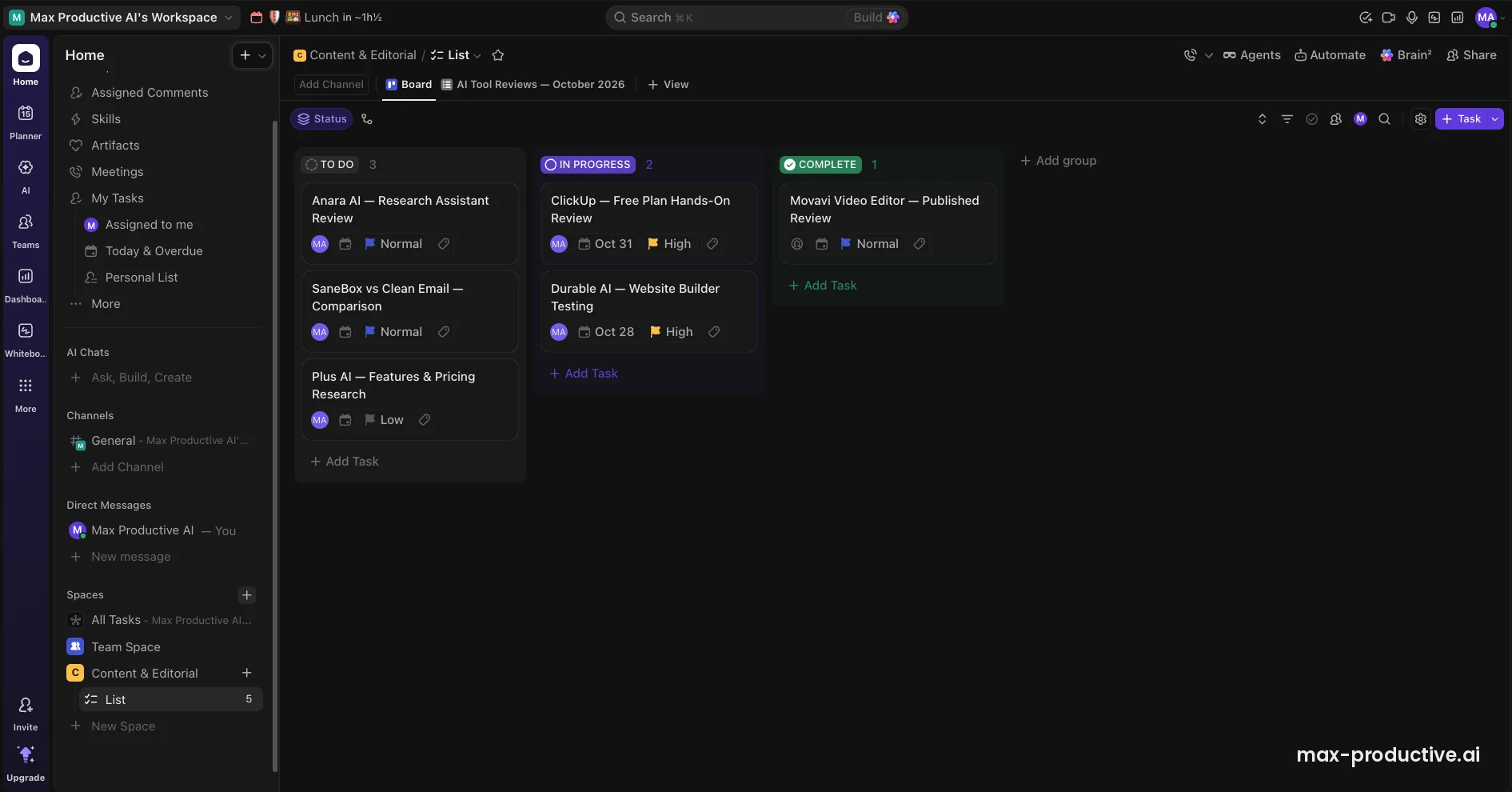
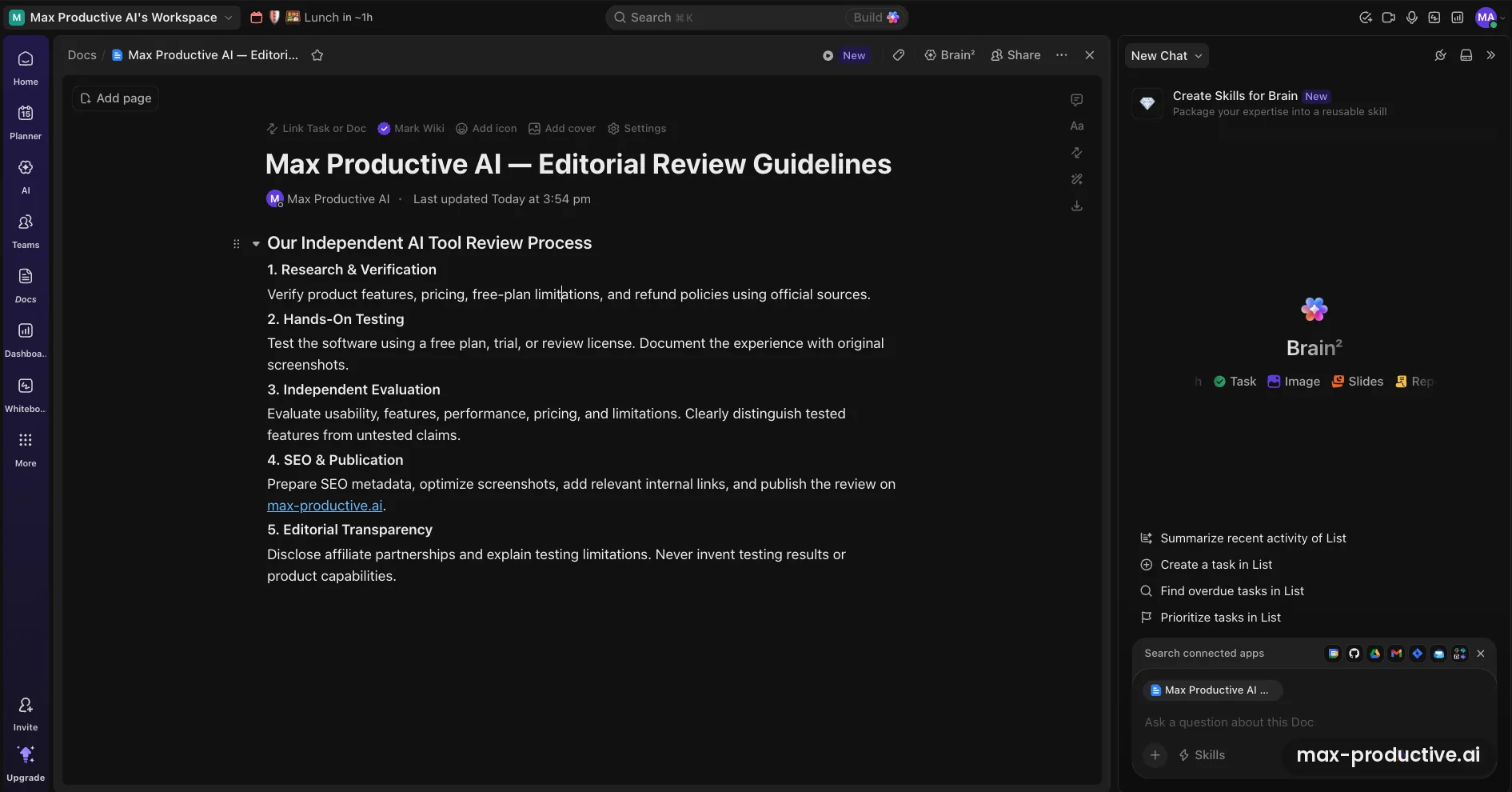
In ClickUp, we built a Space called Content & Editorial with one List of six reviews, and worked in Board view. Our main review task held a brief, a due date, a priority and a six-step review checklist. We also wrote our editorial guidelines in a ClickUp Doc and marked it as a wiki.
The same project in monday.com
In monday.com, the project became one board with columns for owner, status, due date, priority and notes. We switched to the Kanban view and dragged one review from Not Started to Stuck. The table updated straight away.
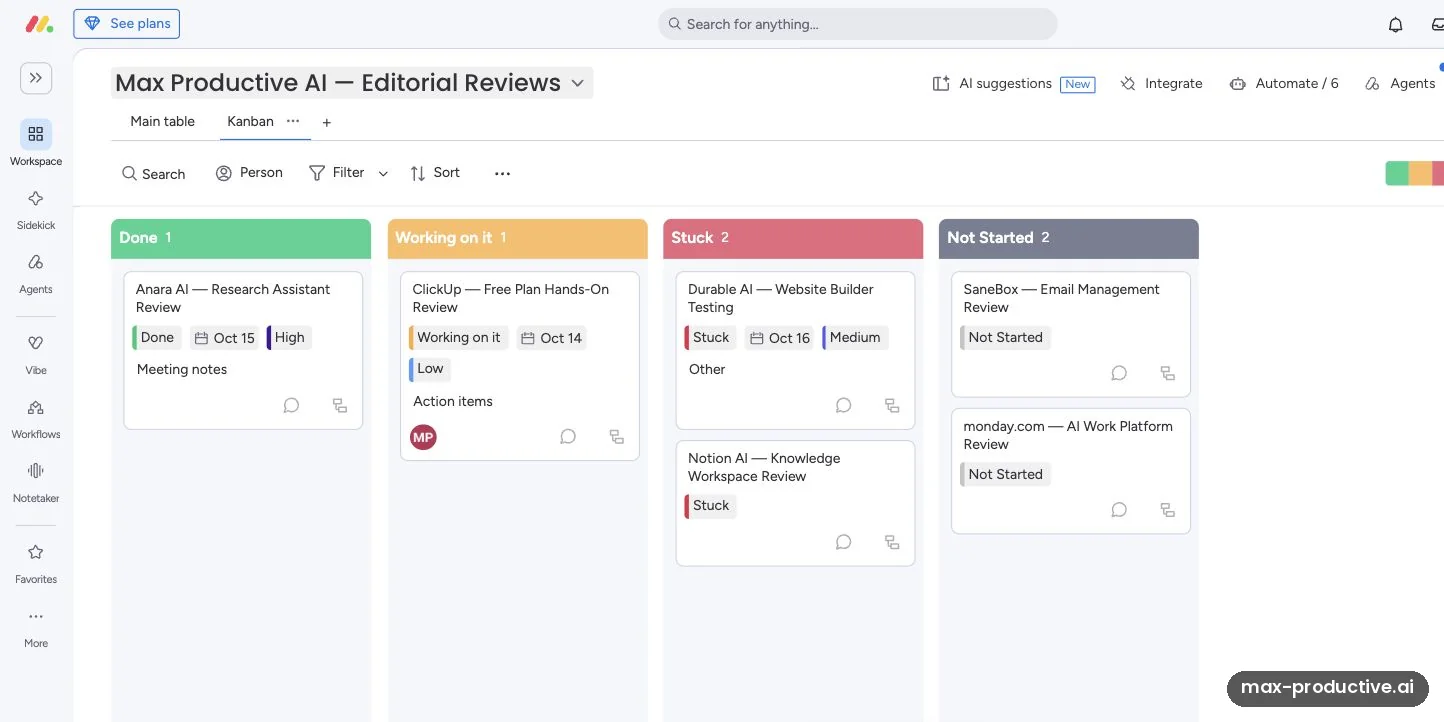
Both tools handled the job well. The difference is in structure. A monday.com board reads like a colorful spreadsheet. In ClickUp, you pick a Space, a List and a view before you start, then decide which of its many task fields to show.
Other reviewers report the same pattern. ZDNET's February 2026 roundup of project management software calls ClickUp's learning curve steep, and users on r/projectmanagement say similar things. Independent reviews such as TechZeeno's, from June 2026, praise monday.com for how quickly new team members pick it up.
Edge: monday.com. Its single-board structure is simpler to read, and independent reviewers find it quicker for new teams to learn.
ClickUp vs monday.com Free Plan: Which Gives You More?
As of October 2026, ClickUp's free plan is the bigger one for teams. monday.com's Free plan has more storage but only 2 seats, so it suits one or two people trying the basics.
| Free plan | ClickUp Free Forever | monday.com Free |
|---|---|---|
| People | Unlimited members | Up to 2 seats, no guests or viewers |
| Projects | Unlimited tasks, 5 Spaces | 3 boards, 200 items |
| Storage | 60MB | 500MB |
| Views | List, Board, Calendar and Table with no limit; Gantt and Timeline 60 uses each | Kanban, Forms and Files views |
| Dashboards | 60 uses, never reset | Each dashboard shows one board |
| Automations | 5 active, 100 actions a month | None |
| AI | Trial: 25 Brain uses (50 for teams over 10) and 500 credits, no reset | None |
| Docs | Collaborative Docs | Up to 3 Docs |
Limits from ClickUp's pricing page and Help Center, checked October 8 and 15, 2026, and monday.com's Free plan help page, updated September 17, 2026. See every source
ClickUp's limits work in an unusual way. Some features, like Gantt charts and Dashboards, come with a set number of uses for the whole workspace, and those uses don't reset. Our ClickUp free plan guide lists every one of them.
monday.com's Free plan has fewer limits to learn, but you reach them sooner: a third person, a fourth board or a first automation all need a paid plan. It's still a good way to try the board. Every new account also starts with a 14-day Pro trial, and monday.com doesn't ask for a credit card.
Edge: ClickUp. A whole team can work on its free plan, with automations and AI to try, while monday.com's Free plan stops at two people.
ClickUp vs monday.com Pricing: What Your Team Really Pays
As of October 2026, the list prices look close. What you pay depends on how each tool counts people: ClickUp bills every member, and monday.com sells seats in groups.
| Plan | Billed yearly, a month | Billed monthly | AI included |
|---|---|---|---|
| ClickUp Core | $9 a person | $12 a person | Brain² trial, 1,000 credits a person a month, pooled |
| ClickUp Business | $17 a person | $25 a person | Brain², 1,500 credits a person a month, pooled |
| ClickUp Business Plus | $28 a person | $39 a person | Brain², 2,000 credits a person a month, pooled |
| monday.com Basic | $9 a seat | $12 a seat | 1,000 credits a month for the account |
| monday.com Standard | $12 a seat | $14 a seat | 2,000 credits a month for the account |
| monday.com Pro | $19 a seat | $24 a seat | 3,000 credits a month for the account |
Swipe sideways to see every column.
ClickUp's prices are the plans its Upgrade screen offered our Free Forever workspace, marked Early access, and ClickUp's Help Center says new workspaces see them too. ClickUp's pricing page still lists its older plans, Unlimited at $7 and Business at $12 a person billed yearly, which most existing paid workspaces keep for now. Both tools have an Enterprise plan priced on request.
Sources: both pricing pages, ClickUp's Upgrade screen and 3 help pages, checked October 15 to 21, 2026
- ClickUp pricing page, checked October 21, 2026
- ClickUp's Upgrade screen in our Free Forever workspace, October 15, 2026
- ClickUp: New plans and pricing options
- monday.com pricing page, checked October 21, 2026
- monday.com: Plans and pricing
- monday.com: AI Credits
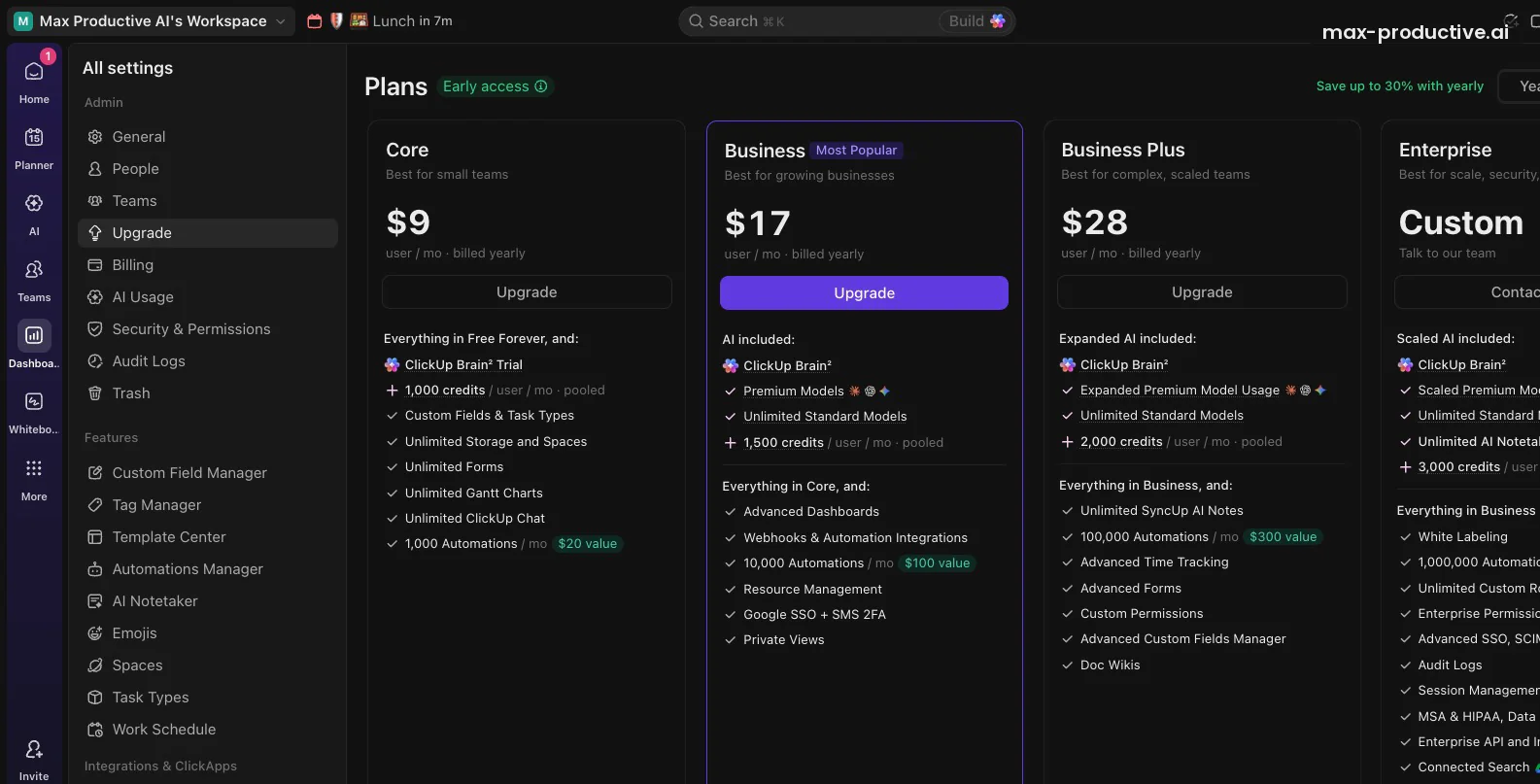
Seat groups: where the gap opens up
monday.com's paid plans start at 3 seats, then go up in multiples of 5: 5, 10, 15 and so on. A team of 4 buys 5 seats, and a team of 6 buys 10. ClickUp has no seat groups, and a one-person workspace can upgrade on its own. An upgrade covers the whole workspace, though, so every member becomes a paid seat. You can't upgrade only the people who need the extra features.
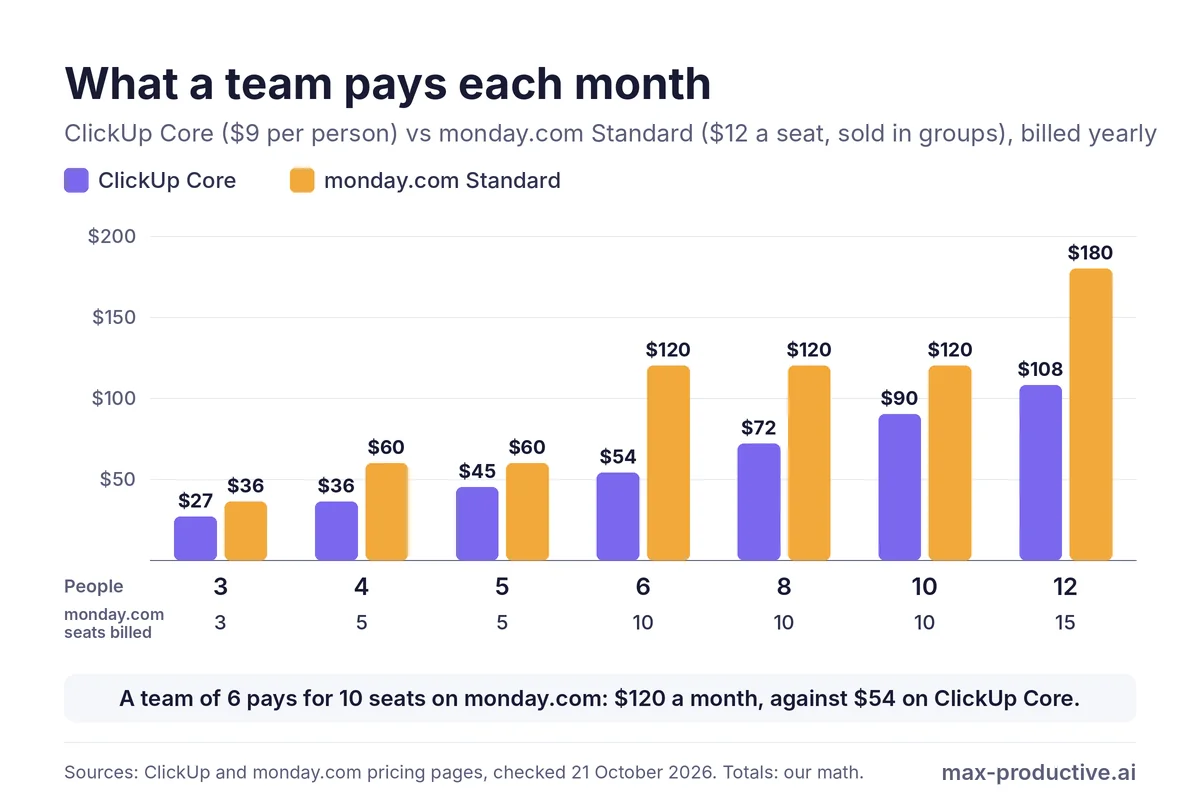
We compared ClickUp Core with monday.com Standard because they're the cheapest paid plans with Gantt charts and automations on each side. ClickUp's free plan limits both, and monday.com Basic, which costs the same per seat as Core, has neither.
In our math, ClickUp Core costs less than monday.com Standard at every team size we checked. In dollars, the gap is smallest at 3 and 5 people. In proportion, it's widest just past a seat group: at 6 people, Standard costs more than twice as much as Core, $120 a month against $54. One plan up, a team of 5 pays $85 a month for ClickUp Business and $95 for monday.com Pro, both billed yearly.
AI credits are counted differently
monday.com gives the whole account one pool of AI credits: 1,000 a month on Basic, 2,000 on Standard and 3,000 on Pro, whatever the number of seats. ClickUp's new plans give credits per person and pool them, so a team of 5 on Core shares 5,000 a month (our math). On Core, though, Brain² itself stays a trial. It is included from Business.
Our advice: if several people will use AI every day, compare the plan you'd need on each side, not only the entry price. For every detail of the other side, see our monday.com pricing guide.
Both offer a safety net. ClickUp advertises a money-back guarantee, which its support pages describe as 30 days on paid plans, subject to its terms. monday.com refunds the remaining balance of a yearly plan cancelled within 30 days. monday.com puts its yearly saving at 18%, and ClickUp at up to 30% on its new plans.
Edge: ClickUp. In our math, Core costs less than Standard at every team size, most of all for teams just past one of monday.com's seat groups.
To see the plans ClickUp offers your team, start free: the Upgrade screen in your workspace shows them with their prices.
Try ClickUp freeClickUp vs monday.com AI: What Each Did in Our Test
Both AI assistants read our board correctly. Every count and status they gave us matched it. They differ in what they're built to do with it, and in what we let them do: we let ClickUp's AI create tasks, and kept monday.com's AI to reading, planning and drafts.
ClickUp Brain²: a report, three subtasks and a dashboard
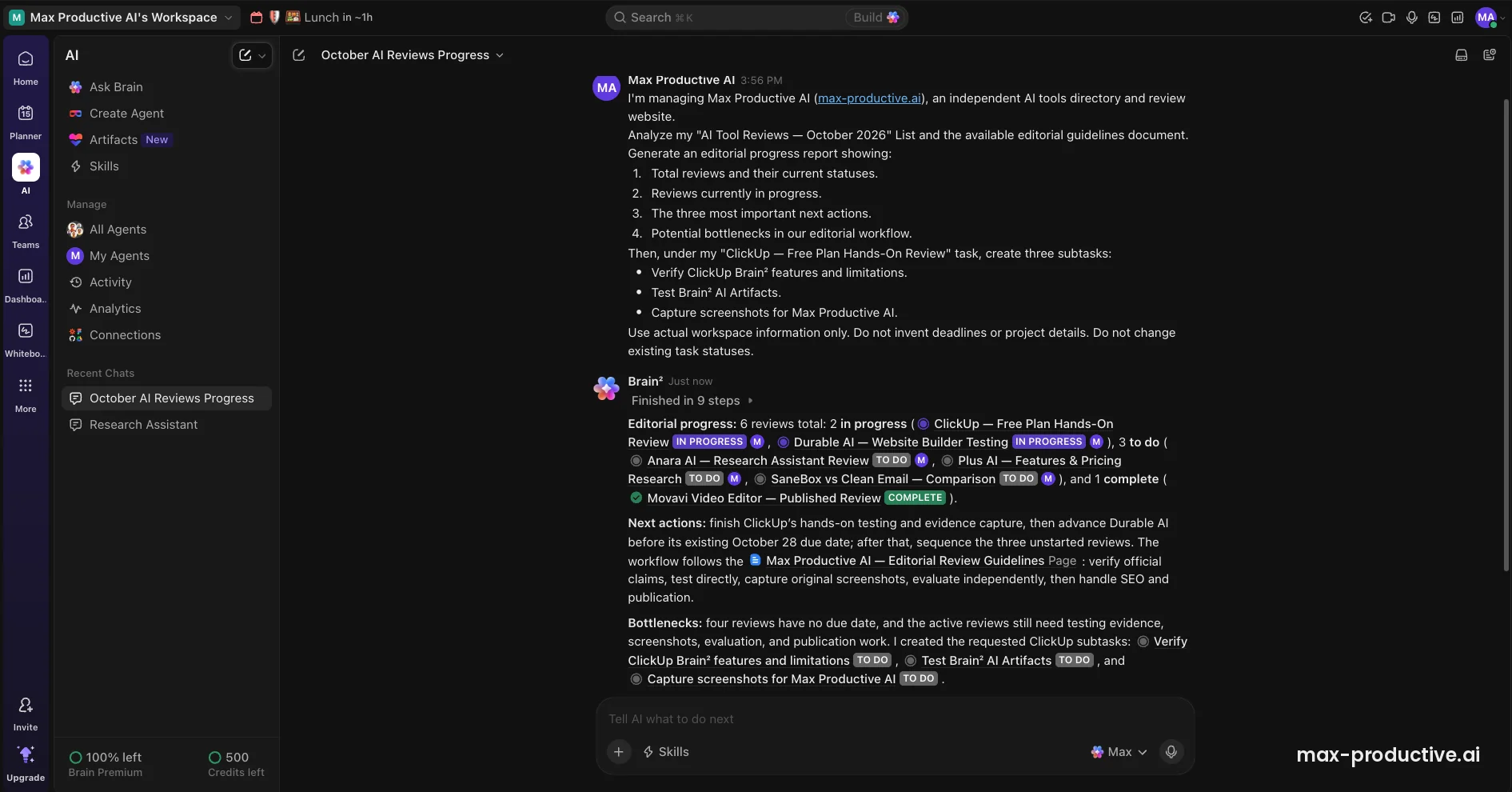
We gave Brain² one long prompt: report on our six reviews using the List and the guidelines Doc, suggest next actions, then create three subtasks under one task. It finished in nine steps. The report counted 2 in progress, 3 to do and 1 complete, which matched the board, and it flagged that four reviews had no due date. Then it created the three subtasks where we asked.
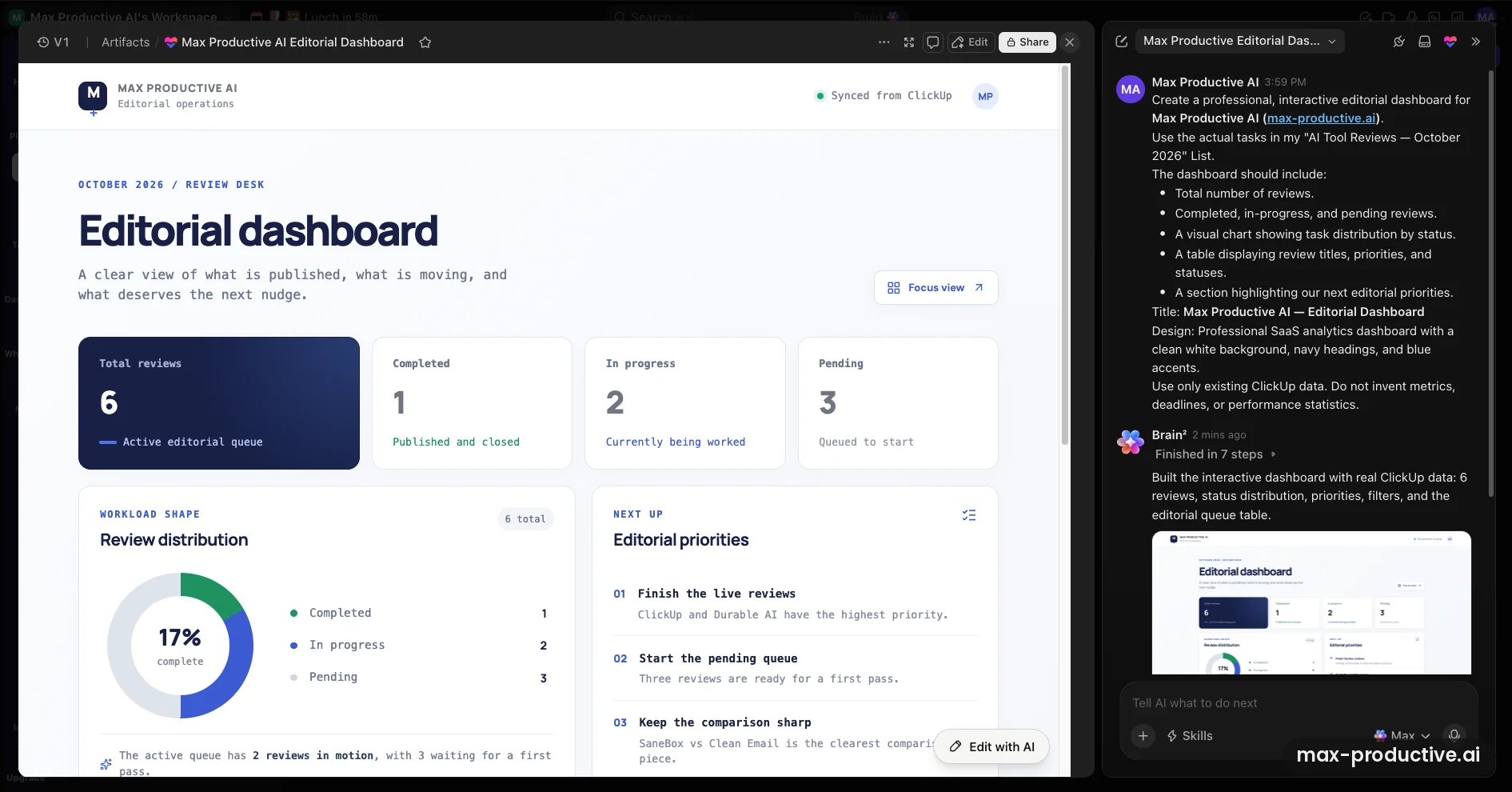
A second prompt asked for an editorial dashboard. Brain² built it as an Artifact in seven steps, with the right totals, a donut chart and a short list of priorities. We didn't test whether it updates on its own when the tasks change. ClickUp says Brain² can route each job to models from Anthropic, OpenAI or Google.
monday.com AI: Sidekick, AI columns and Vibe
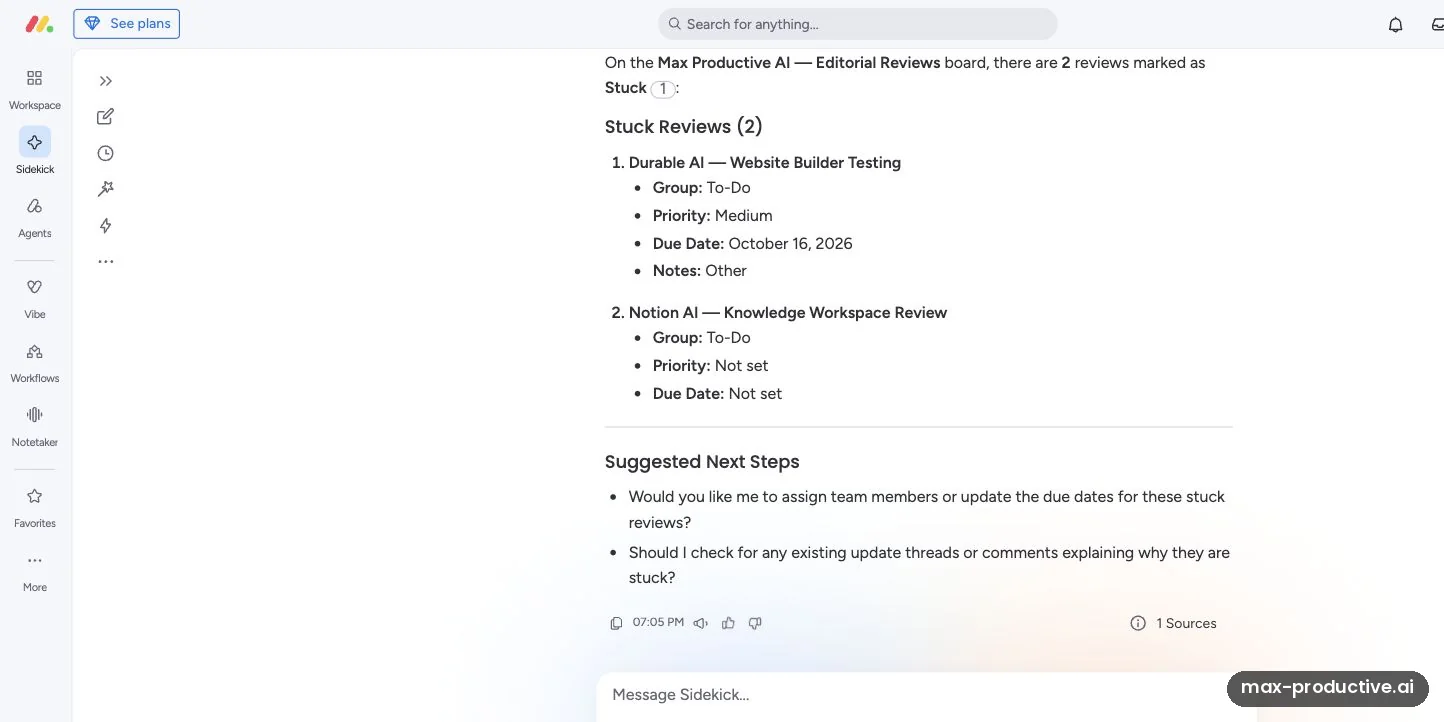
monday.com spreads its AI across several tools. Sidekick, its assistant, answered a question about our board with both stuck reviews, their details and sensible next steps. The first analysis took about a minute. An AI column wrote a review prompt for each of the six items, using each item's status, priority and notes. The prompts were good, if long.
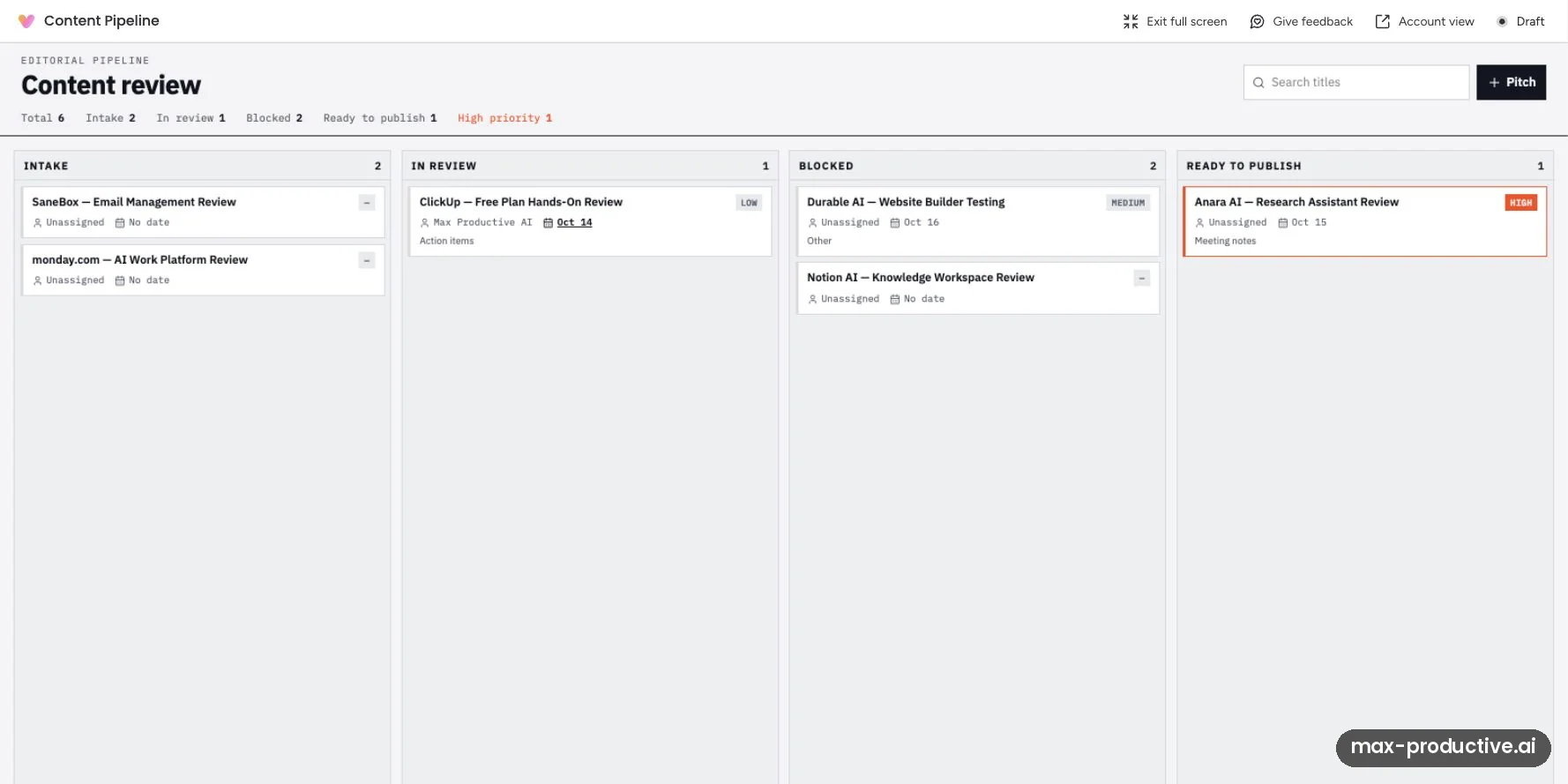
Vibe, monday.com's app builder, gave us monday.com's most impressive result. It turned our board into a small private app called Content Pipeline, with the right count in every column. The build used 39 AI credits, about 4% of Basic's monthly 1,000 (our math). We also created a custom agent, but didn't run it, because it needs access to the board first.
Our read: in our test, ClickUp's AI did more with a single request. In one prompt, it worked from a List and a Doc, wrote the report and created tasks. monday.com's AI stays close to the board, and its credits come with every paid plan from Basic. On ClickUp, Brain² stays a trial until the new Business plan at $17 a person a month, billed yearly.
In either tool, watch your credit usage in the first month. ClickUp estimates 100 to 300 credits for an agent run, and monday.com says the credits used by Sidekick and agents grow with the complexity of the task.
Edge: ClickUp, narrowly. Brain² did more from one prompt across tasks and Docs, while monday.com's Vibe turned our board into a draft app and its AI credits start on a cheaper plan.
Views, Dashboards and Reporting Compared
monday.com makes progress easy to share, with the dashboard we tested and free viewers on its paid plans. ClickUp offers a wide set of views, with usage limits on its free plan.
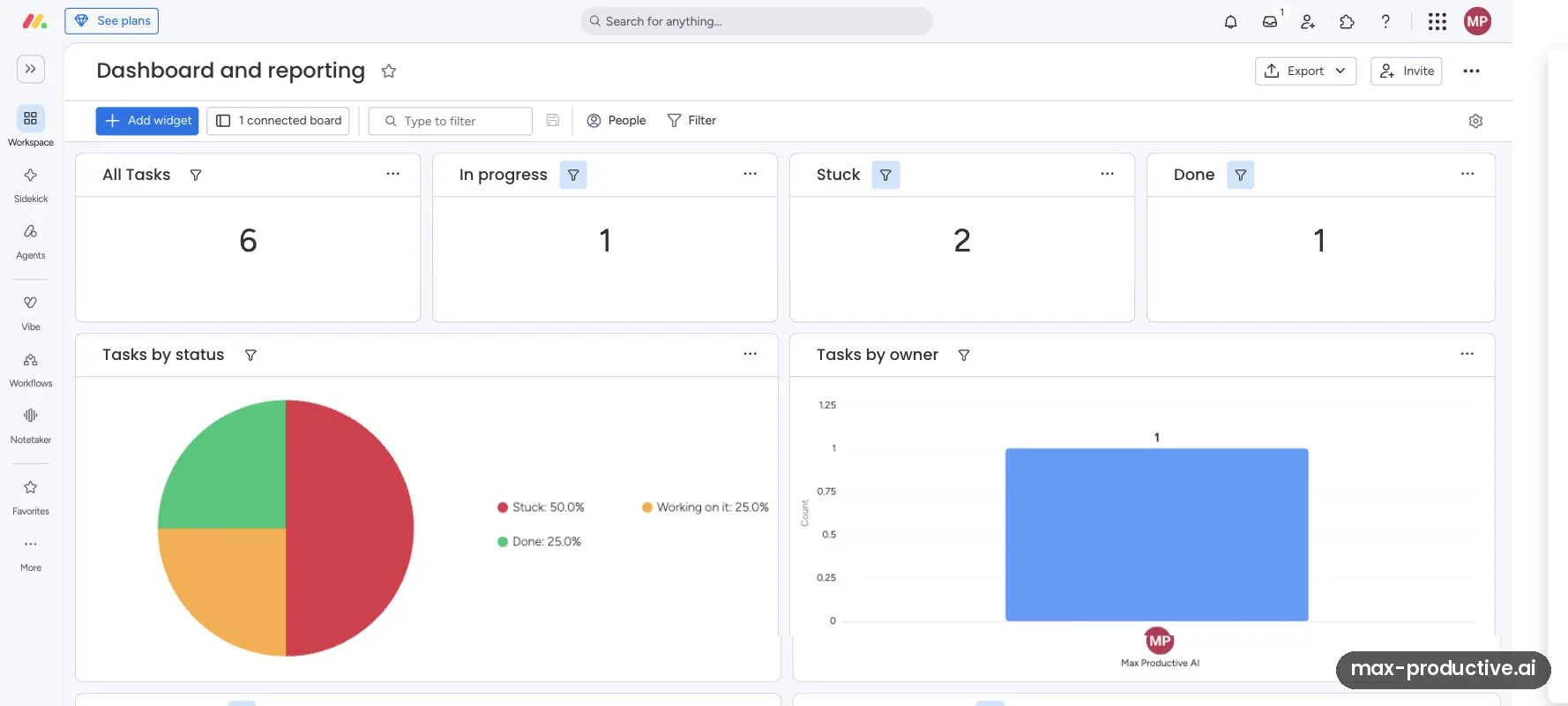
Our monday.com dashboard took one board and turned it into counters, a pie chart by status and a bar chart by owner. After we moved a card in Kanban, the dashboard still matched the board. On the Free plan, each dashboard can show only one board, and Timeline, Gantt and Calendar views start on Standard.
ClickUp offers List, Board, Calendar and Table views with no usage counter on any plan. Gantt, Timeline, Workload and Dashboards get 60 uses each on Free Forever. Core makes Gantt charts unlimited, and Business adds advanced Dashboards. We didn't build a standard ClickUp Dashboard in this test, and the Artifact above is a separate AI feature.
monday.com also includes unlimited free viewers from the Basic plan up. Clients or managers can follow a board without a paid seat, which helps agencies and teams that report upward. ClickUp's paid plans include a set number of guest seats instead: on Core, 5 for a one-member workspace plus 2 for each member you invite.
Edge: monday.com. Its dashboards and free viewers make progress easier to share, especially with people outside the team.
Docs, Chat and Automations: How Much Each Tool Covers
ClickUp aims to be the one app your team works in all day. monday.com focuses on boards and connects to the rest.
ClickUp includes Docs with wikis, team Chat and Whiteboards next to your tasks. Brain² cited our guidelines Doc in its report on the review List. Chat is capped at 1,000 messages in total on the free plan and unlimited from Core, so a small team could move its day-to-day messages into ClickUp.
monday.com has workdocs too, with up to 3 on the Free plan. Both connect to the tools around them. monday.com lists 850+ integrations and apps, and ClickUp says it connects to 1,000+ tools, a figure that includes third-party connectors as well as its own integrations.
Automation allowances favor ClickUp on the cheaper plans. Its free plan runs 5 active automations with 100 actions a month, and Core raises the allowance to 1,000 a month. monday.com has no automations on Free or Basic, and Standard includes 250 automation actions a month. Some Standard users on Reddit and in independent reviews say that goes quickly. Pro raises it to 25,000.
Our read: if you'd like to replace a docs app and a chat app as well as your task board, ClickUp covers more ground. If your team already works in Slack and Google Docs, monday.com's narrower focus can feel lighter.
Edge: ClickUp. Docs, chat and more automation room on the cheaper plans make it the broader workspace.
Moving From monday.com to ClickUp (or Back)
If you're weighing monday vs ClickUp because your team already uses monday.com, note that ClickUp has a dedicated monday.com importer, while monday.com takes data in through a spreadsheet file.
ClickUp's importer works on every plan, the free one included. Each monday.com board becomes a ClickUp List, and you choose whether its groups or its status column become statuses. Subitems arrive as tasks. Assignees, comments, dates, custom fields and time tracking come across. Most attachments, formulas, dependencies, connected boards, mirrors and tags don't, so plan to redo those by hand.
Going the other way, monday.com imports Excel and CSV files of up to 10MB, and a new board takes up to 8,000 rows. ClickUp exports List and Table views as CSV or Excel files, but Free Forever and Unlimited workspaces can export only five views. We haven't moved a real project in either direction, so these steps come from each vendor's help pages.
monday.com vs ClickUp: Which Should You Choose?
| If you... | Pick |
|---|---|
| Are a team of 3 or more on a tight budget | ClickUp |
| Need a free plan for more than 2 people | ClickUp |
| Want one app for tasks, Docs and chat | ClickUp |
| Want AI that works across tasks, Docs and chat | ClickUp |
| Want a tool new teammates learn quickly | monday.com |
| Report progress to clients or managers | monday.com |
| Prefer a visual board to a long list of options | monday.com |
Our recommendations, based on our October 2026 test and each tool's published plans.
If neither fits, look at the tools around them. Trello costs less, with a free plan for up to 10 collaborators and Standard at $5 a user a month billed annually. Asana has a free Personal plan for 2 users and paid plans from $10.99 a user a month billed annually. Our time management tools page compares them all.
ClickUp vs monday.com: our verdict
As of October 2026, ClickUp is the better choice for most small teams that want to keep costs down and work in one app. Its free plan has room for the whole team, and in our math ClickUp Core costs less than monday.com Standard at every team size we checked. monday.com is the better choice for teams that value a quick start and clear visual reporting, and for teams that share progress with clients. Both rate highly in our reviews: ClickUp 4.6 and monday.com 4.5.
What we'd do. Start a free ClickUp workspace and rebuild one real project in it, using the monday.com importer if you're switching. Give it two weeks with your team. If they find it heavy, run the same project through monday.com's Pro trial and compare. If you mainly report to clients, start with monday.com's trial instead.
ClickUp vs monday.com FAQ
Is ClickUp better than monday.com?
ClickUp is the better fit for most small teams that want low costs and one app for tasks, Docs and chat, as of October 2026. monday.com is the better fit for teams that want a tool they can learn quickly and clear dashboards to share. In our side-by-side test, both handled the same project well, and both AI assistants read it accurately.
Is ClickUp cheaper than monday.com?
Yes, ClickUp usually costs less for a team. As of October 2026, ClickUp Core is $9 a month for each person, billed yearly. monday.com Basic matches that per seat but has no automations or Gantt charts, and Standard costs $12 a seat. Its paid plans start at 3 seats, then come in multiples of 5. In our math, a team of 6 pays $54 a month on Core and $120 on Standard, which bills 10 seats.
Is monday.com free?
Yes, monday.com has a free plan for up to 2 seats, with 3 boards and 200 items, as of October 2026. It has no automations, integrations or AI. Every new monday.com account also starts with a 14-day Pro trial that needs no credit card, and after it you choose a paid plan or move to the Free plan.
Which free plan is better, ClickUp or monday.com?
ClickUp's free plan is the more generous one. ClickUp Free Forever has unlimited members and tasks, 60MB of storage, 100 automation actions a month and a one-time AI trial. monday.com's Free plan stops at 2 seats and 3 boards and has no automations or AI. Some ClickUp features, like Gantt charts and Dashboards, have 60 uses that never reset.
Which has better AI, ClickUp or monday.com?
ClickUp's Brain² did more in our October 2026 test: from one prompt it wrote an accurate progress report and created three subtasks, and from another it built a dashboard. monday.com's Sidekick, AI columns and Vibe were just as accurate on our board during its Pro trial, where we kept the AI to reading and drafts. monday.com includes AI credits from Basic, and ClickUp includes Brain² from its new Business plan.
Can I import monday.com boards into ClickUp?
Yes, ClickUp has a monday.com importer that works on every plan, including Free Forever. Each board becomes a ClickUp List, subitems become tasks, and fields such as assignees, comments, dates and statuses come across. Attachments, formulas, dependencies, mirrors and tags don't import, so plan to recreate them by hand.
Is monday.com easier to use than ClickUp?
Yes, monday.com is usually quicker to learn. Its boards are simple tables with colored status columns, and in our test the Kanban view and the dashboard stayed in step with the board. ClickUp has more levels and options, which gives you more control but takes longer to learn. ZDNET describes ClickUp's learning curve as steep.
Do ClickUp and monday.com have desktop apps?
Yes, ClickUp and monday.com both have desktop apps. ClickUp has them for Windows, Mac and Linux, and monday.com has desktop apps for Mac and Windows. Both also have iPhone and Android apps and run in the browser. We ran monday.com in a web browser and didn't test either tool's mobile apps.
Is ClickUp or monday.com better for one person?
ClickUp is the better fit for one person who wants a paid plan. Both free plans cover solo work. ClickUp's paid plans are priced per person, so one person on Core pays $9 a month billed yearly. monday.com's paid plans start at 3 seats, so a solo user pays for at least 3.
Read next
Tools in this article


Guides and comparisons
About this comparison
Based on our side-by-side test of ClickUp and monday.com on October 15, 2026, both vendors' pricing pages, read again on October 21, 2026, and their help centers, checked October 8 to 21, 2026. First published 31 August 2025. Last updated 21 October 2026.
Sources checked
- Our test. The hands-on sessions behind our ClickUp review (Free Forever workspace) and our monday.com review (14-day Pro trial), both on October 15, 2026.
- ClickUp plans and prices. ClickUp's pricing page (checked October 21, 2026), the Upgrade screen of our workspace (October 15, 2026), and the Help Center articles New plans and pricing options, Add-on FAQ and Pricing per user role and plan.
- ClickUp limits, AI and structure. ClickUp Help Center: Brain AI availability and limits, Automations, Views, Chat, How AI Credits are consumed, Intro to the Hierarchy and Artifacts; the Brain² launch post of June 2026; the downloads page and its integrations page.
- Moving between the tools. ClickUp's Import from Monday.com, Importing feature availability and limits and Export List and Table views; monday.com's Import files from Excel (updated October 19, 2026).
- monday.com plans, prices and AI credits. monday.com's pricing page (checked October 21, 2026) and its support articles Plans and pricing, AI Credits, monday vibe Permissions and Pricing and Understanding the Free Plan.
- monday.com structure and apps. monday.com's structural hierarchy article (updated September 22, 2026), its desktop app page and its integrations page.
- Independent reviews. ZDNET's best project management software (February 2026) and TechZeeno's monday.com review (June 2026).
Update log
- 21 October 2026. Rebuilt from scratch: a side-by-side test of the same project in both tools, October 2026 prices with ClickUp's new plans and monday.com's seat groups and AI credits, a team cost chart, and new sections on free plans, AI, reporting and moving between the tools.
- 31 August 2025. First published.
Scores next to tool names are the overall ratings from our own reviews, on a 5-point scale.