
Durable review
Durable AI drafts a small-business website from a short description, then surrounds it with local SEO tools, bookings, invoices and AI agents. It suits service businesses that want one simple tool, and the free plan lets you build before you pay.
Free plan to build and preview your site, no card needed. Publishing starts on Launch.
This review contains affiliate links. We may earn a commission at no extra cost to you.
Verdict: a fast first website for local businesses, with AI help after launch
As of October 2026, Durable is the AI website builder we'd suggest to a local service business that wants a decent site this week and little to manage afterwards. It drafts the whole site from a short description. After that, an AI Partner, an SEO & GEO checklist and beta agents for blogs, leads and Google reviews keep working on it. The free plan only builds a private preview, so budget for Launch at $22 a month, billed yearly, to go live. The trade-off is control: design stays within themes and sections, and online stores are better served elsewhere.
What we like
- A complete first draft from one description
- An AI Partner that edits the site for you
- Local SEO turned into a checklist
Best for. Solo owners and local service businesses, such as coaches, cleaners, contractors and consultants, who want a website, bookings, invoices and local SEO in one place without hiring anyone.
Try Durable freeWhat we don't
- The free plan can't publish
- Design freedom has a ceiling
- Not built for online stores
Not for you if. You sell products online or want full design control. Shopify is built for stores, Wix gives you far more design freedom, and 10Web builds on WordPress, so the site can move with you.
Compare alternativesHow we tested Durable
- Method
- Hands-on test, October 2026
- Access
- Durable's free plan, in a web browser on a Mac
- Scope
- One AI-drafted site, reworked with the AI Partner and editor, plus Studio, SEO & GEO and the Blog Agent
- Not tested
- Publishing, paid plans, bookings, invoices, the leads and reviews agents
We opened a free Durable AI account, which drafted a site at signup. Then we gave the AI Partner a full brief for max-productive.ai: what the site does, its six main categories, the colors we wanted and a suggested headline. We worked on the result in the website editor and tried the AI rewrite and theme controls. We also looked through Studio, opened the SEO & GEO dashboard and asked the Blog Agent for a first post. The screenshots below come from that session. Plan prices and limits come from Durable's pricing page and help center. Where we mention what users think, that comes from Trustpilot and independent reviews.
We did not publish the site, connect a domain, take a booking or send an invoice. We also didn't start the Website Leads and Google Reviews agents or use a paid plan. Those parts rely on Durable's documentation. It's one session on the free plan, so read it as a first-hand impression of the builder and its AI tools.
What changed since our last review
- October 2026
- Each plan now draws on a single pool of AI credits, and the free plan builds a private preview instead of a live site. Grow had already dropped to $41 a month on yearly billing, from $85, by June. See the plans
- September 2026
- Text can be formatted down to a single word, new sections can be built from a prompt, and the SEO & GEO dashboard was refreshed with competitor comparisons and content ideas.
- May 2026
- A Blog Agent arrived that researches a topic, drafts the post with images and SEO fields, and can now publish on a schedule.
- April 2026
- SEO & GEO launched to track listings, reviews and AI answers, followed by online bookings with Google Calendar sync.
Durable
Our rating: 4.3 / 5
Free plan to build and preview. Paid plans from $22 a month, billed yearly.
Try Durable freeWhat is Durable?
Durable is an AI website builder for small businesses and solo entrepreneurs. You describe your business in a sentence or two, and it drafts a full site with pages, copy and images, in under 30 seconds by the company's own count. Around the site sit the tools a local business runs on. There's a simple CRM, online bookings, Stripe invoices and payment links, an image and logo studio, and an SEO & GEO dashboard for Google and AI search.
The Durable AI website builder has changed a lot in 2026. In March it relaunched as what it calls "the complete AI business builder for independent entrepreneurs", with an AI Partner you can chat with to change your site. SEO & GEO and Bookings followed in April and a Blog Agent in May, with agents for leads and Google reviews documented by July. Since September you can format text down to a single word and add sections by describing them.
What separates Durable from Wix or Hostinger's AI Builder is how little it asks of you. Those builders give you a design tool with AI inside. Durable gives you a finished draft and a set of assistants, and keeps the choices few: themes, palettes, fonts and sections rather than a blank canvas. For a plumber or a coach who wants to be found on Google and in ChatGPT and to take bookings, that's a good trade. For a designer or an online store, it's a narrow one.
Durable hands-on: one free account, from brief to blog post
These screenshots come from our free Durable AI account in October 2026, in the order we worked. Tap or click any image to open it full size.
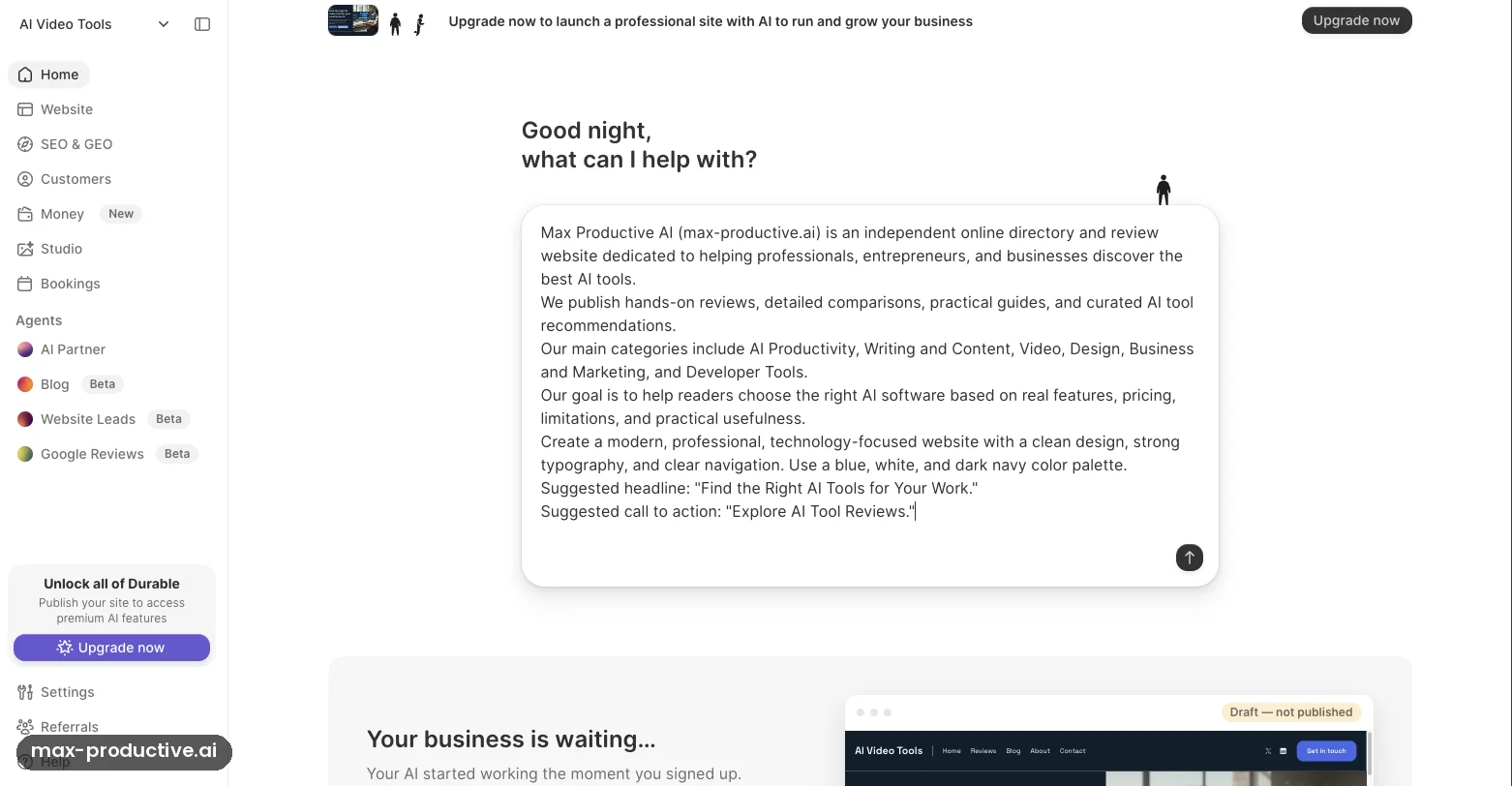
Home: the AI Partner prompt
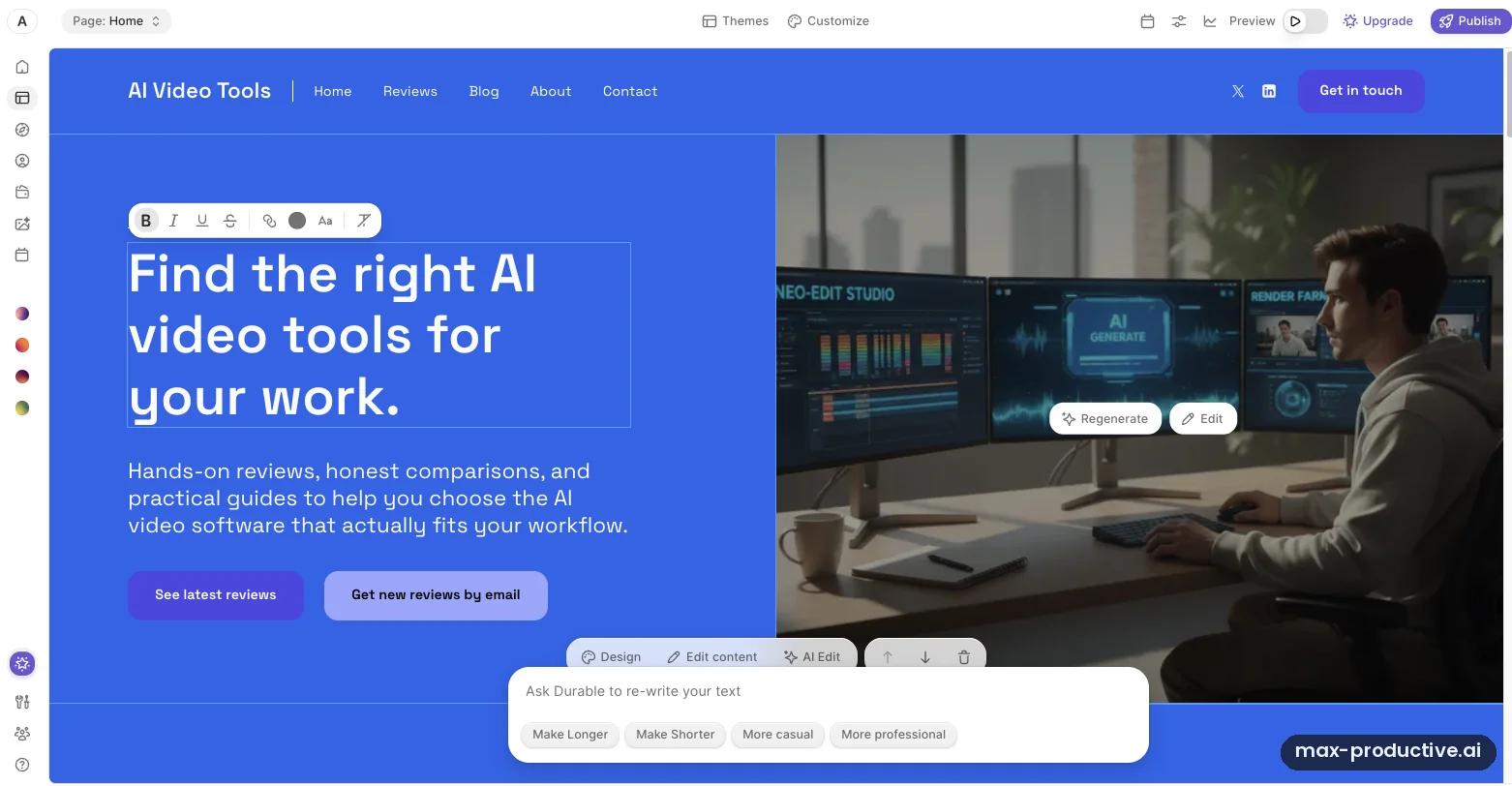
Durable opens on a chat box that invites you to ask your AI Partner to build, write or fix anything. The sidebar shows how much sits around the website: SEO & GEO, Customers, Money, Studio, Bookings, and three agents marked Beta. The site Durable drafted at signup sits below, called AI Video Tools and labeled "Draft, not published". On the free plan it stays that way, and a banner reminds you that publishing unlocks the rest.
To test the AI Partner properly, we pasted in a full brief for max-productive.ai. It covered what the site is, its six main categories, a blue, white and dark navy palette, a suggested headline and a call to action. Our advice: give Durable a detailed brief, then check its summary for anything it skipped.
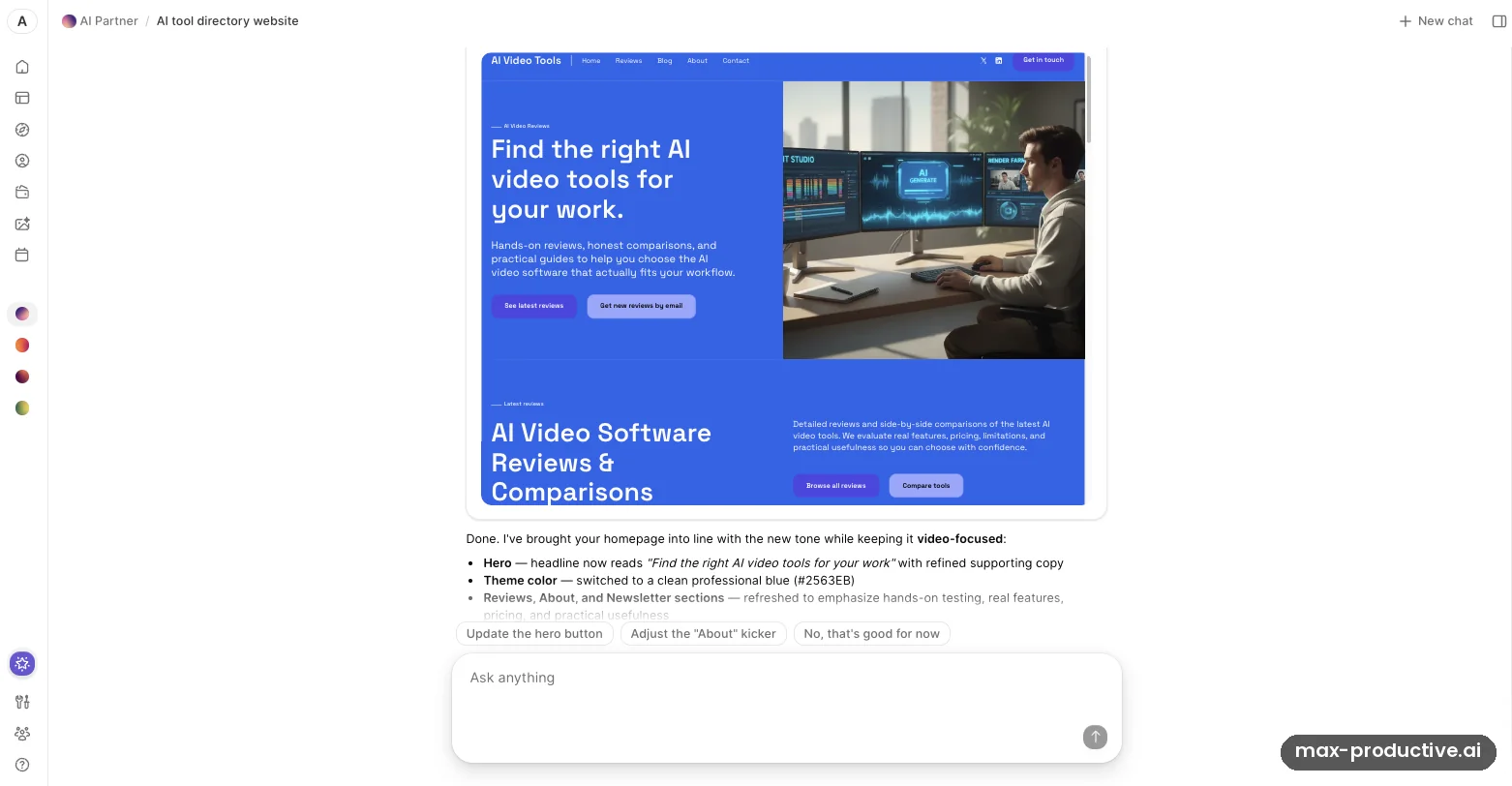
What the AI Partner changed
The AI Partner reworked the homepage and summarized its changes in plain language. It listed a new hero headline, a clean professional blue (#2563EB) as the theme color, and refreshed Reviews, About and Newsletter sections. It then offered follow-ups as one-click chips, such as updating the hero button. Changes like these arrive as a draft, so nothing goes live until you publish.
It acted on the color request and kept its own idea of the scope. Our brief described an AI tools directory across six categories. The AI Partner kept the site "video-focused", in its own words, and wrote "Find the right AI video tools for your work" instead of our headline. The palette also came out as a strong all-blue hero rather than blue with white and navy. Both look easy to fix with a follow-up message or in the editor, so read the summary before you publish.
The editor and AI rewrite
Click any text on the page to edit it in place, with a small toolbar for bold, italics, links, color and size. Select a block and the "Ask Durable to re-write your text" box offers Make Longer, Make Shorter, More casual and More professional. Images get Regenerate and Edit buttons, and each section has Design, Edit content and AI Edit controls, plus arrows to move it up or down.
This is the part of Durable we'd lean on most for small fixes, because you see each change as you make it. The flip side is that you work section by section, inside Durable's layouts. Pages stay tidy, and they look like a Durable site.
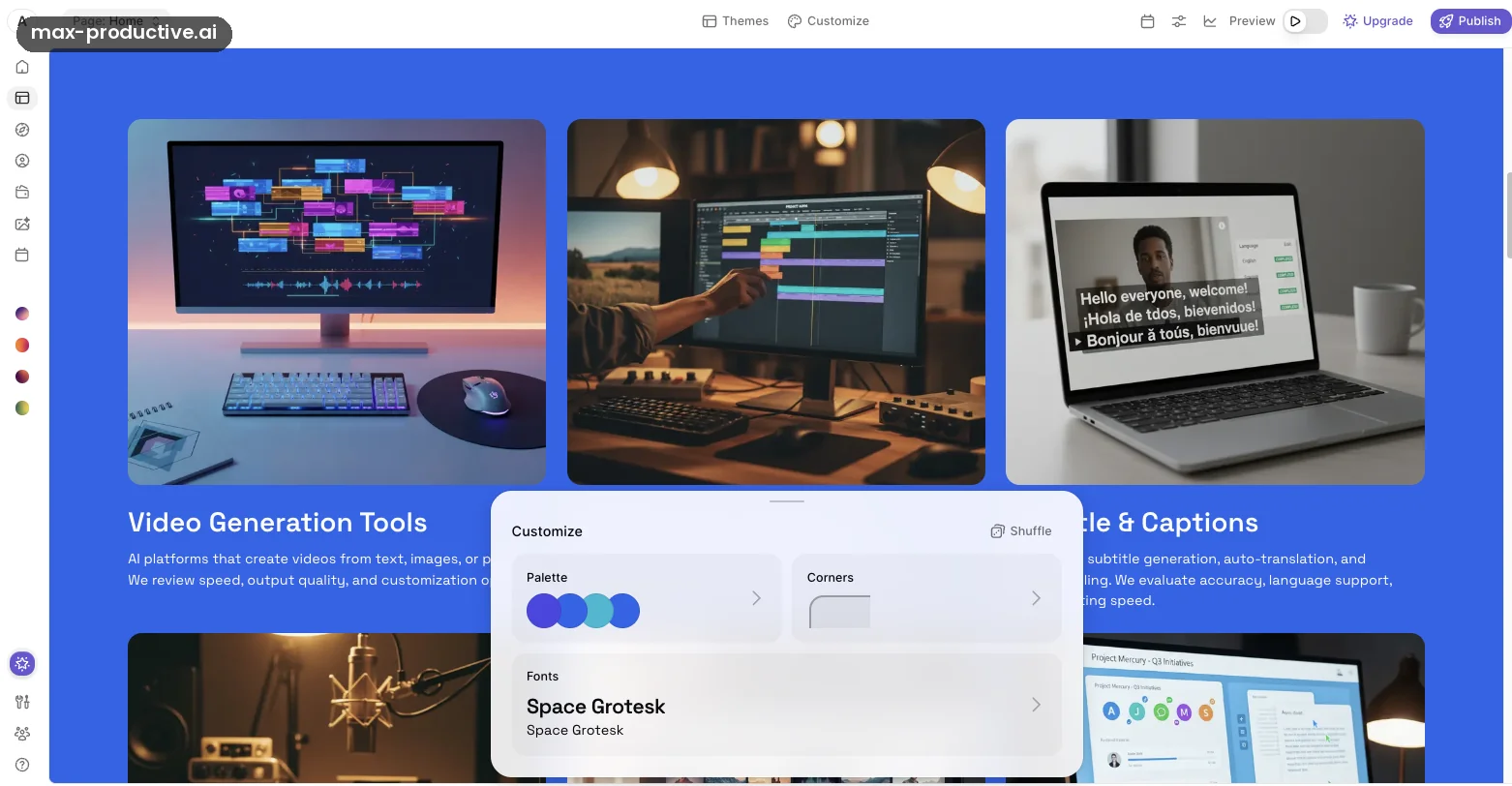
Themes and Customize
Site-wide styling lives in Themes and a Customize panel with Palette, Corners and Fonts. Our site used Space Grotesk throughout, and a Shuffle button tries new combinations for you. Site settings sit nearby, with Domains, Languages, Favicon and Blog. The Integrations page offers Google Analytics and a custom-code box for tags such as Google Ads or a Meta Pixel.
Our read: these controls cover what most small businesses change, and not much beyond that. Brand guidelines with exact layouts and spacing will run into the limits. For your colors and a readable font, the panel has what you need.
Studio: images and a logo
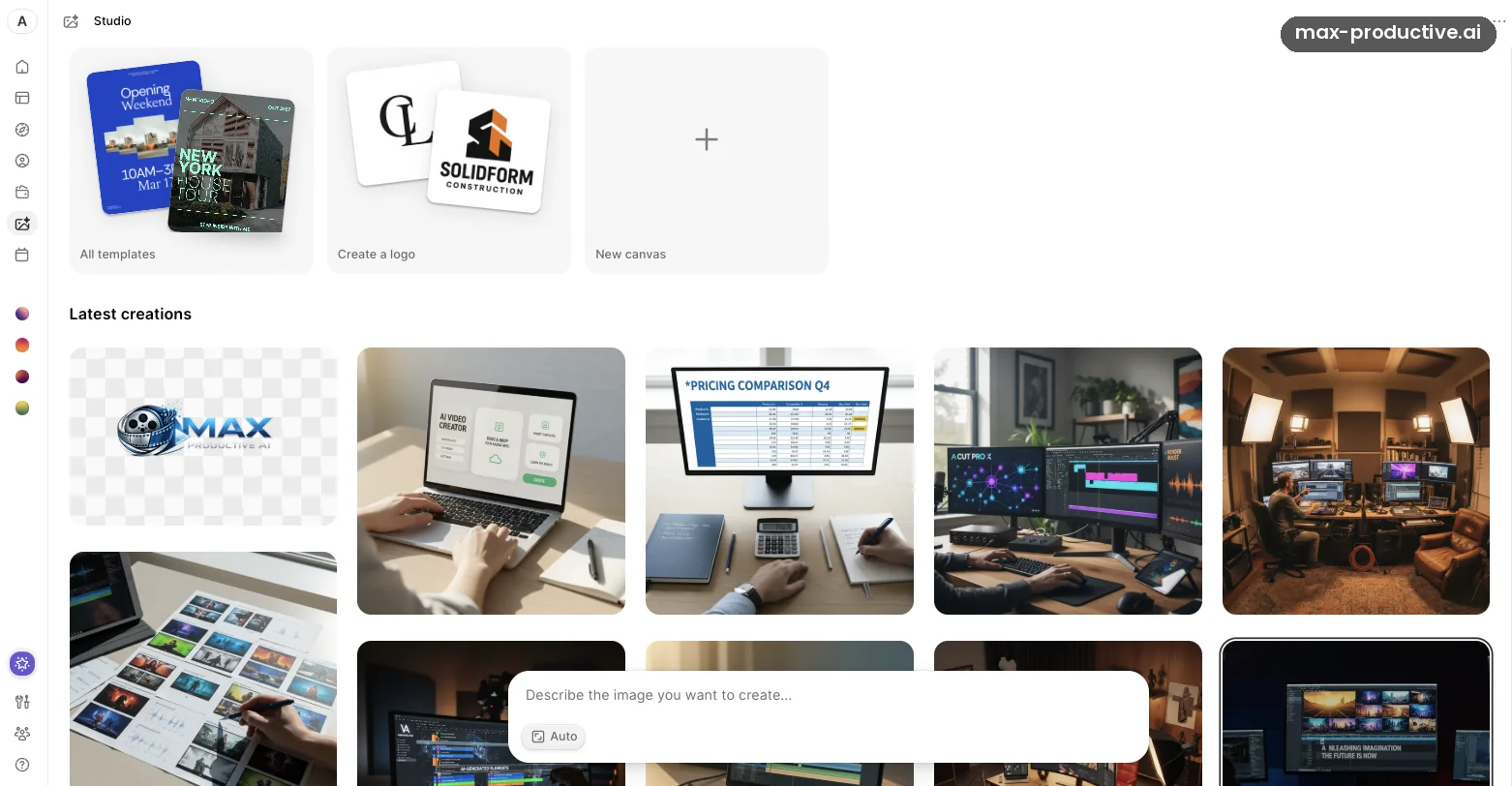
Studio is Durable's image tool. It has a template gallery, a logo maker, a blank canvas and a prompt box for describing the image you want. Latest creations shows the images in the account, including a Max Productive AI logo on a transparent background and several desk-and-monitor scenes for the site.
The images work well for a hero section or a social post, and keeping them in the same account as the site saves a trip to another tool. Look closely before you use one, though. AI-made screens often carry invented interface text, and one of ours read "A CUT PRO X". Each image also draws on your AI credits.
SEO & GEO
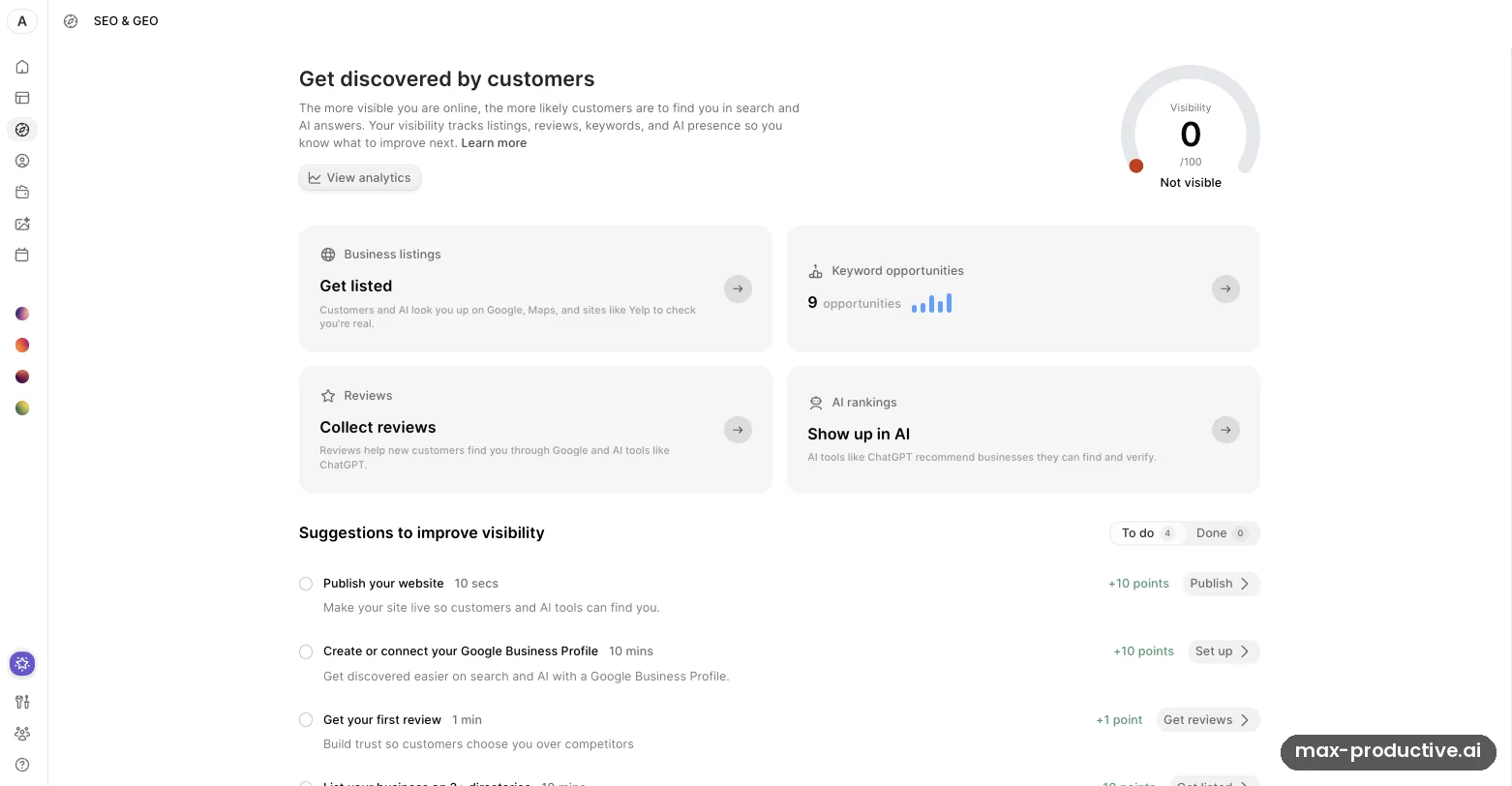
SEO & GEO is where Durable works on getting a business found, on Google and in AI answers. Our unpublished site scored 0 out of 100 for visibility, which is fair. The dashboard then listed what to do next, with the points each step is worth. Publishing the site and setting up a Google Business Profile add 10 points each, a first review adds 1, and listing the business on three or more directories comes next.
It also found 9 keyword opportunities and has panels for listings, reviews and AI rankings. According to Durable, it tracks answers in ChatGPT, Gemini, Claude, Perplexity and Grok. The feature we'd point a local business to is the checklist, because it turns SEO into a short to-do list. Google Business Profile, the fuller directory set and AI rank tracking need a paid plan.
The Blog Agent
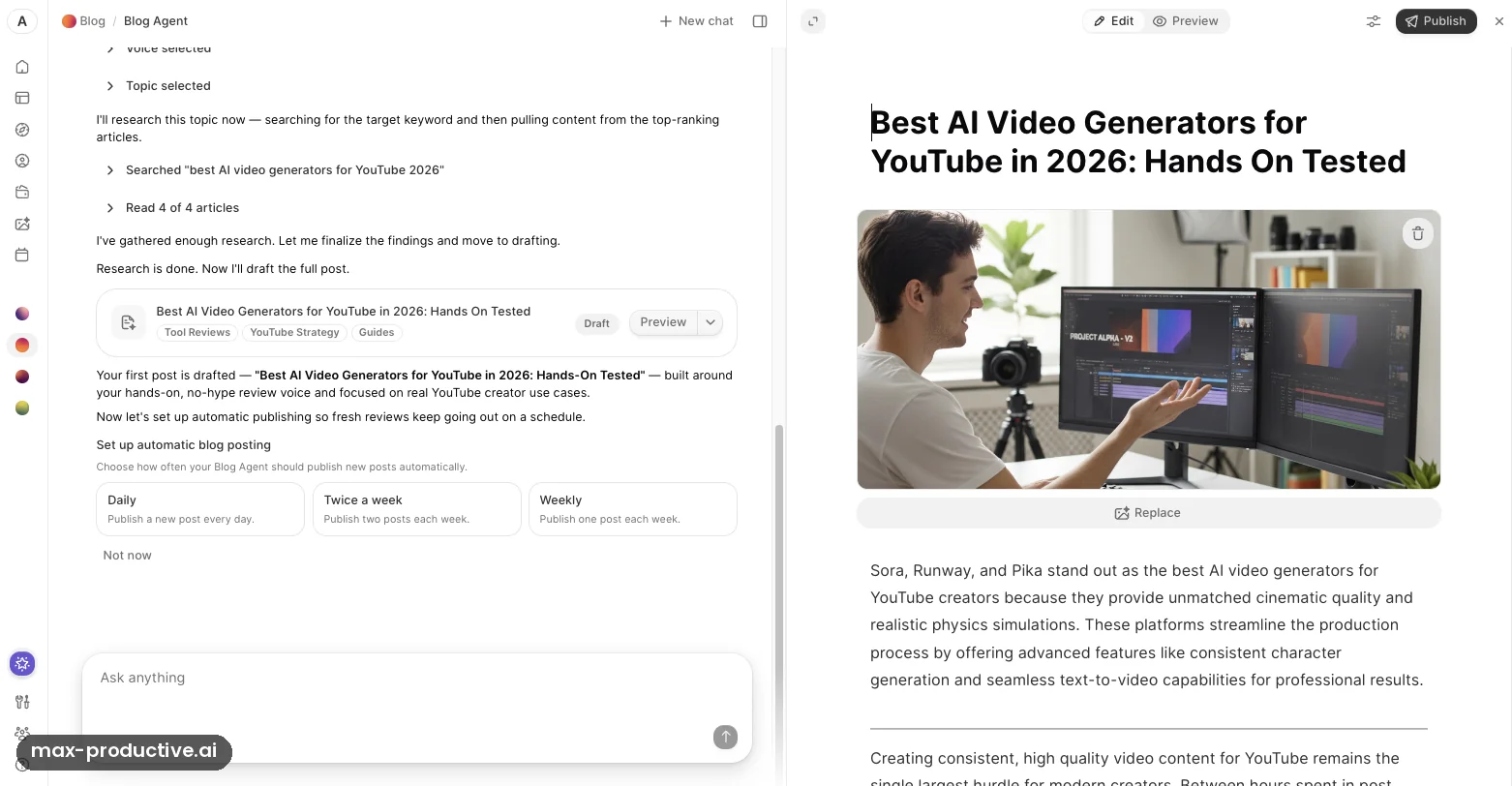
The Blog Agent, marked Beta, read our site and suggested five topic pillars. It then researched "best AI video generators for YouTube 2026", read the four top-ranking articles and drafted a full post with an AI hero image and tags. Once the draft was ready, it asked how often it should publish new posts on its own: daily, twice a week or weekly.
It's quick, and the draft reads cleanly. It still needs an editor. The agent titled the post "Hands On Tested" although nothing had been tested. Its start page also offered to bring in people searching in Austin, Texas, a city we never mentioned. Our advice: keep posts as drafts, check every claim, and switch on automatic publishing only once you trust the output.
Durable key features
Here's what Durable AI includes and which parts need a paid plan. Where a feature goes beyond what we tried on the free plan, we rely on Durable's help center and announcements.
-
AI website generation
Describe your business and Durable drafts a site with pages, copy and images. Every page gets the SEO basics, including metadata, heading tags, structured data and a sitemap, and every site gets an llms.txt file so AI assistants can read it. Since September 2026 you can also add a new section by describing it.
-
AI Partner
A chat assistant that edits the site for you, writes competitor research, and handles routine jobs such as daily social posts or a weekly business recap. Site edits arrive as a draft you publish, so you can check them first.
-
SEO & GEO
Full version on paid plansA Visibility Score, directory listings, review requests by email and AI rank tracking. Free covers 4 basic directories. Launch and Grow add Google Business Profile, 10+ directories picked for your industry and name-address-phone consistency checks. They also track your 5 most relevant AI queries, refreshed weekly on Launch and daily on Grow.
-
Blog Agent
BetaResearches live search results, builds a brief, writes the post, adds images with alt text and fills in the SEO title and meta description. When it launched in May 2026 it saved drafts for review. The app now also offers scheduled publishing.
-
Website Leads and Google Reviews agents
Beta, paid plansThe Leads agent drafts replies to contact-form messages and connects to Gmail. The Reviews agent connects to your Google Business Profile and drafts replies to reviews, one at a time or in bulk. You approve, edit or decline each reply.
-
Bookings
Launch and GrowClients book your services from the site, with intake questions, bookable team members, Google Meet links and two-way Google Calendar sync. Payment options are none, an invoice, full payment upfront, or payment after the appointment. There are no per-booking fees, according to Durable.
-
CRM, invoices and payments
A built-in customer list, plus Stripe-powered invoices and payment links with automatic reminders. Free holds 10 customers and paid plans are unlimited. You pay Stripe's standard rates, and Durable says it adds no fee on top.
-
Studio
Logos, website images, social posts and posters from a prompt, with templates and a canvas for editing. Durable routes each request to an AI model it considers suitable, and each image uses AI credits.
-
Multilingual sites
Grow planDurable translates the whole site and its SEO metadata into up to 5 extra languages and adds a language switcher for visitors.
One note on maturity. The website builder has been public since 2022, while the Blog, Leads and Reviews agents arrived in 2026 and still carry a Beta label. We'd rely on the first and supervise the second, the way you'd check a new assistant's work for the first few weeks.
Durable pricing
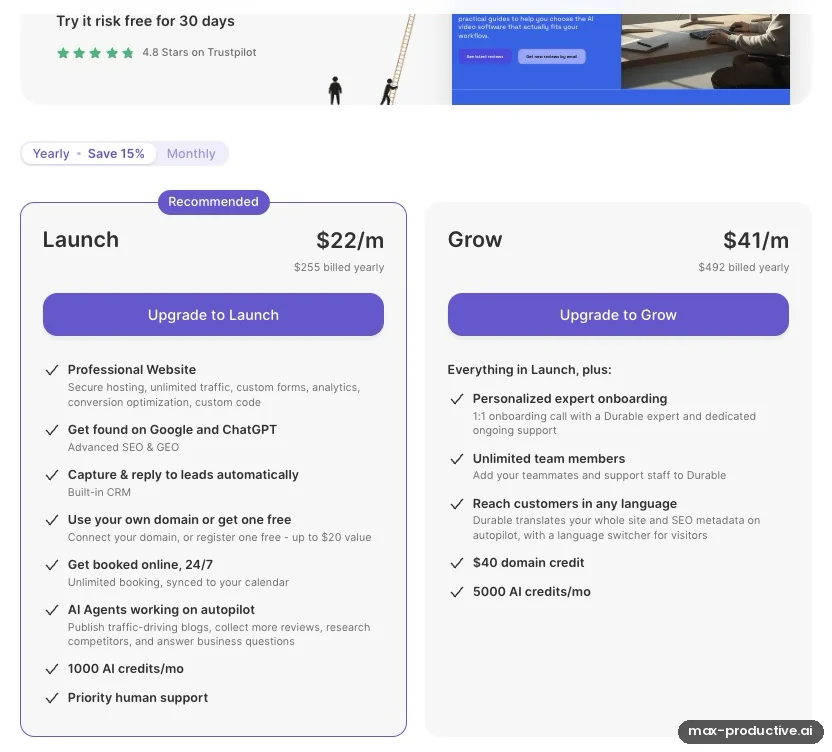
As of October 2026, Durable AI pricing has a free plan and two paid plans. Launch costs $22 and Grow $41 a month on yearly billing, or $25 and $49 billed monthly.
The upgrade screen in our account
This is Durable's upgrade screen inside our free account, set to yearly billing. Launch shows $255 billed yearly and Grow $492, and switching to Monthly brings back the $25 and $49 prices. The screen also says you can try a paid plan risk free for 30 days, and the monthly view has an Add credits link for extra AI credits. We didn't upgrade or ask for a refund, so read the terms at checkout.
Our read: the Launch card is where Durable earns its price. Publishing, your own domain, bookings, the agents and priority human support all start there, so it's the plan to compare against other builders.
| Plan detail | Free | Launch | Grow |
|---|---|---|---|
| Billed yearly | $0 | $22/mo ($255 a year) | $41/mo ($492 a year) |
| Billed monthly | $0 | $25/mo | $49/mo |
| Publish your site | No, private preview only | Yes | Yes |
| Domain | None | Connect yours, or a free one worth up to $20 | Connect yours, or a $40 domain credit |
| AI credits | 300 in total | 1,000 a month | 5,000 a month |
| AI agents | AI Partner and Blog Agent, within your credits | All agents, including leads and reviews | All agents, with 5 times the credits |
| Bookings and Google Business Profile | No | Yes | Yes |
| Customers in the CRM | 10 | Unlimited | Unlimited |
| Team and languages | Not listed | Teammates allowed | Unlimited team members, site translation |
| Support | Help center | Priority live chat | Expert onboarding and dedicated support |
Swipe sideways to see every plan.
Prices and limits come from Durable's pricing page and help center, last verified in October 2026.
Compare what each plan includes.
See Durable plansWhich Durable plan should you choose?
Free is for trying the builder. You can generate a site, edit it and test the AI tools with the trial credits, but you can't put it online. Launch is the plan most small businesses need. It publishes the site on your own domain and removes Durable's branding. It also adds bookings, Google Business Profile, the full set of AI agents and 1,000 credits a month. Grow makes sense for teams, for sites in more than one language, or for owners who'll run the agents hard enough to use 5,000 credits.
Is Durable AI worth the money?
For a local service business, Launch buys a hosted site, a domain, a booking page, invoices, a CRM and SEO help on one bill. Getting the same pieces separately usually means a website builder plus a scheduling app plus an invoicing tool. Against pure website builders, the price sits in the middle. Hostinger's AI Builder starts lower on a long prepaid term, and Wix's Light plan costs a little less on yearly billing. Durable's value depends on how many of the extras you'll use.
Our advice: when in doubt, start on monthly billing for a couple of months, then switch to yearly once you know you'll stay. The yearly saving, which Durable puts at 15%, is worth having on a plan you mean to keep.
How AI credits work
Every AI action draws on credits, from a site edit to a blog post, a Studio image or a reply to a lead. Free includes 300 in total, Launch 1,000 a month and Grow 5,000 a month. Durable doesn't publish a fixed cost per action: its terms say the cost depends on the request and the AI model used. Paid-plan credits are a monthly allowance, and the upgrade screen has an Add credits option if you run out. Anyone planning to run the agents on autopilot should keep an eye on the balance in the first month.
Domains, cancelling and leaving Durable
Custom domains are included with paid plans. A cancelled plan stays active until the end of the billing period. Durable will transfer a domain it registered for you once you've been subscribed for at least three consecutive months, and the transfer takes a couple of weeks. We found no way to export the site itself, and independent reviewers report the same, so moving to another builder means rebuilding your pages.
Durable pros and cons
Pros
A complete first draft from one description
Durable had a full, structured site waiting when we signed up, with pages, copy and images that fit a small business. The company quotes under 30 seconds for the draft, and independent reviewers report 30 to 60. Most of your time goes into checking details rather than building pages.
An AI Partner that edits the site for you
Changing the site is a conversation. Our brief came back as a restyled homepage, with a plain-language summary of every change and one-click follow-ups. For owners who don't want to learn an editor, this is the main appeal.
Local SEO turned into a checklist
SEO & GEO gives you a score, tells you what to do next and shows the points each step is worth. On paid plans, Durable also tracks how you appear in answers from ChatGPT, Gemini, Claude, Perplexity and Grok.
Bookings, invoices and a CRM included
Paid plans cover the tools a service business runs on: online bookings with Google Calendar sync, Stripe invoices and payment links, and an unlimited customer list. Stripe's standard rates apply, with no Durable fee on top.
A simple editor built on sections
Inline editing, one-click rewrites and section-level controls keep small changes quick. Because you work within Durable's sections, pages stay tidy without design skills.
You can try the core tools before paying
The free plan needs no card, and its trial credits covered everything we did: drafting a site, reworking it with the AI Partner and testing the Blog Agent.
Cons
The free plan can't publish
Free builds a private preview only. To put the site online, even without a custom domain, you need the Launch plan. Treat Free as a long trial rather than a free website.
Design freedom has a ceiling
Themes, palettes, fonts and sections cover the basics, but deep layout control isn't on offer. Independent reviewers make the same point, and Durable sites can look alike. If design is how you stand apart, look at Wix.
Not built for online stores
The company says so itself. Stripe links and paid bookings handle payments, but there's no cart or product catalog. A store belongs on Shopify or Wix.
AI output needs a careful read
The AI Partner kept our site video-focused despite a broader brief, a Studio image carried invented screen text, and the Blog Agent called an untested post "Hands On Tested". All quick fixes, as long as someone reads before publishing.
No site export we could find
We found no export option in Durable or its help center, and independent reviewers report the same. Leaving means rebuilding your pages elsewhere. A domain registered through Durable can be transferred after three months, so your address stays yours.
Credit costs aren't published
Every AI action uses credits, but Durable doesn't list what each one costs, and its terms say the cost can vary. Top-ups are available from the upgrade screen, but if you'll lean on the agents, watch the balance during your first month.
Durable alternatives
All the tools below sit in our AI website builders directory. The table covers the four closest to Durable.
| Compared on | Durable Reviewed | Hostinger | Wix | 10Web | Shopify |
|---|---|---|---|---|---|
| Entry paid plan | $22 a month, billed yearly | $2.99 a month on a 48-month term, renews at $10.99 | $17 a month, billed yearly | $10 a month, billed yearly | $29 a month, billed yearly |
| How you build | AI draft, AI Partner chat and a simple editor | AI Builder with a visual editor | AI generator plus a full design editor | AI builder on WordPress | Themes and an app store |
| Selling online | Payment links and paid bookings | Store on the Unlimited plan | Store from the Core plan, $29 a month billed yearly | WordPress and WooCommerce | Built for it |
| Standout strength | Local SEO, bookings and AI agents in one place | Lowest long-term price | Design freedom and an app market | WordPress flexibility | Ecommerce depth |
| Best for | Local service businesses | Budget sites and small stores | Creative and growing businesses | WordPress users and agencies | Online stores |
Swipe sideways to see every tool.
Durable vs Wix
Wix is the builder to choose when the look of your site matters as much as its content. It gives you far more design freedom, an app market and a full online store from its Core plan. The cost is time: there's more to learn and more to look after. Durable gets a local business online faster and adds SEO tasks, bookings and AI agents without extra apps. Pick Wix if you'd enjoy designing your site. Pick Durable if you'd rather not think about it.
Durable vs Hostinger AI Builder
Hostinger's AI Builder is the budget pick. Its entry plan costs $2.99 a month on a 48-month prepaid term and renews at $10.99, which undercuts Durable over a few years. Its Unlimited plan adds a store and email marketing. Durable costs more and puts its effort into what happens after launch: the SEO & GEO checklist, bookings, invoices and the agents. When price comes first, start with Hostinger. For one tool that keeps nudging your marketing along, Durable is worth the difference.
Which alternative fits you?
-
HostingerOur rating: 4.8 / 5
Best for: Budget-minded owners who want a simple site or a small store at the lowest long-term price.
Hostinger merged its Website Builder and Horizons into one AI Builder in August 2026. Premium costs $2.99 a month on a 48-month term and renews at $10.99, and the Unlimited plan adds a store and email marketing. It's the cheaper route, while Durable does more for local marketing after launch.
-

ShopifyOur rating: 4.6 / 5
Best for: Anyone whose website is mainly a store.
Basic costs $29 a month on yearly billing, or $39 monthly, and online card payments cost 2.9% + 30¢. You get inventory, checkout, point of sale and a large app store, which is everything Durable leaves to others.
-

10WebOur rating: 4.4 / 5
Best for: Owners who want an AI-built site they can keep and extend on WordPress.
AI Starter costs $10 a month on yearly billing, $120 for the first year. Because the site runs on WordPress, you get its plugins and can move hosts later. Expect a little more to learn than with Durable.
-

HubSpot AI Website GeneratorOur rating: 4.1 / 5
Best for: Businesses that already use, or plan to use, HubSpot's CRM and marketing tools.
HubSpot's free website tool sits in Content Hub and carries HubSpot branding. Starter removes it, from $15 per seat a month on yearly billing. The draw is a CRM and marketing platform that can grow well beyond Durable's.
Read our HubSpot AI Website Generator review Visit HubSpot AI Website Generator
-

WegicOur rating: 4.1 / 5
Best for: People who'd like to design and edit their whole site by chatting with an AI.
Wegic builds and edits a site through a chat with its AI designer. Check the plan before you buy: a custom domain needs its Premium tier, and its prices vary between sources.
-
PleskOur rating: 4.1 / 5
Best for: Web hosts, agencies and technical users who run many sites on their own servers.
Plesk is a hosting control panel rather than a builder for one business. Its licenses include Sitejet Builder, which has an AI website generator, so it suits agencies building sites for clients.
-

Site123Our rating: 3.9 / 5
Best for: A very low-cost, simple site with a basic store.
SITE123's paid plan starts at $10.80 a month on an annual plan paid upfront. It's a plain, inexpensive way to get pages and a small shop online.
-
WixOur rating: 4.5 / 5
Best for: Owners who want full control over design and room to grow, including a real store.
The Light plan costs $17 a month on yearly billing, or $24 monthly, and online stores start on Core at $29 a month. Wix has far more design freedom and an app market, and it takes longer to learn than Durable.
Durable FAQ
Is Durable AI free?
Yes, Durable AI has a free plan, but it only builds a private preview of your site. On the Durable free plan you can generate a site, edit it and try the AI tools with 300 AI credits, and you don't need a card to start. To publish, use a custom domain, take bookings or keep the agents running after the trial credits, you need the Launch plan or higher.
How much does Durable cost?
As of October 2026, Durable costs $22 a month for Launch and $41 a month for Grow on yearly billing, or $25 and $49 billed monthly. Durable advertises a 15% saving on yearly billing. Launch includes 1,000 AI credits a month and a free domain worth up to $20. Grow adds unlimited team members, site translation and 5,000 credits a month.
Is Durable good for SEO?
Yes, Durable covers the SEO basics on every site and adds local SEO tools on paid plans. Pages get metadata, heading tags, structured data, a sitemap and an llms.txt file automatically. The SEO & GEO dashboard scores your visibility, suggests directories, helps collect Google reviews and tracks how AI assistants mention you. Google Business Profile and AI rank tracking need Launch or Grow.
Can you build an online store with Durable?
No, Durable isn't designed specifically for ecommerce, as its own pricing page explains. You can sell services through paid bookings and take payments with Stripe invoices and payment links, but there's no shopping cart or product catalog. For a store, Shopify or Wix is the better choice, and both handle inventory and checkout.
What is Durable's AI Partner?
Durable's AI Partner is a chat assistant in your dashboard that can change your website, write content and run routine tasks. In our test it restyled our homepage from a single brief and summarized every change. It can also prepare competitor reports, daily social posts and a weekly business recap. Site edits arrive as a draft you review before publishing.
Does Durable write blog posts?
Yes, Durable's Blog Agent researches a topic, reads top-ranking articles, drafts a full post with images and alt text, and fills in the SEO title and meta description. In our test it produced a complete draft and offered to publish new posts daily, twice a week or weekly. It's still labeled Beta, so review each post before it goes live.
Durable vs Wix: which is better?
Durable is the better fit for a local business that wants a site online quickly, with SEO tasks, bookings and AI help built in. Wix is the better fit if design control, an app market or a full online store matters more. Wix's Light plan costs $17 a month on yearly billing, a little less than Durable's Launch plan.
Can I use my own domain with Durable?
Yes, every paid Durable plan lets you connect a domain you already own, or register one free, worth up to $20 on Launch and $40 on Grow. When you leave, Durable can transfer a domain it registered for you after at least three consecutive months of subscription, and the transfer takes a couple of weeks.
Should you try Durable?
Durable AI is at its best when you'd rather run your business than build a website. It gets a local service business online quickly, then keeps helping with the jobs that bring in customers: SEO tasks, Google reviews, bookings and invoices. The limits are clear. The free plan can't publish, design freedom is modest, and stores belong elsewhere. If that fits how you work, Durable earns its 4.3.
What we'd do. Sign up for the free plan and write a detailed brief: your services, your area, your colors and the headline you want. Let Durable draft the site, then read every page and fix anything the AI assumed. Open SEO & GEO to see your to-do list. When you're happy, move to Launch, connect your domain and set up bookings. Keep the Blog Agent on drafts for the first few weeks.
Our rating: 4.3 / 5
Very good
About this review
Based on a hands-on session on Durable's free plan, Durable's published pricing, help center and product announcements, and public user feedback. First published 25 October 2025. Last updated 14 October 2026.
Sources checked
- Pricing and plan limits. Durable pricing page and help center, checked October 2026.
- Product updates. Durable's blog announcements, March to September 2026.
- User feedback. Trustpilot and independent reviews, including Tooltester and Cybernews.
Ratings are our overall editorial judgment on a 5-point scale: 4.5 and up is Excellent, 4.0 to 4.4 Very good, 3.5 to 3.9 Good, 3.0 to 3.4 Fair. We do not use sub-scores.
This review contains affiliate links, so we may earn a commission at no extra cost to you. Our ratings and editorial opinions remain independent.