Hostinger AI Website Builder
Hostinger's Website Builder and Horizons are now one product: AI Builder. Describe what you want — a website, a store, or a full web app — and the AI builds it, backend included. Hosting, domain, and SSL come in the same plan.
Try Hostinger AI Builder →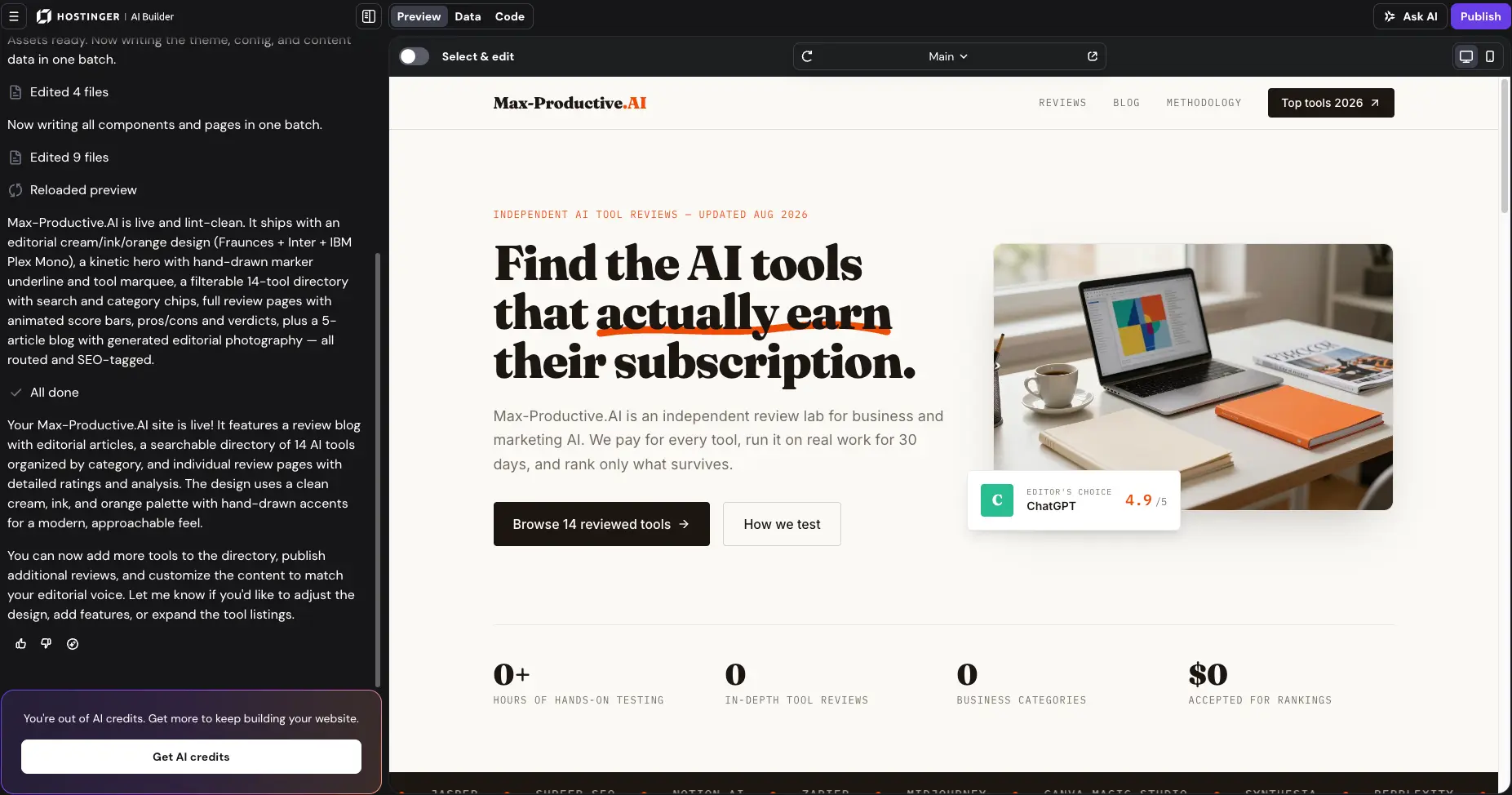
Two Builders Became One —
And the Value Is Hard to Beat
Hostinger made a smart move in August 2026: it merged its drag-and-drop Website Builder and its Horizons vibe-coding tool into a single product, AI Builder. We tested it by rebuilding a full review directory from one prompt and got real pages, working search and filters, and a design the AI chose itself. The catch is the fine print: headline pricing needs a 48-month commitment, renewals jump hard, and ambitious builds eat AI credits. Still, for under $3/month with hosting, domain, and SSL included, nothing else in this segment comes close.
✓ What We Love
- Agentic + manual building modes in one product
- Hosting, domain, SSL, and email in one bill
- Real backend: user accounts, databases, emails
- Full AI suite beyond the website itself
! Could Be Better
- Drag-and-drop sites can't be exported
- Renewal prices triple after the intro term
- AI copy needs a human editing pass
What Is Hostinger AI Website Builder?
The product changed shape in August 2026. Here's what it is now — and who it's for.
August 2026 Update: Website Builder + Horizons Are Now AI Builder
On August 18, 2026, Hostinger merged its two site-creation products — Hostinger Website Builder (the drag-and-drop AI generator) and Hostinger Horizons (the prompt-based vibe-coding tool) — into a single product called Hostinger AI Builder. Existing projects keep working, old Horizons links redirect automatically, and both building styles now live in one interface: agentic mode, where the AI leads, and manual mode, where you keep hands-on control.
Hostinger started as a budget hosting company. In 2026 it's something broader: an AI platform where one account covers the website, the store, the backend, the email marketing, and a set of standalone AI agents. AI Builder sits at the center of it all, now serving over 5 million customers across 150+ countries.
Why merge two products? Because what people build changed. A year ago, fewer than 4% of projects on the platform were anything other than traditional websites. Today nearly one in five is a SaaS product, an internal tool, or a learning platform — a fivefold jump in twelve months. Those projects need user logins, databases, and payments, and the line between "website" and "app" keeps fading. AI Builder covers both sides of that line in one interface.
That's also what separates it from the competition. Prompt-only generators like Durable are faster to a first draft but stop at the visible site. Editor-first platforms like Wix give you deeper design control but cost several times more once you build a real store. Hostinger is the only budget option doing both — conversational AI building and hands-on editing, with a native backend underneath.
Is everything great? No. The AI-written copy tends toward generic phrasing and needs editing before you publish, and comparative testing by independent reviewers has found the design output less refined than Wix's or Squarespace's. Hostinger wins on speed, breadth, and price — not on design awards. For most small businesses, that's the right trade.
Our Testing
We ran this review's test in late August 2026, in agentic mode, with a single prompt: build a review blog and directory for AI tools — essentially a clone of this very site. AI Builder delivered a multi-page site with a filterable 14-tool directory, individual review pages with score bars, a 5-article blog, and its own font and color choices. We also hit the AI credit limit mid-polish, which taught us something too. The screenshots below are all from that build.
Who Is Hostinger AI Builder Best For?
Beginners, solopreneurs, and small businesses who want the cheapest full path to a live website or small store — hosting, domain, backend, and email in one bill, without touching code. It's also the rare budget tool that can build actual web apps with logins and data. If you need deep design customization, WordPress compatibility, or a future migration path, look at the alternatives further down instead.
Starting points are flexible: type a prompt, upload a PDF (a restaurant menu works), share a screenshot of a design you like, or paste the link of an outdated site you want rebuilt. Any of those becomes the foundation for a website, store, app, or internal tool.
See Hostinger AI Builder in Action
Real screenshots from our own test build — one prompt, agentic mode, no design input from us.
Start From a Prompt (or a Template)
The first screen: describe your project in one sentence, or pick from the template gallery
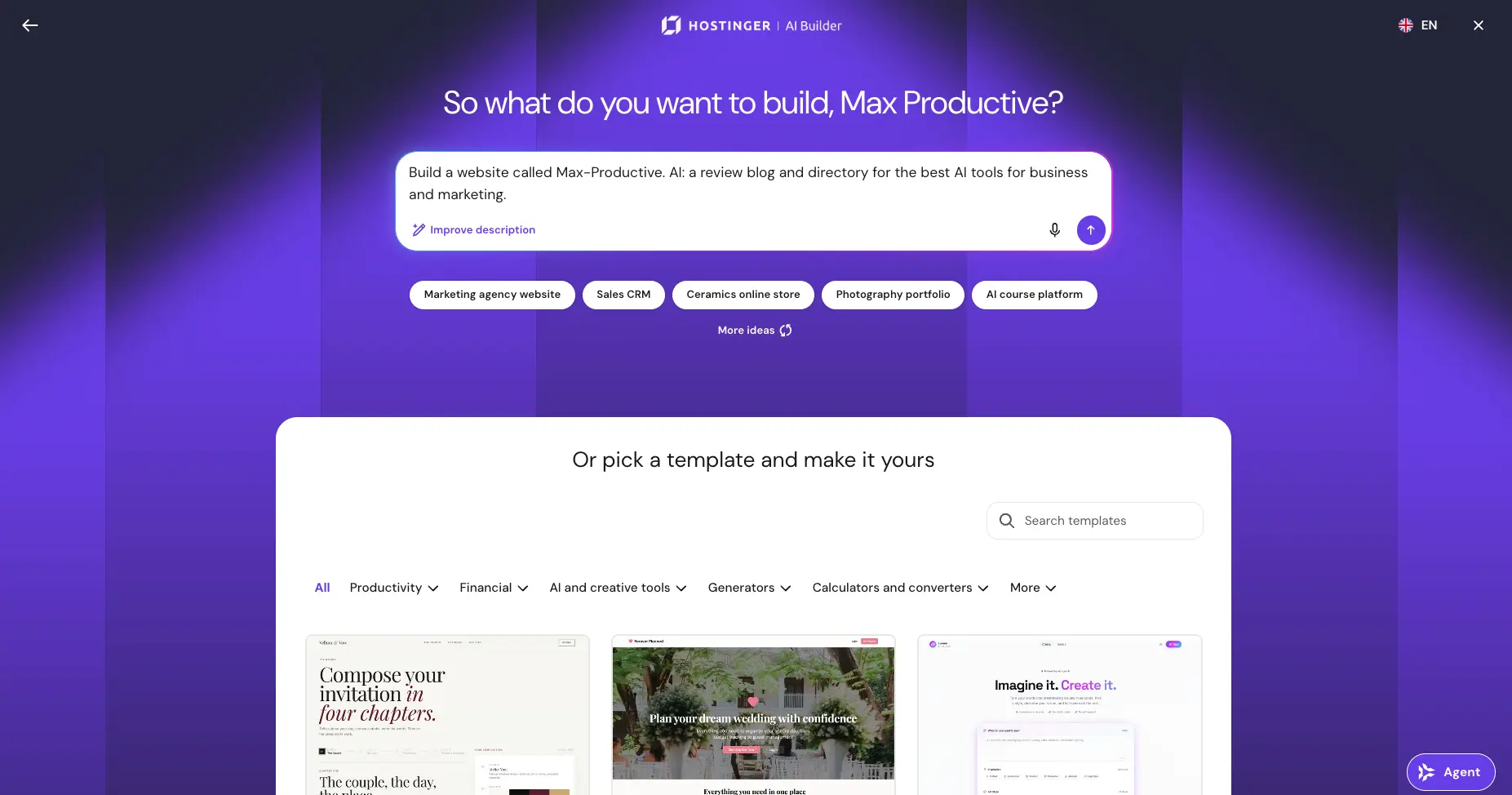
You get one text box and a direct question. We typed a single sentence (a review blog and directory for AI tools) and pressed "Improve description," which is worth doing every time: a sharper prompt visibly produces a sharper first draft. If you'd rather not start from words, a searchable template gallery sits right below, organized by category.
Choose Your Building Style
The merger in one screen — manual drag-and-drop or agentic vibe coding
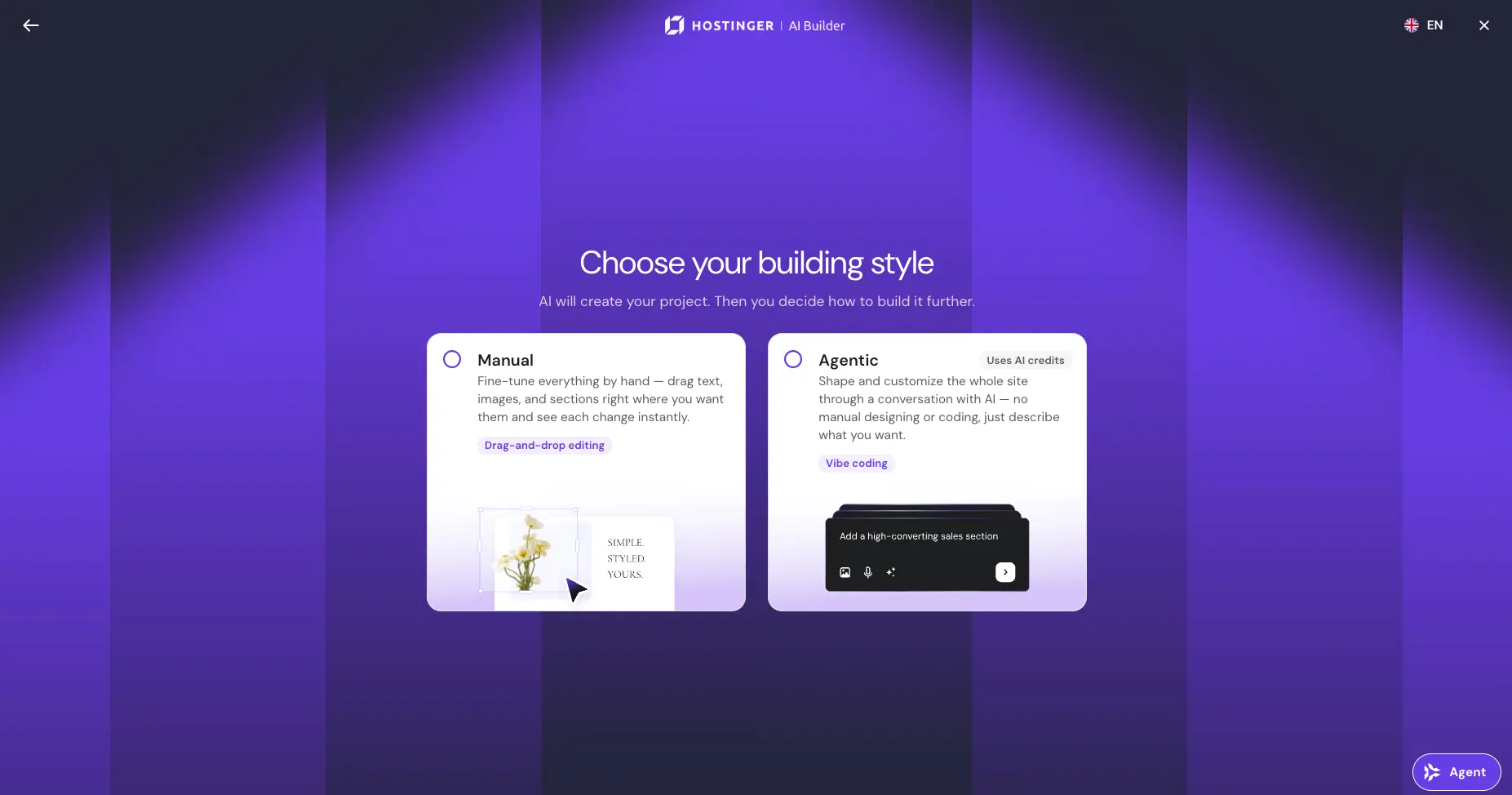
This screen tells the whole merger story. Manual is the old Website Builder: fine-tune everything by hand and watch each change land. Agentic is the old Horizons: hold a conversation and let the AI design and code. You're not locked into either. A sensible workflow: agentic for the heavy lifting, manual for the finishing touches. Just note the small badge: agentic mode spends AI credits.
The Result: A Full Site From One Prompt
Our test site, live in the preview — directory, reviews, blog, all generated
This is the part that surprised us. From one sentence, AI Builder produced an editorial design with its own serif-and-mono font pairing, a working 14-tool directory with search and category filters, individual review pages with animated score bars, and a five-article blog, all routed and SEO-tagged. Is the copy publish-ready? Not quite; it reads a bit generic, like most AI text. But as a starting structure, this is well beyond what budget builders produced a year ago.
Curious what one prompt gets you?
Try Hostinger AI Builder →Free domain for the first year • Every plan includes hostingCode Editor — Agentic Projects Aren't a Black Box
The Code tab shows the full generated project, with an export option
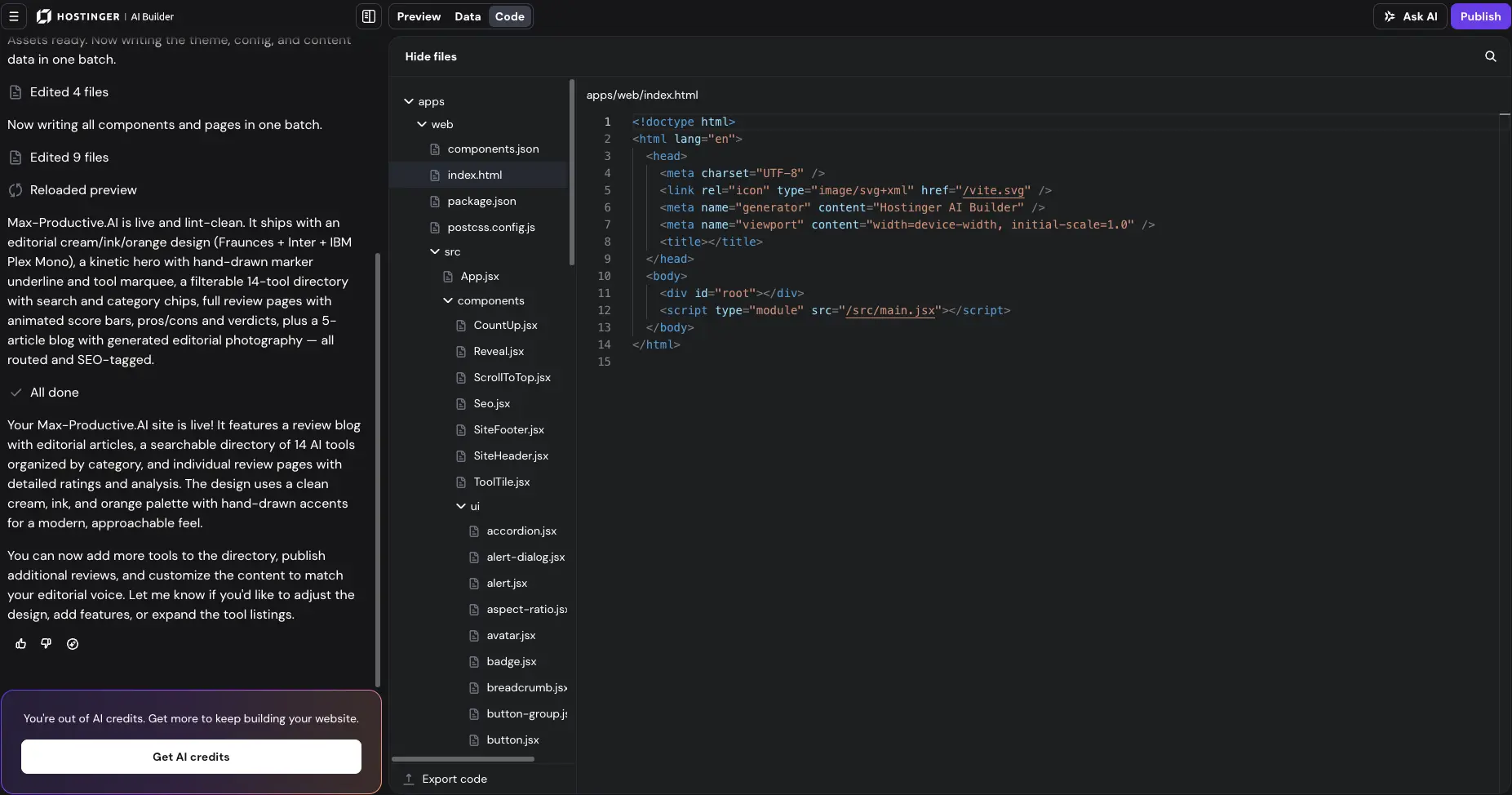
Worth noting: agentic projects come with a proper code view. The Code tab shows everything the AI wrote: components, config, styles. An "Export code" button sits at the bottom of the panel. A meaningful nuance, because classic drag-and-drop sites still can't leave Hostinger. Developers can audit what the agent built; everyone else can safely never open this tab.
Data Dashboard — the Backend, Handled
User accounts, contact forms, and bookings without third-party services
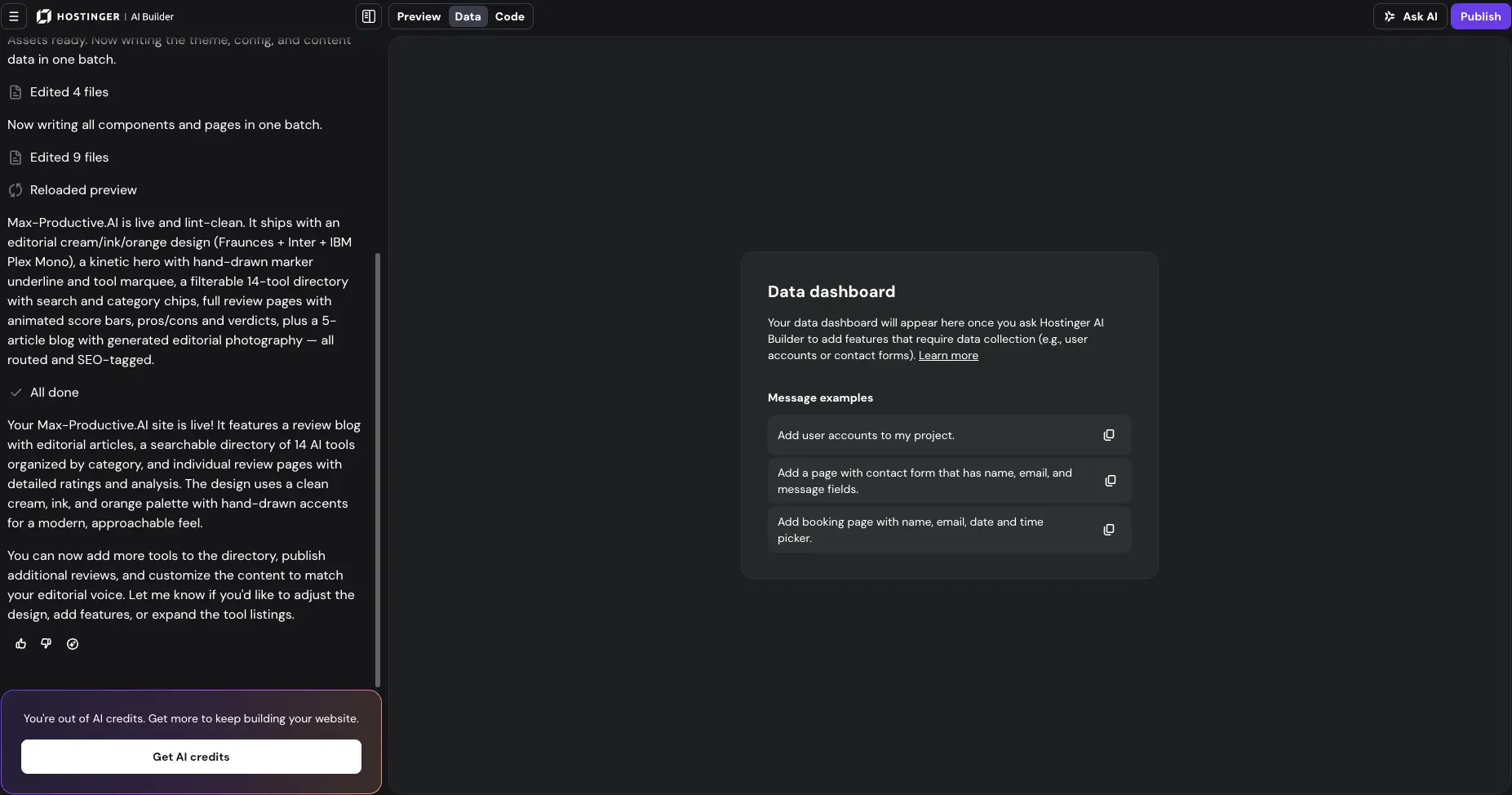
Ask for anything that needs data (user accounts, a contact form, a booking page) and AI Builder provisions the backend itself, then reports it in this dashboard. No Firebase account, no external form service, no API keys to paste. It's the piece prompt-only builders skip entirely.
AI Credits: The Real Cost of Agentic Mode
Top-up packs, from small experiments to heavy iteration
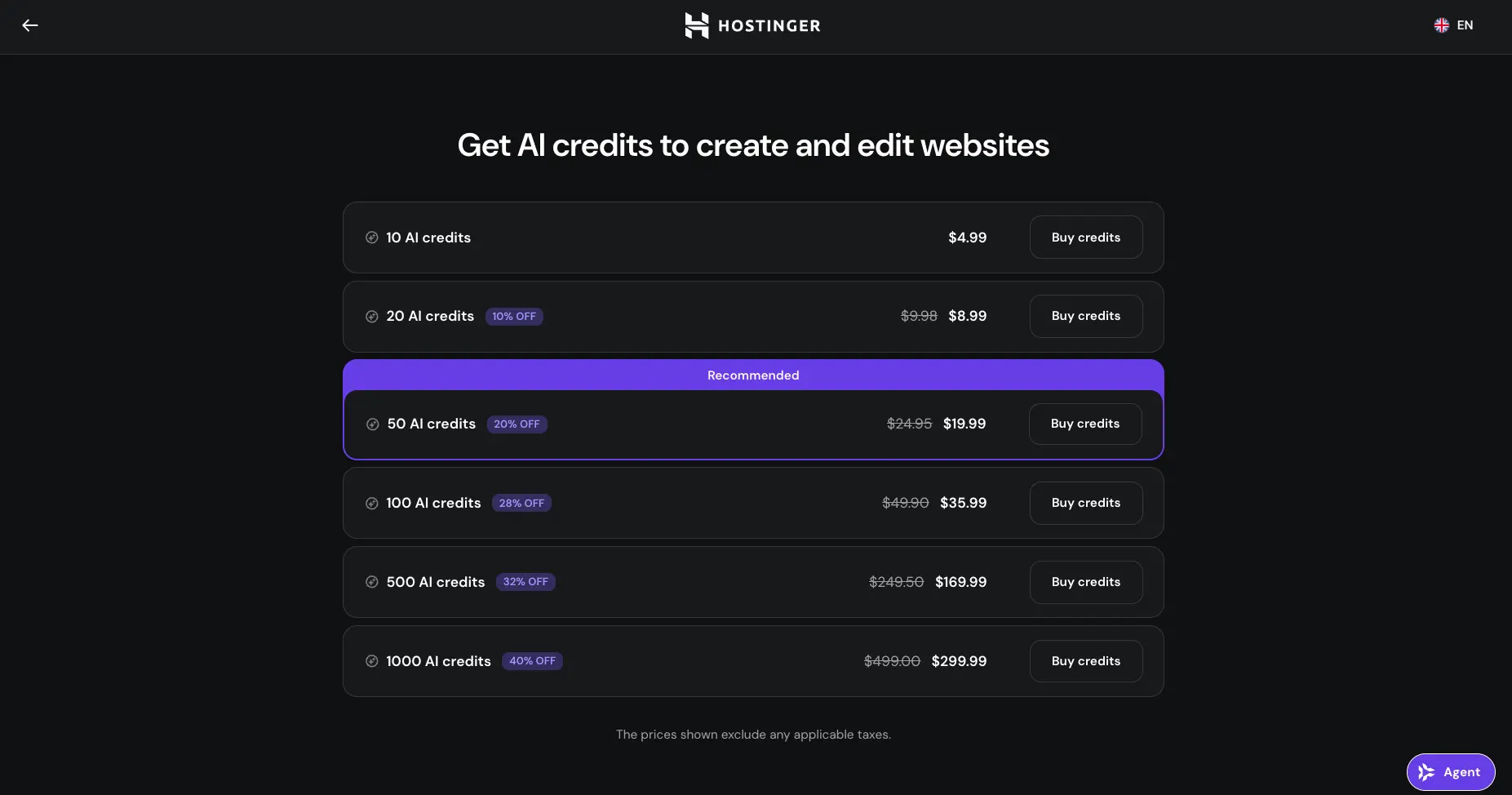
Full transparency: we ran out of credits before we finished polishing our test site. You can spot the banner in the earlier screenshots. Included plan credits cover generating a site and a reasonable round of edits, but ambitious back-and-forth burns through them. Top-ups run $4.99 for 10 credits up to $299.99 for 1,000. Budget a pack if you plan to iterate a lot, or switch to the manual editor for small changes. That one costs nothing.
How Hostinger AI Builder Works
From idea to published site in four steps. Simple on purpose.
Describe Your Project — or Upload One
Type a prompt, upload a PDF, share a screenshot, or paste the URL of an old site you want rebuilt. A restaurant can hand over its menu; a designer can share a reference image. AI Builder turns any of these into a working first draft in about a minute. The "Improve description" button is a small feature with an outsized effect. Use it.
Pick Agentic or Manual
Agentic mode is a conversation: you describe, the AI designs, codes, and iterates. Manual mode is the classic editor: drag text, images, and sections exactly where you want them. Most people will mix both — agentic for structure and pages, manual for the tweaks you'd rather not spend credits on. Switching is a click, not a commitment.
Iterate in Chat, Watch the Preview
Ask for a pricing section, a different color mood, a testimonial block, and the preview updates as the AI works. You can also click any element to edit it directly. Everything happens in a draft environment kept separate from your published site, so nothing your visitors see changes until you decide it should. Hostinger says its upgraded AI architecture produces better results earlier, with fewer wasted prompt iterations; our test broadly matched that — the first draft needed direction, not rescue.
Add the Backend, Connect a Domain, Publish
Need sign-ups? AI Builder provisions the database and sign-in flow (passwords, one-time passcodes, Google and Apple login) plus the confirmation and reset emails that go with them. Need to sell? It opens the store with Stripe and PayPal. Need to reach customers? It works through Hostinger Reach. Then connect your free first-year domain and hit Publish.
Safe to Use on a Live Business
The AI always works in a draft kept apart from your published project. Changes only reach the public when you publish them. That's what makes it reasonable to let an AI agent loose on a site that's already trading. It's a quiet feature, but for anyone with real customers, it's the one that matters.
Works With Your Own AI Tools
Hostinger Connector, included free with every plan, lets your own AI assistant (Claude Code, Cursor, or VS Code) operate on the same account: deploy a project, connect a domain, update store inventory, even draft a campaign. If you already work with a coding agent, your Hostinger account becomes something it can act on, not just read about.
Key Features
What a plan that starts under $3/month actually includes.
Agentic Mode (Vibe Coding)
The old Horizons experience, now built in. Describe what you want and the AI designs, writes, and codes it: websites, stores, or full web apps with logic behind them. This is the mode that spends AI credits, and it's where the platform's ambition lives.
Manual Drag-and-Drop Editor
The classic Website Builder lives on as manual mode: move sections, swap images, edit text, and see every change instantly. It's free to use — no credits — which makes it the smart place for small fixes.
Built-In Backend
The feature no other budget builder matches. User accounts with Google and Apple sign-in, one-time passcodes, databases, file storage, and automated emails, all provisioned by the AI on Hostinger's own infrastructure. A customer portal used to mean hiring a developer; here it's a sentence in chat.
Start From Anything
A prompt, a PDF, a screenshot, or a link. The URL option is quietly brilliant: paste your outdated site's address and AI Builder rebuilds it as the starting point — the tedious copy-paste work that stops most redesigns, gone.
Ecommerce With Stripe & PayPal
Payments are built in: ask the AI to open a store and it does. Right-sized for small catalogs and straightforward selling. For serious scale, multi-channel selling, or B2B, Shopify remains the deeper (and pricier) platform.
Hosting, Domain & SSL Bundled
No separate hosting bill, ever. That's the structural advantage of a hosting company owning the builder. Independent testers measured page loads around 0.6 seconds on Hostinger's LiteSpeed servers with NVMe storage, and the first-year domain is included.
AI Agent Suite
The website is only one piece. Hostinger Agent (the merged Kodee assistant) handles daily business tasks inside your dashboard, OpenClaw runs as an always-on assistant in WhatsApp, Telegram, Slack, and Discord, and Hermes Agent, an open-source agent that improves its own skills over time, comes managed or self-hosted. One automation plan lets you switch between agent apps freely.
Reach Email Marketing
Hostinger Reach is the built-in email marketing arm: AI-generated campaigns, forms, and now standalone AI image generation right in the editor. It's included with the Business plan, and AI Builder can send campaigns through it directly when you ask.
Two more things before pricing. AI Builder applies SEO optimization automatically, aimed at traditional search and at AI answer engines like ChatGPT, a sensible bet on where discovery is heading. And if none of the AI paths appeal, 400+ conventional templates are still there to start from.
Both building modes come with every plan:
Try Hostinger AI Builder →No separate builder subscription • AI credits includedHostinger Pricing Plans
AI Builder is sold through Hostinger's hosting plans — no separate subscription. Watch the renewal column.
Premium
- ✓ 5 AI build credits
- ✓ 3 websites
- ✓ Agentic + manual modes
- ✓ Free domain (1st year) + SSL
- ✓ Hosting included
- ✓ Renews at $10.99/mo
Business
- ✓ 15 AI build credits + 500 agent credits
- ✓ Unlimited websites
- ✓ Ecommerce (Stripe & PayPal)
- ✓ Hostinger Reach included
- ✓ Free domain (1st year) + SSL
- ✓ Renews at $16.99/mo
Cloud Startup
- ✓ 15 AI build credits + 1,000 agent credits
- ✓ Maximum resources
- ✓ Priority support
- ✓ Best for heavier web apps
- ✓ Renews at $25.99/mo
Pricing last verified August 2026. Visit Hostinger for current rates.
About those AI credits: the included 5-15 build credits cover generating a site plus a reasonable round of edits. If you iterate heavily in agentic mode (as we did) you'll need a top-up: packs run from $4.99 for 10 credits to $299.99 for 1,000, with 50 credits at $19.99 flagged as the recommended pack. The manual editor never touches your balance, so save credits for structural work and do cosmetic fixes by hand.
Is It Worth the Money?
For context: Wix's Core plan alone runs about $29/month, over $1,300 across the same four years, and that's before store apps push the bill higher. Even after Hostinger's renewal jump, the all-in cost stays below every big-name alternative. The trade-off was never price. It's lock-in and design polish.
Against the rest of the field: Shopify starts at $39/month for its Basic plan plus transaction fees; Wegic lands around $23.90-41.90/month on annual billing with custom domains gated to its top tier; and 10Web sits in mid-tier managed-WordPress territory. Wix is the only one here with a free tier you can actually use, handy if you want to experiment before spending a cent.
Detailed Pros & Cons
The honest breakdown after our hands-on build and a pass through independent reviews.
✓ Pros
Hosting, domain, SSL, the builder, backend, and (on Business) email marketing — one bill, starting under $3/month on the intro term. Every competitor makes you assemble at least part of that stack separately, and most charge more for just one piece of it.
Agentic mode for the heavy lifting, manual mode for control. Competitors pick one lane: Durable and Wegic are prompt-only, Wix is editor-first. Hostinger is the only budget platform where you can vibe-code the structure and then hand-adjust the result without leaving the tool.
Databases, sign-in flows, file storage, and automated emails provisioned by the AI on Hostinger's own infrastructure. The result: actual web apps (customer portals, booking systems, internal tools) where other AI website builders stop short.
A working draft in under a minute, and published pages that loaded in well under a second for independent testers. Speed shows up at both ends: building and browsing.
Hostinger Agent for daily tasks, OpenClaw and Hermes for always-on automation, Reach for email, Connector for your own coding tools. No other website builder ships with a stable of standalone AI agents around it. For some businesses, that suite ends up mattering more than the site itself.
The AI works in an environment separate from your published project, and nothing goes public until you publish it. It sounds basic; it's the difference between letting an AI experiment on your business and letting it break your business.
✗ Cons
The headline prices require a four-year prepay, and renewals land at more than triple the intro rate. This is the single most repeated criticism across review platforms — not the product, the pricing structure. Do the four-year math before you buy, not after.
There's no export or migration path for builder sites — they live on Hostinger, full stop. Agentic projects soften this with a code view and export option, but if platform independence is non-negotiable, 10Web's WordPress route is the honest answer.
The generated text is grammatical and on-topic but tends toward generic phrasing — our test site's copy read fine and said little. Plan an editing session before launch. To be fair, this is true of nearly every AI builder; Hostinger just isn't the exception.
We hit the credit wall mid-polish on a single ambitious build. Simple sites will live comfortably within plan credits; iterative perfectionists will be buying packs. The free manual editor is the pressure valve — use it for anything cosmetic.
Comparative testing by independent reviewers has found Hostinger's design output less refined than Wix's and Squarespace's, even while beating both on speed and price. Our test build looked better than expected, but design-led brands wanting pixel control will feel the ceiling.
Agent credits only start at the Business plan, and several AI extras are gated to pricier tiers. The Premium plan is a fine on-ramp, but the platform clearly wants you one step up. Factor that in when you compare plans against alternatives.
Hostinger vs Competitors
How AI Builder stacks up against the main alternatives in AI website building.
| Feature | Reviewed Hostinger | Wix | 10Web | Shopify |
|---|---|---|---|---|
| Starting Price | $2.99/mo (48-mo term) | Free tier; paid from ~$17/mo | Managed WordPress plans | $5/mo Starter (limited) |
| Realistic Ongoing Cost | $10.99-$25.99/mo at renewal | $70-150/mo for a real store | Mid-tier WP hosting | $39-$399/mo + transaction fees |
| Site Export | Builder sites: no (agentic: code export) | Limited | ✓ Real WordPress | Store data exportable |
| Backend (logins, databases) | ✓ Built in | Via Wix apps | Via WP plugins | Commerce-focused |
| Ecommerce Depth | Stripe & PayPal built in | Good from Core plan | Basic | Best-in-class |
| AI Approach | Agentic + manual modes | Aria inside the editor | AI on real WordPress | Magic + Sidekick |
| Best For | Budget all-in-one, web apps | Design control | WordPress + portability | Scaling stores |
Which Tool Is Right For You?
Hostinger AI Builder
ReviewedBest for: Beginners, solopreneurs, and small businesses who want the cheapest complete path to a live website or small store, with hosting, domain, backend, and email on a single plan, and who don't plan to migrate away. The agentic mode makes it the only budget builder that also produces real web apps with logins and data. Accept the lock-in and the renewal math, and the value is unmatched.

Wix
Design ControlBest for: Design-led sites where pixel control matters. Wix retired its old ADI generator in late 2024; AI now lives inside the full editor as Aria, and Wix Studio goes as deep as CSS-level editing — flexibility Hostinger can't match. The free tier is genuinely usable for testing. The downside is cost: a realistic small store runs $70-150/month once the necessary apps stack up.

10Web
WordPress + PortabilityBest for: Anyone who needs code ownership and a migration path. 10Web generates and hosts real WordPress sites, which means plugins, themes, and, crucially, the freedom to leave that Hostinger doesn't offer. Reviewers rate it much stronger as a WordPress AI builder than as an ecommerce tool, and real WordPress does mean more moving parts to maintain. That's the price of owning your site.

Shopify
Serious EcommerceBest for: Stores built to scale. Shopify's AI (Magic and Sidekick) sits on top of the deepest commerce stack in this comparison: multi-channel selling, B2B tools, a huge app ecosystem, and a new $0/month Agentic plan that syndicates your catalog into AI shopping surfaces like ChatGPT and Perplexity. It costs meaningfully more and is overkill for a simple site, but past a certain order volume, nothing here competes.

Durable
Instant PresenceBest for: Solo service businesses that need a presence today. Durable generates a site with copy, images, and simple CRM and invoicing tools in under a minute, a great fit for contractors, consultants, and local shops. Design depth is shallow next to Hostinger's manual mode, and there's no backend layer, but for "I need a professional page by lunch," it's hard to argue with.

Wegic
Chat-Based BuildingBest for: Chat-first builders who want a conversational draft fast. Wegic builds a site through dialogue (voice input included) in 60-90 seconds. Pricing has shifted several times in 2026: currently a $2.99 one-time trial, then roughly $23.90-41.90/month billed annually, with custom domains reserved for the top tier, and no code export. Fun to try; run the numbers on the cost per finished site before committing.
One more name that doesn't fit the cards above: Plesk. It's a server management panel rather than a website builder, but every Plesk license now includes Sitejet Builder with an AI website generator: feed it a few business details and it produces a responsive site you can edit and publish straight from the panel. If you or your agency already run projects on Plesk servers, building where you already host is a sensible shortcut. Everyone else will find the tools above a more natural fit.
Frequently Asked Questions
Should You Try Hostinger AI Builder?
The August 2026 merger turned two decent products into one genuinely strong one. In our test, a single prompt produced a complete, well-designed, multi-page website with working features. The same platform then adds user accounts, a store, and email campaigns without ever sending you to a third-party service. For beginners and small businesses who just want to get online fast and cheap, with everything handled, Hostinger AI Builder is the clearest recommendation in this category right now.
Go in with clear eyes on three things. The headline price means paying four years upfront, and renewals climb steeply, so judge the renewal rate. Drag-and-drop sites can't be moved elsewhere, so this is a platform choice, not just a tool choice. And the AI's writing needs your editing before launch. None of these are dealbreakers at this price — they're just the terms of the deal.
Our Recommendation
Start on the Business plan at $3.99/month — the 15 build credits, ecommerce, and included Reach email marketing make it the practical entry point, and the extra dollar over Premium buys the most. Build your site in the first week and judge the output inside the 30-day money-back window. Spend credits on structure in agentic mode, then switch to the free manual editor for cosmetic changes so your balance lasts.