

Hedra AI review
Hedra AI is an agent-led studio for video, images and talking characters, with Seedance, Kling, Veo and its own Character-3 on one credit balance. Marketers and creators who make many kinds of short video will find it a strong fit.
Free to start, no card. Paid plans from $20 a month.
This review contains affiliate links. We may earn a commission at no extra cost to you.
Verdict: a multi-model studio whose agent made a professional ad first time
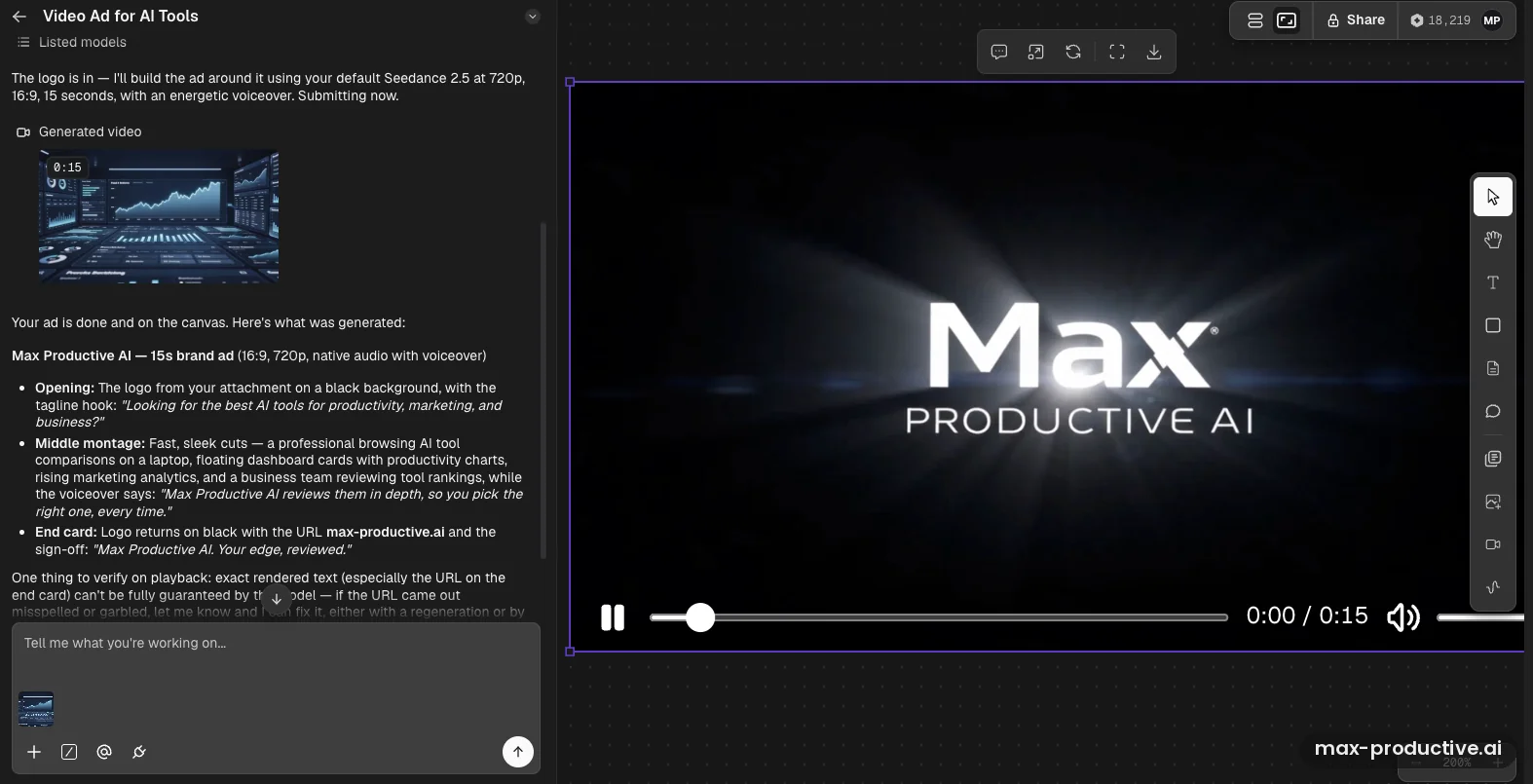
As of October 2026, Hedra is the AI video studio we'd point marketers and creators to when they want finished clips without juggling separate tools. In our test, its agent turned one sentence and a logo into a 15-second brand ad with a voiceover, made with Seedance 2.5, and the first version looked professional. Behind the agent sit Hedra's own Character-3 lip-sync model and a large catalog of others, from Seedance, Kling and Veo to Nano Banana, on one credit balance. The trade-off is cost. Premium models use credits fast: the top Seedance 2.5 setting costs up to 3,322 credits per clip, close to half of the Pro plan's monthly allowance.
What we like
- Professional results from a one-line brief
- The agent handles the setup for you
- Leading models on one credit balance
Best for. Marketers, agencies and creators who make many kinds of short video, from ads and social clips to talking characters. One subscription covers the models, and the agent handles the setup for each job.
Try Hedra freeWhat we don't
- Premium models use credits quickly
- Fewer credits per dollar above Basic
- Monthly credits don't roll over
Not for you if. Most of your videos are a presenter reading a script, often in several languages. HeyGen and Synthesia are built for that. If you only want one video model, Kling AI's own plans start lower, at $10 a month.
Compare alternativesHow we tested Hedra
- Method
- Hands-on test, October 2026
- Access
- Our own paid Creator plan, web app on a Mac
- Scope
- One 15-second video ad from a one-sentence brief, plus the Video and Image tools
- Not tested
- Long avatar videos, Research and Workflow modes, team sharing, the API
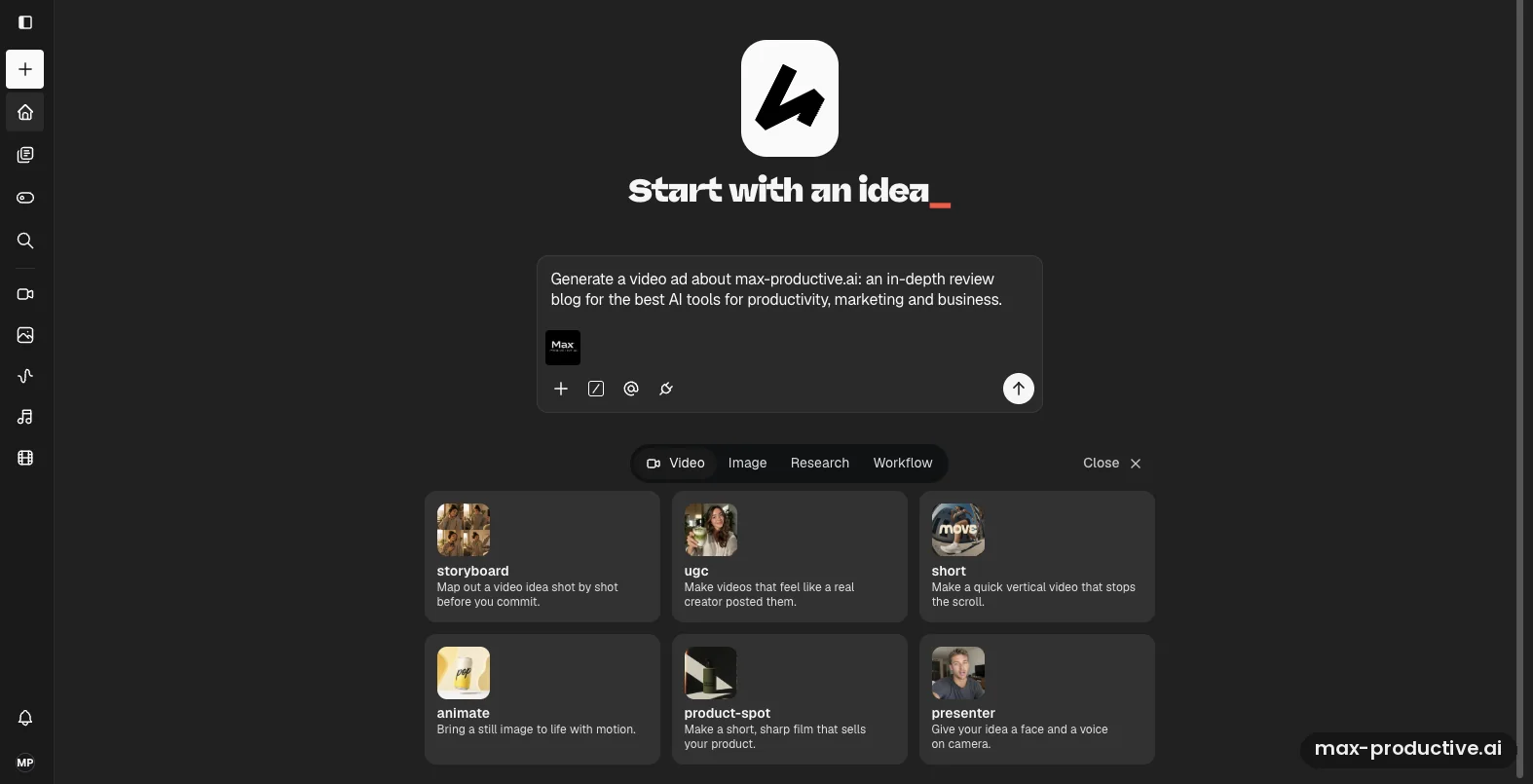
We tested Hedra AI on our own Creator plan, the $30 tier Hedra sold until its September 2026 price change. On the home screen, we attached the Max Productive AI logo and asked the agent, in one sentence, for a video ad about max-productive.ai. It went with Seedance 2.5, the default video model in our account, at 720p, 16:9 and 15 seconds. It wrote the prompt and the voiceover and placed the finished ad on the canvas. We then opened the manual Video and Image tools to see what it had sent and what each model costs. The screenshots below come from that session, alongside a few earlier generations in the same account.
Plan prices and credit rules come from Hedra's pricing page and help docs, checked in October 2026. What users think comes from Reddit and Trustpilot. This round centered on one ad, so we didn't run a long avatar video, the Research or Workflow modes, team sharing or the developer API, and those parts lean on Hedra's documentation. Read the ad result as one strong first impression, not a benchmark.
What changed since our last review
- September 2026
- New plans. Basic, Pro and Ultra replace Basic, Creator and Professional, with prices from $20 to $100 a month. Teams stays at $75. See the plans
- August 2026
- Seedance 2.5 arrived, along with Visual Skills (reusable agent workflows with up to 10 reference images) and an MCP server and CLI for Claude, ChatGPT or Cursor.
- July 2026
- Multiplayer: real-time shared Spaces where teammates and clients view or edit the same canvas, on every plan.
- May 2026
- The Hedra Agent became a general creative agent that researches, plans and produces video, image and audio inside Spaces.
Hedra
Our rating: 4.2 / 5
Free to start. Paid plans from $20 a month, billed monthly.
Try Hedra freeWhat is Hedra AI?
Hedra, often searched as Hedra AI, is an AI creative studio for video, images and audio, run by an agent. You describe the result you want, and the agent plans it, picks a model, writes the prompts and puts the finished work on a canvas you can share. Hedra made its name with its Character lip-sync models. The current one, Character-3, turns a photo and an audio track into a talking or singing character, and it's still at the heart of Hedra's avatar videos.
Over 2026 it grew into something much broader. The agent now researches, plans and produces inside persistent workspaces called Spaces, with reusable Skills, real-time collaboration and connectors to other services. Behind it sits a catalog of third-party models, such as Seedance, Kling, Veo, MiniMax, GPT Image and Nano Banana, all paid for with one credit balance. Hedra's developer platform lists more than 110 generation models.
What separates Hedra from HeyGen or Synthesia is range. Those two center on presenter videos made from a script. Hedra makes avatar videos too, but it can also produce a product spot, a music video or a cinematic ad from a prompt. Against single-model makers like Kling AI, the difference is choice: you aren't tied to one company's model, and Hedra says its agent selects the right model for each job. Our read: that makes Hedra a strong home base for marketers who make many kinds of short video.
Hedra AI hands-on: a 15-second ad from one sentence
These screenshots come from our Hedra AI account, in the order we used it, from the first prompt to the models behind the result. Tap or click any image to open it full size.
One sentence and a logo
Hedra opens on a single prompt box under "Start with an idea". We wrote one sentence: a video ad about max-productive.ai, an in-depth review blog for the best AI tools for productivity, marketing and business. We attached our logo and sent it. Below the box you can switch between Video, Image, Research and Workflow, or start from a template such as storyboard, UGC, short, animate, product spot or presenter.
Our advice: hand the agent your brand assets up front. The logo was the only reference we added, and the agent built the whole ad around it.
The agent's plan and the finished ad
First it confirmed the logo. It then went with our account's default model, Seedance 2.5, at 720p, 16:9 and 15 seconds, added an energetic voiceover, and submitted the job itself. The ad landed on the canvas with a short summary. According to the agent, it opens on our logo with a hook line, then cuts through a fast montage of tool comparisons, dashboards and a team reviewing rankings. An end card carries the URL and a sign-off. The voiceover came from the model's native audio, so there was nothing to stitch together.
The quality was the surprise. For a first attempt, it looked like a decent, professional brand spot. We also liked that the agent flagged its own limit. It warned that rendered text, above all the URL on the end card, can't be fully guaranteed, and offered a regeneration or an edit to fix it. On-screen text is a common weak spot for AI video, so that warning is worth acting on.
Under the hood: the Video tool
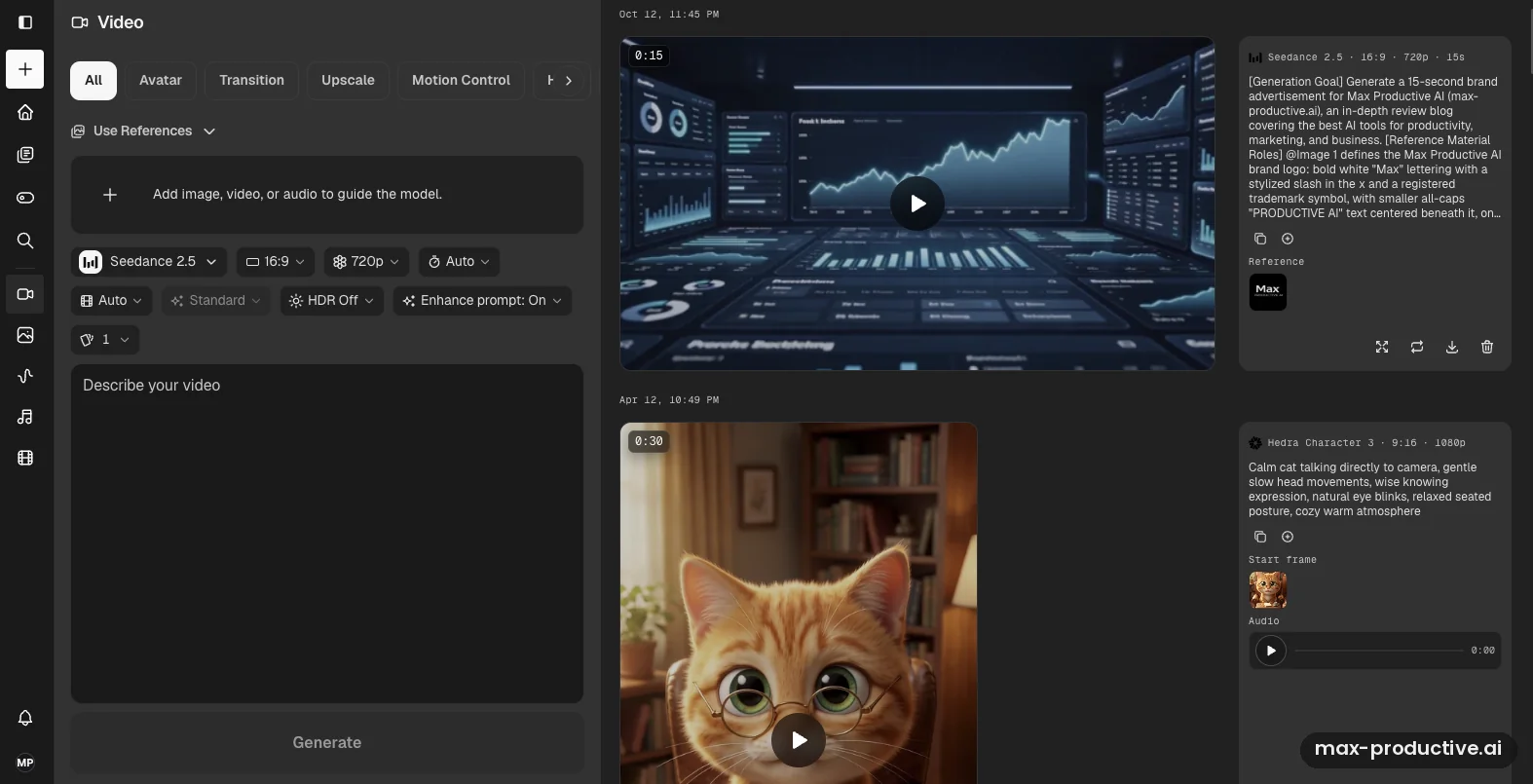
Our agent job also showed up in the manual Video tool, with the settings and the prompt it sent. Ours is listed as Seedance 2.5, 16:9, 720p and 15 seconds. The prompt the agent wrote is far longer than ours, with a stated goal and a section that gives each reference a role, here "@Image 1" as the brand logo. You can copy it, tweak it and run it again yourself. Tabs across the top split the tool by job: Avatar, Transition, Upscale, Motion Control and more.
In the frame, the dashboards look convincing at a glance, but the small labels on them are made-up words. That's normal for AI video and hard to spot at full speed. Zoom in before you pull a still from it for a thumbnail.
The video model picker
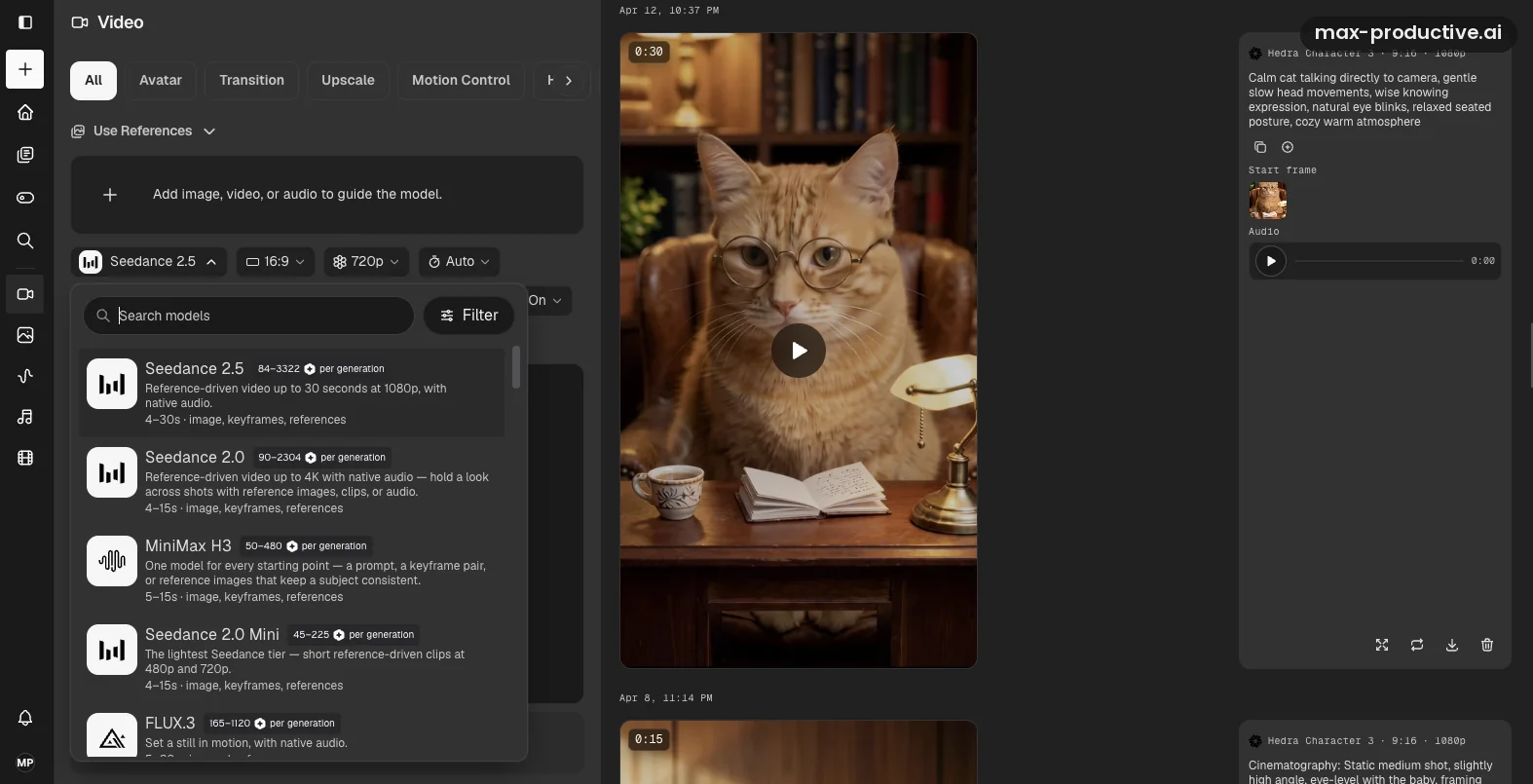
Open the model menu and you see what Hedra has become: a hub for other companies' leading models next to its own. Our list started with Seedance 2.5, Seedance 2.0, MiniMax H3, Seedance 2.0 Mini and FLUX.3, each with a one-line description, its length range and the inputs it accepts. Seedance 2.5 runs from 4 to 30 seconds at up to 1080p with native audio. Seedance 2.0 reaches 4K but stops at 15 seconds.
The detail we'd point to is the credit range printed next to each model. Seedance 2.5 costs 84 to 3,322 credits per generation, depending on length and resolution, while Seedance 2.0 Mini costs 45 to 225. Check it before you generate, because the model you pick can change the cost of a clip many times over. The library on the right also holds Character-3 talking-character clips from our earlier tests.
The Image tool
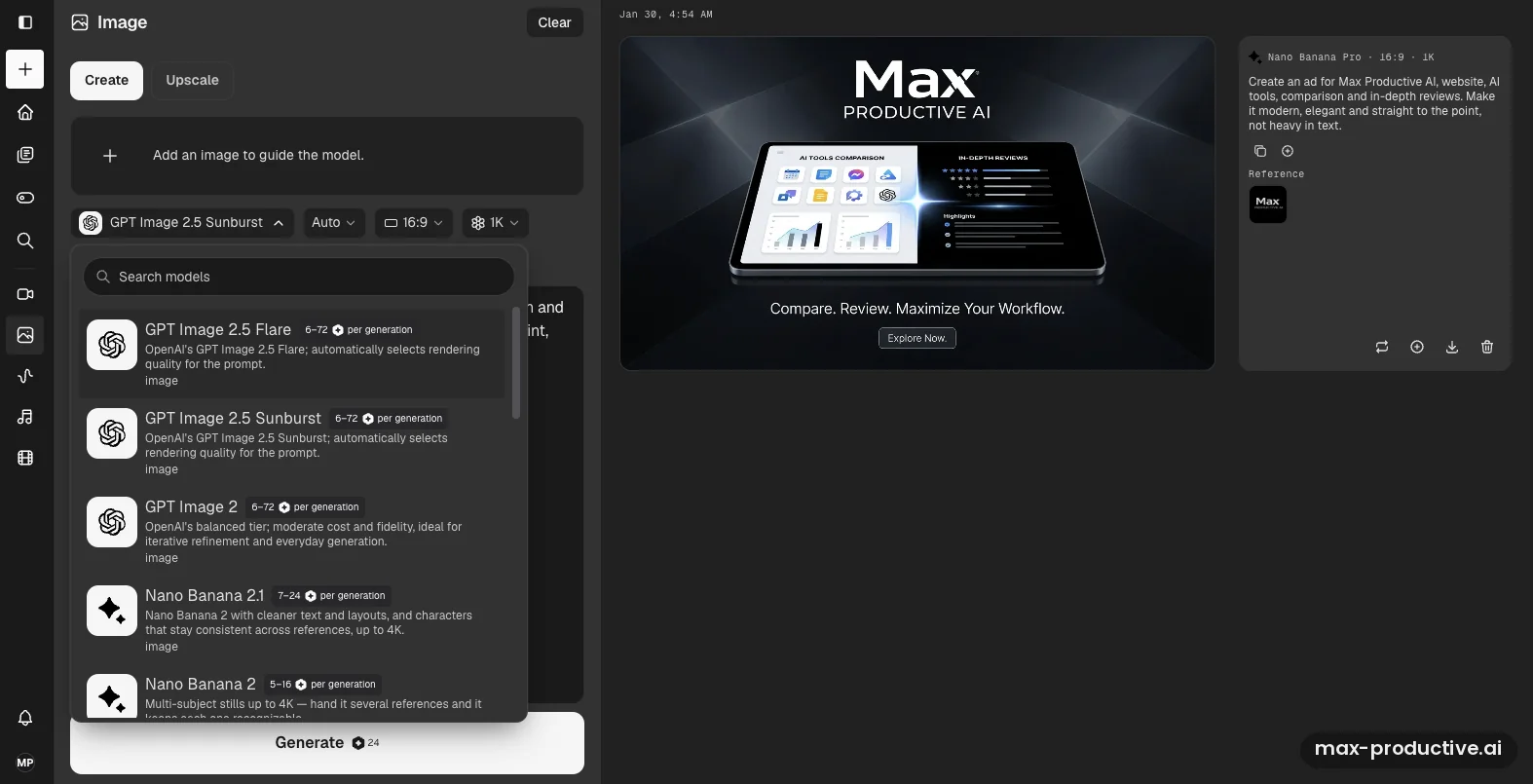
Images work the same way. The picker lists GPT Image 2.5 Flare and Sunburst, GPT Image 2, Nano Banana 2.1 and Nano Banana 2, at roughly 5 to 72 credits an image. Next to it sits an ad image we made earlier with Nano Banana Pro from a short brief and our logo: a tablet showing comparison and review screens under the line "Compare. Review. Maximize Your Workflow." The text came out clean, which isn't a given with image models.
Our read: images are cheap next to video, so they're a good way to settle a look before you spend credits on motion. Make a still, agree on it, then ask the agent to animate it or build the video around it.
Give the agent your own brief and logo.
Try Hedra freeHedra AI key features
Here's what you get in the studio. Where a feature goes beyond what our test touched, we rely on Hedra's documentation and announcements.
-
Hedra Agent
Describe the outcome and the agent plans the work, writes the prompts and generates video, images or speech. Hedra says it selects the right model for each job; in our test it used the account's default, Seedance 2.5. It can research a topic on the web first, and it sees the current canvas with each message, so you can ask for changes without repeating the brief. This is the part we tested, and the part we'd start every project with.
-
Character-3 lip-sync
Hedra's own model turns one image and an audio track into a talking or singing character. Clips run up to 10 minutes at up to 1080p, with several languages and multi-speaker scenes. On Reddit it's often recommended for singing portraits and stylized or cartoon characters. Hedra's catalog also includes other avatar models, such as OmniHuman 1.5.
-
Third-party models on one balance
In our account the video menu included Seedance 2.5 and 2.0, Veo 3.1, MiniMax H3 and FLUX.3, and Hedra's model pages list Kling on the same shared credits. Image models include GPT Image 2.5 and Nano Banana. Hedra's wider catalog adds models such as Seedream and ElevenLabs voices, including voice cloning. The picker shows each model's credit range before you run it.
-
Manual tools
When you'd rather drive yourself, the Video tool has modes such as All, Avatar, Transition, Upscale and Motion Control, with aspect ratio, resolution, duration, HDR and prompt enhancement settings. There are also Image, Speech and Edit Video tools. It's the right place to rerun or tweak a prompt the agent wrote.
-
Skills and Elements
Skills are saved instructions for jobs you repeat, from storyboards and UGC ads to moodboards and competitor scans. Since August 2026 a skill can carry up to 10 reference images, such as logo variants, and be published to your team. Elements store reusable characters, products and styles, which helps keep the same face or product consistent across outputs.
-
Spaces and Multiplayer
All plansEach project lives in a Space that holds the chat, the canvas, references and generated assets. You can invite teammates or clients by email as viewers or editors and work on the same canvas in real time. Your chat with the agent stays private when you share.
-
Developer API, MCP and CLI
Separate walletDevelopers reach Hedra's model catalog through an API with Python and TypeScript SDKs, a command-line tool, and an MCP server for Claude, ChatGPT, Cursor and other assistants. The API bills a prepaid dollar wallet, not your studio credits, except for generations made through MCP.
One note on maturity. Character-3 has been in use since early 2025, and the catalog comes from established model makers. The agent, Spaces, Skills and Multiplayer all arrived or changed between May and August 2026. In our test the agent did its job well, and we'd treat it like a capable new colleague whose work deserves a second look before anything goes out.
Hedra AI pricing
As of October 2026, Hedra has four self-serve plans at $20, $50, $75 and $100 a month, all billed monthly, plus Enterprise on a custom quote. Credits are what you're buying, so read those before the prices.
| Plan detail | Basic | Pro | Ultra | Teams | Enterprise |
|---|---|---|---|---|---|
| Price | $20/mo | $50/mo | $100/mo | $75/mo | Custom |
| Billing | Monthly | Monthly | Monthly | Monthly | Custom |
| Credits a month | 2,000 | 7,200 | 18,000 | 14,400 | Custom |
| Credits per dollar | 100 | 144 | 180 | 192 | Custom |
| Generation speed | Slower | Faster | Fastest | Fastest | Fastest inference |
| Commercial use | Yes | Yes | Yes | Yes | Yes |
| Also worth knowing | The entry plan. Fine for light use and testing the agent. | Marked Popular on Hedra's pricing page. | Teams plan access. The card also mentions allowances of up to 57,600 credits a month; ask Hedra what that covers. | Teams plan access, built for shared work. | SSO, private deployments, Slack support, a dedicated account manager, legal and security review. |
Swipe sideways to see every plan.
Prices, credits and credit rules come from Hedra's pricing page and help docs, last verified in October 2026.
See current plans and credit packs.
See Hedra plansWhich Hedra plan should you choose?
Basic is for trying the workflow. Its 2,000 credits won't cover one clip at Seedance 2.5's top setting, so use it to learn the agent and make images and short drafts. Pro is where regular creators should start, with 7,200 credits and faster generation. Ultra suits heavy users who make video most days. Teams costs less than Ultra and gives the most credits per dollar of any self-serve plan, so a small team that shares work should price it first. Enterprise is the tier for SSO, private deployments and a security review.
Is Hedra worth the money?
If you'd otherwise pay for two or three separate model makers, yes. One Hedra plan reaches Seedance, Kling, Veo, MiniMax, GPT Image and Nano Banana, plus Character-3, and the agent saves the hours you'd spend learning each one. The math turns against Hedra if you lean on the priciest models every day. Monthly credits reset each cycle, and Hedra charges by the length of each clip, so a run of long 1080p videos empties a plan quickly.
Our advice: pick the model per job. A 720p draft on a lighter model costs a fraction of a 1080p final. Ask the agent for a lighter model, or rerun its prompt yourself in the Video tool. Credit packs bought on top of a plan don't expire, which makes them the better buffer for a busy month than a permanent upgrade.
What changed in September 2026
Hedra repriced its individual plans in late September 2026. Basic went from $15 (1,500 credits) to $20 (2,000 credits). Creator at $30 (5,400 credits) and Professional at $75 (14,400 credits) were replaced by Pro at $50 (7,200 credits) and Ultra at $100 (18,000 credits). Teams stayed at $75.
Our read: Basic keeps the same credits per dollar, while the middle tier now gives fewer credits for each dollar than Creator did, 144 against 180. Our own Creator plan was still active in October 2026, but if you're on an old plan, check what it changes to before you switch tiers.
How Hedra credits work
Plan credits reset to your plan's amount at the start of each billing cycle and don't roll over. Credit packs don't expire and are only used once plan credits run out. Video is charged by the length you generate. When a generation fails, Hedra says the credits can be refunded automatically, and you'll see a matching refund in your billing history. A clip that comes out but isn't what you wanted still costs credits. An active subscription is needed to use credits, but pack credits wait on the account if you resubscribe later.
Annual subscriptions exist in Hedra's help docs, which say the whole year's credits arrive upfront. The pricing page showed only monthly billing when we checked, so ask Hedra if you want an annual plan.
Renewals, cancelling and refunds
Plans renew automatically. You cancel from the billing section of your account settings, and you keep your credits and benefits until the end of the current period. In the recent Trustpilot reviews we read, the most common complaint is about renewals users didn't expect, and Hedra's replies there say refunds aren't standard policy. If you're only testing, set a reminder and cancel a few days before the renewal date.
API pricing is separate
The developer API uses a prepaid dollar wallet with no free tier, and studio credits can't pay for API calls except through MCP. Hedra's own September 2026 price check put 10 seconds of Seedance 2.5 at 1080p with audio at $7.91, against $1.68 for Kling V3 Pro. Character-3 costs 5 cents a second at 720p through the API.
Hedra AI pros and cons
Pros
Professional results from a one-line brief
Our single sentence and logo became a professional-looking 15-second ad with a voiceover in one generation. We didn't write a detailed prompt or touch a setting: the agent wrote the prompt and used our default model.
The agent handles the setup for you
You describe the result, and the agent writes a detailed prompt, sets the format and runs the job. Hedra says it can also choose the model for each task. You can open its prompt in the Video tool and change it.
Leading models on one credit balance
Seedance, Kling, Veo, MiniMax, GPT Image, Nano Banana and Hedra's own Character-3 all sit behind one subscription. That's one bill and one place to work instead of several accounts.
Credit costs shown before you generate
Every model we saw in the picker shows its credit range per generation. It makes the difference between a cheap draft and an expensive final easy to see before you spend anything.
Character-3 is still a lip-sync favorite
Hedra's own avatar model handles talking and singing characters up to 10 minutes long. Users on Reddit often recommend it for music videos, singing portraits and stylized faces.
Built for teams and repeat work
Real-time shared Spaces come with every plan, and Skills with attached references let a team reuse the same brand rules and assets on every job.
Cons
Premium models use credits quickly
Seedance 2.5 can cost up to 3,322 credits for one generation, more than the Basic plan's whole month. Some Trustpilot reviewers also mention credits spent on retries. Draft at lower settings and keep 1080p for the final.
Fewer credits per dollar above Basic
The September 2026 plans add credits on every tier, but above Basic each dollar buys fewer: Pro gives 144 credits per dollar against the old Creator tier's 180. Teams is the best value per credit if your team can use it.
Monthly credits don't roll over
Plan credits reset every cycle, so a quiet month means unused credits. Buy credit packs for busy periods instead, since those don't expire.
Renewals need your attention
Plans renew automatically, and Hedra's replies on Trustpilot say refunds aren't standard policy. Note your renewal date and cancel a few days before it if you're only testing.
On-screen text still needs a check
Small labels in our ad's background came out as made-up words, and the agent itself warned that the URL on the end card might not render correctly. Watch the final frames before you publish.
Long lip-sync clips can drift
A few Reddit users report faces changing or looking uncanny over long runtimes. Run a short test first, and split long talks into shorter segments if you notice it.
Hedra AI alternatives
The Hedra alternatives below all sit in our AI video generators directory. The table covers the four closest to Hedra.
| Compared on | Hedra Reviewed | HeyGen | Synthesia | Kling AI | InVideo AI |
|---|---|---|---|---|---|
| Entry paid plan | $20 a month, billed monthly | $29 a month, or $24 billed annually | $29 a month, or $18 billed annually | $10 a month, or about $6.60 billed annually | $20 a seat a month, or $10 billed annually (current promotion) |
| Free option | Free sign-up, watermarked | Free plan, 3 videos a month | Free plan, watermarked | Free daily credits | Free tier mentioned in its FAQ |
| Models | Character-3 plus Seedance, Kling, Veo and more | Mainly its own avatar models | Mainly its own avatar models | Kling's own models | Several third-party models |
| How you work | Agent on a shared canvas, plus manual tools | Script to avatar video | Script to avatar video | Prompt or image to clip | Prompt to an edited video with stock footage |
| Standout strength | Range, and an agent that runs the whole job | Avatars and video translation | Corporate training features | Cinematic text and image to video | Finished, edited videos from a prompt |
| Best for | Marketers and creators making varied short video | Business and creator presenter videos | Training and internal communication teams | Creators who want one strong model cheaply | Faceless and explainer videos |
Swipe sideways to see every tool.
Hedra vs HeyGen and Synthesia
All three make avatar videos, but they start from different places. HeyGen and Synthesia start from a script and a presenter, and they're stronger on stock avatars, translation into many languages and, in Synthesia's case, training features such as learner seats and SSO. Hedra starts from an idea and can turn it into an avatar clip, an ad or a music video. If most of your output is someone speaking to camera, pick HeyGen or Synthesia. If your output changes from week to week, Hedra covers more of it. Our HeyGen vs Synthesia comparison goes deeper on those two.
Hedra vs Kling AI
Kling AI makes its own video models and sells them direct, starting at about $10 a month. If Kling is the only model you want, its own plans are the simpler route. Hedra includes Kling models among many others. What you pay for is the freedom to switch to Seedance, Veo or Character-3 when a job calls for it, and an agent that sets up each job for you. Our Sora alternatives guide compares the leading video models side by side.
Which alternative fits you?
-

Kling AIOur rating: 4.5 / 5
Best for: Creators who want cinematic text-to-video and image-to-video from one strong model at a low monthly price.
Kling's Standard plan lists at $10 a month, with free daily credits to start. You trade Hedra's choice of models and its agent for a lower entry price.
-

SynthesiaOur rating: 4.5 / 5
Best for: Training, HR and internal communication teams that turn scripts into presenter videos at scale.
Starter costs $29 a month, or $18 a month on annual billing, and there's a watermarked free plan. It's the more structured choice for corporate video, with less room for creative formats than Hedra.
-

FlikiOur rating: 4.3 / 5
Best for: Faceless video creators who turn scripts, blog posts or ideas into narrated videos with stock footage.
Fliki has a free-forever plan and paid tiers with a discount for yearly billing. It's built around lifelike text-to-speech voices and stock media, which keeps it simple for explainers and faceless channels.
-

InVideo AIOur rating: 4.3 / 5
Best for: Creators who want a finished, edited video from a prompt, with stock footage, voiceover and a timeline to adjust.
Starter costs $20 a seat a month, or $10 on annual billing during its current promotion. It's closer to an automated editor, while Hedra centers on generating new footage through an agent.
-
ngramOur rating: 4.3 / 5
Best for: Teams making explainers, screencasts and AI avatar videos for products and training.
Basic costs $29 a month, or $23.20 on annual billing, and a free plan gives 600 one-time credits. It's focused on explaining products and processes, where Hedra aims at ads and creative clips.
-

MagnificOur rating: 4.3 / 5
Best for: Designers and marketers who want image, video and audio generation next to a large stock library and upscalers.
Formerly Freepik, Magnific's Premium plan costs $20 billed monthly, or $14.50 a month on annual billing. Like Hedra, it brings many models under one roof. It leans toward design and stock assets, where Hedra leans toward agent-made video.
-
VEEDOur rating: 4.3 / 5
Best for: Teams that edit, caption and publish video in the browser and want AI generation as one tool among many.
Creator costs $25 billed monthly or $147 a year per seat, and there's a watermarked free plan. VEED is the better fit when editing and subtitles matter more than generating footage.
-
GoEnhance AIOur rating: 4.2 / 5
Best for: Creators who want video style transfer, animation effects and upscaling for existing clips.
GoEnhance focuses on restyling and enhancing video you already have, for example giving footage an anime look. It's a useful companion to Hedra rather than a replacement for its agent.
Hedra AI FAQ
Is Hedra AI free or paid?
Hedra AI is a paid tool with a free way in. You can sign up without a credit card, but Hedra doesn't publish a free credit allowance, and free output is watermarked and non-commercial. Regular use needs a plan. As of October 2026, Basic costs $20 a month for 2,000 credits, billed monthly. Commercial use comes with every paid plan.
How much does Hedra cost?
As of October 2026, Hedra costs $20 a month for Basic, $50 for Pro and $100 for Ultra, all billed monthly. Teams costs $75 a month with 14,400 credits, and Enterprise is quoted. Monthly credits reset each billing cycle, while credit packs bought on top don't expire. The plans changed in late September 2026, replacing the old $30 Creator tier.
What is Hedra AI used for?
Hedra AI is used to make short marketing videos, social clips, talking and singing characters, product spots and images from a prompt. Its agent plans the work and runs a suitable model, such as Seedance 2.5 for a cinematic ad or Character-3 for lip-sync. Marketers, creators and agencies use the studio, and developers reach Hedra's model catalog through its API.
What is Hedra Character-3?
Character-3 is Hedra's own lip-sync model. It turns one image and an audio track into a talking or singing character video, up to 10 minutes long at up to 1080p, with support for several languages and multiple speakers. Hedra launched it in early 2025, and it still powers Hedra's avatar videos alongside other avatar models in Hedra's catalog.
Which AI models can you use in Hedra?
Hedra gives you its own Character-3 plus a large catalog of third-party models on one credit balance. In our account, the video menu offered Seedance 2.5, Seedance 2.0, Veo 3.1, MiniMax H3 and FLUX.3, and the image menu offered GPT Image 2.5 and Nano Banana. Hedra's developer platform lists more than 110 generation models, including Kling and ElevenLabs voices.
Do Hedra credits roll over?
No, Hedra's monthly plan credits don't roll over. They reset to your plan's amount at the start of each billing cycle. Credit packs work differently: they don't expire, carry over between cycles and are only used once your plan credits run out. Hedra also says credits for a failed generation can be refunded automatically.
Can I use Hedra videos commercially?
Yes, Hedra lists commercial use on every paid plan, from Basic up to Enterprise. Free generations are watermarked and non-commercial, so keep them for testing. Hedra's terms say it doesn't claim ownership of your inputs or outputs, though you grant it a license to use them to run the service. Faces, voices and music you upload still need their owner's permission.
Is Hedra better than HeyGen?
Hedra is the better pick for varied short videos, and HeyGen for presenter-style business videos. Hedra's agent can make an ad, a music video or a talking character from one prompt, using many models. HeyGen focuses on avatar videos and translation, with a free plan and a Creator plan at $29 a month. If most of your videos are someone speaking to camera, start with HeyGen.
How do I cancel my Hedra subscription?
You cancel Hedra from the billing section of your account settings. Billing stops, and you keep your plan's credits and benefits until the end of the current period. Refunds aren't standard policy, according to Hedra's replies to customer reviews, so cancel a few days before renewal if you only wanted to test it. Credit-pack credits stay on the account.
Should you try Hedra?
Hedra has grown from a lip-sync tool into a full creative studio, and the agent is the reason to choose it. In our test it took one sentence and a logo and returned a professional-looking 15-second ad, writing the script and running the job on its own. The limits are about money more than quality: premium models use credits fast, and the new plans give fewer credits per dollar above Basic. If you make one kind of video, a specialist such as HeyGen, Synthesia or Kling AI may cost less. If you make many kinds, Hedra earns its 4.2.
What we'd do. Sign up for free, then take Pro for a month if you plan to make video regularly. Start in the agent with a one-sentence brief and your logo or product images. Check the model it picks and the credit range in the Video tool, and ask for 720p drafts before any 1080p final. Watch the last frames for on-screen text. Note your renewal date, and buy a credit pack rather than upgrading if one month runs short.
Our rating: 4.2 / 5
Very good
About this review
Based on a hands-on test with our own paid Creator plan in October 2026, Hedra's published pricing, help documentation and announcements, and public user feedback. First published 2 February 2026. Last updated 13 October 2026.
Sources checked
- Pricing and credit rules. Hedra pricing page and help docs, checked October 2026.
- Features and release dates. Hedra blog and Hedra documentation.
- User feedback. Reddit threads on AI video and lip-sync, and Hedra's Trustpilot page.
Ratings are our overall editorial judgment on a 5-point scale: 4.5 and up is Excellent, 4.0 to 4.4 Very good, 3.5 to 3.9 Good, 3.0 to 3.4 Fair. We do not use sub-scores.
This review contains affiliate links, so we may earn a commission at no extra cost to you. Our ratings and editorial opinions remain independent.