

Fliki AI
AI text-to-video platform that turns scripts, blog URLs, ideas, and presentations into fully produced videos with 2,500+ AI voices across 80+ languages — no editing skills required.
Try Fliki AI →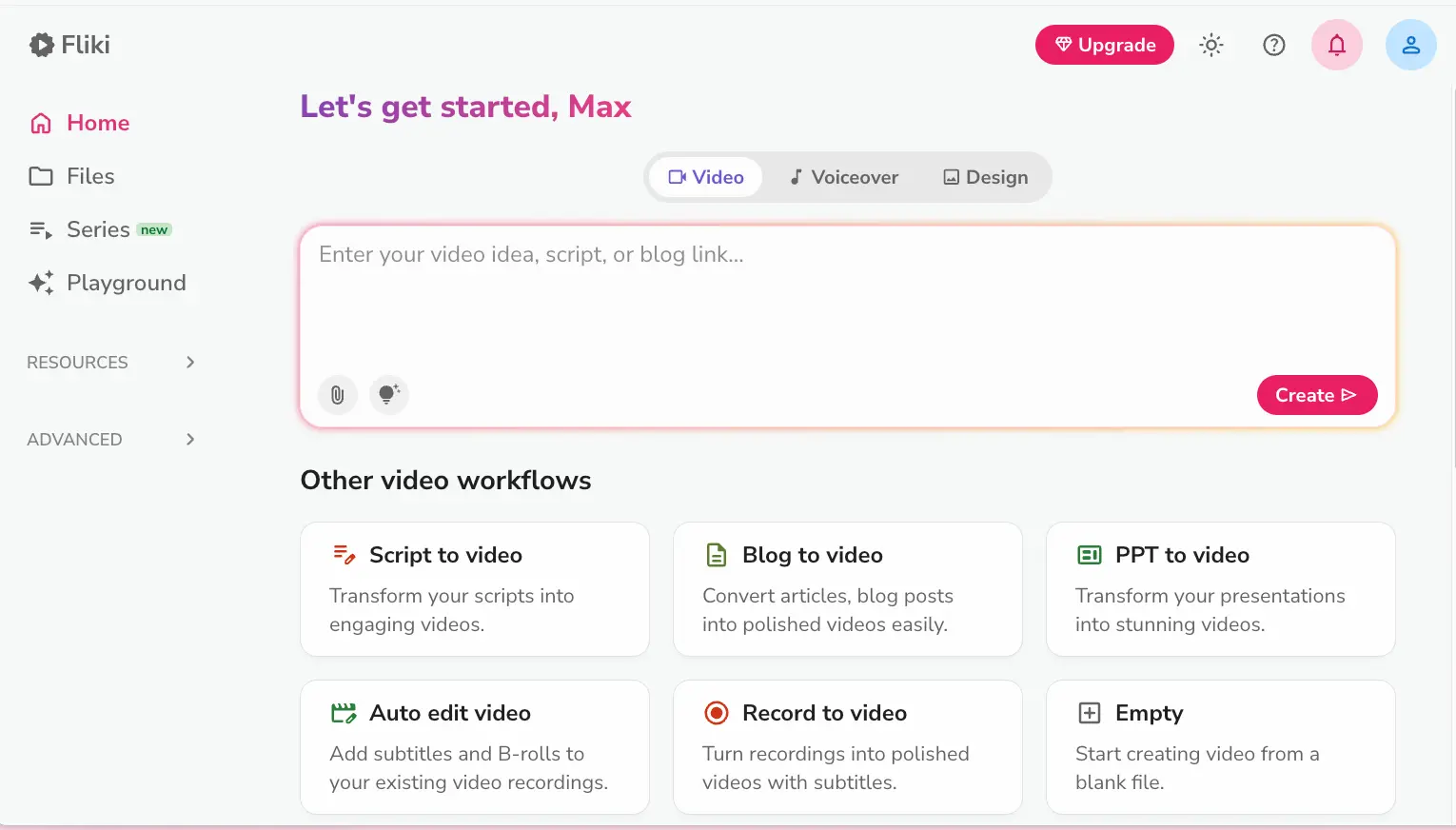
Best-in-Class Voices,
Fast Blog-to-Video Pipeline
Fliki AI does two things better than any competitor in 2026: voice quality and content repurposing speed. Its 2,500+ voice library is the deepest on the market, and the Blog-to-Video feature genuinely works — paste a URL, get a finished video in under five minutes. For faceless YouTube channels, blog-to-social repurposing, and multilingual narration, it's hard to beat at ~$21/month on the annual plan. The catch? Auto-selected stock footage needs manual replacing more often than you'd want, avatars trail HeyGen and Synthesia in realism, and there's no timeline editor for fine-grained control.
✓ What We Love
- Deepest voice library available — 2,500+ voices in 80+ languages
- Blog-to-Video: paste a URL, get a video in minutes
- Free plan available, no credit card needed
- Voice cloning from a 2-minute sample
! Could Be Better
- Stock footage selections often miss — manual replacing needed
- Avatar realism noticeably behind premium competitors
- No timeline editor for frame-level video control
What Is Fliki AI?
Who built it, what it actually does, and whether it fits your workflow.
Fliki AI is a browser-based platform developed by Nine Thirty Five LLC that combines text-to-video and text-to-speech into a single workflow. You give it text — a script, a blog post URL, a prompt, or even a PowerPoint file — and it assembles a complete video with AI narration, stock footage, background music, subtitles, and transitions. No video editing experience required. It runs entirely in the cloud, and there are iOS and Android apps too, though the desktop browser version remains more fully featured for complex projects.
Here's what separates Fliki from general-purpose AI tools or traditional video editors: it's built around voice first. Where platforms like HeyGen and Synthesia lead with photorealistic avatars, and InVideo AI leads with a massive template library, Fliki's competitive moat is its voice engine — 2,500+ AI voices spanning 80+ languages and 100+ dialects. If your content strategy depends on narration quality rather than talking-head avatars, that distinction matters.
The standout practical feature is Blog-to-Video. Paste any article URL, and Fliki extracts key points, writes a condensed video script, selects matching stock footage, layers in your chosen AI voice, and outputs a social-ready video. The whole process takes roughly 3–5 minutes. For bloggers and affiliate marketers who want to repurpose written content into YouTube Shorts, TikTok clips, or Instagram Reels without hiring an editor, this is the highest-ROI workflow in Fliki's toolkit.
Our Testing Approach
We tested Fliki AI hands-on, creating videos using multiple workflows — including Blog-to-Video from our own published articles, Idea-to-Video from prompts, and the scene editor with Copilot. Screenshots in this review are from our actual account. We also analyzed user feedback from independent platforms and the latest April 2026 feature releases to give you a current, honest picture.
Worth noting: Fliki's development pace in 2026 has been unusually aggressive. In April alone, they shipped Video Series (a workflow for planning and auto-scheduling entire content seasons), an AI Asset Library for injecting branded media into workflows, and 130+ new character-driven voices across 20+ languages. That kind of release cadence signals a team that's actively iterating — but it also means the platform you try today might look different in a few months, for better or worse.
The free plan gives you 5 minutes per month at 720p with a watermark. It's enough for one test video — barely — but it lets you evaluate the interface and voice quality without paying. That alone puts Fliki ahead of tools that demand a credit card before you've seen a single output.
See Fliki AI in Action
Real screenshots from our Fliki account showing the main workflows and editor interface.
Dashboard & Video Workflows
Your starting point — choose how you want to create your video
Clean interface. The main input field accepts a video idea, script, or blog link — type or paste, hit Create. Below that, six specialized workflow cards cover different starting points. The left sidebar gives quick access to Files, the new Series feature, and the Playground for experimentation. Straightforward enough that most people will be creating their first video within minutes of signing up.
Idea-to-Video Template Selection
Step 2 of the guided workflow — pick your template and aspect ratio
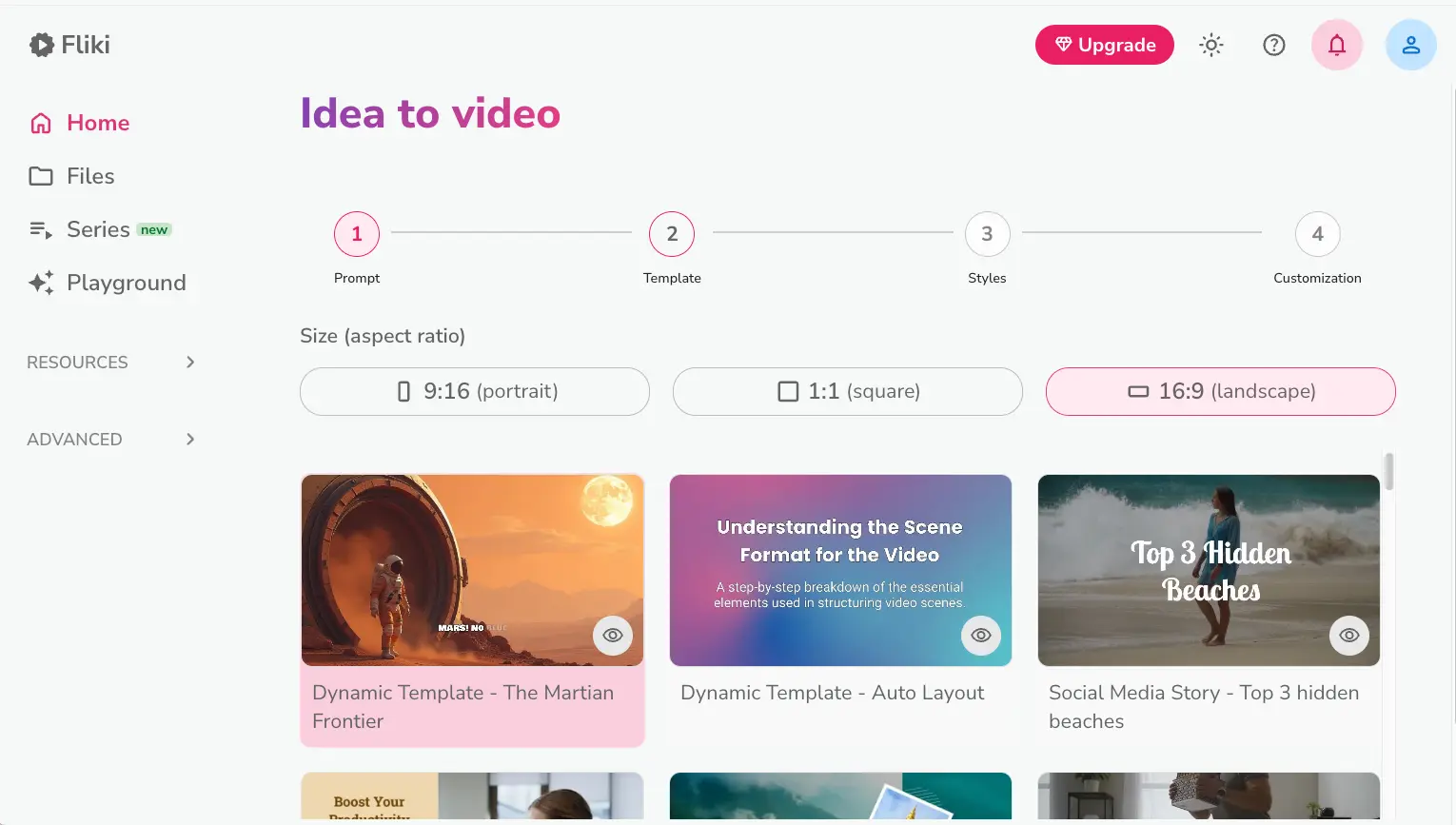
The guided flow walks you through four steps. After entering your prompt, you choose aspect ratio and template. The template selection is functional but limited — around 8 options compared to the thousands offered by InVideo AI. For most creators making explainers or social clips, these templates work fine. If you need heavy visual customization, you'll feel the constraint.
Video Customization — Tone, Audience & Style
Fine-tune your video's personality before the AI generates it
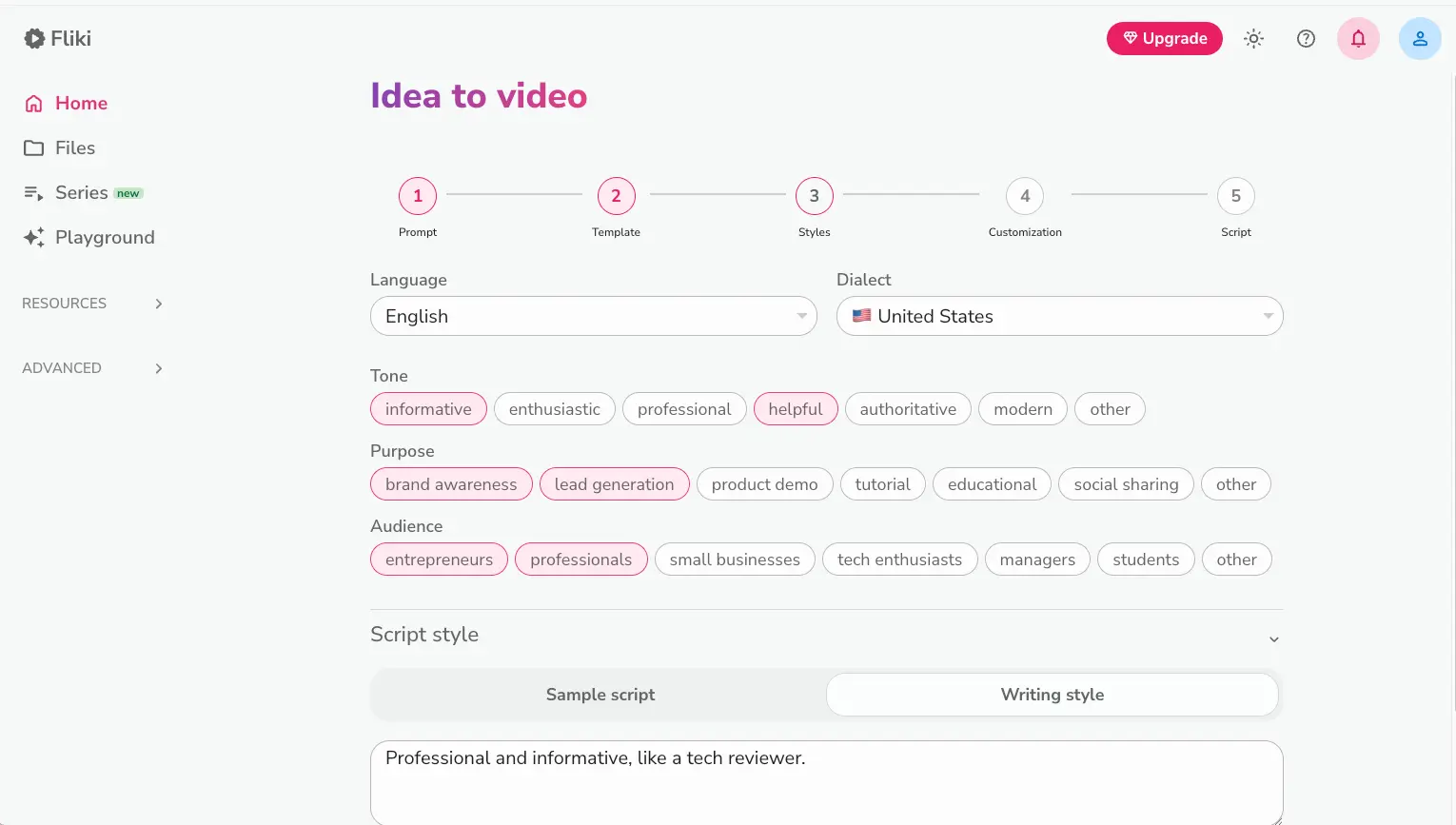
This is where Fliki gets genuinely thoughtful. You set the tone (informative, enthusiastic, professional, etc.), purpose (brand awareness, lead generation, tutorial), and target audience (entrepreneurs, students, small businesses). These aren't just labels — they shape the AI's script generation, scene selection, and pacing. The Script Style box at the bottom lets you describe your voice in plain language, which is a nice touch for maintaining consistency across multiple videos.
Want to test Fliki's Blog-to-Video with your own content?
Try Fliki AI Free →Free plan available • No credit card requiredVideo Series — Content Calendar on Autopilot
The newest major feature: plan and auto-schedule entire content seasons
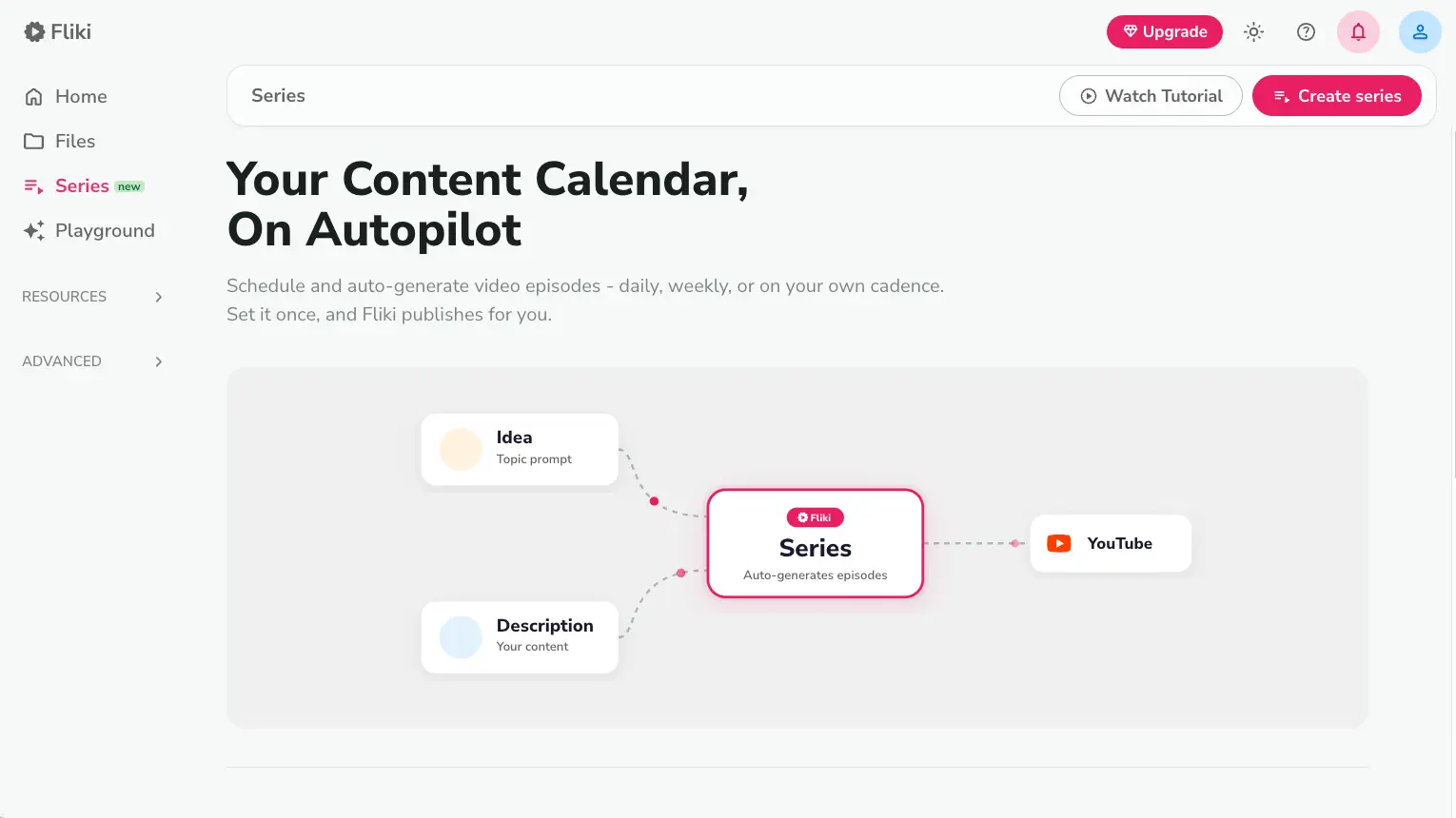
Launched April 14, 2026 — just a day before this review. Video Series lets you define a topic prompt and content description, then Fliki auto-generates a full season of episodes and publishes them on your chosen schedule directly to YouTube. This is a bold feature for faceless channel operators who want to set-and-forget their upload cadence. Too early to judge long-term quality, but the concept is exactly what volume creators have been asking for.
Video Editor with Scene Panel & Copilot
Where you refine individual scenes, swap media, and adjust the AI's output
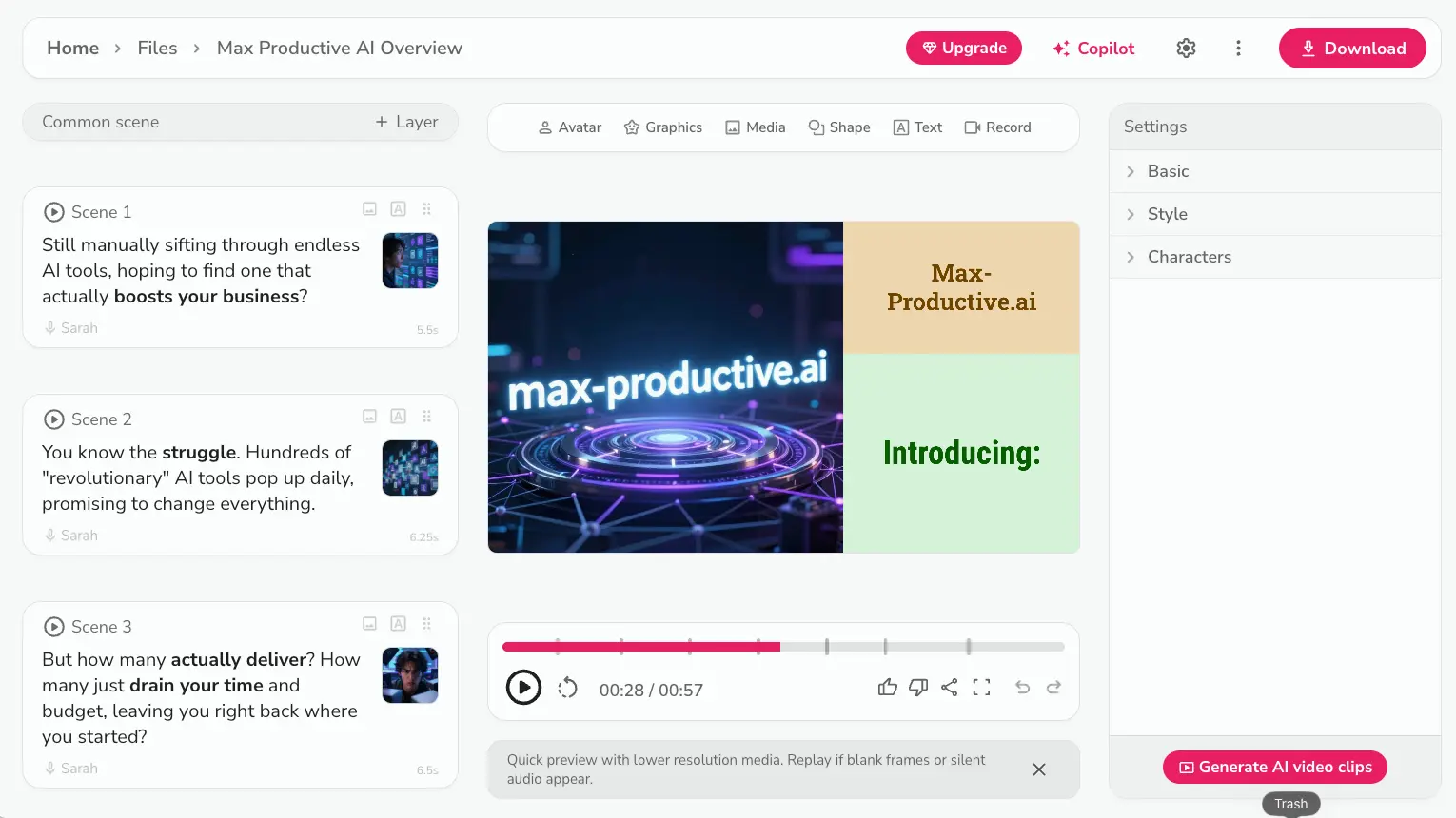
The editor is where you'll spend most of your time refining Fliki's output. Each scene shows its script text, assigned voice, thumbnail, and duration. The Copilot button (top right) opens an AI assistant that can rewrite scenes, adjust pacing, or suggest improvements mid-project. Here's the honest reality though — this is a scene-based editor, not a timeline editor. You can swap clips, change text, and adjust voiceover settings, but you won't get frame-level control or the kind of editing precision that tools like DaVinci Resolve or even CapCut offer. For quick explainers and social content, it works. For anything requiring precise timing or complex layering, you'll hit walls.
How Fliki AI Works
From text input to published video in four steps. It's faster than you'd expect — with some caveats.
Choose Your Input Type
Fliki accepts four starting points: a written script, a blog article URL, a short text prompt (Idea-to-Video), or a PowerPoint file. Blog-to-Video is the standout — paste a link and Fliki extracts the article content, condenses it into a video-friendly script, and moves to scene assembly automatically. For scripts and prompts, you type or paste directly into the main input field. PPT-to-Video converts slides into narrated video scenes, which is surprisingly useful for repurposing webinar decks or training materials.
Customize Tone, Template & Voice
Before the AI generates anything, you set the parameters: aspect ratio (9:16 for Shorts/Reels, 16:9 for YouTube, 1:1 for social), template style, language, dialect, tone, purpose, and target audience. You also choose your AI voice from the 2,500+ library — or use your cloned voice on Premium. This customization step takes about a minute, and it meaningfully shapes the output quality. Skipping it and accepting defaults will give you something generic. Spending 60 seconds on tone and audience selection produces noticeably better results.
AI Generates Your Video
Fliki's engine breaks your content into scenes, selects B-roll from a stock library of millions of clips, generates the AI voiceover, adds captions and background music, and assembles everything into a cohesive video. A 2–3 minute video typically generates in 3–5 minutes. Here's the catch everyone should know: the auto-selected visuals are often generic or loosely matched to the script. Independent testing consistently finds that 60–70% of stock footage selections need manual replacement for quality short-form content. The voice is excellent; the visuals are the weak link.
Edit, Refine & Publish
The scene editor lets you swap stock clips, adjust script text, change voices, and use Copilot for AI-assisted rewrites. Once you're satisfied, export in 720p (free) or 1080p (paid) and publish directly to YouTube, TikTok, or Instagram. For most creators, the editing phase is where the real work happens — the AI gets you 60–80% there, and you bring it across the finish line by replacing weak visuals and tightening the script. Plan for 10–20 minutes of editing on top of the generation time.
New in April 2026: Video Series
The Series feature lets you plan an entire content season from a single project brief. Define your topic, set a publishing cadence (daily, weekly, or custom), and Fliki auto-generates episodes and publishes them directly to YouTube. It's designed for faceless channel creators who want consistent output without manual episode creation. Launched April 14, 2026 — still very new, but the concept addresses a real pain point for volume publishers.
Commercial Rights & YouTube Whitelist
All paid plans include full commercial usage rights. For YouTube specifically, you'll need to add your channel ID to your Fliki account so their media partners can whitelist your channel — this prevents copyright strikes from licensed stock footage and music. The YouTube-licensed music library (added March 2026) automatically selects copyright-safe tracks, which eliminates the content ID claim anxiety that plagues creators using other stock music sources.
Key Features
What Fliki actually delivers — and where the limitations are.
2,500+ AI Voice Library
The crown jewel. Neural synthesis voices across 80+ languages and 100+ dialects — including Arabic regional variants, Brazilian/European Portuguese, and multiple English accents. The best voices are convincingly human in emotion and pacing. This is Fliki's clearest competitive advantage over every tool in this category.
Blog-to-Video
Paste any article URL → Fliki extracts key points, writes a script, selects stock footage, adds voiceover and music, outputs a ready video. Under 5 minutes. The highest-ROI feature for bloggers and affiliate marketers who want to multiply one article across YouTube, TikTok, and Instagram simultaneously.
Voice Cloning
Record a 2-minute sample, get a digital replica of your voice that narrates any script in 70+ languages — including languages you don't speak. Premium plan only (~$66/month annual). Approval takes 1–6 hours. Requires explicit voice owner consent under Fliki's terms.
Video Series
Plan, produce, and auto-schedule entire content seasons from a single project brief. Publishes directly to YouTube on your chosen cadence. Launched April 14, 2026. Still brand-new, so expect some rough edges — but the concept is exactly what volume creators need.
AI Avatars
70+ stock avatars plus personalized avatar options for enterprise. Honest take: this is Fliki's weakest area. Users report unnatural blinking and lip-sync glitches. If avatar-led video is your primary need, HeyGen or Synthesia are measurably better choices.
Auto-Translate & Auto-Dub
Take a video created in one language, re-narrate it in a different language in a single click. Not just subtitle translation — actual voice re-generation. For multilingual content strategies targeting global audiences, this alone can save thousands in localization costs.
Editor Copilot
An AI assistant embedded inside the video editor that can rewrite scenes, adjust pacing, and suggest improvements mid-project. Think of it as having a writing partner who can restructure your script without leaving the editing view. Added in 2025 and steadily improving.
Podcast & Audio Creation
A unique capability in this category — Fliki can convert text into podcast episodes with RSS feed generation. No other major text-to-video tool offers a native podcast workflow. If you're producing both video and audio content, this consolidates two tools into one.
Beyond the core features, Fliki integrates with Zapier and Make for automated bulk video creation workflows, offers an AI Asset Library for injecting branded media into generated videos, a YouTube-licensed music library to prevent content ID claims, and a Character Library for maintaining visual consistency across projects. The branding kit supports custom fonts, logos, and brand colors across templates.
All core features available on the free plan to test:
Try Fliki AI Free →No credit card required • Upgrade anytimePricing Plans
Credit-based system with annual discounts. The free plan is real — no credit card needed.
Free
- ✓ 5 minutes/month
- ✓ 300+ voices
- ✓ 720p export
- ✓ 80+ languages
- ✗ Watermark included
- ✗ No commercial rights
Standard
- ✓ 2,160 min/year (~180/mo)
- ✓ 1,000+ voices
- ✓ 1080p export
- ✓ No watermark
- ✓ Commercial rights
- ✓ 15 min max video length
Premium
- ✓ 7,200 min/year (~600/mo)
- ✓ 2,000+ voices
- ✓ Voice cloning
- ✓ AI avatars
- ✓ 30 min max video length
- ✓ Priority features
Important: Monthly billing costs ~33% more ($28/mo Standard, $88/mo Premium). Credits are consumed even on failed generations — a frustrating gotcha that multiple users have flagged.
Pricing last verified April 2026. Visit Fliki AI for current rates.
Is It Worth the Money?
A single 3-minute explainer video from a freelance editor costs $150–300+. Fliki's Standard plan produces unlimited videos for $21/month on the annual plan — the math works if you're publishing 4+ videos monthly. Even with the editing time needed to replace auto-selected visuals, the time savings are substantial for solo creators and small teams.
For pricing context in this category: HeyGen starts at $24/month (Creator) with credit caps; Synthesia gives only 10 minutes/month on its $18/month Starter plan; InVideo AI starts at ~$20/month with 50 AI minutes. Fliki's 2,160 minutes/year on Standard is the most generous allocation at this price point — especially for audio-first content where voice quality matters most.
Detailed Pros & Cons
An honest breakdown based on our testing and verified user feedback.
✓ Pros
No other tool in this category comes close to 2,500+ voices across 80+ languages with this level of quality. The neural synthesis voices are convincingly natural — some are genuinely hard to distinguish from human narrators. For content that depends on narration quality (explainers, courses, podcasts, multilingual content), this is the deciding factor.
Paste a URL, get a video. For bloggers and affiliate marketers repurposing written content into social video, this workflow alone justifies the subscription. Turning a 2,000-word article into a 3-minute YouTube Short that would take an editor hours to produce? Done in under five minutes. The output needs polish, but the starting point is strong.
No credit card, no time limit, no expiring trial. The 5 minutes/month at 720p with watermark is tight, but it's enough to actually test the core workflows and evaluate voice quality before spending anything. In a category where several competitors demand payment before showing you a single result, this matters.
Video Series, AI Asset Library, 130+ new voices, YouTube-licensed music, Character Library — all shipped in the last 30 days. Fliki's development cadence in early 2026 is the fastest of any tool in this comparison. That signals an active team and a product that's getting meaningfully better, not just cosmetically updated.
Record two minutes, get a digital voice clone that works across 70+ languages. At the Premium tier's price point, this is accessible compared to dedicated voice cloning services. Approval is fast (usually under an hour), and the quality is solid for narration-focused content.
Fliki is the only major text-to-video platform with a native podcast workflow including RSS feed generation. If you're producing both video and audio content from the same source material, this consolidation saves you from maintaining a separate audio tool subscription.
✗ Cons
This is Fliki's most consistent criticism across independent reviews, and our testing confirms it. The AI picks stock clips that loosely match the script, but for short-form content meant for TikTok or Reels, roughly 60–70% of auto-selected scenes need manual replacement to meet a reasonable quality bar. The voice is great; the visuals regularly disappoint.
Fliki's avatars show unnatural blinking, occasional lip-sync glitches, and less expressive range than what HeyGen (1,000+ photorealistic avatars) and Synthesia (230+ hyper-realistic avatars) offer. If talking-head avatar video is your primary use case, Fliki isn't the right tool. They're fine for supplementary use, but not as your main presenter solution.
You get a scene-based editor, not a timeline. There's no frame-level control, no multi-layer compositing, no precise audio syncing. For quick explainers and social clips, the scene editor works. For anything requiring editing precision — like syncing to beat drops, cutting to specific frames, or complex transitions — you'll need to export and finish in another tool entirely.
When the AI stumbles — a voice that skips words, a generation that fails mid-process — you lose those credits. They're consumed even on unsuccessful attempts, and getting refunds for wasted credits through support isn't guaranteed. On a credit-based system, this feels particularly frustrating.
A recurring theme in negative reviews: slow or non-responsive support, particularly around billing issues and refund requests. Some users report great experiences; others describe being ignored for days. No live chat option. If you hit a problem, be prepared to wait and follow up via email. This is the area where Fliki needs the most improvement.
The ~33% premium for monthly billing ($28 vs. $21 on Standard, $88 vs. $66 on Premium) makes month-to-month use uncompetitive. Fliki clearly wants annual commitments. If you're testing the waters or have seasonal needs, the monthly rate feels punishing compared to what you get on the annual plan.
Fliki AI vs Alternatives
How Fliki stacks up against direct competitors in the AI video generation space.
| Feature | Reviewed Fliki AI | HeyGen | Synthesia | InVideo AI |
|---|---|---|---|---|
| Starting Price | Free / ~$21/mo | Free / $24/mo | Free / $18/mo | Free / ~$20/mo |
| Monthly Credits | ~180 min/mo | 200 credits/mo | 10 min/mo | 50 AI min/mo |
| Voice Library | 2,500+ / 80+ langs | 175+ languages | 140+ languages | 50+ languages |
| Avatar Quality | 70+ (Fair) | 1,000+ (Excellent) | 230+ (Excellent) | 240+ (Good) |
| Blog-to-Video | ✓ Core feature | Basic | ✗ No | ✓ Strong |
| Voice Cloning | ✓ Premium | ✓ Creator+ | ✓ Creator+ | ✓ 2–5 clones |
| Timeline Editor | ✗ Scene-based only | ✗ Limited | ✗ Limited | ✓ Full timeline |
| Best For | Narration, blog repurposing | Avatar marketing, dubbing | Corporate training/L&D | Creative control + AI |
Which Tool Is Right For You?
Fliki AI
ReviewedBest for: Bloggers, faceless YouTube channel creators, and multilingual content producers who need the highest voice quality and fastest blog-to-video conversion. The sweet spot is the annual Standard plan at ~$21/month — generous credit allocation, solid voice library, and enough features for consistent publishing. Choose Fliki when narration quality matters more than visual customization or avatar realism.

HeyGen
Avatar LeaderBest for: Brands and marketers who need photorealistic avatar-led videos and multilingual lip-sync dubbing of real-person footage — a capability no other tool matches. Choose HeyGen over Fliki if talking-head presentations, video localization, or e-commerce product videos are your primary use case. Starting at $24/month Creator plan with 200 credits.

Synthesia
Enterprise L&DBest for: Corporate teams needing training videos with SCORM/xAPI/LMS integration, interactive branching video, and hyper-realistic avatars. Synthesia is an enterprise platform, not a social media tool — its Starter plan gives just 10 minutes/month vs. Fliki's 2,160 minutes/year. Different tier, different buyer. Only makes sense for structured corporate training workflows.

InVideo AI
Creative ControlBest for: Creators who want both AI generation and full timeline editing in one tool. InVideo AI offers 16M+ iStock premium assets, 5,000+ templates (vs. Fliki's ~8), and 240+ avatars. Choose InVideo when you need creative control over the final product and want deeper visual customization. The trade-off: it demands more detailed prompts and doesn't match Fliki's voice quality.

Kling AI
Generative VideoBest for: Creators who need generative video from text or image prompts — producing original footage rather than assembling stock clips. Kling AI is a different tool category (generative AI video) vs. Fliki's text-to-video assembly approach. Choose Kling when you need AI to create entirely new visual content rather than narrate over existing footage.

Hedra
AI Character VideoBest for: Creators who need AI-generated character videos with expressive lip-sync and emotional range from a single image. Hedra's Character-3 model produces talking-head content from a photo and audio input — a different approach than Fliki's text-to-video pipeline. Choose Hedra when you want to animate a specific character or persona without filming, particularly for YouTube Shorts and social content.
VEED.io
Video EditingBest for: Creators who need a full online video editor with AI-powered features like auto-subtitles, eye contact correction, and background removal. VEED.io is more of a post-production tool, while Fliki is a production tool. Use Fliki to generate the video, then VEED to polish it — or use VEED alone if you already have footage and need editing tools.
Frequently Asked Questions
Should You Try Fliki AI?
Fliki AI earns its place in the AI video toolkit for one clear reason: nobody does voice better at this price point. The 2,500+ voice library across 80+ languages isn't just a spec — it translates directly into more natural, more engaging narration than anything else in the category. Pair that with Blog-to-Video, and you've got a genuinely efficient pipeline for turning written content into social video at scale.
The limitations are real, though, and worth weighing honestly. Auto-selected visuals are mediocre more often than not — plan to spend time replacing stock footage. Avatars aren't competitive with HeyGen or Synthesia. There's no timeline editor for fine-grained control. And customer support has a mixed track record. These aren't dealbreakers for the right user, but they mean Fliki works best as a narration-first tool, not a visual-first one.
Our Recommendation
Start with the free plan — no credit card needed — and test Blog-to-Video with one of your own articles. Listen to the voice quality. Evaluate how much visual editing the output needs. If the voice meets your standard and you're publishing 4+ videos monthly, the annual Standard plan at ~$21/month is strong value. If avatars or timeline editing are what you need most, look at HeyGen or InVideo AI instead. Different tools, different strengths.