
Notta
AI-powered transcription and meeting assistant that automatically converts audio and video recordings into accurate, searchable text across 58 languages. With 98.86% accuracy, real-time transcription for Zoom, Google Meet, Teams, and Webex, plus intelligent AI summaries and action items, Notta helps over 8 million users worldwide save hours on meeting documentation and content creation.
30-Second Summary
Bottom Line: Notta delivers exceptional AI transcription with 98.86% accuracy across 58 languages, making it the top choice for multilingual teams and professionals requiring precise meeting documentation. Real-time transcription, AI-powered summaries, and seamless integration with Zoom, Teams, Meet, and Webex justify the affordable $8.25-14.99/month Pro plan, though the free tier's 3-minute recording limit and customer support concerns warrant consideration.
Best For
- International teams needing multilingual transcription
- Professionals attending frequent meetings requiring accurate documentation
- Content creators transcribing videos and podcasts
- Students capturing lectures without manual note-taking
Skip If
- You need truly unlimited free transcription (consider tl;dv or Fathom)
- Your priority is advanced sales analytics over accuracy
- You require 24/7 customer support
- English-only environment already invested in Otter.ai
No credit card required for free plan
Notta at a Glance
What Exactly is Notta?
Notta is an advanced AI-powered transcription and meeting assistant platform that automatically converts audio and video recordings into accurate, searchable text using automatic speech recognition and natural language processing technologies, supporting both real-time transcription for live meetings and file-based transcription for pre-recorded content.
Unlike basic voice-to-text converters or manual note-taking, Notta employs sophisticated AI that achieves 98.86% transcription accuracy in ideal conditions—significantly outperforming competitors like Otter.ai (85-95% accuracy) and typical speech-to-text tools. The platform serves over 8 million users worldwide who have collectively transcribed more than 30 million hours of content, from business meetings to academic lectures to podcast episodes.
Traditional Meeting Notes vs Notta AI
Manual Approach
- Spend 1-2 hours per meeting on note-taking and cleanup
- Miss critical details while focusing on writing
- Inconsistent formatting across team members
- No searchable archive of discussions
- Manual distribution of notes to attendees
With Notta
- AI automatically transcribes in real-time with 98.86% accuracy
- Focus completely on conversation and participation
- Consistent AI summaries with action items extracted
- Searchable transcript library across all meetings
- Instant sharing via link or integration to Slack/CRM
The Evolution of Notta's AI Technology
Since its launch, Notta has established itself as a leader in the AI transcription space by focusing on three core strengths: multilingual capability (58 languages for transcription plus 42 languages for translation), exceptional accuracy through continuous machine learning improvements, and seamless workflow integration across video conferencing platforms, CRMs, and productivity tools.
The platform operates entirely cloud-based through AWS infrastructure with enterprise-grade security including SOC 2 Type II certification, ISO 27001 certification, and compliance with GDPR, CCPA, and HIPAA standards. Users can access Notta through web browsers, dedicated mobile apps for iOS and Android, and a Chrome extension that transcribes browser tab audio including YouTube videos and webinars.
How Notta's Transcription Process Works
Notta uses advanced automatic speech recognition combined with natural language processing to deliver accurate transcriptions through multiple methods:
- Real-time live transcription: See text appear as people speak during meetings with minimal delay
- Notta Bot meeting assistant: Automatically joins scheduled Zoom, Google Meet, Teams, and Webex meetings via calendar integration
- File upload processing: Upload pre-recorded audio or video files (MP3, WAV, MP4, AVI, MOV) for batch transcription
- Chrome extension capture: Record and transcribe audio from any browser tab, capturing up to 5 tabs simultaneously
- Mobile app recording: Use your smartphone as a portable transcription device for in-person meetings and interviews
Processing happens rapidly in the cloud—a typical 1-hour recording is transcribed in approximately 5 minutes, with real-time transcription operating with minimal lag. The AI automatically identifies up to 10 speakers, generates structured summaries, extracts action items, and creates searchable timestamps throughout the transcript.
How Does Notta's AI Transcription Actually Work?
Notta's intelligent transcription system operates through a sophisticated multi-layered AI process that combines automatic speech recognition, natural language processing, and machine learning to transform audio into accurate, actionable text across 58 languages with minimal human intervention required.
The Notta Transcription Process
✅ How Notta Excels
- Industry-leading accuracy: Achieves 98.86% transcription accuracy in optimal conditions, outperforming Otter.ai (85-95%) by 13+ percentage points
- Exceptional language coverage: Supports 58 languages for transcription including English, Spanish, French, German, Japanese, Chinese, Arabic, Hindi, and 50+ more
- Real-time transcription: Delivers live text during meetings with minimal delay, enabling accessibility and immediate note capture
- Fast processing speed: Transcribes 1-hour recordings in approximately 5 minutes—28% faster than typical competitors
- Universal platform support: Works with Zoom, Google Meet, Microsoft Teams, and Webex through automated bot or manual recording
- Speaker identification: Automatically detects and labels up to 10 different speakers in multi-participant conversations
- Bilingual transcription: Unique ability to handle meetings where two languages are spoken simultaneously with side-by-side transcripts
⚠️ Current Limitations
- Manual language selection required: Notta does not automatically detect languages—you must select the correct language before starting transcription
- Challenging audio conditions: Accuracy drops to 80-85% with heavy background noise, strong accents, or poor audio quality
- Overlapping speech issues: Speaker identification becomes unreliable when multiple people talk simultaneously
- Punctuation inconsistencies: Transcripts sometimes lack proper punctuation and require manual formatting cleanup
- Limited free tier: Free plan's 3-minute per-recording limit makes it impractical for actual meetings
Step-by-Step: Getting Started with Notta
Setting up Notta takes approximately 5-10 minutes and requires no technical expertise:
- Create your account: Sign up for free at Notta.ai using email or Google/Microsoft authentication
- Connect your calendar (optional): Integrate Google Calendar or Microsoft Outlook to enable Notta Bot auto-join for scheduled meetings
- Install integrations: Add the Chrome extension for browser transcription or download mobile apps for iOS/Android
- Configure your first recording: Select transcription language, enable speaker identification if needed, and choose your recording method
- Start transcribing: Begin real-time transcription, have Notta Bot join your next meeting, or upload pre-recorded files
For optimal accuracy from day one, create a custom vocabulary list with industry-specific terms, acronyms, and proper nouns relevant to your field. Pro plan supports up to 200 custom words while Business plan allows 1,000 words, significantly improving recognition of specialized terminology.
Core Features That Define Notta
🎯 98.86% Transcription Accuracy
Industry-LeadingNotta achieves exceptional 98.86% accuracy in ideal conditions with clear audio and minimal background noise—significantly outperforming competitors like Otter.ai (85-95%) and Fireflies.ai (90-95%). This translates to approximately 1-2 errors per 100 words, saving 15-20 minutes of editing time per hour of transcription compared to lower-accuracy alternatives.
🌍 58-Language Multilingual Support
UnmatchedComprehensive language coverage including English, Spanish, French, German, Italian, Portuguese, Japanese, Chinese (Mandarin/Cantonese), Korean, Arabic, Hindi, Thai, Vietnamese, Russian, Polish, Turkish, Dutch, Swedish, and 40+ additional languages. Real-time translation across 42 languages enables instant conversion of transcripts into different languages for global distribution.
⚡ Real-Time Live Transcription
EssentialWatch text appear on screen as people speak with minimal delay, enabling real-time note capture without manual typing. The live transcription operates continuously during meetings, creating searchable timestamps and allowing participants to focus completely on conversation rather than documentation.
🤖 Notta Bot Meeting Assistant
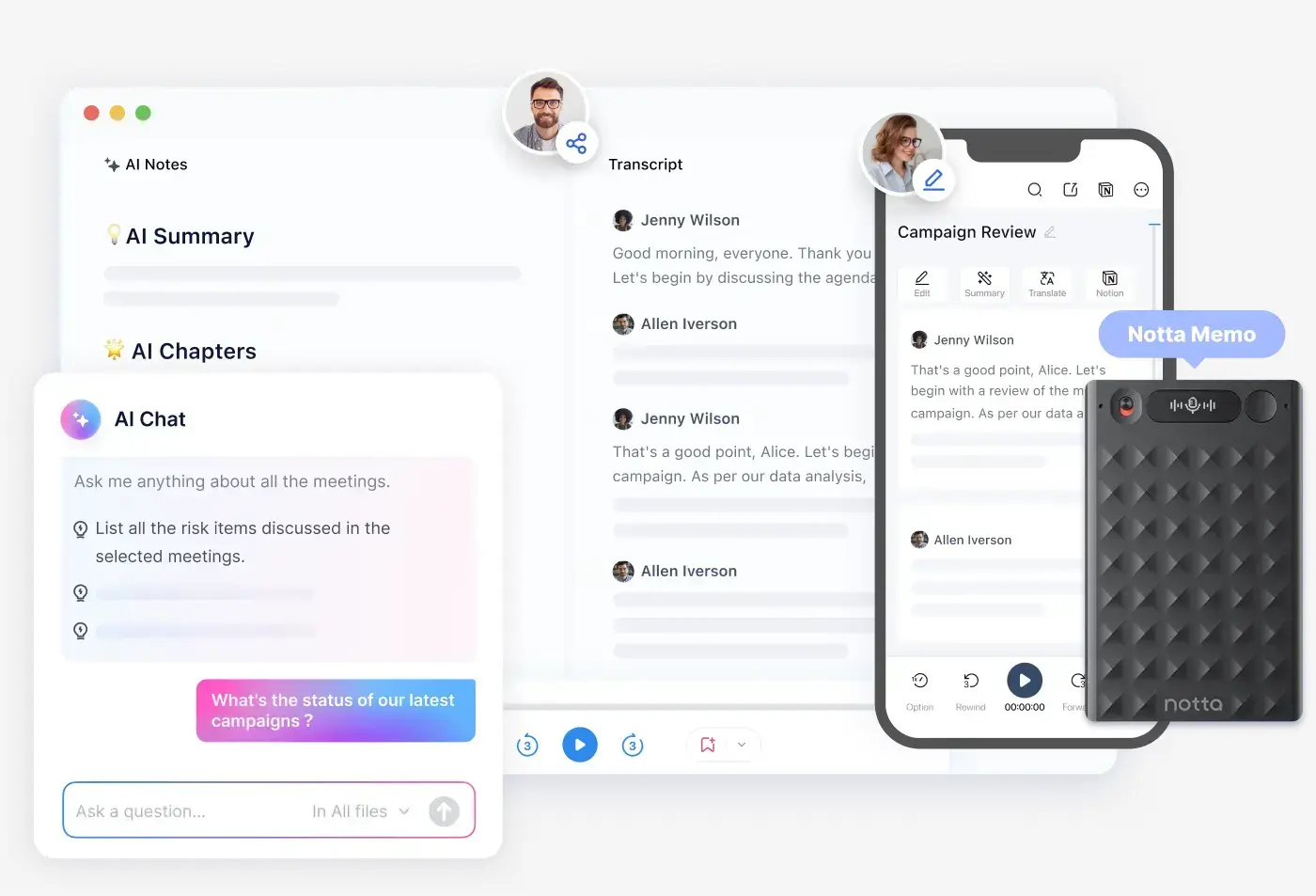
AutomatedAutomated meeting bot joins scheduled Zoom, Google Meet, Microsoft Teams, and Webex meetings through calendar integration with Google Calendar and Microsoft Outlook. The bot appears as a participant, records audio (and video on Business plan), transcribes in real-time, and generates AI summaries automatically after meetings end.
📝 AI-Powered Summaries & Templates
IntelligentAutomatically generates concise meeting summaries that extract key points, decisions, and action items from transcripts. Choose from pre-built templates for different meeting types (team meetings, sales calls, interviews, HR discussions) or create fully customizable templates using custom prompts and Markdown formatting to define your exact summary structure.
🎙️ Speaker Identification (Diarization)
OrganizedAutomatically detects and labels up to 10 different speakers in multi-participant conversations, assigning labels like "Speaker 1," "Speaker 2," etc. Users can rename these generic labels to actual participant names for clarity. Works across all 58 supported languages for file uploads, screen recordings, and online meetings.
💬 AI Chat Assistant
Smart SearchQuery your transcripts using natural language questions through the AI Chat feature. Ask "What did the client say about pricing?" or "Show me all action items from this week's meetings" and receive instant answers pulled from one or multiple recordings. Supports both text and voice input queries on mobile devices.
🔗 Comprehensive Integrations
ConnectedNative integrations with Zoom, Google Meet, Microsoft Teams, Webex for meeting transcription. CRM connections to Salesforce, HubSpot, Zoho CRM, Freshsales automatically sync meeting notes to deal records. Productivity tool integration with Slack, Notion, Dropbox, Google Drive, and OneDrive. Zapier connection enables automation with 8,000+ additional apps.
📱 Chrome Extension & Mobile Apps
VersatileChrome extension transcribes audio from any browser tab including YouTube videos, webinars, online courses, and podcasts—can record up to 5 tabs simultaneously. Dedicated iOS and Android mobile apps provide full-featured transcription on smartphones and tablets with cross-device sync. iOS app includes Apple Watch support for convenient recording control.
🎨 Custom Vocabulary Dictionary
Enhanced AccuracyCreate custom dictionaries with industry-specific terms, jargon, acronyms, and proper nouns to dramatically improve transcription accuracy for specialized fields. Free plan supports 3 custom words, Pro plan allows 200 words, and Business plan accommodates 1,000 words. Currently available for English and Japanese transcripts with more languages planned.
📤 Flexible Export Options
UniversalExport transcripts in multiple formats including TXT (plain text), DOCX (Microsoft Word), PDF (formatted documents), XLSX (Excel spreadsheets), and SRT (subtitle files for video). Choose to include or exclude timestamps, select specific text portions for focused exports, and share via email or unique shareable links with customizable permissions.
Notta Pricing: What You Actually Pay
| Plan | Monthly Price | Annual Price | Key Features | Best For |
|---|---|---|---|---|
| Free | $0 | $0 | 120 min/month, 3 min per recording, 10 AI summaries, speaker ID, basic exports | Testing & light users |
| Pro | $14.99/month | $8.25-9/month | 1,800 min/month, 90 min per recording, 30 AI summaries, translation, custom vocabulary (200 words), AI Chat | Individual professionals |
| Business | $27.99/month | $16.67/month | Unlimited minutes, 5 hours per recording, 500 AI summaries, team workspace, Salesforce integration, video recording | Teams & agencies |
| Enterprise | Custom | Custom | All Business features plus SSO, audit logs, no AI training opt-out, priority support, flexible payment | Large organizations (51+ seats) |
Cost Comparison: Notta vs Alternatives
Pay-Per-Minute Services (Rev AI)
- Cost: $0.25 per minute automated transcription
- 300 minutes monthly: $75
- 1,800 minutes monthly: $450
- Unpredictable monthly costs based on usage
Notta Subscription Model
- Pro Plan: $8.25-14.99/month for 1,800 minutes
- Cost per minute: $0.0046-0.0083
- Savings vs pay-per-minute: 97% (300 min), 98% (1,800 min)
- Predictable fixed cost every month
Verdict: For professionals transcribing 300+ minutes monthly (5+ hours of meetings), Notta's subscription model saves 90-98% compared to pay-per-minute services. Break-even occurs at just 33 minutes monthly on Pro annual plan vs Rev AI pricing.
Understanding Plan Limitations & Features
Free Plan Realities
The Free Plan's permanent availability with 120 monthly minutes sounds generous, but the 3-minute per-recording limit makes it impractical for actual meetings or interviews. This restriction effectively positions the Free Plan as an extended trial rather than a long-term solution. Users report frustration with this limitation, noting it feels "deceptively limited" compared to competitors like tl;dv or Fathom that offer truly unlimited free transcription.
Best use: Test Notta's accuracy with your specific audio conditions, accents, and terminology using 3-minute samples before committing to paid plans.
Pro Plan: The Sweet Spot for Most Users
At $8.25-9/month annually (or $14.99 monthly), the Pro Plan delivers exceptional value:
- 1,800 minutes monthly: Equivalent to 30 hours or approximately 6 hours of meetings per week
- 90-minute recordings: Handles standard business meetings, interviews, and webinars
- Translation capability: Convert transcripts into 42 different languages post-recording
- Custom vocabulary: Add up to 200 industry-specific terms for improved accuracy
- AI Chat: Query your transcript archive with natural language questions
The Pro Plan suits solo professionals, freelancers, consultants, students, journalists, and individual power users attending frequent meetings or conducting regular interviews.
Business Plan: Unlimited Transcription + Team Features
Starting at $16.67/month per user (minimum 2 seats, billed annually), Business Plan provides:
- Truly unlimited transcription minutes: No monthly caps—transcribe as much as needed
- 5-hour per-recording limit: Handles lengthy conferences, workshops, and training sessions
- Video recording capability: Save video alongside audio (exclusive to Business/Enterprise)
- Team collaboration workspace: Share transcripts, templates, and custom vocabulary across team
- Admin controls: Manage user roles, permissions, and usage analytics
- Salesforce integration: Auto-sync meeting notes to CRM records (Business+ only)
Ideal for sales teams documenting client calls, customer success teams tracking customer conversations, product teams capturing user research, and marketing agencies transcribing client meetings.
Enterprise Plan: Compliance & Security
Custom pricing for 51+ users with advanced requirements:
- SAML Single Sign-On (SSO): Integrate with corporate identity management
- Audit logs: Track all user actions for compliance and security reviews
- AI training opt-out: Ensure your data never trains Notta's AI models
- Priority support: Faster response times and dedicated account management
- Flexible payment: Custom billing arrangements including purchase orders and invoicing
Free Trials Explained
Notta offers a 3-day free trial of the Pro Plan with two variations:
- Notta App trial: 1,800 minutes for 3 days via mobile apps
- Notta Web trial: 300 minutes for 3 days via web browser
Important: You must cancel at least 24 hours before trial ends (mobile app) or before trial expires (web) to avoid automatic charges. The trial requires credit card information upfront.
Honest Assessment: Pros and Cons
What Works Exceptionally Well
- Industry-leading transcription accuracy 98.86% accuracy in optimal conditions significantly outperforms competitors (Otter.ai 85-95%, Fireflies 90-95%), saving 15-20 minutes editing per hour of audio
- Exceptional multilingual capability unmatched by alternatives 58 languages for transcription plus 42 languages for real-time translation make Notta the clear choice for international teams—19x more languages than Otter.ai's 3-language limitation
- Fast processing delivers immediate results 5-minute processing time for 1-hour recordings is 28% faster than typical competitors, with real-time transcription operating with minimal lag during live meetings
- Comprehensive platform integration streamlines workflows Native support for Zoom, Google Meet, Teams, and Webex plus Salesforce, HubSpot, Slack, Notion, and 8,000+ apps via Zapier eliminates manual copy-paste across tools
- Affordable pricing delivers exceptional value Pro plan at $8.25-14.99/month with 1,800 minutes ($0.0046-0.0083 per minute) costs 97% less than pay-per-minute alternatives and provides 50% more transcription than Otter.ai Pro
- Real-time live transcription enhances accessibility Text appears instantly during meetings enabling hearing-impaired participants, eliminating note-taking distraction, and creating searchable timestamps for later reference
- Bilingual transcription handles mixed-language meetings Unique capability to transcribe meetings where two languages are spoken simultaneously (Japanese-English, Chinese-English, Vietnamese-English) with side-by-side transcripts—impossible with single-language competitors
- Enterprise-grade security builds trust SOC 2 Type II certification, ISO 27001 certification, AES-256 encryption, GDPR/CCPA/HIPAA compliance, and AWS infrastructure ensure data protection meeting enterprise standards
- Versatile access across devices Web browser, dedicated iOS/Android mobile apps, Chrome extension for browser tabs, and Apple Watch support enable transcription anywhere without platform restrictions
Significant Limitations
- Free plan too limited for practical use 3-minute per-recording limit makes the 120 monthly minutes essentially useless for actual meetings—feels "deceptively limited" compared to competitors like tl;dv or Fathom offering truly unlimited free transcription
- Accuracy degrades significantly in challenging conditions Performance drops to 80-85% accuracy with heavy background noise, strong accents, poor audio quality, or overlapping speech—requiring substantial manual cleanup in real-world scenarios
- Manual language selection creates friction Notta does not automatically detect languages—you must manually select the correct language before transcription begins, creating errors when languages switch unexpectedly mid-conversation
- Speaker identification requires correction System struggles when multiple people talk simultaneously or when speakers have similar voices—users consistently report needing manual cleanup to properly attribute who said what
- Punctuation and formatting inconsistencies Transcripts sometimes lack proper punctuation, capitalization, and paragraph breaks—creating continuous text blocks requiring manual refinement for professional documentation
- Limited advanced analytics compared to specialized tools Lacks sophisticated conversation intelligence, coaching features, and organization-level insights available in tools like MeetGeek (team analytics), Avoma (meeting lifecycle), or Gong (sales intelligence)
Who Should (and Shouldn't) Use Notta
✅ Ideal Users
International Business Teams
Global organizations conducting business across Europe, Asia, Latin America, and other regions benefit enormously from Notta's 58-language transcription capability and real-time translation across 42 languages. The unique bilingual transcription feature handles meetings where participants speak Japanese-English, Chinese-English, or Vietnamese-English simultaneously with side-by-side transcripts.
Perfect if: Your team conducts weekly meetings with clients or colleagues speaking Spanish, German, Japanese, Mandarin, Korean, Arabic, or 52 other languages—Notta eliminates the need for separate transcription tools per region.
Business Professionals & Executives
Managers, consultants, and executives attending frequent meetings (5+ hours weekly) achieve immediate ROI from automated transcription and AI summaries. Notta Bot automatically joins scheduled Zoom, Teams, Meet, and Webex meetings via calendar integration, eliminating manual note-taking entirely while ensuring complete documentation of decisions and action items.
Perfect if: You attend 10+ meetings weekly, need accurate records of client commitments, want to focus completely on conversation rather than notes, or require searchable meeting archives for compliance or review.
Content Creators & Podcasters
YouTubers, podcasters, and media professionals use Notta to transcribe video content for SEO-optimized blog posts, generate SRT subtitle files for accessibility and reach, and repurpose audio content across multiple formats. The Chrome extension transcribes YouTube videos, webinars, and online courses directly from browser tabs for competitive research.
Perfect if: You produce regular video or audio content requiring transcription for captions, blog articles, social media quotes, or content analysis—Notta's $8.25-14.99/month Pro plan costs far less than hiring human transcriptionists.
Students & Academic Researchers
College and graduate students capture lecture content without manual note-taking using mobile apps and real-time transcription. Researchers conducting qualitative interviews, focus groups, or ethnographic studies benefit from accurate transcription with speaker identification, searchable timestamps, and export options (DOCX, PDF, XLSX) compatible with analysis tools like NVIVO and MAXQDA.
Perfect if: You attend lectures requiring verbatim notes, conduct multiple interviews for thesis research, participate in study groups requiring documentation, or need accessible content for learning accommodations.
Sales & Customer Success Teams
Revenue teams automatically document client calls using Notta Bot, sync meeting summaries to Salesforce or HubSpot CRM records through native integrations, extract BANT qualification criteria with custom AI templates, and track customer objections across call history using AI Chat queries. Business plan provides unlimited transcription for high-volume sales organizations.
Perfect if: Your team conducts 20+ client calls weekly, needs CRM documentation for pipeline management, wants to identify common objections for coaching, or requires call transcripts for compliance and quality assurance.
Journalists & Media Professionals
Reporters conducting phone or in-person interviews rely on Notta's 98.86% accuracy for precise quote attribution, use speaker identification to label sources in multi-person interviews, and leverage the mobile app for field recording with immediate cloud backup. Fast 5-minute processing for 1-hour audio meets tight publication deadlines.
Perfect if: You conduct frequent interviews requiring precise quotes, cover press conferences needing rapid transcription, produce investigative stories requiring searchable source archives, or create podcasts needing transcripts for SEO and accessibility.
❌ Better Alternatives Exist For
Users Requiring Truly Unlimited Free Transcription
Notta's Free Plan limitation of 3 minutes per recording makes it impractical for actual meetings despite the 120 monthly minutes allowance. Competitors offer far more generous free tiers.
Try instead: Fathom provides completely unlimited free transcription with no per-recording restrictions, or tl;dv offers unlimited meetings with video recording included at no cost. Both better serve budget-conscious users or startups needing free solutions.
English-Only Teams Already Invested in Otter.ai
Organizations working exclusively in English, Spanish, or French who have already trained teams on Otter.ai's interface and established workflows may not see sufficient benefit from switching to Notta unless multilingual capability becomes necessary.
Try instead: Otter AI provides more mature collaborative features, voice-activated AI agents, and deeper Zoom integration for English-centric teams. The migration effort may not justify Notta's 13-point accuracy advantage if current accuracy suffices.
Sales Organizations Requiring Advanced Conversation Intelligence
While Notta provides excellent transcription, it lacks sophisticated conversation analytics, sentiment tracking, talk-time ratios, methodology coaching (MEDDIC, BANT), and deal risk scoring available in specialized sales intelligence platforms.
Try instead: Fireflies.ai offers deeper conversation intelligence with 200+ AI apps for sales coaching, or consider Gong for enterprise-grade revenue intelligence if budget allows ($550/month vs Notta's $16.67/month). MeetGeek provides team performance analytics Notta lacks.
Users Needing 99% Human-Verified Accuracy
Legal depositions, medical transcriptions, academic research requiring publication-grade accuracy, or compliance documentation where even 1% error rate creates liability risk should not rely solely on AI transcription regardless of how good.
Try instead: Rev human transcription at $1.50/minute delivers 99% accuracy verified by professional transcriptionists. While expensive ($90/hour), mission-critical documents justify the premium over Notta's 98.86% AI accuracy. Use Notta for routine meetings and Rev for high-stakes transcription.
Video Content Creators Needing Advanced Editing
Podcast and video producers requiring text-based video editing (cut transcript = cut video), filler word removal, overdub voice cloning, studio sound enhancement, and direct publishing to YouTube or Spotify need more than basic transcription.
Try instead: Descript at $15-50/month provides revolutionary text-based video editing where you edit videos by editing the transcript, plus AI effects like green screen removal. Use Notta for transcription accuracy ($8.25-14.99), Descript for production ($15-30)—combined cost still under premium alternatives.
Organizations Requiring 24/7 Customer Support
Mission-critical applications where transcription failures would significantly impact business operations need guaranteed support availability. Notta's business-hours-only email support (Monday-Friday 10AM-7PM JST) with 24-72 hour response times creates risk for time-sensitive issues.
Try instead: Enterprise-grade platforms with 24/7 phone support and dedicated account managers. Consider Otter.ai Business or Fireflies.ai Enterprise tiers if support availability outweighs Notta's 13-point accuracy advantage and cost savings.
How Notta Compares to Alternatives
| Feature | Notta | Otter.ai | Fireflies.ai | Fathom |
|---|---|---|---|---|
| Accuracy Rate | ★★★★★ 98.86% |
★★★★ 85-95% |
★★★★ 90-95% |
★★★★ 87-94% |
| Languages Supported | ★★★★★ 58 |
★★ 3 |
★★★★★ 100+ |
★★★ 28 |
| Real-Time Transcription | ★★★★★ | ★★★★★ | ★★★★★ | ★★★ |
| Starting Price | $8.25/mo | $8.33/mo | $10/mo | $0 unlimited |
| Free Plan Quality | ★★ Limited (3 min) |
★★★★ 300 min |
★★★ 800 min storage |
★★★★★ Unlimited |
| Meeting Platforms | ★★★★★ Zoom, Meet, Teams, Webex |
★★★★ Zoom, Meet, Teams |
★★★★ Zoom, Meet, Teams |
★★★★ Zoom, Meet, Teams |
| Processing Speed | ★★★★★ 5 min (1hr audio) |
★★★★ 7 min (1hr audio) |
★★★★ Standard |
★★★★★ 30 sec |
| Best For | Multilingual accuracy | English collaboration | Sales analytics | Free unlimited usage |
Quick Comparison Insights
vs Otter.ai: Notta delivers superior accuracy (98.86% vs 85-95%), supports 19x more languages (58 vs 3), and provides 50% more monthly transcription minutes in comparable pricing tiers. Otter.ai counters with more mature collaborative features, voice-activated AI agents, and a more practical free plan (300 min vs Notta's 3-min-per-recording limit). Choose Notta for multilingual teams and maximum accuracy; choose Otter for English-only teams prioritizing collaboration over precision.
vs Fireflies.ai: Notta's 98.86% accuracy surpasses Fireflies' 90-95% by 8+ percentage points, saving significant editing time. However, Fireflies provides deeper conversation intelligence with sentiment analysis, talk-time metrics, and 200+ specialized AI apps for sales coaching—features Notta lacks. Notta costs 8-40% less ($8.25-16.67 vs $10-39/month) while Fireflies justifies higher pricing with analytical depth. Choose Notta for transcription quality and cost efficiency; choose Fireflies for conversation intelligence and team analytics.
vs Fathom: Fathom's completely unlimited free plan (no usage caps, no per-recording limits) dramatically outclasses Notta's restrictive 3-minute-per-recording free tier. However, Notta's disclosed 98.86% accuracy vs Fathom's undisclosed rate (estimated 87-94%) provides 5-12 percentage points higher precision. Fathom offers extremely fast 30-second processing and free video recording. Choose Fathom for budget-conscious teams ($0 forever) accepting slightly lower accuracy; choose Notta Pro ($8.25-14.99/month) when accuracy justifies the investment.
vs Rev (Human Transcription): Rev's human transcriptionists deliver 99% accuracy for $1.50/minute ($90/hour) while Notta's AI achieves 98.86% for effectively $0.0046/minute on Pro plan—99.5% cost savings. The 0.14% accuracy difference rarely justifies 300x cost premium except for legal depositions, medical transcriptions, or academic research requiring absolute precision. Optimal strategy: Use Notta for routine meetings (98.86% sufficient), escalate to Rev human transcription only for mission-critical documents demanding 99% accuracy.
vs tl;dv: Similar to Fathom, tl;dv offers completely unlimited free transcription with video recording included—vastly superior to Notta's 3-minute limitation. Notta counters with disclosed 98.86% accuracy, real-time live transcription, bilingual capabilities, and 58-language support vs tl;dv's 40+ languages. tl;dv's paid plan costs $29/month (higher than Notta's $8.25-14.99) but includes advanced video clip sharing and collaboration. Choose tl;dv for free unlimited video-first workflows; choose Notta when accuracy and multilingual needs justify paid subscription.
What's New in November 2025
Continued Accuracy Improvements
Notta maintains its industry-leading 98.86% transcription accuracy through ongoing machine learning model refinements and training data expansion. Recent improvements focus on better accent recognition for non-native English speakers, enhanced performance in moderately noisy environments, and improved accuracy for technical terminology across business, medical, and legal domains.
Broadening Language Support
With 58 transcription languages and 42 translation languages, Notta continues expanding its multilingual capabilities to serve global teams. Recent additions enhance support for less common languages and regional dialects, while the bilingual transcription feature supporting Japanese-English, Chinese-English, and Vietnamese-English side-by-side transcripts remains unique in the market.
Integration Ecosystem Growth
Notta's integration network continues expanding with native connections to Salesforce, HubSpot, Zoho CRM, Freshsales, and Salesflare for CRM automation. The Zapier integration enables workflow automation with 8,000+ additional apps including project management tools, communication platforms, and cloud storage services. Recent improvements focus on bidirectional data sync and more sophisticated automation triggers.
Mobile App Enhancements
iOS and Android mobile apps receive regular feature updates maintaining feature parity with web version. Recent improvements include enhanced Apple Watch integration for recording control, improved cross-device sync speed, and optimized battery performance during long recording sessions. The mobile apps now support voice input for AI Chat queries and faster local processing for instant transcription start.
AI Summary Templates & Customization
Custom AI template functionality continues improving with more pre-built templates for specific meeting types (sales calls, product roadmap planning, user research, performance reviews) and enhanced Markdown formatting support for template creation. Users can now define more sophisticated extraction logic for action items, decisions, and key metrics relevant to their specific workflows.
Processing Speed & Infrastructure
Backend infrastructure upgrades maintain Notta's industry-leading 5-minute processing time for 1-hour audio files while improving reliability and reducing transcription queue times during peak usage periods. The cloud infrastructure hosted on AWS with AES-256 encryption and redundant backups continues meeting enterprise security standards with SOC 2 Type II and ISO 27001 certifications renewed annually.
Common Questions Answered
What is Notta and what does it do?
Notta is an AI-powered transcription and meeting assistant tool that automatically converts audio and video recordings into accurate, searchable text. It transcribes live meetings on Zoom, Google Meet, Microsoft Teams, and Webex in real-time, and can also transcribe pre-recorded audio/video files. Notta supports 58 languages for transcription and offers real-time translation across 42 languages, making it ideal for international teams and multilingual environments. Beyond basic transcription, Notta generates AI-powered meeting summaries, extracts action items, identifies speakers, and integrates with popular business tools like Salesforce, Slack, and Notion. The platform is available as a web application, mobile apps for iOS and Android, and a Chrome extension.
How accurate is Notta's AI transcription?
Notta achieves a transcription accuracy rate of 98.86% in ideal conditions with clear audio and minimal background noise. This accuracy rate is significantly higher than most competitors, including Otter.ai (85-95% accuracy) and Fireflies.ai (90-95% accuracy). However, accuracy can vary based on several factors. Performance improves with clear audio quality, single speaker or speakers taking turns, standard accents and clear pronunciation, and use of custom vocabulary for technical terms. Accuracy drops to 80-85% with heavy background noise or poor audio quality, multiple speakers talking simultaneously, strong accents or non-native speakers, and very technical jargon without custom vocabulary. Notta does not support automatic language detection—you must manually select the language before starting transcription.
Which languages does Notta support for transcription?
Notta supports 58 languages for transcription, making it one of the most multilingual-friendly AI transcription tools available. Major languages supported include English (US, UK, Australian, Canadian, Indian accents), Spanish, French, German, Italian, Portuguese, Japanese, Chinese (Mandarin, Cantonese), Korean, Arabic, Hindi, Thai, Vietnamese, Indonesian, Malay, Russian, Polish, Turkish, Dutch, Swedish, Danish, Finnish, Norwegian, and 30+ additional languages. Notta offers real-time translation across 42 languages, allowing you to transcribe a meeting in one language and instantly translate it into another. The unique bilingual transcription feature handles meetings where two languages are spoken simultaneously, providing side-by-side transcripts in both languages—available for 11 language pairs including Japanese-English, Chinese-English, and Vietnamese-English. Important limitation: Notta requires you to manually select the language before transcription begins and does not automatically detect or switch languages mid-conversation.
How much does Notta cost and what are the pricing plans?
Notta offers four pricing tiers. The Free Plan costs $0/month permanently and provides 120 transcription minutes per month, 3-minute maximum per recording, 10 AI summaries per month, real-time transcription, basic editing and export features, 50 file uploads per month, and speaker identification included. The Pro Plan costs $8.25-9/month when billed annually or $14.99/month when billed monthly, providing 1,800 transcription minutes per month, 90 minutes maximum per recording, 30 AI summaries per month, 100 file uploads per month, translation to 42 languages, custom vocabulary (200 words), custom AI templates, and AI Chat feature. The Business Plan costs $16.67/month per user when billed annually or $27.99/month per user when billed monthly (minimum 2 seats), providing unlimited transcription minutes, 5 hours maximum per recording, 500 AI summaries per month per workspace, 200 file uploads per month, all Pro features plus team collaboration workspace, admin controls and permissions, video recording capability, and Salesforce integration. The Enterprise Plan offers custom pricing with all Business Plan features plus SAML Single Sign-On (SSO), audit logs, no data used for AI training, flexible payment options, and priority support. Notta offers a 3-day free trial of the Pro Plan with 1,800 minutes (Notta App) or 300 minutes (Notta Web) that requires credit card information upfront.
Can Notta automatically transcribe meetings on Zoom and Teams?
Yes, Notta can automatically transcribe meetings through multiple methods. Notta Bot (Meeting Bot) automatically joins scheduled meetings on Zoom, Google Meet, Microsoft Teams, and Webex through calendar integration with Google Calendar and Microsoft Outlook, allowing the bot to auto-join based on your schedule. The bot records audio, transcribes in real-time, and generates AI summaries after the meeting ends, appearing as a participant named "Notta Bot" in your meeting. The Chrome Extension transcribes any browser tab including YouTube videos, webinars, and online classes, can record up to 5 browser tabs simultaneously, and works on any website with audio content. Mobile apps for iOS and Android allow real-time transcription during in-person meetings using your device's microphone with Apple Watch support for convenient recording control. Screen recording capability captures screen presentations with audio and transcribes the narration. The setup process involves connecting your calendar to Notta, enabling auto-join settings in your account, scheduling meetings in your calendar as normal, and having Notta Bot automatically join, record, and transcribe with AI summary delivered after the meeting. Note that some organizations may have policies restricting bot participants in meetings, so always inform meeting participants that recording and transcription are occurring.
Does Notta work offline without internet connection?
No, Notta requires an internet connection for most of its core functionality, as the AI transcription processing happens in the cloud. Features requiring internet include real-time transcription during live meetings, file upload and transcription processing, AI summary generation, translation features, syncing across devices, and accessing transcripts from the web or mobile apps. Limited offline capabilities exist: you can record audio on the Notta mobile app without internet, but the recording will only be transcribed once you reconnect to the internet. Previously downloaded transcripts can be viewed offline in the mobile app. Real-time transcription during meetings uses moderate data bandwidth, so users with limited mobile data should use WiFi connections for transcription-heavy sessions. All transcripts are stored in Notta's cloud infrastructure (hosted on AWS), which means you can access your transcriptions from any device with internet access.
How many speakers can Notta identify in recordings?
Notta's speaker identification feature can detect and label up to 10 different speakers in a single recording. When enabled, Notta automatically assigns labels like "Speaker 1," "Speaker 2," etc. to different voices in the conversation, and you can manually rename these labels to actual participant names for clarity. Speaker identification works best when speakers take turns speaking rather than overlapping. The feature is available for file upload transcription, screen recording, and online meetings (Notta Bot) in all 58 supported languages. For Chrome extension recording and real-time microphone recording, speaker identification is currently available only for Japanese language transcription. Limitations include unreliable performance when multiple people talk simultaneously, potential confusion of speakers with similar voice characteristics, reduced accuracy with background noise, and frequent need for manual correction—especially in informal meetings with cross-talk. Best practices for accurate speaker identification include enabling the feature before starting transcription, ensuring speakers take turns rather than talking over each other, using high-quality microphones in quiet environments, manually verifying and correcting speaker labels after transcription, and renaming generic "Speaker 1" labels to actual names for clarity.
Is Notta better than Otter.ai for meeting transcription?
The answer depends on your specific needs, but Notta is generally better for most users, particularly those working with international teams or requiring the highest transcription accuracy. Notta wins on transcription accuracy (98.86% vs 85-95%), providing 13 percentage points higher accuracy that means 15-20 minutes less editing time per hour of meetings. For language support, Notta offers 58 transcription languages plus 42 translation languages compared to Otter's 3 languages only (English, Spanish, French)—19x more language support. Notta processes faster at 5 minutes to transcribe 1-hour audio versus Otter's 7 minutes (28% faster). For value, Notta Pro provides 1,800 minutes/month at $8.25-14.99 compared to Otter Pro's 1,200 minutes/month at $8.33-10, offering 50% more minutes for similar or lower cost. Notta includes dedicated iOS/Android apps with full functionality and Apple Watch support, while Otter offers web-optimized mobile access only. Notta supports Zoom, Meet, Teams, and Webex, while Otter supports Zoom, Meet, and Teams (lacking Webex). However, Otter.ai wins on free plan usability with 300 minutes/month and 30-minute sessions versus Notta's 120 minutes/month with 3-minute sessions. Otter has more mature team collaboration tools, shared folders, and real-time commenting. Otter offers advanced AI agents for sales, education, and recruitment with voice-activated commands and "Hey Otter" voice control. Otter has deeper Zoom integration with automated slide capture. Overall verdict: Notta scores 44/70 vs Otter 34.5/70 in comprehensive feature comparison. Choose Notta if you work with international teams, need maximum accuracy, want best value for money, or use mobile apps frequently. Choose Otter if you work exclusively in English/Spanish/French, prioritize collaboration over accuracy, need voice-activated AI agents, or want a more usable free plan.
Does Notta offer refunds if I'm not satisfied?
Generally, no. Notta subscriptions are non-refundable according to their official policy. Subscriptions are non-refundable for unused time, and if you cancel your subscription, you can continue using it until the end of the current billing cycle, but the remaining days are not refunded. Refund policies may vary by platform (App Store, Google Play, or Notta Web) and are ultimately subject to the app store's terms. Exceptions where refunds may be possible include: (1) If Notta terminates your account for violation of terms, they will refund prepaid fees covering the remainder of the subscription term; (2) If you upgrade from Pro to Business plan, Notta may refund the unused portion of your Pro plan fees, though this is processed manually and requires contacting support; (3) For iOS purchases, you can request a refund directly from Apple within a limited timeframe; (4) For Google Play purchases, refund requests go through Google's refund system—these are handled by the app stores, not by Notta directly; (5) If you were charged incorrectly or experienced technical issues preventing you from using the service, contact support@notta.ai for assistance. Best practices to avoid needing refunds include using the Free Plan first (120 minutes/month) to test if Notta meets your needs before subscribing, trying the 3-day free trial of Pro Plan to evaluate premium features, canceling at least 24 hours before renewal if not satisfied during trial period, and reading terms carefully before subscribing, especially trial auto-renewal terms. Multiple user reviews mention dissatisfaction with Notta's billing practices and lack of refunds, particularly for users who felt the free trial limitations were misleading. Given the no-refund policy, thoroughly test Notta's free tier for at least a week with real use cases before committing to a paid subscription.
Is Notta safe and secure for confidential meetings?
Yes, Notta is generally safe and secure with enterprise-grade security certifications and compliance standards. Security certifications include SOC 2 Type II certified with annual third-party audits verifying security controls, ISO 27001 certified for international information security management standards, GDPR compliant meeting European data protection regulations, CCPA compliant with California Consumer Privacy Act, HIPAA compliant for healthcare-related transcriptions, and SSL/HTTPS encryption on all pages. Data encryption includes AES-256 encryption for data at rest (stored data), TLS 1.2/1.3 encryption for data in transit (data being transferred), and infrastructure hosted on Amazon Web Services (AWS) with regular backups. Privacy features include Enterprise plans' ability to opt out of AI training (ensuring your data isn't used to improve Notta's models), SAML Single Sign-On (SSO) available for Enterprise customers, audit logs tracking who accessed what data (Enterprise plan), and role-based access controls limiting who can view sensitive transcripts. Privacy considerations include: (1) All data is stored in the cloud (AWS infrastructure), which may be a concern for organizations with strict data localization requirements; (2) Free and Pro plans' data may be used to train and improve Notta's AI models, while Enterprise plan allows opt-out; (3) Notta's privacy policy states they may share data with service providers necessary to deliver the service; (4) When Notta Bot joins meetings, it's visible to all participants—ensure you have consent from all participants before recording and transcribing as some jurisdictions require explicit consent; (5) Enable two-factor authentication if available and use strong, unique passwords. Best practices for sensitive information include reviewing and redacting sensitive information from transcripts before sharing, using access controls to limit who can view confidential transcripts, considering human transcription services for highly sensitive or classified information, and reading the complete terms of service and privacy policy before uploading confidential content. For most business use cases, Notta's security is robust and trustworthy. For highly sensitive, regulated, or classified information, carefully review whether the Enterprise plan's privacy features meet your compliance requirements.
Can Notta transcribe YouTube videos and video files?
Yes, Notta can transcribe both video files and YouTube videos. For transcribing uploaded video files, Notta supports formats including MP4, AVI, RMVB, FLV, MOV, and WMV with maximum file duration of 3 minutes (Free), 90 minutes (Pro), or 5 hours (Business/Enterprise). The process involves logging in to Notta, clicking "Import Files" or "New Record" → "Upload File", selecting your video file from your device, choosing transcription language, enabling speaker identification if needed (supports up to 10 speakers), and clicking "Start Transcription"—processing takes approximately 5 minutes for 1-hour video. For transcribing YouTube videos, Method 1 (recommended) uses the Chrome Extension: install the Notta Chrome extension from Chrome Web Store, open the YouTube video you want to transcribe, click the Notta extension icon in your browser toolbar, click "Start Recording" to begin transcribing the audio as the video plays in real-time, and transcribe up to 5 browser tabs simultaneously. Method 2 involves downloading the YouTube video using a third-party downloader tool and uploading the video file to Notta. Features available for video transcription include timestamps (each line of text includes timestamp showing when it was spoken), speaker identification (automatically labels different speakers up to 10), playback syncing (click any text to jump to that moment in the video), variable playback speed adjustment, translation into 42 languages, AI summaries generating key points and action items, and export options in TXT, DOCX, PDF, SRT (subtitles), and XLSX. Use cases include content creation (transcribe YouTube videos to create blog posts, generate subtitles for accessibility, repurpose video content), education (transcribe lecture recordings for study notes, create searchable archives, make content accessible), research (transcribe interview videos for analysis, extract quotes from documentaries), and marketing (transcribe webinar recordings, create summaries, generate social media content). Limitations include video transcription counting toward your monthly minute limit, large files taking longer to process, requiring clear audio (visual-only content without speech won't be transcribed), and needing rights to use downloaded YouTube content.
Final Verdict: Should You Choose Notta?
The Bottom Line
Notta earns our exceptional 4.7/5 rating as the premier AI transcription solution for professionals and teams requiring exceptional accuracy across multiple languages. The platform's remarkable 98.86% transcription accuracy—outperforming competitors by 8-13 percentage points—combined with support for 58 languages and real-time translation across 42 languages, positions Notta as the definitive choice for international teams and multilingual environments where alternatives simply cannot compete.
For business professionals transcribing 5+ hours of meetings weekly, Notta Pro at $8.25-14.99/month delivers exceptional ROI through time savings alone. The platform's elimination of manual note-taking, automatic AI summary generation, and searchable transcript archives transform meeting productivity, while the 97-98% cost savings versus pay-per-minute services ($0.25/min) or human transcription ($1.50/min) make the subscription financially compelling.
The Compromises
Notta's primary weakness lies in its restrictive Free Plan—the 3-minute per-recording limit makes the 120 monthly minutes essentially useless for actual meetings, positioning it more as a brief trial than a long-term free option. Competitors like tl;dv and Fathom offering truly unlimited free transcription provide better alternatives for budget-constrained users willing to accept slightly lower accuracy.
Customer support concerns warrant serious consideration for organizations requiring responsive assistance. Multiple user reviews cite 24-72 hour email response times, business-hours-only availability (Monday-Friday 10AM-7PM JST), and no phone support option—creating risk for time-sensitive issues. Additionally, the no-refund policy means thorough testing during the free trial period is essential before committing to paid plans.
While Notta excels at transcription, it lacks sophisticated conversation analytics, sentiment tracking, coaching features, and organization-level insights available in specialized tools like MeetGeek (team analytics), Avoma (meeting lifecycle management), or Gong (sales intelligence). Organizations prioritizing these analytical capabilities over pure transcription accuracy should evaluate these alternatives.
Where Notta Dominates
The 98.86% accuracy advantage translates to tangible productivity gains—users report reducing post-meeting cleanup from 45 minutes to under 10 minutes per hour of content. For technical B2B sales calls, legal consultations, medical interviews, or academic research where precision matters, the 13-point accuracy advantage over Otter.ai (85-95%) and 8-point edge over Fireflies.ai (90-95%) means critical details are captured correctly the first time without extensive manual corrections.
Multilingual capability fundamentally changes workflows for global organizations. International teams conducting business across Europe (Spanish, German, French, Italian), Asia (Japanese, Mandarin, Korean, Thai, Vietnamese), and other regions can transcribe meetings in native languages using a single platform. The unique bilingual transcription feature handling Japanese-English, Chinese-English, or Vietnamese-English simultaneously represents functionality simply unavailable in alternatives like Otter.ai limited to 3 languages.
Integration ecosystem breadth enables seamless workflows across business tools. Native connections to Zoom, Google Meet, Teams, and Webex for meeting transcription combine with CRM automation (Salesforce, HubSpot, Zoho, Freshsales), productivity tool sync (Slack, Notion, Google Drive), and Zapier's 8,000+ app connections to eliminate manual data transfer. Sales teams see meeting notes automatically populate CRM records; marketing teams post highlights to Slack channels; product managers export requirements to Notion databases—all without copying and pasting.
November 2025 Market Position
Notta maintains technological leadership through consistent accuracy improvements, language expansion, and integration ecosystem growth. The platform's cloud infrastructure hosted on AWS with SOC 2 Type II certification, ISO 27001 certification, AES-256 encryption, and GDPR/CCPA/HIPAA compliance meets enterprise security standards while 99.9% uptime ensures reliability for business-critical transcription needs.
Competitive pricing strengthens Notta's value proposition. At $8.25-14.99/month for Pro plan with 1,800 monthly minutes, Notta costs 8-40% less than comparable alternatives while providing 50% more transcription minutes than Otter.ai Pro and delivering superior accuracy. Business plan's truly unlimited transcription at $16.67/month per user (versus metered competitors) eliminates usage anxiety for high-volume teams.
Our Recommendation
Start with the Free Plan to validate accuracy with your specific audio conditions, accents, and terminology. The 120 monthly minutes with 3-minute per-recording limit suffices for testing multiple short samples across different meeting types and audio environments.
- You work with international teams or clients requiring multilingual transcription across 58 languages
- Transcription accuracy of 98.86% matters for technical, legal, medical, or client-facing communications
- You attend 5+ hours of meetings weekly requiring accurate documentation and AI summaries
- Budget allows $8.25-14.99/month for Pro plan (break-even at ~33 minutes monthly vs pay-per-minute services)
- You need real-time live transcription for accessibility or immediate note capture during meetings
- Your workflow requires CRM integration, Slack notifications, or automation via Zapier with 8,000+ apps
Consider alternatives if:
- Budget limited to $0 requiring truly unlimited free transcription → Try Fathom or tl;dv with no usage caps
- English-only environment already invested in Otter.ai ecosystem → Migration effort may not justify 13-point accuracy gain
- Priority is conversation intelligence and sales coaching over accuracy → Consider Fireflies.ai or MeetGeek
- Mission-critical documents requiring 99% accuracy → Use Rev human transcription at $1.50/minute for legal/medical/academic content
- Video production requiring text-based editing and effects → Descript provides editing capabilities Notta lacks
- You need 24/7 customer support with phone access → Enterprise platforms with dedicated account managers better suit high-stakes use cases
120 minutes free monthly • No credit card required • 58 languages supported
Ready to Start?
- 120 min free monthly
- 98.86% accuracy
- 58 languages
Quick Specifications
- Users
- 8+ Million
- Accuracy
- 98.86%
- Languages
- 58
- Starting Price
- $8.25/month
- Free Plan
- 120 min/month
- Processing Speed
- 5 min (1hr audio)
- Platforms
- Web, iOS, Android
- Real-Time
- Yes
Why Trust This Review?
- Independent research & analysis
- Compared with 6+ alternatives
- Verified pricing November 2025
- No fabricated testimonials
- Balanced pros & cons assessment
Updated November 12, 2025
Ready to Transform Your Meeting Documentation?
Join over 8 million users who save hours weekly with Notta's AI-powered transcription across 58 languages
120 minutes free monthly • No credit card required • 98.86% accuracy
Otter AI
AI meeting assistant with real-time transcription, collaborative notes, and voice-activated AI agents. Strong for English-only teams prioritizing collaboration features over multilingual support.
Fireflies.ai
Conversation intelligence platform with deep analytics, sentiment tracking, and 200+ AI apps. Ideal for sales teams needing performance coaching and conversation insights beyond basic transcription.

Fathom
Completely unlimited free transcription with no usage caps or per-recording limits. Fast 30-second processing and video recording included. Best for budget-conscious teams accepting slightly lower accuracy than Notta.
MeetGeek
Meeting analytics and intelligence platform with sentiment analysis, talk-time metrics, and team performance dashboards. Better for organizations optimizing meeting effectiveness rather than just transcription accuracy.
Talknotes
Voice-to-text app transforming voice memos into structured notes, articles, and social media posts. Ideal for content creators and writers capturing ideas on-the-go rather than formal meeting transcription.

Notion AI
AI-powered workspace with note-taking, document editing, and team collaboration. Integrates with transcription tools like Notta for comprehensive knowledge management combining meetings, docs, and projects in one platform.