
Fathom AI
AI meeting notetaker for Zoom, Google Meet and Microsoft Teams. Fathom records, transcribes and summarizes your calls, then pushes the notes into Slack, HubSpot or Salesforce. Its free plan is the most generous we've seen in this category.
Try Fathom →
The Meeting Notetaker
We Recommend Trying First
When someone asks us which AI meeting notetaker to try, Fathom is usually the first name we say. The free plan records, transcribes and stores every call with no minute cap, and keeps them with no storage cap, which no other tool on our list manages. Summaries land about 30 seconds after you hang up, and Ask Fathom lets you question months of calls in plain English. The catch: the features sales teams want most, Salesforce and HubSpot sync, sit on the $25–34 Business plan, and the free tier only gives you a handful of advanced AI summaries each month.
✓ What We Love
- Free plan with no cap on recording, transcription or storage
- Summaries in ~30 seconds, with 14+ templates for sales and customer calls
- Ask Fathom: chat with your entire meeting history
- Native Salesforce and HubSpot sync that removes post-call admin
! Could Be Better
- CRM sync only unlocks on the Business plan ($25–34/user)
- Free plan limits advanced AI summaries to roughly 5 a month
- No mobile app, and bot-free mode is still a Mac-only beta
What Is Fathom AI?
Who it's built for, what it does well, and one thing to clear up before we go further.
Fathom AI is a meeting notetaker that joins your Zoom, Google Meet or Microsoft Teams calls, records them, writes a transcript, and hands you a summary with action items shortly after everyone leaves. It started life as a productivity tool for individuals who were tired of typing notes during calls. In 2026 it's leaning harder into sales and revenue teams, with CRM sync, deal tracking and coaching metrics layered on top of the original capture-and-summarize core. It's also one of the most-installed notetakers on the Zoom and HubSpot marketplaces, which tells you something about how widely it's been adopted.
Quick clarification, because the name causes confusion: this is Fathom the meeting notetaker (fathom.video), not Fathom Analytics, the privacy-focused website stats tool. Different company, different product. If you landed here looking for web analytics, this isn't it.
So what sets Fathom apart from Otter.ai, Fireflies.ai and the rest? Mostly the free plan. Every competitor we've reviewed caps its free tier somewhere: Otter at 300 minutes a month, Fireflies by storage and AI credits, MeetGeek at three hours of transcription. Fathom doesn't cap recording, transcription or storage at all. What it does cap is the number of advanced AI summaries you get each month (roughly five), which is how it nudges heavier users toward a paid plan. That's a fair trade, in our view. You still get the recording and the transcript of every call; you just don't get the polished AI recap every time.
The second thing worth knowing is Ask Fathom. Most notetakers give you a search box. Fathom gives you an assistant you can talk to. Ask it what a prospect said about budget three weeks ago, or what you promised in Tuesday's call, and it pulls the answer from your recordings. It's the feature people mention most in reviews, and once you've used it for a month it's hard to go back to scrolling through transcripts.
Who Is Fathom AI Best For?
Solo professionals, consultants and founders who live on Zoom or Meet and want their calls recorded and summarized without paying for it. Small sales and customer-success teams on Salesforce or HubSpot who are willing to pay for the Business plan to stop doing post-call data entry. Coaches and account managers who want to clip and share moments from calls. It's a weaker fit for multilingual teams, field sales who talk on phones, or anyone who needs a mobile-first workflow.
How We Reviewed It
We first reviewed Fathom in September 2025 using our own account, and refreshed this page in September 2026 with new screenshots from that same workspace, Fathom's current pricing page and documentation, and a read of independent user feedback. The screenshots below are from our account, not marketing images. We haven't run a formal accuracy benchmark, so where we quote accuracy figures they come from third-party reporting and are labeled as such.
One more thing before the screenshots. Fathom's transcription covers 25+ languages on every plan, including free. That's plenty for a team working in English plus a couple of European languages. It's not enough if your calls bounce between Japanese, Hindi and Portuguese, and we'd point you to Notta or Fireflies in that case.
Fathom AI in Action
Five screenshots of the Fathom meeting notetaker from our own workspace: the meeting page, Ask Fathom, integrations, trackers and playlists.
Meeting Summary, Transcript and Highlights
The page you land on after every call: recording, AI summary, transcript and clips in one view
This is the core of the product and it's laid out sensibly. The recording sits top-left, with Summary, Transcript and Ask Fathom tabs underneath. The summary opens with Meeting Purpose and Key Takeaways, and the Enhanced dropdown swaps in different templates. On the right you get a Share button, an "Extract Action Items from Transcript" button, and a list of highlights, each one a short clip with a timestamp and a one-line note. Highlights marked "Internal Team Only" stay private when you share the recording externally, which is a small detail that saves awkward moments with clients.
Dashboard and Ask Fathom Assistant
Your call library on the left, a chat panel over your whole meeting history on the right

The dashboard is a grid of your recorded calls with a search bar at the top. What's more interesting is the Ask Fathom panel on the right. The suggested prompts give you a feel for what it's for: "Surprise me with an insight", "List my action items for this week", "What might fall through the cracks?" You can scope it to My Calls or Team Calls. Worth noting: when we took this screenshot, Fathom was running a promotion that gifted account-level Ask Fathom to free users with a note that limits may apply afterwards. Treat the account-wide version as a paid feature when you're deciding on a plan; the per-meeting version under each call is available more broadly.
Zoom, Google Meet and Teams Integration Settings
Where you control how Fathom joins each platform

Setup really is quick. Zoom and Microsoft Teams show as Fully Enabled once you connect your calendar. Google Meet is the one to watch: without the Chrome extension, Fathom only captures scheduled Meet calls joined from the desktop app, so install the extension if Meet is your main platform. The Zoom panel has two useful toggles, Enhanced Recording (gallery view, better quality) and Auto-capture for unscheduled meetings, plus a link to switch off Zoom's "recording in progress" audio chime. Attendees still see the notetaker; that chime is Zoom's own notification, not Fathom's.
Trackers
Tell Fathom what to watch for across your team's calls and get a weekly digest

Trackers is one of the newer additions and it's more useful than the name suggests. You describe a moment in plain English, say "reliability concerns and bug reports" or "testimonial-worthy experiences shared by customers", pick which teams it applies to, and Fathom scans every call for matches and sends a weekly snapshot to the channels you choose. The three presets (competitor mentions, at-risk customers, enthusiastic praise) are a sensible starting point. For a founder or a customer-success lead, this is the difference between hearing about churn risk in a call and actually acting on it.
Playlists of Shareable Highlights
Group clips from different calls into one link
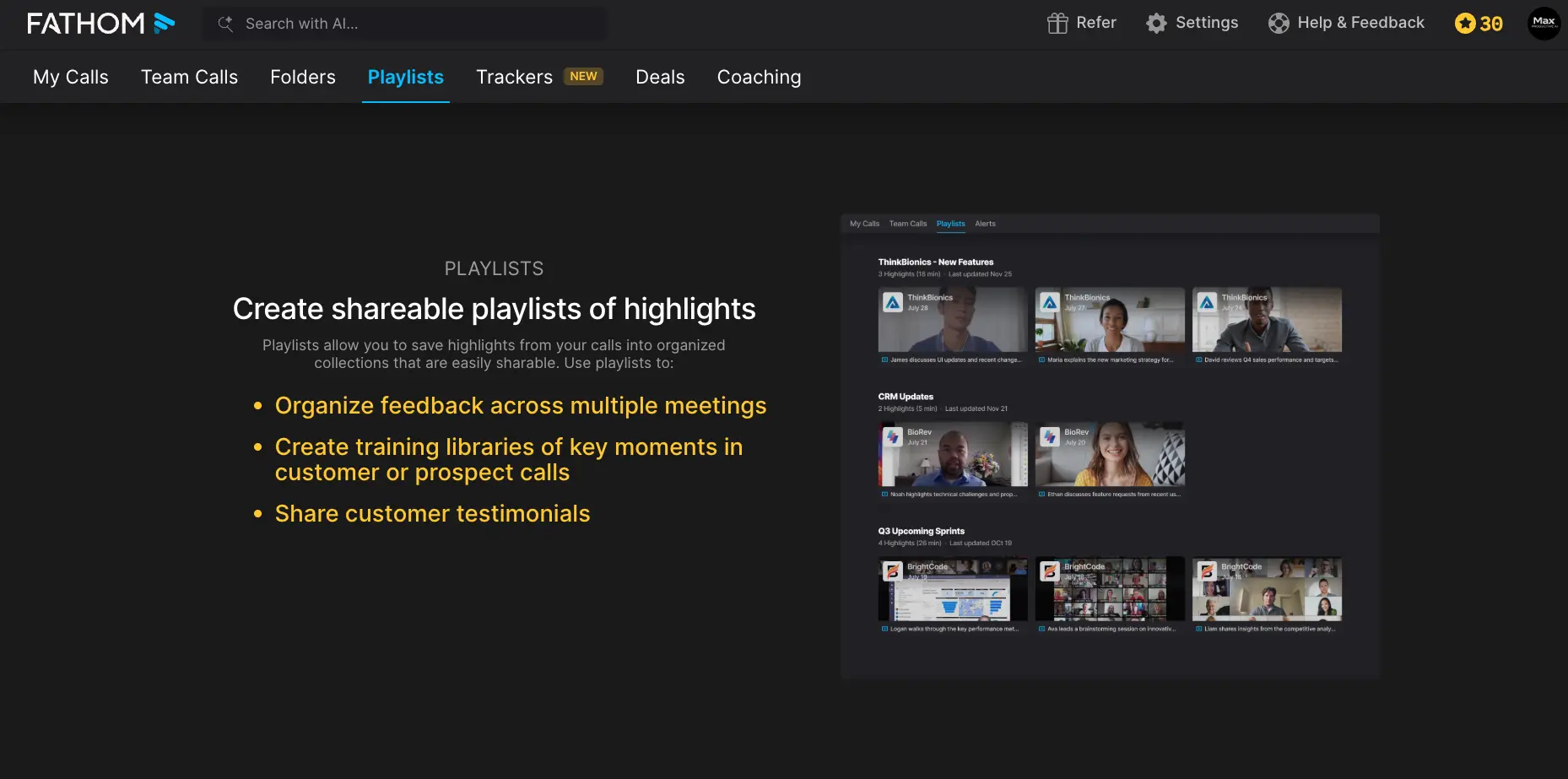
Playlists take the highlight clips you saw in the first screenshot and let you organize them across meetings. The examples Fathom shows are the right ones: a "New Features" playlist of customer requests for your product team, a training library of strong discovery calls for new reps, or a reel of customers saying nice things. Sharing is one link. It's a simple feature, but it's what turns a pile of recordings into something a team actually uses.
How Fathom AI Works
From connecting your calendar to notes in your CRM, in four steps.
Connect Your Calendar and Platforms
Sign up with Google or Microsoft, connect your calendar, and the Fathom meeting notetaker links to Zoom, Google Meet and Teams. On Meet you'll want the Chrome extension. That's the whole setup; most people are recording their first call within five minutes. You can choose which meeting types get recorded automatically and which ones you'll trigger by hand, which matters if you don't want your dentist appointment transcribed.
Fathom Joins and Records
By default Fathom shows up in the call as a notetaker bot, visible to everyone. If you're on a Mac you can try the bot-free capture mode, which records from the desktop without adding a participant. It's still in beta as of September 2026 and there's no Windows version yet, so most users are on the classic bot. During the call you can hit highlight buttons to mark moments, and Fathom captures the speaker's full point around that moment rather than just the few seconds after you clicked.
The Summary Lands Before You've Closed the Tab
Hang up, and the recording, transcript and summary are ready almost immediately. The default summary gives you purpose, takeaways and next steps. The Enhanced view lets you switch templates: general, customer success, and 14+ sales frameworks including BANT, MEDDPICC, SPICED and Sandler. Action items get pulled out automatically on paid plans, along with a drafted follow-up email. Here's the thing: the summaries are consistent and reliable, but a couple of reviewers describe the tone as flat. We'd agree it's more "accurate minutes" than "insightful colleague". For most people that's exactly what they want.
Push It Where the Work Happens
From here it depends on your plan. Everyone can copy the summary or share the recording link. Paid plans post summaries to Slack, create tasks in Asana, and open up a Zapier connector that reaches roughly 9,000 other apps. Business and Enterprise add native Salesforce and HubSpot sync, writing notes and action items straight into contact, account and opportunity records, plus a Deal View that groups calls by opportunity. And whatever you do with the notes, Ask Fathom keeps the whole archive searchable in plain English.
Recording Notice and Consent
Fathom never records quietly. Either the bot is visible in the participant list or, in bot-free mode, participants get an on-screen notice. Consent rules for recording calls differ between countries and between US states, and some require every participant's agreement rather than just the host's. Our advice, whatever tool you use: say out loud at the start of the call that a notetaker is running. It takes five seconds and it's just good manners.
Data Retention and AI Training
Fathom encrypts data in transit and at rest, publishes its subprocessor list, and displays SOC 2 Type II and Data Privacy Framework badges. Two things to check for yourself: recordings stay in Fathom's cloud until you delete them (Enterprise gets custom retention), and Fathom's documentation says de-identified meeting data may be used to improve its models, with an opt-out. If that matters for your clients, find the setting in your account before your first customer call rather than after.
Key Features
What you get for free, and what's waiting behind the paid plans.
Recording, Transcription and Storage
Every call on Zoom, Meet and Teams, recorded and transcribed in every supported language, stored with no minute limit and no expiry. This is the feature that makes the free plan worth having on its own. Transcripts are clickable, so tapping a line jumps the video to that moment.
AI Summaries and Templates
A recap within about half a minute of the call ending. The free plan gives you a small monthly allowance of the advanced version; paid plans make them unlimited and open up 14+ templates for BANT, MEDDPICC, SPICED, Sandler and customer-success calls. Custom summary templates are a Business feature.
Ask Fathom
Our favorite feature, and the one that has no real equal at this price. Ask questions about one call or your whole archive and get answers pulled from the transcripts. "What did the client say about timeline?" beats scrolling through 40 minutes of text. Account-wide Ask Fathom is a paid feature.
Action Items and Follow-Up Emails
Tasks extracted from the conversation and a drafted follow-up email you can edit and send. Nothing exotic, but it removes the ten-minute post-call admin that everyone skips when they're busy.
Salesforce and HubSpot Sync
Native, first-party integrations that write summaries, action items and deal notes into contact, account and opportunity records. Deal View groups calls by opportunity. This is Fathom's strongest argument for sales teams, and also its most frustrating paywall: you need the Business plan. Fireflies.ai offers CRM sync at a lower tier and covers Pipedrive and Zoho too.
Clips, Playlists and Trackers
Cut a clip, drop it in a playlist, share one link. Trackers scan every team call for whatever you tell them to watch (competitors, churn signals, praise) and send a weekly digest. Between them, these turn recordings from a personal archive into something a whole team gets value from.
Coaching Metrics and Scorecards
Talk-time ratio, call scoring and team-level analytics on Team, with scorecards on Business. Fine for a sales manager reviewing a handful of reps. If coaching is your main reason for buying, tl;dv goes deeper with methodology playbooks, at a much higher price.
Integrations and MCP Server
Native Slack and Asana, a Zapier connector reaching roughly 9,000 apps, Make and n8n routes, and an MCP server that lets you bring meeting context into ChatGPT or Claude. That last one is a quietly big deal if you already run your workday through an AI assistant.
What's missing? No file import, so recordings made outside Fathom can't be transcribed by it. No mobile app. Nothing built for in-person meetings. If those are your use cases, Notta handles uploads and sells a hardware recorder, and Krisp captures in-person audio on-device.
Every feature above starts from the free plan or a paid upgrade:
Check Fathom's pricing →Free plan included • Paid from $15/user/monthFathom AI Pricing
Four plans plus Enterprise. The free plan is the story; the Business plan is where sales teams end up.
Free
- ✓ Recording, transcription, storage with no cap
- ✓ 25+ languages
- ✓ Bot or bot-free capture (Mac beta)
- ✓ Clickable transcripts and sharing
- ✓ ~5 advanced AI summaries/month
- ✗ No unlimited summaries or CRM sync
Premium
- ✓ Everything in Free
- ✓ Unlimited AI summaries
- ✓ Action items and follow-up emails
- ✓ Ask Fathom across your account
- ✓ Custom prompts
- ✓ $20/mo on monthly billing
Business
- ✓ Everything in Team
- ✓ Salesforce and HubSpot field sync
- ✓ Deal View
- ✓ Coaching scorecards
- ✓ Custom summary templates
- ✓ $34/mo monthly • 2-seat minimum
Guarantee: All paid plans come with a 90-day money-back guarantee.
Pricing last verified September 2026. Fathom changed tier names and prices more than once this year, so visit Fathom for current rates before you commit.
Should You Pay for Fathom?
If you have a few calls a week and mostly want a searchable record, stay on free and use your five summaries wisely. Upgrade to Premium when you find yourself writing summaries by hand because you've hit the cap. Go to Business only if you're on Salesforce or HubSpot and the post-call data entry is costing your team real hours. Most solo users never need to leave the free plan, which is either great news or a sign Fathom is leaving money on the table, depending on who you ask.
How does that stack up? On annual billing, Fathom's Premium at $16 costs more than Otter.ai Pro ($8.33, with a 1,200-minute monthly cap), Notta Pro ($8.17) and MeetGeek Pro ($9.99, 20 hours a month). Fireflies.ai Pro sits at $10, though heavy users can burn through its AI credits. Where Fathom wins is the free plan, which makes the "entry price" comparison a bit unfair: most rivals need you to pay before you get unlimited transcription, and Fathom doesn't. The honest weak spot is Business at $25–34. Fireflies gives you CRM sync for $19 on its Business tier and covers more CRMs. Is it perfect? No. But for a solo user, the pricing question mostly answers itself.
Detailed Pros & Cons
The full picture after a year with the tool, including the parts Fathom's own site won't tell you.
✓ Pros
Record and transcribe every call, keep them forever, and never see a "minutes remaining" counter. We've reviewed nine notetakers in this category; Granola and tl;dv come closest, but both cap how long you keep what you recorded. It's the single biggest reason Fathom is the default recommendation in most user communities.
Almost before you've closed the meeting window, the recap is there. The sales templates (BANT, MEDDPICC, SPICED, Sandler) are a real help for reps who need notes in the shape their manager expects. Independent reviewers commonly put transcription accuracy at 90–95% in clean audio, and the summaries stay usable even when a few words are wrong.
Most notetakers give you a pile of transcripts. Fathom gives you something you can question. It's the feature that comes up most in user feedback and, in our experience, the one that stops you from switching to a cheaper tool later.
On the Business plan, notes, action items and deal insights flow into Salesforce and HubSpot at the field level, and Deal View ties calls to opportunities. For a small revenue team, this is the feature that pays for the subscription.
Connect your calendar, join a call, and it works. No admin console to configure, no training session. The refund window on paid plans is also unusually long for this category, so trying Premium or Business is low-risk.
Highlights, playlists, internal-only annotations and trackers are the kind of things that sound minor on a feature list and end up being how the product team learns what customers want. They're well executed here.
✗ Cons
This is the complaint we hear most. A two-person sales team pays $50–68 a month for HubSpot sync that Fireflies includes at $19 per seat. If CRM automation is your main reason for buying, run the numbers before assuming Fathom is the cheaper option.
"Unlimited" applies to recording and transcription, not to advanced AI summaries, which are limited to a handful each month. The cap has shifted over time and hasn't always been clearly communicated, and users who signed up expecting a fully free product have been caught out. We'd like to see it stated more plainly on the pricing page.
Tier names and prices changed more than once in 2026. Older reviews still quote Premium at $19 and a Team Edition at $29–39. It's confusing, and it's why we've dated every figure on this page.
Some prospects find a notetaker in the participant list off-putting. Fathom's answer, bot-free capture, exists but is still in beta and only on Mac as of September 2026. Windows users are on the bot for now. Granola built its whole product around this problem if it's a deal-breaker for you.
You can't start a recording or review notes from a phone, you can't upload an audio file recorded elsewhere, and in-person meetings aren't really supported. For a desk-based Zoom user none of this matters. For a consultant who does half their meetings over coffee, it's a real gap.
Language coverage is respectable but well behind Fireflies (100+) and Notta (58). And the summaries, while accurate, read like careful minutes rather than insight. One reviewer called it "like Notepad with a mic". A little harsh, but we see the point.
Fathom AI vs Alternatives
How it compares to the notetakers people most often weigh it against.
| Feature | Reviewed Fathom AI | Fireflies.ai | Otter.ai | MeetGeek | Granola |
|---|---|---|---|---|---|
| Free plan | No recording cap, ~5 AI summaries/mo | 400 min storage, limited AI credits | 300 min/mo, 30-min per call | 3 hrs/mo, unlimited summaries | Unlimited meetings, limited note history |
| Paid from (annual) | $15–16/user/mo | $10/seat/mo | $8.33/user/mo | $9.99/user/mo | $14/user/mo |
| Languages | 25+ | 100+ | A handful | 100+ | Not a focus |
| Native CRM sync | Salesforce, HubSpot (Business) | Salesforce, HubSpot, Pipedrive, Zoho | Salesforce, HubSpot (Pro+) | HubSpot + Zapier/Make (Pro+) | Limited (API/MCP on Business) |
| Capture method | Bot, or bot-free (Mac beta) | Bot | Bot or desktop | Bot or bot-free | No bot, local audio |
| Mobile app | No | Yes | Yes | Yes | iOS |
| Standout | Ask Fathom + free tier | Integrations + languages | Long track record | Analytics on free | Stay-present notetaking |
| Best for | Solo users, small sales teams | Teams, multilingual, CRM-heavy | Light users, education | Budget teams | Bot-averse individuals |
Fathom vs Fireflies: The One People Actually Ask About
These two get compared more than any other pair in this category, and the answer depends on who's paying. If you're an individual or a team of two or three, Fathom's free plan wins on volume: no minute cap, no credits to watch. Fireflies' free plan gives you 400 minutes of storage and a limited pool of AI credits, which runs out fast if you take a lot of calls.
Flip it to a sales team of five on HubSpot and the picture changes. Fireflies Business at $19 per seat includes CRM sync and covers Pipedrive and Zoho as well as Salesforce and HubSpot; Fathom asks $25–34 per seat for its Business plan to get the same core capability. Fireflies also handles 100+ languages and has a mobile app. What Fathom has that Fireflies doesn't is Ask Fathom's quality and the summary speed, plus a cleaner interface. Our short answer: solo or small and English-speaking, Fathom; larger, multilingual or CRM-heavy, Fireflies. Both are worth trying on their free plans before deciding.
Which Tool Is Right For You?
Fathom AI
ReviewedBest for: Individuals and small teams on Zoom, Meet or Teams who want every call recorded and searchable without paying, and sales teams on Salesforce or HubSpot who'll pay for the Business plan to kill post-call admin. If you take calls in English and a couple of other languages and rarely meet in person, it's the one we'd start with.
Fireflies.ai
Team PickBest for: Teams that need CRM sync at a lower price point, 100+ languages, and the largest integration catalog in the category. The trade-off is the AI-credit system, which can push real costs above the sticker price for very active users, and a free plan that's far tighter than Fathom's.

Otter.ai
The IncumbentBest for: Light users who want a mature mobile app and a familiar name, plus students and educators who benefit from its discounts. The free plan's 300 minutes a month and 30-minute per-conversation cap are what send many people to Fathom in the first place. We wrote a whole guide on Otter AI alternatives if that's you.
MeetGeek
Budget PickBest for: Teams on a budget who want meeting analytics (talk time, sentiment, engagement) on every plan including free, and automation through Zapier, Make and n8n from the Pro tier. The three-hour monthly transcription cap on free is the main limitation versus Fathom.

Granola
No BotBest for: People who hate seeing a bot in their meetings. Granola captures audio locally and blends it with the notes you type yourself, so you stay present in the conversation. It's thinner on integrations and CRM sync than Fathom, and it leans on you to jot things down during the call rather than doing everything for you.
Notta
MultilingualBest for: Multilingual teams and anyone who records outside video calls. Notta transcribes 58 languages with a bilingual live mode, accepts file uploads, and sells a $149 hardware recorder for in-person conversations. Its free plan is close to unusable for real meetings (a 3-minute cap per recording), so budget for Pro at $8.17 on annual.
Frequently Asked Questions
Should You Try Fathom AI?
Yes, and the good news is that trying it costs nothing. Fathom's free plan is the most useful in the meeting-notetaker category: every call recorded, transcribed and kept, with a summary quality that's consistent even if it's not poetic. Ask Fathom is the feature that makes the archive worth building. For a solo professional on Zoom or Meet, it's hard to argue for paying anyone else.
The reservations are about the paid tiers, not the product. The Business plan is the only way to get Salesforce and HubSpot sync, and at $25–34 per seat that's pricier than Fireflies for the same job. The free-tier cap on advanced summaries deserves clearer labeling. Bot-free capture needs to leave beta and reach Windows. And a mobile app is overdue. None of that stops us rating Fathom AI 4.6 out of 5, but it's why it isn't a 5.
Our Recommendation
Start on the free plan and use it for two weeks of real calls. If you keep running out of AI summaries, Premium at $16 a month annual is an easy upgrade, and you have three months to change your mind. If you're a sales team on HubSpot or Salesforce, test Fathom Business and Fireflies Business side by side on a couple of seats before committing either way. And if the bot bothers you or your prospects, try bot-free mode on a Mac or look at Granola.