Otter.ai
Otter.ai sits in your Zoom, Google Meet and Microsoft Teams calls, transcribes them as they happen, and lets you ask questions across everything you've ever recorded. This Otter.ai review covers what still holds up in 2026, what's changed, and who should be looking at something else.
Visit Otter.ai →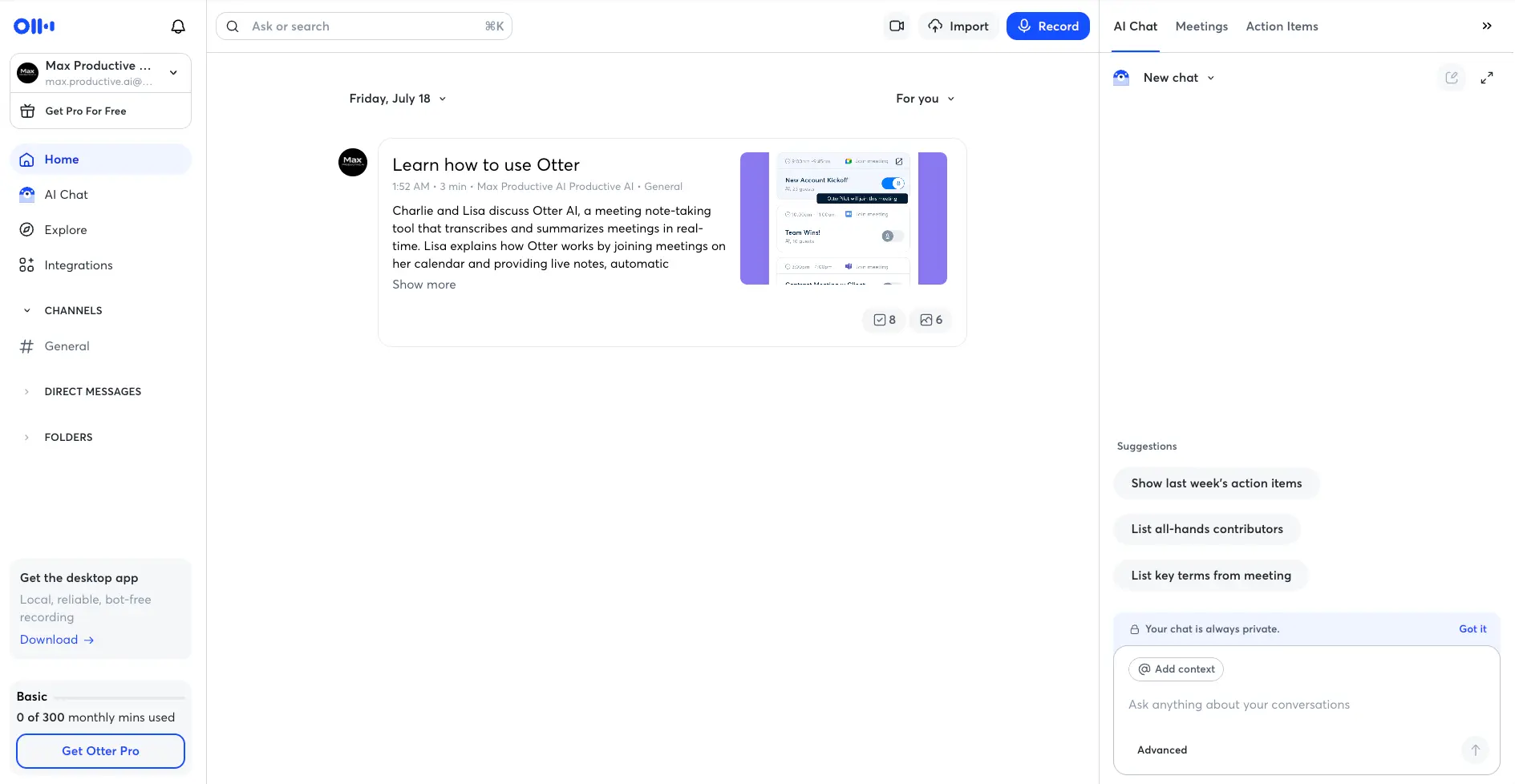
Still the Safe Default for English Meetings,
Just Not the Only One Anymore
Otter.ai does the core job as well as anyone. The live transcript is fast and readable, and asking AI Chat "what did the client say about timing?" across a year of calls still feels like the feature everyone else is trying to copy. The free plan is a real trial, not a demo. What's changed is the maths around it. Pro now stops at 1,200 minutes a month, the language list is short, and the meeting bot is something you'll want to mention at the start of every call. If your meetings are in English and you'll fit inside the caps, it's a very good pick. If not, this page has better options for you.
✓ What We Love
- Live transcription that's quick, readable and easy to mark up mid-call
- AI Chat across your whole meeting history, the most mature version of this idea
- A free plan you can actually evaluate on real meetings
- Desktop app records bot-free; calendar sync handles the rest
! Could Be Better
- Pro allowance is now 1,200 minutes with a 90-minute per-call cap
- Around six languages, fewer than most rivals
- Bot is visible by default; consent etiquette is on you
What Is Otter.ai?
The tool that made "AI note-taker" a category, and what that head start is worth today.
Otter.ai is an AI meeting assistant. Connect your Google or Outlook calendar and its AI Notetaker joins your Zoom, Google Meet and Microsoft Teams calls on its own, transcribing as people speak and tagging who said what. When the call ends you get a summary, a list of action items and a clickable outline, all filed into a searchable archive. Don't want a bot? The desktop app records audio from your machine with nothing joining the meeting, the mobile apps handle in-person conversations, and the Chrome extension covers browser calls.
Otter has been at this longer than almost anyone, and that shows in two ways. The good way is maturity. Live captions are smooth, the transcript editor is the most refined I've used, and AI Chat, which lets you ask questions across every meeting you've ever recorded, has had years to become properly useful. Ask it who committed to what last quarter and it tells you, with links back to the exact moments. Newer tools like Fathom and Fireflies AI have similar features now. Otter's just feel more lived-in, in the good sense.
The other way is that Otter's model was shaped in a market with fewer competitors. It's English-first, with a language list that stops at around six. It leans on a visible bot by default, which is the thing tools like Granola built their whole pitch around avoiding. And the plans have tightened: Pro's monthly allowance went from 6,000 minutes to 1,200 in 2026 at the same price, a change that pricing trackers documented widely even though Otter didn't make much noise about it. Meanwhile Fathom hands out unlimited recording for free. None of that makes Otter a bad product. It means Otter now competes on polish rather than generosity, and you should know which of those you're paying for.
How We Evaluated Otter.ai
I set up a free Basic account, connected Google Calendar, switched on the AI Notetaker for an upcoming Google Meet call, ran a short live recording from the browser to watch the transcript build in real time, and worked through AI Chat, the templates library and the integrations page. I didn't put Otter through a full month of meetings, so the accuracy numbers here come from independent tests (the most useful one ran 34 real meetings) rather than my own benchmark. Plan limits come from Otter's pricing page and the upgrade prompts inside the app. Otter has no affiliate relationship with this site, so nothing on this page changes depending on what you decide.
So who is it for? Individuals and small teams who meet mostly in English, want dependable transcripts and a searchable archive, and can live inside 1,200 minutes a month. Anyone with an existing Otter library has an extra reason to stay, because AI Chat gets more valuable the more history it has to dig through. If you run calls in several languages, look at Notta first. If you spend your days on long calls, check Fathom's free tier before you pay anyone. And if you need talk-time analytics or CRM-driven sales coaching, tl;dv and Fireflies go deeper than Otter does outside its Enterprise tier.
Otter.ai Screenshots: What You Actually Get
From our free Basic account, in the order you'd meet these screens.
Home Dashboard
Conversations in the middle, AI Chat on the right, your plan meter bottom left
Otter greets you with a pre-recorded onboarding conversation so there's something to click before you've recorded anything. Worth a look, because it shows the summary, the action-item count and the slide captures a real meeting produces. The layout is Slack-shaped, with Channels, Direct Messages and Folders in the sidebar, which makes more sense once you're sharing recordings with a team than it does on day one. The AI Chat panel on the right is always open, with suggestion chips like "Show last week's action items". Two things I noticed straight away: the plan meter is impossible to miss, and there are three separate invitations to upgrade on this one screen. Otter would quite like you on Pro.
Recording a Live Meeting
Paste a link, or let the calendar do the work
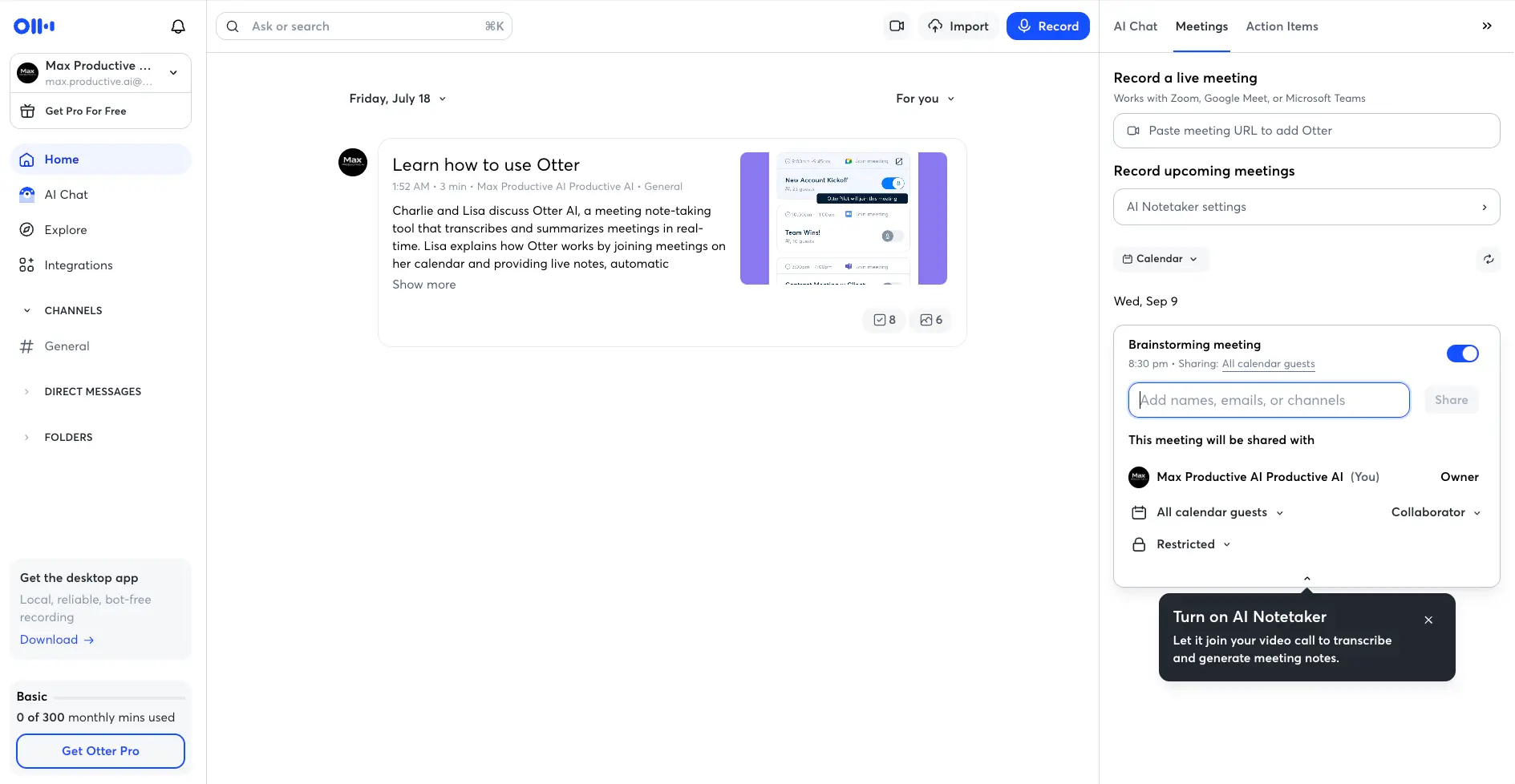
Two ways in. Paste a meeting URL and the AI Notetaker joins that call, or connect your calendar and flip a toggle next to each upcoming event. Once Google Calendar was connected, a meeting I'd scheduled showed up with the Notetaker already switched on and a friendly pop-up encouraging me to let it join. Here's the thing to check before you record anything sensitive: sharing defaults to "All calendar guests" as Collaborator. Convenient for a team stand-up, a surprise on a one-to-one with a client. You can set it to Restricted per meeting, but you have to know to look. The panel also confirms the platform list: Zoom, Google Meet, Teams. No Webex, which Notta does support.
Live Transcript with AI Chat
Text appears as you speak, with highlight, comment and screenshot tools
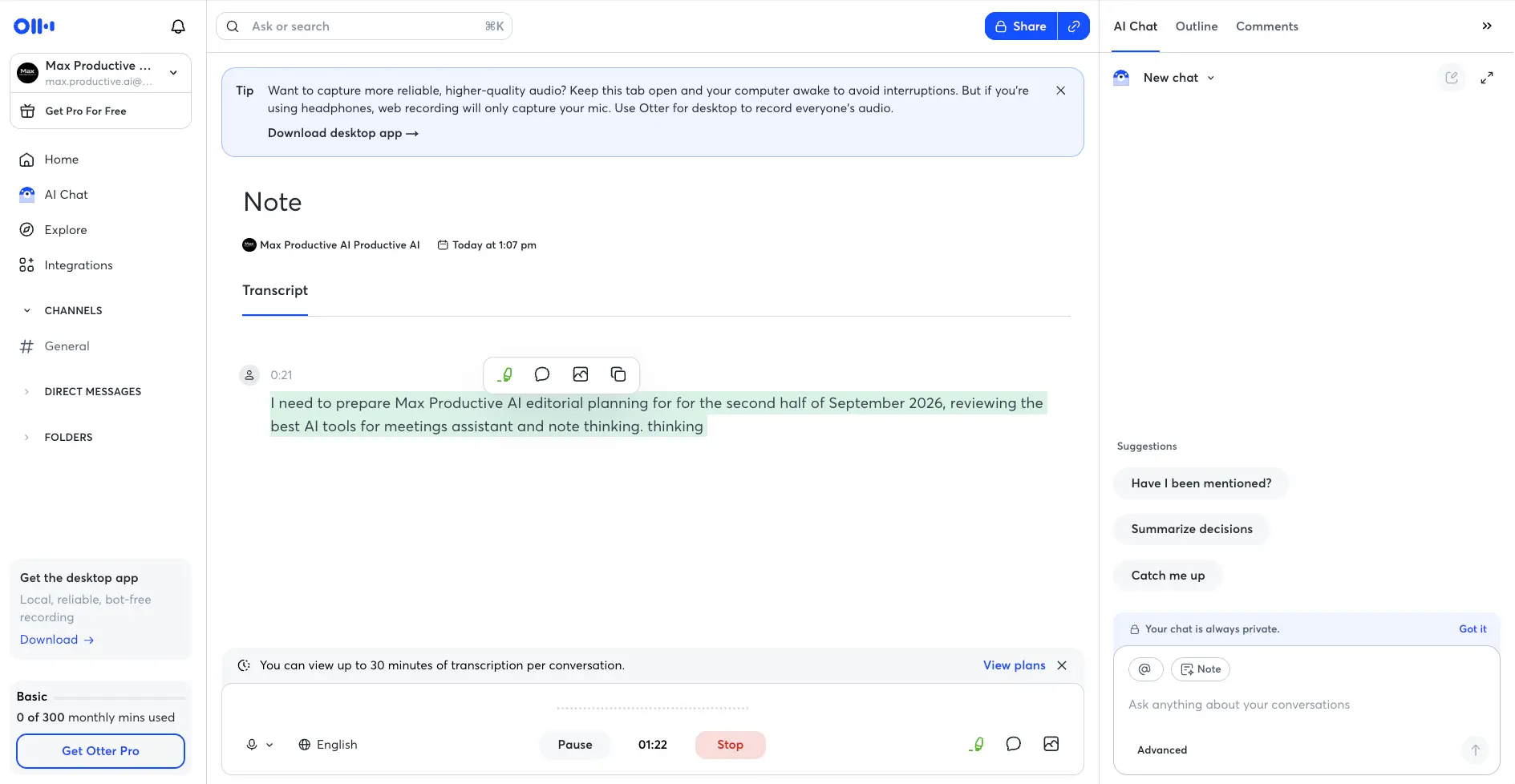
I recorded a short voice note from the browser to see how the live view behaves. Words landed within a second or two and the sentence was readable straight away. It wasn't flawless: Otter doubled a word ("for for") and heard "note-taking" as "note thinking", which is exactly the sort of slip independent tests report on jargon and quick speech. A double-click fixes it. The banner along the bottom is the free plan reminding you of the 30-minute ceiling, and the tip at the top is honest in a way I appreciated: if you're wearing headphones, web recording only captures your side. For everyone's audio without a bot, it's the desktop app or nothing.
Meeting Templates
Six templates on the free plan, four more on paid
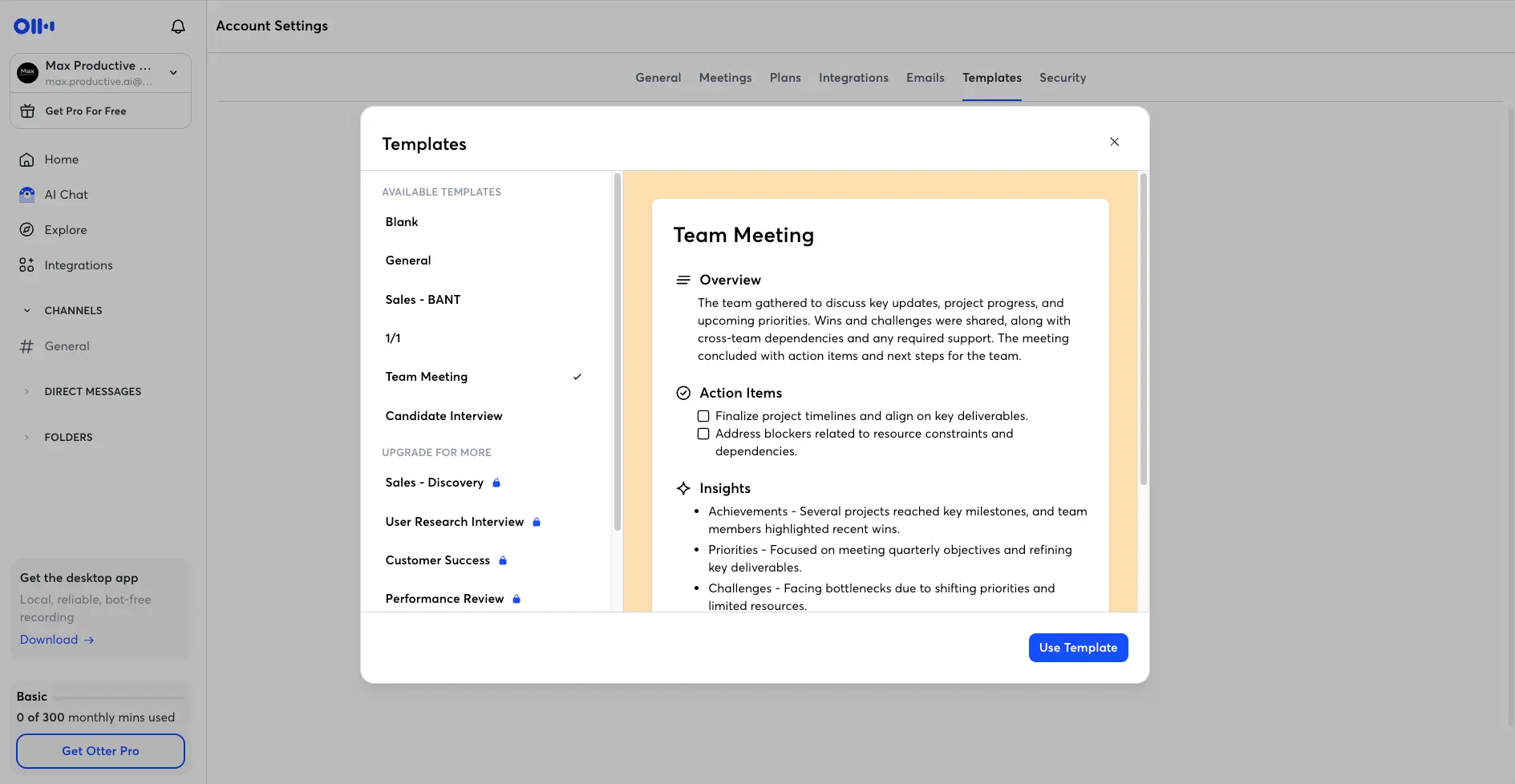
Templates decide the shape of the summary Otter writes after a meeting. The Team Meeting one previews as an Overview paragraph, checkbox action items, and an Insights list split into achievements, priorities and challenges. That's a sensible default, and it's what most people will leave running. The split between free and paid is telling, though. The free set covers general meetings, a basic sales call and interviews. The ones a manager would reach for, performance reviews and customer success calls, are behind the padlock. Not a deal-breaker. Just a gentle reminder that Basic is designed to show you the way to Pro.
Integrations
Calendar and Zoom connect for free; CRMs need a paid plan
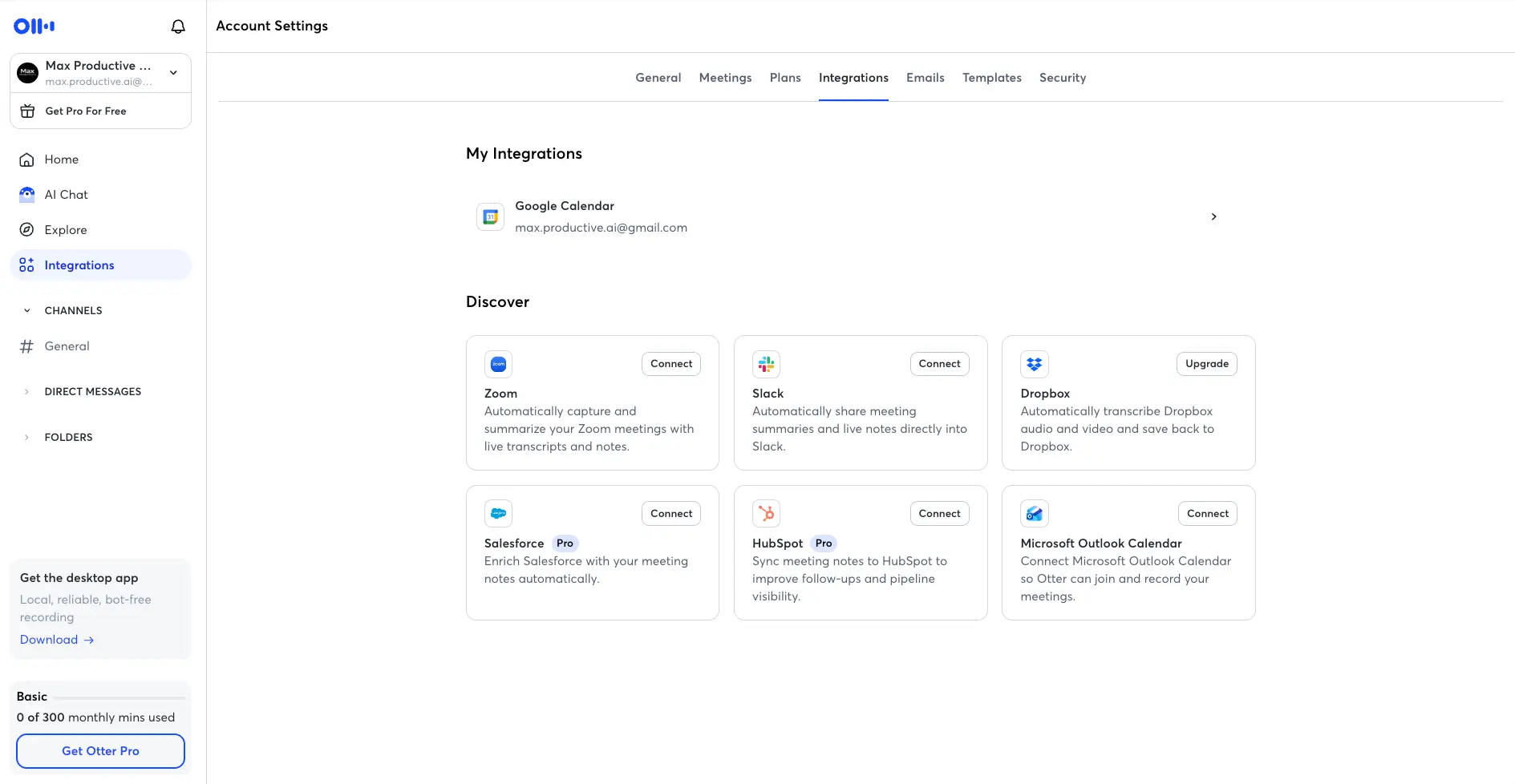
The integrations page is short and clear. Both calendars and Zoom connect on the free plan, and Slack will post summaries and live notes into a channel. Salesforce and HubSpot carry a "Pro" badge in the app, though Otter's pricing page places CRM sync on Business, so read that badge as "paid" rather than a promise about which tier. Dropbox auto-transcription needs an upgrade as well. What you won't see on this screen is the more interesting stuff: Zapier, Notion, Google Drive, and an MCP server that lets ChatGPT or Claude query your Otter meetings directly. That last one is a real differentiator if you like building your own workflows on top of meeting data.
How Otter.ai Works
Calendar in, notes out, and a couple of decisions in between that matter more than they look.
Connect Your Calendar and Pick a Capture Method
Link Google or Outlook Calendar and Otter lists your upcoming meetings with a toggle for the AI Notetaker on each one. Leave it on and the bot joins by itself. Prefer a one-off? Paste the Zoom, Meet or Teams link into the Meetings panel. Then there's the bot-free route: the desktop app for Mac and Windows records device audio locally, the mobile app records in-person conversations, and the Chrome extension handles browser calls. Choose deliberately. The bot is the easy default, but it's also the visible one, and that's worth a thought before every client call.
Otter Transcribes in Real Time
Once recording starts, the transcript builds live with speaker labels and timestamps. You can highlight a line, drop a comment, or grab a slide from a screen share without leaving the call. On Zoom, Otter also feeds live captions. Language is set per recording, and this is where Otter's ceiling shows: the list is short and English-centric. If someone switches to French halfway through, you'll get English-shaped guesses. Speaker labels are reliable in small groups and start to wander once you're past five or six voices.
Summary, Action Items and Outline Arrive
A few minutes after the call ends, Otter writes a summary in the shape of whichever template applied, pulls out action items you can assign, and builds a clickable outline of the conversation. The summaries are good rather than brilliant. They catch the gist and the decisions; they sometimes miss who pushed back on what. Fathom's and MeetGeek's notes read a touch more naturally to me, but I wouldn't switch tools over it.
Ask, Share and Sync
This is Otter's best step. Open AI Chat and ask a question about this meeting, or about all of them: "What did we agree with the supplier on lead times?" It answers with citations back to the transcript and will draft a follow-up email if you ask. There are Express and Advanced response modes, and query caps per plan (20 a month on Basic, 50 on Pro, 200 on Business). Share the recording to a Channel, post the summary to Slack, or push notes into Salesforce or HubSpot on a paid plan. Export goes to TXT, DOCX, PDF and SRT, plus the audio itself.
Bot or No Bot?
Otter's default is a visible participant called the AI Notetaker. Everyone on the call sees it, which is transparent, and also the reason some clients ask you to remove it. The desktop app is the answer: it records from your device, nothing joins, and unlike browser recording it captures everyone's audio even when you're on headphones. Granola and Krisp work this way by design; for Otter it's an option you have to install and remember to use.
A Word on Recording Consent
This applies to every tool on this page, not just Otter. Recording laws differ by country, and in the US by state: some places need only one person to agree, others need everyone. The habit that keeps you on the right side of all of them is simple: say you're recording at the start and get a yes. Otter's visible bot helps, because nobody can miss it. Pair that with a glance at the sharing setting and you're in good shape. If your work involves regulated data, the Enterprise tier adds SSO, SCIM and a HIPAA add-on.
Otter.ai Features
What's in the box, what's metered, and what's behind a paywall.
Live Transcription & Captions
Still the reason to use Otter. Text appears almost as fast as people talk, speaker labels are applied automatically, and you can highlight or comment on a line while the meeting is running. Native live captions inside Zoom are a nice touch few rivals match. Accuracy on clean English is as good as anyone's; on accents and crosstalk it's about average for the category.
AI Chat Across Meetings
Ask a question about one meeting or your entire archive and get an answer with links to the exact moments. Draft follow-up emails, pull decisions, list who owns what. It's the most polished version of this idea I've used. The catch is the meter: 20 queries a month on Basic, 50 on Pro, 200 on Business. Heavy users will feel it.
Summaries, Action Items & Outline
Every recording gets an AI summary, assignable action items and a clickable outline. The Action Items tab collects them across meetings so nothing hides in a transcript. Good, not exceptional. Fathom's notes are a little sharper; Otter's are perfectly usable.
Meeting Templates & AI Workflows
Templates shape the summary to the meeting type. Six come free, including Sales BANT and Candidate Interview; Performance Review and Customer Success need a paid plan. Paid plans also add AI Workflows for repeatable extraction across meetings.
Bot-Free Desktop App
Mac and Windows apps record device audio locally, so no Otter participant appears in the call and everyone's voice is captured even on headphones. This is the mode to use for anything sensitive. I'd have liked it to be the default rather than a download nudge in the sidebar, but it works well once it's there.
Channels, Folders & Sharing
Recordings live in Slack-style Channels with comments and direct messages, so a team can react to a meeting without holding another one. Sharing is granular per recording (Owner, Collaborator, Restricted) but defaults to all calendar guests. Worth checking once.
Integrations & MCP Server
Calendars, Zoom and Slack are free. Salesforce and HubSpot sync, Dropbox auto-transcription and Zapier need a paid plan. The MCP server, which opens your meeting knowledge up to ChatGPT and Claude, is the one forward-looking teams will care about. Fireflies AI still does more inside the CRM once notes land there.
File Import
Upload an existing audio or video file and Otter transcribes it. The allowance is small, though: Basic gives you three imports for the lifetime of the account, and Pro ten a month. If interviews, podcasts or archive recordings are a big part of your work, Notta or HappyScribe were built for that job. Otter wasn't.
Two patterns across all of this. First, almost everything in Otter is metered: minutes, minutes per conversation, AI Chat queries, imports, templates. No single cap is unreasonable on its own, but together they mean you'll meet an upgrade prompt sooner than you expect. Second, the features that make Otter special are the ones that reward time invested. AI Chat over a year of meetings is worth a lot. AI Chat over three recordings isn't, yet. Which is a fair argument for sticking with Otter if you already have a library, and a slightly weaker one for starting fresh here rather than with a competitor.
See which features come with each plan:
Check Otter.ai's pricing →Free Basic plan • Pro from $8.33/mo billed annuallyOtter.ai Pricing
Three public plans plus Enterprise. The minute caps matter more than the prices.
Basic
- ✓ 300 transcription minutes/month
- ✓ 30 minutes max per conversation
- ✓ AI Notetaker for Zoom, Meet, Teams
- ✓ 20 AI Chat queries/month
- ✓ Workspace for up to 5 people
- ✗ 3 file imports, lifetime
Pro
- ✓ 1,200 minutes/month
- ✓ 90 minutes max per conversation
- ✓ 10 file imports/month
- ✓ 50 AI Chat queries/month
- ✓ Custom vocabulary, advanced search, export
- ✗ No CRM sync
Business
- ✓ ~6,000 minutes/month
- ✓ 4 hours max per conversation
- ✓ Unlimited file imports
- ✓ 200 AI Chat queries/month
- ✓ Salesforce & HubSpot sync, admin controls
- ✓ Up to 25 seats
Enterprise: Custom pricing with SSO/SCIM, HIPAA add-on, API and webhooks, and the Sales Notetaker (pre-call briefs, live coaching, CRM sync). Contact Otter for a quote
Education: Students and teachers get a discount on Pro with a verified .edu email
Pricing last verified September 2026. Visit Otter.ai for current rates.
Is Otter.ai Worth the Money?
Twenty hours of meetings a month for $8.33 works out to about 42 cents an hour, and that's before you count the time you're no longer spending writing notes. Cheap, in other words. The question isn't the price, it's the ceiling. Twenty hours is one hour-long call every working day. Consultants and managers can get through that by week three, at which point the choice is Business at more than double the cost, or a competitor with no cap.
The change worth knowing about is the Pro allowance. It used to include 6,000 minutes a month. In 2026 it became 1,200, with a 90-minute limit per conversation, at the same price. I couldn't find an announcement, only the before-and-after in pricing trackers, so if you signed up a while ago, check what your own account shows. If you're new, judge Pro on 1,200 minutes and nothing else. On the free side, the 30-minute per-conversation cap is a real restriction for anything longer than a stand-up, and three file imports for the life of the account is tighter than I'd like. Still, a monthly pool of free minutes with no expiry is enough to test the product properly, which is more than you get from Notta's three-minute free recordings or Krisp's seven-day trial.
Against the rest of the category, Otter's paid prices are fine and its caps are the sticking point. Pro at $8.33 sits next to Notta ($8.17), Krisp ($8) and HappyScribe ($8.50), and under Fireflies ($10), MeetGeek ($9.99), Granola ($14, monthly only) and Fathom Premium ($16). But Fathom gives unlimited recording and transcription for nothing, with around five advanced AI summaries a month as the free tier's only meter, and Fireflies' free plan has no transcription cap either, just 400 minutes of storage per team. At the Business tier, Otter's $19.99 is in line with Fireflies ($19) and under Fathom ($25) and tl;dv ($59). So: pay Otter for the archive and AI Chat. Don't pay it for raw minutes, because someone else will give you those for free.
Otter.ai Pros & Cons
The full list, including the parts Otter's own site doesn't lead with.
✓ Pros
Years of iteration show. Text arrives fast, the editor is clean, highlights and comments work mid-call, and Zoom users get native live captions. One independent test across 34 real meetings put accuracy at roughly 93% on clean English audio, which is as good as anyone manages in this category. Even reviewers who've moved on from Otter for other reasons tend to give it this one.
Ask what a client said about budget three months ago and get an answer with the timestamp. Draft the follow-up email in the same box. Competitors have added similar assistants; Otter's is the one that's been around long enough to feel dependable, and it gets better the more meetings you feed it. This is the strongest argument for staying with Otter once you have a library.
Three hundred minutes a month with no expiry date is enough to run real meetings through the bot and decide whether the summaries suit you. That sounds like table stakes until you compare it with three-minute demos and seven-day trials elsewhere. Otter's free tier respects your time.
Calendar-driven bot, pasted meeting link, bot-free desktop app for Mac and Windows, browser recording, Chrome extension, and iOS and Android apps for in-person conversations. Whatever your setup, there's a way in. The desktop app in particular solves the "could you remove the bot?" moment without switching tools.
Both calendars, Zoom and Slack on the free plan, Salesforce and HubSpot on paid, plus Notion, Google Drive and Zapier. The MCP server is the interesting one: point ChatGPT or Claude at your meeting archive and ask your questions there instead. Not many meeting tools have got that far yet.
Channels, comments, direct messages and per-recording permissions make Otter more of a shared meeting workspace than a personal transcriber. Business adds admin controls and usage reporting. If you want one place where a team reviews calls together, Otter's structure is ahead of most single-user-first rivals.
✗ Cons
Six thousand minutes became 1,200, a 90-minute cap per conversation arrived, and the price didn't move. For anyone who'd grown used to the old allowance, that's a big adjustment. Heavy individual users now choose between Business at $19.99 and a competitor with no cap at all. It's the change reviewers mention most in 2026, and it's fair to weigh it before you subscribe.
Around six languages, with English clearly the priority. Fireflies AI handles 100+, MeetGeek similar, Notta 58 with bilingual transcripts. If anyone on your calls doesn't speak English, Otter isn't the right tool, and that rules out plenty of teams across Europe, the Gulf and Asia.
Ninety-three percent on a clean two-person Zoom call is good. The same tests found accuracy dipping into the 85 to 90 range with background noise, non-native accents or people talking over each other, and speaker labels getting muddled beyond five or six participants. My own short test doubled a word and misheard "note-taking". Every tool in this space has these problems; Otter doesn't have noticeably fewer of them.
Out of the box, Otter joins your calls as a named participant. That's honest, and plenty of teams prefer it, but some clients will ask you to remove it, and on delicate conversations you may not want to have that exchange at all. The desktop app solves this, yet it's a separate install you have to remember to use. Tools like Granola and Krisp capture from your device by design, so the question never comes up.
Three imports for the lifetime of a free account. Ten a month on Pro. That's a clear signal Otter wants to be a meeting tool rather than a transcription service, and it means podcasters, researchers and anyone with a backlog of recordings should look at Notta or HappyScribe instead.
Three "Get Pro" invitations on the home screen, padlocks on templates, a banner on every free recording, a Pro badge on integrations. None of it is unusual for freemium software, and none of it gets in the way, but it's persistent enough to notice. Also worth knowing: the headline prices are annual, and monthly billing costs roughly double.
Otter.ai vs Alternatives
How Otter stacks up against the tools most people shortlist next to it.
| Feature | Reviewed Otter.ai | Fathom | Fireflies AI | Notta | Granola |
|---|---|---|---|---|---|
| Entry Paid Plan (annual) | $8.33/mo | $16/mo | $10/mo | $8.17/mo | $14/mo (monthly only) |
| Free Plan | 300 min/mo, 30 min/conversation | Unlimited recording, ~5 advanced summaries | Unlimited transcription, 400 min storage/team | 120 min/mo, 3 min/conversation | Free, ~30-day visible history |
| Languages | ~6 | 25+ | 100+ | 58 + bilingual | ~10 |
| Bot-Free Recording | ✓ Desktop app | Mac beta | ✗ | ✓ Desktop app | ✓ By design |
| File Import | 3 lifetime (free), 10/mo (Pro) | Limited | ✓ | ✓ Extensive | ✗ |
| Standout Strength | AI Chat over meeting history | Unlimited free tier | CRM sync & language coverage | Bilingual transcripts | Enhances your typed notes |
| Best For | English-first teams with a meeting archive | Individuals, freelancers | Sales teams, multilingual | Multilingual, file-heavy work | People who already take notes |
Otter.ai vs Fathom: The Short Version
This is the comparison most people are actually making. Fathom wins on generosity: unlimited recording and transcription on the free plan, with around five advanced AI summaries a month as the only meter, and its summaries read slightly better. Otter wins on the archive: AI Chat across every meeting you've recorded, a fuller integrations list including the MCP server, and a cheaper paid entry point ($8.33 against $16). Both are English-first, both use a bot by default, and Fathom's bot-free mode is still a Mac-only beta while Otter's desktop app ships on Mac and Windows. If you're an individual who mostly needs transcripts, start with Fathom. If you want to interrogate your meeting history and you'll stay inside 1,200 minutes, Otter Pro is the better buy. Our Otter AI alternatives guide walks through nine options in more depth.
Which Tool Is Right For You?
Otter.ai
ReviewedBest for: English-speaking individuals and small teams who want a mature live transcript, a searchable archive and an AI assistant that can answer questions across all of it. The free plan is enough to decide. Pro is good value if 1,200 minutes covers your month. Otter doesn't pay us either way, so take this recommendation at face value.

Fathom
Best Free TierBest for: Individuals and freelancers who want unlimited recording and transcription without paying, and slightly sharper AI summaries than Otter produces. The trade-offs are a paid tier at nearly double Otter Pro, a bot-free mode still in Mac-only beta, and around 25 languages. See how it compares with MeetGeek →
Fireflies AI
Languages + CRMBest for: Sales and customer-facing teams that need transcripts in 100+ languages pushed into a CRM with talk-time, sentiment and topic analytics on top. Pro at $10 is close to Otter's price and the free plan doesn't cap transcription. It's bot-based like Otter, so the same consent habit applies.
Notta
Multilingual PickBest for: Teams that meet in more than one language, and anyone whose work is as much uploaded files as live calls. Fifty-eight transcription languages, bilingual side-by-side transcripts and translation, plus the Webex support Otter lacks, at $8.17 for Pro. The free plan's three-minute cap is the weak spot; use the trial instead.

Granola
Bot-FreeBest for: People who already type notes during calls and want AI to turn them into something polished, with no bot in the meeting and no audio kept afterwards. Business is $14 a month, monthly only. The model only works if you actively take notes, and roughly ten languages keeps it English-leaning like Otter.
Krisp
Noisy RoomsBest for: Remote workers in noisy environments or with strong accents, where real-time noise cancellation and accent conversion clean up the audio before it's ever transcribed. Notes are the bonus, not the main event. Captures locally with no bot. Core is $8 a month, but there's no permanent free plan, only a seven-day trial.
MeetGeek
Budget AnalyticsBest for: Small teams that want meeting analytics (talk time, sentiment, tracked KPIs) and broad language coverage at $9.99 a month, with monthly billing that doesn't punish you for skipping the annual plan. The free tier's three hours a month is thinner than Otter's, and it's bot-based.
Otter.ai FAQ
Is Otter.ai Still Worth It in 2026?
Yes, for the right person. Otter.ai remains one of the most dependable ways to turn an English-language meeting into a transcript, a summary and a set of action items, and AI Chat over your meeting history is still the best version of that feature I've used. The free plan lets you find all this out without a card. The desktop app quietly answers the bot objection, and the integrations reach further than most, MCP server included. For individuals and small teams who meet in English and don't run past 1,200 minutes a month, Pro at $8.33 is a fair deal.
The caveats are why it's a 4.2 rather than higher. The Pro change turned a generous plan into a metered one at the same price. Six languages isn't enough for a lot of teams in 2026. Accuracy is good on clean audio and ordinary everywhere else. And the visible bot means consent is a conversation you'll be having yourself, on every call. Otter is no longer the automatic answer it was when this page was first written. It's a very good answer to a narrower question.
Our Recommendation
Start on the free Basic plan and connect your calendar. Run three or four real meetings through the AI Notetaker, install the desktop app for at least one of them, and then ask AI Chat something you'd actually want to know across all of them. If the transcripts hold up in your accents and the 1,200-minute Pro ceiling covers your month, subscribe annually. If you find yourself watching the minute meter, or if any of your meetings aren't in English, try Fathom or Notta before you pay Otter anything.