
Pi (Presentation Intelligence)
AI-native presentation maker that turns prompts, PDFs, Word docs, and web pages into fully designed PPT decks in seconds. A multi-agent Design Engine builds layout and content together, with no template auto-fill.
Try Pi Free →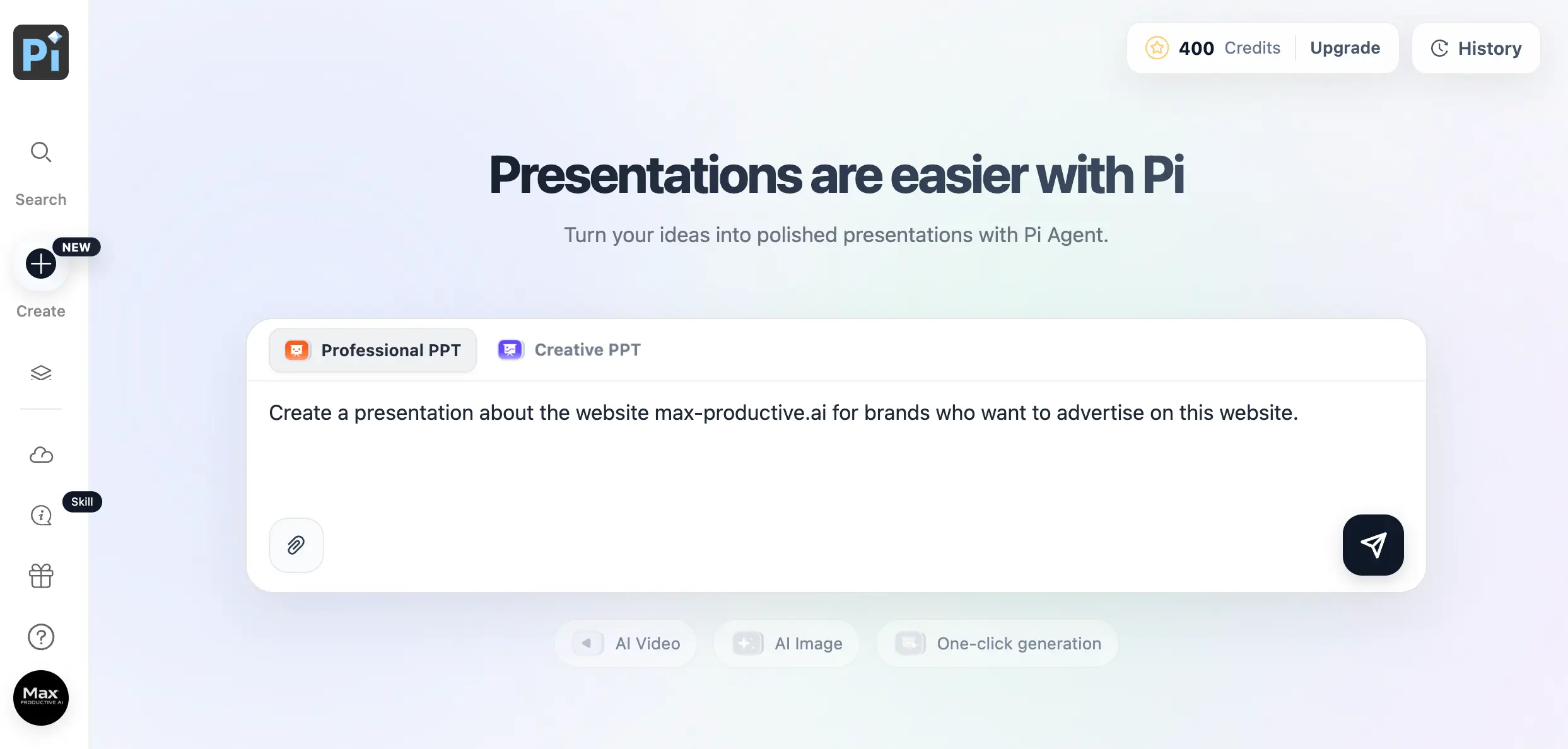
AI-Native Deck Design
at the Lowest Price in Its Class
Pi is the rare AI presentation maker that actually designs, rather than decorating a template. Decks come out looking analyst-authored in seconds, the PowerPoint export barely needs cleanup, and the free plan is genuinely usable. Just don't present a Pi deck without fact-checking it first — the same research agent that makes slides feel smart will occasionally blend in numbers that aren't yours, or aren't true.
✓ What We Love
- True from-scratch AI design — original layouts per deck
- Cheapest paid plan among the big AI deck tools
- Clean, editable PowerPoint export
- Turns PDFs, docs & URLs into decks in seconds
! Could Be Better
- File export locked behind the paid plan
- AI-researched "facts" need a manual check
- No team tier, SSO, or public security docs
What Is Pi (Presentation Intelligence)?
An AI PPT generator that designs decks from scratch — who built it, how it thinks, and where the catch is.
Pi (Presentation Intelligence) is an AI presentation platform at pi.inc, built by Shanghai-based initi.ai and launched in alpha in late 2024. It belongs to the "AI-native" camp of deck generators: rather than writing text and slotting it into a library of pre-made layouts (the approach behind Beautiful.ai's Smart Slides or Decktopus's guided templates), Pi composes the content and the visual design of each deck together, from nothing.
The engine behind that is what the company calls a multi-agent Design Engine. One agent reads and structures your source material like a researcher-editor; a separate agent works on typography, spacing, and visual flow at the same time. Feed it a one-line prompt, a PDF, a Word file, an old PowerPoint, a web page URL, or an image, and it returns a complete, styled deck with original layouts and generated imagery, typically in ten to fifteen seconds.
Here's the thing that makes Pi both impressive and slightly dangerous: when your source material is thin, a background agent researches the open web mid-generation and folds outside data into your slides. That's why Pi decks read as researched rather than generated. It's also where the tool demands adult supervision, because that external data isn't always labeled as external. More on that below, with an example from our own test.
Our Testing
We ran Pi on our own free account and generated a full deck from a single-line prompt — a presentation pitching this very website to potential advertisers, with no source files attached. Every screenshot in this review comes from that session. The test shaped both our biggest compliment (the structure and design were presentable as generated) and our biggest criticism (some of the "facts" Pi researched for us were flat-out wrong).
Who Is Pi Best For?
Solo consultants, founders, sales and marketing professionals, and students who produce standalone decks from documents or research and want them looking designed without touching a layout tool. It's especially strong for pitch decks, proposals, and report-to-deck conversions on a small budget. It's the wrong pick for organizations that need seat management, SSO, or published compliance credentials — none of that exists publicly yet.
Worth noting: Pi is a younger product than Gamma or Prezi, with a smaller theme library, a smaller community, and thinner public documentation. What it offers in exchange is the most aggressive price in the category and a different generation approach. For a lot of solo users, that's exactly the trade worth making. One practical annoyance before you even start: searching for "Pi AI" mostly surfaces Inflection's unrelated chatbot, so bookmark pi.inc directly.
See Pi in Action
Screenshots of the Pi AI presentation maker from our own test account, following one deck from prompt to export screen.
The Prompt Screen
Where every deck starts — a prompt box, two generation modes, and your credit balance in plain sight
No dashboard clutter: Pi opens on a single prompt box driven by its Pi Agent. The Professional/Creative toggle meaningfully changes the register of what you get, and the paperclip accepts PDFs, docs, and links as source material. Chips below hint at the wider platform (AI video, AI image, one-click generation), and your credit balance sits top-right so you always know what a generation will cost you. We typed one sentence and hit send.
Theme Selection
A filterable Theme Hub, plus a My Themes tab for saved brand looks
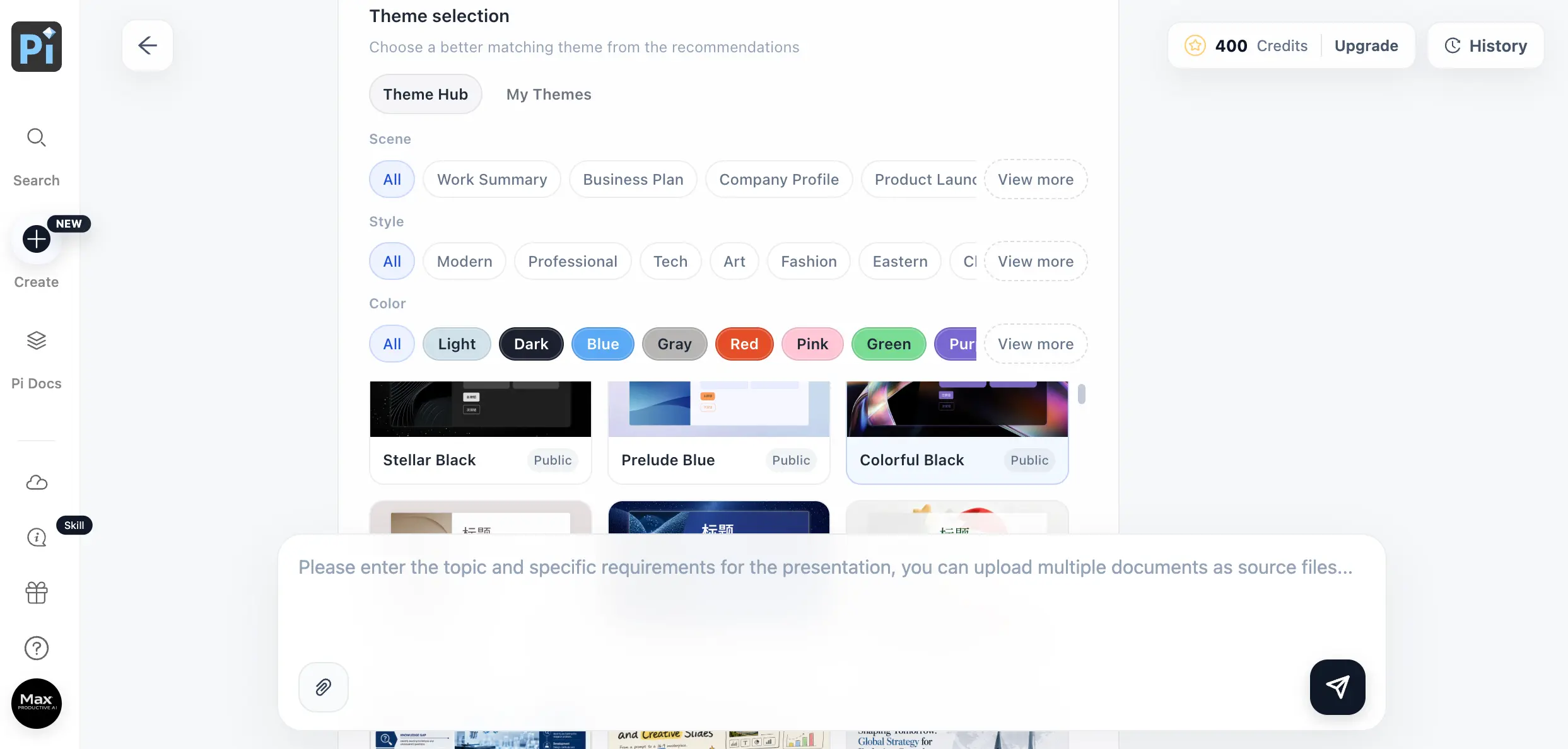
Themes are filtered by scene, style, and color rather than browsed as an endless gallery. That's faster to navigate, though the library is noticeably smaller than what Canva-style tools offer. You can also skip this step and let Pi match a theme to your content. One oddity: a few theme previews still show Chinese placeholder text, a small tell of the product's Shanghai origins and its still-maturing localization.
Outline Generation & Confirmation
Pi drafts the full outline and waits for approval before building a single slide
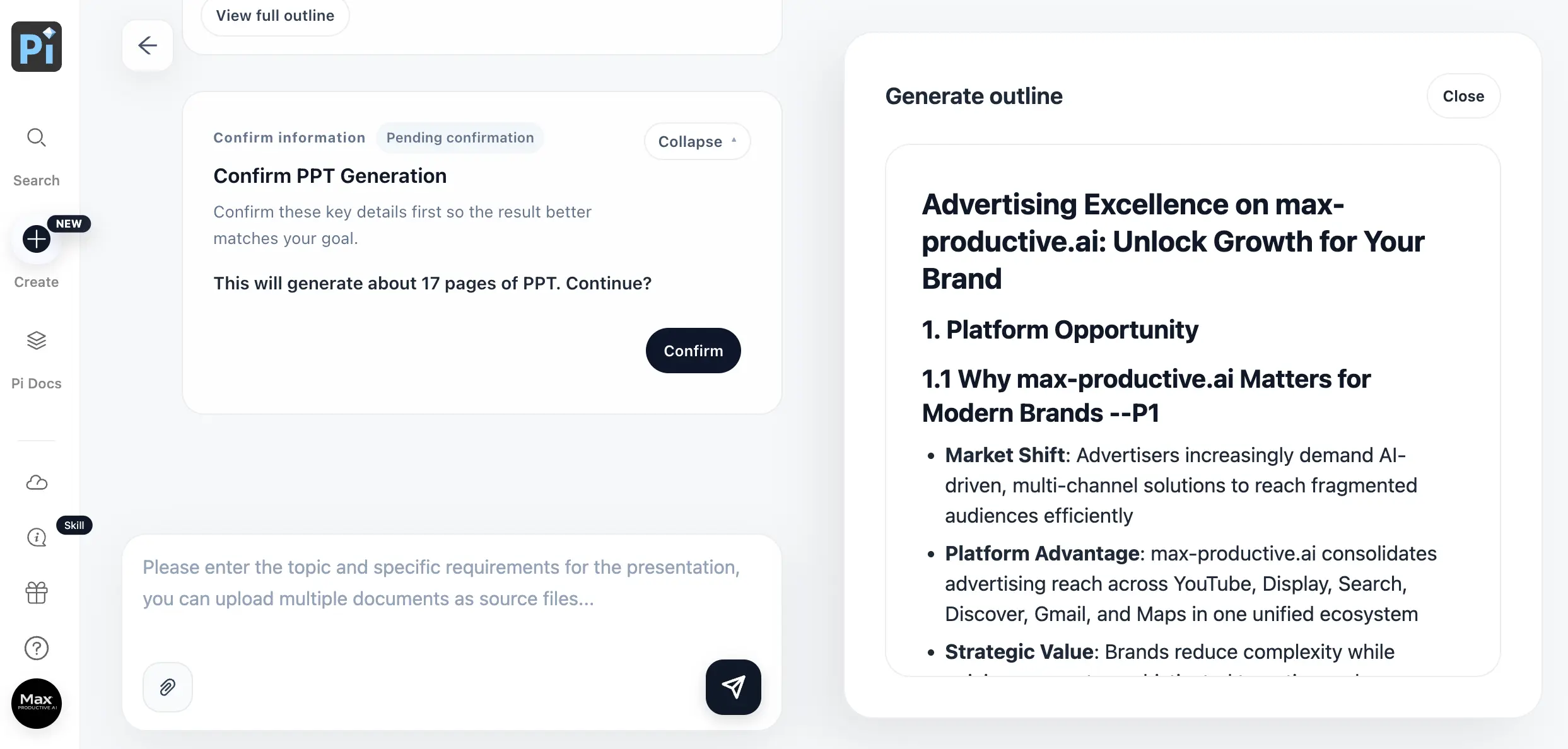
Quietly one of Pi's best design decisions. Before spending your generation credits, it shows the complete outline with a page-count estimate and a confirm button. This is also your fact-checking checkpoint: our outline confidently described max-productive.ai as selling ad placements across YouTube, Display, Search, Discover, Gmail, and Maps. That's Google Ads boilerplate, not us. Catching it here costs seconds; catching it in a live pitch costs credibility.
Curious what Pi does with your own documents?
Try Pi Free →Starting credits cover roughly ten full decksThe Slide Editor
Block-based editing with a slide navigator and a full text-element library
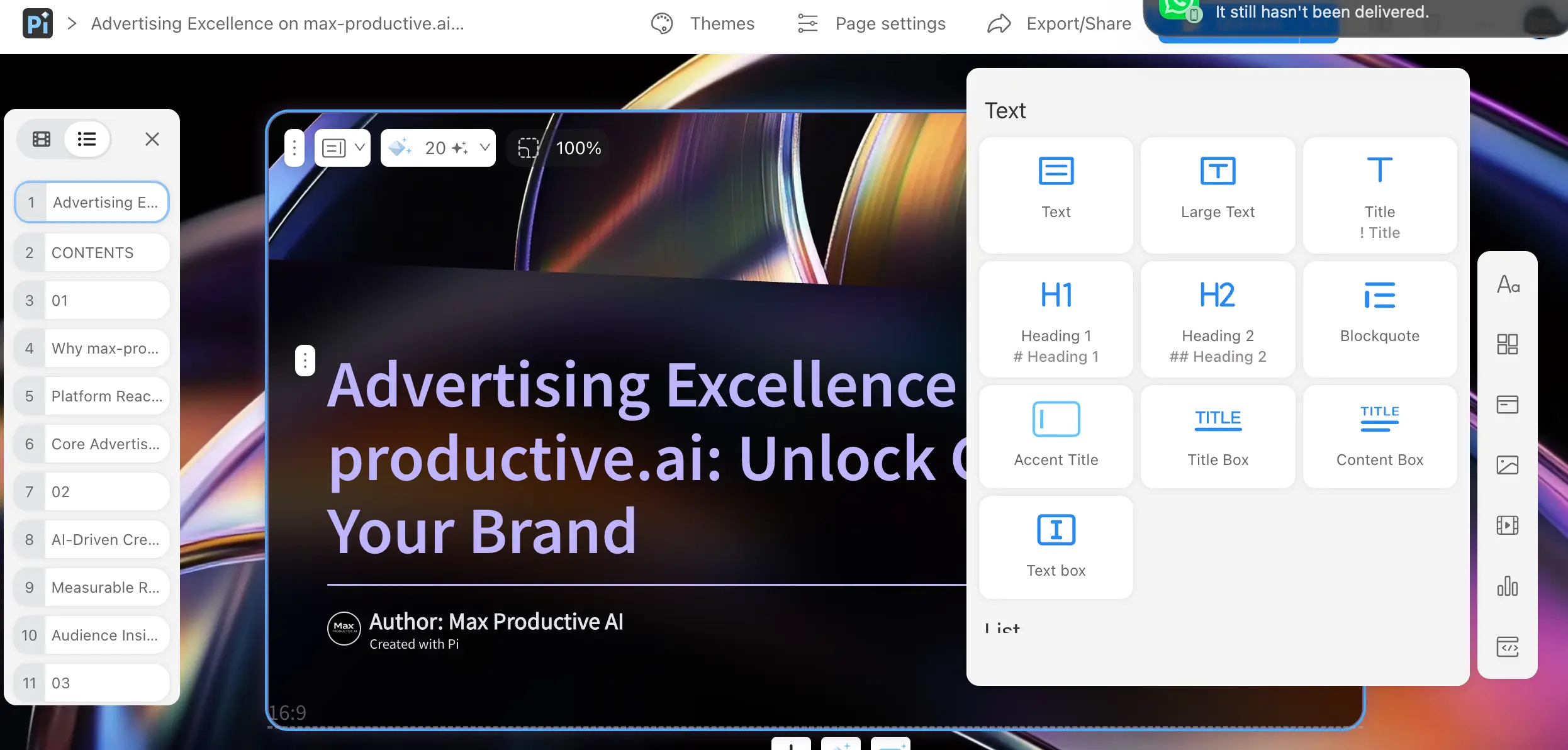
The editor works in blocks (titles, headings, blockquotes, content boxes) rather than free-floating text frames, and the fluid layout system reflows the slide as you add or cut content. That's a relief compared to nudging boxes around in PowerPoint, but it cuts the other way too: pixel-level control is limited, and designers who want to place every element manually will feel boxed in. For everyone else, it keeps edited slides from ever looking broken.
Preview & Share
The finished deck, ready to present, share by link, or send back for changes
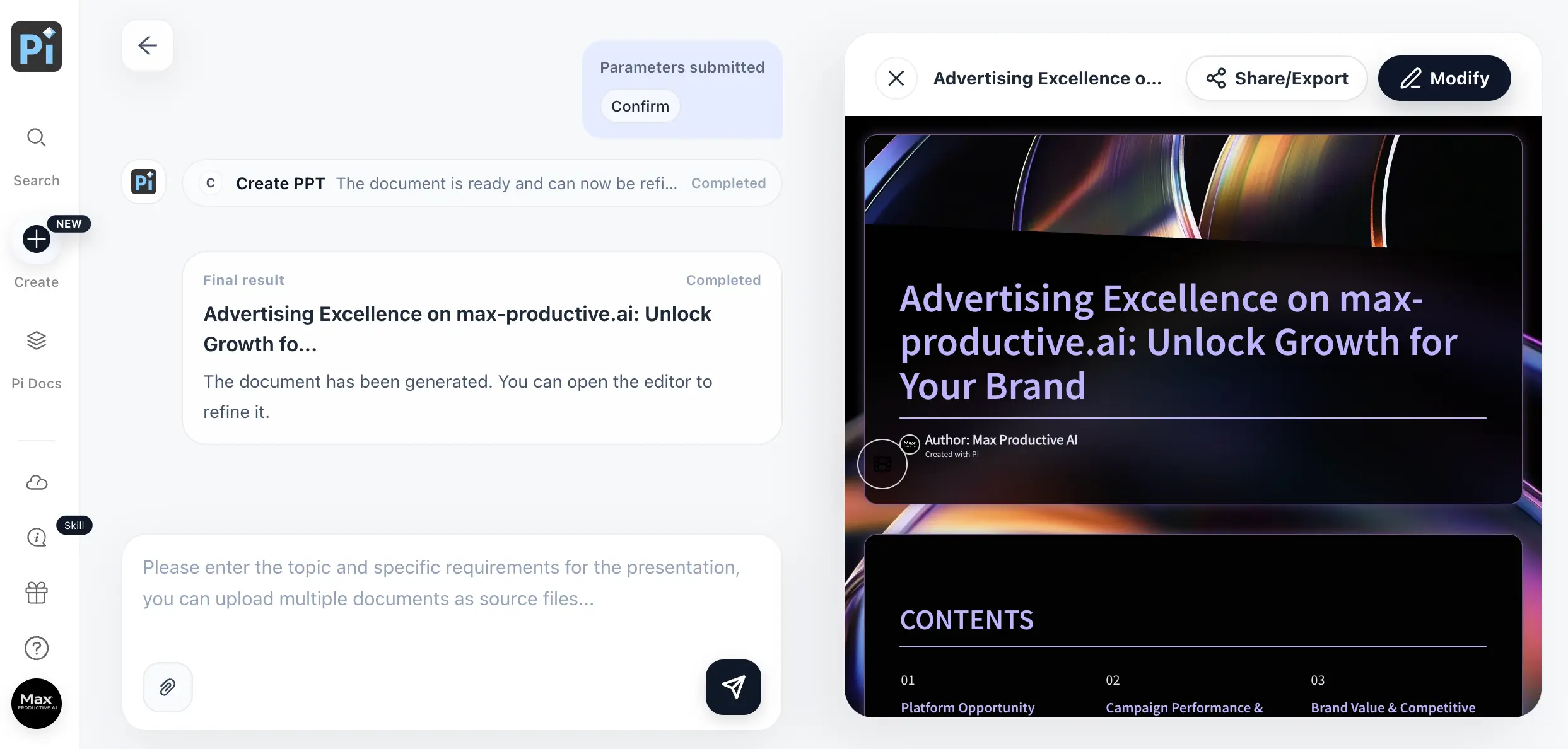
Our finished test deck: 17 slides generated from one sentence, opening with a cover and a contents spread. The agent-style chat on the left logs each completed step, and the Modify button drops you back into the editor. Shared decks come with reading analytics attached, which rivals usually reserve for higher tiers.
Export Options — and the Paywall
Four file formats, font embedding, and an upgrade button on every single one
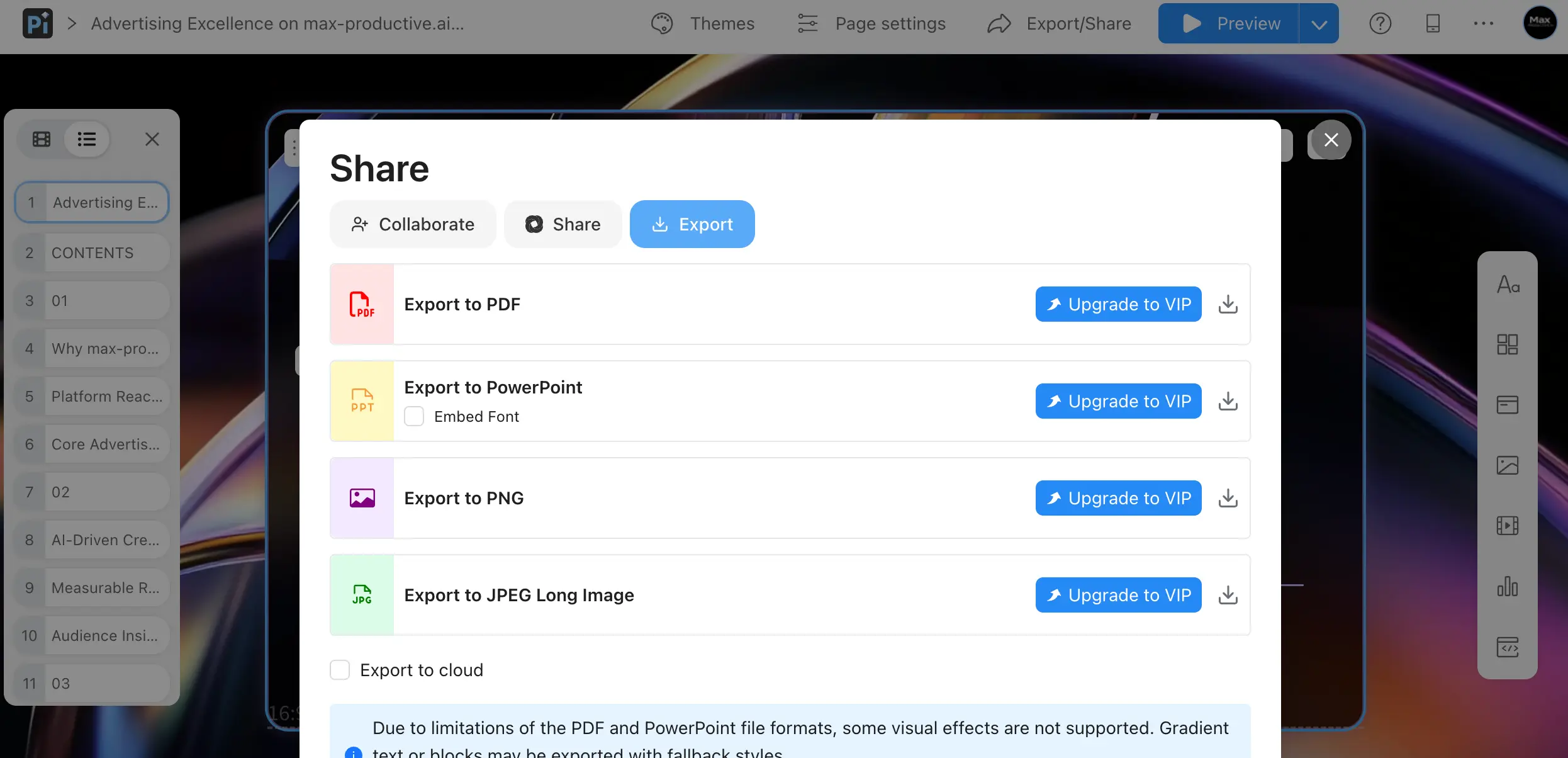
This is the screenshot every free user should see before getting attached to a deck. Collaborating and sharing by link work fine on the free plan, but all four file exports carry an upgrade button. Once unlocked, the PowerPoint output is excellent: editable text boxes, intact layouts, optional embedded fonts. Pi is also upfront that gradient text and some effects export with fallback styles due to format limitations, better disclosed upfront than discovered in a client meeting.
How Pi Works
One sentence in, seventeen slides out. Here's the actual workflow, including where to slow down.
Give Pi a Prompt — or a Pile of Documents
Choose Professional PPT or Creative PPT, then type what you want or attach source files: PDFs, Word docs, existing PowerPoints, web links, images. A one-line prompt was enough to get us a full structured deck. The more real material you feed it, though, the less the research agent has to improvise, which matters more than you'd think at step three.
Pick a Theme, or Let Pi Choose
The Theme Hub filters public designs by scene, style, and color, while My Themes stores custom brand looks with your uploaded fonts; a custom theme takes about ten minutes to set up once and stays reusable. Skipping this step entirely is fine; Pi will match a theme to your content on its own.
Review the Outline Before Anything Generates
Pi drafts the complete outline (sections, per-slide bullets, an estimated page count) and waits for confirmation before building slides or spending credits. Read it properly. This is where invented or misattributed claims first surface, and editing them out at outline stage is far cheaper than rewriting finished slides.
Generate, Refine, Share — or Pay to Export
The deck renders in seconds. From there, the block editor handles structural changes, AI text actions handle rewording (shorten, expand, simplify, translate), and sharing works by link with reading analytics attached. Downloading actual files (PowerPoint, PDF, image formats) is where the free plan ends and Basic begins.
The Research Agent Cuts Both Ways
Pi's background agent crawls the live web to fill gaps in your source material. It's how its decks arrive with context you never provided. It's also how our test outline came to describe our own website with capabilities lifted from an entirely different ad platform, nothing labeled as external. Treat Pi's drafts as strong first passes from a fast, occasionally overconfident junior colleague.
Built to Reflow, Not Break
Pi's Smart Fluid Content Framework rebalances text and imagery whenever you edit, and renders decks responsively across aspect ratios, including mobile. In practice, adding a paragraph doesn't wreck a slide's composition the way it does in most fixed-layout editors; the layout absorbs the change.
Key Features
What Pi actually does well — and the honest footnotes on each.
Multi-Agent Design Engine
The reason Pi exists. One agent reads and structures your source material like an editor; another handles typography, spacing, and visual flow in parallel. Each deck gets original layouts rather than the same template wearing different colors. Of everything Pi does, this is the part that feels most unlike the rest of the category.
Multi-Format Input
Text prompts, PDFs, Word docs, PowerPoint files, web URLs, and images can all seed a deck, giving it wider input support than most rivals and the fastest route from an existing report or blog post to slides. Caveat: very large PDFs and some image formats have failed to upload in testing, so split big documents first.
Live Research Agent
When source material is thin, Pi researches the open web mid-generation and folds findings into the deck: context, market figures, supporting points. It's why the output feels authored rather than assembled. It's also the feature to watch: external data isn't always labeled as external, so verify before presenting.
Knowledge Space
Upload your company's documents — pricing sheets, case studies, brand assets — and Pi grounds future generations in them, keeping decks consistent with your latest material. Neither Gamma nor Beautiful.ai offers a direct equivalent, and it's the best answer to the research agent's improvisation problem: give it real sources.
Theme Hub & Custom Branding
A filterable public theme library (by scene, style, and color) plus custom themes with your own fonts, quick to build and reusable via My Themes. The library is smaller than Canva-style galleries; if you like browsing hundreds of options, you'll run out quickly.
AI Editing Tools
Select any text and have the AI shorten, expand, simplify, or translate it in place. Combined with block-based editing and the fluid layout, small edits stay small — slides rebalance automatically instead of demanding manual realignment.
PowerPoint & File Export
Decks export to PowerPoint (with optional font embedding), PDF, PNG, and JPEG. The .pptx output is among the cleanest of any standalone AI PPT generator: editable text boxes, intact layouts, minimal rework. Honest note: on the free plan, every one of these buttons is an upgrade prompt.
Reading Analytics
Share a deck by link and Pi reports how often it was opened over the past 30 days, page by page. For sales decks and proposals, that's the difference between guessing and knowing which slides did the work.
Beyond the grid, real-time collaboration with comments and co-editing is included, and Pi exposes an API, iFrame embedding, and MCP-protocol integration for companies that want deck generation inside their own products; existing integration partners include Kantar and Amazon Marketplace. The Professional/Creative mode switch at the prompt stage is worth experimenting with too: Professional leans corporate and dense, Creative comes out looser and more visual, and the difference is bigger than a simple style toggle suggests.
Pi (Presentation Intelligence) Pricing
Two public plans, one of the simplest structures in the category — with one important asterisk on the free tier.
Free
- ✓ Forever free plan
- ✓ Starting credits for ~10 decks
- ✓ Custom templates & font upload
- ✓ No watermark on shared decks
- ✓ Share via link & embed
- — File export requires Basic
Basic
- ✓ Unlimited AI generation
- ✓ Unlimited AI editing & images
- ✓ Export to PPT, PDF, PNG, JPEG
- ✓ Font embedding on PPT export
- ✓ Custom templates & fonts
- ✓ Share links & embeds
Annual
- ✓ Everything in Basic
- ✓ Works out to ~$7.50/month
- ✓ Roughly 25% off monthly billing
- ✓ Best value for regular use
Heads up: Pi's pricing has changed more than once since launch.
Pricing last verified August 2026. Visit Pi for current rates.
Is the Free Plan Enough to Judge It?
Pi's starting credit grant is one of the few in this category large enough for a real trial: at roughly 40 credits per full generation, you can build around ten decks, with your own documents and a custom brand theme, before deciding whether Basic is worth it. Just remember you'll be sharing those decks as links, not files, until you upgrade.
For context on where that sits: Gamma's Plus plan runs $8–10/month with 1,000 monthly credits and a watermarked free tier; Plus AI starts at $10/month billed annually with only a 7-day trial; Beautiful.ai Pro is $12/month with no permanent free plan at all; Decktopus Pro is $14.99/month with yearly credit caps; and Prezi's watermark-free tier lands around $15–19/month. Pi pairs the lowest entry price in that lineup with a flat unlimited paid plan (no credit meter to watch), an edge over rivals whose "unlimited" claims come with fine print.
Detailed Pros & Cons
What held up in our testing and research — and what didn't.
✓ Pros
Most "AI presentation makers" write text and pour it into templates. Pi composes layout, typography, and imagery per deck, and the difference shows: two decks on different topics come out looking like different documents, not the same skin recolored. If design originality is why you're shopping for an AI PPT generator, this is the honest differentiator.
Basic undercuts every direct rival's entry tier, and it's flat-rate unlimited rather than credit-metered. For freelancers and consultants producing decks weekly, the absence of a credit meter changes how you use the tool: you iterate freely instead of rationing generations.
Enough starting credits for about ten complete decks, custom themes and fonts included, and nothing stamped on your slides. Most competitors either watermark free output or don't offer a free plan at all, so being able to show a Pi deck to a client during your trial period is worth more than it sounds.
Exported .pptx files open with editable text boxes, working charts, and intact layouts — top-tier fidelity for a standalone AI generator, where broken conversions are the norm. Font embedding is a thoughtful extra for decks that travel to machines without your typefaces installed.
Pi shows you the full structure and estimated page count, then waits. No credits spent, no surprise 30-slide monster, and a natural checkpoint to catch problems early. It's a small workflow decision that most competitors skip, and we came to rely on it.
Prompts, PDFs, Word docs, old PowerPoints, web URLs, images — the input breadth makes Pi a converter as much as a creator. Turning a written report or a blog post into a presentable deck is the use case where it saves the most time, and where the Knowledge Space grounding pays off.
✗ Cons
Every export button on the free plan (PowerPoint, PDF, PNG, JPEG) is an upgrade prompt. You can share and present by link, but you can't hand a client a file without paying. For a tool whose whole pitch is generating PPTs, a small export allowance on the free tier wouldn't have hurt.
Pi blends web-researched data into your slides without flagging what came from outside your documents, and in our test some of that data was simply wrong about our own website. Independent testing has documented the same pattern, including a mislabeled statistic and an incorrect trend date. For anything client-facing, budget fact-checking time into your workflow.
Pi's public offering stops at individual plans. There's no seat management, no admin controls, and little published documentation on security or compliance, a serious gap next to Gamma or Beautiful.ai for anyone pushing sensitive business content through a cloud tool. Custom deployments exist, but only by contacting the company.
Very large PDFs (a 425-page document in one reported test) and certain image uploads have failed outright. The workaround of splitting documents before upload is easy but shouldn't be necessary, and it chips away at the feed-it-anything promise.
The block-based editor and fluid layout keep slides tidy, but they also mean you're steering the design rather than controlling it. There's no large browsable template gallery to art-direct from, and pixel-precise adjustments aren't really on the menu. Designers with strong opinions will chafe.
"Pi" collides with Inflection's chatbot and various crypto projects in search results, which muddies research, reviews, and even finding the product. A petty complaint? Maybe. But discoverability is real, and Pi makes you work to find honest information about it.
Pi Alternatives: How It Compares
How Pi compares to the strongest AI presentation tools we've reviewed — and who each one actually suits.
| Feature | Reviewed Pi | Gamma | Plus AI | Beautiful.ai |
|---|---|---|---|---|
| Free Plan | ✓ No watermark | ✓ Watermarked | 7-day trial only | Trial only (card required) |
| Paid Entry | $9.90/mo | ~$8–10/mo | $10/mo (annual) | $12/mo (annual) |
| Approach | AI-native, from scratch | Card-based AI | Add-in inside PPT/Slides | Smart Slide templates |
| Generation Limits | Unlimited on paid | Credit-metered | Credit-metered | Unlimited on paid |
| PPT Output | High-fidelity export (paid) | Layouts can break | Native — no export step | Reliable export |
| Team / SSO | Custom request only | Team & Business tiers | Team plan | Enterprise, SOC 2 |
| Viewer Analytics | Built-in, 30-day | Per-viewer stats | Not a focus | Paid tiers |
| Best For | Solo pros & consultants | Decks + docs + sites | Office-suite teams | Brand consistency at scale |
Which Tool Is Right For You?
Pi (Presentation Intelligence)
ReviewedBest for: Solo consultants, founders, and small teams producing standalone decks from documents and research, who want original-looking design at the lowest cost in the category. The sweet spot is document-to-deck conversion: feed it a report, review the outline, present in minutes. Fact-check the statistics, and budget for the paid plan if you need actual files rather than share links.

Gamma
Broadest PlatformBest for: Anyone who wants one tool for decks, documents, and simple one-page websites. Gamma's card-based format is more flexible than fixed slides, its team and security features are the most mature among AI-native tools, and per-viewer analytics come built in. The trade-offs against Pi: free decks carry a watermark, credits are metered on every tier, and PowerPoint exports don't always survive conversion cleanly.

Plus AI
Works Inside PPTBest for: Teams anchored to Google Slides or PowerPoint who can't (or won't) adopt a new editor. Plus AI works as an add-in inside the files you already use, so there's no export step and no fidelity loss; the output is a native, fully editable deck from the first second. It costs slightly more than Pi and has no permanent free tier, but for office-suite workflows it removes the biggest AI-deck pain point entirely.

Presentations AI
Category LeaderBest for: Users who want AI-native polish with a more established product around it. Presentations AI is our top-rated tool in this category at 4.7, and it matches Pi in the area Pi is proudest of: PowerPoint exports that don't need rework. If export quality is your deciding factor and you'd rather bet on a more proven platform, shortlist it alongside Pi.

Beautiful.ai
Design ConsistencyBest for: Teams that value locked-in brand consistency over design originality. Its Smart Slides auto-format your content into roughly 300 pre-built layouts, which keeps every deck on-brand but caps creative range, the philosophical opposite of Pi's from-scratch approach. No permanent free plan (the 14-day trial requires a card), and enterprise credentials like SOC 2 are exactly what Pi lacks.

Prezi
Non-Linear DecksBest for: Presenters who care more about audience retention than production speed. The zooming, non-linear canvas is unlike anything else in this lineup, and Prezi Video overlays your content onto a live camera feed in Zoom, Teams, or Meet. Its AI-generated text tends to be more generic than Pi's, and its billing structure draws regular complaints, but nothing else presents like a Prezi.
Frequently Asked Questions
Should You Try Pi?
Pi earns its 4.1 by doing the hard part well: it designs. Decks come out with original layouts, sensible narrative structure, and a PowerPoint export that doesn't need rebuilding, behind a free plan that's big enough for a real evaluation and a paid plan that costs less than any direct rival. For solo consultants, founders, and anyone converting documents into standalone decks, it's one of the strongest picks of 2026.
The reservations are just as concrete. The free tier can share links but can't download files. The research agent that makes decks feel smart will blend in outside data unannounced (sometimes wrong, never labeled), so every statistic needs a human pass before a real audience sees it. And with no team tier, no SSO, and little published security documentation, cautious organizations will have to wait, or look elsewhere for now.
Our Recommendation
Start on the free plan and test with your real material, not a toy prompt — upload an actual report or brief and read the generated outline line by line before confirming. If the structure and design earn your trust across a few decks, Basic is a small spend for unlimited generation and file export. If you need a platform your whole company can adopt with admin controls, look at Gamma instead.