
9 Best Gamma Alternatives in 2026: Better Exports, Real Design Control, No Credit Anxiety
Gamma raised $68 million at a $2.1 billion valuation in November 2025 and passed $100 million in annual revenue, so why is "Gamma alternatives" a growing search? Usually one of three reasons: free credits that never refresh, PowerPoint exports that don't survive the trip, or a suspicion that the AI already bundled into your office tools covers the job. We compared nine alternatives on live pricing checked August 19, 2026, hold our own accounts on five of the tools involved, and tell you plainly which ones pay us and which don't.
The short answer, as of August 2026: Beautiful.ai is where most Gamma leavers should look first. It solves the two complaints that start this search, with design rules that keep decks looking professional and an editable PowerPoint export that's a documented feature, not a hope. Plus AI is the answer if the real problem is that you never wanted a separate app at all, because it generates directly inside Google Slides and PowerPoint, so there is no export step to break. If your team just needs a free plan that doesn't count down to zero, Pitch lets you build unlimited decks by hand at $0, and Prezi hands out 500 AI credits every month on its free tier, which is more generous than Gamma's one-time allowance.
Best overall escape: Beautiful.ai
Beautiful.ai is built on Smart Slides, layout rules that keep every element aligned and on-brand no matter who edits the deck, and its pricing grid names "editable PowerPoint export" as a feature in writing. Pro is $12/month billed annually, with PowerPoint import for decks you started elsewhere, including a PPTX you pulled out of Gamma. The trade: no free tier, only a 14-day trial that wants a card and charges it if you forget to cancel.
Stay in your own tools: Plus AI
Plus AI works as an add-on inside Google Slides and PowerPoint, so the deck it generates is already a native file in the format your company runs on. Nothing to export means nothing to break, which quietly retires the biggest Gamma complaint. Plans start at $10/user/month billed annually. The trade: a 7-day card-required trial instead of a free tier, and you give up Gamma's slick web-native sharing.
| Tool | Built For | Entry Price | Rating |
|---|---|---|---|
| Beautiful.ai | Design control, editable PPTX export | $12/mo (annual) | 4.1 / 5 |
| Plus AI | AI inside Google Slides & PowerPoint | From $10/mo (annual) | 4.6 / 5 |
| Presentations.AI | Agent-built business decks | Free; paid from $20/mo | — |
| Pitch | Team decks, real free plan | Free; paid from €10/mo | — |
| Decktopus | Guided business and sales decks | From ~$9.99–14.99/mo | 4.0 / 5 |
| Prezi | Zooming canvas, live presenting | Free; paid from $7/mo | 4.6 / 5 |
| Pi | Budget AI-native deck design | Free; USD plans in-app | 4.1 / 5 |
| Canva | Presentations inside an all-round design suite | Free; Pro subscription | — |
| Chronicle | Design-forward web decks | Free; paid from $12/mo | — |
Prices verified August 19, 2026 against live pricing pages. Gamma and Pitch render pricing by region, and two vendors below showed us conflicting numbers on their own pages, so confirm your exact price at checkout.
One thing worth knowing upfront: six of the nine tools below pay this site a commission. Three of them, Presentations.AI, Canva, and Chronicle, pay us nothing at all and made the list anyway, and Gamma itself pays us if you decide to stay. We tell you which is which in each section, and the ranking doesn't care.
Search for Gamma alternatives and look at who's answering. Alai's ranking article concludes the best Gamma alternative is Alai. Prezent's list puts Prezent first. Presentations.AI's comparison page, Chronicle's landing page, and Presenti's all reach the same flattering conclusion about themselves, and gamma.app ranks on the page too. Not one result in the top ten is written by someone who doesn't sell a presentation tool. We don't sell one. We run an independent AI tools review site, we hold our own accounts on Gamma, Beautiful.ai, Decktopus, Prezi, and Pi, and the screenshots below are ours. This article exists because "which tool should I switch to" deserves at least one answer from someone with nothing to switch you to.
Why People Are Searching for a Gamma Alternative in 2026
Gamma is not a product in trouble. On November 10, 2025 it announced a $68 million Series B led by Andreessen Horowitz at a $2.1 billion valuation, having passed $100 million in annual recurring revenue with around 70 million users, and the press wrote it up as the tool coming for PowerPoint. Its Gamma 3.0 release the previous September added Gamma Agent, an assistant that researches topics with citations, restyles whole decks on request, and critiques your slides. People are not leaving because Gamma stopped shipping.
They search for alternatives for three specific reasons. The first is the credit system. Gamma's free plan grants 400 AI credits once, at signup, and its own help center confirms they never refresh; free users can't buy more, every AI action on the free plan draws from the pool, and exports carry a "Made with Gamma" watermark until you pay. A Reddit thread from April 22, 2026 documenting a 60-day attempt to replace PowerPoint with Gamma praised the speed and still admitted the poster "burned through my credits in week one." That is the free tier working as designed, and it is also why the generous-sounding 400 runs out mid-project.
The second reason is what happens to exports. Gamma's own troubleshooting documentation acknowledges that exports render from Present Mode rather than Edit Mode, that charts and diagrams can scale unexpectedly without the "Zoom to fit" toggle, and that fonts get substituted when a Gamma PPTX is opened in Google Slides, which Gamma attributes to Google Slides ignoring embedded fonts. There is also no native Google Slides export on any plan, despite the pricing page's bullet suggesting otherwise; the documented route is exporting a PPTX and uploading it to Google Slides yourself. Users have built folk knowledge around this: a March 18, 2026 thread in r/GammaApp walks through switching decks to traditional 16:9 before generating, avoiding nested columns, and sending the live share link whenever the recipient doesn't need an editable file. Workarounds like that are the sound of a real limitation.
The third reason is the quiet one: Microsoft and Google now bundle AI into the tools your company already pays for, and it's fair to ask why a standalone subscription should exist at all. We take that question seriously in its own section below, because the honest answer changed twice in the last eighteen months.
One fairness note before the list. Gamma remains, in our experience and in the threads, one of the fastest ways to turn raw text into a structured, watchable deck, and for web-native sharing nothing here beats it. If that's your job, the last section covers who should stay.
The 9 Gamma Alternatives at a Glance
| Tool | Free plan | Entry price (annual billing) | Editable PPTX export | Our rating |
|---|---|---|---|---|
| Beautiful.ai | No (14-day trial, card required) | $12/mo | Yes, documented feature | 4.1 / 5 |
| Plus AI | No (7-day trial, card required) | $10/mo | Native files, nothing to export | 4.6 / 5 |
| Presentations.AI | Yes (100 credits, 20 slides) | $20/mo | Listed on all tiers | — |
| Pitch | Yes (100 one-time AI credits, unlimited manual decks) | €10/mo as rendered | From Plus tier, no branding | — |
| Decktopus | Reported (~20 credits, 3 decks) | ~$9.99–14.99/mo (see section) | PPT export included | 4.0 / 5 |
| Prezi | Yes (500 AI credits/month) | $7/mo | No; PDF from Plus, PPT import | 4.6 / 5 |
| Pi | Yes (points-based credits) | USD plans in-app | On paid tiers per reviews | 4.1 / 5 |
| Canva | Yes (10 lifetime AI design uses) | Pro subscription | Yes | — |
| Chronicle | Yes (10 decks) | $12/mo | Not listed on any tier | — |
1. Beautiful.ai — Design Control and the Export Gamma Can't Match
Beautiful.ai pays us a commission, and it tops this list because it answers the two complaints that start most of these searches. Its whole design system, called Smart Slides, works like guardrails: elements snap to layout rules, spacing and alignment fix themselves, and a deck edited by five people still looks like one person made it. Where Gamma writes your content and lets the design flow, Beautiful.ai keeps the design locked and disciplined, which is exactly what teams with brand standards keep asking for in the comparison threads. A December 2025 tester in r/powerpoint who ran six AI presentation tools put the split neatly: aesthetics and speed point to Gamma, structured and consistent layouts point to Beautiful.ai.
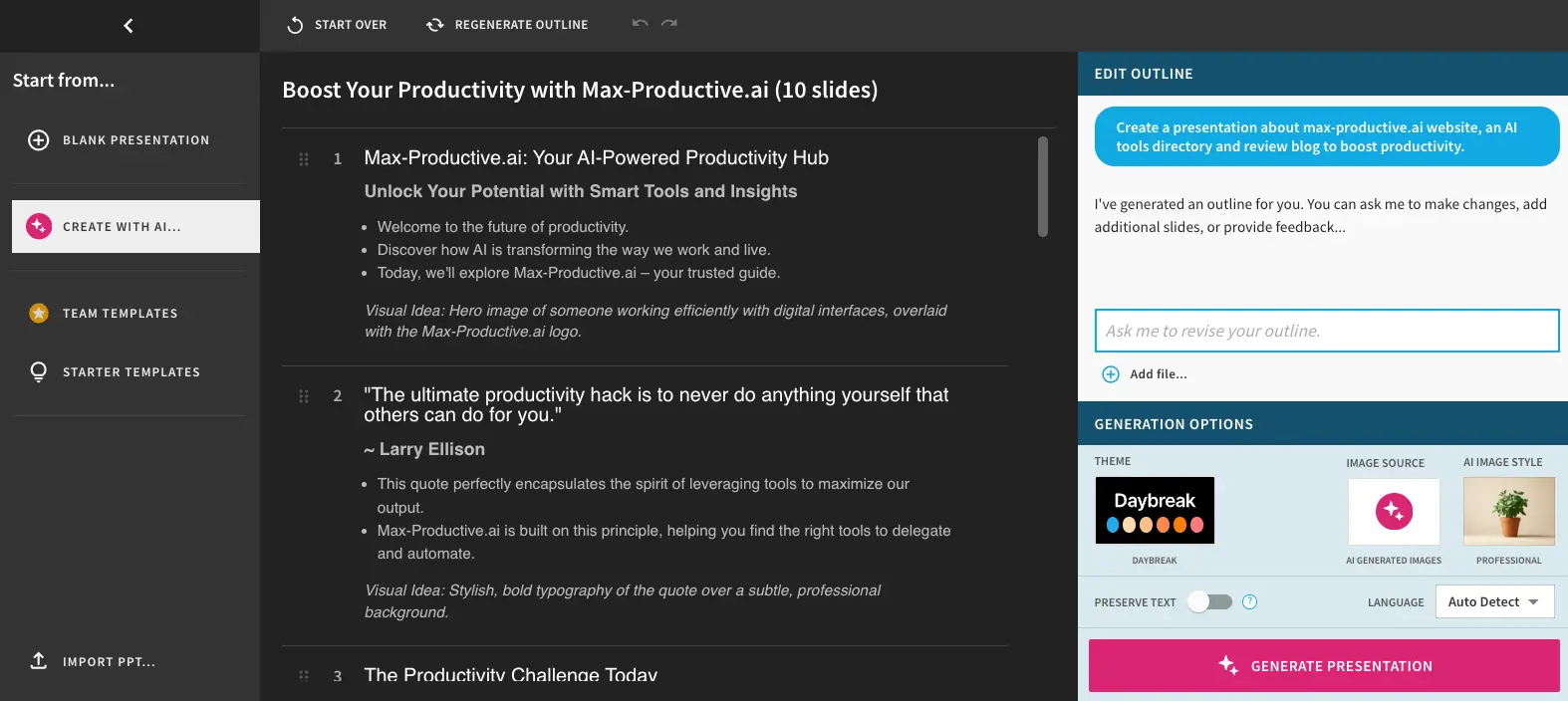
On the export question, Beautiful.ai is the only tool in this article that names "editable PowerPoint export" as a written feature on its own pricing grid, alongside PowerPoint import for decks you started elsewhere, including a PPTX you pulled out of Gamma. Pricing as of August 19, 2026: Pro at $12/month billed annually, Team at $40/user/month annually ($50 monthly), and a separate $45 one-month option its FAQ describes as ad-hoc access for a single project, useful if you have exactly one investor deck to survive. The catch worth flagging in bold terms: there is no free tier at all, only a 14-day trial that requires a card and charges it automatically if you don't cancel. Set a reminder the day you start it. Our full Beautiful.ai review (4.1/5) covers the editor's learning curve and where the guardrails start to feel like walls.
Choose Beautiful.ai over Gamma if: your decks end up in PowerPoint, brand consistency matters more than generation speed, and you'd rather pay $12/month than explain a broken layout to a client. Start the Beautiful.ai trial, and cancel in time if it's not the one.
2. Plus AI — The AI That Lives Inside Google Slides and PowerPoint
Plus AI pays us a commission, and it solves the export problem by refusing to have one. It's an add-on, not an app: you install it into Google Slides or PowerPoint, and it generates and edits decks as native files in the tool your company already runs on. There is no conversion step, so there is nothing to break, no fonts to substitute, and no "why does this look different" email. If the real reason you're leaving Gamma is that a web-native deck was always going to end up as a .pptx in someone's inbox, this is the cleanest fix on the list.
Pricing as of August 19, 2026: Basic at $10/user/month billed annually ($15 monthly) with 1,500 AI credits a month, Pro at $20 annually ($25 monthly) with 3,000 credits and document uploads, Team at $30 annually with 6,000 credits and custom branding, and a Max tier at $200 with unlimited credits. Note the pattern difference from Gamma: credits refresh monthly on every plan. There's no free tier, just a 7-day trial with 1,000 credits that requires a card and charges it at the end. One honesty note: we don't hold a Plus AI account, so this section makes no hands-on claims, it's built from Plus AI's own documentation and our Plus AI review (4.6/5). We've also compared it head-to-head with Gamma before, in our Gamma vs Plus AI comparison, where the short version is: Gamma for web-native speed, Plus AI for Slides-and-PowerPoint reality.
Choose Plus AI over Gamma if: your organization lives in Google Workspace or Microsoft 365 and the deck must be a real, editable native file from the first minute. Try Plus AI in your own slides.
3. Presentations.AI — The Agent-Based Rival That Pays Us Nothing
Presentations.AI pays us nothing, and it belongs here anyway because it's the most direct like-for-like rival to Gamma in the lineup: describe what you need, and an AI agent builds a structured business deck, with templates aimed squarely at sales decks, investor pitches, and board reviews. Its free Starter plan includes 100 credits and decks up to 20 slides, and, unusually for this category, its comparison table lists PowerPoint export on every tier including free, where Gamma's free exports carry a watermark. The pricing page also states its prices are US-specific with purchasing-power adjustment elsewhere, which is more transparency than most vendors manage.
Paid plans as of August 19, 2026: Pro at $20/month billed annually ($240/year) and Gold at $100/month billed annually with much larger credit pools and frontier-model access. One buyer-protective detail we have to flag: on the day we checked, the vendor's own page showed two different monthly credit figures for Pro, 5,000 on the plan card and 1,500 in the comparison table. That's the kind of discrepancy that should be resolved on your screen before you subscribe, not assumed from an article, including this one. You'll also meet this company everywhere you research this topic, since its comparison pages rank on nearly every "alternatives" search in the category; treat those pages as the vendor's opening argument and this section as a second opinion. Our Presentations.AI review goes deeper.
Choose Presentations.AI over Gamma if: you want the same prompt-to-deck workflow but tuned for formal business documents, a free tier that exports to PowerPoint, and you like knowing your reviewer earns nothing when you sign up.
4. Pitch — Team Decks With a Free Plan That Doesn't Expire
Pitch pays us a commission, and it earns its slot as the team pick with the most livable free plan in the lineup. The free tier includes 100 AI credits that don't renew, which sounds like Gamma's problem all over again, except for the difference that matters: unlimited presentations built by hand, forever, at $0. When the AI credits run out on Pitch, you still have a fast, collaborative deck editor with custom templates and two external guests; when they run out on Gamma's free plan, the meter is simply empty. For a small team that mostly writes its own slides and wants AI as a starter, not an engine, that's a real difference.
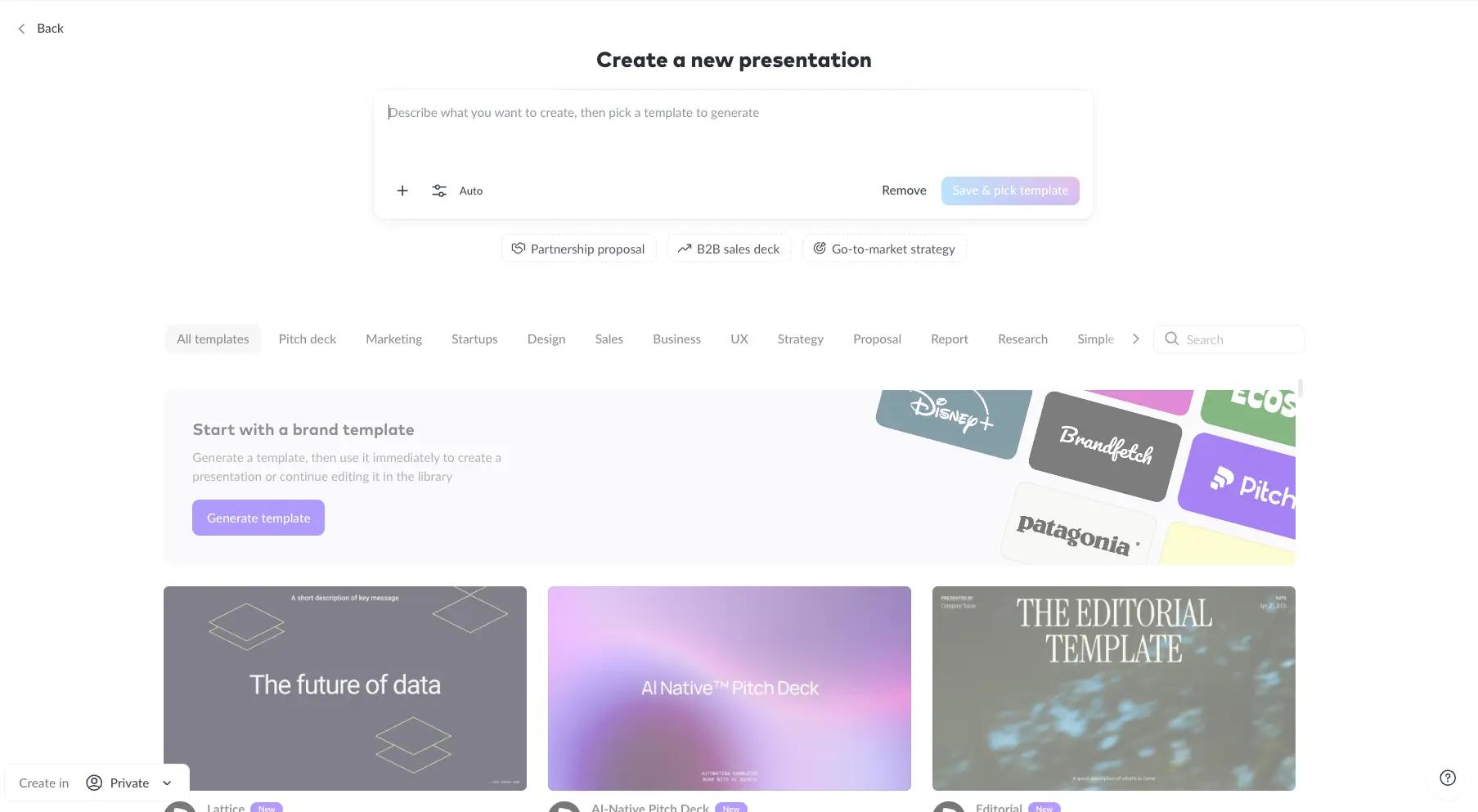
Paid pricing rendered in euros when we checked on August 19, 2026, a geo quirk worth knowing: Plus at €10/month billed annually adds 500 monthly-renewing AI credits, custom fonts, video uploads, five external guests, and, relevant to this article's theme, PowerPoint export with no Pitch branding. Team at €15 and Business at €20 stack collaboration features on top. US buyers should confirm the dollar equivalent at their own checkout, since Pitch, like Gamma, renders pricing by region. Note that PPTX export is a paid feature; the free tier shares decks as links. Pitch also documents an official PPTX importer, so a deck exported from Gamma, Keynote, or Google Slides can come along for the move.
Choose Pitch over Gamma if: the deck is a team sport, you want a $0 plan you can actually stay on, and branding-free PowerPoint export for about ten euros a month sounds fair. Start free on Pitch and see if the editor fits before paying anything.
5. Decktopus — Guided Decks for People Who Sell Things
Decktopus pays us a commission. It's the guided option: instead of a blank prompt box, it interviews you about your audience and goal, then produces a business deck with the structure already argued out, which is why it keeps coming up for sales decks, client proposals, and one-person businesses that present to win work. It generates from a topic or a URL rather than importing existing decks, so treat it as a fresh-start tool, not a migration destination. Exports cover PDF, PPT, and PNG on its Studio plans.
Now the pricing honesty section, because Decktopus made us work for it. On the day we checked, decktopus.com's own pricing page rendered as an interactive credit calculator, Pro at 750 AI credits a month and Business at 1,000 per seat, without a plain price table. Dated 2026 captures of that same page disagree with each other: Pro appears between $9.99 and $14.99 a month and Business between $19.99 and $44.99 depending on the capture and billing term, and sources even disagree on whether the free tier, roughly 20 credits and 3 decks where reported, is currently offered. Budget for the higher number, toggle the billing term yourself, and treat anything an article tells you, including this one, as a starting point. Our Decktopus review (4.0/5) has the full picture, and we've previously run it directly against Gamma in our Gamma vs Decktopus comparison.
Choose Decktopus over Gamma if: your decks exist to close deals, you want the tool to coach the structure instead of just writing faster, and a guided flow beats a blank prompt for how you work. See Decktopus's current pricing with your own billing toggle.
6. Prezi — A Different Kind of Presentation Entirely
Prezi pays us a commission, and it's the one entry here that isn't trying to be a better slide generator, because a Prezi isn't a slide deck. It's a zooming canvas: your whole story lives on one map, and you fly between ideas instead of clicking through pages, which is why it still owns the room for live talks, teaching, and any presentation where the presenter is the show. Prezi AI, launched in 2024, generates these canvases from a prompt, and since a June 2025 update it can build one directly from an uploaded PowerPoint or Word file, so your old decks are raw material rather than dead weight.

The free Basic plan is quietly the most generous AI allowance in this article: 500 AI credits every month, refreshing, where Gamma's 400 arrive once and never return. Paid plans as of August 19, 2026: Standard at $7/month billed annually, Plus at $19 with unlimited AI generation, unlimited PDF and PPT import, PDF export, recording, and a desktop app with offline presenting, something neither Gamma nor most of this list offers, and Premium at $29 with analytics. The honest limit runs the other way from Gamma's: if your deliverable must land as an editable .pptx in someone's inbox, Prezi is the wrong exit, because the zooming canvas doesn't flatten into slides, and file export means PDF from the Plus tier up. Our Prezi review (4.6/5) covers where the format shines and where it fights you.
Choose Prezi over Gamma if: you present live more than you send files, offline presenting matters, or you want the most generous refreshing free AI allowance in this lineup. Try Prezi's free plan.
7. Pi — The Budget AI-Native Designer With Homework Attached
Pi, short for Presentation Intelligence, pays us a commission. It's the young one in the lineup: an AI-native deck designer where the editing architecture is built around the AI rather than bolted on, and in our own account the theme system and generation flow punch well above the price. The paid tiers we see logged in are billed in US dollars, and third-party captures put the entry plans near $10 and Pro near $20 a month, with a free tier that tops up through points rather than a fixed monthly grant. For a solo user who wants Gamma-style generation at less money, it's a genuine option, which is why it holds a 4.1/5 in our Pi review.
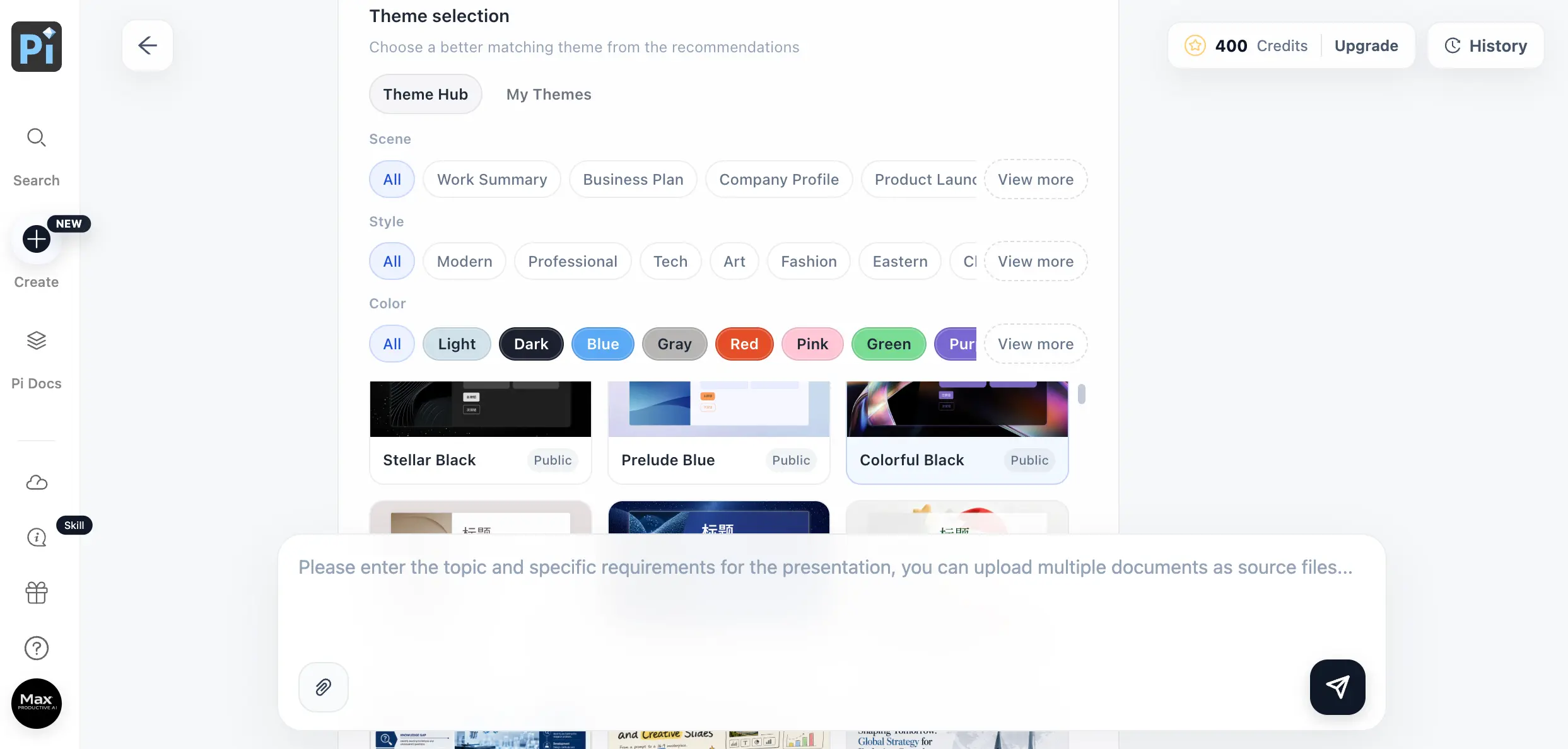
The homework: Pi's public face is thinner than anyone else's here. When we visited pi.inc logged out on August 19, 2026, the site rendered in Chinese for a general visitor and the public pricing page showed essentially nothing, with plan details living inside the product instead. The company behind it is young, founded in 2023, and its corporate paper trail is harder to follow than a Prezi's or a Canva's. None of that is an accusation, plenty of good products grow up in public, but it means you should confirm pricing and export options inside the app before subscribing, and weigh how much vendor maturity matters for your use. File exports sit on the paid tiers per the reviews we've cross-checked.
Choose Pi over Gamma if: you're a solo user chasing the best AI-design-per-dollar and you're comfortable with a young vendor whose public documentation is still catching up to its product. See Pi for yourself.
8. Canva — Presentations Inside the Everything App
Canva pays us nothing; it closed its old affiliate program to conversions on January 31, 2024, so no review site on earth earns a commission recommending it today, ours included. It stays on this list because for a lot of Gamma users the honest answer is that they don't need a presentation specialist at all, they need decent slides from the design tool their team already uses for everything else. Canva's presentation templates are vast, the editor is the most familiar interface in this article, and decks live alongside your social posts, one-pagers, and brand kit.
The AI is where expectations need managing, with numbers from Canva's own pages: free accounts get 10 lifetime uses of Magic Design, the feature that generates a presentation from a prompt, not 10 a month, 10 ever, plus small one-time pools for the underlying tools like Magic Write, while a Pro subscription upgrades those to monthly-renewing allowances. Canva's own FAQ also notes its AI assistant currently works in English only. So as a Gamma alternative, free Canva is a taste, not a workflow; the AI workflow starts at Pro. It exports to PPTX, and as an all-rounder it remains excellent, but if AI generation is the whole point of your search, the specialists above give you more of it per dollar.
Choose Canva over Gamma if: presentations are one of many design jobs on your plate, your team already lives in Canva, and template range plus familiarity beat having the strongest generation engine.
9. Chronicle — Beautiful Web Decks, With One Big Caveat
Chronicle pays us nothing. It's the design-forward pick: opinionated, elegant blocks that make a deck look art-directed with almost no effort, closer in spirit to a beautifully typeset web page than to PowerPoint. The free tier is genuinely usable, up to 10 decks with the professional editing tools, preset themes, publishing to the web, PDF and social exports, and three guest editors, and paid starts at $12/month billed annually. For founders and product people who present in a browser and want decks that look designed, it's a pleasure to use.
The caveat is the theme of this article: on the pricing page we checked, PowerPoint export isn't listed on any tier, free or paid, only PDF and social formats. If broken PPTX exports are the wound that brought you here, Chronicle doesn't heal it, it removes PowerPoint from the equation entirely, which is either liberating or disqualifying depending on your inbox. Treat it as a Gamma alternative for the web-sharing half of Gamma's job, not the export half. Our Chronicle review covers the editor in detail.
Choose Chronicle over Gamma if: your decks live and die in the browser, design taste is the priority, and nobody in your workflow will ever ask for the .pptx.
Free Gamma Alternatives: What You Actually Get at $0
Gamma's free plan is real but finite: 400 credits at signup, never refreshed, watermarked exports, and no way to buy more without upgrading. Against that, the free tiers here sort into three groups. Refreshing allowances: Prezi's free plan grants 500 AI credits every month, the only allowance in this article that comes back on its own. Finite but livable: Pitch gives 100 one-time AI credits on top of unlimited hand-built decks, Presentations.AI's Starter includes 100 credits with PowerPoint export listed even at free, Chronicle offers 10 decks with PDF export, and Pi tops up through activity points. Trials in disguise: Beautiful.ai and Plus AI have no free tier at all, only card-required trials of 14 and 7 days that charge automatically at the end, so set a reminder before you start either. Canva sits apart: free forever as a design tool, but with 10 lifetime AI presentation generations, it's a demo of the AI, not a supply.
The Export Reality: What Actually Happens to Your Deck
This is the section the vendor articles skip, and it decides more switches than pricing does. The complaint that dominates Gamma threads isn't that export is missing, it's that the file which arrives isn't the deck you made. Gamma's own documentation is usefully candid here: exports render from Present Mode rather than Edit Mode, chart and diagram scaling depends on a "Zoom to fit" toggle, and when a Gamma PPTX is opened in Google Slides, fonts get substituted because Google Slides ignores embedded fonts, a limitation Gamma correctly attributes to Google. There is also no native Google Slides export on any Gamma plan; the route is PPTX out, then upload. None of that makes Gamma unusable, the March 2026 workaround thread we cited earlier shows experienced users shipping fine, but it does mean the export step is a real step, with real failure modes, on every deck that leaves the app.
| Tool | How your deck leaves it | What to watch |
|---|---|---|
| Gamma | PPTX, PDF, PNG on all plans; watermark on free | Renders from Present Mode; fonts substitute in Google Slides; no native Slides export |
| Beautiful.ai | Editable PPTX export, a documented feature; PDF | Confirm which paid tier carries it on the live plan grid |
| Plus AI | None needed; the deck is born a native Slides or PowerPoint file | You're inside Google's or Microsoft's editor, with their limits |
| Presentations.AI | PowerPoint and PDF listed on all tiers, free included | Per-action credit costs; verify on your account |
| Pitch | PPTX without branding from the Plus tier | Free tier shares links, not files |
| Decktopus | PDF, PPT, PNG on Studio plans | Free tier reportedly excludes PDF export |
| Prezi | PDF from Plus; presents offline via desktop app | The canvas format doesn't become editable slides |
| Pi | File exports on paid tiers per reviews | Confirm formats in-app before subscribing |
| Canva | PPTX and PDF from the editor | Complex Canva elements can simplify in PowerPoint |
| Chronicle | PDF and social formats; web publishing | No PowerPoint export listed on any tier |
The practical test costs you one evening: build the same three-slide deck in your two finalists, export it, open the file on the machine that matters, and look at the fonts, the charts, and whether you can still edit it. No article can run that test for you.
Copilot and Gemini: The Free AI You May Already Have
Before paying for any standalone tool, check what your existing licenses already include, because the answer changed twice recently and neither change was loud. On the Microsoft side, the free ride ended: per Microsoft's own admin notices of March 17, 2026, Copilot Chat disappeared from inside Word, Excel, PowerPoint, and OneNote on April 15, 2026 for unlicensed users at organizations over 2,000 seats, reserving the in-app experience for paid Microsoft 365 Copilot licenses, listed at $30/user/month for enterprise and around $21 for smaller businesses. Add the commercial Microsoft 365 price increases Microsoft announced for July 1, 2026, and Copilot in PowerPoint is many things, but it is not free.
Google went the other way. Since January 15, 2025, Gemini has been folded into the base price of Google Workspace Business Standard and above, no add-on required, and Google's Workspace blog announced fully editable multi-slide generation in Google Slides in June 2026, with promotional usage limits running through August 1, 2026 and English-only support at rollout. So the honest decision rule: if your organization already pays for Business Standard or better, try Gemini in Slides on a real deck before you subscribe to anything in this article. If it's good enough for your decks, you're done, and if it isn't, you'll know exactly which gap you're paying a specialist to close, usually design quality, structure, or export fidelity.
A Note on What Ranks for This Search
Worth naming what you're wading through when you research this topic. The article ranking near the top, dated April 2026, concludes that the best Gamma alternative is the tool whose blog published it. The next list, from July 2026, reaches the same conclusion about its own publisher. A comparison page from a third vendor ranks on nearly every search in this category, each time recommending that vendor, and Google's AI Overview, having only vendor pages to read, currently cites an AI-agent company's blog as its main source on presentation software. None of these pages is lying, exactly, they're marketing. But when every available answer is written by a contestant, an independent scorecard has some value. Ours: six of the nine tools above pay us, three pay us nothing, Gamma pays us if you stay, and every ranking decision in this article was made before we checked which was which.
Who Should Stay on Gamma
An honest alternatives article owes you the other side. Gamma is still the fastest path we know from raw text to a finished, presentable deck, and the threads praising it praise the right things: it helps with the thinking, not just the formatting, it iterates quickly, and since the September 2025 Agent release it researches with citations and restyles whole decks on request. The 60-day PowerPoint-replacement experiment from April 2026 that we quoted earlier for its credit complaint also concluded the speed was worth it for drafts. If your decks are shared as links, presented from the browser, or drafted for someone else to finish, the export problem barely touches you, and nothing here generates faster.
Stay on Gamma if the web is your deck's final home, generation speed and narrative quality are the job, and a paid plan's refreshing credits fit your volume. Full disclosure applies in this direction too: Gamma pays us if you stay, which is one more reason to trust that we're not pushing you out the door. Our Gamma review (4.6/5) tracks its plans and credit system in detail.
How to Choose Your Gamma Alternative
Match the tool to the reason you're leaving, not to feature lists. Leaving over broken PPTX exports: Beautiful.ai, whose editable PowerPoint export is a written feature, or Plus AI, which removes the export step entirely by generating native files. Leaving over credits: Prezi's free 500 a month refresh forever, Pitch's free plan never expires for hand-built decks, and every Plus AI plan refreshes monthly. Leaving over price: Prezi Standard at $7, Plus AI Basic at $10, Beautiful.ai Pro and Chronicle at $12, Pi's in-app USD tiers near $10. You present live: Prezi, and it's not close, especially offline. You sell for a living: Decktopus for guided sales decks, Presentations.AI for formal business documents at $0 to start. You already pay for Workspace Business Standard: try Gemini in Slides first, it's included. And if the web is your deck's home: staying on Gamma is a legitimate call, its speed and sharing remain the category's best.
Final Verdict — The Best Gamma Alternatives in 2026
| Best overall escape | Beautiful.ai ($12/mo annual, editable PPTX export, our 4.1/5) |
| Stay in your own tools | Plus AI (native in Slides & PowerPoint, from $10/mo, our 4.6/5) |
| Best free plans | Prezi (500 AI credits/month) and Pitch (unlimited manual decks) |
| Agent-built business decks | Presentations.AI (free tier exports PPTX, pays us nothing) |
| Guided sales decks | Decktopus (interview-style builder, our 4.0/5) |
| Budget AI-native pick | Pi (USD plans in-app, our 4.1/5) |
| Design-forward web decks | Chronicle (no PPTX, pays us nothing) |
| Already in your stack | Canva, Copilot, or Gemini (check your licenses first) |
Bottom line: Gamma is a genuinely good product whose free credits run out once and whose exports need checking, and in 2026 both problems have specialized fixes. Beautiful.ai for decks that must survive PowerPoint, Plus AI for teams that never wanted to leave Slides or PowerPoint in the first place, Pitch and Prezi for free plans you can live on, Decktopus and Presentations.AI for business decks, Pi for budget AI design, Chronicle for the browser, Canva and the bundled AI in Microsoft 365 and Workspace for people who'd rather not add a subscription at all. Before you commit anywhere, run the one-evening test above: same deck, two finalists, export, open, edit. That evening answers more than any article can, including this one.