
Predis AI
AI social media content platform that turns a prompt, product page, or store catalog into designed posts, carousels, and short videos—then schedules and auto-publishes them across every major network from one dashboard.
Try Predis AI →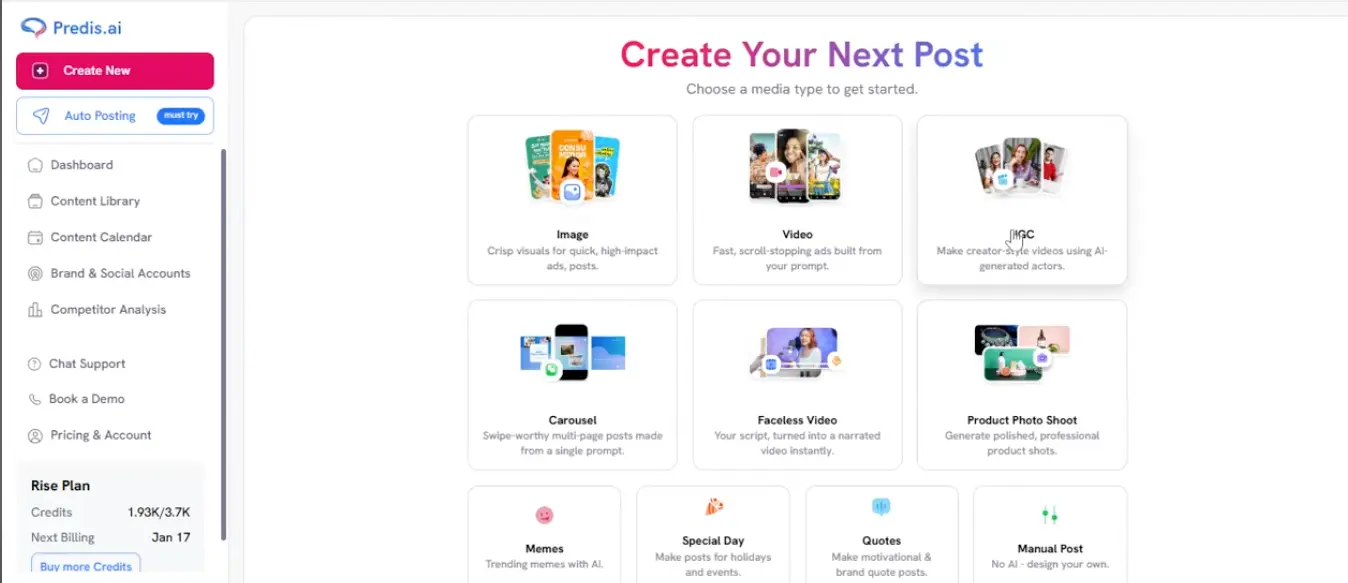
Prompt-to-Post Social Content
for Small Brands & Lean Agencies
Predis AI's pitch, as of August 2026, is breadth: type a prompt or paste a product URL, and it hands back a designed post with caption and hashtags in under a minute—then schedules it across seven networks. No other tool in this category covers as many formats in one workspace. The trade-offs are just as clear: a credit system that punishes video-heavy workflows, and output that reads generic unless you invest in the brand kit first. Test it on the free trial before committing—just know it asks for a credit card up front.
✓ What We Love
- Free trial to test output on your own brand
- Idea to designed, scheduled post in one dashboard
- Widest format range: posts, carousels, video, memes, UGC
- Auto-publishing with AI-picked posting times
! Could Be Better
- Credit limits bite fast—video especially
- Output reads generic without brand-kit setup
- Thin analytics; robotic AI voiceovers
What Is Predis AI?
The essentials of this Predis AI review: what it does, who it's built for, and whether the breadth is worth the trade-offs.
Predis AI is an AI social media content platform that compresses the whole post-production chain—ideation, design, copywriting, hashtags, scheduling, publishing—into a single dashboard. You give it a text prompt, a product URL, or a connected store catalog; it hands back a finished, correctly sized post with caption and hashtags attached, ready to schedule. We list it under Ad Creation because that's how many businesses use it, but its real scope is wider: organic social content across Instagram, Facebook, LinkedIn, TikTok, YouTube, Pinterest, and X.
The obvious question: why not just use ChatGPT plus Canva plus a scheduler? Because Predis AI collapses those three subscriptions and the copy-paste work between them into one flow. The design, the caption, and the publishing calendar live in the same place, and your brand kit—logo, colors, fonts, trained voice—gets applied to every generation automatically. Brand-voice specialists like Holo AI attack the same problem from the voice side; Predis AI attacks it from the volume side.
And the volume argument is real. Ten media types sit behind one Create button: image posts, multi-slide carousels, short-form video, UGC-style clips with AI-generated actors, narrated faceless videos, product photo shoots, memes, quote posts, holiday content, and a fully manual editor for when you want no AI at all. Add built-in competitor tracking and direct store connections for Shopify, WooCommerce, Wix, and Squarespace, and you get a tool that genuinely replaces several others—for a specific kind of user.
Here's the honest context, though. Crowd ratings on public review platforms average a glowing 4.6–4.7 out of 5, while independent editorial reviews cluster noticeably lower, around 3.8–4.3. The criticism behind that gap is strikingly consistent: Predis AI is wide but not deep. Output can read generic out of the box, video quality trails the static formats, and analytics are basic. Our 4/5 sits between the two camps deliberately: the breadth is genuinely valuable for its target user, as long as you go in expecting to edit.
Who Is Predis AI Best For?
Solo founders, small marketing teams, e-commerce store owners, and small agencies that need steady multi-format content across several networks without a designer. It's especially strong for Shopify, WooCommerce, Wix, and Squarespace stores, since it builds posts straight from your product catalog. Less suited to teams that need polished video, deep reporting, or fully hands-off automation.
See Predis AI in Action
Real screenshots from the platform, following the workflow from creation to scheduling.
Content Creation Hub: Pick a Media Type
Every format Predis AI can generate, in one menu
This is the first screen after hitting Create New, and it's the clearest picture of what Predis AI actually is: image posts, carousels, video, UGC clips with AI-generated actors, faceless narrated videos, product photo shoots, memes, quote posts, and holiday content, all one click apart. Worth noticing the bottom-left corner too: the credits counter (1.93K of 3.7K on this account). Every generation draws from that pool, and it's the number that defines your real monthly capacity—more on that in the pricing section.
Four Ways to Start an Image Post
Prompt, store catalog, product URL, or your own upload
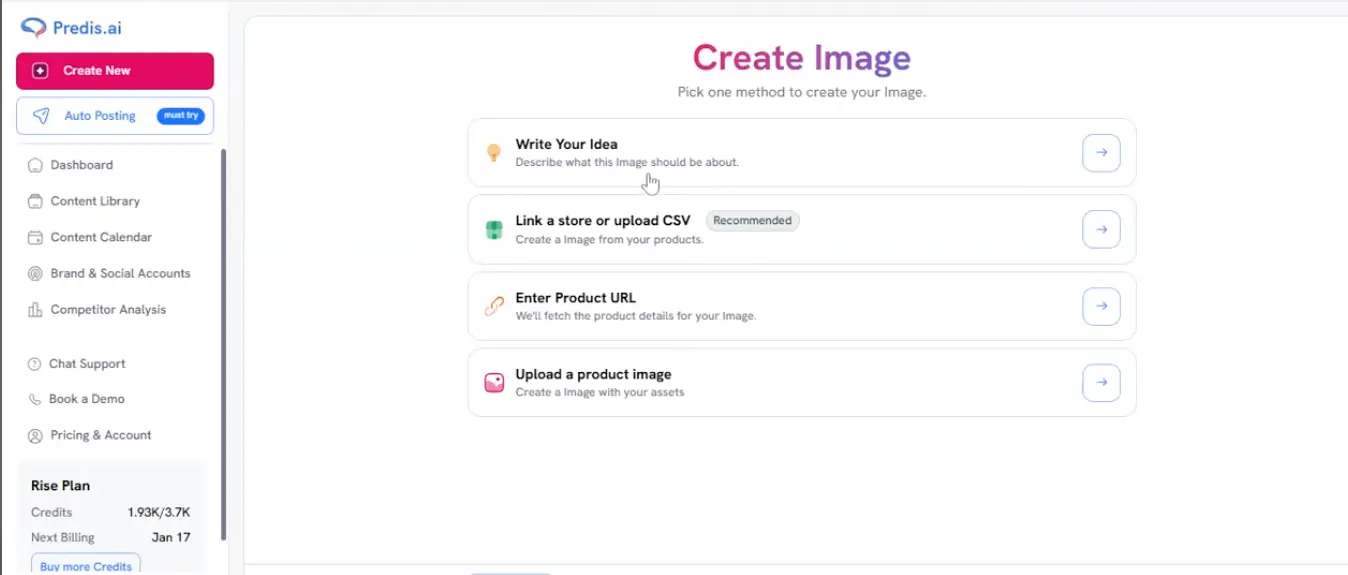
Four input methods, and they're not equal. "Write Your Idea" is the standard prompt route, and the one behind most cookie-cutter output complaints. The "Link a store or upload CSV" option, flagged as Recommended in the interface itself, is where Predis AI separates from prompt-only AI tools: it builds posts from your actual product data instead of inventing copy. The Product URL route does the same for a single item. If you sell online, start there.
E-commerce Store Integrations
Connect your store and generate posts from your catalog
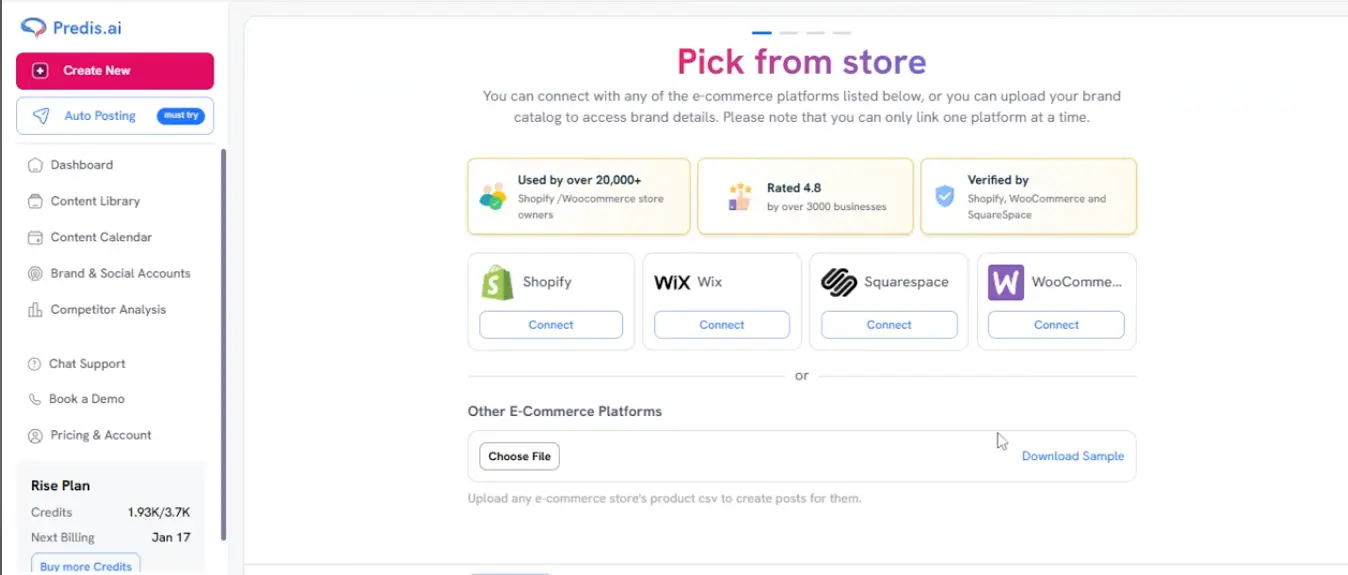
Direct connections for the four big store platforms, plus a CSV upload for everything else—Predis AI says over 20,000 store owners use these integrations. Two things to know from the fine print: only one platform can be linked at a time, and at least one independent hands-on review has reported product-sync hiccups. Double-check generated product details before anything goes live. Still, for merchants this screen is the strongest argument for the whole tool.
Curious what it generates from your own products?
Try Predis AI →Free trial available • Connects to your store in minutesGenerated Post Example
A finished output in the Content Library, caption included

A real output: a 1:1 coffee-shop post generated from a short text prompt, with the caption already written and the source tagged. The design is clean, correctly sized, and instantly publishable. It's also unmistakably template-driven. That's the honest picture of Predis AI's output level: perfectly good for keeping a feed active and consistent, not the scroll-stopping hero creative a designer would give you. Publish, Edit, and Download all sit one click away.
Scheduling with AI-Suggested Times
Calendar picker with approval workflow built in
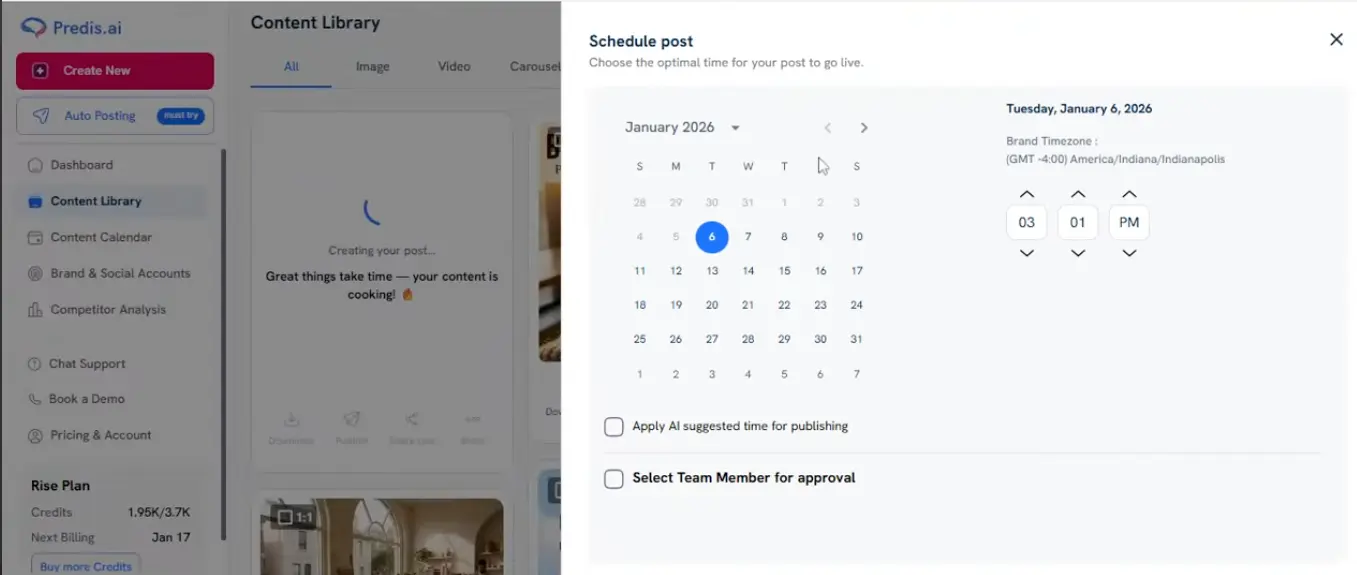
Scheduling is where the platform earns its all-in-one label. Pick a date and time manually, or tick "Apply AI suggested time" and let the engine choose the slot. Each brand workspace keeps its own timezone, and the "Select Team Member for approval" option routes posts through sign-off before anything publishes—a small feature that matters a lot for agencies. Daily auto-posting caps apply, so plan around them if you publish heavily.
How Predis AI Works
Four steps from empty feed to a scheduled content calendar.
Set Up Your Brand (Don't Skip This)
Create a brand workspace: logo, colors, fonts, and—most importantly—brand voice. Connect your social accounts, and if you sell online, link your store or upload a product CSV. Here's the thing: most "Predis output looks generic" complaints trace back to rushing this step. The brand kit is the filter every generation passes through; an hour spent here changes everything downstream.
Pick a Format and Give It an Input
Choose a media type—image, carousel, video, UGC, faceless video, product photo shoot, meme, quote, holiday post, or a fully manual design. Then feed it a starting point: a written idea, a product URL, an item from your connected store, or an uploaded image. The store route consistently produces the most specific results, because the AI works from real product data instead of guesses.
The AI Builds the Complete Post
Predis AI generates the design, caption, and hashtags together: platform-sized, with your brand kit applied. It's fast; you'll spend more time reviewing than waiting. Each generation consumes credits from your monthly pool, and video draws far more than images. Not happy with a result? Tweak it in the built-in editor rather than burning credits on full regenerations.
Schedule, Approve, Publish
Send finished posts to the calendar, let the AI suggest optimal publishing times, and route them through team approval if clients need sign-off. Predis AI then auto-publishes across Instagram, Facebook, LinkedIn, TikTok, YouTube, Pinterest, and X. Daily auto-posting caps apply per account—most brands never hit them, but heavy publishers will.
Understand the Credit Math Before You Pick a Tier
Credits are Predis AI's real currency, and the exchange rate isn't flat: video generations consume credits roughly 3–5x faster than static images, and users have reported failed video runs still eating credits. Before choosing a plan, sketch your actual monthly mix—say, 40 image posts, 8 carousels, 4 videos—and check it against the tier's allowance. Five minutes of math prevents the single most common Predis AI complaint.
Where the Generic-Output Criticism Comes From
Independent reviewers keep landing on the same critique: bulk-generated posts can look like near-duplicates with minor word swaps. It's real—and largely avoidable. The pattern behind most complaints is prompt-only usage with no brand voice training. Feed it real product data, complete the brand kit, and edit captions before publishing, and the output moves from "obviously AI" to solid brand content. Just know the tool won't do that last mile for you.
Predis AI Features
What you're actually paying for—and where the depth runs out.
Prompt-to-Post Generation
The core loop: type an idea, get back a designed, platform-sized post with caption and hashtags attached. No blank-canvas design work, no separate copywriting step. It's the reason the tool exists, and it works.
Carousels, Memes & Quote Posts
Multi-slide carousels from a single prompt, plus meme, quote, and holiday-post generators for calendar filler. Not glamorous—but this is the content that keeps a feed alive between campaigns.
AI Video, UGC & Faceless Clips
Short-form video for Reels, TikTok, and Shorts—including UGC-style clips with AI actors and narrated faceless videos. Honest take: this is the weakest area. Voiceovers sound mechanical and the credit draw is heavy. Treat it as a bonus, not the reason to buy; if video is your main channel, a specialist will serve you better.
E-commerce Product Posts
Connect Shopify, WooCommerce, Wix, or Squarespace—or upload any store's CSV—and generate posts straight from your catalog, including a dedicated Product Photo Shoot mode for polished product shots. If you run a store, this feature justifies the subscription on its own.
Scheduling & Auto-Posting
A full content calendar with bulk scheduling, AI-suggested publishing times, and direct auto-posting across every supported network. Daily posting caps apply per account. For many users, the built-in calendar means dropping a separate scheduling subscription entirely.
Competitor Analysis
Track rival accounts' posts and engagement to see what's working in your niche. Scans are tiered, from around 10–60 runs a month on lower plans to about 600 at the top. Almost nothing else in this category includes this; it's a quiet differentiator.
Brand Kit & Voice Training
Logos, colors, fonts, and a trained brand voice applied to every generation, plus import of your own assets. This is the feature that decides whether your output looks like your brand or like everyone else's AI posts. Set it up first.
Multi-Brand & White-Label
Up to 20 brand workspaces, client approval workflows, a white-label dashboard, and rate-limited API access on top tiers. Per-brand, the effective cost undercuts most agency alternatives by a wide margin.
Beyond the grid: a built-in library of over five million royalty-free assets, compatibility with Canva, Adobe, and Figma files, and in-app chat support with a book-a-demo option. It's a lot of surface area for one subscription—which is exactly Predis AI's bet: be good enough at everything rather than exceptional at one thing.
Predis AI Pricing (2026)
Three credit-based tiers plus a card-required free trial. The credit math matters more than the sticker price.
Lite
- ✓ 60–120 posts/month in credits
- ✓ 1 brand workspace
- ✓ Direct publishing & scheduling
- ✓ AI-suggested posting times
- ✓ Best for single-brand image content
Premium
- ✓ 130–300 posts/month in credits
- ✓ AI video generation unlocked
- ✓ Brand voice training
- ✓ 3–5 brand workspaces
- ✓ Expanded competitor scans
Agency
- ✓ White-label dashboard
- ✓ Client approval workflows
- ✓ API access (rate-limited)
- ✓ Up to 20 brand workspaces
- ✓ High-volume credit allowances
Important: all tiers are credit-based, and video consumes credits several times faster than images—model your real content mix first.
Pricing last verified August 2026; Predis AI adjusts plans and allowances often. Visit Predis AI for current rates.
Is It Worth the Money?
Use your full allowance and Lite works out to roughly thirty to fifty cents per designed, captioned, scheduled post—a rate no human workflow touches. The math only breaks down if video dominates your mix, because credits drain much faster there. Image-first accounts get excellent value; video-first accounts should look elsewhere.
For context on pricing: AdCreative.ai starts at $29/month, credit-limited, with the same card-required trial model. Holo AI runs $19–39/month with unlimited generation but no trial at all—just a conditional refund. Atria starts at $129/month and isn't really a generation tool—it's ad intelligence. Nobody in this group lets you in friction-free, so treat the Predis AI trial as your test window: full brand kit, real products, and an eye on the trial end date before you generate anything.
Predis AI Pros & Cons
The full breakdown, based on our research, platform walkthroughs, and verified user feedback.
✓ Pros
Holo AI offers no trial at all, and Atria's converts straight into a $129/month plan. Predis AI's free trial lets you set up the brand kit and generate posts from your actual catalog before the first charge—the only reliable way to know whether AI output works for your niche. One catch, and we flag it for AdCreative.ai too: activation requires a credit card, so put a cancellation reminder in your calendar the moment you start.
One dashboard replaces a writer, a design tool, and a scheduler. Type a prompt or pick a product, and a designed, captioned, hashtagged post comes back before you've switched tabs, then goes straight onto the calendar. For anyone currently juggling ChatGPT plus Canva plus Buffer, the consolidation alone justifies a test run.
Images, carousels, short video, UGC-style clips with AI actors, faceless narrated videos, product photo shoots, memes, quotes, and holiday posts—one menu covers it all. Most rivals do one or two of these. If your content calendar needs variety, this is the tool's strongest card.
Direct Shopify, WooCommerce, Wix, and Squarespace connections (plus CSV for everything else) mean posts get built from real product data instead of invented copy. That single difference cuts the same-y output problem significantly, and the Product Photo Shoot mode replaces a decent chunk of product photography.
White-label dashboards, client approval workflows baked into the scheduling flow, API access, and up to 20 brand workspaces on the top tier. Per brand, the cost undercuts nearly every alternative—and undercuts human freelancers by an order of magnitude.
Tracking rival accounts' content and engagement usually requires a separate subscription. Predis AI includes it, with scan allowances that scale by tier. It won't replace a dedicated intelligence platform like Atria, but as a bundled extra it's genuinely useful for content planning.
✗ Cons
The headline post counts assume an image-only diet. Mix in video and your allowance drains at several times the rate; some users also report failed video generations still consuming credits. Active accounts on Lite regularly hit the ceiling mid-month. Do the math on your real content mix before committing to a tier.
This is the most consistent criticism across independent reviews, and it's fair: bulk-generate from bare prompts and you'll get near-duplicate posts with minor word swaps. The brand kit and voice training reduce the problem substantially—but they don't eliminate the need for a human editing pass. Budget for it.
AI voiceovers sound mechanical with off timing, avatar clips sit firmly in uncanny territory, and video drains the credit pool. Fine for faceless filler content; wrong tool for hero creative. If short-form video is your main channel, buy a video specialist and use Predis AI for everything else.
You get basic engagement and reach numbers—enough to spot obvious winners, not enough for real performance analysis. Teams that live in their reports will end up keeping a dedicated analytics tool alongside, which chips away at the all-in-one value pitch.
Automatic publishing tops out around 2–3 posts per day per account, even on the most expensive plans. Most small brands never notice. High-frequency publishers and news-style accounts will, and there's no way to buy around it.
In-app chat support exists, but some users report slow responses and billing transparency issues—particularly around credit consumption disputes. The card-required trial adds one more billing date to track. Not a dealbreaker, but keep records of your usage and billing dates, and don't expect instant answers when something breaks.
Predis AI Alternatives: How It Compares
How Predis AI stacks up against the other tools we've reviewed in this category.
| Feature | Reviewed Predis AI | AdCreative AI | Holo AI | Atria |
|---|---|---|---|---|
| Starting Price | ~$27/mo | $29/mo | $19/mo | $129/mo |
| Free Option | Free trial (card required) | Trial (card required) | 14-day refund | 7-day trial |
| Generation Model | Credit-based | Credit-based | Unlimited | N/A (intelligence) |
| AI Video | ✓ Credit-heavy | Limited | ✓ Developing | ✗ |
| Competitor Analysis | ✓ Tiered scans | ✓ Professional+ | ✗ | ✓ Core (25M+ ads) |
| Predictive Scoring | ✗ | ✓ Core feature | ✗ | ✓ Letter grades |
| Multi-Brand | Up to 20 | 1–25 | Up to 10 | Team seats |
| Best For | Multi-format social content | Paid-ad testing | Brand-voice content | Meta/TikTok ad intelligence |
Which Tool Is Right For You?
Predis AI
ReviewedBest for: Small brands, e-commerce stores, and agency teams that want volume across formats and networks without hiring designers—and can live with light editing and a bit of credit budgeting. The free trial lets you evaluate real output on your own products before the first charge—it needs a card, so don't let it convert by accident.

AdCreative AI
Performance FocusBest for: Performance marketers producing paid ad variants at volume who want conversion-prediction scoring before spending budget. It's ad-focused where Predis AI is social-focused—genuinely different jobs. Watch the credit economics (the steepest in this group in real cost per creative) and the card-required trial that auto-converts. AdCreative.ai vs Predis AI: full comparison →

Holo AI
Brand VoiceBest for: Founders who care more about sounding like their brand than about covering every format. Holo AI's Brand DNA reads your website in about 10 minutes and produces the most brand-faithful output in this category, with unlimited generation from $19/month. The catch: no free trial—only a conditional 14-day refund—so you're paying before you know it fits.

Atria
Agency-GradeBest for: Teams spending seriously on Meta and TikTok ads who need competitor intelligence rather than content generation: a 25M+ tagged ad library, pattern detection on your own ad account, and an AI strategist. At $129+/month it's a different budget class and a different job—plenty of teams run it alongside a generation tool rather than instead of one.

Oz (HeyOz)
Viral ContentBest for: E-commerce brands and dropshippers chasing viral TikTok and Instagram formats. Trendy templates, product-URL auto-extraction, and current-gen video models make it quick to test angles. Pricing isn't public, which usually signals it's not cheap—expect a sales conversation before you see numbers.

Madgicx
Full Ad ManagementBest for: Meta advertisers who want creative generation inside a full ad-management stack—audience targeting, automation rules, and analytics in one platform. It's an ads-operations tool that includes creatives, not a content tool that runs ads. A different category from Predis AI entirely.
Predis AI: Frequently Asked Questions
Should You Try Predis AI?
Predis AI earns its place by doing one thing better than anyone in this category: covering the entire distance from idea to published post, across more formats and more networks than any rival, in one subscription. The output won't win design awards—it's competent, template-driven brand content—but for the daily reality of keeping several social channels alive, competent and instant beats beautiful and slow. The store integrations, the format range, and the agency workflow features all push in the same direction: volume without headcount.
The weaknesses are just as clear, and we haven't hidden them. Credits run out faster than the marketing implies, especially with video. Default output needs brand-kit setup and a human edit to stop sounding like AI. Video generation is the roughest edge, and the analytics won't satisfy anyone serious about reporting. If any of those is your core requirement, one of the alternatives above fits better. Judged against what it actually promises—fast, broad, affordable social content—it lands at a solid 4 out of 5 as of August 2026.
Our Recommendation
Start with the free trial—it needs a card, so know your end date going in. Spend the first session completing the brand kit and voice training before generating anything, then create posts from your real products rather than test prompts. If the output fits your brand with light edits, Lite or Premium is fair value; just run the credit math on what you'll really publish each month (count video generously) before picking a tier.