StreamYard
Browser-based live streaming and recording studio for creators, coaches, and B2B marketers. Go live on multiple platforms at once—no software to install, and guests join with just a URL.
Try StreamYard →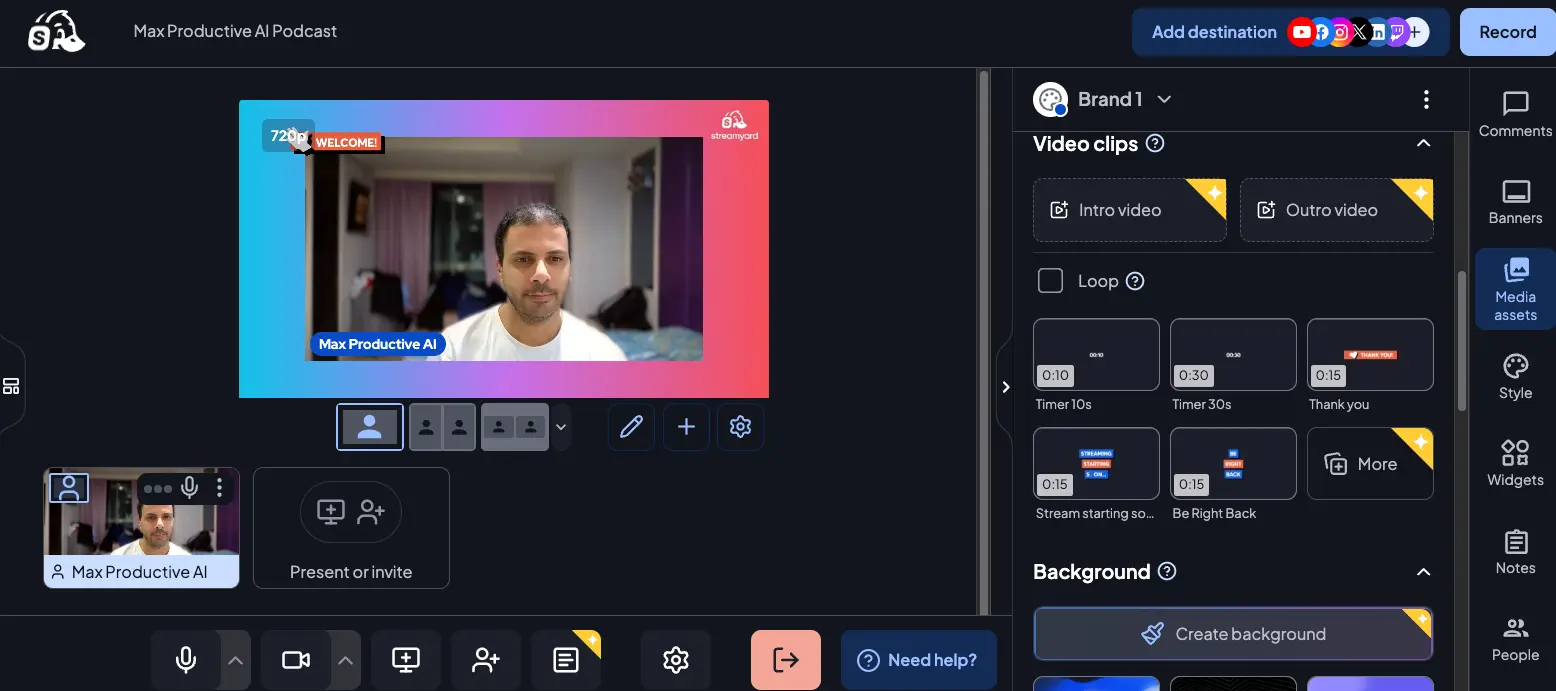
The Easiest Way to Go Live Professionally
—With One Real Catch
StreamYard earns its reputation: nearly zero learning curve, the smoothest guest experience in browser-based live streaming, and a genuinely free plan that actually works for small shows. What holds it back from a perfect score is pricing—the post-Bending Spoons hikes of 80–82% on core plans stung a lot of long-time users. But if you can stomach the monthly rate (or stretch the free tier), this is still the most polished live studio you can run from a browser in 2026.
✓ What We Love
- Free plan is genuinely usable—not just a demo
- Guests join by URL, no install, any device
- MARS: simultaneous horizontal + vertical streams
- AI Clips 2.0 auto-creates short-form content
! Could Be Better
- Steep price increases since the 2024 acquisition
- Live streaming capped at 1080p (no 4K)
- Zero built-in viewer analytics
What Is StreamYard?
A look at how it works, who owns it, and why the free plan matters more than you'd expect.
StreamYard is a browser-based live streaming studio. You open a tab in Chrome (or Firefox, Edge, Safari), plug in your camera and mic, click a button, and you're broadcasting simultaneously to YouTube, LinkedIn, Facebook, Twitch, X, or any RTMP destination. There's nothing to download. There's no encoder to configure. And—crucially—your guests join by clicking a link, with no account and no install on their end.
That last point sounds minor until you've tried inviting a non-technical guest onto OBS or a desktop studio. Watching someone try to install software 10 minutes before you go live is a nightmare a lot of creators have lived through once and never want to live through again. StreamYard's guest experience is, honestly, the single best reason to use it.
The tool was founded in 2018 by Geige Vandentop, bootstrapped to $30M ARR and over 100,000 paying customers, and acquired by Hopin in January 2021 for $250 million. In April 2024, Italian tech company Bending Spoons (which also owns Evernote, Remini, and Splice) bought StreamYard from Hopin. That acquisition is important context because it's when the pricing story changed—we'll get to that in the Pricing section.
Who Is StreamYard Best For?
Solo creators, coaches, podcasters, and small B2B marketing teams who run live shows, guest interviews, or webinars on LinkedIn/YouTube/Facebook. Also ideal for nonprofits, churches, and small businesses that can't afford dedicated AV staff. The sweet spot is anyone who values polish and speed over granular technical control—and who needs guests to join without friction. If you're comfortable in OBS and need every knob turned, StreamYard will feel limited; if OBS has ever made you close your laptop in frustration, StreamYard will feel like a relief.
Under the hood, the platform handles all encoding and distribution in the cloud. You upload a single video feed from your browser, and StreamYard fans it out to every destination you've connected. This matters because your computer isn't doing the heavy lifting—older laptops and mid-range hardware can run StreamYard smoothly in cases where OBS would choke. The tradeoff: you need a solid internet connection (5 Mbps up/down minimum, 7+ Mbps preferred) because the cloud does the work.
What's new in 2026? Quite a lot, actually. The team has shipped more than 55 product updates since the start of 2025, including MARS (simultaneous horizontal and vertical streams from one studio—unique in the market), AI Clips 2.0 (now 3× faster with prompt-guided generation), the AI Background Generator, Scenes for one-click layout switching, and StreamYard On-Air, their built-in webinar platform with registration pages and automated email sequences. For a product that some assumed would stagnate after the ownership changes, the pace of shipping is honestly surprising.
See StreamYard in Action
Real screenshots from inside the platform—dashboard, live studio, and destination setup.
Dashboard with Four Creation Modes
The starting point for every broadcast or recording session
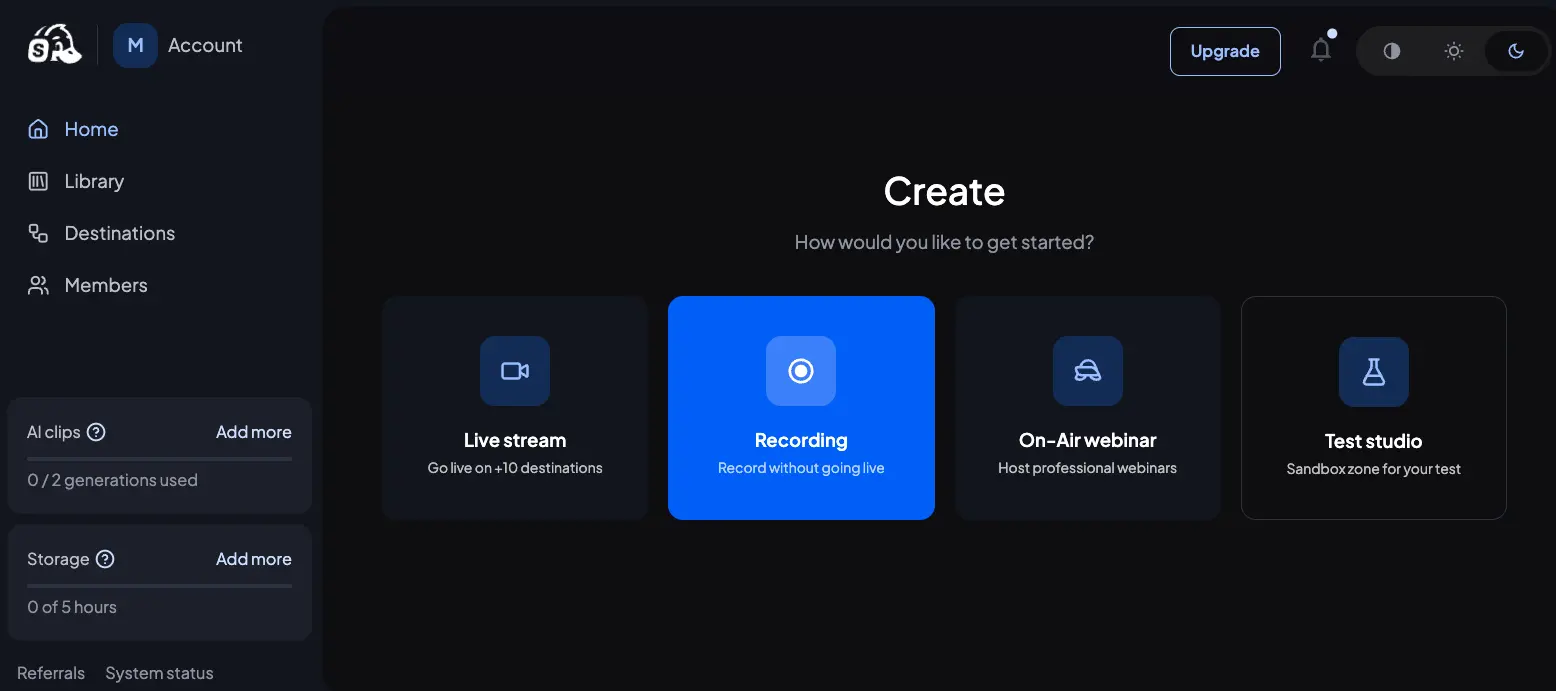
The dashboard splits your options into four clear modes, and the separation matters. Test studio in particular is underrated—it's a sandbox where you can rehearse layouts, check overlays, and practice without any stream going out. Anyone who's ever gone live with an accidentally-open camera or wrong microphone will appreciate having this as a first stop. The sidebar also shows your AI Clips usage, cloud storage, and referral links.
Live Studio Interface
Where the actual broadcasting happens—layouts, brand assets, and guest management
This is the heart of the platform. Everything you see here is built for speed: one tap adds a guest to the stage, another switches layouts, and the media assets panel gives you drag-and-drop timers ("Stream starting soon," "Be right back," "Thank you") that feel designed by someone who's actually run live shows. The right sidebar toggles between comments from all connected platforms, brand banners, media, style settings, widgets, and private production notes. It's dense but not cluttered.
Want to see the studio on your own brand?
Try StreamYard →Free plan available • No credit card requiredStreaming Destination Setup
Connect platforms once and broadcast to all of them simultaneously
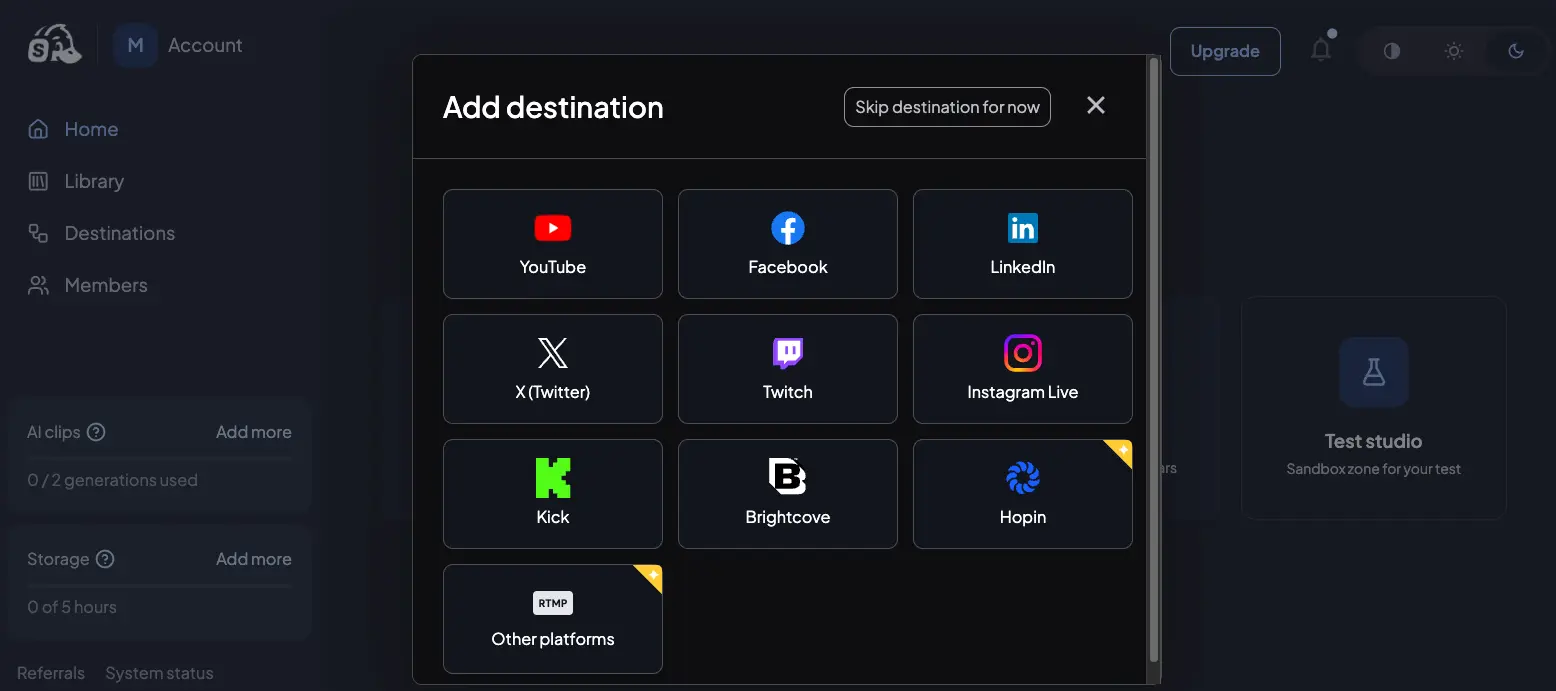
Destination setup is where StreamYard's browser-based approach really shines. Click a platform, authorize once, and that destination is saved for future sessions. Need to reach Rumble, Vimeo Live, or a private RTMP server? The "Other platforms" option handles unlimited custom RTMP feeds on paid plans. The number you can broadcast to simultaneously is plan-dependent—1 on Free, 3 on Core, 8 on Advanced, 10+ on Business. Worth noting: if your main goal is reaching 20+ platforms at once, dedicated multistreaming tools like Restream can go further.
How StreamYard Works
From account signup to going live in under 10 minutes—here's the actual flow.
Create Your Account and Pick a Mode
Sign up with an email (no card needed for the free tier), land on the dashboard, and pick what you're doing today: Live stream, Recording, On-Air webinar, or Test studio. That's it for onboarding. There's no tutorial to sit through and no settings to configure up front—the platform defaults to sensible options and lets you change what you need as you go.
Connect Your Destinations (Optional)
If you're going live, link the platforms you want to broadcast to—YouTube, LinkedIn, Facebook, X, Twitch, or Kick are native, and anything else works via custom RTMP on paid plans. Authorize each platform once and they're saved for future sessions. On the free plan you can connect one destination; on Core you get three; on Advanced, eight. Test studio mode skips this entirely, which is handy for practice.
Enter the Studio and Set Up Your Show
The studio opens with your camera preview, basic layouts, and a right sidebar for media assets, banners, and brand settings. Upload your logo, pick background colors, add intro/outro videos, and set up Scenes (pre-saved layouts you can switch between with one click during the show). Most of this is drag-and-drop. If you've used Zoom, you'll feel at home within minutes.
Invite Guests and Go Live
Share the guest invite URL in a message—your guest clicks, names themselves, and joins. No account. No install. No tech support call at 4:55 PM before a 5:00 show. From there, you manage who's on screen, when banners appear, and when to trigger Media overlays. Hit Go Live and the stream fans out to every connected destination simultaneously. If your computer crashes mid-stream, reboot protection keeps the broadcast going until you rejoin—a small feature that saves careers.
Local Recordings Are Higher Quality Than Your Stream
Here's something most users don't realize: StreamYard records a separate local copy on each participant's device at up to 4K on the Advanced plan, regardless of what your live stream looks like. So even if viewers are watching a 1080p broadcast—or your internet hiccups mid-show—your post-show recording can still be pristine 4K with separate audio and video tracks per person. For podcasters and anyone planning to repurpose content, this is genuinely useful.
After the Show: AI Clips Does the Repurposing
Once you end a session, AI Clips 2.0 scans the recording and auto-generates captioned vertical clips (9:16) for Reels, Shorts, and TikTok. The December 2025 update added prompt-guided generation—type "find the moment I mentioned revenue" and it'll pull that clip. It's not a replacement for a real editor like Descript, but for fast repurposing after a live show, it saves hours you'd otherwise spend scrubbing timestamps.
Key Features
What you're actually getting—and where the platform is weakest.
Browser-Based Studio
No install, no encoder setup, no scene configuration. Works on Windows, Mac, Chromebook, Linux—anywhere a modern browser runs. The tradeoff vs. desktop tools: less granular control. The upside: you can start in under 60 seconds.
Zero-Friction Guest Experience
Guests click a URL, type their name, and they're in the studio. That's the whole onboarding. No account signup, no app download, works on any device including phones. If you've ever lost 15 minutes before a show helping a guest install software, you'll understand why this is the single feature that locks most creators in.
MARS (Multi-Aspect Ratio Streaming)
Broadcast horizontal (16:9) and vertical (9:16) feeds simultaneously from the same studio session. So your YouTube widescreen stream and your YouTube Shorts/Instagram/TikTok vertical stream both go out live at the same time, with independent overlays and layouts. This feature doesn't exist anywhere else in the browser-based streaming category—it's genuinely differentiated.
AI Clips 2.0
Auto-generates captioned short-form vertical clips from your recordings. The December 2025 update tripled processing speed and added prompt-guided clipping ("find the moment I talk about pricing"), logo embedding, and caption style customization. It's not as deep as SendShort for dedicated short-form editing, but for post-live repurposing it's quick and good enough.
StreamYard On-Air Webinars
A full webinar platform built into StreamYard, available from the Advanced plan ($68.99/month annual). Includes registration pages with custom form fields, automated email sequences (confirmation, 24-hour and 1-hour reminders, post-event replay), embeddable player for your website, and on-demand replay with a private copy option. It's not as powerful as dedicated tools like Demio, but it replaces them well enough for most creators—and you're not paying another monthly fee for webinar software.
Scenes & Brand Assets
Pre-save multiple layout configurations—each with its own backgrounds, overlays, and guest arrangements—then switch with a single click during a live show. The Brand panel stores intros, outros, logos, and banner templates per brand. On the Business plan, you can manage multiple brands in one account, which is useful for agencies running client shows.
Reboot Protection
If your computer crashes or loses connection mid-stream, StreamYard keeps the broadcast running for your audience while you rejoin. Small feature, massive impact the one time you need it. Most browser-based tools don't offer this.
Local 4K Recording & Separate Tracks
Paid plans save a local copy of each participant's audio and video at up to 4K (Advanced+), independent of the stream quality. Perfect for podcasters who want clean post-production inputs. The catch: live streaming is still capped at 1080p on every tier—there's no 4K live option.
What's missing? A few things worth knowing about. There's no built-in viewer analytics—you have to check each destination platform separately to see engagement, watch time, or audience retention. There's no native video editor (you'll hand off to Descript or VEED.io for real post-production). And while the platform handles 10 on-screen participants, very large panels or 20+ guest shows would fit better in a dedicated webinar tool.
StreamYard Pricing
Four paid tiers plus a genuinely free plan—here's how they compare, and why the 2024 price hikes still sting.
Free
- ✓ 1 streaming destination
- ✓ 6 on-screen participants
- ✓ 2 hours local recording/mo
- ✓ 5 hours cloud storage
- ✓ 720p quality
- ⚠ StreamYard watermark
Core
- ✓ 3 streaming destinations
- ✓ 10 on-screen participants
- ✓ 1080p full HD
- ✓ 50 hours cloud storage
- ✓ Custom branding & overlays
- ✓ AI Clips 2.0
Advanced
- ✓ 8 streaming destinations
- ✓ 10 on-screen + 15 backstage
- ✓ 4K local recordings
- ✓ On-Air webinars + registration
- ✓ MARS (dual-format streaming)
- ✓ Zapier integration
Business
- ✓ 10+ streaming destinations
- ✓ 700+ hours cloud storage
- ✓ Multi-brand support
- ✓ 10,000+ webinar attendees
- ✓ Priority support
- ✓ Custom onboarding
Monthly alternatives: Core $44.99/mo • Advanced $88.99/mo • Business $299/mo • Enterprise (custom)
Pricing last verified April 2026. Visit StreamYard for current rates and any active promotions.
Is StreamYard Worth the Money?
Here's the honest framing: if you broadcast once a week and can live with the watermark, the free plan genuinely works. For most creators, upgrading to Core ($35.99/mo annual) is only necessary when you hit the watermark or want multi-platform reach. Advanced ($68.99/mo) is the sweet spot if you're running webinars or want MARS and 4K recordings. Business ($249/mo) is really aimed at agencies or larger teams.
For pricing context: the closest direct competitor Riverside starts at $19/mo annual for the Standard plan and goes to $29/mo for Pro with 4K recording—meaningfully cheaper if recording quality is your priority. Descript starts at $16/mo annual but has no native live streaming. OBS Studio is free but has a steep learning curve. StreamYard sits at the premium end of browser-based tools, and you're paying for polish and the guest experience, not raw feature count.
About the 2024 Pricing Controversy
When Bending Spoons acquired StreamYard in 2024, the company restructured plans with 80–82% price increases on individual tiers and up to 368% increases on multi-seat plans—with no grandfathering for existing subscribers. A second wave hit legacy users in June 2025. This is worth mentioning up front because it still shapes how long-term users feel about the product. The good news: current pricing has been stable since, the product has genuinely improved, and billing practices appear to have settled. But if you're signing up now, treat the pricing as potentially subject to change and budget accordingly.
Detailed Pros & Cons
An honest breakdown based on research, product testing, and verified user feedback.
✓ Pros
A lot of tools advertise a free plan that's really a demo. StreamYard's free tier is genuinely usable: 2 hours of monthly local recording, 1 destination, 720p quality, 6 on-screen participants, and yes, a watermark. For small community streams, practice runs, or testing the platform before committing, it's a real offering. That's become rare in 2026.
Guests join via URL. No account, no install, no tech support call. They can be on any device—laptop, tablet, phone—and on any operating system. For anyone who regularly interviews guests, this is the feature that makes StreamYard worth the premium price over desktop alternatives.
Simultaneous horizontal and vertical broadcasts from one studio don't exist anywhere else in the browser-based category. If you publish to both YouTube and Shorts/Instagram/TikTok, this alone can justify the Advanced plan—you stop running two separate workflows.
If your computer crashes mid-stream, the broadcast stays live for your audience while you rejoin. You won't use this feature often. The one time you do, it saves the show—and possibly a sponsorship deal.
After a session, the AI auto-generates captioned vertical clips. The December 2025 update added prompt-guided clip finding, which actually works—"find where I talked about the new pricing" does find it. Not a replacement for SendShort or Gling for dedicated short-form editing, but as a built-in tool it saves genuine hours.
55+ product improvements shipped since the start of 2025, including MARS, AI Clips 2.0, Scenes, the AI Background Generator, Teleprompter, and a full visual rebrand. A lot of acquired products stagnate—this one is clearly still being built.
Because encoding happens in the cloud, StreamYard runs smoothly on older laptops and mid-range hardware where OBS would struggle. You need 4 GB RAM and a modern browser—that's it. The real hardware requirement is a solid internet connection (5 Mbps up/down minimum).
✗ Cons
Honestly, this is the elephant in the room. The August 2024 restructuring raised individual plans by 80–82% and multi-seat plans by up to 368%, and the lack of grandfathering for existing subscribers damaged trust. The current prices aren't outrageous for what the product delivers—but if you were a Basic plan user paying $25/month and woke up to find your renewal was $44.99, you're going to remember that.
Live broadcasts max out at 1080p on every plan, which is fine for most creators but a real limitation for anyone producing premium video content in 2026. 4K is available for local recordings only (Advanced and Business). If live 4K matters to you, look at desktop tools or Ecamm.
There's no dashboard for viewer metrics, engagement rates, or audience retention inside StreamYard. You have to check each destination separately—YouTube Studio for YouTube, Meta Business Suite for Facebook, LinkedIn analytics for LinkedIn. For creators running data-driven content strategies, this is a meaningful gap.
StreamYard On-Air is excellent but requires the Advanced plan ($68.99/mo annual, $88.99 monthly). If webinars are your primary use case and you don't need live streaming features, that's a lot of product you're paying for to access the webinar tier.
StreamYard ships with 16+ layouts, Scenes, and good branding options—but OBS lets you build infinite custom scenes with any source, filter, or plugin you want. For power users doing complex broadcasts with multiple cameras, VST audio plugins, or advanced scripting, StreamYard will feel constrained. The simplicity is a feature for most users and a limit for some.
Live chat support was removed and replaced by a contact form. Response times are inconsistent—some users report fast help, others describe multi-day waits, especially for refund and billing issues. If you need responsive support, this is worth knowing before you sign up.
StreamYard Alternatives
How StreamYard stacks up against the main competitors for live streaming, recording, and editing.
| Feature | Reviewed StreamYard | Riverside | Descript | Podcastle |
|---|---|---|---|---|
| Starting Price (annual) | $0 (free plan) | $19/mo | $16/mo | $11.99/mo |
| Live Streaming | ✓ Core feature | ✓ Secondary | ✗ Not supported | ✓ Limited |
| 4K Recording | ✓ Advanced+ | ✓ Pro+ | ✓ Creator+ | Limited |
| Guest (no install) | ✓ Best-in-class | ✓ + mobile apps | Limited | ✓ |
| Built-in Webinars | ✓ Advanced+ | Partial | ✗ | ✗ |
| AI Editing | AI Clips only | Co-Creator + chat-based | Underlord (deepest) | AI Magic Edit |
| MARS (Dual Format) | ✓ Unique | ✗ | ✗ | ✗ |
| Best For | Live shows + webinars | Remote recording quality | Post-production editing | Podcasters on a budget |
Which Tool Is Right For You?
StreamYard
ReviewedBest for: Creators, coaches, podcasters, and B2B marketers running live shows, guest interviews, or webinars on LinkedIn, YouTube, and Facebook who value simplicity and a zero-friction guest experience over technical control. The free plan is a genuinely valuable entry point, and MARS plus On-Air webinars justify the premium over alternatives if those features fit your workflow.

Riverside
Recording-FirstBest for: Remote podcast hosts and video series producers who prioritize maximum recording quality (up to 4K), local device capture independent of internet speed, and AI-powered post-production. Riverside's Co-Creator AI and chat-based editing go further than StreamYard's AI Clips for repurposing. Also has iOS and Android apps that StreamYard lacks. Many creators run both: StreamYard to broadcast live, Riverside to capture the master recording for editing.

Descript
Editing-FirstBest for: Creators who spend more time editing than broadcasting. Descript's text-based editing—edit the transcript, and the video cuts automatically—is the fastest workflow for dialogue-heavy content. Underlord AI drafts scripts, summarizes recordings, removes filler words, corrects eye contact, and can even clone your voice. No native live streaming, so it complements rather than replaces StreamYard for anyone doing live + polished post-production.
Podcastle
Podcast-FocusedBest for: Podcasters on a tighter budget who want an all-in-one recording + editing platform at a lower price point than Riverside or Descript. Includes AI transcription, Magic Edit, and voice cloning at an entry level that undercuts most of the category. Live streaming is more limited than StreamYard, so this is really a recording + editing play rather than a live broadcasting tool.
VEED.io
Video EditorBest for: Creators who need a solid browser-based video editor for post-production after their live shows. VEED.io handles trimming, subtitles, translations, and AI-assisted edits in the browser. Not a live streaming tool—so it's complementary to StreamYard rather than an alternative. If you finish a StreamYard session and want to polish the recording without opening a heavyweight desktop editor, this is the fast path.

CapCut
Free TierBest for: Solo creators who want a free, fast editor for short-form content after a live show. CapCut's AI features and mobile-first workflow make it popular for TikTok, Reels, and Shorts repurposing. Not a live streaming tool—think of it as downstream from StreamYard for clip editing on a budget. For quick social-ready clips, it often replaces StreamYard's built-in AI Clips when you want more control.
Frequently Asked Questions
Should You Try StreamYard?
StreamYard does one thing and does it genuinely well: it gets you live-streaming professionally in minutes, from any browser, with guests who don't need to install anything. The 55+ improvements shipped across 2025—MARS, AI Clips 2.0, Scenes, On-Air webinars, and the rebuilt video quality pipeline—show a team that's still actively investing in the product. For creators, coaches, and B2B marketers who run live shows or webinars, it's the most polished browser-based option available in 2026.
The drawbacks are real and shouldn't be glossed over. The 2024 price increases broke trust with a lot of long-term users, and while the current pricing is defensible for what the product delivers, it sits at the premium end of the category. No 4K live, no built-in analytics, and slower customer support are legitimate limitations. But for the core use case—running live broadcasts, guest interviews, or webinars without technical headaches—StreamYard remains the default recommendation for good reason.
Our Recommendation
Start with the free plan. It's genuinely usable, and you'll quickly learn whether StreamYard fits your workflow before committing to a paid tier. If you need multi-platform reach, upgrade to Core ($35.99/mo annual). If you're running webinars or want MARS and 4K recording, the Advanced plan ($68.99/mo annual) is the sweet spot. Business is really for agencies or larger teams. Whatever you pick, annual billing saves 22%—and the 7-day trial lets you validate before the first charge hits.