
Todoist
The gold standard task manager used by 50M+ people. Capture tasks with natural language, organize with projects and labels, and let AI handle the rest—available on every platform including Linux and smartwatches.
Try Todoist Free →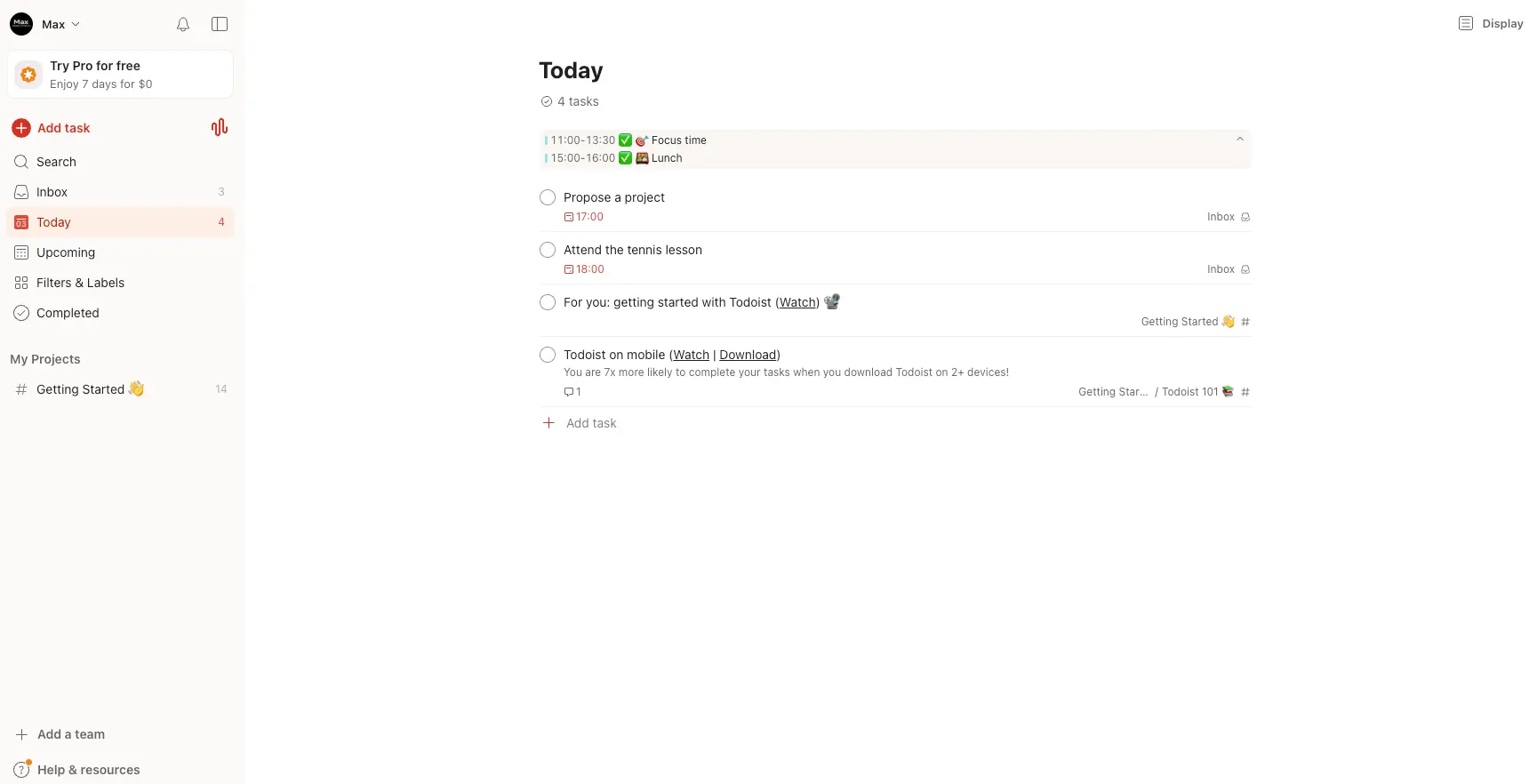
The Best Pure Task Manager
for Speed, Simplicity & Integrations
After extensive testing, Todoist remains the gold standard for individual task management in 2026. Its best-in-class natural language input lets you type "Submit report every second Thursday at 3pm" and the app handles the rest. The new Ramble AI voice-to-task feature adds genuine innovation, and with apps on every major platform—including Linux and both smartwatch OSes—Todoist goes wherever you do. It's not a full project management suite, and that's by design.
✓ What We Love
- Best-in-class natural language task input
- Available on every major platform + wearables
- Ramble AI voice-to-task in 38 languages
- 80+ integrations + 8,000+ via Zapier
! Could Be Better
- Reminders & calendar require Pro plan
- No Gantt charts or task dependencies
- Free plan limited to 5 projects
What Is Todoist?
A comprehensive overview of the platform and who it's built for.
Todoist is a cross-platform task management and to-do list application built by Doist, a fully independent, bootstrapped company with approximately 100 employees distributed across 40 countries. Founded in 2007 by Amir Salihefendić, it has grown to serve over 50 million users worldwide with more than 2 billion tasks completed to date—making it one of the most trusted productivity tools in the world.
What makes Todoist stand out in the crowded task management space is its relentless focus on simplicity without sacrificing power. The platform's natural language input is widely considered the best in its category—type "Finish sales report by Thursday at 3pm priority 1" and Todoist automatically parses the due date, time, and priority level. No competitor matches this level of parsing accuracy, especially for complex recurrence patterns like "every second Thursday" or "every weekday except holidays."
Todoist is available natively on Web, iOS, Android, macOS, Windows, and Linux—making it the only major task manager with a dedicated Linux app. It also supports Apple Watch and Wear OS smartwatches, plus browser extensions for Chrome, Firefox, Safari, and Edge. All platforms sync in near real-time with full offline support on mobile and desktop.
In 2026, Todoist has added meaningful AI capabilities without bloating the product. Todoist Assist breaks down large tasks into subtasks, suggests optimal scheduling, and builds custom filters from plain-language descriptions. The newest addition, Ramble (launched January 2026), lets you speak naturally and have the AI convert your words into organized, actionable tasks—powered by Google Gemini 2.5 Flash Live and supporting 38 languages.
Who Is Todoist Best For?
Todoist is ideal for individuals managing personal and professional to-do lists, freelancers tracking deliverables and recurring tasks, small teams (under ~20 people) needing lightweight collaboration, and GTD practitioners looking for a system that maps naturally to the Getting Things Done methodology. It's also the top choice for cross-platform users who need seamless sync between phone, tablet, desktop, and wearable devices.
The platform has earned recognition as Wirecutter's "Best To-Do List App" and Zapier's pick for "balancing power and simplicity." On review platforms, Todoist maintains a 4.5/5 on G2 across 816 verified reviews and a 4.6/5 on Capterra across 2,628 reviews—with users consistently praising its clean interface, natural language input, and cross-device reliability.
See Todoist in Action
Real screenshots from the platform showing key features and the task management workflow.
Today View with Calendar Sync
Your daily command center showing tasks and calendar events side by side
The Today view serves as your daily hub. Calendar events from Google Calendar (like "Focus time" and "Lunch") appear at the top alongside your Todoist tasks due today. Each task shows its due time, project assignment, and priority level. The clean left sidebar provides one-click access to Inbox, Today, Upcoming, Filters & Labels, and your Projects—keeping navigation fast and intuitive.
Quick Add with Natural Language
Todoist's standout feature—type tasks naturally and let the app parse everything

This is where Todoist truly shines. Type "Finish sales report by Thu at 3pm p1" and the app automatically recognizes the due date (Thursday), the time (3:00 PM), and the priority level (P1 — highest). The recognized elements appear as colored pills below the task title. You can also set reminders, add descriptions, and assign the task to a specific project—all from this single input field. No other task manager handles natural language this accurately.
Upcoming Weekly Planner View
Plan your week at a glance with tasks organized by day

The Upcoming view shows your entire week in a column layout. Each day displays its synced calendar events at the top (Focus time, Lunch) followed by tasks due that day. Task counts per day help you spot overloaded days quickly. You can drag and drop tasks between days to reschedule, and add new tasks directly to any day. This view is especially valuable for weekly planning sessions and reviewing your workload distribution.
Board Templates & Project Setup
Get started quickly with pre-built templates for common workflows

Todoist offers a library of Board Templates to help you set up projects quickly. Choose from templates like Social Media Calendar, Student Project, Sales Pipeline, and more—each pre-configured with sections and sample tasks. You can also browse additional templates, email tasks directly to a project, or import from CSV files. The board view (Kanban-style) lets you visualize workflows with drag-and-drop columns.
Social Media Calendar Template
A real-world example of Todoist's board view for content planning
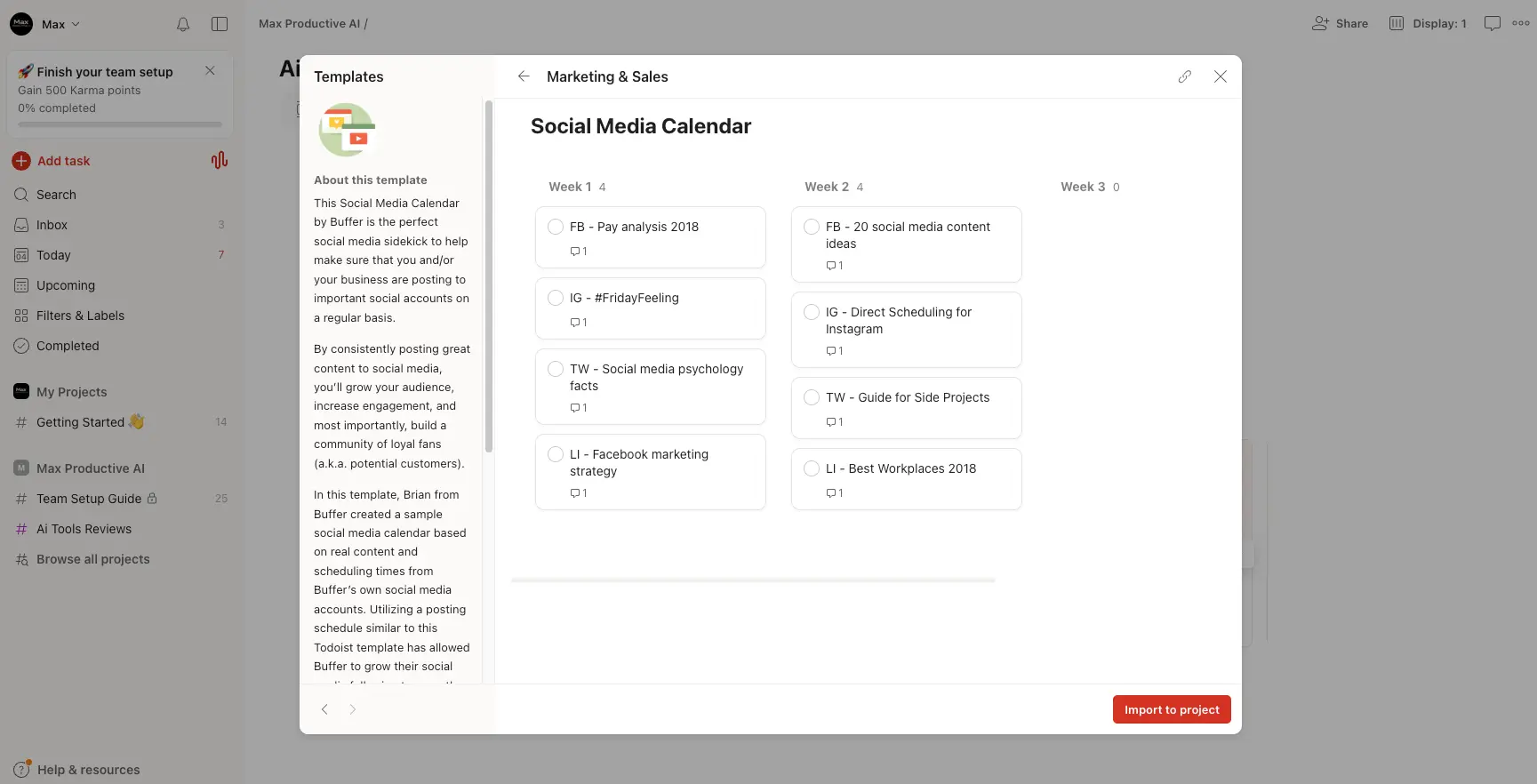
This template demonstrates how Todoist's board view handles content planning workflows. Tasks are organized by weekly sections with platform-specific content items (Facebook, Instagram, Twitter, LinkedIn). Each task can hold comments, attachments, and subtasks for detailed content briefs. The "Import to project" button lets you add this entire structure to your workspace instantly—a practical example of how Todoist handles workflows beyond simple to-do lists.
Ready to organize your tasks with the best natural language input in the market?
Try Todoist Free →Free plan available • 7-day Pro trial • No credit card requiredHow Todoist Works
From first task to full productivity system in four simple steps.
Capture Everything Instantly
Todoist is built for speed of capture. Press Q on desktop to open Quick Add, type your task using natural language ("Call dentist tomorrow at 10am" or "Review proposal every Monday p2 @work"), and press Enter. The app parses dates, times, priorities, and labels automatically. You can also capture tasks via email forwarding, browser extensions, voice commands through Siri or Google Assistant, or the new Ramble feature that converts natural speech into structured tasks. The goal is zero friction between thought and capture.
Organize into Projects & Labels
Tasks flow into your Inbox by default—a holding area for quick triage. From there, sort them into color-coded Projects (up to 5 on free, 300 on Pro) with nested sub-projects for complex areas. Apply Labels to create contexts like @home, @office, or @errands. Set four priority levels (P1 through P4) for visual urgency. Add Sections within projects to create Kanban-style boards or staged workflows. The organization system is flexible enough for simple lists or full GTD implementations.
Plan with Views & Filters
Switch between multiple views to see your work from different angles. The Today view shows everything due now with synced calendar events. Upcoming gives a weekly column layout for load balancing. Board view provides Kanban-style visualization. Calendar view (Pro) shows tasks on a monthly grid with Google Calendar events. Create custom Filters using Todoist's query language to build smart views—like "all P1 tasks due this week in @work projects"—so you always know exactly what to focus on next.
Execute, Collaborate & Track Progress
Work through your tasks using the Today view as your daily hub. Share projects with teammates for assignment, comments, and file sharing. Use Todoist Assist to break down complex tasks into subtasks or get smart scheduling suggestions. Track your productivity with Karma scores—a gamified system that awards points for completing tasks and maintaining streaks. Completed tasks feed into your activity history, giving you a clear record of accomplishment over time.
SOC 2 Type II Certified Security
As of December 2025, Todoist holds SOC 2 Type II certification. All data is encrypted with AES-256 at rest and TLS 1.2+ in transit. The platform is fully GDPR-compliant, and Ramble audio is processed in real time without being stored or used for model training—a strong privacy stance for a productivity tool.
Works Everywhere You Do
Todoist is the only major task manager with native apps for Web, iOS, Android, macOS, Windows, AND Linux, plus wearable support for both Apple Watch and WearOS. Browser extensions for Chrome, Firefox, Safari, and Edge round out the coverage. If you switch between devices throughout your day, Todoist's near-instant sync means your tasks are always up to date.
Key Features
Everything you need to capture, organize, and complete your tasks efficiently.
Natural Language Input
Type tasks naturally—"Submit report every second Thursday at 3pm p1 @work"—and Todoist parses due dates, recurrence, priority, and labels automatically. Best-in-class NLP accuracy that no competitor matches for complex patterns.
Todoist Ramble (AI Voice)
Speak naturally about tasks, ideas, or meeting recaps—the AI converts speech into structured tasks with dates, priorities, labels, and even section assignments. Supports 38 languages. Powered by Google Gemini 2.5 Flash Live.
Multiple Views
Switch between List, Board (Kanban), and Calendar views to see your work from different angles. The Calendar view syncs bidirectionally with Google Calendar and Outlook, allowing drag-and-drop rescheduling of tasks.
Todoist Assist (AI)
AI engine that breaks down large tasks into actionable subtasks, suggests optimal scheduling, summarizes project activity, and builds custom filters from plain-language descriptions. Requires Pro or Business plan.
Projects, Labels & Filters
Organize tasks into color-coded projects (up to 300 on Pro) with nested sub-projects. Apply labels as contexts, use four priority levels, and create powerful custom filters to build smart views tailored to your workflow.
Collaboration & Sharing
Share projects for task assignments, comments with file attachments, and activity logs. Business plan adds team workspaces, admin/member roles, Team Filters, Project Insights, and support for up to 1,000 team members.
80+ Integrations
Native integrations with Google Calendar, Slack, Gmail, Microsoft Teams, Jira, GitHub, and more. Plus 8,000+ additional connections via Zapier and IFTTT. REST API and webhooks available for custom workflows.
Cross-Platform Sync
Native apps for Web, iOS, Android, macOS, Windows, Linux, Apple Watch, and WearOS. Browser extensions for Chrome, Firefox, Safari, and Edge. Near real-time sync with full offline support on mobile and desktop.
Beyond these core capabilities, Todoist includes Karma scores for gamified productivity tracking, recurring task support with sophisticated patterns, email-to-task forwarding, and a comprehensive template library for common workflows. The platform publishes an official GTD (Getting Things Done) implementation guide, reflecting how naturally Todoist maps to structured productivity methodologies.
Experience all these features with the free plan or a 7-day Pro trial:
Try Todoist Free →Free plan available • No credit card requiredPricing Plans
A generous free tier and competitive paid plans with a 7-day trial and 30-day refund window.
Beginner (Free)
Pro
Business
Annual billing: Pro at $4/mo ($48/year) • Business at $8/user/mo ($96/user/year)—save ~20% vs monthly
Is Todoist Pro Worth the Upgrade?
For most active users, Pro delivers exceptional value. At just $4/month billed annually, you unlock reminders (arguably essential for any task manager), the calendar view with Google Calendar sync, Todoist Assist AI, unlimited Ramble voice input, 300 projects, and 150 filters. If a single reminder prevents you from missing one important deadline, the plan has already paid for itself.
Todoist's pricing sits in the middle of the task management market. TickTick Premium costs ~$3/month but lacks AI features. Microsoft To Do is fully free but significantly feature-limited. Motion starts at $19/month for AI-driven scheduling. For individuals wanting the best balance of features, integrations, and affordability, Todoist Pro represents strong value.
Detailed Pros & Cons
An honest, balanced assessment after extensive testing.
✓ Pros
No task manager matches Todoist's parsing accuracy. Type complex inputs like "Submit report every second Thursday at 3pm p1 @work" and everything is captured correctly. If you capture 20+ tasks per day, this feature alone saves significant time compared to manual-entry alternatives.
Clean, fast interface universally praised across every platform. Todoist is the only major task manager with native Linux support and dual-wearable coverage (Apple Watch + WearOS). Near real-time sync and full offline mode mean your tasks are always accessible, regardless of device or connectivity.
Todoist Assist and Ramble add real value without feeling gimmicky. Assist breaks down complex tasks, suggests scheduling, and builds filters from plain English. Ramble converts natural speech to structured tasks in 38 languages—a meaningful innovation for on-the-go capture. Audio is never stored, reflecting strong privacy practices.
80+ native integrations including two-way Google Calendar sync, Slack, Gmail, and Microsoft Teams. Plus 8,000+ additional connections via Zapier and IFTTT. REST API and webhooks enable custom workflows. If your productivity stack involves multiple tools, Todoist connects them all.
Doist has been bootstrapped since 2007—no VC pressure to chase growth at the expense of user experience. SOC 2 Type II certified with AES-256 encryption and GDPR compliance. This independence gives confidence that the product will remain focused on user needs rather than investor demands.
Todoist maps beautifully to the Getting Things Done methodology with Inbox for capture, projects for organization, labels as contexts, filters for smart views, and the Today view for execution. Todoist even publishes an official GTD guide—it's one of the best-suited apps for structured productivity systems.
✗ Cons
Reminders—a feature many consider essential for any task manager—require the Pro plan. Same for the calendar view, AI Assistant, and advanced filters. While the free plan is functional for basic use, power users will find themselves needing to upgrade relatively quickly.
Todoist intentionally stays in the task management lane. There are no Gantt charts, no task dependencies, no workload views, and no advanced resource management. Teams running multi-week sprints or managing cross-departmental projects will need a dedicated PM tool like ClickUp or Asana instead.
Productivity insights are basic compared to dedicated PM tools. The Karma system provides gamified tracking, but detailed reporting on team performance, time allocation, or project health isn't available. Users who need data-driven productivity analysis may find this insufficient.
Five active projects and a 1-week activity history are notably limiting for anyone beyond the most casual user. The free plan works for testing the platform, but practical daily use usually requires the Pro upgrade—especially once you experience reminders and the calendar view.
Todoist doesn't include built-in time-blocking capabilities. To block time for tasks on your calendar, you need to use the Google Calendar two-way sync as a workaround. Users who rely on time-blocking as a core productivity technique may prefer tools like Motion or TickTick.
Multiple reviewers note that support response times can vary. While the help documentation is comprehensive, users requiring timely assistance for account or billing issues may occasionally experience delays. Business plan users receive priority support.
Todoist vs Alternatives
A comprehensive comparison to help you choose the right task management tool.
| Feature | Todoist | TickTick | Motion AI | ClickUp |
|---|---|---|---|---|
| Starting Price | Free / $4/mo | Free / $3/mo | $19/mo | Free / $7/user |
| NLP Input Quality | ★★★★★ | ★★★☆☆ | ★★★☆☆ | ★★☆☆☆ |
| AI Features | Assist + Ramble | None | Auto-scheduling | Brain ($9 add-on) |
| Built-in Calendar | Sync only (Pro) | Yes (multiple views) | Yes (AI-driven) | Yes |
| Pomodoro / Habits | No | Yes (both) | No | No |
| Gantt / Dependencies | No | No | Business only | Yes |
| Native Integrations | 80+ | 30+ | 40+ | 100+ |
| Best For | Speed + NLP + GTD | Value + habits | AI scheduling | Full team PM |
Which Tool Is Right For You?
Todoist
Best Pure Task ManagerBest for: Individuals and small teams who value speed, best-in-class natural language input, and deep integrations. Ideal for GTD practitioners, freelancers managing clients, and cross-platform users who need tasks synced across every device. The free plan lets you start immediately, and Pro at $4/month annually delivers exceptional value.
Motion AI
AI Auto-SchedulingBest for: Users who spend 30+ minutes daily planning their schedule and want AI to build their calendar automatically. Motion is the only tool that truly automates time-blocking—tell it your tasks and deadlines, and the AI arranges your day. The trade-off is a premium price ($19-49/month) and surrendering control to the AI. See our detailed review →

ClickUp
Full Team PMBest for: Teams needing comprehensive project management—Gantt charts, time tracking, whiteboards, docs, dashboards, and 15+ views for $7/user/month. ClickUp packs more features per dollar than any competitor. The trade-off is a cluttered UI and a steep learning curve. Choose ClickUp if your needs go beyond task management into full project orchestration. See our detailed review →
Monday.com
Visual PMBest for: Teams who prefer a highly visual, customizable project management experience with colorful boards, automations, and dashboards. Monday.com excels at workflow automation and offers CRM, dev tools, and work management in one platform. More suited for teams than individuals, with pricing reflecting enterprise-grade capabilities. See our detailed review →

Reclaim AI
Smart SchedulingBest for: Professionals who want AI-driven calendar management with smart habits, scheduling links, and time tracking. Reclaim focuses specifically on optimizing your Google Calendar by automatically finding time for tasks, habits, and meetings. A strong complement to—or replacement for—Todoist if calendar-first workflow matters most. See our detailed review →

Taskade
AI WorkspaceBest for: Users wanting an AI-native workspace that combines tasks, docs, and mind maps with powerful AI agents. Taskade offers AI-generated workflows, real-time collaboration, and a unique visual approach to task management. A strong option for teams who want AI deeply embedded in every workflow, not just as an add-on. See our detailed review →

Sunsama
Calm PlanningBest for: Productivity-minded professionals who want a calm, guided daily planning ritual. Sunsama pulls tasks from Todoist, Asana, Trello, and other tools into a single daily view, helping you timeblock your day without feeling overwhelmed. Ideal for those who find most PM tools too noisy and want intentional, mindful planning. See our detailed review →
Frequently Asked Questions
Should You Try Todoist?
After extensive testing, Todoist earns its reputation as the best pure task manager available in 2026. Its natural language input remains unmatched, the cross-platform experience is flawless across every major OS, and the 2026 AI additions—particularly Ramble voice-to-task—add genuine innovation without bloating the product. With 80+ integrations and a design that maps naturally to GTD, it's the ideal choice for individuals and small teams who want speed, simplicity, and reliability.
The limitations are intentional, not oversights. Todoist is not trying to be a full project management suite, and if you need Gantt charts, dependencies, or workload views, tools like ClickUp or Asana serve those needs better. The paywalled reminders and calendar view may frustrate free users, but at $4/month on the annual Pro plan, the upgrade delivers exceptional value for anyone who's serious about their productivity.
Our Recommendation
Start with the free plan to test Todoist's core experience—especially the natural language input. If you like the workflow, activate the 7-day Pro trial to evaluate reminders, calendar view, and AI features. Most users who try Pro don't go back. With a 30-day refund on annual plans, the risk is minimal and the potential upside—a reliable, beautiful task system that works on every device you own—is significant.
Ready to Organize Your Life with Todoist?
Join 50M+ people managing tasks with the best natural language input, AI-powered features, and seamless cross-platform sync